window.dataLayer = window.dataLayer || []; function gtag(){dataLayer.push(arguments);} gtag('js', new Date()); gtag('config', 'UA-206511945-1');
Search
Categories
Uncategorized

Barbershop Inventory Control: A Practical Guide to Stock That Stays in Sync

A busy Saturday can make a stock problem hard to spot: a popular styling product sells out at the front desk while supplies used for services run low in the back. If counts are easy to forget and product use isn’t recorded consistently, barbershop inventory control can feel like one more task competing for your attention.

You don’t need a complicated system to get a clearer picture. A repeatable process helps you track what’s on hand, distinguish retail sales from service use, and make reorders with more confidence. The key is connecting product movement to a routine your team can maintain.

This guide covers how to organize retail products and service supplies, set a manageable counting and replenishment schedule, and use stock records to spot patterns. You’ll also learn when inventory-tracking software can bring stock records closer to the rest of your shop workflow, including point-of-sale transactions. The goal is practical control, not perfect paperwork.

Key Takeaways

  • Separate retail products from supplies used during services to see where stock is going.
  • Build a repeatable barbershop inventory control workflow, from recording incoming stock to reviewing counts.
  • Choose paper, spreadsheets, or software based on who needs access and how your stock activity is changing.
  • Set replenishment points using your own usage records, delivery timing, and each product’s importance.
  • Consider inventory alongside point-of-sale activity to bring stock records closer to your shop’s daily workflow.

What barbershop inventory control means, and why informal stock checks fall short

Barbershop inventory control is the routine of recording, checking, and replenishing the retail products and service supplies a shop keeps on hand. It means keeping records aligned with physical stock and deciding what needs attention. For a foundational explanation of the term, see Inventory control.

A glance at a shelf can help, but informal checks leave room for errors. Staff may count a partly used package differently, or a retail sale may never make it into the stock record. That can lead to unexplained count differences, urgent restocking, and uncertainty about whether a product was sold, used during a service, or recorded incorrectly.

The aim isn’t to count every item constantly. It’s to create enough visibility to make sensible replenishment decisions without turning stock checks into a daily burden. Start by deciding what belongs in your inventory system and how your team will record it.

Which products belong in a barbershop inventory system?

Track retail items sold to clients separately from supplies consumed while providing services. Retail stock might include shampoo, conditioner, styling products, or beard-care products. Service-use supplies can include shaving products, disinfectant, gloves, and other grooming or sanitation essentials. Separating the categories shows what generates retail sales and what supports the services you provide.

Prioritize items according to client demand, their role in delivering services, and how difficult they are to replace. Use the same product name and unit every time. For example, track individual bottles consistently rather than switching between bottles and cases. Uniform records make counts easier to compare.

What does good inventory control help an owner see?

Good records distinguish the physical count from recent stock activity. A shelf count shows what’s on hand now; sales and usage records help explain what has moved since the last count. Together, they give you a clearer picture than either view alone.

If the recorded quantity and physical count don’t match, review the process rather than treating the difference as proof of theft or assigning blame. Check whether a delivery, sale, service use, damaged item, or unit conversion was recorded inconsistently. Over time, these reviews can show which products need closer attention, which are moving steadily, and where replenishment or product-range decisions may need adjusting.

Barbershop Inventory Control: Receiving to Replenishment

A reliable stock routine connects what comes into the shop with what gets sold, used, counted, and reordered. Keep the process simple enough to follow during a busy week. The five steps are: set up product records, record incoming stock, capture movement, count, and review.

Set up consistent product records and receiving habits

Give each item a clear name and an agreed unit of measure. If a product arrives in a case but is sold as individual bottles, decide how to record that conversion and use the same method every time. Otherwise, one person may enter a case while another counts bottles, making the record hard to compare with the shelf.

When a delivery arrives, compare the quantity with the shop’s order records, note any difference, and update the quantity received. Record stock movement close to when it happens. Keep retail sales separate from supplies used during services, using a routine your team can follow, such as noting service-use supplies at the end of a shift. The Retail inventory management guide also explores how sales patterns can inform retail stock decisions.

Count stock and turn discrepancies into useful information

You don’t need to count everything at once. Start with essential supplies and fast-moving retail products, then set a repeatable schedule for the rest. During each count, compare the physical quantity on the shelf with the recorded quantity. Note differences instead of silently changing the record, so you can review what may have caused them.

If quantities don’t match, check recent deliveries, sales, service use, damaged items, and unit conversions. A single discrepancy may be a recording slip. Repeated differences can point to a process that needs clarification, such as when movement is logged or who updates the record. Review the issue calmly and adjust the routine rather than jumping to conclusions about the cause.

Finish each review by deciding what needs replenishing and whether the record or routine needs correcting. Over time, this gives you a more dependable basis for reorders. Encore’s management software features include inventory tracking and point-of-sale transactions, bringing these tools into a broader shop-management workflow.

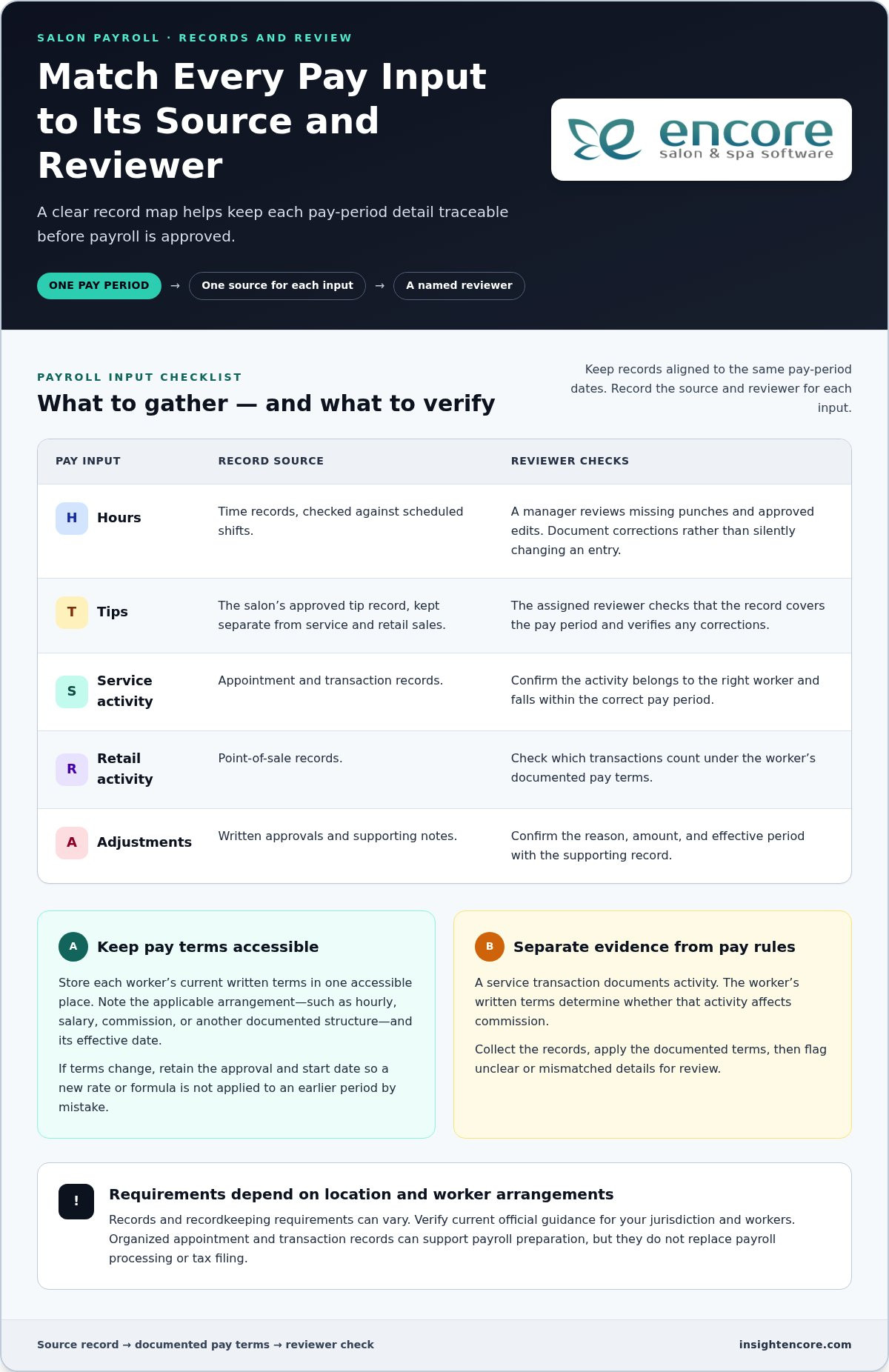
Spreadsheet, manual counts, or software: which barbershop inventory method fits?

The right method is the one your team can maintain accurately. A paper list may suit a small, stable assortment, while a spreadsheet makes records easier to sort and share. Software can suit a shop that wants inventory records alongside point-of-sale activity and other operations. Whatever the tool, staff still need to record stock movement consistently.

Method Setup effort Shared visibility Record consistency As activity grows
Paper list Low Limited to whoever can access the list Depends on one person keeping it current Can become harder to maintain as products or users increase
Spreadsheet Moderate Can be shared, depending on how it’s stored Requires clear entry rules and version control Useful for organizing more detail, but updates can become scattered
Inventory-tracking software Requires setup of product records and routines Can support a shared shop workflow Provides a consistent place to record stock, when staff use it May be a better fit as product movement and operational needs increase

When can a manual list or spreadsheet be enough?

A paper list can work when the assortment is small, stock movement is straightforward, and one accountable person updates counts and notes changes. A spreadsheet gives you more room to sort items and review entries, but multiple editors need to use a shared file and follow clear version rules. The right level of detail depends on your products and routines, not on a universal item-count threshold.

Either approach can become difficult to manage when entries are missed, staff keep separate copies, or no one knows which record is current. Before changing tools, clarify who records sales, service use, deliveries, and corrections. Reliable barbershop inventory control depends on that routine, whatever method you choose.

When does inventory-tracking software become more useful?

Software is worth considering when staff need a shared record or when you want to view stock information alongside other shop activity. Encore’s management platform includes inventory tracking and point-of-sale transactions, so shops can manage these tasks as part of a broader workflow. Explore the software features to see how the inventory tools fit into shop operations.

Software still depends on accurate entries. If a retail sale or service-use item isn’t recorded, the system can’t show that movement reliably. For more on approaches such as prioritizing items by importance, Forbes covers several inventory management techniques that can help inform your process.

Barbershop Inventory Control: A Practical Guide to Stock That Stays in Sync

How to set stock levels, count consistently, and prevent avoidable gaps

A useful stock level reflects how your shop uses a product, not a universal quantity. Set a replenishment point by considering recorded retail sales or service use, how long replenishment usually takes based on your supplier experience, and how important the item is to daily operations. A core sanitation supply may deserve closer attention than a slow-moving retail item.

Choose practical reorder points for products your shop depends on

Use stock records to understand how quickly each product moves. When the remaining quantity may not cover expected use during the usual replenishment time, plan to reorder. Set levels based on your shop’s experience, then revisit them when demand changes, a service routine shifts, or supply timing changes. Keep the reasoning with the record so the next review is easier.

Not every product needs the same attention. Prioritize items that support essential services or sell regularly, then assess less critical products according to their movement and role in your assortment. This makes barbershop inventory control more practical: protect availability where it matters without tying up attention in arbitrary stock targets.

Make cycle counts and stock reviews manageable

Instead of waiting to count everything at once, assign a small, defined group of products to each count session. Give someone clear responsibility for checking physical quantities and recording adjustments. Compare the count with the record, note unresolved differences, and look for likely process causes before changing the number. Use a regular management check-in to review those notes.

Use the same review to look at slow-moving products. Check whether they still meet a client need, fit the shop’s services, or merit shelf space before automatically reordering. A product that moves slowly may call for a smaller order, a change to the assortment, or another review period. Let your shop’s records guide the decision.

Inventory decisions are part of the wider work of running a shop. For a broader view of how management tools can support barber-shop operations, explore barbershop management software.

Explore Encore for your barbershop

Bring barbershop inventory control into a connected management workflow

A dependable process doesn’t need to be complicated. Categorize retail products and service supplies, record stock movement, count on a repeatable schedule, review differences and product activity, then adjust records and replenishment decisions. These steps create a useful foundation, whether you track stock on paper or use software.

As you assess your process, consider how inventory records relate to point-of-sale activity. Reviewing stock information alongside sales can help you interpret what’s moving, but the records still depend on accurate entries. A connected platform brings these parts of shop operations into a broader workflow while keeping the need for consistent staff record-keeping clear.

What to look for in software for barbershop inventory control

Start with the everyday tasks your system needs to support. Can your team keep clear records for retail items and supplies used during services? Can staff follow a process for recording sales, use, deliveries, counts, and adjustments? Consider how inventory fits with point-of-sale operations and whether the workflow makes sense to the people who will use it. A long feature list matters less if the routine is difficult to follow.

Evaluate software against your actual stock-control process. Decide who updates records, how often you count, and what information you need before replenishing. Then consider whether a shared management platform could reduce reliance on disconnected records while keeping responsibilities clear.

Take the next step with Encore

Encore Salon & Spa Software is designed for barbershops and includes inventory tracking and point-of-sale transactions within its management platform. It gives shop owners an option for bringing stock records into a wider operational workflow. Explore Encore software for barbershops as you plan how to organize inventory alongside other shop needs.

Keep the process practical: define your categories, assign record-keeping responsibilities, and review stock regularly. Then choose tools that fit the routine you’ve built. For broader operational planning, explore Encore’s barber-shop software information as part of your next steps.

Explore Encore and see how it can support your barbershop

Build a Stock Routine You Can Rely On

Steady barbershop inventory control starts with a clear routine: separate retail products from service supplies, record stock movement consistently, and count and review products on a manageable schedule. Use your own sales, service-use, and delivery records to guide replenishment decisions instead of relying on guesswork or one-size-fits-all stock levels.

The right tracking method should fit how your shop operates. A paper list or spreadsheet may be enough for a simple setup, while software can bring inventory records closer to point-of-sale activity. Whichever approach you choose, consistent staff habits keep the information useful.

Encore offers specialized software for barbershops, including inventory tracking and point-of-sale transactions within its management platform. Encore has focused on vertical-market software for beauty and wellness businesses since 1991, giving barbershops an option for connecting stock tracking with broader shop operations.

Explore Encore and see how it can support your barbershop

Start with a routine your team can maintain, then build on it as your needs change. Clearer records can help you make stock decisions with greater confidence.

Frequently Asked Questions

What is barbershop inventory control?

Barbershop inventory control is the routine of recording what stock the shop has, tracking products sold or used, checking physical quantities, and deciding when to replenish. It helps you distinguish retail products from supplies consumed during services, so you can see what’s available and what’s moving. Start with clear product names, consistent units, and a process your team can follow. Consistency matters more than complexity.

How often should a barbershop count inventory?

There’s no single counting schedule that suits every barbershop. Count essential supplies and fast-moving products more regularly, then set a manageable routine for the rest. Consider how quickly items move, how many people handle stock, and whether your records match physical counts. If sales patterns or shop routines change, review the schedule and adjust it. A consistent cadence is more useful than an ambitious plan that’s often missed.

What inventory should a barbershop track?

Track products sold directly to clients separately from supplies used during services. Retail items might include styling or beard-care products, while service supplies can include grooming and sanitation products. Begin with items that are essential, frequently used, or commonly requested, then add others as your routine becomes manageable. Use consistent names and units, such as individual bottles rather than switching between bottles and cases.

Can a spreadsheet work for barbershop inventory control?

Yes. A spreadsheet can work well if your assortment is limited, stock movement is straightforward, and one person is responsible for keeping records current. If several staff members update it, use one shared version and agree on how to record sales, service use, deliveries, and corrections. Conflicting copies or missed entries can make the record unreliable. If you want inventory considered alongside point-of-sale activity, software can offer a more connected workflow.

How do you calculate when to reorder barbershop products?

Use your own records to understand how quickly a product sells or gets used, then consider how long replenishment usually takes for your shop. Choose a practical point at which you’ll review stock and place an order if needed. Give essential items closer attention than products that are easy to replace or move slowly. Compare reorder decisions with later counts and adjust them as demand or supply timing changes.

Does barbershop software help with inventory control?

Inventory software can provide a structured place to record products and review stock information. Encore’s management platform includes inventory tracking and point-of-sale transactions, which helps owners consider stock alongside sales activity. Software supports the process, but it doesn’t replace clear product records or consistent staff habits. Decide who records movement and how counts are reviewed so the information remains useful in day-to-day decisions.

What is the difference between retail inventory and back-bar inventory?

Retail inventory is made up of products the shop sells directly to clients. Back-bar inventory refers to products used while providing services, such as grooming or sanitation supplies. Keeping the categories separate helps you understand which items contribute to retail sales and which support service delivery. Record each category consistently, including clear product names and counting units, so you can review movement and replenishment needs for each group.

Disclaimer

This article is general in nature and may contain errors, please verify all claims with your sales rep
Categories
Uncategorized

Salon Key Performance Indicators to Track in 2026: A Practical Guide

What if tracking fewer numbers helped your salon make better decisions? Collecting reports can still leave you unsure what to change, especially when records aren’t consistent or a result doesn’t point to an obvious cause. The salon key performance indicators to track are the ones that connect a business goal to a practical next step.

You don’t need to measure everything at once. A focused set of KPIs can show where bookings are slipping, whether clients are returning, how staff time is being used, and which services or products deserve a closer look. Use consistent formulas and compare equivalent time periods so changes in the numbers tell a useful story.

This guide explains which salon KPIs matter, how to calculate them, and how to turn trends into decisions about bookings, staffing, retention, and inventory. You’ll also see how connected booking, client, sales, and inventory records can make tracking more consistent, whether you use salon software, spreadsheets, or both.

Key Takeaways

  • Choose salon key performance indicators to track based on a specific business goal, not simply because a number appears in a report.
  • Use clear formulas and reliable data sources to measure sales, client behavior, team productivity, and retail performance consistently.
  • Compare results with your salon’s own past periods, accounting for seasonality, service mix, hours, and staffing changes.
  • Turn KPI reviews into a repeatable cycle: ask a business question, check the trend, choose an action, then reassess.
  • Connected appointment, client, sales, and inventory records can reduce manual reconciliation and make tracking easier to maintain.

Salon key performance indicators to track: what they reveal about business health

A salon can collect plenty of numbers and still be unsure what to do next. A Key Performance Indicator (KPI) is a measurable indicator tied to a specific business goal. It helps you judge whether an important part of the business is moving in the right direction and whether an adjustment may be needed.

The best salon key performance indicators to track depend on your priorities, services, and operating model. A booth-rental salon may focus on different questions than a team-based salon. You don’t need to monitor every available figure. Start with a small, balanced set, define how each measure is calculated, and review it consistently. A number belongs on your dashboard only if it helps guide a decision.

How KPIs differ from salon metrics

A metric is a measurement; a KPI connects that measurement to a goal. Appointment count, for example, tells you how many bookings were made. Booking conversion, calculated as bookings divided by booking inquiries or opportunities, can help assess how effectively interest turns into appointments. Define what counts as an inquiry or opportunity, then use the same definition and time period in every comparison. A KPI should prompt a useful question, such as whether to adjust booking availability or follow-up, rather than simply fill a report.

Context makes the numbers more useful. One week’s booking count is a data point; comparing weekly counts across equivalent periods can reveal a pattern. Before drawing a conclusion, check that the periods cover the same number of days and that your records use the same counting rules. Otherwise, an apparent improvement or drop may reflect inconsistent tracking rather than a real change in performance.

Choose KPIs around the salon’s priorities

Begin with the business outcome you want to understand, then choose a measure that can help explain it. Revenue stability may call for a financial measure, repeat visits may call for a client measure, and better capacity use may call for an operational measure. Keep owner-level KPIs focused on the health of the whole salon. Use individual staff measures for coaching conversations, with relevant context such as scheduled hours, service mix, and role.

  • Financial health: Are sales and revenue patterns supporting the salon’s goals?
  • Client health: Are clients returning and maintaining a steady visit pattern?
  • Operational health: Are available appointments and team time being used effectively?

This compact view helps you spot trade-offs instead of reacting to one number in isolation. A change in sales, for instance, may relate to client behavior or available capacity. Next, choose specific measures, formulas, data sources, and review periods that make those questions answerable.

The essential salon KPIs to track, with straightforward formulas

Useful measures start with clear rules. For the salon key performance indicators to track, define the reporting period, what counts as a completed visit, and how you handle discounts, refunds, cancellations, tips, and taxes. Apply the same rules each time so a change in the result reflects business activity, not a change in bookkeeping.

The U.S. Bureau of Labor Statistics reports that employment of barbers, hairstylists, and cosmetologists is projected to grow 7 percent. Tracking your own business health can help you understand how revenue, client activity, and available capacity are changing within your salon.

Revenue and visit-value KPIs

Start with sales and the value of each completed visit. For consistent comparisons, calculate sales after discounts and refunds, and exclude taxes and tips. Keep service and retail revenue separate so a shift in the sales mix is visible. These measures show what’s changing, but they don’t account for operating costs. For profit-focused guidance, see increasing salon profit margin.

Client, booking, and capacity KPIs

Client and appointment measures need defined time windows. For retention, select a return window that fits your salon’s visit patterns and compare eligible clients in each group. For utilization, divide booked service hours by available service hours, excluding breaks and other time when appointments can’t be scheduled. Keep the definition of available hours consistent when comparing staff or periods. For more detail, read calculating salon staff utilization rate.

KPI Formula and counting rule Data source Review cadence
Total sales Service revenue + retail revenue, less discounts and refunds; exclude taxes and tips. Point-of-sale records Weekly and monthly
Average ticket Service and product revenue, net of discounts and refunds, divided by completed visits; exclude taxes and tips. POS and completed appointments Weekly and monthly
Revenue mix Service or retail revenue divided by total service and retail revenue. POS categories Monthly
Client retention Clients in a defined group who return within the chosen window divided by eligible clients in that group. Client and appointment records Monthly or quarterly
Rebooking rate Completed visits where the client books again before leaving divided by completed visits. Appointment records Weekly
Cancellation / no-show rate Cancelled appointments or no-shows divided by appointments scheduled for the period. Track each separately. Appointment records Weekly
Appointment utilization Booked service hours divided by available service hours. Staff schedules and appointments Weekly

Use linked appointment, client, and POS records where possible to reduce manual matching. Encore Salon & Spa Software brings booking, client management, point-of-sale, and inventory tools together, giving salons a connected operational record to support consistent KPI tracking. Explore salon management tools.

A KPI change is a signal to investigate, not a verdict on your salon or team. Before reaching for an industry benchmark, compare the result with your own earlier periods. Your services, prices, opening hours, staffing model, and client mix all shape what a reasonable result looks like. The salon key performance indicators to track become more useful when you can explain what changed and decide what to test next.

What is a good salon KPI result?

There’s no universal target that suits every salon or service mix. Build a baseline from reliable historical records, then set a target that supports your business priorities. Compare like with like, such as the same month year over year or equivalent weeks, and document changes to formulas, booking systems, or recordkeeping. A new definition can create a jump in the numbers without any real change in performance.

Seasonality can affect demand, while changes in working hours or staffing can alter available capacity. Service mix matters too: a month with more long or higher-value appointments may shift revenue measures even if visit volume stays steady. Where records allow, break results down by service, staff member, booking channel, or new versus returning clients. These segments can suggest where to investigate, but they don’t prove what caused a change.

Find a useful explanation for a changing KPI

If average ticket falls, check whether clients booked a different mix of services, discounts increased, or fewer clients added retail products. If rebooking declines, look at client segments, appointment availability, and follow-up practices. These checks help you move from “the number changed” to a practical question the team can address.

  • Check the context: Confirm the date range, metric definition, staffing, and service mix.
  • Look for a pattern: Compare relevant client, service, or booking segments where records are available.
  • Test one adjustment: Change one operational factor, such as availability or follow-up, and review the result after a defined period.

Keep KPI conversations focused on coaching and planning, not surveillance. Use team-level trends to identify barriers, improve schedules, or support consistent client follow-up. If you review an individual measure with a staff member, add context such as their hours and service mix, then agree on a useful next step together. Numbers work best as a shared tool for learning, not a scorecard without explanation.

Salon Key Performance Indicators to Track in 2026: A Practical Guide

Build a practical salon KPI review routine your team can maintain

A useful KPI process doesn’t need to become another full-time task. Give it a simple rhythm: define the question, check the data, review the trend, choose one action, then reassess. Frequent checks can catch operational issues such as schedule gaps or cancellations. Monthly or quarterly reviews give you room to consider broader goals, staffing, and service mix.

Set up reliable KPI definitions and data sources

Before each review, make sure the numbers use the same rules. Keep a short reference for every measure that records its formula, data source, reporting period, and treatment of cancellations, discounts, or refunds. Then reconcile appointment, POS, client, and inventory records as needed. If you’re not ready for a formal reporting workflow, a spreadsheet is a practical place to start, provided someone updates it consistently.

Connected operational records can reduce the time spent matching figures from separate systems. Salon software features such as appointment booking, client management, point-of-sale transactions, and inventory tracking can help bring relevant information into a more consistent workflow. The right setup is one your team can maintain and use to answer real business questions.

Turn a review into one measurable next step

Choose one KPI tied to a current priority. If rebooking is the focus, for example, agree on one change to test, such as adjusting the time staff set aside to discuss the next appointment. Don’t change several processes at once; otherwise, it’s harder to tell which adjustment affected the result.

Record the decision in a simple action log:

  • KPI and question: What changed, and what do you need to understand?
  • Action and owner: What will change, and who is responsible?
  • Expected signal: What movement in the measure would suggest the action is helping?
  • Follow-up date: When will you review the result using the same definition and time period?

Use the follow-up to decide whether to keep, adjust, or stop the test. This turns the salon key performance indicators to track into a steady learning loop rather than a report that gets opened once and forgotten. Keep the process supportive: discuss obstacles, share useful context, and focus on what the team can try next.

Explore Encore salon software

How salon software can make KPI tracking more consistent

Spreadsheets can be a practical way to start: they’re flexible and easy to adapt to a small set of measures. But someone needs to enter and reconcile the information, and separate files can make it harder to compare bookings, sales, client activity, and inventory reliably. An integrated system can bring those records together, reducing manual matching and making it easier to work from consistent source data.

What to look for in salon KPI tracking software

Start with your chosen KPIs, then check whether the system supports the records behind them. Booking measures need appointment information; retention depends on consistent client records; revenue measures draw on point-of-sale data; and retail or stock decisions rely on inventory information. Reporting should make the date range clear and align with your formulas, including how completed visits, cancellations, discounts, and refunds are treated.

Ease of use matters, too. A report that’s difficult to access or a workflow staff can’t maintain won’t support dependable comparisons. Review the salon software features that can help centralize day-to-day information, and choose an approach your team can follow consistently. Spreadsheets can still play a role in calculations or analysis when needed.

Connect Encore tools to the measures that matter

Encore’s salon management platform brings appointment booking, client management, point-of-sale transactions, and inventory tracking into one operational setting. Those connected records can support a more consistent view of the activity behind your selected KPIs. Explore Encore salon software and its management tools.

Software supports the measurement routine; it doesn’t replace sound judgment. Keep your KPI definitions clear, check that the underlying records fit the question, and use trends to guide decisions rather than treating a dashboard as an automatic answer. The most useful setup is one that helps your team gather dependable information and act on it.

Learn about Encore salon software

Make your salon numbers work for you

The most useful salon key performance indicators to track are tied to clear business goals, measured with consistent formulas, and reviewed over comparable periods. A focused set of financial, client, and operational measures can reveal where to look without burying you in reports.

Use trends as prompts for investigation, not instant conclusions. Consider changes in seasonality, service mix, staffing, and availability, then choose one practical action, assign an owner, and set a date to reassess. That simple routine helps turn a result into a decision your team can learn from.

Encore brings appointment booking, client management, point-of-sale, inventory, payment processing, and marketing tools together to support salon operations.

Start with one meaningful question and a manageable set of measures. With consistent records and regular follow-through, you can build a clearer picture of your salon’s health and move forward with confidence.

Frequently Asked Questions

What are the most important KPIs for a salon to track?

The most important KPIs are the ones tied to your salon’s goals. A useful starting set includes total sales and average ticket for financial health, retention and rebooking rate for client relationships, and appointment utilization and no-show rate for operations. You might also track retail sales if product revenue is a priority. Choose a manageable group of salon key performance indicators to track, and use clear formulas and consistent time periods.

How do you calculate a salon rebooking rate?

Divide the number of completed visits where the client books their next appointment before leaving by the total number of completed visits, then multiply by 100 to express the result as a percentage. For example, if 30 out of 50 completed visits include a rebooking, the rate is 60%. Use the same period and counting rules each time, and decide how to treat rescheduled visits so comparisons stay consistent.

What is a good average ticket for a salon?

There’s no single average ticket target that fits every salon, since prices, service mix, and retail sales vary. Calculate yours by dividing service and product revenue by completed visits, using the same rules for discounts, refunds, taxes, and tips each period. Then compare the result with your own past periods. If it changes, check whether clients chose different services or added fewer retail products before deciding what to adjust.

How often should a salon review its KPIs?

Review operational measures, such as bookings, cancellations, and no-shows, frequently enough to respond to scheduling issues. A weekly check may suit these day-to-day questions. Review broader measures, such as retention or revenue trends, monthly or quarterly so there’s enough context to identify patterns. Pick a cadence your team can maintain, use consistent date ranges, and set a follow-up date whenever you decide to test a change.

How do you calculate salon staff utilization?

Divide booked service hours by available service hours, then multiply by 100 to get a utilization percentage. For example, 24 booked service hours out of 30 available hours equals 80% utilization. Define available hours consistently, excluding time when the staff member can’t take appointments, such as breaks or scheduled leave. Keep the same rules across periods, and interpret the result alongside service mix and schedule changes.

Should a salon use industry benchmarks or its own historical data?

Start with your salon’s own historical data. Comparing equivalent periods helps you see whether performance is changing within your business, while accounting for factors such as seasonality, service mix, staffing, and hours. External benchmarks can offer context, but they may reflect different salon models or KPI definitions. Before comparing, confirm that the formulas, reporting periods, and counting rules match closely enough to make the comparison meaningful.

Can salon software track key performance indicators automatically?

Salon software can bring appointment, client, point-of-sale, and inventory records together, which may reduce manual data entry and reconciliation. Some platforms also offer reporting tools, but don’t assume every KPI is calculated automatically or uses your exact formula. Check how reports define date ranges, completed visits, cancellations, discounts, and refunds. You may still need to set definitions, confirm data quality, and interpret trends before choosing an action.

Disclaimer

This article is general in nature and may contain errors, please verify all claims with your sales rep
Categories
Uncategorized

How to Manage Multiple Salon Locations: A Practical 2026 Guide

What if adding another salon location didn’t mean adding another set of disconnected schedules, client records, and inventory headaches? Learning how to manage multiple salon locations starts with identifying where daily routines differ and deciding which differences affect the client experience or make it harder to understand how each salon is performing.

You need shared standards, but a single rigid rulebook can overlook what makes each local team and its clients unique. Decide which processes must stay consistent, give managers clear ownership of daily operations, and make key information easier to compare. This approach supports oversight while leaving teams room to serve clients well.

This guide covers practical ways to align core processes, coordinate schedules and client information, manage inventory, and review performance across locations. It also explains how connected booking, client management, inventory, and point-of-sale tools can reduce fragmented workflows. The goal is a repeatable approach that helps you spot differences, ask better questions, and support each location without managing every detail yourself.

Key Takeaways

  • Map how each salon currently handles daily work to see which processes align and where they differ.
  • To learn how to manage multiple salon locations, set shared standards for essential client-facing tasks while leaving room for local decisions.
  • Give each manager clear responsibility for team training and daily follow-through. Focus owner oversight on progress, recurring issues, and decisions that need escalation.
  • Roll out changes in stages. Use a pilot and a small set of relevant measures to learn what works before expanding.
  • Assess whether connected tools for booking, client records, inventory, payments, and other daily tasks can support your operating model across locations.

How to Manage Multiple Salon Locations Without Losing Operational Clarity

Managing multiple salons means coordinating people, processes, client experience, and performance across every site. Growth brings more than extra appointments and staff. It also raises questions about how work gets done, who owns each decision, and how you’ll recognize when a location needs support.

The practical answer to how to manage multiple salon locations is not to make every salon identical. Set shared expectations for essential work, then give managers clear authority to respond to local needs. This helps protect the client experience and makes differences in performance easier to interpret. Comparisons are useful only when every salon defines and records the information in the same way.

This approach can support different ownership structures. For example, a franchise is a particular business growth strategy with defined relationships between franchisors and franchisees. Whatever your structure, clear standards and decision rights help teams work together without relying on the owner to resolve every routine question.

What changes when a salon grows beyond one location?

At one salon, the owner can often spot a scheduling problem, explain checkout steps, or notice stock running low in person. Across locations, those informal check-ins become harder to maintain. One team might confirm appointments the same way each time, while another handles changes differently. Client records may be updated inconsistently, and stock counts may follow different routines.

Not every difference signals a problem. Appointment patterns may vary because clients, services, or local demand differ. The important task is to distinguish local variation from gaps in the process. If teams handle checkout records or inventory counts differently, comparisons may reflect inconsistent routines rather than actual business performance.

Which responsibilities should be clear from the start?

Make decision ownership visible before small issues start bouncing between teams. A simple responsibility guide can show who sets expectations, who handles day-to-day choices, and when an unresolved issue should be escalated.

  • Owner: Sets business priorities, approves core policies, and reviews performance across locations.
  • Central operations lead: Turns shared policies into practical procedures, supports managers, and tracks recurring issues across sites.
  • Location manager: Runs daily operations, coaches the local team, and makes decisions within agreed boundaries.
  • Frontline team: Follows shared steps for client-facing tasks and flags issues that can’t be resolved locally.

Define escalation paths with practical examples. A manager might resolve a routine scheduling exception locally, while a system-wide issue that keeps recurring goes to the operations lead. The owner can then focus on policy or resource decisions instead of being pulled into every daily adjustment.

How to Build Repeatable Processes Across Every Salon Location

Shared processes are easier to teach, follow, and improve. They also help clients receive dependable service, whether they book online, update their details, or pay at checkout. A useful multi-location standard sets a clear minimum, not a script for every interaction.

Build your process playbook in manageable steps:

  1. Map current workflows. Ask each location to describe how it handles booking, client records, checkout, and stock. Note the steps and where teams improvise or rely on individual knowledge.
  2. Select the standards. Agree on essential steps that should be consistent, especially those that affect clients or make information comparable. Leave room for local choices that don’t undermine those essentials.
  3. Assign owners. Name someone responsible for each process. For example, the operations lead can maintain the shared procedure while a location-level owner handles questions and feedback.
  4. Train the teams. Demonstrate the steps in context, then give staff a short checklist they can refer to during a shift.
  5. Review adoption. Observe the workflow, ask where it creates friction, and update the process when teams identify a practical improvement.

Keep procedures in a short, accessible playbook. Include each process’s purpose, steps, owner, and review date. The U.S. Chamber of Commerce offers guidance on creating Standard operating procedures, which can help you write usable instructions instead of lengthy documents that staff struggle to apply.

Which salon processes should be standardized first?

Start with appointment booking, client record handling, checkout, and inventory routines. These tasks connect the client experience with day-to-day business information, so inconsistent steps can lead to avoidable confusion. A shared opening and closing checklist can cover practical handoffs: reviewing the day’s appointments, noting stock that needs attention, and completing routine end-of-day records. Keep service conversations personal. Standardize the necessary administrative steps, not the stylist’s relationship with each client.

How can managers train teams to follow shared processes?

Use realistic examples. Show staff how to record a client update or complete checkout, then give them a chance to practise using the checklist. Each location should have a process owner who can answer questions and flag recurring obstacles. Managers can check adoption through coaching and workflow observations, not just by distributing a policy document. Their feedback can reveal whether a step is unclear, difficult to use, or ready for refinement.

As you define these routines, consider whether connected booking, client management, inventory, and point-of-sale tools can support the same workflow across sites. Explore Encore’s salon management tools to see how a shared system could fit your processes.

How to Balance Central Control and Local Flexibility Across Salons

Consistency doesn’t mean every salon has to operate identically. Set shared expectations for what protects the brand and makes performance comparable, then let managers adapt decisions that depend on local clients, schedules, and team needs. Clear boundaries give staff room to act without turning every choice into a head-office approval.

What should be decided centrally, and what can managers adapt?

Use the examples below as decisions to assess, not universal rules. The right split depends on your services, locations, and operating model.

Shared standards set centrally Choices managers may adapt
Brand-wide principles for presenting services and supporting clients How the team brings those principles to life in local conversations
Definitions for reports, such as what counts as a completed appointment Scheduling choices that respond to local appointment patterns
Core workflows for booking, client records, checkout, and inventory tracking Day-to-day team coordination and shift handoffs
Guidelines for local promotions and shared brand requirements Which locally relevant promotion to run, within those guidelines

For each flexible choice, clarify the boundary: what a manager can decide independently, what needs approval, and what information to record. If a location adjusts a routine to meet a local need, log the reason, decision owner, and review date. This makes flexibility visible and gives you a basis for deciding whether an exception should stay local, become a useful practice for other salons, or prompt an update to the shared process.

How can owners compare locations fairly?

Start with comparable information. Use the same metric definitions and reporting periods across salons, then interpret results in context rather than ranking teams by a single number. A difference in appointment volume, for example, may reflect staffing levels or appointment mix, not simply how well a location is managed. Local demand and operating context matter, too.

Staff utilization can help you understand how scheduled team time relates to appointments and service activity. Before comparing locations, define which time and activity the measure includes, and apply that definition consistently. Then look for patterns: does a result change alongside a different appointment mix, or does it persist across reporting periods? Consistent definitions make comparisons a starting point for useful questions, not a verdict on a manager.

This is a practical part of how to manage multiple salon locations: centralize the rules that create shared understanding, and let managers adapt within clear boundaries. Review logged exceptions alongside performance results so local learning informs decisions without quietly changing the process at each site.

How to Manage Multiple Salon Locations: A Practical 2026 Guide

How to Roll Out Multi-Location Salon Management Step by Step

A clear rollout gives staff time to understand a change, practise it, and share what needs adjustment before it reaches every location. Keep the process manageable: establish a baseline, test one workflow, learn from the pilot, and then expand.

How should a salon group prepare for a new operating process?

Before changing a routine, document how it works today. Note the systems teams use, handoffs between roles, differences between locations, and known bottlenecks. A booking workflow, for example, may look consistent on paper but involve different follow-up steps at each salon. Capture what staff actually do, including where they need to use their judgment.

Next, choose one process to pilot. Look for a workflow with a visible effect on clients or daily operations, but keep the change manageable enough for managers to support. Assign a rollout lead to coordinate instructions, training, questions, and follow-up. Before implementation, explain what’s changing, why it matters, what staff need to do differently, and how they can raise concerns.

How can owners know whether the rollout is working?

Set a baseline before the pilot so you have a fair point of comparison. Choose a small group of measures tied to the process, such as whether required booking steps are completed or whether checkout records are entered consistently. Define each measure clearly, use the same approach throughout the pilot, and compare results with the baseline rather than relying on impressions alone.

Adoption also depends on how the process works in practice. Schedule check-ins with the pilot manager and invite frontline team members to share confusion, extra steps, or client concerns. Keep a simple record of feedback, decisions, and process updates. If the workflow needs adjustment, make the change clear and update the shared instructions before expanding to other salons.

Once the pilot is working as intended, train the next location, name its process owner, and repeat the review. This staged approach to how to manage multiple salon locations builds on tested routines instead of asking every team to adapt to an untested change at once. For a related look at tools that can support shared salon workflows, explore Encore salon software.

See how Encore salon software supports daily workflows

How Salon Management Software Can Support Multiple Locations

Software can help put your operating model into everyday practice. The aim isn’t to add another tool for its own sake. It’s to connect key tasks, reduce repeated data entry, and make the information managers and owners use easier to work with. As you assess options, map each need to a tool, a user, and a routine.

Which software capabilities matter when managing several salons?

Start with workflows that affect clients and daily operations. Use this checklist to connect capabilities to practical needs:

  • Appointment booking: Consider how clients book and how staff review upcoming appointments and changes.
  • Client management: Identify which client details teams need to access and maintain throughout the client journey.
  • Inventory tracking: Map how teams record product movement and identify items that need attention.
  • Point-of-sale transactions: Review how checkout information is recorded and used in routine closeout work.
  • Integrated credit card processing: Consider whether connecting payment processing with checkout fits your payment workflow.
  • Marketing, loyalty, and gift cards: Decide which tools are relevant to your client communication and retention plans.

Encore Salon & Spa Software brings appointment booking, client management, inventory, and point-of-sale tools together. The platform also includes integrated credit card processing, automated marketing, loyalty programs, and gift cards. Match each capability to a process your team needs to perform, rather than adopting features without a clear operational purpose.

How can salon owners evaluate whether a platform fits their workflow?

Make the assessment specific. For each task, name who uses the tool, what information they need, and what should happen next. For example, trace a booking from the client’s first appointment request through team preparation and the completed visit. Then map checkout from the transaction to the records managers use in their work. This helps show where connected tools may reduce handoffs or duplicated work.

Consider managers’ and owners’ needs separately. Managers may need practical access to booking, client, inventory, and transaction information for daily decisions. Owners need consistent definitions and a usable way to review operations across the business. For payments, consider how integrated credit card processing fits into the salon’s checkout routine.

Use this checklist to assess how software could support how to manage multiple salon locations without assuming every location needs identical settings. Encore’s connected salon management tools bring booking, client records, inventory, and payments together to support established workflows.

Explore Encore salon software for your workflows

Build a Stronger, More Connected Salon Group

Knowing how to manage multiple salon locations comes down to creating clarity without limiting local teams. Set repeatable standards for essential processes, give managers clear decision-making responsibilities, and use consistent measures to understand how each location is doing. Roll out changes in stages, listen to staff feedback, and refine the approach as your salons grow.

The right tools can help bring those routines together. Encore combines online appointment booking, client management, inventory tracking, and point-of-sale transactions. Integrated credit card processing, automated marketing, loyalty programs, and gift cards can also support how you serve and retain clients. Map these capabilities to your operating needs and workflows.

Shared standards, thoughtful local flexibility, and connected operations give each team room to serve clients while helping you keep a clearer view of the whole business. Explore Encore’s salon management software to see how its tools can support your multi-location workflows.

Frequently Asked Questions

How do you manage multiple salon locations effectively?

Manage multiple salons effectively by clarifying responsibilities, documenting shared processes, and giving each location manager defined decision-making authority. Standardize essential workflows such as booking, client records, checkout, and inventory routines. Review the same operational measures across locations on a regular schedule. If one salon’s results differ, consider local demand, staffing, and workflow context before deciding what support or coaching may help.

What should be standardized across salon locations?

Standardize core processes that support a dependable client experience and reliable business records. These often include appointment handling, client record practices, checkout steps, inventory routines, and reporting definitions. Document the minimum expected process, name who owns it, and explain where managers can adapt. Set shared requirements without scripting every client interaction or local decision.

How can salon owners compare performance across multiple locations?

Compare locations using a small set of measures with consistent definitions and reporting periods. Depending on your goals, you might review appointment activity, service mix, or inventory movement. Interpret differences alongside staffing, local demand, and each salon’s operating context. A change in service mix, for example, could affect appointment activity. Use comparisons to ask questions and identify where managers need support, rather than treating a ranking as a complete explanation of performance.

How do you keep each salon location consistent without making it feel impersonal?

Keep administrative steps consistent while giving staff room to build genuine client relationships. Shared booking and checkout routines can make the experience familiar without requiring identical conversations or service choices. Be clear about which standards are essential and which decisions managers can adapt to local needs. Feedback from clients and salon teams can show where a process needs adjustment, helping you protect dependable service while preserving each location’s character.

What software do salon groups need to manage multiple locations?

Look for software that supports the workflows your salon group needs to coordinate, including appointment booking, client management, inventory tracking, and point-of-sale transactions. Integrated credit card processing, automated marketing, loyalty programs, and gift cards may also fit your needs. Map each requirement to the people who use it and the process it supports. Encore Salon & Spa Software brings these management capabilities together for beauty and wellness businesses.

How should a salon group roll out new processes across its locations?

Start by documenting current workflows, then choose one process for a manageable pilot. Assign a rollout owner, explain what’s changing and why, and give staff practical training. Set a review date before the pilot begins. Gather feedback from managers and frontline teams, document decisions, and update the process instructions. Once the workflow is clear and workable, expand it to other locations and share what you learned.

How often should salon owners review results from each location?

Choose a review rhythm that lets you respond at the pace your business requires, then apply the same reporting periods and metric definitions across locations. Regular check-ins can help owners and managers discuss emerging trends, operational barriers, and needed support. Avoid drawing conclusions from one unusual period without context. Pair the numbers with manager feedback so each review reflects measurable activity and what’s happening in the salon.

Disclaimer

This article is general in nature and may contain errors, please verify all claims with your sales rep
Categories
Uncategorized

Reducing Salon Operating Costs: A Practical 2026 Guide

Labor can account for 45% to 55% of a salon’s gross revenue, according to Booksy’s September 2026 industry guidance. That makes reducing salon operating costs less about slashing budgets and more about finding avoidable spending without weakening the client experience. Expenses can be hard to track across supplies, subscriptions, payroll, and daily operations. Small recurring purchases may disappear in the totals, while a blunt cut can leave clients waiting or staff stretched.

This guide shows you how to identify controllable costs, prioritize changes by likely impact and risk, and test adjustments before making them permanent. You’ll learn how to reduce avoidable waste, protect service quality, and track whether a change improves financial performance.

We’ll cover inventory, appointment flow, recurring tools, and other expense categories, then outline a simple routine for comparing spending with revenue. Better visibility, not guesswork, helps you make measured decisions and keep the salon running smoothly.

Key Takeaways

  • Classify expenses as fixed, variable, semi-variable, or discretionary before deciding what to adjust.
  • Review waste and unused recurring expenses before considering changes that could affect staffing or service quality.
  • To assess a cost change, record a baseline, make one specific adjustment, then compare like-for-like results.
  • Use booking, client, inventory, and point-of-sale records to spot patterns and guide operational decisions.
  • Salon management software can support clearer records and consistent processes, but it does not guarantee savings.

Reducing salon operating costs starts with knowing where the money goes

When bills rise, it’s natural to look for something to cut. But reducing salon operating costs works best when you first identify what is driving the pressure. A large expense may reflect overspending, or it may look larger because bookings and revenue have dipped while necessary costs stayed steady. Those situations call for different responses.

Operating costs are the expenses involved in running the salon day to day. The broader idea of operating expenses can help frame this review. Start by distinguishing recurring expenses, such as rent or software subscriptions; variable expenses, such as products used during services; one-time expenses, such as isolated purchases or repairs; and discretionary expenses, which may be adjusted. Categories can overlap: a subscription is recurring and often predictable.

Is the problem high expenses or too little booked work?

Compare expenses with appointment volume and service revenue over the same period. If bookings and revenue have fallen while core bills remain similar, the main issue may be a quieter schedule, not unusually high costs. Cutting supplies needed for booked services won’t fill open appointment slots and could affect the client experience.

If service volume is steady but a particular cost is rising faster than the work it supports, investigate that expense. Compare staff schedules with booked hours to distinguish a capacity issue from a cost issue. The salon staff utilization guide offers a related way to assess how scheduled time aligns with booked work.

Build a useful salon expense baseline

Review bookkeeping records, receipts, invoices, and recurring payments instead of relying on memory. Separate salon-wide expenses, such as rent or general software, from costs tied directly to services, such as color products. This helps show whether a change affects the whole business or a particular service.

An expense baseline is a consistent record of what the salon spends, when, and why. It gives you a fair point of comparison before and after a change. For each item, note:

  • Period: The dates covered, such as a month or quarter.
  • Expense category: For example, rent, supplies, payroll, or subscriptions.
  • Amount: The recorded spend for that period.
  • Trend: Whether it is rising, falling, or staying steady compared with a matching period.
  • Business purpose: What the expense supports, such as client service, staffing, or daily administration.

This review turns transactions into useful context. Once you know what each cost supports and how it changes alongside salon activity, you can decide what deserves a closer look without treating every expense as waste.

Classify salon expenses before deciding what to reduce

Once you’ve listed your spending, group each expense by how it behaves. The label helps you choose what to review, but it doesn’t prove a cost is wasteful. Rent may be fixed but essential; a discretionary purchase may be optional but valuable to the client experience. The goal is to understand each expense in the context of your services, staffing, and business needs.

Which salon expenses are fixed, variable, or semi-variable?

Fixed expenses generally stay similar from one period to the next, such as rent or a recurring software subscription. Variable expenses rise or fall with activity. Service products, for example, may be used more as appointment volume increases. Semi-variable expenses combine a steady base with a portion that changes. Utilities can include a regular charge plus usage, while labor may include scheduled hours as well as additional hours tied to demand.

Discretionary expenses are choices the salon can review, such as optional refreshments or tools that duplicate another service. They may also be recurring or variable. These categories describe how a cost behaves, not whether it should be cut.

Separate essential spending from reviewable spending

Assess expenses against your own records rather than treating industry averages as universal targets. A cost that makes sense for one salon’s service mix or staffing model may not suit another. Compare each expense’s trend with the services generating revenue, the people needed to deliver them, and any changes in operating needs.

For each item, consider:

  • Necessity: Does it support safe, reliable operations or a service clients expect?
  • Client impact: Could changing it affect service quality, comfort, or convenience?
  • Frequency: Is it a one-time purchase, a regular payment, or an expense that changes with bookings?
  • Alternatives: Is there a practical way to meet the same need with less waste or overlap?

Subscriptions, duplicate tools, and services staff rarely use are sensible candidates for an evidence-based review. Check invoices and actual use before making a change. If a tool supports booking, client records, or inventory visibility, consider how staff would handle that work if the tool were removed.

Management tools can bring appointment, client, inventory, and point-of-sale information together to support a clearer review. Encore salon management tools bring these operational records into one platform, helping you organize information for your own review.

Where salons can reduce operating costs without lowering service quality

The safest opportunities usually come from preventing waste or removing unused spending, not cutting whatever looks costly. Before making a change, weigh four factors: how much control you have, the likely effect on clients, the effort required, and how you’ll measure the result. This gives you a practical way to prioritize cost changes without treating every expense as equally adjustable.

  • High control, low client impact: Start with avoidable product waste or recurring tools staff no longer use.
  • Moderate control, moderate effort: Review purchasing routines, appointment workflows, and utility use, then test one adjustment.
  • Lower control, high client or staff impact: Take extra care with staffing levels and products essential to services. Don’t cut these without evidence that the current approach can change safely.

Choose a measure that fits each test. Track product use against services performed, for example, or compare subscription costs with actual use. A change is useful only if it improves spending without creating new problems.

Inventory, subscriptions, and everyday purchasing

Use stock counts, usage patterns, and reorder habits to spot products that sit unused, expire, or are reordered before existing stock is needed. Adjust purchasing gradually and monitor availability so popular services aren’t disrupted. For subscriptions, check which features staff use and whether another tool already covers the same task. Review invoices and actual use before removing anything that supports essential daily work.

Track service consistency alongside the change. If lower stock levels lead to missing products or last-minute replacements, the adjustment may not be helping the salon. Inventory records can connect purchasing decisions to product use and stock on hand.

Scheduling, labor, utilities, and payment processes

Review appointment gaps and administrative tasks for ways to improve coordination, not to leave the salon short-staffed. Better visibility into bookings can help align coverage with demand while preserving the capacity to serve clients. Compare utility bills over similar periods and look for low-disruption steps, such as switching off equipment when it isn’t needed, without compromising comfort or service routines.

A cost reduction is worthwhile only when its financial benefit outweighs any added burden on clients, staff, or service quality. Review payment processing statements, transaction patterns, and contract terms before changing a process or provider. Compare total costs and operational effects, not just a single rate. The credit card processing overview provides more context on payment processes.

Apply the same discipline to vendor and marketing changes. Review terms, actual use, and business outcomes before deciding. Test one change at a time, then keep, refine, or reverse it based on what your records show.

Reducing Salon Operating Costs: A Practical 2026 Guide

A salon cost-reduction checklist for testing changes and tracking results

A cost idea is useful only when you can tell what it changed. Test one adjustment at a time, compare it with a clear baseline, and check its effects on clients and staff as well as the accounts. This helps you see whether a change improves performance or simply shifts the burden elsewhere.

How to test one cost-saving change at a time

Use this checklist to make each test clear and repeatable:

  • Choose one expense. Pick a specific item, such as a recurring tool or product-ordering process, rather than changing several categories at once.
  • Record the baseline. Note current spending and process, plus a relevant activity measure, such as appointments served or product use.
  • Define the test. Write down the exact change, who will manage it, and its start date. For example, adjust reorder timing while monitoring stock and service needs.
  • Set success measures and guardrails. Track the expense alongside service quality, staff workload, and client feedback. A lower bill alone isn’t enough if the change creates delays or disrupts appointments.
  • Review and decide. Keep the change if records show a useful improvement without unacceptable trade-offs. Adjust it if results are mixed, or reverse it if costs or service problems worsen.

Choose a review period that fits the expense. Assess a recurring payment over a billing cycle, for example, while purchasing patterns may need a longer window to account for changes in appointment volume or service mix. Compare like with like: similar periods, categories, and operating conditions. Avoid making other major changes during the test, since they can make the result harder to interpret.

Turn expense tracking into a monthly routine

Set aside time each month to compare actual spending with your salon’s plan. Look for unexpected increases, confirm whether earlier adjustments are still working, and account for changes in bookings or services before drawing conclusions. A consistent routine is more useful than a complicated reporting process.

Keep a short decision log with the expense reviewed, the change made, the review date, and the outcome. These notes can help you avoid repeating unsuccessful experiments and make future decisions using your own results. Review expense changes alongside incoming payments and upcoming obligations, since cost control also affects available cash. For a broader perspective, connect this review to your salon’s overall cash flow and profitability analysis.

For a tool to organize booking, client, inventory, and point-of-sale records, see Encore salon management software.

Use salon management tools to keep operating costs visible

Once you’ve identified which expenses deserve attention, consistent records make them easier to monitor. Salon management software can bring booking, client, inventory, and point-of-sale information into everyday workflows, reducing the need to move details between separate records. That visibility can support better decisions, but software doesn’t guarantee savings. The value comes from using the information to spot patterns and act thoughtfully.

What salon software can help owners monitor

Inventory tracking can help you review stock movement, product use, and purchasing patterns. Compare what’s on hand and what’s being used with reorder decisions to identify opportunities to reduce waste without risking product availability. Appointment booking and client records can also make schedule and client information easier to review during daily operations.

Point-of-sale and payment functions bring transaction records into salon operations. When these records connect with other day-to-day information, it can be easier to understand business activity and reduce manual handoffs. Staff still need to review the information and make decisions, but consistent records can simplify that routine.

Choose practical next steps for your salon

Start with the expense category you’ve identified as most reviewable. If product purchasing is the focus, examine inventory use and stock movement. If appointment flow or administrative effort is the concern, review booking and client records. Choose tools that help answer the question you’re investigating, then measure the result against your own records.

Encore Salon & Spa Software brings together inventory tracking, appointment booking, client management, point-of-sale transactions, and integrated credit card processing to support salon operations. Its tools help organize information for consistent tracking. Assess any operational changes based on their actual effect on spending, staff workflow, and client service.

Learn more about the platform’s salon management software and how its tools support day-to-day operations.

Make your next cost decision with confidence

Reducing salon operating costs doesn’t mean making broad cuts. Start with clear records, separate essential spending from reviewable expenses, and test one change at a time. Then weigh the financial result alongside its effects on service quality, staff workload, and client experience.

Consistent tracking makes decisions easier to repeat and refine. Encore brings appointment booking, client management, inventory tracking, and point-of-sale tools together to support day-to-day operations. The platform serves salons, spas, barber shops, nail salons, and other beauty and wellness businesses. It can help keep information organized, while your records show which changes are working.

Small, measured steps can build a clearer picture of your costs and a steadier path toward sound business decisions.

Explore Encore salon management software

Frequently Asked Questions

What are the biggest operating costs for a salon?

Labor is often a salon’s largest operating cost, alongside rent, service products, utilities, payment processing, and software. Booksy’s September 2026 industry guidance estimates labor at 45% to 55% of gross revenue, but your own figures depend on your staffing model, services, and location. Review expenses against revenue and appointment activity rather than assuming another salon’s cost mix is the right benchmark for yours.

How can I reduce salon expenses without cutting staff?

Start by looking for waste and spending that doesn’t support current salon needs. Compare product use with purchasing, check for duplicate or rarely used subscriptions, and review utility patterns for low-disruption conservation opportunities. You can also look for ways to reduce manual administrative work or improve appointment coordination. Track each change alongside service quality and staff workload, so lower spending doesn’t create extra pressure for your team or clients.

How do I track salon operating expenses?

Record each expense by category, amount, period, and business purpose, then compare it with the same category in a comparable period. Use bookkeeping records, receipts, invoices, and recurring payment statements to build a complete baseline. Add context such as appointment volume and service revenue, especially for costs that change with activity. This makes cost reduction a measured process rather than a decision based on memory or one unusually high bill.

Which salon expenses should I review first?

Review expenses that appear controllable and have limited potential to affect service quality, such as unused subscriptions, overlapping tools, avoidable product waste, or purchasing habits that lead to excess stock. Check actual use and records before making a change. Be more cautious with staffing and products needed to deliver booked services. Rank potential adjustments by likely impact, effort, and client or staff effects, then test one change at a time.

Can salon software help reduce operating costs?

Salon software can make operational information easier to track, but it doesn’t guarantee lower costs. Booking and client records can support organized daily workflows, while inventory tracking can help you review stock movement and purchasing patterns. Point-of-sale tools can also keep transaction records within salon operations. Use these records to spot issues, reduce manual handoffs, and assess whether a change is helping your salon’s finances and service experience.

How often should a salon review its expenses?

Review spending monthly to catch unexpected changes and compare actual expenses with your salon’s plan. Some costs need a review period suited to their billing or usage pattern, so don’t judge a longer-term purchasing adjustment from a few days of data. Keep a short record of the change, review date, and outcome. Regular notes help you learn from past decisions and make future cost reviews more consistent.

Should a salon cut marketing costs to save money?

Not automatically. First, review what each marketing activity costs and what business outcome it supports, such as inquiries, bookings, or repeat visits. Compare results over a suitable period and avoid judging a campaign by spending alone. If an activity has unclear value, adjust or test it before removing it entirely. Automated marketing tools can help organize outreach, but your salon’s records should guide whether the approach is worthwhile.

Disclaimer

This article is general in nature and may contain errors, please verify all claims with your sales rep
Categories
Uncategorized

Chair/Booth Renter Software: A 2026 Guide to Choosing the Right System

What if the software meant to make salon work easier left you feeling less in control of your own business? For independent stylists, chair/booth renter software should simplify daily admin while leaving client relationships and business decisions in your hands.

If client details live in one place, appointments in another, and payments require extra steps, keeping everything straight can take time away from your services. A system built for a full salon may not fit the way you work as an independent renter. Look for an organized workflow that supports your business without adding tools you won’t use.

This guide explains how to compare chair/booth renter software based on daily needs: managing client records, handling bookings and payments, understanding costs, and keeping track of who can access your information. You’ll also find practical questions to ask before choosing a platform and learn how to evaluate Encore’s chair and booth renter software. By the end, you’ll have a clearer way to find a system that fits your workflow and keeps your business organized.

Key Takeaways

  • Separate the tasks you handle for your own business from the salon’s premises and broader administration.
  • Assess software by the jobs you need done, from booking and client records to payments and reporting, rather than by the length of its feature list.
  • Compare chair/booth renter software with your services, booking habits, and current process, and check that it supports the level of independence you need.
  • Test realistic booking and payment scenarios before moving client information or changing how clients schedule with you.
  • Use your requirements to assess whether Encore’s renter-focused software and confirmed capabilities fit your workflow.

What Chair/Booth Renter Software Should Help You Manage

Chair/booth renter software helps an independent beauty professional manage their service business while working in a shared salon or barbershop. It can bring client records, appointments, and transactions into a more organized workflow, reducing the need to check separate calendars, messages, and payment records.

Software can support your day-to-day operations, but it doesn’t provide rental space or make business decisions for you. The premises and shared arrangements are separate from how you manage your clients and services. Your legal status as an independent contractor depends on the real working relationship, not simply on which software you use.

How a renter’s workflow differs from a salon owner’s

Your daily focus is usually personal and direct: keep track of clients, the services they book, your schedule, and payments for your work. A salon owner may also need tools for managing staff, locations, or broader business administration. Some needs can overlap in a shared space, but they aren’t automatically part of your individual workflow.

For example, you and the salon owner may work from the same premises while maintaining separate client interactions and routines. Check whether the system clearly distinguishes appointments and records connected to your business. That separation can help you maintain continuity with clients if your work arrangements change, rather than treating those relationships as part of salon staff management.

Which everyday tasks can software bring together?

Focus on how software handles the tasks you repeat throughout the week:

  • Client management: Organize relevant client and service information so it’s easy to find when preparing for an appointment.
  • Appointment handling: Online booking can let clients request or schedule appointments without arranging every detail manually.
  • Transactions: Point-of-sale and payment tools can help you record payments alongside service activity. Check the supported payment methods and terms rather than assuming they’re the same across systems.

The goal is to reduce the effort of switching between tools, not to create more software tasks. Encore offers chair and booth renter software. Review its salon software information on the Encore Salon Software page and compare it with the workflow you need.

Which Chair Renter Software Features Make Daily Work Easier?

A long feature list can look impressive without solving the tasks that slow you down. Start by naming those tasks, then compare how each system handles them. Encore software features can help you identify common categories, but check how each one fits your routine.

Renter-focused software should bring core tasks such as booking, client records, and transactions into a workflow you can manage yourself. A solo professional may need those essentials first. Inventory tracking, loyalty tools, or broader marketing features may suit a business with different needs, but extra options aren’t automatically useful if they add steps you won’t use.

Booking and client management for independent professionals

Test the booking process from a client’s perspective. Can someone find the right service and request or schedule an appointment clearly? Can you set availability to match your working schedule? A practical test is to follow the full booking path, then check whether the appointment appears where you expect and whether the process creates avoidable back-and-forth.

Client records should be easy to find and useful in practice. Organized service and appointment details can help you prepare for a visit and follow up consistently. For a closer look at choosing tools for those records, read this booth renter client management guide.

Payments, marketing, and add-on tools

Check how point-of-sale and payment processing fit the way you take payment and record transactions. Ask providers to confirm the supported payment workflows and applicable terms for the specific setup you’re considering. A feature name alone doesn’t show whether it will work smoothly during your service day.

Other tools depend on your business. Inventory tracking may help if you manage products or supplies. Gift cards, loyalty programs, and automated marketing may be useful if they fit how you serve and reconnect with clients. Before adding them, identify the task each feature would solve and how often you expect to use it.

Software can support your workflow, but it doesn’t determine your worker classification. If you have questions about the distinction between an employee and an independent contractor, refer to the IRS guidelines on worker classification. As you compare chair/booth renter software, confirm features and terms directly with each provider. You can also explore Encore as an option against the tasks you’ve identified.

How to Compare Chair/Booth Renter Software Without Losing Independence

Sharing a salon space doesn’t have to mean sharing every client interaction or business routine. The right chair/booth renter software depends on how you work. Don’t assume, however, that separate accounts automatically mean private records or independent control. Confirm the details with each provider before deciding.

Use the comparison below to frame your questions. Check what you can actually do in the system, not just the feature names on a product page.

Area What to check
Booking Can you manage your own availability and see appointments connected to your services?
Client records Who can view, edit, export, or otherwise access your client information?
Payments Can you record and review transactions for your work, and what terms apply?
Reporting Can you review information relevant to your own appointments and transactions?
Renter usability Does the workflow make sense for one professional, or is it built around salon-wide staff and administration?

There isn’t one best fit for every renter. Your services, booking volume, and current process all matter. A solo professional may prioritize personal scheduling and straightforward records. Several renters sharing a workspace may also need clear separation between each professional’s bookings and information. Shared software can support distinct workflows, but its settings and policies need to allow for them.

Questions to ask about client records and access

Ask who can view, edit, export, or otherwise access client information, and whether permissions can be set for individual professionals. Find out whether you can manage your own availability and records. Then review the provider’s current privacy and data-handling documentation. Don’t rely on assumptions or verbal descriptions alone. Check that the written terms address access to records and what happens to them if your arrangement changes.

Matching features to your rental setup

Separate essentials from extras. Booking, client records, payments, and useful reporting may be core needs; inventory or loyalty tools may matter only if they fit your services. Consider the setup, too. One renter needs a workable individual routine, while a shared workspace may need each professional’s activity to be easy to distinguish.

Before choosing, test one realistic client journey: select a service, book based on your availability, find the relevant client record, record the payment, and check what information is available for follow-up. Note any unclear steps and ask the provider to demonstrate how permissions and data access work. This practical check can reveal more than a feature list.

Chair/Booth Renter Software: A 2026 Guide to Choosing the Right System

How to Choose and Set Up Software for Your Booth Rental

A good setup starts with your actual workday, not a long list of features. Before committing to chair/booth renter software, identify what it needs to handle, test those tasks in a realistic workflow, and clarify practical details with the provider. This makes it easier to compare systems and plan a change without disrupting client bookings.

A practical checklist before you choose

  1. Map your current tasks. List the tools you use for appointments, client details, payments, and follow-up. Note where you enter the same information twice or handle routine tasks manually.
  2. Shortlist your must-haves. Decide which jobs the system needs to support from day one. Separate them from features you may not need yet.
  3. Test the workflow. Walk through a typical client journey, from booking a service to recording payment and finding the information you need afterward. Try the steps yourself instead of relying only on a feature overview.
  4. Verify terms and access. Ask about data export, account permissions, payment terms, and how client records are handled. Request current details in writing, and clarify anything that could affect your control of business information.
  5. Plan the setup. Ask the provider what information can be transferred, who is responsible for setup tasks, and what onboarding or training support is available. Confirm these details rather than assuming they’re included.

A smoother transition into a new system

Choose a transition point that gives you time to check the setup around your appointment schedule. Before changing how clients book, confirm which records can be moved and how they’ll appear in the new system. If other renters will use the same platform, decide who needs access and which permissions are appropriate for each person.

Test the basics before relying on the new process: make a sample booking, review a client record, and check how a payment is entered and displayed. If anything is unclear, pause and ask the provider before moving more information or directing clients to a new booking routine. Preparation can help you catch gaps while your existing process is still available.

Encore offers specialized software for independent chair and booth renters. After defining your requirements, review the Encore Salon Software page as one option, and confirm current feature availability, setup, and payment details for the renter configuration.

Explore Encore for your booth rental workflow

How Encore Chair/Booth Renter Software Can Support Your Next Step

Once you’ve identified the tasks your system needs to handle, assess Encore against those requirements. Encore offers specialized chair/booth renter software within a broader beauty and wellness management platform. Its capabilities include online booking, client management, point-of-sale transactions, and integrated credit card processing, which can bring key parts of a renter’s day-to-day workflow together.

Don’t choose a platform based on a feature list alone. Consider whether its booking, client, and transaction tools fit the way you manage services and business information. Confirm the details for the specific chair or booth renter configuration you’re considering.

Where Encore may fit in a renter’s workflow

For a professional looking to bring core management tasks together, online booking can support appointment scheduling, while client management can help organize customer records. Point-of-sale transactions and integrated credit card processing may also suit renters who want to manage service payments within their broader workflow. Check how these functions work together in the configuration available to you, and whether its record-access settings match your needs.

Encore provides software, not booth rental listings or physical salon space. Its offerings don’t make it a substitute for your own decisions about client relationships or how you run your independent business. Evaluate the system against the requirements you’ve already defined.

What to confirm before moving forward

Ask which features are included in the chair or booth renter configuration and whether the system supports the booking, client-record, and transaction steps you want to use. Confirm current payment processing terms, account permissions, and how client data can be accessed or exported. These details affect how well the software can support your workflow.

Also ask about onboarding and support arrangements, including what guidance is available during setup and which tasks you’ll need to complete. Compare the answers with your must-have criteria rather than assuming every feature or service applies to every configuration. Reviewing terms directly with Encore can help you make an informed decision and identify questions to resolve before changing your routine.

Explore Encore and take the next step

Choose a System That Keeps Your Business in Your Hands

The right chair/booth renter software should make everyday tasks easier without blurring who manages your clients, schedule, and business records. Start with your workflow, compare booking, client management, payments, and reporting, then confirm data access and terms directly with each provider.

Before switching, test realistic client scenarios and plan how records, payment setup, and booking routines will move into the new system. A careful setup helps you make a confident choice and avoid unnecessary disruption to your day.

Encore offers a specialized solution for chair and booth renters. Its broader platform includes online booking, client management, and point-of-sale transactions. Explore how these capabilities may fit your needs, and verify current features, configuration, and terms before deciding.

Explore Encore and take the next step

You’re building a business around your skills and client relationships. Choose tools that support that independence. To see whether Encore fits your renter workflow, explore Encore and take the next step.

Frequently Asked Questions

What is chair or booth renter software?

Chair or booth renter software helps an independent salon professional manage business tasks while working in a shared salon or barbershop. It may bring appointment booking, client records, and transactions into one workflow. Unlike tools focused on running an entire salon, renter software should suit an individual professional’s routine. It supports business operations, but it doesn’t provide rental space or make business decisions for you.

Do booth renters need their own salon software?

Not every booth renter needs a separate system, but software that supports your own workflow can make it easier to manage appointments, client information, and payments. Before using a salon-wide platform, find out whether you can manage your availability and records independently. Ask who can access client information and what happens to your data if you leave the shared space. Choose based on your arrangement and business needs.

Can chair renter software keep each professional’s clients separate?

It can, depending on the software’s account setup, permissions, and data-handling rules. Don’t assume separate logins mean records are private or that you can export them. Ask who can view, edit, or access client details, and whether each professional can manage their own bookings. Review the provider’s current privacy documentation and terms to understand how client information is handled before entering or moving records.

What features should booth renter software include?

Start with the tasks you handle regularly. Useful core features may include online booking, organized client records, appointment management, and point-of-sale or payment tools. Depending on your services, inventory tracking, gift cards, loyalty programs, or marketing features may also help. Check that the software supports your actual workflow, including how you schedule clients and record transactions. Confirm current feature availability for the renter configuration you’re considering.

How much does chair or booth renter software cost?

Pricing depends on the provider and the plan or configuration, so ask for current details directly rather than relying on a general estimate. Compare the full cost, not just a subscription fee. Check payment processing terms, any per-booking charges, and whether the tools you need are add-ons. Contact Encore to confirm current pricing and terms for its chair and booth renter software.

Is salon software different from booth renter software?

They can overlap, but they may be designed around different day-to-day needs. Salon-wide software may include tools for managing staff or broader business operations, while renter-focused software should support an individual professional’s appointments, clients, and transactions. The labels alone don’t tell you whether a system fits. Check how it handles your records, booking availability, permissions, and payments, especially if you share a platform with the salon.

How do I switch to new booth renter software?

Start by listing your current tools and deciding which tasks the new system must support. Ask what client and appointment information can be transferred, how to export records later, and who will handle setup. Test a realistic booking, client-record, and payment workflow before changing your routine or directing clients to a new booking process. Plan the transition around your schedule, and confirm account access, payment terms, and available onboarding guidance.

Disclaimer

This article is general in nature and may contain errors, please verify all claims with your sales rep
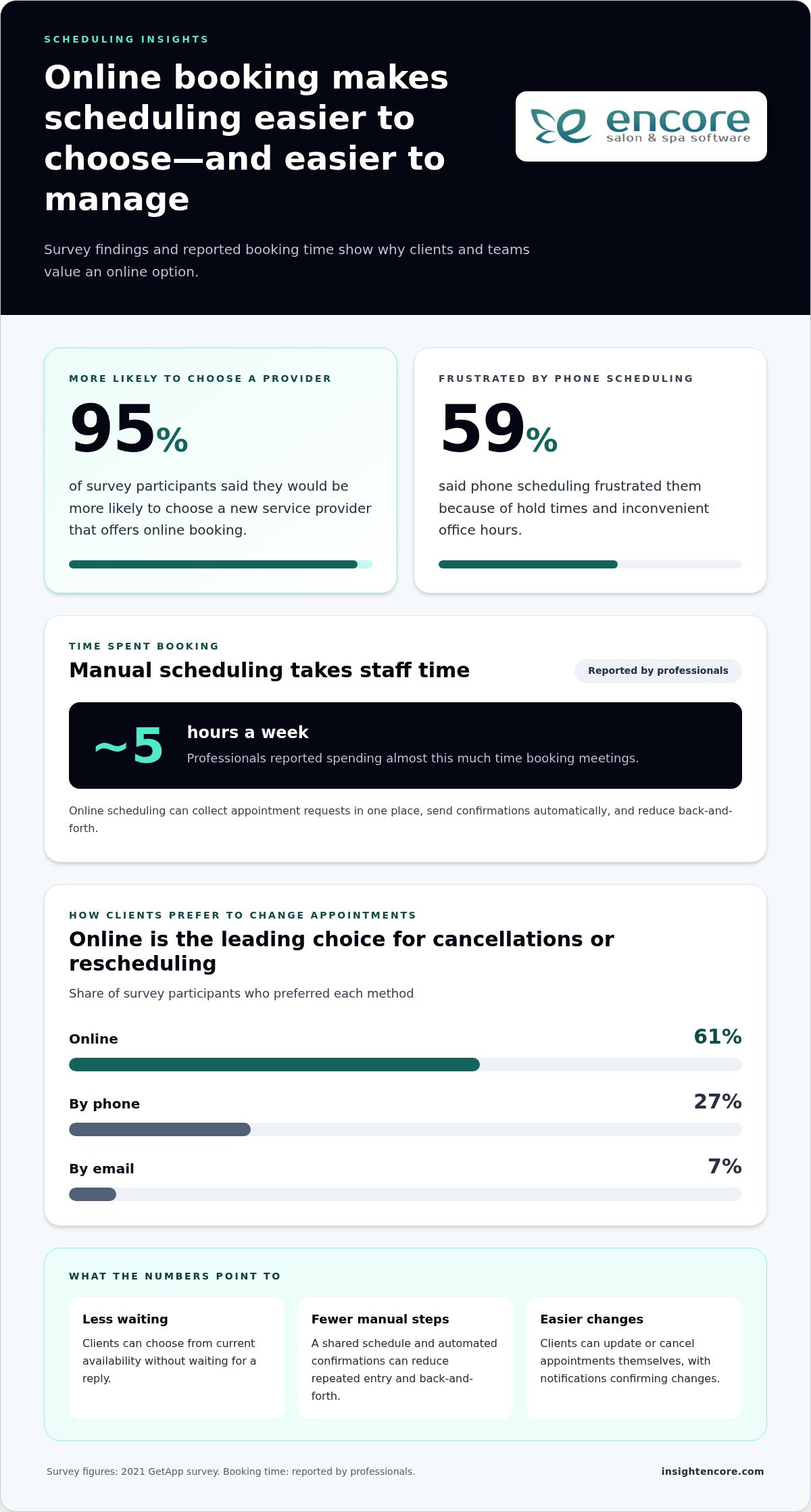
Categories
Uncategorized

How to Sell More Retail Products in a Salon: A 2026 Guide

What if selling more retail didn’t mean selling harder? If you’re working out how to sell more retail products in a salon, you may already know the challenges: appointments get busy, recommendations can feel awkward, and products can sit on the shelf while you try to figure out what’s working. Retail doesn’t have to feel pushy or become one more task to squeeze into the day.

The most useful recommendations support the results clients want from their service. When staff explain what they’re using and why, product suggestions can feel like a natural part of the appointment, not a sales pitch. A simple, repeatable approach can also help your team recommend products consistently, keep useful items in stock, and follow up thoughtfully.

This guide shows how to connect recommendations, product visibility, availability, and follow-up so salon visits can lead to repeat retail purchases. You’ll find practical ways to build staff confidence, reduce slow-moving stock, and track which efforts are helping. You’ll also see how client, inventory, and point-of-sale tools can support an organized retail routine without losing the personal service your clients value.

Key Takeaways

  • Learn how to sell more retail products in a salon by matching recommendations to client needs, not adding pressure.
  • Use a simple ask, listen, match, explain, and invite routine to make product conversations easier to repeat.
  • Compare displays, service-linked recommendations, bundles, and follow-up to choose tactics that fit your salon and clients.
  • Track retail sales, units sold, and product sell-through consistently to guide stock decisions and assess what’s working.
  • Use inventory, client records, and checkout tools to help keep retail routines organized and trackable.

How to Sell More Retail Products in a Salon Without Making Clients Feel Pressured

Back-to-back appointments make it easy to focus on the service in front of you and leave retail for later. By checkout, the next client may be waiting, and there’s little time to explain what could help someone maintain or recreate their salon result. The answer isn’t to push harder. It’s to make relevant recommendations a natural part of client care.

Client-first retail means recommending a product only when it connects to a client’s stated need or the result they want to maintain.

This approach gives clients useful information for their at-home routine and creates an opportunity for salon retail revenue. A clear explanation matters: the retail marketing mix includes product, place, promotion, price, personnel, and presentation. In a salon, the recommendation and the professional explaining it are part of that experience, alongside how products are displayed and offered.

Why salon clients may leave without the products they need

A client may leave without a product because nobody had time to mention it or because its benefit wasn’t clear. A bottle on a shelf can be easy to overlook, and a product name alone doesn’t explain how it fits into someone’s routine. That’s an opportunity to make the information clearer, not a client or staff failure. An informed recommendation explains the connection and leaves the decision with the client. Pressure makes a purchase feel expected.

Set a helpful standard for retail conversations

Keep conversations brief and specific. Ask what the client uses at home, what they want to achieve, and what they prefer in a routine. Listen before suggesting anything, then connect one relevant option to a service or need. After a blowout, for example, you might explain how a styling product could fit into recreating the look at home, without promising the same result for everyone.

Make the next step easy to understand and easy to decline. Explain how the product is typically used, where it fits into the routine, and why you chose it. For example: “You mentioned wanting a simpler styling routine. This could be one option to consider. Would you like me to show you how it’s used?” If the client isn’t interested, accept that warmly and move on.

  • Ask: Find out about the client’s routine and preferences.
  • Listen: Identify the need or goal they’ve described.
  • Match: Choose a relevant product, if there’s a clear fit.
  • Explain: Connect it to the service or routine in plain language.
  • Invite: Offer the option without making a purchase feel expected.

A consistent, low-pressure standard helps staff speak confidently without turning every appointment into a sales pitch. The focus stays on the client’s needs, and retail becomes part of the service conversation rather than an awkward add-on at checkout.

Build a Salon Retail Recommendation Process Around the Client

A repeatable process helps stylists make recommendations feel personal, even on a busy day. Use five simple steps: ask, listen, match, explain, and invite. The goal isn’t to deliver a perfect sales line. It’s to understand what the client wants, share a relevant option clearly, and let them decide.

Match retail products to a client’s service and routine

Start with questions that uncover context: “What are you using at home?” or “Is there anything you’d like to maintain or change about your routine?” Listen for the client’s priorities before connecting a product to the service. After a colour appointment, for example, a stylist might discuss an at-home product intended for colour-treated hair if it fits the client’s needs. After a haircut, the conversation could focus on how the client likes to style their hair day to day.

Explain the product’s use in plain language. Describe when it fits into the routine and how to use it according to its directions. Avoid guarantees or claims that every client will get the same result. If there’s no clear connection between a product and the client’s needs, don’t recommend it just to make a sale.

Help stylists recommend products with confidence

Confidence comes from knowing what a product is designed for, how it’s used, and where its limits are. Make product education practical: discuss a few common use cases, demonstrate the application when appropriate, and invite questions during team meetings. Short role-play can help, too. One stylist plays a client describing a routine or concern; another practices asking follow-up questions and explaining a relevant option in their own words.

Keep the framework consistent, not the wording. Rigid scripts can sound impersonal, while a shared approach gives stylists room to speak naturally. Recognize good consultations as well as completed purchases. When a stylist listens carefully, makes a suitable suggestion, and respects a client’s decision to pass, they’ve supported trust even if no product leaves the salon that day.

  • Ask and listen: Learn the client’s routine, goals, and preferences.
  • Match and explain: Connect a relevant option to their service or stated need, then describe its use clearly.
  • Invite: Offer the product without pressure and accept the client’s answer.

Client records can help a salon team keep track of relevant preferences and support more consistent conversations, while staff still use their judgment in the moment. Explore how salon client management tools can support client and retail workflows alongside your team’s recommendation process.

These conversations work best when they feel like useful guidance, not a transaction. With a shared process and regular practice, stylists can make thoughtful recommendations in a way that suits both the client and their own communication style.

Compare Salon Retail Tactics: Merchandising, Bundles, and Follow-Up

Retail tactics work best when they address a real barrier, such as products going unnoticed, clients being unsure what fits their routine, or forgetting to restock after an appointment. Before adding a tactic, consider the effort involved and how it will feel from the client’s perspective.

Visibility helps clients discover what’s available, while relevant recommendations help them understand what may suit their needs. Use both, but keep the selection focused and the conversation useful.

Tactic Effort Client experience Best suited to
Display improvements Low to moderate: arrange and refresh products Self-directed browsing Products that are easy to miss or hard to understand
Service-linked recommendations Moderate: explain a relevant option during the visit Personal guidance tied to a service or stated need Clients who need help choosing or understanding product use
Bundles Moderate: select compatible products and explain the pairing A convenient option, if each item has a clear purpose Clients already considering more than one related product
Follow-up Moderate: prepare and send a relevant message A reminder or helpful next step after the visit Clients who may need a prompt to restock or revisit a recommendation

Choose salon merchandising that makes products easy to notice

Set out a focused selection where clients can browse without interrupting a service or blocking the checkout flow. Clear labels can explain what a product is for, who might consider it, or how it fits into a routine. Refresh the display based on client questions and available inventory. If a product is out of stock, avoid making it the centrepiece of the display.

Use follow-up and gift cards thoughtfully

A follow-up can remind a client about an option discussed during their visit, but it should fit the relationship and any consent or communication preferences you have on record. Keep the message relevant and easy to act on. Don’t treat every client as a sales lead. Loyalty rewards can be an optional thank-you, not a promise that someone will purchase. Gift cards may also suit clients looking for a flexible gift. Explore salon gift card management as part of planning how your salon handles them.

Bundles should follow the same client-first principle. Pair products only when each item serves a purpose for the client, and present the combination as a convenience, not a requirement. To decide how to sell more retail products in a salon, test one tactic at a time and observe client questions, product interest, and stock movement. That gives you a clearer sense of what belongs in your routine.

How to Sell More Retail Products in a Salon: A 2026 Guide

Track Salon Retail Results and Improve Stock Decisions

Retail figures are most useful when they help you choose a next step. Start with a small set of measures, define each one, and review them over comparable periods. This makes it easier to judge whether a change in recommendations or product placement is worth keeping, without overwhelming the team with reports.

Measure retail performance without overwhelming the team

Choose measures that match your current goal and the information your salon can reliably record. If you’re checking whether clients are buying more often, review units sold. If you’re assessing retail income, track sales on the same basis each time, such as gross or net sales, and apply that definition consistently.

  • Retail sales: The value of retail transactions during a set period. Decide how you’ll treat returns and discounts.
  • Units sold: The number of individual products sold in that period.
  • Sell-through: Units sold divided by units available for sale during the period, expressed as a percentage. Use the same inventory method each time.

Compare like-for-like periods, such as one month with the previous month, and note changes that could affect the result. A stylist’s sales total, for example, may reflect different hours worked, appointment volume, or client mix. Avoid treating the number as a standalone performance score. Where records allow, review trends by product category as well as across the salon. For the wider business picture, see How to Increase Salon Profit Margin: The 2026 Operational Checklist.

Keep useful products available and reduce guesswork

Sales totals don’t explain every missed opportunity. Keep a simple record of client questions, requests for unavailable products, and recurring stockouts. If clients often ask for an item that’s missing, check whether the timing or quantity of replenishment needs attention. If a product moves slowly, review its sales alongside display location, staff recommendations, and available stock before deciding whether to reorder.

Set a regular stock review and flag products that haven’t moved or may no longer suit your salon’s focus. Inventory records can help your team check what’s on hand and spot repeat gaps; point-of-sale records can help connect transactions with product movement. Confirm that your software reporting supports the measures you plan to use. Salon inventory and point-of-sale features can support a more organized review process.

Tracking gives you a clearer way to assess how to sell more retail products in a salon: look for patterns, consider the context, and make one practical adjustment at a time.

Explore tools for salon retail and inventory workflows

Use Salon Software to Support a Consistent Retail Routine

Software can connect parts of a retail routine that are easy to lose track of during a busy day: the client conversation, the checkout, and what remains in stock. It can organize records and make information easier to review. It can’t replace a stylist’s product knowledge or judgment about whether a recommendation fits the client.

Connect point-of-sale records with inventory checks

A simple review sequence can help the team close the loop: discuss the client’s needs, offer a relevant option, record the purchase at checkout, then check inventory to see whether stock needs attention. Point-of-sale records can help managers review product movement, while inventory tracking can help teams monitor what’s on hand. Check which reporting and inventory functions are included in your software before relying on a specific workflow.

Client records may also help staff keep useful context for future visits, where the system and your salon’s practices support it. This can connect retail conversations to broader client workflows, such as booking and service history. For a closer look at connected client journeys, read The Ultimate Guide to Setting Up a Salon Client Booking Portal in 2026. Encore’s salon inventory and POS features are relevant tools to consider when deciding how records and checkout can fit into your process.

Keep the human part central. A system may help surface a client’s previous purchase or show that an item needs restocking, but the stylist still needs to ask, listen, and decide whether a new recommendation makes sense. Use records to support a thoughtful conversation, not to make assumptions about what someone should buy.

Build a manageable retail improvement plan

Don’t change every part of the retail routine at once. Choose one recommendation behavior, such as asking each client about their at-home routine, and one merchandising improvement, such as making a focused product display easier to browse. Assign someone to own each change and set a review date. Then look at relevant sales and stock information alongside staff observations and client questions.

At the review, decide whether to keep, adjust, or stop each tactic. If a display draws questions but few purchases, staff may need clearer product information. If recommendations are happening but stock is often unavailable, review replenishment. This measured approach helps you learn how to sell more retail products in a salon without making the process harder to manage.

See how Encore can support your salon’s retail workflow

Make Your Salon’s Retail Routine Easier to Repeat

Learning how to sell more retail products in a salon starts with a client-first habit: recommend products that connect to a client’s needs, make useful options easy to notice, and review what sells before adjusting your stock. A simple process gives your team room to offer helpful guidance without making every appointment feel like a sales pitch.

Salon software can support the work behind that routine. Encore Salon & Spa Software includes inventory tracking and point-of-sale transactions, along with client management, automated marketing, loyalty programs, and gift card management. These tools can help organize retail activity and client follow-up, while your team’s knowledge and personal service guide each recommendation. Encore’s parent company was founded in 1991.

Start with one practical improvement, review how it works for your salon, and build from there. Consistent small steps can make retail easier to manage and more useful for clients.

Explore Encore for your salon

Your team can create a retail experience that feels thoughtful, organized, and true to the service your clients value.

Frequently Asked Questions

How can a salon sell more retail products without being pushy?

Make recommendations that connect directly to a client’s needs or service, and leave the choice to them. To learn how to sell more retail products in a salon, build a habit of asking about the client’s routine, listening to their goals, and explaining why a product might be relevant. Keep the suggestion optional, answer questions honestly, and accept a “no” graciously. Helpful advice supports trust, even when the client doesn’t buy.

What should salon staff say when recommending a product?

Start with a question, such as, “What are you using at home?” Then connect a product to what the client has shared: “You mentioned wanting to recreate this style. Would you like to see an option that could fit your routine?” Explain how and when to use it in plain language, following the product directions. Avoid promising a particular result, and make it easy for the client to decline.

Where should retail products be displayed in a salon?

Place a focused selection where clients can notice and browse it without interrupting services or blocking the checkout area. Use clear labels to explain each product’s purpose, who might consider it, or how it fits into a routine. Keep the display aligned with current stock, and refresh it based on client questions and observed interest. A tidy, understandable display can invite browsing without making clients feel pressured to buy.

How do you train salon staff to recommend retail products?

Give staff practical product education, including what each product is intended for, how it’s used, and any relevant limitations. Practice short role-plays in team discussions: one person describes a routine or concern, and another asks follow-up questions before suggesting an option. Encourage stylists to use their own words rather than memorize a rigid script. Recognize thoughtful consultations as well as sales, so staff know that client trust matters.

Which salon retail metrics should I track?

Start with retail sales, units sold, and product sell-through. Define each measure consistently, including how you’ll account for returns or discounts in sales totals. Compare similar periods and, where your records allow, review results by product category. Add context such as appointment volume, staff schedules, client questions, and stockouts before drawing conclusions. A small, consistent set of measures is usually easier to act on than a long list of changing reports.

Can salon software help increase retail product sales?

Salon software can support a more organized retail routine, but it can’t guarantee higher sales or replace staff knowledge. Inventory tracking can help teams monitor product availability, point-of-sale transactions can record purchases, and client management can support organized client records. Check which features and reports are included before choosing a workflow. Use the information to guide stock reviews and follow-up, while letting client needs and professional judgment shape recommendations.

Should salons bundle retail products with services?

Offer bundles as an optional convenience, not as a requirement or a way to move products clients don’t need. A combination makes sense when each item has a clear purpose related to the service or the client’s stated routine. Explain what each product does and let the client choose individual items instead. Review whether clients show interest and whether the products move, then adjust the bundle if it doesn’t fit their needs.

How can a salon avoid overstocking retail products?

Review inventory and sales records before reordering, and pay attention to products that move slowly or repeatedly run out. Track units sold over consistent periods, note client requests for unavailable items, and review stock on hand at a regular interval. Avoid treating one quiet period as the whole story; consider display changes, staff recommendations, and appointment patterns too. Use those observations to adjust order quantities and reconsider products that no longer suit your salon.

Disclaimer

This article is general in nature and may contain errors, please verify all claims with your sales rep

Categories
Uncategorized

Tattoo Studio Software: How to Choose the Right System in 2026

The tattoo studio software with the most features isn’t necessarily the best fit for your shop. If a system doesn’t match how you schedule artists, manage client information, and handle transactions, it can add steps instead of taking work off your plate.

When artist availability is hard to coordinate or client and payment details are spread across separate tools, it can be difficult to know which features matter most. Start with your studio’s day-to-day workflow, not a long list of capabilities.

This guide shows how to compare tattoo studio software against the tasks your team actually handles, from booking and client management to payments and inventory. You’ll learn what to assess for solo artists and multi-artist shops, which tattoo-specific features to verify, and how to look beyond the subscription when comparing options. By the end, you’ll have a practical way to narrow the field and choose a platform that supports your artists and clients without unnecessary complexity.

Key Takeaways

  • Map how appointments, client details, and transactions move through your studio to find avoidable admin gaps.
  • Use scheduling, records, payments, inventory, and client retention to define your essential tattoo studio software requirements.
  • Compare platforms by how well they support real studio workflows, not by the length of their feature lists.
  • Test realistic booking and client-management tasks, then confirm feature availability, plan limits, and terms with each vendor.
  • Encore may suit studios looking to bring several management tools together. Verify which capabilities are included in its tattoo software offering.

What Tattoo Studio Software Does for Your Day-to-Day Operations

Tattoo studio software helps organize appointments, client information, and business transactions in one place. A booking-only tool mainly handles appointment requests and schedules, while studio management software may also bring together other daily tasks. Capabilities vary by platform, so check exactly what’s included before choosing.

This distinction matters when a studio uses separate systems for artist availability, client details, and transactions. Staff may have to search for or enter the same information more than once. A connected platform can make these handoffs easier to manage, but it won’t determine how your studio should operate.

Which everyday studio tasks can software help organize?

Online booking gives clients a way to request appointments and helps the studio coordinate its schedule. Client management tools organize relevant records in one system, much like a Customer Relationship Management (CRM) system supports organized customer information and interactions. Point-of-sale tools can connect service transactions with business records, keeping operational information together.

Assess how these tasks work together, not just whether each feature appears on a list. After a client books, for example, can staff find the appointment and the related client record without switching between separate tools? Ask the provider to demonstrate that workflow and clarify any plan limits.

Who benefits from tattoo studio management software?

Owners coordinating several artists may value a shared way to manage appointments, client-facing processes, and transactions. Independent artists can consider whether a broader platform would simplify their routine or whether a booking-focused tool better suits their setup. In either case, check that the system fits your team size and the way you handle scheduling and records.

Software organizes information and processes. It doesn’t set studio policies or deliver tattoo services. Owners remain responsible for decisions such as how appointments are handled and what procedures the team follows. If a system appears to support a particular policy or tattoo-specific process, verify that capability directly rather than assuming it’s included.

Encore serves tattoo parlours alongside other beauty and wellness businesses. Its listed platform tools include online booking, client management, inventory tracking, and point-of-sale transactions. Check which capabilities apply to its tattoo studio software and your intended setup on the tattoo studio software page.

Tattoo Studio Software Features: Build Your Essential Requirements List

Build your requirements list around your studio’s actual workflow, not the platform with the longest feature list. Core capabilities to assess include scheduling and online booking, organized client records, point-of-sale transactions and payment processing, and inventory tracking. Retention tools such as automated marketing, loyalty programs, and gift cards may also be useful. Confirm which features are available in the specific product and plan you’re considering.

Scheduling and client records for tattoo appointments

Start with the schedule. Can clients request appointments online? Can your team see artist availability and manage bookings in a way that matches current studio processes? A feature name alone won’t show whether a system can handle how your artists share, assign, or update bookings. Ask vendors to demonstrate the scheduling tasks your team performs regularly.

Next, look at client records. Check how information is stored, updated, and accessed by authorized team members. If your workflow depends on deposits, reminders, forms, or appointment-specific notes, verify each capability directly. Don’t assume these are included under a general “client management” or “booking” label.

Payments, inventory, and client retention tools

Review how point-of-sale transactions fit with your studio’s payment process, and confirm what integrated credit card processing includes. For inventory, ask whether the system can track the supplies and products your studio actually manages. A tool that doesn’t match your inventory needs may add work instead of reducing it.

Automated marketing, loyalty programs, and gift cards can support client retention, but may be optional rather than essential. Prioritize them based on how your studio communicates with returning clients. If the platform stores client information, ask vendors how they protect it and review the FTC cybersecurity guidelines for practical steps businesses can take to safeguard information.

  • Scheduling: online booking, artist availability, and appointment visibility.
  • Client management: organized records and appropriate team access.
  • Transactions: point-of-sale tools and integrated payment capabilities.
  • Inventory: tracking that fits the supplies and products you manage.
  • Retention: marketing, loyalty, and gift card tools if they suit your client approach.

Rank each requirement as essential, useful, or optional. A studio coordinating several artists may prioritize shared scheduling, while an independent artist may focus on straightforward booking and accessible client records. Encore lists online booking, client management, inventory tracking, point-of-sale transactions, integrated credit card processing, automated marketing, loyalty programs, and gift card management among its platform capabilities. Check which are included in the tattoo software offering and applicable plan, then explore Encore as a possible fit.

How to Compare Tattoo Studio Software Beyond the Feature List

A broad platform can bring daily tasks together, but only if it fits the way your studio works. Separate tools may suit a team with an established process, while connected tools may reduce repeated data entry and switching between systems. Neither setup is automatically better. Compare each option against your real workflows, and confirm feature availability, limits, and plan applicability with the vendor.

Area What to compare
Workflow fit Can the system support how your studio assigns, updates, and tracks work?
Booking Can clients request appointments, and can staff view and manage schedules as needed?
Records Can authorized team members find and update relevant client information?
Transactions Do point-of-sale and payment capabilities match how the studio handles transactions?
Inventory Can you track the supplies and products your studio actually manages?
Support What help is available, through which channels, and during what hours?

What should a tattoo studio ask during a software demo?

Ask the vendor to demonstrate a typical client journey, from requesting an appointment to finding the client record and handling the transaction. Make the walkthrough practical: ask how staff find information during a working day, who can access or update it, and what happens when an appointment changes. Get clear answers about included features, implementation steps, data handling, and available support. A direct walkthrough can reveal gaps that a feature list won’t.

How can you assess cost and value without guessing?

Compare each provider’s current plan details, included features, limits, and transaction fees where applicable. Don’t assume a feature is included just because it appears on a general product page. Ask which plan supports your needs and whether additional charges apply.

Then consider the operational trade-off: could consolidating tools reduce duplicate work, or would separate systems remain easier for your team? Assess value against the tasks staff perform without assuming a particular financial return. For Encore’s current plan details, review the Encore pricing information, and confirm which capabilities apply to its tattoo studio software offering.

Tattoo Studio Software: How to Choose the Right System in 2026

A Practical Checklist for Choosing Tattoo Studio Software

Use a consistent process to compare platforms before moving appointments or client records. A focused evaluation helps you determine whether tattoo studio software fits your studio’s routines, rather than relying on a feature list or polished demo alone.

  1. Map your current workflow. Write down how clients book, how artists manage their schedules, and where client records are kept. Note repeated admin tasks, handoffs, or moments when staff have to search across tools. Include tattoo-specific needs, such as deposits or forms, as items to verify with vendors rather than assumed features.
  2. Rank what matters. Sort requirements into essential, useful, and optional. Ask artists and staff what slows them down and what information they need to find quickly. Review current records and processes too, so you understand what may need to move or change.
  3. Shortlist platforms. Compare providers against your priorities, team size, and daily tasks. Review Encore platform features alongside other vendors’ information, and confirm that any required capability applies to the specific product and plan you’re considering.
  4. Test realistic tasks. Use the same sample workflow for every shortlisted platform, such as handling an appointment request, finding a client record, updating details, and completing a transaction. Ask staff to try the steps and assess whether they can find the information they need without unnecessary detours.
  5. Confirm the terms. Ask each vendor about data migration, onboarding, available support, feature limits, and contract terms. Clarify what your team needs to prepare and which records or processes may require manual attention during a changeover.

Make the evaluation practical

A feature may sound useful but still be awkward in daily use. During a demo or trial, ask staff to complete the same tasks they handle at the studio, then gather their feedback. Can they follow the workflow and find and update the right information? Does the system support the process your studio wants, or would the team need to change how it works?

Before switching, check that current records are organized and identify what should be transferred, retained, or reviewed. A clear view of existing processes makes it easier to ask specific questions and plan the transition. The right choice should meet your priorities without adding features or complexity your studio won’t use.

Explore Encore for your studio

Is Encore Tattoo Studio Software a Fit for Your Business?

Encore is a management platform for beauty and wellness businesses, including tattoo parlours. It may be worth considering if you want to assess several everyday studio tools together rather than evaluate booking in isolation. The fit depends on whether the available features match your team’s workflow, not simply on how many capabilities the platform lists.

Which Encore capabilities may support a tattoo studio?

Encore lists online booking, client management, inventory tracking, and point-of-sale transactions among its platform capabilities. Other listed tools include integrated credit card processing, automated marketing, loyalty programs, and gift card management. These may be relevant to studios reviewing appointment coordination, client records, transactions, stock, and client retention.

Confirm which capabilities are included in the tattoo studio software offering and the plan you’re considering. If your process depends on a specific tattoo-related feature, such as digital forms, deposits, appointment reminders, artist-level access, or particular reporting, ask Encore directly whether it’s available and how it works. Don’t assume a capability is included based on a general feature description.

For product-specific details, review Encore tattoo studio software. Use your list of essential workflows to assess whether the listed tools address your needs, and ask for clarification wherever the details aren’t clear.

How can you take the next step with confidence?

Before exploring the trial, write down your must-have tasks and questions. These might include how your team handles booking requests, updates client records, tracks inventory, and processes transactions. Compare those workflows with the capabilities available in the tattoo offering. A clear checklist helps you focus your evaluation and identify what still needs confirmation.

Ask about feature availability, plan details, onboarding, data handling, and support arrangements that matter to your studio. If the fit isn’t clear, ask more questions rather than rushing a decision. Evaluate the platform against your real process and involve the people who will use it.

If you’re ready to explore the next step, see how Encore’s trial fits your studio’s requirements.

Try Encore and explore whether it fits your studio

Choose a System That Works for Your Studio

The strongest choice isn’t the platform with the longest feature list. It’s the one that supports your real workflow, helps keep bookings and client records organized, and fits your team’s needs. Before deciding, test routine tasks and confirm which features are included in the product and plan you’re considering.

Encore offers tattoo studio software for tattoo parlours, with listed platform capabilities including online booking, client management, inventory tracking, and point-of-sale transactions. Integrated credit card processing and automated marketing are also listed offerings. Check directly which capabilities are available for your studio and whether they support your tattoo-related requirements.

Use your checklist to explore the option at your own pace. A practical evaluation can help you move forward with confidence.

Try Encore and explore whether it fits your studio

Frequently Asked Questions

What is tattoo studio software?

Tattoo studio software helps organize business tasks such as appointment booking, client management, and transactions. Some platforms also offer inventory tracking, marketing, loyalty programs, or gift card tools. Capabilities vary by provider, so compare them with your studio’s daily workflows. A useful system should support the way you manage appointments and records, rather than require changes to essential studio practices without a clear reason.

What features should tattoo studio software include?

Start with the tools your studio needs most, such as online booking, artist scheduling, client records, and payment handling. Inventory tracking and client-retention features may also be useful. Ask vendors to confirm any tattoo-specific requirements, including forms, deposits, reminders, or session notes. Don’t assume a feature is included just because a platform serves tattoo businesses. Check availability, plan limits, and how each tool works in your actual workflow.

Can tattoo studio software manage multiple artists?

Some platforms may support team scheduling and shared studio workflows, but capabilities vary by product and plan. Ask the vendor to demonstrate how your team can view artist availability, manage appointments, and access client information. If you need artist-level permissions or reporting, confirm those details directly. Before choosing, test a realistic multi-artist scenario, such as updating an appointment and checking that the right team members can find the relevant information.

How does online booking help a tattoo studio?

Online booking gives clients a way to request or schedule appointments without relying entirely on back-and-forth messages. It can also help keep booking information organized for the studio. Check whether the system supports your preferred process, including consultations or other steps before an appointment is confirmed. Ask how booking requests are reviewed, updated, and confirmed, and whether the workflow suits the way your artists manage availability.

Is tattoo studio software suitable for a solo tattoo artist?

It can suit a solo artist if its booking, client-management, and payment tools match the way you work. You may not need every team or inventory feature, so compare the available capabilities and plan details against your actual requirements. Consider whether you can manage the system independently and find the client information you need. A simpler tool may be a better fit if a broader platform adds steps you won’t use.

How much does tattoo studio software cost?

Pricing depends on the provider, included capabilities, and applicable plan terms. Compare current vendor information rather than relying on generic estimates. Ask whether setup, payment processing, or optional features involve additional charges for your situation, and review contract terms before deciding. Look beyond the headline price to consider which tools are included and whether they support your workflow. That gives you a clearer basis for comparing value.

How do I switch to tattoo studio software?

Start by documenting your current booking process, client records, and routine business tasks. Shortlist platforms, ask vendors about data migration and onboarding, then test realistic workflows before committing. Confirm what information can be transferred, what your team needs to do, and what support is available. Review your records before the change and plan staff training. Choose a transition time that gives your team room to adjust and address questions.

Disclaimer

This article is general in nature and may contain errors, please verify all claims with your sales rep
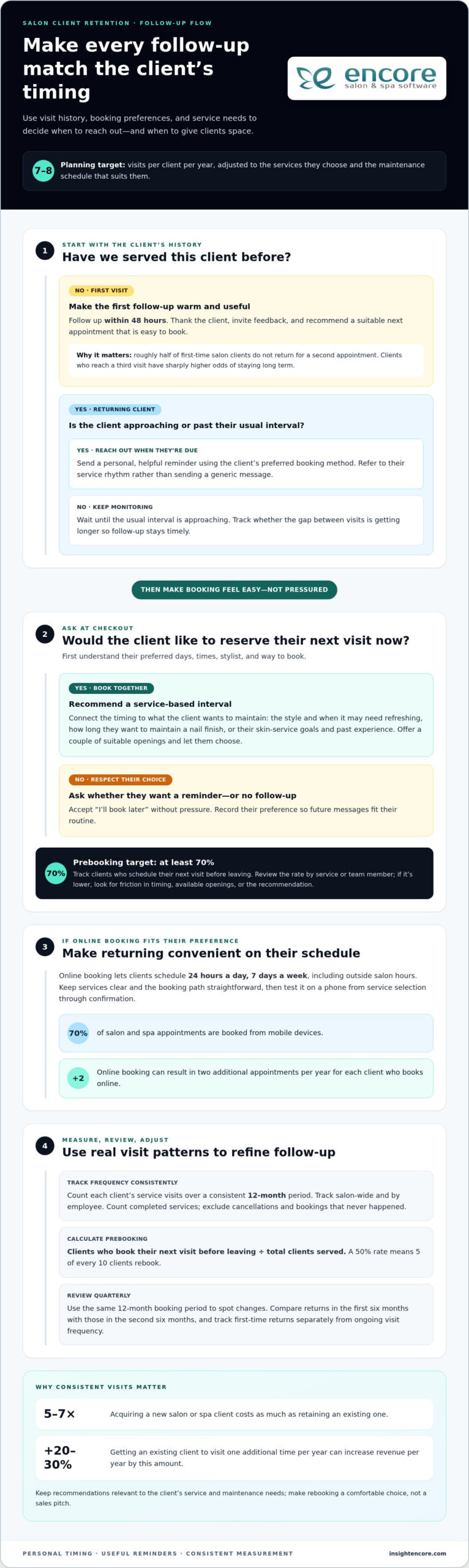
Categories
Uncategorized

Upgrading Salon Cash Registers to POS: 2026 Guide

A client finishes a service, buys a styling product, and pays at the front desk. If the sale goes through one tool while the appointment, client notes, and stock records live elsewhere, checkout may be complete, but the picture of your business is not. That is the practical question behind upgrading from a cash register to a POS system: what can it connect that your register cannot?

A cash register can record a payment. A salon POS system may also connect transactions with client records, inventory, and payment processing, depending on its features. But changing systems can raise fair concerns about disrupting appointments, slowing checkout, or asking staff to learn a new routine. Your salon needs a setup that supports the way you already work, not one that adds unnecessary steps.

This guide will help you compare day-to-day capabilities, identify the features your salon actually needs, and plan a manageable transition. You’ll see how checkout can fit into the wider client journey, what to check before choosing a system, and how to prepare staff and records before switching. By the end, you’ll have a clearer basis for deciding whether a POS system suits your salon’s checkout and management needs.

Key Takeaways

  • Identify where checkout, client details, product stock, and sales records feel disconnected before deciding whether to upgrade.
  • Compare register and POS capabilities carefully. Client information, inventory tracking, and reporting depend on the system you choose.
  • Make upgrading from a cash register to a POS system more manageable by documenting your current workflow and giving staff time to practise key tasks.
  • Choose features around your salon’s real needs, rather than paying for tools that won’t support daily operations.
  • Once you’ve set your requirements, assess whether Encore’s POS, client management, inventory, and integrated credit card processing fit your workflow.

When should a salon upgrade from a cash register to a POS system?

Checkout can run smoothly while the information behind it stays scattered. A service payment goes through the register, retail stock is tracked separately, and client details sit in another tool or on paper. That arrangement may be workable, but repeated manual steps can make it harder to reconcile transactions, see what sold, or give staff the information they need at checkout.

A cash register records sales and accepts payment. A POS system may do that and connect checkout with other business tools, but capabilities depend on the provider and setup. As a foundation, Point of Sale (POS) systems combine hardware and software to handle sales transactions.

A salon POS system records transactions and may connect them with services, client details, inventory, or reporting, depending on the system you choose. The term “POS” alone doesn’t guarantee that every feature is included.

What does a POS system add to a cash register?

Consider a client who receives a haircut and buys a retail product before leaving. A basic register can record the payment total. A suitably configured POS may let staff record the service and product together, associate the sale with a client record, and update inventory. These steps may depend on the system and its configuration, so check each capability rather than assuming it comes standard.

Signs your salon may be ready to upgrade

Look for recurring friction, not just attractive feature lists. Do you or your team regularly re-enter sales in a spreadsheet, manually compare register totals with other records, or struggle to review which services and products sold? Do staff have to switch between tools to find client, service, and checkout information? These are practical signs that a connected workflow could help.

  • Repeated manual work: Routine reconciliation or duplicate entry takes attention away from clients.
  • Disconnected records: Staff can’t easily access relevant details while completing a sale.
  • Limited sales visibility: Reviewing transaction history means piecing information together by hand.

Start with the problem you want to solve. A feature that sounds appealing may not matter if it doesn’t address a real bottleneck in your salon. If checkout is simple, records are easy to manage, and your current process gives you the sales information you need, a register may remain adequate. Upgrading from a cash register to a POS system makes most sense when connected tools can reduce specific day-to-day friction, not simply because newer technology is available.

How a POS system can connect salon checkout, clients, and inventory

A salon checkout has several steps: staff select the service or items being purchased, confirm the total, take payment, and provide a receipt. A POS system may bring some of those steps together with client and product records. The exact workflow depends on the provider and configuration. Check how each system handles the information your team needs instead of assuming everything connects automatically.

For example, a system might let staff select a completed service, add retail products, apply an eligible gift card, and record the payment in one transaction. If it also supports sales reporting, owners may be able to review transaction details without compiling them from separate records. The U.S. Chamber of Commerce outlines several benefits of POS systems for small businesses, including payment processing and sales data capture. Connected data can reduce repeated entry when selected tools share information, but confirm exactly what is linked.

Connect checkout with client and service records

If a POS connects with client management, staff may be able to view relevant visit information while preparing or completing checkout. That can help associate the service and transaction with the right client, if the system supports that workflow. Online booking is a separate function. Some platforms offer it alongside POS and client management, but don’t assume appointments automatically appear at checkout. Confirm how bookings, completed services, and client records interact.

Track retail products and gift card activity

Inventory tracking may help staff and owners follow retail products sold through checkout, such as shampoo or styling products. Ask whether quantities update from recorded sales, how stock counts are corrected, and what checks your team must still perform. A system can support inventory oversight, but accurate records depend on setup and consistent processes. If your salon sells gift cards, check whether the POS can record their sale and redemption in a way that fits your checkout routine.

Payment is another connection to assess. Integrated credit card processing may keep payment steps within the selected workflow, but it isn’t a universal POS feature. Confirm supported payment methods, hardware compatibility, and how transaction records are handled before choosing. If this capability matters to your salon, review Encore’s integrated credit card processing as part of your comparison.

As you consider upgrading from a cash register to a POS system, map the journey your staff actually follow, from selecting a service to issuing a receipt. Mark where information is re-entered or looked up in another tool. Then identify which connections would remove that work and which features aren’t essential. This keeps the decision focused on your salon’s workflow, not simply on a longer feature list.

Cash register vs. POS system: compare the right capabilities for your salon

A useful comparison goes beyond the number of features on a plan. Focus on the tasks your team performs, how easily staff can use the system during a busy checkout, and whether you can access the records you need afterward. The U.S. Chamber of Commerce explains what a modern POS system is and how capabilities such as inventory tracking and sales reporting may support small businesses. Actual features vary by provider and setup.

Capability Cash register POS system
Transaction recording Records payment totals and sales, depending on the register. Records sales; itemized transaction details depend on the system.
Client context Usually handles checkout without connected client records. May connect sales to client or service records if supported and configured.
Inventory May require separate stock records and manual updates. May track retail products sold; confirm how stock counts are updated.
Reporting May offer basic totals or require manual review. May provide more detailed sales reports, depending on available tools.

Which POS features matter most in a salon?

Start with reliable checkout, payment processing that fits your business, and transaction records you can understand and review. Then weigh client management, inventory tracking, and booking integration against your actual workflow. A salon with a small retail range may need simpler stock oversight than one that regularly sells products. Encore’s salon software features can help you assess how management tools may fit alongside POS.

For a nail salon, consider whether tracking products is a recurring challenge before prioritizing inventory tools. The same principle applies across service models: choose capabilities that address real work, not features that simply look impressive in a comparison.

Questions to ask before choosing a POS

Test common tasks with the people who’ll use the system. Ask staff to ring through a service and retail item, take payment, find a past transaction, and correct an error. Can they complete each task clearly and confidently? Check that the workflow suits your team, not just the owner’s reporting needs.

  • Which payment methods and hardware are supported? Verify current compatibility directly with the provider.
  • Can you access or export the records you need, and in what format?
  • What security responsibilities apply to your salon and any providers handling payment data?
  • Which tools are essential now, and which can wait until your needs change?

Upgrading from a cash register to a POS system is a better fit when its everyday workflow solves a specific problem without adding unnecessary steps. Compare practical usability and data access alongside the feature list.

Upgrading Salon Cash Registers to POS: 2026 Guide

Planning a Low-Disruption Move from Cash Register to POS

A smoother transition starts with your current routine, not with a software demo. Before upgrading from a cash register to a POS system, map how your salon handles services, retail items, discounts, gift cards, payments, receipts, and end-of-day checks. This gives you a practical checklist for comparing systems and preparing staff without changing everything at once.

Prepare staff, records, and checkout routines

Use a short, step-by-step plan to keep the change organized:

  1. Document your needs. Note the checkout tasks you perform, payment arrangements, products you sell, and records your team relies on.
  2. Choose a point person. Have one staff member collect questions, coordinate checks, and gather feedback from the people who use checkout every day.
  3. Review records and data options. Ask the provider what information can be imported, what can be exported later, and what may need manual review. Confirm whether migration assistance is available and what it includes. Don’t assume records will transfer automatically.
  4. Compare the full workflow. Check that the system supports the features you need, and confirm device, payment, and receipt requirements before committing. Ask for the provider’s implementation guidance and write down a changeover plan.

Keep the scope realistic. Prioritize the records and tasks that matter at checkout, such as service and product lists, gift card handling, and transaction history. Reviewing your current practices can help you ask better questions and spot gaps before they affect the client experience.

Test the new system before full changeover

Give staff time to practise before relying on the new workflow during a busy period. Run representative transactions, including a service sale, a service plus retail item, a discount, and a gift card transaction if applicable. Practise correcting an entry, processing a refund, and reviewing end-of-day totals where the system supports those tasks.

Also confirm that the required devices, network connection, payment setup, and receipt process work as expected. Choose a changeover window that gives the team room to focus, and keep access to essential records from the old register during the transition. Ask the provider what support, training, and data-transfer steps are included rather than treating them as automatic.

A written salon software implementation plan can help you track decisions, responsibilities, and test results. Adjust it around your salon’s staffing and appointment schedule, then share the final steps with everyone who handles checkout.

Explore Encore salon software

Is a salon POS upgrade right for you? Evaluate Encore as a next step

A standalone register may be enough if your salon has straightforward checkout, keeps reliable records elsewhere, and can review sales without repeated manual work. Connected management tools may be more useful if staff move between client information, transactions, and product records to complete everyday tasks. The right choice depends on your workflow, not on how many features a system offers.

Encore combines POS transactions with salon and spa management features, including client management, inventory tracking, and integrated credit card processing. Compare Encore salon management software with the needs you’ve already identified, then confirm that the specific functions you require are available for your business and setup.

Match the software to your business model

Consider how your team works. A salon, spa, barber shop, nail salon, tattoo studio, or chair or booth rental business may have different checkout and recordkeeping needs. Decide which functions matter most: processing transactions, accessing client records, tracking products, or offering online booking. Encore offers specialized solutions for several business types, but confirm the fit for your own service model.

If card payments are part of your decision, review Encore’s credit card processing options. Verify current supported payment methods, hardware compatibility, and any related terms directly before making a choice.

Take the next step without rushing the decision

Before committing, prepare specific questions for the provider. Ask what setup involves, whether your existing records can be transferred or exported, what staff training is available, and what support is provided. Confirm which capabilities are included and how they work with your current checkout routine. These details can vary, so get clear answers rather than assuming migration, training, or particular equipment is covered.

Then compare the answers with your priorities. If connected checkout, client management, inventory, or booking addresses a real operational need, a POS upgrade may be worth exploring. If your register and existing processes already serve you well, there’s no need to rush. Decide when the expected workflow fits your team and the practical details are clear.

Explore Encore and take the next step

Choose a POS upgrade that fits your salon’s next step

Upgrading from a cash register to a POS system makes sense when it addresses a clear need, such as connecting checkout with client records, inventory, or sales reporting. Compare the day-to-day workflow, confirm which features are included, and plan staff practice and record handling before making the switch. A standalone register may still suit a salon with simple, stable checkout needs.

Encore combines POS transactions with salon and spa management capabilities. The company was founded in 1991 and is part of Syntec Business Systems. If those connected tools align with your priorities, explore how Encore may fit your workflow. Confirm current capabilities, payment options, and transition details directly before deciding.

Explore Encore and take the next step

Explore Encore’s software and discuss whether its POS and management tools fit your salon’s checkout workflow.

Frequently Asked Questions

What is the difference between a cash register and a POS system?

A cash register records sales and handles checkout, while a POS system may connect transactions with other business tools. Depending on the provider and setup, those tools can include client management, inventory tracking, booking, payment processing, or reporting. Not every POS includes every feature. Compare the specific functions offered and how they fit your salon’s daily workflow before choosing.

Can a POS system track salon inventory and sales?

Some POS systems offer inventory tracking and sales reports, but features and workflows vary. A system may record retail items sold and provide transaction summaries, while stock counts may still need staff review and correction. Before choosing, ask how product quantities are updated, what reports are available, and whether you can access the information in a format that helps with regular reviews.

Will switching to a POS system disrupt my salon operations?

A switch can affect routines if staff haven’t practised or important records aren’t ready, but planning can help limit disruption. Document common transactions, check what data can be transferred, and ask the provider what setup and training involve. Practise service and retail sales, corrections, and end-of-day tasks before relying on the new process during a busy period. Keep access to essential old records while your team adjusts.

Can a POS system manage client records and payments together?

Some platforms combine POS transactions with client management and payment processing, but confirm how those functions connect in the system you’re considering. A connected workflow may let staff access relevant client information while completing checkout and record payment alongside a transaction. Check which payment methods are supported and whether staff can access the records they need. Don’t assume all POS providers link appointments, client details, and payments automatically.

Do I need to replace my cash register hardware to use a POS system?

Not necessarily, but whether existing equipment can be used depends on the POS provider’s hardware requirements and compatibility. Ask which devices, payment terminals, and receipt printers are supported before purchasing or reusing equipment. Also confirm what your salon needs for its chosen payment setup. Hardware compatibility can’t be assumed across systems, so get current details directly from the provider before planning the changeover.

How do I choose the right POS system for my salon?

Choose based on the work you need the system to support, not the length of its feature list. Prioritize reliable checkout, suitable payment processing, and usable transaction records, then assess whether client management, inventory, or booking tools solve real needs. Have staff test common tasks, ask about data access and transfer, and verify current hardware and payment compatibility. Clarify setup, training, and support terms before making a decision.

Disclaimer

This article is general in nature and may contain errors, please verify all claims with your sales rep

Categories
Uncategorized

Measuring Salon Marketing ROI: A Practical Guide for 2026

A full appointment book can make a promotion look successful, even when many clients would have booked anyway. That’s why measuring salon marketing roi starts with a more useful question: which bookings and revenue can you reasonably connect to the campaign?

It’s frustrating to see likes, clicks, and appointments without knowing what your marketing contributed. Discounts can muddy the picture, too. A campaign may bring in bookings while leaving little profit behind. You don’t need perfect tracking to make a more confident decision, but you do need to separate campaign-driven visits from business that was already likely to happen.

This guide explains how to calculate a useful ROI measure, account for campaign costs and discounts, and compare channels using consistent data. It also covers how to treat repeat bookings carefully, so one promotion doesn’t get credit for a client’s ongoing loyalty. Use your salon’s own results to decide what to keep, change, or stop, rather than relying on a generic industry benchmark.

Key Takeaways

  • Choose one clear outcome for each campaign, such as first-time bookings or redeemed offers, to make results easier to interpret.
  • Measuring salon marketing roi means looking beyond clicks and bookings to compare attributable revenue with the full campaign cost.
  • Track campaign spend, attributed bookings, and revenue consistently so you can compare channels without relying on generic benchmarks.
  • Check seasonality, appointment capacity, cancellations, and repeat-client behavior before deciding whether a campaign contributed to a change.
  • Bring booking, client, and transaction records together where possible, then use the results to choose what to keep, adjust, or stop.

What Measuring Salon Marketing ROI Really Tells You

A campaign can fill appointments and still fall short financially. To judge its contribution, measuring salon marketing roi means comparing the revenue you can reasonably attribute to the campaign with the cost of running it. The result is a decision-making measure, not proof that every new booking came from marketing.

Salon marketing ROI is the percentage return from campaign-attributed revenue after campaign costs are deducted. Use this formula:

Marketing ROI = ((attributable revenue − campaign cost) ÷ campaign cost) × 100

For example, if a campaign generates three units of attributable revenue for every one unit spent, its revenue-based ROI is 200%. That does not mean the salon made 200% net profit. The calculation compares revenue with campaign costs, not with every cost of delivering the services sold.

Marketing ROI versus salon revenue and profit

Revenue is the sales received; profit is what remains after relevant business costs are accounted for. Campaign ROI sits between those ideas: it asks whether the revenue linked to a campaign exceeded the cost of that campaign. Return on ad spend (ROAS) is narrower, dividing attributed revenue by advertising spend alone. For background on the broader metric, see Return on Marketing Investment (ROMI).

A revenue increase after a promotion doesn’t prove the promotion caused it. Clients may have already planned to visit, or demand may have shifted for other reasons. Your calculation is only as reliable as the attribution and cost information behind it.

Which marketing costs belong in the calculation?

Include costs tied to the campaign, such as ad spend, creative work, applicable staff time, and the effect of discounts. If you record revenue after discounts, don’t subtract the same discount again as a separate cost. If you use the pre-discount value instead, account for the discount consistently.

Shared tools or recurring costs also need a consistent approach. You might allocate a reasonable share to each campaign or leave them outside campaign-level ROI, as long as you use the same method when comparing results. Don’t load one promotion with the full cost of general business operations. Keep campaign costs distinct, and note what your calculation includes so you can compare like with like.

How to Measure Salon Marketing ROI Step by Step

A repeatable process makes campaign results easier to compare and less dependent on guesswork. Before launching, decide what success means, how you’ll identify campaign-driven activity, and when you’ll review the results.

Set one goal and a measurement window

Choose one primary outcome for each campaign, such as first-time bookings, rebookings, consultations, or gift card sales. Record the target audience and a baseline period before launch, then set a measurement window that fits the campaign and booking cycle. Use the same window when comparing similar campaigns. Impressions and likes can help explain reach, but they aren’t sales unless they directly support a defined goal.

Aligning a metric with a business objective helps you measure marketing effectiveness, rather than just activity. Keep secondary measures for context, but don’t change the main success measure after the campaign has started.

Define the campaign and capture its source

Give each promotion a clear name and record its dates, audience, offer, channels, and costs. Then choose a practical way to identify responses: a campaign code, a booking question, a tracked link, or a unique offer identifier. Apply the method consistently so you can identify bookings or sales associated with the campaign.

Connect the source to the outcome as far as your records allow. A booking is not necessarily a completed appointment, and an appointment is not the same as collected revenue. Match campaign responses to completed visits and transaction records where possible. If a client’s source is unknown, mark it as unknown instead of assigning it to the promotion.

Calculate and review the result

Campaign ROI is ((attributable revenue minus campaign cost) divided by campaign cost) multiplied by 100. It requires a consistent cost total and revenue linked to campaign responses within your pre-set measurement window.

Use revenue and cost inputs prepared on the same basis, including discounts and applicable campaign labor. Then compare the result with the campaign’s goal and note any gaps in tracking. The calculation won’t resolve uncertain attribution, but a consistent process can show where the evidence is strong and where it needs improvement.

Booking, client, and transaction records can provide useful inputs when they’re connected appropriately. Salon management tools such as Encore Salon & Spa Software bring online booking, client management, and POS transactions together, but you’ll still need to confirm how campaign sources can be captured and matched to outcomes. Use what the records support, then refine your tracking for the next campaign.

Which Salon Marketing Metrics Help Explain ROI?

ROI is the result you’re trying to understand, while supporting metrics help explain what happened along the way. Separate outcome metrics, such as completed appointments and sales, from activity metrics, such as impressions, clicks, and likes. Activity can show that people noticed a campaign. On its own, it can’t show that the campaign was profitable.

For a useful comparison, keep a simple record for each campaign. Measuring salon marketing roi becomes more meaningful when you use the same fields and definitions from one campaign to the next.

Campaign Spend Attributed bookings Attributed revenue Estimated ROI
Campaign name and dates Costs included Bookings linked to campaign Revenue linked to those bookings Calculated using your stated method

Bookings, new clients, repeat visits, and average transaction value

Bookings show a response, but they don’t confirm that appointments were completed or paid for. Separate first-time clients from returning clients: a promotion that attracts new guests has a different purpose from one that encourages existing clients to return. Repeat visits can signal ongoing engagement, but they don’t prove which campaign caused the visit.

Average transaction value shows the typical revenue per completed transaction. It can help explain whether campaign-linked visits generated higher or lower sales, but it doesn’t reveal campaign costs or profit on its own. Read these measures together, and define each one consistently.

Attribution challenges in salon marketing

A client might see a social post, receive an email, and later book after a reminder. Three common approaches assign credit differently: first-touch credits the earliest recorded interaction, last-touch credits the final one before booking, and self-reported attribution asks clients how they heard about the salon. Each offers a useful view, but none captures every influence.

Write your attribution method beside the results. Compare campaigns only when their goals, measurement windows, and tracking methods are reasonably alike. A campaign focused on new-client bookings shouldn’t be ranked directly against one designed to encourage repeat visits. Channel performance depends on your objective and the quality of your tracking, not a universal winner.

Measuring Salon Marketing ROI: A Practical Guide for 2026

How to Interpret Salon Marketing ROI Without Misleading Yourself

A strong month is encouraging, but it doesn’t prove a campaign caused growth. Clients may already have planned their visits, demand may have shifted with the season, or your team may have had more availability than usual. When measuring salon marketing roi, treat the calculation as evidence to assess, not a verdict on its own.

Put campaign results in context. Check whether appointment capacity changed, whether cancellations affected completed visits, and whether revenue came from first-time clients or repeat guests. A campaign may prompt an existing client to book earlier without creating a new visit. That distinction matters when you assess whether the promotion achieved its intended goal.

Discounts need a closer look, too. An offer can increase bookings while lowering the amount collected per appointment. Compare campaign-linked revenue after discounts with campaign costs, and consider whether the service mix or margin changed. More appointments don’t automatically mean a better financial result.

Common salon ROI calculation mistakes

Before acting on a result, check for omitted campaign costs, revenue counted more than once, and offers redeemed without a trackable identifier. Don’t credit every sale during a campaign period to that campaign. Small booking counts can swing sharply from one appointment, while inconsistent comparison periods can make a routine seasonal change look like campaign impact. Note these limitations beside the result.

Use a practical review cycle to improve campaigns

Review results after the measurement window you chose before launch. Record what the data supports, what remains uncertain, and whether the campaign met its primary goal. When the evidence is limited, test again rather than treating one result as conclusive. When practical, change one meaningful element at a time, such as the offer or audience. That makes it easier to see what may have influenced the next result.

  • Continue when tracking is credible and the campaign supports its goal.
  • Adjust when results are mixed and you can identify a clear issue to address.
  • Test again when results look promising but sample size or attribution is weak.
  • Stop when reliable evidence shows the campaign repeatedly misses its goal.

Keep the decision proportional to the evidence. Organized booking, client, and transaction records can help you review outcomes, but they don’t establish campaign attribution by themselves. Use them alongside your source-tracking method, and note any gaps before deciding what to change.

To see how Encore’s tools bring booking, client, and transaction information together, explore Encore Salon Software.

Build a Salon Marketing ROI Tracking Routine with the Right Tools

A simple routine is easier to maintain than a complicated dashboard. For each campaign, record its goal, dates, audience, tracking method, and costs. After the measurement window closes, capture the relevant outcomes, calculate the result using the same definitions, and decide what to do next. This steady process makes measuring salon marketing roi more useful over time because it lets you compare campaigns on consistent terms.

  • Record: Note the campaign details and which costs are included.
  • Capture: Connect campaign sources with bookings and completed sales where possible.
  • Calculate: Apply your chosen ROI formula consistently.
  • Decide: Keep, adjust, test, or stop based on the strength of the evidence.

What to look for in salon marketing and management software

Online booking, client records, POS transactions, and marketing tools can each contribute useful information. Together, they may help you organize campaign activity alongside bookings and sales, but they don’t automatically establish which campaign caused a transaction. Before choosing a system, ask how campaign sources can be recorded and whether booking and completed-sale information can be reviewed or exported together. If your salon is still relying on a basic cash register for transactions, it may also be worth reviewing what’s involved in upgrading from a cash register to a POS system to better connect sales data with client and booking records.

Encore Salon Software combines online booking, client management, POS transactions, and automated marketing tools. Explore Encore salon software features, and confirm which records or exports support the tracking process you plan to use.

Turn campaign results into a confident next step

Start with one campaign and a small tracking sheet. Include the campaign name, goal, dates, spend, source, attributed bookings, completed sales, revenue, and any limitations in the data. A spreadsheet can be enough to establish a consistent method before you add more tools or campaigns.

Software can help keep operational information organized, but it can’t replace clear goals, consistent attribution, or careful interpretation. Build the method first, then decide whether a platform’s records and reporting options fit your needs.

To explore whether Encore fits your salon’s tracking routine, learn more about Encore.

Make Your Next Marketing Decision with Confidence

Strong campaign decisions don’t depend on perfect data or a universal benchmark. They come from a consistent way to connect marketing activity with bookings, completed sales, and campaign costs. Measuring salon marketing roi becomes more useful when you set a clear goal, track where responses came from, and interpret results alongside repeat visits, cancellations, and discounts.

Start with one campaign and a simple tracking routine. Record what you can verify, note where attribution is uncertain, and use the findings to decide whether to continue, adjust, test again, or stop. Over time, organized records can help you identify which activities are worth another look.

Encore brings together online booking, client management, and POS tools, alongside automated marketing, loyalty programs, and gift card management. These tools can help organize salon activity, while your chosen tracking method remains essential to measuring campaign results.

Take it one campaign at a time. A clearer view of your results can help you make your next marketing decision with greater confidence.

Frequently Asked Questions

What is a good marketing ROI for a salon?

There’s no single marketing ROI benchmark that applies to every salon or campaign. A useful result depends on the goal, which costs you include, and how confidently you can connect bookings or sales to the campaign. Compare similar campaigns over comparable periods, and treat early results as directional if the sample is small. Consider profit and available appointment capacity alongside attributed revenue before deciding whether a result is strong.

How do you calculate salon marketing ROI?

Subtract campaign costs from the revenue reasonably attributed to the campaign, divide by those costs, then multiply by 100. For example: ((attributed revenue − campaign cost) ÷ campaign cost) × 100. Include relevant expenses, such as advertising, discounts, and campaign labor, consistently. Measuring salon marketing roi also requires you to state how you attributed revenue. The formula organizes the calculation, but it can’t make uncertain source data reliable.

How can a salon track which marketing campaign generated a booking?

Use a trackable link, campaign-specific code, booking question, or unique offer identifier, then connect the recorded source to completed appointments and transactions where possible. Choose a method staff can use consistently. A client may see several promotions before booking, so tracking won’t always identify a single cause. Record the attribution approach you use, and mark the source as unknown when the available information doesn’t support a confident match.

Should salons measure revenue or profit when calculating marketing ROI?

Revenue is often easier to connect to campaign-linked bookings, but it doesn’t account for the costs of delivering services or running the promotion. Profit gives a fuller financial picture when those costs can be estimated reliably. Choose the measure that fits the decision you’re making, clearly state what it includes, and apply it consistently. Don’t compare a revenue-based calculation with a profit-based one as if they measure the same result.

Can a salon measure social media marketing ROI?

Yes, if you define a business outcome and have a way to connect social activity to bookings or sales. Use tracked links, campaign codes, or a booking-source question where practical, then compare the attributed outcome with campaign costs. Likes, views, and comments can help show engagement, but they don’t establish revenue or profit on their own. Be transparent about any sales or bookings whose source you can’t confirm.

How often should a salon review marketing ROI?

Set a review period before each campaign and allow enough time for its intended outcome, such as a booking followed by a completed appointment. A weekly check can help catch tracking gaps while the campaign is running; make the final assessment using the window and method chosen at launch. Compare campaigns with similar goals and timing, and account for changes in seasonality, appointment capacity, or cancellations.

What if a salon cannot identify which campaign caused a sale?

Report the sale as unattributed or uncertain rather than assigning it to a campaign without evidence. You can still review overall booking and sales trends, but keep those observations separate from campaign-attributed results. For the next promotion, try a unique link, offer code, or booking-source question, and make the tracking step clear for staff and clients. Better source records can strengthen future comparisons without guaranteeing perfect attribution.

Explore Encore for your salon

Disclaimer

This article is general in nature and may contain errors, please verify all claims with your sales rep
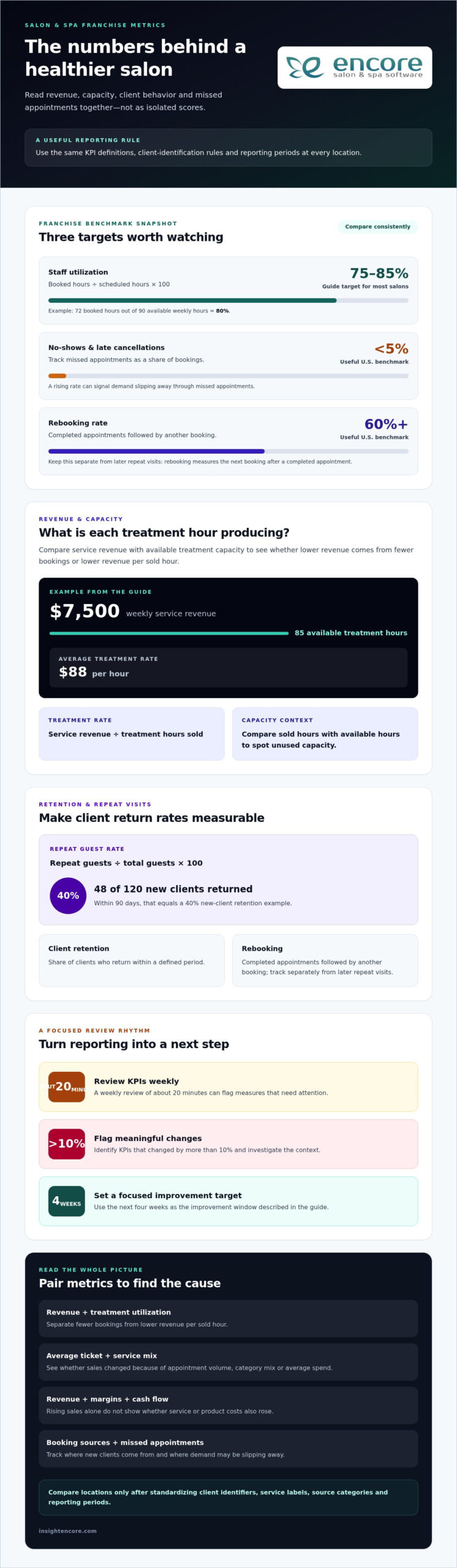
Categories
Uncategorized

Spa Marketing Automation Examples: 10 Ideas to Build Client Loyalty in 2026

What if the best way to bring spa clients back isn’t another generic promotion, but a timely message that fits their client journey? When manual follow-ups compete with appointments and daily operations, messages can go out too late, too often, or without a clear reason. The most useful spa marketing automation examples start with a client’s needs, not a calendar of blasts.

It makes sense to be careful: outreach that feels impersonal can weaken the relationships your spa works hard to build. Automation should make follow-up more thoughtful, not make clients feel like names on a list. This guide shares practical campaign ideas and explains when each may work best, so you can choose messages that feel relevant and useful.

Explore 10 examples across the client journey, from welcome and post-visit messages to rebooking reminders, win-back campaigns, and loyalty outreach. For each, you’ll see what client information can guide the timing and what to measure. You’ll also learn how to start with a manageable plan and review it over time, using connected booking, client management, marketing, and loyalty tools to keep campaigns organized.

Key Takeaways

  • Build campaigns around client actions and stages, so messages feel timely and relevant rather than like generic promotions.
  • Use spa marketing automation examples as adaptable starting points, then tailor each message to its audience, purpose, and timing.
  • Choose one campaign goal and track a fitting measure, such as rebooking or response, to see whether clients find it useful.
  • Compare software by how clearly it connects client records, booking context, campaign controls, and reporting.
  • Connected booking, client management, marketing, and loyalty tools can help organize spa workflows. Confirm which triggers and channels a platform supports.

Why spa marketing automation works best across the client journey

A client’s relationship with your spa doesn’t begin and end in the treatment room. It may start when they discover your services, continue as they book and visit, and grow through useful follow-up and future appointments. Marketing automation can help you communicate at those moments without relying on someone to remember every task manually.

Spa marketing automation is software-supported messaging or tasks that begin when a client takes an action or a chosen time condition is met. A one-off campaign goes to a selected group at a particular time; an automated workflow responds to a defined client moment. This reflects the broader idea of marketing automation, where software helps coordinate marketing tasks and communication.

The distinction matters. Automation isn’t a reason to send more promotions. It’s a way to make communication more useful: booking information when someone schedules, a thoughtful check-in after a visit, or a relevant reminder after a client-defined interval. The best spa marketing automation examples fit the service and the client’s expectations rather than treating every client alike.

Which spa moments are useful automation triggers?

Start with moments that give a message a clear purpose. A booking can prompt practical appointment information. An appointment completion may prompt a follow-up. A client-defined interval can cue a relevant return-visit reminder, while an inactive-client period may prompt a gentle check-in. These are possible workflow ideas, not a universal schedule. Choose triggers that make sense for your services and how clients prefer to hear from you.

Keep operational messages distinct from promotional ones. Operational communication helps a client manage an existing appointment or understand what happens next. Promotional communication invites them to consider another service or offer. The purpose affects the content, timing, and permissions you need to check before sending.

How can automation still feel personal?

Personal doesn’t have to mean overly familiar. Use preferences or service history only when they’ve been appropriately recorded and are relevant to the message. A simple reference to the service a client booked can feel more considered than a generic offer. Adding unnecessary personal details, however, may feel intrusive.

Keep every message warm, specific, and easy to understand. Make the next step clear, and respect the client’s communication permissions and stated preferences. For promotional outreach, ensure your process reflects applicable consent requirements and makes preferences or opt-outs clear.

Connected booking and client-management records may help a spa organize context for follow-up, while marketing and loyalty tools can support related workflows. Before choosing software, confirm which triggers and communication channels it actually supports. The goal is a client journey that feels thoughtfully supported, not a larger volume of automated messages.

Spa marketing automation examples for booking, follow-up, and rebooking

Use these workflows as starting points, not guaranteed revenue drivers or a universal message schedule. The right trigger and timing depend on your spa’s services, policies, and client expectations. For more help assessing booking workflows, consult a spa booking software buyer’s guide.

What can a spa automate before and after an appointment?

Begin with practical messages that support an appointment already on the books. Keep each one clear and focused on what the client needs next.

  • Booking confirmation: Trigger it when an appointment is booked. Send the appointment details and explain how to request a change. Review delivery and how often clients use the stated process to handle changes.
  • Appointment reminder: Trigger it as the appointment approaches, with timing chosen to fit your policies and client preferences. Its purpose is to help clients remember and prepare. Review responses, changes, or missed appointments to assess whether the timing and wording are useful.
  • Post-visit check-in: Trigger it after a completed appointment when follow-up makes sense for the service. Invite the client to share feedback or ask a question. Measure replies or feedback received rather than assuming every treatment needs the same message.

These are operational communications: they help clients manage an existing appointment. Keep them distinct from promotional messages, which invite a client to consider another visit or service.

How can spas encourage the next visit?

A rebooking prompt should relate to the service and arrive at an interval the spa considers appropriate. Avoid treating one schedule as right for every client. A message can invite the client to book again without implying they need a service or assuming a particular result.

  • Service-relevant rebooking: Trigger it after a spa-selected interval has passed since a completed visit. Send it to clients who received that service, with a warm, optional invitation to view booking availability. Measure return bookings among the clients who received the prompt.
  • Relevant next-step suggestion: Trigger it after a visit when a suitable recommendation is supported by the service and the client’s recorded preferences. Keep the message informative, and measure replies or bookings linked to the recommendation.

Gift-related follow-up has a different audience and purpose. After a gift card purchase, for example, a spa might send useful information about how the recipient can use it. Explore gift card management tools when planning that workflow.

Review each campaign’s responses and client feedback. Adjust or pause messages that feel mistimed, irrelevant, or repetitive. The aim is thoughtful follow-up, not more contact for its own sake.

Spa automation examples for retention, win-back, and client loyalty

Retention messages work best when they recognize why a client might value hearing from your spa. A service follow-up can invite feedback, a win-back note can reopen a conversation, and a loyalty update can acknowledge participation. Seasonal education can offer helpful context without turning every change in season into a sales pitch. These spa marketing automation examples are options to adapt, not fixed schedules or promises of results.

Automation should support a human experience, not replace thoughtful service. Use a message to make the next interaction easier or more relevant, then leave room for a personal response when a client has a question or concern.

Trigger Appropriate message Intended client value Measurement option
Visit completed A brief service follow-up or invitation to share feedback, when appropriate A simple way to give input or ask a question Replies or feedback received
Spa-defined inactive period A warm check-in or relevant service reminder A useful, low-pressure prompt to reconnect Responses or return bookings
Loyalty participation changes A clear update about the client’s loyalty activity Recognition and a better understanding of the program Client engagement or questions about the program
Seasonal point chosen by the spa Practical education related to services or client interests Helpful information without an unnecessary sales push Engagement with the message or related inquiries

These measures are options, not industry benchmarks. Choose a spa-defined target for each campaign, then review results alongside client feedback. If a message gets little response or draws complaints, reconsider its timing, relevance, or audience.

What does a respectful win-back message look like?

Define “inactive” using a timeframe that fits the service cycle at your spa. A client who hasn’t returned within that period could receive a friendly check-in or useful reminder, without an assumed discount or pressure to book. If clients don’t engage, stop or adjust the outreach according to your communication policy. Respecting silence helps keep future contact welcome.

How can loyalty campaigns add value without over-messaging?

Send loyalty updates when there’s something useful to share, rather than repeating sales prompts. A clear note can recognize participation or explain relevant program information without inventing rewards or mechanics. Beyond loyalty updates, date-based triggers such as automated birthday greetings for salon clients offer another way to acknowledge clients personally without adding manual work. Encore offers loyalty programs alongside automated marketing capabilities. If you’re comparing software, review its automated marketing and loyalty features, and confirm which triggers and channels are supported.

Keep the experience personal by using only appropriately recorded client information and honoring communication preferences. A smaller number of relevant messages can serve clients better than frequent outreach that asks for their attention without offering something useful.

Spa Marketing Automation Examples: 10 Ideas to Build Client Loyalty in 2026

How to choose spa marketing automation examples and measure them

The most useful spa marketing automation examples solve a clear communication problem and give you a way to assess whether the workflow is helping. Start small. A campaign that’s easy to understand, check, and adjust is more manageable than several automations launched at once.

Use this sequence to shape one workflow:

  • Choose one goal: For example, reduce missed appointments or encourage clients to return.
  • Define the audience: Select clients for whom the message is relevant.
  • Set a trigger: Choose a recorded action or spa-defined timing condition.
  • Write the message: Make its purpose and next step clear.
  • Select a channel: Use a method that suits the message and client permissions.
  • Pick a measure: Decide what response or outcome you’ll review.

Booking information can provide useful context for appointment-related workflows. A salon client booking portal guide may help you consider how booking details fit into the client experience. If you’re evaluating software, look for usable client records, relevant booking context, control over campaign audiences and timing, and reports your team can interpret. Confirm which specific triggers and channels are available before relying on them.

Which metrics can a spa track for each campaign?

Match the measure to the message. For booking reminders, review attendance or rescheduling when those records are reliable. For retention outreach, consider rebooking, repeat visits, replies, and opt-outs. Campaign activity, such as messages sent or opened, isn’t the same as a business outcome. A change in bookings may have other causes, so avoid crediting automation alone. To go further, measuring salon marketing ROI can help you separate campaign-driven visits from business that was already likely to happen and assess what each promotion actually contributed.

Set any performance target yourself, based on your spa’s goals and starting point. Then compare results over a useful review period and note client feedback, not just counts.

How should a spa start without overwhelming the team?

Pick one recurring communication problem staff can describe clearly. Draft the message and review it manually before automating delivery. Check that the audience, wording, timing, and next step make sense. Assign an owner to monitor accuracy, client responses, and the effort required to keep the workflow working. Once the process is dependable, decide whether to refine it or test another campaign.

This measured approach helps you improve without adding unnecessary work. Encore brings online booking, client management, automated marketing, and loyalty programs into one platform. Review whether its capabilities fit your workflow and verify the triggers and channels you need.

Explore Encore for spa marketing workflows

How Encore can support a more organized spa marketing workflow

It’s easier to plan relevant client communication when booking details, client records, and marketing activities are organized together. Encore serves spa and beauty businesses with online booking, client management, automated marketing, and loyalty programs. These capabilities can help a spa coordinate its workflow, such as keeping booking context accessible while planning communications for clients.

That organization is a starting point, not a strategy by itself. Your team still decides who should receive a message, what it should say, and whether the timing suits the service and client. Software can support the process, but it doesn’t replace consent, good judgment, or personal care.

What should spa owners confirm in a software evaluation?

Ask the provider to show how client records, online booking, marketing tools, and loyalty programs work together in practice. A system’s feature list matters less than whether staff can use the information to manage the workflow you have in mind. When evaluating how transactions, client notes, and inventory connect at checkout, it may also be worth reviewing what’s involved in upgrading from a cash register to a POS system to understand what a more connected setup can support.

  • Campaign control: Can your team choose or adjust the audience and timing?
  • Channels and triggers: Which communication channels and campaign triggers are available? Confirm the specific options directly with the provider.
  • Reporting: Can you understand what was sent and review the responses or outcomes that matter to your spa?
  • Team fit: Does the workflow suit your services, staff responsibilities, and clients’ communication preferences?

Bring a real example to the evaluation. For instance, map the information your team would need to send a relevant follow-up after a visit. Check where that information is recorded, who reviews the message, and how you’d know whether the process is working. This helps reveal gaps before you commit to a workflow.

When is it time to explore Encore?

If coordinating bookings and repeat-client communication across separate processes is creating extra work, it may be worth seeing how Encore’s capabilities fit together. Encore offers spa and beauty business software, not a full-service marketing agency. Before relying on a particular automation, confirm the triggers, communication channels, and reporting available for your needs.

The spa marketing automation examples in this article can help you identify a first workflow to evaluate. Choose one that addresses a clear client or team need, then assess whether the tools support it without adding unnecessary complexity. Keep client preferences and thoughtful service at the center. You can explore Encore and its spa workflow tools as part of that evaluation.

Build a more thoughtful client journey, one step at a time

The strongest spa marketing automation examples aren’t about sending more messages. They help your team communicate at useful moments, with content that fits the client and a clear way to review how it’s received. Start with one workflow, define what you want it to do, and adjust based on client responses and your team’s experience.

Good tools can make that work easier to organize. Encore includes online booking, client management, automated marketing, and loyalty programs, bringing key parts of the spa workflow into one platform. As you evaluate the fit, confirm that its available campaign controls and channels support the approach you have in mind. Automation can support your relationships, while your team’s thoughtful care keeps them personal.

You don’t need to automate everything at once. Choose a useful place to begin, learn from the response, and build a client journey that feels considered at every step.

Frequently Asked Questions

What are examples of marketing automation for a spa?

Examples include booking confirmations, appointment reminders, post-visit feedback requests, service-relevant rebooking prompts, loyalty updates, and check-ins for clients who haven’t visited within a spa-defined period. These spa marketing automation examples work best when each has a clear audience and purpose. Before launching one, decide what client need it serves, what information it relies on, and how you’ll tell whether it’s useful.

How can a spa automate client follow-up after an appointment?

A spa can use appointment records to organize a follow-up for clients who’ve completed a visit, if the software supports that workflow. First decide whether follow-up is appropriate for the service, then write a brief message that offers a useful next step, such as a way to share feedback. Review the wording and recipient criteria, and make sure the message respects client permissions and preferences.

Can spa marketing automation help bring clients back?

It can support return visits by helping a spa follow up with relevant clients at a time that fits its service cycle. For example, a spa might identify clients who haven’t booked again within a timeframe it defines, then send a considerate check-in rather than assuming they want a promotion. Review resulting bookings and replies, but remember that automation supports outreach; it can’t guarantee a client will return.

How often should a spa send automated marketing messages?

There’s no single schedule that suits every spa or client. Set timing according to the purpose of each message, your services, client preferences, and communication permissions. Avoid sending multiple messages that repeat the same request or arrive too close together. Review client responses, opt-outs, and complaints for signs that the pace or content needs to change, and pause messages that no longer feel relevant.

What should a spa measure in an automated marketing campaign?

Choose measures that match the campaign’s purpose. For appointment communications, review reliable attendance or rescheduling records. For retention outreach, consider replies, repeat visits, rebookings, and opt-outs. Opens or clicks can show interaction, but they don’t prove a campaign caused a business outcome. A practical approach to measuring salon marketing ROI can help you account for discounts, compare channels consistently, and avoid giving one promotion credit for a client’s ongoing loyalty. Compare results with your spa’s own goals and context, and treat targets as internal benchmarks rather than universal standards.

Does spa marketing automation replace personal client service?

No. Automation can help organize routine communication, but it can’t replace a staff member’s judgment, attentive treatment, or personal response to a client’s question. Use it to handle appropriate, predictable tasks, and give clients a clear way to get help from your team when they need it. Keep messages accurate and considerate, and review feedback so your communication continues to reflect the experience your spa wants to provide.

Explore Encore for your spa marketing workflow

Disclaimer

This article is general in nature and may contain errors, please verify all claims with your sales rep