window.dataLayer = window.dataLayer || []; function gtag(){dataLayer.push(arguments);} gtag('js', new Date()); gtag('config', 'UA-206511945-1');
Search
Categories
Uncategorized

How to Manage Salon Payroll: A Practical Guide for 2026

Reliable salon payroll starts with clean records, not last-minute calculations. When hours are in one place, tips in checkout activity, commissions in service notes, and adjustments in messages, figuring out how to manage salon payroll can feel like rebuilding the pay period from scratch. Missing details lead to corrections, and the rules that apply can vary by worker and location.

A dependable routine makes payday more predictable. This guide explains how to organize pay inputs for each worker and pay period, assign review responsibilities, and check the information before payroll is finalized. You’ll learn how to build a workflow around different pay arrangements, from hourly wages and commissions to tips and adjustments, while verifying current requirements for your jurisdiction. Organized scheduling and transaction activity in salon management tools such as Encore Salon & Spa Software can help you review payroll inputs, without replacing payroll processing. The goal is fewer surprises and records you can check with confidence.

Key Takeaways

  • Learn how to manage salon payroll with a repeatable pay-period workflow, from setting a cutoff to retaining final records.
  • Build a checklist that traces each pay detail to its source and a named reviewer.
  • Use discrepancy checks to spot mismatches before approving pay.
  • Separate payroll processing from salon-management tools that help organize scheduling and transaction activity.
  • Choose operational software around the records and workflows your salon needs to manage.

How to Manage Salon Payroll Without the Pay-Period Scramble

The salon is busy, clients are checking in, and payday is approaching. You’re matching time records with service activity, tips, commissions, and adjustments, often gathered from different places. A single missing detail can turn a routine task into a stressful review.

A calmer approach starts before payday: set a consistent cutoff, gather records through one process, and review them before approval. Learning how to manage salon payroll means building a routine around your salon’s actual pay arrangements, rather than relying on memory or rushing through calculations. The aim is to make each pay period easier to check and explain.

What does salon payroll management include?

Salon payroll management is the process of gathering, checking, approving, and recording the information used to determine worker pay for a pay period. It includes collecting records, applying documented pay terms, reviewing discrepancies, securing approval, and retaining final records. These preparation steps are distinct from paying workers and filing payroll taxes, which have separate processes and deadlines. Requirements vary by jurisdiction, so verify current official guidance for your location and worker arrangements. For broader context, payroll management involves compensation, benefits, and tax withholdings.

Why salon pay can be harder to organize

Salon pay may draw on several kinds of activity, each recorded differently. Appointments can show who performed a service, point-of-sale records may capture service or retail transactions, time records track hours, and tip records document gratuities. The pay terms in place determine which inputs matter for each worker. Don’t assume every person is paid the same way or has the same classification.

Small process gaps can add up. If time records close on one date but service or tip information is reviewed on another, the totals may cover different periods. A missing adjustment or unclear entry can send the reviewer searching through notes and transactions after the cutoff. Set a clear period and source for each input, then record who checks it.

A simple responsibility map can get the routine started:

  • Time: Identify the record used for hours and who checks missing or unusual entries.
  • Service and retail activity: Choose the transaction records used to verify eligible activity under documented pay terms.
  • Tips and adjustments: Specify where approved details are recorded and who reviews exceptions.
  • Pay terms: Keep each worker’s current written terms accessible to the person preparing payroll.

Organized appointment and transaction records can make payroll preparation easier to review, but they don’t replace payroll processing or tax filing. The next sections provide a checklist, common mismatch checks, and a repeatable routine for your salon.

Which Salon Payroll Records and Pay Details Should You Gather?

A useful payroll checklist does more than name the numbers to collect. It shows where each number comes from, which pay period it belongs to, and who reviews it. Keep the source record separate from the rule used to calculate pay: a service transaction documents activity, while the worker’s written terms determine whether that activity affects commission.

Gather hours, tips, and salon activity records

Start with records that cover the same pay-period dates. Compare scheduled shifts with actual time records, then document approved corrections rather than silently changing an entry. Keep tip records separate from service and retail sales because they support different information. Source documents and recordkeeping requirements vary by location, so check current official guidance for your jurisdiction.

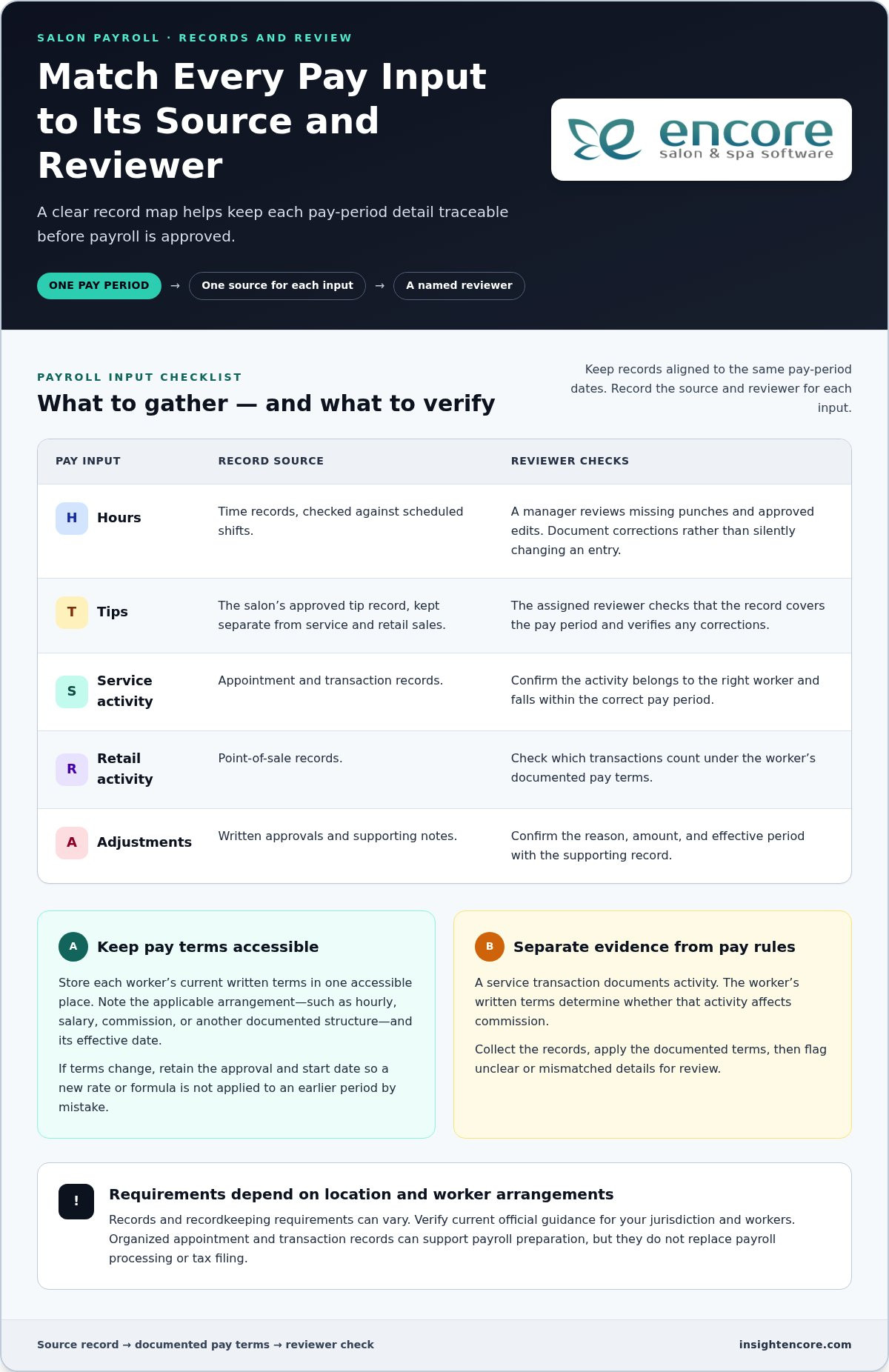
For each input, note its source and reviewer. A checklist might look like this:

  • Hours: Time records, checked against scheduled shifts; a manager reviews missing punches and approved edits.
  • Tips: The salon’s approved tip record; the assigned reviewer checks the period and any corrections.
  • Service activity: Appointment and transaction records; the reviewer confirms the activity belongs to the right worker and period.
  • Retail activity: Point-of-sale records; the reviewer checks which transactions count under the worker’s documented terms.
  • Adjustments: Written approvals and supporting notes; the reviewer confirms the reason, amount, and effective period.

These records help explain what happened. They don’t, on their own, determine what someone is owed. Federal and local requirements may affect how hours and pay are handled. The U.S. Department of Labor’s overview of federal wage and hour laws is a starting point for understanding federal rules, including minimum wage and overtime. Verify current requirements for your location and workers.

Document pay arrangements before calculating

Before using the records, keep each worker’s current written pay terms in one accessible place. Record the applicable arrangement, such as hourly, salary, commission, or another documented structure, along with its effective date. If terms change, save the approval and start date so you don’t apply a new rate or formula to an earlier period by mistake.

Next, match each input to the terms that govern it. A service or retail total may be relevant to one commission plan but not another. Handle tips and hours according to applicable terms and rules. For commission structures and calculation methods, see salon staff commission calculations.

That separation is central to how to manage salon payroll: collect evidence first, apply documented terms second, and flag anything unclear before approval. Salon tools that organize appointments and point-of-sale activity can help keep operational records in view during preparation, without replacing payroll processing. Explore Encore’s salon management tools as part of your operations routine.

How to Check Salon Payroll for Errors Before Approval

Payroll software can help organize calculations, but it can’t confirm that every input is complete, correctly assigned, or consistent with a worker’s documented pay terms. A wrong time entry or unapproved adjustment can still produce a polished-looking result. Before approval, compare pay-period totals with source records and investigate exceptions rather than assuming the system has resolved them.

Keep the review focused by identifying the evidence you expect for each record, the mismatch to watch for, and the follow-up needed.

Common salon payroll discrepancies to catch

Look for missing or duplicate shifts, unusual time entries, adjustments without approval, and service activity assigned to the wrong worker or period. Compare tips and commission inputs with the salon’s documented policies and supporting records. Checking source records matters because payroll calculations can only be as reliable as the information and pay terms behind them.

Record Expected evidence Common mismatch Follow-up
Time records Entries covering the full pay period Missing shift, duplicate entry, or unexplained edit Compare with scheduling records and document an approved correction.
Service activity Transactions assigned to the correct worker and dates Duplicate, missing, or misassigned service Review the source transaction and apply the documented commission terms.
Tips Approved tip record for the period Amount differs from the supporting record or policy Trace the difference and record how it was resolved.
Adjustments and deductions Written reason, approval, and applicable period Unapproved change or unclear basis Pause the item and verify the applicable rules before processing.

Build a review and approval checkpoint

Where staffing allows, have one person prepare the pay inputs and another review them. A second reviewer can compare totals with source records and catch a mismatch the preparer may overlook. In a small salon where roles overlap, separate the steps in time: prepare first, then review the records and exceptions before approval.

Keep a brief review log for each pay period. Note the record checked, discrepancy found, correction made, who approved it, and any question still unresolved. Don’t treat an open question about classification, overtime, minimum-pay requirements, tips, or deductions as a routine data fix. These issues depend on worker circumstances and jurisdiction, so verify them using current official wage, employment, and tax guidance for your location before finalizing pay.

A consistent checkpoint makes how to manage salon payroll more reviewable: confirm the inputs, reconcile differences, document decisions, then approve. If a discrepancy can’t be supported by a source record or documented term, hold it for clarification rather than guessing.

How to Manage Salon Payroll: A Practical Guide for 2026

How to Manage Salon Payroll Step by Step Each Pay Period

A reliable payroll routine works like a closing checklist: each task has an owner, a source record, and a clear sign that it’s complete. Use the same sequence for every pay period, leaving time between input collection and approval so missing details don’t become rushed guesses.

Create a repeatable payroll calendar

Choose recurring dates for time entry, tip reporting, record review, approval, and payment. Share the cutoff and each person’s responsibility in plain language, including how staff should submit corrections. Build in reminders for holidays, schedule changes, and location-specific deadlines. Confirm official deadlines for your jurisdiction because requirements vary.

  1. Set the cutoff. The payroll coordinator owns the calendar, and the pay-period schedule is the source. Mark the period’s start, end, and submission deadline as complete when they’ve been shared with everyone who provides inputs.
  2. Collect time and activity records. The designated preparer gathers time entries, tip details, and relevant service or retail activity from their source records. Check that each item covers the same dates and is assigned to the right worker before marking collection complete.
  3. Apply documented pay terms. The preparer uses each worker’s current written terms and any approved changes, including effective dates. Confirm the terms match the period being prepared and flag unclear or missing documentation instead of assuming.
  4. Reconcile exceptions. The preparer compares inputs with supporting records and logs missing entries, duplicates, corrections, or other differences. Mark an item resolved only when its supporting evidence and decision are recorded.
  5. Review the prepared information. A separate reviewer, where staffing allows, checks the records, calculations, and documented terms. Give the reviewer time to ask questions and receive evidence before approval, rather than leaving the review until the cutoff.
  6. Approve and complete the pay run. The authorized approver confirms that required inputs are present and discrepancies are resolved or appropriately addressed. Record approval and completion according to the salon’s established process.
  7. Retain final records securely. The assigned records owner stores final records using approved access and retention practices. Confirm the files are complete, organized by pay period, and accessible only to appropriate people.

Close the pay period and improve the next one

After the run, note which corrections took the most time and why. If a shift entry repeatedly arrives late, clarify who submits it and by when. If service activity needs repeated checking, review how staffing patterns and appointment flow affect planning. A salon staff utilization guide can help connect staffing patterns with operational planning. Update the checklist or calendar so the next cycle benefits from what you learned.

This sequence makes how to manage salon payroll a defined routine, not a last-minute scramble. Salon management tools can help organize appointment and transaction activity as part of that workflow, while payroll preparation, processing, and recordkeeping remain distinct tasks.

Explore Encore’s salon management tools

Choose Salon Software That Supports an Organized Payroll Routine

Salon software can help organize the business records that inform payroll preparation, but that doesn’t make it a payroll processor. Keep the roles clear: payroll tools handle tasks such as calculating pay or processing payments, while salon-management tools support daily operations such as scheduling appointments and recording transactions. The right setup depends on where your information currently lives and which handoffs create friction.

What to look for in a salon management platform

Start with the work your team does every day, not a long feature list. Ask where appointments are scheduled, where client details are managed, how service and retail transactions are recorded, and whether inventory tracking would support your routine. Then identify which operational records your payroll preparer needs to review separately. This helps you choose tools for real workflow needs without assuming that salon software calculates pay or connects automatically to payroll.

Encore salon software brings together salon operations capabilities such as appointment booking, client management, inventory tracking, and point-of-sale transactions. These records can provide useful context as you organize payroll inputs, but payroll preparation and processing remain distinct tasks. The Encore features overview summarizes operational tools to consider for your salon’s needs.

Use a simple fit check before choosing or changing tools:

  • Scheduling: Would a more organized appointment workflow help your team understand staffing and service activity?
  • Client management: Do you need a central way to manage client information as part of salon operations?
  • Point of sale: Would clearer transaction records help staff review service and retail activity during payroll preparation?
  • Inventory: Would inventory tracking support the way your salon manages products and day-to-day work?
  • Payroll: Which separate system or process handles pay calculations, payment, tax responsibilities, and required records?

That last question matters. An organized appointment calendar or transaction record may make operational information easier to find, but don’t treat it as a payroll calculation, payroll-ready report, or tax filing unless a system explicitly provides that function.

Make the next step manageable

Before adopting a new platform, map the current route for each payroll input: who creates it, where it’s recorded, who reviews it, and how it reaches the person preparing payroll. Mark the handoffs that cause repeated searching or corrections. This makes it easier to assess whether salon-management tools could improve the operational records around those handoffs, without changing payroll responsibilities by assumption.

Then evaluate the platform using familiar tasks. Consider how appointment booking, client management, inventory tracking, and point-of-sale activity fit your actual routine. A practical evaluation helps you decide whether the tools support your salon’s operations and the information-gathering process around payroll. It’s one useful step toward a more organized approach to how to manage salon payroll.

Try Encore now

Make Your Next Pay Period Easier to Prepare

A dependable approach to how to manage salon payroll is built one pay period at a time. Keep refining handoffs, clarify who owns each record, and make room to review questions before approval. With a steady routine, you can spend less time chasing information and more time supporting your team and clients.

Salon operations software can help bring everyday activity into a more organized view. Encore provides tools for appointment booking, client management, inventory tracking, and point-of-sale transactions. Explore how those capabilities could fit the way your salon works.

Try Encore now

Start with one practical improvement, then build from there. A clear routine can make payroll easier to prepare and repeat.

Frequently Asked Questions

How often should a salon run payroll?

There’s no single payroll schedule that applies to every salon. Pay frequency depends on local requirements, employment terms, and the business’s payroll setup. Choose a consistent calendar that gives staff clear expectations about pay periods and payment dates, then communicate it in writing. Before setting or changing the schedule, check current official rules for your jurisdiction and confirm that the arrangement fits each worker’s terms.

Can salon employees be paid on commission only?

Commission-only pay may be subject to wage and employment rules, so it isn’t automatically suitable for every worker or situation. Document the agreement clearly, including how commission is earned and which services or sales count. Then verify local minimum-pay, overtime, and other applicable requirements using official guidance or a qualified professional. If a worker’s pay could fall below a required amount, resolve how the rules apply before relying on the commission arrangement.

How should a salon track tips for payroll?

Keep dated tip records separate from service revenue and retail sales. For example, use a consistent staff process to submit or confirm tip details for each pay period, and record corrections with their dates and reasons. Tip reporting, allocation, and payroll treatment can depend on local rules and the salon’s arrangement. Review the process against current official guidance so staff know what information to report and how the salon handles it.

What payroll records should a salon keep?

Keep organized records that support each pay period, such as hours, written pay terms, tip and commission details, adjustments, approvals, and final payroll outcomes, as applicable. A dated note explaining a correction can help clarify why a record changed later. Required records and retention periods vary by jurisdiction and worker arrangement. Limit access to appropriate people, use a consistent filing method, and verify current local requirements for what to retain and for how long.

Do booth renters go through salon employee payroll?

Not necessarily. Booth rental and employment are different business arrangements, but the correct classification depends on the working facts and applicable law, not just the label in a contract. Before deciding how to handle someone’s pay, check current classification rules for your location using official guidance or a qualified professional. Keep rental payments and salon employee payroll records clearly separated, with supporting agreements and financial records organized for review.

Can salon management software replace payroll software?

Usually, these tools serve different purposes. Salon management software can organize appointment booking, client information, inventory, or point-of-sale activity, while payroll systems handle separate pay-processing functions and requirements. For example, transaction records may help you review salon activity, but don’t assume they calculate wages or complete tax tasks. Map where information is created and who uses it, then confirm each tool’s role before relying on it in your payroll routine.

Disclaimer

This article is general in nature and may contain errors, please verify all claims with your sales rep

Categories
Uncategorized

Salon Business Plan Template 2026: Build a Clear, Practical Plan

What if your salon business plan did more than fill a folder and actually helped you decide what to do next? Starting with a blank document can make it hard to connect your salon concept, ideal clients, daily operations, and financial assumptions. A practical salon business plan template 2026 gives you a clear structure for working through those decisions, including the services you’ll offer, how clients will book, and what your salon needs to operate.

It’s normal to feel unsure about projections while you’re still shaping the business. The goal isn’t to predict every outcome perfectly. It’s to make your assumptions visible, understand how they fit together, and update them as your salon develops.

This step-by-step guide will help you outline your concept and customer base, assess your market, map services and operations, and organize startup costs, revenue expectations, and ongoing expenses. Use it as a working document, not a one-time exercise. Revisit it when your services, staffing, bookings, or costs change.

Key Takeaways

  • Use the salon business plan template 2026 to connect your concept, customers, services, operations, and financial assumptions.
  • Build a customer profile worksheet around real needs, service preferences, location, and booking habits. Separate research findings from assumptions.
  • Compare service categories, delivery formats, staffing, and booking workflows to keep your service mix aligned with your salon concept.
  • Organize your financial plan in sequence, from startup costs and revenue assumptions to recurring expenses and cash flow.
  • Turn the plan into a working roadmap by tracking sources, dates, owners, and next actions, then revisiting it when the business changes.

Start Your Salon Business Plan 2026 With a Focused Concept

A salon business plan connects your concept, customers, operations, and financial assumptions. It gives each decision a place in the bigger picture: who you want to serve, what you’ll offer, how the salon will run, and what resources the business needs. If you’re new to planning, this overview of a business plan explains its role and common components.

Start with the salon you intend to build, not a generic description of the beauty industry. Name your format, service focus, location or service area, and the experience you want clients to have. For example, a studio specializing in color services will plan its appointments, staffing, and customer experience differently from a full-service salon offering hair, nails, and other treatments. Those specifics make the rest of the plan more useful.

Write an executive summary that explains the salon at a glance

Your executive summary should give readers a concise understanding of the business. Draft it after completing the other sections so it reflects your research and forecast, rather than untested promises. Describe the concept, intended customers, core services, and business goals. Explain the experience you plan to deliver with practical details, such as your consultation style, appointment format, or planned services.

Copy-ready prompt: “[Salon name] will be a [salon format] in [location or service area], serving [intended customers and their needs]. Its core services will include [services]. Customers can expect [distinctive, practical experience]. The business aims to [goals]. It is planning to [funding need, if applicable], based on a forecast that estimates [brief financial highlights].” Leave the funding and financial highlights blank until you’ve built the forecast. Then check that each statement matches the details elsewhere in your plan.

Define the salon model before filling in the rest

Choose a working model that reflects how clients will access your services and how the salon will operate. A full-service salon may offer several service categories under one roof, while a specialty studio may focus on a narrower set of treatments. An independent stylist may work alone; another business may have a team or use a chair or booth rental arrangement. Treat these as planning choices and describe the one that fits your idea.

  • Format: What kind of salon or studio are you planning?
  • Service focus: Which core services fit the concept, and what experience will they create?
  • Business stage: Is this plan for a new launch, expansion, ownership change, or review of an existing operation?
  • Location: Where will you operate, and what local requirements apply to the business and practitioners?

State your location and research the requirements for that jurisdiction, since rules can vary. Keep the salon business plan template 2026 grounded in its planning context: date your estimates and research, identify assumptions, and revisit them when the location, services, staffing, or circumstances change. A dated plan is easier to review than one that treats early estimates as permanent facts.

Build a Salon Market and Marketing Plan Around Real Customers

A useful market plan starts with people, not broad claims about what “everyone” wants from a salon. Identify the customer groups your concept is designed to serve, the needs behind their service choices, and how they may find and book with you. Separate what you’ve learned through research from what you’re still assuming. That distinction helps you make decisions without presenting a guess as a fact.

Describe your target customers and local market

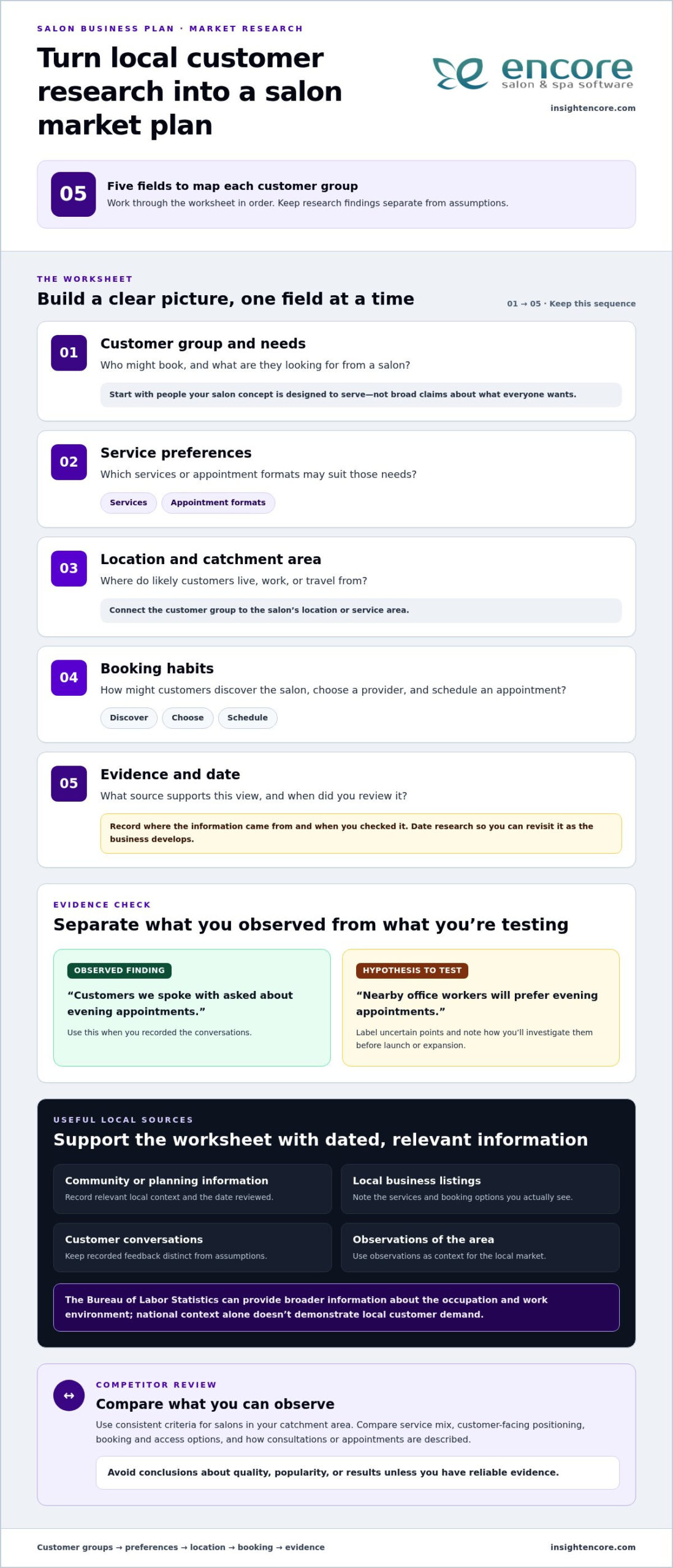
Use this worksheet for each customer group you’re considering. Be specific enough to connect the group to your services and location.

  • Customer group and needs: Who might book, and what are they looking for from a salon?
  • Service preferences: Which services or appointment formats may suit those needs?
  • Location and catchment area: Where do likely customers live, work, or travel from?
  • Booking habits: How might they discover the salon, choose a provider, and schedule an appointment?
  • Evidence and date: What source supports this view, and when did you review it?

For local context, record relevant sources such as dated community or planning information, local business listings, customer conversations, and your observations of the area. When comparing online listings, note the services and booking options you actually see, and when you reviewed them. The Bureau of Labor Statistics can provide broader information about the occupation and work environment, but national context alone doesn’t demonstrate local customer demand.

Separate findings from hypotheses. For example, “customers we spoke with asked about evening appointments” is an observed finding if you recorded those conversations. “Nearby office workers will prefer evening appointments” is a hypothesis to test. Label each statement and note how you’ll investigate uncertain points before launch or expansion.

Compare competitors and clarify your position

Review salons in your catchment area using consistent criteria and information you can observe. Compare their service mix, customer-facing positioning, booking and access options, and the way they describe consultations or appointments. Avoid conclusions about quality, popularity, or results unless you have reliable evidence. The goal isn’t to copy another salon. It’s to understand what clients can already choose and define how your concept will differ.

Summarize your position in one clear customer-facing sentence: “We help [customer group] get [service or experience] through [specific approach].” Keep it grounded in what your salon plans to deliver, not an unsupported claim that it’s the best or only option.

Turn positioning into a focused marketing plan

Choose activities that fit how your intended clients discover and revisit salons. Include how clients will move from finding your business to choosing a service and booking an appointment. For each activity, record an owner, a review date, and a measure, such as inquiries, first-time appointments, referral bookings, repeat visits, or promotion redemptions.

  • Discovery: Keep local listings and service information accurate, and share useful salon content through suitable channels.
  • Referrals: Give satisfied clients a simple way to recommend the salon and track referral bookings.
  • Repeat visits: Plan follow-up and retention activities that suit your services and appointment cycle.
  • Promotions: Set a clear purpose, audience, and review date before offering a promotion.

In your salon business plan template 2026, treat each marketing idea as something to review, not a guaranteed result. Compare activity with the measures you chose, keep what supports your goals, and revise what doesn’t. Encore’s automated marketing, loyalty programs, and gift card management can support the marketing activities you choose to include in your salon’s operations.

Choose Salon Services, Staffing, and Workflows That Fit the Concept

Your service menu shapes more than what clients can book. It affects the people, time, supplies, space, and daily processes your salon needs. Build the menu around your concept and the customer needs you’ve identified, then check that each service fits your staffing and schedule. The Small Business Administration’s business-plan guidance also emphasizes connecting key plan details rather than treating each choice in isolation.

Select a service mix and explain how it supports the salon

Use this comparison worksheet to assess each proposed category. Add a row for each service and note what it requires before including it in your launch menu.

Service category: [Service] | Delivery format: [In-salon, appointment, walk-in, or other] | Staffing approach: [Owner, employee, commission, or renter] | Customer access: [How clients find and book it]

Customer need and concept fit: [Need served and how this service supports the salon’s promise] | Resources and dependencies: [Staff skills, space, equipment, products, or other requirements] | Timing: [Launch priority or possible later addition]

For example, a specialty salon might prioritize a focused set of related services rather than add unrelated options just to make the menu longer. State why each service belongs and what it depends on. If you don’t yet have evidence of demand, label it as an assumption and set a review date. This keeps an early idea from quietly becoming a fixed forecast.

Match staffing and appointment workflows to the business model

Compare staffing approaches based on the experience and operating structure you want, not on a universal “best” model. Employee teams can support shared workflows; commission arrangements connect compensation to service work; booth rental gives independent professionals their own operating arrangement; an owner-operated salon relies heavily on the owner’s available time. Record who handles each task and how the approach fits the planned services. Research jurisdiction-specific requirements separately.

Next, map the customer journey as distinct steps. An appointment-led salon plans capacity around scheduled services; a walk-in model needs a process for arrivals and waiting; a mixed model must account for both. For each service, estimate appointment length and available working hours, and note the assumptions behind each estimate. Review the salon staff utilization rate alongside booking capacity, but don’t treat every open hour as a bookable service hour. Consultations, transitions, and other duties take time too.

  1. Booking: Capture service, timing, and appointment details.
  2. Consultation: Confirm the client’s needs and planned service.
  3. Service delivery: Assign the right staff member and time.
  4. Checkout: Record the transaction and any relevant product sale.
  5. Follow-up: Document the next step, such as a rebooking reminder.

In your salon business plan template 2026, identify an owner for each workflow step and the system that supports it. Online booking, client records, inventory tracking, and point-of-sale tools can form part of the operational plan. Encore provides these tools to support salon workflows. Revisit staffing and capacity assumptions when the menu, schedule, or customer demand changes.

Salon Business Plan Template 2026: Build a Clear, Practical Plan

Use a Salon Financial Plan Template to Connect Assumptions

A financial plan becomes useful when each estimate traces back to an operating choice. Your service mix informs appointment capacity; capacity and booking assumptions inform revenue; and the costs of delivering those services shape cash needs. Treat figures as planning scenarios, not promises. Build cautious, expected, and stronger cases to see how changes in bookings, costs, or timing may affect the plan.

Estimate startup needs and recurring salon expenses

Separate one-time setup costs from ongoing expenses. Research costs for your location and business model, then record a source and date beside every estimate. A note such as “supplier quote, reviewed [date]” makes it easier to revisit an assumption later.

  • One-time setup: premises preparation [estimate, source, date]; equipment [estimate, source, date]; opening supplies and inventory [estimate, source, date]; launch activity [estimate, source, date].
  • Recurring expenses: rent and occupancy [estimate, source, date]; staffing [estimate, source, date]; supplies replenishment [estimate, source, date]; systems and payment costs [estimate, source, date]; ongoing marketing and other operating costs [estimate, source, date].

Separate fixed commitments, such as a regular lease payment, from costs that may change with service volume, such as product use. Use categories that reflect your actual plan rather than an invented industry average. A solo operator and a staffed salon, for example, may have different staffing and premises assumptions. Make sure your estimates match the model you’ve chosen.

Connect service capacity to revenue and cash-flow assumptions

Build the forecast in sequence. First, list services, planned prices, and the time each appointment requires. Then estimate available bookable time after allowing for breaks, administration, and other duties. Apply an expected booking assumption to that capacity, and show how many appointments or services you expect to complete. Keep each input visible. An open appointment slot is not a confirmed booking.

Use this five-step worksheet to connect the figures:

  1. Startup costs: Total one-time setup items and note when payments are expected.
  2. Revenue assumptions: Connect services and planned prices to available capacity and expected bookings.
  3. Operating expenses: List recurring fixed costs and costs that vary with activity.
  4. Cash flow: Map when money is expected to come in and when bills and setup costs are due.
  5. Review: Compare cautious, expected, and stronger cases, then record the source, date, and owner of each key assumption.

Break-even worksheet: Planned costs for the period [ ]; expected revenue per completed service [ ]; estimated services needed to cover planned costs [ ]; assumptions and review date [ ]. Break-even means revenue covers the costs included in your plan. It isn’t a profit target or a guarantee. A salon profit margin checklist can also help you examine how operating choices relate to profitability.

As your salon operates, compare actual bookings, transactions, and expenses with your assumptions. Online booking, client records, inventory tracking, and point-of-sale tools can help organize the activity you review. Encore Salon & Spa Software brings these capabilities together, along with integrated credit card processing. Keep the salon business plan template 2026 adjustable, and update the forecast when services, staffing, or costs change.

Explore Encore for salon operations

Turn Your Salon Business Plan Into a Working 2026 Roadmap

A finished plan is a starting point, not a document to file away. Use it to guide decisions, then update it when the business changes. Before sharing it or acting on it, check that the executive summary matches your customer, service, operations, and financial sections. If the summary promises a service the operating plan doesn’t support, or the forecast relies on bookings your schedule can’t accommodate, resolve the mismatch first.

Review the plan before sharing or acting on it

Run through this checklist to make the plan clear, grounded, and ready to use:

  • Owners: Name who is responsible for each action and assumption.
  • Evidence: Record the source behind important market findings and estimates.
  • Assumptions: Label what you still need to test instead of presenting it as confirmed.
  • Dates: Add when each source was reviewed and when the assumption should be revisited.
  • Next actions: Specify the task, owner, and review date so an idea becomes a practical step.

For each key assumption, keep a short note such as “expected appointment demand, based on [source or reasoning], owned by [person], review by [date].” The salon management software features you choose should also match workflows documented in the plan, rather than being selected without a clear operational need.

Use salon software to support planned workflows

Revisit your plan after a meaningful change, such as adding or removing services, changing staffing, seeing a sustained shift in demand, or adjusting operating priorities. You don’t need to rewrite every section each time. Update the affected assumptions, then check how the change affects capacity, costs, customer access, and financial expectations. Date each revision so you can distinguish the current plan from earlier estimates.

Make sure the systems you use support the daily steps you’ve mapped. Online booking supports appointment scheduling; client management organizes client records; inventory tracking helps you account for products; and point-of-sale tools record checkout transactions. These details matter because the plan is only practical if the workflows behind it can be carried out consistently.

Encore Salon & Spa Software brings together online booking, client management, inventory tracking, and point-of-sale transactions, along with integrated credit card processing, automated marketing, loyalty programs, and gift card management. Match these capabilities to the tasks your salon plans to handle, and document how the tools fit into your workflow. Software can support salon operations, while decisions about your services, team, and customer experience remain part of your plan.

Keep the salon business plan template 2026 as a working reference. Set a recurring review date that suits your business, and revisit it sooner when an important change calls for a fresh look. If Encore’s salon management capabilities fit the workflows you’ve planned, explore how they can support your day-to-day operations.

Put Your Salon Plan Into Motion

Your plan doesn’t need to answer every question before you begin. Choose one assumption to test next, such as which services to prioritize or how clients will book, and give that step an owner and review date. Small, tracked decisions help turn the salon business plan template 2026 into a practical guide you can adjust as you learn.

As you put the plan into action, consider whether your daily systems fit the workflows you’ve mapped. Encore Salon & Spa Software includes online appointment booking and client management, along with inventory tracking, point-of-sale transactions, and integrated credit card processing. These tools support the operational tasks in your plan while your salon’s goals and choices remain your own.

Explore Encore Salon & Spa Software

Start with the next clear step, review what you learn, and let your plan develop alongside your salon. Explore Encore Salon & Spa Software to see how its booking, client management, inventory, and point-of-sale tools can support your planned workflows.

Frequently Asked Questions

Can I use a salon business plan template for a booth-rental or solo stylist business?

Yes. Adapt the template to the business you actually operate. An independent stylist can describe their services, customer base, workspace arrangement, booking process, and business responsibilities, including which tasks they handle themselves. Keep a shared-space or booth-rental arrangement distinct from an employee model, since responsibilities and expenses may differ. Base financial assumptions on the stylist’s own income and costs, not on figures copied from a full-service salon plan.

Do I need a business plan if my salon is already open?

Yes. A plan can help an operating salon clarify priorities, assess a new service, consider a staffing change, or prepare for growth. Start with current information rather than treating launch estimates as permanent. Before adding a service, for example, compare the idea with your current schedule, customer feedback, and available resources. Note what has changed, then update the sections that will help you make the decision.

How long should a salon business plan be?

There’s no single required length for every use. A working plan should explain your salon concept, customers, operations, and financial assumptions clearly without becoming difficult to review. Focus on useful detail, not page count. If you’re preparing the plan for a lender, landlord, or another audience, tailor its depth and supporting documents to that audience’s stated requirements. A concise plan can still be thorough when its evidence and assumptions are clear.

Can a salon business plan guarantee a loan or business success?

No. A plan can organize your salon concept, show how your assumptions connect, and communicate the preparation behind your decisions, but it can’t guarantee financing or business results. Decisions depend on factors beyond the document, and projections are estimates rather than promises. Use available evidence, be clear about uncertainty, and revise estimates as operating information becomes available. Treat the plan as a decision-making tool, not a certain prediction of what will happen.

How often should I update my salon business plan?

Review it on a regular schedule and whenever a meaningful change affects the business. A new service mix, staffing arrangement, location, or shift in customer demand may change the assumptions behind your plan. You don’t need to rewrite every section each time. Check which details no longer reflect current conditions, record the important changes, and assign someone to complete the next review by a specific date.

What financial information should I gather before completing a salon plan?

Gather the information that supports your estimates, including proposed services and prices, expected appointment capacity, startup needs, recurring expenses, and available cash-flow information. The details you need depend on your salon’s stage and location, so research local costs instead of relying on generic figures. If you don’t yet have exact numbers, label estimates clearly, note how you arrived at them, and revisit them before making commitments.

Is a salon business plan template useful when I am still researching my idea?

Yes. A salon business plan template 2026 can help you identify what you still need to learn before settling on a concept or committing resources. Use it to keep open questions, research sources, and assumptions together, rather than treating early guesses as established facts. For example, record what you need to find out about potential customers or workspace options, then update those sections as your research develops.

Disclaimer

This article is general in nature and may contain errors, please verify all claims with your sales rep

Categories
Uncategorized

Salon Owner Dashboard App: A 2026 Buying Guide

What makes the best salon owner dashboard app useful isn’t the number of charts. It’s whether the information helps you decide what to do next. When bookings, client details, inventory, and sales sit in separate tools, it’s harder to get a clear picture of the day. A long feature list doesn’t make the right choice any clearer.

Look beyond booking. A helpful system should make relevant business activity easier to review and connect that visibility with the work you need to manage. To compare options, start with the decisions you make regularly, then identify what information would help you make them. This keeps you focused on what your salon needs, rather than features you may never use.

This guide explains which business information is worth reviewing, how to compare dashboard capabilities, and how to assess whether software fits your daily workflow. We’ll look at booking, client management, inventory, point of sale, and marketing as parts of salon operations. Encore brings these capabilities together for beauty and wellness businesses, so you can evaluate the platform against the way your salon runs, not just its dashboard label.

Key Takeaways

  • Distinguish between reviewing information on a dashboard and the operational tools that record appointments, sales, and client activity.
  • Focus on business signals that help answer real management questions across appointments, clients, sales, inventory, and marketing.
  • Compare each salon owner dashboard app by workflow fit, usability, relevant capabilities, and how it handles everyday salon needs.
  • Test common tasks with the people who will use the system instead of judging it by dashboard design alone.
  • Assess how Encore’s booking, client management, inventory, and point-of-sale capabilities fit your salon’s daily workflow.

What should a salon owner dashboard app help you see?

A dashboard is a place to review selected business information and use it to guide decisions. It can bring key signals into view, but the charts aren’t the business itself. Appointments, sales, client activity, and stock information first need to be recorded in the underlying software. They’re useful only when those records are accurate and relevant to the questions you’re trying to answer.

A dashboard is the review surface; salon management software is the operational system that records and supports the work behind what you see. That distinction matters when comparing tools. A polished display can look helpful, but it won’t tell you much if the information behind it is incomplete or disconnected from your daily processes.

Which salon decisions can a dashboard support?

Start with decisions you make repeatedly, then identify the business activity that could inform them. Appointment information, for example, can help you review the day’s schedule and consider whether available time is being used as intended. A useful signal prompts a next question, such as whether the schedule needs attention, rather than encouraging you to react to every change.

Client and inventory information can support other kinds of planning. A client record can help staff review service history before a return visit or plan follow-up. Stock information can help you spot items that need attention before they interrupt routine work. Customer appointment management software covers core functions such as booking and scheduling, which are part of the operational information a salon may want to review.

  • Appointments: What does the schedule suggest about daily capacity and workflow?
  • Clients: What service history or follow-up details are useful for the next interaction?
  • Inventory: Which stock decisions need attention to keep routine services moving?

These are prompts, not a universal scorecard. A solo stylist, a multi-staff salon, and a spa may need different information to make sound decisions. Focus on what you’ll do with a signal, not how attractive it looks as a chart.

Dashboard app or salon management platform: what is the difference?

A dashboard helps you review information. A salon management platform supports the work that creates it, such as managing bookings, client records, inventory, and point-of-sale transactions. Some products combine both roles; others focus on only part of the workflow. Capabilities vary, so look at what each system actually does instead of assuming the word “dashboard” guarantees particular screens, reports, or measures.

Encore is a salon and spa software platform with operational tools for booking, client management, inventory, and point-of-sale activity. Explore its salon software features to see how its workflows fit your business. A salon owner dashboard app is most useful when the information you review connects clearly to the operations your team needs to manage.

Which salon dashboard metrics and capabilities deserve attention?

The most useful information is what helps you make a decision. A salon owner dashboard app may present appointment, client, sales, inventory, and marketing activity, but not every salon needs to review every measure. A solo stylist may focus on upcoming bookings and client follow-up, while a larger team may also review sales activity and stock routines. Start with the questions you need answered, then assess whether the software makes the relevant information clear.

A metric is actionable only when you understand what it measures, where the information comes from, and which time period it covers. Before relying on a number, check its definition, date range, filters, and source. A booking total might refer to appointments made during a period or appointments scheduled to take place during it. Those answer different questions. Clear definitions help you compare like with like instead of reacting to a figure that looks precise but means something else.

Appointment and client visibility

Check how easily you can find upcoming bookings and understand the schedule. Can you focus on a particular day, team member, or service when that view matters to your workflow? Treat this as a usability check, not evidence that the software calculates capacity or performance measures.

Client profiles and service histories can help staff prepare for returning clients and plan appropriate follow-up. Consider whether the information your team needs is straightforward to locate and maintain. If a system includes performance reporting, assess those claims separately from basic appointment visibility, and understand how each reported figure is defined.

Sales, inventory, and marketing visibility

Point-of-sale activity, inventory, marketing, and loyalty programs support different operational questions. You might review sales transactions as part of a regular business check-in, keep stock decisions connected to inventory records, or manage client communications and loyalty activity alongside other salon work. The right combination depends on your services, team roles, and routines. Prioritize capabilities that support those tasks instead of choosing a tool simply because it lists many metrics.

Encore brings booking, client management, inventory, point-of-sale transactions, integrated card processing, automated marketing, and loyalty programs together for beauty and wellness businesses. Explore the salon and spa software features in relation to the work you want to manage. This gives you a practical way to evaluate platform fit without assuming a particular dashboard screen, report, or metric is included.

  • Appointments: Check whether booking information is easy to review in the views your team needs.
  • Clients: Consider how service history supports preparation and follow-up.
  • Sales and stock: See whether transaction and inventory tools fit your regular review routine.
  • Marketing: Assess whether marketing and loyalty activity belongs in the same operational workflow.

Keep your first evaluation focused. Choose a few real management questions, then see whether the system’s available information and tools help you address them. If you’re considering Encore, explore Encore as an option for your salon’s workflow.

How to compare salon owner dashboard apps without getting distracted by feature lists

A long list of features can make every option look capable. A more useful comparison starts with your salon’s actual work: what your team does often, which decisions take time, and where information gets hard to find. Apply the same criteria to each option, including Encore. That keeps your evaluation focused on workflow fit rather than the number of items on a product page.

A practical salon software comparison checklist

Choose a simple rating scale, such as “fits,” “partly fits,” and “doesn’t fit,” then use it consistently. Base each rating on a task you can describe, not an assumption about what a feature name means. If staff need several workarounds to complete a routine task, note that too. Ease of use matters because a tool helps only when the people responsible for the work can use it comfortably.

Comparison area What to assess Useful question
Workflow fit Booking, client management, inventory, and point-of-sale tasks Can the team handle its common tasks in a clear sequence?
Usability Steps, navigation, and ease of finding relevant information Can the intended users complete routine work without unnecessary steps?
Relevant features Functions that match your service mix and management needs Does each feature solve a real operational need?
Support expectations Available training, access arrangements, and routine support Do the support and learning options suit how your salon operates?

Distinguish what’s included from what you’re inferring. A system may list booking, inventory, or client tools without showing how they work together in everyday use. Review the product’s capabilities, then test representative tasks where possible. For instance, follow a booking through the steps your team uses and consider how client details or a point-of-sale transaction fit into that process. Don’t treat a dashboard label as proof of specific reports or data connections.

Questions to ask before choosing a dashboard app

As you evaluate each option, identify which records feed each displayed figure or summary, how often information is updated, and how filters or date ranges affect its meaning. Consider how staff access is managed, what learning options are available, and what routine support looks like. These details help you compare both the visible information and the process behind it.

  • Booking: Does the workflow match how appointments are created and managed?
  • Client management: Can staff maintain and use client information as part of service?
  • Inventory: Does stock management fit the salon’s regular routines?
  • Point of sale: Can transactions fit naturally into the client visit?

Use this same checklist to assess Encore Salon & Spa Software. Encore combines booking, client management, inventory, and point-of-sale capabilities, making those operational workflows useful comparison points. A strong fit supports your salon’s real tasks, gives staff a manageable way to complete them, and makes its information clear enough to use with confidence.

Salon Owner Dashboard App: A 2026 Buying Guide

How to assess fit for your salon, team, and daily workflow

A salon owner dashboard app should suit the way your business runs, not just look clear in a product demonstration. Before comparing systems, write down who handles bookings, client records, stock, and transactions, along with the decisions you make most often. Note where information lives now and where routine tasks slow down. This gives you a practical picture of what a new system needs to support.

Match software to your salon’s operating model

Your setup shapes what “good fit” means. A single-location salon may prioritize a straightforward daily schedule, while a team with multiple staff may need clear workflows for shared responsibilities. Independent renters may have different needs around managing their own bookings and client records. Consider your service mix, too. A business that tracks products or handles varied transactions may place more weight on inventory and point-of-sale workflows than one with different priorities.

Map the work from start to finish. For a typical client visit, consider how an appointment is booked, how staff find relevant client details, whether inventory plays a role, and how the transaction is handled. The goal is to identify the steps software needs to support without adding avoidable friction. Encore offers specialized solutions for salons and other beauty and wellness businesses, including chair and booth renters, so compare the capabilities that relate to your operating model.

Plan a realistic evaluation before committing

Choose representative tasks and invite the people who perform them to assess each option using the same criteria. Ask a staff member who handles bookings to walk through a typical scheduling task; have the person responsible for stock or transactions review their routine. Testing consistent tasks makes systems easier to compare fairly, while staff feedback can reveal steps an owner might not notice.

Look beyond the demonstration. Identify which records would need to move, which current habits may change, and what time or guidance the team would need to get comfortable with new routines. These are planning questions, not assumptions about any particular implementation process. Pay attention to everyday usability: can users find the information they need, understand the next step, and complete the task without confusion?

  • Document: List recurring tasks, decision needs, users, and services before evaluating software.
  • Test: Have relevant staff complete realistic tasks rather than judging a system by its dashboard appearance.
  • Plan: Note records, routines, and team learning that may need attention during a transition.

If staff scheduling and capacity are central to your evaluation, define the management question first. For example, decide whether you want to understand how scheduled time relates to your team’s work, rather than assuming a software label tells the whole story. Then assess whether the information and workflow available in each system support that question. The right choice depends on your service mix, users, and daily priorities.

Use the same workflow-based criteria to assess Encore Salon Software alongside other options. Its booking, client management, inventory, and point-of-sale capabilities give you operational areas to consider against your salon’s needs.

Explore Encore for your salon’s workflow

Choose a salon dashboard app that connects visibility with action

The right choice isn’t necessarily the app with the fullest dashboard. Look for a system that helps you understand relevant business information and supports the work your team needs to do next. A salon owner dashboard app is a good fit when its available information, operational capabilities, and day-to-day workflows make sense together for your business.

Before deciding, return to the tasks and questions you identified during your evaluation. Can the system support the workflows your salon depends on? Is the information your team needs understandable? Can the people who will use it manage routine tasks comfortably? These practical points matter more than an impressive feature list or an attractive display.

When an all-in-one salon platform may be a better fit

If booking, client management, inventory, and transactions are spread across separate routines, consider whether a platform covering those operational areas could make everyday work easier to manage. Bringing capabilities together may reduce the need to move between disconnected tools, although the exact workflow depends on how the system’s functions work in practice. Evaluate how each task is handled instead of assuming that “all-in-one” means every process is automatically connected.

Encore offers salon and spa software alongside solutions for barbers, nail salons, tattoo studios, and chair or booth renters. These options give beauty and wellness businesses operational capabilities to assess against their service mix and team structure. Compare the plan details and included capabilities with the tasks your business needs to manage.

Take the next step with a focused product evaluation

Make a short list of essential tasks, such as managing bookings, maintaining client information, handling inventory, or processing transactions. Compare each task with the capabilities available in Encore’s salon software, then consider whether the workflow suits your staff and business priorities. Keep the decision grounded in fit: the best option is the one that addresses your actual needs and is practical for your team to use.

You don’t need to settle every question at once. A focused evaluation of common tasks can help you see whether the platform’s operational tools belong in your salon’s workflow, without assuming specific dashboard screens or reporting functions. Encore has focused on software for beauty and wellness businesses since 1991, offering a platform to consider against your evaluation criteria.

Ready to explore whether Encore fits the way your salon works?

Try Encore now

Turn your next software decision into a practical test

Before choosing a salon owner dashboard app, pick one recurring decision you’d like to handle with more confidence. Write down what information you need, who uses it, and what action might follow. Use that question to guide your product evaluation. This keeps the next step manageable and gives your team a clear way to judge whether a system supports important work.

A useful evaluation doesn’t need to answer every question at once. Start with a familiar task and notice whether the process makes sense to the people who’ll use it. If the information is clear and the workflow suits your salon, you’ll have a stronger basis for deciding whether to explore further. If it isn’t, you’ll know what needs a closer look.

Try Encore now

Focus on the work your salon does every day, then choose software that supports it. Explore Encore’s salon software to evaluate its fit for your team.

Frequently Asked Questions

What should a salon owner dashboard app show?

A salon owner dashboard app should make information for regular decisions easy to find and understand. Depending on your priorities, that could include upcoming appointments, client activity, sales transactions, or inventory records. Check what each figure represents and whether you can narrow it to a useful date range or team member. A focused view is more helpful than a crowded screen full of numbers you won’t use.

How do I choose the best dashboard app for my salon?

Match the software to real tasks your salon handles, then involve the people who perform them. For example, have a receptionist try a booking task and a staff member who handles stock review an inventory task. Compare how each option supports those activities, how easy it is to learn, and whether its capabilities suit your services. The best fit is the one your team can use consistently.

Can a salon dashboard app track appointments, sales, and inventory?

Some salon software includes tools for appointments, point-of-sale transactions, and inventory, but available functions differ by system. Encore Salon & Spa Software includes online booking, point-of-sale transactions, and inventory management capabilities. Before relying on a displayed total or summary, understand which records it uses and what period it covers. For example, distinguish appointments booked during a month from appointments scheduled to happen during that month.

Is a salon dashboard app different from salon management software?

Often, yes. “Dashboard” usually refers to a way to view selected information, while salon management software supports daily activities such as scheduling, managing client records, and processing transactions. Some platforms combine operational tools with ways to review business information, but labels alone don’t establish which functions are included. Look at the tasks the system supports and how information is entered, updated, and accessed by your team.

Do small salons need a business dashboard app?

Not necessarily. A small salon may be able to manage its priorities with a simple schedule and reliable records, while a dashboard can be useful if it saves time finding information or makes a recurring decision easier. Consider how often you need to review appointments or stock. If a separate app adds little value, prioritize software that supports essential work without unnecessary complexity.

Can salon software help me understand business performance?

Salon software can help organize business records, and reporting or analytics tools may help you review performance when the system offers them. Start with a focused question, such as whether a change in bookings coincides with a change in sales. Check that the information covers the same time period and uses consistent definitions. A total doesn’t explain itself; context helps you decide what it means.

What should I check before switching to a salon dashboard app?

Before switching, list the records you rely on, the tasks your team completes, and the information they need during a client visit. Identify what may need to be transferred or re-entered, and decide who will help staff learn the new workflow. Test typical tasks before making a choice, including correcting a booking or finding a client record. A small, realistic evaluation can reveal practical issues that a feature list won’t show.

Disclaimer

This article is general in nature and may contain errors, please verify all claims with your sales rep
Categories
Uncategorized

How to Protect Client Data in a Salon: A Practical 2026 Guide

A shared tablet left open between appointments can expose client information just as easily as a more complex security problem. Contact details, booking notes, allergy information, photos, and payment activity may pass through several hands and systems during a busy day. Knowing how to protect client data in a salon starts with understanding those everyday workflows and making them easier to manage.

You don’t need to be a cybersecurity expert to protect client information. Start by identifying which details need extra care, who needs access, and where information is stored. Clear routines help your team handle client data consistently and reduce avoidable risks.

This guide shows you how to map where client data is collected and used, set practical safeguards for staff and shared devices, and assess software and payment workflows. You’ll also learn how to prepare a straightforward response plan for a possible incident. The goal is clear responsibilities, better day-to-day control, and routines your salon team can follow.

Key Takeaways

  • Start with a practical inventory of the client details your salon collects, from booking information to service notes and payment-related data.
  • Trace how information moves between booking, consultation, checkout, and follow-up to spot where extra copies or access points may appear.
  • Learn how to protect client data in a salon with everyday safeguards such as individual staff accounts, screen locks, updates, and secure backups.
  • Put a repeatable routine in place by assigning responsibilities, setting access rules, and building short data-handling steps into daily salon procedures.
  • Use a clear checklist to compare software capabilities with your salon’s own data-handling practices and responsibilities.

How to protect client data in a salon starts with knowing what you collect

A practical inventory is a useful first step. List what your salon collects, where each item is kept, who uses it, and why it’s needed. This gives you a basis for deciding what to retain, what to limit, and which everyday routines need stronger safeguards.

Client data includes more than names and phone numbers. It can include appointment history, service preferences, consultation notes, photos, and payment-related information. A salon data inventory records these information types, their locations, who uses them, and their purpose. This connects the broader idea of information privacy to practical decisions your team makes every day.

Which client details should a salon identify first?

Follow a client’s journey from booking to follow-up. At each step, note what information is collected and whether it appears on paper, a staff device, in email or messaging tools, or in salon software. Record why you need each item and which roles use it. If there’s no clear purpose, consider whether you need to collect or retain it.

  • Booking: Name, contact details, appointment time, and service requested.
  • Consultation and service: Preferences, service history, and notes needed to provide the requested treatment.
  • Payment: Transaction-related information handled during checkout. Identify where this information is recorded, without copying sensitive payment details into general notes.
  • Follow-up: Contact details or preferences used for appointment reminders and relevant client communications.

Not every detail needs the same level of care. A preferred appointment time is useful service information. Notes about an allergy, skin condition, or other health-related detail are more sensitive and deserve tighter access. Photos can also reveal personal information, especially when they identify a client or document a condition. Keep sensitive notes limited to what’s needed to provide the service, and explain to staff why they must handle them carefully.

Where can salon client information be exposed?

Many exposure risks arise during ordinary workflow moments. An unattended screen may let someone nearby view a client record; a shared login makes it harder to tell who accessed information. A misplaced consultation form can expose details on paper, while a lost device may put saved messages or files at risk. Use your inventory to identify where these situations could occur in your salon.

  • Accidental disclosure: Discussing a client’s personal details where others can hear, or sending a message to the wrong recipient.
  • Lost or misplaced items: Leaving forms, printed schedules, or devices in an unsecured area.
  • Weak account access: Reusing logins or keeping an account active after someone no longer needs access.
  • Suspicious messages: A message that pressures staff to open an attachment, share a password, or reveal client information.

Record each risk beside the information and location it affects. This creates a practical map of workflow issues and helps you choose safeguards that address the risks your team actually faces.

How salon client data moves through booking, service, and payment workflows

Client information often moves through several systems during an appointment. A guest may submit contact details and service preferences through an online booking form, then provide more information during a consultation. Staff may refer to the details in a client record, use a payment tool at checkout, and send a follow-up by email or text. Each handoff can create another copy or access point.

Walk through a typical appointment as a team. Identify what you collect at booking, what you add during the service, what’s needed at checkout, and what you use for follow-up. Keep only details that support the service or an ongoing client relationship. For example, a stylist may need a relevant service preference, but that information doesn’t also need to be copied into a calendar note, an email, and a personal phone.

Keep online booking questions focused on arranging the appointment and preparing for the service. When clients can see what a form asks and why, the information request is easier to understand. Salon software that brings booking and client-management tasks together can help your team organize where information is handled rather than relying on disconnected records.

How to map client information across salon systems

List the tools involved at each stage, including scheduling, client records, payment processing, email, and text messages. For each tool, note the staff roles that need it and the information they use. Then look for duplicate records, such as contact details stored in both a booking system and a shared spreadsheet. Removing unnecessary copies makes information easier to manage and reduces the number of places staff need to check.

Keep the review straightforward. The NIST Cybersecurity Framework offers organizations a structured way to think about managing cybersecurity risk. A salon can use the same practical approach: identify where information moves, who handles it, and which procedures can reduce avoidable exposure.

How to keep payment information in the right workflow

Set a clear boundary around payment information. Use the designated payment process for transactions, and keep routine client notes focused on service preferences and appointment history. Don’t put full card details in service notes, spreadsheets, email, or unsecured forms. If a client record needs to reflect a completed transaction, record only what your workflow requires, not sensitive payment details.

Make the handoff clear: the team member taking payment should use the salon’s designated payment workflow, while other staff should see only information needed for their role. Encore’s integrated credit card processing connects payment activity with salon operations. Software is only one part of responsible data handling, so pair the tools you use with clear staff practices and written procedures.

Once you’ve mapped the client journey, review each handoff and decide where to simplify it. To see how a connected workflow could fit your salon, explore Encore’s salon software as part of your broader data-management routine.

Which salon data safeguards matter most? Compare practical controls

Useful safeguards address specific risks, have someone responsible for them, and fit naturally into salon routines. Start with access: client information should be available to people who need it for their duties, not automatically to everyone on the team. Review access when someone changes roles or leaves, and remove permissions that are no longer needed.

Use these practical controls as a starting point:

  • Individual staff accounts: Help identify who used a system and make access easier to adjust. Separate accounts let a receptionist use booking details while a stylist can access the service information needed for appointments.
  • Strong authentication: Makes accounts harder to access with guessed or reused passwords. Each staff member should use a strong, unique password, with multi-factor authentication enabled for important accounts where it’s available.
  • Screen locking: Helps prevent someone nearby from viewing an open client record. Staff should lock the front-desk computer or secure a tablet whenever they step away, even briefly.
  • Software updates: Help keep devices and applications current. Assign someone to review update prompts and follow the salon’s process for applying them rather than leaving updates indefinitely.
  • Secure backups: Provide a way to recover important business information if records are lost or unavailable. Decide who oversees backups, where they’re kept, and how the salon will check that its recovery process works.

What access and device controls should salon teams use?

Begin with the accounts and devices staff use each day. Avoid shared credentials wherever individual accounts are supported. Shared logins make it difficult to connect actions to a person or promptly change one person’s access. Set a screen-lock habit for computers, tablets, and phones, and store mobile devices securely between uses. Keep the rules short enough to follow during a busy shift.

Make these measures part of regular salon administration rather than a one-time setup. Choose someone to review accounts and device practices when staff responsibilities change, and include the review in the salon’s routine checks.

How should salons assess software and payment tools?

Compare a tool’s actual capabilities with the procedures your salon needs. Review how the software handles access settings, data exports, support requests, and privacy documentation. Consider how staff will use each feature, too. Encore’s salon software brings operational functions together in one platform, but tools support a protection routine; they don’t replace staff practices or oversight.

For payment tools, understand how payment handling is separated from ordinary client records, and identify the payment processor and related documentation. Don’t assume a feature is a safeguard without understanding how it works in your workflow. Protecting client data in a salon means combining appropriate tools with clear access rules, trained staff, and regular review.

To review how salon workflows could fit together, explore Encore’s salon software as part of your broader approach.

How to Protect Client Data in a Salon: A Practical 2026 Guide

How to put salon client-data protection into practice with staff

A good routine should work on a busy day, not just look thorough on paper. Give staff short steps they can follow while opening the salon, booking clients, checking out appointments, and closing. To put client-data protection into practice, assign clear owners and make it easy for team members to ask questions or report a concern.

  1. Keep the inventory current. Record the client information your salon uses, where it’s held, its purpose, and which roles need it. Update the record when you add a tool or change a workflow.
  2. Assign owners. Name the person responsible for staff accounts, devices, paper records, and routine reviews. Staff should know who can approve access changes and who receives incident reports.
  3. Set access by role. Give each person access suited to their work duties, then review it when responsibilities change. Remove access that’s no longer needed rather than relying on everyone to remember old permissions.
  4. Train the team. Explain the everyday steps for handling client details, checking requests, and reporting anything unusual. Keep instructions specific to the tools and situations staff actually encounter.
  5. Review routinely. Check whether the procedures are being followed and still fit the salon’s workflow. Use changes in staff, devices, or software as prompts for an extra review.

How to train salon staff to handle client information

Use brief examples instead of abstract warnings. Show staff how to keep conversations private, store printed forms, lock screens, check message recipients, and report a lost device. Before sharing appointment or account details, they should verify the person’s identity using the salon’s agreed process. Give everyone one clear internal contact for questions and concerns, and encourage prompt reporting without blame.

Keep instructions close to the task. A booking checklist can remind staff to verify a client’s details; a checkout prompt can remind them to keep payment handling within the designated workflow. Short, visible reminders are easier to follow consistently than a long policy no one can find during a busy shift.

What should a salon do if client data may be exposed?

Act calmly and follow a written sequence. The priorities are to limit further access, preserve useful details about what happened, and involve the right people. Don’t guess about the cause or make promises to clients before the salon has established the facts.

  1. Contain the issue. Secure the affected account, device, or records. For a suspicious message, don’t click links or forward it widely; report it through the salon’s internal process.
  2. Document what’s known. Note when the issue was noticed, what happened, which systems or information may be involved, and what steps have already been taken. Preserve relevant messages or records.
  3. Notify responsible leadership. Contact the designated owner promptly so the salon can coordinate its response and decide on next steps.
  4. Seek appropriate advice. A qualified adviser can help assess notification duties that apply in the salon’s jurisdiction and circumstances.

Clear roles, practical training, and a calm response plan make data protection a shared routine rather than one person’s task.

Explore Encore for your salon

How to choose salon software that supports responsible client-data practices

Software shapes how client details move through your salon, but no platform can replace clear staff responsibilities and everyday procedures. Use a consistent checklist to compare what a product does with the way your team books appointments, manages client records, takes payments, and responds to concerns. This helps you choose tools that fit your operation without treating software as a security guarantee.

What questions help compare salon software data practices?

Start with the information your salon needs and the people who use it. Review product documentation and support processes to understand how the workflow fits your procedures. Focus on practical details, not broad security language.

  • Information: What client details does each workflow collect, and can your team keep forms focused on what’s needed?
  • Staff access: What access roles or account settings are available, and how will you review permissions when staff duties change?
  • Data handling: Where does client information appear across booking, records, payments, and follow-up? Can your team avoid unnecessary copies?
  • Exports and records: How are client records exported, and what documentation explains the process?
  • Support and account recovery: What support process applies to account or access issues, and how can staff recover access appropriately?

Compare the answers with your salon’s written procedures. For example, if the team has a process for reporting a lost device, make sure staff understand which software accounts or records could be affected and who handles the next step. Product capabilities should support routines your team can maintain, not add steps no one owns.

How can salon software fit into a wider protection plan?

Consider the whole workflow, not one feature in isolation. Encore combines online booking, client management, and payment workflows in salon-management software. Bringing these operational functions together can help your team organize where information is handled. Access rules, staff training, device practices, and regular reviews remain essential parts of the plan.

Map a platform’s actual functions against your salon’s needs. Make sure staff know how to use the relevant workflows, keep the information they collect purposeful, and include the software in routine account and procedure reviews. If you change systems or add a feature, revisit staff instructions so the day-to-day process stays clear.

Choosing software is one part of protecting client data in a salon. Pair useful tools with responsible habits: limit unnecessary collection, train staff, manage access, and establish how to report a concern. A good fit should make daily operations easier to organize while supporting procedures your salon can follow consistently.

Try Encore for your salon

Make your next data-protection step part of the routine

Protecting client information doesn’t require a perfect system on day one. Choose one improvement your team can put into practice now, such as reviewing who can access client records or making the lost-device reporting process easier to find. Assign someone to own that step, then build on it as your salon’s workflows change. A small action staff repeat is more useful than a complicated policy that stays unread.

Protecting client data in a salon is an ongoing part of salon management: keep responsibilities clear, revisit routines, and adjust when tools or staff roles change. Encore’s salon-management platform brings together tools for daily salon operations, including online booking, client management, and payment processing. Explore Encore to see how its software can support the way your team organizes those operations.

Try Encore for your salon

Start with one practical change, assign someone to own it, and help your team build stronger data-handling habits over time.

Frequently Asked Questions

What client information should a salon keep confidential?

Keep identifying, contact, appointment, payment-related, and personal service information private. This includes details that may seem routine, such as a client’s appointment schedule, as well as more sensitive consultation notes or photos. A caller asking whether someone has an appointment shouldn’t automatically receive confirmation. Set a simple rule for what staff can share, with whom, and how to check that a request is legitimate.

How can a salon protect client data from staff misuse?

Make appropriate use of client records part of the salon’s staff expectations. Explain that looking up a client out of curiosity, discussing their information socially, or using contact details for personal reasons isn’t acceptable. Limit access to work needs, and have a manager review account activity if a concern arises and the system provides that information. A clear reporting route helps staff raise concerns early rather than trying to handle them alone.

Is salon booking software safe for client information?

Booking software can help organize client information, but safety depends on the product, its configuration, and how the salon uses it. Before relying on a system, review its privacy information, account recovery process, access options, and data-handling practices. Make sure staff know how to use the booking workflow correctly, too. Don’t treat a convenient online form as a reason to request details that aren’t needed for the appointment.

Can a salon store client payment card details in its records?

Don’t copy full card numbers or security codes into client notes, spreadsheets, email, or paper forms. Use the salon’s designated payment workflow instead, and follow the instructions provided for that process. Keep appointment and service records separate from payment credentials. If staff need to reference a transaction later, use the appropriate transaction record rather than retaining sensitive card details in a general client profile.

What should a salon do if client information is accidentally shared?

Tell the salon’s designated manager or privacy lead promptly, even if the message went to only one unintended recipient. Preserve the message and note what was shared, when it happened, and who may have received it. Don’t forward the information to more people while investigating. The responsible lead can assess the circumstances, decide what immediate steps are appropriate, and seek qualified advice about any notification duties that may apply.

How often should salons review client-data access?

Review access whenever a staff member changes duties, leaves, or needs temporary access for a specific task. Also include account permissions in a recurring management check, so dormant accounts and unnecessary access don’t linger unnoticed. For example, a manager can review the staff list alongside other routine administrative records. The right schedule depends on how the salon operates, but role changes should always prompt a timely review.

Does salon software alone protect client data?

No. Software can support organized workflows, but it can’t ensure staff follow good practices or secure every device and paper record. A locked account won’t prevent someone from sharing a password, and a useful booking form can still collect more information than the service requires. Combine software with clear staff expectations, careful device handling, limited collection, and a process for raising concerns. That’s a practical foundation for protecting client data in a salon.

Disclaimer

This article is general in nature and may contain errors, please verify all claims with your sales rep

Categories
Uncategorized

Salon Key Performance Indicators to Track in 2026: A Practical Guide

What if tracking fewer numbers helped your salon make better decisions? Collecting reports can still leave you unsure what to change, especially when records aren’t consistent or a result doesn’t point to an obvious cause. The salon key performance indicators to track are the ones that connect a business goal to a practical next step.

You don’t need to measure everything at once. A focused set of KPIs can show where bookings are slipping, whether clients are returning, how staff time is being used, and which services or products deserve a closer look. Use consistent formulas and compare equivalent time periods so changes in the numbers tell a useful story.

This guide explains which salon KPIs matter, how to calculate them, and how to turn trends into decisions about bookings, staffing, retention, and inventory. You’ll also see how connected booking, client, sales, and inventory records can make tracking more consistent, whether you use salon software, spreadsheets, or both.

Key Takeaways

  • Choose salon key performance indicators to track based on a specific business goal, not simply because a number appears in a report.
  • Use clear formulas and reliable data sources to measure sales, client behavior, team productivity, and retail performance consistently.
  • Compare results with your salon’s own past periods, accounting for seasonality, service mix, hours, and staffing changes.
  • Turn KPI reviews into a repeatable cycle: ask a business question, check the trend, choose an action, then reassess.
  • Connected appointment, client, sales, and inventory records can reduce manual reconciliation and make tracking easier to maintain.

Salon key performance indicators to track: what they reveal about business health

A salon can collect plenty of numbers and still be unsure what to do next. A Key Performance Indicator (KPI) is a measurable indicator tied to a specific business goal. It helps you judge whether an important part of the business is moving in the right direction and whether an adjustment may be needed.

The best salon key performance indicators to track depend on your priorities, services, and operating model. A booth-rental salon may focus on different questions than a team-based salon. You don’t need to monitor every available figure. Start with a small, balanced set, define how each measure is calculated, and review it consistently. A number belongs on your dashboard only if it helps guide a decision.

How KPIs differ from salon metrics

A metric is a measurement; a KPI connects that measurement to a goal. Appointment count, for example, tells you how many bookings were made. Booking conversion, calculated as bookings divided by booking inquiries or opportunities, can help assess how effectively interest turns into appointments. Define what counts as an inquiry or opportunity, then use the same definition and time period in every comparison. A KPI should prompt a useful question, such as whether to adjust booking availability or follow-up, rather than simply fill a report.

Context makes the numbers more useful. One week’s booking count is a data point; comparing weekly counts across equivalent periods can reveal a pattern. Before drawing a conclusion, check that the periods cover the same number of days and that your records use the same counting rules. Otherwise, an apparent improvement or drop may reflect inconsistent tracking rather than a real change in performance.

Choose KPIs around the salon’s priorities

Begin with the business outcome you want to understand, then choose a measure that can help explain it. Revenue stability may call for a financial measure, repeat visits may call for a client measure, and better capacity use may call for an operational measure. Keep owner-level KPIs focused on the health of the whole salon. Use individual staff measures for coaching conversations, with relevant context such as scheduled hours, service mix, and role.

  • Financial health: Are sales and revenue patterns supporting the salon’s goals?
  • Client health: Are clients returning and maintaining a steady visit pattern?
  • Operational health: Are available appointments and team time being used effectively?

This compact view helps you spot trade-offs instead of reacting to one number in isolation. A change in sales, for instance, may relate to client behavior or available capacity. Next, choose specific measures, formulas, data sources, and review periods that make those questions answerable.

The essential salon KPIs to track, with straightforward formulas

Useful measures start with clear rules. For the salon key performance indicators to track, define the reporting period, what counts as a completed visit, and how you handle discounts, refunds, cancellations, tips, and taxes. Apply the same rules each time so a change in the result reflects business activity, not a change in bookkeeping.

The U.S. Bureau of Labor Statistics reports that employment of barbers, hairstylists, and cosmetologists is projected to grow 7 percent. Tracking your own business health can help you understand how revenue, client activity, and available capacity are changing within your salon.

Revenue and visit-value KPIs

Start with sales and the value of each completed visit. For consistent comparisons, calculate sales after discounts and refunds, and exclude taxes and tips. Keep service and retail revenue separate so a shift in the sales mix is visible. These measures show what’s changing, but they don’t account for operating costs. For profit-focused guidance, see increasing salon profit margin.

Client, booking, and capacity KPIs

Client and appointment measures need defined time windows. For retention, select a return window that fits your salon’s visit patterns and compare eligible clients in each group. For utilization, divide booked service hours by available service hours, excluding breaks and other time when appointments can’t be scheduled. Keep the definition of available hours consistent when comparing staff or periods. For more detail, read calculating salon staff utilization rate.

KPI Formula and counting rule Data source Review cadence
Total sales Service revenue + retail revenue, less discounts and refunds; exclude taxes and tips. Point-of-sale records Weekly and monthly
Average ticket Service and product revenue, net of discounts and refunds, divided by completed visits; exclude taxes and tips. POS and completed appointments Weekly and monthly
Revenue mix Service or retail revenue divided by total service and retail revenue. POS categories Monthly
Client retention Clients in a defined group who return within the chosen window divided by eligible clients in that group. Client and appointment records Monthly or quarterly
Rebooking rate Completed visits where the client books again before leaving divided by completed visits. Appointment records Weekly
Cancellation / no-show rate Cancelled appointments or no-shows divided by appointments scheduled for the period. Track each separately. Appointment records Weekly
Appointment utilization Booked service hours divided by available service hours. Staff schedules and appointments Weekly

Use linked appointment, client, and POS records where possible to reduce manual matching. Encore Salon & Spa Software brings booking, client management, point-of-sale, and inventory tools together, giving salons a connected operational record to support consistent KPI tracking. Explore salon management tools.

A KPI change is a signal to investigate, not a verdict on your salon or team. Before reaching for an industry benchmark, compare the result with your own earlier periods. Your services, prices, opening hours, staffing model, and client mix all shape what a reasonable result looks like. The salon key performance indicators to track become more useful when you can explain what changed and decide what to test next.

What is a good salon KPI result?

There’s no universal target that suits every salon or service mix. Build a baseline from reliable historical records, then set a target that supports your business priorities. Compare like with like, such as the same month year over year or equivalent weeks, and document changes to formulas, booking systems, or recordkeeping. A new definition can create a jump in the numbers without any real change in performance.

Seasonality can affect demand, while changes in working hours or staffing can alter available capacity. Service mix matters too: a month with more long or higher-value appointments may shift revenue measures even if visit volume stays steady. Where records allow, break results down by service, staff member, booking channel, or new versus returning clients. These segments can suggest where to investigate, but they don’t prove what caused a change.

Find a useful explanation for a changing KPI

If average ticket falls, check whether clients booked a different mix of services, discounts increased, or fewer clients added retail products. If rebooking declines, look at client segments, appointment availability, and follow-up practices. These checks help you move from “the number changed” to a practical question the team can address.

  • Check the context: Confirm the date range, metric definition, staffing, and service mix.
  • Look for a pattern: Compare relevant client, service, or booking segments where records are available.
  • Test one adjustment: Change one operational factor, such as availability or follow-up, and review the result after a defined period.

Keep KPI conversations focused on coaching and planning, not surveillance. Use team-level trends to identify barriers, improve schedules, or support consistent client follow-up. If you review an individual measure with a staff member, add context such as their hours and service mix, then agree on a useful next step together. Numbers work best as a shared tool for learning, not a scorecard without explanation.

Salon Key Performance Indicators to Track in 2026: A Practical Guide

Build a practical salon KPI review routine your team can maintain

A useful KPI process doesn’t need to become another full-time task. Give it a simple rhythm: define the question, check the data, review the trend, choose one action, then reassess. Frequent checks can catch operational issues such as schedule gaps or cancellations. Monthly or quarterly reviews give you room to consider broader goals, staffing, and service mix.

Set up reliable KPI definitions and data sources

Before each review, make sure the numbers use the same rules. Keep a short reference for every measure that records its formula, data source, reporting period, and treatment of cancellations, discounts, or refunds. Then reconcile appointment, POS, client, and inventory records as needed. If you’re not ready for a formal reporting workflow, a spreadsheet is a practical place to start, provided someone updates it consistently.

Connected operational records can reduce the time spent matching figures from separate systems. Salon software features such as appointment booking, client management, point-of-sale transactions, and inventory tracking can help bring relevant information into a more consistent workflow. The right setup is one your team can maintain and use to answer real business questions.

Turn a review into one measurable next step

Choose one KPI tied to a current priority. If rebooking is the focus, for example, agree on one change to test, such as adjusting the time staff set aside to discuss the next appointment. Don’t change several processes at once; otherwise, it’s harder to tell which adjustment affected the result.

Record the decision in a simple action log:

  • KPI and question: What changed, and what do you need to understand?
  • Action and owner: What will change, and who is responsible?
  • Expected signal: What movement in the measure would suggest the action is helping?
  • Follow-up date: When will you review the result using the same definition and time period?

Use the follow-up to decide whether to keep, adjust, or stop the test. This turns the salon key performance indicators to track into a steady learning loop rather than a report that gets opened once and forgotten. Keep the process supportive: discuss obstacles, share useful context, and focus on what the team can try next.

Explore Encore salon software

How salon software can make KPI tracking more consistent

Spreadsheets can be a practical way to start: they’re flexible and easy to adapt to a small set of measures. But someone needs to enter and reconcile the information, and separate files can make it harder to compare bookings, sales, client activity, and inventory reliably. An integrated system can bring those records together, reducing manual matching and making it easier to work from consistent source data.

What to look for in salon KPI tracking software

Start with your chosen KPIs, then check whether the system supports the records behind them. Booking measures need appointment information; retention depends on consistent client records; revenue measures draw on point-of-sale data; and retail or stock decisions rely on inventory information. Reporting should make the date range clear and align with your formulas, including how completed visits, cancellations, discounts, and refunds are treated.

Ease of use matters, too. A report that’s difficult to access or a workflow staff can’t maintain won’t support dependable comparisons. Review the salon software features that can help centralize day-to-day information, and choose an approach your team can follow consistently. Spreadsheets can still play a role in calculations or analysis when needed.

Connect Encore tools to the measures that matter

Encore’s salon management platform brings appointment booking, client management, point-of-sale transactions, and inventory tracking into one operational setting. Those connected records can support a more consistent view of the activity behind your selected KPIs. Explore Encore salon software and its management tools.

Software supports the measurement routine; it doesn’t replace sound judgment. Keep your KPI definitions clear, check that the underlying records fit the question, and use trends to guide decisions rather than treating a dashboard as an automatic answer. The most useful setup is one that helps your team gather dependable information and act on it.

Learn about Encore salon software

Make your salon numbers work for you

The most useful salon key performance indicators to track are tied to clear business goals, measured with consistent formulas, and reviewed over comparable periods. A focused set of financial, client, and operational measures can reveal where to look without burying you in reports.

Use trends as prompts for investigation, not instant conclusions. Consider changes in seasonality, service mix, staffing, and availability, then choose one practical action, assign an owner, and set a date to reassess. That simple routine helps turn a result into a decision your team can learn from.

Encore brings appointment booking, client management, point-of-sale, inventory, payment processing, and marketing tools together to support salon operations.

Start with one meaningful question and a manageable set of measures. With consistent records and regular follow-through, you can build a clearer picture of your salon’s health and move forward with confidence.

Frequently Asked Questions

What are the most important KPIs for a salon to track?

The most important KPIs are the ones tied to your salon’s goals. A useful starting set includes total sales and average ticket for financial health, retention and rebooking rate for client relationships, and appointment utilization and no-show rate for operations. You might also track retail sales if product revenue is a priority. Choose a manageable group of salon key performance indicators to track, and use clear formulas and consistent time periods.

How do you calculate a salon rebooking rate?

Divide the number of completed visits where the client books their next appointment before leaving by the total number of completed visits, then multiply by 100 to express the result as a percentage. For example, if 30 out of 50 completed visits include a rebooking, the rate is 60%. Use the same period and counting rules each time, and decide how to treat rescheduled visits so comparisons stay consistent.

What is a good average ticket for a salon?

There’s no single average ticket target that fits every salon, since prices, service mix, and retail sales vary. Calculate yours by dividing service and product revenue by completed visits, using the same rules for discounts, refunds, taxes, and tips each period. Then compare the result with your own past periods. If it changes, check whether clients chose different services or added fewer retail products before deciding what to adjust.

How often should a salon review its KPIs?

Review operational measures, such as bookings, cancellations, and no-shows, frequently enough to respond to scheduling issues. A weekly check may suit these day-to-day questions. Review broader measures, such as retention or revenue trends, monthly or quarterly so there’s enough context to identify patterns. Pick a cadence your team can maintain, use consistent date ranges, and set a follow-up date whenever you decide to test a change.

How do you calculate salon staff utilization?

Divide booked service hours by available service hours, then multiply by 100 to get a utilization percentage. For example, 24 booked service hours out of 30 available hours equals 80% utilization. Define available hours consistently, excluding time when the staff member can’t take appointments, such as breaks or scheduled leave. Keep the same rules across periods, and interpret the result alongside service mix and schedule changes.

Should a salon use industry benchmarks or its own historical data?

Start with your salon’s own historical data. Comparing equivalent periods helps you see whether performance is changing within your business, while accounting for factors such as seasonality, service mix, staffing, and hours. External benchmarks can offer context, but they may reflect different salon models or KPI definitions. Before comparing, confirm that the formulas, reporting periods, and counting rules match closely enough to make the comparison meaningful.

Can salon software track key performance indicators automatically?

Salon software can bring appointment, client, point-of-sale, and inventory records together, which may reduce manual data entry and reconciliation. Some platforms also offer reporting tools, but don’t assume every KPI is calculated automatically or uses your exact formula. Check how reports define date ranges, completed visits, cancellations, discounts, and refunds. You may still need to set definitions, confirm data quality, and interpret trends before choosing an action.

Disclaimer

This article is general in nature and may contain errors, please verify all claims with your sales rep
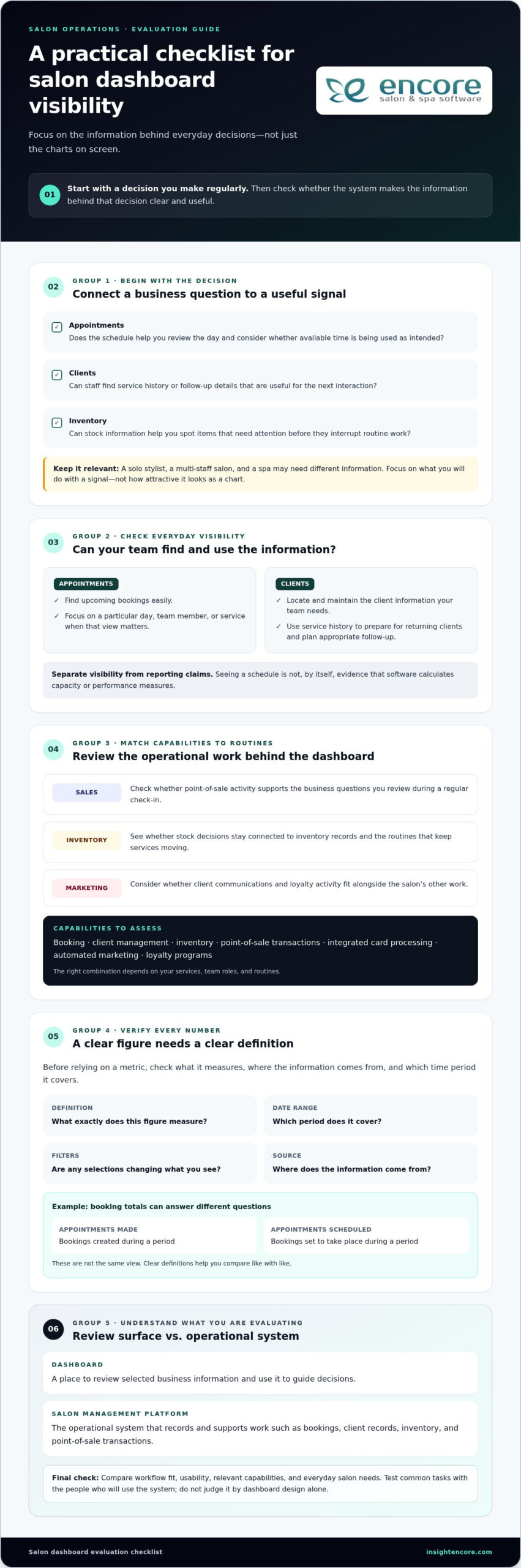
Categories
Uncategorized

How to Manage Multiple Salon Locations: A Practical 2026 Guide

What if adding another salon location didn’t mean adding another set of disconnected schedules, client records, and inventory headaches? Learning how to manage multiple salon locations starts with identifying where daily routines differ and deciding which differences affect the client experience or make it harder to understand how each salon is performing.

You need shared standards, but a single rigid rulebook can overlook what makes each local team and its clients unique. Decide which processes must stay consistent, give managers clear ownership of daily operations, and make key information easier to compare. This approach supports oversight while leaving teams room to serve clients well.

This guide covers practical ways to align core processes, coordinate schedules and client information, manage inventory, and review performance across locations. It also explains how connected booking, client management, inventory, and point-of-sale tools can reduce fragmented workflows. The goal is a repeatable approach that helps you spot differences, ask better questions, and support each location without managing every detail yourself.

Key Takeaways

  • Map how each salon currently handles daily work to see which processes align and where they differ.
  • To learn how to manage multiple salon locations, set shared standards for essential client-facing tasks while leaving room for local decisions.
  • Give each manager clear responsibility for team training and daily follow-through. Focus owner oversight on progress, recurring issues, and decisions that need escalation.
  • Roll out changes in stages. Use a pilot and a small set of relevant measures to learn what works before expanding.
  • Assess whether connected tools for booking, client records, inventory, payments, and other daily tasks can support your operating model across locations.

How to Manage Multiple Salon Locations Without Losing Operational Clarity

Managing multiple salons means coordinating people, processes, client experience, and performance across every site. Growth brings more than extra appointments and staff. It also raises questions about how work gets done, who owns each decision, and how you’ll recognize when a location needs support.

The practical answer to how to manage multiple salon locations is not to make every salon identical. Set shared expectations for essential work, then give managers clear authority to respond to local needs. This helps protect the client experience and makes differences in performance easier to interpret. Comparisons are useful only when every salon defines and records the information in the same way.

This approach can support different ownership structures. For example, a franchise is a particular business growth strategy with defined relationships between franchisors and franchisees. Whatever your structure, clear standards and decision rights help teams work together without relying on the owner to resolve every routine question.

What changes when a salon grows beyond one location?

At one salon, the owner can often spot a scheduling problem, explain checkout steps, or notice stock running low in person. Across locations, those informal check-ins become harder to maintain. One team might confirm appointments the same way each time, while another handles changes differently. Client records may be updated inconsistently, and stock counts may follow different routines.

Not every difference signals a problem. Appointment patterns may vary because clients, services, or local demand differ. The important task is to distinguish local variation from gaps in the process. If teams handle checkout records or inventory counts differently, comparisons may reflect inconsistent routines rather than actual business performance.

Which responsibilities should be clear from the start?

Make decision ownership visible before small issues start bouncing between teams. A simple responsibility guide can show who sets expectations, who handles day-to-day choices, and when an unresolved issue should be escalated.

  • Owner: Sets business priorities, approves core policies, and reviews performance across locations.
  • Central operations lead: Turns shared policies into practical procedures, supports managers, and tracks recurring issues across sites.
  • Location manager: Runs daily operations, coaches the local team, and makes decisions within agreed boundaries.
  • Frontline team: Follows shared steps for client-facing tasks and flags issues that can’t be resolved locally.

Define escalation paths with practical examples. A manager might resolve a routine scheduling exception locally, while a system-wide issue that keeps recurring goes to the operations lead. The owner can then focus on policy or resource decisions instead of being pulled into every daily adjustment.

How to Build Repeatable Processes Across Every Salon Location

Shared processes are easier to teach, follow, and improve. They also help clients receive dependable service, whether they book online, update their details, or pay at checkout. A useful multi-location standard sets a clear minimum, not a script for every interaction.

Build your process playbook in manageable steps:

  1. Map current workflows. Ask each location to describe how it handles booking, client records, checkout, and stock. Note the steps and where teams improvise or rely on individual knowledge.
  2. Select the standards. Agree on essential steps that should be consistent, especially those that affect clients or make information comparable. Leave room for local choices that don’t undermine those essentials.
  3. Assign owners. Name someone responsible for each process. For example, the operations lead can maintain the shared procedure while a location-level owner handles questions and feedback.
  4. Train the teams. Demonstrate the steps in context, then give staff a short checklist they can refer to during a shift.
  5. Review adoption. Observe the workflow, ask where it creates friction, and update the process when teams identify a practical improvement.

Keep procedures in a short, accessible playbook. Include each process’s purpose, steps, owner, and review date. The U.S. Chamber of Commerce offers guidance on creating Standard operating procedures, which can help you write usable instructions instead of lengthy documents that staff struggle to apply.

Which salon processes should be standardized first?

Start with appointment booking, client record handling, checkout, and inventory routines. These tasks connect the client experience with day-to-day business information, so inconsistent steps can lead to avoidable confusion. A shared opening and closing checklist can cover practical handoffs: reviewing the day’s appointments, noting stock that needs attention, and completing routine end-of-day records. Keep service conversations personal. Standardize the necessary administrative steps, not the stylist’s relationship with each client.

How can managers train teams to follow shared processes?

Use realistic examples. Show staff how to record a client update or complete checkout, then give them a chance to practise using the checklist. Each location should have a process owner who can answer questions and flag recurring obstacles. Managers can check adoption through coaching and workflow observations, not just by distributing a policy document. Their feedback can reveal whether a step is unclear, difficult to use, or ready for refinement.

As you define these routines, consider whether connected booking, client management, inventory, and point-of-sale tools can support the same workflow across sites. Explore Encore’s salon management tools to see how a shared system could fit your processes.

How to Balance Central Control and Local Flexibility Across Salons

Consistency doesn’t mean every salon has to operate identically. Set shared expectations for what protects the brand and makes performance comparable, then let managers adapt decisions that depend on local clients, schedules, and team needs. Clear boundaries give staff room to act without turning every choice into a head-office approval.

What should be decided centrally, and what can managers adapt?

Use the examples below as decisions to assess, not universal rules. The right split depends on your services, locations, and operating model.

Shared standards set centrally Choices managers may adapt
Brand-wide principles for presenting services and supporting clients How the team brings those principles to life in local conversations
Definitions for reports, such as what counts as a completed appointment Scheduling choices that respond to local appointment patterns
Core workflows for booking, client records, checkout, and inventory tracking Day-to-day team coordination and shift handoffs
Guidelines for local promotions and shared brand requirements Which locally relevant promotion to run, within those guidelines

For each flexible choice, clarify the boundary: what a manager can decide independently, what needs approval, and what information to record. If a location adjusts a routine to meet a local need, log the reason, decision owner, and review date. This makes flexibility visible and gives you a basis for deciding whether an exception should stay local, become a useful practice for other salons, or prompt an update to the shared process.

How can owners compare locations fairly?

Start with comparable information. Use the same metric definitions and reporting periods across salons, then interpret results in context rather than ranking teams by a single number. A difference in appointment volume, for example, may reflect staffing levels or appointment mix, not simply how well a location is managed. Local demand and operating context matter, too.

Staff utilization can help you understand how scheduled team time relates to appointments and service activity. Before comparing locations, define which time and activity the measure includes, and apply that definition consistently. Then look for patterns: does a result change alongside a different appointment mix, or does it persist across reporting periods? Consistent definitions make comparisons a starting point for useful questions, not a verdict on a manager.

This is a practical part of how to manage multiple salon locations: centralize the rules that create shared understanding, and let managers adapt within clear boundaries. Review logged exceptions alongside performance results so local learning informs decisions without quietly changing the process at each site.

How to Manage Multiple Salon Locations: A Practical 2026 Guide

How to Roll Out Multi-Location Salon Management Step by Step

A clear rollout gives staff time to understand a change, practise it, and share what needs adjustment before it reaches every location. Keep the process manageable: establish a baseline, test one workflow, learn from the pilot, and then expand.

How should a salon group prepare for a new operating process?

Before changing a routine, document how it works today. Note the systems teams use, handoffs between roles, differences between locations, and known bottlenecks. A booking workflow, for example, may look consistent on paper but involve different follow-up steps at each salon. Capture what staff actually do, including where they need to use their judgment.

Next, choose one process to pilot. Look for a workflow with a visible effect on clients or daily operations, but keep the change manageable enough for managers to support. Assign a rollout lead to coordinate instructions, training, questions, and follow-up. Before implementation, explain what’s changing, why it matters, what staff need to do differently, and how they can raise concerns.

How can owners know whether the rollout is working?

Set a baseline before the pilot so you have a fair point of comparison. Choose a small group of measures tied to the process, such as whether required booking steps are completed or whether checkout records are entered consistently. Define each measure clearly, use the same approach throughout the pilot, and compare results with the baseline rather than relying on impressions alone.

Adoption also depends on how the process works in practice. Schedule check-ins with the pilot manager and invite frontline team members to share confusion, extra steps, or client concerns. Keep a simple record of feedback, decisions, and process updates. If the workflow needs adjustment, make the change clear and update the shared instructions before expanding to other salons.

Once the pilot is working as intended, train the next location, name its process owner, and repeat the review. This staged approach to how to manage multiple salon locations builds on tested routines instead of asking every team to adapt to an untested change at once. For a related look at tools that can support shared salon workflows, explore Encore salon software.

See how Encore salon software supports daily workflows

How Salon Management Software Can Support Multiple Locations

Software can help put your operating model into everyday practice. The aim isn’t to add another tool for its own sake. It’s to connect key tasks, reduce repeated data entry, and make the information managers and owners use easier to work with. As you assess options, map each need to a tool, a user, and a routine.

Which software capabilities matter when managing several salons?

Start with workflows that affect clients and daily operations. Use this checklist to connect capabilities to practical needs:

  • Appointment booking: Consider how clients book and how staff review upcoming appointments and changes.
  • Client management: Identify which client details teams need to access and maintain throughout the client journey.
  • Inventory tracking: Map how teams record product movement and identify items that need attention.
  • Point-of-sale transactions: Review how checkout information is recorded and used in routine closeout work.
  • Integrated credit card processing: Consider whether connecting payment processing with checkout fits your payment workflow.
  • Marketing, loyalty, and gift cards: Decide which tools are relevant to your client communication and retention plans.

Encore Salon & Spa Software brings appointment booking, client management, inventory, and point-of-sale tools together. The platform also includes integrated credit card processing, automated marketing, loyalty programs, and gift cards. Match each capability to a process your team needs to perform, rather than adopting features without a clear operational purpose.

How can salon owners evaluate whether a platform fits their workflow?

Make the assessment specific. For each task, name who uses the tool, what information they need, and what should happen next. For example, trace a booking from the client’s first appointment request through team preparation and the completed visit. Then map checkout from the transaction to the records managers use in their work. This helps show where connected tools may reduce handoffs or duplicated work.

Consider managers’ and owners’ needs separately. Managers may need practical access to booking, client, inventory, and transaction information for daily decisions. Owners need consistent definitions and a usable way to review operations across the business. For payments, consider how integrated credit card processing fits into the salon’s checkout routine.

Use this checklist to assess how software could support how to manage multiple salon locations without assuming every location needs identical settings. Encore’s connected salon management tools bring booking, client records, inventory, and payments together to support established workflows.

Explore Encore salon software for your workflows

Build a Stronger, More Connected Salon Group

Knowing how to manage multiple salon locations comes down to creating clarity without limiting local teams. Set repeatable standards for essential processes, give managers clear decision-making responsibilities, and use consistent measures to understand how each location is doing. Roll out changes in stages, listen to staff feedback, and refine the approach as your salons grow.

The right tools can help bring those routines together. Encore combines online appointment booking, client management, inventory tracking, and point-of-sale transactions. Integrated credit card processing, automated marketing, loyalty programs, and gift cards can also support how you serve and retain clients. Map these capabilities to your operating needs and workflows.

Shared standards, thoughtful local flexibility, and connected operations give each team room to serve clients while helping you keep a clearer view of the whole business. Explore Encore’s salon management software to see how its tools can support your multi-location workflows.

Frequently Asked Questions

How do you manage multiple salon locations effectively?

Manage multiple salons effectively by clarifying responsibilities, documenting shared processes, and giving each location manager defined decision-making authority. Standardize essential workflows such as booking, client records, checkout, and inventory routines. Review the same operational measures across locations on a regular schedule. If one salon’s results differ, consider local demand, staffing, and workflow context before deciding what support or coaching may help.

What should be standardized across salon locations?

Standardize core processes that support a dependable client experience and reliable business records. These often include appointment handling, client record practices, checkout steps, inventory routines, and reporting definitions. Document the minimum expected process, name who owns it, and explain where managers can adapt. Set shared requirements without scripting every client interaction or local decision.

How can salon owners compare performance across multiple locations?

Compare locations using a small set of measures with consistent definitions and reporting periods. Depending on your goals, you might review appointment activity, service mix, or inventory movement. Interpret differences alongside staffing, local demand, and each salon’s operating context. A change in service mix, for example, could affect appointment activity. Use comparisons to ask questions and identify where managers need support, rather than treating a ranking as a complete explanation of performance.

How do you keep each salon location consistent without making it feel impersonal?

Keep administrative steps consistent while giving staff room to build genuine client relationships. Shared booking and checkout routines can make the experience familiar without requiring identical conversations or service choices. Be clear about which standards are essential and which decisions managers can adapt to local needs. Feedback from clients and salon teams can show where a process needs adjustment, helping you protect dependable service while preserving each location’s character.

What software do salon groups need to manage multiple locations?

Look for software that supports the workflows your salon group needs to coordinate, including appointment booking, client management, inventory tracking, and point-of-sale transactions. Integrated credit card processing, automated marketing, loyalty programs, and gift cards may also fit your needs. Map each requirement to the people who use it and the process it supports. Encore Salon & Spa Software brings these management capabilities together for beauty and wellness businesses.

How should a salon group roll out new processes across its locations?

Start by documenting current workflows, then choose one process for a manageable pilot. Assign a rollout owner, explain what’s changing and why, and give staff practical training. Set a review date before the pilot begins. Gather feedback from managers and frontline teams, document decisions, and update the process instructions. Once the workflow is clear and workable, expand it to other locations and share what you learned.

How often should salon owners review results from each location?

Choose a review rhythm that lets you respond at the pace your business requires, then apply the same reporting periods and metric definitions across locations. Regular check-ins can help owners and managers discuss emerging trends, operational barriers, and needed support. Avoid drawing conclusions from one unusual period without context. Pair the numbers with manager feedback so each review reflects measurable activity and what’s happening in the salon.

Disclaimer

This article is general in nature and may contain errors, please verify all claims with your sales rep
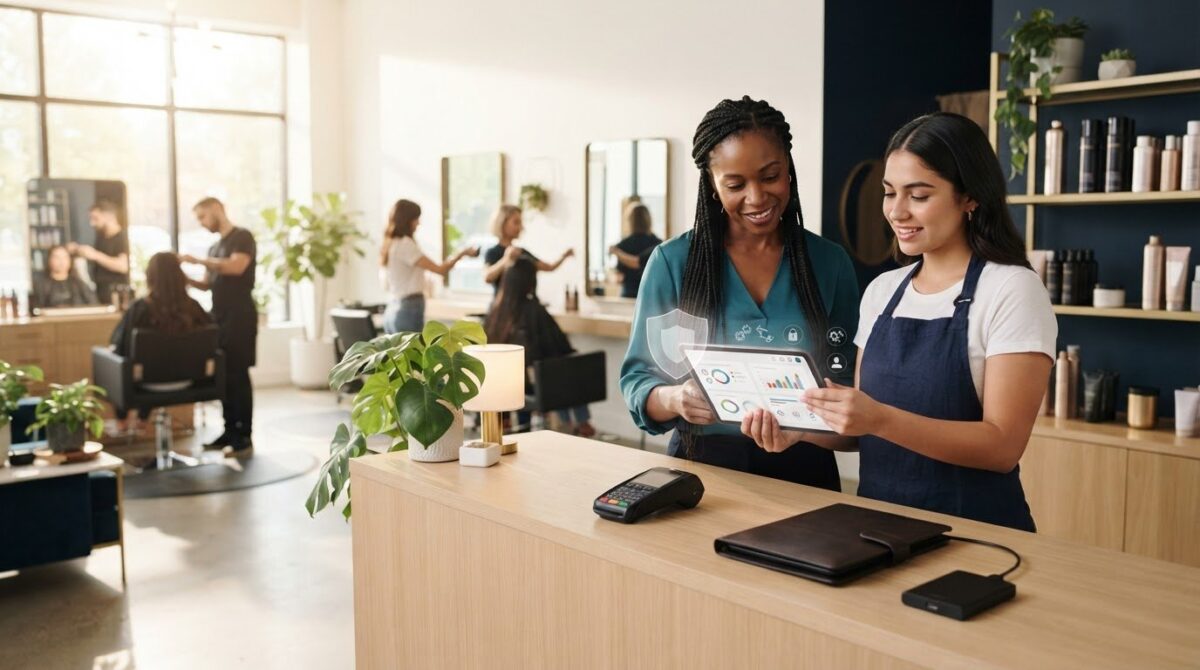
Categories
Uncategorized

How to Increase Salon Profit Margin: The 2026 Operational Checklist

What if the reason your bank account feels empty isn’t a lack of clients, but a series of invisible leaks in your daily operations? It’s a frustrating reality for many owners in 2026. You see a packed appointment book, yet rising labor costs, high no-show rates, and product waste keep your actual take-home pay stagnant. We understand how exhausting it feels to work this hard without seeing the financial reward you deserve. To truly master how to increase salon profit margin, you need to move beyond simple revenue growth and start plugging those operational gaps.

We’re here to help you shift from being busy to being profitable. You’ll discover how to identify which services are actually making you money and how to stop the backbar bleed of wasted supplies. We’ll also look at how automating those tedious, time-consuming tasks can drastically lower your labor expenses. This guide provides a comprehensive operational checklist designed to protect your bottom line and give you back your peace of mind. By the end, you’ll have a clear roadmap to turn your salon into a high-efficiency, high-profit business.

Key Takeaways

  • Understand the difference between gross and net profit margins to set realistic 2026 targets for your specific business model.
  • Identify and stop “invisible” profit leaks like backbar over-pouring that quietly erode your bottom line.
  • Discover how to increase salon profit margin by auditing your service menu to prioritize high-margin treatments over high-effort tasks.
  • Reclaim hours of administrative time and reduce labor costs by automating your booking and marketing workflows.
  • Establish a sustainable profit culture by tracking the specific weekly metrics that move the needle on your financial growth.

Understanding Salon Profit Margins: 2026 Benchmarks

Many owners focus on the wrong number. They see a busy shop and assume success. But revenue just tells you how much money passed through your hands. Profit tells you how much stayed there. Profit margin is the percentage of revenue remaining after all operating costs are paid. In our current economic climate, “revenue is vanity, profit is sanity.” You can have a million-dollar salon and still struggle if your margins are thin. Learning how to increase salon profit margin starts with a clear-eyed look at your current health.

There are two levels to watch. Gross margin measures the efficiency of a specific service. It subtracts the cost of the stylist and the product from the ticket price. Net profit margin is the big picture. It’s the final amount left after you’ve paid the landlord, the tax man, and the electric bill. If you don’t know the difference, you might be busy doing work that actually costs you money.

The Net Profit Formula for Salon Owners

Calculating your profit doesn’t require a degree in finance. Use this simple formula: (Total Revenue – Total Expenses) / Total Revenue. This gives you a percentage that represents your business efficiency. To get an accurate number, you must categorize your spending correctly. Fixed costs stay the same regardless of how many clients you see. This includes your rent, insurance, and utilities. Variable costs move with your volume. These include backbar products, retail inventory, and commissions.

In 2026, three specific “margin killers” are draining bank accounts. Labor costs are rising as the competition for top talent increases. Software bloat is a sneaky second; paying for multiple disconnected apps for booking, marketing, and inventory adds up fast. Finally, product inflation means your color lines and shampoos likely cost significantly more than they did two years ago. Identifying these leaks is the first step toward fixing them. Learning how to manage salon cash flow effectively alongside your margin strategy ensures that the money you save from plugging leaks actually stays in your account.

Margin Benchmarks by Business Model

Profitability looks different depending on how you run your shop. Traditional commission-based hair salons usually aim for a 10-15% net margin. Med spas often see higher margins due to equipment-led services, though their insurance and compliance costs are much steeper. Tattoo and nail studios vary wildly based on talent, but they generally fall within the 12-18% range.

If you manage a booth rental model, your margins might look higher, often 20-30%. This is because your overhead is lower, but remember that the responsibility for marketing and growth shifts to the individual renter. Using Encore Salon Software helps you track these specific benchmarks in real-time. Instead of waiting for your accountant to deliver bad news, you can see exactly where you stand every Monday morning. Understanding these numbers gives you the professional confidence to make necessary changes before a small leak becomes a flood. Pairing this real-time visibility with a salon financial forecasting template allows you to project future performance and plan proactively rather than reacting to surprises.

Identifying and Plugging Salon “Profit Leaks”

Revenue growth is exciting, but it’s often a mask for internal inefficiencies. If your salon is a bucket, you can’t fill it if the bottom is full of holes. Small losses compound. Identifying where your money disappears daily is the most practical way to understand how to increase salon profit margin. These “profit leaks” are often invisible until you start looking for them. From the backbar to the front desk, tiny drains on your resources turn into a significant financial deficit by the end of the year.

Consider your backbar first. Many stylists over-pour color or use twice as much shampoo as a service requires. This invisible waste typically eats 3-5% of your gross margin. It might seem like a few cents per service, but it adds up to hundreds of dollars in literal trash every month. The Invisible Waste Checklist includes:

  • Backbar over-pouring in color and chemical services.
  • Retail shrinkage from unrecorded sales or theft.
  • Expired inventory taking up valuable shelf space.
  • Staff downtime due to poor scheduling or late arrivals.

Staff downtime is a particularly silent killer. If your therapists have a 50% utilization rate, you’re paying for an hour of labor but only generating revenue for 30 minutes. This is a financial emergency. It demands an immediate shift in how you manage your team’s time and schedule. Whether you run a hair salon or a barbershop, the principles of tight scheduling and operational accountability are universal — the barbershop management tips for new owners in our 2026 success guide offer a practical framework for building that discipline from day one.

Inventory Control and Backbar Management

Protecting your supplies requires more than just a locked cabinet. You need a robust inventory management system to track exactly what’s being used versus what’s being sold. Implementing a weigh-and-track policy for chemical services is a game-changer. By weighing color bowls before and after application, you eliminate the guesswork that leads to over-pouring. This level of transparency also reduces “shrinkage” and ensures you aren’t holding onto expired products that represent dead capital on your shelves. You’ll stop paying for product that never reaches a client’s hair.

Eliminating the No-Show Margin Drain

A no-show is more than just a missed appointment. It represents a 100% loss of revenue for that time slot while your fixed costs remain unchanged. This is a primary factor when considering how to increase salon profit margin. In 2026, relying on hope is not a business strategy. Automated appointment reminders are essential for keeping your calendar full. They respect the client’s time and protect your therapists’ productivity. You might also consider the psychology of deposits. A small booking fee, even $20, creates a commitment that significantly lowers no-show rates. If you’re ready to secure your schedule, you can explore how automated tools protect your time.

High-Margin Service Engineering & Retail Strategy

Not all services are created equal. Some treatments fill your chair but drain your resources; others take minutes and carry massive margins. To master how to increase salon profit margin, you must audit your menu with clinical precision. Identify your “Stars” and your “Dogs.” Stars are high-margin services that are easy to perform. Dogs are low-margin tasks that require heavy effort or expensive supplies. If a service takes three hours but barely covers the stylist’s commission and product costs, it might be time to let it go.

The secret to immediate growth often lies in the “Add-on.” These are 5-minute treatments, like deep conditioning masks or scalp massages, that provide up to 90% profit margins. They require almost no extra labor but significantly increase the average ticket price. When you engineer your menu to encourage these small wins, your daily profitability climbs without adding more hours to the schedule. It’s about working smarter, not just filling more slots.

Cash flow is the lifeblood of your business. Developing a proactive gift card strategy is one of the fastest ways to improve immediate liquidity. Gift cards provide upfront revenue and often lead to new client acquisitions. They also tend to result in higher spending per visit, as clients feel like they’re “treating” themselves with “free” money. This simple shift in focus helps stabilize your bank account during slower months. Pairing this approach with a solid understanding of salon cash flow management ensures that seasonal revenue spikes are planned for and protected rather than spent impulsively.

Menu Engineering for Maximum Profit

Start by calculating the “Cost per Minute” for every stylist in your building. Factor in their wages, the utilities used during their shift, and the average cost of backbar supplies. If a service doesn’t clear this baseline with a healthy buffer, it’s a liability. Specialized software for nail salons or hair studios can help you track specific art-supply or color costs with total accuracy. You can’t fix what you don’t measure. Dropping services with a low return on investment frees up time for more profitable bookings.

The 20% Retail Rule

Retail should account for at least 20% of your total revenue. This is pure margin that doesn’t require additional chair time. The key is training your staff to view retail as “prescribing” rather than “selling.” If a client leaves without the right products, they can’t maintain the look you’ve created. It’s a service to their hair, not a sales pitch. Link retail sales to your commission structures. When your team sees how retail growth boosts their own paychecks, they’ll become your most vocal advocates for profit growth. This creates a win-win culture where everyone is invested in the salon’s financial health.

How to Increase Salon Profit Margin: The 2026 Operational Checklist

Operational Efficiency: Automation as a Margin Protector

Labor is often the single largest expense on your profit and loss statement. If you’re paying a receptionist to answer phones and manage a paper book, you’re missing a massive opportunity to protect your bottom line. Automation isn’t about replacing the human touch; it’s about removing the manual friction that eats your time. Implementing an online booking module can save your team 10 or more hours of administrative labor every week. That’s time they could spend on the floor or assisting clients, directly impacting how to increase salon profit margin through reduced overhead.

Beyond the front desk, automated marketing acts as a silent salesperson. Instead of manual outreach, your system identifies gaps in the calendar and sends personalized offers to clients who are due for a visit. This fills empty chairs without requiring a single minute of staff time. Additionally, moving toward a “paperless” model in 2026 reduces physical overhead. You save on the cost of supplies, storage, and the inevitable time lost searching for misplaced client files. Every minute saved is a cent earned back for your business.

Integrated payments also play a critical role in efficiency. When your POS and booking system talk to each other, you reduce human errors during checkout. This ensures you’re capturing every dollar and managing credit card processing fees effectively. It’s a professional, seamless experience that builds trust with your clients while protecting your revenue. As you digitize more of your operations, following salon client data security best practices becomes equally important to ensure that the personal and payment information flowing through your integrated systems stays fully protected.

Streamline your salon operations today

Optimizing Staff Utilization Rates

Staff utilization is the percentage of available hours actually spent in a billable service. If your team is only billable 50% of the time, your margins are in danger. You can use a performance dashboard to spot these schedule gaps before they become a problem. Once you see a pattern of downtime, you can deploy “last-minute” automated marketing campaigns to fill those empty slots. This turns wasted time into profitable appointments with minimal effort.

Streamlining the Checkout Process

A slow, clunky checkout process leads to missed retail opportunities. If a client has to wait five minutes to pay, they won’t want to browse your product shelves. Integrated POS systems are especially beneficial for tattoo studios and barber shops where quick, accurate transactions are essential. These systems automate commission and tip calculations, removing the risk of “human error” that can lead to overpaying or frustrating your staff. A fast checkout keeps the client happy and ensures your financial data is always precise.

Building a Sustainable Profit Culture with Encore

Transitioning from a busy salon to a profitable one requires a fundamental shift in your daily mindset. You’ve likely spent years focusing on filling chairs, but now it’s time to focus on what actually stays in the bank. A sustainable profit culture starts with transparency and a clear understanding of how to increase salon profit margin. This isn’t a one-time event; it’s a commitment to checking the pulse of your business every single week. Monitoring your net margin, retail-to-service ratio, and staff utilization rates allows you to make corrections before a small dip becomes a financial crisis.

Sharing these financial goals with your team doesn’t have to create friction. In fact, it often does the opposite. When you frame profitability as “business health” and “job security,” your staff becomes more invested in the results. A profitable salon can afford better education, newer equipment, and a more stable work environment. It creates a win-win scenario where everyone benefits from efficiency. While you build this culture, take a hard look at your current software stack. Many owners pay for multiple apps that overlap in features. Auditing for this waste and consolidating your tools can instantly reclaim hundreds of dollars in monthly overhead.

Data-Driven Decision Making

Using Encore Salon Software reporting removes the guesswork from your management style. You can see your true net margin at the click of a button, rather than waiting for an accountant’s end-of-year report. This data helps you identify your top-performing staff members and those who might need extra support or training. If a specific stylist has a low retail percentage, you can provide targeted coaching to help them grow. Setting specific “Margin Goals” for the next quarter gives your entire team a target to hit, turning abstract numbers into a shared mission. Complement this real-time reporting with a structured salon financial forecasting template to translate today’s data into confident projections for the months ahead.

Your 2026 Profit Growth Roadmap

Massive year-over-year gains are rarely the result of one giant change. They come from consistent, small tweaks to your operations. Use a 30-day checklist to keep yourself on track: spend the first week auditing your menu, the second week implementing backbar tracking, the third week setting up automated marketing, and the final week training your team on retail prescriptions. This methodical approach ensures you aren’t overwhelmed while making significant progress. If you’re ready to take control of your financial future, view Encore pricing and start protecting your margins today.

Take Control of Your Financial Future

Success in 2026 isn’t just about how many clients walk through your door. It’s about what stays. By plugging invisible leaks in your backbar and using automation to cut labor costs, you’ve mastered the basics of how to increase salon profit margin. These small operational shifts create the foundation for a business that truly rewards your hard work. You’ve built a beautiful brand; now it’s time to ensure it provides the financial freedom you deserve.

We’ve supported beauty professionals as a dedicated partner since 1991. Whether you need integrated credit card processing or precise inventory tracking, our specialized solutions are built for your specific niche. We’re here to help you move from feeling overwhelmed to feeling in total control of your bottom line. Our tools act as the silent partner that watches your metrics so you can focus on your craft. Protecting your clients’ personal and payment data is equally part of that commitment — reviewing the latest salon client data security best practices ensures that the trust you’ve built with every client is never put at risk.

Ready to see your true profit? Explore Encore Salon Software today.

Take that first step toward a more profitable future today. We’re ready to help you grow and thrive.

Frequently Asked Questions

What is a good profit margin for a hair salon in 2026?

A healthy net profit margin for traditional hair salons in 2026 typically falls between 10% and 15%. If you’re operating a booth rental model, you might see higher margins between 20% and 30% because your overhead is significantly lower. These benchmarks help you understand where your business stands compared to industry standards. Aiming for these numbers ensures you have enough capital to reinvest in your team and your facility’s long-term growth.

How do I calculate my salon’s net profit margin?

You can calculate your net profit margin by subtracting your total expenses from your total revenue, then dividing that result by the total revenue. This gives you a percentage that reflects your overall business efficiency. It’s essential to include every cost, from fixed rent and insurance to variable expenses like backbar supplies and commissions. Tracking this number monthly allows you to see exactly how your operational changes are impacting your actual take-home pay.

Will increasing my prices hurt my salon’s profit margin in the long run?

Increasing your prices won’t necessarily hurt your margin if you focus on delivering high-value, high-margin services. In fact, strategic price adjustments are often necessary to keep up with rising product inflation and labor costs. The key is to communicate the value to your clients and ensure your “Star” services remain profitable. If you provide a superior experience, your loyal clients will understand the need for a professional rate that reflects your expertise.

How can salon software help increase my profit margin?

Salon software provides the tools you need for how to increase salon profit margin by automating time-consuming administrative tasks. By using an online booking module, you can save hours of receptionist labor every week. Integrated inventory management also prevents costly product waste by tracking exactly what your stylists use. These efficiencies protect your bottom line from the silent leaks that often go unnoticed in a busy, manual shop environment.

What are the biggest expenses for a salon business?

Labor remains the largest expense for most salon owners, often accounting for a significant portion of total revenue. Rent and utilities are the primary fixed costs, while product inventory and software bloat from multiple disconnected apps are the main variable drains. In 2026, product inflation has also become a major factor. Identifying these high-cost areas is the first step toward managing them more effectively and protecting your business’s financial health.

How can I reduce my salon’s product waste?

You can reduce product waste by implementing a strict weigh-and-track policy for all chemical services. Using an inventory management system allows you to see exactly how much color or treatment product is used versus what was billed. This transparency discourages over-pouring and ensures you aren’t throwing money into the trash. Training your staff to view backbar supplies as a shared resource helps build a culture of accountability and financial awareness.

Is it better to have more clients or higher-paying clients for better margins?

Higher-paying clients who book high-margin services are generally better for your bottom line than a high volume of low-profit appointments. Focus on “Star” services that offer a high return for the time and effort required. Encouraging small, high-margin add-ons can also boost your average ticket price without adding significant labor time. Efficiency is the key to mastering how to increase salon profit margin while maintaining a sustainable workload for your team.

How does staff utilization affect my bottom line?

Staff utilization directly impacts your profitability because it measures the percentage of available hours your team spends in billable services. If your stylists are only billable 50% of the time, you’re paying for labor that isn’t generating revenue. This is a common profit leak that demands better scheduling and automated marketing to fill gaps. Improving this rate ensures you’re getting the best possible return on your largest investment: your people.

Disclaimer

This article is general in nature and may contain errors, please verify all claims with your sales rep
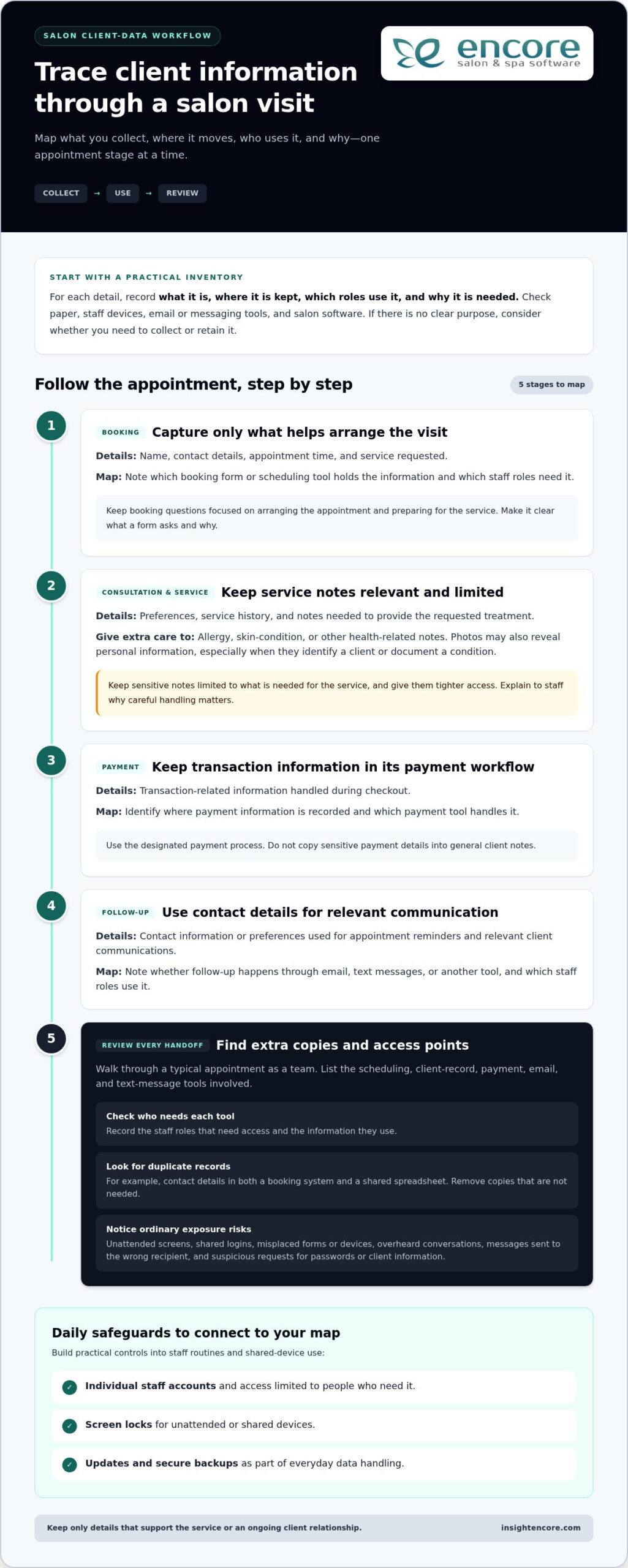
Categories
Uncategorized

The Complete Guide to Managing Salon Inventory with a Spreadsheet in 2026

Imagine it’s 8:00 PM on a Sunday. Instead of unwinding, you’re crouched in the backroom, counting half-empty bottles of developer while your coffee goes cold. It’s a familiar scene for owners who feel buried under manual stock takes, yet managing salon inventory with a spreadsheet remains a reliable first step toward reclaiming your time and preventing mid-service shortages.

We understand how draining it is to juggle client expectations while worrying about shrinkage or missing retail numbers. You deserve a system that provides peace of mind and professional confidence. This guide is your roadmap to building a professional tracking system from scratch, setting up automatic low stock alerts, and streamlining your entire ordering process.

We’ll walk you through the essential steps to maintain your data and show you how to get a clear view of your total stock value. Finally, we’ll help you recognize the signs that your growing business is ready to graduate from manual entries to the ease of full salon automation.

Key Takeaways

  • Learn how to set up a logical framework in Google Sheets or Excel that turns a cluttered list into a functional management tool.
  • Discover the specific formulas needed for managing salon inventory with a spreadsheet, including conditional formatting for instant low-stock alerts.
  • Master the “First In, First Out” (FIFO) method and audit routines to ensure your stock levels are always accurate and products never expire.
  • Identify the hidden costs of manual tracking and learn how simple human errors can lead to expensive ordering mistakes.
  • Recognize the clear signals that your salon has outgrown manual sheets and is ready for the efficiency of an integrated inventory management system.

Building Your Salon Inventory Spreadsheet: The Essential Framework

Starting the journey of managing salon inventory with a spreadsheet can feel overwhelming, but it’s the first step toward total control. Without a structured layout, your data is just a digital pile of notes. A professional framework turns that list into a tool that protects your profit margins and prevents mid-service panic. You need a system that grows with your salon, not one that breaks the moment you add a new color line.

Your first decision is where your data will live. Google Sheets is a brilliant choice for collaboration. It allows your team to update stock levels from their phones in real-time. If you prefer working offline or need heavy-duty data processing, Excel remains the gold standard. Whichever you choose, stick to it. Consistency prevents the “which version is the newest?” headache that plagues many small businesses.

Organization relies on a golden rule for naming conventions: Brand, Line, Product, and Size. Instead of writing “Conditioner” or “Blue bottle,” use “Redken, All Soft, Conditioner, 1000ml.” This precision makes it impossible to order the wrong SKU. It also helps when you separate your Master List from your Daily Log. Your Master List acts as your permanent library, while the Daily Log tracks the actual movement of products in and out of the cabinet.

The 7 Non-Negotiable Columns Every Salon Needs

To keep your records accurate, every item needs specific data points. These columns provide the context your business needs for tax time and insurance purposes:

  • SKU/Barcode: This is the unique DNA of the product.
  • Product Category: This helps you filter your view instantly.
  • Minimum Stock Level (Par Level): This is your “danger zone” threshold. When you hit this number, it’s time to reorder.
  • Unit of Measure: Are you tracking by the tube, the ounce, or the bottle? Be specific to avoid counting errors.
  • Current Quantity: Your live count on the shelf.
  • Cost per Unit: Essential for calculating your total business value.
  • Supplier Name: Who do you call when the shelf is empty?

Categorizing for Success: Backbar vs. Retail

One of the biggest mistakes in managing salon inventory with a spreadsheet is mixing backbar and retail items. Backbar products are the tools of your trade, like developers and shampoos used at the sink. These are business expenses. Retail products are inventory meant for sale to clients, representing potential revenue.

Mixing these two categories leads to accounting nightmares. You need to know exactly how much stock is tied up in service costs versus retail profit. Keeping them separate allows you to track which side of your business is more efficient. It also ensures your insurance coverage reflects the true value of your sellable goods.

Advanced Tracking: Formulas and Thresholds for Stock Control

Managing salon inventory with a spreadsheet becomes truly powerful when you stop treating it like a static list and start using it as a diagnostic tool. By adding simple formulas, you transform rows of data into a live command center. This shift allows you to make decisions based on facts rather than gut feelings. It’s the difference between hoping you have enough color and knowing exactly when the next shipment needs to arrive.

Visual cues are your best friend during a busy shift. You can use conditional formatting to make your life easier. Set a rule where a cell turns bright red if the “Current Quantity” falls below your “Minimum Stock Level.” This visual “red alert” means you don’t have to scan every line to know what’s missing. You can also add an “Order Trigger” column. Use a simple IF statement to display “Yes” or “No” based on your stock levels. This creates an automatic shopping list for your weekly supplier run.

Tracking usage rates is the next level of professional management. If you record the date you opened a gallon of shampoo and the date it finished, you’ll learn exactly how long your supplies last. This data helps you predict future costs with pinpoint accuracy. If you find yourself spending more time fixing formulas than styling hair, exploring an integrated inventory management system might be the relief you need.

Calculating Inventory Valuation for Tax Season

Your accountant needs to know the exact wholesale value of your shelves, not the potential retail price. Wholesale cost is what you paid; MSRP is what the customer pays. Keeping these distinct ensures your tax filings are accurate and your insurance coverage is sufficient. You can calculate your total asset value instantly by using a SUMPRODUCT formula to multiply the quantity of every item by its individual wholesale cost. This single number represents the cash currently tied up in your stockroom.

Setting Accurate Par Levels (Minimum Stock)

Finding your “Minimum Stock Level” isn’t a one-time task. You must consider shipping times, your weekly service volume, and seasonal peaks. While managing salon inventory with a spreadsheet offers a clear view of your current situation, setting accurate par levels ensures you never run out of critical supplies. Avoid the “Overstock Trap” by remembering that too much inventory is just cash sitting on a shelf. Adjust your levels before the holiday rush to ensure you have enough color for every guest without cluttering your backroom.

The Spreadsheet Trap: Why Manual Tracking Often Fails Growing Salons

While managing salon inventory with a spreadsheet is a great starting point, it eventually becomes a bottleneck. Many owners fall into the “Spreadsheet Trap” without realizing how much it actually costs them. You might think you’re saving money by avoiding software fees, but the hidden expenses tell a different story. If you’re spending your Sunday nights manually counting bottles, you’re paying for that time with your own energy and business growth.

Consider the hourly rate of the person managing the file. If a manager spends just three hours a week on manual entry, that’s over 150 hours a year. That’s time that could be spent training staff or improving the client experience. Then there’s the risk of human error. A single mistyped digit can turn a small restock into a $500 ordering mistake. These errors are easy to make when you’re tired and staring at a grid of tiny numbers.

The biggest hurdle is the lack of POS integration. Your spreadsheet is a silent observer. It doesn’t know when a stylist uses a tube of color or when a client buys a retail bottle. This disconnect leads to “inventory ghosts” where your sheet says you have stock that isn’t actually on the shelf. Security is another concern. One accidental click or a disgruntled employee can delete months of data in seconds, leaving you with no backup and a lot of frustration.

Spreadsheet vs. Integrated Inventory Software

The difference between manual sheets and professional software comes down to speed and accuracy. Software provides real-time updates. The moment a sale is made, the stock is deducted. You don’t have to wait until the end of the week to see where you stand. Professional systems also handle automated ordering. Instead of typing out a list, the software generates purchase orders based on your par levels. It also builds staff accountability. You can track exactly which products are being used by which stylist, removing the guesswork from your backbar costs.

Signs Your Salon Has Outgrown Excel

It’s okay to move on when a system no longer serves you. You’ll know it’s time to upgrade when you see these red flags:

  • Your team has grown to more than 3 stylists sharing the same supplies.
  • You spend more than 2 hours every week updating stock levels manually.
  • Discrepancies between your sheet and your shelves are becoming a regular occurrence.
  • You feel anxious about the accuracy of your ordering list.

When you reach this stage, transitioning to Encore’s Inventory Management System provides the relief you’ve been looking for. It turns inventory from a stressful chore into a seamless part of your daily routine. You can finally stop counting bottles and start focusing on the creative work you love.

The Complete Guide to Managing Salon Inventory with a Spreadsheet in 2026

Best Practices for Maintaining Inventory Accuracy Every Week

Your spreadsheet is a living document. It needs regular attention to stay relevant. Managing salon inventory with a spreadsheet requires more than just a good template; it demands a consistent routine. Without regular updates, your data becomes a relic of the past, leading to the very stockouts you’re trying to avoid. Establishing a rhythm ensures your numbers reflect the reality of your shelves.

One of the most effective ways to protect your investment is the “First In, First Out” (FIFO) method. When new shipments arrive, place them behind the existing bottles. This simple habit prevents products from expiring at the back of the shelf. You should also create a clear process for handling shrinkage. Whether it’s a spilled bottle of developer or a damaged retail box, every loss must be documented. If it isn’t in the sheet, your stock value will never be accurate.

Success depends on your team. Make inventory management a part of your salon culture. When stylists understand that accurate tracking leads to better supplies and fewer headaches, they’re more likely to help. Encourage them to log every use immediately. This shared responsibility lightens your load and builds a sense of professional pride across the floor. It’s about working together to ensure nobody ever runs out of the tools they need mid-service.

The Sunday Night Audit: A Step-by-Step Checklist

A weekly audit is the heartbeat of a healthy salon. Start by comparing your physical count to what’s listed on your sheet. If there’s a discrepancy, ask why. Did someone forget to log a sale? Was there an unrecorded spill? Use this time to update wholesale prices if your suppliers have made changes. Finally, take five minutes to organize your stockroom. A tidy space makes next week’s count significantly faster and less stressful.

Inventory for Booth Renters and Independent Stylists

If you’re a chair renter or a solo professional, your needs are slightly different. You must keep your personal stock strictly separate from any salon-provided backbar. This clarity is essential for your own tax reporting. Use a simplified version of your spreadsheet to track your specific expenses. It ensures you maximize your deductions and stay organized without the complexity of a multi-chair operation. Managing your own supplies is the first step toward true business independence.

Streamline your inventory tracking today

Scaling Beyond the Grid: Moving to Integrated Salon Software

Growth brings new challenges that require more than just a static list. Managing salon inventory with a spreadsheet is a solid foundation, but as your business gains momentum, the effort required to maintain that sheet pulls you away from your clients. Scaling beyond the grid means choosing a system that works for you, rather than the other way around. Automation turns inventory into a profit center by giving you back your most valuable asset: time. It’s about moving from a state of potential stress to a feeling of organized control.

The real magic happens when your stockroom talks to your front desk. By using Integrated Credit Card Processing, every retail sale automatically updates your inventory levels. There’s no manual tally at the end of the day. This seamless flow reduces human error and ensures your records are always audit-ready. When you move beyond managing salon inventory with a spreadsheet, you unlock the power of “One-Click” reporting for instant business health checks. Your accountant will appreciate the clean data, and your staff will appreciate the fairness and transparency of a professional system.

The Encore Advantage: Inventory That Manages Itself

The Encore system is designed to remove industry frustrations and act as your dedicated mentor. It features automatic deductions from every service and retail sale, so you’re never guessing what’s left on the shelf. You can generate purchase orders with a single click based on your custom par levels, ensuring you never run out of backbar essentials mid-service. Plus, mobile access means you can check your stock from home or the distributor’s aisle. You’ll have the peace of mind that comes with knowing exactly where your business stands at all times.

  • Automatic deductions ensure your stock levels are always live.
  • One-click reports show you which products are actually driving profit.
  • Mobile tools let you manage your stockroom without being tied to a desk.

Transitioning from Sheets to Encore

Moving from a manual system doesn’t have to be a daunting task. We’ve made the process simple and encouraging for users of all technical levels. You can easily import your existing spreadsheet data to get started quickly, preserving all the hard work you’ve already done. We’ll help you set up barcodes for lightning-fast scanning, turning a three-hour Sunday night stock take into a twenty-minute walk-through. It’s time to stop counting bottles and start focusing on the creative work that inspired you to open your salon. Ready to stop counting and start growing? Discover Encore Salon Software today.

Take Control of Your Salon’s Future

Managing salon inventory with a spreadsheet is a commendable first step toward professional organization. You’ve learned how to build a structured framework and use formulas to prevent stockouts. These tools provide the initial clarity needed to protect your margins. However, as your business grows, the hours spent on manual audits can become a heavy burden that pulls you away from your creative passion and your clients.

Since 1991, we’ve helped beauty professionals navigate these transitions with confidence. Whether you run a spa, a tattoo studio, or a busy hair salon, our specialized modules are designed to replace frustration with flow. Our integrated POS and inventory features ensure that every sale is tracked automatically. This removes the “late-night audit” from your schedule and gives you the reliable data you need for your accountant and your own peace of mind.

Ready to ditch the spreadsheet? Explore Encore's automated inventory tracking.

You deserve a system that works as hard as you do. Empower your team and protect your profits by moving beyond manual entries. We’re here to support you every step of the way as you scale your business toward its full potential.

Frequently Asked Questions

Is it better to use Google Sheets or Excel for salon inventory?

Google Sheets is generally better for real-time collaboration among multiple staff members, while Excel offers superior offline capabilities and advanced data processing for larger datasets. Most modern salons prefer Sheets because stylists can update stock levels from their phones as they use products. This accessibility reduces the delay between usage and recording, which is a common failure point when managing salon inventory with a spreadsheet. Choose the platform that fits your team’s daily workflow.

How often should I do a full physical inventory count in my salon?

You should perform a full physical inventory count at least once a month, though high-volume salons often benefit from weekly spot checks on popular items. Regular counts help you identify shrinkage or recording errors before they become expensive problems. Consistency is the key to maintaining a reliable system. By setting a recurring “Stock Take” appointment in your calendar, you ensure that your digital records always reflect the actual bottles sitting on your backroom shelves.

What is a ‘Par Level’ and how do I calculate it for my hair color?

A par level is the minimum amount of a specific product you must have on hand to meet demand until your next shipment arrives. To calculate it for hair color, add your average weekly usage to the number of days it takes for a supplier to deliver your order. If you use four tubes of a specific shade per week and shipping takes seven days, your par level should be at least five tubes to ensure safety.

Can a spreadsheet automatically alert me when I’m low on stock?

A spreadsheet cannot send you an email or push notification like professional software, but you can use conditional formatting to create visual alerts. By setting a rule that turns a cell bright red when the current quantity drops below your par level, you create a clear signal for reordering. While this requires you to manually check the file, it provides a much-needed visual shortcut during the busy rush of your weekly ordering process.

What should I do if my spreadsheet count doesn’t match my physical stock?

When your numbers don’t match, you must first document the discrepancy as “shrinkage” and then investigate the cause to prevent it from happening again. Common reasons include unrecorded spills, forgotten retail sales, or staff members pulling backbar supplies without logging them. Use these moments as a teaching opportunity for your team. Updating the sheet immediately to reflect the physical reality ensures your ordering list remains accurate while you work on improving your salon’s tracking habits.

How do I track professional backbar use vs. retail sales in one sheet?

The most effective method is to use two separate tabs within your workbook or a dedicated “Category” column to filter your view. Since backbar items are business expenses and retail products are sellable assets, mixing them complicates your accounting. Managing salon inventory with a spreadsheet works best when you clearly label each item. This separation allows you to track service costs accurately while monitoring which retail lines are generating the most profit for your business.

Is there a way to scan barcodes into a spreadsheet?

Yes, you can scan barcodes into a spreadsheet using a USB barcode scanner or a mobile app that syncs with your digital files. When you click on a cell and scan a product, the SKU number appears instantly. While this speeds up the initial setup of your master list, remember that a spreadsheet still won’t automatically deduct that item from your total when a stylist uses it. It remains a manual entry process at its core.

At what point should I switch from a spreadsheet to salon management software?

You should consider upgrading to professional salon software when you’re spending more than two hours a week on manual data entry or if you have more than three stylists. If you consistently find that your manual sheet is out of sync with your actual stock, it’s a sign your business has outgrown the grid. Transitioning to an integrated system like Encore provides the automation needed to turn inventory management from a chore into a seamless profit center.

Disclaimer

This article is general in nature and may contain errors, please verify all claims with your sales rep

Categories
Uncategorized

Software for High-End Nail Salons: A 2026 Case Study in Luxury Operations

Imagine walking into your boutique where the air smells of lavender, but your front desk is a frantic mess of "no-show" notifications for two-hour appointments. You’ve built a luxury brand, yet your digital presence feels like a discount shop. It’s frustrating when elite clients expect a concierge experience but meet a generic booking page that doesn’t match your aesthetic. Finding the right software for high-end nail salons isn’t just about scheduling. It’s about mirroring the excellence of your artistry in every digital touchpoint. You’ve created a sanctuary, and your management system should reflect that same level of care.

We know that running a top-tier studio involves more than just beautiful manicures. It’s about protecting your revenue from late cancellations and tracking every bottle of your premium gel systems. This 2026 case study reveals how specialized tools transform operational chaos into a seamless, high-revenue flow. You’ll discover how to automate personalized client communication, master your high-end inventory, and use detailed reporting to accurately reward your technicians. Let’s look at how to turn your boutique into a truly automated luxury experience.

Key Takeaways

  • Learn why a concierge-first approach is vital for high-net-worth clients and how it differs from basic transactional booking.
  • See how specialized software for high-end nail salons helped one premium studio eliminate scheduling chaos and scale past $1M in revenue.
  • Discover how to implement “invisible” checkout experiences and use advanced CRM tools for a truly personalized guest journey.
  • Master the tracking of expensive inventory like premium gel systems while automating complex commission structures for your team.
  • Learn the best way to transition from legacy systems and customize your digital interface to perfectly mirror your boutique’s luxury brand.

The Luxury Standard: Why High-End Nail Salons Need Specialized Software

Luxury isn’t just about the marble floors or the quality of your seating. It’s about the feeling of being seen and understood. Many owners make the mistake of using generic appointment scheduling software designed for quick, high-volume transactions. But a high-end salon operates on a different frequency. It’s a concierge-first model. This means your digital tools don’t just fill a gap in a calendar; they manage an ongoing relationship. When a client spends hundreds on a single visit, they expect every interaction to feel intentional.

When you choose software for high-end nail salons, you’re investing in your brand’s digital handshake. A branded booking portal tells your client that their time is valuable and their preferences matter. It creates a psychological sense of security and belonging before they even arrive. In 2026, the shift is moving toward AI-driven personalization. Imagine a system that suggests a specific technician because it knows your client prefers a quiet, meditative environment during their service. This technology doesn’t replace your staff. It empowers them to be better hosts by providing the data they need to excel.

Concierge vs. Retail: Understanding the Digital Divide

In the retail world, speed is everything. We’re used to "Amazon Prime" efficiency where the goal is to get in and out. In luxury beauty, however, rushing feels cheap. Your digital communication needs to balance automation with a human touch. Using specialized software for high-end nail salons allows for deep customization that generic tools miss. You need custom fields to track whether a client prefers a specific brand of premium gel or if they always enjoy a glass of sparkling water. This level of detail turns a simple appointment into a curated, high-touch experience. If you’re still managing bookings manually, learning how to implement reliable salon scheduling software can help you reclaim the hours lost to administrative chaos and redirect that energy toward your clients.

The Cost of "Free" or Generic Booking Systems

Generic systems often lack the aesthetic flexibility your brand requires. If your booking page looks like every other local shop, you’re diluting your exclusivity. There’s also a significant financial risk. High-end services often take two or three hours. A single no-show can cost hundreds in lost revenue. You need robust deposit features and automated, yet personalized, reminders to protect your bottom line. Before committing to any platform, it’s worth understanding the hidden costs of a free salon online booking system that can quietly drain your revenue through transaction fees and lost opportunities. Transitioning to Encore Salon Software ensures your operational backend matches the sophistication of your physical space. It removes the friction that often plagues "one-size-fits-all" platforms, giving you back your peace of mind.

Case Study: How a Premium Studio Scaled to $1M+ with Smart Management

Success in the luxury market often hides behind a veneer of calm, but for "The Polished Boutique," the reality was anything but peaceful. Before adopting specialized software for high-end nail salons, this high-traffic studio relied on manual paper logs and a constantly ringing phone. Their bottleneck was clear. Inconsistent client records led to double bookings, while manual scheduling left no time for the front desk to actually greet guests. They were losing money and, more importantly, they were losing the "luxury" feel their brand promised.

Transitioning to Encore’s specialized nail module allowed them to step away from the chaos. By moving to an all-in-one management platform, they unified their scheduling, client notes, and inventory. The results were immediate and measurable. They saw a 30% reduction in no-shows and a 20% increase in retail upsells within the first six months. This wasn’t just luck. It was the direct result of having the right tools to support their growth. It’s about having a partner that understands your daily hurdles.

Phase 1: Streamlining the Front Desk Concierge

The first step was implementing a salon client booking portal that matched their high-end aesthetic. Instead of a generic list of services, clients were greeted with a beautiful, branded interface. Automated reminders were set up to secure high-value, long-duration appointments. This simple change drastically reduced phone time for the staff. Instead of playing phone tag, the team focused on providing a warm, in-person welcome to every guest who walked through the door. It made the studio feel like a sanctuary again.

Phase 2: Data-Driven Personalization

With a robust database, the boutique began using client history to predict and offer preferred time slots before the client even asked. They also leveraged automated marketing to send "VIP-only" seasonal previews of new luxury lacquer collections. By treating every client interaction as a data point for future comfort, they created a cycle of loyalty that felt effortless. Detailed client profiles ensured that every technician knew exactly how a guest liked their coffee or which specific gel brand they preferred. By leveraging historical data to personalize every visit, the boutique successfully turned one-time guests into lifelong regulars who wouldn’t dream of going anywhere else. If you’re ready to see how these tools can work for your business, you can explore our specialized features today.

Beyond the Basics: Essential Features for a High-Touch Client Experience

Luxury clients don’t just pay for a service; they pay for a narrative. In the 2026 market, your CRM is the brain of that narrative. Using specialized nail salon client management software allows you to store more than just phone numbers. You can track anniversaries, favorite scent profiles, and even the specific pressure they prefer during a hand massage. This is the foundation of high-touch service. It’s about remembering the things your clients haven’t even said out loud yet. When your team has this data at their fingertips, every guest feels like the only guest in the room.

The right software for high-end nail salons acts as a silent partner in your success. It removes the technical friction that often interrupts a relaxing environment. By automating the backend, you give your staff the freedom to focus entirely on the person in their chair. This shift from "managing tasks" to "managing experiences" is what defines a truly elite boutique. It’s a transition that requires reliable tools and a clear vision for your brand’s future.

The "Invisible Checkout" and Integrated Payments

Nothing ruins a post-massage glow quite like fumbling for a credit card at a busy front desk. The "invisible checkout" is a hallmark of luxury operations. By utilizing card-on-file features, you allow your guests to simply walk out when their service is complete, knowing the transaction is handled. This requires integrated credit card processing that communicates directly with your booking system. It handles complex tipping and technician commissions automatically. It’s fast, it’s secure, and it keeps the focus on the luxury experience rather than the bill.

Membership Tiers and Exclusive Loyalty Programs

Forget the "buy ten get one free" punch cards. High-end loyalty should feel like an exclusive club. Your software should help you design and manage sophisticated membership tiers that offer real value. Consider these options for your boutique:

  • The Unlimited Tier: A monthly subscription for unlimited basic manicures and priority booking.
  • The VIP Preview: Early access to new seasonal lacquer collections and limited-edition gel systems.
  • The Concierge Club: Complimentary beverage service and a dedicated booking line for your top 1% of clients.

Automating the billing for these recurring revenue models ensures your cash flow remains steady without manual intervention. It allows you to track and reward your most loyal guests with surgical precision. When a client feels like they belong to something exclusive, their retention rate skyrockets. You aren’t just selling a service anymore; you’re providing a lifestyle they don’t want to give up.

Software for High-End Nail Salons: A 2026 Case Study in Luxury Operations

Operational Excellence: Managing Inventory and Staff in a High-End Environment

A luxury boutique is only as strong as its backend operations. While your clients enjoy the serene atmosphere you’ve created, your team needs a high-precision engine running behind the scenes. Managing a premium studio means juggling high-cost supplies and a talented team of artists who expect fair, transparent compensation. Relying on manual spreadsheets for these tasks is a recipe for burnout. The right software for high-end nail salons turns these complex operational hurdles into a streamlined, automated process that gives you back your peace of mind.

True operational excellence comes from moving away from "guessing" and toward real-time data. You need to know your exact profit margins on every service, from a basic manicure to a complex, multi-service afternoon. Optimizing your nail salon POS system ensures that every transaction feeds into a larger picture of your business health. This allows you to make confident decisions about growth, hiring, and product investments without the stress of missing information.

Precision Inventory Management for Luxury Brands

In a high-end environment, your inventory isn’t just "stock." It’s a collection of professional-grade gel systems and luxury lacquers that represent a significant investment. Losing a few bottles to waste or theft can quietly erode your margins. Specialized software for high-end nail salons allows you to set "Low Stock" alerts for your most essential premium products. This ensures you never have to tell a VIP client that their favorite shade is unavailable.

You can also track back-bar usage versus retail sales with surgical precision. By mapping specific products to specific services, you’ll see exactly how much product your technicians are using. This transparency reduces waste and helps you understand the true cost of every service you offer. It’s about having total control over your resources so you can focus on the artistry.

Staff Performance and Retention

Your technicians are the heart of your brand. In the luxury market, retaining top-tier talent is vital. You need to track productivity without making your artists feel micromanaged. A modern management system provides staff with mobile access to their own schedules and goals. This empowers them to take ownership of their day and see their progress in real-time. It fosters a culture of professional confidence and growth.

Automating complex commission structures is another major win for retention. Whether you have senior artists on a higher percentage or junior technicians on a base plus commission, the software handles the math for you. It even accounts for multi-service appointments where different commission rates might apply. This eliminates "payday friction" and ensures your team feels valued and respected for their hard work. If you’re ready to simplify your operations, you can start your Encore journey today and see the difference for yourself.

Elevating Your Brand: Implementing Encore for Your Luxury Nail Boutique

Switching your management system is often the most daunting hurdle for an established boutique owner. You worry about losing a decade of client history or confusing your regulars with a new interface. But staying with a platform that limits your growth is a much bigger risk. Modern software for high-end nail salons is built to handle this transition with empathy and precision. It’s about moving from a tool that simply functions to one that actually inspires your team and delights your guests.

Your brand is your signature. Every digital touchpoint must reflect the same aesthetic as your physical studio. With Encore, you don’t have to settle for a generic booking page. You can customize the user interface to match your boutique’s specific brand colors and professional tone. This ensures a consistent, high-end experience from the moment a client clicks "book" to the moment they leave with a fresh set. It’s about building trust through visual excellence.

Staff training is the final piece of the puzzle. Software should be a supportive partner, not a technical barrier that hinders service. We focus on training your artists to use the system to enhance the guest journey. When your team spends less time on manual entry and more time on their artistry, everyone wins. A confident staff creates a confident client base.

Seamless Data Migration and Setup

The transition process doesn’t have to be a solo journey. Human-led support is essential during the migration phase to ensure every client note and appointment record transfers securely. We work with you to set up your service menu for maximum "bookability," ensuring your most profitable services are front and center. A dedicated onboarding specialist can typically have a busy boutique fully migrated and ready for launch within fourteen to twenty-one days without interrupting your daily operations. This structured approach removes the guesswork and allows you to focus on your clients.

Measuring Success: Your First 90 Days

Once your new system is live, it’s time to monitor your progress. Keep a close eye on key performance indicators like rebooking rates and average ticket values. These metrics will show you exactly how the new system is impacting your bottom line. Gathering direct client feedback on the new booking experience is also vital. Most luxury guests appreciate the ease of a modern portal, and their positive reviews will confirm you made the right choice. You can check out our pricing and features to see how we support luxury scaling at every stage.

Ready to see how a specialized system can transform your studio? It is time to move beyond the limitations of generic tools and embrace a platform designed for your specific needs. Try Encore Now to see the luxury difference and take the first step toward a more organized, high-revenue future.

Securing the Future of Your Luxury Boutique

Managing a high-end studio is an art form that requires the right tools to truly flourish. We’ve explored how specialized software for high-end nail salons moves beyond simple transactions to create a digital concierge experience. By automating complex commissions and precision inventory, you free your team to focus on the luxury services that define your brand. You don’t have to choose between operational control and a high-touch guest experience. With the right system, you can have both.

From Syntec Business Systems, founded in 1991, Encore brings decades of industry expertise to your front desk. Our specialized modules are designed specifically for the luxury beauty niche, featuring integrated marketing and loyalty tools built right into the platform. We’re here to help you remove the technical friction that holds your business back. It’s time to give your boutique the professional foundation it deserves.

Ready to elevate your boutique? Try Encore Now for your high-end nail salon.

Your journey toward a more organized, high-revenue studio starts with a single step. We’re excited to be your partner in this next chapter of growth and success.

Frequently Asked Questions

What is the best software for high-end nail salons in 2026?

Encore Nail Salon Software is the premier choice because it prioritizes a concierge-first experience over simple transactions. It offers specialized modules that handle the complex scheduling and high-end client management required in luxury environments. Unlike generic apps, it allows for deep branding and personalization. This ensures your digital presence matches your boutique’s physical aesthetic perfectly while providing a supportive backend for your team.

Can nail salon software help reduce no-shows for luxury services?

Yes, the right system reduces no-shows by using automated, personalized reminders and robust deposit features. Since luxury services often involve long durations and expensive materials, protecting your time is vital. You can require card-on-file or partial payments during the booking process. This professional boundary encourages client commitment and protects your studio’s revenue from late cancellations, giving you total peace of mind.

How does integrated payment processing improve the luxury client experience?

Integrated credit card processing creates an "invisible checkout" where clients don’t have to fumble for cards after a relaxing service. By keeping a card on file securely, you allow guests to simply walk out while the system handles the bill and tips. This removes the friction of a traditional transaction. It keeps the focus on the pampering they just received rather than the financial cost of the visit.

Is it difficult to switch from a generic salon app to Encore?

Switching is a streamlined process with our human-led support team guiding you through every step. We prioritize your peace of mind by ensuring a secure data migration of your existing client records and service history. Most boutiques are fully operational on the new system within fourteen to twenty-one days. We help you set up your menu for maximum bookability and ease of use from day one.

Does Encore support membership programs for nail boutiques?

Yes, Encore includes specialized tools for creating and managing tiered membership programs that feel like exclusive clubs. You can automate recurring billing for "unlimited" tiers or offer exclusive VIP early access to new collections. This turns a standard service into a lifestyle choice for your guests. It provides your boutique with steady, predictable revenue while building deeper loyalty with your most valuable, top-tier clients.

Can I manage multiple luxury salon locations with one software account?

You can certainly manage multiple locations through a centralized dashboard that provides a bird’s-eye view of your entire business. This allows you to track inventory, staff performance, and client history across all your boutiques simultaneously. It ensures a consistent luxury standard regardless of which location a guest visits. You’ll have total control over your brand’s growth without the administrative headache of separate systems.

How does software help with high-end nail inventory management?

The software tracks professional back-bar usage versus retail sales to ensure you never run out of essential premium products. You can set "Low Stock" alerts for high-cost items like specialized gel systems or luxury lacquers. By mapping products to specific services, you’ll see exactly where your inventory is going. This precision reduces waste and helps you maintain healthy profit margins for your high-end nail salon.

Can my nail technicians see their commissions in real-time?

Yes, your team can access their own schedules and commission goals through a mobile-friendly interface. This transparency empowers your artists and removes "payday friction" by showing them exactly what they’ve earned. The system automatically calculates complex commissions for senior versus junior technicians. It’s a great tool for staff retention because it makes your team feel valued and respected for their professional artistry.

Disclaimer

This article is general in nature and may contain errors, please verify all claims with your sales rep