
window.dataLayer = window.dataLayer || []; function gtag(){dataLayer.push(arguments);} gtag('js', new Date()); gtag('config', 'UA-206511945-1');
Search
Categories
Uncategorized

Tattoo Studio Management System: How to Choose the Right Software in 2026

The best tattoo studio management system isn’t necessarily the one with the longest feature list. It’s the one that fits the way your studio works, from handling appointments and client details to processing payments and tracking stock.

If those tasks live in separate places, staying organized can take time away from your clients and your work. Generic business software may also overlook the repeat visits and ongoing client relationships that are part of running a tattoo studio. Look for a system that brings key tasks together without adding unnecessary complexity.

This guide explains how to identify the daily operations your software should support and compare options using practical criteria. You’ll learn what to look for in booking, client and employee management, point-of-sale, inventory, and support, so you can choose a system that fits your studio.

We’ll also look at how Encore supports connected day-to-day management, and why ease of use and accessible, live support matter as much as features.

Key Takeaways

  • Map your scheduling, client-record, checkout, and inventory processes before comparing software, so you can focus on what your studio actually needs.
  • Choose a tattoo studio management system by how well it fits your everyday workflow, not by the length of its feature list.
  • Compare usability, support, access, and feature fit to find a platform your team can use with confidence.
  • Plan adoption in clear steps, from documenting current processes to orienting staff and reviewing how the system works in practice.
  • Encore brings appointment booking, client and employee management, inventory, and point-of-sale together. Its 30-day free trial requires no credit card, has no obligation, and includes live support.

What Does a Tattoo Studio Management System Actually Manage?

Appointments in one calendar, client details in another file, payments in a separate system, and stock tracked on a clipboard. When information is scattered, it takes extra steps to answer basic questions, such as which artist is booked with a client or whether a supply needs replenishing.

A tattoo studio management system brings selected business tasks into one operational workflow, helping a studio organize scheduling, client and employee information, sales, and inventory.

That’s broader than an online booking tool. A booking tool helps clients request or reserve appointment times. A management system can connect the schedule with other studio tasks, giving staff a clearer path from booking to service and checkout. The right combination depends on how your studio operates.

Why tattoo studios have different management needs

A client relationship may extend beyond one appointment. A project can involve planning, multiple visits, and follow-up conversations, so a useful record may need to provide context across interactions rather than capture only a time slot. Tattooing also carries personal and cultural meaning, as outlined in this overview of Tattoo.

Studios also differ in how artists work together. An independent artist may manage their own schedule, while a shared studio may coordinate several artists alongside common checkout or stock processes. Choose tools that support how responsibilities are divided. Forms, deposits, and client documentation should reflect your studio’s own policies, not an assumed industry-wide template.

Which everyday tasks can software bring together?

Consider your main operational needs. A studio may want software to support:

  • Scheduling: Organize appointments and make artist availability easier to understand.
  • Client management: Keep relevant client details and interaction history together.
  • Point-of-sale: Record transactions as part of the checkout process.
  • Inventory: Track supplies and keep stock information accessible.
  • Employee management: Organize staff details and coordinate work across the team.

These tasks don’t have to be managed in one place, but separate tools can mean entering the same information more than once or switching systems to find it. A booking may be easy to locate while the related client record or payment history sits elsewhere. A connected workflow can reduce that searching and help staff follow consistent steps without forcing every studio into the same process.

As you explore tattoo studio software, list the tasks your team handles repeatedly and where the information for each one lives. This map helps you identify which tasks a system should bring together and which workflows should remain specific to your studio.

How Tattoo Studio Software Supports the Client-to-Checkout Workflow

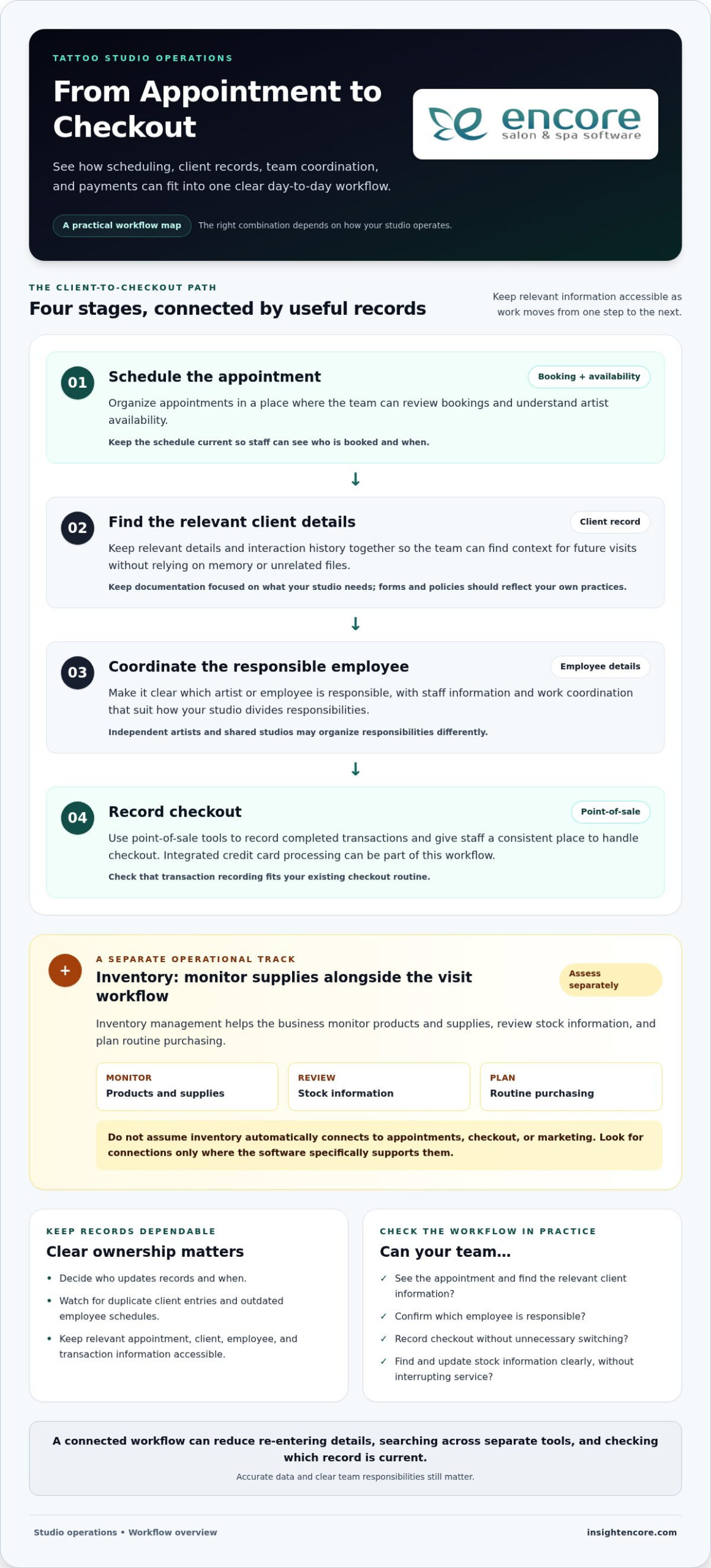
A studio’s daily workflow doesn’t end when an appointment is booked. The next steps may include preparing for the visit, coordinating the right artist, recording the transaction, and keeping business records current. Software can help organize these stages, but it works best when each step reflects how your team operates.

From appointment scheduling to client records

Scheduling tools give the team a place to review appointments and artist availability. Once a visit is booked, client management can keep relevant business details organized for future interactions. Together, these functions help staff find information without relying on memory or searching through unrelated files.

Accuracy matters. A duplicate client entry or outdated employee schedule can cause avoidable confusion, so decide who updates records and when. Keep information focused on what your studio needs to manage its service and administration. Software should support your client documentation practices rather than assume every studio uses the same forms or policies.

From service delivery to payments and stock

After a service, point-of-sale tools help record completed transactions and give staff a consistent place to handle checkout. Integrated credit card processing can be part of that workflow. Consider how transactions are recorded and how the process fits your existing checkout routine.

Inventory management serves a different purpose. It helps the business monitor products and supplies, review stock information, and plan routine purchasing. Don’t assume inventory tracking automatically connects to appointments, checkout, or marketing. Assess each need separately and look for connections where the software specifically supports them.

Where connected records make a difference

When a tattoo studio management system keeps relevant appointment, client, employee, and transaction records accessible in one workflow, staff can spend less time re-entering details, searching across separate tools, and checking which record is current. Accurate data and clear team responsibilities still matter. The benefit is that information is easier to maintain as work moves from one stage to the next.

Test the workflow using a typical visit: Can the team see the appointment, locate the relevant client information, confirm which employee is responsible, and record checkout without unnecessary switching? Then consider inventory separately. If a staff member needs to update stock, is the task clear, and can they find the relevant information without interrupting service?

These questions help you assess how scheduling, records, checkout, and stock fit together before changing your day-to-day process. To explore Encore in practice, you can try Encore for 30 days. The trial requires no credit card, has no obligation, and includes live support.

How to Compare Tattoo Studio Management Systems Without Missing the Fit

A broader service-business platform can suit a tattoo studio if its tools match the studio’s actual work. A long feature list doesn’t prove that fit. Start with tasks your team handles every day, then compare how each system supports them. Separate essentials, such as scheduling and checkout, from specialist processes that vary by studio. This keeps your decision grounded in your workflow rather than marketing language.

A practical checklist for evaluating software

Use the same criteria for each option. This comparison helps you look beyond feature count and consider whether a system will work for your team in practice.

Workflow
Usability
Support
Access
Total feature fit
Can it support your scheduling, client, employee, inventory, and checkout processes?
Can staff learn the key tasks and use them consistently?
Is help available in a format your team can use when questions arise?
Can your team use it on the devices and with the internet access your setup requires?
Does it cover the essentials without making optional features the deciding factor?

Make the comparison specific. Note whether employees share scheduling duties, who updates client records, and how checkout is recorded. Then compare the software’s stated features with those tasks. A feature matters when it supports a real process, not simply because it appears in a product description.

  • Test common tasks: Consider how staff would book an appointment, find a client record, update employee details, record checkout, or review stock.
  • Consider consistency: Look for a straightforward flow the whole team can follow, not just one staff member.
  • Include support and access: Compare the available support and the devices or internet connection needed to use the system.

When tattoo-specific workflows call for closer scrutiny

Some studio processes may not be clear from a general feature list. Treat each as a separate evaluation question rather than assuming it comes with scheduling or client management. For example, consider whether your workflow requires particular forms, how your studio handles deposits, where artwork is managed, and what session documentation your team maintains. These needs differ between studios.

Write down what each process needs to accomplish, then compare that requirement with the product’s stated capabilities. Don’t infer that a tool stores artwork, captures signatures, or tracks session details unless that function is specifically described. This helps distinguish core business management from specialist requirements and makes it easier to choose a tattoo studio management system that fits without adding unnecessary complexity.
Tattoo Studio Management System: How to Choose the Right Software in 2026

Prepare Your Tattoo Studio for a Management System

A smoother rollout starts before you enter information into a new platform. First, agree on how your studio handles daily work. When staff understand who updates records and how the system fits into their routine, information is more likely to stay organized and useful.

Use this sequence to prepare your team and keep setup focused:

  1. Map the current workflow. Write down how appointments are scheduled, client records are maintained, checkout is handled, inventory is monitored, and employee information is updated.
  2. Assign responsibility. Identify who manages each task now and who will own routine updates once the system is in use. In a shared studio, clarify how artists and other staff coordinate those responsibilities.
  3. Spot repeated manual steps. Note where the team re-enters information, searches across files, or relies on informal reminders. Choose a few priorities to simplify first, rather than trying to set up every feature at once.
  4. Prepare the information and routines. Decide what information needs to be entered, how staff will keep it current, and what each person should do during a typical workday. Use your existing studio policies to guide the process.
  5. Orient the team and review. Walk staff through the tasks they’ll use, invite questions, and set a time to review the workflow after the team has used it.

Map current processes before setup

Be specific about what happens from opening the schedule to closing out a transaction. Record who books appointments, who updates client and employee details, how completed payments are recorded, and who checks stock. This gives you a practical setup plan and helps distinguish essential information from details that can wait.

Keep the first phase manageable. If the team’s biggest need is reliable scheduling and clearer records, prioritize those routines before adding less urgent tasks. A tattoo studio management system should support the process your team has agreed to follow, not create a complicated new one.

Introduce the system with clear team routines

Before staff begin using the system, agree on simple shared habits: who enters new information, when updates happen, and where employees should look for current details. Consistent routines help prevent duplicate or outdated records. A straightforward orientation gives each team member a chance to practice tasks relevant to their role, while live, real-person support can help answer questions as they come up.

Once the system is in use, ask staff where they encounter friction. Review whether agreed updates are happening and whether the workflow still reflects how the studio operates. Adjust responsibilities or steps where needed. A rollout is a process, not just a setup task.

Start your 30-day Encore trial

How Encore Fits Tattoo Studio Management: How to Try It

Once you’ve mapped your studio’s routines, compare them with what a system supports. Encore, operated by Syntec Business Systems, offers management software for tattoo studios and other service businesses, bringing key operational tools into one platform. Focus on practical fit: whether your team can use the system to manage everyday work, rather than judging it by the length of its feature list.

What Encore brings to daily studio management

Encore supports online appointment booking, client and employee management, inventory management, and point-of-sale, including integrated credit card processing. These capabilities help studios organize core business tasks in one place. Review the details of tattoo studio management software and Encore’s features against the processes your team identified, then consider how each tool would fit into a typical day.

  • Appointments: Organize booking as part of the studio’s daily schedule, with free SMS appointment confirmations included with every subscription.
  • Client and employee management: Keep business and team information organized.
  • Inventory: Manage stock information alongside other studio operations.
  • Point-of-sale: Record transactions as part of checkout with integrated credit card processing.

Encore Essentials and Encore Elite both include the full feature set available at their respective tiers. Elite adds extra modules, so the distinction is about those additional modules, not missing core features in Essentials. Syntec Business Systems brings more than 30 years of industry experience, and live, real-person support is available. Encore requires an internet connection and a current web browser, so include those requirements in your assessment.

Try the system with a low-pressure next step

A trial gives you a chance to compare the platform with your actual routines. Test how the team would handle appointments, records, inventory, and checkout, and whether the workflow feels straightforward for everyday use. Every subscription includes unlimited device logins and free SMS appointment confirmations, useful details to consider as you assess access and scheduling.

Encore offers a 30-day free trial with no credit card required and no obligation, with live support available. Use the trial to focus on your studio’s priorities and see how the platform’s capabilities fit your workflows.

Ready to see how Encore fits your studio’s workflow? Start the 30-day free trial, with no credit card required, no obligation, and live support.

Take the Next Step With Confidence

Choosing a tattoo studio management system is a chance to shape a smoother way of working, not just replace the tools you use now. Try the system with real studio routines, notice what feels clear, and gather staff feedback. That experience can help you decide whether it suits your day-to-day needs.

Encore is backed by Syntec Business Systems’ more than 30 years of industry experience. Every subscription includes live, real-person support, unlimited customer support, unlimited device logins, and free SMS appointment confirmations. The 30-day free trial requires no credit card, has no obligation, and includes live support.

Start your 30-day free trial

Choose a system that helps your team manage daily details with confidence and gives you more room to focus on the work that makes your studio yours.

Frequently Asked Questions

What is a tattoo studio management system?

A tattoo studio management system helps organize the business side of studio operations, such as scheduling, client and employee information, transactions, and stock. It can do more than provide a booking calendar, though the tools included vary by platform. To assess fit, consider a typical workday and identify which tasks the software helps your team manage in one place.

Is salon management software suitable for a tattoo studio?

Yes, salon management software can suit a tattoo studio when its capabilities match the studio’s daily processes. Encore offers a specialized solution for tattoo studios, with tools for appointment booking, client and employee management, inventory, and point-of-sale. Note any studio-specific needs, such as forms or session documentation, and assess them separately from core business tasks.

Can a tattoo studio management system work without an internet connection?

Encore requires an internet connection and a current web browser, so it doesn’t operate offline. If your studio’s connection is interrupted, consider how that affects access to the platform and plan your routine accordingly. Keep the system’s access requirements in mind when deciding which devices and connection your team will use during business hours.

Do I need a credit card to try Encore?

No. Encore offers a 30-day free trial with no credit card required, no obligation, and live support available. Use the trial to explore the platform with tasks that matter to your studio, such as locating a client record or reviewing appointment details. This hands-on experience can help you decide whether the workflow suits your team.

Can I use Encore on multiple devices?

Yes. Unlimited device logins are included, so Encore isn’t restricted to a fixed number of devices. The software requires an internet connection and a current web browser. Decide which team members need access and agree on how they’ll keep information up to date. Clear routines help everyone work from current records across devices.

Are all Encore features included in the lower-priced tiers?

Every pricing tier includes the full feature set available at that tier, and Elite adds extra modules. Essentials does not lose core features because it is a lower-priced tier. Compare Essentials and Elite based on whether your business needs Elite’s additional modules. Free SMS appointment confirmations and unlimited customer support are included with every subscription.

Disclaimer

This article is general in nature and may contain errors, please verify all claims with your sales rep

Categories
Uncategorized

Tattoo Studio Software: How to Choose the Right System in 2026

The tattoo studio software with the most features isn’t necessarily the best fit for your shop. If a system doesn’t match how you schedule artists, manage client information, and handle transactions, it can add steps instead of taking work off your plate.

When artist availability is hard to coordinate or client and payment details are spread across separate tools, it can be difficult to know which features matter most. Start with your studio’s day-to-day workflow, not a long list of capabilities.

This guide shows how to compare tattoo studio software against the tasks your team actually handles, from booking and client management to payments and inventory. You’ll learn what to assess for solo artists and multi-artist shops, which tattoo-specific features to verify, and how to look beyond the subscription when comparing options. By the end, you’ll have a practical way to narrow the field and choose a platform that supports your artists and clients without unnecessary complexity.

Key Takeaways

  • Map how appointments, client details, and transactions move through your studio to find avoidable admin gaps.
  • Use scheduling, records, payments, inventory, and client retention to define your essential tattoo studio software requirements.
  • Compare platforms by how well they support real studio workflows, not by the length of their feature lists.
  • Test realistic booking and client-management tasks, then confirm feature availability, plan limits, and terms with each vendor.
  • Encore may suit studios looking to bring several management tools together. Verify which capabilities are included in its tattoo software offering.

What Tattoo Studio Software Does for Your Day-to-Day Operations

Tattoo studio software helps organize appointments, client information, and business transactions in one place. A booking-only tool mainly handles appointment requests and schedules, while studio management software may also bring together other daily tasks. Capabilities vary by platform, so check exactly what’s included before choosing.

This distinction matters when a studio uses separate systems for artist availability, client details, and transactions. Staff may have to search for or enter the same information more than once. A connected platform can make these handoffs easier to manage, but it won’t determine how your studio should operate.

Which everyday studio tasks can software help organize?

Online booking gives clients a way to request appointments and helps the studio coordinate its schedule. Client management tools organize relevant records in one system, much like a Customer Relationship Management (CRM) system supports organized customer information and interactions. Point-of-sale tools can connect service transactions with business records, keeping operational information together.

Assess how these tasks work together, not just whether each feature appears on a list. After a client books, for example, can staff find the appointment and the related client record without switching between separate tools? Ask the provider to demonstrate that workflow and clarify any plan limits.

Who benefits from tattoo studio management software?

Owners coordinating several artists may value a shared way to manage appointments, client-facing processes, and transactions. Independent artists can consider whether a broader platform would simplify their routine or whether a booking-focused tool better suits their setup. In either case, check that the system fits your team size and the way you handle scheduling and records.

Software organizes information and processes. It doesn’t set studio policies or deliver tattoo services. Owners remain responsible for decisions such as how appointments are handled and what procedures the team follows. If a system appears to support a particular policy or tattoo-specific process, verify that capability directly rather than assuming it’s included.

Encore serves tattoo parlours alongside other beauty and wellness businesses. Its listed platform tools include online booking, client management, inventory tracking, and point-of-sale transactions. Check which capabilities apply to its tattoo studio software and your intended setup on the tattoo studio software page.

Tattoo Studio Software Features: Build Your Essential Requirements List

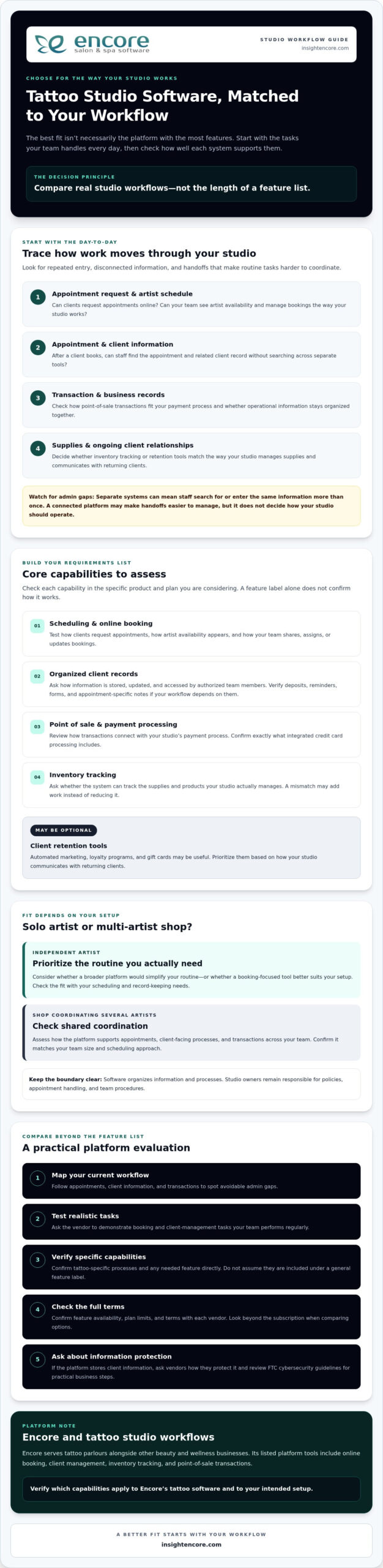
Build your requirements list around your studio’s actual workflow, not the platform with the longest feature list. Core capabilities to assess include scheduling and online booking, organized client records, point-of-sale transactions and payment processing, and inventory tracking. Retention tools such as automated marketing, loyalty programs, and gift cards may also be useful. Confirm which features are available in the specific product and plan you’re considering.

Scheduling and client records for tattoo appointments

Start with the schedule. Can clients request appointments online? Can your team see artist availability and manage bookings in a way that matches current studio processes? A feature name alone won’t show whether a system can handle how your artists share, assign, or update bookings. Ask vendors to demonstrate the scheduling tasks your team performs regularly.

Next, look at client records. Check how information is stored, updated, and accessed by authorized team members. If your workflow depends on deposits, reminders, forms, or appointment-specific notes, verify each capability directly. Don’t assume these are included under a general “client management” or “booking” label.

Payments, inventory, and client retention tools

Review how point-of-sale transactions fit with your studio’s payment process, and confirm what integrated credit card processing includes. For inventory, ask whether the system can track the supplies and products your studio actually manages. A tool that doesn’t match your inventory needs may add work instead of reducing it.

Automated marketing, loyalty programs, and gift cards can support client retention, but may be optional rather than essential. Prioritize them based on how your studio communicates with returning clients. If the platform stores client information, ask vendors how they protect it and review the FTC cybersecurity guidelines for practical steps businesses can take to safeguard information.

  • Scheduling: online booking, artist availability, and appointment visibility.
  • Client management: organized records and appropriate team access.
  • Transactions: point-of-sale tools and integrated payment capabilities.
  • Inventory: tracking that fits the supplies and products you manage.
  • Retention: marketing, loyalty, and gift card tools if they suit your client approach.

Rank each requirement as essential, useful, or optional. A studio coordinating several artists may prioritize shared scheduling, while an independent artist may focus on straightforward booking and accessible client records. Encore lists online booking, client management, inventory tracking, point-of-sale transactions, integrated credit card processing, automated marketing, loyalty programs, and gift card management among its platform capabilities. Check which are included in the tattoo software offering and applicable plan, then explore Encore as a possible fit.

How to Compare Tattoo Studio Software Beyond the Feature List

A broad platform can bring daily tasks together, but only if it fits the way your studio works. Separate tools may suit a team with an established process, while connected tools may reduce repeated data entry and switching between systems. Neither setup is automatically better. Compare each option against your real workflows, and confirm feature availability, limits, and plan applicability with the vendor.

Area What to compare
Workflow fit Can the system support how your studio assigns, updates, and tracks work?
Booking Can clients request appointments, and can staff view and manage schedules as needed?
Records Can authorized team members find and update relevant client information?
Transactions Do point-of-sale and payment capabilities match how the studio handles transactions?
Inventory Can you track the supplies and products your studio actually manages?
Support What help is available, through which channels, and during what hours?

What should a tattoo studio ask during a software demo?

Ask the vendor to demonstrate a typical client journey, from requesting an appointment to finding the client record and handling the transaction. Make the walkthrough practical: ask how staff find information during a working day, who can access or update it, and what happens when an appointment changes. Get clear answers about included features, implementation steps, data handling, and available support. A direct walkthrough can reveal gaps that a feature list won’t.

How can you assess cost and value without guessing?

Compare each provider’s current plan details, included features, limits, and transaction fees where applicable. Don’t assume a feature is included just because it appears on a general product page. Ask which plan supports your needs and whether additional charges apply.

Then consider the operational trade-off: could consolidating tools reduce duplicate work, or would separate systems remain easier for your team? Assess value against the tasks staff perform without assuming a particular financial return. For Encore’s current plan details, review the Encore pricing information, and confirm which capabilities apply to its tattoo studio software offering.

Tattoo Studio Software: How to Choose the Right System in 2026

A Practical Checklist for Choosing Tattoo Studio Software

Use a consistent process to compare platforms before moving appointments or client records. A focused evaluation helps you determine whether tattoo studio software fits your studio’s routines, rather than relying on a feature list or polished demo alone.

  1. Map your current workflow. Write down how clients book, how artists manage their schedules, and where client records are kept. Note repeated admin tasks, handoffs, or moments when staff have to search across tools. Include tattoo-specific needs, such as deposits or forms, as items to verify with vendors rather than assumed features.
  2. Rank what matters. Sort requirements into essential, useful, and optional. Ask artists and staff what slows them down and what information they need to find quickly. Review current records and processes too, so you understand what may need to move or change.
  3. Shortlist platforms. Compare providers against your priorities, team size, and daily tasks. Review Encore platform features alongside other vendors’ information, and confirm that any required capability applies to the specific product and plan you’re considering.
  4. Test realistic tasks. Use the same sample workflow for every shortlisted platform, such as handling an appointment request, finding a client record, updating details, and completing a transaction. Ask staff to try the steps and assess whether they can find the information they need without unnecessary detours.
  5. Confirm the terms. Ask each vendor about data migration, onboarding, available support, feature limits, and contract terms. Clarify what your team needs to prepare and which records or processes may require manual attention during a changeover.

Make the evaluation practical

A feature may sound useful but still be awkward in daily use. During a demo or trial, ask staff to complete the same tasks they handle at the studio, then gather their feedback. Can they follow the workflow and find and update the right information? Does the system support the process your studio wants, or would the team need to change how it works?

Before switching, check that current records are organized and identify what should be transferred, retained, or reviewed. A clear view of existing processes makes it easier to ask specific questions and plan the transition. The right choice should meet your priorities without adding features or complexity your studio won’t use.

Explore Encore for your studio

Is Encore Tattoo Studio Software a Fit for Your Business?

Encore is a management platform for beauty and wellness businesses, including tattoo parlours. It may be worth considering if you want to assess several everyday studio tools together rather than evaluate booking in isolation. The fit depends on whether the available features match your team’s workflow, not simply on how many capabilities the platform lists.

Which Encore capabilities may support a tattoo studio?

Encore lists online booking, client management, inventory tracking, and point-of-sale transactions among its platform capabilities. Other listed tools include integrated credit card processing, automated marketing, loyalty programs, and gift card management. These may be relevant to studios reviewing appointment coordination, client records, transactions, stock, and client retention.

Confirm which capabilities are included in the tattoo studio software offering and the plan you’re considering. If your process depends on a specific tattoo-related feature, such as digital forms, deposits, appointment reminders, artist-level access, or particular reporting, ask Encore directly whether it’s available and how it works. Don’t assume a capability is included based on a general feature description.

For product-specific details, review Encore tattoo studio software. Use your list of essential workflows to assess whether the listed tools address your needs, and ask for clarification wherever the details aren’t clear.

How can you take the next step with confidence?

Before exploring the trial, write down your must-have tasks and questions. These might include how your team handles booking requests, updates client records, tracks inventory, and processes transactions. Compare those workflows with the capabilities available in the tattoo offering. A clear checklist helps you focus your evaluation and identify what still needs confirmation.

Ask about feature availability, plan details, onboarding, data handling, and support arrangements that matter to your studio. If the fit isn’t clear, ask more questions rather than rushing a decision. Evaluate the platform against your real process and involve the people who will use it.

If you’re ready to explore the next step, see how Encore’s trial fits your studio’s requirements.

Try Encore and explore whether it fits your studio

Choose a System That Works for Your Studio

The strongest choice isn’t the platform with the longest feature list. It’s the one that supports your real workflow, helps keep bookings and client records organized, and fits your team’s needs. Before deciding, test routine tasks and confirm which features are included in the product and plan you’re considering.

Encore offers tattoo studio software for tattoo parlours, with listed platform capabilities including online booking, client management, inventory tracking, and point-of-sale transactions. Integrated credit card processing and automated marketing are also listed offerings. Check directly which capabilities are available for your studio and whether they support your tattoo-related requirements.

Use your checklist to explore the option at your own pace. A practical evaluation can help you move forward with confidence.

Try Encore and explore whether it fits your studio

Frequently Asked Questions

What is tattoo studio software?

Tattoo studio software helps organize business tasks such as appointment booking, client management, and transactions. Some platforms also offer inventory tracking, marketing, loyalty programs, or gift card tools. Capabilities vary by provider, so compare them with your studio’s daily workflows. A useful system should support the way you manage appointments and records, rather than require changes to essential studio practices without a clear reason.

What features should tattoo studio software include?

Start with the tools your studio needs most, such as online booking, artist scheduling, client records, and payment handling. Inventory tracking and client-retention features may also be useful. Ask vendors to confirm any tattoo-specific requirements, including forms, deposits, reminders, or session notes. Don’t assume a feature is included just because a platform serves tattoo businesses. Check availability, plan limits, and how each tool works in your actual workflow.

Can tattoo studio software manage multiple artists?

Some platforms may support team scheduling and shared studio workflows, but capabilities vary by product and plan. Ask the vendor to demonstrate how your team can view artist availability, manage appointments, and access client information. If you need artist-level permissions or reporting, confirm those details directly. Before choosing, test a realistic multi-artist scenario, such as updating an appointment and checking that the right team members can find the relevant information.

How does online booking help a tattoo studio?

Online booking gives clients a way to request or schedule appointments without relying entirely on back-and-forth messages. It can also help keep booking information organized for the studio. Check whether the system supports your preferred process, including consultations or other steps before an appointment is confirmed. Ask how booking requests are reviewed, updated, and confirmed, and whether the workflow suits the way your artists manage availability.

Is tattoo studio software suitable for a solo tattoo artist?

It can suit a solo artist if its booking, client-management, and payment tools match the way you work. You may not need every team or inventory feature, so compare the available capabilities and plan details against your actual requirements. Consider whether you can manage the system independently and find the client information you need. A simpler tool may be a better fit if a broader platform adds steps you won’t use.

How much does tattoo studio software cost?

Pricing depends on the provider, included capabilities, and applicable plan terms. Compare current vendor information rather than relying on generic estimates. Ask whether setup, payment processing, or optional features involve additional charges for your situation, and review contract terms before deciding. Look beyond the headline price to consider which tools are included and whether they support your workflow. That gives you a clearer basis for comparing value.

How do I switch to tattoo studio software?

Start by documenting your current booking process, client records, and routine business tasks. Shortlist platforms, ask vendors about data migration and onboarding, then test realistic workflows before committing. Confirm what information can be transferred, what your team needs to do, and what support is available. Review your records before the change and plan staff training. Choose a transition time that gives your team room to adjust and address questions.

Disclaimer

This article is general in nature and may contain errors, please verify all claims with your sales rep

Categories
Uncategorized

Mindbody vs Vagaro for Salons: 2026 Comparison Guide

The biggest names in software might be the very thing holding your salon back from its true profit potential. You’ve likely spent hours weighing mindbody vs vagaro for salons, trying to decide if you want the massive marketplace reach of one or the modular flexibility of the other. It’s exhausting to watch a 20% marketplace commission or a stack of monthly add-ons eat into your margins. You’re looking for a partner, yet it often feels like you’re just another data point in a giant corporate database.

We believe your software should empower your team, not complicate their day. This 2026 comparison guide promises to show you exactly how these giants stack up and why a human-centric alternative might be the best path to a streamlined business. We’ll preview the latest pricing shifts, from Mindbody’s $79 base tier to Vagaro’s unbundled feature costs, helping you find a solution that offers transparent pricing and reliable support. It’s time to move from a state of stress to organized control and find a tool that actually feels like a partner.

Key Takeaways

  • Understand the real impact of “marketplace taxes” and hidden fees on your bottom line before signing a long-term contract.
  • Evaluate mindbody vs vagaro for salons based on your specific team size and whether you need bundled automation or a la carte features.
  • See how industry-specific modules for nail salons and tattoo studios offer more precision than general wellness platforms.
  • Discover why human-centric technical support is the key to reducing staff burnout and streamlining your daily operations.
  • Learn how to protect your client relationships by choosing a software partner that puts your brand’s growth first.

The Salon Software Dilemma: Comparing Mindbody and Vagaro in 2026

Running a salon today requires a delicate balance between high-tech efficiency and high-touch service. When weighing the options for mindbody vs vagaro for salons, most owners feel forced to choose between two very different corporate philosophies. One offers an enterprise-level ecosystem designed for massive scale; the other provides a bustling marketplace that promises instant visibility. Both have shaped the industry, but they also bring specific friction points that can leave boutique owners feeling overwhelmed or overlooked. In 2026, the choice isn’t just about features. It’s about who actually owns your client relationships and how much of your margin you’re willing to give away.

Mindbody: The Enterprise-Level Giant

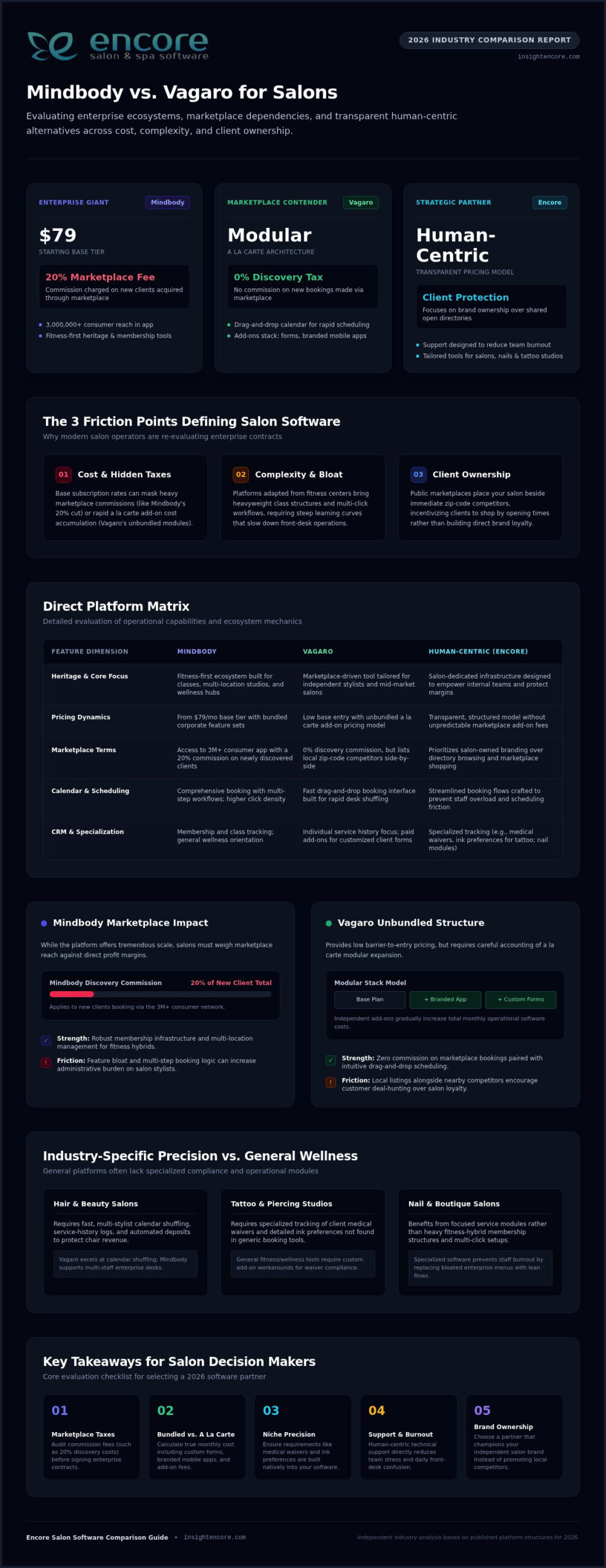
Mindbody remains the heavy hitter for multi-location wellness centers and fitness-hybrid salons. Looking at the Mindbody platform history, it’s clear the software was built with a fitness-first mindset. This heritage brings incredible power for memberships and class scheduling, but it often creates “feature bloat” for hair and beauty professionals who just need intuitive booking. While the Mindbody app connects you to over 3 million consumers, it comes with a cost. You’ll likely face a 20% commission on new clients discovered through their marketplace. For a growing salon, this “all-in-one” weight can lead to a steep learning curve that frustrates staff and eats into valuable service time. If you’ve ever wondered why people leave Mindbody in growing numbers, escalating subscription tiers and a cluttered interface that complicates routine staff onboarding are among the most cited reasons.

Vagaro: The Marketplace-First Contender

Vagaro won over the mid-market by focusing on simplicity and a “pay-as-you-go” modular model. It’s an attractive fit for independent stylists who want to be discovered without the high upfront cost of enterprise software. Their marketplace is a major draw because it doesn’t charge commissions on new bookings, which helps with initial visibility. However, this convenience has a downside. Your salon is listed right alongside every competitor in your zip code. The interface often encourages clients to shop for the next available opening rather than staying loyal to your specific brand. When you add up the costs for essential modules like branded apps and custom forms, that “affordable” base price can quickly climb.

The core friction in 2026 centers on three main issues: cost, complexity, and client ownership. You want a system that feels like a partner, not a corporation that treats your business as just another database entry. If you’re tired of feeling like a number, it’s time to look at how Encore Salon Software prioritizes your brand over a crowded marketplace.

Core Feature Showdown: Booking, Client Management, and Marketing

Choosing between mindbody vs vagaro for salons often comes down to how these tools handle the daily rush. Your calendar is the heartbeat of your business. If it’s clunky or difficult for staff to navigate, it creates a ripple effect of stress that clients definitely notice. You need a system that feels like a supportive partner, allowing you to focus on your craft rather than fighting with a screen. Both giants offer robust tools, but they approach the user experience with very different philosophies.

Scheduling and Calendar Flexibility

Vagaro is widely praised for its intuitive drag and drop interface. It’s built for speed, making it easy to shuffle appointments when a stylist runs late or a client arrives early. Mindbody offers deep functionality, but its interface can feel heavy, often requiring more clicks to complete simple tasks. Both platforms provide mobile apps to manage your day on the go, which is essential for modern flexibility. They also help you protect your time with automated deposits and cancellation fees. If you are looking for specialized insights beyond hair services, you might find similar logic applied in our guide to the Best Spa Booking Software in 2026.

Client Relationship Management (CRM)

A great CRM should do more than just store phone numbers; it should tell your client’s story. Mindbody excels at tracking memberships and class attendance, which is great for hybrid wellness centers. Vagaro focuses heavily on the individual service history, making it a favorite for traditional salons. However, specialized businesses often find these general tools lacking. A tattoo studio, for example, needs to track detailed ink preferences and medical waivers that a standard hair salon doesn’t require. Proper data management ensures you’re aligning with the U.S. Bureau of Labor Statistics industry overview regarding core managerial duties like client tracking and professional record-keeping.

Marketing and staff management are where you truly reclaim your time. Automated marketing tools like SMS reminders and birthday greetings keep your chairs full without manual effort. On the back end, tracking commissions and performance shouldn’t be a headache. Salon staff utilization rate measures the percentage of available working hours actually filled with client appointments, serving as a vital health check for your business growth in 2026. If you want to see how a human-centric system handles these complex details, consider exploring the specialized Encore features designed for your specific niche.

Beyond the Subscription: Analyzing Pricing and Marketplace Dynamics

When you’re comparing mindbody vs vagaro for salons, the sticker price is rarely the final number you see on your bank statement. It’s easy to get caught up in the promise of a low entry cost, but the true cost of ownership often hides in the fine print. You’ve worked hard to build your business. You shouldn’t have to guess where your money is going or feel like your software is taking a cut of your hard earned success. Understanding these operational costs is part of your broader responsibility, as noted in the Bureau of Labor Statistics occupational outlook for hairstylists and cosmetologists, which highlights the importance of managing inventory and scheduling systems effectively.

The Hidden Costs of Big-Box Software

Mindbody’s public starting tier is $79 per month for small businesses, but this is just the beginning. To access advanced marketing or automation, you’ll likely find yourself looking at quotes for their $279 or $499 tiers. Then there’s the 20% marketplace commission on new clients, which can feel like a heavy tax on your growth. Vagaro takes a different approach by unbundling its features. While a $30 base for one calendar sounds affordable, the “nickel and diming” starts quickly. You’ll pay $10 for digital forms, $20 for SMS marketing, and $100 per month for a custom branded app. Before you know it, that budget friendly tool is costing you hundreds more than you planned.

Marketplace vs. Brand-First Growth

One of the biggest risks with marketplace driven platforms is the “marketplace trap.” When you train your clients to book through a generic directory, you’re helping the platform grow its own brand, not yours. If a client opens an app to find you and sees a competitor’s “introductory offer” right next to your profile, you’ve lost control of the relationship. Setting up a dedicated salon client booking portal ensures your clients stay connected to your brand. It protects your business from being just another listing in a corporate database.

Data ownership is another critical factor. If you ever decide to move to a different provider, some platforms make it difficult to export your client history or formula notes. You should always own your data. It’s your most valuable asset. Choosing a partner that prioritizes transparency and brand loyalty over marketplace commissions is the only way to ensure long term peace of mind. If you’re looking for a simpler way to handle transactions without the corporate complexity, our integrated credit card processing provides the clear, honest pricing you deserve.

Mindbody vs Vagaro for Salons: 2026 Comparison Guide

Industry-Specific Solutions: Tailoring Software to Your Niche

A “one size fits all” approach often feels like wearing a uniform that doesn’t quite fit. While you’re weighing mindbody vs vagaro for salons, it’s easy to see how these platforms try to be everything to everyone. However, a hair salon’s workflow is vastly different from a tattoo studio or a booth rental space. You deserve software that understands the specific nuances of your niche, not a generic system that forces you to change how you work. Choosing the right fit in the mindbody vs vagaro for salons debate depends on how much you value these specialized features.

Specialized Tools for Tattoo and Nail Studios

Nail salons and professional spas have very different inventory needs. A nail studio might need to track thousands of polish shades, glitters, and dipping powders with high precision. Meanwhile, a spa focuses on professional backbar products and retail skincare. Generic platforms often miss these distinctions. Tattoo studios face even stricter requirements, needing integrated digital waivers and health record compliance to meet safety standards. Specialized tools like Encore’s specialized modules outperform generic platforms because they’re designed for these exact scenarios. They remove the friction of manual tracking, giving you more time to focus on your clients.

Specialized businesses require specific features to thrive:

  • Integrated health waivers and consent forms for tattoo and spa services
  • High-precision inventory tracking for thousands of nail supplies and retail items
  • Financial partitioning to keep booth rental income separate from salon overhead
  • Mobile-first management tools for independent contractors on the move

Booth Renters and Independent Stylists

Booth renters and independent stylists face their own set of hurdles. They need individual logins and complete financial separation from the main salon owner while maintaining a professional appearance. It’s about balancing salon wide branding with individual autonomy. Independent pros shouldn’t have to settle for a system that treats them like a standard employee. They need a dedicated booth renter client management app that lets them run their business their way. This level of specialization is what separates a partner from a service provider.

Barbershops also have a unique rhythm, often balancing high turnover with a mix of scheduled appointments and walk-ins. Managing that flow requires a specific strategy. If you’re looking to sharpen your operations, explore these 15 Barbershop Management Tips to stay ahead of the curve in 2026. Whether you’re running a multi-chair shop or working as a solo contractor, the right software should feel like a natural extension of your hands.

See how Encore fits your niche today

Encore: The Professional Alternative for Human-Centric Salons

Deciding between the trade-offs of mindbody vs vagaro for salons often feels like picking the lesser of two corporate evils. You’re either a tiny fish in a massive enterprise pond or a single listing in a crowded marketplace. After exploring the hidden costs and feature gaps of these giants, many owners realize they need a third path. You deserve a platform that prioritizes your peace of mind and business growth without the corporate coldness. Encore stands apart as a dedicated, human-centric ally that treats your success as its own.

Human Support in a Digital World

We reject the trend of automated bots and endless email ticketing systems. When you have a question or a technical hiccup, you deserve to speak with a real expert who understands the daily hurdles of running a busy shop. Our team provides personalized training to ensure your staff actually uses the software to its full potential rather than feeling intimidated by it. This hands-on guidance removes the stress of learning a new system. We approach every challenge with a “can-do” attitude, acting as a supportive partner that remains deeply invested in your individual success.

All-In-One Without the Overwhelm

You don’t need software that’s too difficult for your team to master. Encore brings together online booking, inventory management, and integrated credit card processing into a single, intuitive interface. You can drive repeat business with branded gift cards and loyalty programs that feel like a natural extension of your brand. It’s about having professional power without the unnecessary complexity that leads to staff burnout. We focus on removing industry frustrations so you can get back to what you love. Ready to see a better way? Try Encore Salon Software today.

Moving your data from Mindbody or Vagaro doesn’t have to be a nightmare. We specialize in seamless data migration, handling the technical heavy lifting so you don’t have to worry about losing your history. Your client records, formula notes, and inventory data are too valuable to leave behind. By choosing a partner that values reliability and simplicity, you’re investing in a tool that finally feels like it’s on your side. In the final analysis of mindbody vs vagaro for salons, the best choice is the one that values your brand over its own marketplace.

Choose a Software Partner Built for Your Salon’s Future

Deciding between mindbody vs vagaro for salons doesn’t have to be a choice between two corporate extremes. You’ve seen how the “marketplace tax” can eat into your profits and how generic tools often fail specialized niches like tattoo studios or booth rental shops. The right software should feel like a partner that simplifies your day, not a vendor that treats you like a database entry. By prioritizing transparent pricing and specialized modules, you protect your brand and your peace of mind.

We provide the professional power you need with a human touch that big-box companies often lack. With integrated credit card processing and dedicated support from real experts, we help you move from a state of stress to organized control. You deserve a system that understands the daily hurdles of your industry and is genuinely eager to help you overcome them.

Experience the Human-Centric Alternative to Big-Box Software—Try Encore Now

Take the next step toward a more streamlined and supportive business environment today. Your success is our priority, and we’re ready to help you thrive.

Frequently Asked Questions

Is Mindbody or Vagaro better for a small salon?

Choosing between mindbody vs vagaro for salons depends on your specific growth goals. Mindbody offers deep automation for large wellness centers but often feels too complex for boutique teams. Vagaro is easier to start with but relies heavily on its own marketplace. For a small salon, you want software that feels like a partner, not a giant corporation. Encore provides specialized tools that simplify your day without the enterprise-level learning curve or hidden marketplace commissions.

Can I migrate my client data from Mindbody to Encore?

Yes, moving your client history and formula notes is a seamless process with our team. We handle the technical heavy lifting so you don’t have to worry about losing years of valuable data. Whether you are coming from Mindbody or Vagaro, we ensure your records are transferred accurately. This hands-on support removes the typical stress of switching systems, letting you focus on your craft while we set up your new digital home.

Does Vagaro charge fees for every booking made through their marketplace?

Unlike Mindbody, which charges a 20% commission on new clients found through its app, Vagaro currently offers its marketplace with $0 commission per booking. However, while the marketplace is free, Vagaro unbundles its features. You might find yourself paying extra monthly fees for essential tools like digital forms, SMS marketing, or a custom branded app. These add-ons can quickly increase your total monthly spend beyond the initial base subscription price.

What is the best alternative to Mindbody for a high-end spa?

Encore Spa Software is the premier alternative for high-end spas that value a personalized touch. While Mindbody focuses on fitness and wellness conglomerates, our platform is built specifically for the high-touch requirements of a professional spa. We offer specialized inventory management and client relationship tools that big-box software often generalizes. You get the professional power of an enterprise system with the dedicated human support that ensures your team feels confident and supported.

Do these platforms include integrated credit card processing?

Yes, both Mindbody and Vagaro offer integrated payments, and Encore provides Integrated Credit Card Processing as well. Having payments tied directly to your booking system reduces manual entry errors and speeds up the checkout process. Our solution offers transparent pricing without the corporate complexity. It allows you to manage deposits, memberships, and gift cards in one place, ensuring your financial tracking is as streamlined as your appointment calendar.

How does Encore’s support differ from big-box software companies?

We reject the trend of automated chatbots and delayed email tickets used by many big-box software companies. Our support is handled by real experts who understand the daily hurdles of the beauty industry. You get a dedicated ally with a “can-do” attitude, ready to solve problems over the phone. This human-centric approach ensures you never feel like just another number in a database, providing a level of reliability that corporate giants simply don’t match.

Can I manage booth renters with salon software?

Yes, managing booth renters requires specific tools that maintain individual autonomy while keeping the salon organized. Encore offers specialized Chair/Booth Renter Software that provides separate logins and financial partitioning. This ensures that independent contractors can manage their own schedules and income without it getting tangled in the salon’s overhead. It’s the perfect balance of professional salon branding and the individual freedom that modern independent stylists require to thrive.

Is there a contract required for salon management software in 2026?

Software contracts vary across the industry, but the trend in 2026 is moving toward more flexible, month-to-month arrangements. We believe in earning your business every day through reliability and excellent support rather than locking you into restrictive long-term commitments. When comparing mindbody vs vagaro for salons, always check for hidden cancellation fees or data export costs. We prioritize transparency, ensuring you always own your data and feel empowered in your software partnership.

Disclaimer

This article is general in nature and may contain errors, please verify all claims with your sales rep
Categories
salon software

Master Your Business with Encore Salon Software: The Ultimate 2026 Management Guide

Imagine it’s a packed Saturday morning. Your booking system glitches, and instead of a quick solution, you’re stuck in an endless loop with an automated chatbot that simply doesn’t understand your problem. It’s frustrating, exhausting, and frankly, you deserve better. You need a partner, not just a program. That’s where Encore Salon & Spa Software steps in to change the narrative for business owners who are tired of being treated like a ticket number.

We understand that managing a salon, spa, or tattoo studio shouldn’t feel like a constant tech battle. You started your business to focus on your craft and your clients, not to spend your evenings troubleshooting complex menus or worrying about hidden fees. It’s a common struggle in the industry, but it doesn’t have to be your reality anymore.

This ultimate 2026 guide will show you exactly how to reclaim your peace of mind and streamline your operations. We’ll walk through how Encore’s human-centric support and specialized modules eliminate management stress. From automated marketing that keeps your chairs full to precise inventory tracking, you’ll discover how this long-standing platform provides the tools you need to grow with professional confidence.

Key Takeaways

  • Understand how an all-in-one suite simplifies daily operations and adopts a “Less Stress, More Style” approach to business management.
  • Master your schedule with drag-and-drop tools and use detailed client records to foster long-term loyalty and fill every chair.
  • Explore why Encore Salon Software is the ideal choice for niche businesses like tattoo studios and pet groomers through specialized, modular tools.
  • Learn the value of human-centric support, ensuring you have a real partner to help you navigate setup and daily use without the frustration of chatbots.
  • Future-proof your growth by leveraging integrated online booking and performance benchmarks to hit your 2026 financial targets.

What is Encore Salon Software and Why Does Your Business Need It?

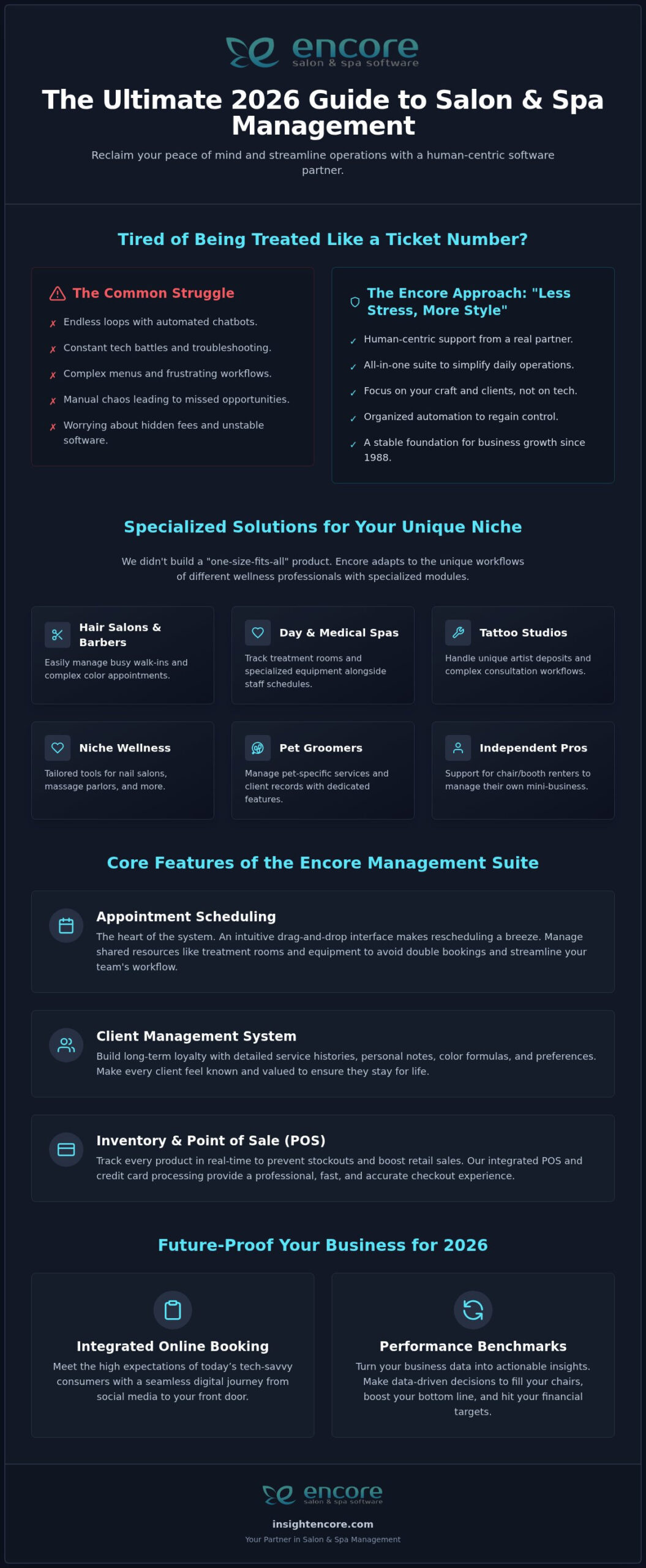
Running a beauty or wellness business is about more than just your craft. It’s about managing people, products, and time. Encore Salon Software is an all-in-one management suite designed to handle the heavy lifting of your daily operations. Developed by Syntec Business Systems, a company with over 30 years of experience since its founding in 1991, this platform isn’t just another tech tool. It’s a stable foundation for your growth. We operate on a "Less Stress, More Style" philosophy. This means we focus on removing the technical hurdles that keep you stuck at your desk so you can spend more time doing what you love. When you move away from manual chaos and toward organized automation, you regain control over your schedule and your life.

The Evolution of Salon Management in 2026

By 2026, the industry has moved far beyond simple paper planners or generic calendar apps. Today’s clients expect a seamless, digital journey from the moment they find you on social media to the second they walk out your door. Relying on manual logs creates gaps in your service and leads to missed opportunities. Modern success requires a bridge between traditional hospitality and smart technology. Using advanced appointment scheduling software allows you to make data-driven decisions rather than guessing your next move. Encore Salon Software acts as that bridge. It turns your business data into actionable insights that fill your chairs and boost your bottom line, ensuring you meet the high expectations of today’s tech-savvy consumers.

Who is Encore Built For?

We didn’t build a "one-size-fits-all" product. Instead, we created specialized modules that respect the unique workflows of different wellness professionals. Whether you run a high-traffic hair salon or a tranquil day spa, the system adapts to your specific needs. Our core modules are meticulously designed for:

  • Hair Salons and Barber Shops: Manage busy walk-ins and complex color appointments with ease.
  • Day Spas and Medical Spas: Track treatment rooms and specialized equipment alongside staff schedules.
  • Niche Wellness: Tailored tools for nail salons, massage parlors, and even pet grooming businesses.
  • Tattoo Studios: Specific features that handle the unique deposit and consultation needs of artists.
  • Independent Professionals: Robust support for independent chair and booth renters who need to manage their own mini-business within a larger space.

If you are an independent professional, you face different challenges than a large enterprise. Encore provides the flexibility to manage your own clients, commissions, and inventory without the bloat of unnecessary features. It’s about giving every business owner, regardless of size, the professional confidence they deserve.

Core Features of the Encore Management Software Suite

Encore Salon Software is designed to be the silent partner that handles your most tedious tasks. The Appointment Scheduling module is the heart of this system. It features a drag-and-drop interface that makes moving appointments as easy as a simple swipe. You can also manage shared resources like treatment rooms or specialized equipment, ensuring that your tools are never overbooked. This level of organization allows your team to focus on the client in the chair rather than the chaos at the front desk. It’s about creating a flow where you don’t have to think about the technology.

The Client Management System goes beyond a simple contact list. It allows you to build long-term loyalty through detailed service histories and personal notes. Industry leaders like the Professional Beauty Association emphasize that personalized client experiences are vital for business stability and growth. Encore helps you do this by tracking color formulas, allergies, and even specific preferences. When a client feels truly known, they stay for life. You can also start your free trial to see how these personalized records transform your client interactions.

Inventory management often feels like a chore, but our system tracks every bottle of shampoo or tube of color in real-time. This prevents stockouts and ensures you never miss a retail sale because of missing stock. When it’s time for checkout, our Point of Sale (POS) tools and Integrated Credit Card Processing provide a professional finish. Transactions are faster and more accurate. This removes the friction that can occur during the payment process, leaving your clients with a positive final impression of their visit.

Automated Marketing and Loyalty Programs

Keeping your chairs full shouldn’t be a full-time job. Our automated marketing tools reach your clients through scheduled text and email campaigns. These keep your schedule busy by targeting clients who are due for a rebook or highlighting a new service. You can also offer Gift Cards to bring in new faces and boost immediate cash flow. The loyalty program module rewards your most frequent guests automatically, making it easy to increase their lifetime value without you lifting a finger.

Employee Management and Commission Tracking

One of the biggest stressors for salon owners is payroll. Calculating commissions shouldn’t take hours of manual math or complex spreadsheets. Encore calculates these figures automatically based on your unique pay structures. You can also monitor performance benchmarks and manage staff schedules within the software. This transparency builds trust with your team and ensures everyone is working toward the same goals. It reduces payroll stress and keeps your team motivated through clear, integrated reporting tools.

Specialized Industry Solutions: Tailored for Your Unique Niche

Every business has its own rhythm. A high-volume hair salon thrives on quick turnovers and rapid rebooking. In contrast, a tattoo studio relies on long sessions and intensive documentation. Encore Salon Software isn’t a "one-size-fits-all" box that forces you to change how you work. Instead, it’s a modular platform. We’ve built these specialized industry solutions because we know a generic app won’t cut it when you’re managing complex financial reporting or specific client intake needs. It’s about providing a system that speaks your language and understands your daily hurdles.

This modular approach is a core brand differentiator. We don’t just offer a digital calendar; we provide a foundation tailored to your specific trade. By using tools built for your niche, you eliminate the workarounds that usually come with standard software. This leads to more accurate data, happier staff, and a much smoother experience for your clients. You shouldn’t have to "make do" with your management tools. You should have a partner that fits your business perfectly. If you operate a wellness facility and want to compare your options, our guide to the best spa booking software in 2026 breaks down the top-rated platforms to help you make a confident, informed decision.

Encore Tattoo Studio and Barber Software

Tattoo artists and barbers have very specific requirements that most software ignores. Our Tattoo Studio Software handles artist schedules that can span several hours, alongside essential digital waivers and detailed client records. It keeps your shop compliant and organized without the paperwork. For modern barber shops, we streamline the delicate balance between traditional walk-ins and digital appointments. If you host independent professionals, our Chair/Booth Renter Software allows them to manage their own mini-business. They can track their own reports and client lists without cluttering your main shop data.

Encore Pet Grooming and Nail Salon Software

Pet groomers deal with more than just human clients. Encore Pet Grooming Software manages detailed pet profiles, breed-specific notes, and critical vaccination records. It’s about safety as much as it is about scheduling. In the luxury nail salon world, we focus on technician rotations and high-frequency service tracking. You can monitor specialized inventory, like professional-grade polishes or grooming supplies, in real-time. This ensures you never run out of a client’s favorite shade or a specific medicated shampoo. Whether you’re tracking the rotation of technicians or the medical history of a golden retriever, our software adapts to your specific needs.

Master Your Business with Encore Salon Software: The Ultimate 2026 Management Guide

The Encore Advantage: Human-Centric Support and Setup

One of the biggest fears we hear from owners is the dread of being left alone with a complex new system. You’ve probably been there before. You invest in a tool to save time, but you end up losing hours trying to figure out how it works. Most companies today hide behind ticket-based systems or automated bots that never quite answer your questions. Encore Salon Software takes a different path. We believe in human-centric support because your peace of mind is just as important as your business growth. When you have a question, you speak to a real person. It’s that simple.

Our onboarding process is designed to be a partnership. We don’t just give you a login and wish you luck. We help you get set up fast and take the time to teach your team the ropes. This hands-on approach removes the intimidation factor and builds professional confidence from day one. You aren’t just buying software; you’re gaining a dedicated mentor who understands the daily hurdles of the beauty and wellness industry. We are here to ensure your transition is smooth and your operations remain uninterrupted.

Seamless Transition and Data Migration

Switching from paper books or an outdated program can feel like a massive hurdle. You worry about losing years of client history or messing up your inventory counts. We understand that anxiety. The Encore team assists you by importing your client lists and inventory data directly into the new system. This means you don’t have to spend your weekends doing manual data entry. To make things even easier, we offer a 30-day free trial with no credit card required. It’s a risk-free way to test the waters and see how our tools fit your specific workflow before making a commitment.

Reliability Powered by Syntec Business Systems

In 2026, software stability and data security are more critical than ever. You can’t afford for your booking system to crash during a holiday rush. Our reliability is backed by Syntec Business Systems, a company with over 30 years of experience since its founding in 1991. This legacy matters. It means we’ve weathered every industry shift and built a platform that stands the test of time. We prioritize business continuity and data protection so you can focus on your clients. Our team brings a "can-do" attitude and a commitment to transparency to every interaction. We act as a responsive ally, ensuring your business stays organized and your data stays safe.

Future-Proofing Your Business with Encore in 2026

Consumer expectations have shifted significantly as we head through 2026. Your clients no longer want to wait for business hours to schedule an appointment. They expect to book from their phones at midnight. Providing a seamless salon client booking portal isn’t just a luxury anymore; it is the standard for modern service. Encore Salon Software ensures you meet these demands by providing 24/7 access to your calendar without you ever having to pick up the phone. This level of accessibility builds trust and shows your clients that you value their time as much as your own.

Beyond booking, the key to staying ahead lies in your data. You can’t improve what you don’t measure. Our reporting tools provide "benchmarks" that help you see exactly where your revenue is coming from and where you might be losing ground. This clarity allows you to set realistic financial goals and actually exceed them. Whether you are currently a solo artist or managing a multi-location spa, Encore is a scalable partner. It grows alongside you, providing the stability you need to expand with professional confidence.

Maximizing ROI with Integrated Modules

Every dollar counts when you are growing a business. Integrated credit card processing within the platform reduces manual entry errors and helps you avoid the hidden merchant fees that often come with third-party apps. It creates a faster checkout that your clients will appreciate. You should also consider the cost-benefit of your outreach. Automated marketing campaigns fill the gaps in your schedule far more effectively than manual social media posting alone. By using inventory tracking, you can identify your high-margin products and reduce waste. This ensures your capital is working for you rather than sitting on a dusty shelf.

Getting Started: Your Stress-Free Path Forward

Taking control of your business narrative starts with better organization. You don’t have to do this alone. We are here to act as your friendly guide and dedicated mentor throughout the entire process. If you are still researching your options, learning How to Choose the Best Salon Booking Software is a great place to start. When you are ready to see the difference for yourself, the path forward is simple. Schedule a demo to see the tools in action, start your risk-free trial, and meet the support team that is ready to help you succeed. It’s time to replace management chaos with organized growth and rediscover why you fell in love with this industry in the first place.

Ready to Transform Your Business Narrative?

You’ve seen how the right tools can turn daily management from a burden into a competitive advantage. By moving away from generic apps and embracing specialized modules, you gain the clarity needed to hit your 2026 financial benchmarks. Whether you are managing a high-volume salon or a precision tattoo studio, Encore Salon Software provides the structure to help you grow without the usual tech-induced headaches. It’s about shifting your focus back to your craft while the system handles the logistics.

You deserve a partner that offers more than just a login screen. With over 30 years of industry experience, our team is here to provide live human support whenever you need it. We don’t believe in bots; we believe in real people who understand your world. You can test every feature risk-free to see how it fits your unique workflow. There is no credit card required to begin your journey toward a more organized and professional workspace.

Start Your Stress-Free 30-Day Free Trial Today. Take the first step toward a more profitable and peaceful business today. You have the talent. Let us provide the foundation you need to truly thrive.

Frequently Asked Questions

Is Encore Salon Software easy to learn for my staff?

Yes, Encore Salon Software is built with an intuitive interface that your staff can master quickly. We avoid dense technical jargon and focus on a logical flow that mirrors your daily tasks. If your team does have questions, they won’t be stuck with a chatbot. They can speak directly to a live person for guidance, ensuring your transition is smooth and stress-free.

Can I use Encore if I am an independent booth or chair renter?

Yes, we offer dedicated Chair/Booth Renter Software designed specifically for independent professionals. This allows you to manage your own client list, schedule, and reports without being tied to a larger salon’s data. It’s the perfect way to maintain your independence while still having access to professional management tools that keep your business organized and professional.

Does Encore support online booking for my clients?

Yes, the Online Booking Module is a core feature that allows your clients to schedule appointments 24/7. This system integrates directly with your main calendar, so you don’t have to worry about double bookings. It meets the expectations of modern consumers who prefer the convenience of digital scheduling over making phone calls during your busy business hours.

What happens to my data if I switch to Encore from another program?

We make data migration a priority by assisting you with importing your existing client lists and inventory records. You don’t have to worry about losing your history or manually re-entering thousands of data points. Our team works with you to ensure your information is transferred accurately, so you can pick up right where you left off without any data loss.

Do I need to buy specific hardware to use Encore software?

No, you do not need to purchase expensive, proprietary hardware to use our system. Encore Salon Software is designed to run on the devices you already own, such as tablets, laptops, or desktop computers. This flexibility lowers the barrier to entry and allows you to use the hardware that best fits your workspace and your budget.

Is there a free trial available for Encore Salon & Spa Software?

Yes, you can start a 30-day free trial of our software with no credit card required. This gives you full access to our tools so you can explore the specialized modules and human-centric support firsthand. It’s a completely risk-free way to see how we can eliminate your management stress and help your business grow with confidence.

How does Encore help reduce last-minute cancellations?

Encore reduces last-minute cancellations by sending automated SMS and email reminders to your clients. These prompts keep your appointments top-of-mind and give clients an easy way to confirm their visit. By keeping your schedule visible and proactive, you can significantly lower the rate of no-shows and keep your chairs full throughout the week.

Can Encore handle multiple locations for a growing spa business?

Yes, the software is fully scalable and can easily manage multiple locations for a growing spa or wellness business. You can track performance across different branches and manage staff schedules from a single, centralized system. This makes it easy to maintain consistency and control as you expand your brand and open new locations.

Disclaimer

This article is general in nature and may contain errors, please verify all claims with your sales rep