window.dataLayer = window.dataLayer || []; function gtag(){dataLayer.push(arguments);} gtag('js', new Date()); gtag('config', 'UA-206511945-1');
Search
Categories
Uncategorized

Reducing Client Wait Times in a Salon: A Practical 2026 Guide

Asking your team to move faster is one of the quickest ways to make a busy salon feel more stressful. Reducing client wait times in a salon starts with fixing the appointment flow, not rushing the service. When clients arrive on time but still wait, and small delays ripple through the day, the problem often lies in the handoffs and scheduling around each appointment.

You shouldn’t have to choose between keeping the day on track and giving every client the attention they deserve. A calmer schedule begins with understanding where waiting starts, whether it’s an unrealistic service duration, a slow transition, or a booking pattern that leaves too little breathing room. Once you can see the bottleneck, you can choose a practical fix that fits your services and staffing.

This guide will help you spot common sources of avoidable waiting, make changes without overloading your team, and keep clients informed and welcomed when delays happen. We’ll also look at how online booking and client management tools can support a more organized appointment flow, while recognizing that smooth service still depends on thoughtful day-to-day workflows.

Key Takeaways

  • Define the wait clearly by comparing each appointment’s scheduled start with when service actually begins.
  • Track delays by service, day, time, and handoff to uncover patterns instead of guessing at the cause.
  • Compare schedule buffers, service-time estimates, staffing coordination, and client communication to find a fix that suits your salon.
  • Make reducing client wait times in a salon manageable by testing one workflow change at a time and assigning clear responsibilities.
  • Use online booking and client management tools to support an organized flow, while keeping staffing and service routines in view.

Reducing client wait times in a salon starts with finding where delays begin

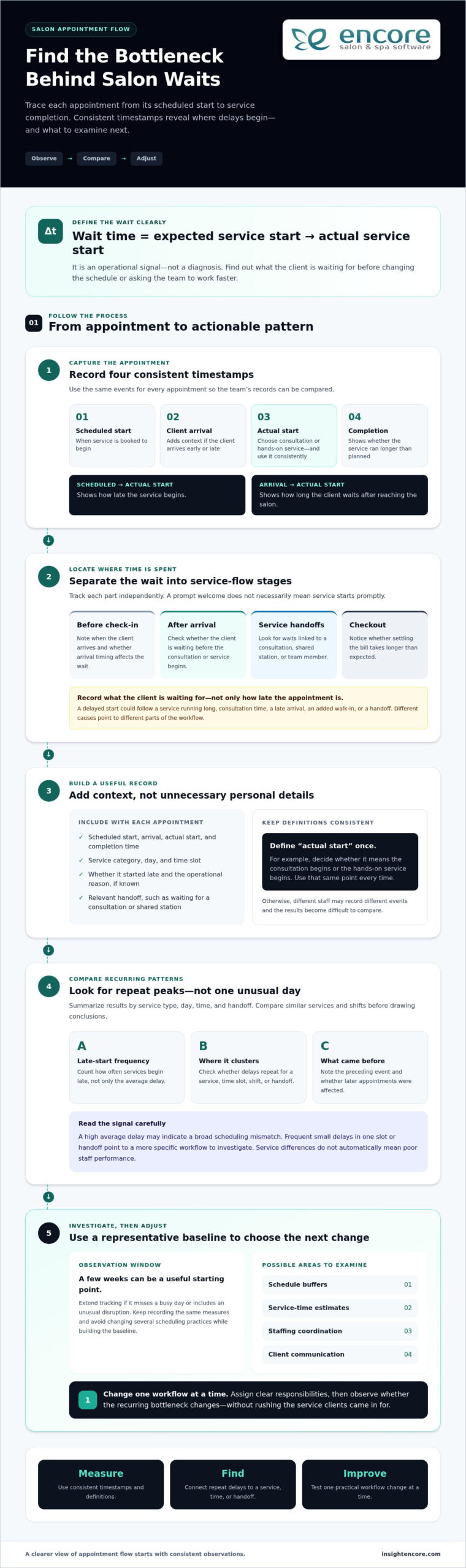
A late start can unsettle a client who planned their day around an appointment, put pressure on the stylist, and push the next booking off schedule. But “the salon is running behind” doesn’t explain where the delay began. Before changing the schedule or asking anyone to work faster, trace what happened from the client’s expected start time to the moment service actually began.

Salon wait time is the gap between a client’s expected service start and the actual start. It’s an operational signal that shows where appointment flow needs attention. To understand that signal, separate the wait into stages: before check-in, after arrival, between service handoffs, and at checkout. A client may be welcomed promptly but wait for a consultation, or finish their service on time but spend longer than expected settling the bill. Each points to a different part of the day.

Record what the client is waiting for, not just how late the appointment is. A delayed start might come from the previous service running long, a stylist needing consultation time, or a transition that depends on another team member. That distinction helps you focus on the process instead of treating every delay as a performance problem.

Which salon waits frustrate clients most?

A waiting-room delay and a late service start can feel different. A client may arrive at the scheduled time and see their stylist still finishing with someone else, or they may be checked in promptly but wait before the consultation begins. Uncertainty can make either pause feel longer, especially if the client doesn’t know what’s happening. Track check-in, consultation, processing, and checkout separately to see where time is spent and where a simple explanation could improve the experience.

What causes appointment delays to snowball?

One service that takes longer than planned can shift the next appointment, then the one after it. The cause might be a complex service, a late arrival, a walk-in added to an already full schedule, or a handoff that relies on a shared chair or team member. Delays can also reflect normal differences in service needs, not poor staff performance. Look for recurring patterns before deciding what to change.

It can help to think of the salon as a series of connected arrivals and services. Queueing Theory studies how waiting lines form, offering a useful way to consider how appointment timing and available staff interact. You don’t need a mathematical model to begin: note when each wait occurs, what was happening just before it, and whether later appointments were affected. That gives you a clearer starting point for reducing client wait times in a salon without rushing the work clients came in for.

Measure salon wait times to pinpoint the real bottleneck

Once you know where a client’s wait occurs, record it consistently. Start with three timestamps for each appointment: the scheduled service start, the actual service start, and service completion. Together, they show whether the issue is a late start, a service running long, or both.

Scheduled start, actual start, and service completion reveal whether a salon bottleneck begins before service, during the appointment, or at a transition. Keep the measures distinct. Scheduled-to-actual start time shows how late the service begins, while arrival-to-service-start time shows how long the client waits after reaching the salon. If a client arrives early or late, that context helps you interpret both figures fairly.

Which wait-time measures should a salon track?

Alongside those timestamps, count how often services begin late, not just the average delay. An average can look manageable even if the same service or time slot repeatedly starts behind. Note the service type, day, time, and relevant handoff, such as waiting for a consultation or a shared station. Keep the record focused on operations by avoiding unnecessary personal information.

A simple log can include:

  • Scheduled start, client arrival, actual start, and completion time.
  • Service category and the day or time slot.
  • Whether the appointment started late and the operational reason, if known.

Keep the definitions consistent across the team. For example, decide whether “actual start” means the consultation begins or the hands-on service begins, then use that same point every time. Otherwise, two staff members may record different events and make the results difficult to compare.

How can managers interpret the patterns?

Look for repeated peaks, not conclusions based on one unusual day. Compare similar services and shifts, since a complex appointment and a quick trim may involve different steps. If late starts cluster around a particular handoff or time slot, investigate that part of the workflow before changing the whole schedule. Comparing these patterns with your salon staff utilization rate can also help you understand how staff capacity lines up with demand.

Choose an observation window that covers the salon’s normal range of days, shifts, and services. A few weeks can be a useful starting point, but extend the tracking if the period misses a busy day or includes an unusual disruption. The goal is a representative picture, not a perfect dataset. Record the same measures throughout, and avoid changing several scheduling practices while you’re building the baseline.

Then summarize the results by service type, day, time, and handoff. A high average delay may point to a broad scheduling mismatch; frequent small delays in one slot may call for a more targeted adjustment. This gives you evidence to guide the next step in reducing client wait times in a salon, rather than asking the team to move faster without knowing what’s causing the wait.

Compare salon wait-time fixes before changing the schedule

Once you’ve identified where delays recur, match the solution to the cause. Adding time everywhere may protect the schedule, but it can also leave avoidable gaps. Packing appointments closer together may appear efficient, yet even small variations in service time can quickly push later clients behind. Choose a targeted adjustment that supports quality service and fits the way your salon works.

Consider the effort and trade-off of each option:

  • Schedule buffers: Add breathing room around services that regularly run over or need a more involved transition. This is simple to test, but broad buffers may create unused time.
  • Service-duration estimates: Review the time allowed for different services against observed durations. Updating estimates can improve the fit, though the team may need to revisit them as service needs vary.
  • Staffing coordination: Clarify who handles consultations, shared stations, or other handoffs during busy periods. This can address workflow gaps, but requires clear team communication.
  • Client communication: Set realistic expectations about appointment timing and explain delays promptly. This won’t remove the underlying bottleneck, but it can reduce uncertainty while the salon addresses it.

When do buffers and appointment-duration changes help?

Use your recorded service times to identify where a modest allowance may help, rather than adding the same buffer to every booking. A complex consultation or a transition between services may need different time from the hands-on appointment itself. The trade-off is capacity: protect time where variation is real, but avoid turning the entire schedule into idle space.

If a service routinely takes longer than its booking duration, update the estimate and observe what changes. If only certain appointments run over, consider whether consultation needs, finishing steps, or preparation explain the difference. More accurate durations can help clients select a suitable slot and give staff a schedule that better reflects the work. Avoid shortening estimates just to fit more appointments; tighter scheduling can magnify the effect of normal variation.

How should a salon balance walk-ins and booked appointments?

Walk-ins can serve clients who want flexibility, but accepting them when staff are fully committed may delay people with bookings. A designated walk-in period or capacity can make demand easier to manage, while protecting booked slots prioritizes appointments already on the schedule. Either approach needs a clear boundary so the team can make consistent decisions.

Set expectations honestly. If a walk-in can’t begin right away, explain that timing depends on service availability rather than promising immediate attention. Online booking can help clients choose from available appointment times instead of relying on a call or arriving without a slot. A clear salon client booking portal can support that choice, but it won’t resolve staffing or service-flow issues on its own.

There’s no single fix for reducing client wait times in a salon. Compare the likely benefit, effort, and trade-off, then test the option that best matches the delay pattern you observed.
Reducing Client Wait Times in a Salon: A Practical 2026 Guide

Reduce salon waiting with a practical workflow improvement plan

A useful improvement plan doesn’t need a major schedule overhaul. Start with a recurring bottleneck you’ve observed, make one focused change, and review what happens. Keeping the test small helps you see whether the change addressed the cause or simply moved the delay somewhere else.

Choose one bottleneck, test one change, and compare the same measures before and after. Your team can adapt this sequence to the salon’s services and staffing:

  1. Choose the pattern. Select a recurring issue, such as a certain appointment type regularly starting late or a specific handoff slowing down the next service.
  2. Assign ownership. Decide who greets and checks in clients, who updates the schedule when timing changes, and who coordinates service transitions. Clear roles reduce confusion during busy periods.
  3. Test one adjustment. For example, revise the time allowed for a service that often runs over, or give one team member responsibility for communicating schedule changes.
  4. Review the results. Compare the same start-time and completion measures you used for your baseline. Keep, adjust, or reverse the change based on what the records show and what staff experience.

This gives everyone a shared action sequence: spot the pattern, name an owner, try one change, and review the evidence. It keeps the focus on improving the flow rather than asking the team to rush through services or absorb a poorly planned schedule.

How can a salon test a schedule change?

Use the delay pattern from your observations to choose a change that addresses its likely cause. If a particular service repeatedly overruns, adjust its scheduled duration rather than adding time to every appointment. Keep other practices steady during the trial, then compare the same measures from similar services, days, and shifts. If the pattern doesn’t improve, revisit the cause before expanding the change.

What should staff say when a client is waiting?

Acknowledge the delay promptly, apologize for the wait, and share a realistic update if the team has one. If timing is still uncertain, say so rather than guessing at a new start time. For example: “I’m sorry we’re running behind. We’re checking the schedule and will update you as soon as we have a clearer estimate.” A warm, direct message helps clients feel seen without promising a time the team can’t meet.

Agree on who gives updates and how schedule changes reach the rest of the team. The person at check-in may not know what’s happening in the service area, so establish a simple handoff for sharing current timing. Consistency matters: clients should receive a clear update, not conflicting estimates from different staff members. Small communication habits can make an unavoidable delay feel more considered while the team works on its underlying cause.

With a repeatable test and clear ownership, reducing client wait times in a salon becomes a practical workflow effort, not a demand to work faster.

Explore Encore salon software

Use salon software to support a more organized client flow

Once you’ve identified which parts of the day create friction, consider whether software could simplify the administrative work around appointments. Online booking can present available appointment times so clients can choose a suitable slot without relying on staff to coordinate every booking manually. That can make appointment selection more organized, but it won’t fix a schedule that underestimates service time or lacks enough capacity.

Software supports the flow. Your service timings, staffing decisions, and communication practices still shape the client experience. If an appointment routinely takes longer than its scheduled slot, a booking tool won’t create the missing time. Likewise, a system can help organize information and transactions, but staff still need clear responsibilities for service transitions and updates when the day runs behind.

Which software capabilities can support appointment flow?

Think about the practical steps in a client visit. Online appointment booking lets clients select from the availability you present. Client management helps staff access client records as they prepare for scheduled visits. Point-of-sale tools support transactions at checkout, making this part of the visit easier to organize. Together, these capabilities can support the appointment journey without replacing the team’s day-to-day workflow.

Encore salon software brings online booking, client management, point-of-sale transactions, and integrated credit card processing together. Match each capability to a specific friction point. If the team spends time coordinating appointment requests, online booking may help. If staff need a more organized way to manage client information, client management can support their preparation. If checkout adds friction, point-of-sale transactions and integrated credit card processing can help organize that part of the visit.

Keep schedule design and client communication in your improvement plan. These tools support booking, client information, and transactions, while your team remains responsible for service timing, capacity, and the flow between appointments.

How can a salon decide whether to explore software?

Start with the recurring administrative task that takes time or creates confusion, then define what a better process would look like. For example, your goal might be to let clients select from available appointment times online or make client records easier for staff to access when preparing for visits. A clear goal makes it easier to assess whether a software change matches the salon’s needs.

Next, connect the capability to the workflow. Identify who will use it, which step it supports, and what still requires a staff decision. Then review whether the process feels more organized without assuming that software alone will reduce delays. This keeps the focus on a practical fit, not on adding technology for its own sake.

Reducing client wait times in a salon takes realistic service timing, appropriate capacity, and consistent communication. Software can support those efforts by organizing booking, client information, and checkout, while your team remains responsible for the service flow.

Explore Encore salon software

Build a calmer appointment day, one step at a time

Better appointment flow doesn’t require a perfect schedule from day one. Choose one recurring delay to address, make a focused adjustment, and give your team a clear way to keep clients informed. Small, thoughtful changes can help create a visit that feels more welcoming for clients and more manageable for staff, without rushing the service.

If administrative friction is part of the problem, Encore brings online booking, client management, and point-of-sale transactions together to support an organized client journey. Encore’s parent company, Syntec Business Systems, was founded in 1991. These tools can support your process, while your team’s service timing and communication remain essential to reducing client wait times in a salon.

Keep learning from each appointment, and build a salon flow that gives both your clients and your team room to feel at ease.

Try Encore salon software

Frequently Asked Questions

How can I reduce client wait times in a salon?

Start by identifying the point where appointments most often lose time, then make one manageable change. For example, if consultations frequently delay hands-on work, decide who will conduct them and how that time fits into the booking. Tell the team what to watch during the trial, such as whether later appointments still start behind. This keeps reducing client wait times in a salon focused on a fix the team can observe and maintain.

What is an acceptable wait time at a salon?

There’s no universal wait-time limit that suits every salon, service, or client. Set expectations around the appointment experience your salon can reliably provide, then pay attention to whether clients understand what’s happening if the schedule shifts. A brief wait with a clear explanation may feel different from an unexplained delay. Review client feedback alongside appointment records, and use recurring concerns to refine your service standards rather than relying on one fixed number of minutes.

Can appointment scheduling software reduce salon wait times?

It can help organize appointment selection when it offers online booking, but it can’t correct every source of delay. For instance, online availability may reduce back-and-forth booking coordination, while an appointment duration that doesn’t match the service can still throw off the day. Identify the administrative task causing friction before changing tools. Then decide what success should look like, such as fewer manual booking exchanges, while separately addressing staffing, timing, and service handoffs.

How do salons prevent appointments from running late?

Salons can reduce avoidable overruns by matching booking details to the service planned and preparing for known steps before the client arrives. If a booking may involve an add-on or a more involved consultation, clarify the plan early so the appointment isn’t unexpectedly extended. Keep transitions clear, too: the next team member should know when their part begins. Preserve realistic service time, because squeezing appointments together can spread one overrun across the schedule.

Should a salon leave buffer time between appointments?

Use buffers where your schedule shows a specific need, rather than inserting the same gap after every service. A consultation-heavy appointment or a transition that requires resetting a station may benefit from added flexibility. But widespread gaps can limit appointment availability without addressing the actual cause of delays. Try a targeted allowance on the relevant service or time slot, then compare how the day flows before deciding whether to keep or adjust it.

How should a salon handle a client who is waiting?

Acknowledge the wait directly and let the client know what you can say with confidence. For example: “I’m sorry for the delay. We’re checking the timing and will update you when we have a clearer estimate.” Don’t offer a start time just to reassure them if you’re unsure. If the estimate changes, share another update rather than leaving the client to ask. A respectful tone and consistent information help maintain trust during an imperfect day.

Do walk-ins increase wait times for salon clients with appointments?

They can, particularly if a walk-in takes a stylist or station already needed for a booked service. The effect depends on the service requested and the capacity available at that moment. Set a clear rule for accepting walk-ins, such as only offering them when they fit without displacing booked appointments. Explain that availability depends on the day’s schedule, and give walk-in clients a realistic expectation rather than implying they can be seen immediately.

Disclaimer

This article is general in nature and may contain errors, please verify all claims with your sales rep
Categories
Uncategorized

Measuring Salon Marketing ROI: A Practical Guide for 2026

A full appointment book can make a promotion look successful, even when many clients would have booked anyway. That’s why measuring salon marketing roi starts with a more useful question: which bookings and revenue can you reasonably connect to the campaign?

It’s frustrating to see likes, clicks, and appointments without knowing what your marketing contributed. Discounts can muddy the picture, too. A campaign may bring in bookings while leaving little profit behind. You don’t need perfect tracking to make a more confident decision, but you do need to separate campaign-driven visits from business that was already likely to happen.

This guide explains how to calculate a useful ROI measure, account for campaign costs and discounts, and compare channels using consistent data. It also covers how to treat repeat bookings carefully, so one promotion doesn’t get credit for a client’s ongoing loyalty. Use your salon’s own results to decide what to keep, change, or stop, rather than relying on a generic industry benchmark.

Key Takeaways

  • Choose one clear outcome for each campaign, such as first-time bookings or redeemed offers, to make results easier to interpret.
  • Measuring salon marketing roi means looking beyond clicks and bookings to compare attributable revenue with the full campaign cost.
  • Track campaign spend, attributed bookings, and revenue consistently so you can compare channels without relying on generic benchmarks.
  • Check seasonality, appointment capacity, cancellations, and repeat-client behavior before deciding whether a campaign contributed to a change.
  • Bring booking, client, and transaction records together where possible, then use the results to choose what to keep, adjust, or stop.

What Measuring Salon Marketing ROI Really Tells You

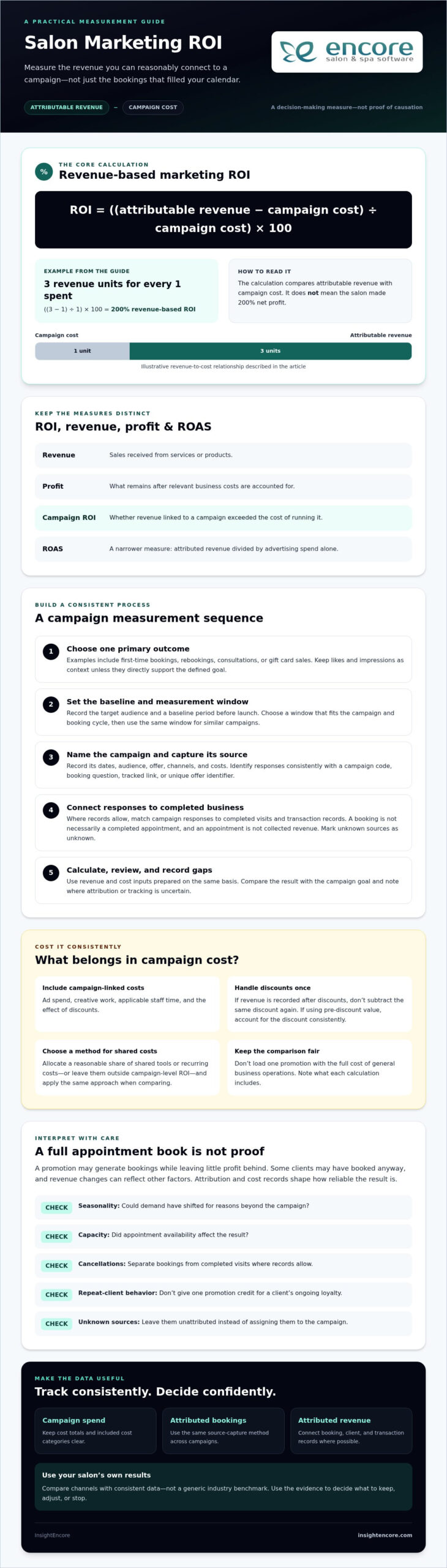
A campaign can fill appointments and still fall short financially. To judge its contribution, measuring salon marketing roi means comparing the revenue you can reasonably attribute to the campaign with the cost of running it. The result is a decision-making measure, not proof that every new booking came from marketing.

Salon marketing ROI is the percentage return from campaign-attributed revenue after campaign costs are deducted. Use this formula:

Marketing ROI = ((attributable revenue − campaign cost) ÷ campaign cost) × 100

For example, if a campaign generates three units of attributable revenue for every one unit spent, its revenue-based ROI is 200%. That does not mean the salon made 200% net profit. The calculation compares revenue with campaign costs, not with every cost of delivering the services sold.

Marketing ROI versus salon revenue and profit

Revenue is the sales received; profit is what remains after relevant business costs are accounted for. Campaign ROI sits between those ideas: it asks whether the revenue linked to a campaign exceeded the cost of that campaign. Return on ad spend (ROAS) is narrower, dividing attributed revenue by advertising spend alone. For background on the broader metric, see Return on Marketing Investment (ROMI).

A revenue increase after a promotion doesn’t prove the promotion caused it. Clients may have already planned to visit, or demand may have shifted for other reasons. Your calculation is only as reliable as the attribution and cost information behind it.

Which marketing costs belong in the calculation?

Include costs tied to the campaign, such as ad spend, creative work, applicable staff time, and the effect of discounts. If you record revenue after discounts, don’t subtract the same discount again as a separate cost. If you use the pre-discount value instead, account for the discount consistently.

Shared tools or recurring costs also need a consistent approach. You might allocate a reasonable share to each campaign or leave them outside campaign-level ROI, as long as you use the same method when comparing results. Don’t load one promotion with the full cost of general business operations. Keep campaign costs distinct, and note what your calculation includes so you can compare like with like.

How to Measure Salon Marketing ROI Step by Step

A repeatable process makes campaign results easier to compare and less dependent on guesswork. Before launching, decide what success means, how you’ll identify campaign-driven activity, and when you’ll review the results.

Set one goal and a measurement window

Choose one primary outcome for each campaign, such as first-time bookings, rebookings, consultations, or gift card sales. Record the target audience and a baseline period before launch, then set a measurement window that fits the campaign and booking cycle. Use the same window when comparing similar campaigns. Impressions and likes can help explain reach, but they aren’t sales unless they directly support a defined goal.

Aligning a metric with a business objective helps you measure marketing effectiveness, rather than just activity. Keep secondary measures for context, but don’t change the main success measure after the campaign has started.

Define the campaign and capture its source

Give each promotion a clear name and record its dates, audience, offer, channels, and costs. Then choose a practical way to identify responses: a campaign code, a booking question, a tracked link, or a unique offer identifier. Apply the method consistently so you can identify bookings or sales associated with the campaign.

Connect the source to the outcome as far as your records allow. A booking is not necessarily a completed appointment, and an appointment is not the same as collected revenue. Match campaign responses to completed visits and transaction records where possible. If a client’s source is unknown, mark it as unknown instead of assigning it to the promotion.

Calculate and review the result

Campaign ROI is ((attributable revenue minus campaign cost) divided by campaign cost) multiplied by 100. It requires a consistent cost total and revenue linked to campaign responses within your pre-set measurement window.

Use revenue and cost inputs prepared on the same basis, including discounts and applicable campaign labor. Then compare the result with the campaign’s goal and note any gaps in tracking. The calculation won’t resolve uncertain attribution, but a consistent process can show where the evidence is strong and where it needs improvement.

Booking, client, and transaction records can provide useful inputs when they’re connected appropriately. Salon management tools such as Encore Salon & Spa Software bring online booking, client management, and POS transactions together, but you’ll still need to confirm how campaign sources can be captured and matched to outcomes. Use what the records support, then refine your tracking for the next campaign.

Which Salon Marketing Metrics Help Explain ROI?

ROI is the result you’re trying to understand, while supporting metrics help explain what happened along the way. Separate outcome metrics, such as completed appointments and sales, from activity metrics, such as impressions, clicks, and likes. Activity can show that people noticed a campaign. On its own, it can’t show that the campaign was profitable.

For a useful comparison, keep a simple record for each campaign. Measuring salon marketing roi becomes more meaningful when you use the same fields and definitions from one campaign to the next.

Campaign Spend Attributed bookings Attributed revenue Estimated ROI
Campaign name and dates Costs included Bookings linked to campaign Revenue linked to those bookings Calculated using your stated method

Bookings, new clients, repeat visits, and average transaction value

Bookings show a response, but they don’t confirm that appointments were completed or paid for. Separate first-time clients from returning clients: a promotion that attracts new guests has a different purpose from one that encourages existing clients to return. Repeat visits can signal ongoing engagement, but they don’t prove which campaign caused the visit.

Average transaction value shows the typical revenue per completed transaction. It can help explain whether campaign-linked visits generated higher or lower sales, but it doesn’t reveal campaign costs or profit on its own. Read these measures together, and define each one consistently.

Attribution challenges in salon marketing

A client might see a social post, receive an email, and later book after a reminder. Three common approaches assign credit differently: first-touch credits the earliest recorded interaction, last-touch credits the final one before booking, and self-reported attribution asks clients how they heard about the salon. Each offers a useful view, but none captures every influence.

Write your attribution method beside the results. Compare campaigns only when their goals, measurement windows, and tracking methods are reasonably alike. A campaign focused on new-client bookings shouldn’t be ranked directly against one designed to encourage repeat visits. Channel performance depends on your objective and the quality of your tracking, not a universal winner.

Measuring Salon Marketing ROI: A Practical Guide for 2026

How to Interpret Salon Marketing ROI Without Misleading Yourself

A strong month is encouraging, but it doesn’t prove a campaign caused growth. Clients may already have planned their visits, demand may have shifted with the season, or your team may have had more availability than usual. When measuring salon marketing roi, treat the calculation as evidence to assess, not a verdict on its own.

Put campaign results in context. Check whether appointment capacity changed, whether cancellations affected completed visits, and whether revenue came from first-time clients or repeat guests. A campaign may prompt an existing client to book earlier without creating a new visit. That distinction matters when you assess whether the promotion achieved its intended goal.

Discounts need a closer look, too. An offer can increase bookings while lowering the amount collected per appointment. Compare campaign-linked revenue after discounts with campaign costs, and consider whether the service mix or margin changed. More appointments don’t automatically mean a better financial result.

Common salon ROI calculation mistakes

Before acting on a result, check for omitted campaign costs, revenue counted more than once, and offers redeemed without a trackable identifier. Don’t credit every sale during a campaign period to that campaign. Small booking counts can swing sharply from one appointment, while inconsistent comparison periods can make a routine seasonal change look like campaign impact. Note these limitations beside the result.

Use a practical review cycle to improve campaigns

Review results after the measurement window you chose before launch. Record what the data supports, what remains uncertain, and whether the campaign met its primary goal. When the evidence is limited, test again rather than treating one result as conclusive. When practical, change one meaningful element at a time, such as the offer or audience. That makes it easier to see what may have influenced the next result.

  • Continue when tracking is credible and the campaign supports its goal.
  • Adjust when results are mixed and you can identify a clear issue to address.
  • Test again when results look promising but sample size or attribution is weak.
  • Stop when reliable evidence shows the campaign repeatedly misses its goal.

Keep the decision proportional to the evidence. Organized booking, client, and transaction records can help you review outcomes, but they don’t establish campaign attribution by themselves. Use them alongside your source-tracking method, and note any gaps before deciding what to change.

To see how Encore’s tools bring booking, client, and transaction information together, explore Encore Salon Software.

Build a Salon Marketing ROI Tracking Routine with the Right Tools

A simple routine is easier to maintain than a complicated dashboard. For each campaign, record its goal, dates, audience, tracking method, and costs. After the measurement window closes, capture the relevant outcomes, calculate the result using the same definitions, and decide what to do next. This steady process makes measuring salon marketing roi more useful over time because it lets you compare campaigns on consistent terms.

  • Record: Note the campaign details and which costs are included.
  • Capture: Connect campaign sources with bookings and completed sales where possible.
  • Calculate: Apply your chosen ROI formula consistently.
  • Decide: Keep, adjust, test, or stop based on the strength of the evidence.

What to look for in salon marketing and management software

Online booking, client records, POS transactions, and marketing tools can each contribute useful information. Together, they may help you organize campaign activity alongside bookings and sales, but they don’t automatically establish which campaign caused a transaction. Before choosing a system, ask how campaign sources can be recorded and whether booking and completed-sale information can be reviewed or exported together. If your salon is still relying on a basic cash register for transactions, it may also be worth reviewing what’s involved in upgrading from a cash register to a POS system to better connect sales data with client and booking records.

Encore Salon Software combines online booking, client management, POS transactions, and automated marketing tools. Explore Encore salon software features, and confirm which records or exports support the tracking process you plan to use.

Turn campaign results into a confident next step

Start with one campaign and a small tracking sheet. Include the campaign name, goal, dates, spend, source, attributed bookings, completed sales, revenue, and any limitations in the data. A spreadsheet can be enough to establish a consistent method before you add more tools or campaigns.

Software can help keep operational information organized, but it can’t replace clear goals, consistent attribution, or careful interpretation. Build the method first, then decide whether a platform’s records and reporting options fit your needs.

To explore whether Encore fits your salon’s tracking routine, learn more about Encore.

Make Your Next Marketing Decision with Confidence

Strong campaign decisions don’t depend on perfect data or a universal benchmark. They come from a consistent way to connect marketing activity with bookings, completed sales, and campaign costs. Measuring salon marketing roi becomes more useful when you set a clear goal, track where responses came from, and interpret results alongside repeat visits, cancellations, and discounts.

Start with one campaign and a simple tracking routine. Record what you can verify, note where attribution is uncertain, and use the findings to decide whether to continue, adjust, test again, or stop. Over time, organized records can help you identify which activities are worth another look.

Encore brings together online booking, client management, and POS tools, alongside automated marketing, loyalty programs, and gift card management. These tools can help organize salon activity, while your chosen tracking method remains essential to measuring campaign results.

Take it one campaign at a time. A clearer view of your results can help you make your next marketing decision with greater confidence.

Frequently Asked Questions

What is a good marketing ROI for a salon?

There’s no single marketing ROI benchmark that applies to every salon or campaign. A useful result depends on the goal, which costs you include, and how confidently you can connect bookings or sales to the campaign. Compare similar campaigns over comparable periods, and treat early results as directional if the sample is small. Consider profit and available appointment capacity alongside attributed revenue before deciding whether a result is strong.

How do you calculate salon marketing ROI?

Subtract campaign costs from the revenue reasonably attributed to the campaign, divide by those costs, then multiply by 100. For example: ((attributed revenue − campaign cost) ÷ campaign cost) × 100. Include relevant expenses, such as advertising, discounts, and campaign labor, consistently. Measuring salon marketing roi also requires you to state how you attributed revenue. The formula organizes the calculation, but it can’t make uncertain source data reliable.

How can a salon track which marketing campaign generated a booking?

Use a trackable link, campaign-specific code, booking question, or unique offer identifier, then connect the recorded source to completed appointments and transactions where possible. Choose a method staff can use consistently. A client may see several promotions before booking, so tracking won’t always identify a single cause. Record the attribution approach you use, and mark the source as unknown when the available information doesn’t support a confident match.

Should salons measure revenue or profit when calculating marketing ROI?

Revenue is often easier to connect to campaign-linked bookings, but it doesn’t account for the costs of delivering services or running the promotion. Profit gives a fuller financial picture when those costs can be estimated reliably. Choose the measure that fits the decision you’re making, clearly state what it includes, and apply it consistently. Don’t compare a revenue-based calculation with a profit-based one as if they measure the same result.

Can a salon measure social media marketing ROI?

Yes, if you define a business outcome and have a way to connect social activity to bookings or sales. Use tracked links, campaign codes, or a booking-source question where practical, then compare the attributed outcome with campaign costs. Likes, views, and comments can help show engagement, but they don’t establish revenue or profit on their own. Be transparent about any sales or bookings whose source you can’t confirm.

How often should a salon review marketing ROI?

Set a review period before each campaign and allow enough time for its intended outcome, such as a booking followed by a completed appointment. A weekly check can help catch tracking gaps while the campaign is running; make the final assessment using the window and method chosen at launch. Compare campaigns with similar goals and timing, and account for changes in seasonality, appointment capacity, or cancellations.

What if a salon cannot identify which campaign caused a sale?

Report the sale as unattributed or uncertain rather than assigning it to a campaign without evidence. You can still review overall booking and sales trends, but keep those observations separate from campaign-attributed results. For the next promotion, try a unique link, offer code, or booking-source question, and make the tracking step clear for staff and clients. Better source records can strengthen future comparisons without guaranteeing perfect attribution.

Explore Encore for your salon

Disclaimer

This article is general in nature and may contain errors, please verify all claims with your sales rep

Categories
Uncategorized

How to Set Up Automated Birthday Greetings for Salon Clients in 2026

What if your salon could remember every client’s birthday without adding another task to your already full day? Automated birthday greetings for salon clients can make that possible, but the message should still feel like it came from your team, not a bulk mailing list.

Tracking birthdays manually can be tiring, and it’s reasonable to worry that automation might feel cold or spammy. Done thoughtfully, a birthday message gives you a simple way to celebrate clients, invite them back during quieter periods, and keep your salon in mind between appointments.

This guide explains how to build a birthday marketing system that feels personal and is straightforward to manage. You’ll learn what information to collect, how to choose a message and offer, when to send it, and how to make booking easy. We’ll also cover how salon software with client management and automated marketing tools can help, plus basic considerations for promotional messages. With a few practical choices, you can create a repeatable process while keeping the client relationship at the centre.

Key Takeaways

  • Set up automated birthday greetings for salon clients by keeping client details accurate and choosing a system that can reduce manual work.
  • Match the channel to the message: SMS suits a concise greeting and offer, while email allows more room for imagery and service ideas.
  • Make each greeting personal with a warm tone, a relevant treat, and wording that sounds like your salon.
  • Consider a birthday-month offer to give clients more flexibility to book and redeem it.
  • Track redemptions and bookings to learn which messages encourage clients to return.

The Psychology of the Personal Touch: Why Birthday Marketing Works

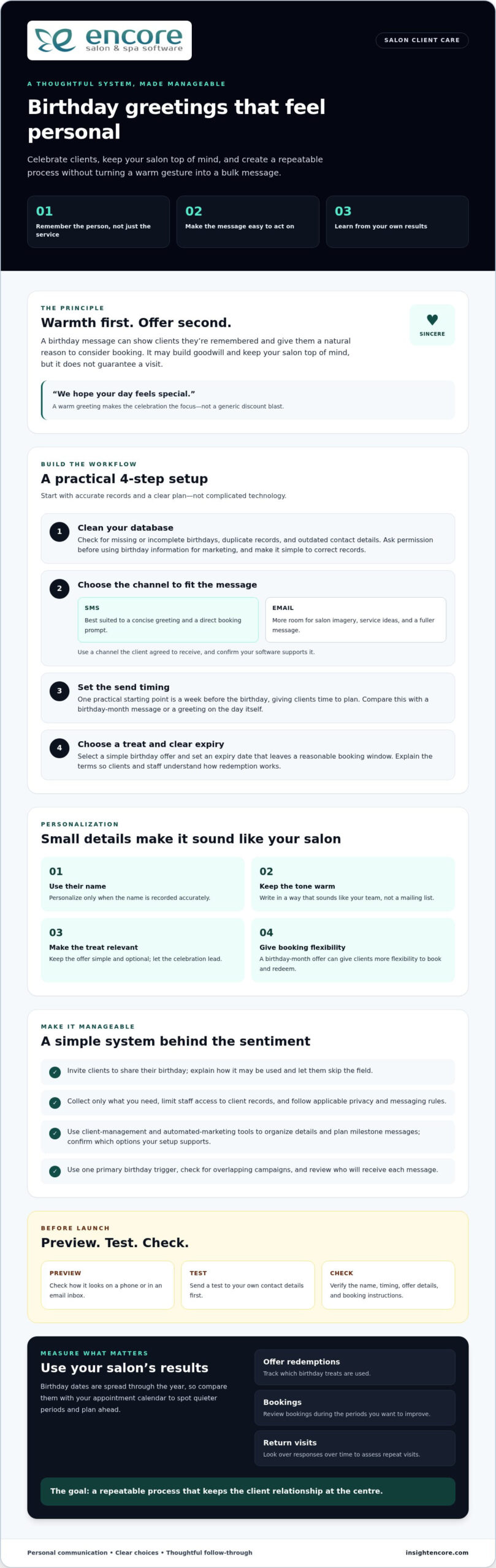
A birthday message can do more than fill a quiet appointment slot. It shows clients you remember them as people, not just as services on the books. That gesture can build goodwill and give them a natural reason to consider booking. It won’t guarantee a visit, but it can put your salon top of mind.

This is the idea behind relationship marketing: building lasting client relationships through relevant, thoughtful communication rather than focusing only on the next sale. Automated birthday greetings for salon clients can support that approach when the message sounds sincere and any offer feels optional, not pressuring.

The Emotional Connection in Beauty and Wellness

Salon visits are personal. Clients trust you with their appearance, preferences, and time, which gives your team an opportunity to make milestones feel meaningful. A message that says, “We hope your day feels special,” has a different tone from a generic discount blast. Keep the greeting warm, use the client’s name when you have it recorded accurately, and make the offer secondary to the celebration. Consistent, thoughtful messages can build familiarity over time.

Combating the “Slow Month” with Birthday Peaks

Birthdays fall throughout the year, so a birthday-month offer can create booking opportunities beyond major holidays. Compare client birthday dates with your appointment calendar to identify quieter periods and plan messages in advance. Rather than rely on broad claims about how birthday marketing affects retention, measure your own results. Track offer redemptions, return visits, and bookings during the periods you want to improve.

Encore Salon & Spa Software combines client management with automated marketing and loyalty programs, giving salons tools to organize client outreach. You can explore how to record client details and plan milestone messages, then confirm which birthday-date and campaign options are available in your setup. The value of a greeting may extend beyond one appointment: it can encourage a client to return and remind them of the care they receive from your team. Review the response over time to see whether the campaign supports repeat visits.

How to Set Up Your Automated Birthday System in 4 Steps

A reliable birthday campaign starts with accurate records and a clear plan, not complicated technology. Use these four steps to create automated birthday greetings for salon clients that feel thoughtful and are manageable for your team.

Collecting Quality Data at the Front Desk

When a new client books, ask whether they’d like to share their birthday and explain that you may use it to send a greeting or offer. Include a birthday field in your intake process, but let clients skip it. A salon booking and management system can help organize client details, and a booking portal may give clients a convenient way to review or update their information. Collect only what you need, limit staff access to client records, and follow the privacy and messaging rules that apply to your salon. The Australian Government’s Manage customer relationships guide also explains how customer records can support more relevant communication.

  • Step 1: Clean your database. Check for missing or incomplete birthday dates, duplicate records, and outdated contact details. Ask permission before using birthday information for marketing, and establish a simple process for correcting records.
  • Step 2: Choose your channel. SMS is suited to a brief greeting and direct booking prompt. Email gives you more room for salon imagery, service ideas, and a fuller message. Use a channel the client has agreed to receive, and check that your software supports the delivery method you choose.
  • Step 3: Set the trigger. Decide when the message should be sent. A week before the birthday is one practical starting point: it gives clients time to plan without making the reminder feel last minute. It won’t suit every salon, so compare it with a birthday-month message or a greeting on the day itself.
  • Step 4: Choose the offer and expiry. Select a clear, simple birthday treat and set an expiry date that gives clients a reasonable booking window. Spell out the terms so clients and staff know how redemption works.

Configure, Check, Then Switch It On

Before launching, preview the message on a phone and in an email inbox. Check that the client’s name, timing, offer details, and booking instructions appear correctly. Send a test to your own contact details first. To prevent duplicate messages, use one primary birthday trigger, look for overlapping campaigns, and review who will receive the message. If your system allows it, begin with a small test group and check delivery and bookings before expanding. Encore’s Automated Marketing & Loyalty Programs can support more organized outreach; confirm the available trigger and channel settings for your setup.

Crafting the Perfect Birthday Message: Templates and Offers

A good birthday message starts with the client, not the promotion. Keep the greeting warm, make the offer easy to understand, and give the client one clear next step. These examples are starting points for automated birthday greetings for salon clients. Adjust the wording to suit your team, and test personalization fields before sending.

Two Ready-to-Adapt Templates

Short and sweet SMS: “Happy birthday, [First Name]! Treat yourself to a little extra care this month. Enjoy [birthday offer] when you book by [expiry date]: [booking link]. Hope you have a wonderful day, [Salon Name].” Keep the text brief, include one clear offer, and check that the booking link works on a phone.

Visual storyteller email: Use your salon’s current branding, a welcoming subject line such as “A birthday treat from [Salon Name],” and a layout that’s easy to read on mobile. Start with a personal greeting, explain the offer and its terms, then add a clear booking button. For example: “Happy birthday, [First Name]! We’d love to help you celebrate with [birthday offer]. Book by [expiry date] and choose a time that works for you.”

Before launching, send test messages to check how names, dates, stylist details, and links appear. If you don’t have a reliable stylist name, sign off from the salon instead of leaving a blank or broken placeholder.

Choose Offers That Fit Your Clients

Possible birthday treats include a discount on a service, a complimentary deep-conditioning add-on, or extra loyalty points. A service add-on can feel like a thoughtful upgrade while keeping the focus on the salon experience. The right choice depends on your services, margins, and what clients value. If you offer special rewards to a segment of clients, define eligibility clearly and apply it consistently.

  • Birthday-month pass: Gives clients flexibility to book around work, family, and existing appointments.
  • Birthday-week offer: Creates a shorter booking window and a timely reason to act, but may not suit clients who plan ahead.
  • No-strings-attached greeting: Send a simple birthday wish without a discount or booking request. This can feel especially sincere when your goal is to recognize the client, not prompt a purchase.

Professional and friendly means being clear about the offer while writing with the warmth you’d use in a genuine conversation. For a tattoo studio, tailor the language to its clients and services rather than reusing salon-specific copy. Explore tattoo studio software as a starting point for understanding that specialized setting.

How to Set Up Automated Birthday Greetings for Salon Clients in 2026

Timing and Personalization: 2026 Best Practices

A birthday greeting works best when it arrives early enough to help a client plan, but not so early that it feels disconnected from the occasion. A birthday-month offer gives clients flexibility to choose a date that suits them, including a date before or after the birthday if their schedule is busy.

Give Clients Time to Book

Try sending the first greeting about a week before the birthday. This gives clients a chance to book ahead, whether they want a fresh style for a celebration or simply a moment of self-care. If you offer a birthday-month promotion, state the final redemption date clearly rather than implying that clients must visit on their birthday.

Make the next step simple. Link directly to your online booking module if it supports the booking path you want clients to use. Test the link on a phone before sending, and check that it takes clients to a clear appointment option.

Personalize with Purpose

Useful personalization reflects what you know about a client without making the message feel overly familiar. Review service history and preferences to shape a relevant suggestion. For example, a client who regularly books blowouts might appreciate, “Ready for your birthday blowout?” A client who visits for nail services could receive a greeting tailored to that experience. Mention a preferred stylist only if the information is reliable; otherwise, keep the greeting salon-wide.

Use purchase history to shape product recommendations only when the record gives you a sensible reason. Don’t assume every client wants the same service or product, and don’t imply that software provides specific recommendations unless your system supports that feature. For more relevant messages, group clients by service or visit pattern and adjust the wording for each group. Even small changes can make a birthday email feel more thoughtful than a generic broadcast.

Coordinate Channels and Respect Preferences

SMS can deliver a concise birthday greeting and booking prompt, while email allows more room for service ideas and salon imagery. If you use both, give each message a distinct purpose. For instance, send an email with ideas for a birthday visit, then use a brief text to share the offer or a booking reminder. Avoid repeating the same copy across channels, and don’t message clients who have opted out of that channel.

Handle opt-outs promptly and without pressure. Keep contact preferences current, remove unsubscribed recipients from future marketing messages, and make any available unsubscribe option easy to find. Respecting a client’s choice protects trust, even when it means sending fewer birthday offers. A well-timed, relevant message is more useful than a crowded inbox.

Explore Encore for automated salon marketing

Measuring Success: Turning Greetings into Revenue

A birthday campaign should do more than send a pleasant message. Track whether it leads to bookings, offer redemptions, and ongoing engagement. Clear measurement helps you improve automated birthday greetings for salon clients without losing the personal touch.

Track Bookings and Offer Redemptions

Give each birthday offer a distinct code or checkout label so your team can record redemptions. To calculate the redemption rate, divide the number of redeemed offers by the number delivered, then multiply by 100. Compare results across different message timings or offers, but remember that redemptions alone don’t tell the whole story. Also track how many recipients booked, whether they were returning clients, and how many appointments took place during your target period.

To estimate the effect on average ticket size, compare the average spend per birthday visit with a relevant baseline, such as those clients’ typical visit spend or similar appointments during the same period. Keep the comparison consistent and account for discounts or complimentary add-ons. This gives you a more useful picture than counting gross sales alone. For a broader framework on evaluating what your promotions actually contribute, see this practical guide to measuring salon marketing ROI, which covers how to separate campaign-driven visits from bookings that would have happened anyway.

Connect Greetings to Loyalty and Gift Cards

Birthday recognition can complement your salon’s broader loyalty efforts. If your loyalty program supports birthday points, decide how clients qualify, what they can use the points for, and how you’ll record them. Confirm that your software can apply the reward as intended before promising automatic credit. If it can’t, your team can use a consistent manual process. You can also mention salon gift card options as a way for clients to treat themselves or invite someone else to celebrate with them.

Encore Salon Software includes point of sale, booking, and marketing, along with Automated Marketing & Loyalty Programs. Use the records and reports available in your setup to review birthday-related transactions and compare results over time. Check which reporting views can isolate campaign revenue, redemptions, and average ticket size rather than assuming a specific report is available. Consider the overall value of the visit and any subsequent return appointments, not just the initial offer.

Refine the Campaign as You Learn

Test one change at a time, such as a different subject line or a service add-on instead of a discount. Ask clients a simple follow-up question: “Did you enjoy your birthday treat?” Use their responses alongside booking and redemption data to decide what to keep. As your salon grows, review whether client groups, offer rules, and reporting are applied consistently across locations. Regular, small adjustments can keep the campaign useful for clients and staff.

Make Every Birthday a Reason to Reconnect

Thoughtful birthday marketing doesn’t need to be complicated. Keep client details accurate, send a warm message at a useful time, and choose an offer that suits your salon and clients. Then review bookings and redemptions to learn what’s working and refine your approach.

Automated birthday greetings for salon clients help you recognize milestones consistently while reducing the need for manual reminders. The relationship still comes first. Automation simply helps your team show up at the right moment.

Encore offers beauty-industry software with automated marketing tools and an integrated platform that brings point of sale and loyalty programs together. The right system can help you organize a birthday process that feels personal and manageable.

Explore Encore Salon Software

Start with one thoughtful greeting, then build from there. Your next client celebration can be the beginning of a stronger salon relationship.

Frequently Asked Questions

Is automated birthday marketing really effective for small salons?

It can be a practical way for a small salon to recognize clients and encourage return visits, but results depend on the message, offer, and client preferences. Automated birthday greetings for salon clients reduce manual reminders and help you communicate consistently. Start with a simple greeting, then track bookings and offer redemptions to see whether the campaign supports your salon’s goals.

How far in advance should I send an automated birthday greeting?

Try sending the first greeting about a week before the client’s birthday, then compare results with a birthday-month message. An early note gives clients time to plan an appointment, while a month-long offer gives them more flexibility. There isn’t one timing that suits every salon, so test one approach at a time and review booking and redemption activity before changing your schedule.

What is the best offer to give clients for their birthday?

The best offer is one clients value and your salon can provide sustainably. Consider a relevant service add-on, a discount, or loyalty points, and make the terms easy to understand. A complimentary add-on may feel like a personal treat, while a discount is straightforward to explain. Choose one offer, state its expiry date clearly, and review redemptions alongside the value of the visits.

Can I send automated birthday greetings via text (SMS) and email?

You can use SMS, email, or both if your messaging platform supports those channels and clients have agreed to receive marketing messages through them. SMS works well for a brief greeting and booking prompt; email gives you room for images and service ideas. If you use both, make each message useful on its own and avoid sending duplicate copy close together.

What if I don’t have all of my clients’ birth dates?

You can start with the clients whose birthday information you have. Invite others to share their birthday when booking or at the front desk, explain how you’ll use the date, and let them decide whether to provide it. Don’t guess or fill in missing dates. Keep client details current so greetings reach the right person at the right time, and respect a client’s choice not to share.

How do I make sure the automated messages don’t sound like spam?

Write as you would to a valued client: use their name when the information is reliable, keep the greeting warm, and make any offer secondary to the celebration. Avoid generic, sales-heavy copy and repeated reminders. Send messages only through channels clients have agreed to use, make the booking step clear, and provide an easy way to opt out of future marketing messages.

Is there a way to track how many people actually use their birthday discount?

Yes. Use a distinct offer code or checkout label so staff can record each redemption in your point-of-sale system. Calculate the redemption rate by dividing redeemed offers by delivered offers, then multiplying by 100. Also compare birthday bookings and average visit spend with a suitable baseline. These measures help you assess whether an offer is bringing clients in and supporting revenue, not just generating clicks.

Do I need special software to automate birthday greetings?

You don’t necessarily need dedicated birthday software, but a salon management platform can make client records and marketing easier to organize. Encore Salon & Spa Software is an all-in-one platform with online booking, client management, point of sale, automated marketing, and loyalty programs. Check that any system you consider supports the birthday triggers and message channels you need, and confirm how it handles client preferences.

Disclaimer

This article is general in nature and may contain errors, please verify all claims with your sales rep
Categories
Uncategorized

How to Stop Salon Staff Theft: A Comprehensive 2026 Prevention Guide

Did you know that internal employee theft accounts for nearly 29% of all retail shrinkage, with the average incident costing a business over $1,800? It’s a heavy weight to carry when you suspect that "missing" retail bottles or end-of-day cash discrepancies aren’t just simple accidents. You’ve worked hard to build your salon. It’s heartbreaking to feel like your trust is being tested by the very people you’ve hired. We understand that you want to maintain high staff morale without feeling like a micromanager. Learning how to stop salon staff theft is really about replacing manual, "trust-based" systems with automated transparency that protects both your profits and your team’s integrity.

You deserve a secure business where every dollar and product is accounted for. This comprehensive 2026 guide will show you how to identify hidden leaks and implement professional systems that protect your revenue, inventory, and client list. We’ll walk through everything from role-based software permissions to the latest PCI DSS 4.0 compliance standards and tip-theft regulations. By the end, you’ll have a clear roadmap to turn Encore software into a silent partner that keeps your books clean and your mind at ease.

Key Takeaways

  • Learn to spot the difference between honest back-bar waste and intentional retail shrinkage to protect your hard-earned margins.
  • Discover how to stop salon staff theft by using tiered POS permissions that keep your cash drawer and client database secure.
  • Implement weekly spot checks on high-value inventory items to catch missing products within days rather than months.
  • Strengthen team morale with automated commission tracking that ensures your stylists are paid accurately and transparently every time.
  • Use real-time audit logs and automated reporting to act as a silent partner, flagging discrepancies so you don’t have to micromanage.

Identifying the 4 Main Types of Salon Staff Theft

Theft in a salon environment is rarely a one-time heist. It’s usually a slow leak that drains your bank account over months. To understand how to stop salon staff theft, you first need to recognize that it comes in many forms, some of which might even look like "business as usual" at first glance. Identifying these leaks is the first step toward reclaiming your peace of mind and protecting your bottom line.

Most internal loss falls into one of four categories:

  • Product and Inventory Theft: This covers retail bottles on your shelves and professional supplies in the back.
  • Cash and Service Theft: This includes unrecorded walk-ins, "sweetheart" discounts for friends, or using the "no-sale" key to open the drawer without a transaction.
  • Time Theft: Paying for hours not worked, such as when staff clock in early, stay late without cause, or spend shift hours on personal calls.
  • Client and Data Poaching: The most dangerous form, where staff export your database to start a competing business or direct clients to their home studios.

The Hidden Cost of "Back-Bar" Shrinkage

Unrecorded color usage is often the number one silent profit killer in salons. It’s easy for a stylist to justify "just a little extra" for a client without adding it to the ticket, but those ounces add up to thousands of dollars in lost revenue annually. Back-bar shrinkage is the unallocated cost of professional supplies used during services. There is a clear, expensive difference between professional use and a staff member "taking a bottle home" for personal use. Without real-time tracking, your back-bar becomes an open buffet that eats your margins.

Client Data: Your Most Valuable (and Vulnerable) Asset

Your client list is the heartbeat of your business. When stylists use personal phones to bypass your booking system, they’re creating a private bridge that bypasses your brand. Learning how to stop salon staff theft requires securing this digital perimeter. If a stylist leaves and takes your database with them, the financial hit can be devastating to your long-term growth. The legal and financial implications of a stolen client database are severe; you’re not just losing future bookings, you’re losing the marketing investment you spent to acquire those leads. Protecting this requires following client data security best practices, such as restricting export permissions and using individual staff logins.

Strengthening Your Point of Sale (POS) Security

When thinking about how to stop salon staff theft, your POS system is your first line of defense. Your front desk is the heart of your business, but it’s also where most revenue leaks happen. If everyone uses the same "General" login, you’ve lost accountability before the day even starts. Assigning unique PINs or login codes to every team member creates a digital paper trail for every action. When you know exactly who opened the drawer at 2:15 PM, the temptation to "borrow" from the till vanishes. This isn’t just about suspicion; it’s about meeting modern security standards. As of March 2025, PCI DSS 4.0 requires strict access logs and multi-factor authentication for payment environments.

Eliminating the abuse of the "No Sale" button is another vital step. In many legacy systems, this button is an open invitation to open the drawer without recording a transaction. By requiring a mandatory reason code for every "No Sale" event, you force transparency. If a drawer opens, there should be a recorded reason why. This simple change is a foundational part of how to stop salon staff theft without creating a hostile work environment.

The Power of Tiered Employee Permissions

Trust is important, but professional boundaries are better. Your junior stylists or front desk staff rarely need the ability to delete a transaction or issue a full refund without oversight. By setting tiered permission levels, you ensure that high-risk actions require a manager’s approval. You can also restrict access to sensitive financial reports and client export tools, ensuring your data stays where it belongs. These Encore features allow you to build a system of checks and balances that supports your team while protecting your assets.

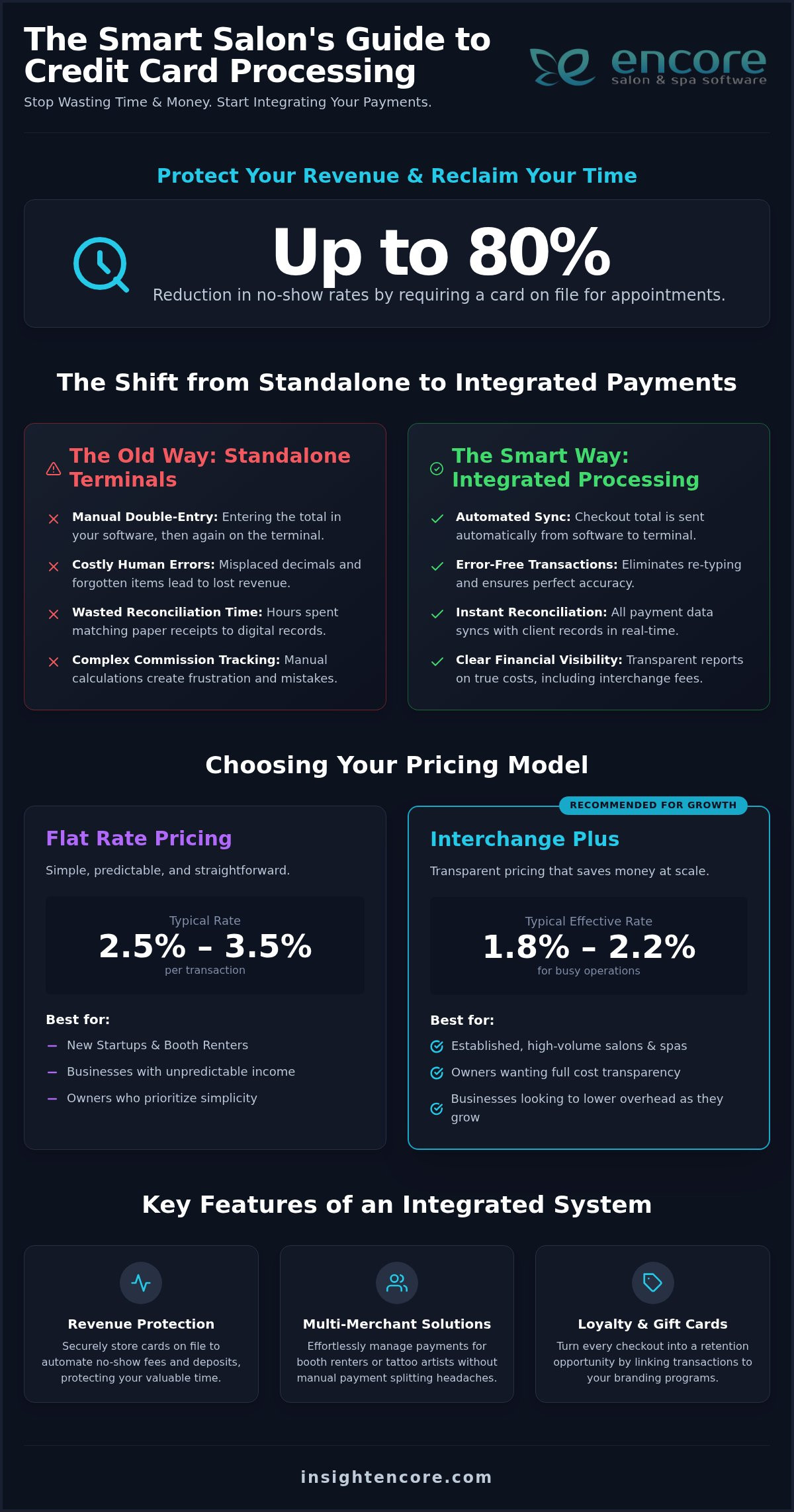
Integrated Payments vs. Manual Entry

Manual payment entry is a major security loophole. When a stylist has to manually type a service total into a standalone terminal, it’s easy for a "fat finger" error to occur. Or worse, a $100 service is intentionally typed in as $80, with the difference disappearing into a pocket. Integrated credit card processing removes this risk entirely. The POS total communicates directly with the terminal, ensuring the bank deposit matches your sales report down to the penny every single day.

Automating your daily reconciliation gives you peace of mind that can’t be found in a manual ledger. It turns your checkout process into a secure, closed loop. If you want to see how these automated systems can simplify your life, you might want to explore our management tools today.

Mastering Inventory Control to Prevent Shrinkage

Inventory management is often the most overlooked strategy when owners consider how to stop salon staff theft. It’s easy to focus solely on the cash drawer, but with internal theft accounting for nearly 29% of all retail shrinkage, your shelves are a primary target. The average internal theft incident costs a business $1,890, which is over four times the cost of an external shoplifting event. You need a system that flags missing items before the loss becomes a crisis.

Implementing a "check-out" system for back-bar supplies and setting up automated "low stock" alerts are simple ways to build accountability. These alerts act as an early warning system. If you suddenly have an unexplained drop in a high-velocity item like a popular lightener, you’ll know within hours. When a stylist knows that the system expects a specific number of color tubes to be used based on the day’s bookings, the temptation to divert products for personal side-work disappears. It turns your software into a silent partner that watches your margins while you focus on your clients.

Retail vs. Professional Inventory Tracking

Tracking retail bottles is straightforward because they’re sold as individual units. You can see the empty spot on the shelf. However, tracking color bowls and chemical treatments is where the real money is saved. These professional supplies are often treated as "free" by staff, but they represent a massive overhead cost. By using Encore Salon Software, you can link specific product consumption to every appointment on your calendar. This creates a clear map of where your supplies are going. If you manage a larger facility, you can find similar tools in our spa inventory management system guide to keep every department in check.

The "Spot Check" Method for Accountability

You don’t need to shut down the salon for a full audit to keep things secure. The "spot check" method involves picking just five high-value items and counting them against your digital records. It’s quick, non-confrontational, and highly effective. When you discuss "missing" items immediately, it prevents small discrepancies from becoming long-term habits. Consistency in counting is more effective than the frequency of the count. This approach builds a culture of transparency where everyone knows the inventory is valued and monitored. It’s a proactive way to manage how to stop salon staff theft without creating an atmosphere of suspicion.

How to Stop Salon Staff Theft: A Comprehensive 2026 Prevention Guide

Building a Culture of Transparency and Fairness

Culture is your strongest defense against internal loss. When your team feels respected and fairly compensated, the psychological barrier to theft becomes much higher. Many owners wonder how to stop salon staff theft, but the answer often starts with looking at your own payroll processes. In 2026, compliance with laws like California SB 648 is essential. This bill, which took effect on January 1, 2026, bars owners from skimming tips or deducting credit card fees from employee gratuities. When you show your team that you respect their earnings, they’re far more likely to respect your inventory and your brand.

Update your employment contracts to include clear non-solicitation and theft clauses. These documents define exactly what happens if a breach occurs, which removes ambiguity for everyone. Hold regular team meetings to review salon performance metrics without finger-pointing. Celebrate high utilization rates and reward honesty when discrepancies are reported voluntarily. When you treat these metrics as a collective win, staff are more likely to protect the resources that help the entire business succeed.

Transparency in Commission and Pay

Removing the mystery from paychecks is a powerful deterrent. If a stylist feels they’re being "short-changed" on a complex commission structure, they might rationalize taking a retail bottle to "even things out." By calculating salon staff commission automatically, you remove the human error that leads to these disputes. Providing staff with their own performance dashboards allows them to track their earnings in real-time. This visibility builds a psychological link between their hard work and their bank account, making them feel like a valued partner in the success of the salon.

Setting Clear Expectations from Day One

Include a "Salon Code of Conduct" in your onboarding packet to set the tone from day one. Explain the "why" behind your tracking systems clearly. It’s not about watching their every move; it’s about protecting their paycheck and the salon’s future growth. When the first discrepancy occurs, take a supportive but firm approach. Ask questions to understand if it was a training issue before assuming it was malicious. Setting these standards is a proactive way to manage how to stop salon staff theft while keeping your team’s morale high.

Start your free Encore trial today

Leveraging Encore Salon Software as Your Security Partner

While building a great culture and setting clear expectations are vital, your management software is the engine that keeps your security systems running. It’s the difference between guessing what happened and having a factual record you can rely on. Software shouldn’t feel like a digital prison for your team. Instead, it acts as a safety net that protects the salon’s assets and ensures everyone is treated fairly. By centralizing your operations, you move from reactive "firefighting" to proactive management.

Modern systems do more than just book appointments. They act as a silent partner that watches your margins 24/7. From tracking every "no-sale" drawer opening to flagging unusual retail discounts, the right tools help you understand how to stop salon staff theft without spending your entire day hovering over the front desk. This automation allows you to focus on growing your brand while the software handles the heavy lifting of oversight.

The Audit Trail: Your Digital Paper Trail

The team behind Encore has been a supportive partner to salon owners since 1991, and our real-time audit trails are a testament to that experience. Every time a staff member logs in, opens a drawer, or completes a sale, a digital footprint is created. You can use the "Transaction History" feature to reconstruct a suspicious day minute by minute. This transparency is incredibly powerful. The mere presence of a robust, visible tracking system deters approximately 90% of opportunistic theft. When staff know that every voided transaction is logged and reviewed, the temptation to "bend the rules" effectively disappears.

Remote Management for Peace of Mind

In 2026, you shouldn’t have to be physically present in the salon to know your business is secure. Mobile access allows you to monitor daily sales, check inventory levels, and review staff activity from your phone, whether you’re at home or on vacation. This high-level visibility helps you spot red flags before they become expensive problems. For example, you can use salon business analytics to identify long-term patterns of loss that might go unnoticed during a busy shift. These reports can flag if a specific stylist has a high rate of "product waste" or if the cash drawer is consistently short on certain days.

Ready to secure your salon and get back to doing what you love? Explore Encore Features to see how our secure client management and automated reporting can protect your business today.

Reclaim Your Peace of Mind and Profits

Protecting your business doesn’t mean sacrificing the positive culture you’ve built. It’s about empowering your team with systems that reward honesty and clear away the fog of manual tracking. By implementing tiered POS permissions and automated inventory counts, you turn your operations into a secure, transparent environment where every product and dollar is accounted for. You’ve discovered how to stop salon staff theft by focusing on visibility rather than suspicion.

Syntec Business Systems has been a dedicated mentor to beauty professionals since 1991. We provide the tools you need to succeed, including comprehensive audit trails and specialized inventory tracking. Our easy-to-use POS systems allow you to customize employee permissions, ensuring your most sensitive data stays protected while your stylists focus on their craft.

Secure your salon’s future with Encore Salon Software
You don’t have to carry the stress of "missing" revenue anymore. With a reliable partner by your side, you can lead with confidence and watch your profit margins thrive.

Frequently Asked Questions

What should I do if I catch a salon employee stealing?

Confront the employee privately with documented evidence immediately. It’s vital to follow your state or provincial labor laws to avoid wrongful termination claims. Keep the conversation professional and focused on the facts you’ve gathered from your audit logs. Depending on the severity, you may need to involve local authorities. Having a clear "Salon Code of Conduct" in place from day one makes these difficult conversations much easier to manage.

Is it legal to install security cameras in my salon?

You can legally install security cameras in public areas of your salon, like the reception desk or retail floor. However, you must never place cameras in private areas such as bathrooms or changing rooms. It’s often required to post a sign informing staff and clients that the premises are under surveillance. Always consult with a local legal professional to ensure you’re complying with specific privacy regulations in your region.

How do I know if a stylist is "stealing" clients for home appointments?

Sudden drops in a stylist’s rebooking rate or a high number of "no-show" clients who were previously regulars are major red flags. You might also notice stylists sharing their personal phone numbers or social media handles during services. A robust client management system helps you track these patterns by flagging unusual appointment gaps. Keeping your database secure with restricted export permissions is the best way to prevent this type of loss.

Can salon software really prevent cash drawer discrepancies?

Integrated systems significantly reduce errors by ensuring that the amount charged on the terminal matches the POS ticket exactly. When you use individual staff PINs, every transaction is tied to a specific person, which eliminates the "it wasn’t me" excuse. This transparency is a key part of how to stop salon staff theft because it removes the opportunity for skimming. Automated reconciliation at the end of each shift catches small errors before they grow.

What are the most common red flags of salon staff theft?

Common red flags include a high frequency of "voided" transactions, excessive "no-sale" drawer openings, and retail inventory that doesn’t match your sales reports. You might also notice a stylist whose retail sales are significantly lower than their peers despite having a full schedule. Defensive behavior when you mention inventory counts is another warning sign. Monitoring these patterns allows you to address potential issues before they impact your overall profit margins.

How do I track professional back-bar product usage accurately?

The most accurate way to track back-bar usage is to link specific product amounts to the services performed in your inventory management system. For example, if a color service typically uses two ounces of developer, the system should automatically deduct that amount from your stock. Performing weekly cycle counts on your top 20% highest-value items helps you catch discrepancies quickly. This level of detail turns your professional supplies from a "free" resource into a tracked asset.

Should I fire an employee for a first-time minor theft?

Deciding whether to fire an employee for a minor first-time offense often depends on the specific language in your employment contract. Many owners choose a zero-tolerance policy because even small thefts can signal a lack of respect for the business. If you decide on a warning, ensure the incident is documented and the expectations are clearly restated. Understanding how to stop salon staff theft involves setting firm boundaries that protect your salon’s long-term financial health.

How can I prevent "time theft" in a busy salon environment?

You can prevent time theft by using a digital clock-in system that requires unique staff credentials. This eliminates "buddy punching" where one employee clocks in for another who is running late. Encore Salon Software allows you to compare scheduled hours against actual hours worked, making it easy to spot discrepancies. Clear policies regarding personal phone use and breaks also help maintain a professional environment where everyone is focused on client care during their shift.

Disclaimer

This article is general in nature and may contain errors, please verify all claims with your sales rep
Categories
Uncategorized

Salon Client Data Security Best Practices: The 2026 Owner’s Guide

Did you know that 43% of all cyberattacks now target small businesses, with the average cost of a breach for a typical salon reaching up to $1.24 million in 2026? It’s a staggering figure that highlights why salon client data security best practices are no longer optional; they’re as essential as a sanitized toolkit. You’ve spent years building a reputation for excellence and care. Protecting your clients’ phone numbers, addresses, and credit card details is the ultimate way to honor that relationship and keep your business thriving.

We know the technical side of things can feel overwhelming. Dealing with PCI DSS v4.0.1 requirements or new state privacy laws shouldn’t keep you up at night. You deserve to feel confident that your digital doors are locked tight. This guide provides a straightforward checklist to help you master modern security protocols and build unbreakable trust with your high-value clients. We’ll explore everything from encryption basics to managing staff access, giving you the peace of mind to grow your business safely.

Key Takeaways

  • Learn how treating privacy as a premium service builds client loyalty and protects your hard-earned reputation from costly breaches.
  • Stay ahead of the latest legal requirements, including PCI DSS 4.0.1 and new state privacy laws, to avoid heavy financial penalties.
  • Discover the most effective salon client data security best practices, such as implementing Multi-Factor Authentication and restricted staff access.
  • Create a culture of safety by training your team on “Clean Desk” policies and secure record handling to eliminate common human errors.
  • Understand why moving to a cloud-based management system provides a more secure “single source of truth” than keeping records on local hardware.

Why Salon Data Security is Your Biggest Business Asset in 2026

In 2026, privacy isn’t just a back-office chore. It’s a premium service. Clients expect their personal details to be as safe as their hair is in your hands. A data breach does more than trigger a fine; it shatters the trust you’ve spent years building. While the financial impact is heavy, the loss of your reputation is often permanent. Recovering from a public security failure is much harder than preventing one. By prioritizing salon client data security best practices, you’re telling your community that you value them beyond the chair. You’re showing that you are a supportive partner in their overall well-being.

The Anatomy of Salon Data

Hackers aren’t just looking for credit cards. They want Personal Identifiable Information (PII). This includes names, birthdates, and those “harmless” phone numbers. In fact, phishing remains the most common attack vector against small businesses. Even your color formulas and sensitive medical notes are assets. Storing these insecurely puts your clients at risk of identity theft or targeted scams. Understanding basic data security principles helps you see your database as a vault that needs protection. Every piece of info you collect is a responsibility that requires professional care.

Security as a Competitive Advantage

High-value clients prioritize discretion. When you can prove that their data is locked down, you’re offering a level of professionalism that sets you apart. Mentioning your secure booking portal in your marketing isn’t bragging; it’s reassuring. You can highlight how Encore Salon Software features keep every record encrypted and accessible only to those who need it. This transparency builds a “safety brand” that attracts clients who are willing to pay more for peace of mind. It turns a technical necessity into a powerful selling point that makes your salon the obvious choice.

Moving away from paper binders is your first big win for modern protection. Paper records are easily lost, stolen, or seen by the wrong eyes. Digital systems allow for much better control and tracking. Modern salon client data security best practices rely on a “Single Source of Truth.” This means all data lives in one secure, cloud-based home rather than scattered across sticky notes and local hard drives. It’s the foundation of a modern, professional beauty business that respects its clients’ digital lives as much as their physical ones. This shift is the first step toward total peace of mind for you and your guests.

The Regulatory Landscape: PCI Compliance and Privacy Standards

Understanding the rules isn’t just about avoiding fines. It’s about professional integrity. In 2026, the regulatory world is a patchwork of payment security and personal privacy laws. Many owners confuse the two. PCI DSS v4.0.1 governs how you handle credit cards. Meanwhile, state laws like those in Indiana and Kentucky protect who can see a client’s home address. Following salon client data security best practices means respecting both sets of rules. It ensures your business remains a safe space for every guest.

PCI DSS v4.0.1 is now the mandatory standard. It moved the industry from once a year checks to continuous security monitoring. This is a big shift. You can find excellent FTC cybersecurity guidance to help you navigate these basics. The goal is to ensure that cardholder data never lingers where it shouldn’t. It’s about creating a safe environment for every swipe or tap. If you aren’t monitoring your systems regularly, you’re already behind the curve.

PCI Compliance for Small Business Salons

The biggest risk in many salons is the simplest one: writing down credit card numbers on paper. This is a major compliance violation. It’s also an invitation for theft. Using integrated credit card processing simplifies this burden immensely. When your software handles the transaction, the sensitive data never touches your local network. This keeps you safe and keeps your clients’ bank accounts protected. It removes the stress of manual record-keeping and local data storage. For a complete breakdown of what these requirements mean for your business, our PCI compliance for small business salons guide walks you through every step without the technical jargon.

Privacy laws are also getting tougher. As of January 1, 2026, new laws in Indiana, Kentucky, and Rhode Island are in full effect. Violations in these states can cost up to $7,500 or $10,000 per incident. Twelve states now require businesses to recognize Global Privacy Control (GPC) signals for opting out of data sales. If you operate across state lines, this complexity grows quickly. You need a system that adapts to these changes automatically and protects you from accidental non-compliance.

Medical Data and Medspas

For medspas and tattoo studios, the stakes are even higher. You aren’t just handling names; you’re handling health history and allergy records. While not every salon falls under HIPAA, many beauty businesses are moving toward those higher standards to ensure total protection. Client waiver forms for spas digital solutions and secure consultation notes are essential. They provide a legal paper trail that protects you if a client has an adverse reaction. This documentation is your best defense against liability and reputation damage.

Managing these layers of compliance doesn’t have to be a headache. You can explore how automated systems handle the heavy lifting for you. By choosing the right tools, you can focus on your craft while the technical details remain secure in the background. It’s about reclaiming your time and your peace of mind while building a business that stands the test of time.

Essential Technical Safeguards: From Encryption to Access Control

Technical safeguards are the locks and alarms on your digital storefront. While previous sections covered the “why” and the “rules,” these tools are how you actually get the job done. Implementing salon client data security best practices starts with end-to-end encryption. This technology scrambles sensitive info so it’s unreadable to anyone without the key. It’s your first line of defense against prying eyes. Pair this with automated cloud backups. If your salon ever faces a hardware failure or a ransomware attempt, these backups act as a safety net to restore your business in minutes. You don’t have to be a tech expert to use these; you just need the right partners in place.

Multi-Factor Authentication (MFA) is another non-negotiable in 2026. It requires a second form of verification, like a code sent to a phone, before granting access to your system. This simple step stops the vast majority of unauthorized login attempts instantly. It’s about building layers of protection that make it too difficult for hackers to bother with your data. By making MFA a standard part of your login routine, you’re choosing a proactive path to peace of mind.

Securing Your Physical Salon Hardware

Your front-desk terminal and tablets are physical gateways to your data. Start by separating your networks. Always offer a “Guest Wi-Fi” for clients that is completely isolated from your “Business Wi-Fi.” This prevents a guest’s infected device from reaching your salon’s private records. Ensure every tablet is password-protected and never left logged in and unattended on the salon floor. For those managing booth or chair renters, encourage them to use their own secure logins rather than sharing a single “salon” account. This keeps everyone’s information separate and safe from accidental exposure.

Software-Level Security Features

Modern software allows you to implement the Principle of Least Privilege (PoLP). This means your team only sees the information they need to perform their specific roles. A receptionist might need the calendar, but they don’t necessarily need access to your year-end tax documents or full client contact lists. Using audit logs lets you see exactly who accessed client data and when, providing total transparency. This approach aligns with the FTC’s Guide to Protecting Personal Information, which emphasizes limiting access to sensitive data to a “need-to-know” basis. If you are an independent pro, our Management Software for Chair Renters offers these same high-level protections tailored for your unique needs.

Salon Client Data Security Best Practices: The 2026 Owner’s Guide

Creating a Culture of Security: Staff Training and Protocols

Your team is the heart of your salon, but they can also be your biggest vulnerability. Most data leaks aren’t the result of high-tech hackers; they’re the result of simple, avoidable mistakes. Training your staff on salon client data security best practices is the most effective way to close these gaps. It’s about building a shared sense of responsibility. When every stylist understands that protecting a client’s email address is just as important as the quality of their highlight, your salon becomes a fortress of trust. Implementing these salon client data security best practices helps you avoid the $11.5 million average cost of a typical U.S. data breach in 2026.

Start by implementing a “Clean Desk” policy across the salon floor. This means no client phone numbers on sticky notes and no passwords written on the back of tablets. In a busy environment, it’s easy to jot something down and forget it. However, a misplaced note is a major security risk. Encourage your team to enter information directly into your secure management system and keep workstations clear of physical records. This simple habit keeps sensitive information away from prying eyes and maintains a professional atmosphere.

Managing staff turnover is another critical protocol. When a team member leaves, their access to client lists and payment systems must be revoked immediately. This prevents potential data theft and ensures that client records stay within your business. In 2026, phishing scams have also become incredibly sophisticated due to the rise of AI. Your team might receive a text or email that looks exactly like a message from you or a trusted vendor. Teach them to verify any unusual request for data or login credentials. If it feels off, it probably is.

Onboarding Staff with Security in Mind

Include data privacy in your employee handbook from day one. Explain how to use secure client messaging and why sharing login details is strictly prohibited. This sets a clear standard for professional behavior. For more operational advice, you might find our 15 Barbershop Management Tips helpful for streamlining your team’s daily routines and maintaining high standards for safety and service.

Ongoing Security Audits

Regular check-ins keep your systems healthy. Schedule monthly password resets and review who has permission to access specific data. A security audit for a salon owner is a systematic review of all digital and physical touchpoints to ensure client information remains protected and compliant with current laws. Test your backup systems regularly to ensure they’re ready if you ever need them. Consistency is the key to maintaining total control over your business assets.

Secure your salon's future today

Future-Proofing Your Business with Secure Management Software

Choosing the right technology is the single most important decision you’ll make for your business’s safety. In the past, many salons kept records on local servers or personal laptops. This is a massive risk. If that hardware is stolen or damaged, your data is gone forever. Cloud-based systems are inherently more secure because they remove these physical vulnerabilities. By moving to a “Single Source of Truth,” you ensure that every client record, color formula, and payment detail lives in one encrypted, professional-grade vault. This centralized approach reduces the number of entry points for hackers and makes managing salon client data security best practices much easier for you and your team.

Encore Salon Software handles the technical heavy lifting so you don’t have to. Our infrastructure has security baked into every feature, from integrated credit card processing to specialized modules for tattoo and medspa compliance. We’re also looking ahead. The next wave of technology will include AI-driven monitoring to spot suspicious login patterns and biometric access like fingerprint or facial recognition for staff terminals. These tools will add even more layers of protection. By partnering with us, you’re ensuring your salon stays at the forefront of these advancements without needing an IT degree.

Choosing the Right Partner

When you evaluate a software provider, ask about their encryption standards and how often they perform automated backups. It’s also vital to consider the human element. If you have a security concern, you need a responsive partner who offers human-led support rather than a delayed automated response. You want a guide who understands the daily hurdles of the beauty industry. For a deeper look at how the right tools can transform your operations, check out our Encore Salon Software Guide. It’s designed to help you master every aspect of your business with confidence.

Next Steps for Your Salon

You can improve your security profile in just ten minutes today. Start by checking that your “Guest Wi-Fi” is truly separate from your business network. Next, verify that every staff member has their own unique login with the correct permission levels. Finally, ensure your front-desk terminal is set to auto-lock after a few minutes of inactivity. If your current system makes these salon client data security best practices difficult to manage, it might be time for a change. Transitioning from a legacy system to Encore is a straightforward process designed to give you organized control and total peace of mind.

Ready for a more secure salon? Try Encore Now

Securing the Future of Your Beauty Business

Mastering salon client data security best practices is about more than checking boxes; it’s about protecting the heart of your business. You’ve learned that modern privacy is a premium service that high-value clients expect. By moving to a cloud-based system and training your team to spot phishing, you’re building a foundation of trust that can’t be broken. Security shouldn’t be a source of stress. With the right tools, it becomes a natural part of your professional routine.

Since 1991, we’ve been helping salon owners navigate industry complexities with reliability and care. Our integrated PCI-compliant payment processing takes the guesswork out of compliance, while our human-centric support team guides you through implementation. You don’t have to handle the technical heavy lifting alone. We’re here to ensure your data stays locked down so you can focus on your craft.

Secure your business and your clients—Try Encore Now

Take the first step toward total peace of mind today. Your clients will thank you for the extra care. You’ll enjoy the confidence that comes with knowing your legacy is safe.

Frequently Asked Questions

Is it safe to store client credit card information in my salon software?

It is safe and highly recommended if you use a system with integrated credit card processing. Encore Salon & Spa Software uses cloud-based infrastructure that ensures sensitive payment data is encrypted and never stored locally on your devices. This approach follows salon client data security best practices by removing the risk of data loss from stolen hardware. It also simplifies your compliance burden because the software handles the heavy technical lifting of protecting cardholder information.

What should I do if I suspect a salon data breach?

You must act quickly to contain the issue and protect your clients. First, secure your systems by changing all passwords and isolating affected hardware. Contact your software provider immediately to investigate the scope of the incident. You may also need to notify affected clients and local authorities depending on your state’s data privacy laws. Having a clear response plan in place ensures you can handle the situation professionally and maintain long-term trust with your guests.

Do independent booth renters need their own data security protocols?

Yes, independent professionals are responsible for the client information they manage. Even if you work within a larger salon, you handle personal details and payments that require protection. Using specialized Chair/Booth Renter Software ensures your records are encrypted and separate from the main salon’s database. This protects your business from liability and ensures you are following the same high security standards as a full-scale salon or spa. It’s about protecting your personal brand and reputation.

How does PCI compliance affect my salon processing fees?

Maintaining PCI compliance helps you avoid non-compliance fees that many processors charge. While there isn’t a direct discount for being compliant, the cost of a breach or a penalty for failing an audit is significantly higher than the cost of a secure system. Integrated processing often streamlines these requirements into your monthly service. This provides a predictable cost structure while giving you the peace of mind that your transactions are fully protected against modern threats and costly fines.

Can I use a personal tablet for client check-ins and booking?

You can use a personal tablet, but it must be properly secured to meet professional standards. This includes setting a strong, unique password and ensuring the device isn’t used for personal browsing while connected to your business network. Always use a dedicated app rather than a mobile browser to access your management system. Separating your business data from personal files is a key part of salon client data security best practices that prevents accidental exposure of sensitive information.

How often should I update my salon’s digital security settings?

You should review your security settings at least once a month. This includes updating passwords, reviewing staff access permissions, and ensuring your software is running the latest version. Regular audits help you stay ahead of new threats and ensure your team is following established protocols. It’s much easier to perform small, monthly checks than to fix a major security gap later. Consistency is the most effective way to maintain a safe and professional digital environment for your team and clients.

Is paper-based client tracking more secure than digital software?

No, paper records are significantly less secure than modern digital systems. Physical binders can be easily lost, stolen, or viewed by unauthorized people on the salon floor. They also lack the encryption and audit logs that professional software provides. Digital systems offer a “Single Source of Truth” that is backed up in the cloud, protecting you from fire, theft, or simple human error. Switching to a secure digital platform for client waiver forms and spa records is the first step toward professional data protection and business growth. When you’re ready to grow that protected client base further, exploring nail salon client retention ideas can help you turn first-time visitors into loyal, returning guests.

Disclaimer

This article is general in nature and may contain errors, please verify all claims with your sales rep
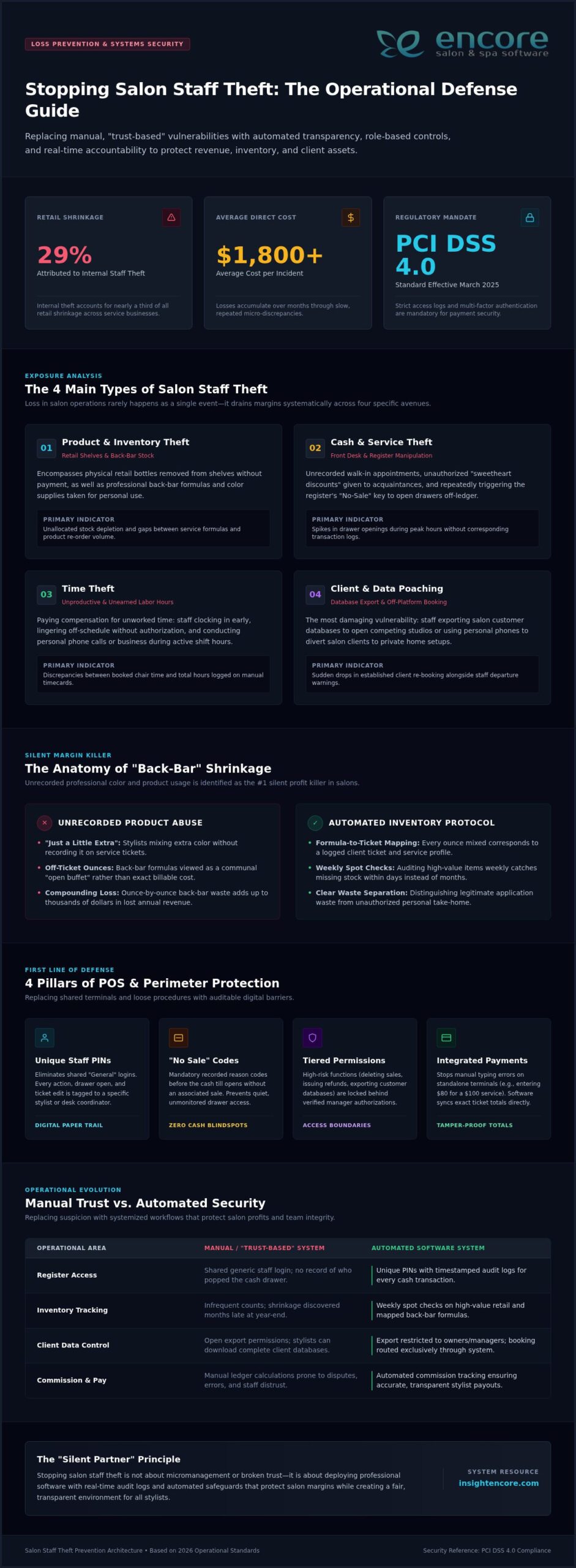
Categories
Uncategorized

The Best Salon Client Database Software of 2026: A Buyer’s Guide to Growth

Did you know that a staggering 87% of your salon’s revenue is generated by repeat clients? It is the heartbeat of your business, yet it is often the hardest part to manage when you are busy behind the chair. You likely know the frustration of hunting for a lost color formula or seeing a gap in your schedule because of a no-show that could have been prevented. Managing these details manually takes up hours of your precious time and leaves money on the table. Finding the right salon client database software is the key to moving from surviving the daily rush to strategically growing your brand.

We understand that the technical side of things can feel overwhelming, but we are here to help you simplify the process. This guide will show you how to transform your client list into a powerful, revenue-generating engine. You will discover how a centralized, searchable hub can make your marketing feel personal rather than robotic. We will preview the top software features of 2026 that reduce no-shows by up to 35% and help you build the lasting relationships your clients deserve. Let’s find the perfect tool to give you back your time and your peace of mind.

Key Takeaways

  • Learn how to transform your salon client database software from a simple contact list into a proactive, revenue-generating engine.
  • Identify the non-negotiable features, like technical note storage and automated triggers, that protect your salon’s intellectual property.
  • Avoid common “Data Ownership” traps by choosing a platform that prioritizes your business’s long-term growth and security.
  • Follow a stress-free, step-by-step plan for auditing and migrating your existing client records to a modern, centralized hub.
  • Discover specialized management solutions tailored specifically for niche professionals, including booth renters and tattoo studios.

Beyond the Digital Rolodex: The Strategic Value of Salon Client Database Software

Think of your client list as the heartbeat of your business. In 2026, a Customer relationship management (CRM) system is no longer a luxury; it’s a necessity. Your salon client database software shouldn’t just be a digital version of an old address book. It is a strategic tool designed to drive revenue. While a rolodex just sits there, a proactive database works for you. It shifts your focus from reactive booking to building deep, lasting relationships. You aren’t just filling a time slot. You’re managing a journey.

This software also protects your intellectual property. Your color formulas, technical notes, and client preferences are the secret sauce of your success. When this information lives only in a stylist’s head or a personal notebook, your business is at risk. A centralized system ensures that if a staff member moves on, the client’s history stays with your salon. This prevents client poaching and maintains the high standard of care your guests expect. It keeps you in control of your business assets and your brand’s reputation.

Why Your Client List is Your Most Valuable Business Asset

Your data is worth money. If you ever decide to sell your salon, a potential buyer won’t just look at your chairs; they’ll look at your database. Investors in 2026 value clean, searchable data over messy paper records. Modern salon client database software allows you to track Client Lifetime Value (CLV). This metric shows exactly how much a guest contributes to your bottom line over time. It helps you identify your most loyal advocates so you can reward them properly. This level of insight turns your salon from a local shop into a scalable, data-driven enterprise.

The Cost of ‘Good Enough’ Data Management

Relying on "good enough" systems without integrated features carries hidden costs that eat into your profits. When a stylist can’t find a formula, it creates stress and wastes time during a busy shift. This leads to inconsistent guest experiences, which is the fastest way to lose a client. Fragmented data also fuels staff burnout. Your team wants to focus on their craft, not on administrative headaches. Poor data management often results in:

  • Lost revenue: Forgotten upsells or missed rebooking opportunities.
  • Damaged reputation: Getting a formula wrong because notes were missing.
  • Security risks: Losing your entire client list if a physical book is misplaced or stolen.

Investing in a reliable system removes these hurdles and allows your team to shine. It creates a smoother day for everyone involved and ensures your business remains resilient. When you have total control over your data, you have total control over your growth.

6 Non-Negotiable Features of a High-Performing Client Database

Choosing the right salon client database software is about more than just picking a calendar. It’s about finding a system that captures the nuance of every guest interaction. A high-performing database acts as your salon’s collective memory. It should track a comprehensive service history, including every visit, which provider they saw, and the exact price point they paid. This level of detail allows you to offer a consistent experience, even if their usual stylist is away. Beyond the basics, you need integrated retail tracking. Knowing exactly which shampoo a client bought three months ago allows your team to make helpful, personalized recommendations that don’t feel like a sales pitch.

Security is equally vital. Your database must provide secure storage for digital consent forms and sensitive information. Following modern data security standards isn’t just about compliance; it’s about building trust with your guests. They need to know their personal details are safe in your hands. This includes secure image storage, which allows you to keep a visual record of progress without cluttering your personal phone or compromising privacy.

Formula Tracking and Technical Notes

Generic notes fields are where good information goes to die. Effective salon client database software provides dedicated fields for color formulas, processing times, and technical nuances. This is essential for hair, nail, and tattoo professionals who rely on precision. When you can store before and after photos directly in the client’s profile, you create a visual timeline of their transformation. Your staff can access this history instantly from any device, ensuring they are prepared before the client even sits in the chair.

Client Segmentation for Targeted Marketing

A database only provides value if you can use the information to drive action. Automated tagging allows you to group clients by behavior, such as "Big Spenders" or "Lapsed." If you see a gap in tomorrow’s schedule, you can use database filters to identify locals who haven’t visited in six weeks and send a targeted invite. This can fill empty chairs in less than 24 hours. You can also automate "We Miss You" campaigns that trigger based on their last visit date. By linking loyalty status directly to the client profile, you ensure a seamless checkout experience that makes every guest feel like a VIP.

If you’re ready to see how these tools can work for your business, you might want to explore how our comprehensive management features simplify your daily routine.

Evaluating ROI: Database-First Software vs. Basic Booking Apps

Choosing between a free booking app and professional salon client database software often feels like a choice between saving money and spending it. In reality, the "free" option frequently costs you more in lost opportunities. A basic calendar app tells you who is coming in at 2:00 PM. A database-first CRM tells you who hasn’t been in for eight weeks, what they bought last time, and which formula was used for their perfect shade. This distinction is the difference between a reactive business and a proactive revenue engine that works while you’re behind the chair.

You also need to watch out for the "Data Ownership" trap. Some low-cost platforms make it incredibly difficult to leave. They might own your client list or charge hefty fees to export your records. Your data is your property. Professional systems ensure you have full data portability. This means you can take your history with you if you ever decide to move, protecting the years of hard work you’ve put into building those relationships. It’s about your long-term peace of mind and business security.

How Data Automation Pays for Your Software Subscription

The math is simple and compelling. Automated SMS reminders have been shown to reduce no-shows by 35% as of 2026. If your average service is $75, preventing just two no-shows a month covers the cost of most professional software tiers. Automation drives growth through:

  • Consistent Rebooking: Triggers that remind guests it is time for their next visit based on their specific history.
  • Inventory Control: Product tracking that identifies which retail items are actually moving and which are wasting space.
  • Personalized Upsells: "Recommended for You" prompts at checkout that can increase retail sales by 20%.

These features target the 87% of revenue that comes from repeat clients. By using "Time to Rebook" triggers, you ensure guests stay on a consistent schedule without you having to send a single manual text.

Security, Privacy, and Data Portability

In 2026, privacy is a legal requirement, not a suggestion. Your software must handle sensitive contact info and health notes with high-level encryption. Following FTC guidelines on protecting customer data is essential for maintaining guest trust. This includes regular backups and clear access controls. If your system doesn’t meet GDPR or CCPA standards, you aren’t just risking a data breach; you’re risking your reputation. Secure client management systems provide a supportive safety net by keeping your digital assets locked down and fully compliant with current laws. It is about protecting your business while you focus on your craft.

The Best Salon Client Database Software of 2026: A Buyer’s Guide to Growth

Step-by-Step: Transition to New Client Database Software

Moving your business to a new salon client database software is a significant milestone. It marks the moment you decide to trade admin headaches for organized growth. While the thought of migrating years of records might feel overwhelming, a structured approach makes the process smooth and even rewarding. Think of it as a digital spring cleaning. You aren’t just moving files; you’re refining the foundation of your business to ensure your future success is built on accurate, actionable information.

The first step is a thorough audit of your current records. You’ll likely find duplicate profiles, incomplete contact details, and "dead" data from clients who haven’t visited in years. There is no need to migrate clutter. By cleaning your list now, you ensure your new system is lean and efficient from day one. Once your data is tidy, you can export it from your legacy software or spreadsheets. Mapping your data fields carefully is the most critical part of this stage. You want to be certain that sensitive color formulas and technical notes land exactly where they belong in the new interface.

Cleaning Your Data Before the Move

Success starts with high-quality data. Start by merging duplicate client profiles to avoid confusing your team later. If you have "Jane Doe" listed three times with different phone numbers, consolidate them into one master record. Standardizing your note-taking format is also helpful. Decide now if formulas should be listed by brand, ratio, or technique. This consistency makes it much easier for your stylists to find what they need during a busy shift. A clean database is a fast database, and a fast database keeps your chair turning.

Team Adoption: Getting Your Stylists on Board

Tech-phobia is a real hurdle in many salons, but it’s one you can overcome with the right approach. Focus on how the new system makes their lives easier. Highlight that they’ll no longer have to hunt through stacks of paper cards or scroll through endless text threads to find a client’s history. Modern salon client database software often features mobile-first interfaces that feel as natural as using social media. When your team sees that they can access client preferences instantly from their own devices, their resistance usually turns into relief.

Training your staff on new entry standards is vital for long-term health. Show them the specific Encore features for team management that help track their individual progress and simplify their daily tasks. Finally, set a firm "Go-Live" date. Perform one last data sync to catch any appointments made during the transition, and then step confidently into your new, organized reality.

Start your stress-free migration today

Why Encore is the Preferred Choice for Salon Client Management

Choosing a partner for your salon’s future is a big decision. You need more than just code; you need a team that understands the industry’s daily hurdles. Since 1991, Syntec Business Systems has provided that stability. With a 35-year legacy of reliability, we aren’t just another tech company. We are your supportive partner. Our salon client database software is designed to grow with you, whether you’re just starting out or managing a multi-location empire. We pride ourselves on being accessible and professional, ensuring you never feel like just another ticket number.

One of the biggest fears in switching software is losing your data. We get it. That’s why we prioritize human-centric support. Our experts don’t just send you a manual; they assist you with the migration process to ensure your history remains intact. We believe your peace of mind is just as important as your business growth. This hands-on approach removes the intimidation factor of new systems and lets you focus on your clients from day one.

Specialized Solutions for Every Business Model

Every beauty and wellness business has unique needs. A hair salon requires different data fields than a spa or a nail studio. Encore adapts to your specific workflow. We offer specialized modules for booth renters who need to manage their own mini-businesses. We also provide dedicated tools for tattoo studios that require specific technical notes and consent tracking. From independent pros to large enterprises, our salon software overview shows how we tailor the experience to fit your craft perfectly.

Integrated Payments and Client Profiles

Efficiency happens when your tools talk to each other. With Encore, your client profiles are directly linked to your checkout process. You can see a guest’s full purchase history and keep a card-on-file in one secure view. This integration simplifies your day and improves the guest experience. It also protects your time. By using integrated credit card processing, you can easily implement deposits and cancellation fees to reduce no-shows. When you combine this with our loyalty programs and automated marketing, you create a seamless cycle of rebooking and rewards. It’s about making your business run smoother so you can focus on the artistry you love.

Take Control of Your Salon’s Future Growth

Transitioning from a basic contact list to a strategic database is the most important step you can take to protect your business assets. You’ve seen how tracking detailed technical formulas and automating rebooking prompts can turn a quiet afternoon into a fully booked schedule. It’s about more than just software; it’s about reclaiming your time and ensuring every guest feels like your only priority. Choosing the right salon client database software is a commitment to your own peace of mind and long-term success.

At Syntec, we’ve been serving the beauty industry since 1991. We offer specialized modules tailored specifically for hair, spa, nail, and tattoo professionals. Our approach is built on transparent pricing with no hidden migration fees, because we believe your growth should be straightforward and stress-free.

Ready to grow? Request a personalized demo of Encore Salon Software today.
You don’t have to navigate this transition alone. We are here to be your supportive partner every step of the way. Your dream of a more organized, revenue-driven salon is well within reach and we are excited to help you get there.

Frequently Asked Questions

What is salon client database software?

Salon client database software is an all-in-one management platform designed to store client profiles, service histories, and technical preferences. It acts as a professional CRM that helps you move beyond simple contact lists to track detailed color formulas and purchase history. By centralizing this information, you can provide more personalized experiences and use data-driven insights to grow your revenue. It is the digital backbone of a modern, efficient beauty or wellness business.

Can I import my existing client list from Excel or another software?

Yes, you can easily import your existing client list from Excel, spreadsheets, or other legacy software systems. We understand that manual data entry is a major frustration, so Encore provides human-centric support to assist with the migration process. Our team helps you map your data fields correctly to ensure that sensitive notes and formulas land in the right place. This transition is designed to be stress-free, protecting the years of history you have built.

How does a client database help reduce no-shows?

A client database helps reduce no-shows by automating SMS and email reminders based on scheduled appointment data. By integrating your database with credit card processing, you can also collect deposits or implement cancellation fees for high-risk bookings. These features create a professional boundary that respects your time and protects your income. Industry data from 2026 shows that automated reminders can reduce no-shows by as much as 35%, keeping your chairs full and your schedule steady.

Is my client data secure and who owns it?

Your client data is fully encrypted and secure, and you retain complete ownership of every record. We prioritize data security and portability, ensuring you can export your list whenever you need it. Our system follows modern standards to protect sensitive contact information and health notes from unauthorized access. This commitment to transparency ensures that your business remains compliant with privacy laws while maintaining the deep trust you have established with your loyal guest base.

Do I need separate software for marketing and client management?

No, you don’t need separate tools for marketing and management. A high-quality salon client database software like Encore includes integrated automated marketing and loyalty programs. This allows you to send targeted campaigns based on database triggers, such as a client’s last visit or their retail purchase history. Having a single hub for all your information ensures your marketing feels personal rather than robotic, which is essential when 87% of your revenue comes from repeat clients.

How much does professional salon database software cost in 2026?

The cost of professional software depends on your business size and the specific modules you require, such as inventory or multi-location support. Most platforms utilize a tiered subscription model that allows you to pay for only the features you use. When considering the price, it’s important to factor in the revenue gained from automated rebooking prompts and reduced no-shows. Look for a partner that offers transparent pricing and dedicated support for your setup and migration.

Can my stylists access client formulas on their phones?

Stylists can access technical notes and color formulas directly from their phones or tablets using a mobile-friendly interface. This instant access allows your team to prepare for appointments without leaving the guest or hunting for paper cards. It ensures consistency across every visit, regardless of which provider the client sees. Secure access controls allow you to manage exactly what information each staff member can view, keeping sensitive business data protected while empowering your team to excel.

Does the software handle booth renters and commission tracking?

Yes, the software includes specialized modules designed for independent booth renters and commission-based salons. The system can automatically calculate commissions and track individual performance metrics, removing the need for manual spreadsheets. This specialized approach ensures that both salon owners and independent pros have the tools they need to manage their finances accurately. It is a flexible solution that adapts to your specific business model, whether you are a solo artist or managing a large team.

Disclaimer

This article is general in nature and may contain errors, please verify all claims with your sales rep

Categories
Uncategorized

The Complete Guide to Managing Salon Inventory with a Spreadsheet in 2026

Imagine it’s 8:00 PM on a Sunday. Instead of unwinding, you’re crouched in the backroom, counting half-empty bottles of developer while your coffee goes cold. It’s a familiar scene for owners who feel buried under manual stock takes, yet managing salon inventory with a spreadsheet remains a reliable first step toward reclaiming your time and preventing mid-service shortages.

We understand how draining it is to juggle client expectations while worrying about shrinkage or missing retail numbers. You deserve a system that provides peace of mind and professional confidence. This guide is your roadmap to building a professional tracking system from scratch, setting up automatic low stock alerts, and streamlining your entire ordering process.

We’ll walk you through the essential steps to maintain your data and show you how to get a clear view of your total stock value. Finally, we’ll help you recognize the signs that your growing business is ready to graduate from manual entries to the ease of full salon automation.

Key Takeaways

  • Learn how to set up a logical framework in Google Sheets or Excel that turns a cluttered list into a functional management tool.
  • Discover the specific formulas needed for managing salon inventory with a spreadsheet, including conditional formatting for instant low-stock alerts.
  • Master the “First In, First Out” (FIFO) method and audit routines to ensure your stock levels are always accurate and products never expire.
  • Identify the hidden costs of manual tracking and learn how simple human errors can lead to expensive ordering mistakes.
  • Recognize the clear signals that your salon has outgrown manual sheets and is ready for the efficiency of an integrated inventory management system.

Building Your Salon Inventory Spreadsheet: The Essential Framework

Starting the journey of managing salon inventory with a spreadsheet can feel overwhelming, but it’s the first step toward total control. Without a structured layout, your data is just a digital pile of notes. A professional framework turns that list into a tool that protects your profit margins and prevents mid-service panic. You need a system that grows with your salon, not one that breaks the moment you add a new color line.

Your first decision is where your data will live. Google Sheets is a brilliant choice for collaboration. It allows your team to update stock levels from their phones in real-time. If you prefer working offline or need heavy-duty data processing, Excel remains the gold standard. Whichever you choose, stick to it. Consistency prevents the “which version is the newest?” headache that plagues many small businesses.

Organization relies on a golden rule for naming conventions: Brand, Line, Product, and Size. Instead of writing “Conditioner” or “Blue bottle,” use “Redken, All Soft, Conditioner, 1000ml.” This precision makes it impossible to order the wrong SKU. It also helps when you separate your Master List from your Daily Log. Your Master List acts as your permanent library, while the Daily Log tracks the actual movement of products in and out of the cabinet.

The 7 Non-Negotiable Columns Every Salon Needs

To keep your records accurate, every item needs specific data points. These columns provide the context your business needs for tax time and insurance purposes:

  • SKU/Barcode: This is the unique DNA of the product.
  • Product Category: This helps you filter your view instantly.
  • Minimum Stock Level (Par Level): This is your “danger zone” threshold. When you hit this number, it’s time to reorder.
  • Unit of Measure: Are you tracking by the tube, the ounce, or the bottle? Be specific to avoid counting errors.
  • Current Quantity: Your live count on the shelf.
  • Cost per Unit: Essential for calculating your total business value.
  • Supplier Name: Who do you call when the shelf is empty?

Categorizing for Success: Backbar vs. Retail

One of the biggest mistakes in managing salon inventory with a spreadsheet is mixing backbar and retail items. Backbar products are the tools of your trade, like developers and shampoos used at the sink. These are business expenses. Retail products are inventory meant for sale to clients, representing potential revenue.

Mixing these two categories leads to accounting nightmares. You need to know exactly how much stock is tied up in service costs versus retail profit. Keeping them separate allows you to track which side of your business is more efficient. It also ensures your insurance coverage reflects the true value of your sellable goods.

Advanced Tracking: Formulas and Thresholds for Stock Control

Managing salon inventory with a spreadsheet becomes truly powerful when you stop treating it like a static list and start using it as a diagnostic tool. By adding simple formulas, you transform rows of data into a live command center. This shift allows you to make decisions based on facts rather than gut feelings. It’s the difference between hoping you have enough color and knowing exactly when the next shipment needs to arrive.

Visual cues are your best friend during a busy shift. You can use conditional formatting to make your life easier. Set a rule where a cell turns bright red if the “Current Quantity” falls below your “Minimum Stock Level.” This visual “red alert” means you don’t have to scan every line to know what’s missing. You can also add an “Order Trigger” column. Use a simple IF statement to display “Yes” or “No” based on your stock levels. This creates an automatic shopping list for your weekly supplier run.

Tracking usage rates is the next level of professional management. If you record the date you opened a gallon of shampoo and the date it finished, you’ll learn exactly how long your supplies last. This data helps you predict future costs with pinpoint accuracy. If you find yourself spending more time fixing formulas than styling hair, exploring an integrated inventory management system might be the relief you need.

Calculating Inventory Valuation for Tax Season

Your accountant needs to know the exact wholesale value of your shelves, not the potential retail price. Wholesale cost is what you paid; MSRP is what the customer pays. Keeping these distinct ensures your tax filings are accurate and your insurance coverage is sufficient. You can calculate your total asset value instantly by using a SUMPRODUCT formula to multiply the quantity of every item by its individual wholesale cost. This single number represents the cash currently tied up in your stockroom.

Setting Accurate Par Levels (Minimum Stock)

Finding your “Minimum Stock Level” isn’t a one-time task. You must consider shipping times, your weekly service volume, and seasonal peaks. While managing salon inventory with a spreadsheet offers a clear view of your current situation, setting accurate par levels ensures you never run out of critical supplies. Avoid the “Overstock Trap” by remembering that too much inventory is just cash sitting on a shelf. Adjust your levels before the holiday rush to ensure you have enough color for every guest without cluttering your backroom.

The Spreadsheet Trap: Why Manual Tracking Often Fails Growing Salons

While managing salon inventory with a spreadsheet is a great starting point, it eventually becomes a bottleneck. Many owners fall into the “Spreadsheet Trap” without realizing how much it actually costs them. You might think you’re saving money by avoiding software fees, but the hidden expenses tell a different story. If you’re spending your Sunday nights manually counting bottles, you’re paying for that time with your own energy and business growth.

Consider the hourly rate of the person managing the file. If a manager spends just three hours a week on manual entry, that’s over 150 hours a year. That’s time that could be spent training staff or improving the client experience. Then there’s the risk of human error. A single mistyped digit can turn a small restock into a $500 ordering mistake. These errors are easy to make when you’re tired and staring at a grid of tiny numbers.

The biggest hurdle is the lack of POS integration. Your spreadsheet is a silent observer. It doesn’t know when a stylist uses a tube of color or when a client buys a retail bottle. This disconnect leads to “inventory ghosts” where your sheet says you have stock that isn’t actually on the shelf. Security is another concern. One accidental click or a disgruntled employee can delete months of data in seconds, leaving you with no backup and a lot of frustration.

Spreadsheet vs. Integrated Inventory Software

The difference between manual sheets and professional software comes down to speed and accuracy. Software provides real-time updates. The moment a sale is made, the stock is deducted. You don’t have to wait until the end of the week to see where you stand. Professional systems also handle automated ordering. Instead of typing out a list, the software generates purchase orders based on your par levels. It also builds staff accountability. You can track exactly which products are being used by which stylist, removing the guesswork from your backbar costs.

Signs Your Salon Has Outgrown Excel

It’s okay to move on when a system no longer serves you. You’ll know it’s time to upgrade when you see these red flags:

  • Your team has grown to more than 3 stylists sharing the same supplies.
  • You spend more than 2 hours every week updating stock levels manually.
  • Discrepancies between your sheet and your shelves are becoming a regular occurrence.
  • You feel anxious about the accuracy of your ordering list.

When you reach this stage, transitioning to Encore’s Inventory Management System provides the relief you’ve been looking for. It turns inventory from a stressful chore into a seamless part of your daily routine. You can finally stop counting bottles and start focusing on the creative work you love.

The Complete Guide to Managing Salon Inventory with a Spreadsheet in 2026

Best Practices for Maintaining Inventory Accuracy Every Week

Your spreadsheet is a living document. It needs regular attention to stay relevant. Managing salon inventory with a spreadsheet requires more than just a good template; it demands a consistent routine. Without regular updates, your data becomes a relic of the past, leading to the very stockouts you’re trying to avoid. Establishing a rhythm ensures your numbers reflect the reality of your shelves.

One of the most effective ways to protect your investment is the “First In, First Out” (FIFO) method. When new shipments arrive, place them behind the existing bottles. This simple habit prevents products from expiring at the back of the shelf. You should also create a clear process for handling shrinkage. Whether it’s a spilled bottle of developer or a damaged retail box, every loss must be documented. If it isn’t in the sheet, your stock value will never be accurate.

Success depends on your team. Make inventory management a part of your salon culture. When stylists understand that accurate tracking leads to better supplies and fewer headaches, they’re more likely to help. Encourage them to log every use immediately. This shared responsibility lightens your load and builds a sense of professional pride across the floor. It’s about working together to ensure nobody ever runs out of the tools they need mid-service.

The Sunday Night Audit: A Step-by-Step Checklist

A weekly audit is the heartbeat of a healthy salon. Start by comparing your physical count to what’s listed on your sheet. If there’s a discrepancy, ask why. Did someone forget to log a sale? Was there an unrecorded spill? Use this time to update wholesale prices if your suppliers have made changes. Finally, take five minutes to organize your stockroom. A tidy space makes next week’s count significantly faster and less stressful.

Inventory for Booth Renters and Independent Stylists

If you’re a chair renter or a solo professional, your needs are slightly different. You must keep your personal stock strictly separate from any salon-provided backbar. This clarity is essential for your own tax reporting. Use a simplified version of your spreadsheet to track your specific expenses. It ensures you maximize your deductions and stay organized without the complexity of a multi-chair operation. Managing your own supplies is the first step toward true business independence.

Streamline your inventory tracking today

Scaling Beyond the Grid: Moving to Integrated Salon Software

Growth brings new challenges that require more than just a static list. Managing salon inventory with a spreadsheet is a solid foundation, but as your business gains momentum, the effort required to maintain that sheet pulls you away from your clients. Scaling beyond the grid means choosing a system that works for you, rather than the other way around. Automation turns inventory into a profit center by giving you back your most valuable asset: time. It’s about moving from a state of potential stress to a feeling of organized control.

The real magic happens when your stockroom talks to your front desk. By using Integrated Credit Card Processing, every retail sale automatically updates your inventory levels. There’s no manual tally at the end of the day. This seamless flow reduces human error and ensures your records are always audit-ready. When you move beyond managing salon inventory with a spreadsheet, you unlock the power of “One-Click” reporting for instant business health checks. Your accountant will appreciate the clean data, and your staff will appreciate the fairness and transparency of a professional system.

The Encore Advantage: Inventory That Manages Itself

The Encore system is designed to remove industry frustrations and act as your dedicated mentor. It features automatic deductions from every service and retail sale, so you’re never guessing what’s left on the shelf. You can generate purchase orders with a single click based on your custom par levels, ensuring you never run out of backbar essentials mid-service. Plus, mobile access means you can check your stock from home or the distributor’s aisle. You’ll have the peace of mind that comes with knowing exactly where your business stands at all times.

  • Automatic deductions ensure your stock levels are always live.
  • One-click reports show you which products are actually driving profit.
  • Mobile tools let you manage your stockroom without being tied to a desk.

Transitioning from Sheets to Encore

Moving from a manual system doesn’t have to be a daunting task. We’ve made the process simple and encouraging for users of all technical levels. You can easily import your existing spreadsheet data to get started quickly, preserving all the hard work you’ve already done. We’ll help you set up barcodes for lightning-fast scanning, turning a three-hour Sunday night stock take into a twenty-minute walk-through. It’s time to stop counting bottles and start focusing on the creative work that inspired you to open your salon. Ready to stop counting and start growing? Discover Encore Salon Software today.

Take Control of Your Salon’s Future

Managing salon inventory with a spreadsheet is a commendable first step toward professional organization. You’ve learned how to build a structured framework and use formulas to prevent stockouts. These tools provide the initial clarity needed to protect your margins. However, as your business grows, the hours spent on manual audits can become a heavy burden that pulls you away from your creative passion and your clients.

Since 1991, we’ve helped beauty professionals navigate these transitions with confidence. Whether you run a spa, a tattoo studio, or a busy hair salon, our specialized modules are designed to replace frustration with flow. Our integrated POS and inventory features ensure that every sale is tracked automatically. This removes the “late-night audit” from your schedule and gives you the reliable data you need for your accountant and your own peace of mind.

Ready to ditch the spreadsheet? Explore Encore's automated inventory tracking.

You deserve a system that works as hard as you do. Empower your team and protect your profits by moving beyond manual entries. We’re here to support you every step of the way as you scale your business toward its full potential.

Frequently Asked Questions

Is it better to use Google Sheets or Excel for salon inventory?

Google Sheets is generally better for real-time collaboration among multiple staff members, while Excel offers superior offline capabilities and advanced data processing for larger datasets. Most modern salons prefer Sheets because stylists can update stock levels from their phones as they use products. This accessibility reduces the delay between usage and recording, which is a common failure point when managing salon inventory with a spreadsheet. Choose the platform that fits your team’s daily workflow.

How often should I do a full physical inventory count in my salon?

You should perform a full physical inventory count at least once a month, though high-volume salons often benefit from weekly spot checks on popular items. Regular counts help you identify shrinkage or recording errors before they become expensive problems. Consistency is the key to maintaining a reliable system. By setting a recurring “Stock Take” appointment in your calendar, you ensure that your digital records always reflect the actual bottles sitting on your backroom shelves.

What is a ‘Par Level’ and how do I calculate it for my hair color?

A par level is the minimum amount of a specific product you must have on hand to meet demand until your next shipment arrives. To calculate it for hair color, add your average weekly usage to the number of days it takes for a supplier to deliver your order. If you use four tubes of a specific shade per week and shipping takes seven days, your par level should be at least five tubes to ensure safety.

Can a spreadsheet automatically alert me when I’m low on stock?

A spreadsheet cannot send you an email or push notification like professional software, but you can use conditional formatting to create visual alerts. By setting a rule that turns a cell bright red when the current quantity drops below your par level, you create a clear signal for reordering. While this requires you to manually check the file, it provides a much-needed visual shortcut during the busy rush of your weekly ordering process.

What should I do if my spreadsheet count doesn’t match my physical stock?

When your numbers don’t match, you must first document the discrepancy as “shrinkage” and then investigate the cause to prevent it from happening again. Common reasons include unrecorded spills, forgotten retail sales, or staff members pulling backbar supplies without logging them. Use these moments as a teaching opportunity for your team. Updating the sheet immediately to reflect the physical reality ensures your ordering list remains accurate while you work on improving your salon’s tracking habits.

How do I track professional backbar use vs. retail sales in one sheet?

The most effective method is to use two separate tabs within your workbook or a dedicated “Category” column to filter your view. Since backbar items are business expenses and retail products are sellable assets, mixing them complicates your accounting. Managing salon inventory with a spreadsheet works best when you clearly label each item. This separation allows you to track service costs accurately while monitoring which retail lines are generating the most profit for your business.

Is there a way to scan barcodes into a spreadsheet?

Yes, you can scan barcodes into a spreadsheet using a USB barcode scanner or a mobile app that syncs with your digital files. When you click on a cell and scan a product, the SKU number appears instantly. While this speeds up the initial setup of your master list, remember that a spreadsheet still won’t automatically deduct that item from your total when a stylist uses it. It remains a manual entry process at its core.

At what point should I switch from a spreadsheet to salon management software?

You should consider upgrading to professional salon software when you’re spending more than two hours a week on manual data entry or if you have more than three stylists. If you consistently find that your manual sheet is out of sync with your actual stock, it’s a sign your business has outgrown the grid. Transitioning to an integrated system like Encore provides the automation needed to turn inventory management from a chore into a seamless profit center.

Disclaimer

This article is general in nature and may contain errors, please verify all claims with your sales rep
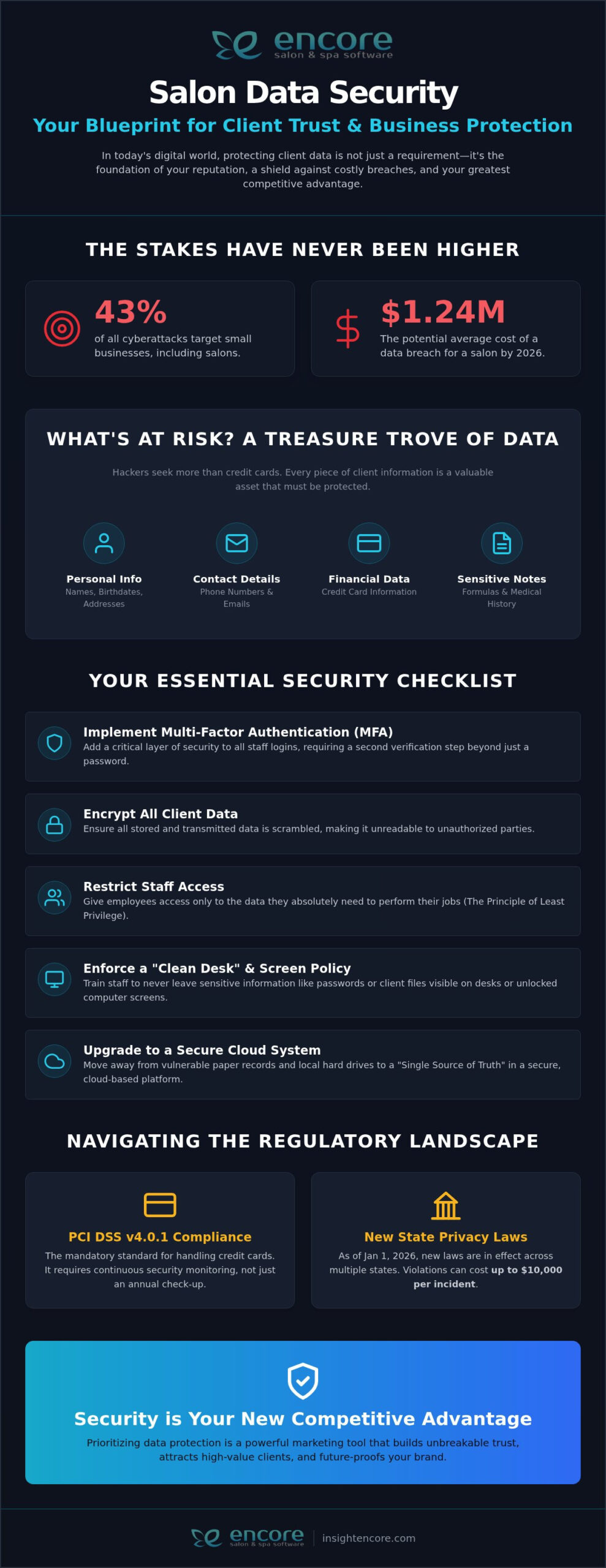
Categories
Uncategorized

The Ultimate Guide to Salon Credit Card Processing in 2026

Did you know that requiring a card on file for appointments can reduce your no-show rates by as much as 80%? If you’ve ever spent your evening squinting at a complex merchant statement or realized a manual entry error just cost you a morning’s profit, you aren’t alone. Most owners feel the weight of these recurring frustrations. It’s exhausting when your salon credit card processing feels like a hurdle instead of a help.

We believe your technology should work as hard as you do. This guide is designed to help you reclaim your time and protect your revenue. You’ll discover how the right integration can eliminate manual reconciliation, slash those high no-show costs, and simplify your daily operations. We’ll walk you through how to achieve lower effective rates and ensure every payment syncs perfectly with your client records. It’s time to trade the stress of hidden fees for a system that gives you total control and the peace of mind you deserve.

Key Takeaways

  • Moving beyond standalone terminals saves you hours of manual reconciliation and prevents costly data entry errors.
  • We’ll help you decode the difference between flat-rate and interchange-plus pricing so you stop overpaying as your salon grows.
  • Implementing salon credit card processing with card-on-file technology protects your time by automating no-show fees and deposits.
  • Specialized multi-merchant solutions allow you to manage booth renters or tattoo artists without the headache of manual payment splitting.
  • Linking your transactions to loyalty programs and gift cards transforms every checkout into a retention opportunity for your brand.

Beyond the Terminal: Why Your Salon Needs Integrated Credit Card Processing

The checkout should be the “golden hour” of your client’s visit. It’s the final moment to solidify that relationship and ensure they leave feeling pampered and valued. However, if your front desk team is frantically typing numbers into a separate terminal while your client waits, that magic disappears. Traditional standalone terminals create a wall between your appointment book and your bank account. This disconnect is more than just a minor annoyance; it’s a silent drain on your focus and your finances.

The Problem with Traditional Standalone Terminals

When your payment terminal doesn’t talk to your software, you’re forced into a “double-entry” workflow. You type the price into your management system, then type it again into the terminal. It sounds simple, but it’s a recipe for human error. A misplaced decimal point or a forgotten retail item can lead to mismatched totals that haunt you during end-of-day balancing. These errors often lead to lost revenue that you might not even notice until it’s too late to correct.

Manual reconciliation is the hidden thief of a salon owner’s time. You likely spend hours every week cross-referencing paper receipts against digital records to find out why your numbers don’t match. Standalone systems also make tracking stylist commissions a nightmare. Without a direct link, you’re stuck manually calculating who earned what for every service and product sold. This process is slow, frustrating, and prone to mistakes that can hurt your team’s morale and your bottom line. It’s a common industry hurdle that modern salon credit card processing is designed to solve.

What is Integrated Salon Credit Card Processing?

Integrated processing is the bridge between your client’s service and your financial data. Instead of two separate systems that ignore each other, your POS and your merchant account live in one unified ecosystem. When you click “checkout” in your management software, the total is automatically sent to the terminal. There’s no re-typing and no room for error. This setup ensures that service totals, retail purchases, and tips sync instantly with your client records.

By using Integrated Credit Card Processing, you eliminate the friction that leads to revenue leaks. You’ll gain better visibility into your actual costs, including the interchange fees that card networks charge for every swipe. This transparency allows you to see the true health of your business without digging through complex, hidden statements. Ultimately, integrated processing is the essential link that connects your daily appointments to your long-term financial growth and stability.

Interchange Plus vs. Flat Rate: Choosing the Right Model for 2026

Fees shouldn’t be a mystery. When you look at your monthly statement, you’re likely seeing a jumble of terms like interchange, assessment fees, and processor markups. Understanding these is the first step toward lower costs. Interchange is the base cost set by the card networks, while assessment fees go to brands like Visa or Mastercard. The markup is what the processor adds on top. Staying informed about FTC rules on electronic payments helps you stay ahead of these shifting costs. Choosing the right salon credit card processing model depends entirely on your current volume and future goals.

When Flat Rate Pricing Makes Sense

Predictability has a price. Flat-rate pricing is popular because it’s simple. You pay one consistent percentage, typically between 2.5% and 3.5%, regardless of the card type used. This model is often ideal for booth renters or new startups with unpredictable monthly income. You won’t have to worry about fluctuating costs when a client pays with a high-end rewards card. It makes your accounting straightforward and stress-free. As your business begins to scale, Encore Salon & Spa Software provides the flexibility to adapt your systems as your needs evolve.

The Advantages of Interchange Plus for High-Volume Spas

For established businesses, transparency leads to savings. High-volume salons often find that flat-rate models become expensive as they grow. Interchange Plus pricing passes the actual card costs directly to you with a small, fixed markup. This can result in lower effective rates, often between 1.8% and 2.2% for busy operations. You get a detailed breakdown of every transaction. This reporting helps you identify which cards cost you more and where you’re saving money. It’s about having total visibility into your overhead. You can check our pricing page to see how our software-led approach prioritizes your bottom line.

We believe you deserve a partner who values transparency as much as you do. Don’t let hidden fees in “low-cost” introductory offers eat into your hard-earned profits. Instead, look for a system that grows with you and offers clear, honest reporting. If you’re ready to see how the right model can transform your finances, you can see how it works for yourself and take the first step toward a more profitable future.

Revenue Protection: Card-on-File and No-Show Fees

An empty chair at 2:00 PM isn’t just a quiet moment. It’s a direct hit to your stylist’s paycheck and your salon’s daily goals. No-shows happen, but they don’t have to be a total loss. By implementing card-on-file as part of your salon credit card processing strategy, you create a layer of professional accountability. This setup allows for an “Uber-style” checkout experience where clients can simply wave goodbye while their payment is handled securely in the background. It feels high-end, seamless, and deeply respectful of everyone’s time.

Transparency is your best friend here. Before you charge a dime, you must ensure your clients understand and agree to your terms. Legally, you need to be clear about appointment deposits and cancellation fees. Most salons in 2026 find that a simple digital consent form during the booking process is enough to stay compliant and protect their revenue. It’s about setting expectations early so there are no surprises later. This approach protects your stylists from the emotional and financial sting of a missed appointment.

Eliminating No-Show Losses with Integrated Policies

Securing your schedule starts long before the client walks through the door. You can use automated appointment reminders to reinforce your cancellation policy 24 or 48 hours in advance. This “set it and forget it” approach ensures your team stays busy and your income stays predictable. Think of card-on-file as a digital handshake between your salon and your client; it signifies a mutual commitment to the appointment time. For high-value services like bridal packages or extensions, collecting an automated deposit ensures you aren’t left holding the bag if plans change.

The Rise of Surcharging: Offsetting Fees Legally in 2026

Processing costs are a reality, but in 2026, more salons are exploring surcharging to offset these expenses. As of August 2026, Visa and Mastercard cap these surcharges at 3% or your actual cost of acceptance. Keep in mind that regulations vary by location. For example, Colorado limits you to 2%, while Illinois caps it at 1%. Surcharging is still prohibited in states like Connecticut, Massachusetts, and Maine. Your salon credit card processing software must handle these complex calculations automatically to keep you compliant. When done with clear signage and open communication, it’s a practical way to protect your margins without losing your luxury appeal.

The Ultimate Guide to Salon Credit Card Processing in 2026

Specialized Solutions: Processing for Booth Renters and Tattoo Studios

Running a salon with independent contractors or booth renters adds a layer of complexity to your daily finances. You aren’t just managing one business; you’re often hosting several micro-businesses under your roof. The “Multi-Merchant” challenge is a common frustration for owners who want to provide a professional front-desk experience without the liability of handling another person’s money. If all payments go into a single account, you’re stuck manually calculating payouts and dealing with messy tax records. This is why booth renters need their own specialized management app. It ensures that every dollar earned by a stylist goes exactly where it belongs. It bypasses the salon owner’s bank account entirely, which is the cleanest way to operate.

Independent Contractor Payouts and Financial Independence

Maintaining clear financial boundaries is crucial for a healthy, long-term salon culture. Encore supports individual merchant accounts within a single, unified software system. This means funds from a haircut or color service go directly to the service provider’s account. It protects the landlord from unnecessary tax liability and gives the contractor total control over their cash flow. You won’t be digging through a year of mixed bank statements when tax season arrives. Integrated transaction histories make 1099 reporting a simple, automated process. It’s a professional way to manage salon credit card processing for a diverse team of independent professionals.

Tattoo Studios: Managing Deposits and Large Transactions

Tattoo studios face unique hurdles that standard retail shops rarely encounter. High-ticket transactions for full-day sessions or complex sleeves require a higher level of security to prevent chargebacks and fraud. This is where tattoo studio software becomes essential for your workflow. These systems allow you to handle large deposits securely and track them against the final bill. You can use digital intake forms to capture payment consent and liability waivers simultaneously. This creates a solid digital paper trail that protects your artists and your studio. For mobile artists or those working guest spots, salon credit card processing offers security on the go. You get the same level of encryption and reporting as a fixed terminal. This ensures your business stays protected and organized, no matter where you’re working.

See how Encore simplifies your specific business needs

The Encore Advantage: Seamless Payments Built for Growth

Choosing a salon credit card processing partner is about more than just a terminal. It’s about finding a guide who understands that your focus should be on your clients, not your software. With over 35 years of industry experience since our founding in 1991, we’ve designed our systems to act as the central hub for your entire operation. Our Integrated Credit Card Processing doesn’t just take payments; it closes the loop on your business management. It connects your front desk to your back office, ensuring every swipe or tap feeds directly into your growth strategy.

From Booking to Checkout: A Frictionless Journey

Imagine a journey where every step is effortless for both you and your client. It starts with a simple online booking where a deposit is collected to secure the spot. Automated reminders go out, and when the service is done, the checkout is a simple one-tap process. Because your payments are synced, your system automatically updates loyalty points and tracks gift cards without any extra steps. This integrated data fuels your marketing, letting you know exactly when to reach out to a client for their next visit. You get the peace of mind that comes from having a single point of contact for both your software and your payments.

PCI Compliance and Data Security in 2026

Security shouldn’t be something you lose sleep over. In 2026, “integrated” is synonymous with “more secure.” We use advanced tokenization and encrypted hardware to ensure that sensitive client data never actually touches your salon’s local network. This removes the heavy burden of technical data security from your shoulders. Our commitment to transparency means you’ll always know your records are safe and your business is compliant with the latest standards. It’s about creating a reliable environment where your financial technology works quietly and effectively in the background.

We know that switching systems can feel daunting. You might worry about disrupting your current bookings or losing client data. We’ve refined our transition process to be as smooth as possible. Our team acts as a dedicated mentor, helping you move your records and set up your new workflow without missing a beat. You aren’t just getting a software provider; you’re gaining a partner who is genuinely invested in your individual success. When you’re ready to simplify your life, we’re here to help you make the move with confidence.

Take Control of Your Salon’s Financial Future

Managing your business shouldn’t feel like a constant battle with your bank statement. By moving toward a fully integrated system, you’re doing more than just updating your hardware. You’re reclaiming hours of your week and protecting your team from the frustration of lost revenue. Whether you’re navigating the complexities of booth renter payouts or looking to slash your no-show rates with secure card-on-file policies, the right technology makes all the difference. Modern salon credit card processing should be a tool for your success, not a source of stress.

We’ve spent 35 years perfecting our approach to the wellness industry. From specialized modules for tattoo studios to seamless support for independent contractors, we understand the daily hurdles you face. Our goal is to provide the reliable, human-centric support you need to grow with confidence. You deserve a partner who is as invested in your success as you are.

Ready to simplify your checkout? Explore Encore’s Integrated Credit Card Processing today.

We’re here to help you every step of the way as you build a more organized and profitable business. It’s time to focus on what you love and let your software handle the rest.

Frequently Asked Questions

How do I choose the best credit card processor for my salon?

Look for a provider that offers Integrated Credit Card Processing to avoid manual entry errors. You should prioritize transparency in pricing, such as interchange-plus models for higher volume, and ensure the system supports card-on-file for no-show protection. A partner with industry-specific experience, like Encore’s 35 years of expertise, ensures they understand your unique daily hurdles. Choosing a partner who values human-centric support will make your transition much smoother.

What is the difference between integrated and non-integrated salon payments?

Integrated payments connect your software directly to your terminal, while non-integrated payments require you to type totals into a separate machine. With an integrated system, checkout totals and tips sync automatically with your client records. This eliminates the “double-entry” process that often leads to revenue-killing errors and hours of manual reconciliation. It’s the most efficient way to maintain organized control over your daily financial data.

Can I charge a no-show fee if I don’t have a card on file?

It is nearly impossible to collect a no-show fee without a card on file unless the client voluntarily pays it later. Requiring a card during the booking process acts as a digital handshake between you and your client. It allows you to automate the collection of fees according to your specific policy. Research shows that simply having a card on file can reduce no-show rates by 60% to 80%.

Is it legal for my salon to add a credit card surcharge to the bill?

Surcharging is legal in most states as of 2026, but specific rules apply depending on your location. Visa and Mastercard generally cap these fees at 3% or your actual cost of acceptance. You must provide clear signage at your entrance and the point of sale to stay compliant. Note that surcharging is currently prohibited in Connecticut, Massachusetts, and Maine, so check your local regulations before implementing this for your salon credit card processing.

Do independent booth renters need their own merchant account?

Yes, having a separate merchant account is the cleanest way for booth renters to manage their own finances and tax liabilities. This setup ensures funds go directly to the stylist instead of the salon owner’s bank account. It simplifies 1099 reporting and gives the renter total control over their cash flow. Integrated systems allow multiple merchant accounts to operate under one roof while maintaining a professional front-desk experience for every client.

How long does it take for salon credit card deposits to hit my bank account?

Most salon credit card processing deposits typically arrive in your bank account within one to two business days. Some modern processors offer “next-day” or even “same-day” funding for an additional fee or as part of a premium service tier. The exact timing often depends on your specific “batch-out” time and your bank’s schedule for electronic transfers. Having a reliable processor ensures your cash flow remains steady and predictable.

What hardware do I need for salon credit card processing in 2026?

You need a PCI-compliant terminal that supports contactless payments like Apple Pay and Google Pay. Modern hardware should be fully compatible with your salon management software to enable Integrated Credit Card Processing. Many salons now opt for sleek, handheld devices that allow for “chairside” checkout. This hardware uses encryption and tokenization to keep your client’s sensitive data safe from the moment they tap, swipe, or dip their card for payment.

How does integrated processing help with salon commission calculations?

Integrated processing automatically links every transaction to the specific stylist who performed the service. This removes the need for manual tallying or messy spreadsheet calculations at the end of the week. Because the software tracks the service total, retail sales, and tips in one place, it can instantly calculate accurate commissions for your team. This transparency builds trust with your staff and ensures everyone is paid correctly for their hard work.

Disclaimer

This article is general in nature and may contain errors, please verify all claims with your sales rep

Categories
Uncategorized

Salon Client No-Show Policy Template 2026: Protect Your Revenue & Time

Did you know that salons without automated reminders often face no-show rates as high as 20%? It’s heartbreaking to watch your hard-earned revenue vanish because of an empty chair and a silent phone. You want to be the supportive, welcoming professional your clients love, but losing $500 or more every month to missed appointments simply isn’t sustainable. Finding the right salon client no-show policy template 2026 is the first step toward ending the awkwardness of asking for fees and ensuring your time is finally respected.

We understand that your time is your most valuable asset. We’re here to help you reclaim your schedule and your peace of mind with professional, enforceable strategies that work. By implementing these proven templates and automation tools, you can stop the profit leak and lower your no-show rates by at least 50%. We’ll walk you through creating a clear policy for your booking portal and show you how to collect fees automatically; this allows you to focus on your craft instead of chasing down payments.

Key Takeaways

  • Protect your revenue from rising operational costs by establishing a formal agreement that values both your time and your clients’ access to premium slots.
  • Download a versatile salon client no-show policy template 2026 designed to handle everything from standard hair services to high-ticket specialty treatments.
  • Identify the best policy model for your brand, whether you prefer a tiered “three strikes” approach for loyalty or a secure “deposit only” system for new clients.
  • Eliminate uncomfortable conversations by automating fee collection through integrated credit card processing and secure card-on-file features.
  • Reduce missed appointments by up to 70% using a strategic sequence of automated 48-hour and 24-hour reminders tailored to modern client habits.

Why Your Salon Needs a Formal No-Show Policy in 2026

Think of your salon chair as prime real estate. Every hour is a finite resource. In the modern beauty industry, a no-show policy is a mutual agreement that protects your time while ensuring your most loyal guests have access to the best time slots. Understanding what a no-show policy is helps reframe the conversation from one of punishment to one of professional respect. It sets the stage for a relationship built on transparency.

The 2026 "Price of an Empty Chair" has never been higher. Rising booth rents and inflation mean your margins are thinner than ever. You can’t afford to let a prime afternoon slot stay empty just because a client changed their mind at the last minute. Moving from verbal promises to digital contracts is no longer optional; it’s a standard business practice that protects your livelihood. Clients actually respect clear boundaries. It signals that your services are in high demand and your expertise is valuable. Using a salon client no-show policy template 2026 ensures these expectations are set before the client even sits in your chair.

The Real Cost of a Cancelled Appointment

Calculating your Hourly Loss Rate is a sobering exercise. It isn’t just the lost service fee. You must account for several hidden drains on your business:

  • Wasted product and preparation time
  • Fixed overhead like rent, software, and utilities
  • The opportunity cost of the client you turned away

A single no-show creates a ripple effect. It disrupts your creative flow and can even delay your next guest if you’re scrambling to fill the gap. Research indicates that 62% of no-shows happen because clients simply forget. Without an automated system, filling that gap at the last minute is nearly impossible. Every minute you spend manually texting clients to find a replacement is a minute you aren’t behind the chair earning money.

Setting Professional Boundaries with Empathy

We believe in framing your policy around fair access for all guests. It’s about being a supportive partner to your clients. You aren’t "charging a fine." You are ensuring that someone else doesn’t miss out on a transformation they’ve been waiting for. This approach lowers the barrier to entry for new clients who might feel intimidated by strict rules.

A solid policy helps you differentiate between true emergencies and chronic no-shows. It removes the "awkward" factor from your daily interactions. When you use integrated credit card processing to hold a card on file, fee collection becomes a neutral, automated process. This builds trust because there’s no ambiguity. Your clients know exactly what to expect, and you can focus on providing a stellar experience instead of worrying about your bottom line.

Essential Components of a Professional Salon Cancellation Policy

Crafting a policy that sticks requires more than just a few sentences on a flyer. It needs a structural framework that balances firm boundaries with the empathy your brand is known for. A professional policy serves as a digital contract, ensuring both you and your guest are on the same page before the first bottle of color is even opened. Your salon client no-show policy template 2026 should clearly state that a valid credit card is required to secure any booking, acting as a digital signature of mutual respect.

The fee structure is the heartbeat of your policy. Many pros choose between a flat fee or a percentage of the total service. While a flat fee is simple to explain, a percentage based fee (typically 50% for late cancellations and 100% for no-shows) better protects your revenue for high-ticket services. You should also define a late arrival grace period. Typically, 15 minutes is the industry standard. Beyond that, the appointment may need to be rescheduled and treated as a late cancellation to keep your day on track.

Defining the Cancellation Window

While a 24 hour notice period is the traditional floor, 48 hours is becoming the 2026 premium norm. High volume, low complexity services like a quick trim can often function with a 24 hour window. However, chemical services, extensions, or balayage require more preparation and are harder to fill at the last minute. These "premium" slots deserve a 48 hour window. If your salon is closed on Sundays and Mondays, make sure your policy explains how to handle those appointments. A client with a Tuesday morning slot should know they need to reach out by Saturday to avoid fees.

Deposit and Pre-payment Terms

There is a subtle but important difference between a booking fee and a down payment. In 2026, "no-questions-asked" booking fees are standard for new clients. This isn’t a penalty; it’s a commitment. When setting these terms, it’s wise to stay informed about consumer cancellation rights to ensure your policy remains fair and legally sound. Most salons find success by making deposits non-refundable but transferable if the client reschedules within a specific timeframe.

Handling these transactions manually can feel awkward and intrusive. Using Encore’s integrated credit card processing allows you to securely store cards on file. This removes the friction of asking for money during a sensitive moment. By automating this step, the system handles the "business" side of things, leaving you free to focus on your client’s transformation. If you’re ready to modernize your booking flow, you can explore how automated tools protect your schedule.

Choosing the Right Policy Model for Your Business

Selecting the right framework for your business is about more than just numbers. It’s about aligning your rules with your brand’s unique personality. When you choose a salon client no-show policy template 2026, you are making a statement about how you value your craft and your time. The economic effects of no-shows can be devastating for a growing business, so your model must be both practical and sustainable. Finding a balance between firm protection and client empathy is the secret to long-term success.

The Three Strikes Model is excellent for building trust. It offers a tiered approach: a friendly warning for the first instance, a 50% charge for the second, and a 100% charge for the third. This gives your loyal guests a chance to adjust to your boundaries. Conversely, the Deposit Only Model works best for high-ticket services like extensions or balayage. It ensures your product costs are covered before the client even walks through the door. For elite salons with months-long waitlists, the Strict 100% Model is often the only way to manage intense demand. Finally, the Flexible Model relies on a "pay what you can" or "waived fee" approach for low-competition, community-focused shops where personal relationships are the primary business driver.

Policy Comparison for Different Business Types

Independent professionals often prefer a direct, personal policy. Since you are both the owner and the stylist, your clients feel a closer connection to your personal time. Luxury spas should focus on the "Experience Reservation." This frames the time block as a curated event rather than just a slot on a calendar. For nail salons, a simple late fee structure is often more effective than a complex cancellation policy due to the high frequency of visits and shorter service times.

When to Waive the Fee

Empathy is your greatest retention tool. A "One-Time Forgiveness" rule maintains goodwill when a reliable client has a true emergency. You don’t want to lose a lifelong guest over a single flat tire or a sudden illness. Using Encore’s Client Management System allows you to see a client’s history at a glance. You can identify patterns of chronic no-shows versus isolated incidents. This data-driven approach removes the guesswork. It helps you make fair decisions that protect your business without sacrificing your brand’s heart.

Salon Client No-Show Policy Template 2026: Protect Your Revenue & Time

5 Salon Cancellation and No-Show Policy Templates for 2026

Having a clear, written agreement is the bridge between a casual request and a professional commitment. This salon client no-show policy template 2026 collection provides the exact wording you need to protect your business while maintaining a welcoming atmosphere. Whether you’re an independent stylist or a high-volume studio, these templates help set expectations from the very first click.

The Standard 24-Hour Notice Template

This is the most versatile option for traditional hair salons. It balances firmness with a welcoming tone. Copy and paste this into your booking portal or website:

"Your appointments are very important to the [Salon Name] team. We reserve this time specifically for you. We understand that schedule changes are sometimes necessary; therefore, we respectfully request at least 24 hours’ notice for cancellations. Please understand that when you forget or cancel your appointment without giving enough notice, we miss the opportunity to fill that appointment time, and clients on our waiting list miss the opportunity to receive services. Less than 24 hours’ notice will result in a charge equal to 50% of the reserved service amount. ‘No shows’ will be charged 100% of the reserved service amount. You may cancel via our online booking portal, our mobile app, or by calling us directly at [Phone Number]."

The Deposit-Based Policy for Specialty Services

For Tattoo Studios, med-spas, or balayage specialists, a non-refundable booking fee is the gold standard. This model ensures your preparation time is covered even if the client doesn’t arrive. Focus your wording on the "Booking Fee" rather than a "penalty." Explain that this fee covers the artist’s dedicated setup time and the lost opportunity of a multi-hour block. Remind guests that this amount applies directly toward their final service total, making it a "down payment" on their transformation.

SMS and Email Notification Templates

Automation is your best ally in reducing no-shows. Short, friendly appointment confirmation texts keep your schedule top-of-mind without feeling aggressive. For SMS, try: "Hi [Name]! Reminder of your visit to [Salon] on [Date] at [Time]. Reply ‘C’ to confirm. Note our 24hr cancellation policy. See you soon!" For emails, use a soft reminder that mentions the policy as a way to ensure "fair access for all guests." During the online booking process, include a mandatory checkbox with the following Acknowledgement Clause: "I have read and agree to the cancellation and no-show policy terms for this reservation."

Start your free trial to automate your policy enforcement today

For independent professionals, a direct approach works best: "As a small business owner, missed spots impact my ability to serve everyone fairly. I appreciate your respect for my time." If you run a busy urban hybrid shop, combine your cancellation rules with a 15-minute grace period. This ensures your walk-in flow remains steady while protecting your scheduled slots. Finally, for new clients, consider a "New Guest Only" policy where a card on file is mandatory to secure their introductory experience, significantly mitigating the risk with unknown guests.

Automating Policy Enforcement with Encore Salon Software

A great salon client no-show policy template 2026 is only effective if you have the tools to back it up. We know that manually tracking missed appointments and chasing fees is the least favorite part of your job. It feels confrontational and drains your creative energy. That’s why we’ve built the infrastructure to handle these logistics for you, turning your policy from a static document into a living, breathing part of your workflow. By integrating your agreement directly into the online booking process, you ensure that every guest acknowledges your terms before the "Book Now" button even becomes active.

Automated reminders are your first line of defense. By sending strategic alerts at 48 and 24 hours before an appointment, you can reduce no-shows by up to 70%. These aren’t just notifications; they are gentle nudges that respect your client’s busy life while prioritizing your schedule. If a client still misses their slot, our secure, PCI-compliant Encore Credit Card Processing allows you to hold fees safely using a card-on-file system. Our reporting and analytics tools also help you identify "Red Flag" clients who have a history of late arrivals. By seeing these patterns early, you can make informed decisions before they cost you another hour of revenue.

The "Silent Enforcer": How Encore Removes the Awkwardness

One of the biggest hurdles in salon management is the discomfort of asking for a cancellation fee. Our system acts as a "silent enforcer" by automating the entire collection process. When a no-show occurs, the system can process the charge based on your pre-set rules without you having to say a word. It then sends an automated receipt that clearly states the reason for the charge, referencing the digital signature the client provided during booking. This transparency significantly reduces the risk of credit card chargebacks and keeps your professional relationship intact. You don’t have to be the "bad guy" when the software handles the business side for you.

Rewarding Reliability with Loyalty Programs

While it’s important to protect your time, it’s equally vital to celebrate your most dependable guests. Using Encore’s Loyalty Programs, you can reward clients who consistently show up on time and respect your boundaries. You might even choose to use "VIP status" to automatically waive a cancellation fee for your top 10% of clients if a rare emergency arises. This approach reinforces that your salon client no-show policy template 2026 is about mutual respect, not punishment. It builds a culture of reliability that benefits your entire salon community and ensures your peace of mind.

Ready to reclaim your time and stop the profit leak? See how Encore automates your business.

Reclaim Your Schedule and Your Peace of Mind

Your time is your most valuable asset. Protecting it doesn’t mean being rigid or cold; it means setting a standard of mutual respect that allows your business to thrive. By choosing the right salon client no-show policy template 2026 and supporting it with the right technology, you can stop the revenue drain and focus on what you love most. We’ve shown you how clear boundaries combined with automated reminders can transform a salon’s culture and bottom line. You no longer have to choose between being a supportive stylist and a savvy business owner.

Since 1991, Syntec has been a trusted partner for thousands of beauty professionals looking to grow their brands with confidence. Our Encore system provides 24/7 online booking with built-in policy enforcement and integrated PCI-compliant card processing to keep your transactions secure. You can finally let the software handle the "silent enforcement" while you concentrate on delivering stellar transformations. You deserve a schedule that works for you and a business that respects your expertise.

Automate your salon’s no-show protection with Encore Salon Software today.
Take the first step toward a more organized and profitable future. Your empty chairs are waiting to be filled by clients who value your craft as much as you do.

Frequently Asked Questions

Is a salon cancellation policy legally enforceable in 2026?

Your policy is enforceable as long as you clearly communicate the terms and obtain the client’s agreement at the time of booking. Modern standards rely on digital agreements within your online booking portal. When a client checks a box to acknowledge your rules, they are entering a valid contract. Ensure your salon client no-show policy template 2026 is easily accessible on your website and booking page to avoid any legal disputes.

How much should a salon charge for a no-show fee?

The industry standard for a true no-show is 100% of the scheduled service price. If a client cancels late but provides some notice, a 50% fee is the common benchmark. Some businesses prefer a flat rate, typically ranging from $25 to $50, depending on the service type. These fees should be reasonable and clearly disclosed upfront to ensure they are viewed as a recovery of lost costs rather than a penalty.

Can I charge a cancellation fee if the client didn’t sign a physical paper?

You absolutely can charge a fee without a physical signature. Digital "click-wrap" agreements, where a client clicks a box during the booking process, are legally binding in 2026. This digital contract proves the guest was aware of the terms before finalizing their reservation. By using a salon client no-show policy template 2026 integrated into your booking flow, you create a secure audit trail that protects your business from chargebacks and disagreements.

What is the best way to tell a client they are being charged a no-show fee?

Automation is the most professional way to handle this sensitive conversation. An automated email or text receipt that cites the policy and the specific appointment time removes the personal friction between you and the guest. If you must speak with them directly, lead with empathy. Explain that the fee helps cover the overhead and lost time for that specific slot, which ensures the salon can continue providing high-quality services to everyone.

Should I require a deposit for every single appointment?

While not mandatory for every guest, deposits are highly effective for new clients and high-ticket services like extensions or chemical treatments. Many salons find a hybrid approach works best. You might require a non-refundable booking fee for anyone you haven’t seen before, while letting long-term, reliable regulars book with just a card on file. This strategy mitigates risk with unknown guests without adding hurdles for your most loyal community members.

How do I handle a regular client who suddenly starts no-showing?

Start with a personal check-in rather than an immediate charge. If a reliable guest misses an appointment, there might be a genuine emergency or a health issue involved. Use your client management system to review their history. If it’s their first offense in years, a "one-time forgiveness" gesture builds immense loyalty. However, if the behavior becomes a pattern, it’s time to have a gentle but firm conversation about your time.

How does salon software help with no-show protection?

Software acts as your dedicated administrative assistant by automating the entire enforcement process. It sends out a sequence of reminders at 48 and 24 hours, which research shows can reduce no-shows by 60% to 80%. Beyond reminders, it securely stores credit card information and processes fees automatically. This ensures you aren’t stuck chasing payments manually and allows you to focus entirely on the creative work happening behind the chair.

What happens if a client’s card on file is declined for a no-show fee?

If a card is declined, your software will typically alert you immediately. You can then reach out to the client to update their payment information or let them know the balance will be added to their next visit. For future bookings, it’s wise to require a full pre-payment or a larger deposit from that specific guest. This protects your revenue and ensures that your time is fully secured before they return to your salon.

Disclaimer

This article is general in nature and may contain errors, please verify all claims with your sales rep
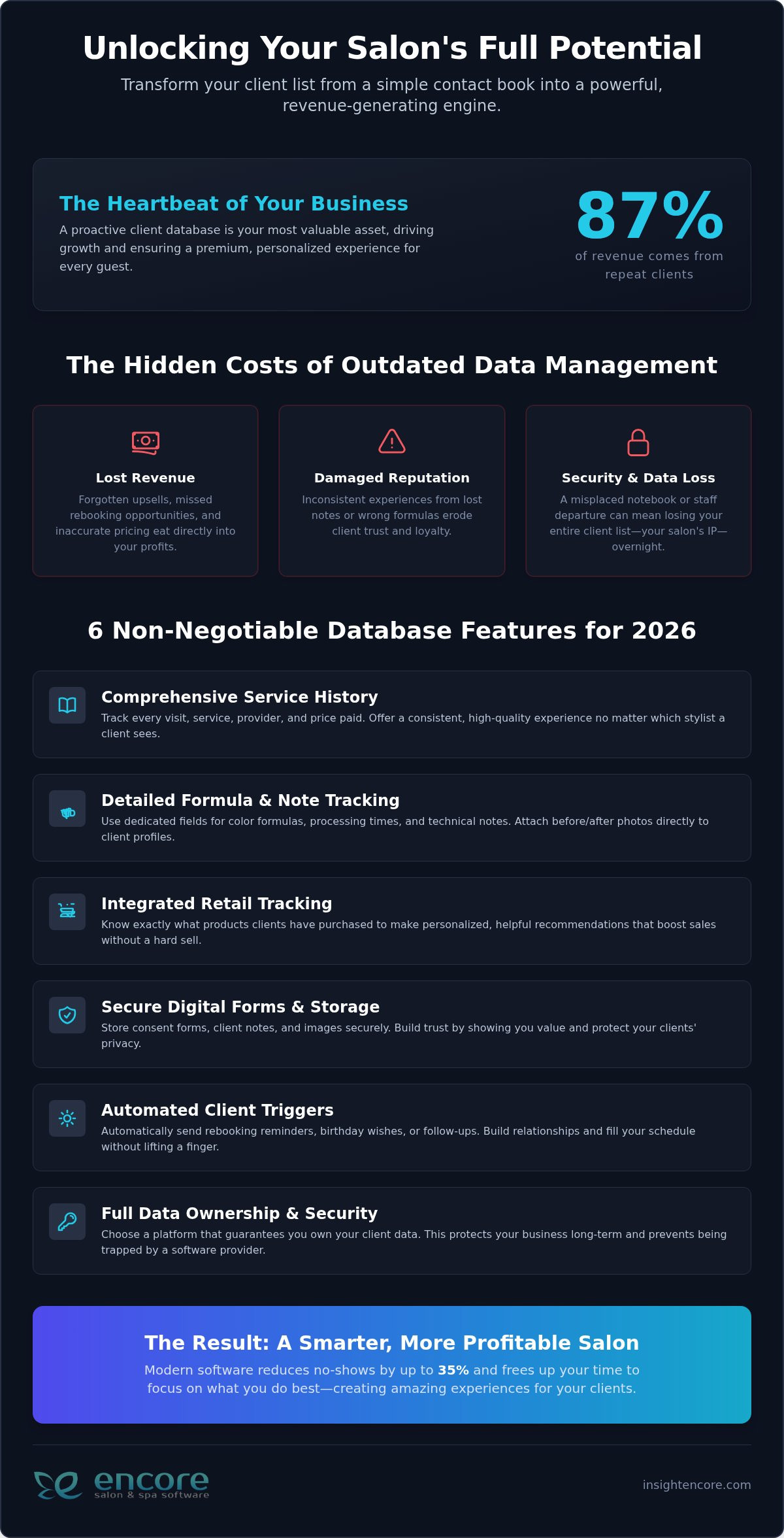
Categories
Uncategorized

Automated Salon Client Retention Strategies: The 2026 Reference Guide

Did you know that between 40% and 70% of first-time salon clients never come back for a second visit if you don’t follow up? It’s a frustrating reality for many owners who pour their hearts into every service. You work hard on improving salon client experience, yet the gap between a great appointment and a loyal regular often remains stubbornly wide. Acquiring a new guest is five to twenty-five times more expensive than keeping the ones you already have. If your books feel like a revolving door, it’s time for a change.

We understand the exhaustion of manual rebooking and marketing tasks that get lost in the shuffle of a busy Saturday. You deserve a system that works as hard as you do. This guide promises to show you how to transform those one-time visitors into lifelong advocates using modern automation and data-driven loyalty frameworks. We’ll explore how to build a predictable, automated re-engagement system that increases your client lifetime value and keeps your chairs full with much less manual effort.

Key Takeaways

  • Learn why 90-day return rates are the new gold standard for success and why chasing new traffic won’t fix a “leaky bucket” retention problem.
  • Discover how to set up automated marketing triggers that keep your schedule full while improving salon client experience through personalized, human-feeling touchpoints.
  • Explore why traditional punch cards are being replaced by experiential rewards and points-based systems that build genuine long-term value.
  • Identify the must-have features for your 2026 tech stack, from centralized CRM data to integrated payments that remove friction at checkout.
  • See how an all-in-one management suite can automate your most time-consuming tasks, giving you back hours of your day while your business grows.

The Economics of Salon Client Retention in 2026

In the beauty industry, we often celebrate the “new.” We love new trends, new products, and especially new clients. However, the data for 2026 tells a different story. With new guest visits for full-service salons falling by 5% last year, the focus has shifted toward what customer retention is and why it’s the primary engine for your growth. In 2026, we define successful retention by 90-day return rates. If a client doesn’t return within three months, the likelihood of them ever coming back drops to less than 20%.

Many owners suffer from “Leaky Bucket” syndrome. They spend heavily on social media ads to bring people in, but those guests never return. It’s a cycle that drains your energy and your bank account. Improving salon client experience starts by realizing that a 5% increase in retention can boost your profits by 25% to 95%. Existing clients spend 67% more on average than new ones. When you stop chasing the next stranger and start nurturing the person in your chair, your business finally finds its rhythm.

This shift requires moving from transactional visits to intentional relationship management. You’re not just selling a haircut or a facial; you’re providing a consistent sanctuary. Focusing on improving salon client experience through personalized care is what turns a casual visitor into a brand advocate.

Key Retention Metrics You Must Track

To fix your retention, you have to see the gaps. You should track new guest retention separately from repeat guest retention. If your “One and Done” rate is high, it means guests aren’t finding a reason to return after that first visit. This often happens when the rebooking process feels like a chore. By monitoring your average visit frequency, you can turn a “twice-a-year” client into a “six-times-a-year” regular. This shift creates predictable, stable revenue that allows you to breathe easier during the slow seasons.

The 2026 Cost of Acquisition vs. Retention

Digital advertising costs have reached a point where retention is the only sustainable way to scale. It’s five to twenty-five times more expensive to acquire a new client than to keep an existing one. Loyal clients don’t just spend more; they also become your unpaid marketing team. They refer friends and leave the reviews that drive organic growth without costing you a cent in ad spend. Client Lifetime Value (LTV) is the total revenue a client generates throughout their relationship. By focusing on LTV, you prioritize long-term stability over the stress of the daily hustle.

Leveraging Automated Marketing for Seamless Retention

Automation isn’t about replacing human connection. It’s about protecting it. When you’re behind the chair, you can’t be at your desk sending follow-up texts. Automated marketing ensures that no guest feels forgotten. By establishing “If This, Then That” workflows, your software acts as a silent assistant that never sleeps. This consistency is a cornerstone of the economics of client retention, turning sporadic visits into a steady rhythm. It removes the stress of manual outreach and lets you focus on the person sitting in front of you.

Success comes down to personalization at scale. Use your CRM data to include specific details, like a client’s preferred stylist or their last hair color formula. This makes an automated text feel like a thoughtful note from a friend. To keep the relationship healthy, implement frequency capping. You want to stay top-of-mind without crowding their digital space. An omnichannel approach, using SMS for quick alerts and email for deeper stories, ensures your message gets through. By balancing these channels, you respect the client’s boundaries while maintaining a presence that feels supportive rather than intrusive.

Essential Automated Triggers for 2026

Start with a “We Miss You” campaign. If a guest hasn’t booked in 6 to 8 weeks, an automatic nudge can bring them back before they look elsewhere. Post-visit gratitude is equally powerful. Sending a thank-you note just two hours after an appointment is a simple way of improving salon client experience. Include a direct link to leave a review while their positive feelings are still fresh. Celebrating birthdays or anniversaries with a small gift or discount builds emotional loyalty that transcends price. These small gestures prove you value them as a person, not just a transaction.

Predictive Rebooking Reminders

Modern software now uses AI to predict exactly when a client needs maintenance. If a guest gets a root touch-up every five weeks, the system knows. It can send a rebooking reminder seven days before that likely need. This proactive approach removes the mental load from the client. By linking these reminders directly to your salon client booking portal, you make the path to the next appointment effortless. It also prevents “calendar inflation,” where your books look full but are actually prone to gaps because people forgot to schedule their upkeep. This is a vital step in improving salon client experience by making their life easier.

Transitioning to these workflows doesn’t have to be intimidating. You can start small and watch your books fill up with minimal effort. If you’re ready to see how these tools work in action, explore our automated marketing features.

Comparing High-Impact Loyalty and Referral Program Models

In 2026, the traditional “Buy 10, Get 1 Free” punch card is a relic of the past. It’s easily lost, hard to track, and doesn’t actually drive emotional connection. Modern loyalty programs focus on improving salon client experience by offering experiential rewards instead of just deep discounts. Think about offering a complimentary paraffin wax treatment or early access to a popular stylist’s holiday schedule. These perks feel more like a gift and less like a coupon, which protects your margins and elevates your brand’s perceived value.

A points-based system is a powerful way to make every dollar a client spends feel like an investment in their future self. When guests see their points balance grow, they’re less likely to wander to a competitor. You can take this further with tiered loyalty structures. By creating an “Elite” or “VIP” tier for your top-spending 10%, you foster a sense of exclusivity that rewards your most dedicated patrons. Adding gamification elements, like digital badges for trying a new service category or hitting a milestone of five visits, keeps the interaction fun and engaging within your client app. Pairing these loyalty efforts with well-timed salon gift card promotion ideas can further boost revenue during slower seasons while giving loyal clients a meaningful way to share your services with friends and family.

The Membership Model: Guaranteed Recurring Revenue

Memberships provide the ultimate business stability. Whether you offer monthly blow-dry packages or skin maintenance plans, recurring revenue allows you to forecast your income with precision. You can manage auto-billing seamlessly through your nail salon POS system, which removes the need for awkward payment conversations at every visit. The psychology of pre-paid services is clear. Members tend to visit about 20% more often because the service is already “accounted for.” It becomes a regular part of their lifestyle rather than an occasional luxury.

Referral Automation: Turning Clients into Influencers

Your loyal regulars are your best marketing team. You can turn them into active influencers by automating the referral process. Set up a trigger that sends a “Refer a Friend” discount code immediately after a client leaves a 5-star review. This captures them at their peak moment of satisfaction. Your client management system should track these referrals automatically, so you don’t have to guess who brought in whom. Rewarding both the referrer and the new guest lowers social friction and makes the recommendation feel like a generous gift. This proactive approach is a simple way of improving salon client experience while growing your books organically.

Automated Salon Client Retention Strategies: The 2026 Reference Guide

Building Your 2026 Client Retention Tech Stack

Great service isn’t just about soft skills. It’s about the technical infrastructure that supports your team. A centralized CRM acts as the brain of your business, ensuring that every piece of client data lives in one accessible place. When any staff member can pull up a guest’s history, color formulas, and personal preferences, the service remains consistent. This reliability is a fundamental part of improving salon client experience. Your data shouldn’t be scattered across paper cards or disconnected apps; it needs to be at your fingertips.

The checkout process is your last chance to leave a positive impression. Integrated credit card processing allows for a frictionless experience where the client doesn’t have to wait. If they can tap and go, or use a stored card for a “silent” checkout, the visit ends on a high note. Mobile-first booking is another essential tool for reducing the barrier to re-entry. Busy clients often remember to book at odd hours. If you provide a seamless way to schedule from their phone, you respect their time. Finally, prioritizing data security builds long-term trust. When guests know their profiles and payment details are safe, they feel secure returning to your business year after year.

Inventory Integration and Product Retention

Retail sales are a retention superpower. Using an integrated spa inventory management system helps you track exactly what your clients are buying. You can set up your software to automate restock reminders for professional skincare or hair products right when they’re likely to run out. Bundling retail products with specific services also increases the “stickiness” of the visit. A client who uses your recommended home care is significantly more likely to return for professional maintenance because they see better results between appointments.

Staff Performance Dashboards

Your team is your greatest asset in improving salon client experience. Staff dashboards allow you to track retention rates by individual stylist to identify who is thriving and who needs more training. This data-driven approach lets you set automated commission bonuses for high-retention employees, rewarding the behaviors that grow your business. By empowering your staff with detailed client notes, you ensure they can personalize every future visit. When a stylist remembers a client’s preferred beverage or a small detail about their life, that guest feels valued and understood.

Build your retention tech stack with Encore today.

Scaling Success with Encore’s Automated Management Suite

Managing a business shouldn’t feel like a second full-time job. You already have enough on your plate with daily operations and team management. Encore Salon & Spa Software is designed to take the weight off your shoulders by simplifying complex marketing workflows. The “Set it and Forget it” philosophy means you can build your loyalty frameworks once and let the software handle the heavy lifting. This allows you to focus on what you do best: improving salon client experience and growing your craft.

One-size-fits-all solutions don’t work in a diverse industry. Whether you need specialized nail salon client management or a dedicated module for tattoo studios and pet groomers, Encore Salon & Spa Software provides tools that understand your specific industry hurdles. You aren’t just another user to us. You’re a partner. Our team provides the human support you need to ensure your transition to automation is smooth and successful. We’re here to help you remove the frustrations that hold your business back.

The Encore Advantage: All-in-One Integration

App fatigue is a real problem for modern owners. Jumping between a booking site, a separate POS, and a marketing tool leads to errors and missed opportunities. Encore Salon & Spa Software houses everything in one accessible place. You get real-time syncing between your online portals and in-salon management, so your books are always accurate. This unified approach is essential for improving salon client experience because it ensures every interaction is seamless. Take a look at our pricing to find a plan that grows alongside your business.

Ready to Stop the Leaky Bucket?

Stopping the “Leaky Bucket” syndrome starts with a single step. Transitioning your existing client data to Encore Salon & Spa Software is straightforward. We’re here to help you do it without any downtime. You can see these automated marketing tools in action by booking a personalized demo with our team. It’s time to take control of your growth and build a business that thrives on loyalty rather than the stress of constant acquisition. Try Encore Now to build your custom retention strategy.

Build a Business That Thrives on Loyalty

The transition from manual marketing to a streamlined growth engine is within your reach. We’ve explored how data-driven triggers and memberships protect your revenue while improving salon client experience. It’s about moving from a state of constant stress to one of organized control. Encore Salon & Spa Software provides the integrated automated marketing and specialized tools needed for barbers, tattoo artists, and pet groomers to thrive.

Since 1991, we’ve focused on providing empathy-driven support from industry experts who understand your daily hurdles. Let technology handle the rebooking reminders so you can focus on the artistry that brought you into this industry. You deserve a system that works as hard as you do.

Try Encore Now to automate your client experience

Your path to a more predictable and rewarding future starts with a single decision. We’re excited to partner with you as you build a business that values every guest relationship.

Frequently Asked Questions

How do I calculate my salon’s client retention rate?

To calculate your retention rate, divide the number of clients who returned within a specific period by the total number of unique clients from the previous period, then multiply by 100. For example, if 100 clients visited in January and 60 of them returned by April, your 90-day retention rate is 60%. Most modern management systems will track these figures for you in real-time, allowing you to monitor your growth without manual math.

Can automated marketing messages really feel personal to my clients?

Automation actually enhances personalization when you use your CRM data effectively. By using smart placeholders, your software can automatically insert a client’s name, their last service, and even their favorite beverage. This makes a text feel like a thoughtful note from a friend rather than a mass broadcast. Prioritizing these human details is a powerful way of improving salon client experience, ensuring your marketing always feels supportive and relevant to their needs.

What is a good retention rate for a high-end hair salon in 2026?

A retention rate between 60% and 70% is considered healthy for a high-end salon in 2026. While it’s tempting to aim for 100%, some natural turnover is expected as people move or change lifestyles. High-end clients often have higher expectations for consistency. If your rate falls below 50%, it’s usually a sign that your rebooking process needs more automation or that your service-level consistency needs attention from your leadership team.

How often should I send We Miss You automated emails?

You should send your first “We Miss You” nudge around the 6-week mark, followed by a second message at 8 weeks if they haven’t booked. This cadence respects the client’s space while ensuring you’re there right when they start noticing they need maintenance. Avoid sending these messages more than once a month. A two-step approach is more effective than a single blast, as it builds momentum without becoming an annoyance in their inbox.

Is it better to offer points or cash discounts in a loyalty program?

Points are almost always better than cash discounts because they encourage higher spend without devaluing your brand. When guests earn points toward experiential rewards, like a scalp massage or a retail gift, they view the program as an investment. Cash discounts can attract bargain hunters who aren’t loyal. Points-based systems are a more sustainable method of improving salon client experience, as they reward the relationship rather than just the transaction.

How does salon software help prevent one-and-done visits?

Software prevents “one-and-done” visits by ensuring every new guest receives a consistent follow-up. Since up to 70% of first-time visitors don’t return without a nudge, an automated thank-you note sent hours after the visit is critical. By setting up a sequence that includes a rebooking reminder two weeks later, you bridge the gap between that first appointment and becoming a regular. This removes the risk of manual tasks falling through the cracks during busy shifts.

Can I run a loyalty program if I only rent a chair or booth?

Yes, you can absolutely run a loyalty program as an independent renter. Modern software for chair and booth renters includes the same automated marketing and loyalty tools used by large salons. You can manage your own points system and referral rewards to build your personal brand. This independence allows you to cultivate a loyal following that stays with you, regardless of where you work. It’s a professional way to scale your business with minimal manual effort.

What are the best automated marketing triggers for a pet grooming business?

The best triggers for a pet grooming business focus on the unique health and hygiene needs of the animal. You should set up reminders based on breed-specific grooming cycles, which typically range from 6 to 8 weeks. Seasonal alerts for de-shedding in the spring or coat protection in the winter also add value. Sending a post-visit text with a photo of the pet is a simple, high-impact way to build trust with pet parents who value consistent care.

Disclaimer

This article is general in nature and may contain errors, please verify all claims with your sales rep