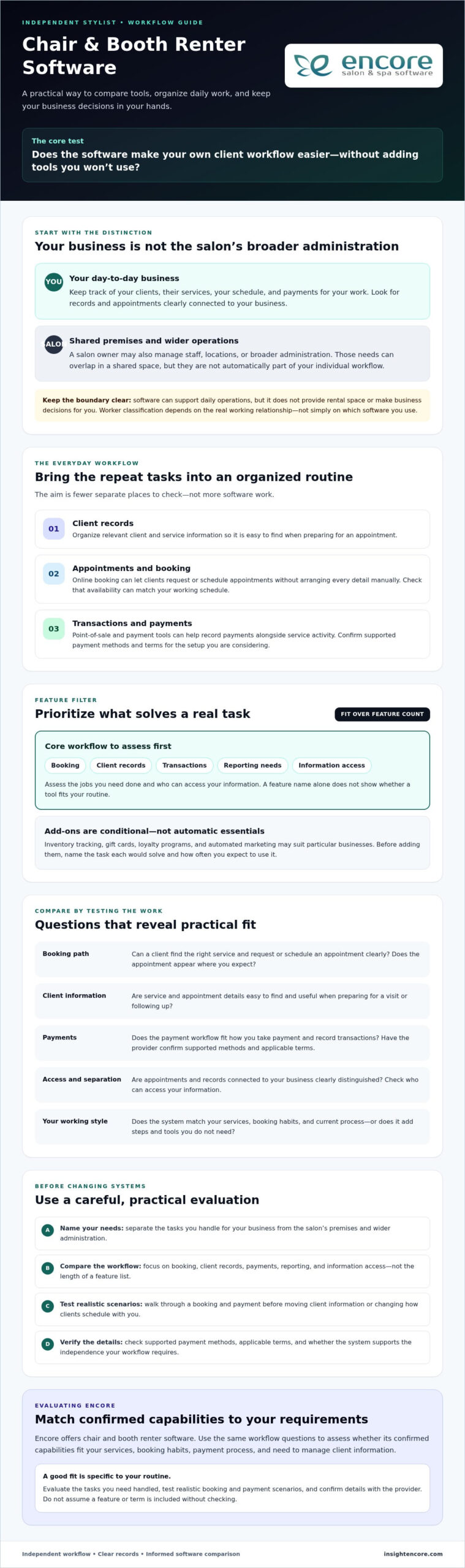

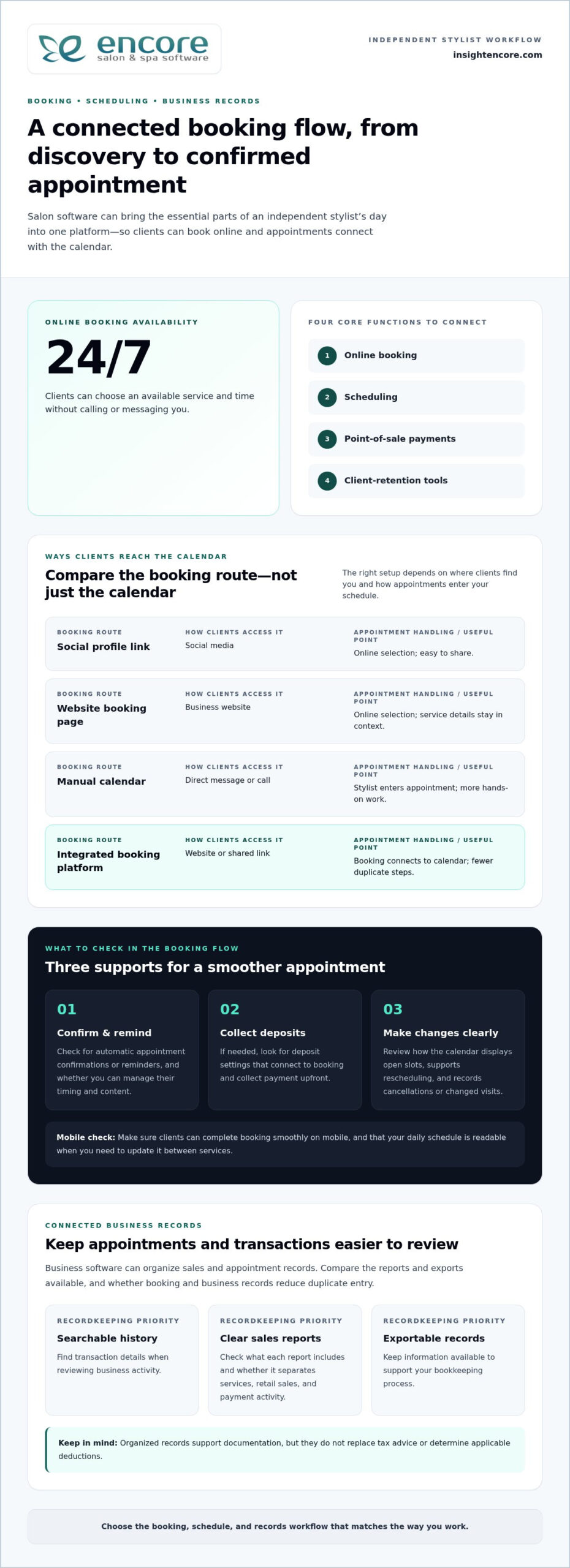
A booking calendar alone won’t cover the day-to-day needs of an independent stylist. Software for independent hair stylists can bring appointments, client records, payments, and retention tools together, while letting clients book online around the clock. The most useful systems connect four core functions: online booking, scheduling, point-of-sale payments, and client-retention tools.
Look beyond the calendar. Managing client details, tracking products, and encouraging repeat visits can all affect how smoothly your business runs, and platforms vary in how they handle these tasks. The right fit depends on which parts of your work you want to manage in one place.
This guide explains what salon software does and compares key features for independent hair stylists, including scheduling, client management, payments, inventory, loyalty programs, and gift cards. You’ll learn how each can support your daily workflow, what to weigh when comparing options, and how to choose a setup that suits the way you work.
Key Takeaways
- Compare booking tools by how they handle online appointments, schedule changes, and the flow of your workday.
- Choose client profiles that make it easy to keep useful service notes and personalize future visits.
- Look at how payment options fit your setup, including whether you need to take payments away from a fixed counter.
- Check whether inventory tracking, loyalty programs, and gift cards support the way you manage products and encourage repeat visits.
- Use the comparison criteria to prioritize the features you’ll actually use, then match them to a salon software option built for your business type.
What is salon software and what does it do?
Salon software brings booking, appointment management, payments, and client tools into one platform. For an independent stylist, it can reduce manual admin and make the booking process clearer, from the first click to a confirmed appointment.
Compare booking platforms by how clients find openings, make changes, and receive appointment information. Choose a system that supports your actual workflow, not simply one with the longest feature list.
Online Booking and Social Media Links
Online booking lets clients choose an available service and time without calling or messaging you. A shareable booking link can sit in a social media profile or post, connecting discovery directly to your calendar. Small salon software should support booking 24 hours a day, seven days a week.
Which salon software supports online booking, reminders, and deposits? Look for a platform with online booking, automatic appointment confirmations or reminders, and a way to take deposits during booking if you need them. Each supports a different step: reserving a slot, reminding clients, and collecting payment upfront. Check that clients can complete the booking smoothly on mobile.
| Booking option | How clients access it | Appointment handling | Useful comparison point |
|---|---|---|---|
| Social profile link | Social media | Online selection | Easy to share |
| Website booking page | Business website | Online selection | Service details in context |
| Manual calendar | Direct message or call | Stylist enters appointment | More hands-on work |
| Integrated booking platform | Website or shared link | Booking connects to calendar | Fewer duplicate steps |
Choose a system based on where clients discover you and whether new bookings update your calendar automatically.
Appointment Management and Reminders
Appointment management helps you view upcoming services, adjust availability, and handle rescheduling in one calendar. Compare how clearly a platform shows open slots and how quickly you can change an appointment when plans shift. A readable daily view on mobile makes schedule updates easier between services.
Appointment confirmations and reminders give clients key details before their visit. Check whether the platform sends them automatically and lets you manage their timing and content. A message can include the booked service and time, so clients can find the essentials without searching old conversations. Also consider how the system records cancellations and rescheduled visits.
Tax and Recordkeeping Features
Business software can organize sales and appointment records, helping you review income and keep information together. Which tax and recordkeeping features should hairstylists look for? Prioritize searchable transaction histories, clear sales reports, and records you can export for bookkeeping. These tools organize documentation, but they don’t replace tax advice or determine applicable deductions.
Compare what each report includes and how easily you can separate services, retail sales, and payment activity. Consistent records make it easier to reconcile appointments with transactions and prepare information for your bookkeeping process. Connected booking and business records can reduce duplicate entry. For example, salon software features can bring operational details into a more connected workflow.
Client profiles and customer relationship management
A client profile connects appointment history with details that help you prepare for each visit. Compare systems by how easily they organize service notes, preferences, consultation information, reminders, and follow-up marketing.
For example, a profile could record a client’s preferred style, past colour service, and notes for the next visit. Organized client management gives you a practical reference before an appointment, without searching through separate messages.
Client Profiles and Reminders
Client profiles store useful details alongside appointment history, while reminders prompt clients about upcoming visits. Compare how quickly you can find a record, update a note, and see the next booking. Marketing tools can also help you share relevant offers or service updates with existing clients, rather than relying only on marketplace listings to attract new people.
Keep records focused on details that support service and communication. For example, a stylist might note a client’s preferred appointment time and the products used during a previous visit. Before switching platforms, consider how existing profiles and notes will move, and which details you need to retain for upcoming appointments.
Consultation Forms, Deposits, and Policies
Consultation forms collect service information before an appointment, while deposits and written policies clarify booking expectations. These tools differ from profile notes: they focus on preparation and agreement, not ongoing client history. For a colour appointment, a form could gather the client’s goals and relevant service background.
Compare whether clients can complete forms before arriving and whether deposit settings connect to booking. Keep cancellation terms clear and visible during the booking process. In the US, state or local rules may affect deposits, cancellations, and client data. Set your policies with the requirements that apply where your salon operates in mind.
Marketplace listings can help clients discover a stylist while browsing services. A standalone profile or booking page, by contrast, can direct people who already know your name to your own booking process. Compare discovery tools by how clearly they show your services, pricing, availability, and booking steps. Consider whether a listing supports the way you want to attract clients, rather than assuming it will replace your own marketing.
Client management also shapes daily operations. Use a simple review process: check the client’s profile before the visit, add useful service notes afterward, then review upcoming appointments and follow-up needs. This creates a consistent record without turning every interaction into administrative work. For a closer look at the capabilities that connect salon records and client workflows, explore salon management features.
Payments and mobile point-of-sale options
A point-of-sale system records a service sale and processes the client’s payment at checkout. Compare in-person and mobile workflows, plan terms, transaction fees, and how the platform handles sensitive information.
For privacy and payment security, compare access permissions, how card details are handled, and which transaction records staff can view. Avoid storing payment details in informal places, such as appointment notes or message threads.
POS and Payment Processing
A POS connects a service sale to payment processing, so you can record the transaction when the appointment ends. A mobile option may suit a stylist working from a rented chair or moving between stations, while a fixed checkout may suit a dedicated salon space. Compare the steps for charging a client, recording the service, and providing a receipt.
Consider whether checkout can include both a service and a retail product, such as a haircut and shampoo. An integrated workflow keeps both items together in one transaction. Separate tools may require you to record the service and product sale in different places, adding manual work.
Plans and Processing Fees
Software plans and processing fees are separate costs to compare. A plan may charge for platform access or features, while payment processing fees apply to transactions. Review the full fee schedule, including how it handles in-person and online payments, refunds, and other transaction types. Don’t assume a lower plan price means lower overall payment costs.
When comparing software for independent hair stylists, match the features in each plan to your actual checkout routine. A stylist who takes payment after appointments may need a different setup from one who accepts deposits online. Consider how transaction volume, payment methods, and plan features affect your total operating costs, rather than relying on a headline rate alone.
Privacy and Payment Security
Security comparisons should cover who can access client and payment records, how staff sign in, and how transactions are documented. For example, a solo stylist may need one account, while a shared salon workflow may require separate staff permissions. Clear access controls help limit unnecessary exposure of client information.
Review how the platform handles card details and payment records, along with its privacy information. Keep client notes focused on service needs, not payment credentials. A booking record should help you prepare for an appointment, while checkout handles the transaction through the payment system.
Before switching, map the client’s path from service selection to receipt and note every manual step. A client who finds your salon through Google, books online, and pays in person may need a different workflow from someone who books and pays remotely. Check whether transaction records support your bookkeeping process and whether checkout works on the mobile device you use during appointments.
Appointment scheduling and calendar management
A salon calendar organizes appointments, stylist availability, service durations, and schedule changes. Compare how each platform handles a solo stylist’s day and whether its tools can also support shared salon operations.
Start with the services you offer. A haircut and a colour appointment need different time blocks, so set each service’s duration and availability separately. Check that the calendar displays those details clearly before you confirm a booking. A useful view helps you spot gaps, overlaps, and appointments that need preparation.
Calendar controls can shape the pace of your day. For example, add a buffer after a colour service for cleanup, then check how that gap appears between appointments. Look for clear daily and weekly views, simple edits, and a way to block personal time. The less you need to rewrite manually, the easier it is to keep your schedule accurate.
Managing no-shows and cancellations starts with clear appointment statuses. Compare whether you can mark a client as confirmed, cancelled, or rescheduled and see the change in your calendar. When a client cancels a morning appointment, for example, the open slot should be easy to identify. Tracking changes helps you understand where schedule gaps occur.
Policies matter, too. Explain your cancellation terms in plain language, then make them visible during booking or in appointment communications. A calendar can record whether a change was made, but your policy tells clients what to expect. Review how the system handles late changes, cancellations, and rebooking before relying on it for daily scheduling.
Team scheduling adds another layer. A solo stylist may need only one availability calendar, while a salon with several stylists needs a clear way to distinguish staff schedules. Compare how each system assigns appointments, displays individual availability, and handles changes. If a client requests a particular stylist, the booking view should make that choice easy to track.
Salon management tools can connect the appointment calendar with client records and service details. This helps you prepare for returning clients without searching separate systems. Reviewing the upcoming service alongside the appointment, for example, can help you plan your day. Check that calendar information is easy to access on mobile between services.
Use this practical comparison checklist:
- Match service durations to the time blocks shown in the calendar.
- Check how you block breaks, personal time, and cleanup periods.
- Review how cancellations, rescheduling, and open slots appear.
- Compare solo scheduling with staff calendars for shared salons.
- Test whether appointment details are readable on mobile.
Choose a calendar that handles your real appointment flow, from service selection through schedule changes, without adding unnecessary tracking work.
Inventory, loyalty programs, and gift cards
Inventory, loyalty programs, and gift cards can connect product sales with client retention. Compare whether salon software integrates these tasks with appointments and checkout or leaves you to track them separately.
Inventory tools help you record products used during services and items sold to clients. For example, track colour supplies separately from retail shampoo and conditioner. Compare how easily you can add products, update stock after sales, and review what remains. If you regularly recommend beauty products, clear stock records can help you spot items to replenish before a client asks to buy them.
Choose inventory features based on how you use products. A stylist who sells a small selection may need simple product records and sales tracking. Someone managing a wider retail range may value searchable product lists and stock reports. Check whether the system connects product sales to checkout. That connection can reduce duplicate entry and show which products are selling.
Loyalty programs can give clients a reason to return, but the rules should be easy to explain. Compare how a platform records rewards, applies them to eligible purchases, and shows clients their progress. A stylist might reward repeat visits or retail purchases. State the terms clearly, including which services or products qualify, so clients know how the program works before expecting a reward.
Gift cards let clients pay for a future service or give someone else a salon experience. Compare how a system records gift card sales, tracks remaining value, and applies redemption at checkout. A connected process makes it easier to see both the original sale and later use. Keep gift cards distinct from booking deposits: a gift card stores value for future purchases, while a deposit is tied to an appointment.
Before choosing, map how each task fits your existing routine. Consider whether product sales update inventory, loyalty rewards appear at checkout, and gift card redemptions show in transaction records. An integrated workflow can reduce repeated data entry, while separate tools may require you to reconcile records manually. Select features that support the products and retention approach you actually use.
- List the products you use and sell, then compare inventory tracking against that list.
- Review loyalty rules for clarity and ease of redemption.
- Trace a gift card from sale through later checkout.
- Check whether inventory and retention records connect with sales activity.
These comparisons help show whether inventory, rewards, and gift cards support your daily work or add administration. For a stylist selling retail products, a good fit keeps stock records and sales easy to follow. For a service-focused business, loyalty and gift card workflows may matter more.
Encore Salon & Spa Software: Encore Salon Software
Encore Salon & Spa Software offers Encore Salon Software for independent stylists who want core salon operations in one platform. It brings appointment booking, client management, inventory tracking, and point-of-sale transactions together, connecting the client visit with the business tasks around it.
Choose a salon solution when you want those workflows organized in one place. Encore Spa Software, Chair/Booth Renter Software, and Tattoo Studio Software are designed for other business setups. Comparing your daily needs with these options can help you find a closer fit without adding tools you won’t use.
Contact Encore Salon & Spa Software to discuss your salon software needs.
Choose a Setup That Fits Your Next Stage
The right software for independent hair stylists should match how you want to run your business, not add complexity to your day. Before choosing, decide which workflow you want to improve first and which features you’ll use regularly. This gives you a practical starting point for comparing platforms and deciding whether an integrated system suits your plans.
Encore Salon & Spa Software offers Encore Salon Software for salon operations, Encore Spa Software for spa businesses, and Chair/Booth Renter Software for independent professionals renting a chair or booth. Consider which setup aligns with your working arrangement and business needs, then explore how it could support your next steps.
A more organized way of working starts with a choice that suits you. Take the next step when you’re ready and build a workflow that supports the business you want to grow.
Frequently Asked Questions
How can I switch from my current booking solution?
Plan the move around your existing appointments so clients know where to book. List upcoming bookings, services, working hours, and client details you need to retain. Set up the new calendar and service options, then compare its schedule with your current one before sharing the new booking link. Choose a clear changeover date and update your website, social profiles, and appointment messages together.
How do I get started?
Start by writing down the tasks you want one system to handle, such as appointment administration, client records, or product sales. Then compare the relevant workflows using a real example from your business. Encore Salon & Spa Software offers a 30-day free trial, no credit card required, no obligation, with live support available. Use that period to explore the platform with your services and daily routines in mind.
What features should independent hairstylists look for in salon software?
Choose features based on the work you handle repeatedly, rather than selecting the longest feature list. A solo stylist might prioritize an easy-to-manage calendar, clear client histories, and checkout suited to their services. Retail sellers may also value stock tracking, while stylists focused on repeat visits may prefer loyalty or gift card tools. Consider whether the system brings these tasks together in a manageable workflow.
What is the best booking and scheduling software for independent hair stylists?
The best option is the one that fits your services, working pattern, and clients’ booking habits. A stylist working from a home studio, for example, may need a straightforward calendar and a booking page clients can use without calling. Someone sharing a salon may need separate availability for each stylist. Compare how platforms handle service durations, schedule edits, and mobile access before deciding.
How much does salon software cost for solo hairstylists in the US?
Salon software pricing depends on the platform, included features, business setup, and payment processing arrangements. Compare the subscription structure with any transaction costs or optional tools, then consider which features support your actual workflow. For Encore Salon & Spa Software, pricing depends on the case and is provided after a quote request. The relevant cost factors include the selected software setup and the number of employees or locations.
What software helps independent stylists manage client records and color formulas?
Look for salon software with client management that keeps each client’s service history and useful preferences organized. For colour work, record formulas consistently, including the date, service, product details, and any adjustments made. Keep notes attached to the correct client profile and review them before the next visit. A clear structure makes records easier to use than scattered messages or paper notes.
What are the best alternatives to salon software for stylists renting a booth or working from home?
A basic calendar and separate client records can work for a stylist with a simple schedule and few administrative needs. As appointments, payments, and client details become harder to track across separate tools, a salon platform can bring those workflows together. Booth renters may also prefer software designed for independent work. Compare the effort of maintaining separate records with the convenience of connected booking and management.
How can an independent hairstylist set up booking software and migrate client data?
Set up services, appointment lengths, availability, and booking rules before inviting clients to use the new system. Review your existing client list and remove duplicate or outdated entries. If your current system offers an export, organize the file and map each field to the matching profile information. Add upcoming appointments, test a sample booking, and share the new link once the calendar is ready.
Disclaimer
This article is general in nature and may contain errors, please verify all claims with your sales rep