

A busy Saturday can make a stock problem hard to spot: a popular styling product sells out at the front desk while supplies used for services run low in the back. If counts are easy to forget and product use isn’t recorded consistently, barbershop inventory control can feel like one more task competing for your attention.
You don’t need a complicated system to get a clearer picture. A repeatable process helps you track what’s on hand, distinguish retail sales from service use, and make reorders with more confidence. The key is connecting product movement to a routine your team can maintain.
This guide covers how to organize retail products and service supplies, set a manageable counting and replenishment schedule, and use stock records to spot patterns. You’ll also learn when inventory-tracking software can bring stock records closer to the rest of your shop workflow, including point-of-sale transactions. The goal is practical control, not perfect paperwork.
Key Takeaways
- Separate retail products from supplies used during services to see where stock is going.
- Build a repeatable barbershop inventory control workflow, from recording incoming stock to reviewing counts.
- Choose paper, spreadsheets, or software based on who needs access and how your stock activity is changing.
- Set replenishment points using your own usage records, delivery timing, and each product’s importance.
- Consider inventory alongside point-of-sale activity to bring stock records closer to your shop’s daily workflow.
What barbershop inventory control means, and why informal stock checks fall short
Barbershop inventory control is the routine of recording, checking, and replenishing the retail products and service supplies a shop keeps on hand. It means keeping records aligned with physical stock and deciding what needs attention. For a foundational explanation of the term, see Inventory control.
A glance at a shelf can help, but informal checks leave room for errors. Staff may count a partly used package differently, or a retail sale may never make it into the stock record. That can lead to unexplained count differences, urgent restocking, and uncertainty about whether a product was sold, used during a service, or recorded incorrectly.
The aim isn’t to count every item constantly. It’s to create enough visibility to make sensible replenishment decisions without turning stock checks into a daily burden. Start by deciding what belongs in your inventory system and how your team will record it.
Which products belong in a barbershop inventory system?
Track retail items sold to clients separately from supplies consumed while providing services. Retail stock might include shampoo, conditioner, styling products, or beard-care products. Service-use supplies can include shaving products, disinfectant, gloves, and other grooming or sanitation essentials. Separating the categories shows what generates retail sales and what supports the services you provide.
Prioritize items according to client demand, their role in delivering services, and how difficult they are to replace. Use the same product name and unit every time. For example, track individual bottles consistently rather than switching between bottles and cases. Uniform records make counts easier to compare.
What does good inventory control help an owner see?
Good records distinguish the physical count from recent stock activity. A shelf count shows what’s on hand now; sales and usage records help explain what has moved since the last count. Together, they give you a clearer picture than either view alone.
If the recorded quantity and physical count don’t match, review the process rather than treating the difference as proof of theft or assigning blame. Check whether a delivery, sale, service use, damaged item, or unit conversion was recorded inconsistently. Over time, these reviews can show which products need closer attention, which are moving steadily, and where replenishment or product-range decisions may need adjusting.
Barbershop Inventory Control: Receiving to Replenishment
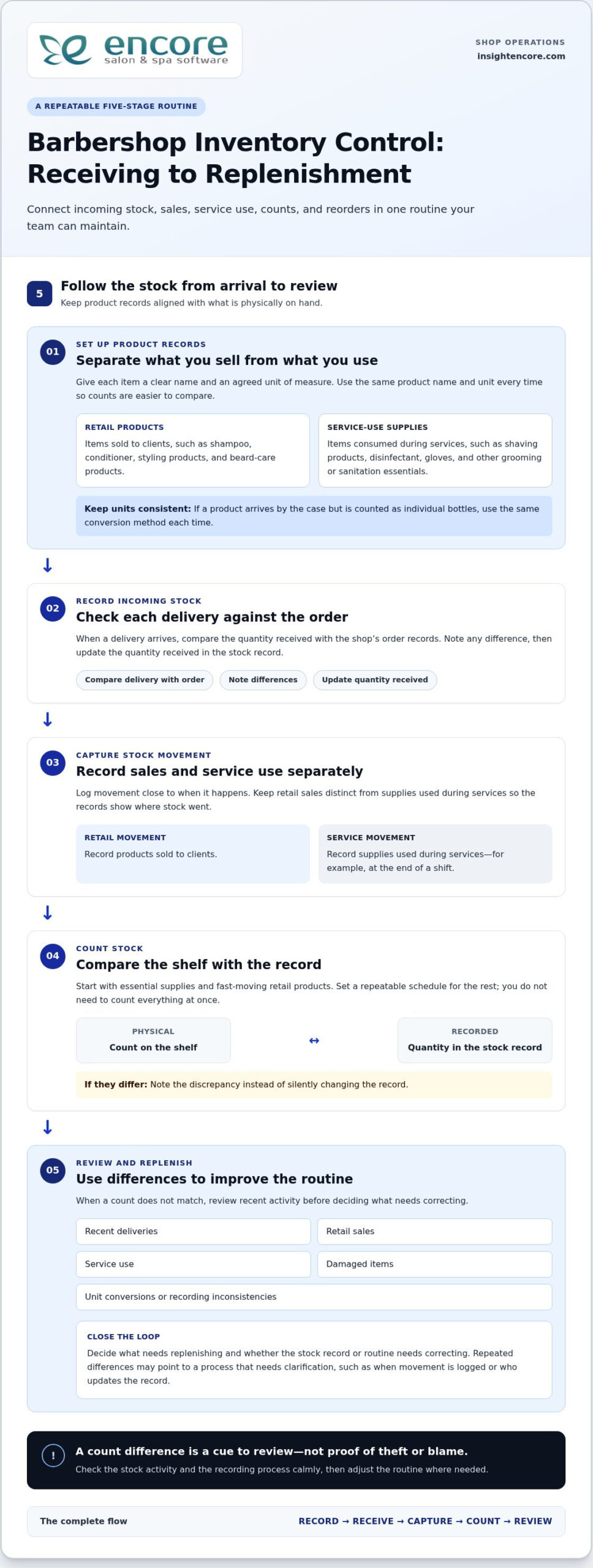
A reliable stock routine connects what comes into the shop with what gets sold, used, counted, and reordered. Keep the process simple enough to follow during a busy week. The five steps are: set up product records, record incoming stock, capture movement, count, and review.
Set up consistent product records and receiving habits
Give each item a clear name and an agreed unit of measure. If a product arrives in a case but is sold as individual bottles, decide how to record that conversion and use the same method every time. Otherwise, one person may enter a case while another counts bottles, making the record hard to compare with the shelf.
When a delivery arrives, compare the quantity with the shop’s order records, note any difference, and update the quantity received. Record stock movement close to when it happens. Keep retail sales separate from supplies used during services, using a routine your team can follow, such as noting service-use supplies at the end of a shift. The Retail inventory management guide also explores how sales patterns can inform retail stock decisions.
Count stock and turn discrepancies into useful information
You don’t need to count everything at once. Start with essential supplies and fast-moving retail products, then set a repeatable schedule for the rest. During each count, compare the physical quantity on the shelf with the recorded quantity. Note differences instead of silently changing the record, so you can review what may have caused them.
If quantities don’t match, check recent deliveries, sales, service use, damaged items, and unit conversions. A single discrepancy may be a recording slip. Repeated differences can point to a process that needs clarification, such as when movement is logged or who updates the record. Review the issue calmly and adjust the routine rather than jumping to conclusions about the cause.
Finish each review by deciding what needs replenishing and whether the record or routine needs correcting. Over time, this gives you a more dependable basis for reorders. Encore’s management software features include inventory tracking and point-of-sale transactions, bringing these tools into a broader shop-management workflow.
Spreadsheet, manual counts, or software: which barbershop inventory method fits?
The right method is the one your team can maintain accurately. A paper list may suit a small, stable assortment, while a spreadsheet makes records easier to sort and share. Software can suit a shop that wants inventory records alongside point-of-sale activity and other operations. Whatever the tool, staff still need to record stock movement consistently.
| Method | Setup effort | Shared visibility | Record consistency | As activity grows |
|---|---|---|---|---|
| Paper list | Low | Limited to whoever can access the list | Depends on one person keeping it current | Can become harder to maintain as products or users increase |
| Spreadsheet | Moderate | Can be shared, depending on how it’s stored | Requires clear entry rules and version control | Useful for organizing more detail, but updates can become scattered |
| Inventory-tracking software | Requires setup of product records and routines | Can support a shared shop workflow | Provides a consistent place to record stock, when staff use it | May be a better fit as product movement and operational needs increase |
When can a manual list or spreadsheet be enough?
A paper list can work when the assortment is small, stock movement is straightforward, and one accountable person updates counts and notes changes. A spreadsheet gives you more room to sort items and review entries, but multiple editors need to use a shared file and follow clear version rules. The right level of detail depends on your products and routines, not on a universal item-count threshold.
Either approach can become difficult to manage when entries are missed, staff keep separate copies, or no one knows which record is current. Before changing tools, clarify who records sales, service use, deliveries, and corrections. Reliable barbershop inventory control depends on that routine, whatever method you choose.
When does inventory-tracking software become more useful?
Software is worth considering when staff need a shared record or when you want to view stock information alongside other shop activity. Encore’s management platform includes inventory tracking and point-of-sale transactions, so shops can manage these tasks as part of a broader workflow. Explore the software features to see how the inventory tools fit into shop operations.
Software still depends on accurate entries. If a retail sale or service-use item isn’t recorded, the system can’t show that movement reliably. For more on approaches such as prioritizing items by importance, Forbes covers several inventory management techniques that can help inform your process.
How to set stock levels, count consistently, and prevent avoidable gaps
A useful stock level reflects how your shop uses a product, not a universal quantity. Set a replenishment point by considering recorded retail sales or service use, how long replenishment usually takes based on your supplier experience, and how important the item is to daily operations. A core sanitation supply may deserve closer attention than a slow-moving retail item.
Choose practical reorder points for products your shop depends on
Use stock records to understand how quickly each product moves. When the remaining quantity may not cover expected use during the usual replenishment time, plan to reorder. Set levels based on your shop’s experience, then revisit them when demand changes, a service routine shifts, or supply timing changes. Keep the reasoning with the record so the next review is easier.
Not every product needs the same attention. Prioritize items that support essential services or sell regularly, then assess less critical products according to their movement and role in your assortment. This makes barbershop inventory control more practical: protect availability where it matters without tying up attention in arbitrary stock targets.
Make cycle counts and stock reviews manageable
Instead of waiting to count everything at once, assign a small, defined group of products to each count session. Give someone clear responsibility for checking physical quantities and recording adjustments. Compare the count with the record, note unresolved differences, and look for likely process causes before changing the number. Use a regular management check-in to review those notes.
Use the same review to look at slow-moving products. Check whether they still meet a client need, fit the shop’s services, or merit shelf space before automatically reordering. A product that moves slowly may call for a smaller order, a change to the assortment, or another review period. Let your shop’s records guide the decision.
Inventory decisions are part of the wider work of running a shop. For a broader view of how management tools can support barber-shop operations, explore barbershop management software.
Bring barbershop inventory control into a connected management workflow
A dependable process doesn’t need to be complicated. Categorize retail products and service supplies, record stock movement, count on a repeatable schedule, review differences and product activity, then adjust records and replenishment decisions. These steps create a useful foundation, whether you track stock on paper or use software.
As you assess your process, consider how inventory records relate to point-of-sale activity. Reviewing stock information alongside sales can help you interpret what’s moving, but the records still depend on accurate entries. A connected platform brings these parts of shop operations into a broader workflow while keeping the need for consistent staff record-keeping clear.
What to look for in software for barbershop inventory control
Start with the everyday tasks your system needs to support. Can your team keep clear records for retail items and supplies used during services? Can staff follow a process for recording sales, use, deliveries, counts, and adjustments? Consider how inventory fits with point-of-sale operations and whether the workflow makes sense to the people who will use it. A long feature list matters less if the routine is difficult to follow.
Evaluate software against your actual stock-control process. Decide who updates records, how often you count, and what information you need before replenishing. Then consider whether a shared management platform could reduce reliance on disconnected records while keeping responsibilities clear.
Take the next step with Encore
Encore Salon & Spa Software is designed for barbershops and includes inventory tracking and point-of-sale transactions within its management platform. It gives shop owners an option for bringing stock records into a wider operational workflow. Explore Encore software for barbershops as you plan how to organize inventory alongside other shop needs.
Keep the process practical: define your categories, assign record-keeping responsibilities, and review stock regularly. Then choose tools that fit the routine you’ve built. For broader operational planning, explore Encore’s barber-shop software information as part of your next steps.
Build a Stock Routine You Can Rely On
Steady barbershop inventory control starts with a clear routine: separate retail products from service supplies, record stock movement consistently, and count and review products on a manageable schedule. Use your own sales, service-use, and delivery records to guide replenishment decisions instead of relying on guesswork or one-size-fits-all stock levels.
The right tracking method should fit how your shop operates. A paper list or spreadsheet may be enough for a simple setup, while software can bring inventory records closer to point-of-sale activity. Whichever approach you choose, consistent staff habits keep the information useful.
Encore offers specialized software for barbershops, including inventory tracking and point-of-sale transactions within its management platform. Encore has focused on vertical-market software for beauty and wellness businesses since 1991, giving barbershops an option for connecting stock tracking with broader shop operations.
Start with a routine your team can maintain, then build on it as your needs change. Clearer records can help you make stock decisions with greater confidence.
Frequently Asked Questions
What is barbershop inventory control?
Barbershop inventory control is the routine of recording what stock the shop has, tracking products sold or used, checking physical quantities, and deciding when to replenish. It helps you distinguish retail products from supplies consumed during services, so you can see what’s available and what’s moving. Start with clear product names, consistent units, and a process your team can follow. Consistency matters more than complexity.
How often should a barbershop count inventory?
There’s no single counting schedule that suits every barbershop. Count essential supplies and fast-moving products more regularly, then set a manageable routine for the rest. Consider how quickly items move, how many people handle stock, and whether your records match physical counts. If sales patterns or shop routines change, review the schedule and adjust it. A consistent cadence is more useful than an ambitious plan that’s often missed.
What inventory should a barbershop track?
Track products sold directly to clients separately from supplies used during services. Retail items might include styling or beard-care products, while service supplies can include grooming and sanitation products. Begin with items that are essential, frequently used, or commonly requested, then add others as your routine becomes manageable. Use consistent names and units, such as individual bottles rather than switching between bottles and cases.
Can a spreadsheet work for barbershop inventory control?
Yes. A spreadsheet can work well if your assortment is limited, stock movement is straightforward, and one person is responsible for keeping records current. If several staff members update it, use one shared version and agree on how to record sales, service use, deliveries, and corrections. Conflicting copies or missed entries can make the record unreliable. If you want inventory considered alongside point-of-sale activity, software can offer a more connected workflow.
How do you calculate when to reorder barbershop products?
Use your own records to understand how quickly a product sells or gets used, then consider how long replenishment usually takes for your shop. Choose a practical point at which you’ll review stock and place an order if needed. Give essential items closer attention than products that are easy to replace or move slowly. Compare reorder decisions with later counts and adjust them as demand or supply timing changes.
Does barbershop software help with inventory control?
Inventory software can provide a structured place to record products and review stock information. Encore’s management platform includes inventory tracking and point-of-sale transactions, which helps owners consider stock alongside sales activity. Software supports the process, but it doesn’t replace clear product records or consistent staff habits. Decide who records movement and how counts are reviewed so the information remains useful in day-to-day decisions.
What is the difference between retail inventory and back-bar inventory?
Retail inventory is made up of products the shop sells directly to clients. Back-bar inventory refers to products used while providing services, such as grooming or sanitation supplies. Keeping the categories separate helps you understand which items contribute to retail sales and which support service delivery. Record each category consistently, including clear product names and counting units, so you can review movement and replenishment needs for each group.
Disclaimer
This article is general in nature and may contain errors, please verify all claims with your sales rep