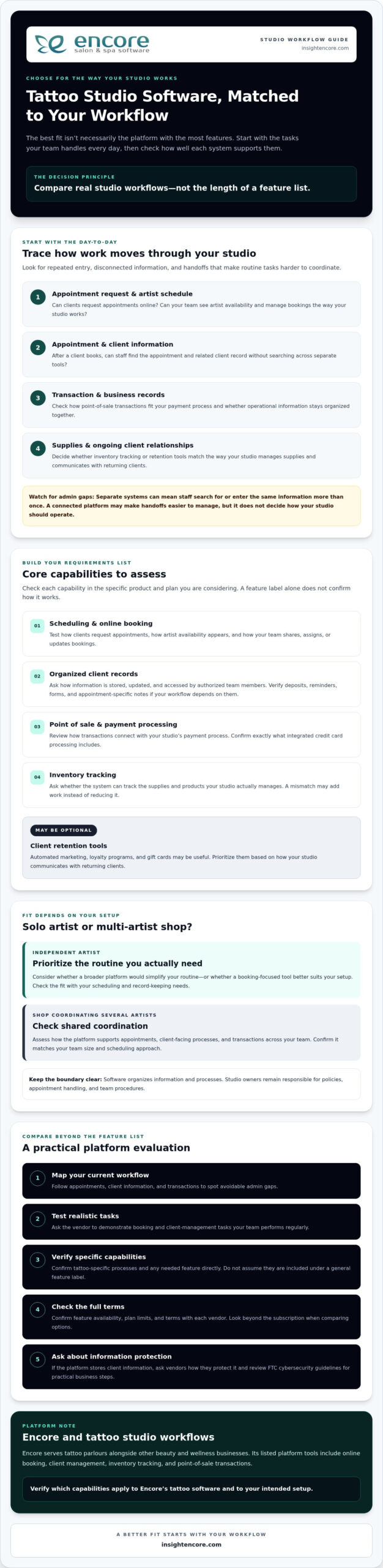
For tattoo artists, the best self-booking option is the one that fits the full appointment journey, from an initial consultation to the tattoo session itself. A useful setup for client self-booking for tattoo artists should make it easy to collect project details, set booking rules, and manage payments without treating every appointment as the same kind of slot.
A clean calendar and simple booking link can be appealing, but tattoo bookings often involve more than choosing a time. Clients may need to share a design idea, discuss the work, and understand what’s required before a session is confirmed. The right tool makes those steps clearer for both you and your clients.
This comparison considers tattoo-focused platforms and general scheduling apps, including their tools for intake forms, reference uploads, deposits and payment processing, booking rules, consultations, and longer sessions. See what each option suits, where a basic calendar may fall short, and how to choose a setup that supports your workflow without unnecessary complexity.
Key Takeaways
- Choose a booking app based on the full tattoo appointment flow, not just how easily it fills calendar slots.
- Use intake forms and reference uploads to gather project details before you discuss or schedule a session.
- Set clear deposit and cancellation rules so clients understand what happens when plans change.
- Compare tattoo-focused tools with general schedulers by looking at booking controls, consultations, and longer sessions.
- Explore Tattoo Studio Software when you want booking and studio management tools designed for tattoo businesses.
Client intake forms, consent waivers, and reference uploads
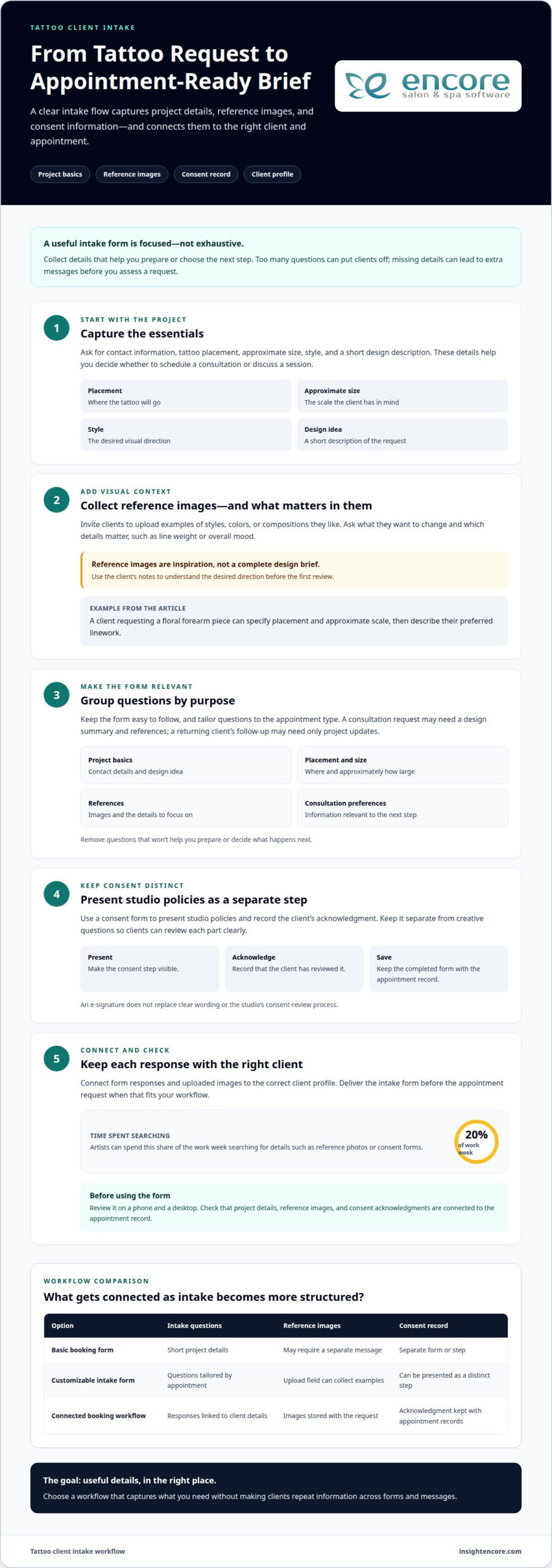
A focused intake form gathers useful project details before an appointment reaches your calendar. Ask for contact information, tattoo placement, approximate size, style, and a short design description. For example, a client requesting a floral forearm piece can specify the placement and approximate scale, then describe their preferred linework. These answers help you decide whether to schedule a consultation or discuss a session.
Reference images provide visual context that short descriptions can miss. Invite clients to upload examples of styles, colors, or compositions they like, and ask what they want to change. A reference is inspiration, not a complete design brief. Ask which details matter, such as line weight or overall mood, so the images are more useful during your first review.
Keep the form focused. Too many questions can put clients off, while missing details can lead to extra messages before you assess a request. Group questions into clear sections: project basics, placement and size, references, and consultation preferences. Connect each response and uploaded image to the correct client profile, and deliver the intake form before the appointment request when that fits your workflow.
Use a consent form to present studio policies and record the client’s acknowledgment. Keep it separate from creative questions so clients can review each part clearly. If you offer e-signatures, make that step visible and save the completed form with the appointment record. A digital signature does not replace clear wording or your studio’s consent-review process.
- Ask: What placement, size, style, and design idea should the artist know?
- Upload: Which reference images show the desired direction, and what should change?
- Review: Has the client read and acknowledged the studio’s consent form?
Customizable booking forms let you tailor questions to each appointment type. A consultation request may need a design summary and references; a returning client’s follow-up may need only project updates. Don’t ask every client to complete irrelevant fields. Review the form on a phone and a desktop, and remove questions that won’t help you prepare or decide the next step.
Artists can spend 20% of the work week searching for details such as reference photos or consent forms. Keeping those materials attached to the right client record makes retrieval more direct. Choose a form workflow that collects project details, stores reference images, and connects acknowledgments with the appointment.
| Option | Intake questions | Reference images | Consent record |
|---|---|---|---|
| Basic booking form | Short project details | May require a separate message | Separate form or step |
| Customizable intake form | Questions tailored by appointment | Upload field can collect examples | Can be presented as a distinct step |
| Connected booking workflow | Responses linked to client details | Images stored with the request | Acknowledgment kept with appointment records |
For tattoo studios organizing booking and client details together, tattoo studio management tools can be part of the workflow. Choose the option that captures the details you need without making clients repeat information across forms and messages.
Deposits, payment processing, and card-on-file options
A deposit connects an online booking to a clear commitment. One suggested tattoo booking deposit is $50-100, but the amount should reflect your appointment structure and stated policy. Show clients the deposit requirement before they choose a time. Explain whether it applies to the session balance, and how cancellation or rescheduling affects it. That clarity helps clients understand the terms before submitting payment.
Write the cancellation policy in plain language beside the booking step. One suggested policy gives a full deposit refund for cancellations made at least 48 hours before the appointment. For cancellations made 24-48 hours before, it retains 50% of the deposit; cancellations made less than 24 hours before forfeit it. If clients can reschedule, explain how the deposit transfers and how to request the change. Keep the same policy visible in booking confirmations.
Online payment collection can link a deposit to the appointment record, making it easier to track what’s paid and what remains. Record the appointment date, client, deposit status, and any cancellation or reschedule. For a returning client, check their existing profile before creating another. Keep payment records separate from creative notes, such as reference images, while linking both to the correct booking.
Card-on-file options can simplify later payments, but clients need to know when a saved card may be charged, what the payment covers, and how to update their payment method. Collecting contact details, tattoo preferences, and card information online creates privacy and security risks if records or payment flows are mishandled. Use a payment processor’s secure payment flow, limit access to client records, and never ask clients to send card details by email or text.
- Before booking: Display the deposit amount and cancellation terms.
- After payment: Attach the transaction status to the correct appointment.
- For repeat bookings: Review the client record and update only relevant details.
Tattoo shops without deposit requirements are reported to have no-show rates of 20-30%, while shops using automated deposits and reminders are reported to have rates below 5%. These figures make the process worth considering, but your policy still needs to match your studio’s booking needs. Choose settings that collect deposits at the right booking stage and keep each payment tied to the relevant appointment.
Before publishing the booking flow, test an appointment from selection through payment confirmation. Check that the deposit status, cancellation terms, and receipt are easy to find. Make it clear what clients should do if a payment fails, so they don’t mistake the appointment for a confirmed booking.
Comparison of tattoo-specific and general scheduling apps
Solo artists often need control over requests and calendar gaps, while tattoo shops need shared visibility and clear artist assignments. Compare scheduling setups by how they handle online booking, calendar access, and incoming requests.
Tattoo-Specific Scheduling Apps
A tattoo-specific app is designed around studio booking needs rather than generic appointment slots. Compare its intake-to-calendar flow with a general scheduler: can you separate consultation requests from session bookings and organize appointments by artist? These distinctions help keep a design discussion from taking the place of reserved tattoo time.
Artist-Controlled and Client-Selected Scheduling
With artist-controlled scheduling, you review a request before confirming its time. With client-selected scheduling, clients choose from the openings you publish. For example, offer direct selection for consultations, then review larger session requests before assigning calendar time. The first approach gives artists more control; the second reduces booking messages when an appointment type has a clear duration.
Calendar Syncing and Multi-Artist Scheduling
Calendar syncing can help keep availability consistent between a booking page and an artist’s calendar. Check which calendars the app supports, such as Google Calendar, and how it handles changes made in either place. For multiple artists, compare individual schedules, shared views, and artist assignment. A solo artist may need one calendar; a studio needs a reliable way to distinguish each artist’s availability.
Pricing and Free Plans
Free plans and paid tiers may differ in booking limits, staff access, calendar tools, and payment features. Compare plan details with your actual workflow, not just the starting price. A solo artist may need one schedule and client requests, while a shop may value separate artist calendars. List the tools you’ll use, then check whether the plan’s limits fit.
| Scheduling option | Calendar control | Useful comparison |
|---|---|---|
| Tattoo-specific app | Review artist and appointment controls | Consultation and session workflows |
| General scheduling app | Review available appointment settings | Ease of publishing open times |
| Artist-controlled booking | Artist approves requests | Control over appointment acceptance |
| Client-selected booking | Client chooses listed openings | Convenience for straightforward bookings |
| Shared studio calendar | Schedules can be viewed by artist | Team visibility and assignment |
| Free-plan option | Depends on included calendar tools | Plan limits and upgrade needs |
Choose a setup that matches your appointment types, team size, and preferred approval process.
Booking limits, buffer times, and lead times
Prevent double-booking by using one booking system as your source of truth. Route custom-work requests to an artist for review before confirming a time, then reserve the session once its scope is clear.
Booking Limits
Booking limits determine which appointment types clients can select and how far ahead they can book. For example, let clients book consultations directly, while custom tattoo sessions remain pending until you review the design, placement, and scope. This separates straightforward appointments from work that needs planning. Set limits by appointment type, and explain which requests need artist approval.
Buffer Times
A buffer is protected calendar time between appointments. Booking limits control what clients can book; buffers protect time around confirmed bookings. For example, leave time after a session for cleanup or notes and before a custom appointment for setup. Apply buffers to relevant appointment types rather than blocking the same time after every booking.
Lead time determines how soon clients can book an available slot. Set it according to the preparation each appointment requires. A consultation may need less advance planning than a custom session involving several conversations and design decisions. Keep the rule visible on the booking page so clients understand why some dates are unavailable and when an artist will review requests.
For custom work, treat an online request as the start of scheduling, not an automatic confirmation. Review the project details, agree on the appointment type, and then reserve the appropriate calendar time. Use portfolio examples a client shares to prepare for the conversation. This lets the artist assess the request before a long session occupies the schedule.
Use reminders to reduce missed appointments and make the next step clear. Tattoo appointment reminders are recommended by SMS or email 24-48 hours before a session. A separate reminder can prompt clients to respond to unresolved questions or confirm a custom-work request. Keep the message focused on the appointment time, studio details, and any preparation instructions already shared.
- Separate bookable consultations from custom-session requests.
- Protect setup and cleanup time with appointment-specific buffers.
- Review pending requests before converting them into confirmed calendar bookings.
Manual booking entry has an estimated 1-4% error rate. A single, consistently updated booking system can help members of a tattoo studio see current availability and avoid overlapping entries. Assign each appointment to the correct artist, and update the calendar whenever a booking changes. Clear limits, review steps, and reminders make the schedule easier to manage without making every tattoo request an instant confirmation.
Online self-booking for tattoo consultations and sessions
Online self-booking works best when consultations and tattoo sessions have separate paths. A consultation clarifies the design; a session reserves time for the actual work. Booking software should make that distinction clear before a client chooses an opening. Otherwise, a short discussion could take up time intended for a longer tattoo appointment.
Offer consultations as a defined appointment type, with a clear purpose and duration. Free tattoo consultations commonly last 15-30 minutes. Clients can select an available consultation slot, then provide a brief project summary beforehand. Use the meeting to discuss placement, design direction, and next steps. Afterward, decide whether the client can book a session or needs further discussion.
For tattoo sessions that need assessment, use a request-and-review flow. A client can submit preferred dates and project details while you review the scope before confirming a calendar slot. This suits custom pieces that vary in placement, size, and design complexity. Make the status clear: requested, under review, or confirmed. Each label tells clients what happens next.
Link each booking to a client profile so details stay together across appointments. For example, a returning client’s record can connect earlier project notes with a new session request. Keep the booking form focused on scheduling information; use a separate conversation for design decisions that need personal attention. This makes self-service useful without treating the booking page as a substitute for an artist’s judgment.
Before choosing booking software, map the client journey from first visit to confirmed session. Check the client view on a phone, test a consultation request, and follow a session request through review. If a free trial is available, test those exact steps with a sample booking. Look for clear confirmations, useful appointment statuses, and an easy way to adjust a request.
Compare the time spent on administration with the steps the system removes. Tattoo artists can save more than 10 hours of administrative work per week by using booking software. The practical gain depends on how much of your booking process the tool handles, including appointment requests, client records, and scheduling. Keep artist review where custom work needs it, while letting clients book suitable consultations independently.
Use this sequence to set up self-booking:
- Separate consultation slots from tattoo-session requests.
- Set the consultation purpose and duration clients see.
- Ask for preferred dates and project details before session review.
- Confirm the booking status and next step in the client profile.
Encore Salon & Spa Software: Encore Salon Software
Encore Salon & Spa Software offers Tattoo Studio Software for businesses managing tattoo appointments and client relationships. If you want online appointment scheduling connected with client records, explore this option. Encore Salon Software supports salon operations, while Tattoo Studio Software is designed for tattoo studio workflows.
Consider a booking system when separate calendars, booking requests, and client details become harder to coordinate. A clear system brings appointment management and client information into one workflow while leaving artists in control of how they review custom work.
To discuss whether Encore Salon & Spa Software fits your studio, contact the Encore team.
Build a booking flow that grows with your studio
Choosing an app is only the start. As your studio’s calendar changes, review where clients pause, which requests need artist input, and whether booking steps still fit your workflow. Adjust appointment types, form prompts, and approval steps as needed. Keep the process easy to use while making room for conversations about custom projects.
Map one client journey, from the first request to a confirmed appointment. This helps you decide what to automate and where personal guidance matters. Encore Salon & Spa Software offers Encore Salon Software, Encore Spa Software, and Chair/Booth Renter Software for different business setups, as well as Tattoo Studio Software.
A thoughtful approach to client self-booking for tattoo artists gives clients more independence while keeping artists involved in planning custom work. Choose a system that supports how your studio schedules, communicates, and serves returning clients. A clear process can adapt as your needs evolve, one booking step at a time.
Refine the experience over time to make each appointment easier to plan.
Frequently Asked Questions
What is client self-booking software for tattoo artists?
Client self-booking lets people request or book appointments online while artists manage availability and booking details. Software for client self-booking for tattoo artists can let clients select a consultation time directly or submit a session request for review. The key distinction is whether a booking is confirmed immediately or waits for artist approval. That choice determines how much control you retain over custom-work scheduling.
Which booking platforms do tattoo artists use for client self-booking?
Tattoo artists use both tattoo-focused scheduling tools and general appointment apps. A tattoo-focused option may suit studio workflows, while a general scheduler can work for straightforward appointments with set durations. Compare how each handles artist calendars, client requests, appointment types, and client records. A solo artist may need only a clear booking link; a multi-artist shop may need shared schedule visibility and artist assignments.
How much do tattoo artist booking apps cost in the United States?
Costs depend on each app’s plan structure and included features, so compare options against your actual workflow. Check whether plans charge by user, location, or feature, and whether online booking, client records, and payment processing are included or separate. Account for any payment-processing charges listed in the terms. Compare the full setup, not just the headline subscription price.
How can tattoo artists set up online booking for consultations and appointments?
To make client self-booking for tattoo artists work smoothly, separate consultation appointments from tattoo-session requests. Set which times clients can select directly and which requests need artist review. Add the appointment types to your calendar and write a confirmation message for each booking status. Test the client journey on a phone, including changing a request and receiving confirmation. This reveals confusing labels before clients use the booking page.
What information should a tattoo booking form collect from clients?
Collect enough detail to understand each request and plan the next conversation. Useful fields include contact details, preferred appointment type, tattoo placement, approximate size, design description, and preferred availability. Invite clients to attach reference images when helpful, and ask them to describe what they like in each image. Keep required questions focused so the form is quick to complete.
How do tattoo artists handle deposits, cancellations, and no-shows with online booking?
Publish deposit and cancellation terms before clients submit a booking, and connect each payment status to the appointment record. Explain how clients can cancel or reschedule and what happens to a deposit in each case. Use booking statuses to distinguish confirmed, changed, and cancelled appointments. A consistent record helps you apply the same policy and identify newly available calendar time after a cancellation.
Can clients book tattoo appointments without an artist approving the design or placement?
Yes, if the artist makes that appointment type available for direct booking. This can work for consultations or services with a clearly defined process. For custom work, a client can submit a request before the design or placement is approved; the artist can review the details before confirming session time. Label it as a request, not a confirmed appointment, whenever review is still needed.
Disclaimer
This article is general in nature and may contain errors, please verify all claims with your sales rep