window.dataLayer = window.dataLayer || []; function gtag(){dataLayer.push(arguments);} gtag('js', new Date()); gtag('config', 'UA-206511945-1');
Search
Categories
Uncategorized

Point of Sale for Booth Renters: A 2026 Buying Guide

What if checkout could do more than take a payment? The right point of sale for booth renters can connect each transaction with client records and appointment activity, helping you keep your independent business organized without adopting a salon-wide system you don’t need.

As a booth renter, you manage your own clients and daily workflow. A basic payment terminal may feel too limited, while software built around an entire salon may seem like more than you need. A practical setup should make payments straightforward and keep useful client and transaction details easy to find.

This guide covers the POS features that can support independent day-to-day operations, from integrated payment processing to client management and online booking. You’ll learn how to compare payment-only tools with connected software, what to prioritize, and which extras may add complexity without helping your routine. Encore’s specialized chair and booth renter software brings POS transactions, credit card processing, client management, and online booking together. Use the criteria below to assess what fits the way you work.

Key Takeaways

  • Start with the daily tasks your POS needs to support, including checkout and organized transaction records.
  • Choose a point of sale for booth renters that suits an independent workflow instead of adding tools designed mainly for salon-wide management.
  • Compare a payment-only setup with connected software to decide whether combining checkout, client records, and booking would simplify your routine.
  • Map your booking, checkout, client, and product workflows before comparing features, so you can focus on tools you’ll use.
  • Encore’s chair and booth renter software brings POS transactions, integrated payments, client management, and online booking together.

What Does Point of Sale for Booth Renters Need to Handle?

A point-of-sale (POS) system combines the tools and software used to record and complete purchases. For a booth renter, that can mean processing payment after a service, recording a retail sale, and keeping the transaction organized alongside client and appointment activity. A basic payment terminal records a sale; a more connected POS can help make that sale part of a broader client workflow.

POS systems can include more than checkout. The Point of Sale (POS) Systems overview explains how these systems bring together components and functions used to complete transactions. For an independent beauty professional, the practical question is how well those functions support the work around each sale, from recording the service to organizing the next visit.

How a booth renter’s checkout differs from a salon-wide POS

A salon-wide system may be organized around the owner’s view of staff, services, and the business as a whole. A booth renter needs a clear view of their own transactions and client activity. When comparing systems, look for a workflow that lets you identify what was sold and keep relevant information with your own client records. Salon arrangements differ, so focus on the way you manage your own work rather than assuming every business handles checkout the same way.

A booth renter’s POS is a checkout and recordkeeping tool for managing their own client purchases, services, products, and appointment context. This distinction helps you look beyond whether a system accepts payment. The right fit depends on whether it supports your independent workflow.

Which transactions and client interactions should POS support?

Begin by listing the transactions you handle. Your setup should make it possible to process service payments and record retail purchases clearly enough to review later. If a client buys a product during a service visit, consider whether you can record both parts of the sale together or whether you would need to track one elsewhere.

Client and appointment details can add useful context. Consider whether client information can be kept alongside service and purchase activity, and whether appointment details are easy to access during the visit. When checkout, booking, and client records work together, you may spend less time switching between separate tools.

Gift cards may also matter if they’re part of your business. Treat them as a specific checkout requirement, not a must-have for every renter. The goal is a point of sale for booth renters that keeps essential transactions and client activity organized without introducing unnecessary steps.

Which POS Features Matter Most for Booth Renters?

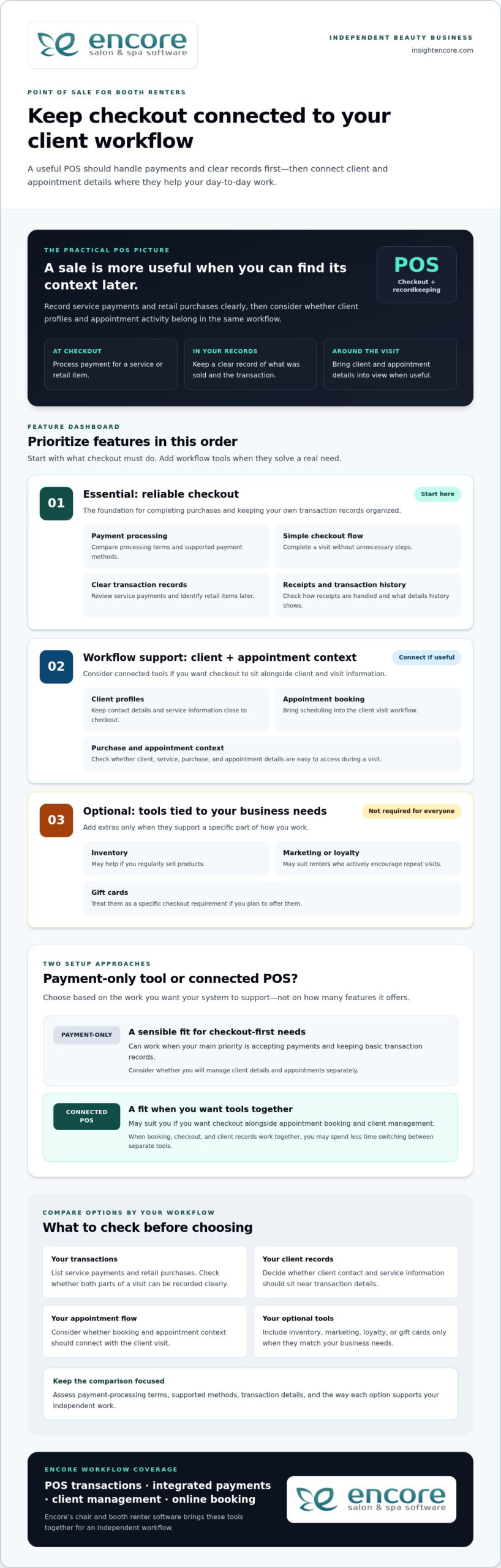
Start with the tasks that happen at checkout. A useful POS should make it straightforward to process a payment, record what the client purchased, and complete the visit without unnecessary steps. Then consider whether client management and appointment booking should connect with checkout. The best point of sale for booth renters supports daily work first; extra tools matter only when they serve a real need.

Core POS checklist: compare payment processing, clear transaction records, a simple checkout flow, client profiles, and appointment context before weighing optional business tools.

Payments, receipts, and transaction records

Payment processing and accurate records are the foundation. A service payment should be easy to enter and review later, and a retail item should be identifiable if it’s part of the same visit. Consider how receipts are handled and whether the transaction history provides the details you need to keep your business records organized.

Compare payment-processing terms, supported payment methods, and the transaction information available for review. These details vary between systems, so assess each option rather than assuming they’re the same. Also consider how integrated credit card processing fits into the checkout workflow you want.

Client management, booking, and business-building tools

Client profiles can keep contact details and service information close to checkout, while online booking can bring appointment scheduling into the client visit workflow. If you’re considering how client records fit into a solo workflow, read this guide to booth renter client management apps.

Other features depend on how you run your business. Inventory tools may be useful if you regularly sell products; automated marketing or loyalty programs may suit renters who actively encourage repeat visits. Gift cards are another option if you plan to offer them. You don’t need every feature. Prioritize tools that solve a specific workflow problem.

  • Essential: payment processing, clear transaction records, and an easy checkout flow.
  • Workflow support: client profiles and appointment booking that connect with your visit process.
  • Optional: inventory, marketing, loyalty, and gift card tools that match your business needs.

Encore’s chair and booth renter software brings POS transactions together with integrated payments, client management, and online booking. Explore Encore for your booth renter workflow as you compare the features that matter to you.

Standalone Payment Tool or Connected Booth Renter POS?

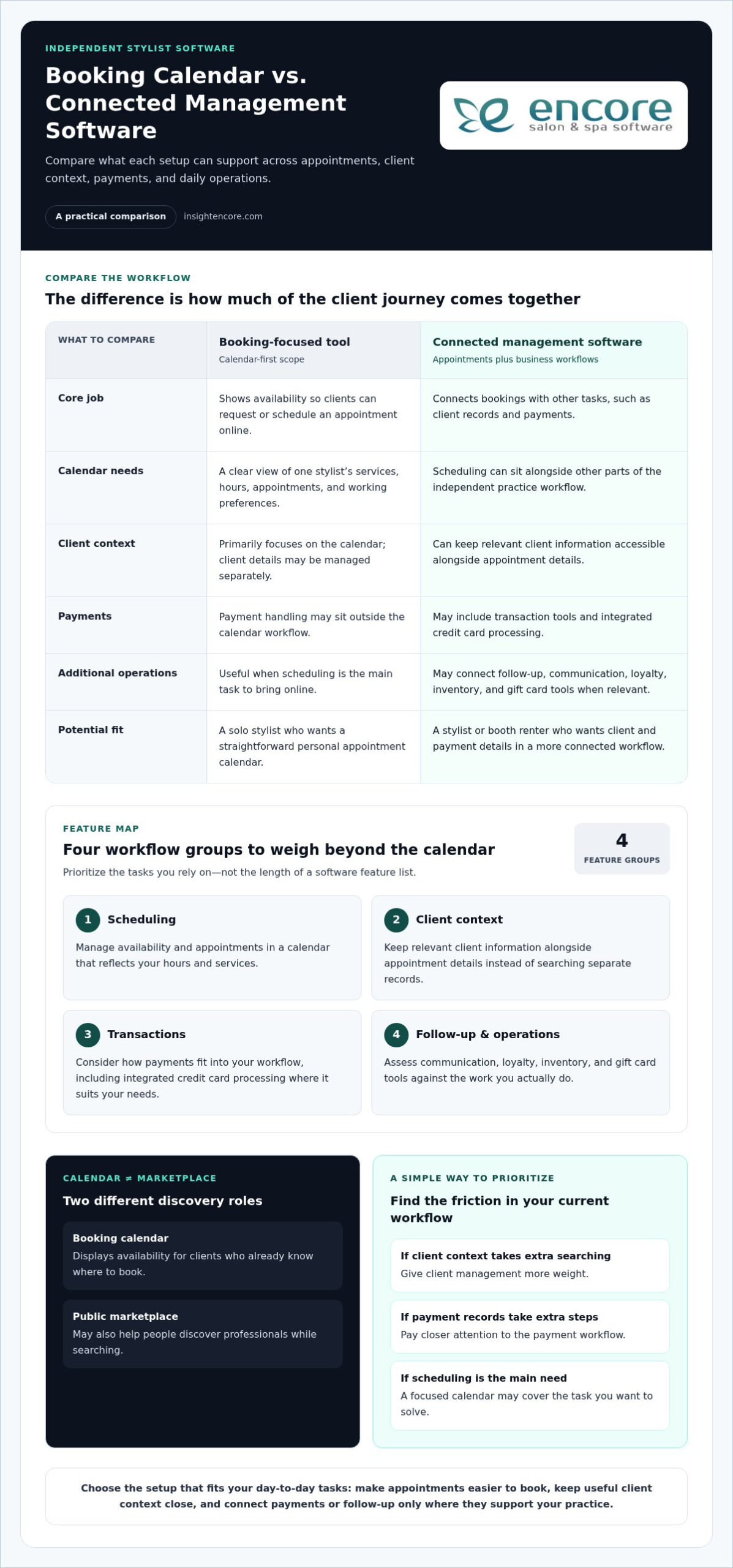
A payment-only tool can be a sensible fit if your main need is accepting payments and keeping basic transaction records. Connected software may suit you better if you want checkout alongside appointment booking and client management. Neither setup works for every renter. Compare how each handles your actual tasks, not just how many features appear on a list.

Workflow area Standalone payment tool Connected booth renter POS
Checkout Focused on processing and recording payments. Can place payment within a broader service and client workflow.
Client records May require a separate client record system. May connect checkout with client profiles.
Booking Appointments may be managed in another tool or process. May bring online booking into the same workflow as checkout.
Reporting Review the transaction information the payment tool provides. May connect transaction activity with other business information.
Business tools Typically focuses on payment needs. May include optional tools such as inventory, marketing, loyalty, or gift cards.

When a payment-only POS may be enough

If you mainly need to accept payment after each service and record the transaction, a focused tool may cover your essentials. You can keep appointments and client notes in separate systems if that arrangement works for you. The trade-off is managing information across those tools, but that doesn’t automatically make the setup unsuitable. Ask yourself how quickly you can find the details you need during a busy day.

When connected salon software may make daily work easier

Connected software can bring related tasks closer together. Booking establishes the appointment, client management helps organize client information, and POS transactions record purchases. If you regularly move between all three tasks, it may be useful to manage them within one broader workflow. Specialized booth renter software supports a setup designed around independent beauty businesses.

An all-in-one platform can feel like too much if it adds steps or tools you won’t use. Keep the comparison practical: start with payments, records, booking, and client details. Then consider extras only when they address a real need, such as tracking products you sell or offering gift cards. A point of sale for booth renters should fit your work, not require you to adopt every available feature.

Encore offers specialized chair and booth renter software with POS transactions, integrated credit card processing, client management, and online booking. Explore Encore’s booth renter software as you consider which workflow best fits your business.

Point of Sale for Booth Renters: A 2026 Buying Guide

How to Evaluate POS Options for Your Booth Rental Business

A useful comparison starts with your actual work, not a feature list. Before choosing a point of sale for booth renters, trace how a client moves from booking to checkout. Note where you currently record payments, client details, and product sales. This simple workflow map helps you identify what should connect and what can stay separate.

A practical five-step POS evaluation checklist

  1. Start with payments and records. List how clients pay, what you sell, and which transaction details you need for your records. Note any payment methods that are essential to your checkout routine.
  2. Map your current workflow. Write down how you handle booking, appointments, client notes, checkout, and product sales. Mark where information moves between tools and where you intentionally keep tasks separate.
  3. Decide what needs to connect. Identify whether you want appointments linked to client profiles, service details available at checkout, or product sales connected to inventory. Focus on links that would make your daily process clearer.
  4. Compare the must-haves first. Check that each option supports your payment and recordkeeping needs. Then assess ease of use and the transaction or business information you can review. Don’t let optional features distract from essentials.
  5. Consider future needs selectively. If you plan to sell retail products, use online booking, or offer gift cards, include those requirements in your comparison. Choose tools that suit your plans rather than judging an option by feature count alone.

Assess cost, setup, and everyday usability

Compare software charges separately from payment-processing terms. Look at what each charge covers and how processing terms fit the transactions you expect, rather than judging a system by one number. Weigh costs against the capabilities you need and the workflow you mapped.

Ease of use matters, too. Think through a typical appointment: Can you find client details, complete checkout, and keep the transaction record without awkwardly switching between tools? Consider the setup steps and whether the available information helps you manage your business day to day. A system should support your routine, not make it more complicated.

Once you’ve identified your priorities, compare them with Encore’s specialized chair and booth renter software, which includes POS transactions, integrated credit card processing, client management, and online booking.

Explore Encore and see whether it fits your booth renter workflow

How Encore Supports a Booth Renter’s POS Workflow

Once you know which tasks your POS needs to handle, look for software designed for independent booth and chair renters. Encore’s specialized chair and booth renter software brings POS transactions together with integrated credit card processing, client management, and online booking. These capabilities let you consider checkout as part of your client workflow, rather than as a separate payment step.

Bring booth renter tasks into a more connected platform

Consider a client’s visit from start to finish. Online booking supports appointment scheduling, client management helps organize client information, and POS transactions record purchases. Bringing these capabilities into a broader platform can help you think through how those tasks fit together during your day. The right fit depends on the workflow you want, not simply the number of tools available.

Encore also includes inventory tracking, automated marketing, loyalty programs, and gift cards. These capabilities may suit you if you sell retail products, want to encourage repeat visits, or plan to offer gift cards. They’re options to weigh against your needs, not a checklist every booth renter must adopt. For a broader look at the platform, visit Encore Salon & Spa Software.

Explore the next step at your own pace

Use the priorities you established to assess Encore: payment processing and transaction records, client management, and booking. Consider which capabilities you’ll rely on regularly and which optional tools match your business plans. This keeps the decision focused on a practical point of sale for booth renters, not features that add complexity without serving your routine.

Encore is part of Syntec Business Systems, founded in 1991. Compare the software’s capabilities with the workflow you mapped, then visit Encore’s booth renter software page to explore the solution.

Try Encore and explore a POS workflow for booth renters

Choose a POS That Fits the Way You Work

The best point of sale for booth renters should make daily business easier to manage, not add complexity. Begin with straightforward checkout and clear transaction records. Then decide whether connecting payments with client management and appointment booking would make your workflow more organized. Inventory tracking, marketing, loyalty programs, and gift cards matter when they support goals you already have.

Encore offers specialized chair and booth renter software with POS transactions, integrated credit card processing, client management, and online booking. As you compare options, focus on which tasks you want to handle in one place and which features you’ll use in your independent business. A practical fit can help you manage client visits and keep important activity organized.

Try Encore and explore software built for booth renters

Start with a clear picture of your workflow and the tasks you want your POS to support. Explore Encore’s chair and booth renter software to see how its connected tools fit those priorities.

Frequently Asked Questions

What is the best point of sale for booth renters?

The best point of sale for booth renters is one that matches how you handle payments, client information, and appointments. If you only need to accept and record payments, a focused payment tool may be enough. If you want checkout connected with booking and client management, consider specialized booth renter software. Encore offers a chair and booth renter solution with POS transactions, integrated credit card processing, client management, and online booking.

Do booth renters need their own POS system?

Not every booth renter needs a separate POS, but you do need a clear way to process and track the transactions you manage. Your setup could be a payment-only tool or a broader system that supports client and appointment tasks, too. Consider how you handle checkout and records now, and whether your current process gives you a clear view of your own business activity.

Can booth renters use salon software to manage payments and clients?

Yes. Salon software can help booth renters manage payments and client information, especially when it supports independent workflows as well as salon operations. Encore offers specialized chair and booth renter software with POS transactions, integrated credit card processing, and client management. Online booking is also available within the platform, bringing appointment tasks into the software workflow.

What features should a booth renter look for in POS software?

Prioritize payment processing, clear transaction records, and an easy checkout flow. Then consider whether client profiles and appointment booking should connect with checkout, so visit details are easier to manage. If you sell products or offer gift cards, inventory and gift card tools may be useful. Marketing and loyalty features are optional; include them when they serve your business goals, not simply because they’re available.

How much does point-of-sale software for booth renters cost?

Costs vary by software plan and payment-processing terms, so compare those separately rather than relying on a single headline price. Consider whether a system includes the functions you need, such as client management or booking, or whether you’d use separate tools for those tasks. Review each option’s pricing details and weigh them against your workflow. A higher feature count doesn’t automatically mean better value.

Can a booth renter use one system for appointments and payments?

Yes. Some salon software combines online booking and POS transactions, allowing you to manage appointment activity and record payments within one platform. This may suit you if you prefer to keep those tasks connected. Encore’s software includes online booking and POS transactions, alongside client management and integrated credit card processing. Whether one system is right for you depends on how you prefer to organize your daily work.

Is integrated credit card processing useful for independent stylists?

Integrated credit card processing can be useful if you want payment handling as part of a broader business-management workflow. It brings payment processing alongside POS transactions, so you can manage these tasks within the same platform. Compare processing terms and supported payment methods as part of your decision, since they can vary. Encore includes integrated credit card processing in its software for chair and booth renters.

Disclaimer

This article is general in nature and may contain errors, please verify all claims with your sales rep

Categories
Uncategorized

Chair/Booth Renter Software: A 2026 Guide to Choosing the Right System

What if the software meant to make salon work easier left you feeling less in control of your own business? For independent stylists, chair/booth renter software should simplify daily admin while leaving client relationships and business decisions in your hands.

If client details live in one place, appointments in another, and payments require extra steps, keeping everything straight can take time away from your services. A system built for a full salon may not fit the way you work as an independent renter. Look for an organized workflow that supports your business without adding tools you won’t use.

This guide explains how to compare chair/booth renter software based on daily needs: managing client records, handling bookings and payments, understanding costs, and keeping track of who can access your information. You’ll also find practical questions to ask before choosing a platform and learn how to evaluate Encore’s chair and booth renter software. By the end, you’ll have a clearer way to find a system that fits your workflow and keeps your business organized.

Key Takeaways

  • Separate the tasks you handle for your own business from the salon’s premises and broader administration.
  • Assess software by the jobs you need done, from booking and client records to payments and reporting, rather than by the length of its feature list.
  • Compare chair/booth renter software with your services, booking habits, and current process, and check that it supports the level of independence you need.
  • Test realistic booking and payment scenarios before moving client information or changing how clients schedule with you.
  • Use your requirements to assess whether Encore’s renter-focused software and confirmed capabilities fit your workflow.

What Chair/Booth Renter Software Should Help You Manage

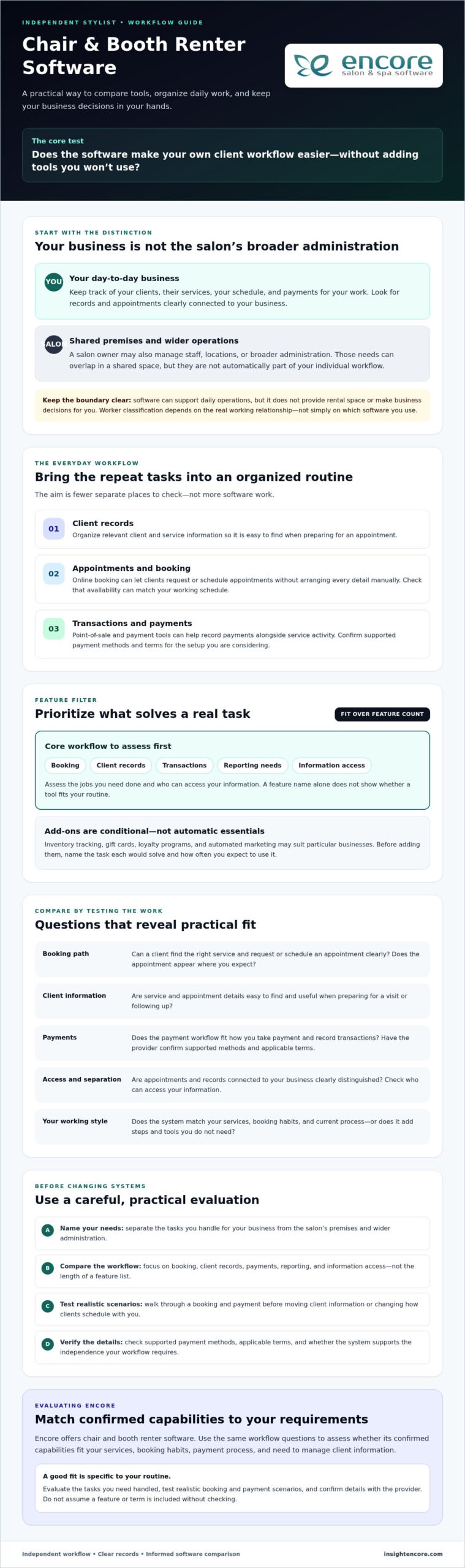
Chair/booth renter software helps an independent beauty professional manage their service business while working in a shared salon or barbershop. It can bring client records, appointments, and transactions into a more organized workflow, reducing the need to check separate calendars, messages, and payment records.

Software can support your day-to-day operations, but it doesn’t provide rental space or make business decisions for you. The premises and shared arrangements are separate from how you manage your clients and services. Your legal status as an independent contractor depends on the real working relationship, not simply on which software you use.

How a renter’s workflow differs from a salon owner’s

Your daily focus is usually personal and direct: keep track of clients, the services they book, your schedule, and payments for your work. A salon owner may also need tools for managing staff, locations, or broader business administration. Some needs can overlap in a shared space, but they aren’t automatically part of your individual workflow.

For example, you and the salon owner may work from the same premises while maintaining separate client interactions and routines. Check whether the system clearly distinguishes appointments and records connected to your business. That separation can help you maintain continuity with clients if your work arrangements change, rather than treating those relationships as part of salon staff management.

Which everyday tasks can software bring together?

Focus on how software handles the tasks you repeat throughout the week:

  • Client management: Organize relevant client and service information so it’s easy to find when preparing for an appointment.
  • Appointment handling: Online booking can let clients request or schedule appointments without arranging every detail manually.
  • Transactions: Point-of-sale and payment tools can help you record payments alongside service activity. Check the supported payment methods and terms rather than assuming they’re the same across systems.

The goal is to reduce the effort of switching between tools, not to create more software tasks. Encore offers chair and booth renter software. Review its salon software information on the Encore Salon Software page and compare it with the workflow you need.

Which Chair Renter Software Features Make Daily Work Easier?

A long feature list can look impressive without solving the tasks that slow you down. Start by naming those tasks, then compare how each system handles them. Encore software features can help you identify common categories, but check how each one fits your routine.

Renter-focused software should bring core tasks such as booking, client records, and transactions into a workflow you can manage yourself. A solo professional may need those essentials first. Inventory tracking, loyalty tools, or broader marketing features may suit a business with different needs, but extra options aren’t automatically useful if they add steps you won’t use.

Booking and client management for independent professionals

Test the booking process from a client’s perspective. Can someone find the right service and request or schedule an appointment clearly? Can you set availability to match your working schedule? A practical test is to follow the full booking path, then check whether the appointment appears where you expect and whether the process creates avoidable back-and-forth.

Client records should be easy to find and useful in practice. Organized service and appointment details can help you prepare for a visit and follow up consistently. For a closer look at choosing tools for those records, read this booth renter client management guide.

Payments, marketing, and add-on tools

Check how point-of-sale and payment processing fit the way you take payment and record transactions. Ask providers to confirm the supported payment workflows and applicable terms for the specific setup you’re considering. A feature name alone doesn’t show whether it will work smoothly during your service day.

Other tools depend on your business. Inventory tracking may help if you manage products or supplies. Gift cards, loyalty programs, and automated marketing may be useful if they fit how you serve and reconnect with clients. Before adding them, identify the task each feature would solve and how often you expect to use it.

Software can support your workflow, but it doesn’t determine your worker classification. If you have questions about the distinction between an employee and an independent contractor, refer to the IRS guidelines on worker classification. As you compare chair/booth renter software, confirm features and terms directly with each provider. You can also explore Encore as an option against the tasks you’ve identified.

How to Compare Chair/Booth Renter Software Without Losing Independence

Sharing a salon space doesn’t have to mean sharing every client interaction or business routine. The right chair/booth renter software depends on how you work. Don’t assume, however, that separate accounts automatically mean private records or independent control. Confirm the details with each provider before deciding.

Use the comparison below to frame your questions. Check what you can actually do in the system, not just the feature names on a product page.

Area What to check
Booking Can you manage your own availability and see appointments connected to your services?
Client records Who can view, edit, export, or otherwise access your client information?
Payments Can you record and review transactions for your work, and what terms apply?
Reporting Can you review information relevant to your own appointments and transactions?
Renter usability Does the workflow make sense for one professional, or is it built around salon-wide staff and administration?

There isn’t one best fit for every renter. Your services, booking volume, and current process all matter. A solo professional may prioritize personal scheduling and straightforward records. Several renters sharing a workspace may also need clear separation between each professional’s bookings and information. Shared software can support distinct workflows, but its settings and policies need to allow for them.

Questions to ask about client records and access

Ask who can view, edit, export, or otherwise access client information, and whether permissions can be set for individual professionals. Find out whether you can manage your own availability and records. Then review the provider’s current privacy and data-handling documentation. Don’t rely on assumptions or verbal descriptions alone. Check that the written terms address access to records and what happens to them if your arrangement changes.

Matching features to your rental setup

Separate essentials from extras. Booking, client records, payments, and useful reporting may be core needs; inventory or loyalty tools may matter only if they fit your services. Consider the setup, too. One renter needs a workable individual routine, while a shared workspace may need each professional’s activity to be easy to distinguish.

Before choosing, test one realistic client journey: select a service, book based on your availability, find the relevant client record, record the payment, and check what information is available for follow-up. Note any unclear steps and ask the provider to demonstrate how permissions and data access work. This practical check can reveal more than a feature list.

Chair/Booth Renter Software: A 2026 Guide to Choosing the Right System

How to Choose and Set Up Software for Your Booth Rental

A good setup starts with your actual workday, not a long list of features. Before committing to chair/booth renter software, identify what it needs to handle, test those tasks in a realistic workflow, and clarify practical details with the provider. This makes it easier to compare systems and plan a change without disrupting client bookings.

A practical checklist before you choose

  1. Map your current tasks. List the tools you use for appointments, client details, payments, and follow-up. Note where you enter the same information twice or handle routine tasks manually.
  2. Shortlist your must-haves. Decide which jobs the system needs to support from day one. Separate them from features you may not need yet.
  3. Test the workflow. Walk through a typical client journey, from booking a service to recording payment and finding the information you need afterward. Try the steps yourself instead of relying only on a feature overview.
  4. Verify terms and access. Ask about data export, account permissions, payment terms, and how client records are handled. Request current details in writing, and clarify anything that could affect your control of business information.
  5. Plan the setup. Ask the provider what information can be transferred, who is responsible for setup tasks, and what onboarding or training support is available. Confirm these details rather than assuming they’re included.

A smoother transition into a new system

Choose a transition point that gives you time to check the setup around your appointment schedule. Before changing how clients book, confirm which records can be moved and how they’ll appear in the new system. If other renters will use the same platform, decide who needs access and which permissions are appropriate for each person.

Test the basics before relying on the new process: make a sample booking, review a client record, and check how a payment is entered and displayed. If anything is unclear, pause and ask the provider before moving more information or directing clients to a new booking routine. Preparation can help you catch gaps while your existing process is still available.

Encore offers specialized software for independent chair and booth renters. After defining your requirements, review the Encore Salon Software page as one option, and confirm current feature availability, setup, and payment details for the renter configuration.

Explore Encore for your booth rental workflow

How Encore Chair/Booth Renter Software Can Support Your Next Step

Once you’ve identified the tasks your system needs to handle, assess Encore against those requirements. Encore offers specialized chair/booth renter software within a broader beauty and wellness management platform. Its capabilities include online booking, client management, point-of-sale transactions, and integrated credit card processing, which can bring key parts of a renter’s day-to-day workflow together.

Don’t choose a platform based on a feature list alone. Consider whether its booking, client, and transaction tools fit the way you manage services and business information. Confirm the details for the specific chair or booth renter configuration you’re considering.

Where Encore may fit in a renter’s workflow

For a professional looking to bring core management tasks together, online booking can support appointment scheduling, while client management can help organize customer records. Point-of-sale transactions and integrated credit card processing may also suit renters who want to manage service payments within their broader workflow. Check how these functions work together in the configuration available to you, and whether its record-access settings match your needs.

Encore provides software, not booth rental listings or physical salon space. Its offerings don’t make it a substitute for your own decisions about client relationships or how you run your independent business. Evaluate the system against the requirements you’ve already defined.

What to confirm before moving forward

Ask which features are included in the chair or booth renter configuration and whether the system supports the booking, client-record, and transaction steps you want to use. Confirm current payment processing terms, account permissions, and how client data can be accessed or exported. These details affect how well the software can support your workflow.

Also ask about onboarding and support arrangements, including what guidance is available during setup and which tasks you’ll need to complete. Compare the answers with your must-have criteria rather than assuming every feature or service applies to every configuration. Reviewing terms directly with Encore can help you make an informed decision and identify questions to resolve before changing your routine.

Explore Encore and take the next step

Choose a System That Keeps Your Business in Your Hands

The right chair/booth renter software should make everyday tasks easier without blurring who manages your clients, schedule, and business records. Start with your workflow, compare booking, client management, payments, and reporting, then confirm data access and terms directly with each provider.

Before switching, test realistic client scenarios and plan how records, payment setup, and booking routines will move into the new system. A careful setup helps you make a confident choice and avoid unnecessary disruption to your day.

Encore offers a specialized solution for chair and booth renters. Its broader platform includes online booking, client management, and point-of-sale transactions. Explore how these capabilities may fit your needs, and verify current features, configuration, and terms before deciding.

Explore Encore and take the next step

You’re building a business around your skills and client relationships. Choose tools that support that independence. To see whether Encore fits your renter workflow, explore Encore and take the next step.

Frequently Asked Questions

What is chair or booth renter software?

Chair or booth renter software helps an independent salon professional manage business tasks while working in a shared salon or barbershop. It may bring appointment booking, client records, and transactions into one workflow. Unlike tools focused on running an entire salon, renter software should suit an individual professional’s routine. It supports business operations, but it doesn’t provide rental space or make business decisions for you.

Do booth renters need their own salon software?

Not every booth renter needs a separate system, but software that supports your own workflow can make it easier to manage appointments, client information, and payments. Before using a salon-wide platform, find out whether you can manage your availability and records independently. Ask who can access client information and what happens to your data if you leave the shared space. Choose based on your arrangement and business needs.

Can chair renter software keep each professional’s clients separate?

It can, depending on the software’s account setup, permissions, and data-handling rules. Don’t assume separate logins mean records are private or that you can export them. Ask who can view, edit, or access client details, and whether each professional can manage their own bookings. Review the provider’s current privacy documentation and terms to understand how client information is handled before entering or moving records.

What features should booth renter software include?

Start with the tasks you handle regularly. Useful core features may include online booking, organized client records, appointment management, and point-of-sale or payment tools. Depending on your services, inventory tracking, gift cards, loyalty programs, or marketing features may also help. Check that the software supports your actual workflow, including how you schedule clients and record transactions. Confirm current feature availability for the renter configuration you’re considering.

How much does chair or booth renter software cost?

Pricing depends on the provider and the plan or configuration, so ask for current details directly rather than relying on a general estimate. Compare the full cost, not just a subscription fee. Check payment processing terms, any per-booking charges, and whether the tools you need are add-ons. Contact Encore to confirm current pricing and terms for its chair and booth renter software.

Is salon software different from booth renter software?

They can overlap, but they may be designed around different day-to-day needs. Salon-wide software may include tools for managing staff or broader business operations, while renter-focused software should support an individual professional’s appointments, clients, and transactions. The labels alone don’t tell you whether a system fits. Check how it handles your records, booking availability, permissions, and payments, especially if you share a platform with the salon.

How do I switch to new booth renter software?

Start by listing your current tools and deciding which tasks the new system must support. Ask what client and appointment information can be transferred, how to export records later, and who will handle setup. Test a realistic booking, client-record, and payment workflow before changing your routine or directing clients to a new booking process. Plan the transition around your schedule, and confirm account access, payment terms, and available onboarding guidance.

Disclaimer

This article is general in nature and may contain errors, please verify all claims with your sales rep

Categories
Uncategorized

The Independent Stylist’s Guide: Why You Need a Booth Renter Client Management App in 2026

Imagine it’s 10:00 PM on a Tuesday, and instead of winding down, you’re three layers deep in Instagram DMs trying to squeeze a client into your Friday afternoon slot. You chose the independent life for the freedom, but lately, the manual hustle feels like a second full-time job. It’s exhausting to manage every booking, reminder, and payment through a flurry of texts. If you’re still relying on the salon’s front desk or a messy notebook, you’re likely feeling the weight of that uncertainty. Transitioning to a dedicated booth renter client management app isn’t just about convenience; it’s about finally owning your business and your data.

You already know that your talent is worth a premium, but your administrative process should reflect that same level of excellence. We’ll show you how the right tools transform a rented chair into a thriving, independent business while protecting your hard-earned income. In this guide, we’ll explore how to automate your schedule, simplify your tax prep, and create a professional client experience that matches your skill level. It’s time to stop being just a renter and start being the CEO of your own career.

Key Takeaways

  • Define your role as a true business owner by shifting from manual scheduling to a digital front desk that handles the heavy lifting for you.
  • Secure your professional future by using a booth renter client management app to maintain total ownership of your client list and business data.
  • Avoid the hidden costs of “free” payment apps and paper planners that often lead to tax season stress and unprotected income from no-shows.
  • Follow a simple, step-by-step workflow to audit your current services and migrate your client info into a more professional system.
  • Discover how human-centric software and expert support can act as your dedicated partner while you’re busy behind the chair.

What is a Booth Renter Client Management App?

A booth renter client management app is a specialized digital tool designed to help independent beauty and wellness professionals run their entire operation from a single device. It isn’t just a digital calendar. It’s a comprehensive platform that handles the administrative tasks that used to be the responsibility of a salon’s front desk. When you move from a commission structure to renting a chair, you aren’t just changing your pay structure. You’re launching a micro-business. This software acts as your virtual assistant, ensuring that your business stays organized while you focus on your craft.

Modern Customer relationship management (CRM) strategies are at the heart of these apps. They allow you to track client preferences, color formulas, and visit history without relying on a shared salon database. This independence is vital. It ensures that your client data stays with you, regardless of where you choose to work. By automating reminders and bookings, you reclaim hours of your week that were previously lost to manual texting and back-and-forth DMs. The core mission is to remove the friction of business ownership so you can stay creative behind the chair.

The Difference Between Salon Management and Renter Apps

Standard salon software is often built for owners who need to manage a large team. These systems usually rely on a "master" login where the owner has oversight of everyone’s books, income, and client lists. For a solo professional, this structure can feel restrictive or even risky. A dedicated booth renter client management app prioritizes your privacy and ownership. It links directly to your personal bank account and keeps your client list confidential from the salon owner. It also allows you to showcase your individual branding. This is essential for building a personal brand that stands out even when you’re working within a shared salon space.

Who Benefit Most from This Software?

Independence looks different for everyone, but the need for organization is universal. If you are responsible for your own taxes, supplies, and schedule, this software is built for you. Several types of professionals find these tools life-changing:

  • Hair stylists and barbers: Those who need total schedule autonomy and the ability to set their own hours without checking in with a manager. Barbers renting a chair can especially benefit from understanding how a dedicated barber shop POS system builds a complete digital foundation that handles bookings, payments, and client management in one place.
  • Tattoo artists and massage therapists: Professionals who require secure, digital intake forms and detailed client history logs. If you’re a tattoo artist tired of managing DM chaos and chasing deposits, explore how dedicated tattoo shop booking software can automate your studio’s entire scheduling workflow.
  • Pet groomers: Business owners who need mobile-friendly booking solutions and integrated inventory management for their supplies.

Whether you’re just starting out or you’ve been renting for years, having the right system in place is the only way to scale without burning out. You can explore the specific features that help automate these daily hurdles and give you back your peace of mind.

The 4 Pillars of Independent Client Management

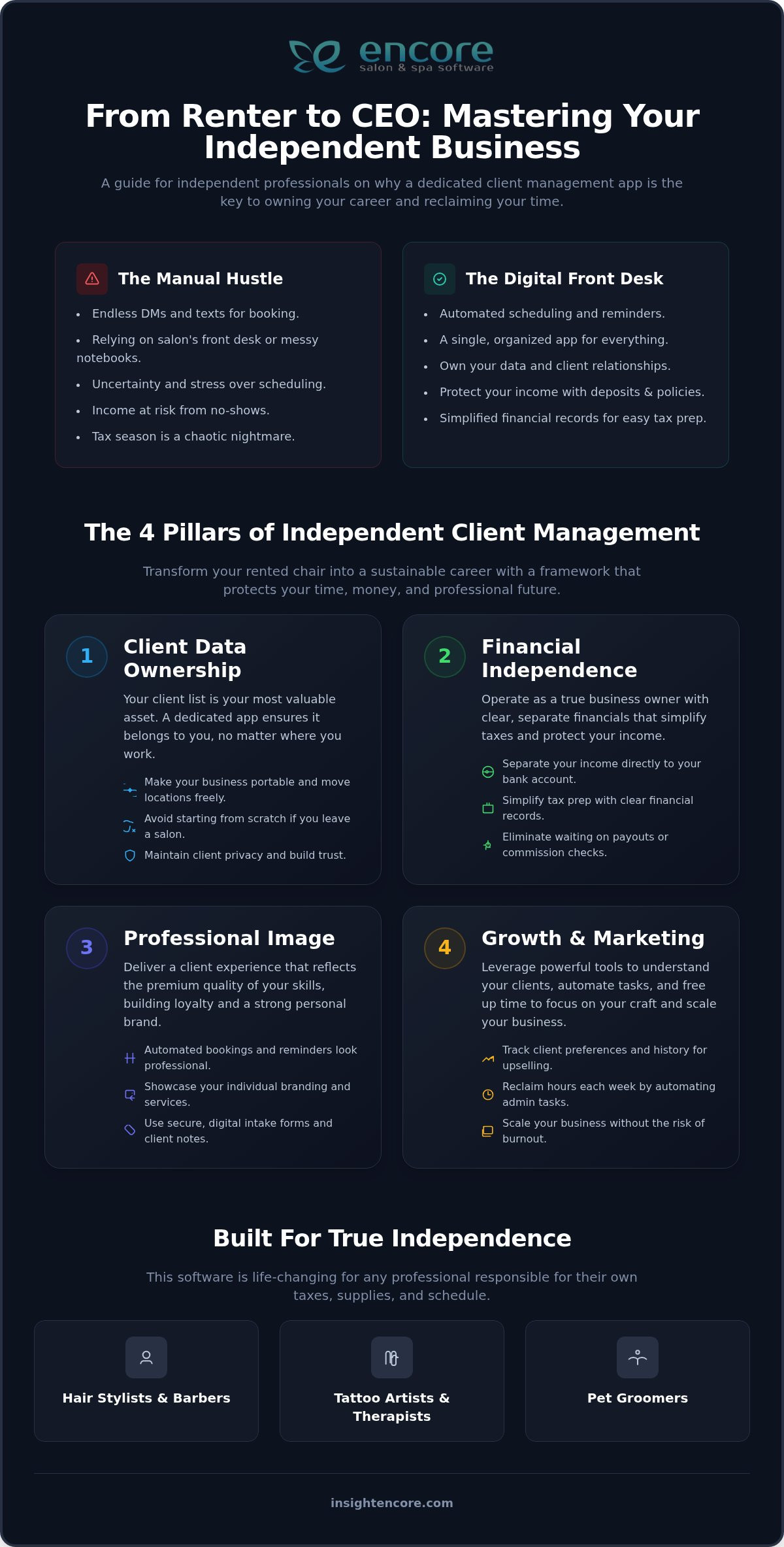
Success as an independent professional relies on more than just your technical skills. It requires a business framework that protects your time and your money. When you use a booth renter client management app, you’re establishing four essential pillars that turn a rented chair into a sustainable career. These pillars include data ownership, financial independence, a professional image, and growth marketing. Without these, you’re essentially an employee without the benefits.

Why Client Data Ownership is Non-Negotiable

Your client list is your most valuable asset. If you rely on a salon’s paper book or a shared computer system, you’re at risk. If you decide to move to a new location, you might find yourself starting from scratch because you don’t have direct access to your visit history or contact details. A management app ensures you own every phone number, color formula, and purchase record. In 2026, data privacy is also a major concern. Using a professional system helps you stay compliant with privacy standards, ensuring your clients feel safe sharing their information with you. You aren’t just storing names; you’re building a portable business that moves whenever you do.

Financial independence is equally critical. According to IRS guidelines on independent contractors, maintaining your own financial records is a key part of proving your status as a business owner. The right booth renter client management app separates your income from the salon owner’s account immediately. This makes tax season much simpler. You won’t have to wait for a payout or double-check a commission check. You see your earnings in real-time, allowing you to reinvest in your tools or save for your future with total confidence.

Automated Scheduling: Your 24/7 Virtual Assistant

Manual booking is a hidden drain on your energy. Answering texts at 10:00 PM or checking DMs between clients isn’t sustainable. It leads to burnout and missed opportunities. By moving to an online portal, you give your clients the convenience they expect while setting firm boundaries for your personal life. Automated reminders and deposit requirements also drastically reduce no-shows. This protects your income and ensures your time is respected. You can master your business with Encore Salon & Spa Software and stop playing phone tag forever.

A professional image is what attracts high-paying clients. When someone receives a polished confirmation email or a sleek text reminder, it signals that you’re a serious professional. This trust allows you to charge what you’re worth. Finally, having your own data allows for growth marketing. You can see who hasn’t visited in six weeks and send a friendly note to fill a gap in your calendar. It’s about being proactive rather than waiting for the phone to ring. To see how these tools work in action, take a look at our comprehensive feature list.

Why "Free" Apps and Paper Planners Often Cost You More

It’s tempting to think that a simple paper planner or a free social media app is enough to run your business. You’re just one person, so why overcomplicate things? However, these "free" methods often come with hidden costs that drain your time and income. When you rely on fragmented systems, you’re forced to manage the mental load of five different apps just to get through one workday. A dedicated booth renter client management app replaces this chaos with a single, professional source of truth.

One of the biggest risks is the "Venmo Trap." Using personal payment apps might seem easy, but it creates a massive tax headache. Mixing business and personal funds makes it nearly impossible to track expenses and income accurately. This lack of clear records can lead to missed deductions or issues during tax season. Beyond the numbers, asking a client to "Venmo me" can feel informal. A formal booking link justifies higher service prices by signaling that you’re an established business owner who values professional standards.

Then there’s the "No-Show Tax." Paper planners are completely passive. They can’t send text reminders, they can’t collect deposits, and they certainly can’t protect your time if a client simply doesn’t show up. Every empty slot in your chair is lost revenue that you can’t get back. Moving to an automated system ensures that your time is respected and your income is secured before the client even walks through the door. This is especially true for high-demand artists who want to learn how tattoo shop booking software eliminates no-shows with automated deposits collected at the time of booking. Independent nail technicians renting a booth face the same challenges, and understanding how nail salon client management software automates reminders and protects revenue can be equally transformative for their business. Nail studio owners who are ready to move beyond basic cash registers and protect their profit margins can also explore how a dedicated nail salon POS system turns manual tracking into a streamlined, scalable operation.

The Real Value of Integrated Payments

Integrated credit card processing is about more than just taking money. It’s about simplifying your life. When your payments are tied directly to your booking system, end-of-day reconciliation takes seconds rather than hours. You don’t have to cross-reference your bank app with your notebook to see who paid what. Everything lives in one secure place. This keeps your deposits and service fees organized, allowing you to focus on your clients instead of your spreadsheets. You can check out our features for independent pros to see how this integration creates a seamless experience.

Security and Reliability in 2026

In 2026, security is a top priority for every client. A physical notebook is vulnerable to fire, water damage, or simply being left behind at the salon. Cloud-based software keeps your business information safe and accessible from any device. Data redundancy is the practice of storing your business information in multiple secure locations simultaneously so that your records are never lost if one device fails. Additionally, you deserve human-led support when questions arise. While many platforms rely on cold, automated chatbots, having access to a real person who understands your industry makes all the difference in your peace of mind.

The Independent Stylist’s Guide: Why You Need a Booth Renter Client Management App in 2026

Setting Up Your Digital Booth: A Step-by-Step Workflow

Moving your business from a paper planner or a salon-owned system into your own digital space is a major milestone. It can feel overwhelming at first, but taking it step-by-step ensures you don’t miss any critical details. Your goal is to build a digital infrastructure that works for you even when you’re busy with a client. By following a clear workflow, you’ll transition from a stylist who rents a chair to a business owner who controls their destiny.

  • Step 1: Audit your list and menu. Look at your current client list and service menu. What are your most profitable services? Who are your most reliable regulars? Use this time to refine your offerings and prices.
  • Step 2: Choose a platform with support. Select a booth renter client management app that offers migration assistance. You shouldn’t have to manually type in every name and phone number.
  • Step 3: Set up your digital storefront. This is your online booking portal. Upload photos of your best work and make sure the interface reflects your personal brand.
  • Step 4: Automate your communication. Configure your confirmation emails and text reminders. This "set and forget" step is what gives you your evenings back.
  • Step 5: Launch your announcement. Tell your clients! Send a mass message explaining the new, easier way to book with you.

Migrating Your Existing Client Data

The first hurdle is often getting your data out of its current home. If you’re coming from a larger salon system, ask for a CSV export of your client list. If you’ve been using your phone’s contacts, most apps allow you to sync them directly. This is the perfect time to clean your list. Focus on your "A-list" clients first. These are the people who show up on time and value your expertise. Starting with a clean, accurate database ensures that your future marketing efforts reach the right people, leading to a much higher return on your time.

Customizing Your Booking Experience

Your online portal is more than just a calendar. It’s an opportunity to set expectations. When setting your hours, be realistic. Build in buffer time for cleaning between clients and scheduled breaks for yourself. This prevents the "back-to-back" burnout that many renters face. When writing service descriptions, focus on the value. Instead of just "Full Highlight," describe the result your client will see in the mirror. Once your portal is ready, place your booking link prominently in your Instagram and Facebook bios. This makes it effortless for new clients to find you and book immediately. Ready to take the leap? You can start your journey to total independence today.

How Encore Supports Your Journey to Independence

Transitioning to independence is one of the biggest moves you’ll ever make. You’re no longer just a stylist; you’re the CEO, the marketing manager, and the accountant. That’s a lot to carry on your own. Choosing a booth renter client management app shouldn’t add to that stress. At Encore, we’ve spent decades refining our tools to act as a supportive partner for professionals just like you. We understand the daily hurdles of the industry because we’ve been helping professionals navigate them since 1991.

Our software isn’t a one-size-fits-all corporate solution. We offer a specialized Chair/Booth Renter Software module that feels like it was built specifically for your individual workflow. It removes the "front desk" frustration by giving you total control over your schedule and income. Our booth renter client management app is designed to be the only tool you’ll ever need to manage your growth. If your dream eventually grows beyond a single chair, our platform scales with you. Whether you stay independent or open your own multi-chair studio, your data and systems remain consistent and reliable.

Features Designed for the Solo Professional

Managing your business requires precision. You need to know exactly what’s in your cabinet and what’s in your bank account. Our Inventory Management System allows you to track your personal product stock with ease. This ensures you never run out of a critical color or supply mid-appointment. To keep your workflow smooth, we provide Integrated Credit Card Processing. This allows for a seamless checkout right at the chair, removing the need for clunky third-party apps or awkward cash transfers. We believe in total honesty, which is why you can always view our transparent pricing plans without worrying about hidden fees.

Join the Encore Family

We pride ourselves on the human touch. When you’re "the only employee," you need to know that someone has your back. Unlike cold, automated platforms that leave you waiting for an email response, we prioritize real connections. Our team acts as a dedicated mentor, offering expert support whenever you need a hand. We want you to feel empowered, not intimidated, by your business tools. This is why we encourage a low-pressure exploration of what we offer. There’s no rush and no corporate pressure; just a genuine desire to see you succeed.

Your journey to a thriving, independent business starts with the right foundation. You’ve done the hard work of building your skills and your clientele. Now, let us help you protect them. We invite you to contact us today for a personalized demo. See for yourself how a dedicated partner can transform your daily grind into a streamlined, professional operation.

Take Control of Your Independent Future

Stepping out on your own is a bold move that deserves the right digital foundation. By prioritizing data ownership and professional automation, you’re doing more than just simplifying your day; you’re building a business that belongs entirely to you. You’ve seen how the right booth renter client management app removes the stress of manual booking and the uncertainty of tax season. It’s time to stop letting administrative tasks dictate your schedule and start focusing on the creative work you love.

Syntec has been a trusted partner for independent professionals since 1991. We provide all-in-one tools for booking, CRM, and payments, all backed by a dedicated support team that truly understands the booth rental business. You don’t have to navigate this transition alone. Our human-centric approach ensures you have the guidance needed to thrive in a competitive industry. Take the first step toward a more organized, profitable, and balanced career today.

Start Your Journey to Independence with Encore Salon & Spa Software

Frequently Asked Questions

Do I really need a management app if I only have 20 clients?

Yes, because professional tools aren’t just for large salons. Even with 20 clients, you’re still responsible for scheduling, reminders, and financial tracking. Automating these tasks now prevents burnout and ensures every client receives a high-end experience. It’s about setting a professional standard from day one so you’re ready to scale when your list grows. You’ll reclaim hours of your week that were previously spent on manual admin.

Will my salon owner be able to see my client list in the app?

No, your client list remains completely private to you. A dedicated booth renter client management app is built with an individual login structure that keeps your data separate from the salon owner’s view. This independence is a core feature of the Encore renter module. You own your relationships, your formulas, and your history, no matter where you choose to rent your chair.

How much does booth renter software typically cost in 2026?

Pricing for software in 2026 is designed to be accessible for solo professionals. Most providers offer tiered plans based on the specific features you need, such as inventory tracking or integrated payments. While we don’t list specific dollar amounts here, you’ll find that the cost is a strategic investment in your time. It often pays for itself by reducing no-shows and simplifying your daily administrative hurdles.

Can I take my data with me if I decide to switch software later?

Yes, you should always have the ability to export your data. Reputable software providers understand that your client list is your most valuable business asset. You can typically download your records into a standard file format if you ever choose to move to a different system. This portability ensures that you aren’t locked in and remain the true owner of your business information at all times.

Does the app handle tax reporting for independent contractors?

The app simplifies your tax preparation by tracking every transaction and expense in real-time. While it doesn’t file your taxes for you, it generates the detailed reports your accountant needs to see. This removes the stress of digging through bank statements or old receipts. Using a booth renter client management app ensures your financial records are organized and ready for tax season well in advance.

What happens if I lose my phone? Is my client data safe?

Your data is perfectly safe because it’s stored in the cloud rather than on your physical device. If you lose or break your phone, you simply log in to your account from a tablet, computer, or a new phone. All your appointments, client notes, and payment records will be exactly where you left them. This digital security is a major advantage over a physical paper planner or a notebook.

Can I require deposits for new clients through the app?

Yes, you can absolutely require deposits or full prepayments for any service. Setting up a deposit requirement for new clients is one of the most effective ways to protect your time and income. The app handles the transaction securely during the booking process. This ensures that you’re compensated for your time, even if a client fails to show up for their scheduled appointment.

Is it hard to move my clients from a paper book to a digital app?

It’s much easier than you might think, especially with a supportive partner to guide you. While moving from a paper book requires a bit of initial data entry, it’s a one-time task that pays off forever. Many platforms even offer migration assistance to help you upload your phone contacts or existing spreadsheets. Once the transition is complete, you’ll wonder how you ever managed your business without it.

Disclaimer

This article is general in nature and may contain errors, please verify all claims with your sales rep