

window.dataLayer = window.dataLayer || []; function gtag(){dataLayer.push(arguments);} gtag('js', new Date()); gtag('config', 'UA-206511945-1');
Search
Categories
Uncategorized

Barbershop Inventory Control: A Practical Guide to Stock That Stays in Sync

A busy Saturday can make a stock problem hard to spot: a popular styling product sells out at the front desk while supplies used for services run low in the back. If counts are easy to forget and product use isn’t recorded consistently, barbershop inventory control can feel like one more task competing for your attention.

You don’t need a complicated system to get a clearer picture. A repeatable process helps you track what’s on hand, distinguish retail sales from service use, and make reorders with more confidence. The key is connecting product movement to a routine your team can maintain.

This guide covers how to organize retail products and service supplies, set a manageable counting and replenishment schedule, and use stock records to spot patterns. You’ll also learn when inventory-tracking software can bring stock records closer to the rest of your shop workflow, including point-of-sale transactions. The goal is practical control, not perfect paperwork.

Key Takeaways

  • Separate retail products from supplies used during services to see where stock is going.
  • Build a repeatable barbershop inventory control workflow, from recording incoming stock to reviewing counts.
  • Choose paper, spreadsheets, or software based on who needs access and how your stock activity is changing.
  • Set replenishment points using your own usage records, delivery timing, and each product’s importance.
  • Consider inventory alongside point-of-sale activity to bring stock records closer to your shop’s daily workflow.

What barbershop inventory control means, and why informal stock checks fall short

Barbershop inventory control is the routine of recording, checking, and replenishing the retail products and service supplies a shop keeps on hand. It means keeping records aligned with physical stock and deciding what needs attention. For a foundational explanation of the term, see Inventory control.

A glance at a shelf can help, but informal checks leave room for errors. Staff may count a partly used package differently, or a retail sale may never make it into the stock record. That can lead to unexplained count differences, urgent restocking, and uncertainty about whether a product was sold, used during a service, or recorded incorrectly.

The aim isn’t to count every item constantly. It’s to create enough visibility to make sensible replenishment decisions without turning stock checks into a daily burden. Start by deciding what belongs in your inventory system and how your team will record it.

Which products belong in a barbershop inventory system?

Track retail items sold to clients separately from supplies consumed while providing services. Retail stock might include shampoo, conditioner, styling products, or beard-care products. Service-use supplies can include shaving products, disinfectant, gloves, and other grooming or sanitation essentials. Separating the categories shows what generates retail sales and what supports the services you provide.

Prioritize items according to client demand, their role in delivering services, and how difficult they are to replace. Use the same product name and unit every time. For example, track individual bottles consistently rather than switching between bottles and cases. Uniform records make counts easier to compare.

What does good inventory control help an owner see?

Good records distinguish the physical count from recent stock activity. A shelf count shows what’s on hand now; sales and usage records help explain what has moved since the last count. Together, they give you a clearer picture than either view alone.

If the recorded quantity and physical count don’t match, review the process rather than treating the difference as proof of theft or assigning blame. Check whether a delivery, sale, service use, damaged item, or unit conversion was recorded inconsistently. Over time, these reviews can show which products need closer attention, which are moving steadily, and where replenishment or product-range decisions may need adjusting.

Barbershop Inventory Control: Receiving to Replenishment

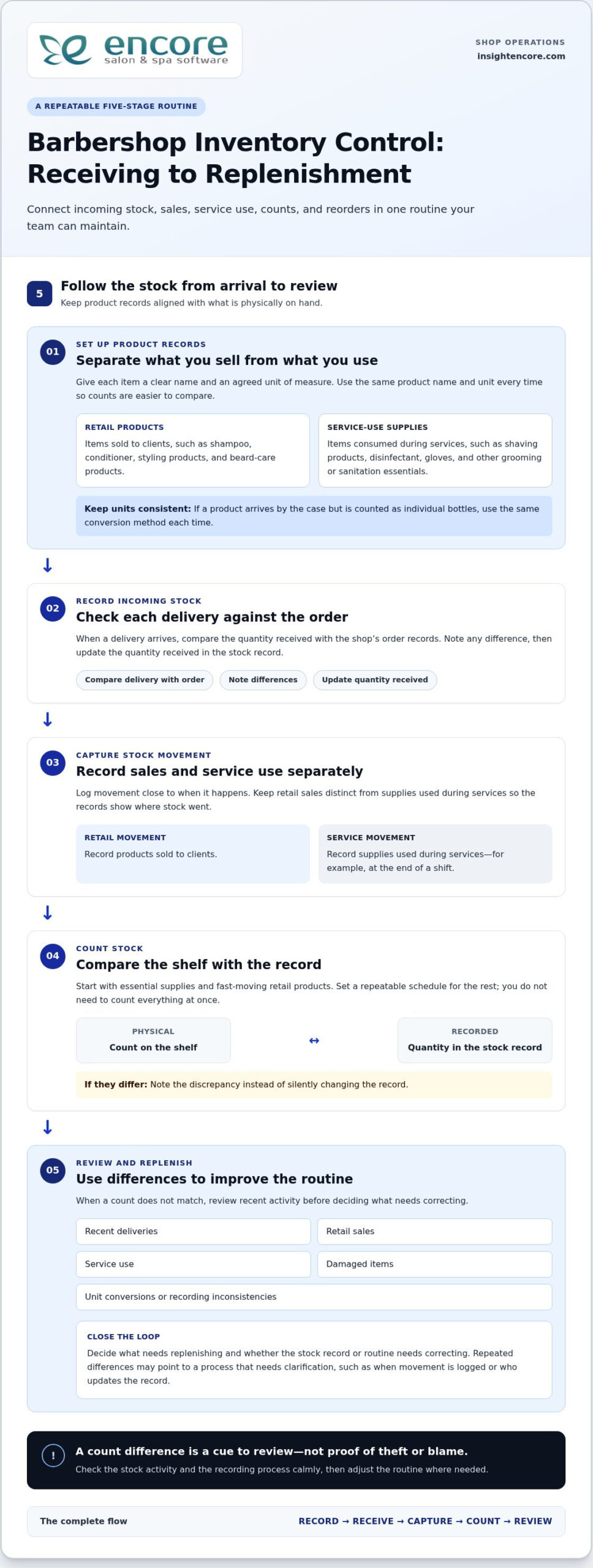
A reliable stock routine connects what comes into the shop with what gets sold, used, counted, and reordered. Keep the process simple enough to follow during a busy week. The five steps are: set up product records, record incoming stock, capture movement, count, and review.

Set up consistent product records and receiving habits

Give each item a clear name and an agreed unit of measure. If a product arrives in a case but is sold as individual bottles, decide how to record that conversion and use the same method every time. Otherwise, one person may enter a case while another counts bottles, making the record hard to compare with the shelf.

When a delivery arrives, compare the quantity with the shop’s order records, note any difference, and update the quantity received. Record stock movement close to when it happens. Keep retail sales separate from supplies used during services, using a routine your team can follow, such as noting service-use supplies at the end of a shift. The Retail inventory management guide also explores how sales patterns can inform retail stock decisions.

Count stock and turn discrepancies into useful information

You don’t need to count everything at once. Start with essential supplies and fast-moving retail products, then set a repeatable schedule for the rest. During each count, compare the physical quantity on the shelf with the recorded quantity. Note differences instead of silently changing the record, so you can review what may have caused them.

If quantities don’t match, check recent deliveries, sales, service use, damaged items, and unit conversions. A single discrepancy may be a recording slip. Repeated differences can point to a process that needs clarification, such as when movement is logged or who updates the record. Review the issue calmly and adjust the routine rather than jumping to conclusions about the cause.

Finish each review by deciding what needs replenishing and whether the record or routine needs correcting. Over time, this gives you a more dependable basis for reorders. Encore’s management software features include inventory tracking and point-of-sale transactions, bringing these tools into a broader shop-management workflow.

Spreadsheet, manual counts, or software: which barbershop inventory method fits?

The right method is the one your team can maintain accurately. A paper list may suit a small, stable assortment, while a spreadsheet makes records easier to sort and share. Software can suit a shop that wants inventory records alongside point-of-sale activity and other operations. Whatever the tool, staff still need to record stock movement consistently.

Method Setup effort Shared visibility Record consistency As activity grows
Paper list Low Limited to whoever can access the list Depends on one person keeping it current Can become harder to maintain as products or users increase
Spreadsheet Moderate Can be shared, depending on how it’s stored Requires clear entry rules and version control Useful for organizing more detail, but updates can become scattered
Inventory-tracking software Requires setup of product records and routines Can support a shared shop workflow Provides a consistent place to record stock, when staff use it May be a better fit as product movement and operational needs increase

When can a manual list or spreadsheet be enough?

A paper list can work when the assortment is small, stock movement is straightforward, and one accountable person updates counts and notes changes. A spreadsheet gives you more room to sort items and review entries, but multiple editors need to use a shared file and follow clear version rules. The right level of detail depends on your products and routines, not on a universal item-count threshold.

Either approach can become difficult to manage when entries are missed, staff keep separate copies, or no one knows which record is current. Before changing tools, clarify who records sales, service use, deliveries, and corrections. Reliable barbershop inventory control depends on that routine, whatever method you choose.

When does inventory-tracking software become more useful?

Software is worth considering when staff need a shared record or when you want to view stock information alongside other shop activity. Encore’s management platform includes inventory tracking and point-of-sale transactions, so shops can manage these tasks as part of a broader workflow. Explore the software features to see how the inventory tools fit into shop operations.

Software still depends on accurate entries. If a retail sale or service-use item isn’t recorded, the system can’t show that movement reliably. For more on approaches such as prioritizing items by importance, Forbes covers several inventory management techniques that can help inform your process.
Barbershop Inventory Control: A Practical Guide to Stock That Stays in Sync

How to set stock levels, count consistently, and prevent avoidable gaps

A useful stock level reflects how your shop uses a product, not a universal quantity. Set a replenishment point by considering recorded retail sales or service use, how long replenishment usually takes based on your supplier experience, and how important the item is to daily operations. A core sanitation supply may deserve closer attention than a slow-moving retail item.

Choose practical reorder points for products your shop depends on

Use stock records to understand how quickly each product moves. When the remaining quantity may not cover expected use during the usual replenishment time, plan to reorder. Set levels based on your shop’s experience, then revisit them when demand changes, a service routine shifts, or supply timing changes. Keep the reasoning with the record so the next review is easier.

Not every product needs the same attention. Prioritize items that support essential services or sell regularly, then assess less critical products according to their movement and role in your assortment. This makes barbershop inventory control more practical: protect availability where it matters without tying up attention in arbitrary stock targets.

Make cycle counts and stock reviews manageable

Instead of waiting to count everything at once, assign a small, defined group of products to each count session. Give someone clear responsibility for checking physical quantities and recording adjustments. Compare the count with the record, note unresolved differences, and look for likely process causes before changing the number. Use a regular management check-in to review those notes.

Use the same review to look at slow-moving products. Check whether they still meet a client need, fit the shop’s services, or merit shelf space before automatically reordering. A product that moves slowly may call for a smaller order, a change to the assortment, or another review period. Let your shop’s records guide the decision.

Inventory decisions are part of the wider work of running a shop. For a broader view of how management tools can support barber-shop operations, explore barbershop management software.

Explore Encore for your barbershop

Bring barbershop inventory control into a connected management workflow

A dependable process doesn’t need to be complicated. Categorize retail products and service supplies, record stock movement, count on a repeatable schedule, review differences and product activity, then adjust records and replenishment decisions. These steps create a useful foundation, whether you track stock on paper or use software.

As you assess your process, consider how inventory records relate to point-of-sale activity. Reviewing stock information alongside sales can help you interpret what’s moving, but the records still depend on accurate entries. A connected platform brings these parts of shop operations into a broader workflow while keeping the need for consistent staff record-keeping clear.

What to look for in software for barbershop inventory control

Start with the everyday tasks your system needs to support. Can your team keep clear records for retail items and supplies used during services? Can staff follow a process for recording sales, use, deliveries, counts, and adjustments? Consider how inventory fits with point-of-sale operations and whether the workflow makes sense to the people who will use it. A long feature list matters less if the routine is difficult to follow.

Evaluate software against your actual stock-control process. Decide who updates records, how often you count, and what information you need before replenishing. Then consider whether a shared management platform could reduce reliance on disconnected records while keeping responsibilities clear.

Take the next step with Encore

Encore Salon & Spa Software is designed for barbershops and includes inventory tracking and point-of-sale transactions within its management platform. It gives shop owners an option for bringing stock records into a wider operational workflow. Explore Encore software for barbershops as you plan how to organize inventory alongside other shop needs.

Keep the process practical: define your categories, assign record-keeping responsibilities, and review stock regularly. Then choose tools that fit the routine you’ve built. For broader operational planning, explore Encore’s barber-shop software information as part of your next steps.

Explore Encore and see how it can support your barbershop

Build a Stock Routine You Can Rely On

Steady barbershop inventory control starts with a clear routine: separate retail products from service supplies, record stock movement consistently, and count and review products on a manageable schedule. Use your own sales, service-use, and delivery records to guide replenishment decisions instead of relying on guesswork or one-size-fits-all stock levels.

The right tracking method should fit how your shop operates. A paper list or spreadsheet may be enough for a simple setup, while software can bring inventory records closer to point-of-sale activity. Whichever approach you choose, consistent staff habits keep the information useful.

Encore offers specialized software for barbershops, including inventory tracking and point-of-sale transactions within its management platform. Encore has focused on vertical-market software for beauty and wellness businesses since 1991, giving barbershops an option for connecting stock tracking with broader shop operations.

Explore Encore and see how it can support your barbershop

Start with a routine your team can maintain, then build on it as your needs change. Clearer records can help you make stock decisions with greater confidence.

Frequently Asked Questions

What is barbershop inventory control?

Barbershop inventory control is the routine of recording what stock the shop has, tracking products sold or used, checking physical quantities, and deciding when to replenish. It helps you distinguish retail products from supplies consumed during services, so you can see what’s available and what’s moving. Start with clear product names, consistent units, and a process your team can follow. Consistency matters more than complexity.

How often should a barbershop count inventory?

There’s no single counting schedule that suits every barbershop. Count essential supplies and fast-moving products more regularly, then set a manageable routine for the rest. Consider how quickly items move, how many people handle stock, and whether your records match physical counts. If sales patterns or shop routines change, review the schedule and adjust it. A consistent cadence is more useful than an ambitious plan that’s often missed.

What inventory should a barbershop track?

Track products sold directly to clients separately from supplies used during services. Retail items might include styling or beard-care products, while service supplies can include grooming and sanitation products. Begin with items that are essential, frequently used, or commonly requested, then add others as your routine becomes manageable. Use consistent names and units, such as individual bottles rather than switching between bottles and cases.

Can a spreadsheet work for barbershop inventory control?

Yes. A spreadsheet can work well if your assortment is limited, stock movement is straightforward, and one person is responsible for keeping records current. If several staff members update it, use one shared version and agree on how to record sales, service use, deliveries, and corrections. Conflicting copies or missed entries can make the record unreliable. If you want inventory considered alongside point-of-sale activity, software can offer a more connected workflow.

How do you calculate when to reorder barbershop products?

Use your own records to understand how quickly a product sells or gets used, then consider how long replenishment usually takes for your shop. Choose a practical point at which you’ll review stock and place an order if needed. Give essential items closer attention than products that are easy to replace or move slowly. Compare reorder decisions with later counts and adjust them as demand or supply timing changes.

Does barbershop software help with inventory control?

Inventory software can provide a structured place to record products and review stock information. Encore’s management platform includes inventory tracking and point-of-sale transactions, which helps owners consider stock alongside sales activity. Software supports the process, but it doesn’t replace clear product records or consistent staff habits. Decide who records movement and how counts are reviewed so the information remains useful in day-to-day decisions.

What is the difference between retail inventory and back-bar inventory?

Retail inventory is made up of products the shop sells directly to clients. Back-bar inventory refers to products used while providing services, such as grooming or sanitation supplies. Keeping the categories separate helps you understand which items contribute to retail sales and which support service delivery. Record each category consistently, including clear product names and counting units, so you can review movement and replenishment needs for each group.

Disclaimer

This article is general in nature and may contain errors, please verify all claims with your sales rep
Categories
Uncategorized

Nail Salon Inventory App: The Complete 2026 Guide to Tracking Supplies and Retail

Most nail studios don’t lose their hard-earned profit on empty chairs; they lose it in unmeasured splashes of monomer, missing chrome powders, and clipboard counts that steal Sunday nights. You already know the headache of a technician running out of a trending gel shade mid-appointment, or trying to guess your actual margins on an intricate set. Generic spreadsheets treat a retail lotion the same way as a microscopic dab of foil glue, and that disconnect quietly drains your revenue. That’s why finding the right nail salon inventory app is an essential step toward running a calmer, more profitable studio.

You shouldn’t have to spend your weekends counting identical bottles just to stay organized. In this guide, you’ll discover how a dedicated nail salon inventory app eliminates backbar waste, tracks micro-usage art products, and protects your retail margins. We’ll explore practical ways to automate stock deductions right at checkout, pinpoint your exact service costs per manicure, and establish automated low-stock reorder alerts so you never face an unexpected shortage again.

Key Takeaways

  • Understand why standard retail tools stumble over micro-usage supplies, and how a dedicated nail salon inventory app solves the challenge of fractional liquid tracking.
  • Discover the practical differences between backbar consumption and retail inventory, including how to set unique targets for each revenue engine.
  • Learn a simple, step-by-step setup process to purge dead stock and standardize bottle naming across every brand, finish, and shade in your salon.
  • See how connecting stock tracking directly to your checkout process eliminates manual entry for technicians while keeping bottle counts fully accurate.
  • Uncover how real-time cost visibility per service protects your bottom line and triggers timely reorders before top-selling items run out.

Why Generic Inventory Systems Fail Modern Nail Salons

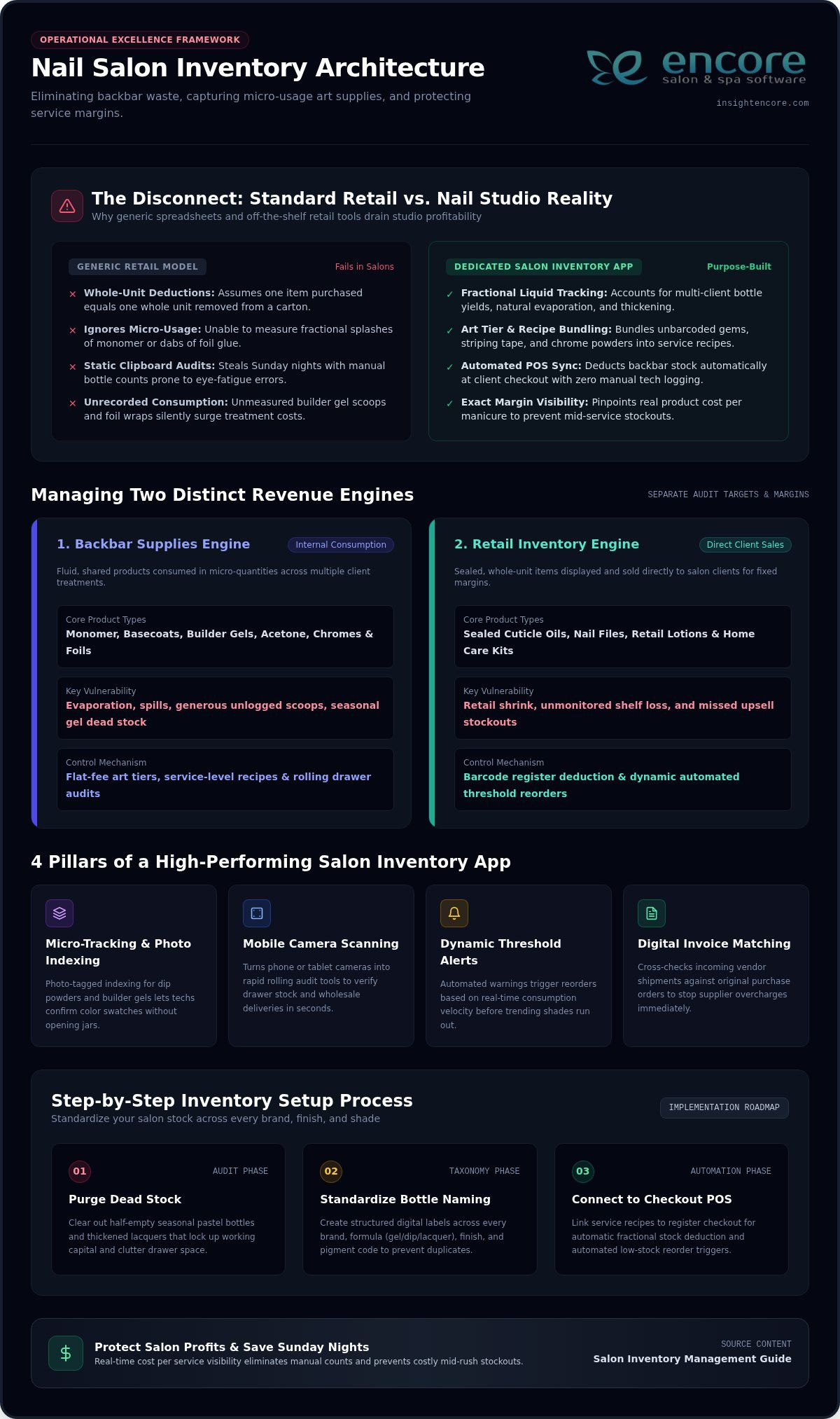
A standard retail store sells items by the unit; a customer buys a bottle of lotion, and the register deducts one box from the shelf. Nail studios don’t work that way. A modern nail salon inventory app must bridge the gap between whole-unit retail and the complex world of fractional backbar consumption. In our industry, a single bottle of monomer, basecoat, or acetone services dozens of clients across several days. While understanding inventory fundamentals helps any business buffer against shortages, general retail tools cannot calculate micro-usage. Liquids evaporate, opened polishes thicken over time, and fine art pigments spill during busy rushes. When your tracking system treats bulk salon supplies like standard boxed retail goods, your numbers drift away from reality.

The Unique Complexity of Nail Studio Supplies

Nail studios balance two completely different inventory models at the same time. Retail shelves feature sealed cuticle oils and files sold directly to clients for a set margin. Backbar supplies, however, are fluid, shared, and consumed in tiny amounts per service. Managing seasonal collections makes this balance even tougher. Trendy pastel collections peak in spring and drop off by summer, leaving behind half-empty bottles that tie up valuable working capital. Meanwhile, unrecorded product usage slowly eats into your service profits. When technicians apply generous scoops of builder gel or cut foil wraps without logging them, your treatment costs silently surge.

The Hidden Costs of Clipboard and Spreadsheet Audits

Manual stocktaking drains both your energy and your schedule. Studio owners frequently spend several hours every Sunday night squinting at hundreds of near-identical lacquer caps on a clipboard audit. Fatigued eyes make mistakes. A hurried count might misidentify a sheer nude as fully stocked, leading to a frantic, embarrassing stockout in the middle of a packed Saturday rush. Spreadsheets also trap numbers in static rows. They fail to connect supply levels with appointment schedules, making accurate cost forecasting and seasonal budgeting nearly impossible.

Essential Features to Look for in a Nail Salon Inventory App

General warehouse systems track pallets and cartons, but a high-performing nail salon inventory app needs to solve much smaller, daily bottlenecks. Nail technicians work at a fast pace, moving through appointments while pulling from shared shelves. You need intuitive digital tools that simplify station audits, catch missing stock early, and protect your margins. Industry reports frequently highlight the billions lost to retail shrink each year, and nail studios face that same vulnerability when unmonitored backbar jars and retail products walk out unaccounted for. Looking for dedicated inventory management features tailored to salon workflows ensures your tracking supports your team instead of slowing them down.

Micro-Tracking for Nail Art, Gems, and Powders

Tiny embellishments cause major tracking headaches. Individual crystals, striping tapes, and foils lack standard barcodes, making unit tracking impossible. An effective salon tool lets you bundle these micro-items into service-level recipes or flat-fee art tiers. For jars of dip powder and builder gel, photo-tagged supply indexing allows technicians to confirm color swatches instantly without opening jars or guessing pigment codes.

Mobile Barcode Scanning and Rapid Audit Modes

Nobody wants to be tethered to a front-desk computer. With mobile scanning, your phone or tablet camera turns into an agile counting tool. Technicians can complete rolling audits of a single drawer between client appointments. When wholesale shipments arrive, quick camera scans verify received items against purchase orders in seconds, preventing shelf delays.

Automated Purchase Orders and Supplier Profiles

Running out of essential supplies stalls appointments. Modern platforms monitor your usage patterns and flag low balances automatically. Key ordering capabilities should include:

  • Dynamic threshold alerts: Notifications trigger based on real-time consumption rather than fixed guesses.
  • Centralized distributor records: Store multiple supplier terms, contact details, and item numbers in one place.
  • Digital invoice matching: Cross-check incoming shipments against original POs to stop vendor overcharges before paying.

Backbar vs. Retail Inventory: Managing Two Distinct Revenue Engines

Every bottle in your studio serves one of two financial masters. Lumping professional supplies together with take-home products clouds your financial health, leaving you unsure whether service fees cover supply costs or if retail sales are masking backbar waste. A dedicated nail salon inventory app separates these streams into distinct ledgers so you can track treatment expenses independently from sales revenue. Applying essential inventory management techniques like First-In, First-Out (FIFO) ensures you rotate aging lacquers on backbar racks while preserving the fresh presentation of client retail shelves.

Inventory Dimension Professional Backbar Supplies Front-Desk Client Retail
Primary Purpose Internal operational use during treatments Direct merchandise resale to clients
Core Metrics Cost per service, waste rate, station usage Inventory turnover, gross margin, attach rate
Depletion Event Service completion or internal supply transfer Point-of-sale barcode checkout
Packaging Status Opened, shared across stations, fluid levels Factory sealed, pristine display packaging

Tracking Professional Backbar Usage and Service Costing

Accurate treatment pricing begins with knowing your true cost per service. When you divide the wholesale price of a builder gel bottle by its average application count, you reveal your baseline material expense for every full set. Tracking backbar transfers also highlights technician consumption habits early. If Station 3 goes through twice as much monomer as Station 1 for identical service numbers, you can offer gentle coaching on brush control and liquid management before lost volume hurts your margins.

Maximizing Front-Desk Retail Turnover and Cuticle Care Sales

Retail sales should serve as a high-margin booster rather than an afterthought. Trending cuticle oils, specialty hand creams, and nail strengtheners carry strong retail margins, yet studios frequently forfeit these sales due to empty shelves. Modern inventory tracking links client service histories with retail recommendations, prompting reception staff to offer the exact aftercare serum discussed during a manicure. Automated reorder triggers ensure your display racks remain fully stocked ahead of busy gift-buying rushes and holiday weekends. Pairing strong stock management with thoughtful spa marketing automation examples can further boost retail attach rates by reaching clients with timely product recommendations between visits. Combining these outreach strategies with automated birthday greetings for salon clients gives your team another touchpoint to celebrate loyal guests and encourage repeat bookings without adding manual work to your day.

Nail Salon Inventory App: The Complete 2026 Guide to Tracking Supplies and Retail

Step-by-Step: Setting Up Inventory Tracking Across All Nail Categories

Transitioning from cluttered shelves to an orderly digital system feels intimidating, but a systematic setup removes the stress. By following a clear operational roadmap, your salon can establish reliable stock controls in just a few focused stages. Here is how to configure your nail salon inventory app from the ground up:

  • Step 1: Conduct a physical purge. Clear every drawer and station shelf. Toss dried-out polishes, separated lacquers, and jars contaminated with dust or stray glitter.
  • Step 2: Standardize your naming system. Build a uniform structure across your entire catalog, such as [Brand] – [Line] – [Color Name/Code] – [Bottle Size]. Consistency prevents duplicate entries.
  • Step 3: Separate stock physical locations. Divide items into three physical and digital zones: client retail displays, active station backbar, and bulk backup storage.
  • Step 4: Establish safety stock baselines. Input your starting bottle counts into your nail salon inventory app, assigning minimum reorder thresholds based on average weekly appointment volumes.
  • Step 5: Train your team on daily checkouts. Educate technicians on how their appointment notes translate directly into inventory deductions at the front desk.

Organizing Lacquers, Gel Systems, and Acrylic Chemistry

Chemicals require strict categorization to ensure smooth service flow and workplace safety. Group items by curing method, separating standard air-dry lacquers from LED soft gels and hard builder formulas. Mark opening dates directly on bottle labels with a paint pen so you can monitor active shelf life. Match physical storage bins to your software naming system, keeping base liquids, powders, and top finishes organized in dedicated sections.

Establishing Station Restocking Schedules and Checkpoints

Prevent technicians from hoarding popular sheer nudes or premium brushes by setting strict replenishment schedules. Schedule a weekly internal transfer where technicians draw supplies from central storage using a digital restock request. Have staff audit their own station drawers every Friday afternoon. Daily sanitation items like disposable buffers, wooden pushers, and barbicides should be tracked as service overhead rather than counted by the piece.

Explore modern salon management tools

Integrated Salon Software vs. Standalone Inventory Apps: Making the Right Choice

Deciding how to track your stock usually leads to an important crossroads: should you run an isolated tracking tool alongside your calendar, or manage everything within a single platform? While a standalone nail salon inventory app can count bottles, operating it separately from your front desk creates invisible friction. Every service completed, color selected, and retail item rung up requires duplicate work. When your software tools don’t speak to each other, accurate numbers quickly slip away.

The Problem with Disconnected Tools and Manual Entry

Juggling disconnected systems burns precious staff hours and breeds costly bookkeeping mistakes. Technicians rushing between back-to-back clients rarely have time to log used materials into a separate app, leaving your stock levels perpetually outdated. Front-desk staff remain unaware of real-time backbar shortages, risking client bookings for intricate nail art sets when essential supplies are gone. Paying for multiple monthly subscriptions to solve one operational problem simply drains your profit margin.

The Advantage of an All-in-One Platform with Encore

True control happens when your appointment book, point of sale, and supply closets share a single brain. Encore unifies your salon operations into an effortless, all-in-one view. When a client checks out, the system automatically logs the service, runs the card, and deducts the appropriate backbar materials and retail bottles right at the register. Technicians never have to log product usage manually after a busy appointment.

Backed by more than three decades of beauty industry experience through parent company Syntec Business Systems, Encore provides specialized tools tailored to the unique workflow of nail studios. Clear, unified reporting shows the exact profit margins of every manicure, acrylic full set, and custom nail art upgrade on your service menu. You get reliable data, human-centered onboarding, and dependable support that keeps your business running smoothly. Explore Encore Salon Software to simplify your nail salon operations today.

Take Full Control of Your Studio’s Supplies and Profits

Stopping inventory leaks shouldn’t mean sacrificing your weekends to manual bottle counts. By separating fluid backbar usage from front-desk retail and automating deductions at checkout, you protect treatment margins while keeping popular polishes on the shelf. Choosing an integrated nail salon inventory app turns chaotic stockrooms into predictable, profitable operations.

Backed by Syntec Business Systems with over 30 years of salon software expertise, Encore delivers a dedicated Nail Salon Software module that seamlessly connects appointments, point of sale, and inventory tracking. With personalized, human-centered training and onboarding, your team receives hands-on guidance to ensure a smooth transition from day one.

Discover how Encore Salon Software simplifies your inventory and daily operations

Give your technicians the freedom to focus on their artistry while your supply management runs smoothly in the background.

Frequently Asked Questions

How does a nail salon inventory app handle fractional use of monomer and acetone?

Dedicated salon platforms track bulk liquids through service-based product recipes. Instead of forcing technicians to measure ounces after each client, the software links standard consumption amounts, such as a fraction of an ounce of monomer per full set, directly to the appointment. When the service checks out, the system deducts that portion automatically, keeping your overall liquid volume accurate over time.

Can an inventory app track small nail art supplies like crystals, foils, and stickers?

Yes, but counting individual charms or foil sheets by hand is impractical. The most efficient approach bundles nail art supplies into flat-rate service tiers or custom add-ons within your system. When a client books or adds a specific art tier, the software accounts for the bundled material cost, protecting your profit margins without forcing artists to count tiny stones.

What is the difference between backbar inventory and retail inventory in a nail salon?

Backbar inventory covers professional supplies consumed during services, including builder gels, acrylic chemistry, and sanitizing solutions. These items represent internal operational expenses. Retail inventory includes sealed items displayed for customer purchase, such as cuticle oils and home hand care. Separating these two streams ensures backbar supply costs never distort your retail sales numbers or skew treatment profitability.

How often should a nail salon conduct physical inventory counts?

Most salons find success using weekly rolling cycle counts combined with a broader monthly audit. Rather than spending hours counting every shade at once, technicians audit fast-moving gel lines and front-desk retail products weekly. Bulk backups and slower-moving seasonal shades can be checked monthly, catching discrepancies early without disrupting daily salon operations.

Will our nail technicians need to enter product usage manually after every manicure?

No, an integrated nail salon inventory app removes that manual burden entirely. Backbar usage connects directly to your appointment schedule and checkout system. When a technician marks an appointment complete and rings up the client, the software deducts the required polishes, prep liquids, and disposables behind the scenes, leaving your staff free to focus on their clients.

Can I use my smartphone or tablet to scan barcodes during inventory checks?

Yes, mobile-friendly salon platforms let you turn any standard tablet or smartphone camera into an agile barcode scanner. Staff can walk directly to manicure tables, storage bins, and retail shelves to scan items during routine audits. This mobile workflow also accelerates receiving new distributor shipments, letting you verify incoming orders right out of the shipping box.

Why is an all-in-one salon management platform better than a standalone inventory app?

Standalone inventory tools operate in isolation, forcing staff to enter data twice between your appointment book and stock sheets. An all-in-one solution like Encore unites appointments, point of sale, and supply management in one place. Product counts deduct automatically as tickets close, giving you real-time visibility into service margins while eliminating the headaches of juggling multiple software subscriptions.

Disclaimer

This article is general in nature and may contain errors, please verify all claims with your sales rep