window.dataLayer = window.dataLayer || []; function gtag(){dataLayer.push(arguments);} gtag('js', new Date()); gtag('config', 'UA-206511945-1');
Search
Categories
Uncategorized

Point of Sale for Booth Renters: A 2026 Buying Guide

What if checkout could do more than take a payment? The right point of sale for booth renters can connect each transaction with client records and appointment activity, helping you keep your independent business organized without adopting a salon-wide system you don’t need.

As a booth renter, you manage your own clients and daily workflow. A basic payment terminal may feel too limited, while software built around an entire salon may seem like more than you need. A practical setup should make payments straightforward and keep useful client and transaction details easy to find.

This guide covers the POS features that can support independent day-to-day operations, from integrated payment processing to client management and online booking. You’ll learn how to compare payment-only tools with connected software, what to prioritize, and which extras may add complexity without helping your routine. Encore’s specialized chair and booth renter software brings POS transactions, credit card processing, client management, and online booking together. Use the criteria below to assess what fits the way you work.

Key Takeaways

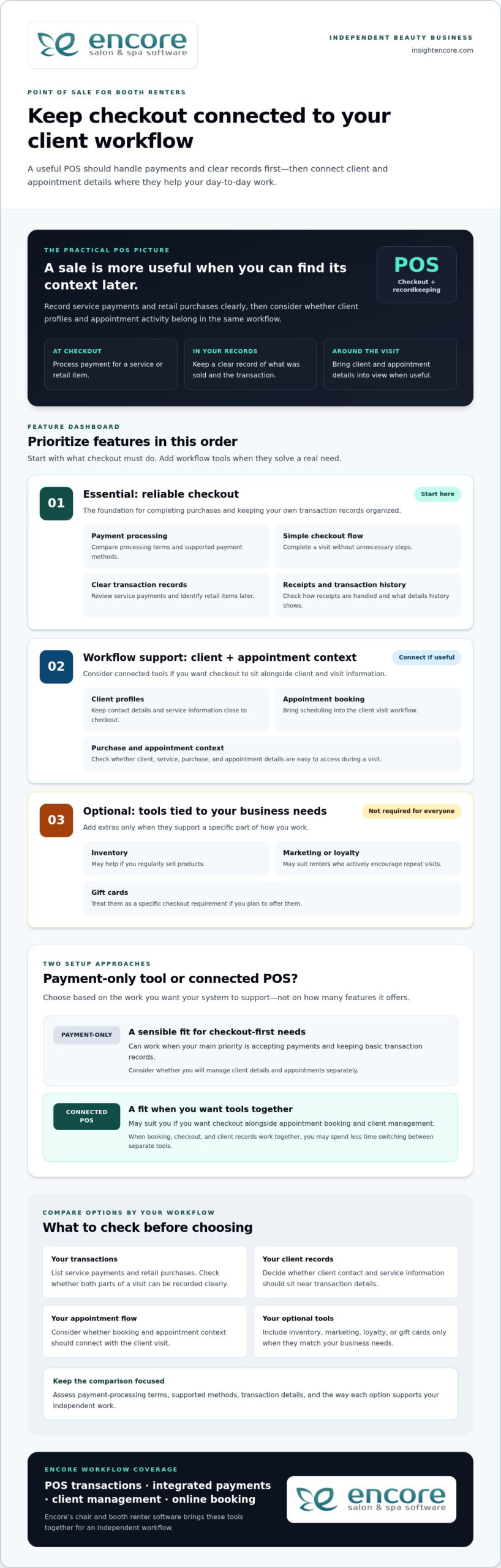
  • Start with the daily tasks your POS needs to support, including checkout and organized transaction records.
  • Choose a point of sale for booth renters that suits an independent workflow instead of adding tools designed mainly for salon-wide management.
  • Compare a payment-only setup with connected software to decide whether combining checkout, client records, and booking would simplify your routine.
  • Map your booking, checkout, client, and product workflows before comparing features, so you can focus on tools you’ll use.
  • Encore’s chair and booth renter software brings POS transactions, integrated payments, client management, and online booking together.

What Does Point of Sale for Booth Renters Need to Handle?

A point-of-sale (POS) system combines the tools and software used to record and complete purchases. For a booth renter, that can mean processing payment after a service, recording a retail sale, and keeping the transaction organized alongside client and appointment activity. A basic payment terminal records a sale; a more connected POS can help make that sale part of a broader client workflow.

POS systems can include more than checkout. The Point of Sale (POS) Systems overview explains how these systems bring together components and functions used to complete transactions. For an independent beauty professional, the practical question is how well those functions support the work around each sale, from recording the service to organizing the next visit.

How a booth renter’s checkout differs from a salon-wide POS

A salon-wide system may be organized around the owner’s view of staff, services, and the business as a whole. A booth renter needs a clear view of their own transactions and client activity. When comparing systems, look for a workflow that lets you identify what was sold and keep relevant information with your own client records. Salon arrangements differ, so focus on the way you manage your own work rather than assuming every business handles checkout the same way.

A booth renter’s POS is a checkout and recordkeeping tool for managing their own client purchases, services, products, and appointment context. This distinction helps you look beyond whether a system accepts payment. The right fit depends on whether it supports your independent workflow.

Which transactions and client interactions should POS support?

Begin by listing the transactions you handle. Your setup should make it possible to process service payments and record retail purchases clearly enough to review later. If a client buys a product during a service visit, consider whether you can record both parts of the sale together or whether you would need to track one elsewhere.

Client and appointment details can add useful context. Consider whether client information can be kept alongside service and purchase activity, and whether appointment details are easy to access during the visit. When checkout, booking, and client records work together, you may spend less time switching between separate tools.

Gift cards may also matter if they’re part of your business. Treat them as a specific checkout requirement, not a must-have for every renter. The goal is a point of sale for booth renters that keeps essential transactions and client activity organized without introducing unnecessary steps.

Which POS Features Matter Most for Booth Renters?

Start with the tasks that happen at checkout. A useful POS should make it straightforward to process a payment, record what the client purchased, and complete the visit without unnecessary steps. Then consider whether client management and appointment booking should connect with checkout. The best point of sale for booth renters supports daily work first; extra tools matter only when they serve a real need.

Core POS checklist: compare payment processing, clear transaction records, a simple checkout flow, client profiles, and appointment context before weighing optional business tools.

Payments, receipts, and transaction records

Payment processing and accurate records are the foundation. A service payment should be easy to enter and review later, and a retail item should be identifiable if it’s part of the same visit. Consider how receipts are handled and whether the transaction history provides the details you need to keep your business records organized.

Compare payment-processing terms, supported payment methods, and the transaction information available for review. These details vary between systems, so assess each option rather than assuming they’re the same. Also consider how integrated credit card processing fits into the checkout workflow you want.

Client management, booking, and business-building tools

Client profiles can keep contact details and service information close to checkout, while online booking can bring appointment scheduling into the client visit workflow. If you’re considering how client records fit into a solo workflow, read this guide to booth renter client management apps.

Other features depend on how you run your business. Inventory tools may be useful if you regularly sell products; automated marketing or loyalty programs may suit renters who actively encourage repeat visits. Gift cards are another option if you plan to offer them. You don’t need every feature. Prioritize tools that solve a specific workflow problem.

  • Essential: payment processing, clear transaction records, and an easy checkout flow.
  • Workflow support: client profiles and appointment booking that connect with your visit process.
  • Optional: inventory, marketing, loyalty, and gift card tools that match your business needs.

Encore’s chair and booth renter software brings POS transactions together with integrated payments, client management, and online booking. Explore Encore for your booth renter workflow as you compare the features that matter to you.

Standalone Payment Tool or Connected Booth Renter POS?

A payment-only tool can be a sensible fit if your main need is accepting payments and keeping basic transaction records. Connected software may suit you better if you want checkout alongside appointment booking and client management. Neither setup works for every renter. Compare how each handles your actual tasks, not just how many features appear on a list.

Workflow area Standalone payment tool Connected booth renter POS
Checkout Focused on processing and recording payments. Can place payment within a broader service and client workflow.
Client records May require a separate client record system. May connect checkout with client profiles.
Booking Appointments may be managed in another tool or process. May bring online booking into the same workflow as checkout.
Reporting Review the transaction information the payment tool provides. May connect transaction activity with other business information.
Business tools Typically focuses on payment needs. May include optional tools such as inventory, marketing, loyalty, or gift cards.

When a payment-only POS may be enough

If you mainly need to accept payment after each service and record the transaction, a focused tool may cover your essentials. You can keep appointments and client notes in separate systems if that arrangement works for you. The trade-off is managing information across those tools, but that doesn’t automatically make the setup unsuitable. Ask yourself how quickly you can find the details you need during a busy day.

When connected salon software may make daily work easier

Connected software can bring related tasks closer together. Booking establishes the appointment, client management helps organize client information, and POS transactions record purchases. If you regularly move between all three tasks, it may be useful to manage them within one broader workflow. Specialized booth renter software supports a setup designed around independent beauty businesses.

An all-in-one platform can feel like too much if it adds steps or tools you won’t use. Keep the comparison practical: start with payments, records, booking, and client details. Then consider extras only when they address a real need, such as tracking products you sell or offering gift cards. A point of sale for booth renters should fit your work, not require you to adopt every available feature.

Encore offers specialized chair and booth renter software with POS transactions, integrated credit card processing, client management, and online booking. Explore Encore’s booth renter software as you consider which workflow best fits your business.
Point of Sale for Booth Renters: A 2026 Buying Guide

How to Evaluate POS Options for Your Booth Rental Business

A useful comparison starts with your actual work, not a feature list. Before choosing a point of sale for booth renters, trace how a client moves from booking to checkout. Note where you currently record payments, client details, and product sales. This simple workflow map helps you identify what should connect and what can stay separate.

A practical five-step POS evaluation checklist

  1. Start with payments and records. List how clients pay, what you sell, and which transaction details you need for your records. Note any payment methods that are essential to your checkout routine.
  2. Map your current workflow. Write down how you handle booking, appointments, client notes, checkout, and product sales. Mark where information moves between tools and where you intentionally keep tasks separate.
  3. Decide what needs to connect. Identify whether you want appointments linked to client profiles, service details available at checkout, or product sales connected to inventory. Focus on links that would make your daily process clearer.
  4. Compare the must-haves first. Check that each option supports your payment and recordkeeping needs. Then assess ease of use and the transaction or business information you can review. Don’t let optional features distract from essentials.
  5. Consider future needs selectively. If you plan to sell retail products, use online booking, or offer gift cards, include those requirements in your comparison. Choose tools that suit your plans rather than judging an option by feature count alone.

Assess cost, setup, and everyday usability

Compare software charges separately from payment-processing terms. Look at what each charge covers and how processing terms fit the transactions you expect, rather than judging a system by one number. Weigh costs against the capabilities you need and the workflow you mapped.

Ease of use matters, too. Think through a typical appointment: Can you find client details, complete checkout, and keep the transaction record without awkwardly switching between tools? Consider the setup steps and whether the available information helps you manage your business day to day. A system should support your routine, not make it more complicated.

Once you’ve identified your priorities, compare them with Encore’s specialized chair and booth renter software, which includes POS transactions, integrated credit card processing, client management, and online booking.

Explore Encore and see whether it fits your booth renter workflow

How Encore Supports a Booth Renter’s POS Workflow

Once you know which tasks your POS needs to handle, look for software designed for independent booth and chair renters. Encore’s specialized chair and booth renter software brings POS transactions together with integrated credit card processing, client management, and online booking. These capabilities let you consider checkout as part of your client workflow, rather than as a separate payment step.

Bring booth renter tasks into a more connected platform

Consider a client’s visit from start to finish. Online booking supports appointment scheduling, client management helps organize client information, and POS transactions record purchases. Bringing these capabilities into a broader platform can help you think through how those tasks fit together during your day. The right fit depends on the workflow you want, not simply the number of tools available.

Encore also includes inventory tracking, automated marketing, loyalty programs, and gift cards. These capabilities may suit you if you sell retail products, want to encourage repeat visits, or plan to offer gift cards. They’re options to weigh against your needs, not a checklist every booth renter must adopt. For a broader look at the platform, visit Encore Salon & Spa Software.

Explore the next step at your own pace

Use the priorities you established to assess Encore: payment processing and transaction records, client management, and booking. Consider which capabilities you’ll rely on regularly and which optional tools match your business plans. This keeps the decision focused on a practical point of sale for booth renters, not features that add complexity without serving your routine.

Encore is part of Syntec Business Systems, founded in 1991. Compare the software’s capabilities with the workflow you mapped, then visit Encore’s booth renter software page to explore the solution.

Try Encore and explore a POS workflow for booth renters

Choose a POS That Fits the Way You Work

The best point of sale for booth renters should make daily business easier to manage, not add complexity. Begin with straightforward checkout and clear transaction records. Then decide whether connecting payments with client management and appointment booking would make your workflow more organized. Inventory tracking, marketing, loyalty programs, and gift cards matter when they support goals you already have.

Encore offers specialized chair and booth renter software with POS transactions, integrated credit card processing, client management, and online booking. As you compare options, focus on which tasks you want to handle in one place and which features you’ll use in your independent business. A practical fit can help you manage client visits and keep important activity organized.

Try Encore and explore software built for booth renters

Start with a clear picture of your workflow and the tasks you want your POS to support. Explore Encore’s chair and booth renter software to see how its connected tools fit those priorities.

Frequently Asked Questions

What is the best point of sale for booth renters?

The best point of sale for booth renters is one that matches how you handle payments, client information, and appointments. If you only need to accept and record payments, a focused payment tool may be enough. If you want checkout connected with booking and client management, consider specialized booth renter software. Encore offers a chair and booth renter solution with POS transactions, integrated credit card processing, client management, and online booking.

Do booth renters need their own POS system?

Not every booth renter needs a separate POS, but you do need a clear way to process and track the transactions you manage. Your setup could be a payment-only tool or a broader system that supports client and appointment tasks, too. Consider how you handle checkout and records now, and whether your current process gives you a clear view of your own business activity.

Can booth renters use salon software to manage payments and clients?

Yes. Salon software can help booth renters manage payments and client information, especially when it supports independent workflows as well as salon operations. Encore offers specialized chair and booth renter software with POS transactions, integrated credit card processing, and client management. Online booking is also available within the platform, bringing appointment tasks into the software workflow.

What features should a booth renter look for in POS software?

Prioritize payment processing, clear transaction records, and an easy checkout flow. Then consider whether client profiles and appointment booking should connect with checkout, so visit details are easier to manage. If you sell products or offer gift cards, inventory and gift card tools may be useful. Marketing and loyalty features are optional; include them when they serve your business goals, not simply because they’re available.

How much does point-of-sale software for booth renters cost?

Costs vary by software plan and payment-processing terms, so compare those separately rather than relying on a single headline price. Consider whether a system includes the functions you need, such as client management or booking, or whether you’d use separate tools for those tasks. Review each option’s pricing details and weigh them against your workflow. A higher feature count doesn’t automatically mean better value.

Can a booth renter use one system for appointments and payments?

Yes. Some salon software combines online booking and POS transactions, allowing you to manage appointment activity and record payments within one platform. This may suit you if you prefer to keep those tasks connected. Encore’s software includes online booking and POS transactions, alongside client management and integrated credit card processing. Whether one system is right for you depends on how you prefer to organize your daily work.

Is integrated credit card processing useful for independent stylists?

Integrated credit card processing can be useful if you want payment handling as part of a broader business-management workflow. It brings payment processing alongside POS transactions, so you can manage these tasks within the same platform. Compare processing terms and supported payment methods as part of your decision, since they can vary. Encore includes integrated credit card processing in its software for chair and booth renters.

Disclaimer

This article is general in nature and may contain errors, please verify all claims with your sales rep

Categories
Uncategorized

Tattoo Studio Software: How to Choose the Right System in 2026

The tattoo studio software with the most features isn’t necessarily the best fit for your shop. If a system doesn’t match how you schedule artists, manage client information, and handle transactions, it can add steps instead of taking work off your plate.

When artist availability is hard to coordinate or client and payment details are spread across separate tools, it can be difficult to know which features matter most. Start with your studio’s day-to-day workflow, not a long list of capabilities.

This guide shows how to compare tattoo studio software against the tasks your team actually handles, from booking and client management to payments and inventory. You’ll learn what to assess for solo artists and multi-artist shops, which tattoo-specific features to verify, and how to look beyond the subscription when comparing options. By the end, you’ll have a practical way to narrow the field and choose a platform that supports your artists and clients without unnecessary complexity.

Key Takeaways

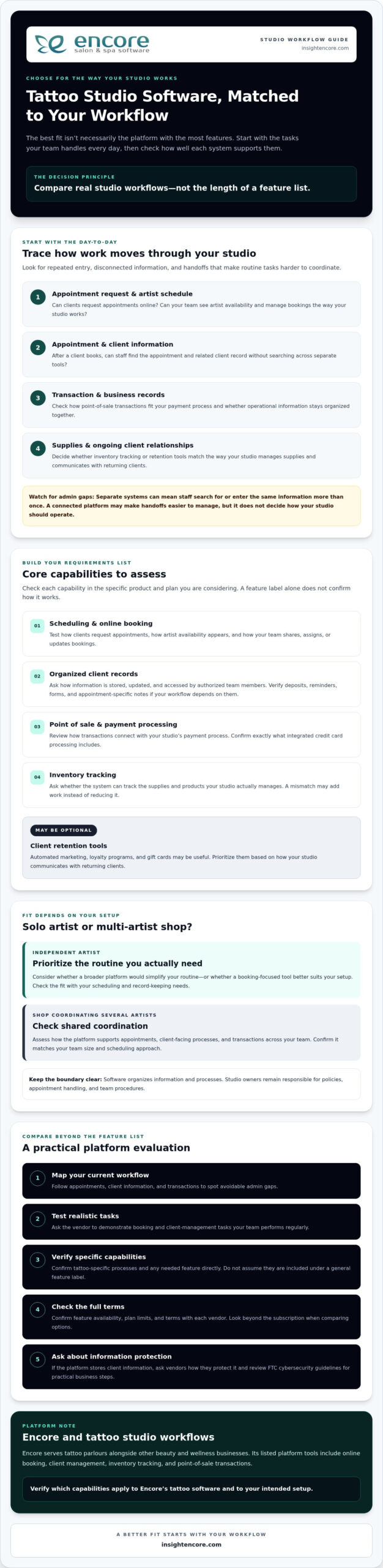
  • Map how appointments, client details, and transactions move through your studio to find avoidable admin gaps.
  • Use scheduling, records, payments, inventory, and client retention to define your essential tattoo studio software requirements.
  • Compare platforms by how well they support real studio workflows, not by the length of their feature lists.
  • Test realistic booking and client-management tasks, then confirm feature availability, plan limits, and terms with each vendor.
  • Encore may suit studios looking to bring several management tools together. Verify which capabilities are included in its tattoo software offering.

What Tattoo Studio Software Does for Your Day-to-Day Operations

Tattoo studio software helps organize appointments, client information, and business transactions in one place. A booking-only tool mainly handles appointment requests and schedules, while studio management software may also bring together other daily tasks. Capabilities vary by platform, so check exactly what’s included before choosing.

This distinction matters when a studio uses separate systems for artist availability, client details, and transactions. Staff may have to search for or enter the same information more than once. A connected platform can make these handoffs easier to manage, but it won’t determine how your studio should operate.

Which everyday studio tasks can software help organize?

Online booking gives clients a way to request appointments and helps the studio coordinate its schedule. Client management tools organize relevant records in one system, much like a Customer Relationship Management (CRM) system supports organized customer information and interactions. Point-of-sale tools can connect service transactions with business records, keeping operational information together.

Assess how these tasks work together, not just whether each feature appears on a list. After a client books, for example, can staff find the appointment and the related client record without switching between separate tools? Ask the provider to demonstrate that workflow and clarify any plan limits.

Who benefits from tattoo studio management software?

Owners coordinating several artists may value a shared way to manage appointments, client-facing processes, and transactions. Independent artists can consider whether a broader platform would simplify their routine or whether a booking-focused tool better suits their setup. In either case, check that the system fits your team size and the way you handle scheduling and records.

Software organizes information and processes. It doesn’t set studio policies or deliver tattoo services. Owners remain responsible for decisions such as how appointments are handled and what procedures the team follows. If a system appears to support a particular policy or tattoo-specific process, verify that capability directly rather than assuming it’s included.

Encore serves tattoo parlours alongside other beauty and wellness businesses. Its listed platform tools include online booking, client management, inventory tracking, and point-of-sale transactions. Check which capabilities apply to its tattoo studio software and your intended setup on the tattoo studio software page.

Tattoo Studio Software Features: Build Your Essential Requirements List

Build your requirements list around your studio’s actual workflow, not the platform with the longest feature list. Core capabilities to assess include scheduling and online booking, organized client records, point-of-sale transactions and payment processing, and inventory tracking. Retention tools such as automated marketing, loyalty programs, and gift cards may also be useful. Confirm which features are available in the specific product and plan you’re considering.

Scheduling and client records for tattoo appointments

Start with the schedule. Can clients request appointments online? Can your team see artist availability and manage bookings in a way that matches current studio processes? A feature name alone won’t show whether a system can handle how your artists share, assign, or update bookings. Ask vendors to demonstrate the scheduling tasks your team performs regularly.

Next, look at client records. Check how information is stored, updated, and accessed by authorized team members. If your workflow depends on deposits, reminders, forms, or appointment-specific notes, verify each capability directly. Don’t assume these are included under a general “client management” or “booking” label.

Payments, inventory, and client retention tools

Review how point-of-sale transactions fit with your studio’s payment process, and confirm what integrated credit card processing includes. For inventory, ask whether the system can track the supplies and products your studio actually manages. A tool that doesn’t match your inventory needs may add work instead of reducing it.

Automated marketing, loyalty programs, and gift cards can support client retention, but may be optional rather than essential. Prioritize them based on how your studio communicates with returning clients. If the platform stores client information, ask vendors how they protect it and review the FTC cybersecurity guidelines for practical steps businesses can take to safeguard information.

  • Scheduling: online booking, artist availability, and appointment visibility.
  • Client management: organized records and appropriate team access.
  • Transactions: point-of-sale tools and integrated payment capabilities.
  • Inventory: tracking that fits the supplies and products you manage.
  • Retention: marketing, loyalty, and gift card tools if they suit your client approach.

Rank each requirement as essential, useful, or optional. A studio coordinating several artists may prioritize shared scheduling, while an independent artist may focus on straightforward booking and accessible client records. Encore lists online booking, client management, inventory tracking, point-of-sale transactions, integrated credit card processing, automated marketing, loyalty programs, and gift card management among its platform capabilities. Check which are included in the tattoo software offering and applicable plan, then explore Encore as a possible fit.

How to Compare Tattoo Studio Software Beyond the Feature List

A broad platform can bring daily tasks together, but only if it fits the way your studio works. Separate tools may suit a team with an established process, while connected tools may reduce repeated data entry and switching between systems. Neither setup is automatically better. Compare each option against your real workflows, and confirm feature availability, limits, and plan applicability with the vendor.

Area What to compare
Workflow fit Can the system support how your studio assigns, updates, and tracks work?
Booking Can clients request appointments, and can staff view and manage schedules as needed?
Records Can authorized team members find and update relevant client information?
Transactions Do point-of-sale and payment capabilities match how the studio handles transactions?
Inventory Can you track the supplies and products your studio actually manages?
Support What help is available, through which channels, and during what hours?

What should a tattoo studio ask during a software demo?

Ask the vendor to demonstrate a typical client journey, from requesting an appointment to finding the client record and handling the transaction. Make the walkthrough practical: ask how staff find information during a working day, who can access or update it, and what happens when an appointment changes. Get clear answers about included features, implementation steps, data handling, and available support. A direct walkthrough can reveal gaps that a feature list won’t.

How can you assess cost and value without guessing?

Compare each provider’s current plan details, included features, limits, and transaction fees where applicable. Don’t assume a feature is included just because it appears on a general product page. Ask which plan supports your needs and whether additional charges apply.

Then consider the operational trade-off: could consolidating tools reduce duplicate work, or would separate systems remain easier for your team? Assess value against the tasks staff perform without assuming a particular financial return. For Encore’s current plan details, review the Encore pricing information, and confirm which capabilities apply to its tattoo studio software offering.

Tattoo Studio Software: How to Choose the Right System in 2026

A Practical Checklist for Choosing Tattoo Studio Software

Use a consistent process to compare platforms before moving appointments or client records. A focused evaluation helps you determine whether tattoo studio software fits your studio’s routines, rather than relying on a feature list or polished demo alone.

  1. Map your current workflow. Write down how clients book, how artists manage their schedules, and where client records are kept. Note repeated admin tasks, handoffs, or moments when staff have to search across tools. Include tattoo-specific needs, such as deposits or forms, as items to verify with vendors rather than assumed features.
  2. Rank what matters. Sort requirements into essential, useful, and optional. Ask artists and staff what slows them down and what information they need to find quickly. Review current records and processes too, so you understand what may need to move or change.
  3. Shortlist platforms. Compare providers against your priorities, team size, and daily tasks. Review Encore platform features alongside other vendors’ information, and confirm that any required capability applies to the specific product and plan you’re considering.
  4. Test realistic tasks. Use the same sample workflow for every shortlisted platform, such as handling an appointment request, finding a client record, updating details, and completing a transaction. Ask staff to try the steps and assess whether they can find the information they need without unnecessary detours.
  5. Confirm the terms. Ask each vendor about data migration, onboarding, available support, feature limits, and contract terms. Clarify what your team needs to prepare and which records or processes may require manual attention during a changeover.

Make the evaluation practical

A feature may sound useful but still be awkward in daily use. During a demo or trial, ask staff to complete the same tasks they handle at the studio, then gather their feedback. Can they follow the workflow and find and update the right information? Does the system support the process your studio wants, or would the team need to change how it works?

Before switching, check that current records are organized and identify what should be transferred, retained, or reviewed. A clear view of existing processes makes it easier to ask specific questions and plan the transition. The right choice should meet your priorities without adding features or complexity your studio won’t use.

Explore Encore for your studio

Is Encore Tattoo Studio Software a Fit for Your Business?

Encore is a management platform for beauty and wellness businesses, including tattoo parlours. It may be worth considering if you want to assess several everyday studio tools together rather than evaluate booking in isolation. The fit depends on whether the available features match your team’s workflow, not simply on how many capabilities the platform lists.

Which Encore capabilities may support a tattoo studio?

Encore lists online booking, client management, inventory tracking, and point-of-sale transactions among its platform capabilities. Other listed tools include integrated credit card processing, automated marketing, loyalty programs, and gift card management. These may be relevant to studios reviewing appointment coordination, client records, transactions, stock, and client retention.

Confirm which capabilities are included in the tattoo studio software offering and the plan you’re considering. If your process depends on a specific tattoo-related feature, such as digital forms, deposits, appointment reminders, artist-level access, or particular reporting, ask Encore directly whether it’s available and how it works. Don’t assume a capability is included based on a general feature description.

For product-specific details, review Encore tattoo studio software. Use your list of essential workflows to assess whether the listed tools address your needs, and ask for clarification wherever the details aren’t clear.

How can you take the next step with confidence?

Before exploring the trial, write down your must-have tasks and questions. These might include how your team handles booking requests, updates client records, tracks inventory, and processes transactions. Compare those workflows with the capabilities available in the tattoo offering. A clear checklist helps you focus your evaluation and identify what still needs confirmation.

Ask about feature availability, plan details, onboarding, data handling, and support arrangements that matter to your studio. If the fit isn’t clear, ask more questions rather than rushing a decision. Evaluate the platform against your real process and involve the people who will use it.

If you’re ready to explore the next step, see how Encore’s trial fits your studio’s requirements.

Try Encore and explore whether it fits your studio

Choose a System That Works for Your Studio

The strongest choice isn’t the platform with the longest feature list. It’s the one that supports your real workflow, helps keep bookings and client records organized, and fits your team’s needs. Before deciding, test routine tasks and confirm which features are included in the product and plan you’re considering.

Encore offers tattoo studio software for tattoo parlours, with listed platform capabilities including online booking, client management, inventory tracking, and point-of-sale transactions. Integrated credit card processing and automated marketing are also listed offerings. Check directly which capabilities are available for your studio and whether they support your tattoo-related requirements.

Use your checklist to explore the option at your own pace. A practical evaluation can help you move forward with confidence.

Try Encore and explore whether it fits your studio

Frequently Asked Questions

What is tattoo studio software?

Tattoo studio software helps organize business tasks such as appointment booking, client management, and transactions. Some platforms also offer inventory tracking, marketing, loyalty programs, or gift card tools. Capabilities vary by provider, so compare them with your studio’s daily workflows. A useful system should support the way you manage appointments and records, rather than require changes to essential studio practices without a clear reason.

What features should tattoo studio software include?

Start with the tools your studio needs most, such as online booking, artist scheduling, client records, and payment handling. Inventory tracking and client-retention features may also be useful. Ask vendors to confirm any tattoo-specific requirements, including forms, deposits, reminders, or session notes. Don’t assume a feature is included just because a platform serves tattoo businesses. Check availability, plan limits, and how each tool works in your actual workflow.

Can tattoo studio software manage multiple artists?

Some platforms may support team scheduling and shared studio workflows, but capabilities vary by product and plan. Ask the vendor to demonstrate how your team can view artist availability, manage appointments, and access client information. If you need artist-level permissions or reporting, confirm those details directly. Before choosing, test a realistic multi-artist scenario, such as updating an appointment and checking that the right team members can find the relevant information.

How does online booking help a tattoo studio?

Online booking gives clients a way to request or schedule appointments without relying entirely on back-and-forth messages. It can also help keep booking information organized for the studio. Check whether the system supports your preferred process, including consultations or other steps before an appointment is confirmed. Ask how booking requests are reviewed, updated, and confirmed, and whether the workflow suits the way your artists manage availability.

Is tattoo studio software suitable for a solo tattoo artist?

It can suit a solo artist if its booking, client-management, and payment tools match the way you work. You may not need every team or inventory feature, so compare the available capabilities and plan details against your actual requirements. Consider whether you can manage the system independently and find the client information you need. A simpler tool may be a better fit if a broader platform adds steps you won’t use.

How much does tattoo studio software cost?

Pricing depends on the provider, included capabilities, and applicable plan terms. Compare current vendor information rather than relying on generic estimates. Ask whether setup, payment processing, or optional features involve additional charges for your situation, and review contract terms before deciding. Look beyond the headline price to consider which tools are included and whether they support your workflow. That gives you a clearer basis for comparing value.

How do I switch to tattoo studio software?

Start by documenting your current booking process, client records, and routine business tasks. Shortlist platforms, ask vendors about data migration and onboarding, then test realistic workflows before committing. Confirm what information can be transferred, what your team needs to do, and what support is available. Review your records before the change and plan staff training. Choose a transition time that gives your team room to adjust and address questions.

Disclaimer

This article is general in nature and may contain errors, please verify all claims with your sales rep
Categories
Uncategorized

Integrated Card Processing: 2026 Guide for Salons & Spas

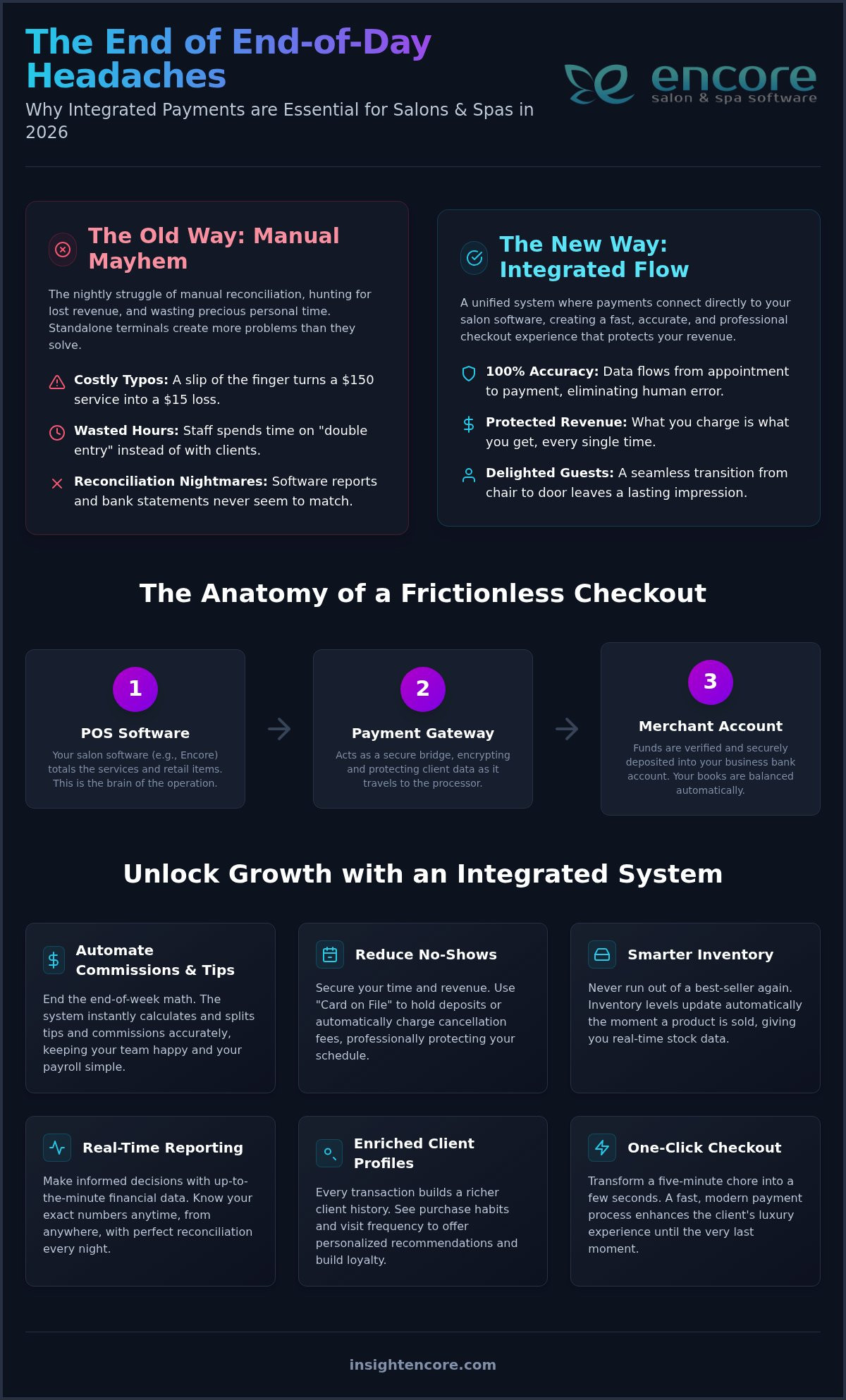
Imagine it’s 8:00 PM on a Friday. Your last client just left with a glowing smile, but your workday is far from over. You’re stuck at the front desk, cross-referencing paper receipts with your appointment book to find a missing twenty dollars. It’s a common frustration that eats into your personal time and drains your energy. Switching to Integrated Credit Card Processing changes this narrative entirely. By connecting your payments directly to your Encore Salon Software, you remove the manual entry that leads to costly typos and lost revenue.

You deserve a business system that works as hard as you do. Reconciling bank statements shouldn’t be a nightly chore, and managing booth renter commissions shouldn’t require a calculator and a prayer. This 2026 guide shows you how to transform your checkout into a fast, error-free process that delights your guests and empowers your team. We’ll explore how automatic syncing provides the real-time financial reporting you need to stay in control, allowing you to focus on your craft while your software handles the heavy lifting.

Key Takeaways

  • Learn how a fully unified system allows data to flow directly from your booking software to the payment terminal, ending the need for manual price entry.
  • Discover why Integrated Credit Card Processing is the key to eliminating checkout errors and protecting your hard-earned revenue in 2026.
  • See how automating tip distribution and commission calculations can turn your end-of-day reconciliation from a headache into a few simple clicks.
  • Understand the critical differences between slow standalone terminals and the instant, accurate results of a modern integrated setup.
  • Find out how connecting your payments to tools like automated marketing and inventory management creates a seamless, profit-driving machine.

What is Integrated Credit Card Processing for Salons and Spas?

Integrated Credit Card Processing isn’t just a technical upgrade; it’s the heartbeat of a modern salon. In 2026, the beauty industry has moved firmly into the era of unified commerce. This means every part of your business, from your inventory to your payroll, needs to speak the same language. When your payments are integrated, the data flows directly from your appointment book to the terminal. There’s no manual typing and no room for error. It creates what we call a "Frictionless Checkout." Your guests enjoy a smooth transition from the chair to the door, feeling pampered until the very last second instead of waiting for a clunky machine to reset.

The Core Components of an Integrated System

To understand how this works, think of it as a team of three specialists working in harmony. When these components are part of a single ecosystem, the transaction happens in one fluid motion, keeping your data safe and your records clean:

  • The POS Software: This is the brain of the operation. Systems like Encore Salon & Spa Software track exactly which services were performed and which retail items were added to the checkout.
  • The Payment Gateway: This acts as a secure digital bridge. It encrypts and protects sensitive client data while it moves between your salon and the financial networks.
  • The Merchant Account: This is where your funds are held after being verified by the Payment Processor before they’re deposited into your business bank account.

Why Standalone Terminals are Costing You More Than You Think

Many owners stick with standalone terminals because they seem simple, but they often carry hidden costs that drain your profits. The biggest culprit is the "Double Entry" tax. If your team spends even two minutes per client re-typing totals into a separate credit card machine, you’re losing hours of productive time every single week. This manual process is where human error thrives. A simple typo can turn a $150 color service into a $15 loss, and those small mistakes add up to significant revenue gaps over a year.

Then there are the reconciliation headaches. When your software reports don’t match your bank statements, you’re forced to spend your evenings hunting for missing dollars. Switching to Integrated Credit Card Processing removes this stress, ensuring your books balance perfectly every single night. You gain peace of mind knowing that what happened in the treatment room is exactly what’s reflected in your bank account.

Key Benefits of Connecting Payments to Your Management Software

Connecting your booking software to your payment terminal does more than just move money. It builds a foundation of trust between you, your staff, and your clients. In 2026, client expectations are higher than ever, and they want a checkout experience that’s as professional as the service they just received. By adopting Integrated Credit Card Processing, you’re not just buying a tool; you’re gaining a partner that handles the tedious math so you don’t have to.

One of the biggest headaches in a busy salon is the end-of-week math. Manually calculating commissions or splitting tips across multiple stylists is a recipe for exhaustion. An integrated system does this instantly. Every time a payment is processed, the software knows exactly who performed the service and how much they earned. It’s accurate, transparent, and keeps your team happy. This level of automation is one of the primary Benefits of Integrated Payments, as it transforms your financial data from a static list into a dynamic business asset.

No-shows are a profit killer that no owner should have to tolerate. With "Card on File" features, you can secure deposits or charge cancellation fees automatically. It’s a professional way to protect your time and ensure your revenue remains predictable. Every transaction also enriches your client profiles. You’ll see exactly what they bought and when they last visited without digging through old files. This data allows you to offer personalized recommendations that feel like a concierge service rather than a sales pitch. An integrated system also makes it effortless to redeem and track gift cards at checkout — and if you’re looking to boost revenue during slow seasons, exploring salon gift card promotion ideas can be a powerful complement to your payment strategy.

Streamlining the Client Checkout Journey

The final minutes of a client’s visit should be spent discussing their next appointment, not waiting for a terminal to wake up. One-click checkout turns a five-minute process into a few seconds. If they bought a shampoo, your inventory levels update the moment the card is swiped. You don’t have to remember to count bottles later. Digital receipts add another layer of convenience, sending a professional summary straight to their inbox while capturing valuable data for their client profile. If you’re ready to see how these features can simplify your daily routine, you can see the platform in action.

Booth Renter and Multi-Merchant Support

Managing a salon with independent contractors used to mean having a desk cluttered with multiple terminals. That’s no longer the case. Modern systems allow for multi-merchant support within a single software interface. Whether you need to manage separate accounts or handle complex split payments between the house and the stylist, the technology handles the routing. Your independent contractors get paid faster, and you avoid the liability of mixing funds. It’s a cleaner, more professional way to run a shared space.

Integrated vs. Non-Integrated: A 2026 Comparison

Choosing between a standalone terminal and Integrated Credit Card Processing is about more than just hardware. It’s a choice between a fragmented business and a unified one. In 2026, the gap between these two methods has become a chasm. Standalone systems require you to act as a human bridge between your terminal and your software. Integrated systems, however, create a seamless loop where every transaction is a building block for your success. It’s the difference between guessing your numbers and knowing them with absolute certainty.

  • Speed of Transaction: Standalone terminals are notoriously slow. You have to wake the machine, type the amount, and wait for a response. Integrated systems are instant. The moment you hit "checkout" in your software, the terminal is ready.
  • Data Accuracy: Manual entry is risky. One slip of a finger can turn a $200 service into a $20 loss. With auto-sync, the data is perfect every time because it’s pulled directly from the client’s service record.
  • End-of-Day Reporting: Manual reconciliation can take hours of stressful hunting for missing receipts. Integrated systems generate auto-reports in minutes, giving you back your evenings.

The ROI of Integration

The return on investment for moving to a unified system is immediate. Think about the labor hours your front desk saves. If you save just three minutes per checkout across twenty clients a day, that’s an hour of productivity regained. Over a month, that’s thirty hours you can reinvest into client care or staff training. Faster checkouts also improve the atmosphere at your front desk. When the payment process is quick and easy, your team has more mental space to focus on re-booking the guest, which is the most effective way to grow your revenue. By unifying your provider model, you often reduce the complexity of merchant service fees, making your overhead more predictable.

Security and PCI Compliance in 2026

Protecting your clients’ sensitive data is a heavy responsibility. In 2026, tokenization is the gold standard for security. Integrated systems use this technology to replace card numbers with unique digital "tokens." This means your salon never actually stores the card data, which significantly reduces your business’s PCI liability. These systems also provide valuable insights into the financial health of the business by creating a robust paper trail for every swipe. This level of detail is your best defense against chargebacks. If a dispute arises, you have a complete record of the transaction, the service performed, and the client’s signature all in one place. Using Encore Salon & Spa Software ensures that these security protocols are built into your daily workflow, giving you and your guests total peace of mind.

Integrated Card Processing: 2026 Guide for Salons & Spas

How to Switch to an Integrated Payment Provider

Making the switch to Integrated Credit Card Processing shouldn’t feel like a high-stress technical overhaul. It’s a straightforward journey toward better organization. Unlike generic providers that leave you to figure out the migration on your own, a supportive partner ensures the transition is smooth and predictable. By following a clear roadmap, you can move from a fragmented system to a unified one without missing a single appointment.

  • Step 1: Audit your volume. Review your peak hours and decide if you need a fixed countertop station or mobile devices for chair-side checkout.
  • Step 2: Verify compatibility. Confirm that your chosen hardware works natively with your salon management software to ensure data flows correctly.
  • Step 3: Apply through your partner. Working with your software provider to set up your merchant account often speeds up approval and simplifies support.
  • Step 4: Configure and train. Set up your 2026-ready terminals and walk your team through the new, faster checkout steps.
  • Step 5: Test and go live. Run a small transaction to confirm the payment syncs perfectly with your client records before your first guest of the day arrives.

Choosing the Right Hardware for Your Space

In 2026, flexibility is king. You might prefer a robust countertop terminal for a traditional front desk setup; however, many modern spas are moving toward mobile handheld devices. These allow for a luxury, chair-side experience where the guest never has to stand in a line. Ensure your hardware supports the latest contactless standards, including tap-to-pay and mobile wallets. Future-proofing your desk with devices like the latest Clover or Dejavoo models ensures you stay ahead of consumer trends and security requirements.

Minimizing Downtime During the Transition

Timing is everything when updating your core systems. We recommend making the switch on your slowest day of the week, typically a Monday or Tuesday. This gives your team a quiet environment to get comfortable with the new flow. If you’re worried about existing contracts, ask your new provider about "white-glove" setup services. They can often help you navigate the paperwork and ensure you aren’t hit with unnecessary penalties. This hands-on assistance transforms a potentially stressful day into a moment of business empowerment.

Start your seamless transition today

Unlocking Growth with Encore’s Integrated Processing

Encore Salon & Spa Software creates a unified business ecosystem where every piece of information works together to support your success. In 2026, successful owners know that a payment is never just a transaction; it’s a data point that can fuel your entire operation. When you choose Integrated Credit Card Processing, you’re choosing a system that talks to every other part of your business. For instance, connecting your payments directly to your Inventory Management System ensures that retail stock levels stay accurate in real time. If a client buys a luxury serum during checkout, the system deducts it from your stock immediately, preventing the frustration of accidental overselling.

This connectivity extends to how you keep your chairs full. Your transaction data is the primary engine for your Automated Marketing & Loyalty Programs. Because the software tracks exactly what a client spends and when they last visited, it can trigger personalized rewards or "we miss you" emails at the precise moment they’re most effective. This isn’t just about taking payments; it’s about building a cycle of loyalty that drives consistent profit without extra effort from your team.

What truly makes Encore the preferred partner for 2026 is our human-centric support. We understand that moving to a new system can feel like a big leap. We don’t just give you a login and leave you to figure it out. Instead, we act as a dedicated mentor, offering professional confidence and reassuring empathy at every step. We’re committed to transparency and accessibility, ensuring you always have a human ally to help you overcome daily hurdles.

Beyond the Transaction: Data-Driven Decisions

Your payment history is a roadmap for future growth. By turning transaction data into actionable insights, you can quickly identify your most profitable services and your highest-spending clients. This clarity allows you to focus your energy where it matters most. You can also automate re-booking reminders based on the last transaction date, ensuring your schedule stays packed. This level of organized control gives you the freedom to focus on your artistry while the software manages the logistics.

Ready to Streamline Your Business?

The transition to a more efficient salon or spa starts with a conversation. We invite you to get started with a personalized demo of Encore to see how our unified approach can work for you. You can explore our features to see the full potential of integration in your specific environment. If you’re ready for a solution that’s as unique as your brand, contact our team for a custom quote. We’re here to help you transform your business into a seamless, profit-driving machine.

Step Into the Future of Salon Management

You’ve seen how the right technology can turn a chaotic front desk into a calm, profit-driving hub. By adopting Integrated Credit Card Processing, you aren’t just upgrading a terminal; you’re reclaiming your time and protecting your hard-earned revenue. The days of manual data entry and nightly reconciliation headaches are over. Instead, you gain a unified ecosystem where payments, inventory, and marketing work in perfect harmony.

At Syntec Business Systems, we’ve been serving the beauty industry since 1991. We provide all-in-one management for salons, spas, and pet groomers who want to work smarter, not harder. You’ll never have to navigate these changes alone because our dedicated human support team is always a phone call away. We’re here to ensure your peace of mind is as prioritized as your business growth.

Ready to eliminate checkout stress? See how Encore’s Integrated Credit Card Processing works for you.
It’s time to stop chasing missing receipts and start focusing on the artistry that makes your business special. We’re excited to help you build the seamless, professional experience your guests deserve in 2026 and beyond.

Frequently Asked Questions

What exactly is integrated credit card processing?

It’s a system where your payment terminal and your salon management software communicate directly. This means when you check out a client in your software, the total is automatically sent to the card reader. You don’t have to type the price in manually. Switching to Integrated Credit Card Processing is a unified way to handle transactions that keeps your data accurate and your checkout lines moving quickly in 2026.

Do I need to change my bank account to use integrated processing?

No, you usually don’t need to switch your business bank account to start using an integrated system. The technology works with your existing banking setup by depositing your daily totals directly into your current account. While you’ll need a compatible merchant account, our team helps you set this up so the transition is seamless. Your funds continue to flow exactly where they always have without any banking disruptions.

How much does it cost to switch to an integrated system?

The cost of switching depends on your salon’s specific hardware needs and transaction volume. While we don’t quote specific rates, you’ll want to consider the investment in 2026-ready terminals like Clover or Dejavoo models. Many owners find that the time saved on manual reconciliation and the reduction in human error more than offsets the setup costs. We provide custom quotes to ensure you get exactly what your business needs.

Is integrated processing more secure than a standard terminal?

Yes, integrated systems offer superior security through advanced features like tokenization and end-to-end encryption. Instead of storing sensitive card numbers on your local computer, the system replaces them with secure digital tokens. This significantly lowers your PCI liability and protects your clients’ data from potential breaches. It is a professional standard that gives both you and your guests total peace of mind during every single transaction you process.

Can I use integrated payments if I have booth renters?

Absolutely, modern systems are designed specifically to handle the complexities of booth renters and independent contractors. You can manage multiple merchant accounts within a single software interface. This allows payments to be routed correctly to either the house or the individual stylist. It simplifies split payments and ensures everyone gets paid accurately without the need for multiple, cluttered terminals sitting at your front desk or in your styling stations.

How does integrated processing help with my salon’s accounting?

It transforms your accounting by providing a perfect sync between your sales and your bank deposits. Every transaction is automatically recorded in your software, which eliminates the need for manual data entry at the end of the night. You’ll have access to real-time financial reporting that shows your most profitable services and retail items. This level of organization makes tax season much less stressful for you and your accountant.

What happens if my internet goes down during a transaction?

Most modern 2026-ready hardware includes an offline mode or cellular backup to keep your business running during an outage. This allows you to continue accepting payments securely, which are then processed once your connection is restored. You won’t have to turn clients away or resort to old-fashioned paper receipts. It is a reliable safeguard that ensures your profit-driving machine never stops, even when the local internet connection has a hiccup.

Will I still be able to accept Apple Pay and Google Pay?

Yes, our Integrated Credit Card Processing hardware is fully equipped to handle all modern contactless payment methods. This includes Apple Pay, Google Pay, and tap-to-pay credit cards. Providing these options is essential for meeting client expectations in 2026. It makes the checkout experience faster and more convenient for your guests, reinforcing your image as a modern business that prioritizes client comfort and the latest secure payment technology.

Disclaimer

This article is general in nature and may contain errors, please verify all claims with your sales rep