More than one barbershop doesn’t have to mean separate systems and scattered stock counts. A barbershop POS with inventory can help you manage multiple locations when it keeps each shop’s appointments, walk-ins, client records, sales, and stock organized while showing you the bigger picture across the business.
The system also needs to fit how your team works: barbers need a clear way to serve booked clients and walk-ins, take payments, and record product sales while keeping track of inventory. The right setup can make these daily tasks easier to manage, whether you run one shop or several.
This article explains how a POS can coordinate locations, bookings, client profiles, payments, and inventory, as well as what affects software and hardware costs. You’ll also learn which features help connect the front desk, barbers, and stockroom, so you can identify what your barbershop needs before choosing a system.
Key Takeaways
- Keep walk-in and appointment sales organized by recording services and retail products together, with stock updates tied to product sales.
- Assess software, payment processing, and hardware as separate cost factors to understand what shapes your POS budget.
- Use client profiles and visit history to keep haircut preferences accessible and support more personal service.
- Connect online bookings with checkout so appointments and payments flow through a more consistent process.
- Consider how cloud-based access can help you view sales and inventory across your shop’s operations.
Can a barber shop POS handle both walk-ins and appointments?
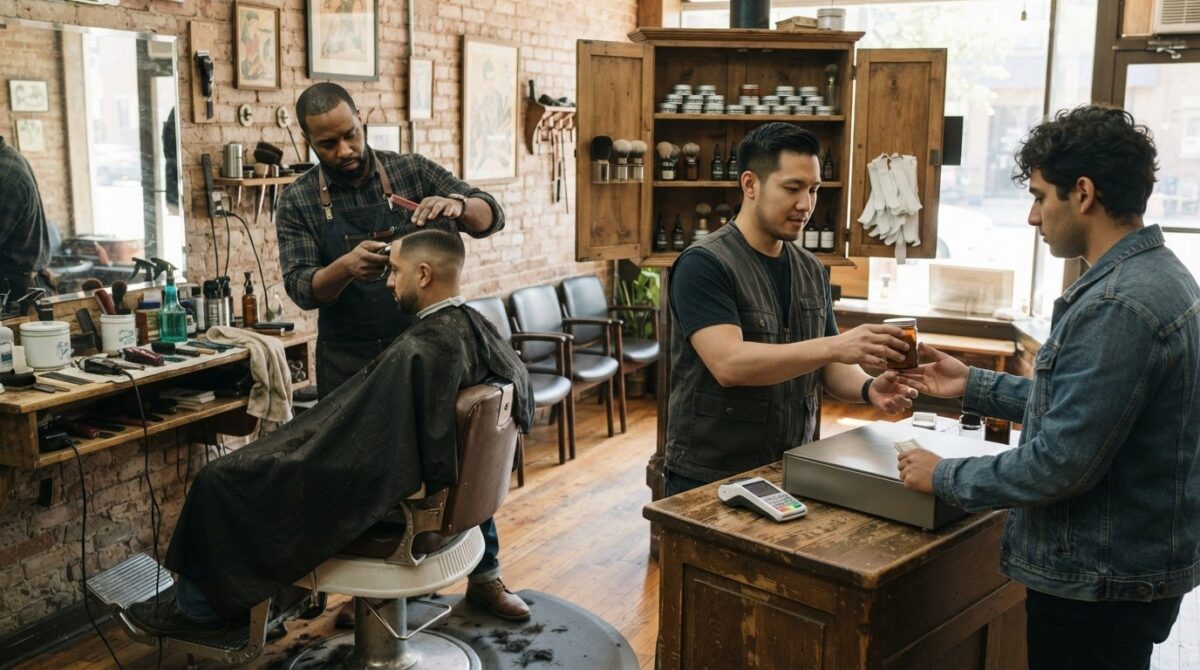
Yes. A POS can bring walk-ins, scheduled services, retail sales, and staff activity into one checkout workflow. For example, a barber can add a walk-in haircut, record a client’s shampoo purchase, and assign both transactions to the correct shift. Booked appointments can follow the same payment process, keeping daily sales and stock records connected. A barbershop POS with inventory links checkout records to product quantities.
A useful barbershop POS combines appointment handling, service sales, product tracking, and staff reporting. Prioritize a clear checkout that separates haircut revenue from retail sales, links product sales to inventory, and records which barber served each client. The right fit depends on how well these tasks work together, not on the length of a feature list. A barbershop POS with inventory should make these connected tasks straightforward for your team.
Set up each service and product as a separate item. Add the haircut name, service price, and assigned barber; then create product entries with names, prices, and starting stock. A shop carrying 50 grooming products, for example, can use categories such as styling products and beard care to make checkout and inventory searches easier.
After setup, record each retail sale through the POS rather than adjusting stock separately. When a barber sells a styling product, the transaction should link the sale to the item and reduce its available quantity. Low-stock alerts can flag products at a chosen threshold, helping staff notice items that need attention before the shelf is empty.
Stock visibility matters during a busy shift. A POS should show current quantities and product sales, so staff can distinguish a fast-moving item from one that rarely sells. Many barbershops carry fewer than 100 retail product SKUs, making a simple list with clear names and categories practical. A count and adjustment process can correct records after damaged or missing stock.
Can barbershop POS software manage appointments, staff commissions, and inventory together? Yes, when it connects appointment and checkout records with staff and product sales. A barber’s shift report can show service revenue, retail sales, and tips. Per-barber totals also give owners useful figures for commission or payroll calculations.
For U.S. retail sales, receipt and tax settings should reflect the shop’s applicable requirements. A POS can record the product, price, tax field, payment method, and transaction details on the receipt. Exact settings depend on the shop’s jurisdiction, so one setup should not be treated as universal.
Before moving to a new POS, organize product names, prices, stock counts, service records, and staff assignments. Review sample migrated records against the old system, then reconcile the opening stock count. These steps can catch duplicate products, mismatched prices, or missing sales history before the new system becomes your main record.
POS software, payment processing, and hardware costs
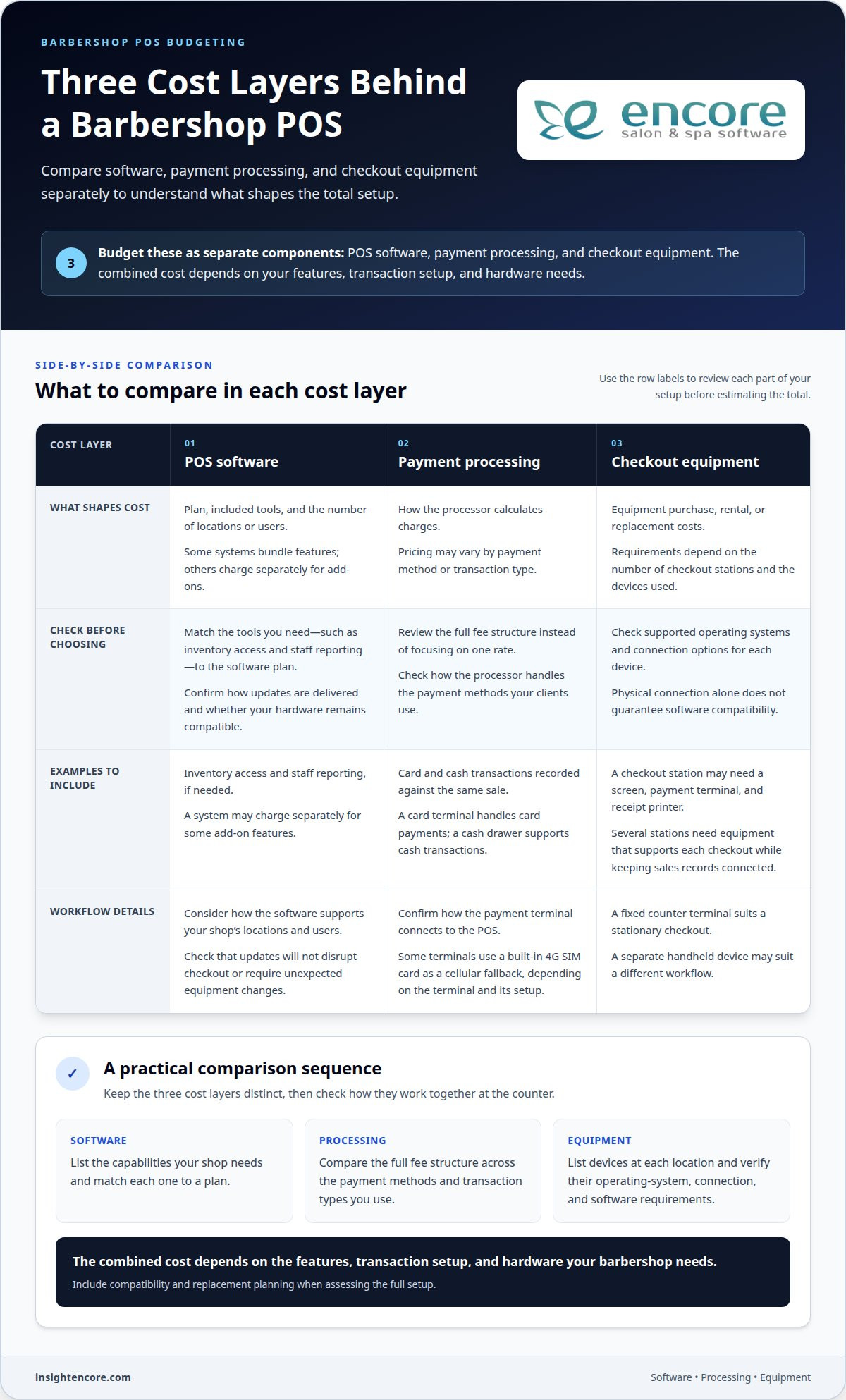
Budget for three components: POS software, payment processing, and checkout equipment. The combined cost depends on the features, transaction setup, and hardware your barbershop needs.
Hardware Compatibility and Requirements
Compatibility determines whether your POS software can work with the devices already at the counter. Check the software’s supported operating systems and connection options for each terminal, receipt printer, cash drawer, or barcode scanner. A device may connect physically but still require compatible software or configuration.
Start by listing the equipment each location uses, then match each item to the system’s requirements. For example, a shop with one checkout station may need a screen, payment terminal, and receipt printer. A shop with several stations needs equipment that supports each checkout while keeping sales records connected.
Payment Options and Hardware Setup
Payment options shape the checkout equipment and processing setup. A card terminal handles card payments, while a cash drawer supports cash transactions. The POS should record both against the same sale. Confirm how the terminal connects to the POS and whether the setup supports the payment methods your clients use.
Some POS hardware terminals use built-in 4G SIM cards as a cellular fallback. That feature may help maintain connectivity when the primary network is unavailable, depending on the terminal and its setup. Also consider where each device sits: a fixed counter terminal suits a stationary checkout, while a separate handheld device may suit a different workflow.
Payment processing fees affect how much card revenue the shop retains. Review how the processor calculates charges, including whether pricing varies by payment method or transaction type. Compare the full fee structure rather than focusing on one rate. Include equipment purchase, rental, or replacement costs when planning the total setup.
Software costs can depend on the plan, included tools, and number of locations or users. Some systems bundle features, while others charge separately for add-ons. List the capabilities you need, such as inventory access and staff reporting, then match each one to the software plan before estimating ongoing costs.
Updates matter, too. Find out how software updates are delivered and whether compatible hardware can keep working after an update. A mismatch can disrupt checkout or require equipment changes, so include compatibility and replacement planning in your budget.
For a clearer view of the full setup, compare the software plan, payment processing terms, and hardware requirements side by side. This makes it easier to see which combination fits your shop’s checkout and revenue needs. Explore a POS setup for your barbershop.
Client profiles, haircut preferences, and visit history
A client profile gives barbers a quick reference before each service. Keep practical details together, such as the client’s preferred cut, guard length, beard shape, and product preferences. For example, a note that someone prefers a low taper and a specific styling paste can help the barber prepare without relying on memory or searching old messages.
Use consistent fields so records remain useful across appointments and staff shifts. After each visit, add the service date, barber, service performed, and relevant preference notes. Separate lasting preferences from one-time requests: “keep the top longer” may guide future cuts, while “shorter for an event” may apply only to that appointment. Clear notes help make service more consistent for returning clients.
Visit history can also support thoughtful rebooking. If a client usually returns every 3 weeks, the POS can help the team recognize that cadence and suggest a suitable next appointment. A barber can mention the timing at checkout, while a rebooking reminder can prompt the client later. The interval is a starting point, not a substitute for the client’s own preference.
Automated marketing works best when it reflects a client’s service history. For example, a shop could group clients who book beard trims and send them relevant updates instead of sending every offer to every profile. Keep messages tied to useful services or products, and use clear audience groups. This helps the shop communicate purposefully while keeping appointment reminders separate from promotions.
Loyalty points can connect repeat visits with a simple reward structure. Decide which purchases or services earn points, how clients can see their balance, and which redemption options are available. For example, a client might earn points on a haircut and later apply them toward a qualifying retail purchase. Clear checkout rules help staff explain the program consistently.
Profiles can support useful reporting without turning every client interaction into a sales pitch. Review return visits, popular services, and retail purchases by client or service category. A barber’s history can help owners understand performance alongside commission records, while keeping client preferences separate from payroll data. Use reports to spot patterns, then adjust appointment availability or product recommendations accordingly.
To build reliable records, start with the fields staff need at checkout: contact details, haircut preferences, visit notes, and appointment history. Train the team to update these fields after each service, correct outdated notes, and avoid duplicate profiles. A consistent routine keeps client records practical, so the next barber can find relevant details before an appointment.
Integrated booking and payment processing
A connected shop POS system can carry an appointment from online booking through checkout and into sales records. The key is linking the calendar, payment workflow, and accounting records without entering the same transaction twice.
When a client books online, the appointment should appear in the shop’s calendar and remain identifiable at checkout. Staff can select it, confirm the service, add retail items, and process one transaction. For a walk-in, they can create a sale without a prior booking. Both workflows should record the service, products, payment method, and responsible barber.
Deposits and cancellation policies need clear handling. A POS that stores a client’s card can collect an upfront deposit or process a cancellation or no-show fee. The booking flow should make the applicable terms clear before the client confirms. At checkout, staff should be able to see whether a deposit has been paid and apply it to the final balance.
Accounting connections can reduce duplicate entry between daily sales and bookkeeping records. Check which details transfer, such as service revenue, retail sales, taxes, tips, refunds, and payment fees. For example, a daily summary that separates card and cash totals can help an owner reconcile deposits against the shop’s sales report. Keep each transaction traceable by date and location.
Booth renters may need payment ownership to be recorded separately from shop employees. A useful setup identifies who performed each service and who receives its payment, rather than treating all revenue as one total. Agree on how shared retail sales, booking deposits, refunds, and tips appear in records. Clear categories make reporting easier when a barber rents a chair but the shop processes checkout.
Split payments can help when clients divide a bill across payment methods or people. For instance, a client might pay part by card and the rest in cash. The POS should keep the full sale together while recording each payment separately. That makes the receipt, drawer reconciliation, and payment report easier to understand.
Card processing fees directly affect the net revenue from each sale. Barbershop card processing fees typically range from 1.5% to 3.5% per transaction, depending on card type. Review how fees apply to refunds, deposits, and different payment methods. If a system supports surcharges, it should disclose them before payment and show them as a separate receipt line item.
Before choosing a setup, map one appointment, one walk-in, and one booth-renter transaction from booking to accounting. This simple walkthrough can reveal duplicate entry or unclear ownership. Explore integrated card payment processing as part of that workflow review.
Cloud-based sales and inventory access
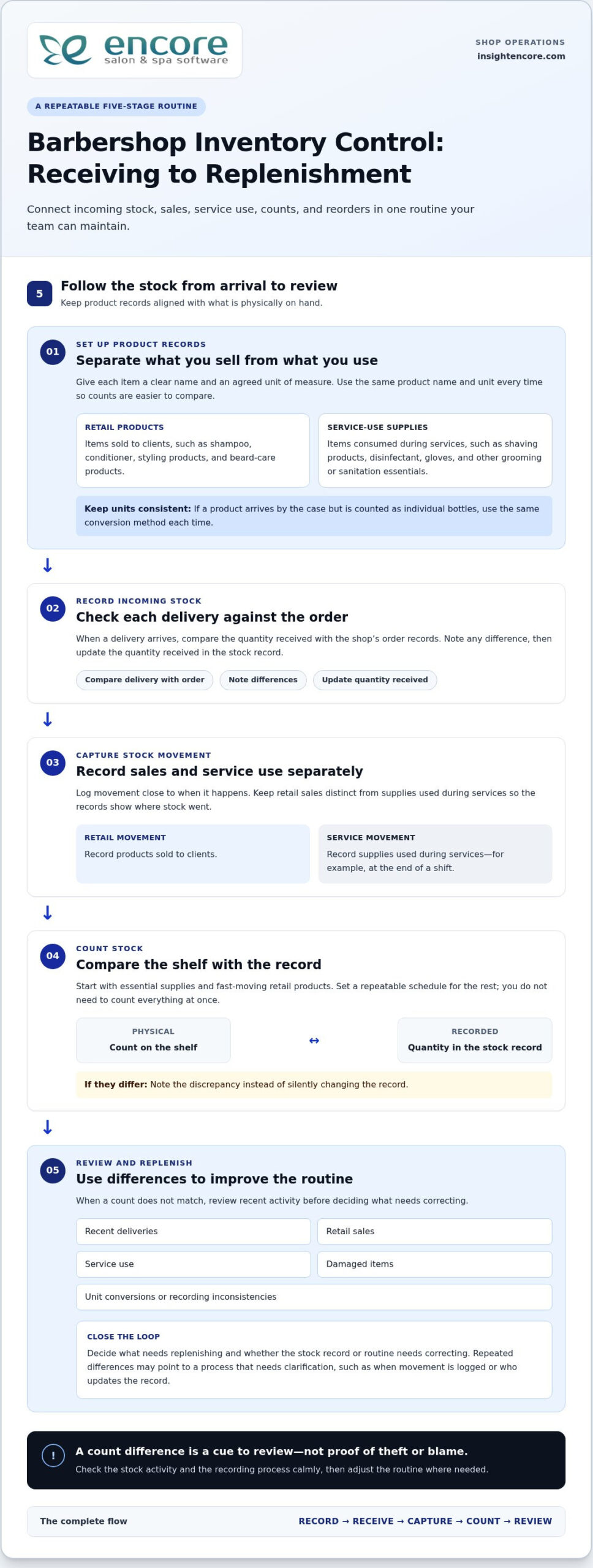
A cloud-based POS can bring sales and stock records into one shared view across locations. For an owner with two shops, reviewing each register’s activity in one place can make it easier to spot differences in product movement and daily sales.
Keep records separate by location before using combined reports. Each sale should include its shop, date, items, and payment details, so managers can distinguish one location’s activity from another’s. For example, if one shop sells more beard-care products, location-specific records can help show whether the pattern reflects local demand or a stock transfer.
Access controls matter, too. Give each team member the access needed for their role, such as recording a sale or reviewing a report. A manager responsible for both locations may need broader visibility than a barber using checkout. Clear permissions keep routine register tasks separate from administrative changes.
For inventory, establish a consistent process for recording deliveries, sales, returns, and adjustments. If a shipment arrives at one shop, record where the items were received before updating available stock. If products move between locations, document both the outgoing and incoming quantities. This creates a traceable record instead of relying on manual notes or memory.
Cloud-based reporting can help owners review sales without collecting separate end-of-day summaries from each register. Compare a location’s service revenue, retail sales, and payment totals for the same period. If a report shows an unexpected change, use its transaction details to identify whether it came from a product sale, refund, or other recorded activity.
Some cloud functions depend on network access. Cloud-based POS systems need connectivity for real-time calendar synchronization and secure remote EMV payment clearing. An internet disruption can affect current calendar updates or remote payment processing. Plan a clear staff procedure for recording transactions during interruptions and reconciling them when service returns.
Hardware setup affects how consistently each shop records activity. Use compatible checkout devices at each location and keep the register workflow consistent. For example, if one shop records product returns under a different category, combined inventory and revenue reports become harder to interpret. Document shared naming and adjustment practices for both teams.
Review a scheduled report regularly and compare it with a physical stock count. Investigate mismatches by checking recent sales, deliveries, returns, and transfers. This routine can help distinguish a data-entry issue from a genuine stock shortage, giving managers a clearer basis for ordering and location-level decisions.
Encore Salon & Spa Software: Inventory Management System
Encore Salon & Spa Software offers an Inventory Management System for barbershops to manage product stock as part of daily operations. Paired with Encore Barber Software, it provides tools for barber businesses, including inventory tracking, client management, bookings, and point-of-sale transactions.
Consider an inventory management system if retail stock, appointments, and checkout records are currently spread across separate systems or require repeated manual updates. It can organize product records alongside everyday shop activity, giving your team a clearer view of sales and stock.
If you’re ready to discuss a setup for your barbershop, contact Encore Salon & Spa Software.
Choose a Setup That Fits Your Next Stage
Choose a barbershop POS with inventory that fits how your team works now and supports your plans for the future. A practical next step is to identify which daily decisions need clearer records, then assess how a system can support those priorities.
Encore Salon and Spa Software offers Encore Salon Software, Encore Spa Software, and Chair/Booth Renter Software. These options serve different business setups, while Encore Barber Software is tailored to barbershop operations. Choose the fit that matches your business model and the workflows you want to bring together.
When you’re ready to explore a system for your shop, take the next step at your own pace.
A thoughtful fit can help your team work with greater clarity and confidence.
Frequently Asked Questions
Can I manage more than one barber shop location?
Yes. Multi-location management can bring separate shop operations into a shared system while keeping each location’s records identifiable. Encore offers multi-location management as an add-on. Assign transactions, stock changes, and staff activity to the location where they occurred. That helps you review each shop’s performance without mixing its daily records with another location’s.
Does POS support both registered and walk-in client handling?
Yes. A POS can serve clients with existing profiles and those who arrive without a booking or saved record. For a registered client, staff can pull up the profile and add the service to its history. For a walk-in, they can complete the transaction and create a profile if useful. Consistent name and contact details help prevent duplicate records.
How does barber shop POS software prevent no-show revenue losses?
Appointment confirmations can remind clients of upcoming visits, while deposits collect part of the payment before an appointment. Encore supports appointment scheduling with email and SMS confirmations. Some POS platforms also support saved cards for cancellation or no-show fees. Clear booking terms and reminders help staff manage missed appointments, but can’t ensure every client attends.
What is an integrated barber shop POS system?
An integrated barber shop POS brings related business tasks into one connected platform. For example, appointment scheduling, client records, point-of-sale transactions, inventory tracking, and credit card processing can share operational information. This can reduce duplicate entry between separate tools. Encore’s management software includes these core functions for beauty and wellness businesses, including barber shops.
Can I precisely track grooming product stock through the POS?
Yes, inventory tools can track product quantities and record adjustments as stock is used or sold. Encore’s inventory control includes product levels, partial use, and back-bar products. Those details matter when a shop uses products during services rather than selling every item at retail. Keep product names and stock adjustments consistent so records remain useful for replenishment decisions.
Can a barbershop POS system handle booth rental and commission models?
It can support these arrangements by keeping renter or barber transactions distinguishable in business records. Encore offers Chair/Booth Renter Software, and its employee management includes payroll and commission tracking. Booth rent and commission are different payment arrangements, so record the right basis for each person. Clear staff records help owners understand who performed a service and how its revenue is handled.
Can multiple barbers have separate access levels?
Yes. Staff management can use password-protected data access, allowing shop owners to manage who can view or change records. For example, a barber may need access to their schedule and checkout tasks, while a manager handles broader business records. Set permissions around actual job responsibilities, then review them when staff roles change.
Can my barbers track their daily tips and payroll percentages directly from the POS interface?
A POS can record tips and payroll or commission information, giving managers transaction records for staff reporting. Encore includes payroll and commission tracking in its employee management features. Whether barbers can view specific figures depends on the system’s user access settings. Keep tip records separate from service revenue so reports show each amount clearly.
Disclaimer
This article is general in nature and may contain errors, please verify all claims with your sales rep