window.dataLayer = window.dataLayer || []; function gtag(){dataLayer.push(arguments);} gtag('js', new Date()); gtag('config', 'UA-206511945-1');
Search
Categories
Uncategorized

Salon Owner Dashboard App: A 2026 Buying Guide

What makes the best salon owner dashboard app useful isn’t the number of charts. It’s whether the information helps you decide what to do next. When bookings, client details, inventory, and sales sit in separate tools, it’s harder to get a clear picture of the day. A long feature list doesn’t make the right choice any clearer.

Look beyond booking. A helpful system should make relevant business activity easier to review and connect that visibility with the work you need to manage. To compare options, start with the decisions you make regularly, then identify what information would help you make them. This keeps you focused on what your salon needs, rather than features you may never use.

This guide explains which business information is worth reviewing, how to compare dashboard capabilities, and how to assess whether software fits your daily workflow. We’ll look at booking, client management, inventory, point of sale, and marketing as parts of salon operations. Encore brings these capabilities together for beauty and wellness businesses, so you can evaluate the platform against the way your salon runs, not just its dashboard label.

Key Takeaways

  • Distinguish between reviewing information on a dashboard and the operational tools that record appointments, sales, and client activity.
  • Focus on business signals that help answer real management questions across appointments, clients, sales, inventory, and marketing.
  • Compare each salon owner dashboard app by workflow fit, usability, relevant capabilities, and how it handles everyday salon needs.
  • Test common tasks with the people who will use the system instead of judging it by dashboard design alone.
  • Assess how Encore’s booking, client management, inventory, and point-of-sale capabilities fit your salon’s daily workflow.

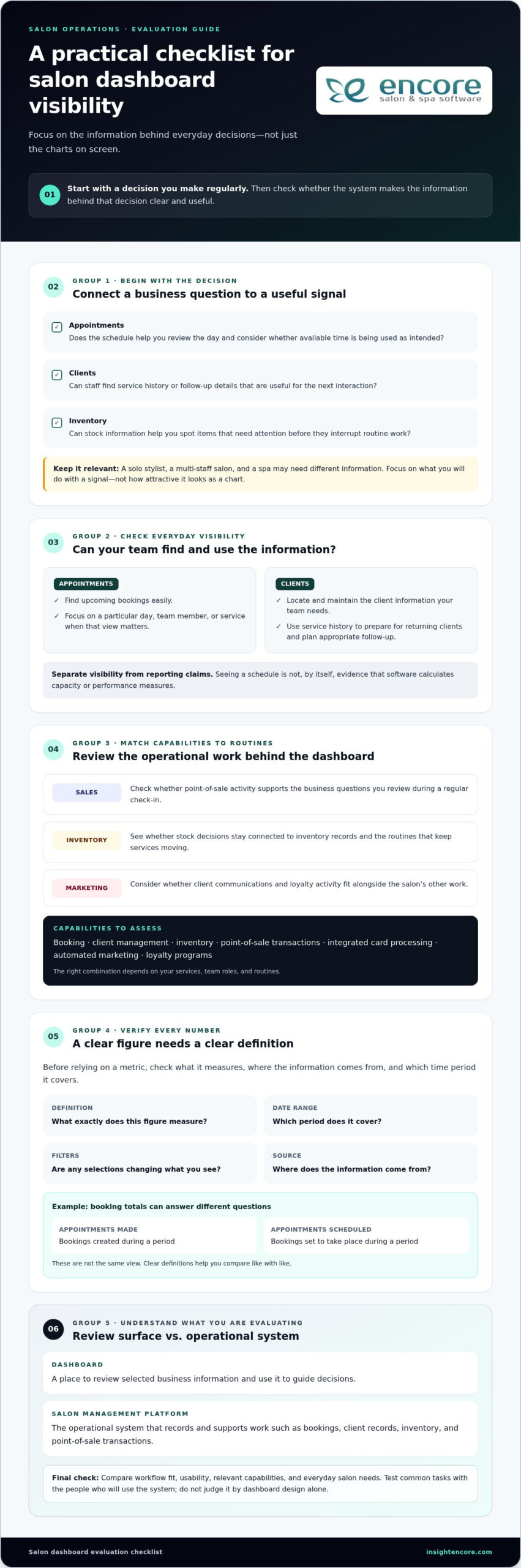
What should a salon owner dashboard app help you see?

A dashboard is a place to review selected business information and use it to guide decisions. It can bring key signals into view, but the charts aren’t the business itself. Appointments, sales, client activity, and stock information first need to be recorded in the underlying software. They’re useful only when those records are accurate and relevant to the questions you’re trying to answer.

A dashboard is the review surface; salon management software is the operational system that records and supports the work behind what you see. That distinction matters when comparing tools. A polished display can look helpful, but it won’t tell you much if the information behind it is incomplete or disconnected from your daily processes.

Which salon decisions can a dashboard support?

Start with decisions you make repeatedly, then identify the business activity that could inform them. Appointment information, for example, can help you review the day’s schedule and consider whether available time is being used as intended. A useful signal prompts a next question, such as whether the schedule needs attention, rather than encouraging you to react to every change.

Client and inventory information can support other kinds of planning. A client record can help staff review service history before a return visit or plan follow-up. Stock information can help you spot items that need attention before they interrupt routine work. Customer appointment management software covers core functions such as booking and scheduling, which are part of the operational information a salon may want to review.

  • Appointments: What does the schedule suggest about daily capacity and workflow?
  • Clients: What service history or follow-up details are useful for the next interaction?
  • Inventory: Which stock decisions need attention to keep routine services moving?

These are prompts, not a universal scorecard. A solo stylist, a multi-staff salon, and a spa may need different information to make sound decisions. Focus on what you’ll do with a signal, not how attractive it looks as a chart.

Dashboard app or salon management platform: what is the difference?

A dashboard helps you review information. A salon management platform supports the work that creates it, such as managing bookings, client records, inventory, and point-of-sale transactions. Some products combine both roles; others focus on only part of the workflow. Capabilities vary, so look at what each system actually does instead of assuming the word “dashboard” guarantees particular screens, reports, or measures.

Encore is a salon and spa software platform with operational tools for booking, client management, inventory, and point-of-sale activity. Explore its salon software features to see how its workflows fit your business. A salon owner dashboard app is most useful when the information you review connects clearly to the operations your team needs to manage.

Which salon dashboard metrics and capabilities deserve attention?

The most useful information is what helps you make a decision. A salon owner dashboard app may present appointment, client, sales, inventory, and marketing activity, but not every salon needs to review every measure. A solo stylist may focus on upcoming bookings and client follow-up, while a larger team may also review sales activity and stock routines. Start with the questions you need answered, then assess whether the software makes the relevant information clear.

A metric is actionable only when you understand what it measures, where the information comes from, and which time period it covers. Before relying on a number, check its definition, date range, filters, and source. A booking total might refer to appointments made during a period or appointments scheduled to take place during it. Those answer different questions. Clear definitions help you compare like with like instead of reacting to a figure that looks precise but means something else.

Appointment and client visibility

Check how easily you can find upcoming bookings and understand the schedule. Can you focus on a particular day, team member, or service when that view matters to your workflow? Treat this as a usability check, not evidence that the software calculates capacity or performance measures.

Client profiles and service histories can help staff prepare for returning clients and plan appropriate follow-up. Consider whether the information your team needs is straightforward to locate and maintain. If a system includes performance reporting, assess those claims separately from basic appointment visibility, and understand how each reported figure is defined.

Sales, inventory, and marketing visibility

Point-of-sale activity, inventory, marketing, and loyalty programs support different operational questions. You might review sales transactions as part of a regular business check-in, keep stock decisions connected to inventory records, or manage client communications and loyalty activity alongside other salon work. The right combination depends on your services, team roles, and routines. Prioritize capabilities that support those tasks instead of choosing a tool simply because it lists many metrics.

Encore brings booking, client management, inventory, point-of-sale transactions, integrated card processing, automated marketing, and loyalty programs together for beauty and wellness businesses. Explore the salon and spa software features in relation to the work you want to manage. This gives you a practical way to evaluate platform fit without assuming a particular dashboard screen, report, or metric is included.

  • Appointments: Check whether booking information is easy to review in the views your team needs.
  • Clients: Consider how service history supports preparation and follow-up.
  • Sales and stock: See whether transaction and inventory tools fit your regular review routine.
  • Marketing: Assess whether marketing and loyalty activity belongs in the same operational workflow.

Keep your first evaluation focused. Choose a few real management questions, then see whether the system’s available information and tools help you address them. If you’re considering Encore, explore Encore as an option for your salon’s workflow.

How to compare salon owner dashboard apps without getting distracted by feature lists

A long list of features can make every option look capable. A more useful comparison starts with your salon’s actual work: what your team does often, which decisions take time, and where information gets hard to find. Apply the same criteria to each option, including Encore. That keeps your evaluation focused on workflow fit rather than the number of items on a product page.

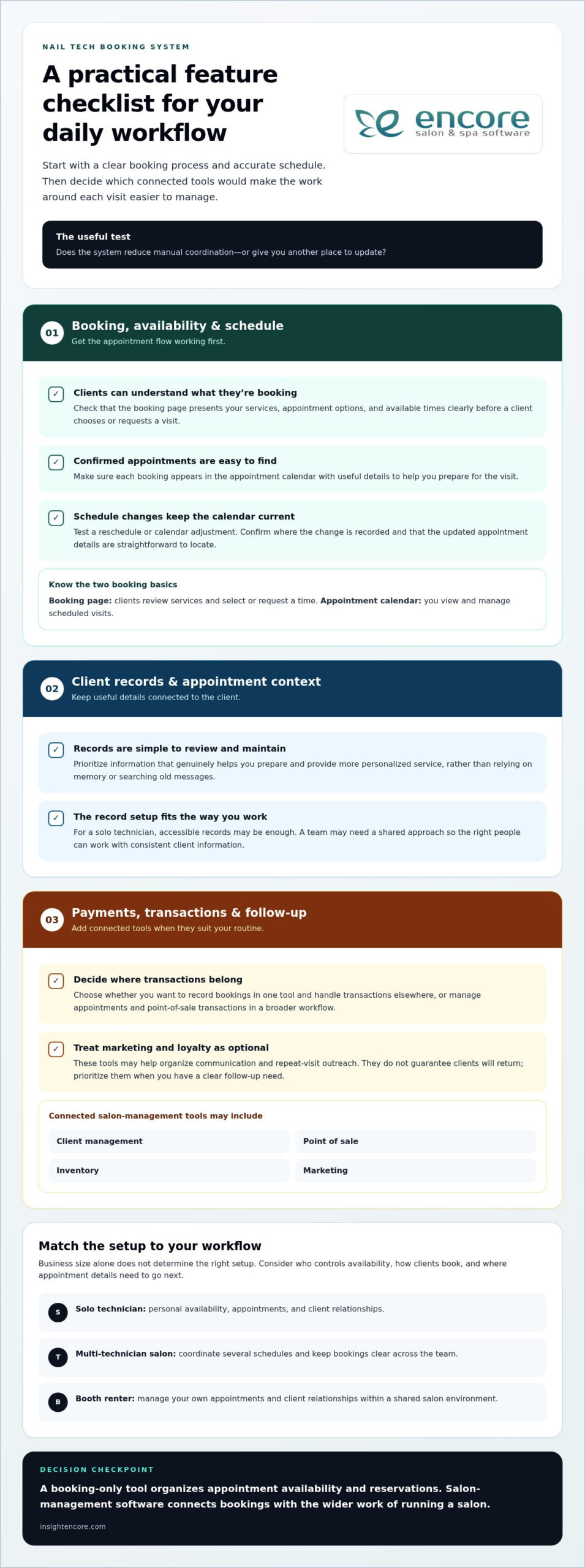
A practical salon software comparison checklist

Choose a simple rating scale, such as “fits,” “partly fits,” and “doesn’t fit,” then use it consistently. Base each rating on a task you can describe, not an assumption about what a feature name means. If staff need several workarounds to complete a routine task, note that too. Ease of use matters because a tool helps only when the people responsible for the work can use it comfortably.

Comparison area What to assess Useful question
Workflow fit Booking, client management, inventory, and point-of-sale tasks Can the team handle its common tasks in a clear sequence?
Usability Steps, navigation, and ease of finding relevant information Can the intended users complete routine work without unnecessary steps?
Relevant features Functions that match your service mix and management needs Does each feature solve a real operational need?
Support expectations Available training, access arrangements, and routine support Do the support and learning options suit how your salon operates?

Distinguish what’s included from what you’re inferring. A system may list booking, inventory, or client tools without showing how they work together in everyday use. Review the product’s capabilities, then test representative tasks where possible. For instance, follow a booking through the steps your team uses and consider how client details or a point-of-sale transaction fit into that process. Don’t treat a dashboard label as proof of specific reports or data connections.

Questions to ask before choosing a dashboard app

As you evaluate each option, identify which records feed each displayed figure or summary, how often information is updated, and how filters or date ranges affect its meaning. Consider how staff access is managed, what learning options are available, and what routine support looks like. These details help you compare both the visible information and the process behind it.

  • Booking: Does the workflow match how appointments are created and managed?
  • Client management: Can staff maintain and use client information as part of service?
  • Inventory: Does stock management fit the salon’s regular routines?
  • Point of sale: Can transactions fit naturally into the client visit?

Use this same checklist to assess Encore Salon & Spa Software. Encore combines booking, client management, inventory, and point-of-sale capabilities, making those operational workflows useful comparison points. A strong fit supports your salon’s real tasks, gives staff a manageable way to complete them, and makes its information clear enough to use with confidence.

Salon Owner Dashboard App: A 2026 Buying Guide

How to assess fit for your salon, team, and daily workflow

A salon owner dashboard app should suit the way your business runs, not just look clear in a product demonstration. Before comparing systems, write down who handles bookings, client records, stock, and transactions, along with the decisions you make most often. Note where information lives now and where routine tasks slow down. This gives you a practical picture of what a new system needs to support.

Match software to your salon’s operating model

Your setup shapes what “good fit” means. A single-location salon may prioritize a straightforward daily schedule, while a team with multiple staff may need clear workflows for shared responsibilities. Independent renters may have different needs around managing their own bookings and client records. Consider your service mix, too. A business that tracks products or handles varied transactions may place more weight on inventory and point-of-sale workflows than one with different priorities.

Map the work from start to finish. For a typical client visit, consider how an appointment is booked, how staff find relevant client details, whether inventory plays a role, and how the transaction is handled. The goal is to identify the steps software needs to support without adding avoidable friction. Encore offers specialized solutions for salons and other beauty and wellness businesses, including chair and booth renters, so compare the capabilities that relate to your operating model.

Plan a realistic evaluation before committing

Choose representative tasks and invite the people who perform them to assess each option using the same criteria. Ask a staff member who handles bookings to walk through a typical scheduling task; have the person responsible for stock or transactions review their routine. Testing consistent tasks makes systems easier to compare fairly, while staff feedback can reveal steps an owner might not notice.

Look beyond the demonstration. Identify which records would need to move, which current habits may change, and what time or guidance the team would need to get comfortable with new routines. These are planning questions, not assumptions about any particular implementation process. Pay attention to everyday usability: can users find the information they need, understand the next step, and complete the task without confusion?

  • Document: List recurring tasks, decision needs, users, and services before evaluating software.
  • Test: Have relevant staff complete realistic tasks rather than judging a system by its dashboard appearance.
  • Plan: Note records, routines, and team learning that may need attention during a transition.

If staff scheduling and capacity are central to your evaluation, define the management question first. For example, decide whether you want to understand how scheduled time relates to your team’s work, rather than assuming a software label tells the whole story. Then assess whether the information and workflow available in each system support that question. The right choice depends on your service mix, users, and daily priorities.

Use the same workflow-based criteria to assess Encore Salon Software alongside other options. Its booking, client management, inventory, and point-of-sale capabilities give you operational areas to consider against your salon’s needs.

Explore Encore for your salon’s workflow

Choose a salon dashboard app that connects visibility with action

The right choice isn’t necessarily the app with the fullest dashboard. Look for a system that helps you understand relevant business information and supports the work your team needs to do next. A salon owner dashboard app is a good fit when its available information, operational capabilities, and day-to-day workflows make sense together for your business.

Before deciding, return to the tasks and questions you identified during your evaluation. Can the system support the workflows your salon depends on? Is the information your team needs understandable? Can the people who will use it manage routine tasks comfortably? These practical points matter more than an impressive feature list or an attractive display.

When an all-in-one salon platform may be a better fit

If booking, client management, inventory, and transactions are spread across separate routines, consider whether a platform covering those operational areas could make everyday work easier to manage. Bringing capabilities together may reduce the need to move between disconnected tools, although the exact workflow depends on how the system’s functions work in practice. Evaluate how each task is handled instead of assuming that “all-in-one” means every process is automatically connected.

Encore offers salon and spa software alongside solutions for barbers, nail salons, tattoo studios, and chair or booth renters. These options give beauty and wellness businesses operational capabilities to assess against their service mix and team structure. Compare the plan details and included capabilities with the tasks your business needs to manage.

Take the next step with a focused product evaluation

Make a short list of essential tasks, such as managing bookings, maintaining client information, handling inventory, or processing transactions. Compare each task with the capabilities available in Encore’s salon software, then consider whether the workflow suits your staff and business priorities. Keep the decision grounded in fit: the best option is the one that addresses your actual needs and is practical for your team to use.

You don’t need to settle every question at once. A focused evaluation of common tasks can help you see whether the platform’s operational tools belong in your salon’s workflow, without assuming specific dashboard screens or reporting functions. Encore has focused on software for beauty and wellness businesses since 1991, offering a platform to consider against your evaluation criteria.

Ready to explore whether Encore fits the way your salon works?

Try Encore now

Turn your next software decision into a practical test

Before choosing a salon owner dashboard app, pick one recurring decision you’d like to handle with more confidence. Write down what information you need, who uses it, and what action might follow. Use that question to guide your product evaluation. This keeps the next step manageable and gives your team a clear way to judge whether a system supports important work.

A useful evaluation doesn’t need to answer every question at once. Start with a familiar task and notice whether the process makes sense to the people who’ll use it. If the information is clear and the workflow suits your salon, you’ll have a stronger basis for deciding whether to explore further. If it isn’t, you’ll know what needs a closer look.

Try Encore now

Focus on the work your salon does every day, then choose software that supports it. Explore Encore’s salon software to evaluate its fit for your team.

Frequently Asked Questions

What should a salon owner dashboard app show?

A salon owner dashboard app should make information for regular decisions easy to find and understand. Depending on your priorities, that could include upcoming appointments, client activity, sales transactions, or inventory records. Check what each figure represents and whether you can narrow it to a useful date range or team member. A focused view is more helpful than a crowded screen full of numbers you won’t use.

How do I choose the best dashboard app for my salon?

Match the software to real tasks your salon handles, then involve the people who perform them. For example, have a receptionist try a booking task and a staff member who handles stock review an inventory task. Compare how each option supports those activities, how easy it is to learn, and whether its capabilities suit your services. The best fit is the one your team can use consistently.

Can a salon dashboard app track appointments, sales, and inventory?

Some salon software includes tools for appointments, point-of-sale transactions, and inventory, but available functions differ by system. Encore Salon & Spa Software includes online booking, point-of-sale transactions, and inventory management capabilities. Before relying on a displayed total or summary, understand which records it uses and what period it covers. For example, distinguish appointments booked during a month from appointments scheduled to happen during that month.

Is a salon dashboard app different from salon management software?

Often, yes. “Dashboard” usually refers to a way to view selected information, while salon management software supports daily activities such as scheduling, managing client records, and processing transactions. Some platforms combine operational tools with ways to review business information, but labels alone don’t establish which functions are included. Look at the tasks the system supports and how information is entered, updated, and accessed by your team.

Do small salons need a business dashboard app?

Not necessarily. A small salon may be able to manage its priorities with a simple schedule and reliable records, while a dashboard can be useful if it saves time finding information or makes a recurring decision easier. Consider how often you need to review appointments or stock. If a separate app adds little value, prioritize software that supports essential work without unnecessary complexity.

Can salon software help me understand business performance?

Salon software can help organize business records, and reporting or analytics tools may help you review performance when the system offers them. Start with a focused question, such as whether a change in bookings coincides with a change in sales. Check that the information covers the same time period and uses consistent definitions. A total doesn’t explain itself; context helps you decide what it means.

What should I check before switching to a salon dashboard app?

Before switching, list the records you rely on, the tasks your team completes, and the information they need during a client visit. Identify what may need to be transferred or re-entered, and decide who will help staff learn the new workflow. Test typical tasks before making a choice, including correcting a booking or finding a client record. A small, realistic evaluation can reveal practical issues that a feature list won’t show.

Disclaimer

This article is general in nature and may contain errors, please verify all claims with your sales rep

Categories
Uncategorized

Point of Sale for Booth Renters: A 2026 Buying Guide

What if checkout could do more than take a payment? The right point of sale for booth renters can connect each transaction with client records and appointment activity, helping you keep your independent business organized without adopting a salon-wide system you don’t need.

As a booth renter, you manage your own clients and daily workflow. A basic payment terminal may feel too limited, while software built around an entire salon may seem like more than you need. A practical setup should make payments straightforward and keep useful client and transaction details easy to find.

This guide covers the POS features that can support independent day-to-day operations, from integrated payment processing to client management and online booking. You’ll learn how to compare payment-only tools with connected software, what to prioritize, and which extras may add complexity without helping your routine. Encore’s specialized chair and booth renter software brings POS transactions, credit card processing, client management, and online booking together. Use the criteria below to assess what fits the way you work.

Key Takeaways

  • Start with the daily tasks your POS needs to support, including checkout and organized transaction records.
  • Choose a point of sale for booth renters that suits an independent workflow instead of adding tools designed mainly for salon-wide management.
  • Compare a payment-only setup with connected software to decide whether combining checkout, client records, and booking would simplify your routine.
  • Map your booking, checkout, client, and product workflows before comparing features, so you can focus on tools you’ll use.
  • Encore’s chair and booth renter software brings POS transactions, integrated payments, client management, and online booking together.

What Does Point of Sale for Booth Renters Need to Handle?

A point-of-sale (POS) system combines the tools and software used to record and complete purchases. For a booth renter, that can mean processing payment after a service, recording a retail sale, and keeping the transaction organized alongside client and appointment activity. A basic payment terminal records a sale; a more connected POS can help make that sale part of a broader client workflow.

POS systems can include more than checkout. The Point of Sale (POS) Systems overview explains how these systems bring together components and functions used to complete transactions. For an independent beauty professional, the practical question is how well those functions support the work around each sale, from recording the service to organizing the next visit.

How a booth renter’s checkout differs from a salon-wide POS

A salon-wide system may be organized around the owner’s view of staff, services, and the business as a whole. A booth renter needs a clear view of their own transactions and client activity. When comparing systems, look for a workflow that lets you identify what was sold and keep relevant information with your own client records. Salon arrangements differ, so focus on the way you manage your own work rather than assuming every business handles checkout the same way.

A booth renter’s POS is a checkout and recordkeeping tool for managing their own client purchases, services, products, and appointment context. This distinction helps you look beyond whether a system accepts payment. The right fit depends on whether it supports your independent workflow.

Which transactions and client interactions should POS support?

Begin by listing the transactions you handle. Your setup should make it possible to process service payments and record retail purchases clearly enough to review later. If a client buys a product during a service visit, consider whether you can record both parts of the sale together or whether you would need to track one elsewhere.

Client and appointment details can add useful context. Consider whether client information can be kept alongside service and purchase activity, and whether appointment details are easy to access during the visit. When checkout, booking, and client records work together, you may spend less time switching between separate tools.

Gift cards may also matter if they’re part of your business. Treat them as a specific checkout requirement, not a must-have for every renter. The goal is a point of sale for booth renters that keeps essential transactions and client activity organized without introducing unnecessary steps.

Which POS Features Matter Most for Booth Renters?

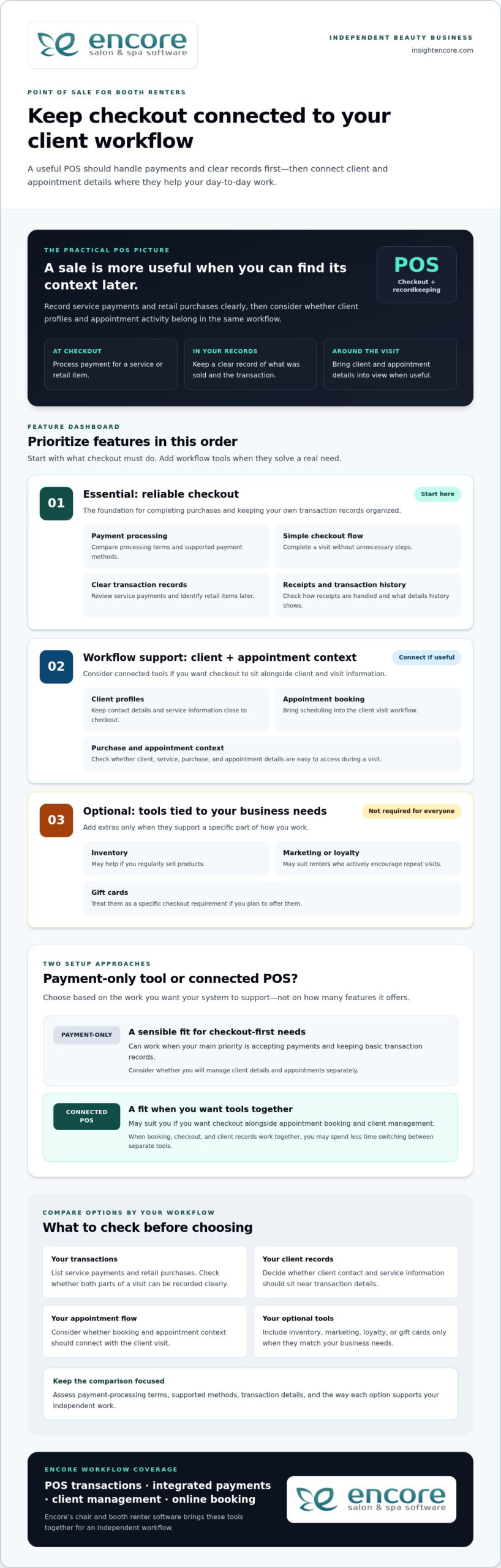
Start with the tasks that happen at checkout. A useful POS should make it straightforward to process a payment, record what the client purchased, and complete the visit without unnecessary steps. Then consider whether client management and appointment booking should connect with checkout. The best point of sale for booth renters supports daily work first; extra tools matter only when they serve a real need.

Core POS checklist: compare payment processing, clear transaction records, a simple checkout flow, client profiles, and appointment context before weighing optional business tools.

Payments, receipts, and transaction records

Payment processing and accurate records are the foundation. A service payment should be easy to enter and review later, and a retail item should be identifiable if it’s part of the same visit. Consider how receipts are handled and whether the transaction history provides the details you need to keep your business records organized.

Compare payment-processing terms, supported payment methods, and the transaction information available for review. These details vary between systems, so assess each option rather than assuming they’re the same. Also consider how integrated credit card processing fits into the checkout workflow you want.

Client management, booking, and business-building tools

Client profiles can keep contact details and service information close to checkout, while online booking can bring appointment scheduling into the client visit workflow. If you’re considering how client records fit into a solo workflow, read this guide to booth renter client management apps.

Other features depend on how you run your business. Inventory tools may be useful if you regularly sell products; automated marketing or loyalty programs may suit renters who actively encourage repeat visits. Gift cards are another option if you plan to offer them. You don’t need every feature. Prioritize tools that solve a specific workflow problem.

  • Essential: payment processing, clear transaction records, and an easy checkout flow.
  • Workflow support: client profiles and appointment booking that connect with your visit process.
  • Optional: inventory, marketing, loyalty, and gift card tools that match your business needs.

Encore’s chair and booth renter software brings POS transactions together with integrated payments, client management, and online booking. Explore Encore for your booth renter workflow as you compare the features that matter to you.

Standalone Payment Tool or Connected Booth Renter POS?

A payment-only tool can be a sensible fit if your main need is accepting payments and keeping basic transaction records. Connected software may suit you better if you want checkout alongside appointment booking and client management. Neither setup works for every renter. Compare how each handles your actual tasks, not just how many features appear on a list.

Workflow area Standalone payment tool Connected booth renter POS
Checkout Focused on processing and recording payments. Can place payment within a broader service and client workflow.
Client records May require a separate client record system. May connect checkout with client profiles.
Booking Appointments may be managed in another tool or process. May bring online booking into the same workflow as checkout.
Reporting Review the transaction information the payment tool provides. May connect transaction activity with other business information.
Business tools Typically focuses on payment needs. May include optional tools such as inventory, marketing, loyalty, or gift cards.

When a payment-only POS may be enough

If you mainly need to accept payment after each service and record the transaction, a focused tool may cover your essentials. You can keep appointments and client notes in separate systems if that arrangement works for you. The trade-off is managing information across those tools, but that doesn’t automatically make the setup unsuitable. Ask yourself how quickly you can find the details you need during a busy day.

When connected salon software may make daily work easier

Connected software can bring related tasks closer together. Booking establishes the appointment, client management helps organize client information, and POS transactions record purchases. If you regularly move between all three tasks, it may be useful to manage them within one broader workflow. Specialized booth renter software supports a setup designed around independent beauty businesses.

An all-in-one platform can feel like too much if it adds steps or tools you won’t use. Keep the comparison practical: start with payments, records, booking, and client details. Then consider extras only when they address a real need, such as tracking products you sell or offering gift cards. A point of sale for booth renters should fit your work, not require you to adopt every available feature.

Encore offers specialized chair and booth renter software with POS transactions, integrated credit card processing, client management, and online booking. Explore Encore’s booth renter software as you consider which workflow best fits your business.

Point of Sale for Booth Renters: A 2026 Buying Guide

How to Evaluate POS Options for Your Booth Rental Business

A useful comparison starts with your actual work, not a feature list. Before choosing a point of sale for booth renters, trace how a client moves from booking to checkout. Note where you currently record payments, client details, and product sales. This simple workflow map helps you identify what should connect and what can stay separate.

A practical five-step POS evaluation checklist

  1. Start with payments and records. List how clients pay, what you sell, and which transaction details you need for your records. Note any payment methods that are essential to your checkout routine.
  2. Map your current workflow. Write down how you handle booking, appointments, client notes, checkout, and product sales. Mark where information moves between tools and where you intentionally keep tasks separate.
  3. Decide what needs to connect. Identify whether you want appointments linked to client profiles, service details available at checkout, or product sales connected to inventory. Focus on links that would make your daily process clearer.
  4. Compare the must-haves first. Check that each option supports your payment and recordkeeping needs. Then assess ease of use and the transaction or business information you can review. Don’t let optional features distract from essentials.
  5. Consider future needs selectively. If you plan to sell retail products, use online booking, or offer gift cards, include those requirements in your comparison. Choose tools that suit your plans rather than judging an option by feature count alone.

Assess cost, setup, and everyday usability

Compare software charges separately from payment-processing terms. Look at what each charge covers and how processing terms fit the transactions you expect, rather than judging a system by one number. Weigh costs against the capabilities you need and the workflow you mapped.

Ease of use matters, too. Think through a typical appointment: Can you find client details, complete checkout, and keep the transaction record without awkwardly switching between tools? Consider the setup steps and whether the available information helps you manage your business day to day. A system should support your routine, not make it more complicated.

Once you’ve identified your priorities, compare them with Encore’s specialized chair and booth renter software, which includes POS transactions, integrated credit card processing, client management, and online booking.

Explore Encore and see whether it fits your booth renter workflow

How Encore Supports a Booth Renter’s POS Workflow

Once you know which tasks your POS needs to handle, look for software designed for independent booth and chair renters. Encore’s specialized chair and booth renter software brings POS transactions together with integrated credit card processing, client management, and online booking. These capabilities let you consider checkout as part of your client workflow, rather than as a separate payment step.

Bring booth renter tasks into a more connected platform

Consider a client’s visit from start to finish. Online booking supports appointment scheduling, client management helps organize client information, and POS transactions record purchases. Bringing these capabilities into a broader platform can help you think through how those tasks fit together during your day. The right fit depends on the workflow you want, not simply the number of tools available.

Encore also includes inventory tracking, automated marketing, loyalty programs, and gift cards. These capabilities may suit you if you sell retail products, want to encourage repeat visits, or plan to offer gift cards. They’re options to weigh against your needs, not a checklist every booth renter must adopt. For a broader look at the platform, visit Encore Salon & Spa Software.

Explore the next step at your own pace

Use the priorities you established to assess Encore: payment processing and transaction records, client management, and booking. Consider which capabilities you’ll rely on regularly and which optional tools match your business plans. This keeps the decision focused on a practical point of sale for booth renters, not features that add complexity without serving your routine.

Encore is part of Syntec Business Systems, founded in 1991. Compare the software’s capabilities with the workflow you mapped, then visit Encore’s booth renter software page to explore the solution.

Try Encore and explore a POS workflow for booth renters

Choose a POS That Fits the Way You Work

The best point of sale for booth renters should make daily business easier to manage, not add complexity. Begin with straightforward checkout and clear transaction records. Then decide whether connecting payments with client management and appointment booking would make your workflow more organized. Inventory tracking, marketing, loyalty programs, and gift cards matter when they support goals you already have.

Encore offers specialized chair and booth renter software with POS transactions, integrated credit card processing, client management, and online booking. As you compare options, focus on which tasks you want to handle in one place and which features you’ll use in your independent business. A practical fit can help you manage client visits and keep important activity organized.

Try Encore and explore software built for booth renters

Start with a clear picture of your workflow and the tasks you want your POS to support. Explore Encore’s chair and booth renter software to see how its connected tools fit those priorities.

Frequently Asked Questions

What is the best point of sale for booth renters?

The best point of sale for booth renters is one that matches how you handle payments, client information, and appointments. If you only need to accept and record payments, a focused payment tool may be enough. If you want checkout connected with booking and client management, consider specialized booth renter software. Encore offers a chair and booth renter solution with POS transactions, integrated credit card processing, client management, and online booking.

Do booth renters need their own POS system?

Not every booth renter needs a separate POS, but you do need a clear way to process and track the transactions you manage. Your setup could be a payment-only tool or a broader system that supports client and appointment tasks, too. Consider how you handle checkout and records now, and whether your current process gives you a clear view of your own business activity.

Can booth renters use salon software to manage payments and clients?

Yes. Salon software can help booth renters manage payments and client information, especially when it supports independent workflows as well as salon operations. Encore offers specialized chair and booth renter software with POS transactions, integrated credit card processing, and client management. Online booking is also available within the platform, bringing appointment tasks into the software workflow.

What features should a booth renter look for in POS software?

Prioritize payment processing, clear transaction records, and an easy checkout flow. Then consider whether client profiles and appointment booking should connect with checkout, so visit details are easier to manage. If you sell products or offer gift cards, inventory and gift card tools may be useful. Marketing and loyalty features are optional; include them when they serve your business goals, not simply because they’re available.

How much does point-of-sale software for booth renters cost?

Costs vary by software plan and payment-processing terms, so compare those separately rather than relying on a single headline price. Consider whether a system includes the functions you need, such as client management or booking, or whether you’d use separate tools for those tasks. Review each option’s pricing details and weigh them against your workflow. A higher feature count doesn’t automatically mean better value.

Can a booth renter use one system for appointments and payments?

Yes. Some salon software combines online booking and POS transactions, allowing you to manage appointment activity and record payments within one platform. This may suit you if you prefer to keep those tasks connected. Encore’s software includes online booking and POS transactions, alongside client management and integrated credit card processing. Whether one system is right for you depends on how you prefer to organize your daily work.

Is integrated credit card processing useful for independent stylists?

Integrated credit card processing can be useful if you want payment handling as part of a broader business-management workflow. It brings payment processing alongside POS transactions, so you can manage these tasks within the same platform. Compare processing terms and supported payment methods as part of your decision, since they can vary. Encore includes integrated credit card processing in its software for chair and booth renters.

Disclaimer

This article is general in nature and may contain errors, please verify all claims with your sales rep

Categories
Uncategorized

How to Manage Multiple Salon Locations: A Practical 2026 Guide

What if adding another salon location didn’t mean adding another set of disconnected schedules, client records, and inventory headaches? Learning how to manage multiple salon locations starts with identifying where daily routines differ and deciding which differences affect the client experience or make it harder to understand how each salon is performing.

You need shared standards, but a single rigid rulebook can overlook what makes each local team and its clients unique. Decide which processes must stay consistent, give managers clear ownership of daily operations, and make key information easier to compare. This approach supports oversight while leaving teams room to serve clients well.

This guide covers practical ways to align core processes, coordinate schedules and client information, manage inventory, and review performance across locations. It also explains how connected booking, client management, inventory, and point-of-sale tools can reduce fragmented workflows. The goal is a repeatable approach that helps you spot differences, ask better questions, and support each location without managing every detail yourself.

Key Takeaways

  • Map how each salon currently handles daily work to see which processes align and where they differ.
  • To learn how to manage multiple salon locations, set shared standards for essential client-facing tasks while leaving room for local decisions.
  • Give each manager clear responsibility for team training and daily follow-through. Focus owner oversight on progress, recurring issues, and decisions that need escalation.
  • Roll out changes in stages. Use a pilot and a small set of relevant measures to learn what works before expanding.
  • Assess whether connected tools for booking, client records, inventory, payments, and other daily tasks can support your operating model across locations.

How to Manage Multiple Salon Locations Without Losing Operational Clarity

Managing multiple salons means coordinating people, processes, client experience, and performance across every site. Growth brings more than extra appointments and staff. It also raises questions about how work gets done, who owns each decision, and how you’ll recognize when a location needs support.

The practical answer to how to manage multiple salon locations is not to make every salon identical. Set shared expectations for essential work, then give managers clear authority to respond to local needs. This helps protect the client experience and makes differences in performance easier to interpret. Comparisons are useful only when every salon defines and records the information in the same way.

This approach can support different ownership structures. For example, a franchise is a particular business growth strategy with defined relationships between franchisors and franchisees. Whatever your structure, clear standards and decision rights help teams work together without relying on the owner to resolve every routine question.

What changes when a salon grows beyond one location?

At one salon, the owner can often spot a scheduling problem, explain checkout steps, or notice stock running low in person. Across locations, those informal check-ins become harder to maintain. One team might confirm appointments the same way each time, while another handles changes differently. Client records may be updated inconsistently, and stock counts may follow different routines.

Not every difference signals a problem. Appointment patterns may vary because clients, services, or local demand differ. The important task is to distinguish local variation from gaps in the process. If teams handle checkout records or inventory counts differently, comparisons may reflect inconsistent routines rather than actual business performance.

Which responsibilities should be clear from the start?

Make decision ownership visible before small issues start bouncing between teams. A simple responsibility guide can show who sets expectations, who handles day-to-day choices, and when an unresolved issue should be escalated.

  • Owner: Sets business priorities, approves core policies, and reviews performance across locations.
  • Central operations lead: Turns shared policies into practical procedures, supports managers, and tracks recurring issues across sites.
  • Location manager: Runs daily operations, coaches the local team, and makes decisions within agreed boundaries.
  • Frontline team: Follows shared steps for client-facing tasks and flags issues that can’t be resolved locally.

Define escalation paths with practical examples. A manager might resolve a routine scheduling exception locally, while a system-wide issue that keeps recurring goes to the operations lead. The owner can then focus on policy or resource decisions instead of being pulled into every daily adjustment.

How to Build Repeatable Processes Across Every Salon Location

Shared processes are easier to teach, follow, and improve. They also help clients receive dependable service, whether they book online, update their details, or pay at checkout. A useful multi-location standard sets a clear minimum, not a script for every interaction.

Build your process playbook in manageable steps:

  1. Map current workflows. Ask each location to describe how it handles booking, client records, checkout, and stock. Note the steps and where teams improvise or rely on individual knowledge.
  2. Select the standards. Agree on essential steps that should be consistent, especially those that affect clients or make information comparable. Leave room for local choices that don’t undermine those essentials.
  3. Assign owners. Name someone responsible for each process. For example, the operations lead can maintain the shared procedure while a location-level owner handles questions and feedback.
  4. Train the teams. Demonstrate the steps in context, then give staff a short checklist they can refer to during a shift.
  5. Review adoption. Observe the workflow, ask where it creates friction, and update the process when teams identify a practical improvement.

Keep procedures in a short, accessible playbook. Include each process’s purpose, steps, owner, and review date. The U.S. Chamber of Commerce offers guidance on creating Standard operating procedures, which can help you write usable instructions instead of lengthy documents that staff struggle to apply.

Which salon processes should be standardized first?

Start with appointment booking, client record handling, checkout, and inventory routines. These tasks connect the client experience with day-to-day business information, so inconsistent steps can lead to avoidable confusion. A shared opening and closing checklist can cover practical handoffs: reviewing the day’s appointments, noting stock that needs attention, and completing routine end-of-day records. Keep service conversations personal. Standardize the necessary administrative steps, not the stylist’s relationship with each client.

How can managers train teams to follow shared processes?

Use realistic examples. Show staff how to record a client update or complete checkout, then give them a chance to practise using the checklist. Each location should have a process owner who can answer questions and flag recurring obstacles. Managers can check adoption through coaching and workflow observations, not just by distributing a policy document. Their feedback can reveal whether a step is unclear, difficult to use, or ready for refinement.

As you define these routines, consider whether connected booking, client management, inventory, and point-of-sale tools can support the same workflow across sites. Explore Encore’s salon management tools to see how a shared system could fit your processes.

How to Balance Central Control and Local Flexibility Across Salons

Consistency doesn’t mean every salon has to operate identically. Set shared expectations for what protects the brand and makes performance comparable, then let managers adapt decisions that depend on local clients, schedules, and team needs. Clear boundaries give staff room to act without turning every choice into a head-office approval.

What should be decided centrally, and what can managers adapt?

Use the examples below as decisions to assess, not universal rules. The right split depends on your services, locations, and operating model.

Shared standards set centrally Choices managers may adapt
Brand-wide principles for presenting services and supporting clients How the team brings those principles to life in local conversations
Definitions for reports, such as what counts as a completed appointment Scheduling choices that respond to local appointment patterns
Core workflows for booking, client records, checkout, and inventory tracking Day-to-day team coordination and shift handoffs
Guidelines for local promotions and shared brand requirements Which locally relevant promotion to run, within those guidelines

For each flexible choice, clarify the boundary: what a manager can decide independently, what needs approval, and what information to record. If a location adjusts a routine to meet a local need, log the reason, decision owner, and review date. This makes flexibility visible and gives you a basis for deciding whether an exception should stay local, become a useful practice for other salons, or prompt an update to the shared process.

How can owners compare locations fairly?

Start with comparable information. Use the same metric definitions and reporting periods across salons, then interpret results in context rather than ranking teams by a single number. A difference in appointment volume, for example, may reflect staffing levels or appointment mix, not simply how well a location is managed. Local demand and operating context matter, too.

Staff utilization can help you understand how scheduled team time relates to appointments and service activity. Before comparing locations, define which time and activity the measure includes, and apply that definition consistently. Then look for patterns: does a result change alongside a different appointment mix, or does it persist across reporting periods? Consistent definitions make comparisons a starting point for useful questions, not a verdict on a manager.

This is a practical part of how to manage multiple salon locations: centralize the rules that create shared understanding, and let managers adapt within clear boundaries. Review logged exceptions alongside performance results so local learning informs decisions without quietly changing the process at each site.

How to Manage Multiple Salon Locations: A Practical 2026 Guide

How to Roll Out Multi-Location Salon Management Step by Step

A clear rollout gives staff time to understand a change, practise it, and share what needs adjustment before it reaches every location. Keep the process manageable: establish a baseline, test one workflow, learn from the pilot, and then expand.

How should a salon group prepare for a new operating process?

Before changing a routine, document how it works today. Note the systems teams use, handoffs between roles, differences between locations, and known bottlenecks. A booking workflow, for example, may look consistent on paper but involve different follow-up steps at each salon. Capture what staff actually do, including where they need to use their judgment.

Next, choose one process to pilot. Look for a workflow with a visible effect on clients or daily operations, but keep the change manageable enough for managers to support. Assign a rollout lead to coordinate instructions, training, questions, and follow-up. Before implementation, explain what’s changing, why it matters, what staff need to do differently, and how they can raise concerns.

How can owners know whether the rollout is working?

Set a baseline before the pilot so you have a fair point of comparison. Choose a small group of measures tied to the process, such as whether required booking steps are completed or whether checkout records are entered consistently. Define each measure clearly, use the same approach throughout the pilot, and compare results with the baseline rather than relying on impressions alone.

Adoption also depends on how the process works in practice. Schedule check-ins with the pilot manager and invite frontline team members to share confusion, extra steps, or client concerns. Keep a simple record of feedback, decisions, and process updates. If the workflow needs adjustment, make the change clear and update the shared instructions before expanding to other salons.

Once the pilot is working as intended, train the next location, name its process owner, and repeat the review. This staged approach to how to manage multiple salon locations builds on tested routines instead of asking every team to adapt to an untested change at once. For a related look at tools that can support shared salon workflows, explore Encore salon software.

See how Encore salon software supports daily workflows

How Salon Management Software Can Support Multiple Locations

Software can help put your operating model into everyday practice. The aim isn’t to add another tool for its own sake. It’s to connect key tasks, reduce repeated data entry, and make the information managers and owners use easier to work with. As you assess options, map each need to a tool, a user, and a routine.

Which software capabilities matter when managing several salons?

Start with workflows that affect clients and daily operations. Use this checklist to connect capabilities to practical needs:

  • Appointment booking: Consider how clients book and how staff review upcoming appointments and changes.
  • Client management: Identify which client details teams need to access and maintain throughout the client journey.
  • Inventory tracking: Map how teams record product movement and identify items that need attention.
  • Point-of-sale transactions: Review how checkout information is recorded and used in routine closeout work.
  • Integrated credit card processing: Consider whether connecting payment processing with checkout fits your payment workflow.
  • Marketing, loyalty, and gift cards: Decide which tools are relevant to your client communication and retention plans.

Encore Salon & Spa Software brings appointment booking, client management, inventory, and point-of-sale tools together. The platform also includes integrated credit card processing, automated marketing, loyalty programs, and gift cards. Match each capability to a process your team needs to perform, rather than adopting features without a clear operational purpose.

How can salon owners evaluate whether a platform fits their workflow?

Make the assessment specific. For each task, name who uses the tool, what information they need, and what should happen next. For example, trace a booking from the client’s first appointment request through team preparation and the completed visit. Then map checkout from the transaction to the records managers use in their work. This helps show where connected tools may reduce handoffs or duplicated work.

Consider managers’ and owners’ needs separately. Managers may need practical access to booking, client, inventory, and transaction information for daily decisions. Owners need consistent definitions and a usable way to review operations across the business. For payments, consider how integrated credit card processing fits into the salon’s checkout routine.

Use this checklist to assess how software could support how to manage multiple salon locations without assuming every location needs identical settings. Encore’s connected salon management tools bring booking, client records, inventory, and payments together to support established workflows.

Explore Encore salon software for your workflows

Build a Stronger, More Connected Salon Group

Knowing how to manage multiple salon locations comes down to creating clarity without limiting local teams. Set repeatable standards for essential processes, give managers clear decision-making responsibilities, and use consistent measures to understand how each location is doing. Roll out changes in stages, listen to staff feedback, and refine the approach as your salons grow.

The right tools can help bring those routines together. Encore combines online appointment booking, client management, inventory tracking, and point-of-sale transactions. Integrated credit card processing, automated marketing, loyalty programs, and gift cards can also support how you serve and retain clients. Map these capabilities to your operating needs and workflows.

Shared standards, thoughtful local flexibility, and connected operations give each team room to serve clients while helping you keep a clearer view of the whole business. Explore Encore’s salon management software to see how its tools can support your multi-location workflows.

Frequently Asked Questions

How do you manage multiple salon locations effectively?

Manage multiple salons effectively by clarifying responsibilities, documenting shared processes, and giving each location manager defined decision-making authority. Standardize essential workflows such as booking, client records, checkout, and inventory routines. Review the same operational measures across locations on a regular schedule. If one salon’s results differ, consider local demand, staffing, and workflow context before deciding what support or coaching may help.

What should be standardized across salon locations?

Standardize core processes that support a dependable client experience and reliable business records. These often include appointment handling, client record practices, checkout steps, inventory routines, and reporting definitions. Document the minimum expected process, name who owns it, and explain where managers can adapt. Set shared requirements without scripting every client interaction or local decision.

How can salon owners compare performance across multiple locations?

Compare locations using a small set of measures with consistent definitions and reporting periods. Depending on your goals, you might review appointment activity, service mix, or inventory movement. Interpret differences alongside staffing, local demand, and each salon’s operating context. A change in service mix, for example, could affect appointment activity. Use comparisons to ask questions and identify where managers need support, rather than treating a ranking as a complete explanation of performance.

How do you keep each salon location consistent without making it feel impersonal?

Keep administrative steps consistent while giving staff room to build genuine client relationships. Shared booking and checkout routines can make the experience familiar without requiring identical conversations or service choices. Be clear about which standards are essential and which decisions managers can adapt to local needs. Feedback from clients and salon teams can show where a process needs adjustment, helping you protect dependable service while preserving each location’s character.

What software do salon groups need to manage multiple locations?

Look for software that supports the workflows your salon group needs to coordinate, including appointment booking, client management, inventory tracking, and point-of-sale transactions. Integrated credit card processing, automated marketing, loyalty programs, and gift cards may also fit your needs. Map each requirement to the people who use it and the process it supports. Encore Salon & Spa Software brings these management capabilities together for beauty and wellness businesses.

How should a salon group roll out new processes across its locations?

Start by documenting current workflows, then choose one process for a manageable pilot. Assign a rollout owner, explain what’s changing and why, and give staff practical training. Set a review date before the pilot begins. Gather feedback from managers and frontline teams, document decisions, and update the process instructions. Once the workflow is clear and workable, expand it to other locations and share what you learned.

How often should salon owners review results from each location?

Choose a review rhythm that lets you respond at the pace your business requires, then apply the same reporting periods and metric definitions across locations. Regular check-ins can help owners and managers discuss emerging trends, operational barriers, and needed support. Avoid drawing conclusions from one unusual period without context. Pair the numbers with manager feedback so each review reflects measurable activity and what’s happening in the salon.

Disclaimer

This article is general in nature and may contain errors, please verify all claims with your sales rep
Categories
Uncategorized

Upgrading Salon Cash Registers to POS: 2026 Guide

A client finishes a service, buys a styling product, and pays at the front desk. If the sale goes through one tool while the appointment, client notes, and stock records live elsewhere, checkout may be complete, but the picture of your business is not. That is the practical question behind upgrading from a cash register to a POS system: what can it connect that your register cannot?

A cash register can record a payment. A salon POS system may also connect transactions with client records, inventory, and payment processing, depending on its features. But changing systems can raise fair concerns about disrupting appointments, slowing checkout, or asking staff to learn a new routine. Your salon needs a setup that supports the way you already work, not one that adds unnecessary steps.

This guide will help you compare day-to-day capabilities, identify the features your salon actually needs, and plan a manageable transition. You’ll see how checkout can fit into the wider client journey, what to check before choosing a system, and how to prepare staff and records before switching. By the end, you’ll have a clearer basis for deciding whether a POS system suits your salon’s checkout and management needs.

Key Takeaways

  • Identify where checkout, client details, product stock, and sales records feel disconnected before deciding whether to upgrade.
  • Compare register and POS capabilities carefully. Client information, inventory tracking, and reporting depend on the system you choose.
  • Make upgrading from a cash register to a POS system more manageable by documenting your current workflow and giving staff time to practise key tasks.
  • Choose features around your salon’s real needs, rather than paying for tools that won’t support daily operations.
  • Once you’ve set your requirements, assess whether Encore’s POS, client management, inventory, and integrated credit card processing fit your workflow.

When should a salon upgrade from a cash register to a POS system?

Checkout can run smoothly while the information behind it stays scattered. A service payment goes through the register, retail stock is tracked separately, and client details sit in another tool or on paper. That arrangement may be workable, but repeated manual steps can make it harder to reconcile transactions, see what sold, or give staff the information they need at checkout.

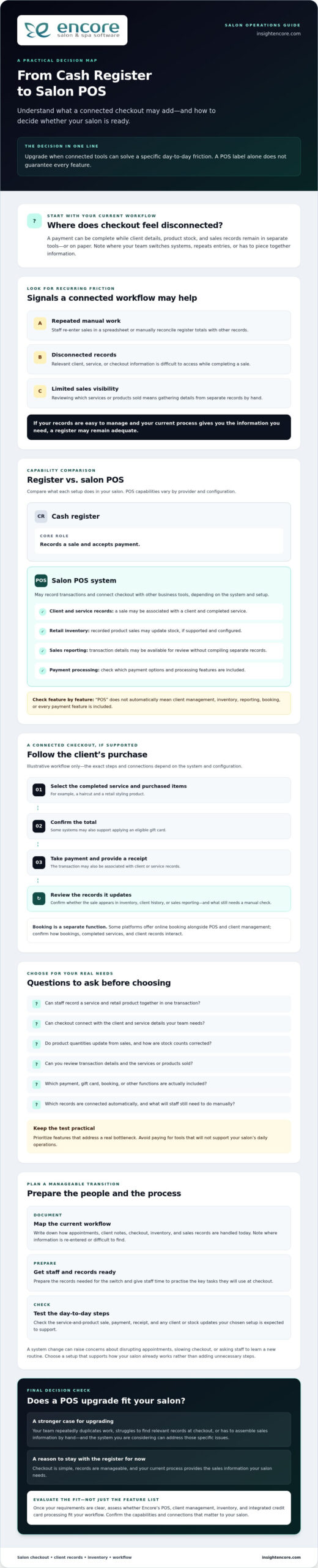
A cash register records sales and accepts payment. A POS system may do that and connect checkout with other business tools, but capabilities depend on the provider and setup. As a foundation, Point of Sale (POS) systems combine hardware and software to handle sales transactions.

A salon POS system records transactions and may connect them with services, client details, inventory, or reporting, depending on the system you choose. The term “POS” alone doesn’t guarantee that every feature is included.

What does a POS system add to a cash register?

Consider a client who receives a haircut and buys a retail product before leaving. A basic register can record the payment total. A suitably configured POS may let staff record the service and product together, associate the sale with a client record, and update inventory. These steps may depend on the system and its configuration, so check each capability rather than assuming it comes standard.

Signs your salon may be ready to upgrade

Look for recurring friction, not just attractive feature lists. Do you or your team regularly re-enter sales in a spreadsheet, manually compare register totals with other records, or struggle to review which services and products sold? Do staff have to switch between tools to find client, service, and checkout information? These are practical signs that a connected workflow could help.

  • Repeated manual work: Routine reconciliation or duplicate entry takes attention away from clients.
  • Disconnected records: Staff can’t easily access relevant details while completing a sale.
  • Limited sales visibility: Reviewing transaction history means piecing information together by hand.

Start with the problem you want to solve. A feature that sounds appealing may not matter if it doesn’t address a real bottleneck in your salon. If checkout is simple, records are easy to manage, and your current process gives you the sales information you need, a register may remain adequate. Upgrading from a cash register to a POS system makes most sense when connected tools can reduce specific day-to-day friction, not simply because newer technology is available.

How a POS system can connect salon checkout, clients, and inventory

A salon checkout has several steps: staff select the service or items being purchased, confirm the total, take payment, and provide a receipt. A POS system may bring some of those steps together with client and product records. The exact workflow depends on the provider and configuration. Check how each system handles the information your team needs instead of assuming everything connects automatically.

For example, a system might let staff select a completed service, add retail products, apply an eligible gift card, and record the payment in one transaction. If it also supports sales reporting, owners may be able to review transaction details without compiling them from separate records. The U.S. Chamber of Commerce outlines several benefits of POS systems for small businesses, including payment processing and sales data capture. Connected data can reduce repeated entry when selected tools share information, but confirm exactly what is linked.

Connect checkout with client and service records

If a POS connects with client management, staff may be able to view relevant visit information while preparing or completing checkout. That can help associate the service and transaction with the right client, if the system supports that workflow. Online booking is a separate function. Some platforms offer it alongside POS and client management, but don’t assume appointments automatically appear at checkout. Confirm how bookings, completed services, and client records interact.

Track retail products and gift card activity

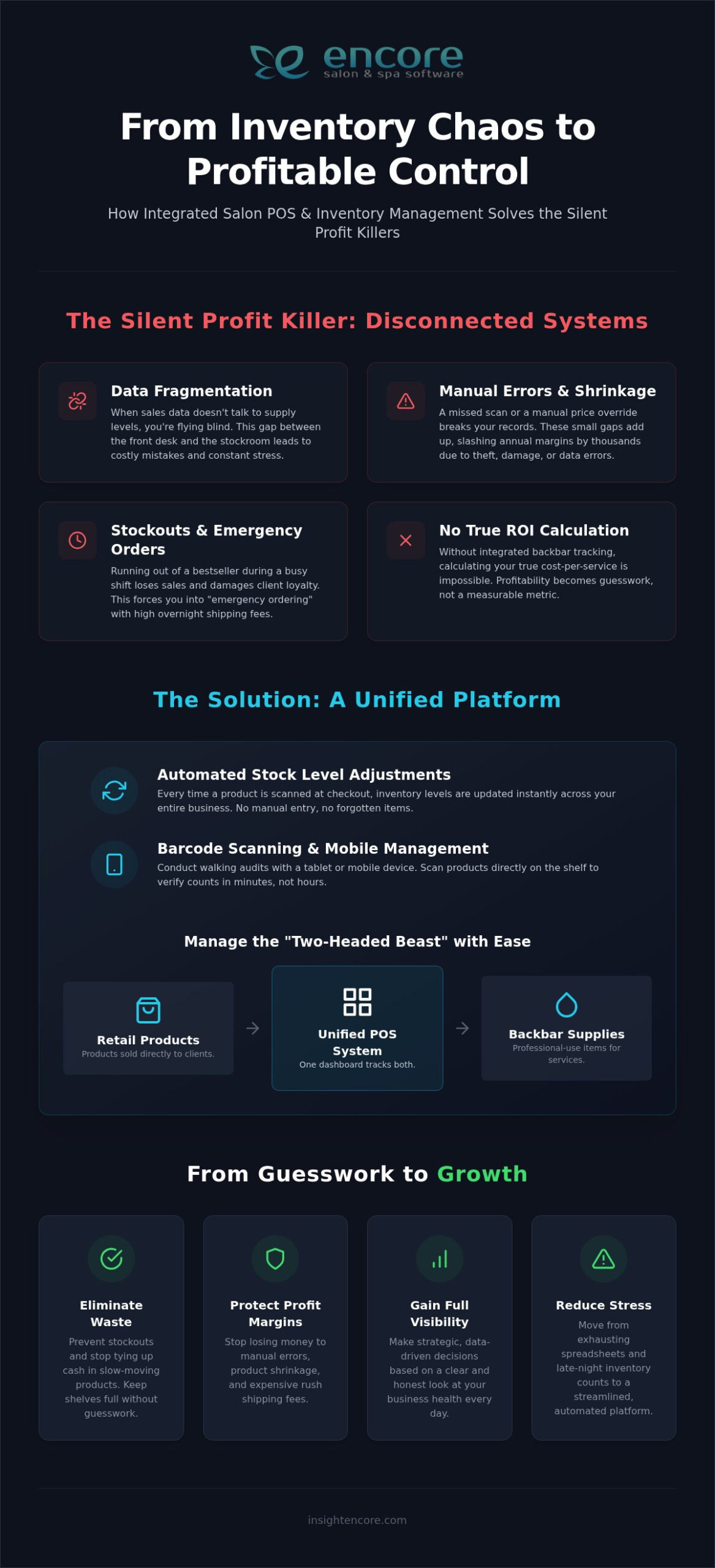
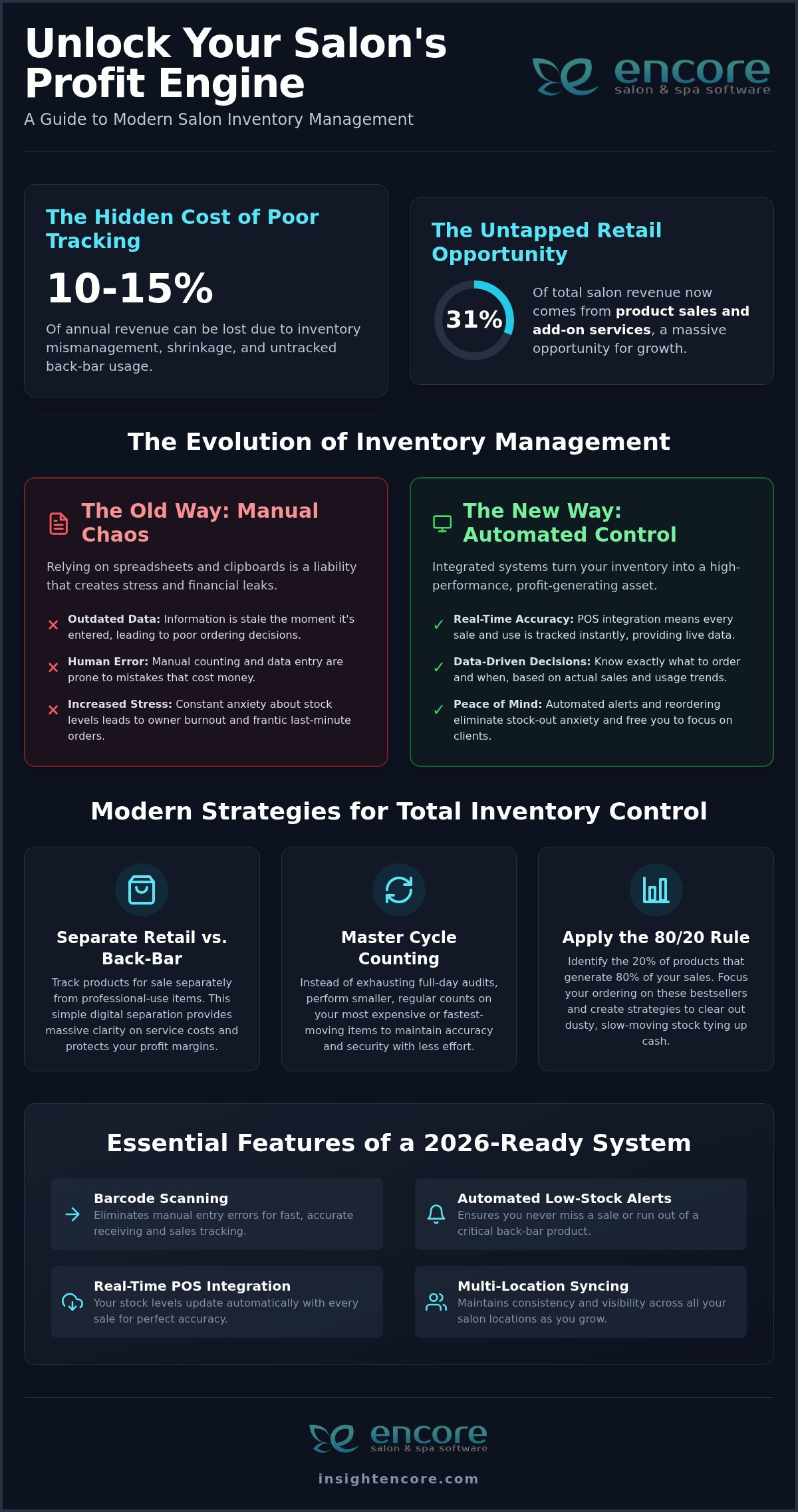
Inventory tracking may help staff and owners follow retail products sold through checkout, such as shampoo or styling products. Ask whether quantities update from recorded sales, how stock counts are corrected, and what checks your team must still perform. A system can support inventory oversight, but accurate records depend on setup and consistent processes. If your salon sells gift cards, check whether the POS can record their sale and redemption in a way that fits your checkout routine.

Payment is another connection to assess. Integrated credit card processing may keep payment steps within the selected workflow, but it isn’t a universal POS feature. Confirm supported payment methods, hardware compatibility, and how transaction records are handled before choosing. If this capability matters to your salon, review Encore’s integrated credit card processing as part of your comparison.

As you consider upgrading from a cash register to a POS system, map the journey your staff actually follow, from selecting a service to issuing a receipt. Mark where information is re-entered or looked up in another tool. Then identify which connections would remove that work and which features aren’t essential. This keeps the decision focused on your salon’s workflow, not simply on a longer feature list.

Cash register vs. POS system: compare the right capabilities for your salon

A useful comparison goes beyond the number of features on a plan. Focus on the tasks your team performs, how easily staff can use the system during a busy checkout, and whether you can access the records you need afterward. The U.S. Chamber of Commerce explains what a modern POS system is and how capabilities such as inventory tracking and sales reporting may support small businesses. Actual features vary by provider and setup.

Capability Cash register POS system
Transaction recording Records payment totals and sales, depending on the register. Records sales; itemized transaction details depend on the system.
Client context Usually handles checkout without connected client records. May connect sales to client or service records if supported and configured.
Inventory May require separate stock records and manual updates. May track retail products sold; confirm how stock counts are updated.
Reporting May offer basic totals or require manual review. May provide more detailed sales reports, depending on available tools.

Which POS features matter most in a salon?

Start with reliable checkout, payment processing that fits your business, and transaction records you can understand and review. Then weigh client management, inventory tracking, and booking integration against your actual workflow. A salon with a small retail range may need simpler stock oversight than one that regularly sells products. Encore’s salon software features can help you assess how management tools may fit alongside POS.

For a nail salon, consider whether tracking products is a recurring challenge before prioritizing inventory tools. The same principle applies across service models: choose capabilities that address real work, not features that simply look impressive in a comparison.

Questions to ask before choosing a POS

Test common tasks with the people who’ll use the system. Ask staff to ring through a service and retail item, take payment, find a past transaction, and correct an error. Can they complete each task clearly and confidently? Check that the workflow suits your team, not just the owner’s reporting needs.

  • Which payment methods and hardware are supported? Verify current compatibility directly with the provider.
  • Can you access or export the records you need, and in what format?
  • What security responsibilities apply to your salon and any providers handling payment data?
  • Which tools are essential now, and which can wait until your needs change?

Upgrading from a cash register to a POS system is a better fit when its everyday workflow solves a specific problem without adding unnecessary steps. Compare practical usability and data access alongside the feature list.

Upgrading Salon Cash Registers to POS: 2026 Guide

Planning a Low-Disruption Move from Cash Register to POS

A smoother transition starts with your current routine, not with a software demo. Before upgrading from a cash register to a POS system, map how your salon handles services, retail items, discounts, gift cards, payments, receipts, and end-of-day checks. This gives you a practical checklist for comparing systems and preparing staff without changing everything at once.

Prepare staff, records, and checkout routines

Use a short, step-by-step plan to keep the change organized:

  1. Document your needs. Note the checkout tasks you perform, payment arrangements, products you sell, and records your team relies on.
  2. Choose a point person. Have one staff member collect questions, coordinate checks, and gather feedback from the people who use checkout every day.
  3. Review records and data options. Ask the provider what information can be imported, what can be exported later, and what may need manual review. Confirm whether migration assistance is available and what it includes. Don’t assume records will transfer automatically.
  4. Compare the full workflow. Check that the system supports the features you need, and confirm device, payment, and receipt requirements before committing. Ask for the provider’s implementation guidance and write down a changeover plan.

Keep the scope realistic. Prioritize the records and tasks that matter at checkout, such as service and product lists, gift card handling, and transaction history. Reviewing your current practices can help you ask better questions and spot gaps before they affect the client experience.

Test the new system before full changeover

Give staff time to practise before relying on the new workflow during a busy period. Run representative transactions, including a service sale, a service plus retail item, a discount, and a gift card transaction if applicable. Practise correcting an entry, processing a refund, and reviewing end-of-day totals where the system supports those tasks.

Also confirm that the required devices, network connection, payment setup, and receipt process work as expected. Choose a changeover window that gives the team room to focus, and keep access to essential records from the old register during the transition. Ask the provider what support, training, and data-transfer steps are included rather than treating them as automatic.

A written salon software implementation plan can help you track decisions, responsibilities, and test results. Adjust it around your salon’s staffing and appointment schedule, then share the final steps with everyone who handles checkout.

Explore Encore salon software

Is a salon POS upgrade right for you? Evaluate Encore as a next step

A standalone register may be enough if your salon has straightforward checkout, keeps reliable records elsewhere, and can review sales without repeated manual work. Connected management tools may be more useful if staff move between client information, transactions, and product records to complete everyday tasks. The right choice depends on your workflow, not on how many features a system offers.

Encore combines POS transactions with salon and spa management features, including client management, inventory tracking, and integrated credit card processing. Compare Encore salon management software with the needs you’ve already identified, then confirm that the specific functions you require are available for your business and setup.

Match the software to your business model

Consider how your team works. A salon, spa, barber shop, nail salon, tattoo studio, or chair or booth rental business may have different checkout and recordkeeping needs. Decide which functions matter most: processing transactions, accessing client records, tracking products, or offering online booking. Encore offers specialized solutions for several business types, but confirm the fit for your own service model.

If card payments are part of your decision, review Encore’s credit card processing options. Verify current supported payment methods, hardware compatibility, and any related terms directly before making a choice.

Take the next step without rushing the decision

Before committing, prepare specific questions for the provider. Ask what setup involves, whether your existing records can be transferred or exported, what staff training is available, and what support is provided. Confirm which capabilities are included and how they work with your current checkout routine. These details can vary, so get clear answers rather than assuming migration, training, or particular equipment is covered.

Then compare the answers with your priorities. If connected checkout, client management, inventory, or booking addresses a real operational need, a POS upgrade may be worth exploring. If your register and existing processes already serve you well, there’s no need to rush. Decide when the expected workflow fits your team and the practical details are clear.

Explore Encore and take the next step

Choose a POS upgrade that fits your salon’s next step

Upgrading from a cash register to a POS system makes sense when it addresses a clear need, such as connecting checkout with client records, inventory, or sales reporting. Compare the day-to-day workflow, confirm which features are included, and plan staff practice and record handling before making the switch. A standalone register may still suit a salon with simple, stable checkout needs.

Encore combines POS transactions with salon and spa management capabilities. The company was founded in 1991 and is part of Syntec Business Systems. If those connected tools align with your priorities, explore how Encore may fit your workflow. Confirm current capabilities, payment options, and transition details directly before deciding.

Explore Encore and take the next step

Explore Encore’s software and discuss whether its POS and management tools fit your salon’s checkout workflow.

Frequently Asked Questions

What is the difference between a cash register and a POS system?

A cash register records sales and handles checkout, while a POS system may connect transactions with other business tools. Depending on the provider and setup, those tools can include client management, inventory tracking, booking, payment processing, or reporting. Not every POS includes every feature. Compare the specific functions offered and how they fit your salon’s daily workflow before choosing.

Can a POS system track salon inventory and sales?

Some POS systems offer inventory tracking and sales reports, but features and workflows vary. A system may record retail items sold and provide transaction summaries, while stock counts may still need staff review and correction. Before choosing, ask how product quantities are updated, what reports are available, and whether you can access the information in a format that helps with regular reviews.

Will switching to a POS system disrupt my salon operations?

A switch can affect routines if staff haven’t practised or important records aren’t ready, but planning can help limit disruption. Document common transactions, check what data can be transferred, and ask the provider what setup and training involve. Practise service and retail sales, corrections, and end-of-day tasks before relying on the new process during a busy period. Keep access to essential old records while your team adjusts.

Can a POS system manage client records and payments together?

Some platforms combine POS transactions with client management and payment processing, but confirm how those functions connect in the system you’re considering. A connected workflow may let staff access relevant client information while completing checkout and record payment alongside a transaction. Check which payment methods are supported and whether staff can access the records they need. Don’t assume all POS providers link appointments, client details, and payments automatically.

Do I need to replace my cash register hardware to use a POS system?

Not necessarily, but whether existing equipment can be used depends on the POS provider’s hardware requirements and compatibility. Ask which devices, payment terminals, and receipt printers are supported before purchasing or reusing equipment. Also confirm what your salon needs for its chosen payment setup. Hardware compatibility can’t be assumed across systems, so get current details directly from the provider before planning the changeover.

How do I choose the right POS system for my salon?

Choose based on the work you need the system to support, not the length of its feature list. Prioritize reliable checkout, suitable payment processing, and usable transaction records, then assess whether client management, inventory, or booking tools solve real needs. Have staff test common tasks, ask about data access and transfer, and verify current hardware and payment compatibility. Clarify setup, training, and support terms before making a decision.

Disclaimer

This article is general in nature and may contain errors, please verify all claims with your sales rep

Categories
Uncategorized

The Ultimate Guide to Salon POS Software with Inventory Management in 2026

Last Saturday, Sarah realized her salon was out of its bestselling shampoo right as a client reached for their wallet. It’s a sinking feeling that every owner knows too well. You shouldn’t have to spend your Sunday nights manually counting bottles or wondering why your backbar supplies are disappearing. It’s exhausting to have your hard-earned cash tied up in slow-moving products while your favorites vanish without warning. This is exactly why implementing modern salon POS software with inventory management is the most important step you can take for your peace of mind.

The good news is that you can turn this daily stress into a streamlined, automated process. We’re going to show you how to unify your checkout and stockroom to eliminate waste, prevent stockouts, and boost your bottom line. We’ll explore how real-time visibility and automated reordering can give you back your evenings and keep your shelves full. This guide covers everything you need to know to gain organized control and see higher profit margins in 2026. Let’s get your business running as smoothly as your best blowout.

Key Takeaways

  • Stop losing money to manual entry errors and high shipping fees by connecting your front desk and backroom data.
  • See how salon POS software with inventory management uses automatic stock level adjustments to keep your shelves full without the guesswork.
  • Learn to manage the “two-headed beast” of retail products and backbar supplies to protect your profit margins.
  • Follow a clear implementation strategy to move from exhausting spreadsheets to a unified platform with confidence.
  • Discover why a human-centric approach to technology makes the transition easy for you and your entire team.

The Silent Profit Killer: Why Disconnected POS and Inventory Systems Fail Salons

Many salon owners treat their front desk and their stockroom as two different worlds. This gap is where profit goes to die. When your sales data doesn’t talk to your supply levels, you’re dealing with "data fragmentation." It’s a technical term for a very practical headache. You end up with "emergency ordering" and paying high overnight shipping fees just to keep your bestsellers on the shelf. This isn’t just about the money; it’s about the stress. Your team feels the weight when they have to apologize to a loyal client because a promised product isn’t there. In 2026, relying on "good enough" spreadsheets is a risk you don’t need to take. Moving toward Inventory management software that integrates directly with your sales is the only way to stay competitive.

The Friday Night Crisis: Stockouts and Manual Overrides

It usually happens during the busiest shift. A barcode won’t scan, so your stylist performs a manual price override just to keep the line moving. While the client is happy in the moment, your records are now broken. The system doesn’t know that specific bottle of volumizing spray is gone. This leads to replenishment failures. Inventory shrinkage is the loss of products between the point of purchase from a supplier and the point of sale, usually caused by theft, damage, or record-keeping errors. Over a year, these small gaps can slash your annual margins by thousands. When a client leaves empty-handed, you don’t just lose a sale. You lose the retail loyalty that keeps your business stable. Implementing a modern salon POS software with inventory management allows you to see these gaps before they become crises.

Data Fragmentation and the Difficulty of True ROI

You can’t grow what you can’t measure. Without integrated backbar tracking, calculating your true cost per service is nearly impossible. Are your stylists using two ounces of color or four? If your backroom isn’t synced, you’re just guessing at your profit. Reconciling the till at the end of the day becomes a nightmare when the physical stock doesn’t match the digital report. This is where Encore Salon Software steps in. By using a unified salon POS software with inventory management, you eliminate the friction between your sales and your supplies. You get a clear, honest look at your business health every single day. This visibility helps you make decisions based on facts rather than feelings.

Core Features of Modern Salon POS Systems with Integrated Inventory

Choosing the right salon POS software with inventory management isn’t just about bells and whistles. It’s about building a foundation that works while you’re busy with clients. You need a system that handles the details so you don’t have to. Without these core features, you risk the dangers of disconnected inventory systems, which often lead to wasted resources and lost sales. Modern platforms act as a silent partner. They can manage stock across different chairs or studio branches from one dashboard, ensuring your multi-location synchronization is seamless and accurate.

Automated Stock Level Adjustments at Point of Sale

A truly integrated system understands the difference between a bottle of retail conditioner and the gallon of shampoo used at the sink. Every time a product is scanned at checkout, the software should trigger an immediate update across your entire business. This real-time syncing is vital for online booking portals where products might be pre-sold or reserved. When your payments are linked through integrated credit card processing, the inventory-to-income cycle speeds up significantly. You get paid, the stock is deducted, and your records stay perfect without a single manual entry. If you’re curious about how this could work for your space, you can explore our comprehensive management features to see the logic in action.

Barcode Scanning and Mobile Management

Gone are the days of being tethered to a desktop computer with a massive binder of spreadsheets. Modern tools allow you to perform walking audits using a mobile device or tablet. You can scan bottles right on the shelf to verify counts in minutes instead of hours. This mobility is especially helpful for variant tracking. If you carry a hairspray in three different sizes or a color line with fifty shades, the software keeps each one distinct. It’s a simple change that makes a massive impact. Industry experts often note that barcode scanning can reduce human error by as much as 90% in busy salon environments compared to manual typing. This accuracy ensures that your par levels, the minimum amount of stock you need to have on hand, are always reliable. Your system will send you a low-stock alert before you ever have to tell a client no.

Managing the Two-Headed Beast: Retail vs. Backbar Inventory Tracking

Managing a salon involves balancing two completely different types of inventory. First, you have your retail products. These are high-margin items meant for client purchase and prominent display. Then, there is the "backbar." These are the professional-use supplies like color, developers, and shampoos that keep your services running. While retail is visible, backbar costs are often hidden. They can quietly drain your profits if they aren’t tracked with precision. Using a unified salon POS software with inventory management allows you to oversee both categories without overwhelming your front-desk team. It keeps the data separate but accessible, ensuring you have a full picture of your studio’s health.

The real challenge often lies in the "Service Cost" problem. If you aren’t tracking your supplies down to the gram or milliliter, you can’t truly know if your color services are profitable. A stylist might use three ounces of color for one client and five for another. Without digital tracking, that variation remains a mystery. Modern software solves this by allowing your team to log usage during the service, which the system then reconciles automatically. This ensures your professional supplies are always accounted for and your margins stay protected. You stop guessing and start growing based on real numbers.

Optimizing Retail Margins with Sell-Through Analytics

Your retail shelves should be a source of income, not a graveyard for "dust collectors." These are slow-moving products that sit on your shelves and tie up your cash flow. By reviewing sell-through analytics, you can identify exactly which brands are performing and which are just taking up space. You can even use this data to trigger automated marketing campaigns for your highest-margin items. This turns your inventory into a proactive sales tool. For more details on how this works in specialized environments, check out The Complete Guide to Choosing a Spa Inventory Management System in 2026.

Reducing Waste in the Backbar

Waste is the enemy of a healthy stockroom. One of the most effective ways to combat this is by implementing "formula notes" within your CRM. This allows you to predict exactly how much product a recurring client needs based on their history. You can also adopt a "parts and labor" pricing model. This ensures the cost of professional supplies is always accounted for in the final bill. This level of detail is especially important for specialized businesses. For example, specialized modules for nail salons are designed to track specific liquids and powders that are easily wasted without strict oversight. A robust salon POS software with inventory management turns these tiny measurements into clear profit data.

The Ultimate Guide to Salon POS Software with Inventory Management in 2026

Implementation Strategy: Moving from Spreadsheets to a Unified Platform

Switching from a binder of papers or a messy spreadsheet to a digital system can feel like a mountain to climb. It doesn’t have to be. By following a logical path, you can transition your business without the stress. The right salon POS software with inventory management is designed to make this move simple, but it starts with a clean slate. You’re not just moving data; you’re setting up a more profitable future for your team. Here is how you can get started:

  • The Master Audit: Physically count every bottle, tube, and foil box in your building. This is your baseline. Without an accurate start, your digital records will never be right.
  • Categorization: Organize your products by brand and type. Clearly separate retail items from backbar supplies to keep your reports clean.
  • Data Import: Use CSV templates to move thousands of SKUs in minutes. Most modern systems allow you to upload your entire list at once, saving you hours of manual typing.
  • Team Training: Build a culture where "scan everything" is the rule. Whether it is at the station or the front desk, every item must be tracked.

Preparing Your Data for a Seamless Transition

Before you hit the import button, take a moment to clean your digital house. Don’t bring "dead stock" into your new system. If a product hasn’t sold in twelve months, it doesn’t need to be in your active inventory. During this setup phase, you should also set your minimum and maximum stock levels for every SKU. These par levels tell the system when to send you an alert. Adding high-quality product photos to the interface also helps your staff identify items at a glance, which reduces errors during a busy shift.

Building Staff Accountability for Inventory Accuracy

Accuracy is a team effort. By using individual staff logins, you can see exactly who is checking out products or performing updates. This isn’t about micromanaging; it’s about transparency and support. When everyone is responsible, accuracy goes up. You can also move away from those exhausting five-hour monthly audits. Instead, create a weekly audit schedule that targets specific brands or sections. It takes fifteen minutes and keeps your data fresh. You can explore the specific Encore features that support this level of staff management and accountability.

Start your stress-free transition today

Why Encore Salon Software is the Strategic Choice for Growth-Minded Studios

Encore isn’t just another software vendor. We’ve been a supportive partner to the beauty industry since 1991. Our roots with Syntec Business Systems mean we understand the daily rhythm of a busy shop. When you choose our salon POS software with inventory management, you aren’t just buying a tool. You’re gaining an ally that values your peace of mind as much as your growth. We’ve spent decades refining our workflows to remove the frustrations that keep you up at night. This long-term expertise allows us to offer a system that feels human-centric and reliable.

Specialized Inventory Logic for Niche Beauty Services

Different studios have different needs. A one-size-fits-all approach doesn’t work for a high-volume barber shop or a custom tattoo studio. Our tattoo studio software is built to manage the unique mix of single-use disposables and expensive ink sets. Meanwhile, barber shops benefit from a rugged interface designed for fast walk-ins. We also provide specialized tools for independent professionals. These tools allow booth renters to manage their own mini-inventory without getting lost in an enterprise-level system. For more on this, read The Independent Stylist’s Guide: Why You Need a Booth Renter Client Management App in 2026.

We know that technology can feel intimidating. That’s why we prioritize the human touch. Our support team doesn’t treat you like a ticket number in a queue. We approach every interaction with a "can-do" attitude and a commitment to your success. Whether you’re upgrading from an old system or starting a new studio, we are here to guide you every step of the way. You deserve a salon POS software with inventory management that is as dedicated to your craft as you are. Let’s build something great together.

Take Control of Your Salon’s Future Today

You’ve poured your heart into building your studio. Don’t let manual inventory counts or unexpected stockouts slow your progress. Moving to a unified system means you can finally stop guessing and start making decisions based on real data. You’ll gain real-time visibility into your stockroom while providing a faster, more professional checkout experience for your clients. It’s about more than just software. It’s about giving yourself the freedom to focus on your artistry while your business runs itself.

By integrating your payments and tracking every ounce of backbar usage, you protect your hard-earned margins and eliminate waste. The right salon POS software with inventory management turns your daily stress into an organized, automated flow. We’ve been a trusted partner to the beauty industry since 1991, offering specialized modules for every niche and integrated payments designed for 2026 efficiency.

Streamline your studio today with Encore Salon Software
You deserve a business that runs as smoothly as your best services. We’re excited to help you take this next step toward a more profitable and peaceful future.

Frequently Asked Questions

How does salon POS software with inventory management save me money?

Salon POS software with inventory management saves you money by stopping profit leaks from over-ordering and high shipping fees. It helps you identify slow-moving products so you don’t tie up cash in items that don’t sell. By tracking every bottle and tube, you also reduce inventory shrinkage from theft or unaccounted usage. This precision ensures your capital stays in your pocket rather than sitting idle on shelves.

Can I track both retail products and professional backbar supplies?

You can easily track both retail products and professional backbar supplies within the same system. The software keeps these categories separate so your sales data doesn’t get cluttered. Retail items are monitored for high-margin sales, while backbar supplies are tracked for service costs like color or developer. This level of detail allows you to calculate your true ROI for every service you provide to your clients.

Does the software work on mobile devices and tablets?

Our software works perfectly on mobile devices and tablets to give you freedom of movement. You can perform audits or check stock levels while walking through your studio instead of being stuck at a desktop. Stylists can even log usage at their stations in real time. This mobility makes inventory management a quick, natural part of your day rather than a long task after closing.

What happens to my current inventory data if I switch to Encore?

Switching to Encore is a smooth process because we help you import your current data using CSV templates. You can move thousands of SKUs into your new account in minutes without tedious manual entry. Our supportive team acts as a guide to ensure your records are clean and organized from the start. It’s a simple way to upgrade your business without the stress or data loss.

Is it possible to set up automatic ordering of low-stock items?

You can set up automatic ordering of low-stock items by choosing "par levels" for every item you carry. When a product hits that minimum level, the system automatically adds that product to your next purchase order so you can reorder before you run out. This prevents the frustration of telling a client that their favorite product is out of stock. It keeps your retail shelves profitable and your backroom fully prepared for every appointment.

How does integrated credit card processing help with inventory accuracy?

Integrated credit card processing links your payments directly to your stock levels. Every time you scan a product and process a payment, the system automatically updates your inventory records. This removes the need for manual overrides or end-of-day reconciliations that often lead to errors. It ensures your digital reports are always 100% accurate, giving you peace of mind even during your busiest shifts.

Can I manage inventory for multiple salon locations from one account?

You can manage inventory for multiple locations from a single, unified dashboard. This feature allows you to see stock levels at every branch and even transfer products between sites if one location is running low. It’s a powerful way to maintain control over your entire brand while managing the specific needs of each studio. You get a clear picture of your total business health at once.

Does Encore offer specialized inventory tracking for tattoo or nail studios?

We offer specialized modules for tattoo studios, nail salons, and barber shops that are tailored to your specific tools. Our tattoo logic tracks single-use disposables and ink sets, while our nail salon tools monitor liquids and powders with precision. These niche-specific features ensure that your salon POS software with inventory management fits your unique workflow. We understand your craft and provide the exact tracking tools you need to succeed.

Disclaimer

This article is general in nature and may contain errors, please verify all claims with your sales rep
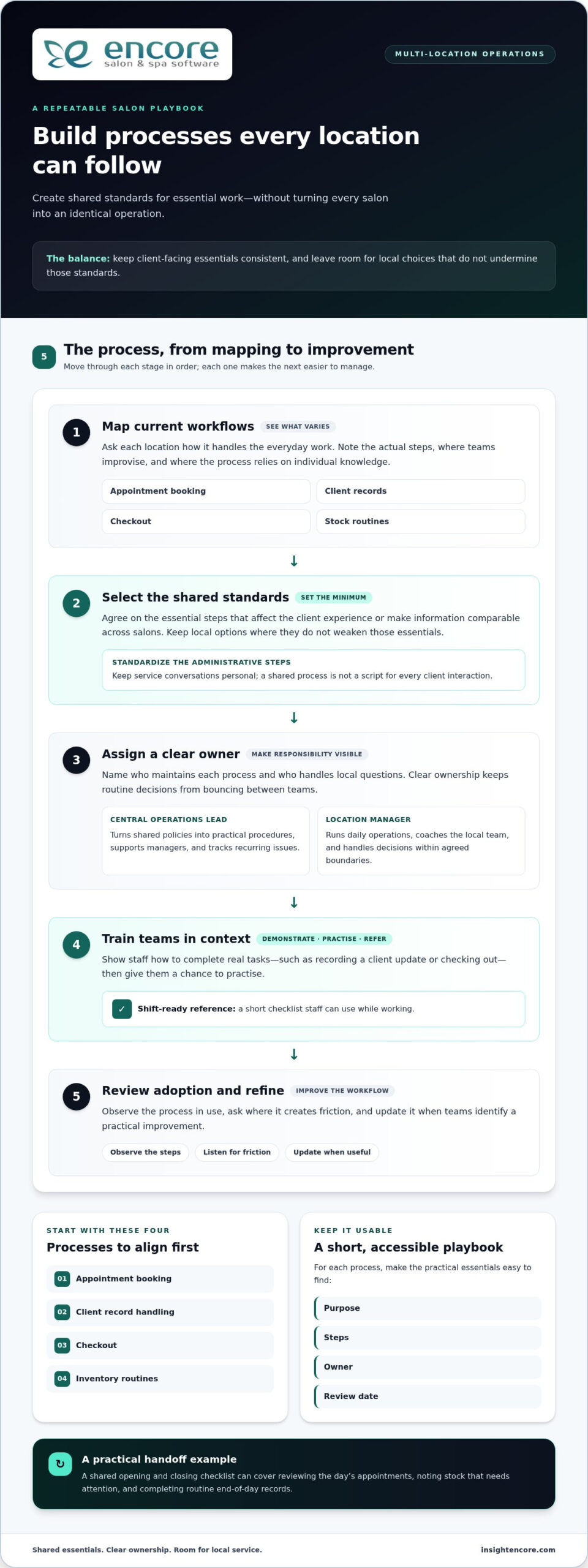
Categories
Uncategorized

Salon Retail Inventory Best Practices: The Ultimate 2026 Profit Guide

Did you know that 31% of salon revenue now comes from product sales and add-on services, according to Salon Business Strategies? It is a massive opportunity; however, if you haven’t mastered salon retail inventory best practices, that stockroom can quickly become a source of stress. You have likely felt the frustration of seeing your hard-earned cash tied up in dusty bottles that just won’t move. Perhaps you are tired of dealing with unexplained shrinkage or a team that constantly forgets to log back-bar usage.

We understand how heavy that burden feels. You started this business to create beauty and connect with people, not to be buried in spreadsheets. This guide will show you exactly how to flip the script and turn your inventory into a streamlined profit engine. You’ll discover how to move from manual chaos to a system that offers real-time accuracy and automated reordering. We are going to walk through the modern strategies you need to protect your margins, boost your retail-to-service ratio, and finally get your stock under control so you can focus on your clients.

Key Takeaways

  • Learn how to identify the “hidden drains” in your stockroom that could be costing your business up to 15% of its annual revenue.
  • Discover how to implement modern salon retail inventory best practices by moving away from manual spreadsheets and toward real-time POS integration.
  • Master the art of cycle counting to keep your most expensive items secure without the exhaustion of a full-day manual audit.
  • Use the 80/20 rule to pinpoint your true bestsellers and effectively clear out dusty products that are tying up your cash flow.
  • Explore how automated reordering and professional support can transform your inventory management into a stress-free, background process.

Beyond the Stockroom: Why Salon Retail Inventory is Your Secret Profit Engine

Poor tracking often leads to a hidden drain on your business, costing the average salon between 10% and 15% of its annual revenue. This isn’t just about missing a few bottles of conditioner; it’s about lost opportunities and leaked cash. Salon retail inventory is the strategic management of products you sell to clients versus those you use in-service. It’s a delicate balance. To truly succeed, you need to master salon retail inventory best practices so you can stop viewing your stockroom as a chaotic expense and start seeing it as a high-performance asset.

In 2026, consumer demand for professional home-care is at an all-time high. Clients are more educated than ever, and they want the specific products their stylists recommend. When you view your stockroom as a collection of high-value assets rather than just a storage expense, your profit margins begin to shift. Applying standard inventory control principles allows you to stop reacting to shortages and start planning for growth. This is where you move from being a storekeeper to a business strategist who understands exactly what drives your bottom line.

Retail vs. Back Bar: The Critical Distinction

Tracking professional-use products requires a different logic than retail sales. While a retail bottle has a clear price tag, back-bar products are "internally consumed." If you don’t track that liter of shampoo used at the sink, your service margins will suffer. It’s easy to lose track of small amounts, but they add up fast over a month. Modern software, like the Encore Inventory Management System, lets you set up separate digital bins. This keeps your reporting clean and ensures you always know what is for sale and what is for service. It’s a simple change that provides massive clarity for your team.

The Emotional Cost of Inventory Chaos

Inventory chaos isn’t just a financial problem; it’s an emotional one. We know the stress of that Sunday night panic when you realize you’re out of a key color line. Eliminating the "did we order more?" anxiety reduces owner burnout instantly. It gives you back your weekends and your peace of mind. An organized stockroom also boosts staff morale. When stylists feel confident that the tools they need are always available, they perform better and stay longer. Plus, a tidy, well-stocked retail area creates a welcoming environment. It naturally encourages your clients to browse, making retail feel like a helpful service rather than a pushy sales pitch.

The 2026 Inventory Framework: Modern Tech Meets Best Practices

Manual spreadsheets are officially a liability. By 2026, the industry has moved toward automated ecosystems that eliminate human error. If you’re still relying on a clipboard or a static Excel file, you’re likely working with outdated data. Modern salon retail inventory best practices require real-time accuracy that only a fully integrated system can provide. When your POS talks directly to your stockroom, you gain a level of control that manual counting can’t touch. It’s about moving from "guessing" to "knowing."

Mobile accessibility is another game-changer. Stylists don’t have time to run back to the stockroom to see if a specific serum is in stock. With a mobile app, they can check availability right from the chair. This empowers them to make recommendations with confidence. It also ensures that the data-driven demand forecasting in your software is working with live numbers. Your software should tell you when to buy, not the other way around. This shift allows you to keep your focus on the client in the chair rather than the boxes in the back.

Essential Features of a 2026 Inventory System

To stay competitive, your system needs specific tools that simplify your life. Barcode scanning is the absolute minimum requirement for accuracy. It removes the "guesswork" and keeps your team accountable. You should also look for specific capabilities like:

  • Automated low-stock alerts: These ensure you never miss a sale because of an empty shelf.
  • Multi-location syncing: This is vital for maintaining consistency across every site as you grow.
  • Barcode integration: A simple scan updates your entire database instantly.

Adopting these proven inventory management strategies ensures your business stays resilient and profitable. It’s a supportive way to ensure your business grows without the usual growing pains.

Master the Count: Modern Auditing and Cycle Counting Strategies

Counting every single item in your salon at once is a recipe for burnout. It’s often called the "Sunday Stocktake," and it’s something most owners dread. Instead, modern salon retail inventory best practices favor cycle counting. This method involves counting small portions of your stock on a rotating basis. It keeps your data fresh without requiring you to close your doors or stay late. It’s a supportive way to maintain accuracy while protecting your personal time.

We recommend the "High-Value" Rule. Your most expensive items, like luxury serums or professional styling tools, should be counted weekly. These are your biggest assets. If one goes missing, you’ll want to know immediately. Lower-value items, like hair ties or basic combs, can wait for a monthly check. This targeted approach ensures your time is spent where the money is. It also helps you identify shrinkage early. Most shrinkage isn’t actually theft; it’s usually just a stylist forgetting to log a product they used at the back bar. Frequent counts help catch these habits before they ruin your margins.

A Step-by-Step Cycle Counting Schedule

To make this work, divide your stock into "A, B, and C" categories based on their value and how fast they sell. Category A items are your top earners and should be counted every week. Category B items move moderately and need a bi-weekly check. Category C items are low-cost staples that only need a monthly count. This 15-minute weekly habit prevents the dreaded year-end audit. When you find a discrepancy, don’t panic. Simply check your recent sales and back-bar logs to see if a transaction was missed. Resolving these small gaps immediately is much easier than trying to solve a three-month-old mystery.

Empowering Your Team to Track

Inventory management shouldn’t be a solo mission. By building a culture of accountability, you turn inventory into a shared team goal. Designating an "Inventory Lead" is a great way to delegate without creating a bottleneck. This person doesn’t have to do all the work, but they should oversee the schedule and ensure counts are completed. You can also incentivize staff for accuracy. When the team sees that organized stock makes their jobs easier, they’re more likely to participate. Using a tool like Encore Salon & Spa Software allows you to delegate these tasks with clear permissions. It gives your team the responsibility they need while giving you the oversight you want. This collaborative approach turns a chore into a source of professional pride.

Salon Retail Inventory Best Practices: The Ultimate 2026 Profit Guide

Data-Driven Merchandising: Turning Dust-Collectors into Bestsellers

Not every product on your shelf deserves the same amount of space. One of the most effective salon retail inventory best practices is applying the 80/20 rule. This principle suggests that roughly 20% of your products generate 80% of your retail profit. By identifying these "hero" products, you can ensure they never go out of stock while reducing the space given to slow-movers. This is about working smarter to maximize every square inch of your retail area.

Identifying "dead stock" is the next step in cleaning up your profit engine. If a product hasn’t moved in six months, it’s a dust-collector that’s eating your cash. Don’t be afraid to clear it out. You can discount these items, bundle them with a popular service, or even donate them to a local charity for a tax benefit. Once you’ve cleared the clutter, establish par levels. This is the science of knowing the minimum number of bottles you need on hand to meet demand until your next shipment arrives. It keeps your shelves looking full without tying up unnecessary capital in the back room.

Your data also gives you a seat at the table with vendors. When you can show a supplier exactly how much of their line you move, you’re in a much stronger position to negotiate. You might ask for better margins, free back-bar samples, or extended payment terms. Having these numbers at your fingertips turns a vendor relationship into a true partnership that supports your growth. It’s a professional way to ensure your business remains healthy and competitive.

[Unlock Your Salon’s Profit Potential with Encore](https://insightencore.com/try-encore-now/)

Visual Merchandising for Maximum Impact

Your retail display should do the heavy lifting for you. Remember that "eye-level is buy-level." Place your high-margin hero products where clients can’t miss them. Use simple signage or "shelf talkers" to explain the benefits of a product in plain language. Instead of a hard sell, focus on how the product solves a client’s problem. If you have an overstock of a specific item, try a "Gift with Purchase" strategy. Offering a free travel-size bottle with a full-size purchase is a great way to move stock while making the client feel pampered and appreciated.

The Power of Bundling and Loyalty

Bundling is a fantastic way to increase your average ticket price. Create "Service + Product" packages, like a "Color Refresh Bundle" that includes a color-safe shampoo and conditioner. This ensures the client gets the best results at home while boosting your sales. You can also link your inventory to your Loyalty Program. Rewarding clients with points for retail purchases encourages repeat business and builds long-term trust. Use automated marketing to send a quick text or email when a client’s favorite product is back in stock. It shows you’re paying attention to their needs and makes their lives easier.

Automating Excellence with Encore: The Stress-Free Path to Inventory Control

Transitioning from manual tracking to a digital ecosystem is the final step in mastering salon retail inventory best practices. It is the bridge that connects the strategies we have discussed; like cycle counting and par levels; into a single, effortless workflow. Encore Salon & Spa Software provides an integrated Inventory Management System that removes the guesswork from your daily operations. Instead of checking shelves and cross-referencing paper logs, you have a live pulse on your business that updates with every transaction.

This integration starts the moment a client clicks your online booking link. As services are performed and retail items are scanned at the desk, your stock levels adjust automatically. This seamless flow ensures your data-driven merchandising is always based on reality, not a three-week-old count. Whether you are an independent professional using our specialized modules for chair renters or a manager overseeing a multi-location spa, the system scales to meet your needs. You get the same level of professional confidence and real-time accuracy regardless of your shop’s size.

We believe that technology should feel like a partner, not a hurdle. That’s why we prioritize human support for every setup and migration. You don’t have to face the transition alone. Our team understands the daily hurdles of the beauty industry and is genuinely invested in your success. We help you move your data over so you can start seeing the relief of organized control from day one.

Reports That Actually Help You Grow

Data is only useful if it leads to action. Our platform generates reports that simplify the complex decisions you face as an owner. The Sales Statistics Report automates the 80/20 analysis for you, showing exactly which brands are driving your revenue and which are taking up space. Meanwhile, the Professional Product Usage Report helps you catch back-bar waste by comparing what was used in-service against your service sales. We also offer tailored reporting for niche businesses, such as tattoo studios, where tracking specialized supplies is critical for maintaining margins. It’s a professional way to ensure your business stays lean and profitable.

Getting Started: Your 30-Day Inventory Turnaround

You can achieve a total stockroom transformation in as little as 30 days. We’ve designed the migration process to be straightforward and supportive, helping you import your current stock data without the usual headache. Once your data is in, we’ll help you set your first automated reorder points and par levels. This turns the panic of "running out" into a background process that the software handles for you. It’s a steady, logical path toward a business that runs smoothly even when you aren’t standing in the stockroom.

Book a demo with a friendly Encore expert today

Take the Next Step Toward a More Profitable Future

Mastering your stockroom is no longer a matter of manual counts and stressful Sunday audits. By shifting your mindset from "counting bottles" to "managing assets," you unlock a level of financial clarity that most owners only dream of. You’ve seen how modern tools like cycle counting, automated par levels, and data-driven merchandising can turn a dusty stockroom into a high-performance profit engine. It’s about working smarter, not harder, to ensure every product on your shelf is earning its keep.

Implementing salon retail inventory best practices is the most direct path to reclaiming your time and your margins. Since 1991, Syntec Business Systems has been the trusted partner for owners who want to eliminate industry frustrations once and for all. With integrated booking, POS, and stock management backed by real-person support, you have everything you need to succeed.

Start Your Stress-Free Inventory Journey with Encore Salon & Spa Software
You have the roadmap and the professional tools to make it happen. We are genuinely excited to help you take this next step toward a more organized, empowered, and profitable business. Your future starts with one simple choice to put your inventory on autopilot.

Frequently Asked Questions

How often should I do a full inventory count in my salon?

You should perform a full physical inventory count at least once a year for tax and accounting purposes. However, if you follow salon retail inventory best practices like cycle counting, you won’t need to close your shop for a massive audit. By rotating through small sections of your stock weekly, your year-end count becomes a quick verification rather than a multi-day ordeal. This keeps your data accurate and your stress levels low throughout the year.

What is a good retail-to-service sales ratio for a hair salon?

A healthy retail-to-service sales ratio for most hair salons is between 15% and 20%. While service revenue pays the bills, retail profit is what truly grows your business. If your ratio is below 10%, it’s time to look at your team’s consultation habits. High-performing salons often reach 25% by focusing on home-care education. Tracking this number in your reports helps you identify which stylists are natural educators and who might need extra training.

How can I prevent staff from using retail products on the back bar?

The best way to prevent retail products from migrating to the back bar is to use separate tracking bins in your software. When you clearly designate specific bottles for professional use, it’s easier for the team to stay organized. You can also implement barcode scanning for every product pulled from the shelf. If a stylist knows that every item is tracked in real-time, they are much more likely to grab the correct back-bar liter instead of a retail bottle.

What should I do with retail products that aren’t selling?

If a product hasn’t moved in six months, you should bundle it with a popular service or offer it as a gift with purchase. Letting dead stock sit on your shelf ties up cash that could be used for faster-moving items. You can also try a "stylist pick" promotion to give the product more visibility. If it still won’t move, consider donating it to a local charity. This clears your shelf space and can provide a helpful tax deduction.

Is it better to have a few large brands or many small ones in my retail section?

It is generally better to focus on a few core brands rather than many small ones. Managing multiple vendors creates extra administrative work and makes it harder to hit the volume thresholds needed for better margins. By concentrating your orders, you become a more valuable partner to your primary suppliers. This often leads to better support, free samples, and more favorable terms. Aim for a balanced selection that covers all hair types without creating shelf clutter.

How do I calculate the "carrying cost" of my salon inventory?

To calculate the carrying cost of your inventory, you need to add up your storage expenses, insurance premiums, and the opportunity cost of the cash tied up in products. Most industry experts estimate this cost is about 20% to 30% of your total inventory value annually. For example, if you have $10,000 in stock, it might be costing you $2,500 a year just to keep it. This is why following salon retail inventory best practices is so vital for your profitability.

Can I manage inventory if I am just a booth renter?

You can absolutely manage inventory as a booth renter, and it’s actually one of the best ways to boost your take-home pay. Since you are running your own mini-business, tracking your color usage and retail sales is essential for tax time. Specialized software for chair renters allows you to track your small stockroom on your phone. This ensures you never run out of your favorite lightener and helps you maximize every dollar of profit from your retail shelf.

What is the best way to handle product returns from clients?

The best way to handle product returns is to have a clear, written policy that prioritizes exchanges over refunds. If a client isn’t happy with a product, encourage your stylists to find a better fit. This keeps the revenue in your business and ensures the client still gets the home-care results they need. Always log the return in your inventory system immediately. This keeps your stock counts accurate and helps you track if a specific product has a high return rate.

Disclaimer

This article is general in nature and may contain errors, please verify all claims with your sales rep
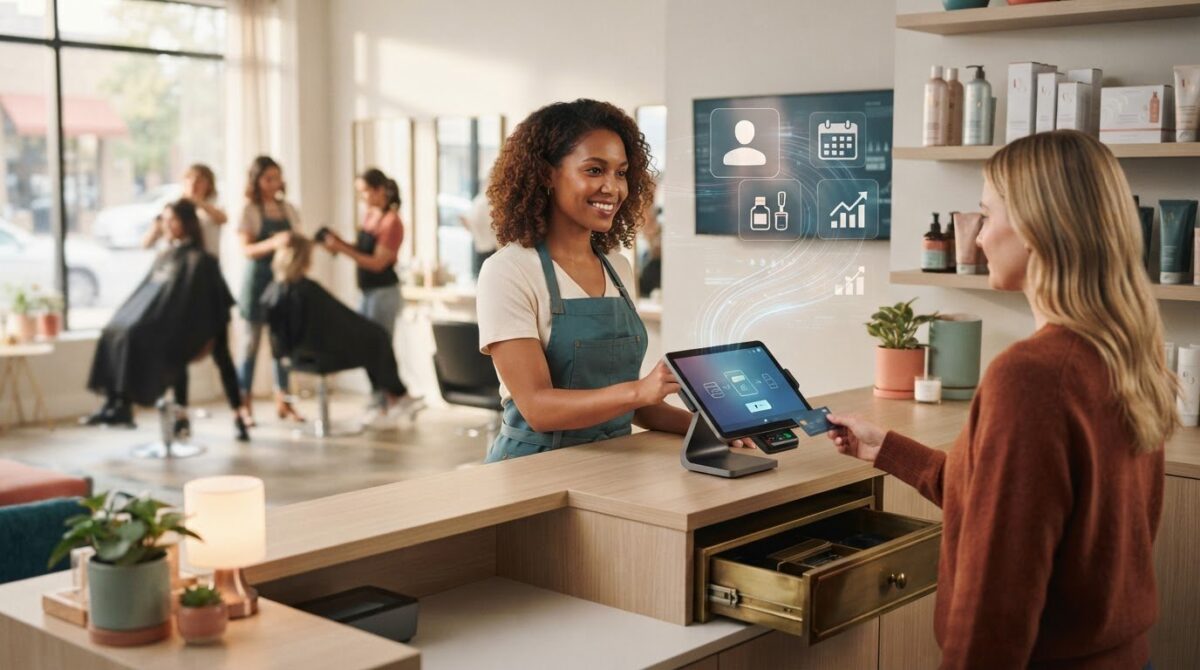
Disclaimer

This article is general in nature and may contain errors, please verify all claims with your sales rep