window.dataLayer = window.dataLayer || []; function gtag(){dataLayer.push(arguments);} gtag('js', new Date()); gtag('config', 'UA-206511945-1');
Search
Categories
Uncategorized

Barbershop Performance Dashboard: Metrics That Drive Better Decisions in 2026

What if a full appointment book is masking your barbershop’s biggest opportunity? A packed Saturday can look like success, but it won’t tell you whether clients are returning, chairs are being used consistently, or each visit is supporting healthy revenue. A barbershop performance dashboard brings those signals into view when you focus on the right measures and interpret them together.

If booking, client, sales, and inventory information lives in separate places, it’s easy to miss patterns or react to a single number without context. You don’t need to track everything. You need a focused set of indicators that answers practical questions about your shop. Connected tools for booking, client management, transactions, and inventory can give you a broader view of daily operations.

This guide covers which revenue, client, and operational metrics deserve attention, how to interpret changes against your shop’s schedule and goals, and how to turn what you learn into practical next steps. You’ll also find a repeatable review routine to make performance data useful in everyday decisions, not just another report to glance at.

Key Takeaways

  • Build a barbershop performance dashboard around decisions you need to make, not numbers that look impressive but offer no clear next step.
  • Organize measures across revenue, appointments, client relationships, and inventory to spot where closer attention may help.
  • Read results against comparable periods and changes in your schedule or service mix before deciding what they mean.
  • Use a steady review routine to turn patterns into a small number of practical actions and follow up on what changes.
  • Connect booking, client records, sales, and inventory tools to create a clearer view of daily operations.

What a Barbershop Performance Dashboard Should Help You See

Bookings may sit in one place, sales in another, and client or inventory details somewhere else. When you’re piecing together the shop’s performance between appointments, scattered figures can be frustrating. A barbershop performance dashboard is a focused view of selected business measures that helps you understand what’s happening and decide what to do next. It’s not a wall of numbers. It’s a way to connect daily activity to decisions you can influence.

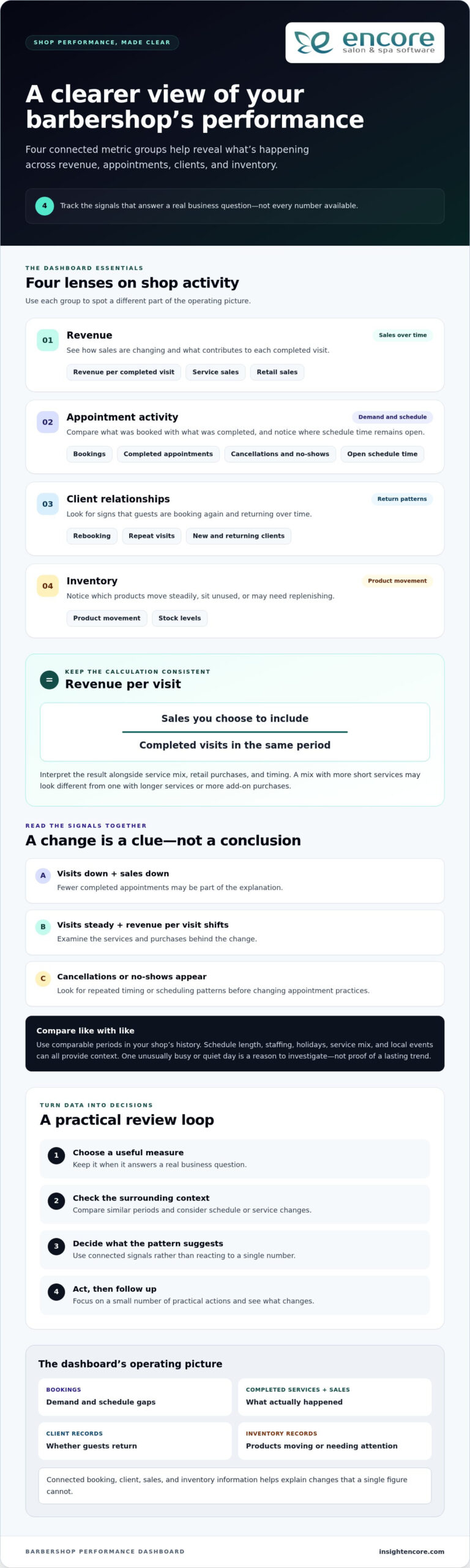
Think of a dashboard as the shop’s operating picture. Booking records can show demand and gaps in the schedule. Completed services and sales transactions show what actually happened, while client records can reveal whether guests are returning. Inventory records add context by showing which products are moving and which may need attention. Together, these sources can help explain a change that a single figure can’t.

The goal is to track useful signals, not every available count. A large social following or a high number of appointments booked might look impressive, but neither tells you whether those bookings are completed or clients come back. Give a measure space on your dashboard when it answers a real business question and points toward an action.

Which daily questions should the dashboard answer?

Start with questions that connect shop activity to choices you can make. For demand, ask whether upcoming bookings are filling the hours and days you want to staff. If certain periods are consistently quiet, you might adjust scheduling or consider a targeted promotion. For completed services, compare appointments on the book with visits completed. A gap may prompt you to review cancellations, reminders, or the time set aside between services.

For sales activity, look at what guests purchased alongside their services. If service sales are steady but retail activity changes, explore product visibility or staff recommendations before changing your inventory. For returning clients, review whether guests book their next visit or come back over time. That pattern can help you decide where follow-up or rebooking conversations deserve more attention.

Keep the time frame in mind. One unusually busy day may reflect a holiday, a local event, or a schedule change. One quiet day may be just that, one day. Treat it as context to investigate, not proof of a lasting trend. Look for a pattern across comparable periods before making a bigger change.

Dashboard, report, and KPI: what is the difference?

A report gives you detailed records to examine, such as individual transactions or appointment histories. A dashboard presents a concise overview of selected measures, making it easier to notice what deserves a closer look. A business dashboard can be organized in different ways, but its purpose is to make important information easier to monitor and use.

A KPI, or key performance indicator, is a measure tied to an important business objective, such as improving repeat visits. A raw operational count records activity; a KPI shows whether that activity is helping meet a goal. A count tells you what happened; a KPI helps you judge whether it moved the business toward an objective. That distinction keeps your dashboard focused on decisions, not just data.

Which Barbershop Performance Metrics Belong on Your Dashboard?

A useful barbershop performance dashboard gives you a balanced view, not a crowded collection of numbers. Choose a small group of measures across revenue, appointment activity, client relationships, and inventory. For each one, know what question it answers and what decision it might inform. A metric without a clear purpose adds noise instead of helping you manage the shop.

  • Revenue: Track sales over time, revenue per completed visit, and the mix of service and retail sales.
  • Appointment activity: Review bookings, completed appointments, cancellations, no-shows, and open time in the schedule.
  • Client relationships: Watch rebooking and repeat-visit patterns, including how new and returning clients contribute to activity.
  • Inventory: Look at product movement and stock levels to notice items that sell steadily, sit unused, or may need replenishing.

Revenue and appointment indicators to interpret together

Revenue per visit can show whether the value generated by each completed appointment is changing. Calculate it consistently by dividing the sales you choose to include by completed visits for the same period. Then interpret the result alongside service mix, retail purchases, and timing. A period with more short services may produce a different average than one with longer services or more add-on purchases. Keep the calculation consistent so comparisons remain meaningful.

Pair the revenue figure with appointment activity. If completed visits fall and sales fall with them, fewer appointments may be part of the explanation. If visits stay steady but revenue per visit shifts, examine the services and purchases behind the change. Compare similar days or periods in your own shop’s history rather than applying a universal target. Schedule length, staffing, holidays, and changes in the services offered can all affect the result.

Cancellation patterns need the same care. Review cancellations and no-shows in relation to bookings, and look for repeated timing or scheduling patterns before changing policies or appointment practices. One cancellation is an event; a recurring pattern is a reason to investigate.

Client and inventory signals that reveal patterns

Rebooking and repeat visits help you understand whether clients are returning and how consistently they do so. A change may relate to service timing, availability, or the way the next appointment is offered. Use client records to explore the pattern, then choose a practical response, such as making rebooking part of checkout conversations. Keep staff utilization distinct from shop-wide appointment measures: the former focuses on an individual barber’s working time, while the latter looks across the shop’s schedule and capacity. For a closer look at the staff measure, see this barbershop staff utilization guide.

Inventory movement adds context to sales. If a product’s sales change, consider whether client demand shifted, purchasing changed, or the item was unavailable when guests wanted it. Compare sales activity with inventory records before adjusting orders. No single measure explains the whole story. Together, these signals help you decide what deserves a closer look and what action is worth testing.

How to Read Dashboard Results Without Misleading Yourself

A dashboard shows what changed, but it can’t explain the cause on its own. Read each measure in context before adjusting prices, staffing, or promotions. Upcoming bookings are a leading indicator: they offer a view of demand that may turn into future work. Completed appointments and sales are lagging results: they show what has already happened. Comparing the two can help you see whether a shift in bookings is showing up in completed business, but allow enough time for the results to develop.

Compare like with like before drawing conclusions

Choose comparable periods, such as the same weekdays across two time windows, rather than comparing a full week with a partial one. Check whether opening hours, staffing, available services, or local events changed. A holiday week may follow a different pattern from a regular week, and a new service mix can shift average sales without indicating a problem. Be cautious with small samples. A single comparison can point to a question, but it rarely proves what caused the change.

Turn a metric change into a useful question

Suppose completed sales are lower than in the prior comparison period. The cause could be fewer appointments, more cancellations, shorter hours, a different mix of services, or a change in retail purchases. Each explanation suggests a different follow-up. Check booking records, completed appointments, and transaction details before deciding whether to change a schedule, price, or promotion.

A metric is a clue to investigate, not a diagnosis of what’s wrong. Use a change to guide your next question, then look for supporting evidence. Connected booking, client, point-of-sale, and inventory records make that review more grounded. Encore’s software features include tools across these operational areas, helping shops keep relevant information connected to daily work.

Signal Possible explanations Follow-up question
Upcoming bookings are down Fewer repeat bookings, reduced availability, seasonal demand, or a shorter booking window Are comparable days and booking lead times also lower?
Completed visits are steady, but sales have shifted Different service mix, changes in add-on purchases, or altered transaction patterns Which services or items account for the change?
Cancellations have increased A particular day, time, service, or booking pattern may be contributing Do appointment records show a recurring pattern or just a brief fluctuation?
Product sales have changed Shifting guest demand, purchase timing, or product availability Do inventory records support the same pattern?

For a barbershop performance dashboard to support sound decisions, keep the comparison method consistent and note important changes alongside the figures. If the signal persists and related records point in the same direction, you have a stronger basis for action. If they don’t, keep observing rather than making a costly change based on one reading.
Barbershop Performance Dashboard: Metrics That Drive Better Decisions in 2026

Build a Simple Barbershop Dashboard Review Routine

A barbershop performance dashboard becomes useful when you review it consistently and connect what you see to a next step. Keep the process light enough to fit around the work of running the shop. You don’t need a long meeting or a complicated scorecard. A focused check-in, consistent definitions, and a clear record of follow-up can turn scattered figures into a routine you can maintain.

Start with a small, decision-focused scorecard

Choose measures that match your current priorities, such as filling appointment gaps, understanding repeat visits, or reviewing retail movement. For every measure, write down its definition, where its information comes from, and the period you’ll review. This prevents the same label from being calculated differently each time. Add one sentence about the decision it supports, such as, “This measure helps us decide whether to adjust coverage during quiet appointment periods.”

Then follow a repeatable sequence:

  1. Choose the question. Name the operating issue you want to understand before opening the figures.
  2. Select the measures. Use only the indicators that help answer that question, and keep their definitions consistent.
  3. Review the pattern. Compare the chosen period with a relevant prior period, noting changes in hours, staffing, or services.
  4. Record an action. Decide whether to investigate further, try a practical adjustment, or keep watching the trend.

Move from review to action and follow-up

Close each review with a brief note: what you observed, what you’ll do next, who owns the action, and when you’ll revisit it. For example, if appointment gaps appear repeatedly during a particular time, review staffing coverage or booking availability. Assign one person to follow through, even if that person is the owner. Clear responsibility helps turn a useful observation into a completed task.

Pick a cadence that fits your operating rhythm. A short weekly check can help you notice near-term changes in bookings or cancellations, while a monthly review gives you more room to assess repeat visits, sales patterns, and inventory movement. These are starting points, not fixed rules. If a measure changes slowly, review it over a longer period; if it affects daily scheduling, a more frequent glance may make sense.

At the next check-in, ask whether the action changed the pattern you were watching. If it did, decide whether to continue or make the adjustment part of normal operations. If it didn’t, revisit your assumption before repeating the same step. Avoid adding another metric simply because it’s available. Add one only when it answers a real operating question or helps you make a decision with more confidence.

Explore Encore Barber Software

Use Barbershop Management Software to Connect the Operating Picture

A useful review depends on having relevant operating information available when you need it. If appointments, client details, sales, and inventory are recorded in separate places, it can take extra effort to understand how one part of the shop relates to another. Barbershop management software can bring these everyday activities into one platform, giving you a more organized foundation for reviewing how the business is operating.

Connect everyday records to better-informed decisions

Booking records help you examine appointment activity, such as how the schedule fills and which periods have open time. Client management records add context about guest history and return visits. Consider them together: booking activity shows what’s planned, while client records can help you understand who is coming back and how often.

Point-of-sale transactions provide a record of completed sales. Inventory records add information about product movement. Looking at both can help you ask useful questions: Did product sales change along with inventory movement? Are there items that appear to be moving differently than expected? The records don’t make the decision for you, but they give you relevant details to investigate before changing purchasing or sales practices.

These connections matter when you’re reviewing a barbershop performance dashboard. Encore’s barber shop software brings together tools for online booking, client management, point-of-sale transactions, and inventory tracking. Having these management activities in one platform helps organize information you can use to review daily operations and investigate performance changes.

Choose tools that fit the way your barbershop operates

Start with the work your shop needs to manage. Consider how you handle booking, client information, transactions, and inventory today. Then assess whether a software platform supports those workflows and makes the information easier to keep organized and review. Bringing relevant management activities together can reduce the need to piece together the operating picture from unrelated records.

The right setup should support your real routine, not add complexity for its own sake. A shop focused on appointment flow may start by keeping booking activity organized; another may prioritize client records or product tracking. Define what information you need to review and how it will support a decision. Then use the same definitions and review periods over time so comparisons remain useful.

Software is one part of effective operations. Staff communication, service standards, and clear day-to-day processes matter too. For practical ideas beyond the numbers, explore this barbershop management tips guide. Together, consistent operating practices and organized records can make it easier to spot questions worth investigating.

If you’re ready to bring booking, client management, sales, and inventory activities into a more organized workflow, take a look at Encore’s barber shop software.

Explore Encore Barber Software

Make Your Next Review a Step Toward Better Decisions

Your next step doesn’t need to be a major overhaul. Choose one operating question you want to answer, decide which figures can help, and note one action to test. A barbershop performance dashboard becomes more useful as that simple habit helps you learn what deserves attention and what can wait. Keep the process grounded in your shop’s goals, and let the evidence guide the next adjustment.

Encore has supported salon and barber shop businesses since 1991, with specialized software for barber shops. If you’re ready to explore management tools that can support your shop’s day-to-day work, take a look at Encore as a practical next step.

Try Encore for your barbershop

Keep asking clear questions, reviewing what changes, and building on what you learn. Your next decision can start with one useful signal.

Frequently Asked Questions

What is a barbershop performance dashboard?

A barbershop performance dashboard is a compact way to keep important business measures visible so you can decide what deserves attention. For example, an owner preparing for a staffing discussion might look at upcoming appointment demand alongside recent completed visits. The dashboard doesn’t explain every change by itself. Its value is helping you identify a useful question, then find the records or context needed to investigate it.

Which KPIs should a barbershop track?

Track the measures that help you manage a current priority. If you’re trying to understand quiet appointment periods, you might review bookings and completed visits for those time slots. If you’re focused on repeat business, consider rebooking or return-visit measures. Define each measure the same way every time, and compare it with your shop’s own history. A figure is more useful when you know what decision it can inform.

How often should a barbershop owner review performance metrics?

Choose a review rhythm you can maintain and match it to the decision at hand. A quick weekly look may help you notice upcoming schedule gaps, while a longer comparison can be more helpful for assessing a gradual change in client visits. Avoid changing the review window from one check-in to the next. Keep a short note of what you observed and what you plan to revisit, so each review builds on the last.

Can barbershop software help track business performance?

Yes. Barbershop software can organize records that support performance reviews, including online bookings, client information, point-of-sale transactions, and inventory activity. Encore offers specialized software for barber shops with these management tools. Use the records to examine specific questions, such as whether a scheduling change coincides with a shift in completed appointments. Software can help organize business information, but you still need context to interpret what a change means.

What should I do if my barbershop metrics suddenly change?

First check that you’re comparing the same type of period and using the same calculation. Then look for a practical explanation in the records. If sales shift, for example, check whether the number of completed appointments or the mix of services also changed. Note what you find and choose a proportionate next step, such as watching the pattern for another review period. One unexpected result is a reason to investigate, not automatically to overhaul your process.

How much does a barbershop performance dashboard cost?

There isn’t one cost that applies to every dashboard or software setup. The amount depends on the solution and the tools your barbershop chooses. Consider which activities you need to manage, what’s included in the option you’re evaluating, and whether it suits your shop’s workflow. Compare pricing information for the options you’re considering with the needs you’ve identified.

Is a performance dashboard useful for a one-chair barbershop?

Yes, if it helps you make a practical decision without creating unnecessary admin. A solo barber might use a small scorecard to understand which appointment periods are hardest to fill or whether clients are booking their next visit. Start with information you already record during daily work. If a measure doesn’t lead to a useful question or action, leave it off. A simple review habit can be more manageable than a complicated tracking system.

Disclaimer

This article is general in nature and may contain errors, please verify all claims with your sales rep

Categories
Uncategorized

Salon Key Performance Indicators to Track in 2026: A Practical Guide

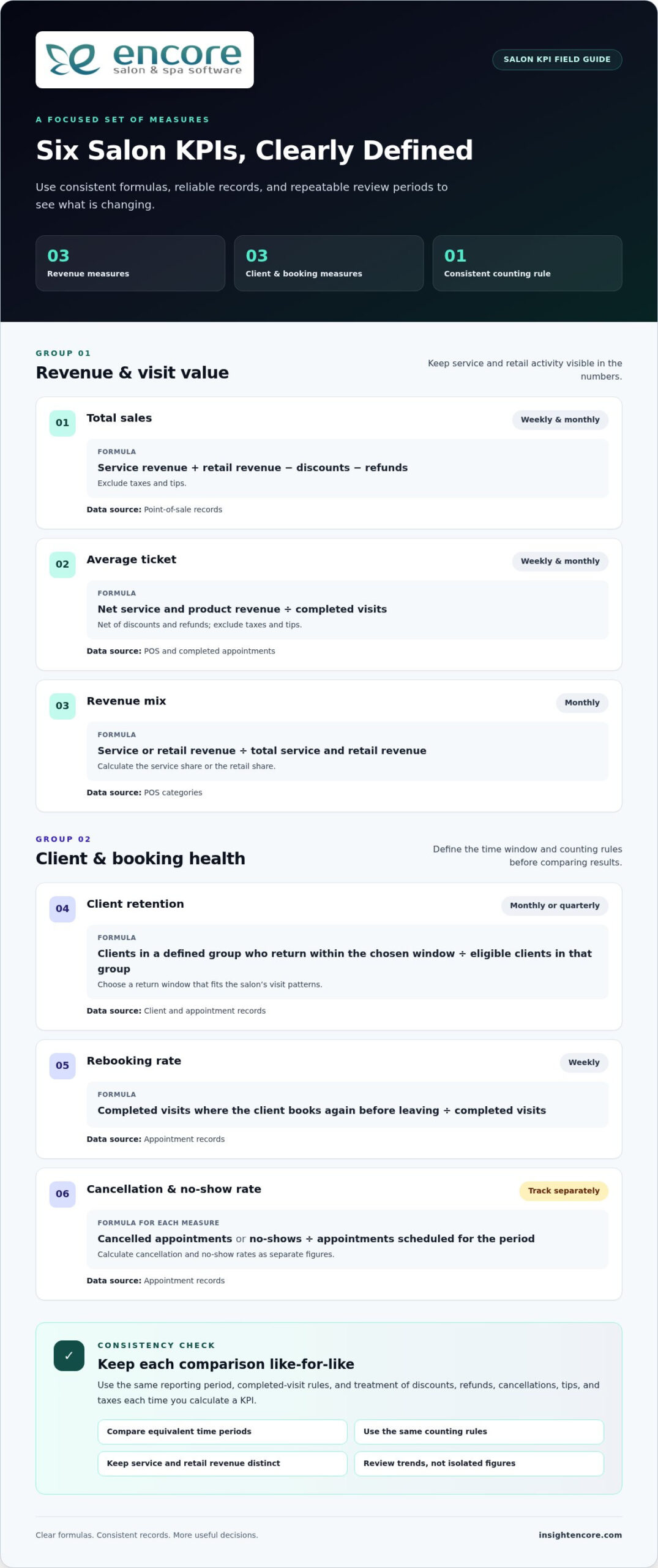
What if tracking fewer numbers helped your salon make better decisions? Collecting reports can still leave you unsure what to change, especially when records aren’t consistent or a result doesn’t point to an obvious cause. The salon key performance indicators to track are the ones that connect a business goal to a practical next step.

You don’t need to measure everything at once. A focused set of KPIs can show where bookings are slipping, whether clients are returning, how staff time is being used, and which services or products deserve a closer look. Use consistent formulas and compare equivalent time periods so changes in the numbers tell a useful story.

This guide explains which salon KPIs matter, how to calculate them, and how to turn trends into decisions about bookings, staffing, retention, and inventory. You’ll also see how connected booking, client, sales, and inventory records can make tracking more consistent, whether you use salon software, spreadsheets, or both.

Key Takeaways

  • Choose salon key performance indicators to track based on a specific business goal, not simply because a number appears in a report.
  • Use clear formulas and reliable data sources to measure sales, client behavior, team productivity, and retail performance consistently.
  • Compare results with your salon’s own past periods, accounting for seasonality, service mix, hours, and staffing changes.
  • Turn KPI reviews into a repeatable cycle: ask a business question, check the trend, choose an action, then reassess.
  • Connected appointment, client, sales, and inventory records can reduce manual reconciliation and make tracking easier to maintain.

Salon key performance indicators to track: what they reveal about business health

A salon can collect plenty of numbers and still be unsure what to do next. A Key Performance Indicator (KPI) is a measurable indicator tied to a specific business goal. It helps you judge whether an important part of the business is moving in the right direction and whether an adjustment may be needed.

The best salon key performance indicators to track depend on your priorities, services, and operating model. A booth-rental salon may focus on different questions than a team-based salon. You don’t need to monitor every available figure. Start with a small, balanced set, define how each measure is calculated, and review it consistently. A number belongs on your dashboard only if it helps guide a decision.

How KPIs differ from salon metrics

A metric is a measurement; a KPI connects that measurement to a goal. Appointment count, for example, tells you how many bookings were made. Booking conversion, calculated as bookings divided by booking inquiries or opportunities, can help assess how effectively interest turns into appointments. Define what counts as an inquiry or opportunity, then use the same definition and time period in every comparison. A KPI should prompt a useful question, such as whether to adjust booking availability or follow-up, rather than simply fill a report.

Context makes the numbers more useful. One week’s booking count is a data point; comparing weekly counts across equivalent periods can reveal a pattern. Before drawing a conclusion, check that the periods cover the same number of days and that your records use the same counting rules. Otherwise, an apparent improvement or drop may reflect inconsistent tracking rather than a real change in performance.

Choose KPIs around the salon’s priorities

Begin with the business outcome you want to understand, then choose a measure that can help explain it. Revenue stability may call for a financial measure, repeat visits may call for a client measure, and better capacity use may call for an operational measure. Keep owner-level KPIs focused on the health of the whole salon. Use individual staff measures for coaching conversations, with relevant context such as scheduled hours, service mix, and role.

  • Financial health: Are sales and revenue patterns supporting the salon’s goals?
  • Client health: Are clients returning and maintaining a steady visit pattern?
  • Operational health: Are available appointments and team time being used effectively?

This compact view helps you spot trade-offs instead of reacting to one number in isolation. A change in sales, for instance, may relate to client behavior or available capacity. Next, choose specific measures, formulas, data sources, and review periods that make those questions answerable.

The essential salon KPIs to track, with straightforward formulas

Useful measures start with clear rules. For the salon key performance indicators to track, define the reporting period, what counts as a completed visit, and how you handle discounts, refunds, cancellations, tips, and taxes. Apply the same rules each time so a change in the result reflects business activity, not a change in bookkeeping.

The U.S. Bureau of Labor Statistics reports that employment of barbers, hairstylists, and cosmetologists is projected to grow 7 percent. Tracking your own business health can help you understand how revenue, client activity, and available capacity are changing within your salon.

Revenue and visit-value KPIs

Start with sales and the value of each completed visit. For consistent comparisons, calculate sales after discounts and refunds, and exclude taxes and tips. Keep service and retail revenue separate so a shift in the sales mix is visible. These measures show what’s changing, but they don’t account for operating costs. For profit-focused guidance, see increasing salon profit margin.

Client, booking, and capacity KPIs

Client and appointment measures need defined time windows. For retention, select a return window that fits your salon’s visit patterns and compare eligible clients in each group. For utilization, divide booked service hours by available service hours, excluding breaks and other time when appointments can’t be scheduled. Keep the definition of available hours consistent when comparing staff or periods. For more detail, read calculating salon staff utilization rate.

KPI Formula and counting rule Data source Review cadence
Total sales Service revenue + retail revenue, less discounts and refunds; exclude taxes and tips. Point-of-sale records Weekly and monthly
Average ticket Service and product revenue, net of discounts and refunds, divided by completed visits; exclude taxes and tips. POS and completed appointments Weekly and monthly
Revenue mix Service or retail revenue divided by total service and retail revenue. POS categories Monthly
Client retention Clients in a defined group who return within the chosen window divided by eligible clients in that group. Client and appointment records Monthly or quarterly
Rebooking rate Completed visits where the client books again before leaving divided by completed visits. Appointment records Weekly
Cancellation / no-show rate Cancelled appointments or no-shows divided by appointments scheduled for the period. Track each separately. Appointment records Weekly
Appointment utilization Booked service hours divided by available service hours. Staff schedules and appointments Weekly

Use linked appointment, client, and POS records where possible to reduce manual matching. Encore Salon & Spa Software brings booking, client management, point-of-sale, and inventory tools together, giving salons a connected operational record to support consistent KPI tracking. Explore salon management tools.

A KPI change is a signal to investigate, not a verdict on your salon or team. Before reaching for an industry benchmark, compare the result with your own earlier periods. Your services, prices, opening hours, staffing model, and client mix all shape what a reasonable result looks like. The salon key performance indicators to track become more useful when you can explain what changed and decide what to test next.

What is a good salon KPI result?

There’s no universal target that suits every salon or service mix. Build a baseline from reliable historical records, then set a target that supports your business priorities. Compare like with like, such as the same month year over year or equivalent weeks, and document changes to formulas, booking systems, or recordkeeping. A new definition can create a jump in the numbers without any real change in performance.

Seasonality can affect demand, while changes in working hours or staffing can alter available capacity. Service mix matters too: a month with more long or higher-value appointments may shift revenue measures even if visit volume stays steady. Where records allow, break results down by service, staff member, booking channel, or new versus returning clients. These segments can suggest where to investigate, but they don’t prove what caused a change.

Find a useful explanation for a changing KPI

If average ticket falls, check whether clients booked a different mix of services, discounts increased, or fewer clients added retail products. If rebooking declines, look at client segments, appointment availability, and follow-up practices. These checks help you move from “the number changed” to a practical question the team can address.

  • Check the context: Confirm the date range, metric definition, staffing, and service mix.
  • Look for a pattern: Compare relevant client, service, or booking segments where records are available.
  • Test one adjustment: Change one operational factor, such as availability or follow-up, and review the result after a defined period.

Keep KPI conversations focused on coaching and planning, not surveillance. Use team-level trends to identify barriers, improve schedules, or support consistent client follow-up. If you review an individual measure with a staff member, add context such as their hours and service mix, then agree on a useful next step together. Numbers work best as a shared tool for learning, not a scorecard without explanation.

Salon Key Performance Indicators to Track in 2026: A Practical Guide

Build a practical salon KPI review routine your team can maintain

A useful KPI process doesn’t need to become another full-time task. Give it a simple rhythm: define the question, check the data, review the trend, choose one action, then reassess. Frequent checks can catch operational issues such as schedule gaps or cancellations. Monthly or quarterly reviews give you room to consider broader goals, staffing, and service mix.

Set up reliable KPI definitions and data sources

Before each review, make sure the numbers use the same rules. Keep a short reference for every measure that records its formula, data source, reporting period, and treatment of cancellations, discounts, or refunds. Then reconcile appointment, POS, client, and inventory records as needed. If you’re not ready for a formal reporting workflow, a spreadsheet is a practical place to start, provided someone updates it consistently.

Connected operational records can reduce the time spent matching figures from separate systems. Salon software features such as appointment booking, client management, point-of-sale transactions, and inventory tracking can help bring relevant information into a more consistent workflow. The right setup is one your team can maintain and use to answer real business questions.

Turn a review into one measurable next step

Choose one KPI tied to a current priority. If rebooking is the focus, for example, agree on one change to test, such as adjusting the time staff set aside to discuss the next appointment. Don’t change several processes at once; otherwise, it’s harder to tell which adjustment affected the result.

Record the decision in a simple action log:

  • KPI and question: What changed, and what do you need to understand?
  • Action and owner: What will change, and who is responsible?
  • Expected signal: What movement in the measure would suggest the action is helping?
  • Follow-up date: When will you review the result using the same definition and time period?

Use the follow-up to decide whether to keep, adjust, or stop the test. This turns the salon key performance indicators to track into a steady learning loop rather than a report that gets opened once and forgotten. Keep the process supportive: discuss obstacles, share useful context, and focus on what the team can try next.

Explore Encore salon software

How salon software can make KPI tracking more consistent

Spreadsheets can be a practical way to start: they’re flexible and easy to adapt to a small set of measures. But someone needs to enter and reconcile the information, and separate files can make it harder to compare bookings, sales, client activity, and inventory reliably. An integrated system can bring those records together, reducing manual matching and making it easier to work from consistent source data.

What to look for in salon KPI tracking software

Start with your chosen KPIs, then check whether the system supports the records behind them. Booking measures need appointment information; retention depends on consistent client records; revenue measures draw on point-of-sale data; and retail or stock decisions rely on inventory information. Reporting should make the date range clear and align with your formulas, including how completed visits, cancellations, discounts, and refunds are treated.

Ease of use matters, too. A report that’s difficult to access or a workflow staff can’t maintain won’t support dependable comparisons. Review the salon software features that can help centralize day-to-day information, and choose an approach your team can follow consistently. Spreadsheets can still play a role in calculations or analysis when needed.

Connect Encore tools to the measures that matter

Encore’s salon management platform brings appointment booking, client management, point-of-sale transactions, and inventory tracking into one operational setting. Those connected records can support a more consistent view of the activity behind your selected KPIs. Explore Encore salon software and its management tools.

Software supports the measurement routine; it doesn’t replace sound judgment. Keep your KPI definitions clear, check that the underlying records fit the question, and use trends to guide decisions rather than treating a dashboard as an automatic answer. The most useful setup is one that helps your team gather dependable information and act on it.

Learn about Encore salon software

Make your salon numbers work for you

The most useful salon key performance indicators to track are tied to clear business goals, measured with consistent formulas, and reviewed over comparable periods. A focused set of financial, client, and operational measures can reveal where to look without burying you in reports.

Use trends as prompts for investigation, not instant conclusions. Consider changes in seasonality, service mix, staffing, and availability, then choose one practical action, assign an owner, and set a date to reassess. That simple routine helps turn a result into a decision your team can learn from.

Encore brings appointment booking, client management, point-of-sale, inventory, payment processing, and marketing tools together to support salon operations.

Start with one meaningful question and a manageable set of measures. With consistent records and regular follow-through, you can build a clearer picture of your salon’s health and move forward with confidence.

Frequently Asked Questions

What are the most important KPIs for a salon to track?

The most important KPIs are the ones tied to your salon’s goals. A useful starting set includes total sales and average ticket for financial health, retention and rebooking rate for client relationships, and appointment utilization and no-show rate for operations. You might also track retail sales if product revenue is a priority. Choose a manageable group of salon key performance indicators to track, and use clear formulas and consistent time periods.

How do you calculate a salon rebooking rate?

Divide the number of completed visits where the client books their next appointment before leaving by the total number of completed visits, then multiply by 100 to express the result as a percentage. For example, if 30 out of 50 completed visits include a rebooking, the rate is 60%. Use the same period and counting rules each time, and decide how to treat rescheduled visits so comparisons stay consistent.

What is a good average ticket for a salon?

There’s no single average ticket target that fits every salon, since prices, service mix, and retail sales vary. Calculate yours by dividing service and product revenue by completed visits, using the same rules for discounts, refunds, taxes, and tips each period. Then compare the result with your own past periods. If it changes, check whether clients chose different services or added fewer retail products before deciding what to adjust.

How often should a salon review its KPIs?

Review operational measures, such as bookings, cancellations, and no-shows, frequently enough to respond to scheduling issues. A weekly check may suit these day-to-day questions. Review broader measures, such as retention or revenue trends, monthly or quarterly so there’s enough context to identify patterns. Pick a cadence your team can maintain, use consistent date ranges, and set a follow-up date whenever you decide to test a change.

How do you calculate salon staff utilization?

Divide booked service hours by available service hours, then multiply by 100 to get a utilization percentage. For example, 24 booked service hours out of 30 available hours equals 80% utilization. Define available hours consistently, excluding time when the staff member can’t take appointments, such as breaks or scheduled leave. Keep the same rules across periods, and interpret the result alongside service mix and schedule changes.

Should a salon use industry benchmarks or its own historical data?

Start with your salon’s own historical data. Comparing equivalent periods helps you see whether performance is changing within your business, while accounting for factors such as seasonality, service mix, staffing, and hours. External benchmarks can offer context, but they may reflect different salon models or KPI definitions. Before comparing, confirm that the formulas, reporting periods, and counting rules match closely enough to make the comparison meaningful.

Can salon software track key performance indicators automatically?

Salon software can bring appointment, client, point-of-sale, and inventory records together, which may reduce manual data entry and reconciliation. Some platforms also offer reporting tools, but don’t assume every KPI is calculated automatically or uses your exact formula. Check how reports define date ranges, completed visits, cancellations, discounts, and refunds. You may still need to set definitions, confirm data quality, and interpret trends before choosing an action.

Disclaimer

This article is general in nature and may contain errors, please verify all claims with your sales rep
Categories
Uncategorized

Barbershop Appointment Scheduling Software: The 2026 Management Guide

You are halfway through a precision skin fade when the shop phone rings for the third time this hour. You can’t step away to answer it, so the call goes to voicemail, and another potential client likely moves on to the shop down the street. It’s a frustrating cycle that costs you money and breaks your creative flow. Most shop owners agree they would rather spend their time behind the chair than acting as a full-time receptionist or chasing down last-minute no-shows. You didn’t open your doors to spend all day on the phone.

The good news is that your technology should be doing the heavy lifting for you. This 2026 guide will show you how the right barbershop appointment scheduling software can act as a silent business partner, handling your logistics while you focus on your craft. We’ll explore how to eliminate scheduling gaps, automate your payments and tips, and manage complex commission structures for your team. You will discover how to build a professional online presence that works 24/7, ensuring your calendar stays full even while you sleep.

Key Takeaways

  • Shift from simple digital calendars to a comprehensive business engine to eliminate manual booking errors and recover lost revenue.
  • Understand the critical role of specialized booth and chair renter management in maintaining fair and transparent accounting across your entire team.
  • Evaluate the true value of professional barbershop appointment scheduling software compared to basic apps that often hide high transaction fees and lack human support.
  • Master the transition to new technology with a clear strategy for auditing client data and optimizing your service menu with precise buffer times.
  • Build your shop’s future on a foundation of trust by partnering with a human-centric management provider that offers decades of industry expertise.

Beyond the Paper Book: Why Barbershops Need Specialized Scheduling in 2026

The traditional paper book was once the heart of the shop. It sat on the counter, filled with crossed-out names and scribbled phone numbers. But in 2026, that book is a liability. Modern barbershop appointment scheduling software has evolved into a comprehensive business engine that powers your entire operation. It’s no longer just a digital calendar; it’s the central hub where your marketing, payments, and client relationships live.

Broadly speaking, appointment scheduling software allows businesses to manage their time more effectively, but for a barber, it does much more. It eliminates the “cost of chaos” by preventing double-bookings and ensuring your revenue remains predictable. By automating administrative tasks, you can finally focus on “reclaiming the chair” and doing the work you actually love. Today’s clients don’t want to wait for business hours to book. They expect 24/7 self-service. If they think about a haircut at 11 PM on a Sunday, they want to book it right then. If you aren’t available digitally, you’re invisible to a massive segment of the market.

The Evolution of the Modern Barbering Business

The industry has shifted away from the “walk-in and wait” culture. Clients value their time, and they want the certainty of an appointment. Modern barbershop management is the intersection of craft and digital efficiency. This digital approach also builds your brand identity. A sleek booking interface tells clients you are a professional who respects their time and invests in a high-quality experience. It moves you from being just another shop on the corner to a premium destination.

The Real Cost of No-Shows and Last-Minute Gaps

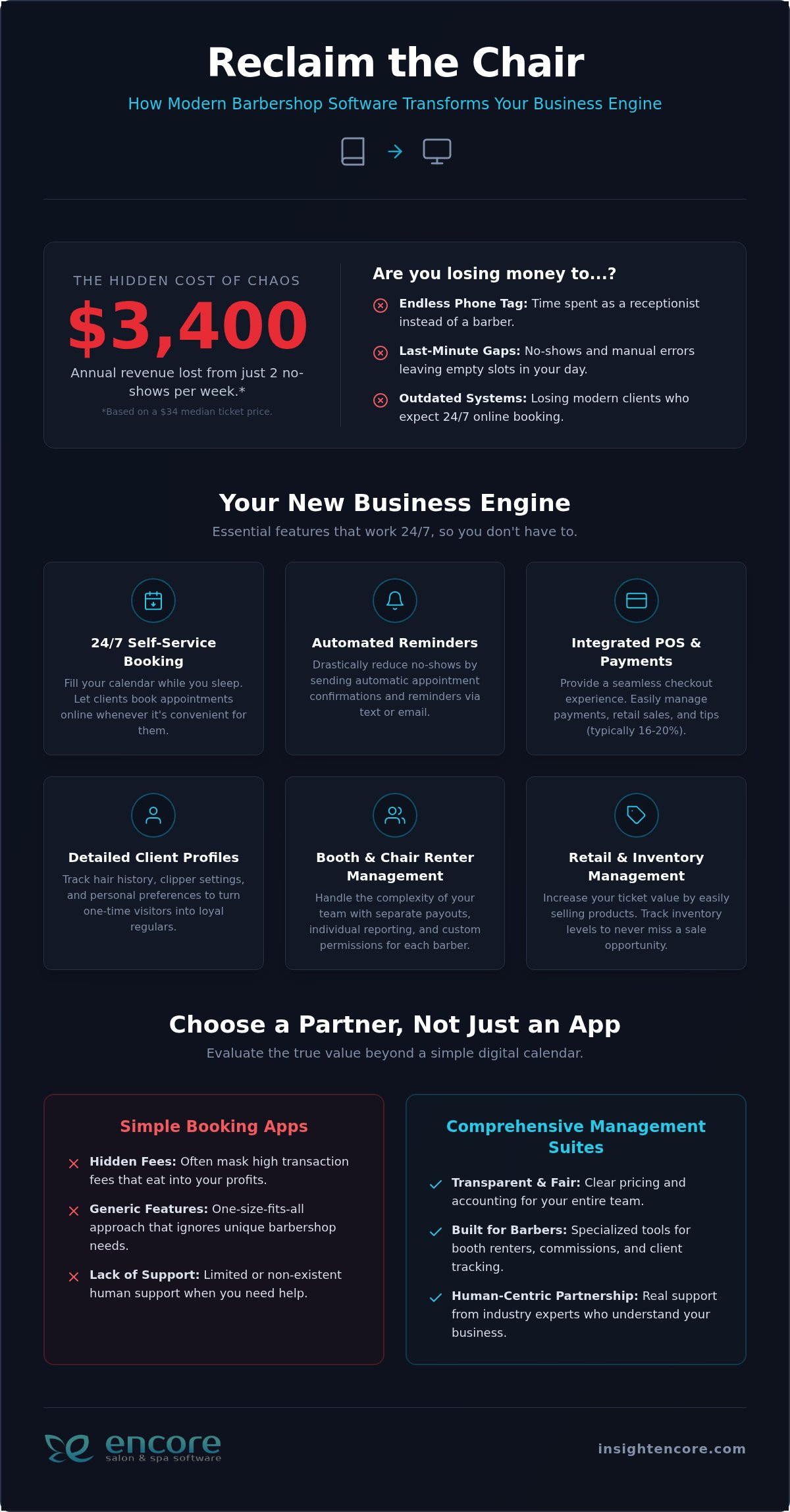
Let’s look at the numbers. Based on a median ticket price of $34, losing just two clients a week to no-shows means you’re leaving over $3,400 on the table every year. That’s a significant hit to your bottom line that you can’t afford to ignore. Automated reminders act as a professional barrier against forgetfulness, prompting clients to confirm or reschedule before it’s too late. Beyond the money, there is a psychological benefit. Walking into a shop with a full, organized calendar boosts barber morale and creates an atmosphere of success that clients can feel the moment they walk through the door. Using barbershop appointment scheduling software ensures that your most valuable asset, your time, is never wasted.

Essential Features for Modern Barbers: From Booth Renting to Retail Management

Choosing the right barbershop appointment scheduling software involves more than just picking a pretty interface. It requires a tool that understands the specific financial flow of a busy shop. For many owners, the biggest headache isn’t the haircut itself. It’s the administrative tangle of managing different revenue streams while keeping the atmosphere professional. When introducing new technology to your team, focusing on features that solve daily friction points is the fastest way to get everyone on board.

A truly modern system bridges the gap between the chair and the front desk. Integrated POS systems allow you to transition a client from a finished fade to a completed transaction in seconds. This isn’t just about speed; it’s about accuracy. By using detailed client profiles, you can track hair history, specific clipper settings, and even personal preferences. These small details turn a one-time visitor into a loyal regular who feels seen. Plus, with integrated processing, you can easily manage tips, which in this industry typically range between 16% and 20% of the ticket value.

Managing Independent Barbers and Chair Renters

Most generic booking apps fail because they assume every barber is a standard employee. We know the reality of the industry is often different. Your software needs to handle the complexity of booth and chair renters with ease. This means generating separate payouts and individual reporting so each barber can see their own progress without compromising shop-wide data. With Encore Salon Software, you can set specific permissions. This allows individual barbers to manage their own calendars on their phones while you maintain total oversight of the shop’s performance. It creates a culture of autonomy and trust.

Barbershop Inventory Control for Retail and Professional Use

Profits aren’t just made through services. They are often found on your retail shelves. Effective barbershop appointment scheduling software must include robust inventory tracking. You need to know exactly how many neck strips, blades, and shave creams you have in your back-bar at all times. Running out of professional supplies mid-day is a disaster you can easily avoid with automated low-stock alerts.

Similarly, managing your retail stock for pomades and beard oils is crucial for boosting your margins. Automated alerts ensure you never miss a sale because a product wasn’t on the shelf. If you’re ready to see how these features can transform your daily grind, you can see our specialized features in action to find the perfect fit for your shop. Finally, don’t overlook automated marketing. You shouldn’t have to spend your Monday nights texting clients to fill a slow Tuesday. Smart systems identify gaps in your schedule and reach out to regulars who are due for a trim, keeping your chairs full without the manual effort.

Evaluating the Options: Simple Booking Apps vs. Comprehensive Management Suites

Choosing the right barbershop appointment scheduling software often feels like a choice between a quick fix and a long-term investment. Many shops start with “free” or low-cost booking apps, thinking they’re saving money. However, these basic tools often hide their true costs in high transaction fees or a total lack of human support when things go wrong. You shouldn’t have to wait three days for an email response when your calendar is frozen on a busy Friday. Professional tools provide the reliability you need to keep your doors open and your chairs full.

Professional management suites provide a unified experience that basic apps can’t match. One major advantage is Integrated Credit Card Processing. Instead of juggling third-party hardware that may or may not sync with your bookings, an all-in-one system ensures your finances and your schedule are always in the same place. In 2026, data ownership is also a top priority. You need to know that your client list belongs to you, not the software provider, and that your shop’s data is secure and accessible from any device. Basic apps often create data silos, making it nearly impossible to get a clear picture of your shop’s health.

When a Basic App Is No Longer Enough

You know it’s time to upgrade when you feel the weight of “app fatigue.” This happens when you use one tool for booking, another for your marketing emails, and a third for your taxes. It’s exhausting. A modern shop requires cloud-based reliability that allows you to check your numbers from home or on the go. If you’re spending more time syncing data between apps than you are talking to your clients, your current system is failing you. Moving to a comprehensive suite eliminates these gaps and brings your entire business into a single, easy-to-use platform.

Calculating the True ROI of Professional Software

Don’t just look at the monthly subscription price. The real ROI comes from the hours you save and the extra revenue you generate. Features like automated loyalty programs and digital gift cards create immediate cash flow and keep regulars coming back. When you view your software as a profit center rather than an expense, the choice becomes clear. You can explore our Pricing and Value page to see how a professional suite pays for itself through increased efficiency and reduced administrative stress. Investing in the right barbershop appointment scheduling software isn’t just about a digital calendar. It’s about giving your business the foundation it needs to scale without the headache of disconnected tools.

Barbershop Appointment Scheduling Software: The 2026 Management Guide

How to Implement New Scheduling Software Without Disrupting Your Shop Flow

Changing your business systems shouldn’t feel like a gamble. You’ve built your shop on solid relationships, and you don’t want technology to get in the way of that. A smooth transition to new barbershop appointment scheduling software is all about preparation. By following a steady, logical path, you can switch tools without losing a single booking or frustrating your team. It’s about moving from a state of potential stress to a feeling of organized control.

The first step is auditing your current client list. This is the perfect time to clean up your data by removing inactive profiles and ensuring phone numbers are accurate. Once your data is ready for migration, focus on your service menu. Set clear durations for every cut and shave, but don’t forget to include buffer times. If a skin fade takes 30 minutes, add a 10-minute buffer for sanitizing your station and resetting your tools. This prevents a “domino effect” where one late client ruins the entire afternoon.

Before going live, ensure 100% adoption through team training. Spend a morning walking everyone through the interface. Finally, launch your online portal to your clients. Offering a small introductory incentive, like a discount on their first online booking, is a great way to shift behavior quickly and get your calendar filled without you picking up the phone.

Staff Buy-In: Making the Transition Smooth

Some barbers may worry that new software feels like micromanagement. You can overcome this by framing the change as a tool for empowerment. Show the team how the system automatically tracks their commissions and tips, saving them from doing manual math at the end of a long shift. When they see that the software actually helps them earn more through repeat bookings and automated reminders, they’ll become your biggest advocates. For more leadership advice, explore these Barbershop management tips for new owners.

Client Communication: Introducing the New Booking Portal

Use your new automated marketing tools to announce the upgrade. Send a blast text or email to your regulars explaining how much easier their lives are about to become. You can also use social media to drive excitement. A simple script like, “Skip the phone tag! Book your next fresh cut in 30 seconds through our new portal. Link in bio!” works wonders. For long-time clients who still prefer to call, don’t worry. Your staff can easily enter their details manually into the barbershop appointment scheduling software, keeping your digital records perfect while maintaining that personal touch.

Start your stress-free transition today

Scaling Your Shop with Encore’s Barbershop Management Solution

Growing a business is about more than just adding chairs. It’s about building a foundation that can support your ambition without crumbling under administrative pressure. While many software giants offer cold, one-size-fits-all platforms, Encore provides a human-centric alternative designed specifically for the unique culture of the barbershop. Built on the 30-plus-year history of Syntec Business Systems, our barbershop appointment scheduling software offers the reliability of an industry veteran with the innovation required for 2026.

Scaling effectively requires tools that turn a single visit into a lifelong habit. Features like integrated gift cards and automated loyalty programs are essential for retention. These aren’t just “add-ons”; they’re revenue drivers that help you maintain a steady cash flow even during slower seasons. When your technology works as hard as you do, you can finally move from a state of constant hustle to one of organized control. It’s time to stop fighting with your tools and start using them to build your legacy.

A Partner, Not Just a Provider

In a world increasingly dominated by AI chatbots and delayed email tickets, we believe in the power of human connection. You deserve talk-to-real-people support when you have a question about your shop’s data. Our team acts as a dedicated mentor, helping you navigate the system so it fits your specific shop layout and workflow. We offer deep customization options because we know no two shops are identical. If you’re ready for a system that adapts to you, contact our team for a personalized walkthrough that addresses your specific goals.

Future-Proofing Your Business for 2026 and Beyond

The industry is moving fast. To stay competitive, your shop must adopt modern trends like mobile-first payments and high-security standards. Encore evolves alongside these changes, ensuring your business never falls behind. A critical part of this is having integrated Credit Card Processing that meets 2026 security protocols while keeping fees transparent. By unifying your payments and bookings, you protect your data and provide a seamless experience for your clients. You’ve done the hard work of mastering your craft. Let us handle the technical heavy lifting so you can focus on the next level of your success.

Try Encore Now

Take the Next Step Toward a Stress-Free Shop

You have seen how the right technology can transform your daily grind from a series of interruptions into a steady flow of creative work. By moving beyond the paper book and embracing a system that handles everything from chair rentals to retail inventory, you are not just buying a tool; you are investing in your peace of mind. The transition does not have to be overwhelming when you have a partner that understands the specific culture of your business.

Choosing barbershop appointment scheduling software shouldn’t feel like a risk. With Encore, you are backed by decades of expertise dating back to 1991. Our platform brings your marketing, loyalty programs, and POS together in one place, ensuring you have the specialized support needed for both employees and independent booth renters. You have done the hard work of building your brand. Now it’s time to let your software do the heavy lifting.

Ready to streamline your shop? Try Encore Now

We are here to help you build the future of your shop with confidence and clarity. Your success is our priority, and we look forward to helping you grow.

Frequently Asked Questions

Is barbershop scheduling software worth the monthly cost for a solo barber?

Yes, it is absolutely worth the investment for a solo barber because it acts as a virtual assistant that never sleeps. Instead of pausing a cut to answer the phone or returning voicemails late at night, you can let your clients book themselves 24/7. This ensures you never miss a lead while you are behind the chair. It also helps you maintain a professional image that builds trust with new guests.

How does barbershop software handle booth renters who pay a flat weekly fee?

Our specialized module for chair and booth renters is designed for this exact scenario. The software can track flat weekly rent payments while allowing each barber to manage their own individual schedule and client records. This creates a clear boundary between the shop owner’s oversight and the barber’s independent business. It simplifies your accounting by keeping rent records and service data in one secure, organized place.

Can I migrate my client data from a different app or a paper book?

You can certainly migrate your data to ensure a smooth transition. If you are moving from another digital app, we can often help you import your existing client lists and contact information. For those moving from a paper book, it requires a bit of manual entry to get started, but it’s a one-time task that sets the foundation for years of organized growth. This cleanup process helps you remove inactive profiles.

Does the software work on both iPads and Android devices?

Yes, the system is designed to be flexible and works seamlessly across various hardware. Whether your shop uses iPads at the front desk or your barbers prefer to check their schedules on Android phones, the cloud-based nature of the platform keeps everyone synced in real-time. This cross-platform accessibility ensures that you can manage your business from the shop, your home, or even while you are on the go.

How do automated reminders actually reduce no-shows?

Automated reminders reduce no-shows by providing a gentle, professional nudge to clients before their appointment. These messages often include a confirmation link, which requires the client to actively commit to the time slot. By giving them an easy way to reschedule or cancel ahead of time, you can fill those gaps with other waiting clients. It removes the “I forgot” excuse and sets clear expectations for the value of your time.

What happens if my internet goes down? Can I still access my schedule?

If your shop’s internet goes down, you can still access your data using mobile data on a smartphone or tablet. Since the information is stored securely in the cloud, it is not tied to a single physical location or local network. You can quickly switch to a hotspot to view your upcoming appointments or check out a client. This level of reliability ensures that your shop stays operational regardless of local connection issues.

Can I sell gift cards and retail products through the scheduling app?

Yes, selling gift cards and retail products is a core feature of high-quality barbershop appointment scheduling software. The system includes an integrated inventory management tool that tracks your stock levels for pomades, oils, and back-bar supplies. You can process these sales at the same time as the service checkout, making it easy to boost your average ticket price. Digital gift cards can also be sold 24/7 through your online booking portal.

Is it possible to set different prices for different barbers in the same shop?

You can easily set different price points for different barbers based on their experience or seniority. This tiered pricing structure allows you to charge more for a master barber while keeping standard rates for junior staff. The barbershop appointment scheduling software handles these variations automatically during the booking and checkout process. It ensures that every transaction is accurate and that your team is compensated fairly for their specific skill level.

Disclaimer

This article is general in nature and may contain errors, please verify all claims with your sales rep
Categories
Uncategorized

The Complete Guide to Spa Gift Card Software: Boosting Revenue in 2026

A stack of paper gift certificates tucked away in a drawer isn’t just disorganized—it’s a ticking time bomb of accounting errors, lost revenue, and client frustration. In 2026, a modern spa’s success hinges on turning those liabilities into a powerful, predictable cash flow engine. The right spa gift card software does more than just replace paper; it transforms how you attract new clients, manage revenue, and build loyalty.

The problem is that many systems are either standalone apps that create data headaches or expensive add-ons that don’t truly integrate with your daily operations. You need a solution that feels like a natural part of your workflow, not another task on your to-do list.

This guide will walk you through the essential features of a high-performance gift card system. We’ll cover everything from the critical importance of POS integration and liability tracking to the specific strategies you can use to make gift cards a cornerstone of your spa’s growth.

Spa Gift Card Systems: Why Integration is Key

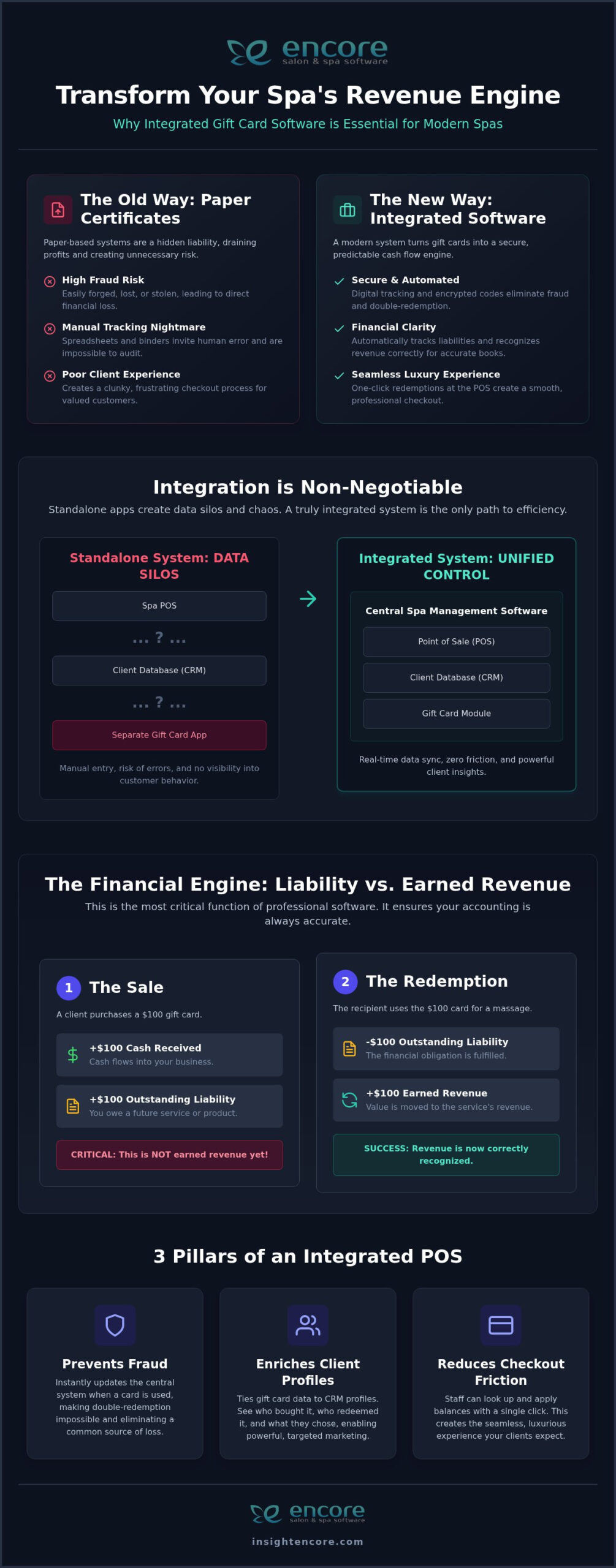
At its core, spa gift card software is a digital ledger that tracks prepaid services or dollar amounts for your clients. It replaces unreliable paper certificates with a secure, centralized system that logs every purchase, redemption, and balance. For 2026, the industry standard has moved far beyond simple tracking; it’s about creating a seamless financial tool that works in lockstep with every other part of your business.

The most significant evolution is the shift from standalone gift card apps to fully integrated modules within your primary spa management software. Standalone systems create dangerous data silos. When your gift card program doesn’t communicate with your point-of-sale (POS) or client relationship management (CRM) system, you invite chaos. Staff members are forced to manually enter codes, check balances in a separate program, and reconcile sales at the end of the day. This friction leads to errors, a clunky checkout experience, and a professional blind spot—you have no idea who is buying or redeeming cards.

True integration means that when a gift card is sold or redeemed, the balance updates in real-time across your entire system, from the front desk computer to a therapist’s tablet. This isn’t a luxury; it’s a fundamental requirement for efficient and secure operations.

The Evolution from Paper to eGift Cards

For decades, spas relied on paper gift certificates. While charming, they are a significant security risk. They can be easily forged, lost, or stolen, and tracking their balances in a binder or spreadsheet is an administrative nightmare. Any spa still using paper in 2026 is leaving itself vulnerable to fraud and accounting errors that can silently drain profits.

The rise of eGift cards—digital codes that can be emailed or texted—introduced instant delivery, which is perfect for last-minute shoppers. However, the true innovation isn’t just the digital format, but the encrypted code itself. This unique identifier is the foundation of a secure system, whether it’s assigned to a physical plastic card or a digital certificate. This leads to the modern standard: an omnichannel gift card experience where a single, integrated system manages both physical and digital card data seamlessly at the point of sale.

Why Integrated POS Systems Win

The point of sale is where your gift card program lives or dies. An integrated system connects every transaction directly to your financial and client databases, providing three undeniable advantages:

  • Prevents Fraud and Double-Redemption: When a card is redeemed through an integrated POS, its balance is instantly and permanently updated in the central system. This makes it impossible for the same card or code to be used twice, eliminating a common source of loss.
  • Enriches Client Profiles: Tying gift card data to a client’s CRM profile is a marketing game-changer. You can see who purchased the card, who redeemed it, and what services they chose. This allows you to turn a first-time gift recipient into a loyal, long-term client with targeted follow-up marketing.
  • Reduces Checkout Friction: A seamless checkout is a hallmark of a luxury spa experience. With an integrated system, your front desk staff can look up a client, see their available gift card balance, and apply it to a sale with a single click. No manual entry, no awkward delays.

High-Performance Features: Beyond Simple Gift Certificates

A basic system that just sells and redeems cards is no longer enough. To truly drive revenue and streamline your business, your spa gift card software needs a robust set of back-end features designed for spa owners and managers. It’s about giving you control, security, and financial clarity.

Look for a system that offers customizable denominations, allowing you to sell cards for specific services (like a "Signature Massage Package") or flexible dollar amounts. You should also have control over expiration logic, ensuring your policies are clear and comply with local regulations. Most importantly, any system you choose must be powered by secure integrated credit card processing. This protects both you and your clients, ensuring every transaction is fast, safe, and reliable.

Liability Tracking and Revenue Recognition

This is the single most overlooked—and most critical—feature of professional spa gift card software. When a client buys a $100 gift card, you have $100 in cash, but you have not yet earned $100 in revenue. That money is a liability on your books until the client redeems the card for services or products.

Manually tracking this is an accountant’s worst nightmare and can lead to serious errors on your tax filings. A sophisticated system like Encore solves this automatically:

  • It separates cash from earned revenue. The software understands that a gift card sale is a prepayment. It tracks the cash received while holding the value as an outstanding liability.
  • It automates revenue recognition. When the card is used, the software correctly moves the corresponding amount from the liability column to the earned revenue column for the specific service or product sold.
  • It provides instant, accurate reporting. With a few clicks, you can generate a report showing all active, redeemed, and expired gift cards. This gives you a precise, real-time snapshot of your outstanding financial obligations.

Flexible Selling and Marketing

An omnichannel strategy in 2026 is about making your gift cards visible everywhere, even if the final sale happens in a controlled environment. While some platforms offer online storefronts, a system that centralizes sales through your POS provides a high-touch, secure alternative that many spa owners prefer. This approach allows you to:

  • Promote 24/7, Sell In-Person: Use your website and social media to showcase beautifully designed gift card packages for holidays, birthdays, and special occasions. A clear call-to-action can direct clients to call or visit the spa to purchase, creating an opportunity for a personal interaction.
  • Leverage Your Automated Marketing: A fully integrated system allows you to use your CRM to promote gift cards. Send a targeted email campaign to clients who have purchased gift cards in the past, reminding them that Mother’s Day is approaching. You can include a link to your automated marketing features page on your website with details about your current gift card offers.
  • Use In-Salon Prompts: Place elegant signage and QR codes at the front desk that lead to a promotional page on your website. This encourages clients to think about gift-giving while they are already in your spa and feeling great about their experience.

The Business Case: How Gift Cards Drive Spa Growth

Gift cards are far more than a simple convenience; they are a strategic tool for client acquisition, cash flow management, and revenue growth. When implemented correctly, they can become one of your most profitable marketing channels.

The data consistently shows that gift card recipients spend more. Studies reveal that clients using a gift card are likely to spend 20-50% more than the card’s initial value. This "Reciprocal Spending" effect happens because the initial service feels "free," making clients more open to splurging on an add-on, upgrading a service, or purchasing retail products. Speaking of which, it’s vital to have a robust spa inventory management system to handle the increased product sales that gift cards drive.

Furthermore, every gift card sold acts as a zero-cost client acquisition tool. Your loyal clients are effectively selling your services to their friends and family, delivering a pre-qualified new customer directly to your door. Finally, gift cards provide a crucial injection of upfront cash flow, helping you manage expenses and payroll during seasonal lulls.

The Psychology of the Gift Card Recipient

A client spending their own money might stick to their usual maintenance service. But a client spending "free money" from a gift card is psychologically primed to explore. This is your golden opportunity to introduce them to higher-margin, luxury services they might not otherwise try, like an advanced facial, a body wrap, or a hot stone massage.

Your goal is to use the gift card as an introduction to a new level of service. Once a client experiences that luxury treatment, they are far more likely to book it again. Your integrated CRM is key here. By tracking what the gift recipient chose, you can send targeted follow-up promotions for that specific high-ticket service, strategically converting them from a one-time guest into a long-term, high-value client.

Referral Programs and Client Incentives

Gift cards are the perfect fuel for a powerful referral and retention engine. Instead of offering a generic discount, you can create tangible, high-perceived-value rewards that drive specific actions:

  • Reward Referrals: When a loyal client refers a new guest, automatically add a $15 or $25 gift credit to their account as a thank you. It feels more like a gift than a discount and encourages them to return.
  • Re-engage Dormant Clients: Run a report to find clients who haven’t visited in over six months. Send them a "We Miss You!" SMS or email with a surprise $10 digital gift credit that expires in 30 days. This small gesture can be incredibly effective at bringing them back.
  • Incentivize Pre-Booking: Encourage clients to pre-book their next appointment before leaving by offering a small gift card credit that can be used at their next visit.

The Complete Guide to Spa Gift Card Software: Boosting Revenue in 2026

Implementation Guide: Launching Your Digital Gift Card Program

Moving from a manual process to a streamlined digital system is a straightforward process when you have a clear roadmap. The key is to focus on system configuration, staff training, and a smart marketing launch.

This process is especially critical for businesses with unique structures, such as spas that work with chair or booth renters. A professional software solution should allow each independent renter to manage their own gift card program under the spa’s umbrella, ensuring their revenue is tracked separately and accurately.

Before you launch, invest time in training your team. They are your front-line salespeople. Ensure they understand the benefits, know how to answer questions about terms and conditions, and feel comfortable mentioning gift cards during checkout or service wrap-ups.

Step-by-Step System Configuration

  1. Step 1: Define Your Card Types and Branding. Work with your software provider to design physical cards that reflect your spa’s luxury brand. Decide on the standard denominations you will offer and create templates for any digital gift certificates you may email from the POS.
  2. Step 2: Set Your Terms, Conditions, and Expiration Dates. Research your state or provincial laws regarding gift card expiration—many jurisdictions have strict consumer protection laws. Clearly define your policies on your website and on the cards themselves to avoid any client confusion.
  3. Step 3: Integrate Your Payment Gateway. Ensure your credit card processing is fully integrated with your POS system. This allows your staff to sell and activate a gift card in a single, secure, and swift transaction right at the front desk.
  4. Step 4: Promote Your Program. Announce your new, professional gift card program to your clients via email, social media, and in-salon signage. This is the time to build excitement and educate your customers on how easy it is to give the gift of relaxation.

Marketing Your Gift Card Program

Once your system is live, a proactive marketing strategy will ensure it generates a steady stream of revenue.

  • Plan Holiday Campaigns: Don’t wait until December to think about Christmas. Plan your marketing for Mother’s Day, Valentine’s Day, and the holiday season months in advance. Create compelling graphics and email campaigns for each.
  • Create Bundle Deals: Increase the average sale value by offering incentives. A popular promotion is: "Buy a $100 gift card, and receive a bonus $20 credit to spend on retail products." This drives cash flow and moves your inventory.
  • Train for the Upsell: The best time to sell a gift card is when a client is at their happiest—right after a wonderful service. Train your therapists and stylists to conclude their service by saying, "If you know anyone who could use a day of relaxation like this, we have beautiful gift cards available at the front desk."

Why Encore is the Best Choice for Spa Gift Card Management

Choosing the right software is about choosing a partner that understands the unique pressures of the spa industry. Encore Salon & Spa Software provides a fully integrated gift card management system designed to eliminate complexity, not add to it. Because gift cards are a core feature of the all-in-one platform—not a tacked-on module—they work seamlessly with every other part of your business.

Developed by Syntec Business Systems, a company that has specialized in the beauty industry since 1991, Encore is built on a foundation of reliability and deep industry knowledge. We understand the specific needs of spas, salons, and even niche businesses like tattoo studios, and have tailored our features to solve their real-world problems.

Our human-centric support and "can-do" personality mean you’re never left dealing with a faceless corporation. We are your partners in growth, dedicated to helping you succeed.

Seamless Integration Across All Modules

The power of Encore lies in its unified ecosystem. When you sell a gift card through our POS, the data flows everywhere it needs to, instantly:

  • Marketing & Loyalty: The purchaser and recipient are tagged in the CRM, allowing for targeted follow-up campaigns and loyalty point tracking.
  • Inventory Management: When a gift card is used to buy a retail product, your stock levels are updated in real-time.
  • Centralized Reporting: Multi-location spas and franchise owners can view gift card sales and liability reports for their entire organization from a single dashboard, providing complete financial oversight.

Getting Started with Encore

We make the transition from a legacy system or manual process smooth and painless. Our team will guide you through the setup, help you configure your gift card program, and ensure your staff is fully trained. With integrated credit card processing built-in, you can streamline every sale from day one.

Stop wrestling with spreadsheets and paper certificates. It’s time to implement a professional, secure, and integrated gift card system that boosts your revenue and gives you peace of mind. Start Growing Your Revenue with Encore Gift Cards and see how a truly all-in-one system can transform your business.

Frequently Asked Questions (FAQs)

Do spa gift cards expire by law in 2026?

Gift card expiration laws vary significantly by state and province. In the U.S., the federal Credit CARD Act of 2009 mandates that cards cannot expire within five years of their purchase date, but many states have even stricter consumer protections. Always consult with a local business advisor to ensure your spa’s policy is compliant with current 2026 regulations in your area.

What is the difference between an eGift card and a physical gift card?

A physical gift card is a plastic, branded card with a magnetic stripe or barcode. An eGift card is a digital version with a unique code that is delivered to the recipient via email or text. Both are managed by the same integrated software; the only difference is the delivery method and physical form factor.

How do I track gift card sales for my spa’s taxes?

Properly integrated spa gift card software does this automatically. It records the sale as a liability, not as immediate revenue. When the card is redeemed for a service or product, the software moves the amount from the liability account to the earned revenue account. This ensures your financial reports are accurate for tax purposes.

Can booth renters have their own independent gift card system?

Yes, but only with the right software. Systems like Encore offer specialized features for booth renters, allowing them to sell and manage their own gift cards. The software keeps their financial data separate from the main spa, ensuring each independent professional can accurately track their own sales and liabilities.

How much do spas typically make from gift card sales annually?

This varies widely based on spa size, location, and marketing efforts. However, for many successful spas, gift card sales can account for 5-10% of their total annual revenue, with significant spikes during key holidays like Christmas and Mother’s Day.

What happens if a client loses their physical gift card?

This is a major advantage of an integrated software system. Because the gift card’s value is tied to a unique code and often linked to a client profile in your CRM, you can easily look up the balance and issue a new card or apply the credit directly to their account. With paper certificates, the value is often lost for good.

Is it better to offer a discount or a gift card for referrals?

While both can be effective, a gift card often has a higher perceived value and is more likely to bring a client back. A $20 gift card feels like a tangible present, whereas a "20% off" coupon feels like a simple marketing promotion. Gift cards are excellent tools for building loyalty and encouraging repeat visits.

How do I integrate gift cards into my spa’s existing website?

The best approach is to create a dedicated page on your website that beautifully showcases your gift card designs and package options. While some systems offer direct online sales, a highly secure and personal approach is to use this page to direct customers to call or visit your spa to complete the purchase through your integrated POS system. This ensures every sale is handled securely by your trained staff.

Disclaimer

This article is general in nature and may contain errors, please verify all claims with your sales rep