
window.dataLayer = window.dataLayer || []; function gtag(){dataLayer.push(arguments);} gtag('js', new Date()); gtag('config', 'UA-206511945-1');
Search
Categories
Uncategorized

Tattoo Artist Booking and Deposit Software: A 2026 Buyer’s Guide

What if the biggest booking headache isn’t finding an open slot, but keeping every detail connected after a client reaches out? The right tattoo artist booking and deposit software can help move an inquiry toward a confirmed appointment while keeping client details, scheduling, and payment activity organized.

If you’re juggling repeated messages between appointments, unclear deposit records, or a calendar that doesn’t fit custom tattoo requests, you’re not alone. A smoother process takes more than an online scheduler. It needs a clear way to handle the steps around each appointment without adding another layer of admin.

This guide compares tattoo-focused tools and broader studio platforms by their booking, deposit, payment, and client-management workflows. You’ll see what to consider as an individual artist or multi-artist studio, and how Encore’s tattoo studio software brings online booking, client management, integrated credit card processing, and point-of-sale transactions into a broader management workflow. Use these criteria to find a practical path from first inquiry to organized appointment records.

Key Takeaways

  • Choose tattoo artist booking and deposit software that supports the full client journey, not just calendar appointments.
  • Map the steps from inquiry to follow-up so you can decide where client references, placement details, and payment records belong.
  • Compare booking flow, intake, deposit records, payments, reminders, and artist calendars against your studio’s actual needs.
  • Document your current policies, test common booking scenarios, and introduce the new process in clear steps.
  • Explore how Encore’s tattoo studio software brings online booking, client management, integrated credit card processing, and point-of-sale tools into a broader studio workflow.

Why tattoo artists need booking and deposit software beyond a calendar

A calendar shows when you’re busy. It doesn’t explain why an appointment needs a consultation, which design reference a client sent, or whether the booking has reached the next step. Tattoo artist booking and deposit software helps coordinate inquiries, appointments, client details, and payment records so essential context doesn’t get lost across messages, notes, and separate tools.

Booking software manages appointment requests and the details attached to them; a general-purpose calendar mainly records scheduled time. That difference matters for tattoo artists. A custom piece may need discussion before you can estimate the session or reserve enough time. A flash design may be ready to book, but the client still needs to choose an artist and appointment slot.

The work itself shapes the booking process. A client’s idea, placement, size, and reference images can affect what happens before an appointment is confirmed. Learning more about the history and process of tattooing offers helpful context for why the design and the client’s plans matter. Your booking process should gather relevant details rather than treat every request as a simple calendar event.

Where a tattoo appointment begins: inquiry, consultation, or flash booking

Custom work often starts with an inquiry and may call for a consultation before an appointment is scheduled. Ready-to-book flash can follow a shorter path. Distinct appointment types help set expectations and reserve suitable time. Asking for useful details early, such as the design idea, placement, approximate size, and reference images, can reduce follow-up messages and help the artist understand the request.

Keep intake focused. Ask for what helps you decide the next step, not so much that clients struggle to get started. A consultation request might ask about the concept and preferred placement. For flash, the client may need to identify the design and preferred availability. The goal is a useful starting point, not a final creative decision made through a form.

What a deposit changes in the booking experience

A deposit is part of an artist’s booking policy, not a universal fixed amount or rule. State the terms clearly before a client commits, including how the deposit relates to the appointment and what happens if plans change. Clear language helps clients understand what they’re agreeing to and reduces avoidable payment misunderstandings.

Deposit tracking is one part of the client record, not a substitute for managing the appointment and client relationship. Artists also need to find the booking date, request details, relevant conversation, and payment activity together or through a consistent process. A dedicated tattoo studio software workflow can bring booking and client management into a broader business setup, while payment tools support transaction administration. Include the deposit status and related appointment details in the recordkeeping process you use to apply your studio’s policy.

Before choosing a tool, consider whether it can help you:

  • Separate custom inquiries, consultations, and ready-to-book appointments.
  • Keep client details and booking context easy to retrieve.
  • Record payment activity clearly alongside appointment information.

That’s the difference between filling a calendar and managing a client journey. The best fit supports your actual process, from the first message to the appointment record and follow-up.

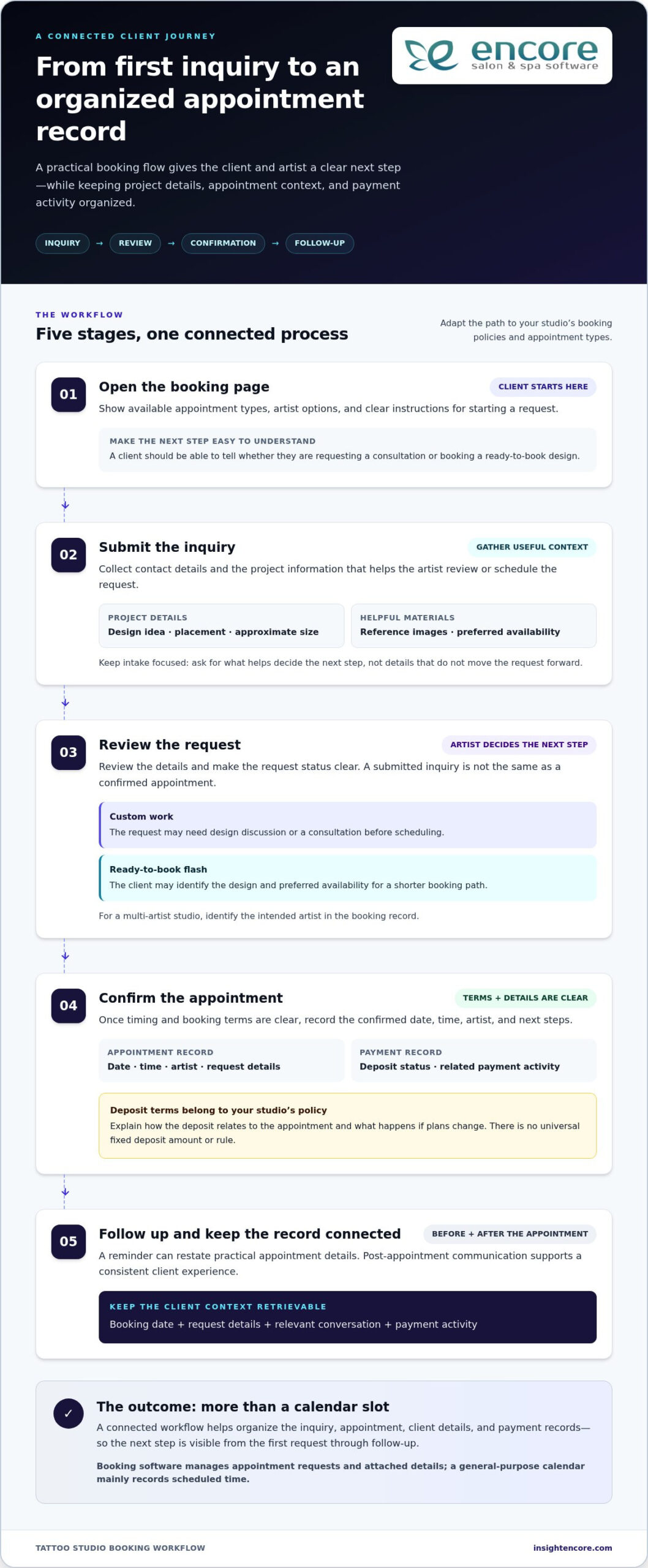
How tattoo booking and deposit software connects each client step

A connected booking journey gives both the client and artist a clear next step, from the first request to post-appointment follow-up. Tattoo artist booking and deposit software can help organize that journey, but the workflow should reflect your studio’s policies rather than force every client through the same process.

A practical client journey might look like this:

  1. Open the booking page. The client sees available appointment types, artist options, and instructions for starting a request.
  2. Submit the inquiry. They share contact details and relevant project information, such as the idea, preferred placement, approximate size, and reference images.
  3. Complete a review or consultation step. The artist reviews the request and decides whether to discuss the design, schedule a consultation, or move toward an appointment.
  4. Confirm the appointment. Once timing and booking terms are clear, the client receives the confirmed date, time, artist, and any next steps.
  5. Get appointment follow-up. A reminder can restate practical details, while post-appointment communication supports a consistent client experience.

From booking request to confirmed appointment

Intake should help you make a decision. Ask for details that affect review or scheduling, but avoid collecting information that doesn’t move the request forward. A custom piece may need a reference and consultation, while a flash booking may need a design choice and preferred time. Make the request status clear so clients know whether they’ve submitted an inquiry or secured an appointment.

Availability also needs to be easy to understand. If a request still requires artist review, make that clear rather than presenting it as a confirmed slot. For a multi-artist studio, identify the intended artist in the booking record and make calendar changes visible to the people managing appointments. This keeps client conversations connected to the schedule.

Deposit records, payment processing, and appointment follow-up

Set deposit steps according to your own policy. A useful record may include the deposit status, the related appointment, the client, and any payment reference needed to reconcile the transaction. Keep the terms visible before the client commits, including how the studio handles changes, cancellations, and payment timing. Clear expectations matter more than applying a one-size-fits-all rule.

Payment processing and deposit tracking are related, but they aren’t identical. A processor handles a transaction; the studio also needs a reliable way to understand what that transaction relates to and where it stands. Keep records consistent with your policy and use reminders to repeat confirmed appointment details, not introduce new terms. Guidance from the National Environmental Health Association on public health and tattoo regulations can also inform how a studio organizes relevant client communication and practices.

Connected records reduce administrative handoffs by keeping the request, appointment, client details, and payment context easier to follow.

Encore brings online booking, client management, and integrated credit card processing into a broader studio workflow. Its tattoo studio software can be part of that operational picture. Take a closer look at Encore to explore how the client journey can fit your processes.

How to compare tattoo booking software for deposits and studio needs

The best fit is the system that follows your actual booking policy without making you enter the same information in multiple places. Use tattoo artist booking and deposit software to compare complete workflows, not just feature counts. Start with the steps every booking needs, then separate must-haves from conveniences that would be helpful but aren’t essential to your studio.

Use this scorecard to compare tools against your process. Mark each item essential, optional, or unnecessary before evaluating options.

Workflow area What to assess Priority question
Booking flow Request, review, consultation, and confirmation steps Can the client tell whether a request is pending or confirmed?
Intake Design details, placement, references, and contact information Can you collect the details needed to review a request without overloading the form?
Deposit records Status and connection to the relevant client and appointment Can you find the record needed to apply your policy or resolve a question?
Payments Transaction records and fit with existing payment routines Does payment administration fit how your studio tracks appointments and business activity?
Reminders Appointment details and timing of client communication Can reminders support your process without creating confusing or duplicate messages?
Artist calendars Availability, appointment ownership, and schedule changes Can each artist or studio coordinator understand who is booked and when?

Keep the priority test grounded in daily work. If clients need to submit a custom concept before you schedule, intake and request review may be essential. If you book directly from set availability, a shorter booking flow may matter more. Reminders or deeper reporting can be optional if your current process already handles those needs well.

Which deposit and payment controls deserve a closer look?

Check whether deposit records can be tied to the right client and appointment, and whether the status is clear enough to support your policy. Consider how the system records payment activity alongside your usual business routines. Client-facing terms should be easy to understand, especially around rescheduling. A tool that processes payments but leaves you reconciling scattered notes may add work instead of removing it.

Does the software fit custom work and multiple artists?

Test a custom request from the client’s perspective. Can they provide the information you need, and can you review it without copying details into another system? For a shared studio, assess whether the schedule makes artist availability and appointment responsibility clear. A solo artist may need a simpler setup, while a team may value shared visibility and organized client records. Needs differ, so avoid adding complexity for features your workflow won’t use.

Encore’s tattoo studio software brings online booking and client management together with integrated credit card processing and point-of-sale transactions. Use the same scorecard to assess how those broader tools fit your studio’s day-to-day administration, and include deposit records and terms in your workflow comparison. The right system should reduce handoffs, not create duplicate data entry.
Tattoo Artist Booking and Deposit Software: A 2026 Buyer’s Guide

How to choose and introduce tattoo booking software without disrupting clients

A new system should make the booking process easier to follow, not leave clients wondering where to send a request or whether an appointment is confirmed. Before switching, map your existing process and decide what needs to change. A thoughtful rollout gives artists time to learn the workflow and clients a clear path to follow.

Use this sequence to introduce tattoo artist booking and deposit software with fewer surprises:

  • Document current policies. Write down how your studio handles deposits, cancellations, rescheduling, consultations, and appointment confirmation.
  • Configure the booking steps. Set up the request path and intake around how artists review work, including any distinctions between custom requests and other appointment types.
  • Test the journey. Try common scenarios from both the client and artist sides before directing clients to the new process.
  • Announce the change. Share the booking link and explain what clients should expect, including where to submit requests and how confirmation works.

Make the transition manageable. You can introduce the new process to incoming inquiries first, then guide returning clients to it as appointments come up. Keep existing conversations easy to reference during the change so clients don’t have to repeat details they’ve already shared.

Set clear booking and deposit expectations before launch

Start with the studio’s written policy, not the software settings. Decide what clients need to know about deposits, cancellations, rescheduling, and consultations, then use the same wording in booking instructions and artist communication. Put the relevant terms where clients can read them before submitting or confirming a request. Plain language helps people understand the next step and gives staff a consistent reference when questions arise.

Be specific about the process without making the booking page feel like a contract clients have to decode. For example, distinguish a request awaiting artist review from a confirmed appointment. Explain what action the client should take if they need to ask about a schedule change. Keep the policy wording consistent with your actual studio records.

Test the booking experience from both sides

Walk through the process on mobile and desktop before sharing it. Submit a custom request, try a reschedule, and update an artist’s calendar. Check that intake details remain attached to the correct client and appointment, and that staff can tell what needs review. Invite artists or coordinators to test the workflow too; their feedback can reveal confusing steps before the process becomes standard.

During testing, look for duplicate work. If someone must copy the same client details into a calendar, payment record, and separate notes, simplify the process where possible. Connected day-to-day tools should support the way your studio handles bookings and records. Encore brings online booking, client management, integrated credit card processing, and point-of-sale transactions into a broader management workflow. Consider how those tools can fit your operations alongside your studio’s deposit and payment routines.

How Encore supports a more connected tattoo studio workflow

Booking is only one part of running a tattoo studio. Artists also need to keep client information organized, manage appointment activity, and handle payments through the wider business. Encore’s tattoo studio software brings online booking and client management into a broader platform that also includes point-of-sale tools and integrated credit card processing. These tools give an artist or studio a more connected way to manage day-to-day operations.

When comparing tattoo artist booking and deposit software, look at how booking and payment administration fit together with your studio’s deposit policy. A system can support appointments and transactions as part of a wider workflow, while your written policy defines how deposits are handled.

Bring tattoo bookings and client management into one workflow

Online booking helps organize how appointments enter the studio, while client management supports the records artists use to understand and manage client relationships. They serve different purposes, but work best as parts of a consistent process. When appointment and client information are easier to locate, artists spend less time searching across separate notes and conversations.

Payment administration is another part of that picture. Integrated credit card processing supports transaction workflows, while point-of-sale tools relate to broader studio operations. Encore’s integrated credit card processing gives studios payment capability alongside other business tools. Consider how those records fit your existing routines for reviewing appointments and tracking business activity.

Decide whether Encore fits your tattoo studio

Encore’s tattoo studio software brings booking and client-management tools into a broader business platform. A solo artist can organize booking and client records within the same management workflow. A studio with multiple artists can assess how the platform fits its appointment coordination and point-of-sale routines. The right fit depends on which tasks you want to manage together and where your current process creates repeated work.

As you assess the fit, map your steps from inquiry through appointment and payment. Identify which details need to stay connected, which tools your team already relies on, and where you want a clearer view of client and appointment information. Then compare those needs with Encore’s online booking, client management, integrated credit card processing, and point-of-sale capabilities. Include your deposit procedures in the workflow you use to manage appointments and payment records.

A connected platform can be a practical next step if you want booking and studio-management tasks to sit within a broader workflow. Explore how Encore can fit the way your tattoo studio operates.

Try Encore now

Make your next booking workflow easier to manage

Your next step doesn’t have to be a sweeping overhaul. Notice where your current process takes extra effort, then decide which part would benefit most from a clearer routine. The right tattoo artist booking and deposit software should support the way you work while keeping client expectations and studio policies clear.

Encore offers specialized tattoo studio software with online booking, client management, and integrated credit card processing as part of a broader business platform. Founded in 1991, Encore brings experience in software for service businesses. Consider how those tools could fit your day-to-day operations and how your studio’s deposit policy fits into its booking and payment routines.

Try Encore now

A more organized process can give you more room to focus on the craft and the people behind each appointment. Try Encore now to explore its tattoo studio software for your business.

Frequently Asked Questions

What should tattoo artists look for in booking and deposit software?

Look for a system that fits your studio’s process and keeps essential booking information easy to find. With tattoo artist booking and deposit software, assess how it handles custom inquiries, appointment changes, client records, payment activity, and staff access. Before choosing, walk through a real booking from the artist’s perspective: Can you quickly see what needs attention, who owns the next step, and which details are relevant to the appointment?

How much deposit should a tattoo artist require?

There’s no single deposit amount that fits every artist or project. Set a policy that reflects your booking approach, the work involved, and the time you’re reserving, then explain it clearly before a client commits. For example, you might define different terms for a consultation and a longer custom session. Keep the policy consistent across client conversations and appointment records, and review it if your services or scheduling practices change.

Can tattoo booking software collect deposits online?

Some booking systems support online deposit collection, but capabilities vary. Separate the steps in your evaluation: Can the client pay online, can the transaction be connected to the relevant appointment, and can you identify its status later? Online booking and integrated credit card processing are useful capabilities to assess alongside deposit collection. Encore offers online booking and integrated credit card processing, so compare those tools with your deposit-handling workflow.

Is tattoo booking software different from regular appointment scheduling software?

It can be. General scheduling tools often focus on choosing a time, while tattoo appointments may require a request to be reviewed before a session is set. Consider whether the system can accommodate separate paths for a consultation, custom project, or appointment that’s ready to book. The practical test is whether the artist can preserve useful project context without forcing clients through irrelevant fields or relying on scattered messages.

What happens if a tattoo client reschedules after paying a deposit?

Your written policy should explain how a reschedule affects the deposit, and the studio should apply that policy consistently. When a client asks to change dates, update the appointment record and note the deposit’s status in relation to the new booking. Keep the client informed about the revised time and any action needed from them. This creates a clear history for both the client and the artist if questions come up later.

Can a tattoo studio use one booking system for multiple artists?

Yes, a studio can use one system if it supports the team’s scheduling needs. Before adopting it, decide how clients choose an artist, who can update each calendar, and how staff will identify the artist responsible for a booking. A shared system can give coordinators a common view, while each artist still needs clear ownership of their appointments. Test a schedule change to see how the update appears to the team.

Disclaimer

This article is general in nature and may contain errors, please verify all claims with your sales rep

Categories
Uncategorized

Client Profile Template for Hair Stylists: A Practical Guide

What if a client profile did more than remind you of someone’s name and appointment time? A useful client profile template for hair stylists brings preferences, service history, color formulas, and follow-up notes together, so you’re not relying on memory or hunting through scattered records. It should support a personal consultation, not turn one into paperwork.

Small details can make the next appointment feel more consistent and considered: a client’s hair goals, what worked at their last visit, or what they’d like to avoid. But generic forms may ask for too much while missing the hair-specific information you need.

This guide provides an adaptable template for new and returning clients, plus tips for keeping service notes clear and useful. You’ll learn what to record, what to leave out, and how to make the process repeatable without losing the human touch. We’ll also compare paper profiles with digital client management, including how salon software can keep client records alongside broader salon operations.

Key Takeaways

  • Use a client profile template for hair stylists to capture useful preferences and service details without making consultations feel like paperwork.
  • Choose essential, optional, and service-specific fields to keep your template focused on what you’ll actually use.
  • Compare paper and digital records by considering access, updates, storage, and who needs to see the information.
  • Follow a simple prepare, consult, record, and review routine to keep client notes current between appointments.
  • Recognize when a standalone template works well and when connected digital client management may better suit your salon’s workflow.

What Should a Hair Stylist Client Profile Template Help You Remember?

A client’s preferences can be easy to overlook between appointments, especially when service notes live in different places or rely on memory. A profile gives you one concise reference for details that matter across visits: what the client likes, which services they’ve had, and what may need a follow-up. Its purpose isn’t to record everything about a person. It’s to help you prepare and continue the conversation with care.

A hair stylist client profile is a concise, ongoing record of service-relevant client details that supports consultations, continuity between appointments, and thoughtful follow-up.

A useful client profile template for hair stylists makes those details easy to find and update. Focus on information that helps you deliver salon care, such as preferred styles, communication preferences, and notes from previous services. Avoid collecting personal details simply because a form has room for them. The goal is a practical working record, not a longer intake form. This reflects the broader idea of Customer Relationship Management (CRM), where organized customer information helps support ongoing relationships.

Client profile, consultation form, and appointment record: what is the difference?

These records serve related but distinct purposes. A client profile holds useful information across visits, such as how someone prefers to communicate or the general style they’re working toward. A consultation form guides a structured conversation about a planned service, helping you discuss the client’s goals and relevant considerations before you begin. An appointment record documents a specific visit, including the service performed, decisions made, and any follow-up discussed. Together, they provide context without treating every appointment as a first meeting.

When does a stylist benefit from a consistent client record?

A consistent record is especially helpful when details need to carry forward. You might note that a client prefers a quiet appointment, likes to see style options before deciding, or wants to discuss how a previous cut has grown out. For a solo stylist, a repeatable format makes it easier to review those notes before the next service. In a salon team, shared record-keeping can help colleagues maintain continuity when a client sees different stylists.

Use notes as prompts, not assumptions. A preference can change, and a past service doesn’t determine what’s right today. Before starting, check relevant notes with the client and ask what they’d like this time. Their current goals, hair condition, and conversation guide your professional judgment. The record simply gives you a more informed place to begin.

  • Useful across visits: preferred styles, communication preferences, and ongoing goals.
  • Specific to one visit: dated service details and follow-up notes.
  • Unnecessary for the task: personal information that doesn’t help with consultation, service, or follow-up.

Keep the profile concise enough to scan before an appointment, and update it when a detail becomes useful. That balance helps records feel supportive rather than bureaucratic, while leaving space for the most important part of the service: listening to the client in front of you.

Build a Hair Stylist Client Profile Template With These Essential Fields

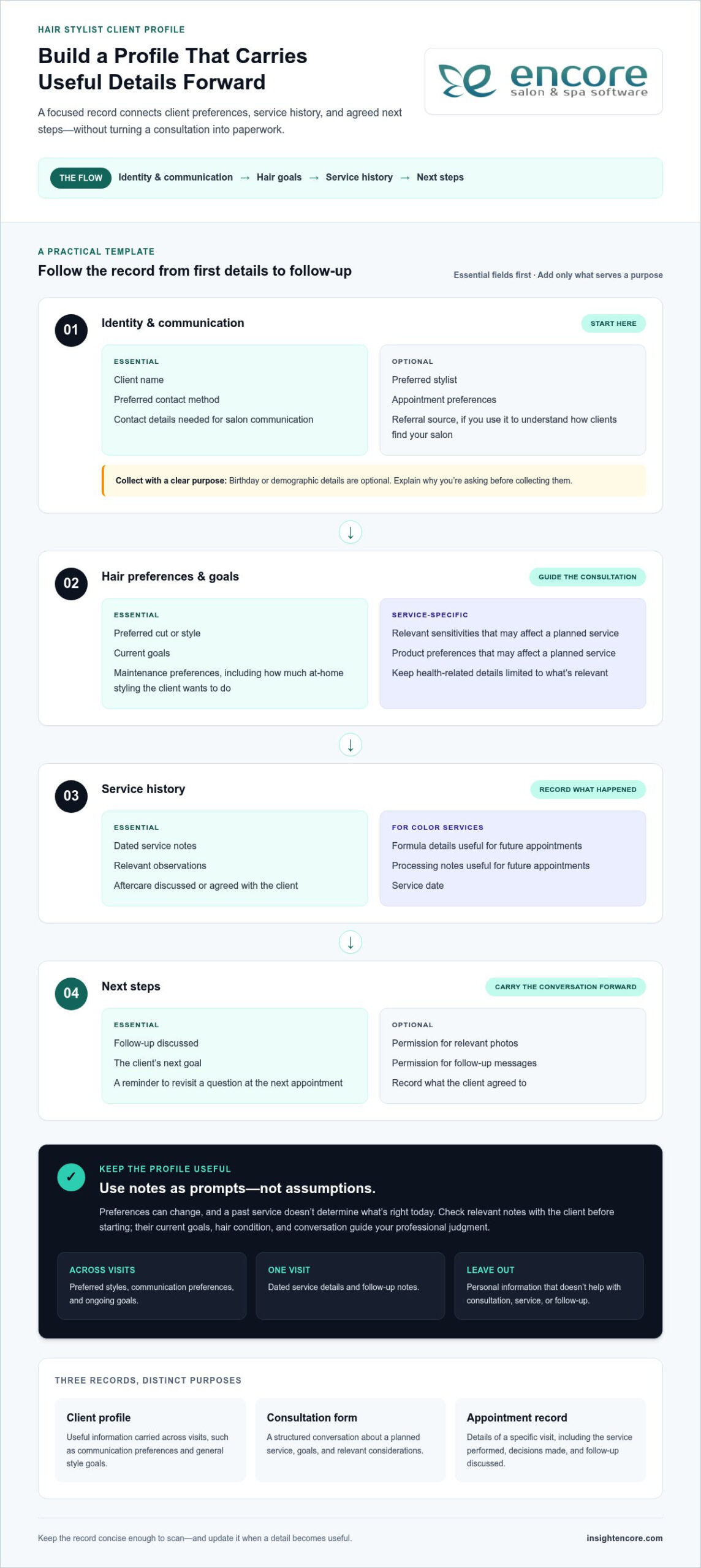
A useful template isn’t the longest one. It’s a focused record that helps you prepare, provide a considered service, and pick up the conversation next time. Use the outline below as a starting point. Remove fields that don’t fit your services or workflow, and add service-specific details only when they’ll help with future appointments.

A practical stylist profile can include contact and appointment preferences, hair goals, relevant service history, and agreed next steps, with optional or service-specific fields added only when they serve a clear purpose.

Copy-ready client profile outline

  • Identity and communication
    • Essential: Client name; preferred contact method; contact details needed for salon communication.
    • Optional: Preferred stylist; appointment preferences; referral source, if you use it to understand how clients find your salon.
    • Optional: Birthday or demographic details only when they support a clear business purpose. Explain why you’re asking before collecting them.
  • Hair preferences and goals
    • Essential: Preferred cut or style; current goals; maintenance preferences, such as how much at-home styling the client wants to do.
    • Service-specific: Relevant sensitivities or product preferences that may affect a planned service. Keep health-related details limited to what’s relevant.
  • Service history
    • Essential: Dated service notes, relevant observations, and aftercare discussed or agreed with the client.
    • Service-specific: For color services, record the formula details and processing notes that are useful for future appointments, along with the service date.
  • Next steps
    • Essential: Follow-up discussed, the client’s next goal, or a reminder to revisit a question at the next appointment.
    • Optional: Permission for relevant photos or follow-up messages, including what the client agreed to and the intended use.

Keep contact and appointment fields purposeful

Collect only the contact information you need to communicate about salon services and appointments. A preferred stylist or appointment preference can help with scheduling, while a referral source may be useful if you track how clients discover your business. Birthday and demographic fields are not automatically necessary. If you include them, be clear about their purpose and let that purpose guide whether they belong on the form.

Write service notes clearly and handle sensitive details with care

Use factual, neutral language. For example, note the client’s stated style goal or what aftercare you discussed, rather than making assumptions about their habits. Record color details in a format you can understand and use again; don’t rely on vague shorthand. Treat health-related information and other sensitive details thoughtfully, and limit collection to what supports the service. Follow the privacy and retention practices that apply in your location. Requirements vary by jurisdiction, so verify the rules that apply to your salon before using the form.

Document permission for photos or follow-up messages clearly, including what the client agreed to. A well-organized client profile template for hair stylists makes relevant details easy to find while keeping unnecessary personal information out. To organize client records alongside salon operations, explore Encore’s client management tools.

Paper or Digital Client Profile Template: Which Format Fits Your Salon?

Choosing a format comes down to how you work, who needs access, and how often you look back at a client’s history. A printable profile can suit an individual stylist who likes to write during a face-to-face consultation. Digital records may be more practical when you need to find details across a busy schedule or keep information accessible to a salon team. Neither format is right for every business.

Compare how each option fits your day-to-day routine:

Consideration Paper profiles Digital profiles
Access Available where the physical file is kept. Can be retrieved through the system or device where records are maintained.
Updates Write additions by hand; keep notes legible and dated. Update the electronic record as details change.
Storage Requires space for organized physical files. Stored digitally, with access practices suited to your salon.
Team visibility Colleagues need access to the relevant file. May make records easier for authorized team members to find, depending on the system and setup.

Think about the friction you want to reduce. If looking up a note means searching through folders, a consistent filing routine may help. If several people need to refer to client information, consider how your chosen format supports appropriate access and makes it clear which record is current.

When a printable client profile is a practical starting point

Paper can be a straightforward choice for a solo stylist or anyone who prefers handwriting during consultations. Print one consistent profile for each client, date new visit notes, and file updates with the original record so service history stays together. Set a routine for returning files to their place after appointments. Keep records from being casually viewed, misplaced, or accessed by people who don’t need them.

When a digital client profile can reduce recordkeeping friction

Digital records may help when you regularly need to retrieve information for returning clients or keep records organized across a salon team. Clear naming and updating habits still matter; a digital file isn’t useful if notes are hard to locate or out of date. Digital client management can also sit alongside broader salon workflows. Encore combines client management with online booking and point-of-sale tools. See how these operational areas fit together in its salon software features.

Start with the format you can maintain consistently. A printable client profile template for hair stylists can establish a reliable routine, while digital records may suit a growing team or a workflow that benefits from connected client management. Whichever you choose, set clear habits for updates, storage, and access. Revisit the decision if your salon’s needs change.

Client Profile Template for Hair Stylists: A Practical Guide

How to Use and Update a Hair Stylist Client Profile at Every Visit

A profile works best as part of the appointment routine, not as a form you complete once and forget. Use the same four stages each time: prepare, consult, record, and review. This rhythm helps you arrive with useful context, make room for the client’s current preferences, and leave clear notes for the next visit.

Introducing the profile without making consultation feel like paperwork

Keep the explanation simple: “I keep a few notes so we can pick up where we left off and focus on what you want today.” Invite the client to share preferences that matter to the service, then fill in only the relevant fields. The profile supports your conversation; it shouldn’t compete with it.

A four-stage routine for each appointment

  • Prepare: Before the appointment, check the client’s existing profile and most recent service notes. Look for useful context, such as a style goal or a detail to follow up on. Don’t treat old notes as instructions for today.
  • Consult: Welcome the client and confirm what still applies. Instead of asking a returning client to repeat everything, try, “Last time, you mentioned wanting a lower-maintenance style. Is that still your goal?” Ask what has changed, then discuss the planned service in person.
  • Record: After the consultation and service, add concise, dated notes. Capture relevant service details, the client’s stated preferences, your observations, and any maintenance guidance you agreed on. Separate what the client said from what you observed so the next reader can understand the context.
  • Review: Before the next visit, read the latest entry and note anything worth revisiting. This makes it easier to continue the conversation without assuming the client’s needs or preferences have stayed the same.

Updating service history and preparing for the next appointment

Useful notes are specific enough to guide a follow-up, but brief enough to scan. For example, record the service date, relevant formula details when applicable, the result discussed with the client, and agreed maintenance notes. Avoid turning the profile into a transcript of the appointment. If a detail isn’t useful for the service or future continuity, leave it out.

Use neutral, clear wording. “Client prefers to air-dry; discussed styling options” distinguishes a client-stated preference from a stylist’s observation. If you note an observation, keep it factual and connected to the service rather than writing a judgment. That makes the record easier for you or a colleague to interpret later.

This repeatable approach works with paper records or digital client management. As a salon grows, connected records can help keep client management alongside broader salon operations. Encore’s client management tools support an organized digital workflow for salon businesses.

Make the routine easy to maintain. Update the record while the appointment details are fresh, then use the next visit to confirm what remains relevant. A consistent client profile template for hair stylists helps you remember the context without asking clients to start from scratch or letting notes replace a personal consultation.

See Encore’s client management tools

From a Client Profile Template to Organized Salon Client Management

A standalone template can be enough when you’re an independent stylist with a manageable client list and a recordkeeping routine you can maintain. It gives you a consistent place for relevant notes without adding another system to learn. As your salon grows, separate files may become harder to keep current or find quickly. The decision isn’t simply paper versus software. It’s whether your current process helps the right people find and update the right information at the right time.

Signs your salon may have outgrown separate client forms

Look for repeated friction in everyday work. Are there duplicate profiles because staff aren’t sure which record to use? Do you spend appointment time searching for a previous note? Are service updates kept in different places, or does each team member record details in a different way? These are signs that your recordkeeping process may need more structure.

A shared process can help salon teams maintain continuity, but software alone won’t set expectations. Agree on what staff should record, when to update a profile, and who should have access. Keep the form focused, and make sure the workflow respects applicable privacy practices. Clear habits matter as much as the tool.

Choosing a client management workflow staff can maintain

Choose a process that fits naturally around appointments. Ask whether the profile is quick to use, whether staff can keep it updated after a service, and whether it’s easy to review before the next visit. For a solo professional, a simple template or digital record may be sufficient if it stays organized and easy to access. A booth renter can build a consistent individual workflow around the same principles: prepare, confirm, record, and revisit.

For a salon team, digital client management can bring client records alongside other salon operations. Encore includes a client management system as part of its salon software offering, with online booking and point-of-sale tools within the broader platform. These tools support different parts of the client journey, from arranging an appointment to completing a transaction. Set clear team habits for recording and updating client details so the workflow stays consistent.

Start by reviewing where client information lives today and where staff experience friction. Then choose a process that’s easy to follow consistently, whether that means refining your form or moving toward digital client management. A client profile template for hair stylists is a practical foundation; organized salon client management can help keep the recordkeeping approach aligned with the way your business operates.

Read the Encore Salon Software overview to see how client management fits within a broader salon platform.

Make Your Next Client Record Easier to Use

Your next step doesn’t need to be a complete change to the way you run your salon. Start by choosing one part of your recordkeeping that feels harder than it should, then adjust your process to make that moment simpler. A client profile template for hair stylists should fit naturally into the way you welcome, consult with, and care for clients.

As you use your template, pay attention to which notes help you feel prepared and which fields rarely serve a purpose. That everyday feedback gives you a practical way to refine the form over time. Keep what supports thoughtful service, and let go of what creates extra work without adding useful context. The result can be a recordkeeping habit that feels personal to clients and manageable for you.

Encore’s salon and spa software brings client management, online booking, and point-of-sale tools together in one platform.

Explore Encore’s client management tools

Choose a process you can keep up with, then build on it at your own pace. A little more clarity can make each client interaction feel that much more considered.

Frequently Asked Questions

What should a hair stylist include in a client profile?

Include details that help you prepare for the client’s next service, and make it clear which notes apply to a specific visit. For example, a general preference can live in the profile, while a formula belongs with its dated color-service entry. If a field wasn’t discussed, don’t guess or fill it with an assumption. Leaving it blank is more useful than recording something that could mislead you later.

How do I create a client profile template for hair clients?

Build the form around your actual appointment flow, then test it before making it standard. Complete a sample profile for a familiar service and check whether another stylist could understand the entries without asking you to translate shorthand. Rename unclear fields, remove questions that don’t inform a service decision, and keep different service types adaptable. A template should guide note-taking, not force every client into the same consultation.

Should hair stylists use paper or digital client records?

Either format can work; choose the one your salon can keep accurate and appropriately protected. If you use both, decide which record is authoritative and how updates move between them. Otherwise, one version may show a newer preference than the other. Consider a short trial using your regular appointment routine, then notice whether staff can locate the right information and make updates without creating duplicate records.

How often should a hairstylist update a client profile?

Review the profile at every appointment, and update it whenever the client shares a meaningful change or a service adds useful context. You don’t need to rewrite unchanged details. For instance, if a client switches their preferred contact method, update that specific field and leave unrelated notes intact. A dated entry helps distinguish new information from older context, especially when several visits have passed between major changes.

Should a hair stylist record allergies and color formulas?

Record relevant sensitivities and color-service details carefully, but treat notes as context for a fresh consultation, not as a substitute for checking with the client. A formula entry can include the service date and the outcome discussed, so you can understand when and why it was used. Limit sensitive details to what supports the service, and follow the privacy and recordkeeping rules that apply where your salon operates.

How can a stylist keep client profile forms from feeling intrusive?

Tell clients why a question helps, and make it easy to skip information that isn’t needed for the service. You might say, “I ask about styling preferences so I can tailor the appointment. You can leave anything blank.” Ask only relevant questions, and let the client’s answers guide the conversation. A brief, respectful explanation can make the form feel like a helpful part of their visit, not an interrogation.

Disclaimer

This article is general in nature and may contain errors, please verify all claims with your sales rep

Categories
Uncategorized

Point of Sale for Booth Renters: A 2026 Buying Guide

What if checkout could do more than take a payment? The right point of sale for booth renters can connect each transaction with client records and appointment activity, helping you keep your independent business organized without adopting a salon-wide system you don’t need.

As a booth renter, you manage your own clients and daily workflow. A basic payment terminal may feel too limited, while software built around an entire salon may seem like more than you need. A practical setup should make payments straightforward and keep useful client and transaction details easy to find.

This guide covers the POS features that can support independent day-to-day operations, from integrated payment processing to client management and online booking. You’ll learn how to compare payment-only tools with connected software, what to prioritize, and which extras may add complexity without helping your routine. Encore’s specialized chair and booth renter software brings POS transactions, credit card processing, client management, and online booking together. Use the criteria below to assess what fits the way you work.

Key Takeaways

  • Start with the daily tasks your POS needs to support, including checkout and organized transaction records.
  • Choose a point of sale for booth renters that suits an independent workflow instead of adding tools designed mainly for salon-wide management.
  • Compare a payment-only setup with connected software to decide whether combining checkout, client records, and booking would simplify your routine.
  • Map your booking, checkout, client, and product workflows before comparing features, so you can focus on tools you’ll use.
  • Encore’s chair and booth renter software brings POS transactions, integrated payments, client management, and online booking together.

What Does Point of Sale for Booth Renters Need to Handle?

A point-of-sale (POS) system combines the tools and software used to record and complete purchases. For a booth renter, that can mean processing payment after a service, recording a retail sale, and keeping the transaction organized alongside client and appointment activity. A basic payment terminal records a sale; a more connected POS can help make that sale part of a broader client workflow.

POS systems can include more than checkout. The Point of Sale (POS) Systems overview explains how these systems bring together components and functions used to complete transactions. For an independent beauty professional, the practical question is how well those functions support the work around each sale, from recording the service to organizing the next visit.

How a booth renter’s checkout differs from a salon-wide POS

A salon-wide system may be organized around the owner’s view of staff, services, and the business as a whole. A booth renter needs a clear view of their own transactions and client activity. When comparing systems, look for a workflow that lets you identify what was sold and keep relevant information with your own client records. Salon arrangements differ, so focus on the way you manage your own work rather than assuming every business handles checkout the same way.

A booth renter’s POS is a checkout and recordkeeping tool for managing their own client purchases, services, products, and appointment context. This distinction helps you look beyond whether a system accepts payment. The right fit depends on whether it supports your independent workflow.

Which transactions and client interactions should POS support?

Begin by listing the transactions you handle. Your setup should make it possible to process service payments and record retail purchases clearly enough to review later. If a client buys a product during a service visit, consider whether you can record both parts of the sale together or whether you would need to track one elsewhere.

Client and appointment details can add useful context. Consider whether client information can be kept alongside service and purchase activity, and whether appointment details are easy to access during the visit. When checkout, booking, and client records work together, you may spend less time switching between separate tools.

Gift cards may also matter if they’re part of your business. Treat them as a specific checkout requirement, not a must-have for every renter. The goal is a point of sale for booth renters that keeps essential transactions and client activity organized without introducing unnecessary steps.

Which POS Features Matter Most for Booth Renters?

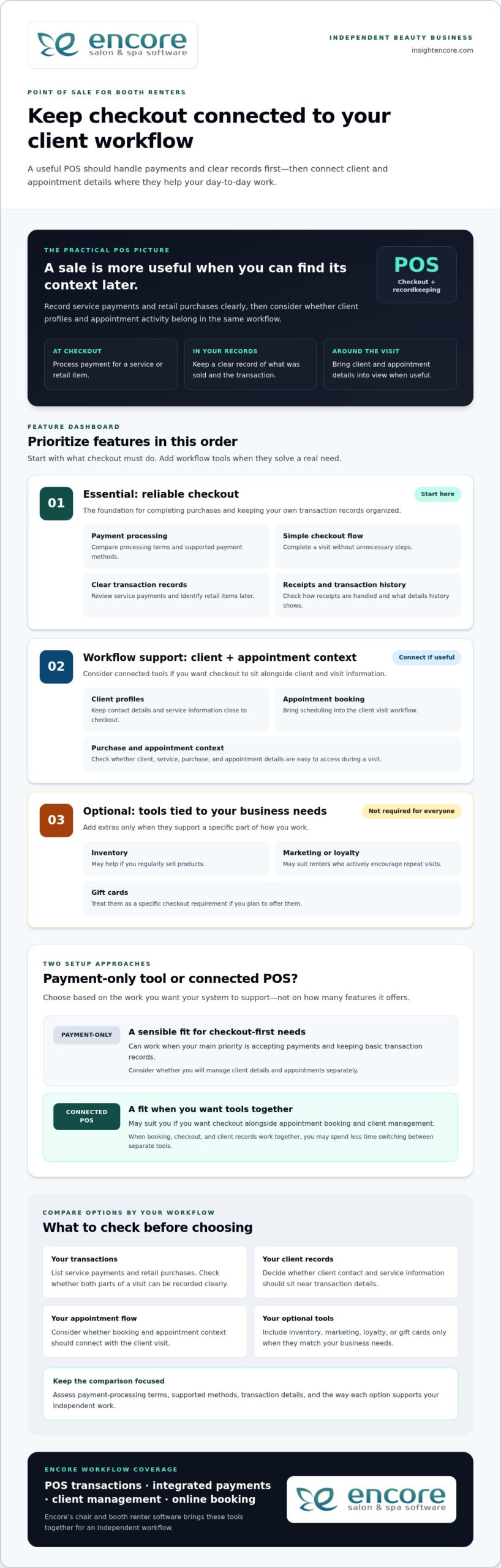
Start with the tasks that happen at checkout. A useful POS should make it straightforward to process a payment, record what the client purchased, and complete the visit without unnecessary steps. Then consider whether client management and appointment booking should connect with checkout. The best point of sale for booth renters supports daily work first; extra tools matter only when they serve a real need.

Core POS checklist: compare payment processing, clear transaction records, a simple checkout flow, client profiles, and appointment context before weighing optional business tools.

Payments, receipts, and transaction records

Payment processing and accurate records are the foundation. A service payment should be easy to enter and review later, and a retail item should be identifiable if it’s part of the same visit. Consider how receipts are handled and whether the transaction history provides the details you need to keep your business records organized.

Compare payment-processing terms, supported payment methods, and the transaction information available for review. These details vary between systems, so assess each option rather than assuming they’re the same. Also consider how integrated credit card processing fits into the checkout workflow you want.

Client management, booking, and business-building tools

Client profiles can keep contact details and service information close to checkout, while online booking can bring appointment scheduling into the client visit workflow. If you’re considering how client records fit into a solo workflow, read this guide to booth renter client management apps.

Other features depend on how you run your business. Inventory tools may be useful if you regularly sell products; automated marketing or loyalty programs may suit renters who actively encourage repeat visits. Gift cards are another option if you plan to offer them. You don’t need every feature. Prioritize tools that solve a specific workflow problem.

  • Essential: payment processing, clear transaction records, and an easy checkout flow.
  • Workflow support: client profiles and appointment booking that connect with your visit process.
  • Optional: inventory, marketing, loyalty, and gift card tools that match your business needs.

Encore’s chair and booth renter software brings POS transactions together with integrated payments, client management, and online booking. Explore Encore for your booth renter workflow as you compare the features that matter to you.

Standalone Payment Tool or Connected Booth Renter POS?

A payment-only tool can be a sensible fit if your main need is accepting payments and keeping basic transaction records. Connected software may suit you better if you want checkout alongside appointment booking and client management. Neither setup works for every renter. Compare how each handles your actual tasks, not just how many features appear on a list.

Workflow area Standalone payment tool Connected booth renter POS
Checkout Focused on processing and recording payments. Can place payment within a broader service and client workflow.
Client records May require a separate client record system. May connect checkout with client profiles.
Booking Appointments may be managed in another tool or process. May bring online booking into the same workflow as checkout.
Reporting Review the transaction information the payment tool provides. May connect transaction activity with other business information.
Business tools Typically focuses on payment needs. May include optional tools such as inventory, marketing, loyalty, or gift cards.

When a payment-only POS may be enough

If you mainly need to accept payment after each service and record the transaction, a focused tool may cover your essentials. You can keep appointments and client notes in separate systems if that arrangement works for you. The trade-off is managing information across those tools, but that doesn’t automatically make the setup unsuitable. Ask yourself how quickly you can find the details you need during a busy day.

When connected salon software may make daily work easier

Connected software can bring related tasks closer together. Booking establishes the appointment, client management helps organize client information, and POS transactions record purchases. If you regularly move between all three tasks, it may be useful to manage them within one broader workflow. Specialized booth renter software supports a setup designed around independent beauty businesses.

An all-in-one platform can feel like too much if it adds steps or tools you won’t use. Keep the comparison practical: start with payments, records, booking, and client details. Then consider extras only when they address a real need, such as tracking products you sell or offering gift cards. A point of sale for booth renters should fit your work, not require you to adopt every available feature.

Encore offers specialized chair and booth renter software with POS transactions, integrated credit card processing, client management, and online booking. Explore Encore’s booth renter software as you consider which workflow best fits your business.

Point of Sale for Booth Renters: A 2026 Buying Guide

How to Evaluate POS Options for Your Booth Rental Business

A useful comparison starts with your actual work, not a feature list. Before choosing a point of sale for booth renters, trace how a client moves from booking to checkout. Note where you currently record payments, client details, and product sales. This simple workflow map helps you identify what should connect and what can stay separate.

A practical five-step POS evaluation checklist

  1. Start with payments and records. List how clients pay, what you sell, and which transaction details you need for your records. Note any payment methods that are essential to your checkout routine.
  2. Map your current workflow. Write down how you handle booking, appointments, client notes, checkout, and product sales. Mark where information moves between tools and where you intentionally keep tasks separate.
  3. Decide what needs to connect. Identify whether you want appointments linked to client profiles, service details available at checkout, or product sales connected to inventory. Focus on links that would make your daily process clearer.
  4. Compare the must-haves first. Check that each option supports your payment and recordkeeping needs. Then assess ease of use and the transaction or business information you can review. Don’t let optional features distract from essentials.
  5. Consider future needs selectively. If you plan to sell retail products, use online booking, or offer gift cards, include those requirements in your comparison. Choose tools that suit your plans rather than judging an option by feature count alone.

Assess cost, setup, and everyday usability

Compare software charges separately from payment-processing terms. Look at what each charge covers and how processing terms fit the transactions you expect, rather than judging a system by one number. Weigh costs against the capabilities you need and the workflow you mapped.

Ease of use matters, too. Think through a typical appointment: Can you find client details, complete checkout, and keep the transaction record without awkwardly switching between tools? Consider the setup steps and whether the available information helps you manage your business day to day. A system should support your routine, not make it more complicated.

Once you’ve identified your priorities, compare them with Encore’s specialized chair and booth renter software, which includes POS transactions, integrated credit card processing, client management, and online booking.

Explore Encore and see whether it fits your booth renter workflow

How Encore Supports a Booth Renter’s POS Workflow

Once you know which tasks your POS needs to handle, look for software designed for independent booth and chair renters. Encore’s specialized chair and booth renter software brings POS transactions together with integrated credit card processing, client management, and online booking. These capabilities let you consider checkout as part of your client workflow, rather than as a separate payment step.

Bring booth renter tasks into a more connected platform

Consider a client’s visit from start to finish. Online booking supports appointment scheduling, client management helps organize client information, and POS transactions record purchases. Bringing these capabilities into a broader platform can help you think through how those tasks fit together during your day. The right fit depends on the workflow you want, not simply the number of tools available.

Encore also includes inventory tracking, automated marketing, loyalty programs, and gift cards. These capabilities may suit you if you sell retail products, want to encourage repeat visits, or plan to offer gift cards. They’re options to weigh against your needs, not a checklist every booth renter must adopt. For a broader look at the platform, visit Encore Salon & Spa Software.

Explore the next step at your own pace

Use the priorities you established to assess Encore: payment processing and transaction records, client management, and booking. Consider which capabilities you’ll rely on regularly and which optional tools match your business plans. This keeps the decision focused on a practical point of sale for booth renters, not features that add complexity without serving your routine.

Encore is part of Syntec Business Systems, founded in 1991. Compare the software’s capabilities with the workflow you mapped, then visit Encore’s booth renter software page to explore the solution.

Try Encore and explore a POS workflow for booth renters

Choose a POS That Fits the Way You Work

The best point of sale for booth renters should make daily business easier to manage, not add complexity. Begin with straightforward checkout and clear transaction records. Then decide whether connecting payments with client management and appointment booking would make your workflow more organized. Inventory tracking, marketing, loyalty programs, and gift cards matter when they support goals you already have.

Encore offers specialized chair and booth renter software with POS transactions, integrated credit card processing, client management, and online booking. As you compare options, focus on which tasks you want to handle in one place and which features you’ll use in your independent business. A practical fit can help you manage client visits and keep important activity organized.

Try Encore and explore software built for booth renters

Start with a clear picture of your workflow and the tasks you want your POS to support. Explore Encore’s chair and booth renter software to see how its connected tools fit those priorities.

Frequently Asked Questions

What is the best point of sale for booth renters?

The best point of sale for booth renters is one that matches how you handle payments, client information, and appointments. If you only need to accept and record payments, a focused payment tool may be enough. If you want checkout connected with booking and client management, consider specialized booth renter software. Encore offers a chair and booth renter solution with POS transactions, integrated credit card processing, client management, and online booking.

Do booth renters need their own POS system?

Not every booth renter needs a separate POS, but you do need a clear way to process and track the transactions you manage. Your setup could be a payment-only tool or a broader system that supports client and appointment tasks, too. Consider how you handle checkout and records now, and whether your current process gives you a clear view of your own business activity.

Can booth renters use salon software to manage payments and clients?

Yes. Salon software can help booth renters manage payments and client information, especially when it supports independent workflows as well as salon operations. Encore offers specialized chair and booth renter software with POS transactions, integrated credit card processing, and client management. Online booking is also available within the platform, bringing appointment tasks into the software workflow.

What features should a booth renter look for in POS software?

Prioritize payment processing, clear transaction records, and an easy checkout flow. Then consider whether client profiles and appointment booking should connect with checkout, so visit details are easier to manage. If you sell products or offer gift cards, inventory and gift card tools may be useful. Marketing and loyalty features are optional; include them when they serve your business goals, not simply because they’re available.

How much does point-of-sale software for booth renters cost?

Costs vary by software plan and payment-processing terms, so compare those separately rather than relying on a single headline price. Consider whether a system includes the functions you need, such as client management or booking, or whether you’d use separate tools for those tasks. Review each option’s pricing details and weigh them against your workflow. A higher feature count doesn’t automatically mean better value.

Can a booth renter use one system for appointments and payments?

Yes. Some salon software combines online booking and POS transactions, allowing you to manage appointment activity and record payments within one platform. This may suit you if you prefer to keep those tasks connected. Encore’s software includes online booking and POS transactions, alongside client management and integrated credit card processing. Whether one system is right for you depends on how you prefer to organize your daily work.

Is integrated credit card processing useful for independent stylists?

Integrated credit card processing can be useful if you want payment handling as part of a broader business-management workflow. It brings payment processing alongside POS transactions, so you can manage these tasks within the same platform. Compare processing terms and supported payment methods as part of your decision, since they can vary. Encore includes integrated credit card processing in its software for chair and booth renters.

Disclaimer

This article is general in nature and may contain errors, please verify all claims with your sales rep
Categories
Uncategorized

Get Positive Salon Reviews: A Practical 2026 Guide

What if getting more salon reviews had less to do with asking more often and more to do with asking at the right moment? Happy clients can leave feeling great about their visit, then forget to share that experience. If you’re wondering how to get positive reviews for my salon without making clients or staff uncomfortable, the answer starts with a simple, respectful routine.

It’s understandable to feel cautious. You want more honest feedback, but you don’t want to pressure clients, break platform rules, or make a critical review feel personal. A clear process helps your team know when to ask, what to say, and how to respond calmly to both praise and concerns.

This practical guide explains how to invite feedback naturally and make it easy for clients to find the right review page. You’ll also learn how to keep requests fair, handle negative comments constructively, and use organized booking and client records to support consistent follow-up. The goal isn’t to chase perfect ratings. It’s to help satisfied clients share genuine experiences and show every reviewer that you’re listening.

Key Takeaways

  • For how to get positive reviews for my salon, invite honest feedback after clients have experienced the service, without pressure or incentives tied to positive ratings.
  • Make requests easy to act on: choose a natural moment, ask politely, share the review destination, and thank the client.
  • Prioritize review platforms your clients already use to discover and evaluate local salons.
  • Respond to praise and criticism with calm, personal replies that acknowledge the client’s experience and address concerns constructively.
  • Build a steady routine for requests and feedback, with clear staff ownership and no pressure to target only certain clients.

Why positive salon reviews start with a memorable client experience

A positive salon review is a client’s voluntary account of what they genuinely experienced. It isn’t a script to steer them toward a five-star rating. The foundation is the visit itself: clear expectations, attentive service, and straightforward checkout. A beautiful result matters, but so does whether the client felt heard, knew what to expect, and left with useful aftercare guidance.

That’s why how to get positive reviews for my salon starts before anyone asks for feedback. Each part of the appointment can shape a client’s impression, and a small mismatch can overshadow excellent technical work. Consistency helps clients feel comfortable sharing specific, honest feedback. Authentic salon reviews grow from experiences clients can describe clearly, from booking through aftercare.

Which parts of a salon visit influence client feedback?

Clients notice different details, so don’t assume one part of the visit matters most to everyone. A first-time guest may value a clear consultation, while a regular may appreciate an on-time appointment or a stylist who remembers their preferences. Consider the full experience:

  • Booking: Make available services, timing, and appointment details clear.
  • Arrival: Greet clients warmly and explain any wait or next step.
  • Consultation: Discuss the desired result, maintenance, and realistic options before beginning.
  • Service: Check in at appropriate points, especially before making a notable change.
  • Payment: Keep checkout clear, including what the client is paying for and how to rebook.
  • Aftercare: Share relevant care advice so clients know how to maintain their style or treatment.

Clear communication can prevent avoidable disappointment. For example, explaining that a color result may take more than one appointment helps align expectations before the service starts. Organized booking and client records can also help your team provide consistent service and thoughtful follow-up.

Why authentic reviews matter more than a perfect-looking score

Specific, balanced feedback gives prospective clients a more useful picture than a string of vague praise. A review that describes the consultation, the stylist’s approach, or the maintenance advice can help someone decide whether the salon suits their needs. Reputation management broadly involves shaping how a business is perceived online; online reputation management also includes paying attention to what people share and responding thoughtfully.

Keep the distinction clear: genuine reviews come from real clients describing their own visits. Fabricated, purchased, or staff-written reviews misrepresent that experience and undermine trust. A particular rating can’t guarantee bookings or search visibility. Aim instead for an honest picture of the service your team provides, and use feedback to recognize what clients value and where the experience could be clearer.

How to ask salon clients for positive reviews without pressure

A good request feels like a natural part of follow-up, not a push for praise. Keep the process simple: choose a suitable moment, ask politely, share the review destination, then thank the client. Invite honest feedback about their experience, whether it was entirely positive or not. Don’t decide who to ask based on who seems most likely to leave a high rating.

When is the right time to invite a salon review?

A friendly checkout request can work when a client is relaxed and has had time to experience the service. If they’re rushing, raising a concern, or focused on payment, don’t force the moment. A brief follow-up message after the appointment gives them space to reflect. Choose timing that fits your salon’s client journey, and keep the invitation optional.

For an in-person ask, try: “Thanks for coming in today. If you’d like to share how your visit went, we’d appreciate an honest review. I can show you where to leave one.” It’s warm, clear, and doesn’t imply that only positive comments are welcome.

What should a salon review request say?

Use a short message that thanks the client, makes clear that feedback is voluntary, and provides a direct route to your chosen review platform where its rules permit. For example: “Thanks for visiting us. If you have a moment, you’re welcome to share honest feedback about your appointment here: [review link]. We appreciate you taking the time.” Review each platform’s current request rules before sending messages or sharing links.

Keep the tone personal rather than scripted. A follow-up might mention the service the client received, but don’t ask them to describe specific praise or change a rating. The Federal Trade Commission’s guidelines for customer reviews offer useful direction for collecting and presenting feedback transparently.

A smooth appointment journey can make follow-up feel more natural. For ideas on organizing booking and client information, explore this guide to salon software and client management. Organized records and follow-up workflows can support a consistent process, while the review invitation itself remains thoughtful and client-led.

That’s a practical foundation for how to get positive reviews for my salon: ask consistently, make it easy to respond, and leave the choice entirely with the client. If they decline or don’t respond, thank them just the same.

Which review channels should your salon focus on?

You don’t need to ask clients to post everywhere. Focus on the places they already use to find or evaluate local salons, and make the choice clear. Consider where potential clients discover your business, what feedback helps them decide, and whether your team can keep up with responses.

Google, Yelp, or Facebook: how do salon review sites differ?

Each platform serves a different role, and its value depends on your local area, services, and clients’ habits. Google Business Profile connects reviews with a business listing clients may encounter while searching locally. Yelp focuses on local business discovery and customer reviews. Facebook can make feedback visible in a social setting where clients may already follow or interact with your salon. None is automatically the right choice for every salon.

Platform Where clients may find the salon Review usefulness Owner response options
Google Business Profile Google Search or Maps business listings Feedback alongside basic local business information Reply to reviews through the business profile, subject to current platform features
Yelp Yelp’s local business directory and review pages Client accounts of their experiences with local businesses Respond through available business tools
Facebook A salon’s Facebook presence and related social activity Feedback in a familiar social environment for clients who use Facebook Reply through the salon’s page, according to current settings

Use the table as a guide, not a ranking. Notice which sites clients mention, where your salon already receives genuine feedback, and which channels your team can monitor consistently. A focused approach to how to get positive reviews for my salon means building visibility where clients naturally look, not scattering requests across every platform.

How can a salon make leaving a review easier?

Offer a direct link or a QR code that takes clients to the intended review page, where the platform permits that method. Keep the instruction simple, such as, “You can share feedback about your visit here.” Don’t make clients search for your listing or follow a long set of steps. They may need to sign in or meet other platform requirements, so don’t promise a process with no extra steps.

Check each platform’s current policies before inviting reviews, including rules for links, QR codes, and incentives. Never offer a reward, discount, or gift in exchange for a positive review. If you offer an incentive for feedback, it must not depend on the rating or sentiment and must comply with the platform’s rules. Invite clients fairly, and let them decide whether and where to share their honest experience.

Get Positive Salon Reviews: A Practical 2026 Guide

Responding to Salon Reviews & Handling Criticism

Your reply is part of the experience people see when they evaluate your salon. A composed response shows that you pay attention to feedback, whether the review is glowing or difficult to read. You don’t need to answer in a hurry. Take a moment to understand the comment and choose words that are respectful, specific, and useful to anyone following the conversation.

How should a salon reply to a positive review?

Thank the client and refer to a detail they chose to share. If they mention feeling comfortable during a consultation or loving the finished style, acknowledge that detail without adding information they didn’t make public. Keep the reply warm and brief. A personal response feels more genuine than pasting the same template under every review, and there’s no need to pressure the reviewer to return or leave more praise.

For example: “Thank you for sharing this. We’re glad the consultation helped you feel comfortable with your new style, and we appreciate you choosing our salon.”

What should you do when a salon review is negative?

Pause before replying, especially if the review feels personal. Then use a simple framework: thank the reviewer for speaking up, acknowledge the concern they described, address it briefly, and offer a private way to discuss details and possible next steps. Avoid arguing point by point or trying to prove the client wrong in public.

A professional response acknowledges a client’s concern while protecting the private details of their visit. Don’t confirm appointment specifics, discuss health information, or bring personal disputes into a public reply. You could say, “We’re sorry to hear the visit didn’t meet your expectations. Please contact the salon directly so we can understand more and discuss this with you.” Keep the invitation calm and open, without promising an outcome before you understand the issue.

After responding, look for lessons in the feedback. If several clients raise a similar concern about wait times, communication, or checkout, review the process with your team and decide whether a practical change is needed. Treat each comment as one person’s account, but don’t dismiss a recurring theme.

A thoughtful routine for how to get positive reviews for my salon includes making space for criticism, not just celebrating praise. Consistent, personal replies can reassure current and prospective clients that feedback is taken seriously. Protecting privacy keeps the conversation respectful.

To see how salon management software can support organized booking and client follow-up, explore Encore’s salon management software.

Build a sustainable salon review routine with better client follow-up

A review process works best when it’s part of your salon’s regular client-care routine, not a scramble to collect praise. Give one team member responsibility for checking feedback, agree on a natural moment to invite clients to share an honest review, and keep a simple record of follow-up. Ask consistently across clients rather than selecting only those you expect to be happy.

Look for themes, not just ratings. Feedback about consultations, appointment flow, or aftercare may point to something the team can improve. Set a regular time to review comments and staff observations, but avoid review targets that could make requests feel pressured or lead to selective invitations.

How can salon software support a consistent client experience?

Online booking and organized client records can help your team manage appointments and keep relevant client information accessible. That supports more consistent service and considered follow-up, such as remembering preferences or noting the best way to communicate. Encore Salon & Spa Software brings salon operations tools together, including online booking and client management. It helps organize the client journey, while review invitations remain personal and client-led.

A simple weekly review routine salon owners can maintain

Set aside a regular time to read new feedback, respond where appropriate, and note recurring service themes. Then check in with staff: does everyone know when and how to invite honest feedback, and does the request feel comfortable for both the team and clients? Adjust the process if it feels rushed or uneven.

  • Assign ownership: Decide who checks review channels and shares useful themes with the team.
  • Keep invitations consistent: Choose a natural point in the client journey and invite feedback without pressure.
  • Learn from patterns: Discuss recurring comments and choose practical service improvements where warranted.

Keep the routine lightweight. The goal is a dependable process that helps clients share real experiences and helps your team listen, not a quota for ratings. Organized booking, client information, and follow-up can make that process easier to maintain as part of daily salon operations.

Encore’s salon management tools bring online booking and client management together to help organize appointments and client information. Explore Encore for your salon.

Build a review routine clients can trust

The best answer to how to get positive reviews for my salon isn’t pressure or a perfect-rating target. It’s a thoughtful client experience, followed by a polite invitation to share honest feedback. Ask consistently, make it easy to find your chosen review platform, and give every client the same freedom to decide whether to respond.

Keep listening after reviews arrive. Thank clients for specific praise, address concerns calmly, protect private details, and look for recurring themes that could help improve service. A steady routine makes review follow-up manageable and shows clients that their feedback matters.

Organized salon operations can support that consistency. Encore provides salon management software with online booking and client management, plus automated marketing and loyalty program tools. These features can help your team organize appointments and follow-up, while review requests and replies remain personal and client-led.

Start with one simple step, then build a process that feels natural for your team and respectful to every client. Genuine feedback grows from genuine care.

Explore Encore for your salon

Frequently Asked Questions

How do I ask salon clients for a review?

Ask politely after the appointment and make clear that honest feedback is welcome, whether it’s positive or negative. For example: “Thanks for visiting us. If you’d like to share your experience, you can leave an honest review here.” Share a direct link to your chosen platform where its rules allow, then thank the client. Invite clients consistently rather than asking only those you expect to give a high rating.

When should a salon ask a client to leave a review?

Ask after the client has had time to experience the service, such as during a relaxed checkout or in a later follow-up message. Avoid interrupting a consultation, service, or sensitive conversation. Adapt the timing to your salon’s flow and the client’s situation. If someone seems rushed or is raising a concern, give them space and don’t press for a review.

Can salons offer discounts in exchange for positive reviews?

No. Don’t offer discounts, gifts, or other rewards in exchange for a positive review. A review invitation should leave clients free to share their honest opinions without pressure or a benefit tied to the rating. Incentives can undermine trust and may conflict with platform policies. Check the current rules for each review site before running any feedback campaign, including one that offers an incentive for reviews generally.

How can a salon get more Google reviews?

Invite clients consistently to share honest feedback on your Google Business Profile, and make the review page easy to find with a direct link where permitted. Don’t filter requests based on whether a client seems happy, offer rewards for positive ratings, or ask clients to change their opinions. A clear, low-pressure request after the appointment gives clients the choice to review without making the invitation feel like a demand.

What should a salon do about a negative review?

Pause, then reply calmly and acknowledge the concern the client described. Thank them for the feedback, address the issue briefly, and invite them to contact the salon privately to discuss details and possible next steps. Don’t argue publicly or disclose appointment, health, or personal information. Review feedback for recurring themes, then consider practical service changes if the same concern appears repeatedly.

How many reviews does a salon need to build trust?

There’s no single review count that guarantees trust. Prospective clients may find recent, specific feedback more useful than a large collection of older or vague comments. Focus on inviting reviews consistently and fairly, then respond thoughtfully to both praise and criticism. Honest accounts that describe different aspects of the client experience can help readers form realistic expectations without suggesting that every visit is identical.

Can salon software automatically ask clients for reviews?

Salon software can help organize appointments and client information, supporting a consistent client experience and follow-up. Encore Salon & Spa Software provides tools such as online booking, client management, automated marketing, and loyalty programs. Keep review invitations personal, voluntary, and consistent with each platform’s current rules.

Disclaimer

This article is general in nature and may contain errors, please verify all claims with your sales rep

Categories
Uncategorized

Barbershop Inventory Control: A Practical Guide to Stock That Stays in Sync

A busy Saturday can make a stock problem hard to spot: a popular styling product sells out at the front desk while supplies used for services run low in the back. If counts are easy to forget and product use isn’t recorded consistently, barbershop inventory control can feel like one more task competing for your attention.

You don’t need a complicated system to get a clearer picture. A repeatable process helps you track what’s on hand, distinguish retail sales from service use, and make reorders with more confidence. The key is connecting product movement to a routine your team can maintain.

This guide covers how to organize retail products and service supplies, set a manageable counting and replenishment schedule, and use stock records to spot patterns. You’ll also learn when inventory-tracking software can bring stock records closer to the rest of your shop workflow, including point-of-sale transactions. The goal is practical control, not perfect paperwork.

Key Takeaways

  • Separate retail products from supplies used during services to see where stock is going.
  • Build a repeatable barbershop inventory control workflow, from recording incoming stock to reviewing counts.
  • Choose paper, spreadsheets, or software based on who needs access and how your stock activity is changing.
  • Set replenishment points using your own usage records, delivery timing, and each product’s importance.
  • Consider inventory alongside point-of-sale activity to bring stock records closer to your shop’s daily workflow.

What barbershop inventory control means, and why informal stock checks fall short

Barbershop inventory control is the routine of recording, checking, and replenishing the retail products and service supplies a shop keeps on hand. It means keeping records aligned with physical stock and deciding what needs attention. For a foundational explanation of the term, see Inventory control.

A glance at a shelf can help, but informal checks leave room for errors. Staff may count a partly used package differently, or a retail sale may never make it into the stock record. That can lead to unexplained count differences, urgent restocking, and uncertainty about whether a product was sold, used during a service, or recorded incorrectly.

The aim isn’t to count every item constantly. It’s to create enough visibility to make sensible replenishment decisions without turning stock checks into a daily burden. Start by deciding what belongs in your inventory system and how your team will record it.

Which products belong in a barbershop inventory system?

Track retail items sold to clients separately from supplies consumed while providing services. Retail stock might include shampoo, conditioner, styling products, or beard-care products. Service-use supplies can include shaving products, disinfectant, gloves, and other grooming or sanitation essentials. Separating the categories shows what generates retail sales and what supports the services you provide.

Prioritize items according to client demand, their role in delivering services, and how difficult they are to replace. Use the same product name and unit every time. For example, track individual bottles consistently rather than switching between bottles and cases. Uniform records make counts easier to compare.

What does good inventory control help an owner see?

Good records distinguish the physical count from recent stock activity. A shelf count shows what’s on hand now; sales and usage records help explain what has moved since the last count. Together, they give you a clearer picture than either view alone.

If the recorded quantity and physical count don’t match, review the process rather than treating the difference as proof of theft or assigning blame. Check whether a delivery, sale, service use, damaged item, or unit conversion was recorded inconsistently. Over time, these reviews can show which products need closer attention, which are moving steadily, and where replenishment or product-range decisions may need adjusting.

Barbershop Inventory Control: Receiving to Replenishment

A reliable stock routine connects what comes into the shop with what gets sold, used, counted, and reordered. Keep the process simple enough to follow during a busy week. The five steps are: set up product records, record incoming stock, capture movement, count, and review.

Set up consistent product records and receiving habits

Give each item a clear name and an agreed unit of measure. If a product arrives in a case but is sold as individual bottles, decide how to record that conversion and use the same method every time. Otherwise, one person may enter a case while another counts bottles, making the record hard to compare with the shelf.

When a delivery arrives, compare the quantity with the shop’s order records, note any difference, and update the quantity received. Record stock movement close to when it happens. Keep retail sales separate from supplies used during services, using a routine your team can follow, such as noting service-use supplies at the end of a shift. The Retail inventory management guide also explores how sales patterns can inform retail stock decisions.

Count stock and turn discrepancies into useful information

You don’t need to count everything at once. Start with essential supplies and fast-moving retail products, then set a repeatable schedule for the rest. During each count, compare the physical quantity on the shelf with the recorded quantity. Note differences instead of silently changing the record, so you can review what may have caused them.

If quantities don’t match, check recent deliveries, sales, service use, damaged items, and unit conversions. A single discrepancy may be a recording slip. Repeated differences can point to a process that needs clarification, such as when movement is logged or who updates the record. Review the issue calmly and adjust the routine rather than jumping to conclusions about the cause.

Finish each review by deciding what needs replenishing and whether the record or routine needs correcting. Over time, this gives you a more dependable basis for reorders. Encore’s management software features include inventory tracking and point-of-sale transactions, bringing these tools into a broader shop-management workflow.

Spreadsheet, manual counts, or software: which barbershop inventory method fits?

The right method is the one your team can maintain accurately. A paper list may suit a small, stable assortment, while a spreadsheet makes records easier to sort and share. Software can suit a shop that wants inventory records alongside point-of-sale activity and other operations. Whatever the tool, staff still need to record stock movement consistently.

Method Setup effort Shared visibility Record consistency As activity grows
Paper list Low Limited to whoever can access the list Depends on one person keeping it current Can become harder to maintain as products or users increase
Spreadsheet Moderate Can be shared, depending on how it’s stored Requires clear entry rules and version control Useful for organizing more detail, but updates can become scattered
Inventory-tracking software Requires setup of product records and routines Can support a shared shop workflow Provides a consistent place to record stock, when staff use it May be a better fit as product movement and operational needs increase

When can a manual list or spreadsheet be enough?

A paper list can work when the assortment is small, stock movement is straightforward, and one accountable person updates counts and notes changes. A spreadsheet gives you more room to sort items and review entries, but multiple editors need to use a shared file and follow clear version rules. The right level of detail depends on your products and routines, not on a universal item-count threshold.

Either approach can become difficult to manage when entries are missed, staff keep separate copies, or no one knows which record is current. Before changing tools, clarify who records sales, service use, deliveries, and corrections. Reliable barbershop inventory control depends on that routine, whatever method you choose.

When does inventory-tracking software become more useful?

Software is worth considering when staff need a shared record or when you want to view stock information alongside other shop activity. Encore’s management platform includes inventory tracking and point-of-sale transactions, so shops can manage these tasks as part of a broader workflow. Explore the software features to see how the inventory tools fit into shop operations.

Software still depends on accurate entries. If a retail sale or service-use item isn’t recorded, the system can’t show that movement reliably. For more on approaches such as prioritizing items by importance, Forbes covers several inventory management techniques that can help inform your process.

Barbershop Inventory Control: A Practical Guide to Stock That Stays in Sync

How to set stock levels, count consistently, and prevent avoidable gaps

A useful stock level reflects how your shop uses a product, not a universal quantity. Set a replenishment point by considering recorded retail sales or service use, how long replenishment usually takes based on your supplier experience, and how important the item is to daily operations. A core sanitation supply may deserve closer attention than a slow-moving retail item.

Choose practical reorder points for products your shop depends on

Use stock records to understand how quickly each product moves. When the remaining quantity may not cover expected use during the usual replenishment time, plan to reorder. Set levels based on your shop’s experience, then revisit them when demand changes, a service routine shifts, or supply timing changes. Keep the reasoning with the record so the next review is easier.

Not every product needs the same attention. Prioritize items that support essential services or sell regularly, then assess less critical products according to their movement and role in your assortment. This makes barbershop inventory control more practical: protect availability where it matters without tying up attention in arbitrary stock targets.

Make cycle counts and stock reviews manageable

Instead of waiting to count everything at once, assign a small, defined group of products to each count session. Give someone clear responsibility for checking physical quantities and recording adjustments. Compare the count with the record, note unresolved differences, and look for likely process causes before changing the number. Use a regular management check-in to review those notes.

Use the same review to look at slow-moving products. Check whether they still meet a client need, fit the shop’s services, or merit shelf space before automatically reordering. A product that moves slowly may call for a smaller order, a change to the assortment, or another review period. Let your shop’s records guide the decision.

Inventory decisions are part of the wider work of running a shop. For a broader view of how management tools can support barber-shop operations, explore barbershop management software.

Explore Encore for your barbershop

Bring barbershop inventory control into a connected management workflow

A dependable process doesn’t need to be complicated. Categorize retail products and service supplies, record stock movement, count on a repeatable schedule, review differences and product activity, then adjust records and replenishment decisions. These steps create a useful foundation, whether you track stock on paper or use software.

As you assess your process, consider how inventory records relate to point-of-sale activity. Reviewing stock information alongside sales can help you interpret what’s moving, but the records still depend on accurate entries. A connected platform brings these parts of shop operations into a broader workflow while keeping the need for consistent staff record-keeping clear.

What to look for in software for barbershop inventory control

Start with the everyday tasks your system needs to support. Can your team keep clear records for retail items and supplies used during services? Can staff follow a process for recording sales, use, deliveries, counts, and adjustments? Consider how inventory fits with point-of-sale operations and whether the workflow makes sense to the people who will use it. A long feature list matters less if the routine is difficult to follow.

Evaluate software against your actual stock-control process. Decide who updates records, how often you count, and what information you need before replenishing. Then consider whether a shared management platform could reduce reliance on disconnected records while keeping responsibilities clear.

Take the next step with Encore

Encore Salon & Spa Software is designed for barbershops and includes inventory tracking and point-of-sale transactions within its management platform. It gives shop owners an option for bringing stock records into a wider operational workflow. Explore Encore software for barbershops as you plan how to organize inventory alongside other shop needs.

Keep the process practical: define your categories, assign record-keeping responsibilities, and review stock regularly. Then choose tools that fit the routine you’ve built. For broader operational planning, explore Encore’s barber-shop software information as part of your next steps.

Explore Encore and see how it can support your barbershop

Build a Stock Routine You Can Rely On

Steady barbershop inventory control starts with a clear routine: separate retail products from service supplies, record stock movement consistently, and count and review products on a manageable schedule. Use your own sales, service-use, and delivery records to guide replenishment decisions instead of relying on guesswork or one-size-fits-all stock levels.

The right tracking method should fit how your shop operates. A paper list or spreadsheet may be enough for a simple setup, while software can bring inventory records closer to point-of-sale activity. Whichever approach you choose, consistent staff habits keep the information useful.

Encore offers specialized software for barbershops, including inventory tracking and point-of-sale transactions within its management platform. Encore has focused on vertical-market software for beauty and wellness businesses since 1991, giving barbershops an option for connecting stock tracking with broader shop operations.

Explore Encore and see how it can support your barbershop

Start with a routine your team can maintain, then build on it as your needs change. Clearer records can help you make stock decisions with greater confidence.

Frequently Asked Questions

What is barbershop inventory control?

Barbershop inventory control is the routine of recording what stock the shop has, tracking products sold or used, checking physical quantities, and deciding when to replenish. It helps you distinguish retail products from supplies consumed during services, so you can see what’s available and what’s moving. Start with clear product names, consistent units, and a process your team can follow. Consistency matters more than complexity.

How often should a barbershop count inventory?

There’s no single counting schedule that suits every barbershop. Count essential supplies and fast-moving products more regularly, then set a manageable routine for the rest. Consider how quickly items move, how many people handle stock, and whether your records match physical counts. If sales patterns or shop routines change, review the schedule and adjust it. A consistent cadence is more useful than an ambitious plan that’s often missed.

What inventory should a barbershop track?

Track products sold directly to clients separately from supplies used during services. Retail items might include styling or beard-care products, while service supplies can include grooming and sanitation products. Begin with items that are essential, frequently used, or commonly requested, then add others as your routine becomes manageable. Use consistent names and units, such as individual bottles rather than switching between bottles and cases.

Can a spreadsheet work for barbershop inventory control?

Yes. A spreadsheet can work well if your assortment is limited, stock movement is straightforward, and one person is responsible for keeping records current. If several staff members update it, use one shared version and agree on how to record sales, service use, deliveries, and corrections. Conflicting copies or missed entries can make the record unreliable. If you want inventory considered alongside point-of-sale activity, software can offer a more connected workflow.

How do you calculate when to reorder barbershop products?

Use your own records to understand how quickly a product sells or gets used, then consider how long replenishment usually takes for your shop. Choose a practical point at which you’ll review stock and place an order if needed. Give essential items closer attention than products that are easy to replace or move slowly. Compare reorder decisions with later counts and adjust them as demand or supply timing changes.

Does barbershop software help with inventory control?

Inventory software can provide a structured place to record products and review stock information. Encore’s management platform includes inventory tracking and point-of-sale transactions, which helps owners consider stock alongside sales activity. Software supports the process, but it doesn’t replace clear product records or consistent staff habits. Decide who records movement and how counts are reviewed so the information remains useful in day-to-day decisions.

What is the difference between retail inventory and back-bar inventory?

Retail inventory is made up of products the shop sells directly to clients. Back-bar inventory refers to products used while providing services, such as grooming or sanitation supplies. Keeping the categories separate helps you understand which items contribute to retail sales and which support service delivery. Record each category consistently, including clear product names and counting units, so you can review movement and replenishment needs for each group.

Disclaimer

This article is general in nature and may contain errors, please verify all claims with your sales rep
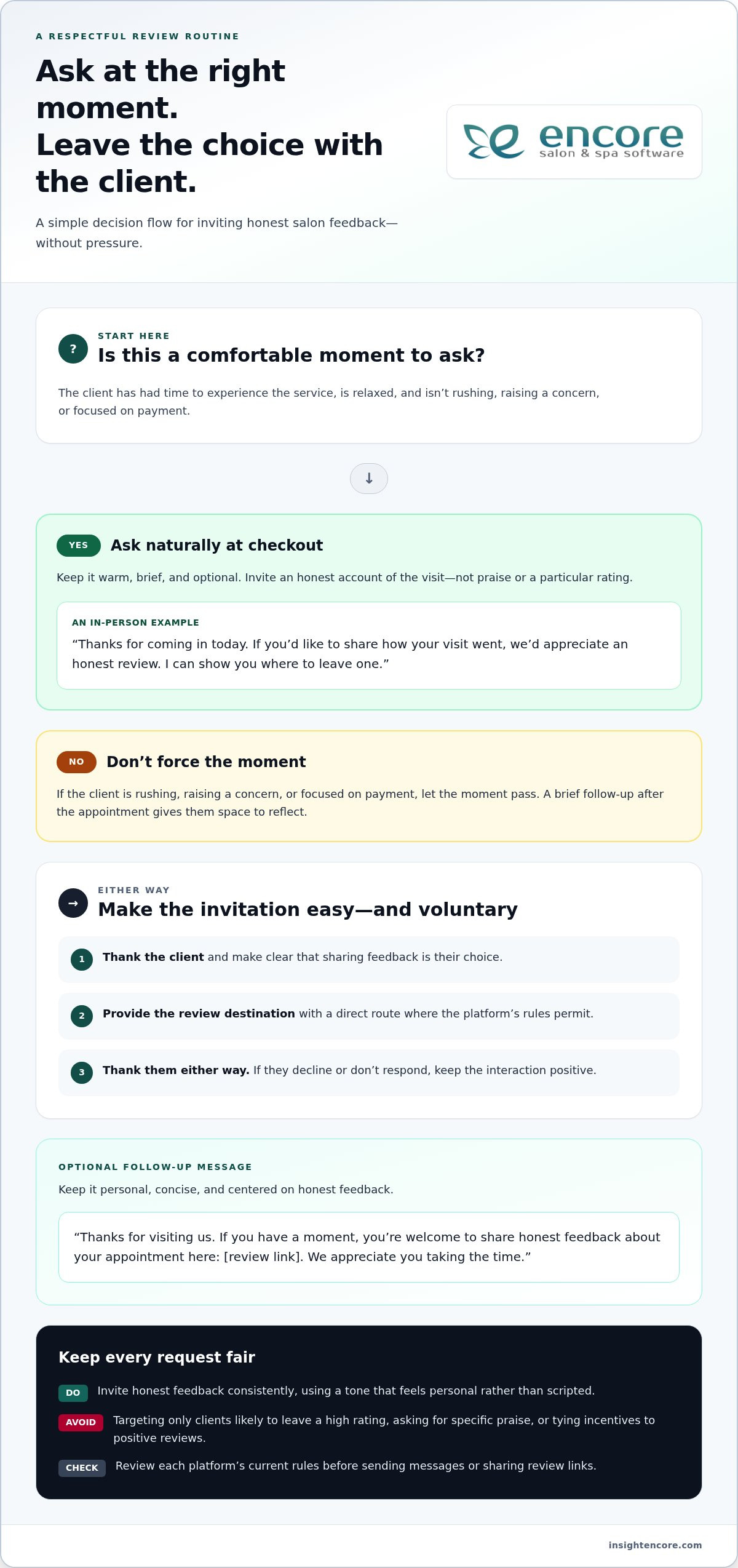
Categories
Uncategorized

Salon Key Performance Indicators to Track in 2026: A Practical Guide

What if tracking fewer numbers helped your salon make better decisions? Collecting reports can still leave you unsure what to change, especially when records aren’t consistent or a result doesn’t point to an obvious cause. The salon key performance indicators to track are the ones that connect a business goal to a practical next step.

You don’t need to measure everything at once. A focused set of KPIs can show where bookings are slipping, whether clients are returning, how staff time is being used, and which services or products deserve a closer look. Use consistent formulas and compare equivalent time periods so changes in the numbers tell a useful story.

This guide explains which salon KPIs matter, how to calculate them, and how to turn trends into decisions about bookings, staffing, retention, and inventory. You’ll also see how connected booking, client, sales, and inventory records can make tracking more consistent, whether you use salon software, spreadsheets, or both.

Key Takeaways

  • Choose salon key performance indicators to track based on a specific business goal, not simply because a number appears in a report.
  • Use clear formulas and reliable data sources to measure sales, client behavior, team productivity, and retail performance consistently.
  • Compare results with your salon’s own past periods, accounting for seasonality, service mix, hours, and staffing changes.
  • Turn KPI reviews into a repeatable cycle: ask a business question, check the trend, choose an action, then reassess.
  • Connected appointment, client, sales, and inventory records can reduce manual reconciliation and make tracking easier to maintain.

Salon key performance indicators to track: what they reveal about business health

A salon can collect plenty of numbers and still be unsure what to do next. A Key Performance Indicator (KPI) is a measurable indicator tied to a specific business goal. It helps you judge whether an important part of the business is moving in the right direction and whether an adjustment may be needed.

The best salon key performance indicators to track depend on your priorities, services, and operating model. A booth-rental salon may focus on different questions than a team-based salon. You don’t need to monitor every available figure. Start with a small, balanced set, define how each measure is calculated, and review it consistently. A number belongs on your dashboard only if it helps guide a decision.

How KPIs differ from salon metrics

A metric is a measurement; a KPI connects that measurement to a goal. Appointment count, for example, tells you how many bookings were made. Booking conversion, calculated as bookings divided by booking inquiries or opportunities, can help assess how effectively interest turns into appointments. Define what counts as an inquiry or opportunity, then use the same definition and time period in every comparison. A KPI should prompt a useful question, such as whether to adjust booking availability or follow-up, rather than simply fill a report.

Context makes the numbers more useful. One week’s booking count is a data point; comparing weekly counts across equivalent periods can reveal a pattern. Before drawing a conclusion, check that the periods cover the same number of days and that your records use the same counting rules. Otherwise, an apparent improvement or drop may reflect inconsistent tracking rather than a real change in performance.

Choose KPIs around the salon’s priorities

Begin with the business outcome you want to understand, then choose a measure that can help explain it. Revenue stability may call for a financial measure, repeat visits may call for a client measure, and better capacity use may call for an operational measure. Keep owner-level KPIs focused on the health of the whole salon. Use individual staff measures for coaching conversations, with relevant context such as scheduled hours, service mix, and role.

  • Financial health: Are sales and revenue patterns supporting the salon’s goals?
  • Client health: Are clients returning and maintaining a steady visit pattern?
  • Operational health: Are available appointments and team time being used effectively?

This compact view helps you spot trade-offs instead of reacting to one number in isolation. A change in sales, for instance, may relate to client behavior or available capacity. Next, choose specific measures, formulas, data sources, and review periods that make those questions answerable.

The essential salon KPIs to track, with straightforward formulas

Useful measures start with clear rules. For the salon key performance indicators to track, define the reporting period, what counts as a completed visit, and how you handle discounts, refunds, cancellations, tips, and taxes. Apply the same rules each time so a change in the result reflects business activity, not a change in bookkeeping.

The U.S. Bureau of Labor Statistics reports that employment of barbers, hairstylists, and cosmetologists is projected to grow 7 percent. Tracking your own business health can help you understand how revenue, client activity, and available capacity are changing within your salon.

Revenue and visit-value KPIs

Start with sales and the value of each completed visit. For consistent comparisons, calculate sales after discounts and refunds, and exclude taxes and tips. Keep service and retail revenue separate so a shift in the sales mix is visible. These measures show what’s changing, but they don’t account for operating costs. For profit-focused guidance, see increasing salon profit margin.

Client, booking, and capacity KPIs

Client and appointment measures need defined time windows. For retention, select a return window that fits your salon’s visit patterns and compare eligible clients in each group. For utilization, divide booked service hours by available service hours, excluding breaks and other time when appointments can’t be scheduled. Keep the definition of available hours consistent when comparing staff or periods. For more detail, read calculating salon staff utilization rate.

KPI Formula and counting rule Data source Review cadence
Total sales Service revenue + retail revenue, less discounts and refunds; exclude taxes and tips. Point-of-sale records Weekly and monthly
Average ticket Service and product revenue, net of discounts and refunds, divided by completed visits; exclude taxes and tips. POS and completed appointments Weekly and monthly
Revenue mix Service or retail revenue divided by total service and retail revenue. POS categories Monthly
Client retention Clients in a defined group who return within the chosen window divided by eligible clients in that group. Client and appointment records Monthly or quarterly
Rebooking rate Completed visits where the client books again before leaving divided by completed visits. Appointment records Weekly
Cancellation / no-show rate Cancelled appointments or no-shows divided by appointments scheduled for the period. Track each separately. Appointment records Weekly
Appointment utilization Booked service hours divided by available service hours. Staff schedules and appointments Weekly

Use linked appointment, client, and POS records where possible to reduce manual matching. Encore Salon & Spa Software brings booking, client management, point-of-sale, and inventory tools together, giving salons a connected operational record to support consistent KPI tracking. Explore salon management tools.

A KPI change is a signal to investigate, not a verdict on your salon or team. Before reaching for an industry benchmark, compare the result with your own earlier periods. Your services, prices, opening hours, staffing model, and client mix all shape what a reasonable result looks like. The salon key performance indicators to track become more useful when you can explain what changed and decide what to test next.

What is a good salon KPI result?

There’s no universal target that suits every salon or service mix. Build a baseline from reliable historical records, then set a target that supports your business priorities. Compare like with like, such as the same month year over year or equivalent weeks, and document changes to formulas, booking systems, or recordkeeping. A new definition can create a jump in the numbers without any real change in performance.

Seasonality can affect demand, while changes in working hours or staffing can alter available capacity. Service mix matters too: a month with more long or higher-value appointments may shift revenue measures even if visit volume stays steady. Where records allow, break results down by service, staff member, booking channel, or new versus returning clients. These segments can suggest where to investigate, but they don’t prove what caused a change.

Find a useful explanation for a changing KPI

If average ticket falls, check whether clients booked a different mix of services, discounts increased, or fewer clients added retail products. If rebooking declines, look at client segments, appointment availability, and follow-up practices. These checks help you move from “the number changed” to a practical question the team can address.

  • Check the context: Confirm the date range, metric definition, staffing, and service mix.
  • Look for a pattern: Compare relevant client, service, or booking segments where records are available.
  • Test one adjustment: Change one operational factor, such as availability or follow-up, and review the result after a defined period.

Keep KPI conversations focused on coaching and planning, not surveillance. Use team-level trends to identify barriers, improve schedules, or support consistent client follow-up. If you review an individual measure with a staff member, add context such as their hours and service mix, then agree on a useful next step together. Numbers work best as a shared tool for learning, not a scorecard without explanation.

Salon Key Performance Indicators to Track in 2026: A Practical Guide

Build a practical salon KPI review routine your team can maintain

A useful KPI process doesn’t need to become another full-time task. Give it a simple rhythm: define the question, check the data, review the trend, choose one action, then reassess. Frequent checks can catch operational issues such as schedule gaps or cancellations. Monthly or quarterly reviews give you room to consider broader goals, staffing, and service mix.

Set up reliable KPI definitions and data sources

Before each review, make sure the numbers use the same rules. Keep a short reference for every measure that records its formula, data source, reporting period, and treatment of cancellations, discounts, or refunds. Then reconcile appointment, POS, client, and inventory records as needed. If you’re not ready for a formal reporting workflow, a spreadsheet is a practical place to start, provided someone updates it consistently.

Connected operational records can reduce the time spent matching figures from separate systems. Salon software features such as appointment booking, client management, point-of-sale transactions, and inventory tracking can help bring relevant information into a more consistent workflow. The right setup is one your team can maintain and use to answer real business questions.

Turn a review into one measurable next step

Choose one KPI tied to a current priority. If rebooking is the focus, for example, agree on one change to test, such as adjusting the time staff set aside to discuss the next appointment. Don’t change several processes at once; otherwise, it’s harder to tell which adjustment affected the result.

Record the decision in a simple action log:

  • KPI and question: What changed, and what do you need to understand?
  • Action and owner: What will change, and who is responsible?
  • Expected signal: What movement in the measure would suggest the action is helping?
  • Follow-up date: When will you review the result using the same definition and time period?

Use the follow-up to decide whether to keep, adjust, or stop the test. This turns the salon key performance indicators to track into a steady learning loop rather than a report that gets opened once and forgotten. Keep the process supportive: discuss obstacles, share useful context, and focus on what the team can try next.

Explore Encore salon software

How salon software can make KPI tracking more consistent

Spreadsheets can be a practical way to start: they’re flexible and easy to adapt to a small set of measures. But someone needs to enter and reconcile the information, and separate files can make it harder to compare bookings, sales, client activity, and inventory reliably. An integrated system can bring those records together, reducing manual matching and making it easier to work from consistent source data.

What to look for in salon KPI tracking software

Start with your chosen KPIs, then check whether the system supports the records behind them. Booking measures need appointment information; retention depends on consistent client records; revenue measures draw on point-of-sale data; and retail or stock decisions rely on inventory information. Reporting should make the date range clear and align with your formulas, including how completed visits, cancellations, discounts, and refunds are treated.

Ease of use matters, too. A report that’s difficult to access or a workflow staff can’t maintain won’t support dependable comparisons. Review the salon software features that can help centralize day-to-day information, and choose an approach your team can follow consistently. Spreadsheets can still play a role in calculations or analysis when needed.

Connect Encore tools to the measures that matter

Encore’s salon management platform brings appointment booking, client management, point-of-sale transactions, and inventory tracking into one operational setting. Those connected records can support a more consistent view of the activity behind your selected KPIs. Explore Encore salon software and its management tools.

Software supports the measurement routine; it doesn’t replace sound judgment. Keep your KPI definitions clear, check that the underlying records fit the question, and use trends to guide decisions rather than treating a dashboard as an automatic answer. The most useful setup is one that helps your team gather dependable information and act on it.

Learn about Encore salon software

Make your salon numbers work for you

The most useful salon key performance indicators to track are tied to clear business goals, measured with consistent formulas, and reviewed over comparable periods. A focused set of financial, client, and operational measures can reveal where to look without burying you in reports.

Use trends as prompts for investigation, not instant conclusions. Consider changes in seasonality, service mix, staffing, and availability, then choose one practical action, assign an owner, and set a date to reassess. That simple routine helps turn a result into a decision your team can learn from.

Encore brings appointment booking, client management, point-of-sale, inventory, payment processing, and marketing tools together to support salon operations.

Start with one meaningful question and a manageable set of measures. With consistent records and regular follow-through, you can build a clearer picture of your salon’s health and move forward with confidence.

Frequently Asked Questions

What are the most important KPIs for a salon to track?

The most important KPIs are the ones tied to your salon’s goals. A useful starting set includes total sales and average ticket for financial health, retention and rebooking rate for client relationships, and appointment utilization and no-show rate for operations. You might also track retail sales if product revenue is a priority. Choose a manageable group of salon key performance indicators to track, and use clear formulas and consistent time periods.

How do you calculate a salon rebooking rate?

Divide the number of completed visits where the client books their next appointment before leaving by the total number of completed visits, then multiply by 100 to express the result as a percentage. For example, if 30 out of 50 completed visits include a rebooking, the rate is 60%. Use the same period and counting rules each time, and decide how to treat rescheduled visits so comparisons stay consistent.

What is a good average ticket for a salon?

There’s no single average ticket target that fits every salon, since prices, service mix, and retail sales vary. Calculate yours by dividing service and product revenue by completed visits, using the same rules for discounts, refunds, taxes, and tips each period. Then compare the result with your own past periods. If it changes, check whether clients chose different services or added fewer retail products before deciding what to adjust.

How often should a salon review its KPIs?

Review operational measures, such as bookings, cancellations, and no-shows, frequently enough to respond to scheduling issues. A weekly check may suit these day-to-day questions. Review broader measures, such as retention or revenue trends, monthly or quarterly so there’s enough context to identify patterns. Pick a cadence your team can maintain, use consistent date ranges, and set a follow-up date whenever you decide to test a change.

How do you calculate salon staff utilization?

Divide booked service hours by available service hours, then multiply by 100 to get a utilization percentage. For example, 24 booked service hours out of 30 available hours equals 80% utilization. Define available hours consistently, excluding time when the staff member can’t take appointments, such as breaks or scheduled leave. Keep the same rules across periods, and interpret the result alongside service mix and schedule changes.

Should a salon use industry benchmarks or its own historical data?

Start with your salon’s own historical data. Comparing equivalent periods helps you see whether performance is changing within your business, while accounting for factors such as seasonality, service mix, staffing, and hours. External benchmarks can offer context, but they may reflect different salon models or KPI definitions. Before comparing, confirm that the formulas, reporting periods, and counting rules match closely enough to make the comparison meaningful.

Can salon software track key performance indicators automatically?

Salon software can bring appointment, client, point-of-sale, and inventory records together, which may reduce manual data entry and reconciliation. Some platforms also offer reporting tools, but don’t assume every KPI is calculated automatically or uses your exact formula. Check how reports define date ranges, completed visits, cancellations, discounts, and refunds. You may still need to set definitions, confirm data quality, and interpret trends before choosing an action.

Disclaimer

This article is general in nature and may contain errors, please verify all claims with your sales rep

Categories
Uncategorized

How to Manage Multiple Salon Locations: A Practical 2026 Guide

What if adding another salon location didn’t mean adding another set of disconnected schedules, client records, and inventory headaches? Learning how to manage multiple salon locations starts with identifying where daily routines differ and deciding which differences affect the client experience or make it harder to understand how each salon is performing.

You need shared standards, but a single rigid rulebook can overlook what makes each local team and its clients unique. Decide which processes must stay consistent, give managers clear ownership of daily operations, and make key information easier to compare. This approach supports oversight while leaving teams room to serve clients well.

This guide covers practical ways to align core processes, coordinate schedules and client information, manage inventory, and review performance across locations. It also explains how connected booking, client management, inventory, and point-of-sale tools can reduce fragmented workflows. The goal is a repeatable approach that helps you spot differences, ask better questions, and support each location without managing every detail yourself.

Key Takeaways

  • Map how each salon currently handles daily work to see which processes align and where they differ.
  • To learn how to manage multiple salon locations, set shared standards for essential client-facing tasks while leaving room for local decisions.
  • Give each manager clear responsibility for team training and daily follow-through. Focus owner oversight on progress, recurring issues, and decisions that need escalation.
  • Roll out changes in stages. Use a pilot and a small set of relevant measures to learn what works before expanding.
  • Assess whether connected tools for booking, client records, inventory, payments, and other daily tasks can support your operating model across locations.

How to Manage Multiple Salon Locations Without Losing Operational Clarity

Managing multiple salons means coordinating people, processes, client experience, and performance across every site. Growth brings more than extra appointments and staff. It also raises questions about how work gets done, who owns each decision, and how you’ll recognize when a location needs support.

The practical answer to how to manage multiple salon locations is not to make every salon identical. Set shared expectations for essential work, then give managers clear authority to respond to local needs. This helps protect the client experience and makes differences in performance easier to interpret. Comparisons are useful only when every salon defines and records the information in the same way.

This approach can support different ownership structures. For example, a franchise is a particular business growth strategy with defined relationships between franchisors and franchisees. Whatever your structure, clear standards and decision rights help teams work together without relying on the owner to resolve every routine question.

What changes when a salon grows beyond one location?

At one salon, the owner can often spot a scheduling problem, explain checkout steps, or notice stock running low in person. Across locations, those informal check-ins become harder to maintain. One team might confirm appointments the same way each time, while another handles changes differently. Client records may be updated inconsistently, and stock counts may follow different routines.

Not every difference signals a problem. Appointment patterns may vary because clients, services, or local demand differ. The important task is to distinguish local variation from gaps in the process. If teams handle checkout records or inventory counts differently, comparisons may reflect inconsistent routines rather than actual business performance.

Which responsibilities should be clear from the start?

Make decision ownership visible before small issues start bouncing between teams. A simple responsibility guide can show who sets expectations, who handles day-to-day choices, and when an unresolved issue should be escalated.

  • Owner: Sets business priorities, approves core policies, and reviews performance across locations.
  • Central operations lead: Turns shared policies into practical procedures, supports managers, and tracks recurring issues across sites.
  • Location manager: Runs daily operations, coaches the local team, and makes decisions within agreed boundaries.
  • Frontline team: Follows shared steps for client-facing tasks and flags issues that can’t be resolved locally.

Define escalation paths with practical examples. A manager might resolve a routine scheduling exception locally, while a system-wide issue that keeps recurring goes to the operations lead. The owner can then focus on policy or resource decisions instead of being pulled into every daily adjustment.

How to Build Repeatable Processes Across Every Salon Location

Shared processes are easier to teach, follow, and improve. They also help clients receive dependable service, whether they book online, update their details, or pay at checkout. A useful multi-location standard sets a clear minimum, not a script for every interaction.

Build your process playbook in manageable steps:

  1. Map current workflows. Ask each location to describe how it handles booking, client records, checkout, and stock. Note the steps and where teams improvise or rely on individual knowledge.
  2. Select the standards. Agree on essential steps that should be consistent, especially those that affect clients or make information comparable. Leave room for local choices that don’t undermine those essentials.
  3. Assign owners. Name someone responsible for each process. For example, the operations lead can maintain the shared procedure while a location-level owner handles questions and feedback.
  4. Train the teams. Demonstrate the steps in context, then give staff a short checklist they can refer to during a shift.
  5. Review adoption. Observe the workflow, ask where it creates friction, and update the process when teams identify a practical improvement.

Keep procedures in a short, accessible playbook. Include each process’s purpose, steps, owner, and review date. The U.S. Chamber of Commerce offers guidance on creating Standard operating procedures, which can help you write usable instructions instead of lengthy documents that staff struggle to apply.

Which salon processes should be standardized first?

Start with appointment booking, client record handling, checkout, and inventory routines. These tasks connect the client experience with day-to-day business information, so inconsistent steps can lead to avoidable confusion. A shared opening and closing checklist can cover practical handoffs: reviewing the day’s appointments, noting stock that needs attention, and completing routine end-of-day records. Keep service conversations personal. Standardize the necessary administrative steps, not the stylist’s relationship with each client.

How can managers train teams to follow shared processes?

Use realistic examples. Show staff how to record a client update or complete checkout, then give them a chance to practise using the checklist. Each location should have a process owner who can answer questions and flag recurring obstacles. Managers can check adoption through coaching and workflow observations, not just by distributing a policy document. Their feedback can reveal whether a step is unclear, difficult to use, or ready for refinement.

As you define these routines, consider whether connected booking, client management, inventory, and point-of-sale tools can support the same workflow across sites. Explore Encore’s salon management tools to see how a shared system could fit your processes.

How to Balance Central Control and Local Flexibility Across Salons

Consistency doesn’t mean every salon has to operate identically. Set shared expectations for what protects the brand and makes performance comparable, then let managers adapt decisions that depend on local clients, schedules, and team needs. Clear boundaries give staff room to act without turning every choice into a head-office approval.

What should be decided centrally, and what can managers adapt?

Use the examples below as decisions to assess, not universal rules. The right split depends on your services, locations, and operating model.

Shared standards set centrally Choices managers may adapt
Brand-wide principles for presenting services and supporting clients How the team brings those principles to life in local conversations
Definitions for reports, such as what counts as a completed appointment Scheduling choices that respond to local appointment patterns
Core workflows for booking, client records, checkout, and inventory tracking Day-to-day team coordination and shift handoffs
Guidelines for local promotions and shared brand requirements Which locally relevant promotion to run, within those guidelines

For each flexible choice, clarify the boundary: what a manager can decide independently, what needs approval, and what information to record. If a location adjusts a routine to meet a local need, log the reason, decision owner, and review date. This makes flexibility visible and gives you a basis for deciding whether an exception should stay local, become a useful practice for other salons, or prompt an update to the shared process.

How can owners compare locations fairly?

Start with comparable information. Use the same metric definitions and reporting periods across salons, then interpret results in context rather than ranking teams by a single number. A difference in appointment volume, for example, may reflect staffing levels or appointment mix, not simply how well a location is managed. Local demand and operating context matter, too.

Staff utilization can help you understand how scheduled team time relates to appointments and service activity. Before comparing locations, define which time and activity the measure includes, and apply that definition consistently. Then look for patterns: does a result change alongside a different appointment mix, or does it persist across reporting periods? Consistent definitions make comparisons a starting point for useful questions, not a verdict on a manager.

This is a practical part of how to manage multiple salon locations: centralize the rules that create shared understanding, and let managers adapt within clear boundaries. Review logged exceptions alongside performance results so local learning informs decisions without quietly changing the process at each site.

How to Manage Multiple Salon Locations: A Practical 2026 Guide

How to Roll Out Multi-Location Salon Management Step by Step

A clear rollout gives staff time to understand a change, practise it, and share what needs adjustment before it reaches every location. Keep the process manageable: establish a baseline, test one workflow, learn from the pilot, and then expand.

How should a salon group prepare for a new operating process?

Before changing a routine, document how it works today. Note the systems teams use, handoffs between roles, differences between locations, and known bottlenecks. A booking workflow, for example, may look consistent on paper but involve different follow-up steps at each salon. Capture what staff actually do, including where they need to use their judgment.

Next, choose one process to pilot. Look for a workflow with a visible effect on clients or daily operations, but keep the change manageable enough for managers to support. Assign a rollout lead to coordinate instructions, training, questions, and follow-up. Before implementation, explain what’s changing, why it matters, what staff need to do differently, and how they can raise concerns.

How can owners know whether the rollout is working?

Set a baseline before the pilot so you have a fair point of comparison. Choose a small group of measures tied to the process, such as whether required booking steps are completed or whether checkout records are entered consistently. Define each measure clearly, use the same approach throughout the pilot, and compare results with the baseline rather than relying on impressions alone.

Adoption also depends on how the process works in practice. Schedule check-ins with the pilot manager and invite frontline team members to share confusion, extra steps, or client concerns. Keep a simple record of feedback, decisions, and process updates. If the workflow needs adjustment, make the change clear and update the shared instructions before expanding to other salons.

Once the pilot is working as intended, train the next location, name its process owner, and repeat the review. This staged approach to how to manage multiple salon locations builds on tested routines instead of asking every team to adapt to an untested change at once. For a related look at tools that can support shared salon workflows, explore Encore salon software.

See how Encore salon software supports daily workflows

How Salon Management Software Can Support Multiple Locations

Software can help put your operating model into everyday practice. The aim isn’t to add another tool for its own sake. It’s to connect key tasks, reduce repeated data entry, and make the information managers and owners use easier to work with. As you assess options, map each need to a tool, a user, and a routine.

Which software capabilities matter when managing several salons?

Start with workflows that affect clients and daily operations. Use this checklist to connect capabilities to practical needs:

  • Appointment booking: Consider how clients book and how staff review upcoming appointments and changes.
  • Client management: Identify which client details teams need to access and maintain throughout the client journey.
  • Inventory tracking: Map how teams record product movement and identify items that need attention.
  • Point-of-sale transactions: Review how checkout information is recorded and used in routine closeout work.
  • Integrated credit card processing: Consider whether connecting payment processing with checkout fits your payment workflow.
  • Marketing, loyalty, and gift cards: Decide which tools are relevant to your client communication and retention plans.

Encore Salon & Spa Software brings appointment booking, client management, inventory, and point-of-sale tools together. The platform also includes integrated credit card processing, automated marketing, loyalty programs, and gift cards. Match each capability to a process your team needs to perform, rather than adopting features without a clear operational purpose.

How can salon owners evaluate whether a platform fits their workflow?

Make the assessment specific. For each task, name who uses the tool, what information they need, and what should happen next. For example, trace a booking from the client’s first appointment request through team preparation and the completed visit. Then map checkout from the transaction to the records managers use in their work. This helps show where connected tools may reduce handoffs or duplicated work.

Consider managers’ and owners’ needs separately. Managers may need practical access to booking, client, inventory, and transaction information for daily decisions. Owners need consistent definitions and a usable way to review operations across the business. For payments, consider how integrated credit card processing fits into the salon’s checkout routine.

Use this checklist to assess how software could support how to manage multiple salon locations without assuming every location needs identical settings. Encore’s connected salon management tools bring booking, client records, inventory, and payments together to support established workflows.

Explore Encore salon software for your workflows

Build a Stronger, More Connected Salon Group

Knowing how to manage multiple salon locations comes down to creating clarity without limiting local teams. Set repeatable standards for essential processes, give managers clear decision-making responsibilities, and use consistent measures to understand how each location is doing. Roll out changes in stages, listen to staff feedback, and refine the approach as your salons grow.

The right tools can help bring those routines together. Encore combines online appointment booking, client management, inventory tracking, and point-of-sale transactions. Integrated credit card processing, automated marketing, loyalty programs, and gift cards can also support how you serve and retain clients. Map these capabilities to your operating needs and workflows.

Shared standards, thoughtful local flexibility, and connected operations give each team room to serve clients while helping you keep a clearer view of the whole business. Explore Encore’s salon management software to see how its tools can support your multi-location workflows.

Frequently Asked Questions

How do you manage multiple salon locations effectively?

Manage multiple salons effectively by clarifying responsibilities, documenting shared processes, and giving each location manager defined decision-making authority. Standardize essential workflows such as booking, client records, checkout, and inventory routines. Review the same operational measures across locations on a regular schedule. If one salon’s results differ, consider local demand, staffing, and workflow context before deciding what support or coaching may help.

What should be standardized across salon locations?

Standardize core processes that support a dependable client experience and reliable business records. These often include appointment handling, client record practices, checkout steps, inventory routines, and reporting definitions. Document the minimum expected process, name who owns it, and explain where managers can adapt. Set shared requirements without scripting every client interaction or local decision.

How can salon owners compare performance across multiple locations?

Compare locations using a small set of measures with consistent definitions and reporting periods. Depending on your goals, you might review appointment activity, service mix, or inventory movement. Interpret differences alongside staffing, local demand, and each salon’s operating context. A change in service mix, for example, could affect appointment activity. Use comparisons to ask questions and identify where managers need support, rather than treating a ranking as a complete explanation of performance.

How do you keep each salon location consistent without making it feel impersonal?

Keep administrative steps consistent while giving staff room to build genuine client relationships. Shared booking and checkout routines can make the experience familiar without requiring identical conversations or service choices. Be clear about which standards are essential and which decisions managers can adapt to local needs. Feedback from clients and salon teams can show where a process needs adjustment, helping you protect dependable service while preserving each location’s character.

What software do salon groups need to manage multiple locations?

Look for software that supports the workflows your salon group needs to coordinate, including appointment booking, client management, inventory tracking, and point-of-sale transactions. Integrated credit card processing, automated marketing, loyalty programs, and gift cards may also fit your needs. Map each requirement to the people who use it and the process it supports. Encore Salon & Spa Software brings these management capabilities together for beauty and wellness businesses.

How should a salon group roll out new processes across its locations?

Start by documenting current workflows, then choose one process for a manageable pilot. Assign a rollout owner, explain what’s changing and why, and give staff practical training. Set a review date before the pilot begins. Gather feedback from managers and frontline teams, document decisions, and update the process instructions. Once the workflow is clear and workable, expand it to other locations and share what you learned.

How often should salon owners review results from each location?

Choose a review rhythm that lets you respond at the pace your business requires, then apply the same reporting periods and metric definitions across locations. Regular check-ins can help owners and managers discuss emerging trends, operational barriers, and needed support. Avoid drawing conclusions from one unusual period without context. Pair the numbers with manager feedback so each review reflects measurable activity and what’s happening in the salon.

Disclaimer

This article is general in nature and may contain errors, please verify all claims with your sales rep
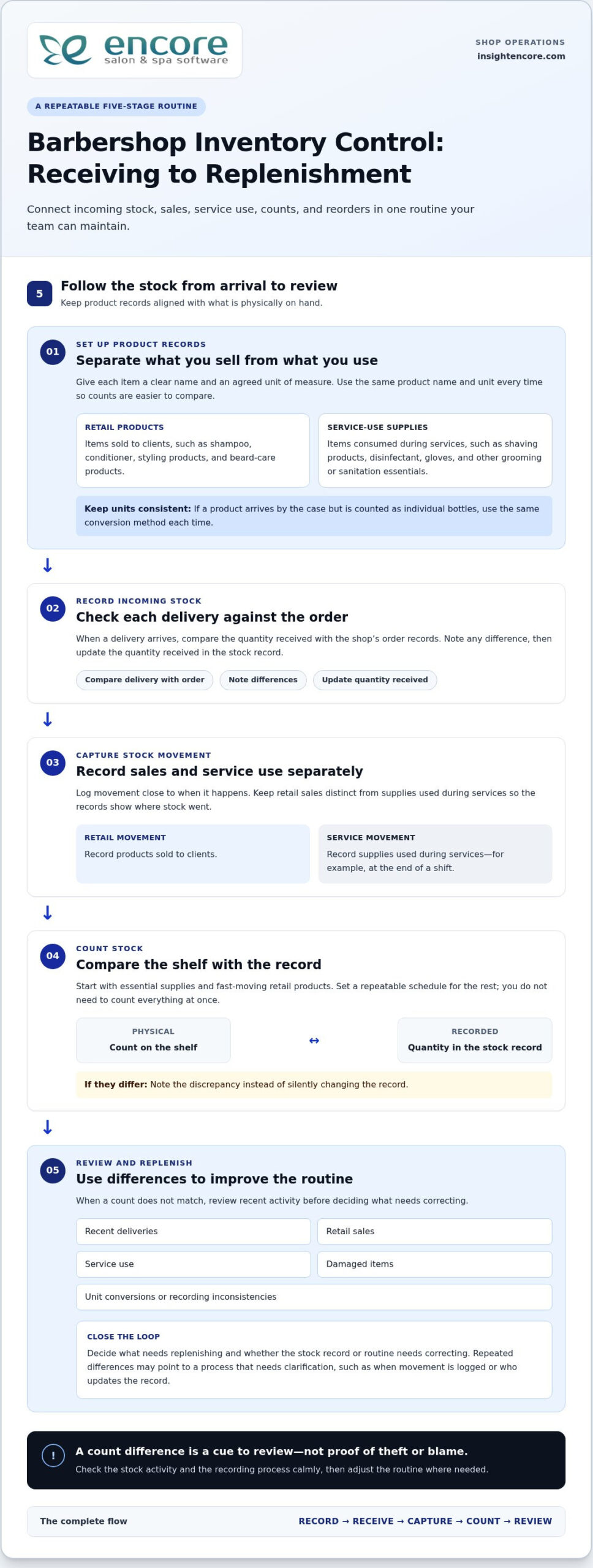
Categories
Uncategorized

Reducing Salon Operating Costs: A Practical 2026 Guide

Labor can account for 45% to 55% of a salon’s gross revenue, according to Booksy’s September 2026 industry guidance. That makes reducing salon operating costs less about slashing budgets and more about finding avoidable spending without weakening the client experience. Expenses can be hard to track across supplies, subscriptions, payroll, and daily operations. Small recurring purchases may disappear in the totals, while a blunt cut can leave clients waiting or staff stretched.

This guide shows you how to identify controllable costs, prioritize changes by likely impact and risk, and test adjustments before making them permanent. You’ll learn how to reduce avoidable waste, protect service quality, and track whether a change improves financial performance.

We’ll cover inventory, appointment flow, recurring tools, and other expense categories, then outline a simple routine for comparing spending with revenue. Better visibility, not guesswork, helps you make measured decisions and keep the salon running smoothly.

Key Takeaways

  • Classify expenses as fixed, variable, semi-variable, or discretionary before deciding what to adjust.
  • Review waste and unused recurring expenses before considering changes that could affect staffing or service quality.
  • To assess a cost change, record a baseline, make one specific adjustment, then compare like-for-like results.
  • Use booking, client, inventory, and point-of-sale records to spot patterns and guide operational decisions.
  • Salon management software can support clearer records and consistent processes, but it does not guarantee savings.

Reducing salon operating costs starts with knowing where the money goes

When bills rise, it’s natural to look for something to cut. But reducing salon operating costs works best when you first identify what is driving the pressure. A large expense may reflect overspending, or it may look larger because bookings and revenue have dipped while necessary costs stayed steady. Those situations call for different responses.

Operating costs are the expenses involved in running the salon day to day. The broader idea of operating expenses can help frame this review. Start by distinguishing recurring expenses, such as rent or software subscriptions; variable expenses, such as products used during services; one-time expenses, such as isolated purchases or repairs; and discretionary expenses, which may be adjusted. Categories can overlap: a subscription is recurring and often predictable.

Is the problem high expenses or too little booked work?

Compare expenses with appointment volume and service revenue over the same period. If bookings and revenue have fallen while core bills remain similar, the main issue may be a quieter schedule, not unusually high costs. Cutting supplies needed for booked services won’t fill open appointment slots and could affect the client experience.

If service volume is steady but a particular cost is rising faster than the work it supports, investigate that expense. Compare staff schedules with booked hours to distinguish a capacity issue from a cost issue. The salon staff utilization guide offers a related way to assess how scheduled time aligns with booked work.

Build a useful salon expense baseline

Review bookkeeping records, receipts, invoices, and recurring payments instead of relying on memory. Separate salon-wide expenses, such as rent or general software, from costs tied directly to services, such as color products. This helps show whether a change affects the whole business or a particular service.

An expense baseline is a consistent record of what the salon spends, when, and why. It gives you a fair point of comparison before and after a change. For each item, note:

  • Period: The dates covered, such as a month or quarter.
  • Expense category: For example, rent, supplies, payroll, or subscriptions.
  • Amount: The recorded spend for that period.
  • Trend: Whether it is rising, falling, or staying steady compared with a matching period.
  • Business purpose: What the expense supports, such as client service, staffing, or daily administration.

This review turns transactions into useful context. Once you know what each cost supports and how it changes alongside salon activity, you can decide what deserves a closer look without treating every expense as waste.

Classify salon expenses before deciding what to reduce

Once you’ve listed your spending, group each expense by how it behaves. The label helps you choose what to review, but it doesn’t prove a cost is wasteful. Rent may be fixed but essential; a discretionary purchase may be optional but valuable to the client experience. The goal is to understand each expense in the context of your services, staffing, and business needs.

Which salon expenses are fixed, variable, or semi-variable?

Fixed expenses generally stay similar from one period to the next, such as rent or a recurring software subscription. Variable expenses rise or fall with activity. Service products, for example, may be used more as appointment volume increases. Semi-variable expenses combine a steady base with a portion that changes. Utilities can include a regular charge plus usage, while labor may include scheduled hours as well as additional hours tied to demand.

Discretionary expenses are choices the salon can review, such as optional refreshments or tools that duplicate another service. They may also be recurring or variable. These categories describe how a cost behaves, not whether it should be cut.

Separate essential spending from reviewable spending

Assess expenses against your own records rather than treating industry averages as universal targets. A cost that makes sense for one salon’s service mix or staffing model may not suit another. Compare each expense’s trend with the services generating revenue, the people needed to deliver them, and any changes in operating needs.

For each item, consider:

  • Necessity: Does it support safe, reliable operations or a service clients expect?
  • Client impact: Could changing it affect service quality, comfort, or convenience?
  • Frequency: Is it a one-time purchase, a regular payment, or an expense that changes with bookings?
  • Alternatives: Is there a practical way to meet the same need with less waste or overlap?

Subscriptions, duplicate tools, and services staff rarely use are sensible candidates for an evidence-based review. Check invoices and actual use before making a change. If a tool supports booking, client records, or inventory visibility, consider how staff would handle that work if the tool were removed.

Management tools can bring appointment, client, inventory, and point-of-sale information together to support a clearer review. Encore salon management tools bring these operational records into one platform, helping you organize information for your own review.

Where salons can reduce operating costs without lowering service quality

The safest opportunities usually come from preventing waste or removing unused spending, not cutting whatever looks costly. Before making a change, weigh four factors: how much control you have, the likely effect on clients, the effort required, and how you’ll measure the result. This gives you a practical way to prioritize cost changes without treating every expense as equally adjustable.

  • High control, low client impact: Start with avoidable product waste or recurring tools staff no longer use.
  • Moderate control, moderate effort: Review purchasing routines, appointment workflows, and utility use, then test one adjustment.
  • Lower control, high client or staff impact: Take extra care with staffing levels and products essential to services. Don’t cut these without evidence that the current approach can change safely.

Choose a measure that fits each test. Track product use against services performed, for example, or compare subscription costs with actual use. A change is useful only if it improves spending without creating new problems.

Inventory, subscriptions, and everyday purchasing

Use stock counts, usage patterns, and reorder habits to spot products that sit unused, expire, or are reordered before existing stock is needed. Adjust purchasing gradually and monitor availability so popular services aren’t disrupted. For subscriptions, check which features staff use and whether another tool already covers the same task. Review invoices and actual use before removing anything that supports essential daily work.

Track service consistency alongside the change. If lower stock levels lead to missing products or last-minute replacements, the adjustment may not be helping the salon. Inventory records can connect purchasing decisions to product use and stock on hand.

Scheduling, labor, utilities, and payment processes

Review appointment gaps and administrative tasks for ways to improve coordination, not to leave the salon short-staffed. Better visibility into bookings can help align coverage with demand while preserving the capacity to serve clients. Compare utility bills over similar periods and look for low-disruption steps, such as switching off equipment when it isn’t needed, without compromising comfort or service routines.

A cost reduction is worthwhile only when its financial benefit outweighs any added burden on clients, staff, or service quality. Review payment processing statements, transaction patterns, and contract terms before changing a process or provider. Compare total costs and operational effects, not just a single rate. The credit card processing overview provides more context on payment processes.

Apply the same discipline to vendor and marketing changes. Review terms, actual use, and business outcomes before deciding. Test one change at a time, then keep, refine, or reverse it based on what your records show.

Reducing Salon Operating Costs: A Practical 2026 Guide

A salon cost-reduction checklist for testing changes and tracking results

A cost idea is useful only when you can tell what it changed. Test one adjustment at a time, compare it with a clear baseline, and check its effects on clients and staff as well as the accounts. This helps you see whether a change improves performance or simply shifts the burden elsewhere.

How to test one cost-saving change at a time

Use this checklist to make each test clear and repeatable:

  • Choose one expense. Pick a specific item, such as a recurring tool or product-ordering process, rather than changing several categories at once.
  • Record the baseline. Note current spending and process, plus a relevant activity measure, such as appointments served or product use.
  • Define the test. Write down the exact change, who will manage it, and its start date. For example, adjust reorder timing while monitoring stock and service needs.
  • Set success measures and guardrails. Track the expense alongside service quality, staff workload, and client feedback. A lower bill alone isn’t enough if the change creates delays or disrupts appointments.
  • Review and decide. Keep the change if records show a useful improvement without unacceptable trade-offs. Adjust it if results are mixed, or reverse it if costs or service problems worsen.

Choose a review period that fits the expense. Assess a recurring payment over a billing cycle, for example, while purchasing patterns may need a longer window to account for changes in appointment volume or service mix. Compare like with like: similar periods, categories, and operating conditions. Avoid making other major changes during the test, since they can make the result harder to interpret.

Turn expense tracking into a monthly routine

Set aside time each month to compare actual spending with your salon’s plan. Look for unexpected increases, confirm whether earlier adjustments are still working, and account for changes in bookings or services before drawing conclusions. A consistent routine is more useful than a complicated reporting process.

Keep a short decision log with the expense reviewed, the change made, the review date, and the outcome. These notes can help you avoid repeating unsuccessful experiments and make future decisions using your own results. Review expense changes alongside incoming payments and upcoming obligations, since cost control also affects available cash. For a broader perspective, connect this review to your salon’s overall cash flow and profitability analysis.

For a tool to organize booking, client, inventory, and point-of-sale records, see Encore salon management software.

Use salon management tools to keep operating costs visible

Once you’ve identified which expenses deserve attention, consistent records make them easier to monitor. Salon management software can bring booking, client, inventory, and point-of-sale information into everyday workflows, reducing the need to move details between separate records. That visibility can support better decisions, but software doesn’t guarantee savings. The value comes from using the information to spot patterns and act thoughtfully.

What salon software can help owners monitor

Inventory tracking can help you review stock movement, product use, and purchasing patterns. Compare what’s on hand and what’s being used with reorder decisions to identify opportunities to reduce waste without risking product availability. Appointment booking and client records can also make schedule and client information easier to review during daily operations.

Point-of-sale and payment functions bring transaction records into salon operations. When these records connect with other day-to-day information, it can be easier to understand business activity and reduce manual handoffs. Staff still need to review the information and make decisions, but consistent records can simplify that routine.

Choose practical next steps for your salon

Start with the expense category you’ve identified as most reviewable. If product purchasing is the focus, examine inventory use and stock movement. If appointment flow or administrative effort is the concern, review booking and client records. Choose tools that help answer the question you’re investigating, then measure the result against your own records.

Encore Salon & Spa Software brings together inventory tracking, appointment booking, client management, point-of-sale transactions, and integrated credit card processing to support salon operations. Its tools help organize information for consistent tracking. Assess any operational changes based on their actual effect on spending, staff workflow, and client service.

Learn more about the platform’s salon management software and how its tools support day-to-day operations.

Make your next cost decision with confidence

Reducing salon operating costs doesn’t mean making broad cuts. Start with clear records, separate essential spending from reviewable expenses, and test one change at a time. Then weigh the financial result alongside its effects on service quality, staff workload, and client experience.

Consistent tracking makes decisions easier to repeat and refine. Encore brings appointment booking, client management, inventory tracking, and point-of-sale tools together to support day-to-day operations. The platform serves salons, spas, barber shops, nail salons, and other beauty and wellness businesses. It can help keep information organized, while your records show which changes are working.

Small, measured steps can build a clearer picture of your costs and a steadier path toward sound business decisions.

Explore Encore salon management software

Frequently Asked Questions

What are the biggest operating costs for a salon?

Labor is often a salon’s largest operating cost, alongside rent, service products, utilities, payment processing, and software. Booksy’s September 2026 industry guidance estimates labor at 45% to 55% of gross revenue, but your own figures depend on your staffing model, services, and location. Review expenses against revenue and appointment activity rather than assuming another salon’s cost mix is the right benchmark for yours.

How can I reduce salon expenses without cutting staff?

Start by looking for waste and spending that doesn’t support current salon needs. Compare product use with purchasing, check for duplicate or rarely used subscriptions, and review utility patterns for low-disruption conservation opportunities. You can also look for ways to reduce manual administrative work or improve appointment coordination. Track each change alongside service quality and staff workload, so lower spending doesn’t create extra pressure for your team or clients.

How do I track salon operating expenses?

Record each expense by category, amount, period, and business purpose, then compare it with the same category in a comparable period. Use bookkeeping records, receipts, invoices, and recurring payment statements to build a complete baseline. Add context such as appointment volume and service revenue, especially for costs that change with activity. This makes cost reduction a measured process rather than a decision based on memory or one unusually high bill.

Which salon expenses should I review first?

Review expenses that appear controllable and have limited potential to affect service quality, such as unused subscriptions, overlapping tools, avoidable product waste, or purchasing habits that lead to excess stock. Check actual use and records before making a change. Be more cautious with staffing and products needed to deliver booked services. Rank potential adjustments by likely impact, effort, and client or staff effects, then test one change at a time.

Can salon software help reduce operating costs?

Salon software can make operational information easier to track, but it doesn’t guarantee lower costs. Booking and client records can support organized daily workflows, while inventory tracking can help you review stock movement and purchasing patterns. Point-of-sale tools can also keep transaction records within salon operations. Use these records to spot issues, reduce manual handoffs, and assess whether a change is helping your salon’s finances and service experience.

How often should a salon review its expenses?

Review spending monthly to catch unexpected changes and compare actual expenses with your salon’s plan. Some costs need a review period suited to their billing or usage pattern, so don’t judge a longer-term purchasing adjustment from a few days of data. Keep a short record of the change, review date, and outcome. Regular notes help you learn from past decisions and make future cost reviews more consistent.

Should a salon cut marketing costs to save money?

Not automatically. First, review what each marketing activity costs and what business outcome it supports, such as inquiries, bookings, or repeat visits. Compare results over a suitable period and avoid judging a campaign by spending alone. If an activity has unclear value, adjust or test it before removing it entirely. Automated marketing tools can help organize outreach, but your salon’s records should guide whether the approach is worthwhile.

Disclaimer

This article is general in nature and may contain errors, please verify all claims with your sales rep

Categories
Uncategorized

Chair/Booth Renter Software: A 2026 Guide to Choosing the Right System

What if the software meant to make salon work easier left you feeling less in control of your own business? For independent stylists, chair/booth renter software should simplify daily admin while leaving client relationships and business decisions in your hands.

If client details live in one place, appointments in another, and payments require extra steps, keeping everything straight can take time away from your services. A system built for a full salon may not fit the way you work as an independent renter. Look for an organized workflow that supports your business without adding tools you won’t use.

This guide explains how to compare chair/booth renter software based on daily needs: managing client records, handling bookings and payments, understanding costs, and keeping track of who can access your information. You’ll also find practical questions to ask before choosing a platform and learn how to evaluate Encore’s chair and booth renter software. By the end, you’ll have a clearer way to find a system that fits your workflow and keeps your business organized.

Key Takeaways

  • Separate the tasks you handle for your own business from the salon’s premises and broader administration.
  • Assess software by the jobs you need done, from booking and client records to payments and reporting, rather than by the length of its feature list.
  • Compare chair/booth renter software with your services, booking habits, and current process, and check that it supports the level of independence you need.
  • Test realistic booking and payment scenarios before moving client information or changing how clients schedule with you.
  • Use your requirements to assess whether Encore’s renter-focused software and confirmed capabilities fit your workflow.

What Chair/Booth Renter Software Should Help You Manage

Chair/booth renter software helps an independent beauty professional manage their service business while working in a shared salon or barbershop. It can bring client records, appointments, and transactions into a more organized workflow, reducing the need to check separate calendars, messages, and payment records.

Software can support your day-to-day operations, but it doesn’t provide rental space or make business decisions for you. The premises and shared arrangements are separate from how you manage your clients and services. Your legal status as an independent contractor depends on the real working relationship, not simply on which software you use.

How a renter’s workflow differs from a salon owner’s

Your daily focus is usually personal and direct: keep track of clients, the services they book, your schedule, and payments for your work. A salon owner may also need tools for managing staff, locations, or broader business administration. Some needs can overlap in a shared space, but they aren’t automatically part of your individual workflow.

For example, you and the salon owner may work from the same premises while maintaining separate client interactions and routines. Check whether the system clearly distinguishes appointments and records connected to your business. That separation can help you maintain continuity with clients if your work arrangements change, rather than treating those relationships as part of salon staff management.

Which everyday tasks can software bring together?

Focus on how software handles the tasks you repeat throughout the week:

  • Client management: Organize relevant client and service information so it’s easy to find when preparing for an appointment.
  • Appointment handling: Online booking can let clients request or schedule appointments without arranging every detail manually.
  • Transactions: Point-of-sale and payment tools can help you record payments alongside service activity. Check the supported payment methods and terms rather than assuming they’re the same across systems.

The goal is to reduce the effort of switching between tools, not to create more software tasks. Encore offers chair and booth renter software. Review its salon software information on the Encore Salon Software page and compare it with the workflow you need.

Which Chair Renter Software Features Make Daily Work Easier?

A long feature list can look impressive without solving the tasks that slow you down. Start by naming those tasks, then compare how each system handles them. Encore software features can help you identify common categories, but check how each one fits your routine.

Renter-focused software should bring core tasks such as booking, client records, and transactions into a workflow you can manage yourself. A solo professional may need those essentials first. Inventory tracking, loyalty tools, or broader marketing features may suit a business with different needs, but extra options aren’t automatically useful if they add steps you won’t use.

Booking and client management for independent professionals

Test the booking process from a client’s perspective. Can someone find the right service and request or schedule an appointment clearly? Can you set availability to match your working schedule? A practical test is to follow the full booking path, then check whether the appointment appears where you expect and whether the process creates avoidable back-and-forth.

Client records should be easy to find and useful in practice. Organized service and appointment details can help you prepare for a visit and follow up consistently. For a closer look at choosing tools for those records, read this booth renter client management guide.

Payments, marketing, and add-on tools

Check how point-of-sale and payment processing fit the way you take payment and record transactions. Ask providers to confirm the supported payment workflows and applicable terms for the specific setup you’re considering. A feature name alone doesn’t show whether it will work smoothly during your service day.

Other tools depend on your business. Inventory tracking may help if you manage products or supplies. Gift cards, loyalty programs, and automated marketing may be useful if they fit how you serve and reconnect with clients. Before adding them, identify the task each feature would solve and how often you expect to use it.

Software can support your workflow, but it doesn’t determine your worker classification. If you have questions about the distinction between an employee and an independent contractor, refer to the IRS guidelines on worker classification. As you compare chair/booth renter software, confirm features and terms directly with each provider. You can also explore Encore as an option against the tasks you’ve identified.

How to Compare Chair/Booth Renter Software Without Losing Independence

Sharing a salon space doesn’t have to mean sharing every client interaction or business routine. The right chair/booth renter software depends on how you work. Don’t assume, however, that separate accounts automatically mean private records or independent control. Confirm the details with each provider before deciding.

Use the comparison below to frame your questions. Check what you can actually do in the system, not just the feature names on a product page.

Area What to check
Booking Can you manage your own availability and see appointments connected to your services?
Client records Who can view, edit, export, or otherwise access your client information?
Payments Can you record and review transactions for your work, and what terms apply?
Reporting Can you review information relevant to your own appointments and transactions?
Renter usability Does the workflow make sense for one professional, or is it built around salon-wide staff and administration?

There isn’t one best fit for every renter. Your services, booking volume, and current process all matter. A solo professional may prioritize personal scheduling and straightforward records. Several renters sharing a workspace may also need clear separation between each professional’s bookings and information. Shared software can support distinct workflows, but its settings and policies need to allow for them.

Questions to ask about client records and access

Ask who can view, edit, export, or otherwise access client information, and whether permissions can be set for individual professionals. Find out whether you can manage your own availability and records. Then review the provider’s current privacy and data-handling documentation. Don’t rely on assumptions or verbal descriptions alone. Check that the written terms address access to records and what happens to them if your arrangement changes.

Matching features to your rental setup

Separate essentials from extras. Booking, client records, payments, and useful reporting may be core needs; inventory or loyalty tools may matter only if they fit your services. Consider the setup, too. One renter needs a workable individual routine, while a shared workspace may need each professional’s activity to be easy to distinguish.

Before choosing, test one realistic client journey: select a service, book based on your availability, find the relevant client record, record the payment, and check what information is available for follow-up. Note any unclear steps and ask the provider to demonstrate how permissions and data access work. This practical check can reveal more than a feature list.

Chair/Booth Renter Software: A 2026 Guide to Choosing the Right System

How to Choose and Set Up Software for Your Booth Rental

A good setup starts with your actual workday, not a long list of features. Before committing to chair/booth renter software, identify what it needs to handle, test those tasks in a realistic workflow, and clarify practical details with the provider. This makes it easier to compare systems and plan a change without disrupting client bookings.

A practical checklist before you choose

  1. Map your current tasks. List the tools you use for appointments, client details, payments, and follow-up. Note where you enter the same information twice or handle routine tasks manually.
  2. Shortlist your must-haves. Decide which jobs the system needs to support from day one. Separate them from features you may not need yet.
  3. Test the workflow. Walk through a typical client journey, from booking a service to recording payment and finding the information you need afterward. Try the steps yourself instead of relying only on a feature overview.
  4. Verify terms and access. Ask about data export, account permissions, payment terms, and how client records are handled. Request current details in writing, and clarify anything that could affect your control of business information.
  5. Plan the setup. Ask the provider what information can be transferred, who is responsible for setup tasks, and what onboarding or training support is available. Confirm these details rather than assuming they’re included.

A smoother transition into a new system

Choose a transition point that gives you time to check the setup around your appointment schedule. Before changing how clients book, confirm which records can be moved and how they’ll appear in the new system. If other renters will use the same platform, decide who needs access and which permissions are appropriate for each person.

Test the basics before relying on the new process: make a sample booking, review a client record, and check how a payment is entered and displayed. If anything is unclear, pause and ask the provider before moving more information or directing clients to a new booking routine. Preparation can help you catch gaps while your existing process is still available.

Encore offers specialized software for independent chair and booth renters. After defining your requirements, review the Encore Salon Software page as one option, and confirm current feature availability, setup, and payment details for the renter configuration.

Explore Encore for your booth rental workflow

How Encore Chair/Booth Renter Software Can Support Your Next Step

Once you’ve identified the tasks your system needs to handle, assess Encore against those requirements. Encore offers specialized chair/booth renter software within a broader beauty and wellness management platform. Its capabilities include online booking, client management, point-of-sale transactions, and integrated credit card processing, which can bring key parts of a renter’s day-to-day workflow together.

Don’t choose a platform based on a feature list alone. Consider whether its booking, client, and transaction tools fit the way you manage services and business information. Confirm the details for the specific chair or booth renter configuration you’re considering.

Where Encore may fit in a renter’s workflow

For a professional looking to bring core management tasks together, online booking can support appointment scheduling, while client management can help organize customer records. Point-of-sale transactions and integrated credit card processing may also suit renters who want to manage service payments within their broader workflow. Check how these functions work together in the configuration available to you, and whether its record-access settings match your needs.

Encore provides software, not booth rental listings or physical salon space. Its offerings don’t make it a substitute for your own decisions about client relationships or how you run your independent business. Evaluate the system against the requirements you’ve already defined.

What to confirm before moving forward

Ask which features are included in the chair or booth renter configuration and whether the system supports the booking, client-record, and transaction steps you want to use. Confirm current payment processing terms, account permissions, and how client data can be accessed or exported. These details affect how well the software can support your workflow.

Also ask about onboarding and support arrangements, including what guidance is available during setup and which tasks you’ll need to complete. Compare the answers with your must-have criteria rather than assuming every feature or service applies to every configuration. Reviewing terms directly with Encore can help you make an informed decision and identify questions to resolve before changing your routine.

Explore Encore and take the next step

Choose a System That Keeps Your Business in Your Hands

The right chair/booth renter software should make everyday tasks easier without blurring who manages your clients, schedule, and business records. Start with your workflow, compare booking, client management, payments, and reporting, then confirm data access and terms directly with each provider.

Before switching, test realistic client scenarios and plan how records, payment setup, and booking routines will move into the new system. A careful setup helps you make a confident choice and avoid unnecessary disruption to your day.

Encore offers a specialized solution for chair and booth renters. Its broader platform includes online booking, client management, and point-of-sale transactions. Explore how these capabilities may fit your needs, and verify current features, configuration, and terms before deciding.

Explore Encore and take the next step

You’re building a business around your skills and client relationships. Choose tools that support that independence. To see whether Encore fits your renter workflow, explore Encore and take the next step.

Frequently Asked Questions

What is chair or booth renter software?

Chair or booth renter software helps an independent salon professional manage business tasks while working in a shared salon or barbershop. It may bring appointment booking, client records, and transactions into one workflow. Unlike tools focused on running an entire salon, renter software should suit an individual professional’s routine. It supports business operations, but it doesn’t provide rental space or make business decisions for you.

Do booth renters need their own salon software?

Not every booth renter needs a separate system, but software that supports your own workflow can make it easier to manage appointments, client information, and payments. Before using a salon-wide platform, find out whether you can manage your availability and records independently. Ask who can access client information and what happens to your data if you leave the shared space. Choose based on your arrangement and business needs.

Can chair renter software keep each professional’s clients separate?

It can, depending on the software’s account setup, permissions, and data-handling rules. Don’t assume separate logins mean records are private or that you can export them. Ask who can view, edit, or access client details, and whether each professional can manage their own bookings. Review the provider’s current privacy documentation and terms to understand how client information is handled before entering or moving records.

What features should booth renter software include?

Start with the tasks you handle regularly. Useful core features may include online booking, organized client records, appointment management, and point-of-sale or payment tools. Depending on your services, inventory tracking, gift cards, loyalty programs, or marketing features may also help. Check that the software supports your actual workflow, including how you schedule clients and record transactions. Confirm current feature availability for the renter configuration you’re considering.

How much does chair or booth renter software cost?

Pricing depends on the provider and the plan or configuration, so ask for current details directly rather than relying on a general estimate. Compare the full cost, not just a subscription fee. Check payment processing terms, any per-booking charges, and whether the tools you need are add-ons. Contact Encore to confirm current pricing and terms for its chair and booth renter software.

Is salon software different from booth renter software?

They can overlap, but they may be designed around different day-to-day needs. Salon-wide software may include tools for managing staff or broader business operations, while renter-focused software should support an individual professional’s appointments, clients, and transactions. The labels alone don’t tell you whether a system fits. Check how it handles your records, booking availability, permissions, and payments, especially if you share a platform with the salon.

How do I switch to new booth renter software?

Start by listing your current tools and deciding which tasks the new system must support. Ask what client and appointment information can be transferred, how to export records later, and who will handle setup. Test a realistic booking, client-record, and payment workflow before changing your routine or directing clients to a new booking process. Plan the transition around your schedule, and confirm account access, payment terms, and available onboarding guidance.

Disclaimer

This article is general in nature and may contain errors, please verify all claims with your sales rep
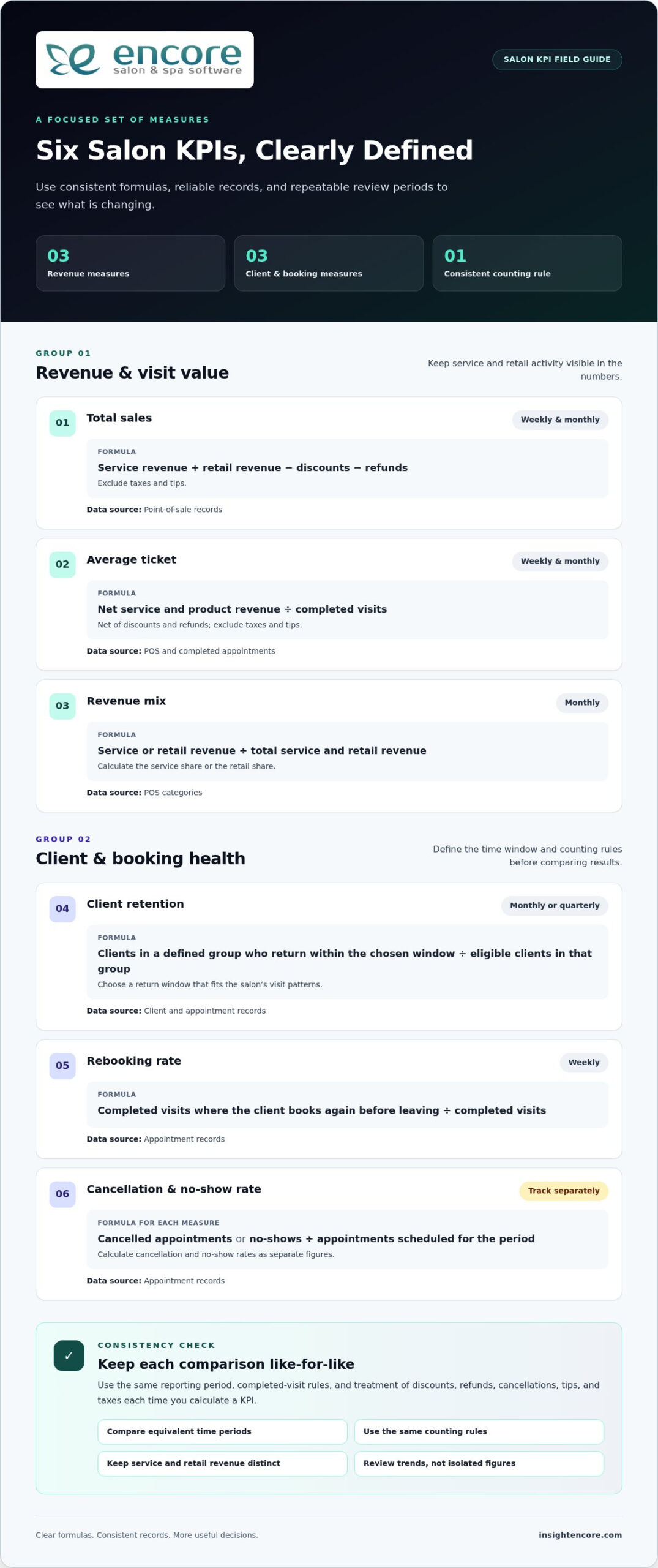
Categories
Uncategorized

How to Sell More Retail Products in a Salon: A 2026 Guide

What if selling more retail didn’t mean selling harder? If you’re working out how to sell more retail products in a salon, you may already know the challenges: appointments get busy, recommendations can feel awkward, and products can sit on the shelf while you try to figure out what’s working. Retail doesn’t have to feel pushy or become one more task to squeeze into the day.

The most useful recommendations support the results clients want from their service. When staff explain what they’re using and why, product suggestions can feel like a natural part of the appointment, not a sales pitch. A simple, repeatable approach can also help your team recommend products consistently, keep useful items in stock, and follow up thoughtfully.

This guide shows how to connect recommendations, product visibility, availability, and follow-up so salon visits can lead to repeat retail purchases. You’ll find practical ways to build staff confidence, reduce slow-moving stock, and track which efforts are helping. You’ll also see how client, inventory, and point-of-sale tools can support an organized retail routine without losing the personal service your clients value.

Key Takeaways

  • Learn how to sell more retail products in a salon by matching recommendations to client needs, not adding pressure.
  • Use a simple ask, listen, match, explain, and invite routine to make product conversations easier to repeat.
  • Compare displays, service-linked recommendations, bundles, and follow-up to choose tactics that fit your salon and clients.
  • Track retail sales, units sold, and product sell-through consistently to guide stock decisions and assess what’s working.
  • Use inventory, client records, and checkout tools to help keep retail routines organized and trackable.

How to Sell More Retail Products in a Salon Without Making Clients Feel Pressured

Back-to-back appointments make it easy to focus on the service in front of you and leave retail for later. By checkout, the next client may be waiting, and there’s little time to explain what could help someone maintain or recreate their salon result. The answer isn’t to push harder. It’s to make relevant recommendations a natural part of client care.

Client-first retail means recommending a product only when it connects to a client’s stated need or the result they want to maintain.

This approach gives clients useful information for their at-home routine and creates an opportunity for salon retail revenue. A clear explanation matters: the retail marketing mix includes product, place, promotion, price, personnel, and presentation. In a salon, the recommendation and the professional explaining it are part of that experience, alongside how products are displayed and offered.

Why salon clients may leave without the products they need

A client may leave without a product because nobody had time to mention it or because its benefit wasn’t clear. A bottle on a shelf can be easy to overlook, and a product name alone doesn’t explain how it fits into someone’s routine. That’s an opportunity to make the information clearer, not a client or staff failure. An informed recommendation explains the connection and leaves the decision with the client. Pressure makes a purchase feel expected.

Set a helpful standard for retail conversations

Keep conversations brief and specific. Ask what the client uses at home, what they want to achieve, and what they prefer in a routine. Listen before suggesting anything, then connect one relevant option to a service or need. After a blowout, for example, you might explain how a styling product could fit into recreating the look at home, without promising the same result for everyone.

Make the next step easy to understand and easy to decline. Explain how the product is typically used, where it fits into the routine, and why you chose it. For example: “You mentioned wanting a simpler styling routine. This could be one option to consider. Would you like me to show you how it’s used?” If the client isn’t interested, accept that warmly and move on.

  • Ask: Find out about the client’s routine and preferences.
  • Listen: Identify the need or goal they’ve described.
  • Match: Choose a relevant product, if there’s a clear fit.
  • Explain: Connect it to the service or routine in plain language.
  • Invite: Offer the option without making a purchase feel expected.

A consistent, low-pressure standard helps staff speak confidently without turning every appointment into a sales pitch. The focus stays on the client’s needs, and retail becomes part of the service conversation rather than an awkward add-on at checkout.

Build a Salon Retail Recommendation Process Around the Client

A repeatable process helps stylists make recommendations feel personal, even on a busy day. Use five simple steps: ask, listen, match, explain, and invite. The goal isn’t to deliver a perfect sales line. It’s to understand what the client wants, share a relevant option clearly, and let them decide.

Match retail products to a client’s service and routine

Start with questions that uncover context: “What are you using at home?” or “Is there anything you’d like to maintain or change about your routine?” Listen for the client’s priorities before connecting a product to the service. After a colour appointment, for example, a stylist might discuss an at-home product intended for colour-treated hair if it fits the client’s needs. After a haircut, the conversation could focus on how the client likes to style their hair day to day.

Explain the product’s use in plain language. Describe when it fits into the routine and how to use it according to its directions. Avoid guarantees or claims that every client will get the same result. If there’s no clear connection between a product and the client’s needs, don’t recommend it just to make a sale.

Help stylists recommend products with confidence

Confidence comes from knowing what a product is designed for, how it’s used, and where its limits are. Make product education practical: discuss a few common use cases, demonstrate the application when appropriate, and invite questions during team meetings. Short role-play can help, too. One stylist plays a client describing a routine or concern; another practices asking follow-up questions and explaining a relevant option in their own words.

Keep the framework consistent, not the wording. Rigid scripts can sound impersonal, while a shared approach gives stylists room to speak naturally. Recognize good consultations as well as completed purchases. When a stylist listens carefully, makes a suitable suggestion, and respects a client’s decision to pass, they’ve supported trust even if no product leaves the salon that day.

  • Ask and listen: Learn the client’s routine, goals, and preferences.
  • Match and explain: Connect a relevant option to their service or stated need, then describe its use clearly.
  • Invite: Offer the product without pressure and accept the client’s answer.

Client records can help a salon team keep track of relevant preferences and support more consistent conversations, while staff still use their judgment in the moment. Explore how salon client management tools can support client and retail workflows alongside your team’s recommendation process.

These conversations work best when they feel like useful guidance, not a transaction. With a shared process and regular practice, stylists can make thoughtful recommendations in a way that suits both the client and their own communication style.

Compare Salon Retail Tactics: Merchandising, Bundles, and Follow-Up

Retail tactics work best when they address a real barrier, such as products going unnoticed, clients being unsure what fits their routine, or forgetting to restock after an appointment. Before adding a tactic, consider the effort involved and how it will feel from the client’s perspective.

Visibility helps clients discover what’s available, while relevant recommendations help them understand what may suit their needs. Use both, but keep the selection focused and the conversation useful.

Tactic Effort Client experience Best suited to
Display improvements Low to moderate: arrange and refresh products Self-directed browsing Products that are easy to miss or hard to understand
Service-linked recommendations Moderate: explain a relevant option during the visit Personal guidance tied to a service or stated need Clients who need help choosing or understanding product use
Bundles Moderate: select compatible products and explain the pairing A convenient option, if each item has a clear purpose Clients already considering more than one related product
Follow-up Moderate: prepare and send a relevant message A reminder or helpful next step after the visit Clients who may need a prompt to restock or revisit a recommendation

Choose salon merchandising that makes products easy to notice

Set out a focused selection where clients can browse without interrupting a service or blocking the checkout flow. Clear labels can explain what a product is for, who might consider it, or how it fits into a routine. Refresh the display based on client questions and available inventory. If a product is out of stock, avoid making it the centrepiece of the display.

Use follow-up and gift cards thoughtfully

A follow-up can remind a client about an option discussed during their visit, but it should fit the relationship and any consent or communication preferences you have on record. Keep the message relevant and easy to act on. Don’t treat every client as a sales lead. Loyalty rewards can be an optional thank-you, not a promise that someone will purchase. Gift cards may also suit clients looking for a flexible gift. Explore salon gift card management as part of planning how your salon handles them.

Bundles should follow the same client-first principle. Pair products only when each item serves a purpose for the client, and present the combination as a convenience, not a requirement. To decide how to sell more retail products in a salon, test one tactic at a time and observe client questions, product interest, and stock movement. That gives you a clearer sense of what belongs in your routine.

How to Sell More Retail Products in a Salon: A 2026 Guide

Track Salon Retail Results and Improve Stock Decisions

Retail figures are most useful when they help you choose a next step. Start with a small set of measures, define each one, and review them over comparable periods. This makes it easier to judge whether a change in recommendations or product placement is worth keeping, without overwhelming the team with reports.

Measure retail performance without overwhelming the team

Choose measures that match your current goal and the information your salon can reliably record. If you’re checking whether clients are buying more often, review units sold. If you’re assessing retail income, track sales on the same basis each time, such as gross or net sales, and apply that definition consistently.

  • Retail sales: The value of retail transactions during a set period. Decide how you’ll treat returns and discounts.
  • Units sold: The number of individual products sold in that period.
  • Sell-through: Units sold divided by units available for sale during the period, expressed as a percentage. Use the same inventory method each time.

Compare like-for-like periods, such as one month with the previous month, and note changes that could affect the result. A stylist’s sales total, for example, may reflect different hours worked, appointment volume, or client mix. Avoid treating the number as a standalone performance score. Where records allow, review trends by product category as well as across the salon. For the wider business picture, see How to Increase Salon Profit Margin: The 2026 Operational Checklist.

Keep useful products available and reduce guesswork

Sales totals don’t explain every missed opportunity. Keep a simple record of client questions, requests for unavailable products, and recurring stockouts. If clients often ask for an item that’s missing, check whether the timing or quantity of replenishment needs attention. If a product moves slowly, review its sales alongside display location, staff recommendations, and available stock before deciding whether to reorder.

Set a regular stock review and flag products that haven’t moved or may no longer suit your salon’s focus. Inventory records can help your team check what’s on hand and spot repeat gaps; point-of-sale records can help connect transactions with product movement. Confirm that your software reporting supports the measures you plan to use. Salon inventory and point-of-sale features can support a more organized review process.

Tracking gives you a clearer way to assess how to sell more retail products in a salon: look for patterns, consider the context, and make one practical adjustment at a time.

Explore tools for salon retail and inventory workflows

Use Salon Software to Support a Consistent Retail Routine

Software can connect parts of a retail routine that are easy to lose track of during a busy day: the client conversation, the checkout, and what remains in stock. It can organize records and make information easier to review. It can’t replace a stylist’s product knowledge or judgment about whether a recommendation fits the client.

Connect point-of-sale records with inventory checks

A simple review sequence can help the team close the loop: discuss the client’s needs, offer a relevant option, record the purchase at checkout, then check inventory to see whether stock needs attention. Point-of-sale records can help managers review product movement, while inventory tracking can help teams monitor what’s on hand. Check which reporting and inventory functions are included in your software before relying on a specific workflow.

Client records may also help staff keep useful context for future visits, where the system and your salon’s practices support it. This can connect retail conversations to broader client workflows, such as booking and service history. For a closer look at connected client journeys, read The Ultimate Guide to Setting Up a Salon Client Booking Portal in 2026. Encore’s salon inventory and POS features are relevant tools to consider when deciding how records and checkout can fit into your process.

Keep the human part central. A system may help surface a client’s previous purchase or show that an item needs restocking, but the stylist still needs to ask, listen, and decide whether a new recommendation makes sense. Use records to support a thoughtful conversation, not to make assumptions about what someone should buy.

Build a manageable retail improvement plan

Don’t change every part of the retail routine at once. Choose one recommendation behavior, such as asking each client about their at-home routine, and one merchandising improvement, such as making a focused product display easier to browse. Assign someone to own each change and set a review date. Then look at relevant sales and stock information alongside staff observations and client questions.

At the review, decide whether to keep, adjust, or stop each tactic. If a display draws questions but few purchases, staff may need clearer product information. If recommendations are happening but stock is often unavailable, review replenishment. This measured approach helps you learn how to sell more retail products in a salon without making the process harder to manage.

See how Encore can support your salon’s retail workflow

Make Your Salon’s Retail Routine Easier to Repeat

Learning how to sell more retail products in a salon starts with a client-first habit: recommend products that connect to a client’s needs, make useful options easy to notice, and review what sells before adjusting your stock. A simple process gives your team room to offer helpful guidance without making every appointment feel like a sales pitch.

Salon software can support the work behind that routine. Encore Salon & Spa Software includes inventory tracking and point-of-sale transactions, along with client management, automated marketing, loyalty programs, and gift card management. These tools can help organize retail activity and client follow-up, while your team’s knowledge and personal service guide each recommendation. Encore’s parent company was founded in 1991.

Start with one practical improvement, review how it works for your salon, and build from there. Consistent small steps can make retail easier to manage and more useful for clients.

Explore Encore for your salon

Your team can create a retail experience that feels thoughtful, organized, and true to the service your clients value.

Frequently Asked Questions

How can a salon sell more retail products without being pushy?

Make recommendations that connect directly to a client’s needs or service, and leave the choice to them. To learn how to sell more retail products in a salon, build a habit of asking about the client’s routine, listening to their goals, and explaining why a product might be relevant. Keep the suggestion optional, answer questions honestly, and accept a “no” graciously. Helpful advice supports trust, even when the client doesn’t buy.

What should salon staff say when recommending a product?

Start with a question, such as, “What are you using at home?” Then connect a product to what the client has shared: “You mentioned wanting to recreate this style. Would you like to see an option that could fit your routine?” Explain how and when to use it in plain language, following the product directions. Avoid promising a particular result, and make it easy for the client to decline.

Where should retail products be displayed in a salon?

Place a focused selection where clients can notice and browse it without interrupting services or blocking the checkout area. Use clear labels to explain each product’s purpose, who might consider it, or how it fits into a routine. Keep the display aligned with current stock, and refresh it based on client questions and observed interest. A tidy, understandable display can invite browsing without making clients feel pressured to buy.

How do you train salon staff to recommend retail products?

Give staff practical product education, including what each product is intended for, how it’s used, and any relevant limitations. Practice short role-plays in team discussions: one person describes a routine or concern, and another asks follow-up questions before suggesting an option. Encourage stylists to use their own words rather than memorize a rigid script. Recognize thoughtful consultations as well as sales, so staff know that client trust matters.

Which salon retail metrics should I track?

Start with retail sales, units sold, and product sell-through. Define each measure consistently, including how you’ll account for returns or discounts in sales totals. Compare similar periods and, where your records allow, review results by product category. Add context such as appointment volume, staff schedules, client questions, and stockouts before drawing conclusions. A small, consistent set of measures is usually easier to act on than a long list of changing reports.

Can salon software help increase retail product sales?

Salon software can support a more organized retail routine, but it can’t guarantee higher sales or replace staff knowledge. Inventory tracking can help teams monitor product availability, point-of-sale transactions can record purchases, and client management can support organized client records. Check which features and reports are included before choosing a workflow. Use the information to guide stock reviews and follow-up, while letting client needs and professional judgment shape recommendations.

Should salons bundle retail products with services?

Offer bundles as an optional convenience, not as a requirement or a way to move products clients don’t need. A combination makes sense when each item has a clear purpose related to the service or the client’s stated routine. Explain what each product does and let the client choose individual items instead. Review whether clients show interest and whether the products move, then adjust the bundle if it doesn’t fit their needs.

How can a salon avoid overstocking retail products?

Review inventory and sales records before reordering, and pay attention to products that move slowly or repeatedly run out. Track units sold over consistent periods, note client requests for unavailable items, and review stock on hand at a regular interval. Avoid treating one quiet period as the whole story; consider display changes, staff recommendations, and appointment patterns too. Use those observations to adjust order quantities and reconsider products that no longer suit your salon.

Disclaimer

This article is general in nature and may contain errors, please verify all claims with your sales rep