The best tattoo studio management system isn’t necessarily the one with the longest feature list. It’s the one that fits the way your studio works, from handling appointments and client details to processing payments and tracking stock.
If those tasks live in separate places, staying organized can take time away from your clients and your work. Generic business software may also overlook the repeat visits and ongoing client relationships that are part of running a tattoo studio. Look for a system that brings key tasks together without adding unnecessary complexity.
This guide explains how to identify the daily operations your software should support and compare options using practical criteria. You’ll learn what to look for in booking, client and employee management, point-of-sale, inventory, and support, so you can choose a system that fits your studio.
We’ll also look at how Encore supports connected day-to-day management, and why ease of use and accessible, live support matter as much as features.
Key Takeaways
- Map your scheduling, client-record, checkout, and inventory processes before comparing software, so you can focus on what your studio actually needs.
- Choose a tattoo studio management system by how well it fits your everyday workflow, not by the length of its feature list.
- Compare usability, support, access, and feature fit to find a platform your team can use with confidence.
- Plan adoption in clear steps, from documenting current processes to orienting staff and reviewing how the system works in practice.
- Encore brings appointment booking, client and employee management, inventory, and point-of-sale together. Its 30-day free trial requires no credit card, has no obligation, and includes live support.
What Does a Tattoo Studio Management System Actually Manage?
Appointments in one calendar, client details in another file, payments in a separate system, and stock tracked on a clipboard. When information is scattered, it takes extra steps to answer basic questions, such as which artist is booked with a client or whether a supply needs replenishing.
A tattoo studio management system brings selected business tasks into one operational workflow, helping a studio organize scheduling, client and employee information, sales, and inventory.
That’s broader than an online booking tool. A booking tool helps clients request or reserve appointment times. A management system can connect the schedule with other studio tasks, giving staff a clearer path from booking to service and checkout. The right combination depends on how your studio operates.
Why tattoo studios have different management needs
A client relationship may extend beyond one appointment. A project can involve planning, multiple visits, and follow-up conversations, so a useful record may need to provide context across interactions rather than capture only a time slot. Tattooing also carries personal and cultural meaning, as outlined in this overview of Tattoo.
Studios also differ in how artists work together. An independent artist may manage their own schedule, while a shared studio may coordinate several artists alongside common checkout or stock processes. Choose tools that support how responsibilities are divided. Forms, deposits, and client documentation should reflect your studio’s own policies, not an assumed industry-wide template.
Which everyday tasks can software bring together?
Consider your main operational needs. A studio may want software to support:
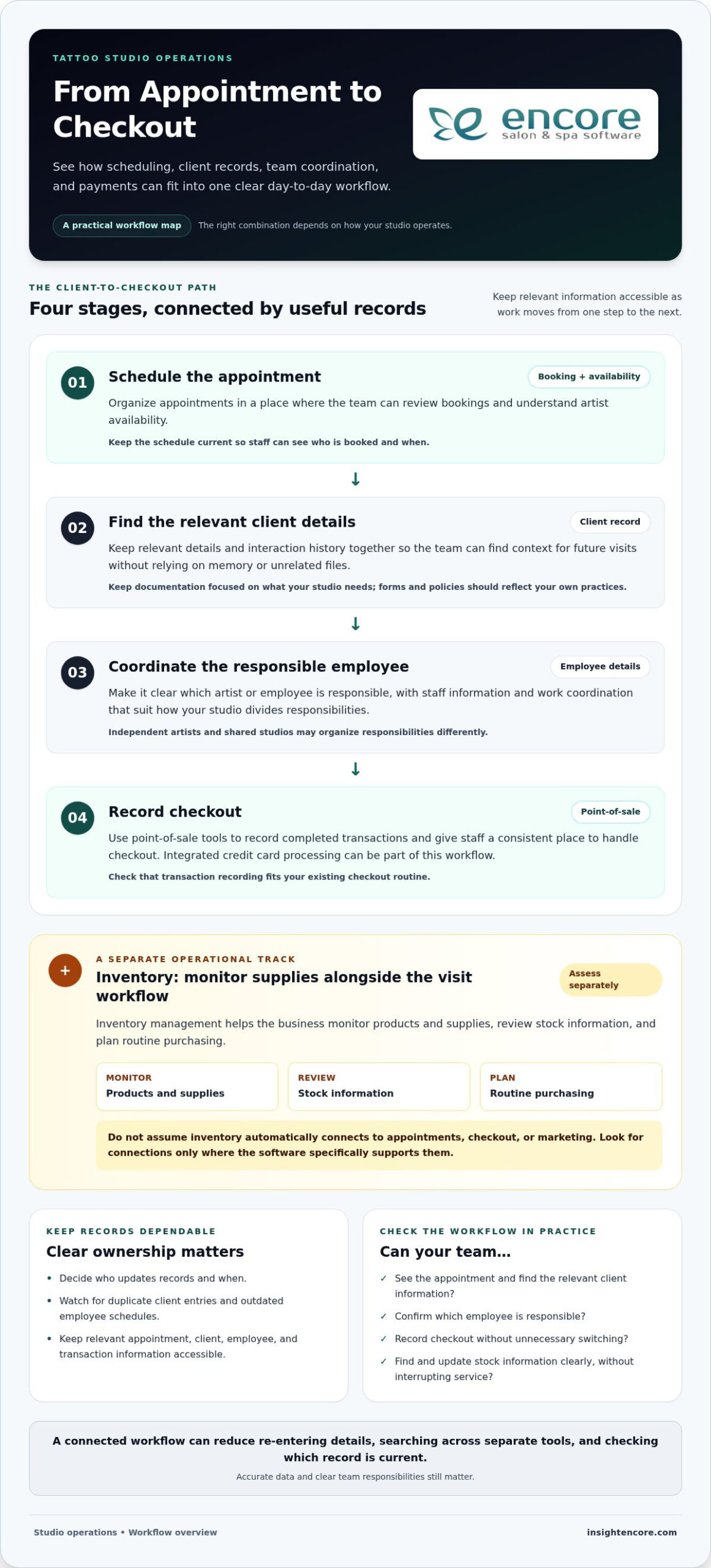
- Scheduling: Organize appointments and make artist availability easier to understand.
- Client management: Keep relevant client details and interaction history together.
- Point-of-sale: Record transactions as part of the checkout process.
- Inventory: Track supplies and keep stock information accessible.
- Employee management: Organize staff details and coordinate work across the team.
These tasks don’t have to be managed in one place, but separate tools can mean entering the same information more than once or switching systems to find it. A booking may be easy to locate while the related client record or payment history sits elsewhere. A connected workflow can reduce that searching and help staff follow consistent steps without forcing every studio into the same process.
As you explore tattoo studio software, list the tasks your team handles repeatedly and where the information for each one lives. This map helps you identify which tasks a system should bring together and which workflows should remain specific to your studio.
How Tattoo Studio Software Supports the Client-to-Checkout Workflow
A studio’s daily workflow doesn’t end when an appointment is booked. The next steps may include preparing for the visit, coordinating the right artist, recording the transaction, and keeping business records current. Software can help organize these stages, but it works best when each step reflects how your team operates.
From appointment scheduling to client records
Scheduling tools give the team a place to review appointments and artist availability. Once a visit is booked, client management can keep relevant business details organized for future interactions. Together, these functions help staff find information without relying on memory or searching through unrelated files.
Accuracy matters. A duplicate client entry or outdated employee schedule can cause avoidable confusion, so decide who updates records and when. Keep information focused on what your studio needs to manage its service and administration. Software should support your client documentation practices rather than assume every studio uses the same forms or policies.
From service delivery to payments and stock
After a service, point-of-sale tools help record completed transactions and give staff a consistent place to handle checkout. Integrated credit card processing can be part of that workflow. Consider how transactions are recorded and how the process fits your existing checkout routine.
Inventory management serves a different purpose. It helps the business monitor products and supplies, review stock information, and plan routine purchasing. Don’t assume inventory tracking automatically connects to appointments, checkout, or marketing. Assess each need separately and look for connections where the software specifically supports them.
Where connected records make a difference
When a tattoo studio management system keeps relevant appointment, client, employee, and transaction records accessible in one workflow, staff can spend less time re-entering details, searching across separate tools, and checking which record is current. Accurate data and clear team responsibilities still matter. The benefit is that information is easier to maintain as work moves from one stage to the next.
Test the workflow using a typical visit: Can the team see the appointment, locate the relevant client information, confirm which employee is responsible, and record checkout without unnecessary switching? Then consider inventory separately. If a staff member needs to update stock, is the task clear, and can they find the relevant information without interrupting service?
These questions help you assess how scheduling, records, checkout, and stock fit together before changing your day-to-day process. To explore Encore in practice, you can try Encore for 30 days. The trial requires no credit card, has no obligation, and includes live support.
How to Compare Tattoo Studio Management Systems Without Missing the Fit
A broader service-business platform can suit a tattoo studio if its tools match the studio’s actual work. A long feature list doesn’t prove that fit. Start with tasks your team handles every day, then compare how each system supports them. Separate essentials, such as scheduling and checkout, from specialist processes that vary by studio. This keeps your decision grounded in your workflow rather than marketing language.
A practical checklist for evaluating software
Use the same criteria for each option. This comparison helps you look beyond feature count and consider whether a system will work for your team in practice.
Make the comparison specific. Note whether employees share scheduling duties, who updates client records, and how checkout is recorded. Then compare the software’s stated features with those tasks. A feature matters when it supports a real process, not simply because it appears in a product description.
- Test common tasks: Consider how staff would book an appointment, find a client record, update employee details, record checkout, or review stock.
- Consider consistency: Look for a straightforward flow the whole team can follow, not just one staff member.
- Include support and access: Compare the available support and the devices or internet connection needed to use the system.
When tattoo-specific workflows call for closer scrutiny
Some studio processes may not be clear from a general feature list. Treat each as a separate evaluation question rather than assuming it comes with scheduling or client management. For example, consider whether your workflow requires particular forms, how your studio handles deposits, where artwork is managed, and what session documentation your team maintains. These needs differ between studios.
Write down what each process needs to accomplish, then compare that requirement with the product’s stated capabilities. Don’t infer that a tool stores artwork, captures signatures, or tracks session details unless that function is specifically described. This helps distinguish core business management from specialist requirements and makes it easier to choose a tattoo studio management system that fits without adding unnecessary complexity.
Prepare Your Tattoo Studio for a Management System
A smoother rollout starts before you enter information into a new platform. First, agree on how your studio handles daily work. When staff understand who updates records and how the system fits into their routine, information is more likely to stay organized and useful.
Use this sequence to prepare your team and keep setup focused:
- Map the current workflow. Write down how appointments are scheduled, client records are maintained, checkout is handled, inventory is monitored, and employee information is updated.
- Assign responsibility. Identify who manages each task now and who will own routine updates once the system is in use. In a shared studio, clarify how artists and other staff coordinate those responsibilities.
- Spot repeated manual steps. Note where the team re-enters information, searches across files, or relies on informal reminders. Choose a few priorities to simplify first, rather than trying to set up every feature at once.
- Prepare the information and routines. Decide what information needs to be entered, how staff will keep it current, and what each person should do during a typical workday. Use your existing studio policies to guide the process.
- Orient the team and review. Walk staff through the tasks they’ll use, invite questions, and set a time to review the workflow after the team has used it.
Map current processes before setup
Be specific about what happens from opening the schedule to closing out a transaction. Record who books appointments, who updates client and employee details, how completed payments are recorded, and who checks stock. This gives you a practical setup plan and helps distinguish essential information from details that can wait.
Keep the first phase manageable. If the team’s biggest need is reliable scheduling and clearer records, prioritize those routines before adding less urgent tasks. A tattoo studio management system should support the process your team has agreed to follow, not create a complicated new one.
Introduce the system with clear team routines
Before staff begin using the system, agree on simple shared habits: who enters new information, when updates happen, and where employees should look for current details. Consistent routines help prevent duplicate or outdated records. A straightforward orientation gives each team member a chance to practice tasks relevant to their role, while live, real-person support can help answer questions as they come up.
Once the system is in use, ask staff where they encounter friction. Review whether agreed updates are happening and whether the workflow still reflects how the studio operates. Adjust responsibilities or steps where needed. A rollout is a process, not just a setup task.
How Encore Fits Tattoo Studio Management: How to Try It
Once you’ve mapped your studio’s routines, compare them with what a system supports. Encore, operated by Syntec Business Systems, offers management software for tattoo studios and other service businesses, bringing key operational tools into one platform. Focus on practical fit: whether your team can use the system to manage everyday work, rather than judging it by the length of its feature list.
What Encore brings to daily studio management
Encore supports online appointment booking, client and employee management, inventory management, and point-of-sale, including integrated credit card processing. These capabilities help studios organize core business tasks in one place. Review the details of tattoo studio management software and Encore’s features against the processes your team identified, then consider how each tool would fit into a typical day.
- Appointments: Organize booking as part of the studio’s daily schedule, with free SMS appointment confirmations included with every subscription.
- Client and employee management: Keep business and team information organized.
- Inventory: Manage stock information alongside other studio operations.
- Point-of-sale: Record transactions as part of checkout with integrated credit card processing.
Encore Essentials and Encore Elite both include the full feature set available at their respective tiers. Elite adds extra modules, so the distinction is about those additional modules, not missing core features in Essentials. Syntec Business Systems brings more than 30 years of industry experience, and live, real-person support is available. Encore requires an internet connection and a current web browser, so include those requirements in your assessment.
Try the system with a low-pressure next step
A trial gives you a chance to compare the platform with your actual routines. Test how the team would handle appointments, records, inventory, and checkout, and whether the workflow feels straightforward for everyday use. Every subscription includes unlimited device logins and free SMS appointment confirmations, useful details to consider as you assess access and scheduling.
Encore offers a 30-day free trial with no credit card required and no obligation, with live support available. Use the trial to focus on your studio’s priorities and see how the platform’s capabilities fit your workflows.
Ready to see how Encore fits your studio’s workflow? Start the 30-day free trial, with no credit card required, no obligation, and live support.
Take the Next Step With Confidence
Choosing a tattoo studio management system is a chance to shape a smoother way of working, not just replace the tools you use now. Try the system with real studio routines, notice what feels clear, and gather staff feedback. That experience can help you decide whether it suits your day-to-day needs.
Encore is backed by Syntec Business Systems’ more than 30 years of industry experience. Every subscription includes live, real-person support, unlimited customer support, unlimited device logins, and free SMS appointment confirmations. The 30-day free trial requires no credit card, has no obligation, and includes live support.
Choose a system that helps your team manage daily details with confidence and gives you more room to focus on the work that makes your studio yours.
Frequently Asked Questions
What is a tattoo studio management system?
A tattoo studio management system helps organize the business side of studio operations, such as scheduling, client and employee information, transactions, and stock. It can do more than provide a booking calendar, though the tools included vary by platform. To assess fit, consider a typical workday and identify which tasks the software helps your team manage in one place.
Is salon management software suitable for a tattoo studio?
Yes, salon management software can suit a tattoo studio when its capabilities match the studio’s daily processes. Encore offers a specialized solution for tattoo studios, with tools for appointment booking, client and employee management, inventory, and point-of-sale. Note any studio-specific needs, such as forms or session documentation, and assess them separately from core business tasks.
Can a tattoo studio management system work without an internet connection?
Encore requires an internet connection and a current web browser, so it doesn’t operate offline. If your studio’s connection is interrupted, consider how that affects access to the platform and plan your routine accordingly. Keep the system’s access requirements in mind when deciding which devices and connection your team will use during business hours.
Do I need a credit card to try Encore?
No. Encore offers a 30-day free trial with no credit card required, no obligation, and live support available. Use the trial to explore the platform with tasks that matter to your studio, such as locating a client record or reviewing appointment details. This hands-on experience can help you decide whether the workflow suits your team.
Can I use Encore on multiple devices?
Yes. Unlimited device logins are included, so Encore isn’t restricted to a fixed number of devices. The software requires an internet connection and a current web browser. Decide which team members need access and agree on how they’ll keep information up to date. Clear routines help everyone work from current records across devices.
Are all Encore features included in the lower-priced tiers?
Every pricing tier includes the full feature set available at that tier, and Elite adds extra modules. Essentials does not lose core features because it is a lower-priced tier. Compare Essentials and Elite based on whether your business needs Elite’s additional modules. Free SMS appointment confirmations and unlimited customer support are included with every subscription.
Disclaimer
This article is general in nature and may contain errors, please verify all claims with your sales rep