

What if a client profile did more than remind you of someone’s name and appointment time? A useful client profile template for hair stylists brings preferences, service history, color formulas, and follow-up notes together, so you’re not relying on memory or hunting through scattered records. It should support a personal consultation, not turn one into paperwork.
Small details can make the next appointment feel more consistent and considered: a client’s hair goals, what worked at their last visit, or what they’d like to avoid. But generic forms may ask for too much while missing the hair-specific information you need.
This guide provides an adaptable template for new and returning clients, plus tips for keeping service notes clear and useful. You’ll learn what to record, what to leave out, and how to make the process repeatable without losing the human touch. We’ll also compare paper profiles with digital client management, including how salon software can keep client records alongside broader salon operations.
Key Takeaways
- Use a client profile template for hair stylists to capture useful preferences and service details without making consultations feel like paperwork.
- Choose essential, optional, and service-specific fields to keep your template focused on what you’ll actually use.
- Compare paper and digital records by considering access, updates, storage, and who needs to see the information.
- Follow a simple prepare, consult, record, and review routine to keep client notes current between appointments.
- Recognize when a standalone template works well and when connected digital client management may better suit your salon’s workflow.
What Should a Hair Stylist Client Profile Template Help You Remember?
A client’s preferences can be easy to overlook between appointments, especially when service notes live in different places or rely on memory. A profile gives you one concise reference for details that matter across visits: what the client likes, which services they’ve had, and what may need a follow-up. Its purpose isn’t to record everything about a person. It’s to help you prepare and continue the conversation with care.
A hair stylist client profile is a concise, ongoing record of service-relevant client details that supports consultations, continuity between appointments, and thoughtful follow-up.
A useful client profile template for hair stylists makes those details easy to find and update. Focus on information that helps you deliver salon care, such as preferred styles, communication preferences, and notes from previous services. Avoid collecting personal details simply because a form has room for them. The goal is a practical working record, not a longer intake form. This reflects the broader idea of Customer Relationship Management (CRM), where organized customer information helps support ongoing relationships.
Client profile, consultation form, and appointment record: what is the difference?
These records serve related but distinct purposes. A client profile holds useful information across visits, such as how someone prefers to communicate or the general style they’re working toward. A consultation form guides a structured conversation about a planned service, helping you discuss the client’s goals and relevant considerations before you begin. An appointment record documents a specific visit, including the service performed, decisions made, and any follow-up discussed. Together, they provide context without treating every appointment as a first meeting.
When does a stylist benefit from a consistent client record?
A consistent record is especially helpful when details need to carry forward. You might note that a client prefers a quiet appointment, likes to see style options before deciding, or wants to discuss how a previous cut has grown out. For a solo stylist, a repeatable format makes it easier to review those notes before the next service. In a salon team, shared record-keeping can help colleagues maintain continuity when a client sees different stylists.
Use notes as prompts, not assumptions. A preference can change, and a past service doesn’t determine what’s right today. Before starting, check relevant notes with the client and ask what they’d like this time. Their current goals, hair condition, and conversation guide your professional judgment. The record simply gives you a more informed place to begin.
- Useful across visits: preferred styles, communication preferences, and ongoing goals.
- Specific to one visit: dated service details and follow-up notes.
- Unnecessary for the task: personal information that doesn’t help with consultation, service, or follow-up.
Keep the profile concise enough to scan before an appointment, and update it when a detail becomes useful. That balance helps records feel supportive rather than bureaucratic, while leaving space for the most important part of the service: listening to the client in front of you.
Build a Hair Stylist Client Profile Template With These Essential Fields
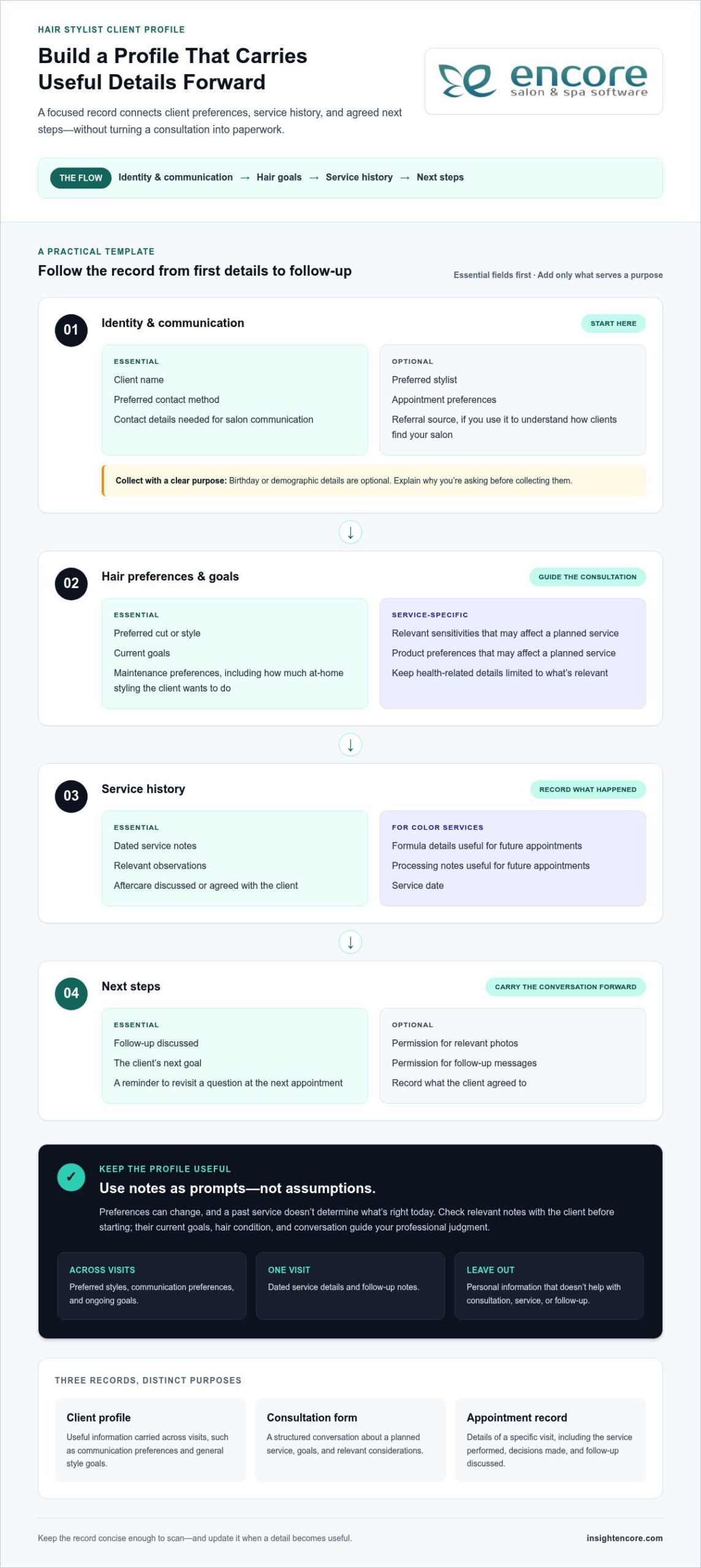
A useful template isn’t the longest one. It’s a focused record that helps you prepare, provide a considered service, and pick up the conversation next time. Use the outline below as a starting point. Remove fields that don’t fit your services or workflow, and add service-specific details only when they’ll help with future appointments.
A practical stylist profile can include contact and appointment preferences, hair goals, relevant service history, and agreed next steps, with optional or service-specific fields added only when they serve a clear purpose.
Copy-ready client profile outline
- Identity and communication
- Essential: Client name; preferred contact method; contact details needed for salon communication.
- Optional: Preferred stylist; appointment preferences; referral source, if you use it to understand how clients find your salon.
- Optional: Birthday or demographic details only when they support a clear business purpose. Explain why you’re asking before collecting them.
- Hair preferences and goals
- Essential: Preferred cut or style; current goals; maintenance preferences, such as how much at-home styling the client wants to do.
- Service-specific: Relevant sensitivities or product preferences that may affect a planned service. Keep health-related details limited to what’s relevant.
- Service history
- Essential: Dated service notes, relevant observations, and aftercare discussed or agreed with the client.
- Service-specific: For color services, record the formula details and processing notes that are useful for future appointments, along with the service date.
- Next steps
- Essential: Follow-up discussed, the client’s next goal, or a reminder to revisit a question at the next appointment.
- Optional: Permission for relevant photos or follow-up messages, including what the client agreed to and the intended use.
Keep contact and appointment fields purposeful
Collect only the contact information you need to communicate about salon services and appointments. A preferred stylist or appointment preference can help with scheduling, while a referral source may be useful if you track how clients discover your business. Birthday and demographic fields are not automatically necessary. If you include them, be clear about their purpose and let that purpose guide whether they belong on the form.
Write service notes clearly and handle sensitive details with care
Use factual, neutral language. For example, note the client’s stated style goal or what aftercare you discussed, rather than making assumptions about their habits. Record color details in a format you can understand and use again; don’t rely on vague shorthand. Treat health-related information and other sensitive details thoughtfully, and limit collection to what supports the service. Follow the privacy and retention practices that apply in your location. Requirements vary by jurisdiction, so verify the rules that apply to your salon before using the form.
Document permission for photos or follow-up messages clearly, including what the client agreed to. A well-organized client profile template for hair stylists makes relevant details easy to find while keeping unnecessary personal information out. To organize client records alongside salon operations, explore Encore’s client management tools.
Paper or Digital Client Profile Template: Which Format Fits Your Salon?
Choosing a format comes down to how you work, who needs access, and how often you look back at a client’s history. A printable profile can suit an individual stylist who likes to write during a face-to-face consultation. Digital records may be more practical when you need to find details across a busy schedule or keep information accessible to a salon team. Neither format is right for every business.
Compare how each option fits your day-to-day routine:
| Consideration | Paper profiles | Digital profiles |
|---|---|---|
| Access | Available where the physical file is kept. | Can be retrieved through the system or device where records are maintained. |
| Updates | Write additions by hand; keep notes legible and dated. | Update the electronic record as details change. |
| Storage | Requires space for organized physical files. | Stored digitally, with access practices suited to your salon. |
| Team visibility | Colleagues need access to the relevant file. | May make records easier for authorized team members to find, depending on the system and setup. |
Think about the friction you want to reduce. If looking up a note means searching through folders, a consistent filing routine may help. If several people need to refer to client information, consider how your chosen format supports appropriate access and makes it clear which record is current.
When a printable client profile is a practical starting point
Paper can be a straightforward choice for a solo stylist or anyone who prefers handwriting during consultations. Print one consistent profile for each client, date new visit notes, and file updates with the original record so service history stays together. Set a routine for returning files to their place after appointments. Keep records from being casually viewed, misplaced, or accessed by people who don’t need them.
When a digital client profile can reduce recordkeeping friction
Digital records may help when you regularly need to retrieve information for returning clients or keep records organized across a salon team. Clear naming and updating habits still matter; a digital file isn’t useful if notes are hard to locate or out of date. Digital client management can also sit alongside broader salon workflows. Encore combines client management with online booking and point-of-sale tools. See how these operational areas fit together in its salon software features.
Start with the format you can maintain consistently. A printable client profile template for hair stylists can establish a reliable routine, while digital records may suit a growing team or a workflow that benefits from connected client management. Whichever you choose, set clear habits for updates, storage, and access. Revisit the decision if your salon’s needs change.
How to Use and Update a Hair Stylist Client Profile at Every Visit
A profile works best as part of the appointment routine, not as a form you complete once and forget. Use the same four stages each time: prepare, consult, record, and review. This rhythm helps you arrive with useful context, make room for the client’s current preferences, and leave clear notes for the next visit.
Introducing the profile without making consultation feel like paperwork
Keep the explanation simple: “I keep a few notes so we can pick up where we left off and focus on what you want today.” Invite the client to share preferences that matter to the service, then fill in only the relevant fields. The profile supports your conversation; it shouldn’t compete with it.
A four-stage routine for each appointment
- Prepare: Before the appointment, check the client’s existing profile and most recent service notes. Look for useful context, such as a style goal or a detail to follow up on. Don’t treat old notes as instructions for today.
- Consult: Welcome the client and confirm what still applies. Instead of asking a returning client to repeat everything, try, “Last time, you mentioned wanting a lower-maintenance style. Is that still your goal?” Ask what has changed, then discuss the planned service in person.
- Record: After the consultation and service, add concise, dated notes. Capture relevant service details, the client’s stated preferences, your observations, and any maintenance guidance you agreed on. Separate what the client said from what you observed so the next reader can understand the context.
- Review: Before the next visit, read the latest entry and note anything worth revisiting. This makes it easier to continue the conversation without assuming the client’s needs or preferences have stayed the same.
Updating service history and preparing for the next appointment
Useful notes are specific enough to guide a follow-up, but brief enough to scan. For example, record the service date, relevant formula details when applicable, the result discussed with the client, and agreed maintenance notes. Avoid turning the profile into a transcript of the appointment. If a detail isn’t useful for the service or future continuity, leave it out.
Use neutral, clear wording. “Client prefers to air-dry; discussed styling options” distinguishes a client-stated preference from a stylist’s observation. If you note an observation, keep it factual and connected to the service rather than writing a judgment. That makes the record easier for you or a colleague to interpret later.
This repeatable approach works with paper records or digital client management. As a salon grows, connected records can help keep client management alongside broader salon operations. Encore’s client management tools support an organized digital workflow for salon businesses.
Make the routine easy to maintain. Update the record while the appointment details are fresh, then use the next visit to confirm what remains relevant. A consistent client profile template for hair stylists helps you remember the context without asking clients to start from scratch or letting notes replace a personal consultation.
From a Client Profile Template to Organized Salon Client Management
A standalone template can be enough when you’re an independent stylist with a manageable client list and a recordkeeping routine you can maintain. It gives you a consistent place for relevant notes without adding another system to learn. As your salon grows, separate files may become harder to keep current or find quickly. The decision isn’t simply paper versus software. It’s whether your current process helps the right people find and update the right information at the right time.
Signs your salon may have outgrown separate client forms
Look for repeated friction in everyday work. Are there duplicate profiles because staff aren’t sure which record to use? Do you spend appointment time searching for a previous note? Are service updates kept in different places, or does each team member record details in a different way? These are signs that your recordkeeping process may need more structure.
A shared process can help salon teams maintain continuity, but software alone won’t set expectations. Agree on what staff should record, when to update a profile, and who should have access. Keep the form focused, and make sure the workflow respects applicable privacy practices. Clear habits matter as much as the tool.
Choosing a client management workflow staff can maintain
Choose a process that fits naturally around appointments. Ask whether the profile is quick to use, whether staff can keep it updated after a service, and whether it’s easy to review before the next visit. For a solo professional, a simple template or digital record may be sufficient if it stays organized and easy to access. A booth renter can build a consistent individual workflow around the same principles: prepare, confirm, record, and revisit.
For a salon team, digital client management can bring client records alongside other salon operations. Encore includes a client management system as part of its salon software offering, with online booking and point-of-sale tools within the broader platform. These tools support different parts of the client journey, from arranging an appointment to completing a transaction. Set clear team habits for recording and updating client details so the workflow stays consistent.
Start by reviewing where client information lives today and where staff experience friction. Then choose a process that’s easy to follow consistently, whether that means refining your form or moving toward digital client management. A client profile template for hair stylists is a practical foundation; organized salon client management can help keep the recordkeeping approach aligned with the way your business operates.
Read the Encore Salon Software overview to see how client management fits within a broader salon platform.
Make Your Next Client Record Easier to Use
Your next step doesn’t need to be a complete change to the way you run your salon. Start by choosing one part of your recordkeeping that feels harder than it should, then adjust your process to make that moment simpler. A client profile template for hair stylists should fit naturally into the way you welcome, consult with, and care for clients.
As you use your template, pay attention to which notes help you feel prepared and which fields rarely serve a purpose. That everyday feedback gives you a practical way to refine the form over time. Keep what supports thoughtful service, and let go of what creates extra work without adding useful context. The result can be a recordkeeping habit that feels personal to clients and manageable for you.
Encore’s salon and spa software brings client management, online booking, and point-of-sale tools together in one platform.
Choose a process you can keep up with, then build on it at your own pace. A little more clarity can make each client interaction feel that much more considered.
Frequently Asked Questions
What should a hair stylist include in a client profile?
Include details that help you prepare for the client’s next service, and make it clear which notes apply to a specific visit. For example, a general preference can live in the profile, while a formula belongs with its dated color-service entry. If a field wasn’t discussed, don’t guess or fill it with an assumption. Leaving it blank is more useful than recording something that could mislead you later.
How do I create a client profile template for hair clients?
Build the form around your actual appointment flow, then test it before making it standard. Complete a sample profile for a familiar service and check whether another stylist could understand the entries without asking you to translate shorthand. Rename unclear fields, remove questions that don’t inform a service decision, and keep different service types adaptable. A template should guide note-taking, not force every client into the same consultation.
Should hair stylists use paper or digital client records?
Either format can work; choose the one your salon can keep accurate and appropriately protected. If you use both, decide which record is authoritative and how updates move between them. Otherwise, one version may show a newer preference than the other. Consider a short trial using your regular appointment routine, then notice whether staff can locate the right information and make updates without creating duplicate records.
How often should a hairstylist update a client profile?
Review the profile at every appointment, and update it whenever the client shares a meaningful change or a service adds useful context. You don’t need to rewrite unchanged details. For instance, if a client switches their preferred contact method, update that specific field and leave unrelated notes intact. A dated entry helps distinguish new information from older context, especially when several visits have passed between major changes.
Should a hair stylist record allergies and color formulas?
Record relevant sensitivities and color-service details carefully, but treat notes as context for a fresh consultation, not as a substitute for checking with the client. A formula entry can include the service date and the outcome discussed, so you can understand when and why it was used. Limit sensitive details to what supports the service, and follow the privacy and recordkeeping rules that apply where your salon operates.
How can a stylist keep client profile forms from feeling intrusive?
Tell clients why a question helps, and make it easy to skip information that isn’t needed for the service. You might say, “I ask about styling preferences so I can tailor the appointment. You can leave anything blank.” Ask only relevant questions, and let the client’s answers guide the conversation. A brief, respectful explanation can make the form feel like a helpful part of their visit, not an interrogation.
Disclaimer
This article is general in nature and may contain errors, please verify all claims with your sales rep