What if the biggest booking headache isn’t finding an open slot, but keeping every detail connected after a client reaches out? The right tattoo artist booking and deposit software can help move an inquiry toward a confirmed appointment while keeping client details, scheduling, and payment activity organized.
If you’re juggling repeated messages between appointments, unclear deposit records, or a calendar that doesn’t fit custom tattoo requests, you’re not alone. A smoother process takes more than an online scheduler. It needs a clear way to handle the steps around each appointment without adding another layer of admin.
This guide compares tattoo-focused tools and broader studio platforms by their booking, deposit, payment, and client-management workflows. You’ll see what to consider as an individual artist or multi-artist studio, and how Encore’s tattoo studio software brings online booking, client management, integrated credit card processing, and point-of-sale transactions into a broader management workflow. Use these criteria to find a practical path from first inquiry to organized appointment records.
Key Takeaways
- Choose tattoo artist booking and deposit software that supports the full client journey, not just calendar appointments.
- Map the steps from inquiry to follow-up so you can decide where client references, placement details, and payment records belong.
- Compare booking flow, intake, deposit records, payments, reminders, and artist calendars against your studio’s actual needs.
- Document your current policies, test common booking scenarios, and introduce the new process in clear steps.
- Explore how Encore’s tattoo studio software brings online booking, client management, integrated credit card processing, and point-of-sale tools into a broader studio workflow.
Why tattoo artists need booking and deposit software beyond a calendar
A calendar shows when you’re busy. It doesn’t explain why an appointment needs a consultation, which design reference a client sent, or whether the booking has reached the next step. Tattoo artist booking and deposit software helps coordinate inquiries, appointments, client details, and payment records so essential context doesn’t get lost across messages, notes, and separate tools.
Booking software manages appointment requests and the details attached to them; a general-purpose calendar mainly records scheduled time. That difference matters for tattoo artists. A custom piece may need discussion before you can estimate the session or reserve enough time. A flash design may be ready to book, but the client still needs to choose an artist and appointment slot.
The work itself shapes the booking process. A client’s idea, placement, size, and reference images can affect what happens before an appointment is confirmed. Learning more about the history and process of tattooing offers helpful context for why the design and the client’s plans matter. Your booking process should gather relevant details rather than treat every request as a simple calendar event.
Where a tattoo appointment begins: inquiry, consultation, or flash booking
Custom work often starts with an inquiry and may call for a consultation before an appointment is scheduled. Ready-to-book flash can follow a shorter path. Distinct appointment types help set expectations and reserve suitable time. Asking for useful details early, such as the design idea, placement, approximate size, and reference images, can reduce follow-up messages and help the artist understand the request.
Keep intake focused. Ask for what helps you decide the next step, not so much that clients struggle to get started. A consultation request might ask about the concept and preferred placement. For flash, the client may need to identify the design and preferred availability. The goal is a useful starting point, not a final creative decision made through a form.
What a deposit changes in the booking experience
A deposit is part of an artist’s booking policy, not a universal fixed amount or rule. State the terms clearly before a client commits, including how the deposit relates to the appointment and what happens if plans change. Clear language helps clients understand what they’re agreeing to and reduces avoidable payment misunderstandings.
Deposit tracking is one part of the client record, not a substitute for managing the appointment and client relationship. Artists also need to find the booking date, request details, relevant conversation, and payment activity together or through a consistent process. A dedicated tattoo studio software workflow can bring booking and client management into a broader business setup, while payment tools support transaction administration. Include the deposit status and related appointment details in the recordkeeping process you use to apply your studio’s policy.
Before choosing a tool, consider whether it can help you:
- Separate custom inquiries, consultations, and ready-to-book appointments.
- Keep client details and booking context easy to retrieve.
- Record payment activity clearly alongside appointment information.
That’s the difference between filling a calendar and managing a client journey. The best fit supports your actual process, from the first message to the appointment record and follow-up.
How tattoo booking and deposit software connects each client step
A connected booking journey gives both the client and artist a clear next step, from the first request to post-appointment follow-up. Tattoo artist booking and deposit software can help organize that journey, but the workflow should reflect your studio’s policies rather than force every client through the same process.
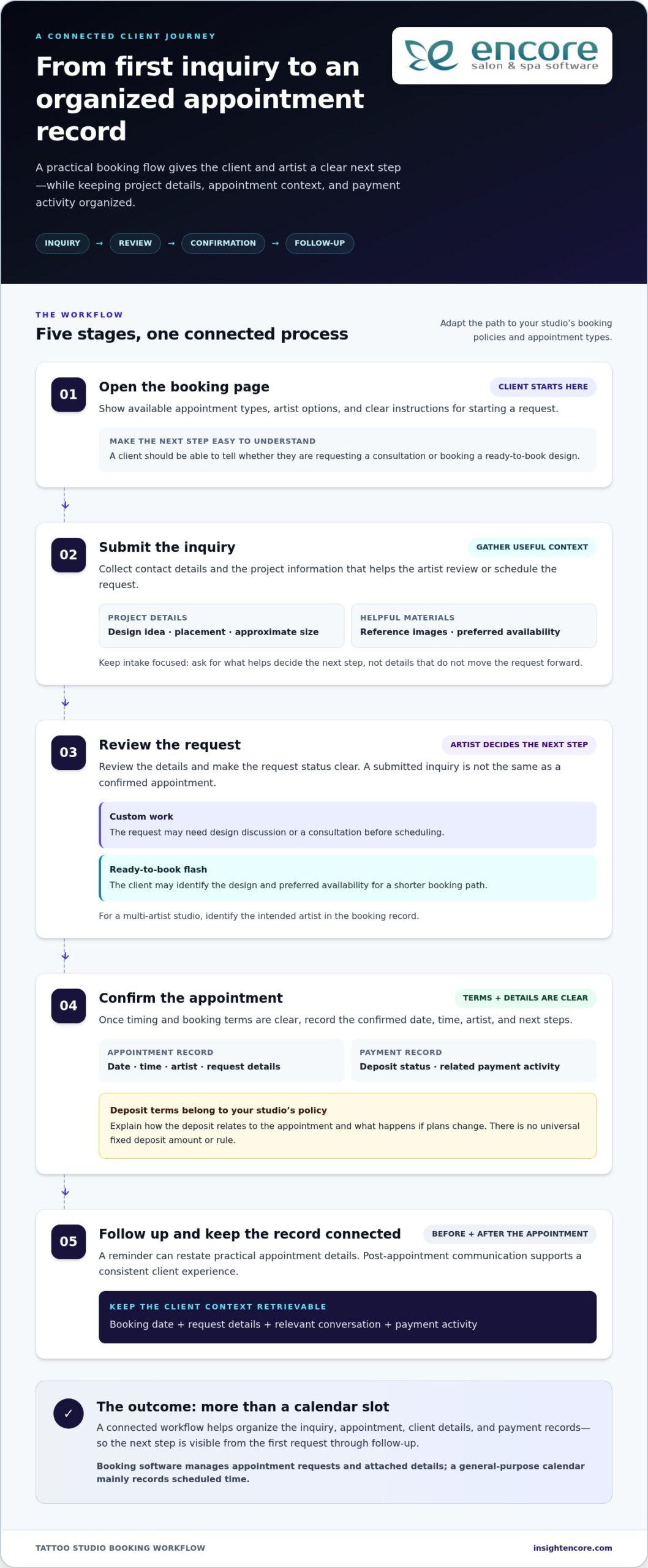
A practical client journey might look like this:
- Open the booking page. The client sees available appointment types, artist options, and instructions for starting a request.
- Submit the inquiry. They share contact details and relevant project information, such as the idea, preferred placement, approximate size, and reference images.
- Complete a review or consultation step. The artist reviews the request and decides whether to discuss the design, schedule a consultation, or move toward an appointment.
- Confirm the appointment. Once timing and booking terms are clear, the client receives the confirmed date, time, artist, and any next steps.
- Get appointment follow-up. A reminder can restate practical details, while post-appointment communication supports a consistent client experience.
From booking request to confirmed appointment
Intake should help you make a decision. Ask for details that affect review or scheduling, but avoid collecting information that doesn’t move the request forward. A custom piece may need a reference and consultation, while a flash booking may need a design choice and preferred time. Make the request status clear so clients know whether they’ve submitted an inquiry or secured an appointment.
Availability also needs to be easy to understand. If a request still requires artist review, make that clear rather than presenting it as a confirmed slot. For a multi-artist studio, identify the intended artist in the booking record and make calendar changes visible to the people managing appointments. This keeps client conversations connected to the schedule.
Deposit records, payment processing, and appointment follow-up
Set deposit steps according to your own policy. A useful record may include the deposit status, the related appointment, the client, and any payment reference needed to reconcile the transaction. Keep the terms visible before the client commits, including how the studio handles changes, cancellations, and payment timing. Clear expectations matter more than applying a one-size-fits-all rule.
Payment processing and deposit tracking are related, but they aren’t identical. A processor handles a transaction; the studio also needs a reliable way to understand what that transaction relates to and where it stands. Keep records consistent with your policy and use reminders to repeat confirmed appointment details, not introduce new terms. Guidance from the National Environmental Health Association on public health and tattoo regulations can also inform how a studio organizes relevant client communication and practices.
Connected records reduce administrative handoffs by keeping the request, appointment, client details, and payment context easier to follow.
Encore brings online booking, client management, and integrated credit card processing into a broader studio workflow. Its tattoo studio software can be part of that operational picture. Take a closer look at Encore to explore how the client journey can fit your processes.
How to compare tattoo booking software for deposits and studio needs
The best fit is the system that follows your actual booking policy without making you enter the same information in multiple places. Use tattoo artist booking and deposit software to compare complete workflows, not just feature counts. Start with the steps every booking needs, then separate must-haves from conveniences that would be helpful but aren’t essential to your studio.
Use this scorecard to compare tools against your process. Mark each item essential, optional, or unnecessary before evaluating options.
| Workflow area | What to assess | Priority question |
|---|---|---|
| Booking flow | Request, review, consultation, and confirmation steps | Can the client tell whether a request is pending or confirmed? |
| Intake | Design details, placement, references, and contact information | Can you collect the details needed to review a request without overloading the form? |
| Deposit records | Status and connection to the relevant client and appointment | Can you find the record needed to apply your policy or resolve a question? |
| Payments | Transaction records and fit with existing payment routines | Does payment administration fit how your studio tracks appointments and business activity? |
| Reminders | Appointment details and timing of client communication | Can reminders support your process without creating confusing or duplicate messages? |
| Artist calendars | Availability, appointment ownership, and schedule changes | Can each artist or studio coordinator understand who is booked and when? |
Keep the priority test grounded in daily work. If clients need to submit a custom concept before you schedule, intake and request review may be essential. If you book directly from set availability, a shorter booking flow may matter more. Reminders or deeper reporting can be optional if your current process already handles those needs well.
Which deposit and payment controls deserve a closer look?
Check whether deposit records can be tied to the right client and appointment, and whether the status is clear enough to support your policy. Consider how the system records payment activity alongside your usual business routines. Client-facing terms should be easy to understand, especially around rescheduling. A tool that processes payments but leaves you reconciling scattered notes may add work instead of removing it.
Does the software fit custom work and multiple artists?
Test a custom request from the client’s perspective. Can they provide the information you need, and can you review it without copying details into another system? For a shared studio, assess whether the schedule makes artist availability and appointment responsibility clear. A solo artist may need a simpler setup, while a team may value shared visibility and organized client records. Needs differ, so avoid adding complexity for features your workflow won’t use.
Encore’s tattoo studio software brings online booking and client management together with integrated credit card processing and point-of-sale transactions. Use the same scorecard to assess how those broader tools fit your studio’s day-to-day administration, and include deposit records and terms in your workflow comparison. The right system should reduce handoffs, not create duplicate data entry.
How to choose and introduce tattoo booking software without disrupting clients
A new system should make the booking process easier to follow, not leave clients wondering where to send a request or whether an appointment is confirmed. Before switching, map your existing process and decide what needs to change. A thoughtful rollout gives artists time to learn the workflow and clients a clear path to follow.
Use this sequence to introduce tattoo artist booking and deposit software with fewer surprises:
- Document current policies. Write down how your studio handles deposits, cancellations, rescheduling, consultations, and appointment confirmation.
- Configure the booking steps. Set up the request path and intake around how artists review work, including any distinctions between custom requests and other appointment types.
- Test the journey. Try common scenarios from both the client and artist sides before directing clients to the new process.
- Announce the change. Share the booking link and explain what clients should expect, including where to submit requests and how confirmation works.
Make the transition manageable. You can introduce the new process to incoming inquiries first, then guide returning clients to it as appointments come up. Keep existing conversations easy to reference during the change so clients don’t have to repeat details they’ve already shared.
Set clear booking and deposit expectations before launch
Start with the studio’s written policy, not the software settings. Decide what clients need to know about deposits, cancellations, rescheduling, and consultations, then use the same wording in booking instructions and artist communication. Put the relevant terms where clients can read them before submitting or confirming a request. Plain language helps people understand the next step and gives staff a consistent reference when questions arise.
Be specific about the process without making the booking page feel like a contract clients have to decode. For example, distinguish a request awaiting artist review from a confirmed appointment. Explain what action the client should take if they need to ask about a schedule change. Keep the policy wording consistent with your actual studio records.
Test the booking experience from both sides
Walk through the process on mobile and desktop before sharing it. Submit a custom request, try a reschedule, and update an artist’s calendar. Check that intake details remain attached to the correct client and appointment, and that staff can tell what needs review. Invite artists or coordinators to test the workflow too; their feedback can reveal confusing steps before the process becomes standard.
During testing, look for duplicate work. If someone must copy the same client details into a calendar, payment record, and separate notes, simplify the process where possible. Connected day-to-day tools should support the way your studio handles bookings and records. Encore brings online booking, client management, integrated credit card processing, and point-of-sale transactions into a broader management workflow. Consider how those tools can fit your operations alongside your studio’s deposit and payment routines.
How Encore supports a more connected tattoo studio workflow
Booking is only one part of running a tattoo studio. Artists also need to keep client information organized, manage appointment activity, and handle payments through the wider business. Encore’s tattoo studio software brings online booking and client management into a broader platform that also includes point-of-sale tools and integrated credit card processing. These tools give an artist or studio a more connected way to manage day-to-day operations.
When comparing tattoo artist booking and deposit software, look at how booking and payment administration fit together with your studio’s deposit policy. A system can support appointments and transactions as part of a wider workflow, while your written policy defines how deposits are handled.
Bring tattoo bookings and client management into one workflow
Online booking helps organize how appointments enter the studio, while client management supports the records artists use to understand and manage client relationships. They serve different purposes, but work best as parts of a consistent process. When appointment and client information are easier to locate, artists spend less time searching across separate notes and conversations.
Payment administration is another part of that picture. Integrated credit card processing supports transaction workflows, while point-of-sale tools relate to broader studio operations. Encore’s integrated credit card processing gives studios payment capability alongside other business tools. Consider how those records fit your existing routines for reviewing appointments and tracking business activity.
Decide whether Encore fits your tattoo studio
Encore’s tattoo studio software brings booking and client-management tools into a broader business platform. A solo artist can organize booking and client records within the same management workflow. A studio with multiple artists can assess how the platform fits its appointment coordination and point-of-sale routines. The right fit depends on which tasks you want to manage together and where your current process creates repeated work.
As you assess the fit, map your steps from inquiry through appointment and payment. Identify which details need to stay connected, which tools your team already relies on, and where you want a clearer view of client and appointment information. Then compare those needs with Encore’s online booking, client management, integrated credit card processing, and point-of-sale capabilities. Include your deposit procedures in the workflow you use to manage appointments and payment records.
A connected platform can be a practical next step if you want booking and studio-management tasks to sit within a broader workflow. Explore how Encore can fit the way your tattoo studio operates.
Make your next booking workflow easier to manage
Your next step doesn’t have to be a sweeping overhaul. Notice where your current process takes extra effort, then decide which part would benefit most from a clearer routine. The right tattoo artist booking and deposit software should support the way you work while keeping client expectations and studio policies clear.
Encore offers specialized tattoo studio software with online booking, client management, and integrated credit card processing as part of a broader business platform. Founded in 1991, Encore brings experience in software for service businesses. Consider how those tools could fit your day-to-day operations and how your studio’s deposit policy fits into its booking and payment routines.
A more organized process can give you more room to focus on the craft and the people behind each appointment. Try Encore now to explore its tattoo studio software for your business.
Frequently Asked Questions
What should tattoo artists look for in booking and deposit software?
Look for a system that fits your studio’s process and keeps essential booking information easy to find. With tattoo artist booking and deposit software, assess how it handles custom inquiries, appointment changes, client records, payment activity, and staff access. Before choosing, walk through a real booking from the artist’s perspective: Can you quickly see what needs attention, who owns the next step, and which details are relevant to the appointment?
How much deposit should a tattoo artist require?
There’s no single deposit amount that fits every artist or project. Set a policy that reflects your booking approach, the work involved, and the time you’re reserving, then explain it clearly before a client commits. For example, you might define different terms for a consultation and a longer custom session. Keep the policy consistent across client conversations and appointment records, and review it if your services or scheduling practices change.
Can tattoo booking software collect deposits online?
Some booking systems support online deposit collection, but capabilities vary. Separate the steps in your evaluation: Can the client pay online, can the transaction be connected to the relevant appointment, and can you identify its status later? Online booking and integrated credit card processing are useful capabilities to assess alongside deposit collection. Encore offers online booking and integrated credit card processing, so compare those tools with your deposit-handling workflow.
Is tattoo booking software different from regular appointment scheduling software?
It can be. General scheduling tools often focus on choosing a time, while tattoo appointments may require a request to be reviewed before a session is set. Consider whether the system can accommodate separate paths for a consultation, custom project, or appointment that’s ready to book. The practical test is whether the artist can preserve useful project context without forcing clients through irrelevant fields or relying on scattered messages.
What happens if a tattoo client reschedules after paying a deposit?
Your written policy should explain how a reschedule affects the deposit, and the studio should apply that policy consistently. When a client asks to change dates, update the appointment record and note the deposit’s status in relation to the new booking. Keep the client informed about the revised time and any action needed from them. This creates a clear history for both the client and the artist if questions come up later.
Can a tattoo studio use one booking system for multiple artists?
Yes, a studio can use one system if it supports the team’s scheduling needs. Before adopting it, decide how clients choose an artist, who can update each calendar, and how staff will identify the artist responsible for a booking. A shared system can give coordinators a common view, while each artist still needs clear ownership of their appointments. Test a schedule change to see how the update appears to the team.
Disclaimer
This article is general in nature and may contain errors, please verify all claims with your sales rep