window.dataLayer = window.dataLayer || []; function gtag(){dataLayer.push(arguments);} gtag('js', new Date()); gtag('config', 'UA-206511945-1');
Search
Categories
Uncategorized

Point of Sale for Booth Renters: A 2026 Buying Guide

What if checkout could do more than take a payment? The right point of sale for booth renters can connect each transaction with client records and appointment activity, helping you keep your independent business organized without adopting a salon-wide system you don’t need.

As a booth renter, you manage your own clients and daily workflow. A basic payment terminal may feel too limited, while software built around an entire salon may seem like more than you need. A practical setup should make payments straightforward and keep useful client and transaction details easy to find.

This guide covers the POS features that can support independent day-to-day operations, from integrated payment processing to client management and online booking. You’ll learn how to compare payment-only tools with connected software, what to prioritize, and which extras may add complexity without helping your routine. Encore’s specialized chair and booth renter software brings POS transactions, credit card processing, client management, and online booking together. Use the criteria below to assess what fits the way you work.

Key Takeaways

  • Start with the daily tasks your POS needs to support, including checkout and organized transaction records.
  • Choose a point of sale for booth renters that suits an independent workflow instead of adding tools designed mainly for salon-wide management.
  • Compare a payment-only setup with connected software to decide whether combining checkout, client records, and booking would simplify your routine.
  • Map your booking, checkout, client, and product workflows before comparing features, so you can focus on tools you’ll use.
  • Encore’s chair and booth renter software brings POS transactions, integrated payments, client management, and online booking together.

What Does Point of Sale for Booth Renters Need to Handle?

A point-of-sale (POS) system combines the tools and software used to record and complete purchases. For a booth renter, that can mean processing payment after a service, recording a retail sale, and keeping the transaction organized alongside client and appointment activity. A basic payment terminal records a sale; a more connected POS can help make that sale part of a broader client workflow.

POS systems can include more than checkout. The Point of Sale (POS) Systems overview explains how these systems bring together components and functions used to complete transactions. For an independent beauty professional, the practical question is how well those functions support the work around each sale, from recording the service to organizing the next visit.

How a booth renter’s checkout differs from a salon-wide POS

A salon-wide system may be organized around the owner’s view of staff, services, and the business as a whole. A booth renter needs a clear view of their own transactions and client activity. When comparing systems, look for a workflow that lets you identify what was sold and keep relevant information with your own client records. Salon arrangements differ, so focus on the way you manage your own work rather than assuming every business handles checkout the same way.

A booth renter’s POS is a checkout and recordkeeping tool for managing their own client purchases, services, products, and appointment context. This distinction helps you look beyond whether a system accepts payment. The right fit depends on whether it supports your independent workflow.

Which transactions and client interactions should POS support?

Begin by listing the transactions you handle. Your setup should make it possible to process service payments and record retail purchases clearly enough to review later. If a client buys a product during a service visit, consider whether you can record both parts of the sale together or whether you would need to track one elsewhere.

Client and appointment details can add useful context. Consider whether client information can be kept alongside service and purchase activity, and whether appointment details are easy to access during the visit. When checkout, booking, and client records work together, you may spend less time switching between separate tools.

Gift cards may also matter if they’re part of your business. Treat them as a specific checkout requirement, not a must-have for every renter. The goal is a point of sale for booth renters that keeps essential transactions and client activity organized without introducing unnecessary steps.

Which POS Features Matter Most for Booth Renters?

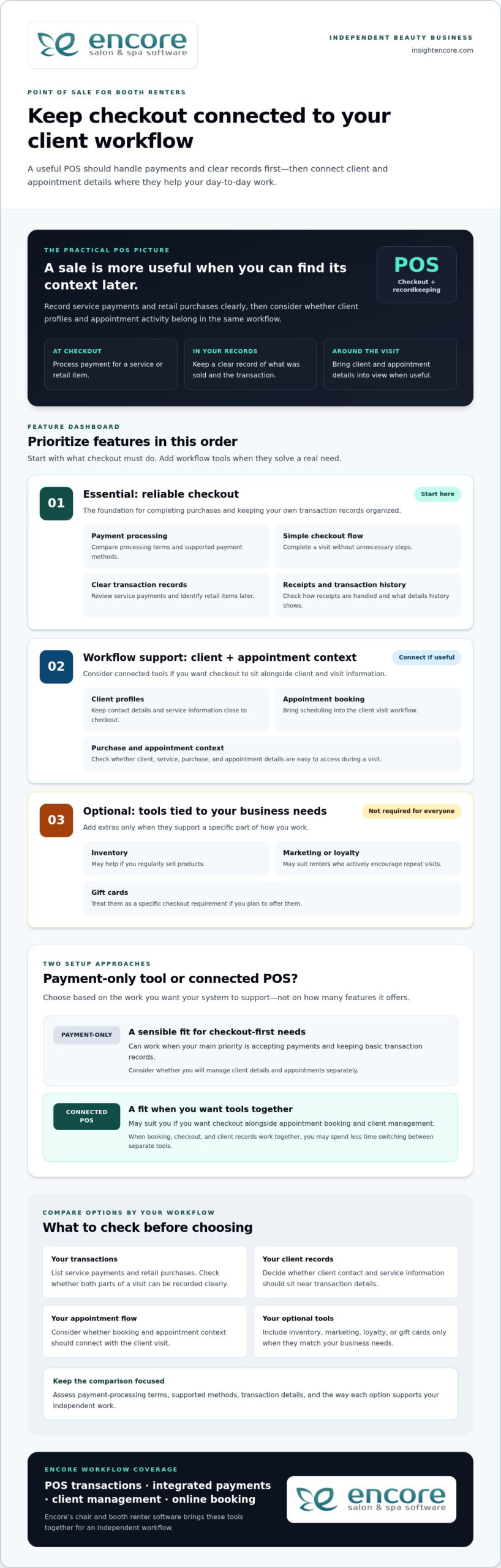
Start with the tasks that happen at checkout. A useful POS should make it straightforward to process a payment, record what the client purchased, and complete the visit without unnecessary steps. Then consider whether client management and appointment booking should connect with checkout. The best point of sale for booth renters supports daily work first; extra tools matter only when they serve a real need.

Core POS checklist: compare payment processing, clear transaction records, a simple checkout flow, client profiles, and appointment context before weighing optional business tools.

Payments, receipts, and transaction records

Payment processing and accurate records are the foundation. A service payment should be easy to enter and review later, and a retail item should be identifiable if it’s part of the same visit. Consider how receipts are handled and whether the transaction history provides the details you need to keep your business records organized.

Compare payment-processing terms, supported payment methods, and the transaction information available for review. These details vary between systems, so assess each option rather than assuming they’re the same. Also consider how integrated credit card processing fits into the checkout workflow you want.

Client management, booking, and business-building tools

Client profiles can keep contact details and service information close to checkout, while online booking can bring appointment scheduling into the client visit workflow. If you’re considering how client records fit into a solo workflow, read this guide to booth renter client management apps.

Other features depend on how you run your business. Inventory tools may be useful if you regularly sell products; automated marketing or loyalty programs may suit renters who actively encourage repeat visits. Gift cards are another option if you plan to offer them. You don’t need every feature. Prioritize tools that solve a specific workflow problem.

  • Essential: payment processing, clear transaction records, and an easy checkout flow.
  • Workflow support: client profiles and appointment booking that connect with your visit process.
  • Optional: inventory, marketing, loyalty, and gift card tools that match your business needs.

Encore’s chair and booth renter software brings POS transactions together with integrated payments, client management, and online booking. Explore Encore for your booth renter workflow as you compare the features that matter to you.

Standalone Payment Tool or Connected Booth Renter POS?

A payment-only tool can be a sensible fit if your main need is accepting payments and keeping basic transaction records. Connected software may suit you better if you want checkout alongside appointment booking and client management. Neither setup works for every renter. Compare how each handles your actual tasks, not just how many features appear on a list.

Workflow area Standalone payment tool Connected booth renter POS
Checkout Focused on processing and recording payments. Can place payment within a broader service and client workflow.
Client records May require a separate client record system. May connect checkout with client profiles.
Booking Appointments may be managed in another tool or process. May bring online booking into the same workflow as checkout.
Reporting Review the transaction information the payment tool provides. May connect transaction activity with other business information.
Business tools Typically focuses on payment needs. May include optional tools such as inventory, marketing, loyalty, or gift cards.

When a payment-only POS may be enough

If you mainly need to accept payment after each service and record the transaction, a focused tool may cover your essentials. You can keep appointments and client notes in separate systems if that arrangement works for you. The trade-off is managing information across those tools, but that doesn’t automatically make the setup unsuitable. Ask yourself how quickly you can find the details you need during a busy day.

When connected salon software may make daily work easier

Connected software can bring related tasks closer together. Booking establishes the appointment, client management helps organize client information, and POS transactions record purchases. If you regularly move between all three tasks, it may be useful to manage them within one broader workflow. Specialized booth renter software supports a setup designed around independent beauty businesses.

An all-in-one platform can feel like too much if it adds steps or tools you won’t use. Keep the comparison practical: start with payments, records, booking, and client details. Then consider extras only when they address a real need, such as tracking products you sell or offering gift cards. A point of sale for booth renters should fit your work, not require you to adopt every available feature.

Encore offers specialized chair and booth renter software with POS transactions, integrated credit card processing, client management, and online booking. Explore Encore’s booth renter software as you consider which workflow best fits your business.

Point of Sale for Booth Renters: A 2026 Buying Guide

How to Evaluate POS Options for Your Booth Rental Business

A useful comparison starts with your actual work, not a feature list. Before choosing a point of sale for booth renters, trace how a client moves from booking to checkout. Note where you currently record payments, client details, and product sales. This simple workflow map helps you identify what should connect and what can stay separate.

A practical five-step POS evaluation checklist

  1. Start with payments and records. List how clients pay, what you sell, and which transaction details you need for your records. Note any payment methods that are essential to your checkout routine.
  2. Map your current workflow. Write down how you handle booking, appointments, client notes, checkout, and product sales. Mark where information moves between tools and where you intentionally keep tasks separate.
  3. Decide what needs to connect. Identify whether you want appointments linked to client profiles, service details available at checkout, or product sales connected to inventory. Focus on links that would make your daily process clearer.
  4. Compare the must-haves first. Check that each option supports your payment and recordkeeping needs. Then assess ease of use and the transaction or business information you can review. Don’t let optional features distract from essentials.
  5. Consider future needs selectively. If you plan to sell retail products, use online booking, or offer gift cards, include those requirements in your comparison. Choose tools that suit your plans rather than judging an option by feature count alone.

Assess cost, setup, and everyday usability

Compare software charges separately from payment-processing terms. Look at what each charge covers and how processing terms fit the transactions you expect, rather than judging a system by one number. Weigh costs against the capabilities you need and the workflow you mapped.

Ease of use matters, too. Think through a typical appointment: Can you find client details, complete checkout, and keep the transaction record without awkwardly switching between tools? Consider the setup steps and whether the available information helps you manage your business day to day. A system should support your routine, not make it more complicated.

Once you’ve identified your priorities, compare them with Encore’s specialized chair and booth renter software, which includes POS transactions, integrated credit card processing, client management, and online booking.

Explore Encore and see whether it fits your booth renter workflow

How Encore Supports a Booth Renter’s POS Workflow

Once you know which tasks your POS needs to handle, look for software designed for independent booth and chair renters. Encore’s specialized chair and booth renter software brings POS transactions together with integrated credit card processing, client management, and online booking. These capabilities let you consider checkout as part of your client workflow, rather than as a separate payment step.

Bring booth renter tasks into a more connected platform

Consider a client’s visit from start to finish. Online booking supports appointment scheduling, client management helps organize client information, and POS transactions record purchases. Bringing these capabilities into a broader platform can help you think through how those tasks fit together during your day. The right fit depends on the workflow you want, not simply the number of tools available.

Encore also includes inventory tracking, automated marketing, loyalty programs, and gift cards. These capabilities may suit you if you sell retail products, want to encourage repeat visits, or plan to offer gift cards. They’re options to weigh against your needs, not a checklist every booth renter must adopt. For a broader look at the platform, visit Encore Salon & Spa Software.

Explore the next step at your own pace

Use the priorities you established to assess Encore: payment processing and transaction records, client management, and booking. Consider which capabilities you’ll rely on regularly and which optional tools match your business plans. This keeps the decision focused on a practical point of sale for booth renters, not features that add complexity without serving your routine.

Encore is part of Syntec Business Systems, founded in 1991. Compare the software’s capabilities with the workflow you mapped, then visit Encore’s booth renter software page to explore the solution.

Try Encore and explore a POS workflow for booth renters

Choose a POS That Fits the Way You Work

The best point of sale for booth renters should make daily business easier to manage, not add complexity. Begin with straightforward checkout and clear transaction records. Then decide whether connecting payments with client management and appointment booking would make your workflow more organized. Inventory tracking, marketing, loyalty programs, and gift cards matter when they support goals you already have.

Encore offers specialized chair and booth renter software with POS transactions, integrated credit card processing, client management, and online booking. As you compare options, focus on which tasks you want to handle in one place and which features you’ll use in your independent business. A practical fit can help you manage client visits and keep important activity organized.

Try Encore and explore software built for booth renters

Start with a clear picture of your workflow and the tasks you want your POS to support. Explore Encore’s chair and booth renter software to see how its connected tools fit those priorities.

Frequently Asked Questions

What is the best point of sale for booth renters?

The best point of sale for booth renters is one that matches how you handle payments, client information, and appointments. If you only need to accept and record payments, a focused payment tool may be enough. If you want checkout connected with booking and client management, consider specialized booth renter software. Encore offers a chair and booth renter solution with POS transactions, integrated credit card processing, client management, and online booking.

Do booth renters need their own POS system?

Not every booth renter needs a separate POS, but you do need a clear way to process and track the transactions you manage. Your setup could be a payment-only tool or a broader system that supports client and appointment tasks, too. Consider how you handle checkout and records now, and whether your current process gives you a clear view of your own business activity.

Can booth renters use salon software to manage payments and clients?

Yes. Salon software can help booth renters manage payments and client information, especially when it supports independent workflows as well as salon operations. Encore offers specialized chair and booth renter software with POS transactions, integrated credit card processing, and client management. Online booking is also available within the platform, bringing appointment tasks into the software workflow.

What features should a booth renter look for in POS software?

Prioritize payment processing, clear transaction records, and an easy checkout flow. Then consider whether client profiles and appointment booking should connect with checkout, so visit details are easier to manage. If you sell products or offer gift cards, inventory and gift card tools may be useful. Marketing and loyalty features are optional; include them when they serve your business goals, not simply because they’re available.

How much does point-of-sale software for booth renters cost?

Costs vary by software plan and payment-processing terms, so compare those separately rather than relying on a single headline price. Consider whether a system includes the functions you need, such as client management or booking, or whether you’d use separate tools for those tasks. Review each option’s pricing details and weigh them against your workflow. A higher feature count doesn’t automatically mean better value.

Can a booth renter use one system for appointments and payments?

Yes. Some salon software combines online booking and POS transactions, allowing you to manage appointment activity and record payments within one platform. This may suit you if you prefer to keep those tasks connected. Encore’s software includes online booking and POS transactions, alongside client management and integrated credit card processing. Whether one system is right for you depends on how you prefer to organize your daily work.

Is integrated credit card processing useful for independent stylists?

Integrated credit card processing can be useful if you want payment handling as part of a broader business-management workflow. It brings payment processing alongside POS transactions, so you can manage these tasks within the same platform. Compare processing terms and supported payment methods as part of your decision, since they can vary. Encore includes integrated credit card processing in its software for chair and booth renters.

Disclaimer

This article is general in nature and may contain errors, please verify all claims with your sales rep

Categories
Uncategorized

Why People Leave Mindbody: Common Frustrations and Smarter Alternatives for 2026

More software features don’t always mean a smoother business; modern studios thrive on specialized operational focus, not bloated enterprise complexity. If you’ve been asking why people leave Mindbody in growing numbers, you aren’t imagining the shift. Managing a busy salon or spa is challenging enough without escalating subscription tiers, unexpected add-on fees, and a cluttered interface that turns routine staff onboarding into a chore. When critical checkout bugs stall your front desk and customer support leaves you waiting in a ticket queue, that frustration hits your bottom line directly.

You got into this industry to serve clients, not to troubleshoot software or lose control over your client records. In this guide, you’ll discover the real reasons beauty and wellness owners switch away from Mindbody and how to choose a platform that truly fits your daily workflow. We’ll examine the standard operational bottlenecks that prompt studios to cancel, evaluate modern salon management alternatives offering transparent tools and dedicated human support, and share a low-risk, step-by-step strategy for migrating your client history seamlessly.

Key Takeaways

  • Understand why people leave Mindbody for dedicated platforms, from unpredictable subscription increases to complex tools built for gyms rather than salons.
  • Discover how purpose-built salon software streamlines split-scheduling, processing intervals, and detailed color formulas without fitness-focused clutter.
  • Learn the essential criteria for evaluating a 2026 software provider, including transparent pricing structures and complete ownership of your client data.
  • Follow a proven migration checklist to export your formulas, retail inventory, and booking records safely without disrupting daily appointments.
  • Explore how an experienced provider like Encore delivers an all-in-one suite designed to give beauty and wellness owners true peace of mind.

The Top Reasons Beauty and Wellness Businesses Leave Mindbody

Running a sustainable salon requires lean operations and dependable tools. Yet, as corporate priorities shift at Mindbody, many independent salon, spa, and studio owners find themselves wrestling with rising expenses and bloated systems. Understanding why people leave Mindbody starts with examining how a platform built for large gym networks often clashes with the daily rhythm of appointment-based personal care.

Escalating Overhead and Add-On Subscription Fatigue

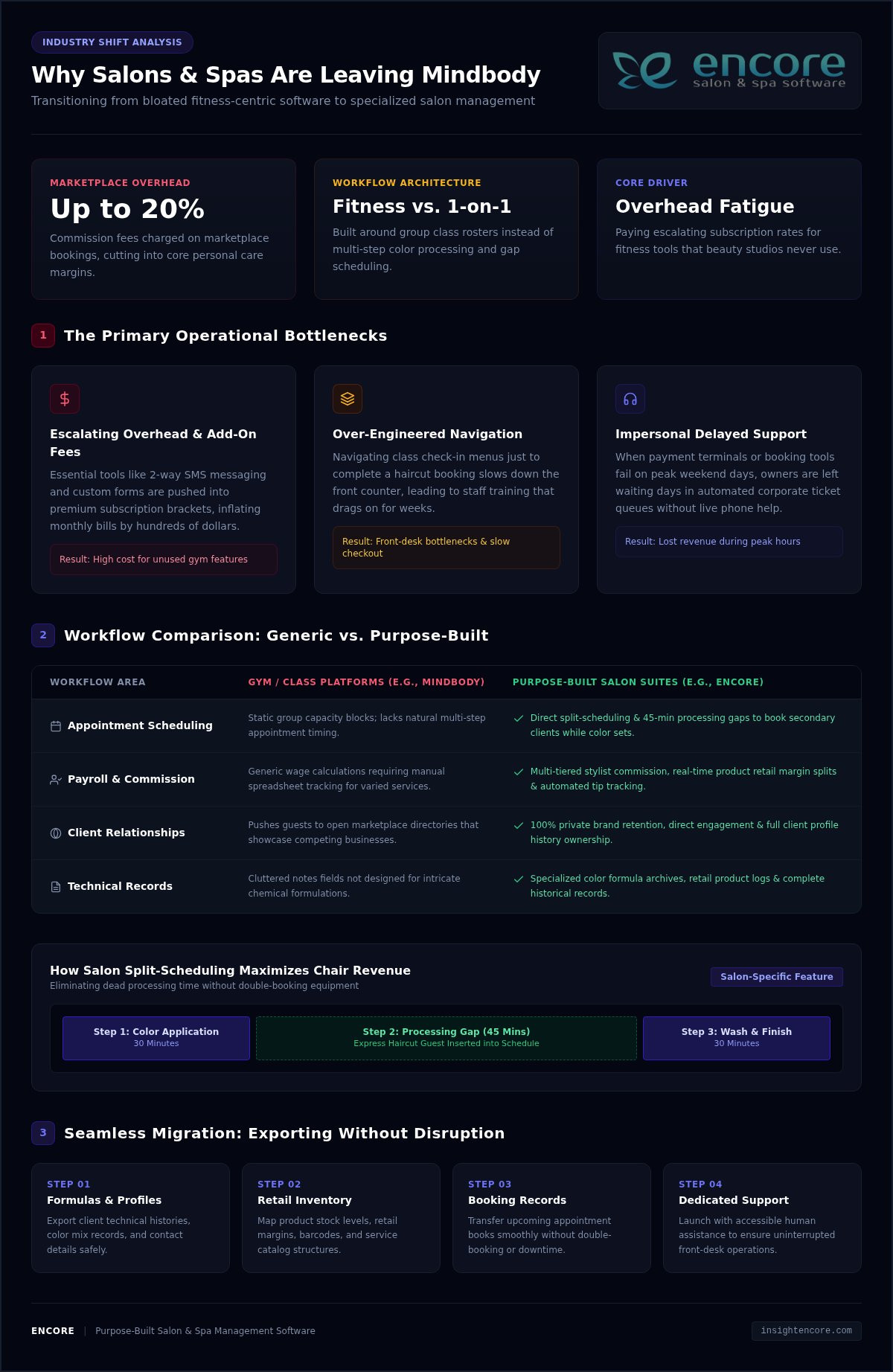
Software costs should scale predictably with your business. Instead, multi-tiered subscription models frequently push essential features, such as automated two-way messaging or customizable forms, into premium brackets. Independent salon operators routinely find themselves bumped into plans costing hundreds of dollars more each month just to retain basic operational tools. To make matters worse, fees extend to marketplace bookings where commissions can reach up to 20%. Owners end up paying steep monthly bills for fitness-centric tools they never touch, squeezing margins at a time when operational discipline matters most.

The Burden of Over-Engineered Navigation and Staff Training

Every extra click at the front desk slows down service. Because the software caters heavily to group fitness rosters and class check-ins, beauty professionals must navigate layers of irrelevant menus just to book an appointment or review a client’s history. Training a new stylist or receptionist becomes an uphill battle that drags on for weeks. When a simple point-of-sale checkout requires multiple tabs and workarounds, counter bottlenecks form, leaving arriving guests waiting and pulling staff away from high-value client care.

Impersonal Support and Prolonged Ticket Resolution Times

When your booking engine stalls or a payment terminal drops offline on a Saturday morning, you need immediate answers. Waiting days for an automated email reply directly damages your client relationships and your daily revenue. A major reason why people leave Mindbody is the shift from accessible, human-led assistance to delayed corporate ticketing queues. Studio owners want a dependable partner who answers the phone and understands salon urgency, not a generic helpdesk ticket that leaves critical checkout bugs unresolved.

Compounding subscription fees, fitness-first workflow bloat, and distant customer service make escalating overhead the primary churn catalyst driving beauty and wellness owners toward streamlined, specialized platforms.

Comparing Mindbody Workflows with Purpose-Built Salon Management Software

At its core, Mindbody was engineered around group fitness classes, gym turnstiles, and shared studio capacity. In contrast, hair salons, day spas, and barbershops operate on intimate, one-on-one guest appointments that require personalized attention. This architectural mismatch is another central reason why people leave Mindbody for software crafted specifically for the personal care industry.

Class Schedules vs. Individual Stylist Appointment Books

Fitness platforms view time as static group blocks, but a colorist’s day rarely moves in a straight line. Hair services rely on processing times and multi-step bookings. A stylist needs to apply a foil, let the color set for 45 minutes, and take a quick haircut client during that intermediate gap. Purpose-built salon software accounts for these split intervals directly on the booking grid, keeping your chairs full without double-booking equipment or overlapping shampoo bowls.

Commission Tracking and Multi-Tiered Stylist Payroll

Calculating salon earnings by hand creates an administrative headache at the end of every week. Stylists often operate under tiered commission scales where product retail margins differ sharply from chemical services or basic cuts. Rather than wrestling with manual spreadsheets, salon teams need automated commission structures that track product sales and tip allocations in real time. Exploring the Encore features page reveals how automated payroll calculations cut hours of administrative overhead every single pay cycle.

Client Retention, Marketing, and Relationship Building

Independent personal care businesses rely on long-term relationships rather than aggregate consumer traffic. You need direct ways to engage guests without paying commission cuts or sending them to a third-party marketplace that highlights your competitors. Dedicated salon tools handle this seamlessly by keeping your brand front and center:

  • Automated Appointment Confirmations: Two-way SMS alerts verify appointments automatically, helping reduce costly no-shows.
  • Integrated Client Profiles: Color formulations, patch test records, and past styling notes remain attached to the client file.
  • Built-In Loyalty and Gifting: Offering integrated balance tracking through the Encore gift cards module helps you build recurring revenue without third-party fees.

When software providers introduce hidden contract renewals or complicate account changes, salon owners feel trapped. With updated FTC rules on recurring subscriptions and cancellations holding vendors to higher standards of transparency, more wellness professionals are seeking business partners that earn their loyalty through straightforward service rather than restrictive lock-ins. If you want a platform built around your daily workflow, take a moment to explore how a salon-first system simplifies your day.

What to Look for in a Mindbody Alternative in 2026

Choosing a new operating system requires looking beyond polished sales demos. You need a setup that simplifies daily tasks rather than burying your staff under unnecessary administrative steps. Unrestricted control over your records is equally critical; policy analysts highlighting the value of reducing switching costs through data portability stress that true business agility relies on open, frictionless access to your operational history. Knowing why people leave Mindbody helps you establish a clear evaluation rubric so your salon lands on a sustainable, supportive foundation.

Transparent Billing Without Hidden Upgrade Traps

Avoid platforms that lock fundamental communication tools behind costly tier jumps. Before signing any contract, ask directly whether two-way SMS confirmations, digital consultation intake forms, or multi-staff calendars incur automatic price bumps. A reliable partner keeps terms simple and visible upfront. You can inspect the Encore pricing page to see how straightforward software tiers eliminate billing surprises and keep overhead predictable.

Integrated Payments and Low-Friction Checkout

A congested checkout desk ruins an otherwise relaxing client visit. Your payment hardware must communicate instantly with your front-desk appointment book to ring up services, split gratuities, and scan retail barcoding in seconds. Choosing a system with integrated credit card processing keeps card-on-file records compliant and reduces errors, ensuring your receipts match your merchant batch reports at the end of every shift.

Specialized Tools for Unique Business Structures

Modern personal care spaces rarely fit into a one-size-fits-all box. Your chosen software needs to match the actual layout of your team:

  • Chair and Booth Rental Independence: Hybrid salons mixing W-2 employees with 1099 independent stylists require separate merchant accounts so renters manage their own revenue smoothly.
  • Custom Treatment Records: Day spas and medical aesthetics practices need clear charting areas for allergy notes and customized consent forms.
  • Walk-In Queue Handling: Barbershops and nail lounges demand dynamic walk-in boards that coordinate with pre-booked appointments.

Selecting software built specifically around these service nuances removes unnecessary hurdles. That flexibility is a primary reason why people leave Mindbody in search of purpose-built systems that respect the way beauty and wellness professionals actually work.

Why People Leave Mindbody: Common Frustrations and Smarter Alternatives for 2026

How to Seamlessly Migrate Away from Mindbody Without Losing Data

The fear of losing years of client formulas, retail records, and booking history keeps many business owners tied to software they’ve outgrown. That lingering hesitation is often why people leave Mindbody only after months of mounting frustration. In reality, switching platforms is an orderly, manageable process when handled with a clear plan. Back up your primary database files into standard CSV format directly from your reports dashboard before initiating any contract cancellations.

Step 1: Auditing and Exporting Your Client Records

Start by extracting complete client contact lists from your administrative reports, ensuring phone numbers, email addresses, and opt-in preferences are preserved. Next, pull detailed chemical formulas, allergy alerts, past visit notes, and historical sales logs. Review the resulting spreadsheets to make sure column headers align cleanly. Clean data allows your replacement software to import profiles without creating duplicate accounts or misplacing essential notes.

Step 2: Transferring Retail Inventory and Outstanding Balances

Perform a hands-on physical inventory count before exporting your digital catalog. Reconciling product counts ensures that recorded quantities match what actually sits on your retail shelves and backbar dispensary. Organize your SKUs, barcodes, and supplier details for a clean import. At the same time, generate reports for unredeemed gift certificates, prepaid series packages, and active client credits so you can honor existing balances without disruption.

Step 3: Training Your Staff and Launching Your New Booking Portal

Give your front desk and service providers dedicated practice time before your official opening day. Running simulated appointments, appointment edits, and checkouts builds confidence and eliminates front-desk anxiety. Once your team feels comfortable, announce the transition to your clients through targeted email and text notifications. For practical operational setup tips and calendar configuration, check out our guide on Encore salon software.

Taking control of your migration timeline removes fear from the equation. That newfound confidence is ultimately why people leave Mindbody for flexible platforms that put studio owners back in charge of their business data.

Explore how simple salon data migration can be with Encore

Why Salon and Spa Owners Choose Encore as Their Long-Term Home

Software should feel like an empowering asset rather than an everyday obstacle. When evaluating why people leave Mindbody, the search usually leads business owners to a desire for stability, clear pricing, and tools tailored to their exact craft. Encore Salon & Spa Software provides that long-term home by combining modern management tools with deep industry experience.

Decades of Dedicated Beauty and Wellness Heritage

Technology trends come and go, but personal care operations require proven stability. Encore is backed by Syntec Business Systems, an established technology partner serving salon and spa professionals since 1991. Over three decades of feedback from studio owners, barbers, nail artists, and aesthetic practitioners have directly shaped our system. We focus entirely on appointment-driven businesses. You don’t have to worry about our attention shifting toward corporate gym franchises or fitness class check-ins. Independent wellness success sits right at the heart of our mission.

A Fully Integrated Suite That Simplifies Daily Operations

Juggling multiple disconnected applications for booking, checkout, inventory, and marketing drains valuable energy. Encore brings these essential operations into a single interface. Your front desk can schedule multi-step appointments, reconcile retail and backbar inventory, process transactions, and maintain rich client records without switching screens. Onboarding new team members takes hours instead of weeks. Explore our tailored tools on the Encore salon software page to see how a streamlined system restores calm to your reception area.

Get Started with a Personalized Transition Plan

Switching your management platform doesn’t need to be stressful. That anxiety is often why people leave Mindbody only after months of mounting friction, but you don’t have to tackle the process alone. Our dedicated team understands salon floor dynamics and helps you organize your transition from day one. We assist in structuring your service menu, setting up your staff books, and ensuring your client records transfer accurately. When you’re ready to leave platform bloat behind, connect with our team through the Encore contact page to schedule a personalized walkthrough.

Reclaim Your Time with Software Built for Beauty

Managing your appointments and guest care shouldn’t feel like wrestling with your software. The reality behind why people leave Mindbody comes down to reclaiming control: ditching hidden add-on costs, leaving behind clunky gym-first interfaces, and protecting your hard-earned client records. Your daily work deserves an all-in-one platform that simplifies booking, inventory, and point of sale without forcing you to manage multiple disconnected apps.

Backed by Syntec Business Systems and over 30 years of software expertise since 1991, Encore pairs specialized salon tools with dedicated human support. You don’t have to navigate changes alone when you have an experienced partner committed to your daily peace of mind.

Switch to stress-free salon management with Encore

Your salon was built on personal connection. Give your team the breathing room and dependable tools to focus on what truly matters: caring for your guests.

Frequently Asked Questions

Why are salon and spa owners actively leaving Mindbody in 2026?

The primary reason why people leave Mindbody centers on rising operational costs and platform design. Many salon and spa owners find the software increasingly weighted toward fitness chains, leaving personal care teams with cluttered menus and irrelevant features. When you combine unexpected tier bumps with slow response times from automated helpdesks, studio owners naturally seek specialized platforms built specifically around appointment-based salon workflows.

Will I lose my historical client formulas and notes when leaving Mindbody?

No, you do not have to lose your valuable client records or technical formulas. Mindbody allows administrators to export client profiles, contact information, and appointment histories into standard CSV files directly from the reports menu. Once extracted, clean spreadsheet files can be mapped and uploaded into your replacement system, preserving past formula notes and service records so your stylists never miss a beat.

How does Encore handle booth renters versus commission salon employees?

Encore provides dedicated workflows designed specifically for both business models. For commission teams, the software automatically tracks retail and service tiers alongside tips for payroll. For hybrid or rental setups, Encore Chair/Booth Renter Software offers separate financial partitioning. Independent stylists can process their own transactions and view their personal calendars securely without exposing confidential salon data or complicating owner tax reporting.

Is migrating salon client records and retail inventory difficult?

Switching systems is straightforward when you follow a structured step-by-step checklist. The migration involves downloading your client spreadsheets, reconciling physical retail stock, and mapping those records into the new platform. With dedicated onboarding guidance from an experienced software partner, you can complete the data transfer smoothly without disrupting your daily appointment calendar or confusing your guests.

Can I keep my existing merchant processing when switching to Encore?

Encore integrates directly with specialized salon merchant processing to deliver seamless counter checkouts and protect cardholder security. Using integrated credit card processing connects your front-desk appointment book with modern payment terminals, eliminating manual key-in errors and saving time during peak departure hours. Our team walks you through setting up merchant accounts tailored to single-owner salons or individual chair renters.

Does Encore charge extra for essential features like automated client reminders?

Encore believes essential daily tools should not come with surprise price hikes. Online booking, client records, inventory control, and automated marketing communications are built into the platform suite to prevent multi-app subscription fatigue. This transparent structure is another key reason why people leave Mindbody, as business owners prefer knowing their software overhead won’t expand unexpectedly as their client list grows.

How long does it take for salon staff to become comfortable using Encore?

Most salon teams feel confident using Encore within just a few days of guided practice. Because the interface is designed specifically for appointment scheduling and retail checkout rather than complex corporate rosters, the learning curve is minimal. Stylists, front-desk coordinators, and managers can quickly run test bookings and ring up sample sales during initial setup, ensuring switchover day feels smooth and stress-free.

Disclaimer

This article is general in nature and may contain errors, please verify all claims with your sales rep