

Imagine it’s 8:00 PM on a Sunday. Instead of unwinding, you’re crouched in the backroom, counting half-empty bottles of developer while your coffee goes cold. It’s a familiar scene for owners who feel buried under manual stock takes, yet managing salon inventory with a spreadsheet remains a reliable first step toward reclaiming your time and preventing mid-service shortages.
We understand how draining it is to juggle client expectations while worrying about shrinkage or missing retail numbers. You deserve a system that provides peace of mind and professional confidence. This guide is your roadmap to building a professional tracking system from scratch, setting up automatic low stock alerts, and streamlining your entire ordering process.
We’ll walk you through the essential steps to maintain your data and show you how to get a clear view of your total stock value. Finally, we’ll help you recognize the signs that your growing business is ready to graduate from manual entries to the ease of full salon automation.
Key Takeaways
- Learn how to set up a logical framework in Google Sheets or Excel that turns a cluttered list into a functional management tool.
- Discover the specific formulas needed for managing salon inventory with a spreadsheet, including conditional formatting for instant low-stock alerts.
- Master the “First In, First Out” (FIFO) method and audit routines to ensure your stock levels are always accurate and products never expire.
- Identify the hidden costs of manual tracking and learn how simple human errors can lead to expensive ordering mistakes.
- Recognize the clear signals that your salon has outgrown manual sheets and is ready for the efficiency of an integrated inventory management system.
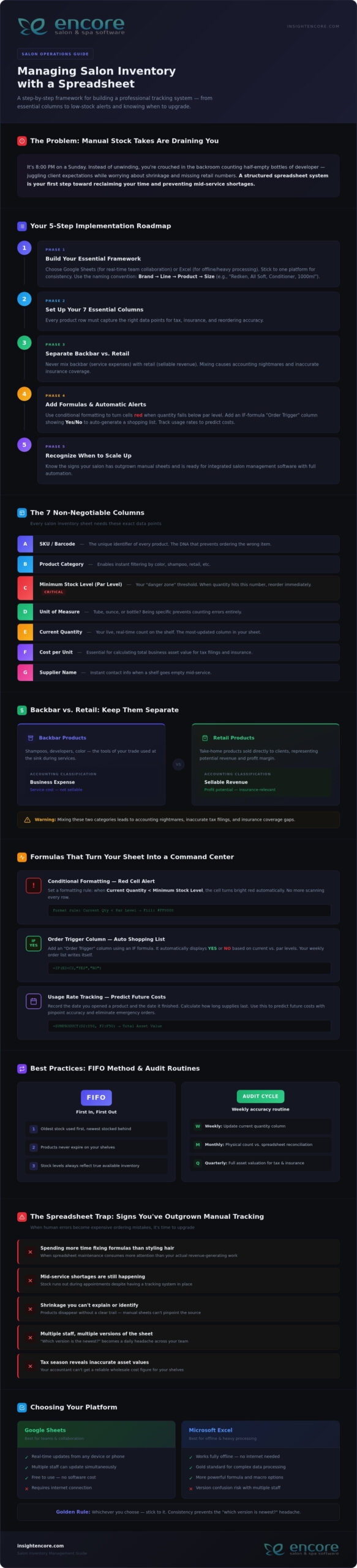
Building Your Salon Inventory Spreadsheet: The Essential Framework
Starting the journey of managing salon inventory with a spreadsheet can feel overwhelming, but it’s the first step toward total control. Without a structured layout, your data is just a digital pile of notes. A professional framework turns that list into a tool that protects your profit margins and prevents mid-service panic. You need a system that grows with your salon, not one that breaks the moment you add a new color line.
Your first decision is where your data will live. Google Sheets is a brilliant choice for collaboration. It allows your team to update stock levels from their phones in real-time. If you prefer working offline or need heavy-duty data processing, Excel remains the gold standard. Whichever you choose, stick to it. Consistency prevents the “which version is the newest?” headache that plagues many small businesses.
Organization relies on a golden rule for naming conventions: Brand, Line, Product, and Size. Instead of writing “Conditioner” or “Blue bottle,” use “Redken, All Soft, Conditioner, 1000ml.” This precision makes it impossible to order the wrong SKU. It also helps when you separate your Master List from your Daily Log. Your Master List acts as your permanent library, while the Daily Log tracks the actual movement of products in and out of the cabinet.
The 7 Non-Negotiable Columns Every Salon Needs
To keep your records accurate, every item needs specific data points. These columns provide the context your business needs for tax time and insurance purposes:
- SKU/Barcode: This is the unique DNA of the product.
- Product Category: This helps you filter your view instantly.
- Minimum Stock Level (Par Level): This is your “danger zone” threshold. When you hit this number, it’s time to reorder.
- Unit of Measure: Are you tracking by the tube, the ounce, or the bottle? Be specific to avoid counting errors.
- Current Quantity: Your live count on the shelf.
- Cost per Unit: Essential for calculating your total business value.
- Supplier Name: Who do you call when the shelf is empty?
Categorizing for Success: Backbar vs. Retail
One of the biggest mistakes in managing salon inventory with a spreadsheet is mixing backbar and retail items. Backbar products are the tools of your trade, like developers and shampoos used at the sink. These are business expenses. Retail products are inventory meant for sale to clients, representing potential revenue.
Mixing these two categories leads to accounting nightmares. You need to know exactly how much stock is tied up in service costs versus retail profit. Keeping them separate allows you to track which side of your business is more efficient. It also ensures your insurance coverage reflects the true value of your sellable goods.
Advanced Tracking: Formulas and Thresholds for Stock Control
Managing salon inventory with a spreadsheet becomes truly powerful when you stop treating it like a static list and start using it as a diagnostic tool. By adding simple formulas, you transform rows of data into a live command center. This shift allows you to make decisions based on facts rather than gut feelings. It’s the difference between hoping you have enough color and knowing exactly when the next shipment needs to arrive.
Visual cues are your best friend during a busy shift. You can use conditional formatting to make your life easier. Set a rule where a cell turns bright red if the “Current Quantity” falls below your “Minimum Stock Level.” This visual “red alert” means you don’t have to scan every line to know what’s missing. You can also add an “Order Trigger” column. Use a simple IF statement to display “Yes” or “No” based on your stock levels. This creates an automatic shopping list for your weekly supplier run.
Tracking usage rates is the next level of professional management. If you record the date you opened a gallon of shampoo and the date it finished, you’ll learn exactly how long your supplies last. This data helps you predict future costs with pinpoint accuracy. If you find yourself spending more time fixing formulas than styling hair, exploring an integrated inventory management system might be the relief you need.
Calculating Inventory Valuation for Tax Season
Your accountant needs to know the exact wholesale value of your shelves, not the potential retail price. Wholesale cost is what you paid; MSRP is what the customer pays. Keeping these distinct ensures your tax filings are accurate and your insurance coverage is sufficient. You can calculate your total asset value instantly by using a SUMPRODUCT formula to multiply the quantity of every item by its individual wholesale cost. This single number represents the cash currently tied up in your stockroom.
Setting Accurate Par Levels (Minimum Stock)
Finding your “Minimum Stock Level” isn’t a one-time task. You must consider shipping times, your weekly service volume, and seasonal peaks. While managing salon inventory with a spreadsheet offers a clear view of your current situation, setting accurate par levels ensures you never run out of critical supplies. Avoid the “Overstock Trap” by remembering that too much inventory is just cash sitting on a shelf. Adjust your levels before the holiday rush to ensure you have enough color for every guest without cluttering your backroom.
The Spreadsheet Trap: Why Manual Tracking Often Fails Growing Salons
While managing salon inventory with a spreadsheet is a great starting point, it eventually becomes a bottleneck. Many owners fall into the “Spreadsheet Trap” without realizing how much it actually costs them. You might think you’re saving money by avoiding software fees, but the hidden expenses tell a different story. If you’re spending your Sunday nights manually counting bottles, you’re paying for that time with your own energy and business growth.
Consider the hourly rate of the person managing the file. If a manager spends just three hours a week on manual entry, that’s over 150 hours a year. That’s time that could be spent training staff or improving the client experience. Then there’s the risk of human error. A single mistyped digit can turn a small restock into a $500 ordering mistake. These errors are easy to make when you’re tired and staring at a grid of tiny numbers.
The biggest hurdle is the lack of POS integration. Your spreadsheet is a silent observer. It doesn’t know when a stylist uses a tube of color or when a client buys a retail bottle. This disconnect leads to “inventory ghosts” where your sheet says you have stock that isn’t actually on the shelf. Security is another concern. One accidental click or a disgruntled employee can delete months of data in seconds, leaving you with no backup and a lot of frustration.
Spreadsheet vs. Integrated Inventory Software
The difference between manual sheets and professional software comes down to speed and accuracy. Software provides real-time updates. The moment a sale is made, the stock is deducted. You don’t have to wait until the end of the week to see where you stand. Professional systems also handle automated ordering. Instead of typing out a list, the software generates purchase orders based on your par levels. It also builds staff accountability. You can track exactly which products are being used by which stylist, removing the guesswork from your backbar costs.
Signs Your Salon Has Outgrown Excel
It’s okay to move on when a system no longer serves you. You’ll know it’s time to upgrade when you see these red flags:
- Your team has grown to more than 3 stylists sharing the same supplies.
- You spend more than 2 hours every week updating stock levels manually.
- Discrepancies between your sheet and your shelves are becoming a regular occurrence.
- You feel anxious about the accuracy of your ordering list.
When you reach this stage, transitioning to Encore’s Inventory Management System provides the relief you’ve been looking for. It turns inventory from a stressful chore into a seamless part of your daily routine. You can finally stop counting bottles and start focusing on the creative work you love.
Best Practices for Maintaining Inventory Accuracy Every Week
Your spreadsheet is a living document. It needs regular attention to stay relevant. Managing salon inventory with a spreadsheet requires more than just a good template; it demands a consistent routine. Without regular updates, your data becomes a relic of the past, leading to the very stockouts you’re trying to avoid. Establishing a rhythm ensures your numbers reflect the reality of your shelves.
One of the most effective ways to protect your investment is the “First In, First Out” (FIFO) method. When new shipments arrive, place them behind the existing bottles. This simple habit prevents products from expiring at the back of the shelf. You should also create a clear process for handling shrinkage. Whether it’s a spilled bottle of developer or a damaged retail box, every loss must be documented. If it isn’t in the sheet, your stock value will never be accurate.
Success depends on your team. Make inventory management a part of your salon culture. When stylists understand that accurate tracking leads to better supplies and fewer headaches, they’re more likely to help. Encourage them to log every use immediately. This shared responsibility lightens your load and builds a sense of professional pride across the floor. It’s about working together to ensure nobody ever runs out of the tools they need mid-service.
The Sunday Night Audit: A Step-by-Step Checklist
A weekly audit is the heartbeat of a healthy salon. Start by comparing your physical count to what’s listed on your sheet. If there’s a discrepancy, ask why. Did someone forget to log a sale? Was there an unrecorded spill? Use this time to update wholesale prices if your suppliers have made changes. Finally, take five minutes to organize your stockroom. A tidy space makes next week’s count significantly faster and less stressful.
Inventory for Booth Renters and Independent Stylists
If you’re a chair renter or a solo professional, your needs are slightly different. You must keep your personal stock strictly separate from any salon-provided backbar. This clarity is essential for your own tax reporting. Use a simplified version of your spreadsheet to track your specific expenses. It ensures you maximize your deductions and stay organized without the complexity of a multi-chair operation. Managing your own supplies is the first step toward true business independence.
Scaling Beyond the Grid: Moving to Integrated Salon Software
Growth brings new challenges that require more than just a static list. Managing salon inventory with a spreadsheet is a solid foundation, but as your business gains momentum, the effort required to maintain that sheet pulls you away from your clients. Scaling beyond the grid means choosing a system that works for you, rather than the other way around. Automation turns inventory into a profit center by giving you back your most valuable asset: time. It’s about moving from a state of potential stress to a feeling of organized control.
The real magic happens when your stockroom talks to your front desk. By using Integrated Credit Card Processing, every retail sale automatically updates your inventory levels. There’s no manual tally at the end of the day. This seamless flow reduces human error and ensures your records are always audit-ready. When you move beyond managing salon inventory with a spreadsheet, you unlock the power of “One-Click” reporting for instant business health checks. Your accountant will appreciate the clean data, and your staff will appreciate the fairness and transparency of a professional system.
The Encore Advantage: Inventory That Manages Itself
The Encore system is designed to remove industry frustrations and act as your dedicated mentor. It features automatic deductions from every service and retail sale, so you’re never guessing what’s left on the shelf. You can generate purchase orders with a single click based on your custom par levels, ensuring you never run out of backbar essentials mid-service. Plus, mobile access means you can check your stock from home or the distributor’s aisle. You’ll have the peace of mind that comes with knowing exactly where your business stands at all times.
- Automatic deductions ensure your stock levels are always live.
- One-click reports show you which products are actually driving profit.
- Mobile tools let you manage your stockroom without being tied to a desk.
Transitioning from Sheets to Encore
Moving from a manual system doesn’t have to be a daunting task. We’ve made the process simple and encouraging for users of all technical levels. You can easily import your existing spreadsheet data to get started quickly, preserving all the hard work you’ve already done. We’ll help you set up barcodes for lightning-fast scanning, turning a three-hour Sunday night stock take into a twenty-minute walk-through. It’s time to stop counting bottles and start focusing on the creative work that inspired you to open your salon. Ready to stop counting and start growing? Discover Encore Salon Software today.
Take Control of Your Salon’s Future
Managing salon inventory with a spreadsheet is a commendable first step toward professional organization. You’ve learned how to build a structured framework and use formulas to prevent stockouts. These tools provide the initial clarity needed to protect your margins. However, as your business grows, the hours spent on manual audits can become a heavy burden that pulls you away from your creative passion and your clients.
Since 1991, we’ve helped beauty professionals navigate these transitions with confidence. Whether you run a spa, a tattoo studio, or a busy hair salon, our specialized modules are designed to replace frustration with flow. Our integrated POS and inventory features ensure that every sale is tracked automatically. This removes the “late-night audit” from your schedule and gives you the reliable data you need for your accountant and your own peace of mind.
You deserve a system that works as hard as you do. Empower your team and protect your profits by moving beyond manual entries. We’re here to support you every step of the way as you scale your business toward its full potential.
Frequently Asked Questions
Is it better to use Google Sheets or Excel for salon inventory?
Google Sheets is generally better for real-time collaboration among multiple staff members, while Excel offers superior offline capabilities and advanced data processing for larger datasets. Most modern salons prefer Sheets because stylists can update stock levels from their phones as they use products. This accessibility reduces the delay between usage and recording, which is a common failure point when managing salon inventory with a spreadsheet. Choose the platform that fits your team’s daily workflow.
How often should I do a full physical inventory count in my salon?
You should perform a full physical inventory count at least once a month, though high-volume salons often benefit from weekly spot checks on popular items. Regular counts help you identify shrinkage or recording errors before they become expensive problems. Consistency is the key to maintaining a reliable system. By setting a recurring “Stock Take” appointment in your calendar, you ensure that your digital records always reflect the actual bottles sitting on your backroom shelves.
What is a ‘Par Level’ and how do I calculate it for my hair color?
A par level is the minimum amount of a specific product you must have on hand to meet demand until your next shipment arrives. To calculate it for hair color, add your average weekly usage to the number of days it takes for a supplier to deliver your order. If you use four tubes of a specific shade per week and shipping takes seven days, your par level should be at least five tubes to ensure safety.
Can a spreadsheet automatically alert me when I’m low on stock?
A spreadsheet cannot send you an email or push notification like professional software, but you can use conditional formatting to create visual alerts. By setting a rule that turns a cell bright red when the current quantity drops below your par level, you create a clear signal for reordering. While this requires you to manually check the file, it provides a much-needed visual shortcut during the busy rush of your weekly ordering process.
What should I do if my spreadsheet count doesn’t match my physical stock?
When your numbers don’t match, you must first document the discrepancy as “shrinkage” and then investigate the cause to prevent it from happening again. Common reasons include unrecorded spills, forgotten retail sales, or staff members pulling backbar supplies without logging them. Use these moments as a teaching opportunity for your team. Updating the sheet immediately to reflect the physical reality ensures your ordering list remains accurate while you work on improving your salon’s tracking habits.
How do I track professional backbar use vs. retail sales in one sheet?
The most effective method is to use two separate tabs within your workbook or a dedicated “Category” column to filter your view. Since backbar items are business expenses and retail products are sellable assets, mixing them complicates your accounting. Managing salon inventory with a spreadsheet works best when you clearly label each item. This separation allows you to track service costs accurately while monitoring which retail lines are generating the most profit for your business.
Is there a way to scan barcodes into a spreadsheet?
Yes, you can scan barcodes into a spreadsheet using a USB barcode scanner or a mobile app that syncs with your digital files. When you click on a cell and scan a product, the SKU number appears instantly. While this speeds up the initial setup of your master list, remember that a spreadsheet still won’t automatically deduct that item from your total when a stylist uses it. It remains a manual entry process at its core.
At what point should I switch from a spreadsheet to salon management software?
You should consider upgrading to professional salon software when you’re spending more than two hours a week on manual data entry or if you have more than three stylists. If you consistently find that your manual sheet is out of sync with your actual stock, it’s a sign your business has outgrown the grid. Transitioning to an integrated system like Encore provides the automation needed to turn inventory management from a chore into a seamless profit center.
Disclaimer
This article is general in nature and may contain errors, please verify all claims with your sales rep