What makes the best salon owner dashboard app useful isn’t the number of charts. It’s whether the information helps you decide what to do next. When bookings, client details, inventory, and sales sit in separate tools, it’s harder to get a clear picture of the day. A long feature list doesn’t make the right choice any clearer.
Look beyond booking. A helpful system should make relevant business activity easier to review and connect that visibility with the work you need to manage. To compare options, start with the decisions you make regularly, then identify what information would help you make them. This keeps you focused on what your salon needs, rather than features you may never use.
This guide explains which business information is worth reviewing, how to compare dashboard capabilities, and how to assess whether software fits your daily workflow. We’ll look at booking, client management, inventory, point of sale, and marketing as parts of salon operations. Encore brings these capabilities together for beauty and wellness businesses, so you can evaluate the platform against the way your salon runs, not just its dashboard label.
Key Takeaways
- Distinguish between reviewing information on a dashboard and the operational tools that record appointments, sales, and client activity.
- Focus on business signals that help answer real management questions across appointments, clients, sales, inventory, and marketing.
- Compare each salon owner dashboard app by workflow fit, usability, relevant capabilities, and how it handles everyday salon needs.
- Test common tasks with the people who will use the system instead of judging it by dashboard design alone.
- Assess how Encore’s booking, client management, inventory, and point-of-sale capabilities fit your salon’s daily workflow.
What should a salon owner dashboard app help you see?
A dashboard is a place to review selected business information and use it to guide decisions. It can bring key signals into view, but the charts aren’t the business itself. Appointments, sales, client activity, and stock information first need to be recorded in the underlying software. They’re useful only when those records are accurate and relevant to the questions you’re trying to answer.
A dashboard is the review surface; salon management software is the operational system that records and supports the work behind what you see. That distinction matters when comparing tools. A polished display can look helpful, but it won’t tell you much if the information behind it is incomplete or disconnected from your daily processes.
Which salon decisions can a dashboard support?
Start with decisions you make repeatedly, then identify the business activity that could inform them. Appointment information, for example, can help you review the day’s schedule and consider whether available time is being used as intended. A useful signal prompts a next question, such as whether the schedule needs attention, rather than encouraging you to react to every change.
Client and inventory information can support other kinds of planning. A client record can help staff review service history before a return visit or plan follow-up. Stock information can help you spot items that need attention before they interrupt routine work. Customer appointment management software covers core functions such as booking and scheduling, which are part of the operational information a salon may want to review.
- Appointments: What does the schedule suggest about daily capacity and workflow?
- Clients: What service history or follow-up details are useful for the next interaction?
- Inventory: Which stock decisions need attention to keep routine services moving?
These are prompts, not a universal scorecard. A solo stylist, a multi-staff salon, and a spa may need different information to make sound decisions. Focus on what you’ll do with a signal, not how attractive it looks as a chart.
Dashboard app or salon management platform: what is the difference?
A dashboard helps you review information. A salon management platform supports the work that creates it, such as managing bookings, client records, inventory, and point-of-sale transactions. Some products combine both roles; others focus on only part of the workflow. Capabilities vary, so look at what each system actually does instead of assuming the word “dashboard” guarantees particular screens, reports, or measures.
Encore is a salon and spa software platform with operational tools for booking, client management, inventory, and point-of-sale activity. Explore its salon software features to see how its workflows fit your business. A salon owner dashboard app is most useful when the information you review connects clearly to the operations your team needs to manage.
Which salon dashboard metrics and capabilities deserve attention?
The most useful information is what helps you make a decision. A salon owner dashboard app may present appointment, client, sales, inventory, and marketing activity, but not every salon needs to review every measure. A solo stylist may focus on upcoming bookings and client follow-up, while a larger team may also review sales activity and stock routines. Start with the questions you need answered, then assess whether the software makes the relevant information clear.
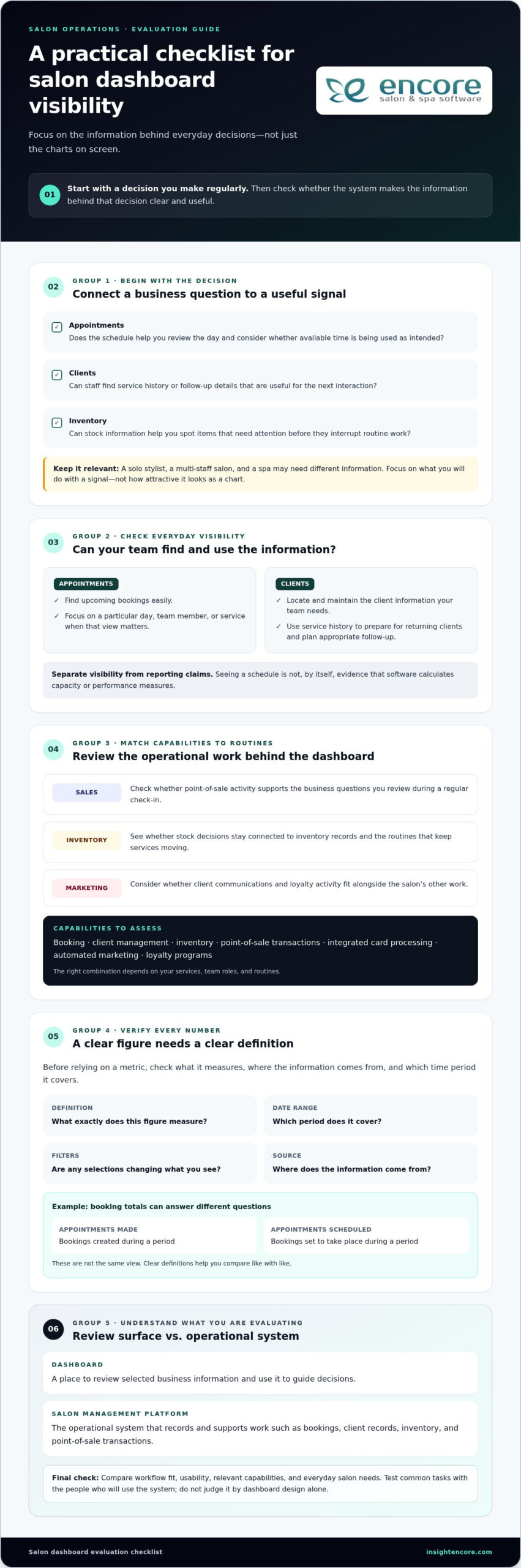
A metric is actionable only when you understand what it measures, where the information comes from, and which time period it covers. Before relying on a number, check its definition, date range, filters, and source. A booking total might refer to appointments made during a period or appointments scheduled to take place during it. Those answer different questions. Clear definitions help you compare like with like instead of reacting to a figure that looks precise but means something else.
Appointment and client visibility
Check how easily you can find upcoming bookings and understand the schedule. Can you focus on a particular day, team member, or service when that view matters to your workflow? Treat this as a usability check, not evidence that the software calculates capacity or performance measures.
Client profiles and service histories can help staff prepare for returning clients and plan appropriate follow-up. Consider whether the information your team needs is straightforward to locate and maintain. If a system includes performance reporting, assess those claims separately from basic appointment visibility, and understand how each reported figure is defined.
Sales, inventory, and marketing visibility
Point-of-sale activity, inventory, marketing, and loyalty programs support different operational questions. You might review sales transactions as part of a regular business check-in, keep stock decisions connected to inventory records, or manage client communications and loyalty activity alongside other salon work. The right combination depends on your services, team roles, and routines. Prioritize capabilities that support those tasks instead of choosing a tool simply because it lists many metrics.
Encore brings booking, client management, inventory, point-of-sale transactions, integrated card processing, automated marketing, and loyalty programs together for beauty and wellness businesses. Explore the salon and spa software features in relation to the work you want to manage. This gives you a practical way to evaluate platform fit without assuming a particular dashboard screen, report, or metric is included.
- Appointments: Check whether booking information is easy to review in the views your team needs.
- Clients: Consider how service history supports preparation and follow-up.
- Sales and stock: See whether transaction and inventory tools fit your regular review routine.
- Marketing: Assess whether marketing and loyalty activity belongs in the same operational workflow.
Keep your first evaluation focused. Choose a few real management questions, then see whether the system’s available information and tools help you address them. If you’re considering Encore, explore Encore as an option for your salon’s workflow.
How to compare salon owner dashboard apps without getting distracted by feature lists
A long list of features can make every option look capable. A more useful comparison starts with your salon’s actual work: what your team does often, which decisions take time, and where information gets hard to find. Apply the same criteria to each option, including Encore. That keeps your evaluation focused on workflow fit rather than the number of items on a product page.
A practical salon software comparison checklist
Choose a simple rating scale, such as “fits,” “partly fits,” and “doesn’t fit,” then use it consistently. Base each rating on a task you can describe, not an assumption about what a feature name means. If staff need several workarounds to complete a routine task, note that too. Ease of use matters because a tool helps only when the people responsible for the work can use it comfortably.
| Comparison area | What to assess | Useful question |
|---|---|---|
| Workflow fit | Booking, client management, inventory, and point-of-sale tasks | Can the team handle its common tasks in a clear sequence? |
| Usability | Steps, navigation, and ease of finding relevant information | Can the intended users complete routine work without unnecessary steps? |
| Relevant features | Functions that match your service mix and management needs | Does each feature solve a real operational need? |
| Support expectations | Available training, access arrangements, and routine support | Do the support and learning options suit how your salon operates? |
Distinguish what’s included from what you’re inferring. A system may list booking, inventory, or client tools without showing how they work together in everyday use. Review the product’s capabilities, then test representative tasks where possible. For instance, follow a booking through the steps your team uses and consider how client details or a point-of-sale transaction fit into that process. Don’t treat a dashboard label as proof of specific reports or data connections.
Questions to ask before choosing a dashboard app
As you evaluate each option, identify which records feed each displayed figure or summary, how often information is updated, and how filters or date ranges affect its meaning. Consider how staff access is managed, what learning options are available, and what routine support looks like. These details help you compare both the visible information and the process behind it.
- Booking: Does the workflow match how appointments are created and managed?
- Client management: Can staff maintain and use client information as part of service?
- Inventory: Does stock management fit the salon’s regular routines?
- Point of sale: Can transactions fit naturally into the client visit?
Use this same checklist to assess Encore Salon & Spa Software. Encore combines booking, client management, inventory, and point-of-sale capabilities, making those operational workflows useful comparison points. A strong fit supports your salon’s real tasks, gives staff a manageable way to complete them, and makes its information clear enough to use with confidence.
How to assess fit for your salon, team, and daily workflow
A salon owner dashboard app should suit the way your business runs, not just look clear in a product demonstration. Before comparing systems, write down who handles bookings, client records, stock, and transactions, along with the decisions you make most often. Note where information lives now and where routine tasks slow down. This gives you a practical picture of what a new system needs to support.
Match software to your salon’s operating model
Your setup shapes what “good fit” means. A single-location salon may prioritize a straightforward daily schedule, while a team with multiple staff may need clear workflows for shared responsibilities. Independent renters may have different needs around managing their own bookings and client records. Consider your service mix, too. A business that tracks products or handles varied transactions may place more weight on inventory and point-of-sale workflows than one with different priorities.
Map the work from start to finish. For a typical client visit, consider how an appointment is booked, how staff find relevant client details, whether inventory plays a role, and how the transaction is handled. The goal is to identify the steps software needs to support without adding avoidable friction. Encore offers specialized solutions for salons and other beauty and wellness businesses, including chair and booth renters, so compare the capabilities that relate to your operating model.
Plan a realistic evaluation before committing
Choose representative tasks and invite the people who perform them to assess each option using the same criteria. Ask a staff member who handles bookings to walk through a typical scheduling task; have the person responsible for stock or transactions review their routine. Testing consistent tasks makes systems easier to compare fairly, while staff feedback can reveal steps an owner might not notice.
Look beyond the demonstration. Identify which records would need to move, which current habits may change, and what time or guidance the team would need to get comfortable with new routines. These are planning questions, not assumptions about any particular implementation process. Pay attention to everyday usability: can users find the information they need, understand the next step, and complete the task without confusion?
- Document: List recurring tasks, decision needs, users, and services before evaluating software.
- Test: Have relevant staff complete realistic tasks rather than judging a system by its dashboard appearance.
- Plan: Note records, routines, and team learning that may need attention during a transition.
If staff scheduling and capacity are central to your evaluation, define the management question first. For example, decide whether you want to understand how scheduled time relates to your team’s work, rather than assuming a software label tells the whole story. Then assess whether the information and workflow available in each system support that question. The right choice depends on your service mix, users, and daily priorities.
Use the same workflow-based criteria to assess Encore Salon Software alongside other options. Its booking, client management, inventory, and point-of-sale capabilities give you operational areas to consider against your salon’s needs.
Choose a salon dashboard app that connects visibility with action
The right choice isn’t necessarily the app with the fullest dashboard. Look for a system that helps you understand relevant business information and supports the work your team needs to do next. A salon owner dashboard app is a good fit when its available information, operational capabilities, and day-to-day workflows make sense together for your business.
Before deciding, return to the tasks and questions you identified during your evaluation. Can the system support the workflows your salon depends on? Is the information your team needs understandable? Can the people who will use it manage routine tasks comfortably? These practical points matter more than an impressive feature list or an attractive display.
When an all-in-one salon platform may be a better fit
If booking, client management, inventory, and transactions are spread across separate routines, consider whether a platform covering those operational areas could make everyday work easier to manage. Bringing capabilities together may reduce the need to move between disconnected tools, although the exact workflow depends on how the system’s functions work in practice. Evaluate how each task is handled instead of assuming that “all-in-one” means every process is automatically connected.
Encore offers salon and spa software alongside solutions for barbers, nail salons, tattoo studios, and chair or booth renters. These options give beauty and wellness businesses operational capabilities to assess against their service mix and team structure. Compare the plan details and included capabilities with the tasks your business needs to manage.
Take the next step with a focused product evaluation
Make a short list of essential tasks, such as managing bookings, maintaining client information, handling inventory, or processing transactions. Compare each task with the capabilities available in Encore’s salon software, then consider whether the workflow suits your staff and business priorities. Keep the decision grounded in fit: the best option is the one that addresses your actual needs and is practical for your team to use.
You don’t need to settle every question at once. A focused evaluation of common tasks can help you see whether the platform’s operational tools belong in your salon’s workflow, without assuming specific dashboard screens or reporting functions. Encore has focused on software for beauty and wellness businesses since 1991, offering a platform to consider against your evaluation criteria.
Ready to explore whether Encore fits the way your salon works?
Turn your next software decision into a practical test
Before choosing a salon owner dashboard app, pick one recurring decision you’d like to handle with more confidence. Write down what information you need, who uses it, and what action might follow. Use that question to guide your product evaluation. This keeps the next step manageable and gives your team a clear way to judge whether a system supports important work.
A useful evaluation doesn’t need to answer every question at once. Start with a familiar task and notice whether the process makes sense to the people who’ll use it. If the information is clear and the workflow suits your salon, you’ll have a stronger basis for deciding whether to explore further. If it isn’t, you’ll know what needs a closer look.
Focus on the work your salon does every day, then choose software that supports it. Explore Encore’s salon software to evaluate its fit for your team.
Frequently Asked Questions
What should a salon owner dashboard app show?
A salon owner dashboard app should make information for regular decisions easy to find and understand. Depending on your priorities, that could include upcoming appointments, client activity, sales transactions, or inventory records. Check what each figure represents and whether you can narrow it to a useful date range or team member. A focused view is more helpful than a crowded screen full of numbers you won’t use.
How do I choose the best dashboard app for my salon?
Match the software to real tasks your salon handles, then involve the people who perform them. For example, have a receptionist try a booking task and a staff member who handles stock review an inventory task. Compare how each option supports those activities, how easy it is to learn, and whether its capabilities suit your services. The best fit is the one your team can use consistently.
Can a salon dashboard app track appointments, sales, and inventory?
Some salon software includes tools for appointments, point-of-sale transactions, and inventory, but available functions differ by system. Encore Salon & Spa Software includes online booking, point-of-sale transactions, and inventory management capabilities. Before relying on a displayed total or summary, understand which records it uses and what period it covers. For example, distinguish appointments booked during a month from appointments scheduled to happen during that month.
Is a salon dashboard app different from salon management software?
Often, yes. “Dashboard” usually refers to a way to view selected information, while salon management software supports daily activities such as scheduling, managing client records, and processing transactions. Some platforms combine operational tools with ways to review business information, but labels alone don’t establish which functions are included. Look at the tasks the system supports and how information is entered, updated, and accessed by your team.
Do small salons need a business dashboard app?
Not necessarily. A small salon may be able to manage its priorities with a simple schedule and reliable records, while a dashboard can be useful if it saves time finding information or makes a recurring decision easier. Consider how often you need to review appointments or stock. If a separate app adds little value, prioritize software that supports essential work without unnecessary complexity.
Can salon software help me understand business performance?
Salon software can help organize business records, and reporting or analytics tools may help you review performance when the system offers them. Start with a focused question, such as whether a change in bookings coincides with a change in sales. Check that the information covers the same time period and uses consistent definitions. A total doesn’t explain itself; context helps you decide what it means.
What should I check before switching to a salon dashboard app?
Before switching, list the records you rely on, the tasks your team completes, and the information they need during a client visit. Identify what may need to be transferred or re-entered, and decide who will help staff learn the new workflow. Test typical tasks before making a choice, including correcting a booking or finding a client record. A small, realistic evaluation can reveal practical issues that a feature list won’t show.
Disclaimer
This article is general in nature and may contain errors, please verify all claims with your sales rep