
A shared tablet left open between appointments can expose client information just as easily as a more complex security problem. Contact details, booking notes, allergy information, photos, and payment activity may pass through several hands and systems during a busy day. Knowing how to protect client data in a salon starts with understanding those everyday workflows and making them easier to manage.
You don’t need to be a cybersecurity expert to protect client information. Start by identifying which details need extra care, who needs access, and where information is stored. Clear routines help your team handle client data consistently and reduce avoidable risks.
This guide shows you how to map where client data is collected and used, set practical safeguards for staff and shared devices, and assess software and payment workflows. You’ll also learn how to prepare a straightforward response plan for a possible incident. The goal is clear responsibilities, better day-to-day control, and routines your salon team can follow.
Key Takeaways
- Start with a practical inventory of the client details your salon collects, from booking information to service notes and payment-related data.
- Trace how information moves between booking, consultation, checkout, and follow-up to spot where extra copies or access points may appear.
- Learn how to protect client data in a salon with everyday safeguards such as individual staff accounts, screen locks, updates, and secure backups.
- Put a repeatable routine in place by assigning responsibilities, setting access rules, and building short data-handling steps into daily salon procedures.
- Use a clear checklist to compare software capabilities with your salon’s own data-handling practices and responsibilities.
How to protect client data in a salon starts with knowing what you collect
A practical inventory is a useful first step. List what your salon collects, where each item is kept, who uses it, and why it’s needed. This gives you a basis for deciding what to retain, what to limit, and which everyday routines need stronger safeguards.
Client data includes more than names and phone numbers. It can include appointment history, service preferences, consultation notes, photos, and payment-related information. A salon data inventory records these information types, their locations, who uses them, and their purpose. This connects the broader idea of information privacy to practical decisions your team makes every day.
Which client details should a salon identify first?
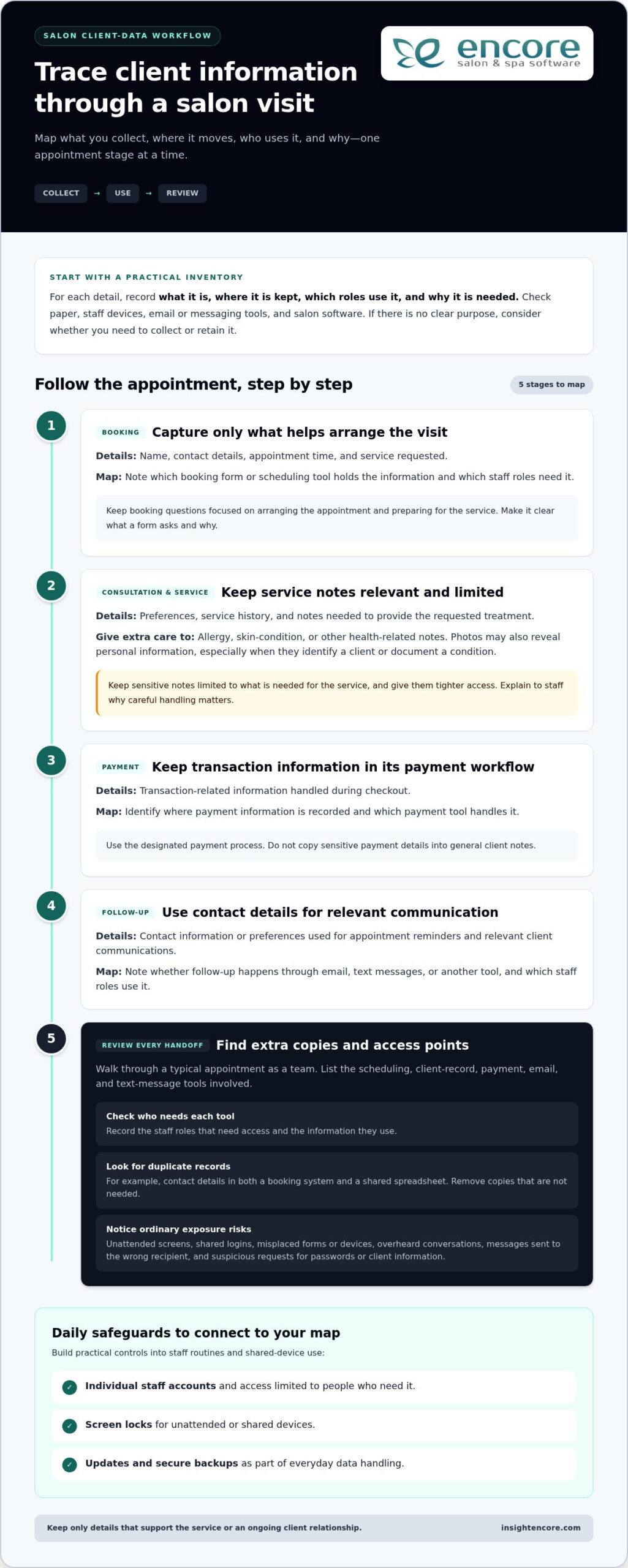
Follow a client’s journey from booking to follow-up. At each step, note what information is collected and whether it appears on paper, a staff device, in email or messaging tools, or in salon software. Record why you need each item and which roles use it. If there’s no clear purpose, consider whether you need to collect or retain it.
- Booking: Name, contact details, appointment time, and service requested.
- Consultation and service: Preferences, service history, and notes needed to provide the requested treatment.
- Payment: Transaction-related information handled during checkout. Identify where this information is recorded, without copying sensitive payment details into general notes.
- Follow-up: Contact details or preferences used for appointment reminders and relevant client communications.
Not every detail needs the same level of care. A preferred appointment time is useful service information. Notes about an allergy, skin condition, or other health-related detail are more sensitive and deserve tighter access. Photos can also reveal personal information, especially when they identify a client or document a condition. Keep sensitive notes limited to what’s needed to provide the service, and explain to staff why they must handle them carefully.
Where can salon client information be exposed?
Many exposure risks arise during ordinary workflow moments. An unattended screen may let someone nearby view a client record; a shared login makes it harder to tell who accessed information. A misplaced consultation form can expose details on paper, while a lost device may put saved messages or files at risk. Use your inventory to identify where these situations could occur in your salon.
- Accidental disclosure: Discussing a client’s personal details where others can hear, or sending a message to the wrong recipient.
- Lost or misplaced items: Leaving forms, printed schedules, or devices in an unsecured area.
- Weak account access: Reusing logins or keeping an account active after someone no longer needs access.
- Suspicious messages: A message that pressures staff to open an attachment, share a password, or reveal client information.
Record each risk beside the information and location it affects. This creates a practical map of workflow issues and helps you choose safeguards that address the risks your team actually faces.
How salon client data moves through booking, service, and payment workflows
Client information often moves through several systems during an appointment. A guest may submit contact details and service preferences through an online booking form, then provide more information during a consultation. Staff may refer to the details in a client record, use a payment tool at checkout, and send a follow-up by email or text. Each handoff can create another copy or access point.
Walk through a typical appointment as a team. Identify what you collect at booking, what you add during the service, what’s needed at checkout, and what you use for follow-up. Keep only details that support the service or an ongoing client relationship. For example, a stylist may need a relevant service preference, but that information doesn’t also need to be copied into a calendar note, an email, and a personal phone.
Keep online booking questions focused on arranging the appointment and preparing for the service. When clients can see what a form asks and why, the information request is easier to understand. Salon software that brings booking and client-management tasks together can help your team organize where information is handled rather than relying on disconnected records.
How to map client information across salon systems
List the tools involved at each stage, including scheduling, client records, payment processing, email, and text messages. For each tool, note the staff roles that need it and the information they use. Then look for duplicate records, such as contact details stored in both a booking system and a shared spreadsheet. Removing unnecessary copies makes information easier to manage and reduces the number of places staff need to check.
Keep the review straightforward. The NIST Cybersecurity Framework offers organizations a structured way to think about managing cybersecurity risk. A salon can use the same practical approach: identify where information moves, who handles it, and which procedures can reduce avoidable exposure.
How to keep payment information in the right workflow
Set a clear boundary around payment information. Use the designated payment process for transactions, and keep routine client notes focused on service preferences and appointment history. Don’t put full card details in service notes, spreadsheets, email, or unsecured forms. If a client record needs to reflect a completed transaction, record only what your workflow requires, not sensitive payment details.
Make the handoff clear: the team member taking payment should use the salon’s designated payment workflow, while other staff should see only information needed for their role. Encore’s integrated credit card processing connects payment activity with salon operations. Software is only one part of responsible data handling, so pair the tools you use with clear staff practices and written procedures.
Once you’ve mapped the client journey, review each handoff and decide where to simplify it. To see how a connected workflow could fit your salon, explore Encore’s salon software as part of your broader data-management routine.
Which salon data safeguards matter most? Compare practical controls
Useful safeguards address specific risks, have someone responsible for them, and fit naturally into salon routines. Start with access: client information should be available to people who need it for their duties, not automatically to everyone on the team. Review access when someone changes roles or leaves, and remove permissions that are no longer needed.
Use these practical controls as a starting point:
- Individual staff accounts: Help identify who used a system and make access easier to adjust. Separate accounts let a receptionist use booking details while a stylist can access the service information needed for appointments.
- Strong authentication: Makes accounts harder to access with guessed or reused passwords. Each staff member should use a strong, unique password, with multi-factor authentication enabled for important accounts where it’s available.
- Screen locking: Helps prevent someone nearby from viewing an open client record. Staff should lock the front-desk computer or secure a tablet whenever they step away, even briefly.
- Software updates: Help keep devices and applications current. Assign someone to review update prompts and follow the salon’s process for applying them rather than leaving updates indefinitely.
- Secure backups: Provide a way to recover important business information if records are lost or unavailable. Decide who oversees backups, where they’re kept, and how the salon will check that its recovery process works.
What access and device controls should salon teams use?
Begin with the accounts and devices staff use each day. Avoid shared credentials wherever individual accounts are supported. Shared logins make it difficult to connect actions to a person or promptly change one person’s access. Set a screen-lock habit for computers, tablets, and phones, and store mobile devices securely between uses. Keep the rules short enough to follow during a busy shift.
Make these measures part of regular salon administration rather than a one-time setup. Choose someone to review accounts and device practices when staff responsibilities change, and include the review in the salon’s routine checks.
How should salons assess software and payment tools?
Compare a tool’s actual capabilities with the procedures your salon needs. Review how the software handles access settings, data exports, support requests, and privacy documentation. Consider how staff will use each feature, too. Encore’s salon software brings operational functions together in one platform, but tools support a protection routine; they don’t replace staff practices or oversight.
For payment tools, understand how payment handling is separated from ordinary client records, and identify the payment processor and related documentation. Don’t assume a feature is a safeguard without understanding how it works in your workflow. Protecting client data in a salon means combining appropriate tools with clear access rules, trained staff, and regular review.
To review how salon workflows could fit together, explore Encore’s salon software as part of your broader approach.
How to put salon client-data protection into practice with staff
A good routine should work on a busy day, not just look thorough on paper. Give staff short steps they can follow while opening the salon, booking clients, checking out appointments, and closing. To put client-data protection into practice, assign clear owners and make it easy for team members to ask questions or report a concern.
- Keep the inventory current. Record the client information your salon uses, where it’s held, its purpose, and which roles need it. Update the record when you add a tool or change a workflow.
- Assign owners. Name the person responsible for staff accounts, devices, paper records, and routine reviews. Staff should know who can approve access changes and who receives incident reports.
- Set access by role. Give each person access suited to their work duties, then review it when responsibilities change. Remove access that’s no longer needed rather than relying on everyone to remember old permissions.
- Train the team. Explain the everyday steps for handling client details, checking requests, and reporting anything unusual. Keep instructions specific to the tools and situations staff actually encounter.
- Review routinely. Check whether the procedures are being followed and still fit the salon’s workflow. Use changes in staff, devices, or software as prompts for an extra review.
How to train salon staff to handle client information
Use brief examples instead of abstract warnings. Show staff how to keep conversations private, store printed forms, lock screens, check message recipients, and report a lost device. Before sharing appointment or account details, they should verify the person’s identity using the salon’s agreed process. Give everyone one clear internal contact for questions and concerns, and encourage prompt reporting without blame.
Keep instructions close to the task. A booking checklist can remind staff to verify a client’s details; a checkout prompt can remind them to keep payment handling within the designated workflow. Short, visible reminders are easier to follow consistently than a long policy no one can find during a busy shift.
What should a salon do if client data may be exposed?
Act calmly and follow a written sequence. The priorities are to limit further access, preserve useful details about what happened, and involve the right people. Don’t guess about the cause or make promises to clients before the salon has established the facts.
- Contain the issue. Secure the affected account, device, or records. For a suspicious message, don’t click links or forward it widely; report it through the salon’s internal process.
- Document what’s known. Note when the issue was noticed, what happened, which systems or information may be involved, and what steps have already been taken. Preserve relevant messages or records.
- Notify responsible leadership. Contact the designated owner promptly so the salon can coordinate its response and decide on next steps.
- Seek appropriate advice. A qualified adviser can help assess notification duties that apply in the salon’s jurisdiction and circumstances.
Clear roles, practical training, and a calm response plan make data protection a shared routine rather than one person’s task.
How to choose salon software that supports responsible client-data practices
Software shapes how client details move through your salon, but no platform can replace clear staff responsibilities and everyday procedures. Use a consistent checklist to compare what a product does with the way your team books appointments, manages client records, takes payments, and responds to concerns. This helps you choose tools that fit your operation without treating software as a security guarantee.
What questions help compare salon software data practices?
Start with the information your salon needs and the people who use it. Review product documentation and support processes to understand how the workflow fits your procedures. Focus on practical details, not broad security language.
- Information: What client details does each workflow collect, and can your team keep forms focused on what’s needed?
- Staff access: What access roles or account settings are available, and how will you review permissions when staff duties change?
- Data handling: Where does client information appear across booking, records, payments, and follow-up? Can your team avoid unnecessary copies?
- Exports and records: How are client records exported, and what documentation explains the process?
- Support and account recovery: What support process applies to account or access issues, and how can staff recover access appropriately?
Compare the answers with your salon’s written procedures. For example, if the team has a process for reporting a lost device, make sure staff understand which software accounts or records could be affected and who handles the next step. Product capabilities should support routines your team can maintain, not add steps no one owns.
How can salon software fit into a wider protection plan?
Consider the whole workflow, not one feature in isolation. Encore combines online booking, client management, and payment workflows in salon-management software. Bringing these operational functions together can help your team organize where information is handled. Access rules, staff training, device practices, and regular reviews remain essential parts of the plan.
Map a platform’s actual functions against your salon’s needs. Make sure staff know how to use the relevant workflows, keep the information they collect purposeful, and include the software in routine account and procedure reviews. If you change systems or add a feature, revisit staff instructions so the day-to-day process stays clear.
Choosing software is one part of protecting client data in a salon. Pair useful tools with responsible habits: limit unnecessary collection, train staff, manage access, and establish how to report a concern. A good fit should make daily operations easier to organize while supporting procedures your salon can follow consistently.
Make your next data-protection step part of the routine
Protecting client information doesn’t require a perfect system on day one. Choose one improvement your team can put into practice now, such as reviewing who can access client records or making the lost-device reporting process easier to find. Assign someone to own that step, then build on it as your salon’s workflows change. A small action staff repeat is more useful than a complicated policy that stays unread.
Protecting client data in a salon is an ongoing part of salon management: keep responsibilities clear, revisit routines, and adjust when tools or staff roles change. Encore’s salon-management platform brings together tools for daily salon operations, including online booking, client management, and payment processing. Explore Encore to see how its software can support the way your team organizes those operations.
Start with one practical change, assign someone to own it, and help your team build stronger data-handling habits over time.
Frequently Asked Questions
What client information should a salon keep confidential?
Keep identifying, contact, appointment, payment-related, and personal service information private. This includes details that may seem routine, such as a client’s appointment schedule, as well as more sensitive consultation notes or photos. A caller asking whether someone has an appointment shouldn’t automatically receive confirmation. Set a simple rule for what staff can share, with whom, and how to check that a request is legitimate.
How can a salon protect client data from staff misuse?
Make appropriate use of client records part of the salon’s staff expectations. Explain that looking up a client out of curiosity, discussing their information socially, or using contact details for personal reasons isn’t acceptable. Limit access to work needs, and have a manager review account activity if a concern arises and the system provides that information. A clear reporting route helps staff raise concerns early rather than trying to handle them alone.
Is salon booking software safe for client information?
Booking software can help organize client information, but safety depends on the product, its configuration, and how the salon uses it. Before relying on a system, review its privacy information, account recovery process, access options, and data-handling practices. Make sure staff know how to use the booking workflow correctly, too. Don’t treat a convenient online form as a reason to request details that aren’t needed for the appointment.
Can a salon store client payment card details in its records?
Don’t copy full card numbers or security codes into client notes, spreadsheets, email, or paper forms. Use the salon’s designated payment workflow instead, and follow the instructions provided for that process. Keep appointment and service records separate from payment credentials. If staff need to reference a transaction later, use the appropriate transaction record rather than retaining sensitive card details in a general client profile.
What should a salon do if client information is accidentally shared?
Tell the salon’s designated manager or privacy lead promptly, even if the message went to only one unintended recipient. Preserve the message and note what was shared, when it happened, and who may have received it. Don’t forward the information to more people while investigating. The responsible lead can assess the circumstances, decide what immediate steps are appropriate, and seek qualified advice about any notification duties that may apply.
How often should salons review client-data access?
Review access whenever a staff member changes duties, leaves, or needs temporary access for a specific task. Also include account permissions in a recurring management check, so dormant accounts and unnecessary access don’t linger unnoticed. For example, a manager can review the staff list alongside other routine administrative records. The right schedule depends on how the salon operates, but role changes should always prompt a timely review.
Does salon software alone protect client data?
No. Software can support organized workflows, but it can’t ensure staff follow good practices or secure every device and paper record. A locked account won’t prevent someone from sharing a password, and a useful booking form can still collect more information than the service requires. Combine software with clear staff expectations, careful device handling, limited collection, and a process for raising concerns. That’s a practical foundation for protecting client data in a salon.
Disclaimer
This article is general in nature and may contain errors, please verify all claims with your sales rep