
window.dataLayer = window.dataLayer || []; function gtag(){dataLayer.push(arguments);} gtag('js', new Date()); gtag('config', 'UA-206511945-1');
Search
Categories
Uncategorized

How to Manage Multiple Salon Locations: A Practical 2026 Guide

What if adding another salon location didn’t mean adding another set of disconnected schedules, client records, and inventory headaches? Learning how to manage multiple salon locations starts with identifying where daily routines differ and deciding which differences affect the client experience or make it harder to understand how each salon is performing.

You need shared standards, but a single rigid rulebook can overlook what makes each local team and its clients unique. Decide which processes must stay consistent, give managers clear ownership of daily operations, and make key information easier to compare. This approach supports oversight while leaving teams room to serve clients well.

This guide covers practical ways to align core processes, coordinate schedules and client information, manage inventory, and review performance across locations. It also explains how connected booking, client management, inventory, and point-of-sale tools can reduce fragmented workflows. The goal is a repeatable approach that helps you spot differences, ask better questions, and support each location without managing every detail yourself.

Key Takeaways

  • Map how each salon currently handles daily work to see which processes align and where they differ.
  • To learn how to manage multiple salon locations, set shared standards for essential client-facing tasks while leaving room for local decisions.
  • Give each manager clear responsibility for team training and daily follow-through. Focus owner oversight on progress, recurring issues, and decisions that need escalation.
  • Roll out changes in stages. Use a pilot and a small set of relevant measures to learn what works before expanding.
  • Assess whether connected tools for booking, client records, inventory, payments, and other daily tasks can support your operating model across locations.

How to Manage Multiple Salon Locations Without Losing Operational Clarity

Managing multiple salons means coordinating people, processes, client experience, and performance across every site. Growth brings more than extra appointments and staff. It also raises questions about how work gets done, who owns each decision, and how you’ll recognize when a location needs support.

The practical answer to how to manage multiple salon locations is not to make every salon identical. Set shared expectations for essential work, then give managers clear authority to respond to local needs. This helps protect the client experience and makes differences in performance easier to interpret. Comparisons are useful only when every salon defines and records the information in the same way.

This approach can support different ownership structures. For example, a franchise is a particular business growth strategy with defined relationships between franchisors and franchisees. Whatever your structure, clear standards and decision rights help teams work together without relying on the owner to resolve every routine question.

What changes when a salon grows beyond one location?

At one salon, the owner can often spot a scheduling problem, explain checkout steps, or notice stock running low in person. Across locations, those informal check-ins become harder to maintain. One team might confirm appointments the same way each time, while another handles changes differently. Client records may be updated inconsistently, and stock counts may follow different routines.

Not every difference signals a problem. Appointment patterns may vary because clients, services, or local demand differ. The important task is to distinguish local variation from gaps in the process. If teams handle checkout records or inventory counts differently, comparisons may reflect inconsistent routines rather than actual business performance.

Which responsibilities should be clear from the start?

Make decision ownership visible before small issues start bouncing between teams. A simple responsibility guide can show who sets expectations, who handles day-to-day choices, and when an unresolved issue should be escalated.

  • Owner: Sets business priorities, approves core policies, and reviews performance across locations.
  • Central operations lead: Turns shared policies into practical procedures, supports managers, and tracks recurring issues across sites.
  • Location manager: Runs daily operations, coaches the local team, and makes decisions within agreed boundaries.
  • Frontline team: Follows shared steps for client-facing tasks and flags issues that can’t be resolved locally.

Define escalation paths with practical examples. A manager might resolve a routine scheduling exception locally, while a system-wide issue that keeps recurring goes to the operations lead. The owner can then focus on policy or resource decisions instead of being pulled into every daily adjustment.

How to Build Repeatable Processes Across Every Salon Location

Shared processes are easier to teach, follow, and improve. They also help clients receive dependable service, whether they book online, update their details, or pay at checkout. A useful multi-location standard sets a clear minimum, not a script for every interaction.

Build your process playbook in manageable steps:

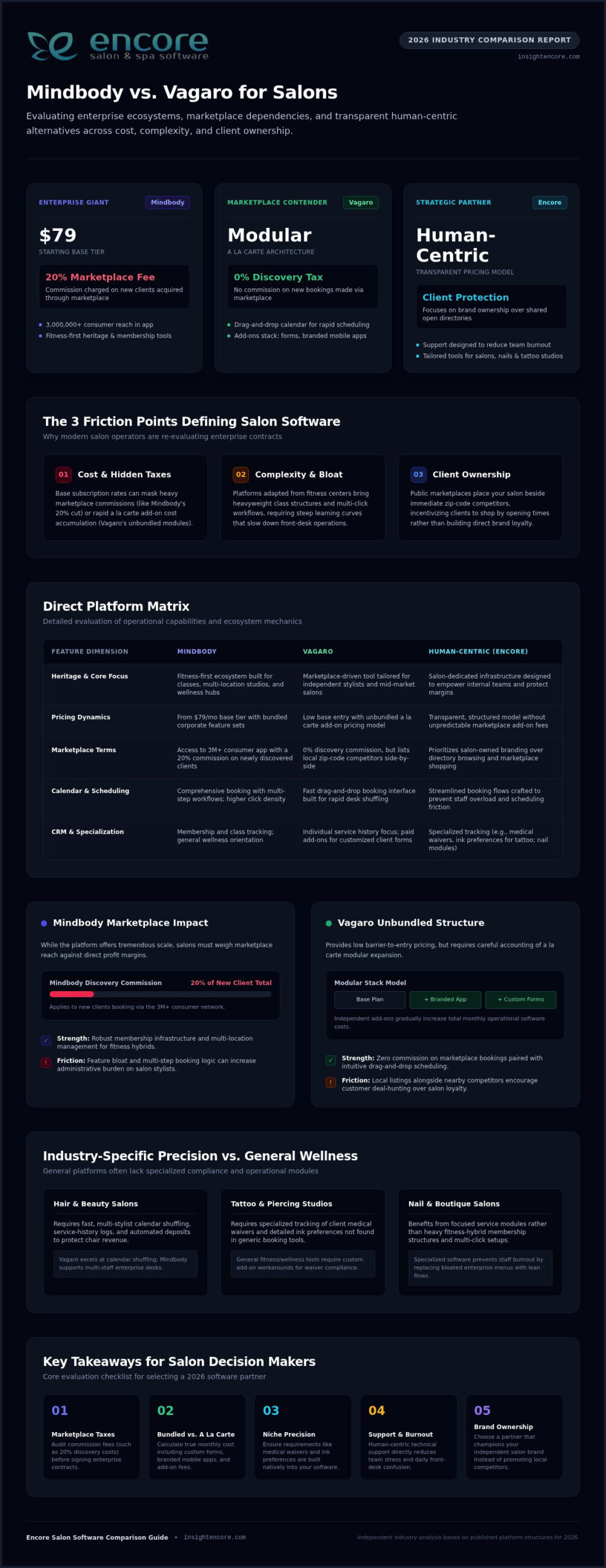
  1. Map current workflows. Ask each location to describe how it handles booking, client records, checkout, and stock. Note the steps and where teams improvise or rely on individual knowledge.
  2. Select the standards. Agree on essential steps that should be consistent, especially those that affect clients or make information comparable. Leave room for local choices that don’t undermine those essentials.
  3. Assign owners. Name someone responsible for each process. For example, the operations lead can maintain the shared procedure while a location-level owner handles questions and feedback.
  4. Train the teams. Demonstrate the steps in context, then give staff a short checklist they can refer to during a shift.
  5. Review adoption. Observe the workflow, ask where it creates friction, and update the process when teams identify a practical improvement.

Keep procedures in a short, accessible playbook. Include each process’s purpose, steps, owner, and review date. The U.S. Chamber of Commerce offers guidance on creating Standard operating procedures, which can help you write usable instructions instead of lengthy documents that staff struggle to apply.

Which salon processes should be standardized first?

Start with appointment booking, client record handling, checkout, and inventory routines. These tasks connect the client experience with day-to-day business information, so inconsistent steps can lead to avoidable confusion. A shared opening and closing checklist can cover practical handoffs: reviewing the day’s appointments, noting stock that needs attention, and completing routine end-of-day records. Keep service conversations personal. Standardize the necessary administrative steps, not the stylist’s relationship with each client.

How can managers train teams to follow shared processes?

Use realistic examples. Show staff how to record a client update or complete checkout, then give them a chance to practise using the checklist. Each location should have a process owner who can answer questions and flag recurring obstacles. Managers can check adoption through coaching and workflow observations, not just by distributing a policy document. Their feedback can reveal whether a step is unclear, difficult to use, or ready for refinement.

As you define these routines, consider whether connected booking, client management, inventory, and point-of-sale tools can support the same workflow across sites. Explore Encore’s salon management tools to see how a shared system could fit your processes.

How to Balance Central Control and Local Flexibility Across Salons

Consistency doesn’t mean every salon has to operate identically. Set shared expectations for what protects the brand and makes performance comparable, then let managers adapt decisions that depend on local clients, schedules, and team needs. Clear boundaries give staff room to act without turning every choice into a head-office approval.

What should be decided centrally, and what can managers adapt?

Use the examples below as decisions to assess, not universal rules. The right split depends on your services, locations, and operating model.

Shared standards set centrally Choices managers may adapt
Brand-wide principles for presenting services and supporting clients How the team brings those principles to life in local conversations
Definitions for reports, such as what counts as a completed appointment Scheduling choices that respond to local appointment patterns
Core workflows for booking, client records, checkout, and inventory tracking Day-to-day team coordination and shift handoffs
Guidelines for local promotions and shared brand requirements Which locally relevant promotion to run, within those guidelines

For each flexible choice, clarify the boundary: what a manager can decide independently, what needs approval, and what information to record. If a location adjusts a routine to meet a local need, log the reason, decision owner, and review date. This makes flexibility visible and gives you a basis for deciding whether an exception should stay local, become a useful practice for other salons, or prompt an update to the shared process.

How can owners compare locations fairly?

Start with comparable information. Use the same metric definitions and reporting periods across salons, then interpret results in context rather than ranking teams by a single number. A difference in appointment volume, for example, may reflect staffing levels or appointment mix, not simply how well a location is managed. Local demand and operating context matter, too.

Staff utilization can help you understand how scheduled team time relates to appointments and service activity. Before comparing locations, define which time and activity the measure includes, and apply that definition consistently. Then look for patterns: does a result change alongside a different appointment mix, or does it persist across reporting periods? Consistent definitions make comparisons a starting point for useful questions, not a verdict on a manager.

This is a practical part of how to manage multiple salon locations: centralize the rules that create shared understanding, and let managers adapt within clear boundaries. Review logged exceptions alongside performance results so local learning informs decisions without quietly changing the process at each site.
How to Manage Multiple Salon Locations: A Practical 2026 Guide

How to Roll Out Multi-Location Salon Management Step by Step

A clear rollout gives staff time to understand a change, practise it, and share what needs adjustment before it reaches every location. Keep the process manageable: establish a baseline, test one workflow, learn from the pilot, and then expand.

How should a salon group prepare for a new operating process?

Before changing a routine, document how it works today. Note the systems teams use, handoffs between roles, differences between locations, and known bottlenecks. A booking workflow, for example, may look consistent on paper but involve different follow-up steps at each salon. Capture what staff actually do, including where they need to use their judgment.

Next, choose one process to pilot. Look for a workflow with a visible effect on clients or daily operations, but keep the change manageable enough for managers to support. Assign a rollout lead to coordinate instructions, training, questions, and follow-up. Before implementation, explain what’s changing, why it matters, what staff need to do differently, and how they can raise concerns.

How can owners know whether the rollout is working?

Set a baseline before the pilot so you have a fair point of comparison. Choose a small group of measures tied to the process, such as whether required booking steps are completed or whether checkout records are entered consistently. Define each measure clearly, use the same approach throughout the pilot, and compare results with the baseline rather than relying on impressions alone.

Adoption also depends on how the process works in practice. Schedule check-ins with the pilot manager and invite frontline team members to share confusion, extra steps, or client concerns. Keep a simple record of feedback, decisions, and process updates. If the workflow needs adjustment, make the change clear and update the shared instructions before expanding to other salons.

Once the pilot is working as intended, train the next location, name its process owner, and repeat the review. This staged approach to how to manage multiple salon locations builds on tested routines instead of asking every team to adapt to an untested change at once. For a related look at tools that can support shared salon workflows, explore Encore salon software.

See how Encore salon software supports daily workflows

How Salon Management Software Can Support Multiple Locations

Software can help put your operating model into everyday practice. The aim isn’t to add another tool for its own sake. It’s to connect key tasks, reduce repeated data entry, and make the information managers and owners use easier to work with. As you assess options, map each need to a tool, a user, and a routine.

Which software capabilities matter when managing several salons?

Start with workflows that affect clients and daily operations. Use this checklist to connect capabilities to practical needs:

  • Appointment booking: Consider how clients book and how staff review upcoming appointments and changes.
  • Client management: Identify which client details teams need to access and maintain throughout the client journey.
  • Inventory tracking: Map how teams record product movement and identify items that need attention.
  • Point-of-sale transactions: Review how checkout information is recorded and used in routine closeout work.
  • Integrated credit card processing: Consider whether connecting payment processing with checkout fits your payment workflow.
  • Marketing, loyalty, and gift cards: Decide which tools are relevant to your client communication and retention plans.

Encore Salon & Spa Software brings appointment booking, client management, inventory, and point-of-sale tools together. The platform also includes integrated credit card processing, automated marketing, loyalty programs, and gift cards. Match each capability to a process your team needs to perform, rather than adopting features without a clear operational purpose.

How can salon owners evaluate whether a platform fits their workflow?

Make the assessment specific. For each task, name who uses the tool, what information they need, and what should happen next. For example, trace a booking from the client’s first appointment request through team preparation and the completed visit. Then map checkout from the transaction to the records managers use in their work. This helps show where connected tools may reduce handoffs or duplicated work.

Consider managers’ and owners’ needs separately. Managers may need practical access to booking, client, inventory, and transaction information for daily decisions. Owners need consistent definitions and a usable way to review operations across the business. For payments, consider how integrated credit card processing fits into the salon’s checkout routine.

Use this checklist to assess how software could support how to manage multiple salon locations without assuming every location needs identical settings. Encore’s connected salon management tools bring booking, client records, inventory, and payments together to support established workflows.

Explore Encore salon software for your workflows

Build a Stronger, More Connected Salon Group

Knowing how to manage multiple salon locations comes down to creating clarity without limiting local teams. Set repeatable standards for essential processes, give managers clear decision-making responsibilities, and use consistent measures to understand how each location is doing. Roll out changes in stages, listen to staff feedback, and refine the approach as your salons grow.

The right tools can help bring those routines together. Encore combines online appointment booking, client management, inventory tracking, and point-of-sale transactions. Integrated credit card processing, automated marketing, loyalty programs, and gift cards can also support how you serve and retain clients. Map these capabilities to your operating needs and workflows.

Shared standards, thoughtful local flexibility, and connected operations give each team room to serve clients while helping you keep a clearer view of the whole business. Explore Encore’s salon management software to see how its tools can support your multi-location workflows.

Frequently Asked Questions

How do you manage multiple salon locations effectively?

Manage multiple salons effectively by clarifying responsibilities, documenting shared processes, and giving each location manager defined decision-making authority. Standardize essential workflows such as booking, client records, checkout, and inventory routines. Review the same operational measures across locations on a regular schedule. If one salon’s results differ, consider local demand, staffing, and workflow context before deciding what support or coaching may help.

What should be standardized across salon locations?

Standardize core processes that support a dependable client experience and reliable business records. These often include appointment handling, client record practices, checkout steps, inventory routines, and reporting definitions. Document the minimum expected process, name who owns it, and explain where managers can adapt. Set shared requirements without scripting every client interaction or local decision.

How can salon owners compare performance across multiple locations?

Compare locations using a small set of measures with consistent definitions and reporting periods. Depending on your goals, you might review appointment activity, service mix, or inventory movement. Interpret differences alongside staffing, local demand, and each salon’s operating context. A change in service mix, for example, could affect appointment activity. Use comparisons to ask questions and identify where managers need support, rather than treating a ranking as a complete explanation of performance.

How do you keep each salon location consistent without making it feel impersonal?

Keep administrative steps consistent while giving staff room to build genuine client relationships. Shared booking and checkout routines can make the experience familiar without requiring identical conversations or service choices. Be clear about which standards are essential and which decisions managers can adapt to local needs. Feedback from clients and salon teams can show where a process needs adjustment, helping you protect dependable service while preserving each location’s character.

What software do salon groups need to manage multiple locations?

Look for software that supports the workflows your salon group needs to coordinate, including appointment booking, client management, inventory tracking, and point-of-sale transactions. Integrated credit card processing, automated marketing, loyalty programs, and gift cards may also fit your needs. Map each requirement to the people who use it and the process it supports. Encore Salon & Spa Software brings these management capabilities together for beauty and wellness businesses.

How should a salon group roll out new processes across its locations?

Start by documenting current workflows, then choose one process for a manageable pilot. Assign a rollout owner, explain what’s changing and why, and give staff practical training. Set a review date before the pilot begins. Gather feedback from managers and frontline teams, document decisions, and update the process instructions. Once the workflow is clear and workable, expand it to other locations and share what you learned.

How often should salon owners review results from each location?

Choose a review rhythm that lets you respond at the pace your business requires, then apply the same reporting periods and metric definitions across locations. Regular check-ins can help owners and managers discuss emerging trends, operational barriers, and needed support. Avoid drawing conclusions from one unusual period without context. Pair the numbers with manager feedback so each review reflects measurable activity and what’s happening in the salon.

Disclaimer

This article is general in nature and may contain errors, please verify all claims with your sales rep

Categories
Uncategorized

Reducing Salon Operating Costs: A Practical 2026 Guide

Labor can account for 45% to 55% of a salon’s gross revenue, according to Booksy’s September 2026 industry guidance. That makes reducing salon operating costs less about slashing budgets and more about finding avoidable spending without weakening the client experience. Expenses can be hard to track across supplies, subscriptions, payroll, and daily operations. Small recurring purchases may disappear in the totals, while a blunt cut can leave clients waiting or staff stretched.

This guide shows you how to identify controllable costs, prioritize changes by likely impact and risk, and test adjustments before making them permanent. You’ll learn how to reduce avoidable waste, protect service quality, and track whether a change improves financial performance.

We’ll cover inventory, appointment flow, recurring tools, and other expense categories, then outline a simple routine for comparing spending with revenue. Better visibility, not guesswork, helps you make measured decisions and keep the salon running smoothly.

Key Takeaways

  • Classify expenses as fixed, variable, semi-variable, or discretionary before deciding what to adjust.
  • Review waste and unused recurring expenses before considering changes that could affect staffing or service quality.
  • To assess a cost change, record a baseline, make one specific adjustment, then compare like-for-like results.
  • Use booking, client, inventory, and point-of-sale records to spot patterns and guide operational decisions.
  • Salon management software can support clearer records and consistent processes, but it does not guarantee savings.

Reducing salon operating costs starts with knowing where the money goes

When bills rise, it’s natural to look for something to cut. But reducing salon operating costs works best when you first identify what is driving the pressure. A large expense may reflect overspending, or it may look larger because bookings and revenue have dipped while necessary costs stayed steady. Those situations call for different responses.

Operating costs are the expenses involved in running the salon day to day. The broader idea of operating expenses can help frame this review. Start by distinguishing recurring expenses, such as rent or software subscriptions; variable expenses, such as products used during services; one-time expenses, such as isolated purchases or repairs; and discretionary expenses, which may be adjusted. Categories can overlap: a subscription is recurring and often predictable.

Is the problem high expenses or too little booked work?

Compare expenses with appointment volume and service revenue over the same period. If bookings and revenue have fallen while core bills remain similar, the main issue may be a quieter schedule, not unusually high costs. Cutting supplies needed for booked services won’t fill open appointment slots and could affect the client experience.

If service volume is steady but a particular cost is rising faster than the work it supports, investigate that expense. Compare staff schedules with booked hours to distinguish a capacity issue from a cost issue. The salon staff utilization guide offers a related way to assess how scheduled time aligns with booked work.

Build a useful salon expense baseline

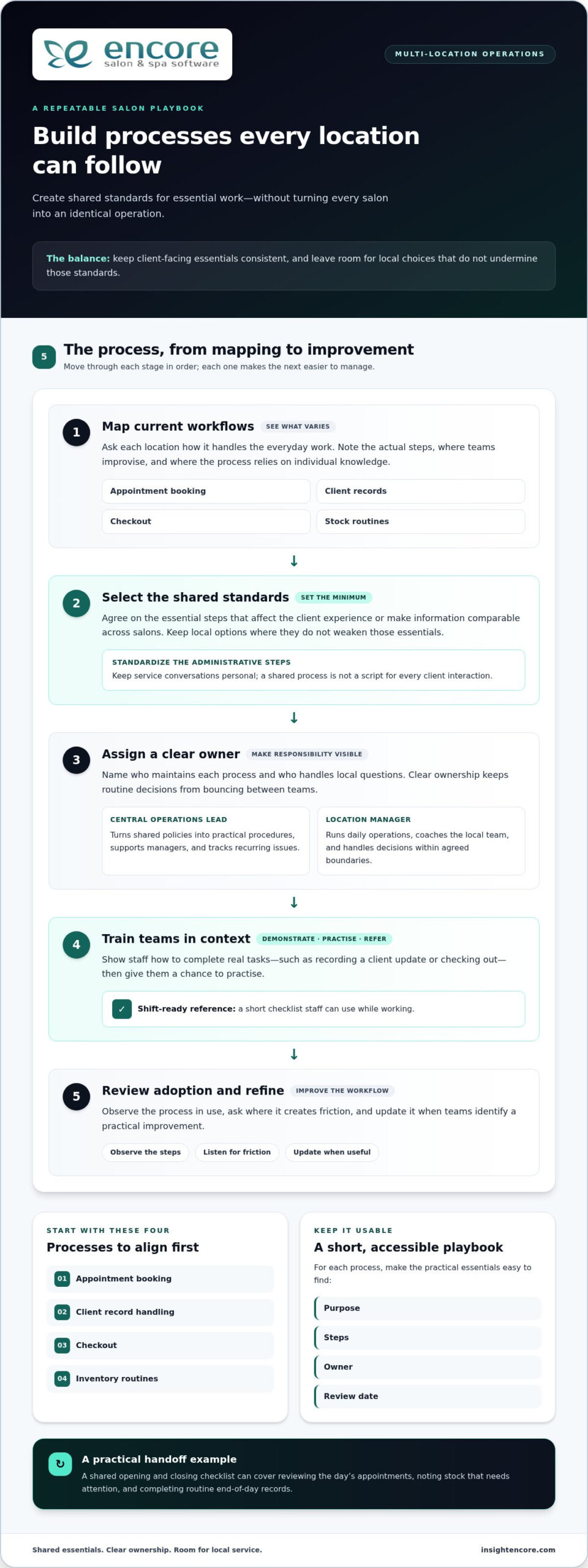
Review bookkeeping records, receipts, invoices, and recurring payments instead of relying on memory. Separate salon-wide expenses, such as rent or general software, from costs tied directly to services, such as color products. This helps show whether a change affects the whole business or a particular service.

An expense baseline is a consistent record of what the salon spends, when, and why. It gives you a fair point of comparison before and after a change. For each item, note:

  • Period: The dates covered, such as a month or quarter.
  • Expense category: For example, rent, supplies, payroll, or subscriptions.
  • Amount: The recorded spend for that period.
  • Trend: Whether it is rising, falling, or staying steady compared with a matching period.
  • Business purpose: What the expense supports, such as client service, staffing, or daily administration.

This review turns transactions into useful context. Once you know what each cost supports and how it changes alongside salon activity, you can decide what deserves a closer look without treating every expense as waste.

Classify salon expenses before deciding what to reduce

Once you’ve listed your spending, group each expense by how it behaves. The label helps you choose what to review, but it doesn’t prove a cost is wasteful. Rent may be fixed but essential; a discretionary purchase may be optional but valuable to the client experience. The goal is to understand each expense in the context of your services, staffing, and business needs.

Which salon expenses are fixed, variable, or semi-variable?

Fixed expenses generally stay similar from one period to the next, such as rent or a recurring software subscription. Variable expenses rise or fall with activity. Service products, for example, may be used more as appointment volume increases. Semi-variable expenses combine a steady base with a portion that changes. Utilities can include a regular charge plus usage, while labor may include scheduled hours as well as additional hours tied to demand.

Discretionary expenses are choices the salon can review, such as optional refreshments or tools that duplicate another service. They may also be recurring or variable. These categories describe how a cost behaves, not whether it should be cut.

Separate essential spending from reviewable spending

Assess expenses against your own records rather than treating industry averages as universal targets. A cost that makes sense for one salon’s service mix or staffing model may not suit another. Compare each expense’s trend with the services generating revenue, the people needed to deliver them, and any changes in operating needs.

For each item, consider:

  • Necessity: Does it support safe, reliable operations or a service clients expect?
  • Client impact: Could changing it affect service quality, comfort, or convenience?
  • Frequency: Is it a one-time purchase, a regular payment, or an expense that changes with bookings?
  • Alternatives: Is there a practical way to meet the same need with less waste or overlap?

Subscriptions, duplicate tools, and services staff rarely use are sensible candidates for an evidence-based review. Check invoices and actual use before making a change. If a tool supports booking, client records, or inventory visibility, consider how staff would handle that work if the tool were removed.

Management tools can bring appointment, client, inventory, and point-of-sale information together to support a clearer review. Encore salon management tools bring these operational records into one platform, helping you organize information for your own review.

Where salons can reduce operating costs without lowering service quality

The safest opportunities usually come from preventing waste or removing unused spending, not cutting whatever looks costly. Before making a change, weigh four factors: how much control you have, the likely effect on clients, the effort required, and how you’ll measure the result. This gives you a practical way to prioritize cost changes without treating every expense as equally adjustable.

  • High control, low client impact: Start with avoidable product waste or recurring tools staff no longer use.
  • Moderate control, moderate effort: Review purchasing routines, appointment workflows, and utility use, then test one adjustment.
  • Lower control, high client or staff impact: Take extra care with staffing levels and products essential to services. Don’t cut these without evidence that the current approach can change safely.

Choose a measure that fits each test. Track product use against services performed, for example, or compare subscription costs with actual use. A change is useful only if it improves spending without creating new problems.

Inventory, subscriptions, and everyday purchasing

Use stock counts, usage patterns, and reorder habits to spot products that sit unused, expire, or are reordered before existing stock is needed. Adjust purchasing gradually and monitor availability so popular services aren’t disrupted. For subscriptions, check which features staff use and whether another tool already covers the same task. Review invoices and actual use before removing anything that supports essential daily work.

Track service consistency alongside the change. If lower stock levels lead to missing products or last-minute replacements, the adjustment may not be helping the salon. Inventory records can connect purchasing decisions to product use and stock on hand.

Scheduling, labor, utilities, and payment processes

Review appointment gaps and administrative tasks for ways to improve coordination, not to leave the salon short-staffed. Better visibility into bookings can help align coverage with demand while preserving the capacity to serve clients. Compare utility bills over similar periods and look for low-disruption steps, such as switching off equipment when it isn’t needed, without compromising comfort or service routines.

A cost reduction is worthwhile only when its financial benefit outweighs any added burden on clients, staff, or service quality. Review payment processing statements, transaction patterns, and contract terms before changing a process or provider. Compare total costs and operational effects, not just a single rate. The credit card processing overview provides more context on payment processes.

Apply the same discipline to vendor and marketing changes. Review terms, actual use, and business outcomes before deciding. Test one change at a time, then keep, refine, or reverse it based on what your records show.

Reducing Salon Operating Costs: A Practical 2026 Guide

A salon cost-reduction checklist for testing changes and tracking results

A cost idea is useful only when you can tell what it changed. Test one adjustment at a time, compare it with a clear baseline, and check its effects on clients and staff as well as the accounts. This helps you see whether a change improves performance or simply shifts the burden elsewhere.

How to test one cost-saving change at a time

Use this checklist to make each test clear and repeatable:

  • Choose one expense. Pick a specific item, such as a recurring tool or product-ordering process, rather than changing several categories at once.
  • Record the baseline. Note current spending and process, plus a relevant activity measure, such as appointments served or product use.
  • Define the test. Write down the exact change, who will manage it, and its start date. For example, adjust reorder timing while monitoring stock and service needs.
  • Set success measures and guardrails. Track the expense alongside service quality, staff workload, and client feedback. A lower bill alone isn’t enough if the change creates delays or disrupts appointments.
  • Review and decide. Keep the change if records show a useful improvement without unacceptable trade-offs. Adjust it if results are mixed, or reverse it if costs or service problems worsen.

Choose a review period that fits the expense. Assess a recurring payment over a billing cycle, for example, while purchasing patterns may need a longer window to account for changes in appointment volume or service mix. Compare like with like: similar periods, categories, and operating conditions. Avoid making other major changes during the test, since they can make the result harder to interpret.

Turn expense tracking into a monthly routine

Set aside time each month to compare actual spending with your salon’s plan. Look for unexpected increases, confirm whether earlier adjustments are still working, and account for changes in bookings or services before drawing conclusions. A consistent routine is more useful than a complicated reporting process.

Keep a short decision log with the expense reviewed, the change made, the review date, and the outcome. These notes can help you avoid repeating unsuccessful experiments and make future decisions using your own results. Review expense changes alongside incoming payments and upcoming obligations, since cost control also affects available cash. For a broader perspective, connect this review to your salon’s overall cash flow and profitability analysis.

For a tool to organize booking, client, inventory, and point-of-sale records, see Encore salon management software.

Use salon management tools to keep operating costs visible

Once you’ve identified which expenses deserve attention, consistent records make them easier to monitor. Salon management software can bring booking, client, inventory, and point-of-sale information into everyday workflows, reducing the need to move details between separate records. That visibility can support better decisions, but software doesn’t guarantee savings. The value comes from using the information to spot patterns and act thoughtfully.

What salon software can help owners monitor

Inventory tracking can help you review stock movement, product use, and purchasing patterns. Compare what’s on hand and what’s being used with reorder decisions to identify opportunities to reduce waste without risking product availability. Appointment booking and client records can also make schedule and client information easier to review during daily operations.

Point-of-sale and payment functions bring transaction records into salon operations. When these records connect with other day-to-day information, it can be easier to understand business activity and reduce manual handoffs. Staff still need to review the information and make decisions, but consistent records can simplify that routine.

Choose practical next steps for your salon

Start with the expense category you’ve identified as most reviewable. If product purchasing is the focus, examine inventory use and stock movement. If appointment flow or administrative effort is the concern, review booking and client records. Choose tools that help answer the question you’re investigating, then measure the result against your own records.

Encore Salon & Spa Software brings together inventory tracking, appointment booking, client management, point-of-sale transactions, and integrated credit card processing to support salon operations. Its tools help organize information for consistent tracking. Assess any operational changes based on their actual effect on spending, staff workflow, and client service.

Learn more about the platform’s salon management software and how its tools support day-to-day operations.

Make your next cost decision with confidence

Reducing salon operating costs doesn’t mean making broad cuts. Start with clear records, separate essential spending from reviewable expenses, and test one change at a time. Then weigh the financial result alongside its effects on service quality, staff workload, and client experience.

Consistent tracking makes decisions easier to repeat and refine. Encore brings appointment booking, client management, inventory tracking, and point-of-sale tools together to support day-to-day operations. The platform serves salons, spas, barber shops, nail salons, and other beauty and wellness businesses. It can help keep information organized, while your records show which changes are working.

Small, measured steps can build a clearer picture of your costs and a steadier path toward sound business decisions.

Explore Encore salon management software

Frequently Asked Questions

What are the biggest operating costs for a salon?

Labor is often a salon’s largest operating cost, alongside rent, service products, utilities, payment processing, and software. Booksy’s September 2026 industry guidance estimates labor at 45% to 55% of gross revenue, but your own figures depend on your staffing model, services, and location. Review expenses against revenue and appointment activity rather than assuming another salon’s cost mix is the right benchmark for yours.

How can I reduce salon expenses without cutting staff?

Start by looking for waste and spending that doesn’t support current salon needs. Compare product use with purchasing, check for duplicate or rarely used subscriptions, and review utility patterns for low-disruption conservation opportunities. You can also look for ways to reduce manual administrative work or improve appointment coordination. Track each change alongside service quality and staff workload, so lower spending doesn’t create extra pressure for your team or clients.

How do I track salon operating expenses?

Record each expense by category, amount, period, and business purpose, then compare it with the same category in a comparable period. Use bookkeeping records, receipts, invoices, and recurring payment statements to build a complete baseline. Add context such as appointment volume and service revenue, especially for costs that change with activity. This makes cost reduction a measured process rather than a decision based on memory or one unusually high bill.

Which salon expenses should I review first?

Review expenses that appear controllable and have limited potential to affect service quality, such as unused subscriptions, overlapping tools, avoidable product waste, or purchasing habits that lead to excess stock. Check actual use and records before making a change. Be more cautious with staffing and products needed to deliver booked services. Rank potential adjustments by likely impact, effort, and client or staff effects, then test one change at a time.

Can salon software help reduce operating costs?

Salon software can make operational information easier to track, but it doesn’t guarantee lower costs. Booking and client records can support organized daily workflows, while inventory tracking can help you review stock movement and purchasing patterns. Point-of-sale tools can also keep transaction records within salon operations. Use these records to spot issues, reduce manual handoffs, and assess whether a change is helping your salon’s finances and service experience.

How often should a salon review its expenses?

Review spending monthly to catch unexpected changes and compare actual expenses with your salon’s plan. Some costs need a review period suited to their billing or usage pattern, so don’t judge a longer-term purchasing adjustment from a few days of data. Keep a short record of the change, review date, and outcome. Regular notes help you learn from past decisions and make future cost reviews more consistent.

Should a salon cut marketing costs to save money?

Not automatically. First, review what each marketing activity costs and what business outcome it supports, such as inquiries, bookings, or repeat visits. Compare results over a suitable period and avoid judging a campaign by spending alone. If an activity has unclear value, adjust or test it before removing it entirely. Automated marketing tools can help organize outreach, but your salon’s records should guide whether the approach is worthwhile.

Disclaimer

This article is general in nature and may contain errors, please verify all claims with your sales rep

Categories
Uncategorized

Chair/Booth Renter Software: A 2026 Guide to Choosing the Right System

What if the software meant to make salon work easier left you feeling less in control of your own business? For independent stylists, chair/booth renter software should simplify daily admin while leaving client relationships and business decisions in your hands.

If client details live in one place, appointments in another, and payments require extra steps, keeping everything straight can take time away from your services. A system built for a full salon may not fit the way you work as an independent renter. Look for an organized workflow that supports your business without adding tools you won’t use.

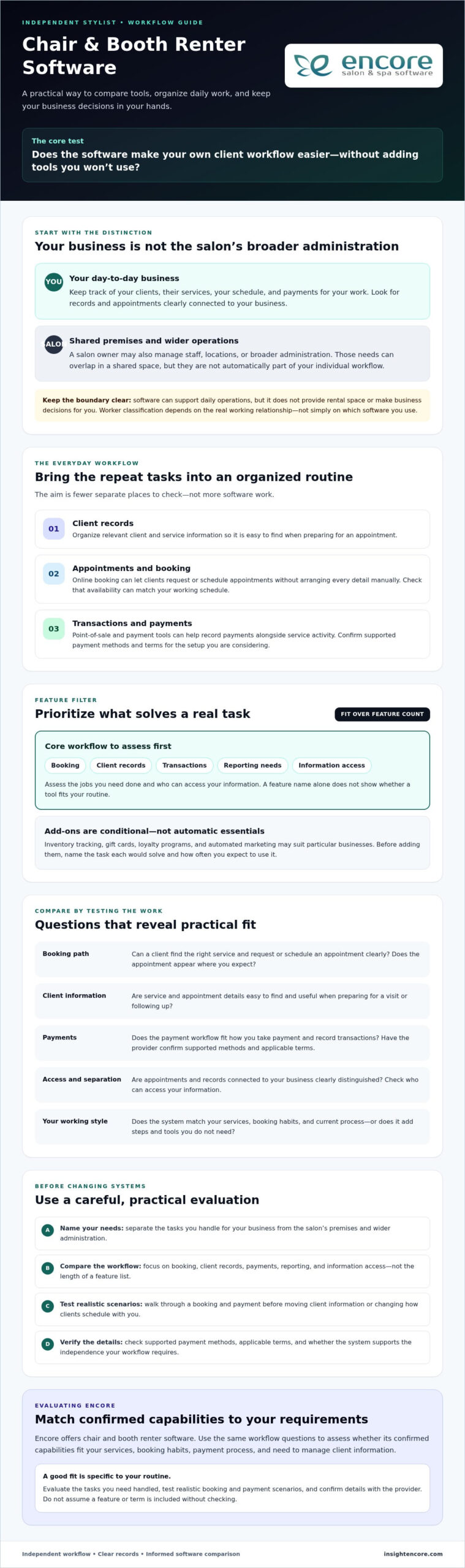
This guide explains how to compare chair/booth renter software based on daily needs: managing client records, handling bookings and payments, understanding costs, and keeping track of who can access your information. You’ll also find practical questions to ask before choosing a platform and learn how to evaluate Encore’s chair and booth renter software. By the end, you’ll have a clearer way to find a system that fits your workflow and keeps your business organized.

Key Takeaways

  • Separate the tasks you handle for your own business from the salon’s premises and broader administration.
  • Assess software by the jobs you need done, from booking and client records to payments and reporting, rather than by the length of its feature list.
  • Compare chair/booth renter software with your services, booking habits, and current process, and check that it supports the level of independence you need.
  • Test realistic booking and payment scenarios before moving client information or changing how clients schedule with you.
  • Use your requirements to assess whether Encore’s renter-focused software and confirmed capabilities fit your workflow.

What Chair/Booth Renter Software Should Help You Manage

Chair/booth renter software helps an independent beauty professional manage their service business while working in a shared salon or barbershop. It can bring client records, appointments, and transactions into a more organized workflow, reducing the need to check separate calendars, messages, and payment records.

Software can support your day-to-day operations, but it doesn’t provide rental space or make business decisions for you. The premises and shared arrangements are separate from how you manage your clients and services. Your legal status as an independent contractor depends on the real working relationship, not simply on which software you use.

How a renter’s workflow differs from a salon owner’s

Your daily focus is usually personal and direct: keep track of clients, the services they book, your schedule, and payments for your work. A salon owner may also need tools for managing staff, locations, or broader business administration. Some needs can overlap in a shared space, but they aren’t automatically part of your individual workflow.

For example, you and the salon owner may work from the same premises while maintaining separate client interactions and routines. Check whether the system clearly distinguishes appointments and records connected to your business. That separation can help you maintain continuity with clients if your work arrangements change, rather than treating those relationships as part of salon staff management.

Which everyday tasks can software bring together?

Focus on how software handles the tasks you repeat throughout the week:

  • Client management: Organize relevant client and service information so it’s easy to find when preparing for an appointment.
  • Appointment handling: Online booking can let clients request or schedule appointments without arranging every detail manually.
  • Transactions: Point-of-sale and payment tools can help you record payments alongside service activity. Check the supported payment methods and terms rather than assuming they’re the same across systems.

The goal is to reduce the effort of switching between tools, not to create more software tasks. Encore offers chair and booth renter software. Review its salon software information on the Encore Salon Software page and compare it with the workflow you need.

Which Chair Renter Software Features Make Daily Work Easier?

A long feature list can look impressive without solving the tasks that slow you down. Start by naming those tasks, then compare how each system handles them. Encore software features can help you identify common categories, but check how each one fits your routine.

Renter-focused software should bring core tasks such as booking, client records, and transactions into a workflow you can manage yourself. A solo professional may need those essentials first. Inventory tracking, loyalty tools, or broader marketing features may suit a business with different needs, but extra options aren’t automatically useful if they add steps you won’t use.

Booking and client management for independent professionals

Test the booking process from a client’s perspective. Can someone find the right service and request or schedule an appointment clearly? Can you set availability to match your working schedule? A practical test is to follow the full booking path, then check whether the appointment appears where you expect and whether the process creates avoidable back-and-forth.

Client records should be easy to find and useful in practice. Organized service and appointment details can help you prepare for a visit and follow up consistently. For a closer look at choosing tools for those records, read this booth renter client management guide.

Payments, marketing, and add-on tools

Check how point-of-sale and payment processing fit the way you take payment and record transactions. Ask providers to confirm the supported payment workflows and applicable terms for the specific setup you’re considering. A feature name alone doesn’t show whether it will work smoothly during your service day.

Other tools depend on your business. Inventory tracking may help if you manage products or supplies. Gift cards, loyalty programs, and automated marketing may be useful if they fit how you serve and reconnect with clients. Before adding them, identify the task each feature would solve and how often you expect to use it.

Software can support your workflow, but it doesn’t determine your worker classification. If you have questions about the distinction between an employee and an independent contractor, refer to the IRS guidelines on worker classification. As you compare chair/booth renter software, confirm features and terms directly with each provider. You can also explore Encore as an option against the tasks you’ve identified.

How to Compare Chair/Booth Renter Software Without Losing Independence

Sharing a salon space doesn’t have to mean sharing every client interaction or business routine. The right chair/booth renter software depends on how you work. Don’t assume, however, that separate accounts automatically mean private records or independent control. Confirm the details with each provider before deciding.

Use the comparison below to frame your questions. Check what you can actually do in the system, not just the feature names on a product page.

Area What to check
Booking Can you manage your own availability and see appointments connected to your services?
Client records Who can view, edit, export, or otherwise access your client information?
Payments Can you record and review transactions for your work, and what terms apply?
Reporting Can you review information relevant to your own appointments and transactions?
Renter usability Does the workflow make sense for one professional, or is it built around salon-wide staff and administration?

There isn’t one best fit for every renter. Your services, booking volume, and current process all matter. A solo professional may prioritize personal scheduling and straightforward records. Several renters sharing a workspace may also need clear separation between each professional’s bookings and information. Shared software can support distinct workflows, but its settings and policies need to allow for them.

Questions to ask about client records and access

Ask who can view, edit, export, or otherwise access client information, and whether permissions can be set for individual professionals. Find out whether you can manage your own availability and records. Then review the provider’s current privacy and data-handling documentation. Don’t rely on assumptions or verbal descriptions alone. Check that the written terms address access to records and what happens to them if your arrangement changes.

Matching features to your rental setup

Separate essentials from extras. Booking, client records, payments, and useful reporting may be core needs; inventory or loyalty tools may matter only if they fit your services. Consider the setup, too. One renter needs a workable individual routine, while a shared workspace may need each professional’s activity to be easy to distinguish.

Before choosing, test one realistic client journey: select a service, book based on your availability, find the relevant client record, record the payment, and check what information is available for follow-up. Note any unclear steps and ask the provider to demonstrate how permissions and data access work. This practical check can reveal more than a feature list.

Chair/Booth Renter Software: A 2026 Guide to Choosing the Right System

How to Choose and Set Up Software for Your Booth Rental

A good setup starts with your actual workday, not a long list of features. Before committing to chair/booth renter software, identify what it needs to handle, test those tasks in a realistic workflow, and clarify practical details with the provider. This makes it easier to compare systems and plan a change without disrupting client bookings.

A practical checklist before you choose

  1. Map your current tasks. List the tools you use for appointments, client details, payments, and follow-up. Note where you enter the same information twice or handle routine tasks manually.
  2. Shortlist your must-haves. Decide which jobs the system needs to support from day one. Separate them from features you may not need yet.
  3. Test the workflow. Walk through a typical client journey, from booking a service to recording payment and finding the information you need afterward. Try the steps yourself instead of relying only on a feature overview.
  4. Verify terms and access. Ask about data export, account permissions, payment terms, and how client records are handled. Request current details in writing, and clarify anything that could affect your control of business information.
  5. Plan the setup. Ask the provider what information can be transferred, who is responsible for setup tasks, and what onboarding or training support is available. Confirm these details rather than assuming they’re included.

A smoother transition into a new system

Choose a transition point that gives you time to check the setup around your appointment schedule. Before changing how clients book, confirm which records can be moved and how they’ll appear in the new system. If other renters will use the same platform, decide who needs access and which permissions are appropriate for each person.

Test the basics before relying on the new process: make a sample booking, review a client record, and check how a payment is entered and displayed. If anything is unclear, pause and ask the provider before moving more information or directing clients to a new booking routine. Preparation can help you catch gaps while your existing process is still available.

Encore offers specialized software for independent chair and booth renters. After defining your requirements, review the Encore Salon Software page as one option, and confirm current feature availability, setup, and payment details for the renter configuration.

Explore Encore for your booth rental workflow

How Encore Chair/Booth Renter Software Can Support Your Next Step

Once you’ve identified the tasks your system needs to handle, assess Encore against those requirements. Encore offers specialized chair/booth renter software within a broader beauty and wellness management platform. Its capabilities include online booking, client management, point-of-sale transactions, and integrated credit card processing, which can bring key parts of a renter’s day-to-day workflow together.

Don’t choose a platform based on a feature list alone. Consider whether its booking, client, and transaction tools fit the way you manage services and business information. Confirm the details for the specific chair or booth renter configuration you’re considering.

Where Encore may fit in a renter’s workflow

For a professional looking to bring core management tasks together, online booking can support appointment scheduling, while client management can help organize customer records. Point-of-sale transactions and integrated credit card processing may also suit renters who want to manage service payments within their broader workflow. Check how these functions work together in the configuration available to you, and whether its record-access settings match your needs.

Encore provides software, not booth rental listings or physical salon space. Its offerings don’t make it a substitute for your own decisions about client relationships or how you run your independent business. Evaluate the system against the requirements you’ve already defined.

What to confirm before moving forward

Ask which features are included in the chair or booth renter configuration and whether the system supports the booking, client-record, and transaction steps you want to use. Confirm current payment processing terms, account permissions, and how client data can be accessed or exported. These details affect how well the software can support your workflow.

Also ask about onboarding and support arrangements, including what guidance is available during setup and which tasks you’ll need to complete. Compare the answers with your must-have criteria rather than assuming every feature or service applies to every configuration. Reviewing terms directly with Encore can help you make an informed decision and identify questions to resolve before changing your routine.

Explore Encore and take the next step

Choose a System That Keeps Your Business in Your Hands

The right chair/booth renter software should make everyday tasks easier without blurring who manages your clients, schedule, and business records. Start with your workflow, compare booking, client management, payments, and reporting, then confirm data access and terms directly with each provider.

Before switching, test realistic client scenarios and plan how records, payment setup, and booking routines will move into the new system. A careful setup helps you make a confident choice and avoid unnecessary disruption to your day.

Encore offers a specialized solution for chair and booth renters. Its broader platform includes online booking, client management, and point-of-sale transactions. Explore how these capabilities may fit your needs, and verify current features, configuration, and terms before deciding.

Explore Encore and take the next step

You’re building a business around your skills and client relationships. Choose tools that support that independence. To see whether Encore fits your renter workflow, explore Encore and take the next step.

Frequently Asked Questions

What is chair or booth renter software?

Chair or booth renter software helps an independent salon professional manage business tasks while working in a shared salon or barbershop. It may bring appointment booking, client records, and transactions into one workflow. Unlike tools focused on running an entire salon, renter software should suit an individual professional’s routine. It supports business operations, but it doesn’t provide rental space or make business decisions for you.

Do booth renters need their own salon software?

Not every booth renter needs a separate system, but software that supports your own workflow can make it easier to manage appointments, client information, and payments. Before using a salon-wide platform, find out whether you can manage your availability and records independently. Ask who can access client information and what happens to your data if you leave the shared space. Choose based on your arrangement and business needs.

Can chair renter software keep each professional’s clients separate?

It can, depending on the software’s account setup, permissions, and data-handling rules. Don’t assume separate logins mean records are private or that you can export them. Ask who can view, edit, or access client details, and whether each professional can manage their own bookings. Review the provider’s current privacy documentation and terms to understand how client information is handled before entering or moving records.

What features should booth renter software include?

Start with the tasks you handle regularly. Useful core features may include online booking, organized client records, appointment management, and point-of-sale or payment tools. Depending on your services, inventory tracking, gift cards, loyalty programs, or marketing features may also help. Check that the software supports your actual workflow, including how you schedule clients and record transactions. Confirm current feature availability for the renter configuration you’re considering.

How much does chair or booth renter software cost?

Pricing depends on the provider and the plan or configuration, so ask for current details directly rather than relying on a general estimate. Compare the full cost, not just a subscription fee. Check payment processing terms, any per-booking charges, and whether the tools you need are add-ons. Contact Encore to confirm current pricing and terms for its chair and booth renter software.

Is salon software different from booth renter software?

They can overlap, but they may be designed around different day-to-day needs. Salon-wide software may include tools for managing staff or broader business operations, while renter-focused software should support an individual professional’s appointments, clients, and transactions. The labels alone don’t tell you whether a system fits. Check how it handles your records, booking availability, permissions, and payments, especially if you share a platform with the salon.

How do I switch to new booth renter software?

Start by listing your current tools and deciding which tasks the new system must support. Ask what client and appointment information can be transferred, how to export records later, and who will handle setup. Test a realistic booking, client-record, and payment workflow before changing your routine or directing clients to a new booking process. Plan the transition around your schedule, and confirm account access, payment terms, and available onboarding guidance.

Disclaimer

This article is general in nature and may contain errors, please verify all claims with your sales rep
Categories
Uncategorized

How to Sell More Retail Products in a Salon: A 2026 Guide

What if selling more retail didn’t mean selling harder? If you’re working out how to sell more retail products in a salon, you may already know the challenges: appointments get busy, recommendations can feel awkward, and products can sit on the shelf while you try to figure out what’s working. Retail doesn’t have to feel pushy or become one more task to squeeze into the day.

The most useful recommendations support the results clients want from their service. When staff explain what they’re using and why, product suggestions can feel like a natural part of the appointment, not a sales pitch. A simple, repeatable approach can also help your team recommend products consistently, keep useful items in stock, and follow up thoughtfully.

This guide shows how to connect recommendations, product visibility, availability, and follow-up so salon visits can lead to repeat retail purchases. You’ll find practical ways to build staff confidence, reduce slow-moving stock, and track which efforts are helping. You’ll also see how client, inventory, and point-of-sale tools can support an organized retail routine without losing the personal service your clients value.

Key Takeaways

  • Learn how to sell more retail products in a salon by matching recommendations to client needs, not adding pressure.
  • Use a simple ask, listen, match, explain, and invite routine to make product conversations easier to repeat.
  • Compare displays, service-linked recommendations, bundles, and follow-up to choose tactics that fit your salon and clients.
  • Track retail sales, units sold, and product sell-through consistently to guide stock decisions and assess what’s working.
  • Use inventory, client records, and checkout tools to help keep retail routines organized and trackable.

How to Sell More Retail Products in a Salon Without Making Clients Feel Pressured

Back-to-back appointments make it easy to focus on the service in front of you and leave retail for later. By checkout, the next client may be waiting, and there’s little time to explain what could help someone maintain or recreate their salon result. The answer isn’t to push harder. It’s to make relevant recommendations a natural part of client care.

Client-first retail means recommending a product only when it connects to a client’s stated need or the result they want to maintain.

This approach gives clients useful information for their at-home routine and creates an opportunity for salon retail revenue. A clear explanation matters: the retail marketing mix includes product, place, promotion, price, personnel, and presentation. In a salon, the recommendation and the professional explaining it are part of that experience, alongside how products are displayed and offered.

Why salon clients may leave without the products they need

A client may leave without a product because nobody had time to mention it or because its benefit wasn’t clear. A bottle on a shelf can be easy to overlook, and a product name alone doesn’t explain how it fits into someone’s routine. That’s an opportunity to make the information clearer, not a client or staff failure. An informed recommendation explains the connection and leaves the decision with the client. Pressure makes a purchase feel expected.

Set a helpful standard for retail conversations

Keep conversations brief and specific. Ask what the client uses at home, what they want to achieve, and what they prefer in a routine. Listen before suggesting anything, then connect one relevant option to a service or need. After a blowout, for example, you might explain how a styling product could fit into recreating the look at home, without promising the same result for everyone.

Make the next step easy to understand and easy to decline. Explain how the product is typically used, where it fits into the routine, and why you chose it. For example: “You mentioned wanting a simpler styling routine. This could be one option to consider. Would you like me to show you how it’s used?” If the client isn’t interested, accept that warmly and move on.

  • Ask: Find out about the client’s routine and preferences.
  • Listen: Identify the need or goal they’ve described.
  • Match: Choose a relevant product, if there’s a clear fit.
  • Explain: Connect it to the service or routine in plain language.
  • Invite: Offer the option without making a purchase feel expected.

A consistent, low-pressure standard helps staff speak confidently without turning every appointment into a sales pitch. The focus stays on the client’s needs, and retail becomes part of the service conversation rather than an awkward add-on at checkout.

Build a Salon Retail Recommendation Process Around the Client

A repeatable process helps stylists make recommendations feel personal, even on a busy day. Use five simple steps: ask, listen, match, explain, and invite. The goal isn’t to deliver a perfect sales line. It’s to understand what the client wants, share a relevant option clearly, and let them decide.

Match retail products to a client’s service and routine

Start with questions that uncover context: “What are you using at home?” or “Is there anything you’d like to maintain or change about your routine?” Listen for the client’s priorities before connecting a product to the service. After a colour appointment, for example, a stylist might discuss an at-home product intended for colour-treated hair if it fits the client’s needs. After a haircut, the conversation could focus on how the client likes to style their hair day to day.

Explain the product’s use in plain language. Describe when it fits into the routine and how to use it according to its directions. Avoid guarantees or claims that every client will get the same result. If there’s no clear connection between a product and the client’s needs, don’t recommend it just to make a sale.

Help stylists recommend products with confidence

Confidence comes from knowing what a product is designed for, how it’s used, and where its limits are. Make product education practical: discuss a few common use cases, demonstrate the application when appropriate, and invite questions during team meetings. Short role-play can help, too. One stylist plays a client describing a routine or concern; another practices asking follow-up questions and explaining a relevant option in their own words.

Keep the framework consistent, not the wording. Rigid scripts can sound impersonal, while a shared approach gives stylists room to speak naturally. Recognize good consultations as well as completed purchases. When a stylist listens carefully, makes a suitable suggestion, and respects a client’s decision to pass, they’ve supported trust even if no product leaves the salon that day.

  • Ask and listen: Learn the client’s routine, goals, and preferences.
  • Match and explain: Connect a relevant option to their service or stated need, then describe its use clearly.
  • Invite: Offer the product without pressure and accept the client’s answer.

Client records can help a salon team keep track of relevant preferences and support more consistent conversations, while staff still use their judgment in the moment. Explore how salon client management tools can support client and retail workflows alongside your team’s recommendation process.

These conversations work best when they feel like useful guidance, not a transaction. With a shared process and regular practice, stylists can make thoughtful recommendations in a way that suits both the client and their own communication style.

Compare Salon Retail Tactics: Merchandising, Bundles, and Follow-Up

Retail tactics work best when they address a real barrier, such as products going unnoticed, clients being unsure what fits their routine, or forgetting to restock after an appointment. Before adding a tactic, consider the effort involved and how it will feel from the client’s perspective.

Visibility helps clients discover what’s available, while relevant recommendations help them understand what may suit their needs. Use both, but keep the selection focused and the conversation useful.

Tactic Effort Client experience Best suited to
Display improvements Low to moderate: arrange and refresh products Self-directed browsing Products that are easy to miss or hard to understand
Service-linked recommendations Moderate: explain a relevant option during the visit Personal guidance tied to a service or stated need Clients who need help choosing or understanding product use
Bundles Moderate: select compatible products and explain the pairing A convenient option, if each item has a clear purpose Clients already considering more than one related product
Follow-up Moderate: prepare and send a relevant message A reminder or helpful next step after the visit Clients who may need a prompt to restock or revisit a recommendation

Choose salon merchandising that makes products easy to notice

Set out a focused selection where clients can browse without interrupting a service or blocking the checkout flow. Clear labels can explain what a product is for, who might consider it, or how it fits into a routine. Refresh the display based on client questions and available inventory. If a product is out of stock, avoid making it the centrepiece of the display.

Use follow-up and gift cards thoughtfully

A follow-up can remind a client about an option discussed during their visit, but it should fit the relationship and any consent or communication preferences you have on record. Keep the message relevant and easy to act on. Don’t treat every client as a sales lead. Loyalty rewards can be an optional thank-you, not a promise that someone will purchase. Gift cards may also suit clients looking for a flexible gift. Explore salon gift card management as part of planning how your salon handles them.

Bundles should follow the same client-first principle. Pair products only when each item serves a purpose for the client, and present the combination as a convenience, not a requirement. To decide how to sell more retail products in a salon, test one tactic at a time and observe client questions, product interest, and stock movement. That gives you a clearer sense of what belongs in your routine.

How to Sell More Retail Products in a Salon: A 2026 Guide

Track Salon Retail Results and Improve Stock Decisions

Retail figures are most useful when they help you choose a next step. Start with a small set of measures, define each one, and review them over comparable periods. This makes it easier to judge whether a change in recommendations or product placement is worth keeping, without overwhelming the team with reports.

Measure retail performance without overwhelming the team

Choose measures that match your current goal and the information your salon can reliably record. If you’re checking whether clients are buying more often, review units sold. If you’re assessing retail income, track sales on the same basis each time, such as gross or net sales, and apply that definition consistently.

  • Retail sales: The value of retail transactions during a set period. Decide how you’ll treat returns and discounts.
  • Units sold: The number of individual products sold in that period.
  • Sell-through: Units sold divided by units available for sale during the period, expressed as a percentage. Use the same inventory method each time.

Compare like-for-like periods, such as one month with the previous month, and note changes that could affect the result. A stylist’s sales total, for example, may reflect different hours worked, appointment volume, or client mix. Avoid treating the number as a standalone performance score. Where records allow, review trends by product category as well as across the salon. For the wider business picture, see How to Increase Salon Profit Margin: The 2026 Operational Checklist.

Keep useful products available and reduce guesswork

Sales totals don’t explain every missed opportunity. Keep a simple record of client questions, requests for unavailable products, and recurring stockouts. If clients often ask for an item that’s missing, check whether the timing or quantity of replenishment needs attention. If a product moves slowly, review its sales alongside display location, staff recommendations, and available stock before deciding whether to reorder.

Set a regular stock review and flag products that haven’t moved or may no longer suit your salon’s focus. Inventory records can help your team check what’s on hand and spot repeat gaps; point-of-sale records can help connect transactions with product movement. Confirm that your software reporting supports the measures you plan to use. Salon inventory and point-of-sale features can support a more organized review process.

Tracking gives you a clearer way to assess how to sell more retail products in a salon: look for patterns, consider the context, and make one practical adjustment at a time.

Explore tools for salon retail and inventory workflows

Use Salon Software to Support a Consistent Retail Routine

Software can connect parts of a retail routine that are easy to lose track of during a busy day: the client conversation, the checkout, and what remains in stock. It can organize records and make information easier to review. It can’t replace a stylist’s product knowledge or judgment about whether a recommendation fits the client.

Connect point-of-sale records with inventory checks

A simple review sequence can help the team close the loop: discuss the client’s needs, offer a relevant option, record the purchase at checkout, then check inventory to see whether stock needs attention. Point-of-sale records can help managers review product movement, while inventory tracking can help teams monitor what’s on hand. Check which reporting and inventory functions are included in your software before relying on a specific workflow.

Client records may also help staff keep useful context for future visits, where the system and your salon’s practices support it. This can connect retail conversations to broader client workflows, such as booking and service history. For a closer look at connected client journeys, read The Ultimate Guide to Setting Up a Salon Client Booking Portal in 2026. Encore’s salon inventory and POS features are relevant tools to consider when deciding how records and checkout can fit into your process.

Keep the human part central. A system may help surface a client’s previous purchase or show that an item needs restocking, but the stylist still needs to ask, listen, and decide whether a new recommendation makes sense. Use records to support a thoughtful conversation, not to make assumptions about what someone should buy.

Build a manageable retail improvement plan

Don’t change every part of the retail routine at once. Choose one recommendation behavior, such as asking each client about their at-home routine, and one merchandising improvement, such as making a focused product display easier to browse. Assign someone to own each change and set a review date. Then look at relevant sales and stock information alongside staff observations and client questions.

At the review, decide whether to keep, adjust, or stop each tactic. If a display draws questions but few purchases, staff may need clearer product information. If recommendations are happening but stock is often unavailable, review replenishment. This measured approach helps you learn how to sell more retail products in a salon without making the process harder to manage.

See how Encore can support your salon’s retail workflow

Make Your Salon’s Retail Routine Easier to Repeat

Learning how to sell more retail products in a salon starts with a client-first habit: recommend products that connect to a client’s needs, make useful options easy to notice, and review what sells before adjusting your stock. A simple process gives your team room to offer helpful guidance without making every appointment feel like a sales pitch.

Salon software can support the work behind that routine. Encore Salon & Spa Software includes inventory tracking and point-of-sale transactions, along with client management, automated marketing, loyalty programs, and gift card management. These tools can help organize retail activity and client follow-up, while your team’s knowledge and personal service guide each recommendation. Encore’s parent company was founded in 1991.

Start with one practical improvement, review how it works for your salon, and build from there. Consistent small steps can make retail easier to manage and more useful for clients.

Explore Encore for your salon

Your team can create a retail experience that feels thoughtful, organized, and true to the service your clients value.

Frequently Asked Questions

How can a salon sell more retail products without being pushy?

Make recommendations that connect directly to a client’s needs or service, and leave the choice to them. To learn how to sell more retail products in a salon, build a habit of asking about the client’s routine, listening to their goals, and explaining why a product might be relevant. Keep the suggestion optional, answer questions honestly, and accept a “no” graciously. Helpful advice supports trust, even when the client doesn’t buy.

What should salon staff say when recommending a product?

Start with a question, such as, “What are you using at home?” Then connect a product to what the client has shared: “You mentioned wanting to recreate this style. Would you like to see an option that could fit your routine?” Explain how and when to use it in plain language, following the product directions. Avoid promising a particular result, and make it easy for the client to decline.

Where should retail products be displayed in a salon?

Place a focused selection where clients can notice and browse it without interrupting services or blocking the checkout area. Use clear labels to explain each product’s purpose, who might consider it, or how it fits into a routine. Keep the display aligned with current stock, and refresh it based on client questions and observed interest. A tidy, understandable display can invite browsing without making clients feel pressured to buy.

How do you train salon staff to recommend retail products?

Give staff practical product education, including what each product is intended for, how it’s used, and any relevant limitations. Practice short role-plays in team discussions: one person describes a routine or concern, and another asks follow-up questions before suggesting an option. Encourage stylists to use their own words rather than memorize a rigid script. Recognize thoughtful consultations as well as sales, so staff know that client trust matters.

Which salon retail metrics should I track?

Start with retail sales, units sold, and product sell-through. Define each measure consistently, including how you’ll account for returns or discounts in sales totals. Compare similar periods and, where your records allow, review results by product category. Add context such as appointment volume, staff schedules, client questions, and stockouts before drawing conclusions. A small, consistent set of measures is usually easier to act on than a long list of changing reports.

Can salon software help increase retail product sales?

Salon software can support a more organized retail routine, but it can’t guarantee higher sales or replace staff knowledge. Inventory tracking can help teams monitor product availability, point-of-sale transactions can record purchases, and client management can support organized client records. Check which features and reports are included before choosing a workflow. Use the information to guide stock reviews and follow-up, while letting client needs and professional judgment shape recommendations.

Should salons bundle retail products with services?

Offer bundles as an optional convenience, not as a requirement or a way to move products clients don’t need. A combination makes sense when each item has a clear purpose related to the service or the client’s stated routine. Explain what each product does and let the client choose individual items instead. Review whether clients show interest and whether the products move, then adjust the bundle if it doesn’t fit their needs.

How can a salon avoid overstocking retail products?

Review inventory and sales records before reordering, and pay attention to products that move slowly or repeatedly run out. Track units sold over consistent periods, note client requests for unavailable items, and review stock on hand at a regular interval. Avoid treating one quiet period as the whole story; consider display changes, staff recommendations, and appointment patterns too. Use those observations to adjust order quantities and reconsider products that no longer suit your salon.

Disclaimer

This article is general in nature and may contain errors, please verify all claims with your sales rep

Categories
Uncategorized

Upgrading Salon Cash Registers to POS: 2026 Guide

A client finishes a service, buys a styling product, and pays at the front desk. If the sale goes through one tool while the appointment, client notes, and stock records live elsewhere, checkout may be complete, but the picture of your business is not. That is the practical question behind upgrading from a cash register to a POS system: what can it connect that your register cannot?

A cash register can record a payment. A salon POS system may also connect transactions with client records, inventory, and payment processing, depending on its features. But changing systems can raise fair concerns about disrupting appointments, slowing checkout, or asking staff to learn a new routine. Your salon needs a setup that supports the way you already work, not one that adds unnecessary steps.

This guide will help you compare day-to-day capabilities, identify the features your salon actually needs, and plan a manageable transition. You’ll see how checkout can fit into the wider client journey, what to check before choosing a system, and how to prepare staff and records before switching. By the end, you’ll have a clearer basis for deciding whether a POS system suits your salon’s checkout and management needs.

Key Takeaways

  • Identify where checkout, client details, product stock, and sales records feel disconnected before deciding whether to upgrade.
  • Compare register and POS capabilities carefully. Client information, inventory tracking, and reporting depend on the system you choose.
  • Make upgrading from a cash register to a POS system more manageable by documenting your current workflow and giving staff time to practise key tasks.
  • Choose features around your salon’s real needs, rather than paying for tools that won’t support daily operations.
  • Once you’ve set your requirements, assess whether Encore’s POS, client management, inventory, and integrated credit card processing fit your workflow.

When should a salon upgrade from a cash register to a POS system?

Checkout can run smoothly while the information behind it stays scattered. A service payment goes through the register, retail stock is tracked separately, and client details sit in another tool or on paper. That arrangement may be workable, but repeated manual steps can make it harder to reconcile transactions, see what sold, or give staff the information they need at checkout.

A cash register records sales and accepts payment. A POS system may do that and connect checkout with other business tools, but capabilities depend on the provider and setup. As a foundation, Point of Sale (POS) systems combine hardware and software to handle sales transactions.

A salon POS system records transactions and may connect them with services, client details, inventory, or reporting, depending on the system you choose. The term “POS” alone doesn’t guarantee that every feature is included.

What does a POS system add to a cash register?

Consider a client who receives a haircut and buys a retail product before leaving. A basic register can record the payment total. A suitably configured POS may let staff record the service and product together, associate the sale with a client record, and update inventory. These steps may depend on the system and its configuration, so check each capability rather than assuming it comes standard.

Signs your salon may be ready to upgrade

Look for recurring friction, not just attractive feature lists. Do you or your team regularly re-enter sales in a spreadsheet, manually compare register totals with other records, or struggle to review which services and products sold? Do staff have to switch between tools to find client, service, and checkout information? These are practical signs that a connected workflow could help.

  • Repeated manual work: Routine reconciliation or duplicate entry takes attention away from clients.
  • Disconnected records: Staff can’t easily access relevant details while completing a sale.
  • Limited sales visibility: Reviewing transaction history means piecing information together by hand.

Start with the problem you want to solve. A feature that sounds appealing may not matter if it doesn’t address a real bottleneck in your salon. If checkout is simple, records are easy to manage, and your current process gives you the sales information you need, a register may remain adequate. Upgrading from a cash register to a POS system makes most sense when connected tools can reduce specific day-to-day friction, not simply because newer technology is available.

How a POS system can connect salon checkout, clients, and inventory

A salon checkout has several steps: staff select the service or items being purchased, confirm the total, take payment, and provide a receipt. A POS system may bring some of those steps together with client and product records. The exact workflow depends on the provider and configuration. Check how each system handles the information your team needs instead of assuming everything connects automatically.

For example, a system might let staff select a completed service, add retail products, apply an eligible gift card, and record the payment in one transaction. If it also supports sales reporting, owners may be able to review transaction details without compiling them from separate records. The U.S. Chamber of Commerce outlines several benefits of POS systems for small businesses, including payment processing and sales data capture. Connected data can reduce repeated entry when selected tools share information, but confirm exactly what is linked.

Connect checkout with client and service records

If a POS connects with client management, staff may be able to view relevant visit information while preparing or completing checkout. That can help associate the service and transaction with the right client, if the system supports that workflow. Online booking is a separate function. Some platforms offer it alongside POS and client management, but don’t assume appointments automatically appear at checkout. Confirm how bookings, completed services, and client records interact.

Track retail products and gift card activity

Inventory tracking may help staff and owners follow retail products sold through checkout, such as shampoo or styling products. Ask whether quantities update from recorded sales, how stock counts are corrected, and what checks your team must still perform. A system can support inventory oversight, but accurate records depend on setup and consistent processes. If your salon sells gift cards, check whether the POS can record their sale and redemption in a way that fits your checkout routine.

Payment is another connection to assess. Integrated credit card processing may keep payment steps within the selected workflow, but it isn’t a universal POS feature. Confirm supported payment methods, hardware compatibility, and how transaction records are handled before choosing. If this capability matters to your salon, review Encore’s integrated credit card processing as part of your comparison.

As you consider upgrading from a cash register to a POS system, map the journey your staff actually follow, from selecting a service to issuing a receipt. Mark where information is re-entered or looked up in another tool. Then identify which connections would remove that work and which features aren’t essential. This keeps the decision focused on your salon’s workflow, not simply on a longer feature list.

Cash register vs. POS system: compare the right capabilities for your salon

A useful comparison goes beyond the number of features on a plan. Focus on the tasks your team performs, how easily staff can use the system during a busy checkout, and whether you can access the records you need afterward. The U.S. Chamber of Commerce explains what a modern POS system is and how capabilities such as inventory tracking and sales reporting may support small businesses. Actual features vary by provider and setup.

Capability Cash register POS system
Transaction recording Records payment totals and sales, depending on the register. Records sales; itemized transaction details depend on the system.
Client context Usually handles checkout without connected client records. May connect sales to client or service records if supported and configured.
Inventory May require separate stock records and manual updates. May track retail products sold; confirm how stock counts are updated.
Reporting May offer basic totals or require manual review. May provide more detailed sales reports, depending on available tools.

Which POS features matter most in a salon?

Start with reliable checkout, payment processing that fits your business, and transaction records you can understand and review. Then weigh client management, inventory tracking, and booking integration against your actual workflow. A salon with a small retail range may need simpler stock oversight than one that regularly sells products. Encore’s salon software features can help you assess how management tools may fit alongside POS.

For a nail salon, consider whether tracking products is a recurring challenge before prioritizing inventory tools. The same principle applies across service models: choose capabilities that address real work, not features that simply look impressive in a comparison.

Questions to ask before choosing a POS

Test common tasks with the people who’ll use the system. Ask staff to ring through a service and retail item, take payment, find a past transaction, and correct an error. Can they complete each task clearly and confidently? Check that the workflow suits your team, not just the owner’s reporting needs.

  • Which payment methods and hardware are supported? Verify current compatibility directly with the provider.
  • Can you access or export the records you need, and in what format?
  • What security responsibilities apply to your salon and any providers handling payment data?
  • Which tools are essential now, and which can wait until your needs change?

Upgrading from a cash register to a POS system is a better fit when its everyday workflow solves a specific problem without adding unnecessary steps. Compare practical usability and data access alongside the feature list.

Upgrading Salon Cash Registers to POS: 2026 Guide

Planning a Low-Disruption Move from Cash Register to POS

A smoother transition starts with your current routine, not with a software demo. Before upgrading from a cash register to a POS system, map how your salon handles services, retail items, discounts, gift cards, payments, receipts, and end-of-day checks. This gives you a practical checklist for comparing systems and preparing staff without changing everything at once.

Prepare staff, records, and checkout routines

Use a short, step-by-step plan to keep the change organized:

  1. Document your needs. Note the checkout tasks you perform, payment arrangements, products you sell, and records your team relies on.
  2. Choose a point person. Have one staff member collect questions, coordinate checks, and gather feedback from the people who use checkout every day.
  3. Review records and data options. Ask the provider what information can be imported, what can be exported later, and what may need manual review. Confirm whether migration assistance is available and what it includes. Don’t assume records will transfer automatically.
  4. Compare the full workflow. Check that the system supports the features you need, and confirm device, payment, and receipt requirements before committing. Ask for the provider’s implementation guidance and write down a changeover plan.

Keep the scope realistic. Prioritize the records and tasks that matter at checkout, such as service and product lists, gift card handling, and transaction history. Reviewing your current practices can help you ask better questions and spot gaps before they affect the client experience.

Test the new system before full changeover

Give staff time to practise before relying on the new workflow during a busy period. Run representative transactions, including a service sale, a service plus retail item, a discount, and a gift card transaction if applicable. Practise correcting an entry, processing a refund, and reviewing end-of-day totals where the system supports those tasks.

Also confirm that the required devices, network connection, payment setup, and receipt process work as expected. Choose a changeover window that gives the team room to focus, and keep access to essential records from the old register during the transition. Ask the provider what support, training, and data-transfer steps are included rather than treating them as automatic.

A written salon software implementation plan can help you track decisions, responsibilities, and test results. Adjust it around your salon’s staffing and appointment schedule, then share the final steps with everyone who handles checkout.

Explore Encore salon software

Is a salon POS upgrade right for you? Evaluate Encore as a next step

A standalone register may be enough if your salon has straightforward checkout, keeps reliable records elsewhere, and can review sales without repeated manual work. Connected management tools may be more useful if staff move between client information, transactions, and product records to complete everyday tasks. The right choice depends on your workflow, not on how many features a system offers.

Encore combines POS transactions with salon and spa management features, including client management, inventory tracking, and integrated credit card processing. Compare Encore salon management software with the needs you’ve already identified, then confirm that the specific functions you require are available for your business and setup.

Match the software to your business model

Consider how your team works. A salon, spa, barber shop, nail salon, tattoo studio, or chair or booth rental business may have different checkout and recordkeeping needs. Decide which functions matter most: processing transactions, accessing client records, tracking products, or offering online booking. Encore offers specialized solutions for several business types, but confirm the fit for your own service model.

If card payments are part of your decision, review Encore’s credit card processing options. Verify current supported payment methods, hardware compatibility, and any related terms directly before making a choice.

Take the next step without rushing the decision

Before committing, prepare specific questions for the provider. Ask what setup involves, whether your existing records can be transferred or exported, what staff training is available, and what support is provided. Confirm which capabilities are included and how they work with your current checkout routine. These details can vary, so get clear answers rather than assuming migration, training, or particular equipment is covered.

Then compare the answers with your priorities. If connected checkout, client management, inventory, or booking addresses a real operational need, a POS upgrade may be worth exploring. If your register and existing processes already serve you well, there’s no need to rush. Decide when the expected workflow fits your team and the practical details are clear.

Explore Encore and take the next step

Choose a POS upgrade that fits your salon’s next step

Upgrading from a cash register to a POS system makes sense when it addresses a clear need, such as connecting checkout with client records, inventory, or sales reporting. Compare the day-to-day workflow, confirm which features are included, and plan staff practice and record handling before making the switch. A standalone register may still suit a salon with simple, stable checkout needs.

Encore combines POS transactions with salon and spa management capabilities. The company was founded in 1991 and is part of Syntec Business Systems. If those connected tools align with your priorities, explore how Encore may fit your workflow. Confirm current capabilities, payment options, and transition details directly before deciding.

Explore Encore and take the next step

Explore Encore’s software and discuss whether its POS and management tools fit your salon’s checkout workflow.

Frequently Asked Questions

What is the difference between a cash register and a POS system?

A cash register records sales and handles checkout, while a POS system may connect transactions with other business tools. Depending on the provider and setup, those tools can include client management, inventory tracking, booking, payment processing, or reporting. Not every POS includes every feature. Compare the specific functions offered and how they fit your salon’s daily workflow before choosing.

Can a POS system track salon inventory and sales?

Some POS systems offer inventory tracking and sales reports, but features and workflows vary. A system may record retail items sold and provide transaction summaries, while stock counts may still need staff review and correction. Before choosing, ask how product quantities are updated, what reports are available, and whether you can access the information in a format that helps with regular reviews.

Will switching to a POS system disrupt my salon operations?

A switch can affect routines if staff haven’t practised or important records aren’t ready, but planning can help limit disruption. Document common transactions, check what data can be transferred, and ask the provider what setup and training involve. Practise service and retail sales, corrections, and end-of-day tasks before relying on the new process during a busy period. Keep access to essential old records while your team adjusts.

Can a POS system manage client records and payments together?

Some platforms combine POS transactions with client management and payment processing, but confirm how those functions connect in the system you’re considering. A connected workflow may let staff access relevant client information while completing checkout and record payment alongside a transaction. Check which payment methods are supported and whether staff can access the records they need. Don’t assume all POS providers link appointments, client details, and payments automatically.

Do I need to replace my cash register hardware to use a POS system?

Not necessarily, but whether existing equipment can be used depends on the POS provider’s hardware requirements and compatibility. Ask which devices, payment terminals, and receipt printers are supported before purchasing or reusing equipment. Also confirm what your salon needs for its chosen payment setup. Hardware compatibility can’t be assumed across systems, so get current details directly from the provider before planning the changeover.

How do I choose the right POS system for my salon?

Choose based on the work you need the system to support, not the length of its feature list. Prioritize reliable checkout, suitable payment processing, and usable transaction records, then assess whether client management, inventory, or booking tools solve real needs. Have staff test common tasks, ask about data access and transfer, and verify current hardware and payment compatibility. Clarify setup, training, and support terms before making a decision.

Disclaimer

This article is general in nature and may contain errors, please verify all claims with your sales rep
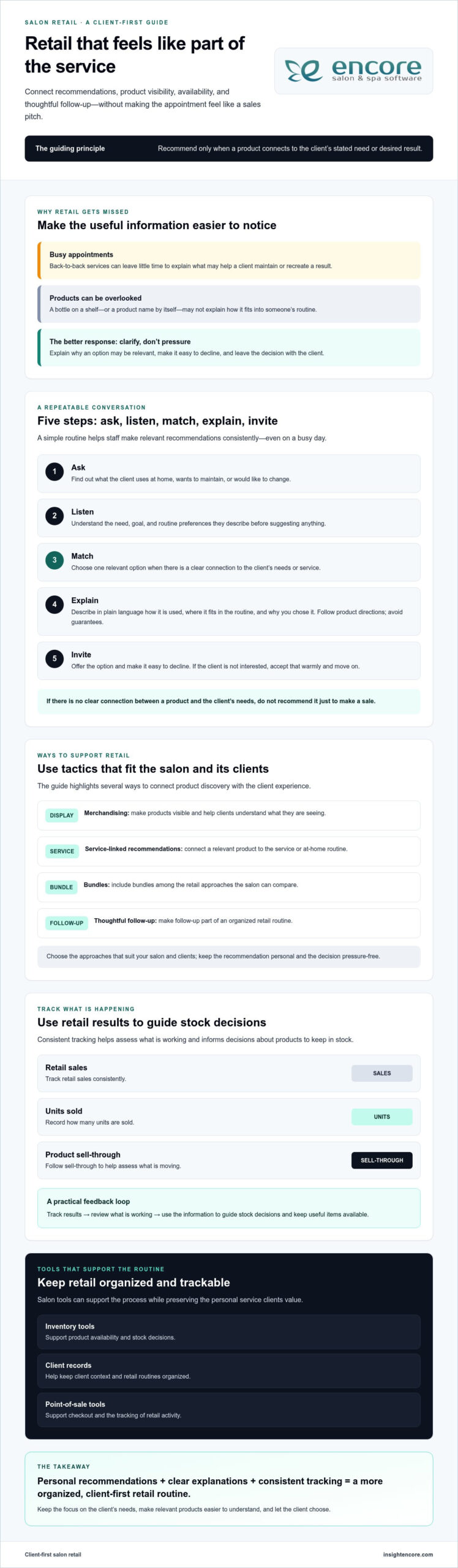
Categories
Uncategorized

Nail Salon Inventory App: The Complete 2026 Guide to Tracking Supplies and Retail

Most nail studios don’t lose their hard-earned profit on empty chairs; they lose it in unmeasured splashes of monomer, missing chrome powders, and clipboard counts that steal Sunday nights. You already know the headache of a technician running out of a trending gel shade mid-appointment, or trying to guess your actual margins on an intricate set. Generic spreadsheets treat a retail lotion the same way as a microscopic dab of foil glue, and that disconnect quietly drains your revenue. That’s why finding the right nail salon inventory app is an essential step toward running a calmer, more profitable studio.

You shouldn’t have to spend your weekends counting identical bottles just to stay organized. In this guide, you’ll discover how a dedicated nail salon inventory app eliminates backbar waste, tracks micro-usage art products, and protects your retail margins. We’ll explore practical ways to automate stock deductions right at checkout, pinpoint your exact service costs per manicure, and establish automated low-stock reorder alerts so you never face an unexpected shortage again.

Key Takeaways

  • Understand why standard retail tools stumble over micro-usage supplies, and how a dedicated nail salon inventory app solves the challenge of fractional liquid tracking.
  • Discover the practical differences between backbar consumption and retail inventory, including how to set unique targets for each revenue engine.
  • Learn a simple, step-by-step setup process to purge dead stock and standardize bottle naming across every brand, finish, and shade in your salon.
  • See how connecting stock tracking directly to your checkout process eliminates manual entry for technicians while keeping bottle counts fully accurate.
  • Uncover how real-time cost visibility per service protects your bottom line and triggers timely reorders before top-selling items run out.

Why Generic Inventory Systems Fail Modern Nail Salons

A standard retail store sells items by the unit; a customer buys a bottle of lotion, and the register deducts one box from the shelf. Nail studios don’t work that way. A modern nail salon inventory app must bridge the gap between whole-unit retail and the complex world of fractional backbar consumption. In our industry, a single bottle of monomer, basecoat, or acetone services dozens of clients across several days. While understanding inventory fundamentals helps any business buffer against shortages, general retail tools cannot calculate micro-usage. Liquids evaporate, opened polishes thicken over time, and fine art pigments spill during busy rushes. When your tracking system treats bulk salon supplies like standard boxed retail goods, your numbers drift away from reality.

The Unique Complexity of Nail Studio Supplies

Nail studios balance two completely different inventory models at the same time. Retail shelves feature sealed cuticle oils and files sold directly to clients for a set margin. Backbar supplies, however, are fluid, shared, and consumed in tiny amounts per service. Managing seasonal collections makes this balance even tougher. Trendy pastel collections peak in spring and drop off by summer, leaving behind half-empty bottles that tie up valuable working capital. Meanwhile, unrecorded product usage slowly eats into your service profits. When technicians apply generous scoops of builder gel or cut foil wraps without logging them, your treatment costs silently surge.

The Hidden Costs of Clipboard and Spreadsheet Audits

Manual stocktaking drains both your energy and your schedule. Studio owners frequently spend several hours every Sunday night squinting at hundreds of near-identical lacquer caps on a clipboard audit. Fatigued eyes make mistakes. A hurried count might misidentify a sheer nude as fully stocked, leading to a frantic, embarrassing stockout in the middle of a packed Saturday rush. Spreadsheets also trap numbers in static rows. They fail to connect supply levels with appointment schedules, making accurate cost forecasting and seasonal budgeting nearly impossible.

Essential Features to Look for in a Nail Salon Inventory App

General warehouse systems track pallets and cartons, but a high-performing nail salon inventory app needs to solve much smaller, daily bottlenecks. Nail technicians work at a fast pace, moving through appointments while pulling from shared shelves. You need intuitive digital tools that simplify station audits, catch missing stock early, and protect your margins. Industry reports frequently highlight the billions lost to retail shrink each year, and nail studios face that same vulnerability when unmonitored backbar jars and retail products walk out unaccounted for. Looking for dedicated inventory management features tailored to salon workflows ensures your tracking supports your team instead of slowing them down.

Micro-Tracking for Nail Art, Gems, and Powders

Tiny embellishments cause major tracking headaches. Individual crystals, striping tapes, and foils lack standard barcodes, making unit tracking impossible. An effective salon tool lets you bundle these micro-items into service-level recipes or flat-fee art tiers. For jars of dip powder and builder gel, photo-tagged supply indexing allows technicians to confirm color swatches instantly without opening jars or guessing pigment codes.

Mobile Barcode Scanning and Rapid Audit Modes

Nobody wants to be tethered to a front-desk computer. With mobile scanning, your phone or tablet camera turns into an agile counting tool. Technicians can complete rolling audits of a single drawer between client appointments. When wholesale shipments arrive, quick camera scans verify received items against purchase orders in seconds, preventing shelf delays.

Automated Purchase Orders and Supplier Profiles

Running out of essential supplies stalls appointments. Modern platforms monitor your usage patterns and flag low balances automatically. Key ordering capabilities should include:

  • Dynamic threshold alerts: Notifications trigger based on real-time consumption rather than fixed guesses.
  • Centralized distributor records: Store multiple supplier terms, contact details, and item numbers in one place.
  • Digital invoice matching: Cross-check incoming shipments against original POs to stop vendor overcharges before paying.

Backbar vs. Retail Inventory: Managing Two Distinct Revenue Engines

Every bottle in your studio serves one of two financial masters. Lumping professional supplies together with take-home products clouds your financial health, leaving you unsure whether service fees cover supply costs or if retail sales are masking backbar waste. A dedicated nail salon inventory app separates these streams into distinct ledgers so you can track treatment expenses independently from sales revenue. Applying essential inventory management techniques like First-In, First-Out (FIFO) ensures you rotate aging lacquers on backbar racks while preserving the fresh presentation of client retail shelves.

Inventory Dimension Professional Backbar Supplies Front-Desk Client Retail
Primary Purpose Internal operational use during treatments Direct merchandise resale to clients
Core Metrics Cost per service, waste rate, station usage Inventory turnover, gross margin, attach rate
Depletion Event Service completion or internal supply transfer Point-of-sale barcode checkout
Packaging Status Opened, shared across stations, fluid levels Factory sealed, pristine display packaging

Tracking Professional Backbar Usage and Service Costing

Accurate treatment pricing begins with knowing your true cost per service. When you divide the wholesale price of a builder gel bottle by its average application count, you reveal your baseline material expense for every full set. Tracking backbar transfers also highlights technician consumption habits early. If Station 3 goes through twice as much monomer as Station 1 for identical service numbers, you can offer gentle coaching on brush control and liquid management before lost volume hurts your margins.

Maximizing Front-Desk Retail Turnover and Cuticle Care Sales

Retail sales should serve as a high-margin booster rather than an afterthought. Trending cuticle oils, specialty hand creams, and nail strengtheners carry strong retail margins, yet studios frequently forfeit these sales due to empty shelves. Modern inventory tracking links client service histories with retail recommendations, prompting reception staff to offer the exact aftercare serum discussed during a manicure. Automated reorder triggers ensure your display racks remain fully stocked ahead of busy gift-buying rushes and holiday weekends. Pairing strong stock management with thoughtful spa marketing automation examples can further boost retail attach rates by reaching clients with timely product recommendations between visits. Combining these outreach strategies with automated birthday greetings for salon clients gives your team another touchpoint to celebrate loyal guests and encourage repeat bookings without adding manual work to your day.

Nail Salon Inventory App: The Complete 2026 Guide to Tracking Supplies and Retail

Step-by-Step: Setting Up Inventory Tracking Across All Nail Categories

Transitioning from cluttered shelves to an orderly digital system feels intimidating, but a systematic setup removes the stress. By following a clear operational roadmap, your salon can establish reliable stock controls in just a few focused stages. Here is how to configure your nail salon inventory app from the ground up:

  • Step 1: Conduct a physical purge. Clear every drawer and station shelf. Toss dried-out polishes, separated lacquers, and jars contaminated with dust or stray glitter.
  • Step 2: Standardize your naming system. Build a uniform structure across your entire catalog, such as [Brand] – [Line] – [Color Name/Code] – [Bottle Size]. Consistency prevents duplicate entries.
  • Step 3: Separate stock physical locations. Divide items into three physical and digital zones: client retail displays, active station backbar, and bulk backup storage.
  • Step 4: Establish safety stock baselines. Input your starting bottle counts into your nail salon inventory app, assigning minimum reorder thresholds based on average weekly appointment volumes.
  • Step 5: Train your team on daily checkouts. Educate technicians on how their appointment notes translate directly into inventory deductions at the front desk.

Organizing Lacquers, Gel Systems, and Acrylic Chemistry

Chemicals require strict categorization to ensure smooth service flow and workplace safety. Group items by curing method, separating standard air-dry lacquers from LED soft gels and hard builder formulas. Mark opening dates directly on bottle labels with a paint pen so you can monitor active shelf life. Match physical storage bins to your software naming system, keeping base liquids, powders, and top finishes organized in dedicated sections.

Establishing Station Restocking Schedules and Checkpoints

Prevent technicians from hoarding popular sheer nudes or premium brushes by setting strict replenishment schedules. Schedule a weekly internal transfer where technicians draw supplies from central storage using a digital restock request. Have staff audit their own station drawers every Friday afternoon. Daily sanitation items like disposable buffers, wooden pushers, and barbicides should be tracked as service overhead rather than counted by the piece.

Explore modern salon management tools

Integrated Salon Software vs. Standalone Inventory Apps: Making the Right Choice

Deciding how to track your stock usually leads to an important crossroads: should you run an isolated tracking tool alongside your calendar, or manage everything within a single platform? While a standalone nail salon inventory app can count bottles, operating it separately from your front desk creates invisible friction. Every service completed, color selected, and retail item rung up requires duplicate work. When your software tools don’t speak to each other, accurate numbers quickly slip away.

The Problem with Disconnected Tools and Manual Entry

Juggling disconnected systems burns precious staff hours and breeds costly bookkeeping mistakes. Technicians rushing between back-to-back clients rarely have time to log used materials into a separate app, leaving your stock levels perpetually outdated. Front-desk staff remain unaware of real-time backbar shortages, risking client bookings for intricate nail art sets when essential supplies are gone. Paying for multiple monthly subscriptions to solve one operational problem simply drains your profit margin.

The Advantage of an All-in-One Platform with Encore

True control happens when your appointment book, point of sale, and supply closets share a single brain. Encore unifies your salon operations into an effortless, all-in-one view. When a client checks out, the system automatically logs the service, runs the card, and deducts the appropriate backbar materials and retail bottles right at the register. Technicians never have to log product usage manually after a busy appointment.

Backed by more than three decades of beauty industry experience through parent company Syntec Business Systems, Encore provides specialized tools tailored to the unique workflow of nail studios. Clear, unified reporting shows the exact profit margins of every manicure, acrylic full set, and custom nail art upgrade on your service menu. You get reliable data, human-centered onboarding, and dependable support that keeps your business running smoothly. Explore Encore Salon Software to simplify your nail salon operations today.

Take Full Control of Your Studio’s Supplies and Profits

Stopping inventory leaks shouldn’t mean sacrificing your weekends to manual bottle counts. By separating fluid backbar usage from front-desk retail and automating deductions at checkout, you protect treatment margins while keeping popular polishes on the shelf. Choosing an integrated nail salon inventory app turns chaotic stockrooms into predictable, profitable operations.

Backed by Syntec Business Systems with over 30 years of salon software expertise, Encore delivers a dedicated Nail Salon Software module that seamlessly connects appointments, point of sale, and inventory tracking. With personalized, human-centered training and onboarding, your team receives hands-on guidance to ensure a smooth transition from day one.

Discover how Encore Salon Software simplifies your inventory and daily operations

Give your technicians the freedom to focus on their artistry while your supply management runs smoothly in the background.

Frequently Asked Questions

How does a nail salon inventory app handle fractional use of monomer and acetone?

Dedicated salon platforms track bulk liquids through service-based product recipes. Instead of forcing technicians to measure ounces after each client, the software links standard consumption amounts, such as a fraction of an ounce of monomer per full set, directly to the appointment. When the service checks out, the system deducts that portion automatically, keeping your overall liquid volume accurate over time.

Can an inventory app track small nail art supplies like crystals, foils, and stickers?

Yes, but counting individual charms or foil sheets by hand is impractical. The most efficient approach bundles nail art supplies into flat-rate service tiers or custom add-ons within your system. When a client books or adds a specific art tier, the software accounts for the bundled material cost, protecting your profit margins without forcing artists to count tiny stones.

What is the difference between backbar inventory and retail inventory in a nail salon?

Backbar inventory covers professional supplies consumed during services, including builder gels, acrylic chemistry, and sanitizing solutions. These items represent internal operational expenses. Retail inventory includes sealed items displayed for customer purchase, such as cuticle oils and home hand care. Separating these two streams ensures backbar supply costs never distort your retail sales numbers or skew treatment profitability.

How often should a nail salon conduct physical inventory counts?

Most salons find success using weekly rolling cycle counts combined with a broader monthly audit. Rather than spending hours counting every shade at once, technicians audit fast-moving gel lines and front-desk retail products weekly. Bulk backups and slower-moving seasonal shades can be checked monthly, catching discrepancies early without disrupting daily salon operations.

Will our nail technicians need to enter product usage manually after every manicure?

No, an integrated nail salon inventory app removes that manual burden entirely. Backbar usage connects directly to your appointment schedule and checkout system. When a technician marks an appointment complete and rings up the client, the software deducts the required polishes, prep liquids, and disposables behind the scenes, leaving your staff free to focus on their clients.

Can I use my smartphone or tablet to scan barcodes during inventory checks?

Yes, mobile-friendly salon platforms let you turn any standard tablet or smartphone camera into an agile barcode scanner. Staff can walk directly to manicure tables, storage bins, and retail shelves to scan items during routine audits. This mobile workflow also accelerates receiving new distributor shipments, letting you verify incoming orders right out of the shipping box.

Why is an all-in-one salon management platform better than a standalone inventory app?

Standalone inventory tools operate in isolation, forcing staff to enter data twice between your appointment book and stock sheets. An all-in-one solution like Encore unites appointments, point of sale, and supply management in one place. Product counts deduct automatically as tickets close, giving you real-time visibility into service margins while eliminating the headaches of juggling multiple software subscriptions.

Disclaimer

This article is general in nature and may contain errors, please verify all claims with your sales rep
Categories
Uncategorized

How to Stop Salon Staff Theft: A Comprehensive 2026 Prevention Guide

Did you know that internal employee theft accounts for nearly 29% of all retail shrinkage, with the average incident costing a business over $1,800? It’s a heavy weight to carry when you suspect that "missing" retail bottles or end-of-day cash discrepancies aren’t just simple accidents. You’ve worked hard to build your salon. It’s heartbreaking to feel like your trust is being tested by the very people you’ve hired. We understand that you want to maintain high staff morale without feeling like a micromanager. Learning how to stop salon staff theft is really about replacing manual, "trust-based" systems with automated transparency that protects both your profits and your team’s integrity.

You deserve a secure business where every dollar and product is accounted for. This comprehensive 2026 guide will show you how to identify hidden leaks and implement professional systems that protect your revenue, inventory, and client list. We’ll walk through everything from role-based software permissions to the latest PCI DSS 4.0 compliance standards and tip-theft regulations. By the end, you’ll have a clear roadmap to turn Encore software into a silent partner that keeps your books clean and your mind at ease.

Key Takeaways

  • Learn to spot the difference between honest back-bar waste and intentional retail shrinkage to protect your hard-earned margins.
  • Discover how to stop salon staff theft by using tiered POS permissions that keep your cash drawer and client database secure.
  • Implement weekly spot checks on high-value inventory items to catch missing products within days rather than months.
  • Strengthen team morale with automated commission tracking that ensures your stylists are paid accurately and transparently every time.
  • Use real-time audit logs and automated reporting to act as a silent partner, flagging discrepancies so you don’t have to micromanage.

Identifying the 4 Main Types of Salon Staff Theft

Theft in a salon environment is rarely a one-time heist. It’s usually a slow leak that drains your bank account over months. To understand how to stop salon staff theft, you first need to recognize that it comes in many forms, some of which might even look like "business as usual" at first glance. Identifying these leaks is the first step toward reclaiming your peace of mind and protecting your bottom line.

Most internal loss falls into one of four categories:

  • Product and Inventory Theft: This covers retail bottles on your shelves and professional supplies in the back.
  • Cash and Service Theft: This includes unrecorded walk-ins, "sweetheart" discounts for friends, or using the "no-sale" key to open the drawer without a transaction.
  • Time Theft: Paying for hours not worked, such as when staff clock in early, stay late without cause, or spend shift hours on personal calls.
  • Client and Data Poaching: The most dangerous form, where staff export your database to start a competing business or direct clients to their home studios.

The Hidden Cost of "Back-Bar" Shrinkage

Unrecorded color usage is often the number one silent profit killer in salons. It’s easy for a stylist to justify "just a little extra" for a client without adding it to the ticket, but those ounces add up to thousands of dollars in lost revenue annually. Back-bar shrinkage is the unallocated cost of professional supplies used during services. There is a clear, expensive difference between professional use and a staff member "taking a bottle home" for personal use. Without real-time tracking, your back-bar becomes an open buffet that eats your margins.

Client Data: Your Most Valuable (and Vulnerable) Asset

Your client list is the heartbeat of your business. When stylists use personal phones to bypass your booking system, they’re creating a private bridge that bypasses your brand. Learning how to stop salon staff theft requires securing this digital perimeter. If a stylist leaves and takes your database with them, the financial hit can be devastating to your long-term growth. The legal and financial implications of a stolen client database are severe; you’re not just losing future bookings, you’re losing the marketing investment you spent to acquire those leads. Protecting this requires following client data security best practices, such as restricting export permissions and using individual staff logins.

Strengthening Your Point of Sale (POS) Security

When thinking about how to stop salon staff theft, your POS system is your first line of defense. Your front desk is the heart of your business, but it’s also where most revenue leaks happen. If everyone uses the same "General" login, you’ve lost accountability before the day even starts. Assigning unique PINs or login codes to every team member creates a digital paper trail for every action. When you know exactly who opened the drawer at 2:15 PM, the temptation to "borrow" from the till vanishes. This isn’t just about suspicion; it’s about meeting modern security standards. As of March 2025, PCI DSS 4.0 requires strict access logs and multi-factor authentication for payment environments.

Eliminating the abuse of the "No Sale" button is another vital step. In many legacy systems, this button is an open invitation to open the drawer without recording a transaction. By requiring a mandatory reason code for every "No Sale" event, you force transparency. If a drawer opens, there should be a recorded reason why. This simple change is a foundational part of how to stop salon staff theft without creating a hostile work environment.

The Power of Tiered Employee Permissions

Trust is important, but professional boundaries are better. Your junior stylists or front desk staff rarely need the ability to delete a transaction or issue a full refund without oversight. By setting tiered permission levels, you ensure that high-risk actions require a manager’s approval. You can also restrict access to sensitive financial reports and client export tools, ensuring your data stays where it belongs. These Encore features allow you to build a system of checks and balances that supports your team while protecting your assets.

Integrated Payments vs. Manual Entry

Manual payment entry is a major security loophole. When a stylist has to manually type a service total into a standalone terminal, it’s easy for a "fat finger" error to occur. Or worse, a $100 service is intentionally typed in as $80, with the difference disappearing into a pocket. Integrated credit card processing removes this risk entirely. The POS total communicates directly with the terminal, ensuring the bank deposit matches your sales report down to the penny every single day.

Automating your daily reconciliation gives you peace of mind that can’t be found in a manual ledger. It turns your checkout process into a secure, closed loop. If you want to see how these automated systems can simplify your life, you might want to explore our management tools today.

Mastering Inventory Control to Prevent Shrinkage

Inventory management is often the most overlooked strategy when owners consider how to stop salon staff theft. It’s easy to focus solely on the cash drawer, but with internal theft accounting for nearly 29% of all retail shrinkage, your shelves are a primary target. The average internal theft incident costs a business $1,890, which is over four times the cost of an external shoplifting event. You need a system that flags missing items before the loss becomes a crisis.

Implementing a "check-out" system for back-bar supplies and setting up automated "low stock" alerts are simple ways to build accountability. These alerts act as an early warning system. If you suddenly have an unexplained drop in a high-velocity item like a popular lightener, you’ll know within hours. When a stylist knows that the system expects a specific number of color tubes to be used based on the day’s bookings, the temptation to divert products for personal side-work disappears. It turns your software into a silent partner that watches your margins while you focus on your clients.

Retail vs. Professional Inventory Tracking

Tracking retail bottles is straightforward because they’re sold as individual units. You can see the empty spot on the shelf. However, tracking color bowls and chemical treatments is where the real money is saved. These professional supplies are often treated as "free" by staff, but they represent a massive overhead cost. By using Encore Salon Software, you can link specific product consumption to every appointment on your calendar. This creates a clear map of where your supplies are going. If you manage a larger facility, you can find similar tools in our spa inventory management system guide to keep every department in check.

The "Spot Check" Method for Accountability

You don’t need to shut down the salon for a full audit to keep things secure. The "spot check" method involves picking just five high-value items and counting them against your digital records. It’s quick, non-confrontational, and highly effective. When you discuss "missing" items immediately, it prevents small discrepancies from becoming long-term habits. Consistency in counting is more effective than the frequency of the count. This approach builds a culture of transparency where everyone knows the inventory is valued and monitored. It’s a proactive way to manage how to stop salon staff theft without creating an atmosphere of suspicion.

How to Stop Salon Staff Theft: A Comprehensive 2026 Prevention Guide

Building a Culture of Transparency and Fairness

Culture is your strongest defense against internal loss. When your team feels respected and fairly compensated, the psychological barrier to theft becomes much higher. Many owners wonder how to stop salon staff theft, but the answer often starts with looking at your own payroll processes. In 2026, compliance with laws like California SB 648 is essential. This bill, which took effect on January 1, 2026, bars owners from skimming tips or deducting credit card fees from employee gratuities. When you show your team that you respect their earnings, they’re far more likely to respect your inventory and your brand.

Update your employment contracts to include clear non-solicitation and theft clauses. These documents define exactly what happens if a breach occurs, which removes ambiguity for everyone. Hold regular team meetings to review salon performance metrics without finger-pointing. Celebrate high utilization rates and reward honesty when discrepancies are reported voluntarily. When you treat these metrics as a collective win, staff are more likely to protect the resources that help the entire business succeed.

Transparency in Commission and Pay

Removing the mystery from paychecks is a powerful deterrent. If a stylist feels they’re being "short-changed" on a complex commission structure, they might rationalize taking a retail bottle to "even things out." By calculating salon staff commission automatically, you remove the human error that leads to these disputes. Providing staff with their own performance dashboards allows them to track their earnings in real-time. This visibility builds a psychological link between their hard work and their bank account, making them feel like a valued partner in the success of the salon.

Setting Clear Expectations from Day One

Include a "Salon Code of Conduct" in your onboarding packet to set the tone from day one. Explain the "why" behind your tracking systems clearly. It’s not about watching their every move; it’s about protecting their paycheck and the salon’s future growth. When the first discrepancy occurs, take a supportive but firm approach. Ask questions to understand if it was a training issue before assuming it was malicious. Setting these standards is a proactive way to manage how to stop salon staff theft while keeping your team’s morale high.

Start your free Encore trial today

Leveraging Encore Salon Software as Your Security Partner

While building a great culture and setting clear expectations are vital, your management software is the engine that keeps your security systems running. It’s the difference between guessing what happened and having a factual record you can rely on. Software shouldn’t feel like a digital prison for your team. Instead, it acts as a safety net that protects the salon’s assets and ensures everyone is treated fairly. By centralizing your operations, you move from reactive "firefighting" to proactive management.

Modern systems do more than just book appointments. They act as a silent partner that watches your margins 24/7. From tracking every "no-sale" drawer opening to flagging unusual retail discounts, the right tools help you understand how to stop salon staff theft without spending your entire day hovering over the front desk. This automation allows you to focus on growing your brand while the software handles the heavy lifting of oversight.

The Audit Trail: Your Digital Paper Trail

The team behind Encore has been a supportive partner to salon owners since 1991, and our real-time audit trails are a testament to that experience. Every time a staff member logs in, opens a drawer, or completes a sale, a digital footprint is created. You can use the "Transaction History" feature to reconstruct a suspicious day minute by minute. This transparency is incredibly powerful. The mere presence of a robust, visible tracking system deters approximately 90% of opportunistic theft. When staff know that every voided transaction is logged and reviewed, the temptation to "bend the rules" effectively disappears.

Remote Management for Peace of Mind

In 2026, you shouldn’t have to be physically present in the salon to know your business is secure. Mobile access allows you to monitor daily sales, check inventory levels, and review staff activity from your phone, whether you’re at home or on vacation. This high-level visibility helps you spot red flags before they become expensive problems. For example, you can use salon business analytics to identify long-term patterns of loss that might go unnoticed during a busy shift. These reports can flag if a specific stylist has a high rate of "product waste" or if the cash drawer is consistently short on certain days.

Ready to secure your salon and get back to doing what you love? Explore Encore Features to see how our secure client management and automated reporting can protect your business today.

Reclaim Your Peace of Mind and Profits

Protecting your business doesn’t mean sacrificing the positive culture you’ve built. It’s about empowering your team with systems that reward honesty and clear away the fog of manual tracking. By implementing tiered POS permissions and automated inventory counts, you turn your operations into a secure, transparent environment where every product and dollar is accounted for. You’ve discovered how to stop salon staff theft by focusing on visibility rather than suspicion.

Syntec Business Systems has been a dedicated mentor to beauty professionals since 1991. We provide the tools you need to succeed, including comprehensive audit trails and specialized inventory tracking. Our easy-to-use POS systems allow you to customize employee permissions, ensuring your most sensitive data stays protected while your stylists focus on their craft.

Secure your salon’s future with Encore Salon Software
You don’t have to carry the stress of "missing" revenue anymore. With a reliable partner by your side, you can lead with confidence and watch your profit margins thrive.

Frequently Asked Questions

What should I do if I catch a salon employee stealing?

Confront the employee privately with documented evidence immediately. It’s vital to follow your state or provincial labor laws to avoid wrongful termination claims. Keep the conversation professional and focused on the facts you’ve gathered from your audit logs. Depending on the severity, you may need to involve local authorities. Having a clear "Salon Code of Conduct" in place from day one makes these difficult conversations much easier to manage.

Is it legal to install security cameras in my salon?

You can legally install security cameras in public areas of your salon, like the reception desk or retail floor. However, you must never place cameras in private areas such as bathrooms or changing rooms. It’s often required to post a sign informing staff and clients that the premises are under surveillance. Always consult with a local legal professional to ensure you’re complying with specific privacy regulations in your region.

How do I know if a stylist is "stealing" clients for home appointments?

Sudden drops in a stylist’s rebooking rate or a high number of "no-show" clients who were previously regulars are major red flags. You might also notice stylists sharing their personal phone numbers or social media handles during services. A robust client management system helps you track these patterns by flagging unusual appointment gaps. Keeping your database secure with restricted export permissions is the best way to prevent this type of loss.

Can salon software really prevent cash drawer discrepancies?

Integrated systems significantly reduce errors by ensuring that the amount charged on the terminal matches the POS ticket exactly. When you use individual staff PINs, every transaction is tied to a specific person, which eliminates the "it wasn’t me" excuse. This transparency is a key part of how to stop salon staff theft because it removes the opportunity for skimming. Automated reconciliation at the end of each shift catches small errors before they grow.

What are the most common red flags of salon staff theft?

Common red flags include a high frequency of "voided" transactions, excessive "no-sale" drawer openings, and retail inventory that doesn’t match your sales reports. You might also notice a stylist whose retail sales are significantly lower than their peers despite having a full schedule. Defensive behavior when you mention inventory counts is another warning sign. Monitoring these patterns allows you to address potential issues before they impact your overall profit margins.

How do I track professional back-bar product usage accurately?

The most accurate way to track back-bar usage is to link specific product amounts to the services performed in your inventory management system. For example, if a color service typically uses two ounces of developer, the system should automatically deduct that amount from your stock. Performing weekly cycle counts on your top 20% highest-value items helps you catch discrepancies quickly. This level of detail turns your professional supplies from a "free" resource into a tracked asset.

Should I fire an employee for a first-time minor theft?

Deciding whether to fire an employee for a minor first-time offense often depends on the specific language in your employment contract. Many owners choose a zero-tolerance policy because even small thefts can signal a lack of respect for the business. If you decide on a warning, ensure the incident is documented and the expectations are clearly restated. Understanding how to stop salon staff theft involves setting firm boundaries that protect your salon’s long-term financial health.

How can I prevent "time theft" in a busy salon environment?

You can prevent time theft by using a digital clock-in system that requires unique staff credentials. This eliminates "buddy punching" where one employee clocks in for another who is running late. Encore Salon Software allows you to compare scheduled hours against actual hours worked, making it easy to spot discrepancies. Clear policies regarding personal phone use and breaks also help maintain a professional environment where everyone is focused on client care during their shift.

Disclaimer

This article is general in nature and may contain errors, please verify all claims with your sales rep
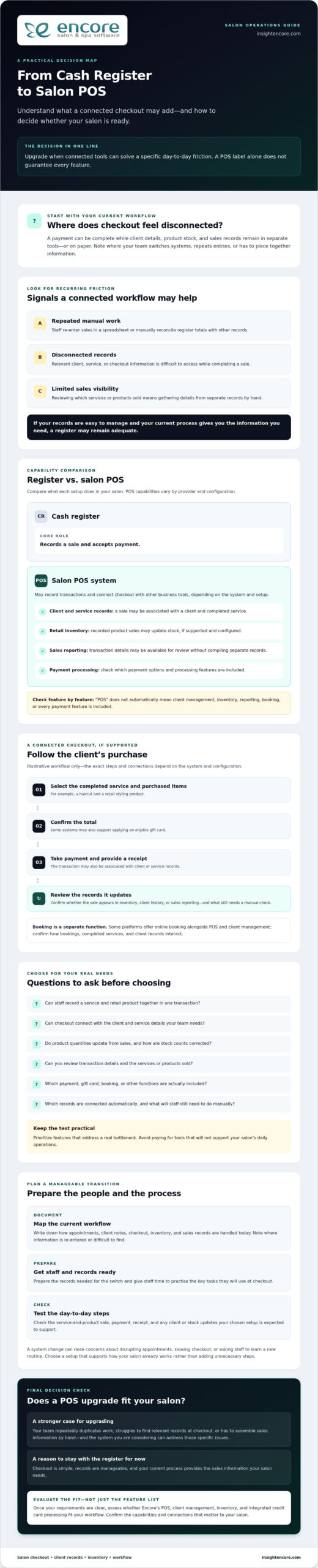
Categories
Uncategorized

Freeing Up Time From Salon Admin Work: The 2026 Automation Guide

Did you know the average salon owner spends between 10 and 16 hours every week on tasks that don’t earn a single cent? That’s nearly two full workdays lost to messy spreadsheets, endless phone tag, and manual math. If you feel like you’re drowning in paperwork, you aren’t alone. Most owners are currently paying a “time tax” that keeps them away from the chair and their families. This guide focuses on freeing up time from salon admin work by using modern automation to handle the heavy lifting for you.

We understand that you didn’t open your doors to become a full-time administrator. You’re an artist and a leader. Yet, your Sunday nights are likely spent calculating multi-tier commissions or worrying about inventory shortages. It’s exhausting to see your creative passion buried under a mountain of manual entries. We’re here to help you move past that stress. You can reclaim 10 or more hours every week while providing a better experience for your clients and a more organized environment for your staff.

This 2026 guide reveals how to eliminate manual double-bookings and slash no-shows by up to 38 percent. We’ll show you how to automate your payroll to capture the expanded FICA tip credits and keep your inventory synced in real time. It’s time to trade your admin burden for a streamlined workflow that finally gives you your life back.

Key Takeaways

  • Identify the hidden “Admin Tax” that drains your energy and pinpoint the three biggest time-wasters in your daily routine.
  • Stop chasing clients and eliminate phone tag by implementing a 24/7 self-service booking portal with automated reminders.
  • Master the art of freeing up time from salon admin work by automating your POS and staff commission calculations for instant, accurate reporting.
  • Ensure your shelves stay stocked and your chairs stay full using automated inventory alerts and “set it and forget it” marketing campaigns.
  • Discover how specialized software modules can streamline your specific business model, from nail salons and barber shops to tattoo studios.

The Salon Admin Tax: Identifying Your Biggest Time Wasters

You didn’t start your salon to be a bookkeeper. You’re a creator. Yet, right now, you’re likely paying a “salon admin tax.” This tax consists of every unbilled hour spent wrestling with spreadsheets or chasing appointments. It’s the time you can’t bill for, but it drains your energy just the same. Identifying these leaks is the first step toward freeing up time from salon admin work. When you know where the minutes are vanishing, you can finally take them back.

Most owners face three primary time sinks. We call these the “Big Three.” First, there’s the relentless phone tag with clients. Second, the Sunday night payroll and commission math. Third, the manual inventory counts that never seem to match what’s actually on your shelves. When you rely on manual systems, errors are inevitable. A single double-booking doesn’t just ruin one hour; it creates a ripple effect of stress for your staff and disappointment for your clients. Salon admin work is the operational friction that limits creative growth.

The Hidden Cost of Manual Scheduling

Every phone call takes an average of three to five minutes. Multiply that by twenty bookings a day, and you’ve lost over an hour just talking about dates and times. Modern appointment scheduling software removes this burden entirely. It allows your clients to book while you sleep. Beyond the time saved, consider the emotional toll. Manually managing cancellations and no-shows is exhausting. Automating this process is a vital part of learning how to increase salon profit margin by focusing on billable services instead of logistics.

The Payroll and Commission Headache

Manual commission calculations are notoriously difficult. Industry data shows that manual systems are often prone to 5-10% error rates. These mistakes aren’t just expensive; they erode the trust you’ve built with your team. Your stylists work hard. When their pay is delayed or incorrect due to paperwork hurdles, morale drops. Freeing up time from salon admin work means moving toward real-time financial tracking. Instead of facing a mountain of receipts at the end of the month, you get instant clarity. You deserve a system that supports your team’s growth without the headache of manual math.

Phase 1: Eliminating Phone Tag with Self-Service Booking

If you’re still relying on a paper book and a landline, you’re essentially tethered to your front desk. Breaking free requires a shift toward self-service. The first phase of freeing up time from salon admin work involves moving your schedule to a cloud-based system that works while you’re busy with a client or sleeping. Research shows that roughly 46 to 50 percent of salon appointments are booked outside regular business hours. If you don’t have a system to catch those requests, you’re leaving money on the table and creating a backlog of voicemails to return the next morning.

The Bureau of Labor Statistics occupational outlook notes that salon owners often juggle heavy administrative duties alongside their craft. By setting up salon client booking portals, you offload the most repetitive part of your day. It isn’t just about convenience; it’s about reclaiming your mental energy.

Setting Up Your 24/7 Virtual Front Desk

To make this transition smooth, don’t just open your calendar. Set intelligent booking rules. For example, you can prevent awkward 15-minute gaps by forcing appointments to sit back-to-back. This ensures your day remains compact and profitable. When configuring your portal, make sure to collect essential data upfront to save time later. A quick checklist for your booking form should include:

  • Updated contact information and preferred communication methods.
  • Chemical history or allergy alerts for new clients.
  • Specific service requirements to ensure the correct time block is reserved.

Digital consultation forms take this a step further. Send these out automatically the moment a booking is confirmed. When the client arrives, you already have their history and goals ready. It’s a professional touch that saves five minutes of “getting to know you” time per appointment.

Automating the “Are You Coming?” Conversation

Automated SMS reminders are a game-changer for any busy owner. They reduce no-show rates by 35 to 38 percent. It isn’t just a nudge; it’s about the psychology of commitment. When a client receives a professional text, they’re more likely to respect your time. Two-way messaging allows them to confirm or reschedule without you ever picking up the phone. You can even see how these automated workflows feel in practice to understand the relief they provide.

Finally, empower your team by giving them mobile access to their own schedules. This eliminates the “when is my first client?” texts that clutter your personal time. When your staff can manage their own day, you’re one step closer to truly freeing up time from salon admin work and focusing on your growth as a mentor and artist.

Phase 2: Automating the Numbers (Payroll, POS, and Commissions)

Numbers don’t lie, but they sure can be exhausting to track by hand. If you’re still using a calculator and a notepad to figure out what you owe your team, you’re losing hours of your life every single pay period. In fact, research shows that salons running manual payroll spend over 11 hours every two weeks just on math. Transitioning to a system where your Point of Sale (POS) talks directly to your calendar is the most effective way of freeing up time from salon admin work. It turns a day-long chore into a few simple clicks.

According to the U.S. Chamber of Commerce guide to business automation, streamlining these repetitive financial workflows prevents burnout and saves hundreds of hours annually. When your sales data flows instantly into your reporting, you get a real-time view of your business health. You don’t have to wait until the end of the month to see your profit and loss; you can see it in seconds.

One-Click Commission and Payroll

The secret to a happy team is accuracy and transparency. You can set up specific rules in your software to calculate salon staff commission automatically based on their experience level. Whether you have senior stylists on a higher tier or junior assistants earning a flat rate, the system handles the logic for you. This is where the Encore advantage really shines, especially for hybrid salons. It manages specialized booth renter financials with ease, keeping your accounts separate and compliant. Giving your staff mobile access to view their own performance metrics builds trust and keeps everyone motivated without you having to print out reports every Friday.

Streamlined Checkout for Clients and Staff

The checkout process should be a celebration of the service, not a math test. By moving to integrated credit card processing, you eliminate the reconciliation errors that happen when you manually type totals into a separate terminal. It’s faster, safer, and much more professional. Storing cards on file allows for a “silent” checkout, which is perfect for busy clients who need to get back to their day. You can also boost your immediate cash flow by offering integrated gift cards that track themselves. Tips and product add-ons are added with a tap, ensuring your stylists get paid exactly what they earned without any manual entry. This level of automation is the ultimate tool for freeing up time from salon admin work while keeping your focus on the guest experience.

Freeing Up Time From Salon Admin Work: The 2026 Automation Guide

Phase 3: Streamlining Inventory and Client Retention Marketing

The final hurdle in freeing up time from salon admin work often involves the tasks you can’t see but definitely feel: inventory and marketing. Counting bottles of shampoo at 9:00 PM or manually emailing clients who haven’t visited in six weeks is a drain on your creative energy. By automating these “back-of-house” processes, you ensure your business remains profitable and your chairs stay full without you ever lifting a pen. It’s about creating a system that cares for your clients and your supplies as much as you do.

Automated Stock Control

Manual inventory counts are notoriously inaccurate and time-consuming. Instead of guessing what you need to order, implement barcode scanning for instant updates. When a stylist checks out a client or logs a formula, your stock levels should update in real time. Using a spa inventory management system allows you to distinguish between back-bar professional usage and retail sales instantly. You can set low-stock alerts that notify you the moment a popular color tube or serum hits a critical level.

This data-driven approach is essential for reducing salon operating costs, as it prevents money from sitting on shelves in the form of overstock. For specialized businesses like tattoo studios, tracking specific supplies like needles and ink is just as critical to maintaining safety and professional standards. When your software handles the ordering logic, you spend less time on clipboards and more time on your craft.

Hands-Free Marketing and Loyalty

Client retention accounts for roughly 87 percent of total salon revenue, yet manual marketing is often the first thing to slide when things get busy. “Set it and forget it” campaigns solve this by triggering “we miss you” emails automatically based on a client’s last visit date. If someone hasn’t re-booked within their usual six-week window, the system sends a friendly nudge for you. This persistent connection is a core part of freeing up time from salon admin work while maintaining a high-end, personal feel.

Automated birthday greetings and holiday promotions build lasting bonds without requiring a single minute of your day. You can also ditch the manual punch cards that clients always lose. An automated loyalty program tracks points internally and applies them at checkout with a simple tap. It rewards your frequent guests and encourages higher spending, all while the software handles the record-keeping in the background.

Automate your marketing and inventory today

Reclaiming Your Freedom: Implementing the Encore Management Suite

Choosing the right system shouldn’t add to your workload. It should be the end of it. Encore Salon & Spa Software acts as a supportive mentor that handles the boring, repetitive tasks so you can focus on being creative. We understand that migrating your data or switching from a complex competitor can feel intimidating. That’s why we use a human-centric approach to get you up and running without the technical headaches. Our team is here to ensure your transition is smooth, reliable, and accessible. Our goal is to guide you from a state of constant operational stress to a feeling of total, organized control. Freeing up time from salon admin work is finally within reach when you have a partner that prioritizes your peace of mind alongside your business growth.

A Solution for Every Business Model

Not every beauty business is the same. A high-end spa has different needs than a bustling barbershop. If you’re an independent pro, you might need a dedicated booth renter client management app that keeps your finances separate from the salon owner’s. Encore provides specialized modules for tattoo artists, nail techs, and barbers, ensuring the tools fit your specific workflow rather than forcing you into a one-size-fits-all box. The Encore features are designed to be an all-in-one suite. This means you don’t have to juggle five different apps to run one business. Whether you’re managing a team of twenty or working solo, the system scales with you, providing the exact level of support you need to thrive.

The Next Step Toward More Free Time

It’s time to stop paying the “admin tax.” You’ve worked hard to build your brand, and you shouldn’t have to sacrifice your personal life or your Sunday nights to keep the lights on. Freeing up time from salon admin work is about more than just convenience; it’s about reclaiming your freedom to lead and inspire. With the reliability of Syntec Business Systems, a company that’s been supporting the industry since 1991, you’re partnering with experts who’ve seen every industry shift. We’re deeply invested in your individual success. We reject delayed interactions and cold, automated support. Instead, we offer a hands-on alliance that empowers you to grow. Take the first step toward a more balanced life today and see how much your business can achieve when you’re finally back behind the chair.

Try Encore Now to Reclaim Your Time

Take Control of Your Salon’s Future

You’ve seen how much your business changes when you stop fighting with spreadsheets and start using smart systems. By automating your booking, payroll, and inventory, you aren’t just making things easier. You’re actively freeing up time from salon admin work so you can focus on the artistry that made you open your doors in the first place. Whether it’s cutting out the stress of manual commission math or ensuring your shelves are always stocked, the right tools make every day feel lighter.

Since 1991, we’ve helped salon professionals transition from chaos to organized control. Our all-in-one platform comes with no hidden fees and dedicated human support to guide you through every step of your migration. You don’t have to navigate these changes alone. We’re here to be the partner that helps your business grow while giving you back your personal life and your Sunday nights.

Start freeing up your time today, try Encore for yourself!

Your journey to a more balanced and profitable salon starts with a single step. We’re excited to help you see what’s possible when the paperwork is finally off your plate and you’re back to doing what you love.

Frequently Asked Questions

How much time can salon software really save me each week?

Most salon owners save between 10 and 16 hours every week by automating their manual workflows. This reclaimed time comes from eliminating the need for manual scheduling, phone tag, and complex payroll calculations. By freeing up time from salon admin work, you can focus on creative services or spend more time with family. It’s a significant shift that turns two full workdays of paperwork into a few simple clicks each morning.

Is it difficult to move my client data from paper or spreadsheets to Encore?

Transitioning your business is much easier than you might think. We provide a human-centric migration process designed to lower the barrier for those moving from manual systems or complex competitors. Our team handles the heavy lifting of importing your client records, formula histories, and service lists. You won’t have to worry about losing important data during the switch. We act as your supportive partner to ensure you’re ready to go without the setup anxiety.

Can I manage multiple staff commission structures automatically?

Yes, you can easily set up automated rules for various staff tiers. Whether you have senior stylists on a high percentage or junior assistants on a flat rate, the software handles the math instantly at checkout. This transparency builds trust with your team because they can view their own performance metrics in real time. It eliminates the 5 to 10 percent error rate often found in manual systems and ensures everyone gets paid accurately and on time.

What happens if I’m not tech-savvy? Is there support available?

We specialize in making technology accessible for everyone. Our platform is designed with simplicity in mind, using clear language instead of dense technical jargon. If you ever feel stuck, you have access to toll-free human phone support from our team of experts. We avoid the cold, impersonal feel of traditional software companies. You’ll always have a responsive ally ready to help you navigate the system and grow your business with confidence.

Does Encore Salon Software work for independent chair renters?

Absolutely. We offer specialized Chair/Booth Renter Software specifically for independent pros. This version includes partitioned logins and separate financial tracking to keep your business records distinct from the salon owner’s. It’s the perfect solution for independent stylists who need professional tools for scheduling and CRM without the complexity of a full enterprise suite. You’ll have total control over your own client list, pricing, and service history in one convenient app.

How do automated reminders help reduce my salon admin work?

Automated reminders act as your virtual front desk, handling the “Are you coming?” conversation while you work. By sending two-way SMS confirmations, you can reduce your no-show rate by up to 38 percent. This is a vital part of freeing up time from salon admin work because it eliminates the need for morning confirmation calls. Clients can confirm or reschedule via text, ensuring your chair stays full and your schedule remains organized without manual effort.

Can I track my inventory and retail sales in the same platform?

Yes, our all-in-one platform includes an integrated Inventory Management System. You can track professional back-bar usage and retail sales in real time using barcode scanning. When a stylist uses a product or sells a bottle of shampoo, the stock levels update automatically. The system even sends low-stock alerts to prevent shortages. This keeps your operating costs low and ensures you never have to spend another Sunday night manually counting bottles in the stockroom.

Is integrated credit card processing more expensive than my current bank terminal?

Integrated processing is often more cost-effective because it eliminates expensive reconciliation errors and manual entry mistakes. While rates vary based on transaction types, having your payments connected directly to your POS saves hours of bookkeeping. It allows for card-on-file bookings and silent checkouts, which improve the client experience. You’ll gain instant financial reporting and a clear view of your profit margins without the headache of managing separate bank terminals and software reports.

Disclaimer

This article is general in nature and may contain errors, please verify all claims with your sales rep
Categories
Uncategorized

How to Make My Salon Look More Professional: The 2026 Front Desk Guide

Imagine a client walks through your doors, ready for a luxury experience, but they’re greeted by a ringing phone, a desk buried in sticky notes, and a "just a minute" finger. It isn’t the high-end vibe you worked so hard to create. You’ve likely felt that sinking feeling when a cluttered desk or a missed call makes your business look disorganized. It’s frustrating because your talent is world-class, but your administrative setup is holding you back. You know that the first thirty seconds of a visit define your brand’s value. When you implement modern salon front desk software, you replace that chaos with a sense of calm and professional confidence.

This guide will show you how to flip the script and transform your entryway into a polished, world-class experience. We’ll explore the 2026 strategies that replace paper clutter with sleek automation and manual scheduling with seamless online booking. You’ll learn how to build deep client trust through reliable communication while reclaiming your time. By the end of this article, you’ll have a clear roadmap to a more professional salon that lets you focus on your craft instead of your calendar. It’s time to let your front desk reflect the high quality of the services you provide every day.

Key Takeaways

  • Discover how to use the “Peak-End Rule” to ensure your clients leave with a world-class impression. Your front desk sets the tone for every visit.
  • Learn why upgrading to modern salon front desk software is the fastest way to replace bulky hardware and messy paperwork. It creates a sleek, digital experience that builds immediate trust.
  • Master the art of consistent communication by automating your reminders and aftercare messages. This removes the risk of human error and keeps your brand looking reliable.
  • Build elite-level loyalty by using detailed client histories to personalize every interaction. When you remember their preferences and formulas, you prove your professionalism.
  • Streamline your entire operation by bringing booking, POS, and marketing into one unified system. This allows you to step away from the admin desk and focus on your artistry.

Defining Professionalism: Why Your Front Desk is the Face of Your Brand

Professionalism isn’t just about a clean floor or a polite greeting. In 2026, it’s the perfect intersection of aesthetics, efficiency, and deep-seated trust. Think of your front desk as the physical handshake of your brand. If that handshake feels cluttered, slow, or disorganized, the client’s perception of your skill drops before they even sit in the chair. This is where the "Peak-End Rule" comes into play. Psychologists suggest that people judge an experience largely based on how they felt at its peak and its end. In a salon setting, the "end" is the checkout and rebooking process. If that final moment is a clumsy fumble through a paper diary, it erases the magic of the service provided. Simply put, salon front desk software is the nervous system of a modern beauty business, ensuring every pulse of your operation is steady, professional, and reliable.

The Psychology of Client Trust in 2026

Efficiency is the modern language of respect. When you use digital systems, you signal to your clients that you value their time as much as your own. There’s a direct, psychological link between how organized your systems appear and how high a client perceives your technical service quality to be. If a stylist can’t find a client’s history or a receptionist struggles with a calendar, the client might wonder if the same lack of care applies to their hair color formula. Today’s clients also crave a sense of control and autonomy. They expect "self-service" options, such as online booking portals, that let them manage their appointments on their own terms at any hour. It isn’t just a convenience anymore; it’s a standard of elite-level service that builds lasting confidence.

Physical vs. Digital Decor: What Matters More?

You might spend thousands on a designer velvet sofa or high-end lighting, but that luxury feeling vanishes if the booking experience is a mess. A $5,000 sofa won’t fix a $0 booking experience. In the modern era, digital decor is just as vital as physical paint and furniture. A minimalist, tech-forward reception area with a sleek tablet looks more expensive and capable than a desk overflowing with pens, post-its, and tangled cords. Modern point-of-sale systems allow you to clear the visual clutter while creating a cohesive brand identity through every digital touchpoint. By focusing on modern features and clean interfaces, you ensure your salon feels like a world-class destination from the first click to the final payment. This digital presence becomes a seamless extension of your physical space, reinforcing your status as a top-tier professional.

2 Steps to Modernizing Your Salon Front Desk Experience

Modernizing your salon starts with a simple audit of your current client flow. Walk through your front door as if you’re a guest for the first time. If you’re met with a bulky computer monitor that blocks your view of the receptionist or a desk buried in paper files, the professional illusion breaks. High-end spaces in 2026 prioritize open, clean lines. By replacing outdated towers with slim tablets or laptops, you create a reception area that feels like a concierge desk rather than a cubicle. This physical shift, powered by the right salon front desk software, immediately signals to your clients that they’ve entered a premium space.

To keep the atmosphere calm, you need to reduce the constant "white noise" of a busy salon. One of the most effective ways to do this is to implement a salon client booking portal. This allows your phone to stop ringing every five minutes, giving your front desk team the freedom to focus entirely on the guest standing in front of them. When your staff isn’t distracted by holding a handset, they can provide the undivided attention that defines world-class service.

Step 1: Digitizing the Intake Process

Clipboards and pens are relics of the past. Using digital waivers and consultation forms makes your business look high-end and technologically savvy. When guests fill out their information on a tablet, or better yet, via a link sent before they arrive, you eliminate the awkward waiting room congestion. Pre-filled client profiles allow your team to greet guests by name and verify details in seconds. This streamlined approach ensures that the transition from the front door to the stylist’s chair is fast and flawless. If you’re looking for a way to simplify this transition, you can explore a modern setup today to see how it fits your workflow.

Step 2: Mastering the Seamless Checkout

Checkout friction is a silent killer of client retention. If a guest has to wait for a slow printer or deal with a glitchy card reader, that’s the last thing they’ll remember. Using integrated credit card processing ensures that the final step of the visit is as smooth as the service itself. It allows for contactless payments and digital receipts sent directly to their phone, which is a much more professional look than crumpled thermal paper. This level of organization is also essential for managing your small business finances because it syncs your sales data automatically. During this seamless flow, your salon front desk software can prompt for tips and re-booking, ensuring your stylists stay busy without any awkward "salesy" pressure at the desk.

Consistency is Key: Professionalism via Automated Communication

Consistency is the secret sauce of elite branding. When your communication is hit or miss, your business feels amateur. Manual appointment reminders are a gamble; they’re prone to human error and often get forgotten during a busy shift. One missed text or a late phone call can make your brand look unreliable. By using salon front desk software, you ensure that every client receives the same "white glove" treatment every single time. This automation doesn’t just save you time; it builds a reputation for being organized and dependable. From automated "Thank You" notes to detailed "Aftercare" instructions, these touchpoints keep your brand at the front of your client’s mind long after they leave the salon.

Your brand voice should remain steady across every message. Whether it’s a booking confirmation or a holiday greeting, the tone should reflect the warm, professional atmosphere of your physical space. Offering professional retail options, such as integrated gift cards, further cements this high-end image. It shows that your business is a complete, well-oiled machine capable of handling more than just the service in the chair.

The Power of Automated Reminders

Professionalism means respecting your client’s schedule as much as your own. Automated reminders are the most effective way to reduce no-shows while appearing "on top of it." In 2026, the timing of these messages is crucial. A good rule of thumb is an email confirmation at the time of booking, followed by an SMS reminder 24 to 48 hours before the appointment. Salon front desk software allows you to personalize these alerts with the client’s name and specific service details. This makes the automation feel human and thoughtful rather than cold or robotic. It’s a simple way to provide a premium experience without adding a single task to your to-do list.

Professional Marketing and Loyalty Programs

It’s time to move beyond the tattered paper punch cards. Digital loyalty tracking is the modern standard for elite salons. It allows you to reward your best guests automatically, without anyone having to dig through a wallet for a card. You can set up automated birthday greetings or "we miss you" campaigns that trigger when a client hasn’t visited in a few months. These proactive moves prove you value the relationship. Using specialized salon software features from Encore Salon & Spa Software ensures these programs run smoothly in the background. This level of data-driven care is what separates a basic shop from a world-class brand that clients trust and recommend to others.

How to Make My Salon Look More Professional: The 2026 Front Desk Guide

Behind the Scenes: Data-Driven Professionalism

True professionalism isn’t just about what your clients see. It’s about what you know. When you have the right data at your fingertips, you can anticipate a client’s needs before they even speak. This level of preparation is what separates a good salon from a world-class brand. By using salon front desk software to track every detail, you create an environment where nothing falls through the cracks. It’s about building a foundation of reliability that your clients can feel in every interaction. You’re not just guessing; you’re operating with certainty.

Data security is a critical part of this foundation. In 2026, clients are more aware of their digital privacy than ever. Protecting their contact information and payment details isn’t just a legal requirement. It’s an elite-level trust builder. When you can confidently tell a guest that their information is secure in a professional system, you reinforce your status as a serious business owner. Additionally, calculating salon staff utilization allows you to manage your team’s time effectively, projecting an image of a busy, successful, and high-demand studio.

Client Notes and Formula History

There is a specific kind of magic in remembering the small details. Maybe it’s a client’s favorite beverage or the fact that they prefer a specific chair. A digital CRM allows you to store these "wow" moments so they’re ready for every visit. For your service providers, this data is even more vital. Professional stylists never have to ask, "What did we do last time?" Instead, they can pull up a complete formula history and service record in seconds. This standardizes the experience across your entire team. Even if a client sees a different stylist, the transition is seamless because the knowledge stays with the house, not just the individual.

Inventory Management as a Professional Standard

Few things break the professional spell faster than an "out of stock" apology. If a stylist realizes halfway through a service that they’re out of a specific toner, it creates unnecessary stress for everyone. Real-time inventory tracking ensures you always have professional-grade products ready for use and for sale. Your retail displays should be backed by data, showing you exactly what’s moving and what needs a restock. Automated ordering systems keep your front desk stocked and ready, so you never have to scramble at the last minute. It’s a simple way to maintain high-end standards without the headache of manual counting.

Upgrade your salon management today

Transform Your Salon with Encore Salon Front Desk Software

Transitioning to a world-class image doesn’t happen by accident. It requires a partner that understands the heartbeat of your business. Encore Salon & Spa Software is built to be that partner, guiding you through every step of your professionalism journey. By bringing your online booking, point-of-sale, client management, and marketing into one unified system, you eliminate the friction that often holds salon owners back. You don’t need to be a tech expert to look like an industry leader. We’ve designed our platform to be intuitive and accessible, ensuring that your transition to a digital front desk is a relief, not a burden.

Professionalism should feel effortless. When your salon front desk software handles the heavy lifting of reminders and inventory, you gain the freedom to focus on your clients. It’s about moving from a state of constant admin stress to a feeling of organized, calm control. This shift doesn’t just improve your workflow; it completely transforms how the world sees your brand. You’re invited to take this next step toward a world-class salon image, knowing you have a reliable system supporting every move you make.

Specialized Solutions for Every Professional

No two beauty businesses are exactly alike. Whether you run a high-end medical spa or one of the busiest tattoo studios in the city, you need tools that fit your specific craft. Encore Salon & Spa Software offers specialized modules that cater to the unique needs of different industry niches. We even support independent booth renters, giving them the digital power to look like a full-scale business with a dedicated reception team. This flexibility comes from 35 years of industry experience. We’ve spent over three decades listening to owners and refining our features to solve real-world problems. When you choose Encore Salon & Spa Software, you’re choosing a seasoned mentor that’s deeply invested in your individual success.

Get Started Today

The impact of switching to modern salon front desk software is immediate. You’ll notice the silence that comes with fewer phone calls and the pride that comes with a clean, paperless desk. Our transition process is designed to be simple, guided, and fully supportive. You won’t have to figure it out on your own. We’re here to help you set up your systems so you can start impressing clients from day one. It’s time to stop letting administrative chaos dim your artistic talent. Take the next step toward the world-class image you deserve and see the difference that reliable, human-centric technology can make.

Try Encore now and elevate your salon’s professional image

Step Into Your Most Professional Era Yet

Your salon’s first impression is the physical handshake that defines your brand’s value. By moving away from paper clutter and embracing digital efficiency, you ensure every client feels prioritized from the moment they book. Professionalism in 2026 is the intersection of aesthetics and reliable systems. When you choose an all-in-one management tool, you simplify everything from booking to payroll. This allows your team to focus on their artistry while the technology handles the administrative heavy lifting.

Implementing the right salon front desk software is the final piece of the puzzle for a truly elite brand image. With over 35 years of beauty industry expertise, Encore is trusted by salons, spas, and tattoo studios worldwide to remove administrative chaos. You don’t have to handle the transition alone. You have a partner ready to help you grow every step of the way.

Elevate your brand image and try Encore now
It’s time to let your front desk reflect the world-class talent you bring to every service. You’ve built something incredible, and now you have the tools to make sure every guest sees it the moment they walk through your doors.

Frequently Asked Questions

How does salon front desk software make me look more professional?

It replaces manual, error-prone tasks with sleek, digital precision. Clients see an organized environment where their appointments are confirmed instantly and their preferences are remembered. This technology removes the visible clutter of paper books and sticky notes, replacing it with a modern interface that signals your business is forward-thinking. Using salon front desk software proves you value their time and manage your business with elite-level care.

Is professional salon software hard to set up for a small business?

Modern systems are designed specifically to be intuitive and user-friendly for businesses of all sizes. While switching systems might feel intimidating at first, a supportive partner will guide you through every step. Most owners find that the initial setup pays off almost immediately by removing daily administrative frustrations. It is about simplifying your life, not adding more technical hurdles to your already busy to-do list.

Can I use salon software on a tablet to save space at my front desk?

Yes, using a tablet is one of the best ways to create a minimalist, high-end reception area. By removing bulky computer towers and monitors, you open up the physical space and create a more welcoming environment for guests. A sleek tablet running your salon front desk software allows for a concierge-style check-in experience. This feels far more professional and modern than a traditional office-style desk setup.

What is the most important feature for a professional salon front desk?

An integrated system that connects your booking, client records, and payments is the most vital feature. When these elements talk to each other, you avoid the awkwardness of asking a client for information you should already have. This seamless flow ensures that checkout is fast and that every guest receives consistent communication. It is the true hallmark of a world-class beauty business that values efficiency and trust.

How much does salon management software typically cost in 2026?

Pricing varies based on the specific features and the number of service providers in your business. Most providers offer tiered plans so you only pay for what you actually need. Instead of looking at it as a flat expense, many owners view it as an investment that pays for itself by reducing no-shows and increasing retail sales. It is best to check current plans to find the right fit for your budget.

Does using software take away the personal touch from my salon?

It actually enhances the personal touch by giving you more time to focus on the human connection. When you aren’t stuck on the phone or buried in paperwork, you can engage more deeply with the guest in front of you. The software stores small details like their favorite beverage or previous formulas. This allows you to provide a tailored experience that feels deeply personal, thoughtful, and professional.

How do I handle client data security to look more professional?

Protecting client information is an elite-level trust builder in the digital age. Professional software uses secure encryption to store contact details and payment history safely. By moving away from paper files that anyone could see, you prove to your clients that you take their privacy seriously. This commitment to security shows that you are a seasoned professional who respects their guests’ boundaries and sensitive data.

What is the best alternative to using a paper appointment book?

A cloud-based digital system is the most reliable alternative to paper. Unlike a physical book, digital calendars can be accessed from anywhere and are protected against loss or damage. They also allow for automatic updates and online booking, which paper simply cannot do. This transition ensures your schedule is always accurate and gives your business a much more polished, tech-forward image that clients expect.

Disclaimer

This article is general in nature and may contain errors, please verify all claims with your sales rep
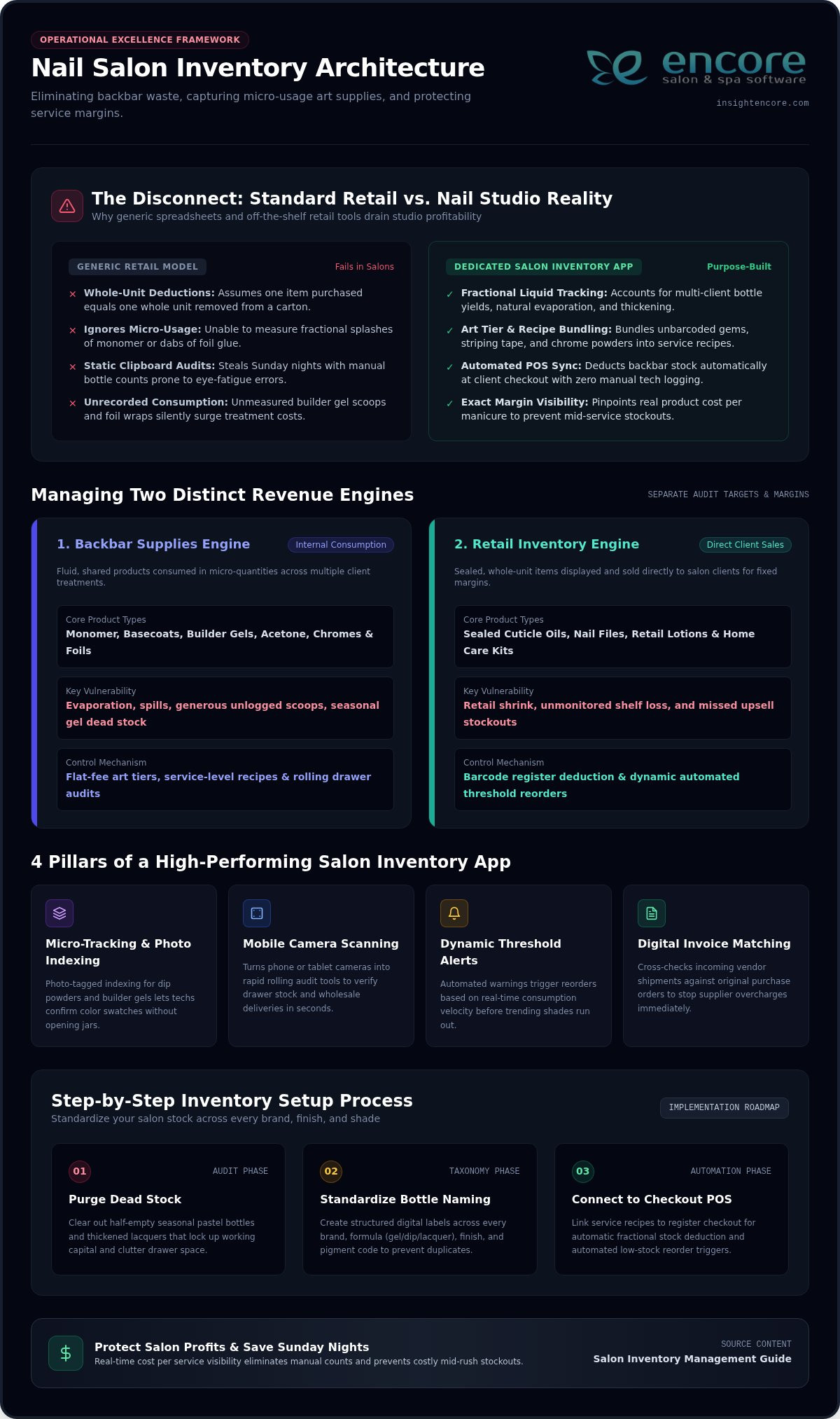
Categories
Uncategorized

Mindbody vs Vagaro for Salons: 2026 Comparison Guide

The biggest names in software might be the very thing holding your salon back from its true profit potential. You’ve likely spent hours weighing mindbody vs vagaro for salons, trying to decide if you want the massive marketplace reach of one or the modular flexibility of the other. It’s exhausting to watch a 20% marketplace commission or a stack of monthly add-ons eat into your margins. You’re looking for a partner, yet it often feels like you’re just another data point in a giant corporate database.

We believe your software should empower your team, not complicate their day. This 2026 comparison guide promises to show you exactly how these giants stack up and why a human-centric alternative might be the best path to a streamlined business. We’ll preview the latest pricing shifts, from Mindbody’s $79 base tier to Vagaro’s unbundled feature costs, helping you find a solution that offers transparent pricing and reliable support. It’s time to move from a state of stress to organized control and find a tool that actually feels like a partner.

Key Takeaways

  • Understand the real impact of “marketplace taxes” and hidden fees on your bottom line before signing a long-term contract.
  • Evaluate mindbody vs vagaro for salons based on your specific team size and whether you need bundled automation or a la carte features.
  • See how industry-specific modules for nail salons and tattoo studios offer more precision than general wellness platforms.
  • Discover why human-centric technical support is the key to reducing staff burnout and streamlining your daily operations.
  • Learn how to protect your client relationships by choosing a software partner that puts your brand’s growth first.

The Salon Software Dilemma: Comparing Mindbody and Vagaro in 2026

Running a salon today requires a delicate balance between high-tech efficiency and high-touch service. When weighing the options for mindbody vs vagaro for salons, most owners feel forced to choose between two very different corporate philosophies. One offers an enterprise-level ecosystem designed for massive scale; the other provides a bustling marketplace that promises instant visibility. Both have shaped the industry, but they also bring specific friction points that can leave boutique owners feeling overwhelmed or overlooked. In 2026, the choice isn’t just about features. It’s about who actually owns your client relationships and how much of your margin you’re willing to give away.

Mindbody: The Enterprise-Level Giant

Mindbody remains the heavy hitter for multi-location wellness centers and fitness-hybrid salons. Looking at the Mindbody platform history, it’s clear the software was built with a fitness-first mindset. This heritage brings incredible power for memberships and class scheduling, but it often creates “feature bloat” for hair and beauty professionals who just need intuitive booking. While the Mindbody app connects you to over 3 million consumers, it comes with a cost. You’ll likely face a 20% commission on new clients discovered through their marketplace. For a growing salon, this “all-in-one” weight can lead to a steep learning curve that frustrates staff and eats into valuable service time. If you’ve ever wondered why people leave Mindbody in growing numbers, escalating subscription tiers and a cluttered interface that complicates routine staff onboarding are among the most cited reasons.

Vagaro: The Marketplace-First Contender

Vagaro won over the mid-market by focusing on simplicity and a “pay-as-you-go” modular model. It’s an attractive fit for independent stylists who want to be discovered without the high upfront cost of enterprise software. Their marketplace is a major draw because it doesn’t charge commissions on new bookings, which helps with initial visibility. However, this convenience has a downside. Your salon is listed right alongside every competitor in your zip code. The interface often encourages clients to shop for the next available opening rather than staying loyal to your specific brand. When you add up the costs for essential modules like branded apps and custom forms, that “affordable” base price can quickly climb.

The core friction in 2026 centers on three main issues: cost, complexity, and client ownership. You want a system that feels like a partner, not a corporation that treats your business as just another database entry. If you’re tired of feeling like a number, it’s time to look at how Encore Salon Software prioritizes your brand over a crowded marketplace.

Core Feature Showdown: Booking, Client Management, and Marketing

Choosing between mindbody vs vagaro for salons often comes down to how these tools handle the daily rush. Your calendar is the heartbeat of your business. If it’s clunky or difficult for staff to navigate, it creates a ripple effect of stress that clients definitely notice. You need a system that feels like a supportive partner, allowing you to focus on your craft rather than fighting with a screen. Both giants offer robust tools, but they approach the user experience with very different philosophies.

Scheduling and Calendar Flexibility

Vagaro is widely praised for its intuitive drag and drop interface. It’s built for speed, making it easy to shuffle appointments when a stylist runs late or a client arrives early. Mindbody offers deep functionality, but its interface can feel heavy, often requiring more clicks to complete simple tasks. Both platforms provide mobile apps to manage your day on the go, which is essential for modern flexibility. They also help you protect your time with automated deposits and cancellation fees. If you are looking for specialized insights beyond hair services, you might find similar logic applied in our guide to the Best Spa Booking Software in 2026.

Client Relationship Management (CRM)

A great CRM should do more than just store phone numbers; it should tell your client’s story. Mindbody excels at tracking memberships and class attendance, which is great for hybrid wellness centers. Vagaro focuses heavily on the individual service history, making it a favorite for traditional salons. However, specialized businesses often find these general tools lacking. A tattoo studio, for example, needs to track detailed ink preferences and medical waivers that a standard hair salon doesn’t require. Proper data management ensures you’re aligning with the U.S. Bureau of Labor Statistics industry overview regarding core managerial duties like client tracking and professional record-keeping.

Marketing and staff management are where you truly reclaim your time. Automated marketing tools like SMS reminders and birthday greetings keep your chairs full without manual effort. On the back end, tracking commissions and performance shouldn’t be a headache. Salon staff utilization rate measures the percentage of available working hours actually filled with client appointments, serving as a vital health check for your business growth in 2026. If you want to see how a human-centric system handles these complex details, consider exploring the specialized Encore features designed for your specific niche.

Beyond the Subscription: Analyzing Pricing and Marketplace Dynamics

When you’re comparing mindbody vs vagaro for salons, the sticker price is rarely the final number you see on your bank statement. It’s easy to get caught up in the promise of a low entry cost, but the true cost of ownership often hides in the fine print. You’ve worked hard to build your business. You shouldn’t have to guess where your money is going or feel like your software is taking a cut of your hard earned success. Understanding these operational costs is part of your broader responsibility, as noted in the Bureau of Labor Statistics occupational outlook for hairstylists and cosmetologists, which highlights the importance of managing inventory and scheduling systems effectively.

The Hidden Costs of Big-Box Software

Mindbody’s public starting tier is $79 per month for small businesses, but this is just the beginning. To access advanced marketing or automation, you’ll likely find yourself looking at quotes for their $279 or $499 tiers. Then there’s the 20% marketplace commission on new clients, which can feel like a heavy tax on your growth. Vagaro takes a different approach by unbundling its features. While a $30 base for one calendar sounds affordable, the “nickel and diming” starts quickly. You’ll pay $10 for digital forms, $20 for SMS marketing, and $100 per month for a custom branded app. Before you know it, that budget friendly tool is costing you hundreds more than you planned.

Marketplace vs. Brand-First Growth

One of the biggest risks with marketplace driven platforms is the “marketplace trap.” When you train your clients to book through a generic directory, you’re helping the platform grow its own brand, not yours. If a client opens an app to find you and sees a competitor’s “introductory offer” right next to your profile, you’ve lost control of the relationship. Setting up a dedicated salon client booking portal ensures your clients stay connected to your brand. It protects your business from being just another listing in a corporate database.

Data ownership is another critical factor. If you ever decide to move to a different provider, some platforms make it difficult to export your client history or formula notes. You should always own your data. It’s your most valuable asset. Choosing a partner that prioritizes transparency and brand loyalty over marketplace commissions is the only way to ensure long term peace of mind. If you’re looking for a simpler way to handle transactions without the corporate complexity, our integrated credit card processing provides the clear, honest pricing you deserve.

Mindbody vs Vagaro for Salons: 2026 Comparison Guide

Industry-Specific Solutions: Tailoring Software to Your Niche

A “one size fits all” approach often feels like wearing a uniform that doesn’t quite fit. While you’re weighing mindbody vs vagaro for salons, it’s easy to see how these platforms try to be everything to everyone. However, a hair salon’s workflow is vastly different from a tattoo studio or a booth rental space. You deserve software that understands the specific nuances of your niche, not a generic system that forces you to change how you work. Choosing the right fit in the mindbody vs vagaro for salons debate depends on how much you value these specialized features.

Specialized Tools for Tattoo and Nail Studios

Nail salons and professional spas have very different inventory needs. A nail studio might need to track thousands of polish shades, glitters, and dipping powders with high precision. Meanwhile, a spa focuses on professional backbar products and retail skincare. Generic platforms often miss these distinctions. Tattoo studios face even stricter requirements, needing integrated digital waivers and health record compliance to meet safety standards. Specialized tools like Encore’s specialized modules outperform generic platforms because they’re designed for these exact scenarios. They remove the friction of manual tracking, giving you more time to focus on your clients.

Specialized businesses require specific features to thrive:

  • Integrated health waivers and consent forms for tattoo and spa services
  • High-precision inventory tracking for thousands of nail supplies and retail items
  • Financial partitioning to keep booth rental income separate from salon overhead
  • Mobile-first management tools for independent contractors on the move

Booth Renters and Independent Stylists

Booth renters and independent stylists face their own set of hurdles. They need individual logins and complete financial separation from the main salon owner while maintaining a professional appearance. It’s about balancing salon wide branding with individual autonomy. Independent pros shouldn’t have to settle for a system that treats them like a standard employee. They need a dedicated booth renter client management app that lets them run their business their way. This level of specialization is what separates a partner from a service provider.

Barbershops also have a unique rhythm, often balancing high turnover with a mix of scheduled appointments and walk-ins. Managing that flow requires a specific strategy. If you’re looking to sharpen your operations, explore these 15 Barbershop Management Tips to stay ahead of the curve in 2026. Whether you’re running a multi-chair shop or working as a solo contractor, the right software should feel like a natural extension of your hands.

See how Encore fits your niche today

Encore: The Professional Alternative for Human-Centric Salons

Deciding between the trade-offs of mindbody vs vagaro for salons often feels like picking the lesser of two corporate evils. You’re either a tiny fish in a massive enterprise pond or a single listing in a crowded marketplace. After exploring the hidden costs and feature gaps of these giants, many owners realize they need a third path. You deserve a platform that prioritizes your peace of mind and business growth without the corporate coldness. Encore stands apart as a dedicated, human-centric ally that treats your success as its own.

Human Support in a Digital World

We reject the trend of automated bots and endless email ticketing systems. When you have a question or a technical hiccup, you deserve to speak with a real expert who understands the daily hurdles of running a busy shop. Our team provides personalized training to ensure your staff actually uses the software to its full potential rather than feeling intimidated by it. This hands-on guidance removes the stress of learning a new system. We approach every challenge with a “can-do” attitude, acting as a supportive partner that remains deeply invested in your individual success.

All-In-One Without the Overwhelm

You don’t need software that’s too difficult for your team to master. Encore brings together online booking, inventory management, and integrated credit card processing into a single, intuitive interface. You can drive repeat business with branded gift cards and loyalty programs that feel like a natural extension of your brand. It’s about having professional power without the unnecessary complexity that leads to staff burnout. We focus on removing industry frustrations so you can get back to what you love. Ready to see a better way? Try Encore Salon Software today.

Moving your data from Mindbody or Vagaro doesn’t have to be a nightmare. We specialize in seamless data migration, handling the technical heavy lifting so you don’t have to worry about losing your history. Your client records, formula notes, and inventory data are too valuable to leave behind. By choosing a partner that values reliability and simplicity, you’re investing in a tool that finally feels like it’s on your side. In the final analysis of mindbody vs vagaro for salons, the best choice is the one that values your brand over its own marketplace.

Choose a Software Partner Built for Your Salon’s Future

Deciding between mindbody vs vagaro for salons doesn’t have to be a choice between two corporate extremes. You’ve seen how the “marketplace tax” can eat into your profits and how generic tools often fail specialized niches like tattoo studios or booth rental shops. The right software should feel like a partner that simplifies your day, not a vendor that treats you like a database entry. By prioritizing transparent pricing and specialized modules, you protect your brand and your peace of mind.

We provide the professional power you need with a human touch that big-box companies often lack. With integrated credit card processing and dedicated support from real experts, we help you move from a state of stress to organized control. You deserve a system that understands the daily hurdles of your industry and is genuinely eager to help you overcome them.

Experience the Human-Centric Alternative to Big-Box Software—Try Encore Now

Take the next step toward a more streamlined and supportive business environment today. Your success is our priority, and we’re ready to help you thrive.

Frequently Asked Questions

Is Mindbody or Vagaro better for a small salon?

Choosing between mindbody vs vagaro for salons depends on your specific growth goals. Mindbody offers deep automation for large wellness centers but often feels too complex for boutique teams. Vagaro is easier to start with but relies heavily on its own marketplace. For a small salon, you want software that feels like a partner, not a giant corporation. Encore provides specialized tools that simplify your day without the enterprise-level learning curve or hidden marketplace commissions.

Can I migrate my client data from Mindbody to Encore?

Yes, moving your client history and formula notes is a seamless process with our team. We handle the technical heavy lifting so you don’t have to worry about losing years of valuable data. Whether you are coming from Mindbody or Vagaro, we ensure your records are transferred accurately. This hands-on support removes the typical stress of switching systems, letting you focus on your craft while we set up your new digital home.

Does Vagaro charge fees for every booking made through their marketplace?

Unlike Mindbody, which charges a 20% commission on new clients found through its app, Vagaro currently offers its marketplace with $0 commission per booking. However, while the marketplace is free, Vagaro unbundles its features. You might find yourself paying extra monthly fees for essential tools like digital forms, SMS marketing, or a custom branded app. These add-ons can quickly increase your total monthly spend beyond the initial base subscription price.

What is the best alternative to Mindbody for a high-end spa?

Encore Spa Software is the premier alternative for high-end spas that value a personalized touch. While Mindbody focuses on fitness and wellness conglomerates, our platform is built specifically for the high-touch requirements of a professional spa. We offer specialized inventory management and client relationship tools that big-box software often generalizes. You get the professional power of an enterprise system with the dedicated human support that ensures your team feels confident and supported.

Do these platforms include integrated credit card processing?

Yes, both Mindbody and Vagaro offer integrated payments, and Encore provides Integrated Credit Card Processing as well. Having payments tied directly to your booking system reduces manual entry errors and speeds up the checkout process. Our solution offers transparent pricing without the corporate complexity. It allows you to manage deposits, memberships, and gift cards in one place, ensuring your financial tracking is as streamlined as your appointment calendar.

How does Encore’s support differ from big-box software companies?

We reject the trend of automated chatbots and delayed email tickets used by many big-box software companies. Our support is handled by real experts who understand the daily hurdles of the beauty industry. You get a dedicated ally with a “can-do” attitude, ready to solve problems over the phone. This human-centric approach ensures you never feel like just another number in a database, providing a level of reliability that corporate giants simply don’t match.

Can I manage booth renters with salon software?

Yes, managing booth renters requires specific tools that maintain individual autonomy while keeping the salon organized. Encore offers specialized Chair/Booth Renter Software that provides separate logins and financial partitioning. This ensures that independent contractors can manage their own schedules and income without it getting tangled in the salon’s overhead. It’s the perfect balance of professional salon branding and the individual freedom that modern independent stylists require to thrive.

Is there a contract required for salon management software in 2026?

Software contracts vary across the industry, but the trend in 2026 is moving toward more flexible, month-to-month arrangements. We believe in earning your business every day through reliability and excellent support rather than locking you into restrictive long-term commitments. When comparing mindbody vs vagaro for salons, always check for hidden cancellation fees or data export costs. We prioritize transparency, ensuring you always own your data and feel empowered in your software partnership.

Disclaimer

This article is general in nature and may contain errors, please verify all claims with your sales rep