

What makes the best nail tech booking system? It should do more than fill your calendar. It should also help you keep appointment details, client information, and daily salon tasks organized. When requests arrive by text, phone, and social media, details can get buried. A cancellation or schedule change can create even more back-and-forth.
Whether you work solo or run a growing salon, a booking system can give clients a clearer way to choose appointments and give you one place to manage your schedule. The right fit depends on how you work now and which tasks you want to connect as your business changes.
This guide covers the features to compare, how to assess different systems, and when broader salon software may make more sense than a booking-only app. You’ll also learn how Encore connects online booking with client management and point-of-sale transactions, so you can decide whether an integrated workflow fits your nail business.
Key Takeaways
- A nail tech booking system can do more than display open appointment times. Understand how booking pages and calendars differ from broader salon-management platforms.
- Map the appointment journey, from booking and schedule changes to client details, payments, and follow-up, to see where you can reduce manual coordination.
- Compare standalone booking tools with salon software by the workflows they support, including client records, transactions, inventory, and marketing.
- Use a practical setup process: identify your needs, compare daily workflows, configure the system, and test both the client booking experience and staff scheduling routine.
- Explore how Encore connects online booking with client management, point-of-sale, inventory, and marketing tools for nail businesses.
What Does a Nail Tech Booking System Actually Manage?
A nail tech booking system organizes appointment availability and client bookings. It lets you show open times, record appointments, and manage your schedule without relying on a mix of texts, calls, and social media messages. That matters when requests come in while you’re working with a client: a detail can get buried, a time can be promised twice, or a change can be missed.
Tools vary in scope. An appointment calendar is where you view and manage scheduled visits. A booking page is the client-facing place to review services and select or request a time. A broader salon-management platform can connect booking with other tasks, such as managing client records, transactions, inventory, or marketing. Comprehensive salon software solutions bring scheduling together with other vital management functions to streamline daily operations.
In short: Booking software handles appointment availability and reservations. Salon-management software connects bookings to the wider work of running a salon.
How online booking changes appointment handling
With online booking, clients can view available times and choose one without relying only on a phone call or message exchange. A clear service list and availability view set expectations before a client books. Clients can see what they’re selecting and which times are open, while you spend less time coordinating each request manually. When comparing systems, walk through the booking steps from both sides: what clients see, what information they enter, and where the confirmed appointment appears in your schedule.
Who benefits from a nail tech booking system?
A solo technician may need a straightforward way to manage personal availability, appointments, and client relationships. A multi-technician salon may need to coordinate several schedules and keep bookings clear across the team. Booth renters have different considerations: they manage their own appointments and client relationships while working within a shared salon environment.
Business size alone doesn’t determine the right setup. Focus on the workflow: who controls availability, how clients book, and where appointment details need to go next. Encore Salon & Spa Software offers solutions designed for nail salons and chair or booth renters, connecting online booking with client management and point-of-sale transactions. The key question is whether you need a clearer appointment process alone or connected tools for the work around each visit.
Which Booking Features Matter in a Nail Tech’s Daily Workflow?
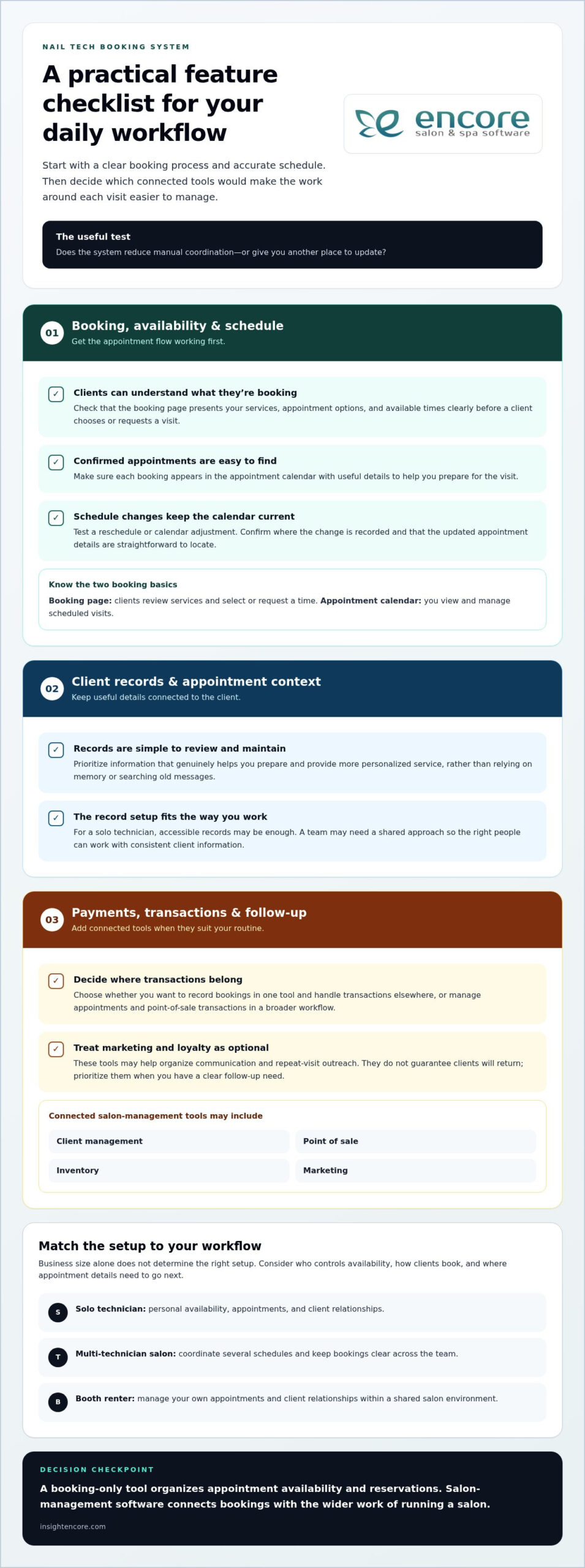
The most useful features are the ones that remove friction from your actual appointment flow. Start with the essentials: clients can understand what they’re booking, you can maintain an accurate schedule, and appointment details are easy to find. Then consider whether connecting payments, client records, and follow-up would make your wider routine easier to manage. The right nail tech booking system depends on how you work, not on the length of its feature list.
Booking, availability, and schedule management
Begin with the client’s booking journey. Can clients review your services, understand the appointment options, and see available times before choosing or requesting a visit? Clear descriptions help clients choose with fewer questions, while useful appointment details help you prepare. The booking page should be easy for clients to use and fit the way you set availability and manage your day.
Next, consider what happens after a booking is made. Clients may need to reschedule, or you may need to adjust your calendar. Look for a workflow that makes clear where changes are recorded and how the schedule stays current. Before choosing a system, test a change to an appointment and confirm that the updated details are easy to find. A feature is useful when it reduces steps rather than giving you another place to update.
Client records and appointment context
Relevant client information can help you prepare for each visit and provide more personalized service. Rather than relying on memory or searching old messages, use organized records to keep useful details connected to the client. Decide what information genuinely helps you do your work, then prioritize a system that makes those details straightforward to review and maintain.
Administrative work is part of running a personal-care business. The U.S. Bureau of Labor Statistics overview of manicurists and pedicurists includes business and administrative responsibilities for salon owners. For a solo technician, simple, accessible records may be enough. A team may need a shared approach so the right people can work with consistent client information.
Payments and follow-up
Connecting appointments to point-of-sale transactions and payment processing can help keep the administrative steps of a visit together. Consider whether you want to record a booking in one tool and handle the transaction elsewhere, or manage both within a broader workflow. Base the decision on how you take payments and keep business records.
Marketing and loyalty tools can help organize communication with clients between visits. They may support repeat-visit outreach, but they don’t guarantee that clients will return. Treat them as optional until you have a clear follow-up need. Encore’s salon software brings together client management, point-of-sale, inventory, and marketing tools.
Keep the priority order practical: get booking and schedule management working first, then add client, payment, and follow-up tools that suit your workflow. Encore’s salon software connects online booking with broader salon-management capabilities.
Is a Booking App Enough, or Do You Need Nail Salon Software?
A booking app can be enough if your main challenge is keeping appointment times organized. A focused tool may cover what you need without adding extra systems to learn. Broader nail salon software becomes more relevant when bookings are one part of the work you want to manage, such as keeping client records, recording transactions, tracking inventory, or organizing marketing.
Compare options by the workflow you want to support, not by assuming that more features are always better. Tools vary, so use this table as a guide to typical differences in scope, rather than a promise about every app or platform.
| Workflow | Standalone booking tool | Broader salon software |
|---|---|---|
| Scheduling | Often the central focus: availability and appointments. | Booking can sit within a wider business workflow. |
| Client records | May offer basic details tied to appointments. | Can include client management alongside booking. |
| Transactions | Payment handling may be separate or limited. | May connect bookings with point-of-sale transactions and payment processing. |
| Inventory | Usually not the main purpose. | May include inventory management. |
| Marketing | May focus on appointment communication. | May include marketing and loyalty tools. |
When a standalone booking tool may fit
Choose a focused setup if you mainly need to show availability, record appointments, and keep your calendar in order. It may suit a solo technician with a simple service menu and few administrative tasks beyond scheduling. If your client details, transactions, and other business records already have a manageable home, a larger platform could add complexity you don’t need. Ask yourself whether the tool solves the scheduling problem you have today.
When connected salon software may be more practical
Connected tools may be useful when booking regularly leads into other tasks. You may want appointments, client information, and point-of-sale transactions in a broader workflow, or need to coordinate several business functions across a team. A growing salon may value that wider scope. An independent technician may also benefit from connected management if separate tools are creating extra work.
If client records are important to your decision, consider what information you need to manage and how you use it during appointments. Encore’s nail salon software brings online booking together with client management, point-of-sale transactions, inventory, and marketing capabilities. It’s an option for businesses that want booking alongside wider salon operations. Explore Encore for your business as you compare workflows.
How to Choose and Set Up a Nail Tech Booking System
A smooth setup starts before you enter your first appointment. Map how clients currently book, identify the parts of the process that need attention, and compare systems against those needs. This keeps a nail tech booking system grounded in your real routine instead of a long list of features you may never use.
Build a shortlist around your actual appointment process
Write down how a client moves from first request to confirmed appointment. Include how they ask about availability, how you confirm a time, and what happens if they need to change or cancel. Note repeated tasks too, such as copying details between messages and a calendar or checking several channels for new requests.
Use those observations to separate must-haves from attractive extras. A clear way to manage availability may be essential, while a marketing feature may not matter yet. Compare how each option handles the steps you identified, including who updates the schedule and where appointment information is kept. If you work with a team, include how staff members coordinate availability and see the information they need.
Make the change manageable for clients and staff
Once you’ve chosen a system, prepare the information clients will use to book. Keep service names clear and consistent, set the availability you intend to offer, and organize existing client information before moving it into the new workflow. A salon booking portal setup guide can also help you think through how the client-facing booking experience should be arranged.
Before inviting clients to use it, test both sides of the process. Follow the booking journey as a client: find a service, review available times, and complete a booking. Then practise the staff routine with realistic examples, such as adding an appointment, changing its time, and locating the updated details. Check that service descriptions are understandable and that the schedule reflects the availability you intended.
Roll out the system in a way that gives you room to learn. Let clients know where to book and what information they’ll need. After launch, watch for recurring questions, missed details, and steps that still require repeated manual work. If clients aren’t sure which service to choose, clarify the wording. If schedule changes cause confusion, revisit how you record them.
Review the setup after using it in everyday work. Keep what makes booking clearer, adjust what creates unnecessary steps, and revisit your priorities as your business changes. A solo technician’s process may stay simple, while a team may need a more coordinated routine. The goal is a system that supports the way you operate now and adapts as those needs shift.
How Encore Connects Nail Salon Booking With Daily Management
After comparing your needs, decide whether you want appointment booking to stand alone or sit alongside other daily business tasks. Encore serves nail salons and independent chair or booth renters with online booking connected to client management and point-of-sale transactions. A focused scheduling tool may suit a simple workflow, while connected capabilities can help if you also manage client details, checkout, inventory, or follow-up.
A nail-business workflow beyond the appointment calendar
Online booking is part of Encore’s broader salon-management platform. Client management and point-of-sale transactions are available alongside it, connecting appointment and visit-related tasks within a wider business workflow. For a salon, this can be useful when scheduling and checkout are both part of the daily routine. Encore also offers management software for independent chair and booth renters.
The platform includes inventory tracking, marketing tools, loyalty programs, and gift cards. These capabilities cover work beyond appointment scheduling, but not every nail business needs every tool. Start with the tasks that take up time or are difficult to keep organized. If checkout is a key part of your evaluation, consider how point-of-sale transactions fit into your visit workflow. Encore’s nail salon software connects booking with these broader management capabilities.
Think through a typical client visit. A booking is made, client information may be useful during the appointment, and a transaction takes place at checkout. Keeping those functions within a broader platform may suit businesses that want fewer separate workflows to manage. Inventory and marketing tools can also help organize those responsibilities when they’re part of your day. Choose a setup based on the work you actually do, not pressure to use every available feature.
For independent renters, the decision is just as practical. Consider whether you manage appointments and client relationships independently, and whether connected transaction or inventory tools would support your work. A multi-technician salon can weigh how those capabilities fit its wider daily operations. Business structure matters, but so do the tasks you need to coordinate.
Explore Encore for your nail business
Use your priorities as a guide as you explore Encore. Consider how online booking, client management, point-of-sale, inventory, and marketing tools align with the workflow you mapped. Think about both the client booking experience and the daily management tasks you want the system to support. Encore has operated in vertical-market software since 1991, and its salon platform serves nail businesses as well as chair and booth renters.
Choose based on the work you need to organize now and the needs you expect to manage as your business changes. If Encore’s connected approach matches those priorities, explore Encore for your nail business.
Take the Next Step Toward a More Manageable Schedule
Your next step doesn’t have to be a major overhaul. Choose one part of your appointment routine that takes more effort than it should, then use it as your guide when exploring a nail tech booking system. A clear starting point makes it easier to judge whether a setup suits your work, rather than getting distracted by features you may not need.
As you compare systems, picture an ordinary workday: check the schedule, handle a change, prepare for an appointment, and keep the day moving. Does the workflow feel natural? Can you see how it would support the way you want to manage your business? Compare the booking experience with the administrative tasks you want to bring together, then choose a setup that fits those priorities.
Start with the workflow you want to improve. Explore Encore to see how online booking and salon-management tools can fit into your nail business.
Frequently Asked Questions
What is a nail tech booking system?
A nail tech booking system is software that helps manage appointment availability and client reservations. Depending on the tool, it may show open times, store booking details, and let you review upcoming appointments in a calendar. Some systems focus on scheduling, while salon-management platforms can connect bookings with other business tasks. Decide whether you need a digital appointment book alone or want booking to fit into a broader work process.
How can a nail tech let clients book appointments online?
Choose software with online booking, then make the booking route easy to find wherever clients interact with your business. Use service names clients recognize and describe any choices they need to make before selecting a time. If two services sound similar, explain the difference in the listing. Keep your availability accurate, and give clients a way to reach you if they’re unsure which option to select.
Can a nail tech booking system help reduce missed appointments?
A booking system can help keep appointment details organized, and some platforms provide reminder or client-communication features. It can’t ensure that every client attends. Set clear expectations at booking, including the appointment time and any relevant salon instructions, and use communication tools consistently if they’re part of your workflow. If missed visits become a concern, review when they occur and whether clients had the information they needed beforehand.
Do independent nail technicians need salon software?
No, not every independent technician needs a full salon-management platform. If you mainly want a reliable way to track your appointments, a focused scheduling tool may be enough. Broader software may make sense if you also want to organize client records, transactions, inventory, or marketing in one system. Consider the tasks you handle between appointments, too. Choose a scope that fits your current workload rather than business size alone.
What should a nail tech compare when choosing booking software?
Compare how each system handles situations you encounter in a normal week: a new appointment, a schedule change, a client lookup, and checkout. Check whether the client-facing booking steps are clear and whether the staff routine feels manageable. If you work with others, include how each person’s availability is handled. If you work solo, focus on ease of use and control over your calendar. A realistic test can reveal more than a feature list.
Can nail salon booking software manage client information too?
Some systems include client management alongside appointment scheduling, while others focus on the calendar. Organized client records can help you find useful details, such as a client’s previous service or preferences, before a visit. Decide which information is relevant to your work and how you’ll keep it current. Handle records in line with your business practices and applicable privacy requirements, and avoid collecting details you don’t need.
How do I move from a paper appointment book to a booking system?
Start by listing appointments already on the calendar so existing visits don’t get lost during the change. Decide when you’ll stop adding new bookings to the paper book, then enter upcoming appointments into the new system and check them against your original records. Test a sample booking and schedule change before sharing the new process with clients. Once you switch, keep one clear source of truth for the schedule.
Disclaimer
This article is general in nature and may contain errors, please verify all claims with your sales rep