window.dataLayer = window.dataLayer || []; function gtag(){dataLayer.push(arguments);} gtag('js', new Date()); gtag('config', 'UA-206511945-1');
Search
Categories
Uncategorized

How to Set Up Secure Client Messaging for Spas

What if the safest message is one that never puts sensitive details in a text or email notification? Secure client messaging for spas keeps conversations behind client sign-in, while email or SMS simply alerts clients that a message is waiting.

It’s natural to want an easy way to turn messaging on and give each client access. Setting up secure client messaging for spas means separating practice-level settings from individual access: clients need a Client Portal account to open the Messaging tab.

This guide explains how to enable secure messaging, organize conversations, and keep protected health information out of email and SMS notifications. You’ll also learn how to prepare client access and establish a clear communication process for your team.

Key Takeaways

  • Keep sensitive details inside authenticated messaging, and make email or SMS notifications a simple alert that a message is waiting.
  • Use a client’s individual conversation for private follow-ups, and consider the audience carefully before sending a message to multiple recipients.
  • Organize threads around the relevant service or provider, and use secure conversations for care instructions, check-ins, and appropriate attachments.
  • Set clear expectations for replies and message changes so clients and staff can follow the conversation without confusion.
  • Connect messaging with a Client Management System when you want client conversations and records managed in a more organized workflow.

Keeping protected health information out of email and SMS notifications

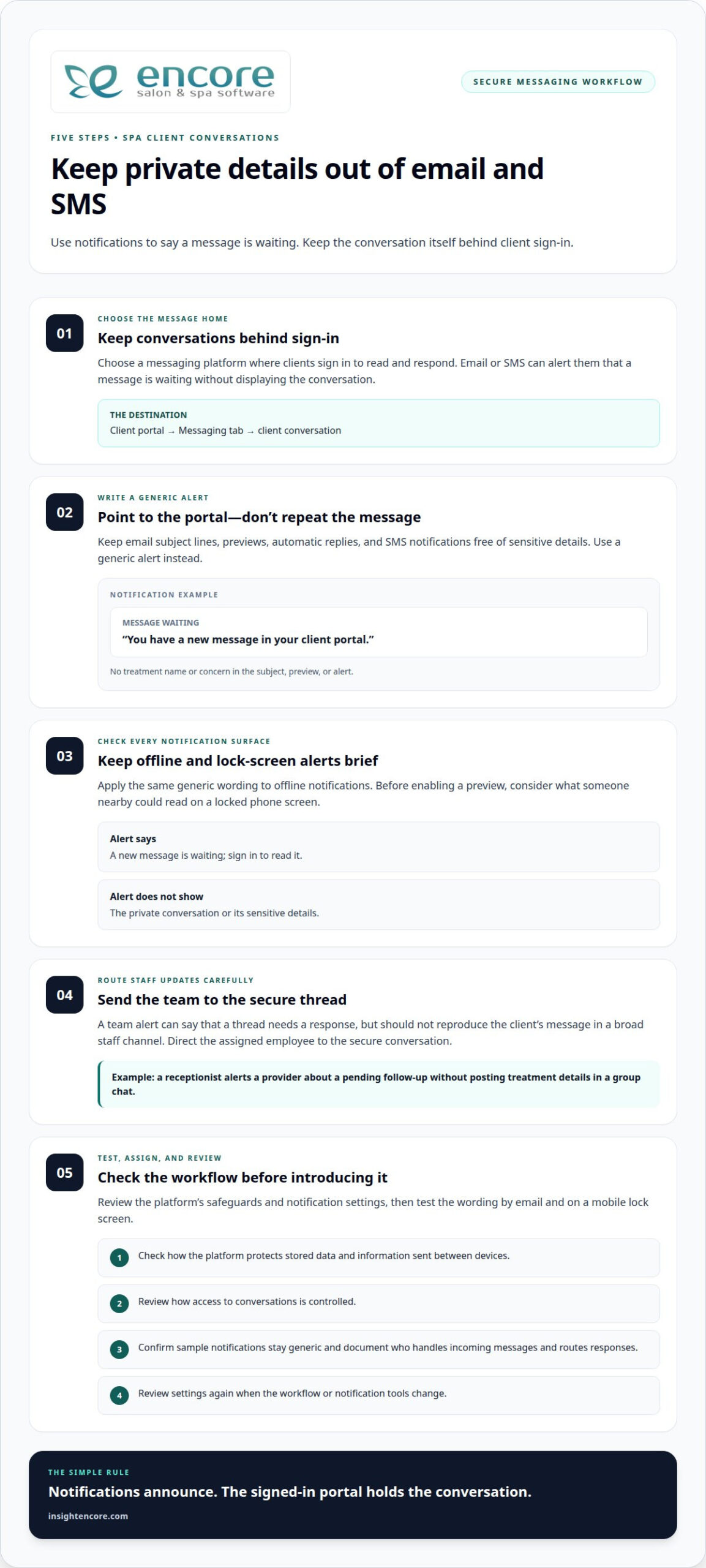
  1. Choose a messaging platform that keeps client conversations behind sign-in. With secure client messaging for spas, an email or text can alert someone that a message is waiting without displaying the conversation. For example, send “You have a new message in your client portal” rather than naming a treatment or describing a concern. The portal gives clients a specific place to read and respond, while ordinary notification previews reveal less.
  2. Keep email notifications brief and free of sensitive details. Use a generic subject line and notification text, then direct clients to sign in to read the message. Avoid clinical information in the subject, preview, or automatic reply. A shared inbox or lock-screen notification can expose details to someone other than the intended recipient. Set one staff rule: email points to the portal but never repeats private message content.
  3. Set client notifications to announce a new message without copying its contents. Apply the same approach to offline notifications, which may appear on a phone when the client isn’t using the portal. Before enabling a preview, consider what someone nearby could read on a locked screen. Keep alerts generic and tell clients where to sign in for the full conversation. This helps clients stay informed without putting sensitive information in SMS.
  4. Keep staff chat notifications separate from client conversations. A team alert can say that a thread needs a response, but shouldn’t reproduce the client’s message in a broad staff channel. Direct the assigned employee to the secure conversation instead. This reduces duplicate copies and helps staff respond in the right context. For example, a receptionist can alert a provider about a pending follow-up without posting treatment details in a group chat.
  5. Review the platform’s safeguards and your notification settings before introducing secure client messaging for spas. Check how the platform protects stored data and information sent between devices, and how it controls access to conversations. Test a sample notification by email and on a mobile lock screen. Confirm that its wording stays generic, then document who handles incoming messages and how staff route responses. Review the settings when your workflow or notification tools change.

Choose a platform that keeps client conversations behind sign-in and sends generic notifications without revealing message contents. Review its encryption and access controls before use.

Can I send a Secure Message to multiple clients and contacts at once?

  1. Use a multi-recipient option only if your messaging platform supports it. A secure message sent to several clients may expose replies or recipient details, depending on how the feature works. For private treatment questions, send separate messages in each client’s thread. For a general update, keep the wording non-sensitive and confirm recipients before sending. Remove anyone who no longer belongs in a group before sending another message.
  2. Choose the web or mobile app based on where your team manages conversations. Sign in, open the correct client thread, and check the recipient before sending. A mobile app can help staff respond between appointments, while a web workspace may be easier for longer replies. Features vary by platform, so confirm how each app handles sent messages, attachments, and message history before adding it to your routine.
  3. Keep appointment reminders and promotions distinct. Whether a spa can send them by SMS under TCPA rules depends on the message, recipient permissions, and sending method. Don’t assume a promotional text follows the same process as an appointment reminder. Make the purpose clear, use the appropriate permissions workflow, and ensure staff can record a client’s communication preferences before sending a campaign.
  4. Attach only the files a recipient needs. For example, a client may need a care instruction document, while a staff member may need an approved reference image. Check the recipient and attachment before sending, especially when a file contains details about another client. Message-length and attachment limits vary by platform and may depend on file type or size. Review the limit shown in the app, then split long explanations into clear, readable messages.
  5. Use internal team messages for coordination, not as a substitute for the client’s conversation history. A team note can direct a colleague to follow up, while the client-facing reply belongs in that client’s thread. Keep internal wording factual and relevant, and avoid forwarding sensitive details into broader staff chats. A consistent workflow helps the next team member understand what’s been sent and what response remains. You can explore a messaging workflow for your spa as you plan these steps.

For a message intended for several clients, keep the content suitable for everyone and use secure channels for personalized care. Med spas can send personalized pre- and post-care instructions, treatment plans, and check-ins through secure channels. Secure messaging can keep protected health information separate from standard email and SMS. This helps teams choose a channel based on the information being sent, rather than treating every message as interchangeable. Keep individual treatment details in the appropriate client conversation, even when sending a broader update to multiple recipients.

Security also depends on the systems behind the messaging workflow. Web applications that interact with APIs must be protected against threats such as those covered by the OWASP Top 10 Web Application Security Risks. For care that involves remote visits, med spa telemedicine workflows can automate pre-visit screenings and consent flows and attach recordings or summaries to client records. These workflows can help keep relevant information connected to the client record, while staff still check that each message and attachment is intended for its recipient.

Client messaging workspace and conversation threads

  1. Organize the workspace around how your spa serves clients. Route conversations by service or provider so a facial question reaches the relevant team member. Keep each client’s discussion in its own thread instead of scattering replies across shared inboxes. A clear structure helps staff find the right conversation before responding. Choose labels your team understands, such as “massage follow-up” or “skin consultation,” and use them consistently.
  2. Use one thread to maintain context for each client conversation. Before replying, review earlier messages to see what the client asked and what staff already explained. For example, if a client follows up about post-care instructions, the assigned provider can refer to the earlier exchange. This reduces repeated questions and supports a consistent tone. Keep replies focused on the current request, and move unrelated topics to the appropriate client thread.
  3. Make each message useful to its recipient. Send personalized pre-care instructions before an appointment, then use the same conversation for relevant follow-up or check-ins. A message about preparing for a facial should address that service, rather than use generic language for every appointment type. When a provider needs to share an image or document, attach it to the relevant conversation. Check the client and thread before sending, especially when staff manage several services.
  4. Set a simple handoff routine for staff. When one team member needs another provider to respond, identify the client, the service, and the next action in the workspace. For instance, a receptionist can route a scheduling question to the appropriate provider without starting a separate client conversation. Keep internal coordination distinct from the client-facing reply. This helps the next staff member understand what the client sees and which response still needs attention.
  5. Use access records to support accountability. Secure messaging can log access to conversations, creating a record of who viewed a thread. Make reviewing those records part of your regular workspace process, especially when several staff members are involved. Keep access appropriate to each person’s role, and close out conversations according to your practice’s workflow. A tidy workspace, consistent routing, and complete message history make follow-up easier to manage.
How to Set Up Secure Client Messaging for Spas

Editing, deleting, and replying to messages

  1. Read the full client thread before replying. Check the appointment date, service, and previous staff response so your message answers the current question. For example, if a client asks whether after-care advice applies to tomorrow’s facial, confirm the appointment details before responding. Keep the reply in the same conversation when it concerns that topic. This gives the client and staff a clear history instead of splitting one request across channels.
  2. Correct an error promptly, but don’t assume a sent message can be edited. Messaging tools handle corrections differently, and an edit button may change the visible message or preserve an earlier version. If editing is available, correct the detail and make the change clear. For example, fix a mistyped appointment time, then send a brief follow-up with the accurate time. This helps prevent a client from relying on outdated information.
  3. Use deletion carefully. Removing a message from your view may not remove it from the recipient’s device, the conversation history, or a record maintained by the platform. Before using a delete button, identify what the action removes and who can still see the message. If you sent sensitive information to the wrong thread, follow your practice’s incident process rather than assuming deletion erased every copy.
  4. Reply through the channel where the client started the conversation. If a client asks about a treatment in an encrypted portal thread, keep the answer there instead of copying details into ordinary SMS or email. For a scheduling change, state the updated appointment information plainly and ask the client to confirm if needed. A focused response clarifies the next action and keeps related details together.
  5. Set a consistent staff routine for message changes. Decide who handles corrections, how staff flag a mistaken recipient, and where they document follow-up. For example, a receptionist can notify the assigned provider when a care instruction needs correction, while the provider sends the client-facing update in the original thread. Train staff to pause before sending, check the recipient and attachment, and choose the appropriate action only after reviewing the message.

Enabling secure messaging for a practice and individual clients

  1. Turn on Secure Messaging at the practice level before inviting clients to use it. This enables messaging for your spa, but individual access still depends on each client’s account. Plan the rollout around a specific client group, such as clients with upcoming appointments, so staff can explain where messages appear and how to sign in. The practice-wide setting and individual access are separate parts of setup.
  2. Make sure each client has a Client Portal account. When Secure Messaging is enabled, clients need that account to access the Messaging tab. Include portal sign-in instructions in appointment communications, and explain that new conversations appear in the portal rather than in an email reply. For example, a client can sign in, open Messaging, and read a private follow-up from the spa.
  3. Set expectations before sending your first message. Tell clients what kinds of questions belong in secure messaging, who in the practice reviews incoming conversations, and how staff handle follow-up. Keep the notice general because the Informative Banner appears to all clients. Edit its text under Settings > Secure Messaging. Use the banner to explain your messaging policy without including private treatment information.
  4. Prepare a consistent workflow for new and existing clients. When adding a client, explain how to create or access a portal account and where to find the Messaging tab. For existing clients, share the same instructions in a general appointment reminder. Don’t assume that enabling the practice setting automatically creates individual accounts or grants portal access. Staff can use a short script to guide clients through signing in and sending their first message.
  5. Keep message exchanges connected to client records. Secure messaging can encrypt patient data and document message exchanges in the client’s chart. After a conversation, staff should follow the practice’s process for reviewing the chart and identifying any next action. For example, a treatment follow-up can remain linked to the relevant client record, helping the team understand the context when the client returns.
Explore a secure messaging workflow

Encore Salon and Spa Software: Client Management System

Encore Salon & Spa Software offers a Client Management System to help spas organize client information and manage relationships alongside daily operations. If you’re bringing appointment management and client records into a more consistent workflow, Encore Salon & Spa Software can be a natural next step. Encore Salon & Spa Software solutions and chair or booth renter tools support various other business setups.

A Client Management System can help keep client details organized, making routine interactions and follow-up easier to manage. Consider one when scattered records or disconnected processes make client management harder. Choose software that fits your business model and your team’s workflow.

Contact Encore Salon & Spa Software to discuss your client management needs.

Make your next messaging decision with confidence

Build secure client messaging for spas around a clear, repeatable process your team can maintain. Decide which conversations belong in the client portal, how staff handle incoming messages, and what clients should expect after they write. A practical workflow gives your team a shared starting point and helps you refine communication as your needs change.

Then consider how client communication fits with the rest of your spa’s operations. If your current tools make client management difficult to organize, Encore Salon and Spa Software may be worth exploring as a next step. Choose an approach that suits your team and makes communication straightforward for staff and clients.

Contact Encore Salon and Spa Software

Start with one manageable decision, then take the next step at a pace that works for your spa.

Frequently Asked Questions

Is there a way for Secure Messaging to be enabled by default when I create a new client?

Enabling Secure Messaging for the practice doesn’t automatically give every new client messaging access. Each client needs a Client Portal account to open the Messaging tab. Build account setup into your new-client welcome process: explain how to sign in, where to find messages, and how to contact the spa with access questions. This makes the steps clear when a client is added, without assuming their account is already active.

Can I remind clients to complete documents using Secure Messaging?

Use a secure message to remind a client about a document and explain the next step. For example, send a brief note asking them to complete an intake form before an appointment. Keep the message focused on the reminder, and use your established process for submitting or signing the document. Don’t assume that a message thread itself collects a signature or stores a completed form.

How can a spa set up secure client messaging and obtain client consent?

Enable Secure Messaging for the practice, then give each client instructions for accessing a Client Portal account. Explain what kinds of conversations your spa handles there, who reviews incoming messages, and how clients can update communication preferences. Keep consent procedures aligned with your spa’s own policies and services. For example, document a client’s preferred contact method during onboarding, then follow that preference for routine communication.

What client information should spas avoid sending in text messages?

Avoid putting treatment details, health history, symptoms, or other sensitive personal information in ordinary SMS messages. A reminder that says “Your spa has a new message” reveals less than a text describing a client’s concern or care plan. Limit texts to basic prompts, such as asking the client to sign in or call the spa. Put sensitive conversation details in an authenticated channel instead.

What are common security risks of texting spa clients and how can they be reduced?

Common risks include sending a text to the wrong number, exposing a preview on a shared or unlocked phone, and staff copying private details into group chats. Reduce these risks by checking recipients before sending, limiting text content, and keeping staff conversations separate from client messages. Train employees not to forward sensitive information, and give them a clear way to report a mistaken send promptly.

What secure messaging platforms are designed for spas and salons?

Look for a platform that keeps conversations behind client sign-in, supports individual client threads, and can route messages by service or provider. Notifications should alert clients without displaying sensitive message contents.

Disclaimer

This article is general in nature and may contain errors, please verify all claims with your sales rep
Categories
Uncategorized

Salon Client Data Security Best Practices: The 2026 Owner’s Guide

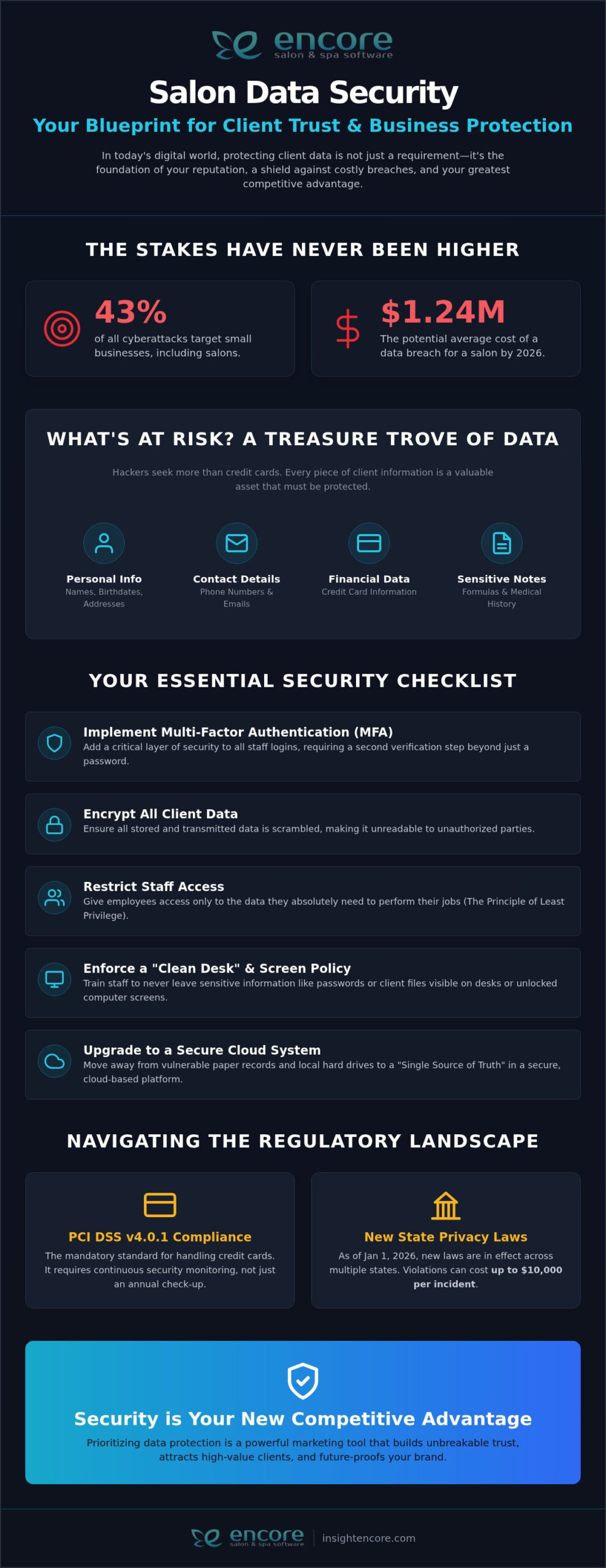
Did you know that 43% of all cyberattacks now target small businesses, with the average cost of a breach for a typical salon reaching up to $1.24 million in 2026? It’s a staggering figure that highlights why salon client data security best practices are no longer optional; they’re as essential as a sanitized toolkit. You’ve spent years building a reputation for excellence and care. Protecting your clients’ phone numbers, addresses, and credit card details is the ultimate way to honor that relationship and keep your business thriving.

We know the technical side of things can feel overwhelming. Dealing with PCI DSS v4.0.1 requirements or new state privacy laws shouldn’t keep you up at night. You deserve to feel confident that your digital doors are locked tight. This guide provides a straightforward checklist to help you master modern security protocols and build unbreakable trust with your high-value clients. We’ll explore everything from encryption basics to managing staff access, giving you the peace of mind to grow your business safely.

Key Takeaways

  • Learn how treating privacy as a premium service builds client loyalty and protects your hard-earned reputation from costly breaches.
  • Stay ahead of the latest legal requirements, including PCI DSS 4.0.1 and new state privacy laws, to avoid heavy financial penalties.
  • Discover the most effective salon client data security best practices, such as implementing Multi-Factor Authentication and restricted staff access.
  • Create a culture of safety by training your team on “Clean Desk” policies and secure record handling to eliminate common human errors.
  • Understand why moving to a cloud-based management system provides a more secure “single source of truth” than keeping records on local hardware.

Why Salon Data Security is Your Biggest Business Asset in 2026

In 2026, privacy isn’t just a back-office chore. It’s a premium service. Clients expect their personal details to be as safe as their hair is in your hands. A data breach does more than trigger a fine; it shatters the trust you’ve spent years building. While the financial impact is heavy, the loss of your reputation is often permanent. Recovering from a public security failure is much harder than preventing one. By prioritizing salon client data security best practices, you’re telling your community that you value them beyond the chair. You’re showing that you are a supportive partner in their overall well-being.

The Anatomy of Salon Data

Hackers aren’t just looking for credit cards. They want Personal Identifiable Information (PII). This includes names, birthdates, and those “harmless” phone numbers. In fact, phishing remains the most common attack vector against small businesses. Even your color formulas and sensitive medical notes are assets. Storing these insecurely puts your clients at risk of identity theft or targeted scams. Understanding basic data security principles helps you see your database as a vault that needs protection. Every piece of info you collect is a responsibility that requires professional care.

Security as a Competitive Advantage

High-value clients prioritize discretion. When you can prove that their data is locked down, you’re offering a level of professionalism that sets you apart. Mentioning your secure booking portal in your marketing isn’t bragging; it’s reassuring. You can highlight how Encore Salon Software features keep every record encrypted and accessible only to those who need it. This transparency builds a “safety brand” that attracts clients who are willing to pay more for peace of mind. It turns a technical necessity into a powerful selling point that makes your salon the obvious choice.

Moving away from paper binders is your first big win for modern protection. Paper records are easily lost, stolen, or seen by the wrong eyes. Digital systems allow for much better control and tracking. Modern salon client data security best practices rely on a “Single Source of Truth.” This means all data lives in one secure, cloud-based home rather than scattered across sticky notes and local hard drives. It’s the foundation of a modern, professional beauty business that respects its clients’ digital lives as much as their physical ones. This shift is the first step toward total peace of mind for you and your guests.

The Regulatory Landscape: PCI Compliance and Privacy Standards

Understanding the rules isn’t just about avoiding fines. It’s about professional integrity. In 2026, the regulatory world is a patchwork of payment security and personal privacy laws. Many owners confuse the two. PCI DSS v4.0.1 governs how you handle credit cards. Meanwhile, state laws like those in Indiana and Kentucky protect who can see a client’s home address. Following salon client data security best practices means respecting both sets of rules. It ensures your business remains a safe space for every guest.

PCI DSS v4.0.1 is now the mandatory standard. It moved the industry from once a year checks to continuous security monitoring. This is a big shift. You can find excellent FTC cybersecurity guidance to help you navigate these basics. The goal is to ensure that cardholder data never lingers where it shouldn’t. It’s about creating a safe environment for every swipe or tap. If you aren’t monitoring your systems regularly, you’re already behind the curve.

PCI Compliance for Small Business Salons

The biggest risk in many salons is the simplest one: writing down credit card numbers on paper. This is a major compliance violation. It’s also an invitation for theft. Using integrated credit card processing simplifies this burden immensely. When your software handles the transaction, the sensitive data never touches your local network. This keeps you safe and keeps your clients’ bank accounts protected. It removes the stress of manual record-keeping and local data storage. For a complete breakdown of what these requirements mean for your business, our PCI compliance for small business salons guide walks you through every step without the technical jargon.

Privacy laws are also getting tougher. As of January 1, 2026, new laws in Indiana, Kentucky, and Rhode Island are in full effect. Violations in these states can cost up to $7,500 or $10,000 per incident. Twelve states now require businesses to recognize Global Privacy Control (GPC) signals for opting out of data sales. If you operate across state lines, this complexity grows quickly. You need a system that adapts to these changes automatically and protects you from accidental non-compliance.

Medical Data and Medspas

For medspas and tattoo studios, the stakes are even higher. You aren’t just handling names; you’re handling health history and allergy records. While not every salon falls under HIPAA, many beauty businesses are moving toward those higher standards to ensure total protection. Client waiver forms for spas digital solutions and secure consultation notes are essential. They provide a legal paper trail that protects you if a client has an adverse reaction. This documentation is your best defense against liability and reputation damage.

Managing these layers of compliance doesn’t have to be a headache. You can explore how automated systems handle the heavy lifting for you. By choosing the right tools, you can focus on your craft while the technical details remain secure in the background. It’s about reclaiming your time and your peace of mind while building a business that stands the test of time.

Essential Technical Safeguards: From Encryption to Access Control

Technical safeguards are the locks and alarms on your digital storefront. While previous sections covered the “why” and the “rules,” these tools are how you actually get the job done. Implementing salon client data security best practices starts with end-to-end encryption. This technology scrambles sensitive info so it’s unreadable to anyone without the key. It’s your first line of defense against prying eyes. Pair this with automated cloud backups. If your salon ever faces a hardware failure or a ransomware attempt, these backups act as a safety net to restore your business in minutes. You don’t have to be a tech expert to use these; you just need the right partners in place.

Multi-Factor Authentication (MFA) is another non-negotiable in 2026. It requires a second form of verification, like a code sent to a phone, before granting access to your system. This simple step stops the vast majority of unauthorized login attempts instantly. It’s about building layers of protection that make it too difficult for hackers to bother with your data. By making MFA a standard part of your login routine, you’re choosing a proactive path to peace of mind.

Securing Your Physical Salon Hardware

Your front-desk terminal and tablets are physical gateways to your data. Start by separating your networks. Always offer a “Guest Wi-Fi” for clients that is completely isolated from your “Business Wi-Fi.” This prevents a guest’s infected device from reaching your salon’s private records. Ensure every tablet is password-protected and never left logged in and unattended on the salon floor. For those managing booth or chair renters, encourage them to use their own secure logins rather than sharing a single “salon” account. This keeps everyone’s information separate and safe from accidental exposure.

Software-Level Security Features

Modern software allows you to implement the Principle of Least Privilege (PoLP). This means your team only sees the information they need to perform their specific roles. A receptionist might need the calendar, but they don’t necessarily need access to your year-end tax documents or full client contact lists. Using audit logs lets you see exactly who accessed client data and when, providing total transparency. This approach aligns with the FTC’s Guide to Protecting Personal Information, which emphasizes limiting access to sensitive data to a “need-to-know” basis. If you are an independent pro, our Management Software for Chair Renters offers these same high-level protections tailored for your unique needs.

Salon Client Data Security Best Practices: The 2026 Owner’s Guide

Creating a Culture of Security: Staff Training and Protocols

Your team is the heart of your salon, but they can also be your biggest vulnerability. Most data leaks aren’t the result of high-tech hackers; they’re the result of simple, avoidable mistakes. Training your staff on salon client data security best practices is the most effective way to close these gaps. It’s about building a shared sense of responsibility. When every stylist understands that protecting a client’s email address is just as important as the quality of their highlight, your salon becomes a fortress of trust. Implementing these salon client data security best practices helps you avoid the $11.5 million average cost of a typical U.S. data breach in 2026.

Start by implementing a “Clean Desk” policy across the salon floor. This means no client phone numbers on sticky notes and no passwords written on the back of tablets. In a busy environment, it’s easy to jot something down and forget it. However, a misplaced note is a major security risk. Encourage your team to enter information directly into your secure management system and keep workstations clear of physical records. This simple habit keeps sensitive information away from prying eyes and maintains a professional atmosphere.

Managing staff turnover is another critical protocol. When a team member leaves, their access to client lists and payment systems must be revoked immediately. This prevents potential data theft and ensures that client records stay within your business. In 2026, phishing scams have also become incredibly sophisticated due to the rise of AI. Your team might receive a text or email that looks exactly like a message from you or a trusted vendor. Teach them to verify any unusual request for data or login credentials. If it feels off, it probably is.

Onboarding Staff with Security in Mind

Include data privacy in your employee handbook from day one. Explain how to use secure client messaging and why sharing login details is strictly prohibited. This sets a clear standard for professional behavior. For more operational advice, you might find our 15 Barbershop Management Tips helpful for streamlining your team’s daily routines and maintaining high standards for safety and service.

Ongoing Security Audits

Regular check-ins keep your systems healthy. Schedule monthly password resets and review who has permission to access specific data. A security audit for a salon owner is a systematic review of all digital and physical touchpoints to ensure client information remains protected and compliant with current laws. Test your backup systems regularly to ensure they’re ready if you ever need them. Consistency is the key to maintaining total control over your business assets.

Secure your salon's future today

Future-Proofing Your Business with Secure Management Software

Choosing the right technology is the single most important decision you’ll make for your business’s safety. In the past, many salons kept records on local servers or personal laptops. This is a massive risk. If that hardware is stolen or damaged, your data is gone forever. Cloud-based systems are inherently more secure because they remove these physical vulnerabilities. By moving to a “Single Source of Truth,” you ensure that every client record, color formula, and payment detail lives in one encrypted, professional-grade vault. This centralized approach reduces the number of entry points for hackers and makes managing salon client data security best practices much easier for you and your team.

Encore Salon Software handles the technical heavy lifting so you don’t have to. Our infrastructure has security baked into every feature, from integrated credit card processing to specialized modules for tattoo and medspa compliance. We’re also looking ahead. The next wave of technology will include AI-driven monitoring to spot suspicious login patterns and biometric access like fingerprint or facial recognition for staff terminals. These tools will add even more layers of protection. By partnering with us, you’re ensuring your salon stays at the forefront of these advancements without needing an IT degree.

Choosing the Right Partner

When you evaluate a software provider, ask about their encryption standards and how often they perform automated backups. It’s also vital to consider the human element. If you have a security concern, you need a responsive partner who offers human-led support rather than a delayed automated response. You want a guide who understands the daily hurdles of the beauty industry. For a deeper look at how the right tools can transform your operations, check out our Encore Salon Software Guide. It’s designed to help you master every aspect of your business with confidence.

Next Steps for Your Salon

You can improve your security profile in just ten minutes today. Start by checking that your “Guest Wi-Fi” is truly separate from your business network. Next, verify that every staff member has their own unique login with the correct permission levels. Finally, ensure your front-desk terminal is set to auto-lock after a few minutes of inactivity. If your current system makes these salon client data security best practices difficult to manage, it might be time for a change. Transitioning from a legacy system to Encore is a straightforward process designed to give you organized control and total peace of mind.

Ready for a more secure salon? Try Encore Now

Securing the Future of Your Beauty Business

Mastering salon client data security best practices is about more than checking boxes; it’s about protecting the heart of your business. You’ve learned that modern privacy is a premium service that high-value clients expect. By moving to a cloud-based system and training your team to spot phishing, you’re building a foundation of trust that can’t be broken. Security shouldn’t be a source of stress. With the right tools, it becomes a natural part of your professional routine.

Since 1991, we’ve been helping salon owners navigate industry complexities with reliability and care. Our integrated PCI-compliant payment processing takes the guesswork out of compliance, while our human-centric support team guides you through implementation. You don’t have to handle the technical heavy lifting alone. We’re here to ensure your data stays locked down so you can focus on your craft.

Secure your business and your clients—Try Encore Now

Take the first step toward total peace of mind today. Your clients will thank you for the extra care. You’ll enjoy the confidence that comes with knowing your legacy is safe.

Frequently Asked Questions

Is it safe to store client credit card information in my salon software?

It is safe and highly recommended if you use a system with integrated credit card processing. Encore Salon & Spa Software uses cloud-based infrastructure that ensures sensitive payment data is encrypted and never stored locally on your devices. This approach follows salon client data security best practices by removing the risk of data loss from stolen hardware. It also simplifies your compliance burden because the software handles the heavy technical lifting of protecting cardholder information.

What should I do if I suspect a salon data breach?

You must act quickly to contain the issue and protect your clients. First, secure your systems by changing all passwords and isolating affected hardware. Contact your software provider immediately to investigate the scope of the incident. You may also need to notify affected clients and local authorities depending on your state’s data privacy laws. Having a clear response plan in place ensures you can handle the situation professionally and maintain long-term trust with your guests.

Do independent booth renters need their own data security protocols?

Yes, independent professionals are responsible for the client information they manage. Even if you work within a larger salon, you handle personal details and payments that require protection. Using specialized Chair/Booth Renter Software ensures your records are encrypted and separate from the main salon’s database. This protects your business from liability and ensures you are following the same high security standards as a full-scale salon or spa. It’s about protecting your personal brand and reputation.

How does PCI compliance affect my salon processing fees?

Maintaining PCI compliance helps you avoid non-compliance fees that many processors charge. While there isn’t a direct discount for being compliant, the cost of a breach or a penalty for failing an audit is significantly higher than the cost of a secure system. Integrated processing often streamlines these requirements into your monthly service. This provides a predictable cost structure while giving you the peace of mind that your transactions are fully protected against modern threats and costly fines.

Can I use a personal tablet for client check-ins and booking?

You can use a personal tablet, but it must be properly secured to meet professional standards. This includes setting a strong, unique password and ensuring the device isn’t used for personal browsing while connected to your business network. Always use a dedicated app rather than a mobile browser to access your management system. Separating your business data from personal files is a key part of salon client data security best practices that prevents accidental exposure of sensitive information.

How often should I update my salon’s digital security settings?

You should review your security settings at least once a month. This includes updating passwords, reviewing staff access permissions, and ensuring your software is running the latest version. Regular audits help you stay ahead of new threats and ensure your team is following established protocols. It’s much easier to perform small, monthly checks than to fix a major security gap later. Consistency is the most effective way to maintain a safe and professional digital environment for your team and clients.

Is paper-based client tracking more secure than digital software?

No, paper records are significantly less secure than modern digital systems. Physical binders can be easily lost, stolen, or viewed by unauthorized people on the salon floor. They also lack the encryption and audit logs that professional software provides. Digital systems offer a “Single Source of Truth” that is backed up in the cloud, protecting you from fire, theft, or simple human error. Switching to a secure digital platform for client waiver forms and spa records is the first step toward professional data protection and business growth. When you’re ready to grow that protected client base further, exploring nail salon client retention ideas can help you turn first-time visitors into loyal, returning guests.

Disclaimer

This article is general in nature and may contain errors, please verify all claims with your sales rep