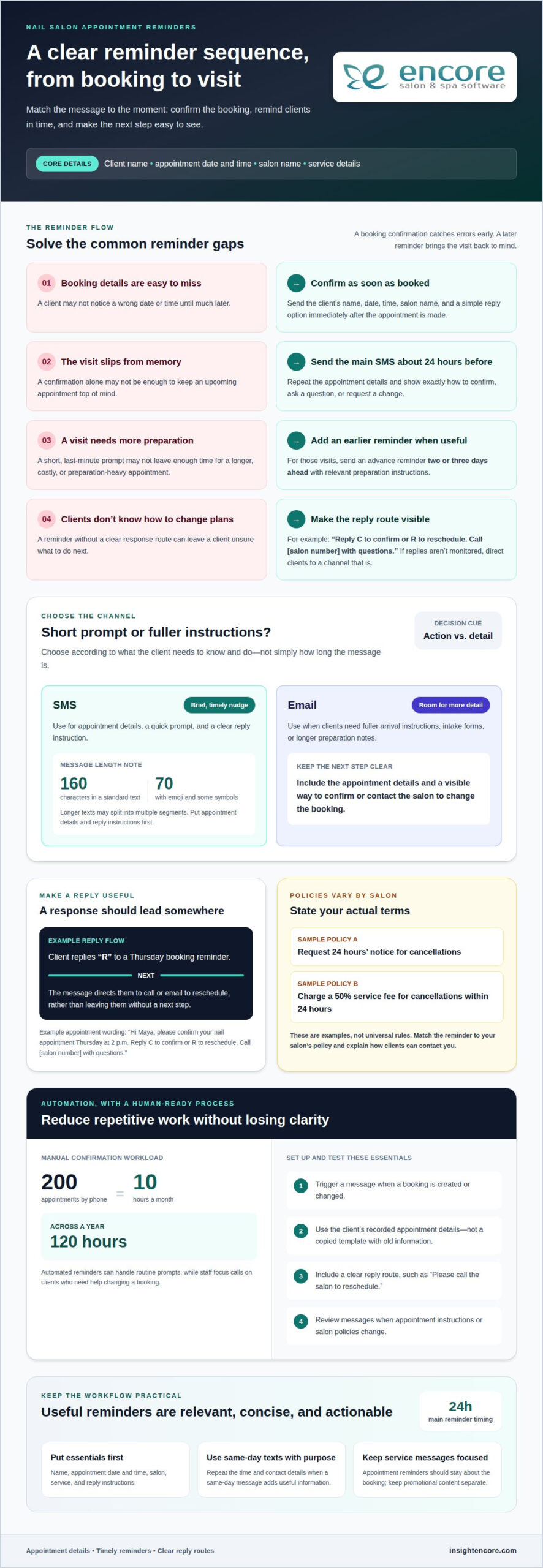
A useful nail salon appointment reminder text puts the client’s name, appointment date and time, salon name, and any important service details in one clear message. Send a booking confirmation as soon as the appointment is made, then send the main SMS reminder about 24 hours before the visit. Make it easy for clients to confirm or get in touch to change their booking.
Reminders don’t need to feel like extra admin or a cold, automated nudge. A short text can bring an appointment to mind, while an email gives you room for longer arrival instructions or forms. Choose the format according to what clients need to know and how much detail the visit calls for.
Find ready-to-adapt nail salon reminder examples, guidance on choosing text or email, and practical tips for automating messages without losing a warm, personal tone. You’ll also learn which appointment details to include so clients can arrive prepared and know what to do if their plans change.
Key Takeaways
- Choose SMS for a brief, timely nudge and email when clients need fuller instructions or forms.
- Set up a reminder schedule that confirms bookings and gives clients a simple way to reply about changes.
- Include the details clients need to recognize the appointment, such as the salon name, date, time, and service.
- Adapt message templates to the visit and your salon’s tone, keeping instructions clear and easy to act on.
- Use nail salon software to bring appointment management and reminders into a more organized workflow.
Are Text Messages or Emails More Effective for Appointment Reminders?
Ask clients to reply “C” to confirm or “R” to reschedule, and include your salon’s phone number or email for help. For example: “Hi Maya, please confirm your nail appointment Thursday at 2 p.m. Reply C to confirm or R to reschedule. Call [salon number] with questions.”
Text and email serve different purposes. SMS reminders make a short appointment prompt easy to notice. Email works well for extra details, such as intake forms or arrival instructions. Choose the channel according to what the client needs to act on, not simply the message length.
Start with a booking confirmation immediately after the appointment is made. Include the client’s name, date, time, salon name, and a simple reply option. Then send the main text reminder about 24 hours before most salon visits. A confirmation helps clients catch a wrong date or time early, before it becomes a missed appointment.
Situation: A client realizes they can’t make a Thursday booking. Action: They reply “R” to the reminder, which directs them to call the salon or email to reschedule. Result: The client has a clear next step instead of leaving the message unanswered. Keep the reply route visible in every reminder, including email.
State your cancellation and rescheduling terms before clients need to use them. One sample salon policy asks for 24 hours’ notice for cancellations; a different sample charges a 50% service fee for cancellations within 24 hours. These are examples, not universal rules. Match your reminder wording to the policy you actually use, and explain how clients can contact you to change a booking.
Two-way messaging makes it practical for clients to get in touch. They may reply with a question about the appointment, ask to change the time, or cancel. Make the expected response clear: “Reply R to request a new time, or call [salon number].” If replies aren’t monitored, direct clients to a channel that is. Don’t invite a text response and leave clients unsure what happens next.
Situation: A client forgets a morning appointment despite an earlier confirmation. Action: A short same-day message repeats the time and gives the salon’s contact details. Result: The client can quickly flag a problem or confirm the plan. Send a same-day reminder when it adds useful information, not automatically without a purpose.
Keep SMS concise. A standard text can hold up to 160 characters; emoji and some symbols can reduce that limit to 70 characters. Longer texts may split into multiple segments. Put the appointment details and reply instructions first, then move longer preparation notes into an email. This keeps the essential action easy to find.
Benefits of automated appointment reminders
Automation turns each confirmed booking into a reliable reminder sequence. Instead of writing messages between appointments, staff can focus on clients in the salon. A reminder system can use booking details to send the right information at the planned time. That consistency helps clients remember their visit and gives them a clear way to respond.
Situation: A technician finishes a busy shift and hasn’t sent reminders for tomorrow. Action: An automated workflow schedules messages using the booking details. Result: Clients receive timely prompts without staff having to remember each appointment. For a long, costly, or preparation-heavy visit, send an earlier reminder two or three days ahead.
Automation also reduces repetitive confirmation work. Confirming 200 appointments by phone takes about 10 hours a month, or 120 hours a year. A salon can instead automate a reminder with appointment details and a reply route. Staff can then focus their calls on clients who need help changing a booking.
Do nail salons need client consent to send appointment reminder texts? A message about a genuinely booked appointment is service communication rather than marketing. Keep the text focused on the booking, and don’t add promotional content to a service reminder.
What are the TCPA rules for automated appointment reminder texts in the United States? The Telephone Consumer Protection Act governs text message communications in the United States. Keep automated reminders specific to the appointment, and treat promotional messages as a separate communication.
Google Calendar can help staff remember appointments, but a calendar alert and a client text serve different purposes. Set a Google Calendar notification as an internal prompt for the technician or front desk. Use a client messaging workflow to send the appointment reminder. For example, a calendar alert can prompt staff to prepare for a complex appointment, while the client receives the visit details directly.
Automated reminder software is most useful when its process is easy to maintain. Set up and test these essentials:
- Trigger a message when a booking is created or changed.
- Use the client’s recorded appointment details, not a copied template with old information.
- Include a clear reply route, such as “Please call the salon to reschedule.”
- Review the message whenever appointment instructions or salon policies change.
Situation: A client books a service that needs preparation. Action: The system sends an advance reminder with the relevant instructions and contact details. Result: The client has time to prepare, while staff avoid sending each message manually. Keep “minutes early” instructions tied to the actual appointment, such as “Please arrive 15 minutes early for check-in,” when that timing applies.
Automation works best as a dependable routine, not a substitute for personal help. Use personalized wording, keep messages relevant to the booking, and clearly tell clients when to call. That balance saves staff time while giving clients a straightforward way to respond.
Including appointment date, time, and service
Personalize each message with the client’s name and accurate booking details. A nail salon appointment reminder text should identify the salon, appointment date and time, and service when appropriate. Add the nail technician’s name if it helps the client recognize the booking.
Make the date and time easy to understand at a glance. Write the weekday, calendar date, and time rather than relying on phrases like “tomorrow afternoon.” That wording can become confusing if a client reads the message later. Include the salon’s business name in the message or sign-off so clients know who sent it.
Use the booking record to choose details that help the client prepare. A practical reminder can include:
- The client’s first name and salon name.
- The appointment date, start time, and service.
- The nail technician’s name, when assigned.
- A phone number or other clear route to cancel or reschedule.
Keep the service description useful and brief. “Gel manicure” gives the client a clearer cue than “appointment,” while a detailed service menu can distract from the date and time. If a team member is assigned, include their name only when the booking record shows that assignment. Don’t copy details from an old message.
Situation: A client has booked a manicure with a preferred nail technician. Action: The reminder includes the client’s name, service, technician, appointment details, and salon sign-off. Result: The client can recognize the booking and spot a mismatch quickly. Personalization depends on accurate appointment information, not just a friendly greeting.
For example: “Hi [Client Name], your [Service] with [Technician Name] is booked for [Weekday, Date] at [Time]. [Salon Name]. Need to cancel or reschedule? Please call [Phone Number]. We look forward to seeing you!” Fill each bracketed field using the current booking. Keep the contact details readable, and use “see you soon” only if it suits your salon’s tone.
Review the message from the client’s point of view before using it. Can they identify the business, service, date, and time without opening another message? Can they find the phone number if plans change? Use these questions to spot vague time references, missing service details, or an unclear reply route.
For a returning client, a familiar greeting can feel warm without crowding the reminder. Use their name and relevant appointment details, then save extra conversation for the in-person visit. A concise message helps each client focus on what matters: where to go, when to arrive, and how to contact the salon.
Appointment reminder text templates
Use templates as a starting point, then fill in every detail from the scheduled booking. A reusable message should still sound personal and fit the appointment. Replace each bracketed field before sending, and remove any instruction that doesn’t apply.
Standard text reminder: “Hi [Client Name], [Salon Name] is looking forward to seeing you for [Service] on [Date] at [Time]. Reply to confirm, or call [Phone Number] to reschedule.” This template gives clients the essential details and a clear next step. Keep the salon name visible, especially when clients may not have saved the number.
First-visit text: “Hi [Client Name], your first [Service] at [Salon Name] is scheduled for [Date] at [Time]. Please arrive 5 minutes early. Call [Phone Number] if you need help.” The five-minute arrival suggestion comes from a sample first-visit reminder. Use it only if it fits your salon’s check-in process. Situation: A new client isn’t familiar with the salon. Action: The reminder adds a brief arrival instruction. Result: The client knows what to expect before leaving home.
Nail appointment text: “Hi [Client Name], your [Nail Service] with [Stylist Name] is scheduled for [Date] at [Time]. Please reply to confirm. We look forward to seeing you, [Salon Name].” Add the stylist’s name when the booking assigns one. If the service or stylist changes, update the template fields before sending. This helps prevent an otherwise polished message from containing outdated details.
Appointment reminder email: “Subject: Your [Salon Name] appointment on [Date]
Hi [Client Name],
Your [Service] with [Stylist Name] is scheduled for [Date] at [Time]. [Add relevant arrival instructions or preparation details here.] To change your booking, call [Phone Number] or reply to this email.
We look forward to seeing you,
[Salon Name]”
Email gives you room to explain useful instructions without crowding the reminder. Situation: A service needs more preparation information than a short text can comfortably hold. Action: Send the appointment summary by email and keep the SMS brief. Result: The client can find both the booking details and additional instructions in one organized message.
Before creating templates, decide which fields are essential and which instructions depend on the service. Use software or a saved draft to keep approved wording consistent, but review every scheduled message for the correct date, time, service, stylist, and contact route. A template supports accurate communication; it doesn’t replace checking the booking record.
Read the final text as a client would. “Your appointment is tomorrow” can be unclear when forwarded or read later; “[Weekday, Date] at [Time]” stays specific. Keep the greeting warm, the details easy to scan, and the reply instruction direct. Adapt these examples to your salon’s voice without adding promotional offers to a service reminder.
Nail salon reminder text examples
Match each message to the service and when it arrives. A manicure reminder can focus on the booking, while a day-of text can emphasize arrival. Keep promotional marketing separate from appointment details so clients can quickly spot the information they need.
Gel manicure: “Hi [Name], your gel manicure at [Salon Name] is booked for [Date] at [Time]. Reply to confirm, or call us to change your appointment.” Situation: A client has a standard service scheduled. Action: Send a concise text with the service and booking details. Result: The client can recognize the appointment and respond without searching through emails.
First visit: “We’re looking forward to your first visit, [Name]. Your [Service] at [Salon Name] is [Date] at [Time]. Please arrive 5 minutes early.” Situation: A new client may need time to check in. Action: Add the early-arrival note to the reminder. Result: The client sees the instruction before heading to the salon. Use this timing only when it matches your check-in plan.
Day-of reminder: “Hi [Name], we’ll see you today at [Time] for your [Service] at [Salon Name]. Please arrive 10 minutes early. Reply or call us if plans change.” A sample salon day-of reminder uses a 10-minute early arrival request. Situation: The appointment is approaching. Action: Send a brief message with the time and instruction. Result: The client gets a useful final prompt.
Nail color preparation: “Hi [Name], your nail appointment at [Salon Name] is [Date] at [Time]. You can choose your nail color when you arrive. We look forward to seeing you.” This nail salon reminder example invites clients to choose their color on arrival. Include that detail if it reflects your salon’s process. Leave gratuity or payment notes out unless clients need them for this booking.
For longer instructions, use an email instead of squeezing details into one text. For example: “Your [Service] is booked for [Date] at [Time]. Please review these arrival notes: [Instructions]. Reply to this email or call us if you need to reschedule.” Situation: The appointment needs additional directions. Action: Send the details by email and use SMS for the key prompt. Result: Clients can forward the email or revisit it as they prepare.
Keep reminders service-focused. A discount or referral offer is marketing, not an appointment detail. If you choose to share a promotion, place it in a separate message. A sample rebooking promotion offers 10% off when clients book that week, but use an offer only when it matches your salon’s actual promotion.
Before sending, read each example as a client would. Confirm that the service, date, time, salon name, and contact route match the booking. Replace every bracketed field and remove instructions that don’t apply.
Encore Salon and Spa Software: Nail Salon Software
Encore Salon and Spa Software offers Nail Salon Software to help salons manage appointments and client information more efficiently. Online booking lets clients make appointments, while a Client Management System keeps client records connected to salon operations. Together, these tools support a consistent process for preparing clear appointment messages with accurate booking details.
Consider this option when appointment information is spread across separate processes or staff need a clearer view of bookings and client records. The right setup can bring routine salon management into one platform while preserving the personal tone clients value in reminders.
If you’d like to discuss how Encore Salon and Spa Software may fit your nail salon’s workflow, contact Encore Salon and Spa Software.
Make Every Reminder Part of a Better Client Experience
A dependable reminder routine can become part of the client experience, from booking through the next visit. Treat each nail salon appointment reminder text as a small point of connection: clear, timely, and easy to respond to. As your schedule changes, refine your templates to reflect how your team welcomes clients and handles appointment updates.
When you’re ready to bring more structure to salon operations, Encore Salon and Spa Software offers Encore Salon Software, Encore Spa Software, and Chair/Booth Renter Software. Choose the solution that fits your business, then build a workflow to help your team manage client appointments more smoothly.
Explore the next step for your salon.
Keep your messages personal and your process clear. A thoughtful reminder can help each client feel welcome before they arrive.
Frequently Asked Questions
How Can You Remind Your Clients About Their Salon and Spa Appointments?
Use a confirmation and reminder sequence that fits the booking. Send confirmation immediately, then choose text for a brief prompt or email for longer instructions. For example, a client booked for a manicure can receive a concise text, while a visit requiring preparation details may call for an email. Make the appointment easy to identify, and give clients a clear way to reach the salon if plans change.
How many SMS reminders are too many?
There’s no single number of reminders that suits every schedule, so avoid repeated texts without a useful purpose. A practical approach is to confirm the booking, send the main reminder, and add a same-day message only when it provides helpful information. For instance, a day-of text can clarify arrival instructions. If a client has already replied, don’t send another generic prompt that ignores their response.
Should a beauty treatment name appear in the message?
Include the service when it helps the client recognize or prepare for the appointment. “Gel manicure” is more useful than a vague “appointment” when a client has several bookings. For a medspa reminder, keep sensitive treatment information out of the message. Avoid specific treatment names, pricing, and clinical details. Identify the booking without disclosing more than the recipient needs.
Should an Appointment Reminder Include a Cancellation Policy?
Yes, include a concise reference when clients need the policy to make a decision. State the notice period and any applicable consequence in plain language, then provide a phone number or email for changes. For example, one sample salon policy requests 24 hours’ notice for cancellations. Your reminder should match the policy clients were given, rather than introducing new terms at the last moment.
When should a hair or beauty salon send an SMS reminder?
Send the main SMS reminder about 24 hours before most appointments. An earlier reminder two or three days ahead can help with a long, costly, or preparation-heavy visit. A final text one to three hours before the appointment can serve as a timely prompt when it adds value. For example, use a same-day reminder to share an arrival instruction, not simply to repeat an unchanged message.
What should a nail salon appointment reminder text say?
A nail salon appointment reminder text should name the client, salon, service, date, and time, then explain how to respond or contact the salon. For example: “Hi Alex, your gel manicure at Bright Nail Studio is Tuesday at 3 p.m. Reply to confirm or call us to request a change.” Use the correct booking details, and keep the message focused on the appointment rather than adding unrelated offers.
When should a nail salon send appointment reminder texts?
Send a booking confirmation as soon as the appointment is made, then schedule the main text reminder about 24 hours before the visit. An earlier message two or three days ahead can suit appointments that require preparation. For example, a client with a longer service can receive advance instructions, while a routine booking may need only the confirmation and main reminder. Use a day-of text only when it adds useful detail.
What cancellation and late-arrival policies should a reminder text include?
Include the salon’s actual cancellation notice period, any applicable consequence, and a direct way to request a change. Add a late-arrival instruction only if the salon has a clear policy, and tell clients what to do, such as calling if they’re running late. Don’t imply that every salon follows the same rule. Clear wording helps clients act promptly instead of guessing what happens next.
Disclaimer
This article is general in nature and may contain errors, please verify all claims with your sales rep