The most effective follow-up sequence depends on the spa service. Automated client follow-up for spas works best when confirmations, reminders, and aftercare messages reflect the appointment and the client’s next need. A booking reminder helps clients arrive prepared; a post-visit message can share relevant care guidance or invite feedback.
It makes sense to reduce manual messaging without making communication feel generic. Automate the timing, tailor the content, and keep texts and emails clear, relevant, and respectful of client preferences.
This guide explains what to adapt for consultations, treatments, and return visits, with practical timing examples, such as sending post-care instructions on checkout day. You’ll also learn how to plan automated texts and emails so follow-up feels organized and personal, not like a one-size-fits-all script.
Key Takeaways
- Match confirmation and reminder details to the appointment, so clients know what to expect and how to prepare.
- Keep automated texts and emails relevant, clear, and aligned with each client’s communication preferences.
- Use consultation reminders to make the next step simple, from confirming the booking to sharing useful appointment details.
- Tailor post-visit messages to the service, separating care guidance from thank-you notes and review requests.
- Automate routine timing while personalizing the message, so follow-up feels helpful rather than generic.
Automating appointment confirmations and reminders
Use a coordinated sequence for booking confirmations, appointment reminders, and follow-up, tailoring each message to its purpose. A spa CRM and booking system can connect client records with appointment details. A booking-only tool focuses on scheduling, while a CRM focuses on client information.
Appointment Reminder and Rescheduling Messages
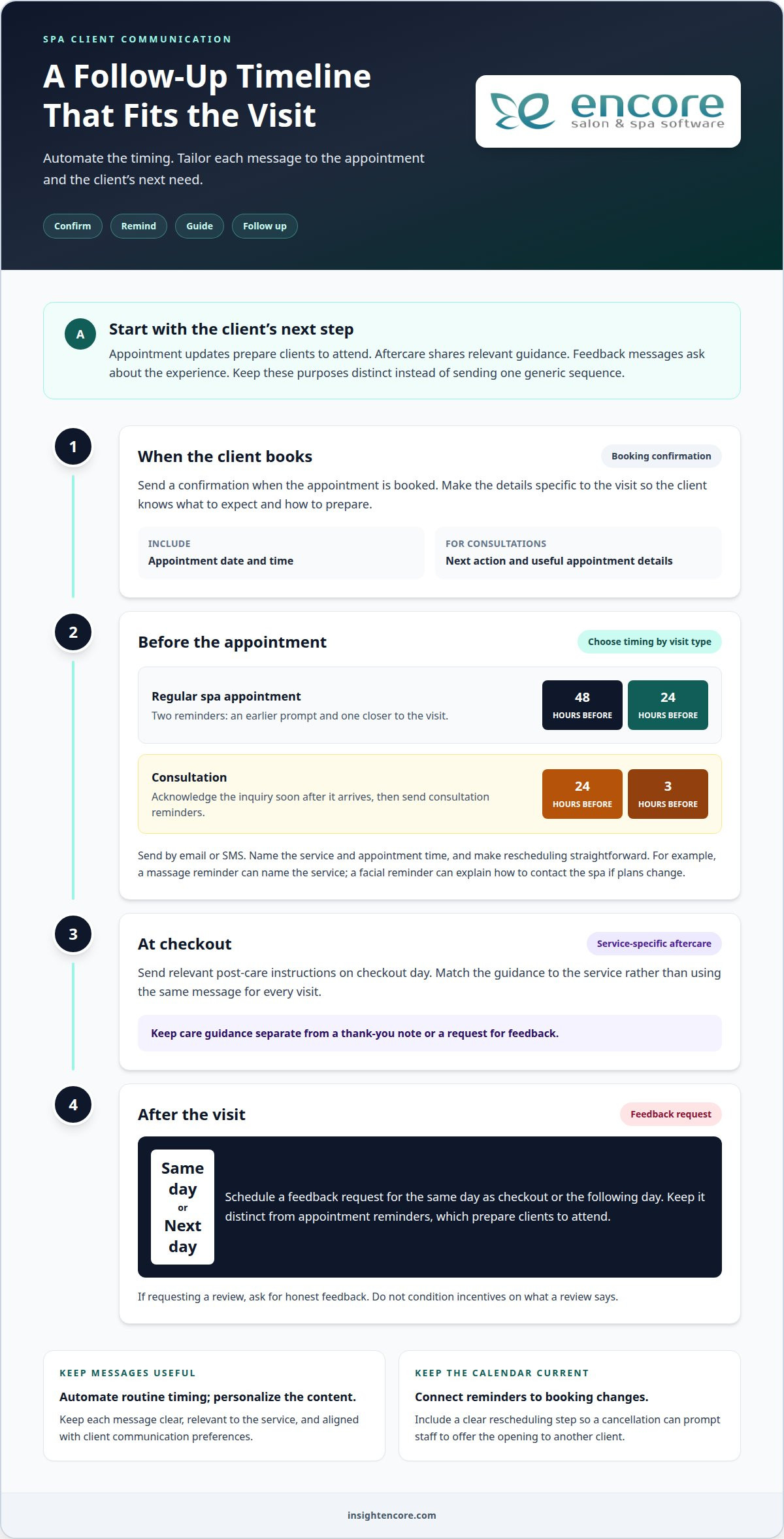
Send an appointment confirmation when a client books, then schedule reminders 48 hours and 24 hours before the visit. These messages differ from post-appointment feedback requests because they prepare clients to attend, rather than asking about their experience. Include the appointment time and a clear rescheduling step, so a cancellation can prompt staff to offer the opening to another client.
Make each message useful and specific. A massage reminder can name the service and appointment time; a facial reminder can explain how to contact the spa if plans change. Send reminders by email or SMS, and make rescheduling straightforward so the calendar stays current. Two reminders can provide an earlier prompt and another closer to the appointment.
CRM and Booking System Options
A booking system organizes appointments and sends messages tied to calendar events. A CRM organizes client records and can support follow-up based on service history. A combined system connects the booking to the client record, helping coordinate confirmations, reminders, and feedback. These systems can reduce repeated data entry compared with manual messaging, but their usefulness depends on which follow-up steps they connect.
Compare systems against the tasks your spa needs to manage. Check whether booking status, rescheduling, and feedback connect in one sequence. The table highlights the practical differences.
| Option | Booking connection | Reminder and rescheduling | Post-visit feedback |
|---|---|---|---|
| Manual messages | Staff sends each confirmation | Staff updates changes | Staff requests feedback |
| Booking-only system | Calendar-focused | Appointment-triggered messages | May require separate steps |
| CRM | Client-record focused | Can use client context | Supports client follow-up |
| Combined CRM and booking | Connects client and appointment | Links messages to booking changes | Can continue the sequence |
| Email or SMS tool | Depends on booking data | Requires appointment details | Can send a feedback request |
Choose a system that connects the steps that matter most, especially booking status, reminders, and rescheduling.
For consultations, send an acknowledgment soon after the inquiry, then set appointment reminders about 24 hours and 3 hours before the visit. Keep the confirmation focused on the date, time, and next action. After checkout, schedule a feedback request for the same day or the next day. That final step can engage clients and provide a simple way to share their experience.
What rules apply to automated texts and emails?
Use automated messages to support a client’s next step, not to send everyone the same promotion. Separate appointment updates from marketing, and tailor each message to its purpose. Keep content accurate, relevant to the service, and consistent with the client’s communication preferences.
Segment contacts before sending campaigns
Start with details clients have shared, such as service interests, booking status, and visit history. Create focused email groups for distinct needs: someone asking about facials, a client with a massage booked, and a returning client considering another appointment. This keeps emails useful and helps prevent unrelated offers from reaching the wrong audience.
Before adding a contact to a promotional sequence, distinguish a direct response to an inquiry from an ongoing campaign. Reply to the service the person asked about; make later emails relevant to their interests and preferences. Record those choices and update the contact record if they change. For example, a client who booked a facial can receive appointment information, while content about other services belongs in a separate, relevant sequence.
Plan SMS, email, and call sequences
Choose the channel for the task. A text can deliver a brief appointment update, an email can carry a treatment guide, and a call can support a conversation that needs a personal response. Multi-channel sequences combining SMS, email, and calls had a 62% higher contact rate than single-channel sequences in the aesthetics and wellness sector in 2024. That finding supports coordinated outreach, not sending every message through every channel.
Give each message in a sequence a clear purpose. For a new inquiry, send an acknowledgment, then follow up with useful information about the requested service. Avoid repeating identical copy across channels. Make it easy for clients to reply or manage communication preferences, and direct questions that need a personal answer to staff.
Measure and improve email campaigns
Review delivery, opens, clicks, replies, bookings, and unsubscribes together. Many opens but few bookings may indicate that the next step isn’t clear. Clicks but few replies may mean the linked information doesn’t answer the client’s main question. Compare campaigns by audience and purpose, then adjust one element, such as the subject line or service-specific content.
Educational emails can offer treatment guides or explain what a consultation covers. Keep each message focused, such as a guide for someone exploring a facial rather than a broad list of every spa service. For review requests, the FTC’s 2024 rule bans conditioning incentives on what a review says. Ask for honest feedback without tying a reward to positive wording.
Consult booking confirmations and reminders
Review reactivation lists monthly and send inactive clients a personal message related to their last service. For example, invite someone who previously booked a facial to ask about returning instead of sending a generic promotion. Use replies to learn whether they want to book, need more information, or prefer no further messages.
Make a consultation confirmation specific to the service the client asked about. Include the appointment date, time, location details, and a clear way to reschedule. A reminder can explain what the consultation covers and what the client should bring or prepare. Name the service so someone asking about massage receives relevant details, not a generic treatment reminder.
Prepare clients with relevant treatment information
Separate appointment reminders from treatment guidance. Send treatment-specific intake and consent requests 2 to 3 days before an appointment, giving clients time to review and respond. Pre-care instructions can be sent 2 to 7 days before treatment, depending on the treatment. For example, a message for one service might focus on completing forms, while another highlights its relevant pre-care steps.
Focus the message on practical actions. State which form to complete, how to return it, and how to ask a question. If the client says they need help, route their message to a staff member rather than sending another automated reminder. This handoff gives the team a clear callback task, with the client’s service and appointment details attached.
Connect reminders to staff follow-up
Automated reminders can flag unanswered forms, rescheduling requests, or consultation questions for staff. Set a clear handoff: record the client’s reply, assign the callback to the appropriate team member, and mark the task complete after contact. If a consultation client asks about a treatment recommendation, for example, staff can respond with information relevant to that appointment instead of repeating the booking confirmation.
After a consultation, send a follow-up nudge 2-3 days later. Invite the client to reply with questions or take the next step toward booking, without assuming they are ready to choose a treatment. A concise message might reference the consultation topic and offer a straightforward way to continue the conversation. This supports a return visit while leaving room for the client’s decision.
Set rebooking reminders around treatment intervals
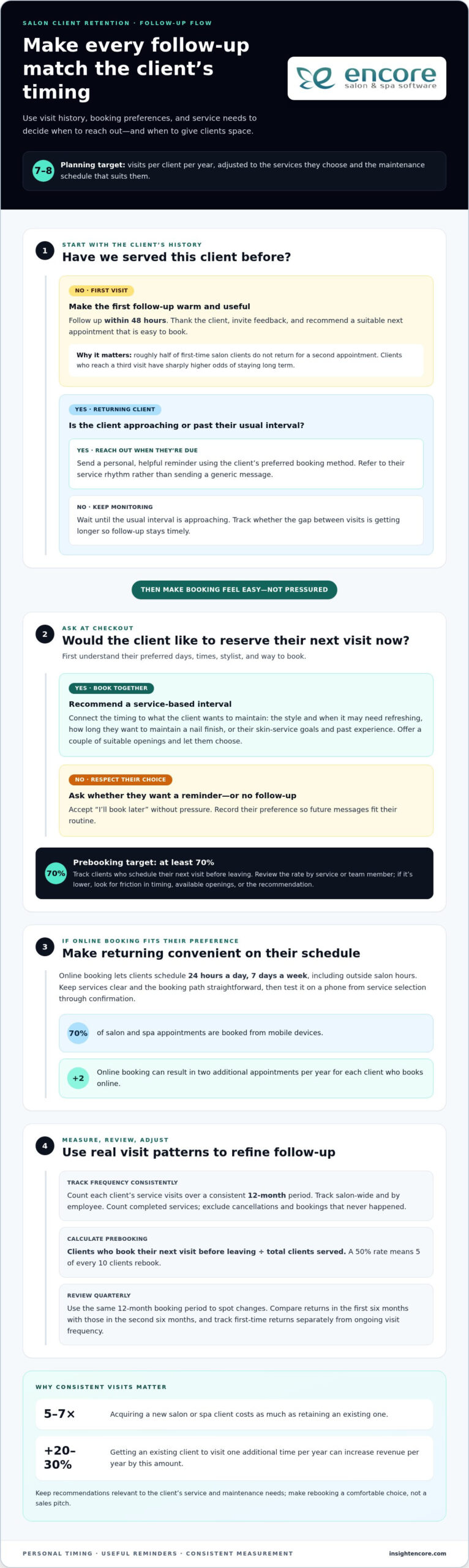
Use the treatment date and service history to time rebooking prompts. For neurotoxin treatments, set a reminder about 90 days after treatment. Frame it as an invitation to discuss a return appointment, not an assumption that the client needs treatment. A service-based reminder is more useful than sending the same rebooking message to every client.
Post-visit thank-you messages and review requests
Plan separate messages for checkout, the client’s return home, and a later rebooking decision. A thank-you can acknowledge the visit, a care message can offer service-specific guidance, and a review request can invite honest feedback. Distinct purposes make messages easier to understand and less like a generic campaign.
Send post-care instructions on checkout day, while the visit is still fresh. Match the content to the treatment and the guidance provided by spa staff. A client leaving after a facial, for example, should receive relevant facial guidance, not a broad message about every service. Keep the instructions practical, with clear steps and a way to contact the spa with questions.
A thank-you message can also help keep the client record useful for the next visit. Name the service and invite the client to reply with questions. If a reply needs staff attention, pass it to the right team member rather than sending another automated note. This handoff helps the spa respond to the client’s actual experience and maintain accurate visit history.
Send review requests on the same day or the day after checkout. Ask clients to share an honest account of their experience, without suggesting what they should say. The FTC’s 2024 rule bans conditioning incentives on what a review says. A neutral request can invite feedback from every client, rather than filtering requests according to whether staff expect a positive rating.
For a consultation that hasn’t yet led to a booking, use a separate nurture message. A post-consultation follow-up 2-3 days later can refer to the service discussed, invite questions, and explain the next booking step. For example, a med spa lead considering a treatment could receive a brief note that makes it easy to reply or schedule. Avoid implying the client has already chosen a treatment.
Connect follow-up to the client’s likely next need, not just the last message sent. Route a question about care to staff; respond to a request to return with booking information. A re-engagement SMS on day three is one possible touch for an inactive contact, while a later loyalty message can recognize repeat visits. Use each step only when it fits the client’s history.
Review replies and booking outcomes to improve the sequence. If clients ask the same question after a particular service, add a clear answer to that service’s care message. If a review request causes confusion, simplify it. These adjustments keep automated messages useful while leaving personal conversations to spa staff.
Balancing automation with personalization
Personalize follow-ups using a client’s service interests, visit history, and communication preferences. Automate routine timing, then tailor the content and next step to the individual.
Treatment-Specific Follow-Up
A treatment-specific message refers to the service the client asked about or received. Unlike a general sequence, its guidance and invitation match that service. For example, a facial inquiry can receive facial-related information, while a massage client gets a message about their own visit. Use staff-approved treatment details and avoid advice that doesn’t fit the service.
Start with the reason for contacting the client. An inquiry about a particular aesthetic service calls for information about that service, not a broad menu of promotions. After an appointment, connect the message to the completed treatment and an appropriate next step. Route questions that need a personal response to the front desk rather than sending another automated message.
Personalized Follow-Up Sequences
A personalized sequence adapts messages to client history and preferences, while a treatment-based message responds mainly to the service. Two clients who received the same treatment may need different next steps: one may be ready to book again, while another wants more information. Use their replies to choose the right path.
Give the sequence a purpose. An inquiry can receive a relevant acknowledgment, helpful follow-up, and later check-in, with each message adding something new. A re-engagement SMS on day three can invite the client to continue the conversation. If they reply, pause the automated path and let staff respond directly. This avoids sending a scheduled promotion after the client has already asked a specific question.
For a practical setup, choose a few useful client details: services discussed, completed appointments, reply history, and communication preferences. Use them to decide what a message says, which channel fits, and whether staff should step in. Review reactivation lists monthly, then refine the sequence based on replies and bookings rather than sending identical content to every inactive contact.
Personalization also means knowing when not to send another message. If a client books, remove them from the inquiry sequence and shift to appointment-related communication. If they ask not to receive promotional messages, respect that preference in future campaigns. These rules coordinate automation with real client interactions and help staff avoid duplicate outreach.
Measure whether each sequence supports a clear outcome, such as a reply, consultation booking, or return appointment. Adjust one element at a time, such as the service reference or next step, so front-desk staff can see what changed. A monthly review keeps the workflow aligned with current client interests.
Encore Salon & Spa Software: Encore Salon Software
Encore Salon & Spa Software brings appointment booking and client management together to help spas organize follow-up. Encore Spa Software connects appointment and client information in one management platform, reducing the need to coordinate every message manually. Its Client Management System supports client relationship management, while Automated Marketing & Loyalty Programs help organize ongoing client engagement.
For example, a spa can use appointment details to guide confirmations and keep relevant client information available for later communication. Automated tools support repeatable workflows, while staff handle personal replies and service-specific judgment. This approach helps spas make follow-up more consistent alongside booking and client management.
Contact Encore Salon & Spa Software to discuss how its spa tools can support your follow-up workflow.
Make your next follow-up step count
Choose one point in the client journey and make it work smoothly. Start with a message your team sends often, then decide what information it should include, which client details should shape it, and when a staff member should step in. This focused change gives your team a clear way to assess whether automated client follow-up for spas feels useful and personal in practice.
Keep the client experience at the center as you refine the process. A well-timed message makes the next action clear, whether that means replying, preparing for a visit, or booking again. Review client responses and adjust the workflow as your spa’s needs evolve. Automation should support thoughtful service, not replace your team’s judgment and care.
With a clear starting point and a helpful process, your team can build client communication that feels organized, relevant, and genuinely welcoming.
Frequently Asked Questions
Should I use the same follow-up sequence for all services?
No. Keep the workflow structure consistent, but adapt its content to the service and the client’s next step. Someone exploring a body treatment may need different information from a client returning for a familiar facial. Use the service discussed, booking status, and client replies to choose relevant messages. A shared sequence stays manageable without giving every client identical details.
What automated follow-up software works best for spas?
Choose software that connects appointment records with client details and the messages you need to manage. A booking calendar alone may not support client history, while a client management tool without scheduling context can require extra work. Encore Spa Software combines online appointment booking with client relationship management tools, helping spas coordinate scheduling and client communication in one management platform.
Which follow-up channels work best for spa clients: SMS, email, or calls?
Choose a channel that fits the message and the client’s preferences. SMS works for brief updates or simple replies; email suits longer information, such as a service guide. A call can help when a client has a question that needs a conversation. For example, send detailed information by email, then have staff call if the client requests personal help.
How can spas automate appointment reminders and reduce no-shows?
Tie reminders to booking status so clients with changed or canceled appointments don’t receive outdated notices. Make each message easy to act on: identify the appointment, provide a clear way to reschedule, and explain how to contact the spa. Review cancellations and missed appointments by service. If clients often need clarification before a particular appointment type, add the missing practical detail to its reminder.
How should spas automate post-treatment aftercare messages?
Create a separate message for each treatment, using aftercare guidance approved by the spa’s qualified staff. Include only instructions relevant to that service, with clear steps and a contact route for questions. Don’t reuse a facial aftercare message for a massage. Make the message easy to scan on a phone, and direct replies that need individual guidance to a staff member.
How can spas automate rebooking and recurring appointment reminders?
Use service history and the spa’s recommended return interval to prompt rebooking, then make the next appointment easy to book. Don’t assume every client needs the same schedule. Remove clients who have already booked from the rebooking sequence, while those who haven’t responded can receive a relevant check-in. Track replies and completed bookings to refine the timing and message.
What consent and opt-out rules apply to automated marketing texts and emails in the United States?
For a responsible workflow, record each client’s marketing preferences, keep promotional messages separate from appointment logistics, and provide a clear way to stop marketing messages. Apply opt-outs to future promotional sends and keep preference records current across campaigns. This answer doesn’t set out every legal requirement for every channel or circumstance; spa owners should build their process around applicable US rules.
What are the risks of automated spa follow-ups, including privacy and over-messaging?
Common risks include messaging the wrong person, exposing unnecessary service details, repeating notices after a booking change, and overwhelming clients with promotions. HIPAA generally permits appointment reminders, but message details should remain minimal. Limit sensitive information, keep contact records accurate, and pause promotional sequences when a client replies or opts out. Review message logs to spot duplicate or mistimed sends.
Disclaimer
This article is general in nature and may contain errors, please verify all claims with your sales rep