
window.dataLayer = window.dataLayer || []; function gtag(){dataLayer.push(arguments);} gtag('js', new Date()); gtag('config', 'UA-206511945-1');
Search
Categories
Uncategorized

Pet Grooming Appointment Confirmations and Reminders

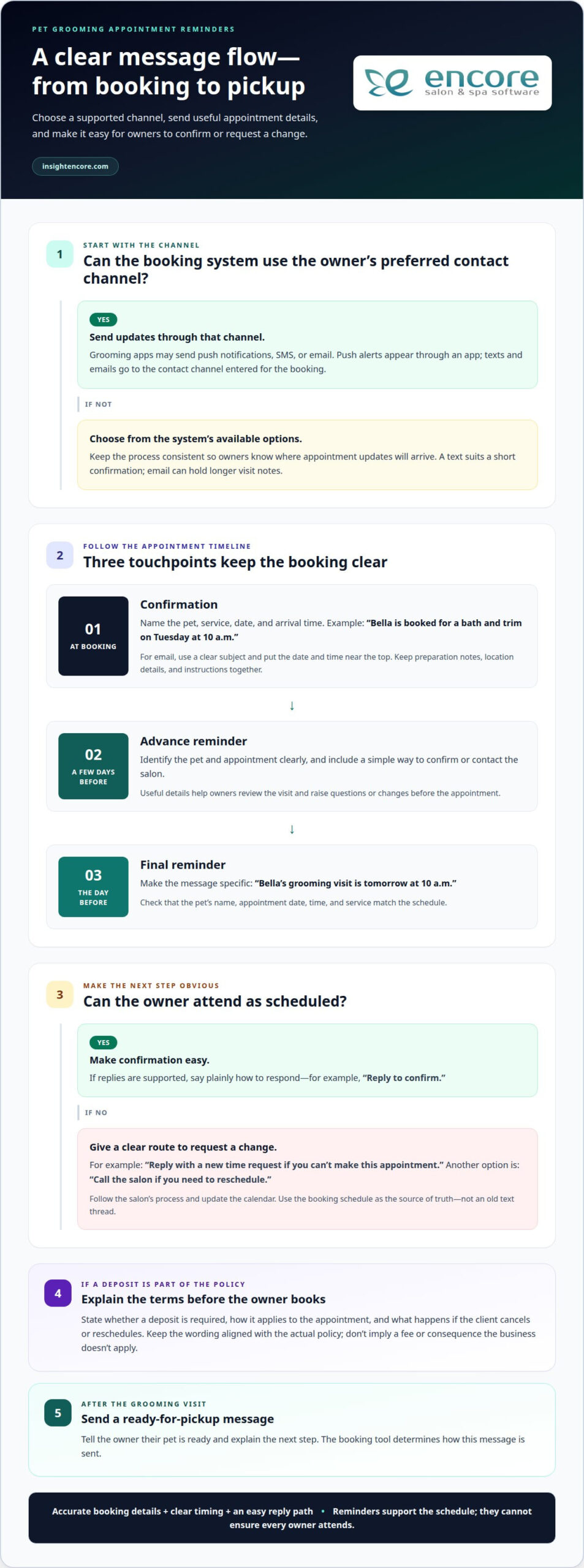
Yes, grooming scheduling apps can send appointment reminders by push notification, SMS, and email. A pet grooming appointment confirmation text can acknowledge the booking, followed by a reminder a few days before the visit and a final text the day before. The exact sequence depends on the app and the salon’s setup.

A full grooming calendar is easier to manage when pet owners know what’s booked and when to arrive. Clear messages can also explain what to prepare before the visit and let owners know when their pet is ready for pickup.

This article explains how grooming apps send reminders and what to include in confirmation, pre-visit, and pickup texts. You’ll also see how timing, message details, and the booking system shape the process, so you can create a smoother experience for clients and staff.

Key Takeaways

  • Choose reminder channels that fit how your clients prefer to receive appointment updates.
  • Make each message useful by clearly stating the appointment details and any preparation the owner needs to know.
  • Use reminders to make it easier for clients to act if their plans change, helping you manage your schedule.
  • Set a clear process for confirming, cancelling, or rescheduling so replies don’t get lost.
  • Send a pickup message that tells the owner their pet is ready and explains the next step.

Automated appointment reminders by push notification, SMS, and email

Grooming apps can send appointment updates through push notifications, SMS, or email. A message sequence can start at booking, continue a few days beforehand, and end with a text the day before.

Text and Email Confirmations

At booking, an automated confirmation gives the owner a written record of the appointment. A pet grooming appointment confirmation text can name the pet, service, date, and arrival time. For example: “Bella is booked for a bath and trim on Tuesday at 10 a.m.” The owner can quickly spot an incorrect date or service.

An email confirmation can include the same essential details in a more spacious format. Use a clear subject, such as “Bella’s grooming appointment is confirmed,” and put the date and time near the top. Keep preparation notes, location details, and instructions together so the owner can find them without searching through unrelated booking messages.

When choosing a channel, consider the owner’s preferred contact details and the booking tool’s options. A text suits a short confirmation, while email can hold longer visit notes. Some systems automatically send either format after booking. Make sure the message matches the appointment saved in the schedule, including the selected service and any timing changes.

Text Reminders and No-Shows

Automated reminders give owners another prompt to review an upcoming visit. A useful sequence may include a reminder a few days ahead and a final text the day before. Each message should identify the pet and appointment clearly. “Bella’s grooming visit is tomorrow at 10 a.m.” is more actionable than a generic reminder.

Reminders can reduce avoidable confusion, but they can’t ensure every owner attends. Make each text easy to act on by including a clear way to confirm or contact the salon. If the booking tool supports replies, explain how to respond in plain language. This gives owners who can’t attend a chance to raise the issue before the appointment.

Choose push notifications, SMS, or email based on the options your booking system supports. Push alerts appear through an app, while texts and emails go to the contact channel entered for the booking. The tool you use also determines how a ready-for-pickup text is sent. Keep the process consistent so owners know where appointment updates will arrive.

Before activating automation, review each message from an owner’s perspective. Confirm that the pet’s name, appointment date, time, and service are easy to understand. Then check the timing settings against the booking flow: confirmation after booking, an advance reminder, and a final reminder the day before. Clear scheduling and accurate details make reminders more useful to clients and staff.

Reducing missed appointments

A missed grooming visit leaves a gap in the schedule and can disrupt staff planning. A clear reminder process gives owners time to confirm plans, ask questions, or request a change. For example, a reminder can invite a reply if the owner can’t bring Max at the scheduled time.

Start by making the booking details accurate. Record the owner’s preferred contact method, the pet’s name, and the appointment time. Then make the next step clear in each message. “Reply to confirm” gives the client a direct action, while “Call the salon if you need to reschedule” explains another option.

Make schedule changes easy to communicate

Owners may miss appointments because plans change, not because they forgot. A simple way to cancel or reschedule helps them tell you before the appointment begins. If your software records appointment changes, use that schedule as the source of truth. This helps staff avoid relying on an old text thread when preparing the day’s appointments.

Keep the wording consistent across booking messages and reminders. For example, a message might say, “Reply with a new time request if you can’t make this appointment.” Staff can then follow the salon’s process and update the calendar. A clear process is more useful than a vague request to “get in touch.”

Set deposit expectations clearly

A deposit may be part of a grooming business’s booking policy, but explain the terms before an owner books. State whether a deposit is required, how it applies to the appointment, and what happens if the client cancels or reschedules. Don’t bury those details in a reminder sent after the booking is complete.

If a client pays by credit card, show the deposit information alongside the booking details. For example: “Your appointment is held once the booking deposit is paid. See our cancellation policy for rescheduling details.” Use wording that matches your actual policy. Clear terms help owners make an informed decision and prevent confusion later.

Keep the policy practical for staff, too. A grooming salon might record whether a deposit was received and whether the appointment changed. This gives the team a useful reference when reviewing the day’s schedule. Don’t let a generic automated message imply a fee or consequence that your business doesn’t apply.

Review the process from the owner’s perspective. Can they identify the appointment, understand the deposit terms, and communicate a change? For your business, a reliable routine means keeping messages, booking records, and staff actions aligned. Use automation to support that routine, then have staff handle replies that need personal attention. The goal is fewer avoidable gaps, not a promise that every client will attend.

What should a pet grooming appointment confirmation text include?

A useful confirmation lets an owner check the booking without searching through earlier messages. Keep the details specific, readable on a phone, and consistent with the appointment record. For example, “Milo is booked for a bath and trim on Tuesday at 10 a.m.” immediately identifies the pet, service, date, and time.

Include the salon name so the sender is recognizable, especially when an owner receives messages from several businesses. Add the appointment location if the salon has multiple locations or uses a separate drop-off entrance. For a mobile grooming visit, make the address or agreed meeting point clear.

Choose details that help the owner prepare and arrive at the right time. If the grooming visit requires a particular arrival instruction, state it plainly. Keep extra notes focused. A long block of care advice can hide the appointment information, while a concise message makes the essentials easier to scan.

Make the next step clear

Tell the owner what to do if a detail looks wrong or plans change. For example, “Reply to this text if you need to change your appointment” gives a clear route. Use that wording only if replies are monitored and the salon can act on them. Otherwise, provide the correct contact method in the message.

If confirmation requires an owner response, say so directly. “Please reply YES to confirm Milo’s appointment” is clearer than “Please respond.” Don’t ask clients to confirm if the booking is already treated as final. The message should match the salon’s actual booking process.

Keep the message easy to scan

Put the pet’s name and appointment details near the beginning. Use separate sentences for the service and any preparation note. For example, “Milo is booked for a bath and trim on Tuesday at 10 a.m. Please bring his vaccination records.” Include health or care instructions only when they apply to that visit.

Avoid unclear shorthand, unexplained abbreviations, and details that could confuse owners. Write “10 a.m.” instead of a compressed time code. Check names carefully, especially when an owner has more than one pet. A message addressed to the wrong pet can make an otherwise accurate appointment feel uncertain.

Before sending, compare the confirmation with the saved booking. Check the owner’s contact details, pet name, service, location, and appointment time. A client management system can keep those records together, helping staff use consistent details across messages. The final text should answer the owner’s basic questions: which pet, what service, where, and when?
Pet Grooming Appointment Confirmations and Reminders

When should a groomer send an appointment confirmation text?

Send the confirmation as soon as the booking is recorded. This gives the owner a written reference while the appointment is still fresh. For example, if Jordan books Luna’s bath during a phone call, a confirmation afterward lets Jordan review the date and time. If a detail looks wrong, there’s time to correct the schedule.

Use the appointment date to plan the next messages. A practical sequence is confirmation at booking, a reminder a few days before, and a final text the day before. Each message serves a different moment: the first records the commitment, the advance reminder helps owners plan, and the last brings the visit back to mind.

Timing also depends on how far ahead the client books. If someone schedules well in advance, the confirmation provides an immediate record, while later reminders renew attention as the visit approaches. If a client books close to the appointment date, send the confirmation promptly and avoid a reminder arriving after the visit. Review message timing against the calendar before enabling automation.

Appointment changes need attention, too. If a client moves a visit from Tuesday to Thursday, the old date should no longer appear in future messages. Send an updated confirmation after staff records the change. Then make sure any remaining reminders refer to Thursday. This prevents a client from receiving conflicting details about Luna’s appointment.

Choose reminder timing that gives clients a useful chance to respond. A text sent the day before can prompt an owner to raise a scheduling conflict before arriving. A reminder a few days ahead leaves more room for planning. The right spacing depends on how clients book and how the salon handles changes, not on one universal schedule.

Coordinate automated messages with staff communication. For example, if a groomer has already called about a timing adjustment, the schedule and next text should reflect that conversation. Review the appointment record before sending a manual update. This small step keeps the calendar, staff notes, and client messages aligned.

Set aside time to test the sequence with a sample booking. Check when the confirmation arrives, whether the advance reminder uses the correct appointment date, and whether the final text arrives before the visit. Also test a changed appointment. These checks can catch timing errors before they affect a client’s real booking.

For a ready-for-pickup message, send it when the pet is actually ready. The grooming business’s booking tool determines how that text is sent. Keep pickup timing separate from appointment reminders so owners don’t mistake a visit confirmation for a collection notice.

How can clients confirm, cancel, or reschedule a grooming appointment by text?

Clients can reply to the salon’s appointment message with a clear request. A confirmation might say, “Yes, I’ll bring Milo for his bath and trim.” For a cancellation, the owner can write, “Please cancel Milo’s grooming appointment.” A rescheduling request should name the pet and ask for another available time.

Clear replies help staff identify the right booking. An owner with more than one pet should include the pet’s name and appointment details. For example, “Please move Luna’s grooming visit” is easier to understand than “Can I change it?” If the owner has a preferred day, they can include it as a request, not as a confirmed appointment.

Clients should use the reply method stated in the salon’s message. If it invites text replies, respond in the same thread. If it directs owners to call, follow that instruction instead. A text sent to an automated number may not reach staff, so the message should explain whether replies are monitored and what to do next.

A cancellation text should state the owner’s request plainly. “Please cancel Max’s appointment” is more actionable than “We can’t make it.” Include the scheduled service or date if the thread contains multiple bookings. That extra detail helps staff find the correct calendar entry and avoid changing another pet’s visit by mistake.

For rescheduling, ask for a new time rather than treating a suggestion as a confirmed change. For example, “Could we move Bella’s appointment to Thursday?” tells the salon what the owner wants. Staff can then check the schedule, offer an available option, and send a revised confirmation after recording the change.

Owners should look for a response that confirms the requested action. A cancellation reply should make clear that the booking was cancelled. A rescheduling reply should identify the new appointment details. If no response arrives, use the salon’s stated contact method instead of assuming the calendar has changed. This prevents confusion if the owner arrives for an appointment that still appears booked.

For grooming businesses, use a consistent process for handling replies. Staff can review the message, locate the client and pet record, update the appointment, and send a clear response. Keep the schedule aligned with the conversation. If a request needs follow-up, record it for the team rather than leaving it buried in a text thread.

Texting works best when the salon’s instructions are simple and its replies reflect the updated booking. Clear options help clients communicate changes, while a written confirmation gives both sides a shared record of the next step.

Encore Salon & Spa Software

Encore Salon & Spa Software helps businesses organize bookings and client information in one management platform. For pet groomers, this can support a consistent process for recording appointments and keeping client details accessible. Clear records help staff manage booking changes and keep client communications aligned with the schedule.

Consider Encore when reminders, booking details, and client records feel scattered across separate tools. Encore offers Encore Salon Software, Encore Spa Software, Chair/Booth Renter Software, and Tattoo Studio Software for those business types.

Contact Encore Salon & Spa Software to discuss your business needs.

Build a smoother booking routine

Use each pet grooming appointment confirmation text as part of a consistent client experience, not just as a reminder. A clear process gives your team a reliable way to manage bookings, keep client information organized, and respond when plans change. As your workflow evolves, reviewing how appointment records and communication fit together can reveal practical ways to reduce friction for staff and pet owners.

Encore Salon & Spa Software offers Encore Salon Software, Encore Spa Software, and Chair/Booth Renter Software. These tools support businesses that want to bring key management tasks into a more organized workflow.

Explore Encore and take the next step

Small improvements to your booking routine can make each visit easier to coordinate. Keep refining the process to create a calmer experience for your team and clients.

Frequently Asked Questions

Do grooming scheduling apps send reminders?

Yes, grooming scheduling apps can send reminders through push notifications, SMS, and email, depending on their settings. The best channel depends on how each owner receives booking updates. An app notification may suit someone who regularly uses the booking app, while email can hold longer visit notes. Review the contact details and communication preferences saved for each booking so updates reach the intended recipient.

What are confirmation text examples for dogs and cats?

A pet grooming appointment confirmation text for a dog could say: “Hi Sam, Rocky is booked for a bath and nail trim on Thursday at 9 a.m. Reply if you have a question.” For a cat: “Hi Lee, Poppy’s grooming visit is set for Monday at 2 p.m. Please bring her carrier to drop-off.” Adjust the service and instructions to match the pet’s actual visit.

How do I confirm a pet grooming appointment by text message?

Reply using the method the salon’s message requests. If it asks for confirmation, send a direct response such as, “Yes, I confirm Charlie’s appointment.” Include your pet’s name if you have more than one animal booked. Keep the original message thread, then read any reply from the salon. If the message doesn’t explain how to respond, use the contact method the salon provided.

How do I write a friendly, professional grooming confirmation text?

Use a warm greeting, the owner’s name, and the pet’s name, then keep the wording clear and natural. For example: “Hi Morgan, we’re looking forward to seeing Scout for his grooming visit. Your appointment is booked for Wednesday at 11 a.m. Please reply if you have a question.” Avoid jokes or overly familiar language that may not suit every client. Keep personal details relevant to the visit.

How should I handle no-shows and late cancellations in grooming texts?

Respond calmly and follow the salon’s stated cancellation policy. For a late cancellation, acknowledge the message and ask whether the owner wants to request another appointment. For a missed visit, send a neutral follow-up, such as, “We missed you and Bailey today. Would you like to arrange another visit?” Record the outcome in the appointment record. Don’t imply a penalty unless it applies under the salon’s policy.

What confirmation text templates work for new and returning clients?

For a new client: “Hi Alex, welcome to the salon. We’ve booked Pippin for a grooming consultation on Friday at 1 p.m. Please reply if you have questions before the visit.” For a returning client, a pet grooming appointment confirmation text might say: “Hi Alex, Pippin’s next grooming visit is booked for Friday at 1 p.m. We look forward to seeing you both.” Tailor each message to the booking.

Disclaimer

This article is general in nature and may contain errors, please verify all claims with your sales rep
Categories
Uncategorized

What ‘Appointment is Confirmed’ Means for Your Business and Clients

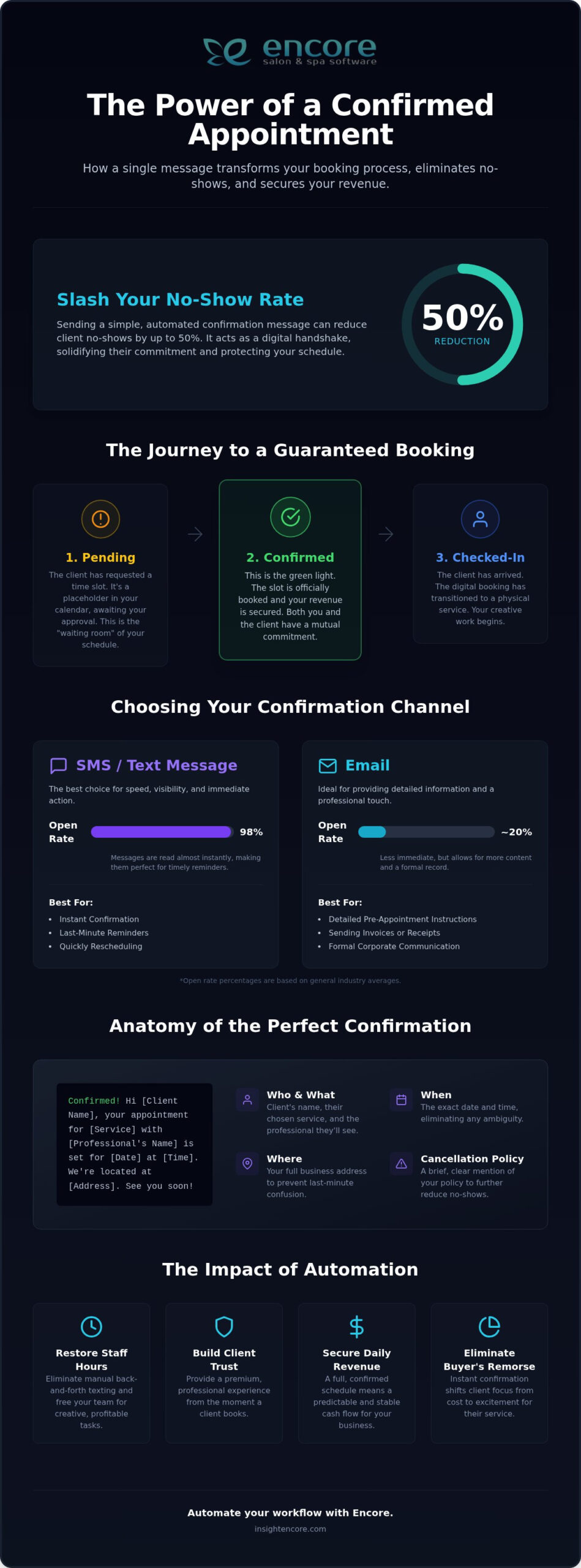
Did you know that sending a simple text message can slash your no-show rate by up to 50%? When a client receives a notification stating their appointment is confirmed, it acts as a digital handshake that builds immediate trust. You’ve likely spent years perfecting your craft, yet a single empty chair can still derail your entire afternoon. It’s exhausting to balance a pair of shears or a tattoo machine in one hand and a smartphone in the other, trying to manually chase down every booking just to keep your lights on.

We understand that your time is your most valuable asset. You’re likely tired of the back and forth texting that eats into your creative hours and leaves clients feeling confused about their booking status. This article shows you how to move past that stress by using professional, automated systems that handle the heavy lifting for you. You’ll learn how a streamlined confirmation process saves hours of staff time and creates a premium experience for every guest. We’ll walk through the essential elements of a perfect confirmation and how to use modern tools to keep your schedule full and your brand looking its absolute best.

Key Takeaways

  • Understand why the confirmation stage is the most critical part of your booking funnel and how it solidifies client commitment.
  • Learn how to leverage psychological triggers that eliminate “buyer’s remorse” once an appointment is confirmed, protecting your daily revenue.
  • Discover why SMS dominates for speed and open rates while identifying the specific scenarios where email still provides a professional edge.
  • Identify the four essential elements every confirmation message needs to include to prevent client confusion and eliminate last-minute questions.
  • See how automating your confirmation workflow with Encore software restores hours of staff time each week for more creative and profitable tasks.

Defining the ‘Appointment is Confirmed’ Status

In the world of professional services, a booking isn’t just a mark on a calendar. It’s a commitment. When an appointment is confirmed, it signals the final stage of the client acquisition funnel. Your marketing did its job, the client found your page, and now they’ve committed to showing up. This status isn’t just a technical label; it’s the specific point where a casual browser transforms into a dedicated customer. It’s the digital handshake that says, "I’ll be there, and I’m ready for you."

Think of the difference between a request and a confirmation. A request is a hope or a wish. A confirmation is a guarantee. For your business, this status means you can stop worrying about gaps in your day and start preparing your station with confidence. For the client, it provides instant relief. They know exactly where they need to be, what time they’re expected, and which professional is waiting for them.

The Linguistic Basis: Agreement and Engagement

The word "appointment" stems from a formal agreement to meet. In a modern salon or spa, this concept has evolved significantly. We’ve moved far beyond the days of messy paper ledgers where "confirmed" simply meant a quick pencil mark next to a name. Today, Appointment scheduling software provides a clear, digital status that acts as a mutual contract of trust.

This digital confirmation creates a powerful psychological shift. Once a client sees that their appointment is confirmed, they’re far more likely to prioritize the event over other daily distractions. It’s no longer a "maybe" in their mind; it’s a professional engagement they’ve officially entered. This mutual obligation ensures you respect their time by being prepared, and they respect yours by arriving on time. It’s about building a relationship before they even walk through your door.

Appointment Statuses You Should Know

Managing a busy schedule requires clear, actionable categories. Using the management features in your booking system helps you track these transitions without the stress of manual checking. Here is how the professional workflow usually looks:

  • Pending: This is the waiting room of your schedule. The client has asked for a specific time, but you haven’t locked it in yet. It’s a placeholder that requires a quick human or automated touch to finalize.
  • Confirmed: This is the green light for both you and the client. Both parties have agreed, and the slot is officially off the market. This is the stage where your revenue is secured and your day is organized.
  • Checked-in: This marks the transition from a digital booking to a physical service. The client is now in the building, and your creative work begins.

Why Confirmation is the Secret to Reducing Salon No-Shows

An empty chair is the most expensive piece of furniture in your salon. When an appointment is confirmed, you aren’t just filling a slot; you’re securing your livelihood. A no-show represents a total loss of potential income that you can’t ever recover. Beyond the immediate cash flow, these gaps disrupt your entire rhythm and leave your staff standing around. Using professional best practices for appointment confirmations ensures that your clients understand the value of the time you’ve set aside specifically for them.

Confirmations also solve a common psychological hurdle known as buyer’s remorse. High-end services or long sessions often come with a moment of hesitation shortly after booking. A clear, welcoming message stating the appointment is confirmed provides a sense of finality and excitement. It moves the client from "did I spend too much?" to "I can’t wait for my transformation." This simple shift in perspective is often the difference between a loyal regular and a last-minute cancellation. It builds your brand as a reliable, organized partner in their self-care journey.

The Cost of a No-Show in 2026

Revenue loss is only the tip of the iceberg. Frequent no-shows drain the energy of your team and create instability for booth renters who rely on every single booking to pay their overhead. When a schedule is flaky, morale drops. Staff start to feel undervalued, and the professional atmosphere of your business begins to slip. You can learn more about protecting your culture and your bottom line in our guide to Master Your Business with Encore Salon & Spa Software.

Creating a Culture of Accountability

Accountability is a two-way street. When you send a professional confirmation, you’re telling the client that your time is valuable. This sets a standard for the entire relationship. It also gives you a natural opportunity to restate your cancellation and deposit policies without it feeling like a confrontation. By automating this journey, you move away from soft verbal promises toward a hard schedule that everyone respects. It’s about creating a system where clients feel obligated to show up because they know you’re ready and waiting for them. If you’re ready to see how this looks in practice, you might want to explore our automated tools to help keep your chairs full and your team happy.

SMS vs. Email: Choosing the Best Way to Confirm

Choosing between text and email isn’t about which tool is better; it’s about meeting your clients where they already live. While both channels serve a purpose, their effectiveness varies based on your specific business model. When an appointment is confirmed, the delivery method determines how quickly that information is processed and acted upon. You want a method that feels like a helpful nudge rather than a digital chore.

The Case for SMS Confirmations

If speed is your priority, SMS is the undisputed champion. Research shows that SMS open rates are as high as 98%, while email averages around 30.7%. Even more impressive is the speed of reading. 95% of text messages are read within 3 minutes of being delivered. For fast-paced environments like barber shops, nail salons, and busy tattoo studios, this immediacy is vital. A "Reply C to Confirm" workflow allows your system to update the schedule automatically, removing the need for staff to manually check messages during a busy shift.

  • High Visibility: Texts cut through the noise of a crowded promotional inbox.
  • Frictionless Response: Clients can confirm with a single character or a quick tap.
  • Real-time Updates: Perfect for last-minute schedule changes or weather-related updates.

The Case for Email Confirmations

While texts are great for speed, email offers the space required for luxury and detail. High-end medical spas or specialized studios often need to provide pre-appointment instructions or digital intake forms. Email allows you to showcase your visual branding, including your logo and a specific aesthetic that reflects your professional identity. It’s the better choice when the client needs to review long-form information before they arrive at your door.

To bridge the "Professionalism Gap," many successful businesses use a multi-channel approach. They send an initial email with all the beautiful branding and prep details, followed by a punchy SMS reminder 24 hours before the visit. This ensures the appointment is confirmed through a method that feels personal and supportive. It captures the client’s attention without being intrusive.

Using automated communication features allows you to hyper-personalize these messages. By pulling client data like their preferred name or their specific service provider, you make the automation feel human. This level of care builds the trust we’ve discussed, ensuring your clients feel like a priority rather than just another entry in a database. It’s a simple way to maintain a high-touch feel while you focus on your creative work.

What 'Appointment is Confirmed' Means for Your Business and Clients

Best Practices for Crafting the Perfect Confirmation Message

Your confirmation message is often the first official interaction a client has with your brand after booking. It needs to be clear, welcoming, and packed with the right details. A vague message leads to "no-show" excuses; a structured message creates a professional boundary. When an appointment is confirmed, the client should immediately feel a sense of organized control. They shouldn’t have to hunt through their inbox to remember who they’re seeing or where they’re going.

To keep things professional, always include these four essential elements in every message: the date and time, the full address of your business, the service provider’s name, and a clear call to action. Whether you want them to "Reply C to Confirm" or click a link to fill out a form, tell them exactly what to do next. This clarity removes the friction that often leads to missed visits. You can explore how to set these up using Encore Salon Software features for automated messaging.

Timing is just as critical as the content. The "sweet spot" for an initial confirmation is immediate. Research shows that 41% of people confirm their appointments within just one hour of receiving a reminder. Sending that first notification the second their appointment is confirmed in your system capitalizes on their current focus. It locks the event into their mental calendar while the booking is still fresh.

Templates You Can Use Today

Different niches require different details. For a standard salon, keep it punchy: "Hi [Name]! Your hair transformation with [Stylist] is locked in for [Date] at [Time]. We can’t wait to see you at [Address]! Reply C to confirm." This is short, sweet, and highly effective for daily bookings. If you’re running a specialized studio, check out our 2026 Nail Salon Client Management Software Guide for more tailored communication tips.

Spas often need to manage logistics like parking or arrival times. A detailed spa confirmation might look like this: "Your relaxation session at [Spa Name] is confirmed for [Date] at [Time]. Please arrive 15 minutes early to enjoy our lounge. Parking is available in the rear lot. See you soon!" This sets expectations and reduces client anxiety about the visit.

Tattoo studios have unique requirements. Your message should emphasize policies: "Hey [Name]! Your session with [Artist] is confirmed for [Date] at [Time]. Remember to bring a valid ID and eat a full meal beforehand. Please note that deposits are non-refundable for cancellations with less than 48 hours’ notice." This firm but friendly tone protects your time and your revenue. If you’re ready to automate these templates and stop the manual texting cycle, you can start your free trial of Encore today.

How Encore Automates Your Confirmation Workflow

The transition from manual texting to an automated system is often the moment a business owner finally breathes a sigh of relief. With Encore Salon & Spa Software, you can implement "set it and forget it" booking rules that act as a silent partner for your front desk. Instead of spending your lunch break scrolling through sent messages to see who replied, the system handles the outreach for you. When an appointment is confirmed through a client’s response, your digital calendar updates in real time. This instant syncing ensures that your schedule is always accurate, preventing double bookings and allowing you to see exactly how your day is shaping up at a glance.

Every business is unique, and your automation should reflect that. A pet grooming session requires different prep than a balayage service. Encore Salon & Spa Software allows you to customize notifications based on the specific service type. You can set unique triggers for your Client Management System so that a tattoo artist’s client receives health disclosures while a hair client gets parking tips. This level of detail ensures that once the appointment is confirmed, the client has every piece of information they need for a successful visit.

Beyond the Text: Integrated Payments and Forms

Securing your revenue starts well before the client walks through the door. By linking deposits directly to the confirmation step, you create a financial commitment that significantly reduces the chance of a no-show. Encore Salon & Spa Software can automatically send digital intake forms the moment a booking is finalized. This means your guests arrive ready to start their service, rather than spending the first ten minutes of their slot filling out paperwork. It creates a seamless, high-end experience that reduces front-desk friction and lets your team focus on their craft.

Getting Started with Automation

Making the switch from a paper book or a basic calendar app to professional software might feel like a big leap, but the results are immediate. Most business owners find they save at least 5 hours a week on administrative tasks alone. That is time you can spend on creative work, staff training, or simply taking a well-deserved break. The ROI isn’t just measured in dollars; it’s measured in the peace of mind that comes from knowing your business is running smoothly in the background. Ready to see it in action? Try Encore Salon & Spa Software Now and discover how simple an organized schedule can be.

Secure Your Revenue and Reclaim Your Time

Ensuring every appointment is confirmed goes beyond simple scheduling; it is about establishing a professional standard that protects your livelihood. By moving away from the chaos of manual follow-ups, you create a reliable environment where both you and your clients can thrive. This digital handshake eliminates ambiguity and ensures that your expertise is respected and your time is properly valued.

Syntec Business Systems has served as a dedicated ally to thousands of beauty professionals since 1991. As an all-in-one platform featuring integrated POS and online booking, we provide specialized tools tailored to the unique needs of salons, spas, and tattoo studios. You deserve a system that works as hard as you do, handling the logistics so you can focus on your craft. We are committed to helping you transition from daily administrative stress to a state of complete, organized control.

Stop chasing clients and start growing your business-Try Encore Salon & Spa Software Now

Frequently Asked Questions

What does ‘appointment is confirmed’ mean in a text message?

An "appointment is confirmed" status means the service provider has officially locked in your requested time slot on their professional schedule. This status indicates that the booking is no longer pending or waiting for approval. You are now expected to arrive at the specified time. It acts as a digital agreement between you and the business to ensure everyone is prepared for the visit.

Is an appointment confirmed the same as a reminder?

No, these messages serve different purposes in the client journey. A confirmation is sent immediately after booking to verify that the slot is officially yours and recorded in the system. A reminder is sent closer to the actual date, often 24 to 48 hours before. This second message ensures you don’t forget the commitment you made days or weeks earlier.

Can I cancel an appointment once it is confirmed?

Yes, you can usually cancel, but you’ll need to follow the specific cancellation policy of the salon or studio. Most professional businesses require at least 24 to 48 hours’ notice to avoid late fees or lost deposits. Check your initial confirmation message for a link or phone number to manage your booking. It’s always better to communicate early if your plans change.

How do I know if my doctor’s appointment is confirmed?

You will typically receive an automated text or email explicitly stating that your appointment is confirmed. If you haven’t received a notification within 24 hours of booking, it’s a good idea to call the office directly. Many modern medical providers also use patient portals where you can log in to check your status and view upcoming visit details in real time.

Why didn’t I receive an appointment confirmation email?

The most common reasons include an incorrect email address, the message being filtered into your spam folder, or a brief delay in the business’s automated system. Check your "Promotions" or "Junk" folders first to see if it was misfiled. If you still can’t find it, contact the business to ensure they have your correct contact information on file for future notifications and reminders.

What is the best wording for an appointment confirmation?

The best wording is clear, concise, and includes all the essential logistics for the visit. Start with a friendly greeting, followed by the date, time, location, and the name of the professional. For example: "Hi [Name], your appointment is confirmed for [Date] at [Time] with [Provider] at [Business Name]. We look forward to seeing you!" This structure removes any potential for client confusion.

Should I ask clients to reply ‘C’ to confirm their booking?

Yes, asking for a simple "C" or "1" is a highly effective way to increase your engagement rates. This low-friction response allows your scheduling software to update the calendar automatically without any manual intervention from your staff. It’s a professional way to ensure the client is still committed to their time slot while drastically reducing your daily administrative workload and manual texting.

How far in advance should an appointment be confirmed?

You should send the initial confirmation immediately after the booking is made to provide instant peace of mind. This gives the client a permanent record of their appointment details. Follow this up with a reminder 24 to 72 hours before the service. This secondary nudge catches any last-minute scheduling conflicts or emergencies before they turn into a frustrating and costly no-show for your team.

Disclaimer

This article is general in nature and may contain errors, please verify all claims with your sales rep