
Yes, grooming scheduling apps can send appointment reminders by push notification, SMS, and email. A pet grooming appointment confirmation text can acknowledge the booking, followed by a reminder a few days before the visit and a final text the day before. The exact sequence depends on the app and the salon’s setup.
A full grooming calendar is easier to manage when pet owners know what’s booked and when to arrive. Clear messages can also explain what to prepare before the visit and let owners know when their pet is ready for pickup.
This article explains how grooming apps send reminders and what to include in confirmation, pre-visit, and pickup texts. You’ll also see how timing, message details, and the booking system shape the process, so you can create a smoother experience for clients and staff.
Key Takeaways
- Choose reminder channels that fit how your clients prefer to receive appointment updates.
- Make each message useful by clearly stating the appointment details and any preparation the owner needs to know.
- Use reminders to make it easier for clients to act if their plans change, helping you manage your schedule.
- Set a clear process for confirming, cancelling, or rescheduling so replies don’t get lost.
- Send a pickup message that tells the owner their pet is ready and explains the next step.
Automated appointment reminders by push notification, SMS, and email
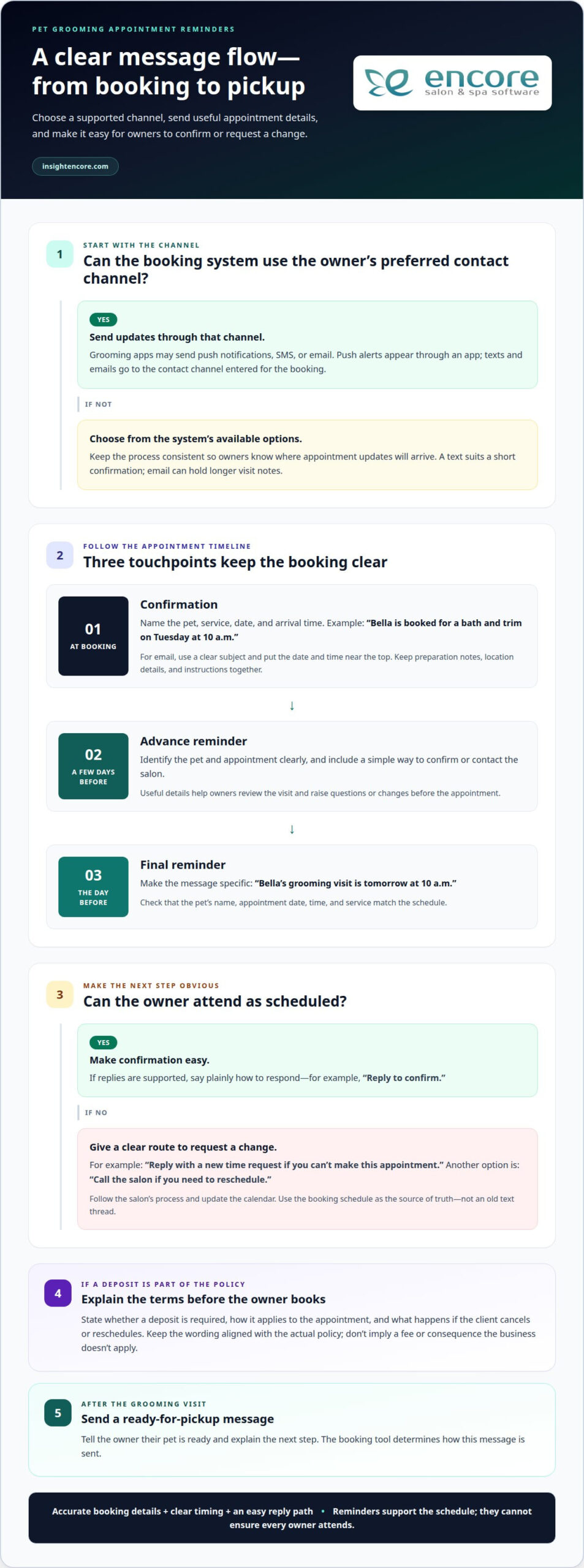
Grooming apps can send appointment updates through push notifications, SMS, or email. A message sequence can start at booking, continue a few days beforehand, and end with a text the day before.
Text and Email Confirmations
At booking, an automated confirmation gives the owner a written record of the appointment. A pet grooming appointment confirmation text can name the pet, service, date, and arrival time. For example: “Bella is booked for a bath and trim on Tuesday at 10 a.m.” The owner can quickly spot an incorrect date or service.
An email confirmation can include the same essential details in a more spacious format. Use a clear subject, such as “Bella’s grooming appointment is confirmed,” and put the date and time near the top. Keep preparation notes, location details, and instructions together so the owner can find them without searching through unrelated booking messages.
When choosing a channel, consider the owner’s preferred contact details and the booking tool’s options. A text suits a short confirmation, while email can hold longer visit notes. Some systems automatically send either format after booking. Make sure the message matches the appointment saved in the schedule, including the selected service and any timing changes.
Text Reminders and No-Shows
Automated reminders give owners another prompt to review an upcoming visit. A useful sequence may include a reminder a few days ahead and a final text the day before. Each message should identify the pet and appointment clearly. “Bella’s grooming visit is tomorrow at 10 a.m.” is more actionable than a generic reminder.
Reminders can reduce avoidable confusion, but they can’t ensure every owner attends. Make each text easy to act on by including a clear way to confirm or contact the salon. If the booking tool supports replies, explain how to respond in plain language. This gives owners who can’t attend a chance to raise the issue before the appointment.
Choose push notifications, SMS, or email based on the options your booking system supports. Push alerts appear through an app, while texts and emails go to the contact channel entered for the booking. The tool you use also determines how a ready-for-pickup text is sent. Keep the process consistent so owners know where appointment updates will arrive.
Before activating automation, review each message from an owner’s perspective. Confirm that the pet’s name, appointment date, time, and service are easy to understand. Then check the timing settings against the booking flow: confirmation after booking, an advance reminder, and a final reminder the day before. Clear scheduling and accurate details make reminders more useful to clients and staff.
Reducing missed appointments
A missed grooming visit leaves a gap in the schedule and can disrupt staff planning. A clear reminder process gives owners time to confirm plans, ask questions, or request a change. For example, a reminder can invite a reply if the owner can’t bring Max at the scheduled time.
Start by making the booking details accurate. Record the owner’s preferred contact method, the pet’s name, and the appointment time. Then make the next step clear in each message. “Reply to confirm” gives the client a direct action, while “Call the salon if you need to reschedule” explains another option.
Make schedule changes easy to communicate
Owners may miss appointments because plans change, not because they forgot. A simple way to cancel or reschedule helps them tell you before the appointment begins. If your software records appointment changes, use that schedule as the source of truth. This helps staff avoid relying on an old text thread when preparing the day’s appointments.
Keep the wording consistent across booking messages and reminders. For example, a message might say, “Reply with a new time request if you can’t make this appointment.” Staff can then follow the salon’s process and update the calendar. A clear process is more useful than a vague request to “get in touch.”
Set deposit expectations clearly
A deposit may be part of a grooming business’s booking policy, but explain the terms before an owner books. State whether a deposit is required, how it applies to the appointment, and what happens if the client cancels or reschedules. Don’t bury those details in a reminder sent after the booking is complete.
If a client pays by credit card, show the deposit information alongside the booking details. For example: “Your appointment is held once the booking deposit is paid. See our cancellation policy for rescheduling details.” Use wording that matches your actual policy. Clear terms help owners make an informed decision and prevent confusion later.
Keep the policy practical for staff, too. A grooming salon might record whether a deposit was received and whether the appointment changed. This gives the team a useful reference when reviewing the day’s schedule. Don’t let a generic automated message imply a fee or consequence that your business doesn’t apply.
Review the process from the owner’s perspective. Can they identify the appointment, understand the deposit terms, and communicate a change? For your business, a reliable routine means keeping messages, booking records, and staff actions aligned. Use automation to support that routine, then have staff handle replies that need personal attention. The goal is fewer avoidable gaps, not a promise that every client will attend.
What should a pet grooming appointment confirmation text include?
A useful confirmation lets an owner check the booking without searching through earlier messages. Keep the details specific, readable on a phone, and consistent with the appointment record. For example, “Milo is booked for a bath and trim on Tuesday at 10 a.m.” immediately identifies the pet, service, date, and time.
Include the salon name so the sender is recognizable, especially when an owner receives messages from several businesses. Add the appointment location if the salon has multiple locations or uses a separate drop-off entrance. For a mobile grooming visit, make the address or agreed meeting point clear.
Choose details that help the owner prepare and arrive at the right time. If the grooming visit requires a particular arrival instruction, state it plainly. Keep extra notes focused. A long block of care advice can hide the appointment information, while a concise message makes the essentials easier to scan.
Make the next step clear
Tell the owner what to do if a detail looks wrong or plans change. For example, “Reply to this text if you need to change your appointment” gives a clear route. Use that wording only if replies are monitored and the salon can act on them. Otherwise, provide the correct contact method in the message.
If confirmation requires an owner response, say so directly. “Please reply YES to confirm Milo’s appointment” is clearer than “Please respond.” Don’t ask clients to confirm if the booking is already treated as final. The message should match the salon’s actual booking process.
Keep the message easy to scan
Put the pet’s name and appointment details near the beginning. Use separate sentences for the service and any preparation note. For example, “Milo is booked for a bath and trim on Tuesday at 10 a.m. Please bring his vaccination records.” Include health or care instructions only when they apply to that visit.
Avoid unclear shorthand, unexplained abbreviations, and details that could confuse owners. Write “10 a.m.” instead of a compressed time code. Check names carefully, especially when an owner has more than one pet. A message addressed to the wrong pet can make an otherwise accurate appointment feel uncertain.
Before sending, compare the confirmation with the saved booking. Check the owner’s contact details, pet name, service, location, and appointment time. A client management system can keep those records together, helping staff use consistent details across messages. The final text should answer the owner’s basic questions: which pet, what service, where, and when?
When should a groomer send an appointment confirmation text?
Send the confirmation as soon as the booking is recorded. This gives the owner a written reference while the appointment is still fresh. For example, if Jordan books Luna’s bath during a phone call, a confirmation afterward lets Jordan review the date and time. If a detail looks wrong, there’s time to correct the schedule.
Use the appointment date to plan the next messages. A practical sequence is confirmation at booking, a reminder a few days before, and a final text the day before. Each message serves a different moment: the first records the commitment, the advance reminder helps owners plan, and the last brings the visit back to mind.
Timing also depends on how far ahead the client books. If someone schedules well in advance, the confirmation provides an immediate record, while later reminders renew attention as the visit approaches. If a client books close to the appointment date, send the confirmation promptly and avoid a reminder arriving after the visit. Review message timing against the calendar before enabling automation.
Appointment changes need attention, too. If a client moves a visit from Tuesday to Thursday, the old date should no longer appear in future messages. Send an updated confirmation after staff records the change. Then make sure any remaining reminders refer to Thursday. This prevents a client from receiving conflicting details about Luna’s appointment.
Choose reminder timing that gives clients a useful chance to respond. A text sent the day before can prompt an owner to raise a scheduling conflict before arriving. A reminder a few days ahead leaves more room for planning. The right spacing depends on how clients book and how the salon handles changes, not on one universal schedule.
Coordinate automated messages with staff communication. For example, if a groomer has already called about a timing adjustment, the schedule and next text should reflect that conversation. Review the appointment record before sending a manual update. This small step keeps the calendar, staff notes, and client messages aligned.
Set aside time to test the sequence with a sample booking. Check when the confirmation arrives, whether the advance reminder uses the correct appointment date, and whether the final text arrives before the visit. Also test a changed appointment. These checks can catch timing errors before they affect a client’s real booking.
For a ready-for-pickup message, send it when the pet is actually ready. The grooming business’s booking tool determines how that text is sent. Keep pickup timing separate from appointment reminders so owners don’t mistake a visit confirmation for a collection notice.
How can clients confirm, cancel, or reschedule a grooming appointment by text?
Clients can reply to the salon’s appointment message with a clear request. A confirmation might say, “Yes, I’ll bring Milo for his bath and trim.” For a cancellation, the owner can write, “Please cancel Milo’s grooming appointment.” A rescheduling request should name the pet and ask for another available time.
Clear replies help staff identify the right booking. An owner with more than one pet should include the pet’s name and appointment details. For example, “Please move Luna’s grooming visit” is easier to understand than “Can I change it?” If the owner has a preferred day, they can include it as a request, not as a confirmed appointment.
Clients should use the reply method stated in the salon’s message. If it invites text replies, respond in the same thread. If it directs owners to call, follow that instruction instead. A text sent to an automated number may not reach staff, so the message should explain whether replies are monitored and what to do next.
A cancellation text should state the owner’s request plainly. “Please cancel Max’s appointment” is more actionable than “We can’t make it.” Include the scheduled service or date if the thread contains multiple bookings. That extra detail helps staff find the correct calendar entry and avoid changing another pet’s visit by mistake.
For rescheduling, ask for a new time rather than treating a suggestion as a confirmed change. For example, “Could we move Bella’s appointment to Thursday?” tells the salon what the owner wants. Staff can then check the schedule, offer an available option, and send a revised confirmation after recording the change.
Owners should look for a response that confirms the requested action. A cancellation reply should make clear that the booking was cancelled. A rescheduling reply should identify the new appointment details. If no response arrives, use the salon’s stated contact method instead of assuming the calendar has changed. This prevents confusion if the owner arrives for an appointment that still appears booked.
For grooming businesses, use a consistent process for handling replies. Staff can review the message, locate the client and pet record, update the appointment, and send a clear response. Keep the schedule aligned with the conversation. If a request needs follow-up, record it for the team rather than leaving it buried in a text thread.
Texting works best when the salon’s instructions are simple and its replies reflect the updated booking. Clear options help clients communicate changes, while a written confirmation gives both sides a shared record of the next step.
Encore Salon & Spa Software
Encore Salon & Spa Software helps businesses organize bookings and client information in one management platform. For pet groomers, this can support a consistent process for recording appointments and keeping client details accessible. Clear records help staff manage booking changes and keep client communications aligned with the schedule.
Consider Encore when reminders, booking details, and client records feel scattered across separate tools. Encore offers Encore Salon Software, Encore Spa Software, Chair/Booth Renter Software, and Tattoo Studio Software for those business types.
Contact Encore Salon & Spa Software to discuss your business needs.
Build a smoother booking routine
Use each pet grooming appointment confirmation text as part of a consistent client experience, not just as a reminder. A clear process gives your team a reliable way to manage bookings, keep client information organized, and respond when plans change. As your workflow evolves, reviewing how appointment records and communication fit together can reveal practical ways to reduce friction for staff and pet owners.
Encore Salon & Spa Software offers Encore Salon Software, Encore Spa Software, and Chair/Booth Renter Software. These tools support businesses that want to bring key management tasks into a more organized workflow.
Small improvements to your booking routine can make each visit easier to coordinate. Keep refining the process to create a calmer experience for your team and clients.
Frequently Asked Questions
Do grooming scheduling apps send reminders?
Yes, grooming scheduling apps can send reminders through push notifications, SMS, and email, depending on their settings. The best channel depends on how each owner receives booking updates. An app notification may suit someone who regularly uses the booking app, while email can hold longer visit notes. Review the contact details and communication preferences saved for each booking so updates reach the intended recipient.
What are confirmation text examples for dogs and cats?
A pet grooming appointment confirmation text for a dog could say: “Hi Sam, Rocky is booked for a bath and nail trim on Thursday at 9 a.m. Reply if you have a question.” For a cat: “Hi Lee, Poppy’s grooming visit is set for Monday at 2 p.m. Please bring her carrier to drop-off.” Adjust the service and instructions to match the pet’s actual visit.
How do I confirm a pet grooming appointment by text message?
Reply using the method the salon’s message requests. If it asks for confirmation, send a direct response such as, “Yes, I confirm Charlie’s appointment.” Include your pet’s name if you have more than one animal booked. Keep the original message thread, then read any reply from the salon. If the message doesn’t explain how to respond, use the contact method the salon provided.
How do I write a friendly, professional grooming confirmation text?
Use a warm greeting, the owner’s name, and the pet’s name, then keep the wording clear and natural. For example: “Hi Morgan, we’re looking forward to seeing Scout for his grooming visit. Your appointment is booked for Wednesday at 11 a.m. Please reply if you have a question.” Avoid jokes or overly familiar language that may not suit every client. Keep personal details relevant to the visit.
How should I handle no-shows and late cancellations in grooming texts?
Respond calmly and follow the salon’s stated cancellation policy. For a late cancellation, acknowledge the message and ask whether the owner wants to request another appointment. For a missed visit, send a neutral follow-up, such as, “We missed you and Bailey today. Would you like to arrange another visit?” Record the outcome in the appointment record. Don’t imply a penalty unless it applies under the salon’s policy.
What confirmation text templates work for new and returning clients?
For a new client: “Hi Alex, welcome to the salon. We’ve booked Pippin for a grooming consultation on Friday at 1 p.m. Please reply if you have questions before the visit.” For a returning client, a pet grooming appointment confirmation text might say: “Hi Alex, Pippin’s next grooming visit is booked for Friday at 1 p.m. We look forward to seeing you both.” Tailor each message to the booking.
Disclaimer
This article is general in nature and may contain errors, please verify all claims with your sales rep