
More reminders aren’t automatically better. A pet grooming client reminder system connects appointment records with automated SMS or email confirmations and follow-ups, while tracking whether messages were sent and clients confirmed. Grooming salons commonly send appointment reminders 24 to 48 hours before a visit, but a reminder can prompt a client without guaranteeing they’ll attend.
It’s understandable to want a simple way to keep every follow-up on track without sending messages that feel repetitive or impersonal. The right approach helps you see who needs a reminder, tailor each message to the appointment, and stop follow-ups once a client books.
This guide explains how grooming software tracks follow-ups, personalizes reminders, and supports communication preferences and opt-outs. You’ll also see how grooming-specific tools compare with generic CRM software, so you can identify features that fit your daily workflow.
Key Takeaways
- Set up appointment confirmations and reminders around your booking workflow, while treating them as prompts rather than guarantees of attendance.
- Track message status and client responses, then stop follow-ups when an appointment is booked.
- Personalise messages with appointment-relevant details and give clients a clear way to share or change communication preferences.
- Assess whether pet-specific records and scheduling tools offer a better fit than a generic CRM for your team’s daily work.
1. What is dog grooming client management software?
Dog grooming client management software brings appointment details, client records, and follow-ups into one workflow. A pet grooming client reminder system uses those records to send automated confirmations and appointment reminders by text or email. It can also help staff see which messages went out and whether clients confirmed, making follow-ups easier to manage alongside the daily calendar.
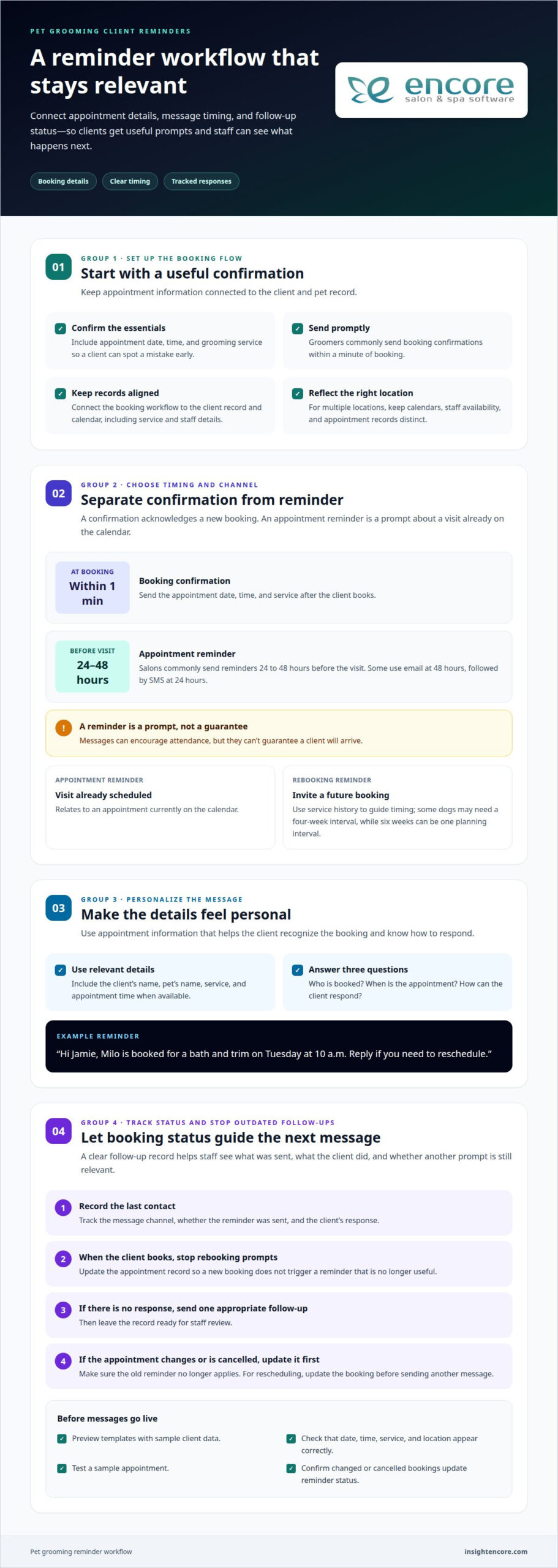
Start with a booking confirmation. A useful confirmation identifies the appointment date, time, and grooming service, so the client can spot a mistake early. Groomers commonly send confirmations within a minute of booking. Then set an appointment reminder for 24 to 48 hours before the visit. Some salons use email 48 hours before, followed by SMS 24 hours before.
Appointment reminders and rebooking reminders serve different purposes. An appointment reminder concerns a visit already on the calendar. A rebooking reminder invites a client to arrange the next visit after grooming. For example, six weeks can be one planning interval, while some dogs may need a four-week interval. Choose timing based on the pet’s service history rather than applying one schedule to every client.
A calendar connection helps keep bookings and messages aligned. When an appointment changes, update the calendar record before another reminder goes out. For multiple groomers, visible staff assignments and service details help prevent double-booking. Keep payment information connected to the appointment record where the workflow supports it, and keep reminder messages focused on booking details.
For multiple locations, choose a system that separates each location’s calendar, staff availability, and appointment records. This helps ensure each reminder reflects the correct salon and booking details. Staff should also be able to find the same client and pet record when a family books at another location.
To set up automated booking and reminder messages, connect the booking workflow to the client record, write confirmation and reminder templates, then choose each message’s timing and channel. Test a sample appointment to make sure the date, time, service, and location appear correctly. Also confirm that a changed or cancelled booking updates the reminder status.
After a client confirms, update the appointment status in the calendar or booking record. A clear label, such as “confirmed,” helps staff distinguish acknowledged visits from pending ones. If a client reschedules, update the booking first and ensure the old reminder no longer applies. Automated messages can encourage attendance, but they can’t guarantee a client will arrive.
2. Tracking follow-ups and stopping reminders after booking
A useful follow-up record shows the last contact, message channel, and client response. For each pet, staff should be able to see whether a reminder was sent and whether the client booked. This matters when many pets have different grooming histories. Without a clear status, a follow-up can be missed or sent after it’s no longer useful.
Build the workflow around booking status. When a client books, stop future rebooking reminders for that visit. If the client doesn’t respond, send one appropriate follow-up, then leave the record ready for staff review. If the client cancels, update the appointment before sending another message. This prevents an old booking from triggering reminders or appearing as an upcoming visit.
Keep rebooking prompts distinct from appointment reminders. The first encourages a future booking; the second relates to a visit already scheduled. For example, a record could show July 10 as the last appointment and August 21 as the suggested next reminder. Staff can use that history to decide whether a prompt remains relevant, rather than sending it automatically after the client has already booked.
Online booking can show clients open calendar slots and let them choose an appointment without waiting for a staff reply. A booking page available outside staffed hours can capture a client’s choice while the salon is closed. The calendar should then reflect the booking so another client doesn’t select the same opening. Keep cancellation and rescheduling updates connected to the appointment record.
Generic booking tools may handle a calendar and basic confirmations, but they may not organize pet histories alongside follow-ups. Grooming software can connect the pet, client, appointment history, and reminder status. That context helps staff distinguish a returning dog from a new booking and makes handoffs clearer when another team member handles the appointment.
Repeat booking patterns also help staff plan follow-ups. Review each pet’s past visits, service notes, and usual return timing before creating a reminder. A dog with regular appointments may need a different prompt from a pet whose visits vary. The record should support that decision without treating every client as if they follow the same schedule.
For a practical workflow, connect online bookings to the client record, track reminder status, and stop rebooking prompts after a new appointment. A connected booking workflow can help bring those steps together instead of leaving them across separate tools.
3. How do I personalise reminder messages?
A personal reminder uses appointment details without sounding like a form letter. Include the client’s name, pet’s name, service, and appointment time when those details are available. For example: “Hi Jamie, Milo is booked for a bath and trim on Tuesday at 10 a.m. Reply if you need to reschedule.” The message stays friendly and gives one clear next step.
Keep templates focused. A useful appointment reminder answers three questions: who is booked, when to arrive, and how to respond. Email reminders can also include the salon’s business name, logo, and footer information. Preview the template with sample client data before using it to make sure fields appear correctly and the message reads naturally.
Effective examples match the moment. A confirmation could say, “Thanks for booking Bella’s grooming appointment for Tuesday at 10 a.m.” A reminder might add, “Please reply if your plans have changed.” These examples share the pet’s name and booking details, then invite a simple response without adding unrelated promotions.
Personalization also means choosing relevant details rather than filling every message with notes. A coat-care instruction may help a client prepare for a specific service, while a past behavior note belongs in the staff record. Keep sensitive or lengthy care details out of a short text. Use the appointment record to guide staff and the message to support the client’s next action.
Separate service updates from promotional messages. A message that adds sales or promotional content can fall under spam rules, even if it mainly provides factual service information. According to ACMA, promotional SMS messages are subject to spam rules, including consent and a working unsubscribe option. Keep a factual appointment notice distinct from an offer for add-on services.
Consider message costs before choosing a channel for every update. SMS and email may have different charges based on the messaging arrangement and volume. A short SMS may suit a time-sensitive change, while an email can carry fuller appointment details. Set templates and channel choices according to each message’s purpose, rather than sending every update through every channel.
Ready-for-pickup messages need a human decision. Send one only when the dog is dry and ready to leave, since grooming progress can change during the appointment. A staff member can confirm readiness, then send a brief note such as, “Milo is ready for pickup.” This avoids an automated message arriving before the pet is ready to leave.
Review each template for a clear sender, accurate appointment details, and one useful action. Remove promotional wording from service reminders, and update examples when services or booking instructions change. A consistent template gives staff a reliable starting point while leaving room for a warm, pet-specific message.
4. Respecting communication preferences and opt-outs
A grooming business should use the channels clients choose and agree to receive. During booking, offer clear choices for appointment reminders, such as email or text, and record each preference in the client file. Keep service updates separate from marketing messages. A client who wants appointment details by email hasn’t necessarily agreed to receive promotional offers by text.
Make it easy to change a preference. For example, a client might switch from SMS to email after changing phone numbers, or ask to stop reminders altogether. Record the request in the client profile and apply it to future messages. Staff should see the current choice before sending a manual update, rather than relying on an old note or memory.
Consent notifications can help staff catch missing communication preferences before sending a message. Configure the system to alert the team when a client hasn’t agreed to receive communications. The notification should lead to the client’s file, where staff can view or update privacy information. This creates a practical pause: check the record, respect the preference, and use another suitable contact method if appropriate.
Keep the process straightforward for clients. A booking form can ask which channel they prefer and provide a clear way to stop reminders later. If someone opts out, update the record promptly and make the preference visible to the team. For a family with multiple contacts, record whose details should receive grooming appointment updates rather than assuming every household member wants messages.
Timing matters as much as the channel. Schedule an appointment reminder for a useful time before the visit, then avoid sending repeated prompts after the client responds. If a client confirms or changes a booking, update the appointment record so the next message reflects that action. A message sent after a cancellation can confuse the client and make the grooming business seem inattentive.
Keep routine communications personal and specific. Use the client’s name, pet’s name, and relevant appointment details, while avoiding unrelated marketing language. For example, “Morgan, Scout’s grooming appointment is booked for Tuesday at 10 a.m.” is clearer than a generic message with no pet or booking reference. A saved template can still feel personal when it uses accurate record details.
Pickup updates need different timing. Appointment reminders can be scheduled, but a pickup message should follow the dog’s actual grooming progress. Staff should send it only once the pet is dry and ready to leave. This simple manual step keeps the message accurate and prevents a client from arriving before pickup is appropriate.
Review communication settings whenever a client updates their profile or asks to change contact preferences. A consistent routine helps staff see who is booked, which channel to use, and whether marketing messages are separate from service updates. Clear records make respectful communication part of everyday appointment management.
5. Grooming-specific software versus generic CRM tools
A generic CRM organizes contacts, appointments, and follow-up tasks. Grooming software can connect those details to each pet’s profile and service history. That difference matters when a client books for a dog with specific coat needs or behavior notes. The team needs more than a name and phone number to prepare for the appointment.
For a very small grooming operation, a generic tool may handle a straightforward calendar and basic client follow-ups. The best fit depends on the daily workflow: how many pet details staff need to find, how services are scheduled, and how often clients return. A repeat-client business can benefit from grooming-specific records that reduce manual searching and make handoffs easier.
Consider what staff need to know before the next groom. A pet profile can hold breed, size, temperament, coat condition, health needs, behavior flags, and service history. For example, a note about a dog’s coat condition can help staff understand the previous service. Keep key information easy to scan rather than buried in a long free-text entry.
Scheduling needs can also differ from generic appointment booking. Grooming software can account for service type, pet size, buffer time, and staff availability. Service duration may vary with breed, coat, or grooming complexity. A basic calendar may show an open slot, while a grooming-focused workflow can help staff assess whether that slot suits the service and pet.
Those records also support useful follow-ups. When a returning client books, staff can review the pet’s last groom notes without rebuilding the profile. A groomer who didn’t handle the previous visit can still see what the client requested and what changed. That context helps the team prepare messages with accurate appointment details.
Compare tools by testing a real returning-client workflow. Find a client, open the pet’s last visit notes, book the next appointment, and see whether the details stay connected. Then check whether staff can quickly locate the pet’s service history and relevant care notes. If the process relies on separate files or manual copying, it may become harder to maintain as records grow.
Choose the simplest software that supports the work your grooming business actually does. A generic CRM can suit a small operation with basic scheduling needs. Pet-specific profiles and visible grooming notes become more valuable when repeat visits, complex services, or staff handoffs are routine.
Encore Salon and Spa Software: Client Management System
Encore Salon and Spa Software offers a Client Management System for managing client relationships and appointment details. For a pet grooming business, keeping those records together can make follow-ups easier to organize and help staff work from consistent client information.
Consider this option when separate calendars, customer records, and reminder processes make returning-client management harder. Encore’s broader salon and spa management platform includes online appointment booking and client management tools. Choose a setup that brings together the workflows your grooming business needs.
If you’d like to discuss how Encore Salon and Spa Software can support your client management workflow, contact Encore Salon and Spa Software.
Shape a follow-up workflow that can grow with you
Your next step is to decide how follow-ups should fit your grooming business as its schedule and client base change. A pet grooming client reminder system works best when its records and messaging process match the way your team handles returning pets. Start with the workflow you want staff to follow, then choose tools that support it without adding unnecessary manual steps.
Encore Salon and Spa Software offers Encore Salon Software, Encore Spa Software, and Chair/Booth Renter Software. These solutions serve different business settings, so consider which one aligns with your operation’s needs. A clear fit can make it easier to bring client management into the way your team already works.
With a workflow that suits your team, follow-ups can feel more manageable and client communication more considered. Take the next step at a pace that feels right for your business.
Frequently Asked Questions
What is dog grooming client management software?
It’s software that helps a grooming business organize client details, pet records, appointments, and related tasks in one workflow. Staff can use a pet’s profile to see service history and important care notes alongside the owner’s contact information. For example, when a client calls about a past groom, the team can find the relevant record instead of searching separate calendars, messages, and files.
Can reminders reduce no-shows on their own?
No. Reminders can prompt clients, but they can’t ensure someone will attend. Pair messages with a clear process for handling replies, cancellations, and unanswered reminders. For example, staff can review appointments that remain unconfirmed and follow up appropriately, then update the calendar if a client changes plans. A reminder workflow supports attendance management, but staff still need accurate booking records and a way to respond.
How do I personalise reminder messages?
Use details that help the client recognize the appointment, such as their name, pet’s name, service, and booking time. Keep the wording warm and direct, then include one clear action if plans change. For example: “Hi Alex, we have Luna’s nail trim booked for Thursday at 2 p.m. Please reply if you need to reschedule.” Review saved templates to ensure each detail displays correctly.
Should reminders be SMS or email?
Choose the channel that suits the client’s recorded preference and the message’s purpose. SMS can deliver a short, direct update, while email allows fuller details or additional appointment information. A grooming business can offer clients a choice during booking and store it with their record. Avoid sending the same reminder through every channel by default, since that may create unnecessary duplicate messages.
What should a grooming reminder include?
Include the grooming business’s name, the pet’s name, appointment date and time, and the booked service. Add the location if the business has more than one salon, so clients know where to go. Keep instructions brief and provide a clear way to contact the business about a change. Before sending a batch, review a sample message to catch missing details or incorrect appointment fields.
What features should a pet grooming client reminder system include?
A useful pet grooming client reminder system should connect appointment records with client and pet profiles. Look for message history, confirmation status, configurable timing, and a way to record communication preferences or opt-outs. Calendar updates should also reflect bookings, cancellations, and rescheduling. These features help staff understand what has happened and what action remains, instead of relying on memory or manually matching messages to appointments.
How do automated appointment reminders work for pet grooming businesses?
After a booking enters the calendar, the software can use its appointment details to prepare a confirmation or scheduled reminder. The business sets the message content, channel, and timing, while the system associates the message with the client’s record. If the appointment changes, staff should update the booking so the message workflow follows the latest details. Tracking sent messages and replies gives the team a clearer follow-up record.
How do SMS, email, and phone reminders compare for grooming appointments?
SMS and email can be scheduled and recorded as part of a software workflow. SMS suits concise updates, while email can carry more context. A phone call lets staff discuss a complicated change directly, but someone must make the call and note the outcome. A grooming business can use the client’s preferred channel for routine reminders and reserve calls for situations that need conversation.
Disclaimer
This article is general in nature and may contain errors, please verify all claims with your sales rep