
window.dataLayer = window.dataLayer || []; function gtag(){dataLayer.push(arguments);} gtag('js', new Date()); gtag('config', 'UA-206511945-1');
Search
Categories
Uncategorized

Independent Stylist Booking App: How to Choose the Right Fit in 2026

The simplest booking calendar might not be the easiest choice for your business. An independent stylist booking app can make appointments easier to schedule, but if client details, payments, and follow-ups live in separate tools, your workday can still feel scattered.

Online booking can give clients a convenient way to schedule without handing over control of the client experience. The right fit should match how you work now and help you manage the parts of your business you want to bring together. This guide compares tools by how they support the client journey and your daily operations, so you can choose a setup that suits your styling practice.

We’ll look at the difference between a focused booking calendar and broader salon management software, along with features that matter for solo stylists and chair or booth renters. You’ll also see when connected client records, payment processing, inventory, marketing, loyalty, and gift card tools can help. Encore brings online booking together with client management and point-of-sale capabilities, with specialized software for independent renters. The goal isn’t to choose the app with the longest feature list. It’s to find a practical fit that makes booking smoother for clients and business admin simpler for you.

Key Takeaways

  • Map your booking, client record, payment, and follow-up tasks to identify friction in your current workflow.
  • Choose an independent stylist booking app based on the tasks you rely on every day, not just the length of its feature list.
  • Compare booking-focused tools with broader management software to decide whether scheduling alone meets your needs.
  • Separate must-have features from appealing extras before comparing how each tool fits your practice.
  • Encore supports independent chair and booth renters with online booking, client management, point-of-sale transactions, and integrated credit card processing.

What Does an Independent Stylist Booking App Need to Do?

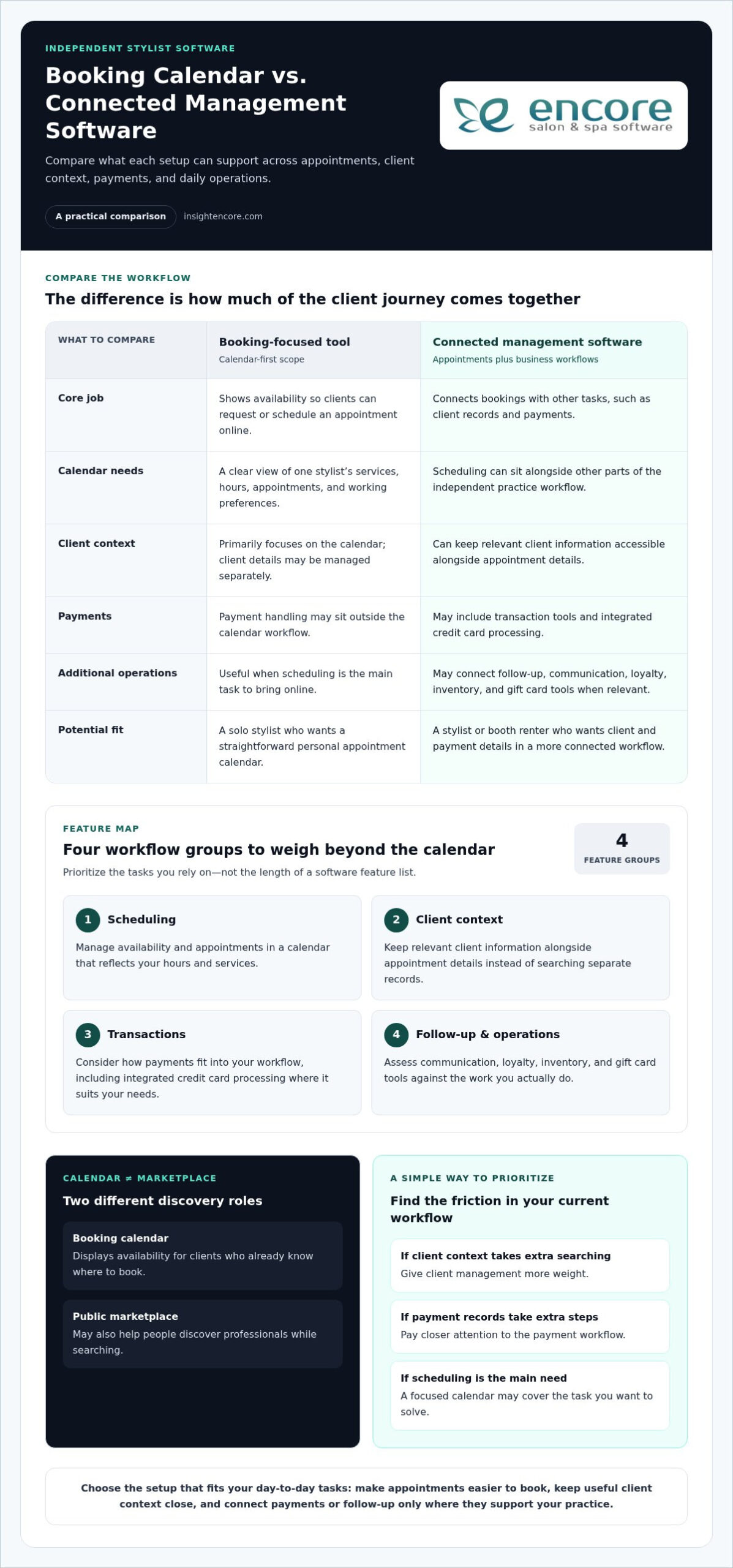
An independent stylist booking app lets clients view a stylist’s availability and request or schedule an appointment online. That’s the core job, but apps differ in scope. Some focus mainly on the calendar, while others connect bookings with client records, payments, and other business tasks. Choose according to how you work, not by the length of the feature list.

For an independent stylist, the calendar usually needs to reflect one person’s services, schedule, and working preferences. A salon manager may need to coordinate several professionals, their availability, and shared operations. That difference affects what is useful day to day. A solo stylist may prioritize a clear view of personal appointments. A booth renter may also want client and payment details in a workflow that supports running an independent practice.

How does online booking fit an independent stylist’s workday?

Online booking lets clients see available times without relying entirely on messages back and forth. For example, a client can review the calendar after work and select a suitable appointment, depending on how the app is set up. This can make scheduling more convenient while leaving you in control of the services, hours, and booking information you present.

Clear service names and appointment details help clients choose the right option. If someone can distinguish a consultation from a longer appointment, they can make a more informed selection. The calendar supports this practical step, but it is only one part of the client journey. Clients discover a stylist or service, book, attend, and decide whether to return.

A booking calendar and a marketplace solve different problems. A calendar displays availability for clients who already know where to book. A public marketplace may also help people discover professionals while searching. Some tools combine both, while others focus on scheduling. Consider whether your main need is making appointments easier for existing clients, helping new clients find you, or both.

Which independent stylist workflows should the app support?

Look beyond the appointment itself. A booking may connect to client records, payment handling, and communication that supports repeat visits. You might want service history close at hand, a clear way to manage transactions, or an organized follow-up process. Not every app needs every function. Start with the tasks you currently manage separately and identify where a connected workflow would save steps.

  • Scheduling: Keep availability and appointments clear.
  • Client context: Keep relevant client details accessible alongside appointment information.
  • Transactions: Consider how payments fit into your appointment workflow.
  • Repeat visits: Decide how you’ll communicate with clients after an appointment.

A solo stylist may need a straightforward personal workflow, while a salon manager may coordinate multiple calendars and team responsibilities. Booth renters have their own mix of independence and administration. For more detail on those needs, explore this booth renter client management app guide.

Which Booking App Features Matter Beyond the Calendar?

Build your feature list around the work you need to get done, not the software’s full menu. An independent stylist booking app might cover scheduling alone or connect appointments to client details, transactions, and follow-up tools. Each capability can be useful when it fits the way you run your practice.

Think of the features in four groups:

  • Scheduling: Manage availability and appointments in a calendar that reflects your working hours and services.
  • Client context: Keep relevant client information alongside appointment details instead of searching through separate records.
  • Transactions: Handle payments as part of your business workflow, with integrated credit card processing where it suits your needs.
  • Follow-up and operations: Consider communication, loyalty, inventory, and gift card tools based on the work you actually do.

Connecting appointments with client and payment workflows can reduce the number of tools you switch between. It can also make it easier to see how a booked service relates to client details and the transaction. The benefit is a more connected working process, not a promise of more bookings or revenue.

How can booking, client records, and payments work together?

In a connected workflow, appointment details and relevant client information are available together. That can mean less switching between calendars, records, and payment tools to piece together what happened. Integrated credit card processing supports managing payment transactions within the software. Encore’s credit card processing workflow connects payment processing with your broader business workflow.

Before prioritizing these features, write down how you handle each task now. If appointment details are already easy to find but payment records take extra steps, payment workflow may deserve attention first. If you often search for client context, client management may be the more immediate need.

When do marketing, loyalty, and inventory tools become useful?

Follow-up tools can support how you encourage repeat visits. Automated marketing and loyalty programs may help organize client communication or loyalty activity as part of your practice. They aren’t essential for every stylist, and their presence alone doesn’t guarantee that clients will return. Choose them when they support a clear, ongoing task.

Inventory tracking matters if you sell retail products or regularly manage supplies as part of your work. If products and supplies play little role in your daily operations, inventory features may be a lower priority than scheduling or client records.

Separate daily essentials from tools you may want later. Write down the tasks you handle every week, then mark which ones feel repetitive, scattered, or easy to overlook. Those are stronger candidates for must-have features. Marketing, loyalty, and inventory tools can stay optional until your workflow gives you a clear reason to use them. To see how connected capabilities can fit into salon operations, explore Encore’s salon software features.

Booking App vs. Salon Management Software: What Should You Compare?

A booking-focused tool and broader salon management software can both support an independent styling practice, but they cover different parts of the work. Compare the tasks you need handled now: appointment access, client information, transactions, follow-up, and other daily operations. The best fit isn’t automatically the one with the most features. It’s the one that matches your workload without adding unnecessary steps.

Area Booking-focused tool Broader management platform
Booking access Centers on presenting availability and organizing appointments. May include booking alongside other business functions.
Client records May require a separate system for client details. Can include client management within the wider workflow.
Payments May leave transaction handling to another tool. May connect point-of-sale activity and payment processing with other tasks.
Marketing May require separate tools for client follow-up. May offer marketing or loyalty capabilities as part of the platform.
Operational scope Focuses on solving the scheduling task. Can support several business-management needs in one system.

What does a standalone booking app handle well?

A standalone booking app can be a practical choice if your main administrative challenge is organizing appointments and showing clients your availability. Its focused scope may be simpler to manage. The trade-off is that client records, payments, or follow-up may remain in separate tools. If those tasks are already working smoothly, a focused booking tool may fit your needs.

When is an all-in-one platform a better fit?

Consider how often your booking, client management, and payment tasks overlap. If you regularly move between systems to manage one appointment from start to finish, a broader platform may bring more of that workflow together. If scheduling is your only pain point, the extra scope may not be necessary yet. Let your current workload guide the choice.

Encore’s salon software features include online booking, client management, point-of-sale transactions, integrated credit card processing, inventory tracking, automated marketing, loyalty programs, and gift card management. This range can suit independent stylists who want booking alongside broader business tools. Explore the salon software features to consider how those capabilities relate to your day-to-day operations.

Use a simple test before deciding: list the tools you open during a typical appointment cycle, from booking through payment and client follow-up. If moving between them creates extra admin, an independent stylist booking app with connected management capabilities may be worth considering. If each task is already easy to handle, a focused calendar could be enough.

For a closer look at how clients use an online portal to book, the salon client booking portal guide explores that part of the experience.
Independent Stylist Booking App: How to Choose the Right Fit in 2026

How to Choose an Independent Stylist Booking App for Your Practice

Choose based on your actual workday, not a feature list that makes every tool look essential. An independent stylist booking app should solve a real scheduling or business-management need and feel manageable within your practice. A simple comparison process can show what matters now, what may help later, and where a tool might add unnecessary complexity.

What should you write down before comparing apps?

Map how you currently manage an appointment, from the first contact through payment and follow-up. Note where clients book, where you keep client details, and how you handle transactions. Then mark the tasks that interrupt client-facing work, such as searching messages for appointment information or updating the same details in more than one place.

Use that map to create a short priority list. Separate tasks you need software to handle now from features that simply sound appealing. For instance, if scheduling is the main source of friction, prioritize a clear booking workflow before adding tools for tasks you rarely do.

How can you assess fit without overbuying?

Compare each option against the same typical week. Trace a few real workflows: setting availability, handling a client’s appointment details, processing a transaction, and managing any follow-up you currently do. Notice where the software supports your process and where you would still need another tool. The goal is a good working fit, not the longest checklist.

Review software-plan affordability alongside the features you expect to use. Encore’s pricing information can help you weigh cost alongside the software’s scope. Compare the plan with your must-haves and the work you’re prepared to bring into the system, rather than treating price as the only measure of value.

Use this checklist to keep comparisons consistent:

  • Booking: Does the appointment workflow match how clients schedule with you?
  • Client information: Can you manage the records you rely on without creating extra admin?
  • Payments: Does the transaction workflow fit how you handle payments?
  • Daily use: Does the system address a recurring task that currently interrupts your work?
  • Future fit: Are extra features relevant to a realistic next step, or are they just attractive possibilities?

Keep implementation planning simple at this stage. Identify the information and routines you’d need to bring into a new workflow, then choose a manageable starting point. You don’t need to plan every future process before deciding whether the tool fits your current practice.

If you’re ready to explore a connected workflow, try Encore.

How Encore Supports Independent Stylists Beyond Online Booking

For an independent stylist, choosing an independent stylist booking app is only part of the decision. You may also want a practical way to manage client information and transactions without treating every business task as a separate process. Encore Salon & Spa Software includes specialized solutions for independent chair and booth renters, with online booking and broader salon and spa management capabilities.

How does Encore connect booking with daily business management?

Encore offers online appointment booking alongside client management and point-of-sale transactions, with integrated credit card processing. Together, these capabilities support several steps around a client appointment: arranging the visit, managing client information, and handling the transaction. The right combination depends on your needs. A stylist focused on scheduling may use a narrower set of capabilities, while another may want more daily operations in one platform.

Independent practices don’t all run the same way. You might work primarily with returning clients and want client details close at hand. Or, as a booth renter, you may be organizing services, payments, and other records independently. Encore’s specialized renter software supports those broader management needs without assuming every stylist needs every available tool.

Consider the related tasks you handle and where you want them to fit:

  • Appointments: Use online booking as the scheduling part of the client workflow.
  • Client context: Manage client information alongside appointment activity.
  • Transactions: Bring point-of-sale transactions and integrated credit card processing into the wider business picture.

What should an independent stylist do next?

Start with your priorities. If booking is the main need, focus on that workflow first. If your client records and payments also feel scattered, consider whether a broader system fits your day-to-day practice. Automated marketing and loyalty programs can support follow-up tasks, while inventory tracking may be relevant if managing products or supplies is part of your operations. These tools are options to match to your work, not requirements for every stylist.

Encore includes automated marketing and loyalty programs, inventory tracking, and gift card management alongside booking, client, and transaction capabilities. Consider which tasks you handle regularly and which you may want to manage as your practice develops. Then compare those needs with Encore’s specialized software for independent chair and booth renters. The aim is a setup that supports your client experience and business routines without adding features you don’t plan to use.

If Encore’s connected approach matches how you want to manage your practice, explore the platform.

Try Encore now

Choose a Setup That Grows With Your Practice

Your next step doesn’t need to be a major overhaul. Use what you’ve learned about your daily workflow to choose an independent stylist booking app that solves today’s frustrations and leaves room for the way you want to work next. The right system should support your practice, not dictate it.

Encore offers specialized software for independent chair and booth renters, bringing online booking together with client management and point-of-sale transactions. If you’re looking for more than a calendar, consider how those capabilities fit the way you manage clients and appointments. Start with the workflow you want to improve, then explore whether Encore is a practical match.

Try Encore now

You’re building a business around your own skills and client relationships. Choose tools that help you stay in control and make the next step manageable.

Frequently Asked Questions

Is a booking app worth it for an independent stylist?

It can be, especially if appointment coordination regularly pulls you away from client work. An independent stylist booking app may help if you’re copying appointments from messages into a calendar or searching multiple places for the latest details. Before choosing, note how you handle a typical booking and what you want to simplify. Focus on whether the tool addresses that specific friction, not how many features appear in its description.

Can clients book appointments online with an independent stylist?

Yes. Online booking tools can let clients view availability and schedule without relying only on calls or direct messages. The experience depends on the software and how you set up your services and available times. Before sharing a booking page, review it as a client would: check that service names make sense, available times are accurate, and the steps give people enough information to choose confidently.

How much does an independent stylist booking app cost?

Costs vary by provider, plan, and included tools, so compare the plan with the tasks you need it to handle. Consider whether you’ll use the included capabilities or rely on separate tools for important workflows. Pricing can change, so review current plan details before deciding. You can review Encore pricing details and consider how the available software scope aligns with your practice.

What happens if a client needs to change an appointment booked online?

The steps depend on the app’s settings and the policies you share with clients. Decide whether clients should request changes by phone, message, or through the booking tool, then explain that process clearly. Also set out how you handle cancellations and missed appointments. A clear policy helps clients know what to do, while a consistent routine helps you manage schedule changes without assuming the software handles every situation automatically.

Can I use a booking app if I rent a salon chair?

Yes. Chair and booth renters can use booking software to organize appointments for their own services and working hours. The key is deciding whether you need scheduling alone or also want tools for client records and payment handling. A renter who manages client information and transactions independently may prefer software that reflects those responsibilities, rather than a setup designed only around a larger salon’s shared team calendar.

What information should clients see before booking a stylist?

Clients need enough detail to select an appropriate service and appointment. Use plain service descriptions, explain meaningful differences between options, and make your booking expectations easy to find. If clients should prepare in a particular way or share information before the visit, include that in the relevant booking details. Review the client-facing information periodically so it stays aligned with the services and policies you currently offer.

Can I keep my client records when switching booking apps?

That depends on the systems you use and the data-transfer options available. Before switching, list the records you rely on, such as contact details, appointment history, and notes you use to prepare for visits. Find out how you can access those records during a transition, and plan around upcoming appointments so important details aren’t overlooked. Don’t assume records will transfer automatically or in the same format across different apps.

Disclaimer

This article is general in nature and may contain errors, please verify all claims with your sales rep

Categories
Uncategorized

Nail Tech Booking System: How to Choose the Right One in 2026

What makes the best nail tech booking system? It should do more than fill your calendar. It should also help you keep appointment details, client information, and daily salon tasks organized. When requests arrive by text, phone, and social media, details can get buried. A cancellation or schedule change can create even more back-and-forth.

Whether you work solo or run a growing salon, a booking system can give clients a clearer way to choose appointments and give you one place to manage your schedule. The right fit depends on how you work now and which tasks you want to connect as your business changes.

This guide covers the features to compare, how to assess different systems, and when broader salon software may make more sense than a booking-only app. You’ll also learn how Encore connects online booking with client management and point-of-sale transactions, so you can decide whether an integrated workflow fits your nail business.

Key Takeaways

  • A nail tech booking system can do more than display open appointment times. Understand how booking pages and calendars differ from broader salon-management platforms.
  • Map the appointment journey, from booking and schedule changes to client details, payments, and follow-up, to see where you can reduce manual coordination.
  • Compare standalone booking tools with salon software by the workflows they support, including client records, transactions, inventory, and marketing.
  • Use a practical setup process: identify your needs, compare daily workflows, configure the system, and test both the client booking experience and staff scheduling routine.
  • Explore how Encore connects online booking with client management, point-of-sale, inventory, and marketing tools for nail businesses.

What Does a Nail Tech Booking System Actually Manage?

A nail tech booking system organizes appointment availability and client bookings. It lets you show open times, record appointments, and manage your schedule without relying on a mix of texts, calls, and social media messages. That matters when requests come in while you’re working with a client: a detail can get buried, a time can be promised twice, or a change can be missed.

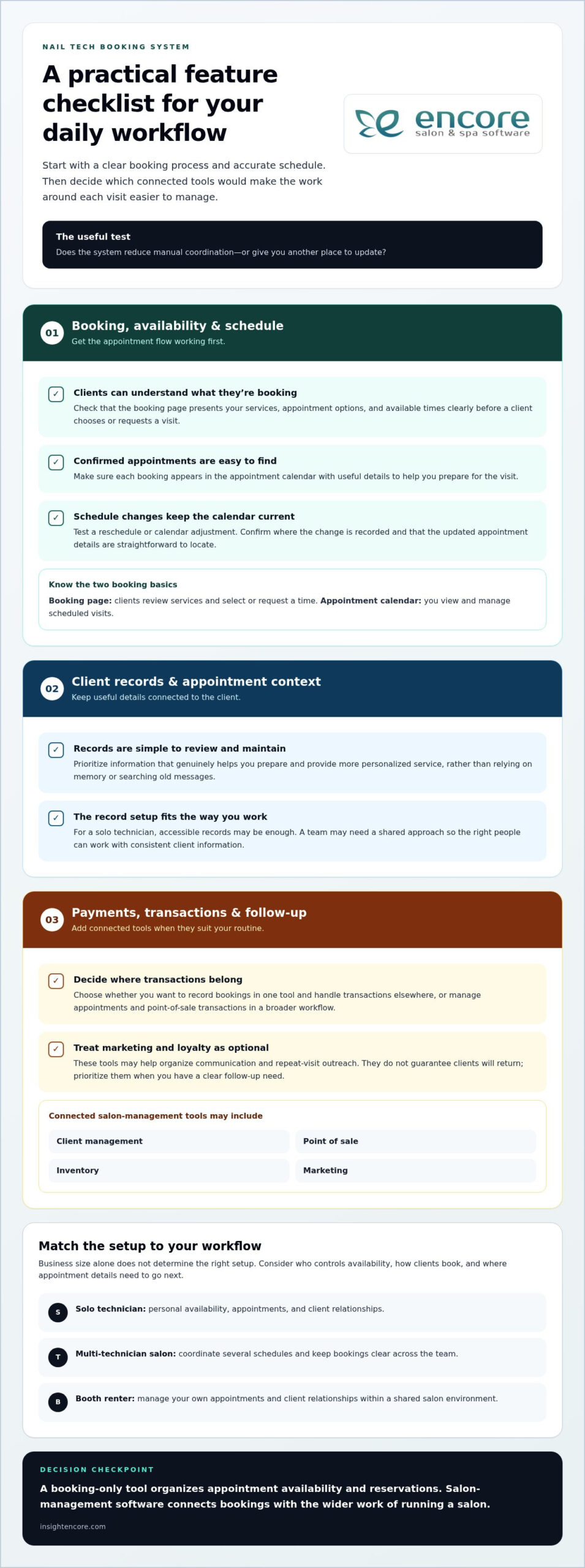
Tools vary in scope. An appointment calendar is where you view and manage scheduled visits. A booking page is the client-facing place to review services and select or request a time. A broader salon-management platform can connect booking with other tasks, such as managing client records, transactions, inventory, or marketing. Comprehensive salon software solutions bring scheduling together with other vital management functions to streamline daily operations.

In short: Booking software handles appointment availability and reservations. Salon-management software connects bookings to the wider work of running a salon.

How online booking changes appointment handling

With online booking, clients can view available times and choose one without relying only on a phone call or message exchange. A clear service list and availability view set expectations before a client books. Clients can see what they’re selecting and which times are open, while you spend less time coordinating each request manually. When comparing systems, walk through the booking steps from both sides: what clients see, what information they enter, and where the confirmed appointment appears in your schedule.

Who benefits from a nail tech booking system?

A solo technician may need a straightforward way to manage personal availability, appointments, and client relationships. A multi-technician salon may need to coordinate several schedules and keep bookings clear across the team. Booth renters have different considerations: they manage their own appointments and client relationships while working within a shared salon environment.

Business size alone doesn’t determine the right setup. Focus on the workflow: who controls availability, how clients book, and where appointment details need to go next. Encore Salon & Spa Software offers solutions designed for nail salons and chair or booth renters, connecting online booking with client management and point-of-sale transactions. The key question is whether you need a clearer appointment process alone or connected tools for the work around each visit.

Which Booking Features Matter in a Nail Tech’s Daily Workflow?

The most useful features are the ones that remove friction from your actual appointment flow. Start with the essentials: clients can understand what they’re booking, you can maintain an accurate schedule, and appointment details are easy to find. Then consider whether connecting payments, client records, and follow-up would make your wider routine easier to manage. The right nail tech booking system depends on how you work, not on the length of its feature list.

Booking, availability, and schedule management

Begin with the client’s booking journey. Can clients review your services, understand the appointment options, and see available times before choosing or requesting a visit? Clear descriptions help clients choose with fewer questions, while useful appointment details help you prepare. The booking page should be easy for clients to use and fit the way you set availability and manage your day.

Next, consider what happens after a booking is made. Clients may need to reschedule, or you may need to adjust your calendar. Look for a workflow that makes clear where changes are recorded and how the schedule stays current. Before choosing a system, test a change to an appointment and confirm that the updated details are easy to find. A feature is useful when it reduces steps rather than giving you another place to update.

Client records and appointment context

Relevant client information can help you prepare for each visit and provide more personalized service. Rather than relying on memory or searching old messages, use organized records to keep useful details connected to the client. Decide what information genuinely helps you do your work, then prioritize a system that makes those details straightforward to review and maintain.

Administrative work is part of running a personal-care business. The U.S. Bureau of Labor Statistics overview of manicurists and pedicurists includes business and administrative responsibilities for salon owners. For a solo technician, simple, accessible records may be enough. A team may need a shared approach so the right people can work with consistent client information.

Payments and follow-up

Connecting appointments to point-of-sale transactions and payment processing can help keep the administrative steps of a visit together. Consider whether you want to record a booking in one tool and handle the transaction elsewhere, or manage both within a broader workflow. Base the decision on how you take payments and keep business records.

Marketing and loyalty tools can help organize communication with clients between visits. They may support repeat-visit outreach, but they don’t guarantee that clients will return. Treat them as optional until you have a clear follow-up need. Encore’s salon software brings together client management, point-of-sale, inventory, and marketing tools.

Keep the priority order practical: get booking and schedule management working first, then add client, payment, and follow-up tools that suit your workflow. Encore’s salon software connects online booking with broader salon-management capabilities.

Is a Booking App Enough, or Do You Need Nail Salon Software?

A booking app can be enough if your main challenge is keeping appointment times organized. A focused tool may cover what you need without adding extra systems to learn. Broader nail salon software becomes more relevant when bookings are one part of the work you want to manage, such as keeping client records, recording transactions, tracking inventory, or organizing marketing.

Compare options by the workflow you want to support, not by assuming that more features are always better. Tools vary, so use this table as a guide to typical differences in scope, rather than a promise about every app or platform.

Workflow Standalone booking tool Broader salon software
Scheduling Often the central focus: availability and appointments. Booking can sit within a wider business workflow.
Client records May offer basic details tied to appointments. Can include client management alongside booking.
Transactions Payment handling may be separate or limited. May connect bookings with point-of-sale transactions and payment processing.
Inventory Usually not the main purpose. May include inventory management.
Marketing May focus on appointment communication. May include marketing and loyalty tools.

When a standalone booking tool may fit

Choose a focused setup if you mainly need to show availability, record appointments, and keep your calendar in order. It may suit a solo technician with a simple service menu and few administrative tasks beyond scheduling. If your client details, transactions, and other business records already have a manageable home, a larger platform could add complexity you don’t need. Ask yourself whether the tool solves the scheduling problem you have today.

When connected salon software may be more practical

Connected tools may be useful when booking regularly leads into other tasks. You may want appointments, client information, and point-of-sale transactions in a broader workflow, or need to coordinate several business functions across a team. A growing salon may value that wider scope. An independent technician may also benefit from connected management if separate tools are creating extra work.

If client records are important to your decision, consider what information you need to manage and how you use it during appointments. Encore’s nail salon software brings online booking together with client management, point-of-sale transactions, inventory, and marketing capabilities. It’s an option for businesses that want booking alongside wider salon operations. Explore Encore for your business as you compare workflows.

Nail Tech Booking System: How to Choose the Right One in 2026

How to Choose and Set Up a Nail Tech Booking System

A smooth setup starts before you enter your first appointment. Map how clients currently book, identify the parts of the process that need attention, and compare systems against those needs. This keeps a nail tech booking system grounded in your real routine instead of a long list of features you may never use.

Build a shortlist around your actual appointment process

Write down how a client moves from first request to confirmed appointment. Include how they ask about availability, how you confirm a time, and what happens if they need to change or cancel. Note repeated tasks too, such as copying details between messages and a calendar or checking several channels for new requests.

Use those observations to separate must-haves from attractive extras. A clear way to manage availability may be essential, while a marketing feature may not matter yet. Compare how each option handles the steps you identified, including who updates the schedule and where appointment information is kept. If you work with a team, include how staff members coordinate availability and see the information they need.

Make the change manageable for clients and staff

Once you’ve chosen a system, prepare the information clients will use to book. Keep service names clear and consistent, set the availability you intend to offer, and organize existing client information before moving it into the new workflow. A salon booking portal setup guide can also help you think through how the client-facing booking experience should be arranged.

Before inviting clients to use it, test both sides of the process. Follow the booking journey as a client: find a service, review available times, and complete a booking. Then practise the staff routine with realistic examples, such as adding an appointment, changing its time, and locating the updated details. Check that service descriptions are understandable and that the schedule reflects the availability you intended.

Roll out the system in a way that gives you room to learn. Let clients know where to book and what information they’ll need. After launch, watch for recurring questions, missed details, and steps that still require repeated manual work. If clients aren’t sure which service to choose, clarify the wording. If schedule changes cause confusion, revisit how you record them.

Review the setup after using it in everyday work. Keep what makes booking clearer, adjust what creates unnecessary steps, and revisit your priorities as your business changes. A solo technician’s process may stay simple, while a team may need a more coordinated routine. The goal is a system that supports the way you operate now and adapts as those needs shift.

Explore Encore for your nail salon booking workflow

How Encore Connects Nail Salon Booking With Daily Management

After comparing your needs, decide whether you want appointment booking to stand alone or sit alongside other daily business tasks. Encore serves nail salons and independent chair or booth renters with online booking connected to client management and point-of-sale transactions. A focused scheduling tool may suit a simple workflow, while connected capabilities can help if you also manage client details, checkout, inventory, or follow-up.

A nail-business workflow beyond the appointment calendar

Online booking is part of Encore’s broader salon-management platform. Client management and point-of-sale transactions are available alongside it, connecting appointment and visit-related tasks within a wider business workflow. For a salon, this can be useful when scheduling and checkout are both part of the daily routine. Encore also offers management software for independent chair and booth renters.

The platform includes inventory tracking, marketing tools, loyalty programs, and gift cards. These capabilities cover work beyond appointment scheduling, but not every nail business needs every tool. Start with the tasks that take up time or are difficult to keep organized. If checkout is a key part of your evaluation, consider how point-of-sale transactions fit into your visit workflow. Encore’s nail salon software connects booking with these broader management capabilities.

Think through a typical client visit. A booking is made, client information may be useful during the appointment, and a transaction takes place at checkout. Keeping those functions within a broader platform may suit businesses that want fewer separate workflows to manage. Inventory and marketing tools can also help organize those responsibilities when they’re part of your day. Choose a setup based on the work you actually do, not pressure to use every available feature.

For independent renters, the decision is just as practical. Consider whether you manage appointments and client relationships independently, and whether connected transaction or inventory tools would support your work. A multi-technician salon can weigh how those capabilities fit its wider daily operations. Business structure matters, but so do the tasks you need to coordinate.

Explore Encore for your nail business

Use your priorities as a guide as you explore Encore. Consider how online booking, client management, point-of-sale, inventory, and marketing tools align with the workflow you mapped. Think about both the client booking experience and the daily management tasks you want the system to support. Encore has operated in vertical-market software since 1991, and its salon platform serves nail businesses as well as chair and booth renters.

Choose based on the work you need to organize now and the needs you expect to manage as your business changes. If Encore’s connected approach matches those priorities, explore Encore for your nail business.

Try Encore for your salon

Take the Next Step Toward a More Manageable Schedule

Your next step doesn’t have to be a major overhaul. Choose one part of your appointment routine that takes more effort than it should, then use it as your guide when exploring a nail tech booking system. A clear starting point makes it easier to judge whether a setup suits your work, rather than getting distracted by features you may not need.

As you compare systems, picture an ordinary workday: check the schedule, handle a change, prepare for an appointment, and keep the day moving. Does the workflow feel natural? Can you see how it would support the way you want to manage your business? Compare the booking experience with the administrative tasks you want to bring together, then choose a setup that fits those priorities.

Try Encore for your salon

Start with the workflow you want to improve. Explore Encore to see how online booking and salon-management tools can fit into your nail business.

Frequently Asked Questions

What is a nail tech booking system?

A nail tech booking system is software that helps manage appointment availability and client reservations. Depending on the tool, it may show open times, store booking details, and let you review upcoming appointments in a calendar. Some systems focus on scheduling, while salon-management platforms can connect bookings with other business tasks. Decide whether you need a digital appointment book alone or want booking to fit into a broader work process.

How can a nail tech let clients book appointments online?

Choose software with online booking, then make the booking route easy to find wherever clients interact with your business. Use service names clients recognize and describe any choices they need to make before selecting a time. If two services sound similar, explain the difference in the listing. Keep your availability accurate, and give clients a way to reach you if they’re unsure which option to select.

Can a nail tech booking system help reduce missed appointments?

A booking system can help keep appointment details organized, and some platforms provide reminder or client-communication features. It can’t ensure that every client attends. Set clear expectations at booking, including the appointment time and any relevant salon instructions, and use communication tools consistently if they’re part of your workflow. If missed visits become a concern, review when they occur and whether clients had the information they needed beforehand.

Do independent nail technicians need salon software?

No, not every independent technician needs a full salon-management platform. If you mainly want a reliable way to track your appointments, a focused scheduling tool may be enough. Broader software may make sense if you also want to organize client records, transactions, inventory, or marketing in one system. Consider the tasks you handle between appointments, too. Choose a scope that fits your current workload rather than business size alone.

What should a nail tech compare when choosing booking software?

Compare how each system handles situations you encounter in a normal week: a new appointment, a schedule change, a client lookup, and checkout. Check whether the client-facing booking steps are clear and whether the staff routine feels manageable. If you work with others, include how each person’s availability is handled. If you work solo, focus on ease of use and control over your calendar. A realistic test can reveal more than a feature list.

Can nail salon booking software manage client information too?

Some systems include client management alongside appointment scheduling, while others focus on the calendar. Organized client records can help you find useful details, such as a client’s previous service or preferences, before a visit. Decide which information is relevant to your work and how you’ll keep it current. Handle records in line with your business practices and applicable privacy requirements, and avoid collecting details you don’t need.

How do I move from a paper appointment book to a booking system?

Start by listing appointments already on the calendar so existing visits don’t get lost during the change. Decide when you’ll stop adding new bookings to the paper book, then enter upcoming appointments into the new system and check them against your original records. Test a sample booking and schedule change before sharing the new process with clients. Once you switch, keep one clear source of truth for the schedule.

Disclaimer

This article is general in nature and may contain errors, please verify all claims with your sales rep

Categories
Uncategorized

Reducing Client Wait Times in a Salon: A Practical 2026 Guide

Asking your team to move faster is one of the quickest ways to make a busy salon feel more stressful. Reducing client wait times in a salon starts with fixing the appointment flow, not rushing the service. When clients arrive on time but still wait, and small delays ripple through the day, the problem often lies in the handoffs and scheduling around each appointment.

You shouldn’t have to choose between keeping the day on track and giving every client the attention they deserve. A calmer schedule begins with understanding where waiting starts, whether it’s an unrealistic service duration, a slow transition, or a booking pattern that leaves too little breathing room. Once you can see the bottleneck, you can choose a practical fix that fits your services and staffing.

This guide will help you spot common sources of avoidable waiting, make changes without overloading your team, and keep clients informed and welcomed when delays happen. We’ll also look at how online booking and client management tools can support a more organized appointment flow, while recognizing that smooth service still depends on thoughtful day-to-day workflows.

Key Takeaways

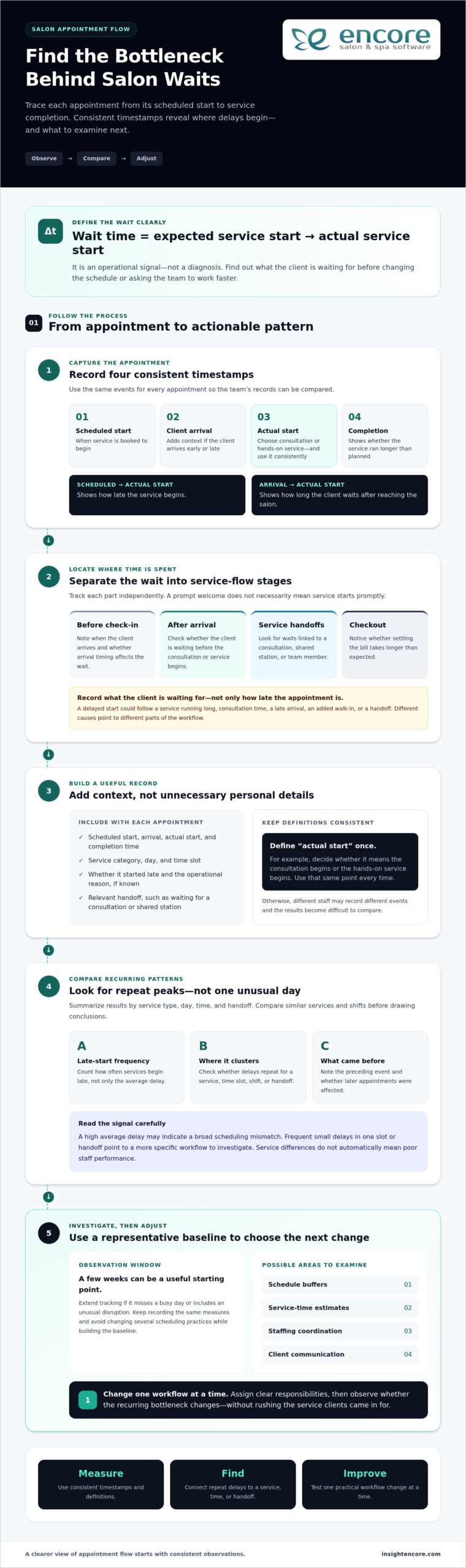
  • Define the wait clearly by comparing each appointment’s scheduled start with when service actually begins.
  • Track delays by service, day, time, and handoff to uncover patterns instead of guessing at the cause.
  • Compare schedule buffers, service-time estimates, staffing coordination, and client communication to find a fix that suits your salon.
  • Make reducing client wait times in a salon manageable by testing one workflow change at a time and assigning clear responsibilities.
  • Use online booking and client management tools to support an organized flow, while keeping staffing and service routines in view.

Reducing client wait times in a salon starts with finding where delays begin

A late start can unsettle a client who planned their day around an appointment, put pressure on the stylist, and push the next booking off schedule. But “the salon is running behind” doesn’t explain where the delay began. Before changing the schedule or asking anyone to work faster, trace what happened from the client’s expected start time to the moment service actually began.

Salon wait time is the gap between a client’s expected service start and the actual start. It’s an operational signal that shows where appointment flow needs attention. To understand that signal, separate the wait into stages: before check-in, after arrival, between service handoffs, and at checkout. A client may be welcomed promptly but wait for a consultation, or finish their service on time but spend longer than expected settling the bill. Each points to a different part of the day.

Record what the client is waiting for, not just how late the appointment is. A delayed start might come from the previous service running long, a stylist needing consultation time, or a transition that depends on another team member. That distinction helps you focus on the process instead of treating every delay as a performance problem.

Which salon waits frustrate clients most?

A waiting-room delay and a late service start can feel different. A client may arrive at the scheduled time and see their stylist still finishing with someone else, or they may be checked in promptly but wait before the consultation begins. Uncertainty can make either pause feel longer, especially if the client doesn’t know what’s happening. Track check-in, consultation, processing, and checkout separately to see where time is spent and where a simple explanation could improve the experience.

What causes appointment delays to snowball?

One service that takes longer than planned can shift the next appointment, then the one after it. The cause might be a complex service, a late arrival, a walk-in added to an already full schedule, or a handoff that relies on a shared chair or team member. Delays can also reflect normal differences in service needs, not poor staff performance. Look for recurring patterns before deciding what to change.

It can help to think of the salon as a series of connected arrivals and services. Queueing Theory studies how waiting lines form, offering a useful way to consider how appointment timing and available staff interact. You don’t need a mathematical model to begin: note when each wait occurs, what was happening just before it, and whether later appointments were affected. That gives you a clearer starting point for reducing client wait times in a salon without rushing the work clients came in for.

Measure salon wait times to pinpoint the real bottleneck

Once you know where a client’s wait occurs, record it consistently. Start with three timestamps for each appointment: the scheduled service start, the actual service start, and service completion. Together, they show whether the issue is a late start, a service running long, or both.

Scheduled start, actual start, and service completion reveal whether a salon bottleneck begins before service, during the appointment, or at a transition. Keep the measures distinct. Scheduled-to-actual start time shows how late the service begins, while arrival-to-service-start time shows how long the client waits after reaching the salon. If a client arrives early or late, that context helps you interpret both figures fairly.

Which wait-time measures should a salon track?

Alongside those timestamps, count how often services begin late, not just the average delay. An average can look manageable even if the same service or time slot repeatedly starts behind. Note the service type, day, time, and relevant handoff, such as waiting for a consultation or a shared station. Keep the record focused on operations by avoiding unnecessary personal information.

A simple log can include:

  • Scheduled start, client arrival, actual start, and completion time.
  • Service category and the day or time slot.
  • Whether the appointment started late and the operational reason, if known.

Keep the definitions consistent across the team. For example, decide whether “actual start” means the consultation begins or the hands-on service begins, then use that same point every time. Otherwise, two staff members may record different events and make the results difficult to compare.

How can managers interpret the patterns?

Look for repeated peaks, not conclusions based on one unusual day. Compare similar services and shifts, since a complex appointment and a quick trim may involve different steps. If late starts cluster around a particular handoff or time slot, investigate that part of the workflow before changing the whole schedule. Comparing these patterns with your salon staff utilization rate can also help you understand how staff capacity lines up with demand.

Choose an observation window that covers the salon’s normal range of days, shifts, and services. A few weeks can be a useful starting point, but extend the tracking if the period misses a busy day or includes an unusual disruption. The goal is a representative picture, not a perfect dataset. Record the same measures throughout, and avoid changing several scheduling practices while you’re building the baseline.

Then summarize the results by service type, day, time, and handoff. A high average delay may point to a broad scheduling mismatch; frequent small delays in one slot may call for a more targeted adjustment. This gives you evidence to guide the next step in reducing client wait times in a salon, rather than asking the team to move faster without knowing what’s causing the wait.

Compare salon wait-time fixes before changing the schedule

Once you’ve identified where delays recur, match the solution to the cause. Adding time everywhere may protect the schedule, but it can also leave avoidable gaps. Packing appointments closer together may appear efficient, yet even small variations in service time can quickly push later clients behind. Choose a targeted adjustment that supports quality service and fits the way your salon works.

Consider the effort and trade-off of each option:

  • Schedule buffers: Add breathing room around services that regularly run over or need a more involved transition. This is simple to test, but broad buffers may create unused time.
  • Service-duration estimates: Review the time allowed for different services against observed durations. Updating estimates can improve the fit, though the team may need to revisit them as service needs vary.
  • Staffing coordination: Clarify who handles consultations, shared stations, or other handoffs during busy periods. This can address workflow gaps, but requires clear team communication.
  • Client communication: Set realistic expectations about appointment timing and explain delays promptly. This won’t remove the underlying bottleneck, but it can reduce uncertainty while the salon addresses it.

When do buffers and appointment-duration changes help?

Use your recorded service times to identify where a modest allowance may help, rather than adding the same buffer to every booking. A complex consultation or a transition between services may need different time from the hands-on appointment itself. The trade-off is capacity: protect time where variation is real, but avoid turning the entire schedule into idle space.

If a service routinely takes longer than its booking duration, update the estimate and observe what changes. If only certain appointments run over, consider whether consultation needs, finishing steps, or preparation explain the difference. More accurate durations can help clients select a suitable slot and give staff a schedule that better reflects the work. Avoid shortening estimates just to fit more appointments; tighter scheduling can magnify the effect of normal variation.

How should a salon balance walk-ins and booked appointments?

Walk-ins can serve clients who want flexibility, but accepting them when staff are fully committed may delay people with bookings. A designated walk-in period or capacity can make demand easier to manage, while protecting booked slots prioritizes appointments already on the schedule. Either approach needs a clear boundary so the team can make consistent decisions.

Set expectations honestly. If a walk-in can’t begin right away, explain that timing depends on service availability rather than promising immediate attention. Online booking can help clients choose from available appointment times instead of relying on a call or arriving without a slot. A clear salon client booking portal can support that choice, but it won’t resolve staffing or service-flow issues on its own.

There’s no single fix for reducing client wait times in a salon. Compare the likely benefit, effort, and trade-off, then test the option that best matches the delay pattern you observed.

Reducing Client Wait Times in a Salon: A Practical 2026 Guide

Reduce salon waiting with a practical workflow improvement plan

A useful improvement plan doesn’t need a major schedule overhaul. Start with a recurring bottleneck you’ve observed, make one focused change, and review what happens. Keeping the test small helps you see whether the change addressed the cause or simply moved the delay somewhere else.

Choose one bottleneck, test one change, and compare the same measures before and after. Your team can adapt this sequence to the salon’s services and staffing:

  1. Choose the pattern. Select a recurring issue, such as a certain appointment type regularly starting late or a specific handoff slowing down the next service.
  2. Assign ownership. Decide who greets and checks in clients, who updates the schedule when timing changes, and who coordinates service transitions. Clear roles reduce confusion during busy periods.
  3. Test one adjustment. For example, revise the time allowed for a service that often runs over, or give one team member responsibility for communicating schedule changes.
  4. Review the results. Compare the same start-time and completion measures you used for your baseline. Keep, adjust, or reverse the change based on what the records show and what staff experience.

This gives everyone a shared action sequence: spot the pattern, name an owner, try one change, and review the evidence. It keeps the focus on improving the flow rather than asking the team to rush through services or absorb a poorly planned schedule.

How can a salon test a schedule change?

Use the delay pattern from your observations to choose a change that addresses its likely cause. If a particular service repeatedly overruns, adjust its scheduled duration rather than adding time to every appointment. Keep other practices steady during the trial, then compare the same measures from similar services, days, and shifts. If the pattern doesn’t improve, revisit the cause before expanding the change.

What should staff say when a client is waiting?

Acknowledge the delay promptly, apologize for the wait, and share a realistic update if the team has one. If timing is still uncertain, say so rather than guessing at a new start time. For example: “I’m sorry we’re running behind. We’re checking the schedule and will update you as soon as we have a clearer estimate.” A warm, direct message helps clients feel seen without promising a time the team can’t meet.

Agree on who gives updates and how schedule changes reach the rest of the team. The person at check-in may not know what’s happening in the service area, so establish a simple handoff for sharing current timing. Consistency matters: clients should receive a clear update, not conflicting estimates from different staff members. Small communication habits can make an unavoidable delay feel more considered while the team works on its underlying cause.

With a repeatable test and clear ownership, reducing client wait times in a salon becomes a practical workflow effort, not a demand to work faster.

Explore Encore salon software

Use salon software to support a more organized client flow

Once you’ve identified which parts of the day create friction, consider whether software could simplify the administrative work around appointments. Online booking can present available appointment times so clients can choose a suitable slot without relying on staff to coordinate every booking manually. That can make appointment selection more organized, but it won’t fix a schedule that underestimates service time or lacks enough capacity.

Software supports the flow. Your service timings, staffing decisions, and communication practices still shape the client experience. If an appointment routinely takes longer than its scheduled slot, a booking tool won’t create the missing time. Likewise, a system can help organize information and transactions, but staff still need clear responsibilities for service transitions and updates when the day runs behind.

Which software capabilities can support appointment flow?

Think about the practical steps in a client visit. Online appointment booking lets clients select from the availability you present. Client management helps staff access client records as they prepare for scheduled visits. Point-of-sale tools support transactions at checkout, making this part of the visit easier to organize. Together, these capabilities can support the appointment journey without replacing the team’s day-to-day workflow.

Encore salon software brings online booking, client management, point-of-sale transactions, and integrated credit card processing together. Match each capability to a specific friction point. If the team spends time coordinating appointment requests, online booking may help. If staff need a more organized way to manage client information, client management can support their preparation. If checkout adds friction, point-of-sale transactions and integrated credit card processing can help organize that part of the visit.

Keep schedule design and client communication in your improvement plan. These tools support booking, client information, and transactions, while your team remains responsible for service timing, capacity, and the flow between appointments.

How can a salon decide whether to explore software?

Start with the recurring administrative task that takes time or creates confusion, then define what a better process would look like. For example, your goal might be to let clients select from available appointment times online or make client records easier for staff to access when preparing for visits. A clear goal makes it easier to assess whether a software change matches the salon’s needs.

Next, connect the capability to the workflow. Identify who will use it, which step it supports, and what still requires a staff decision. Then review whether the process feels more organized without assuming that software alone will reduce delays. This keeps the focus on a practical fit, not on adding technology for its own sake.

Reducing client wait times in a salon takes realistic service timing, appropriate capacity, and consistent communication. Software can support those efforts by organizing booking, client information, and checkout, while your team remains responsible for the service flow.

Explore Encore salon software

Build a calmer appointment day, one step at a time

Better appointment flow doesn’t require a perfect schedule from day one. Choose one recurring delay to address, make a focused adjustment, and give your team a clear way to keep clients informed. Small, thoughtful changes can help create a visit that feels more welcoming for clients and more manageable for staff, without rushing the service.

If administrative friction is part of the problem, Encore brings online booking, client management, and point-of-sale transactions together to support an organized client journey. Encore’s parent company, Syntec Business Systems, was founded in 1991. These tools can support your process, while your team’s service timing and communication remain essential to reducing client wait times in a salon.

Keep learning from each appointment, and build a salon flow that gives both your clients and your team room to feel at ease.

Try Encore salon software

Frequently Asked Questions

How can I reduce client wait times in a salon?

Start by identifying the point where appointments most often lose time, then make one manageable change. For example, if consultations frequently delay hands-on work, decide who will conduct them and how that time fits into the booking. Tell the team what to watch during the trial, such as whether later appointments still start behind. This keeps reducing client wait times in a salon focused on a fix the team can observe and maintain.

What is an acceptable wait time at a salon?

There’s no universal wait-time limit that suits every salon, service, or client. Set expectations around the appointment experience your salon can reliably provide, then pay attention to whether clients understand what’s happening if the schedule shifts. A brief wait with a clear explanation may feel different from an unexplained delay. Review client feedback alongside appointment records, and use recurring concerns to refine your service standards rather than relying on one fixed number of minutes.

Can appointment scheduling software reduce salon wait times?

It can help organize appointment selection when it offers online booking, but it can’t correct every source of delay. For instance, online availability may reduce back-and-forth booking coordination, while an appointment duration that doesn’t match the service can still throw off the day. Identify the administrative task causing friction before changing tools. Then decide what success should look like, such as fewer manual booking exchanges, while separately addressing staffing, timing, and service handoffs.

How do salons prevent appointments from running late?

Salons can reduce avoidable overruns by matching booking details to the service planned and preparing for known steps before the client arrives. If a booking may involve an add-on or a more involved consultation, clarify the plan early so the appointment isn’t unexpectedly extended. Keep transitions clear, too: the next team member should know when their part begins. Preserve realistic service time, because squeezing appointments together can spread one overrun across the schedule.

Should a salon leave buffer time between appointments?

Use buffers where your schedule shows a specific need, rather than inserting the same gap after every service. A consultation-heavy appointment or a transition that requires resetting a station may benefit from added flexibility. But widespread gaps can limit appointment availability without addressing the actual cause of delays. Try a targeted allowance on the relevant service or time slot, then compare how the day flows before deciding whether to keep or adjust it.

How should a salon handle a client who is waiting?

Acknowledge the wait directly and let the client know what you can say with confidence. For example: “I’m sorry for the delay. We’re checking the timing and will update you when we have a clearer estimate.” Don’t offer a start time just to reassure them if you’re unsure. If the estimate changes, share another update rather than leaving the client to ask. A respectful tone and consistent information help maintain trust during an imperfect day.

Do walk-ins increase wait times for salon clients with appointments?

They can, particularly if a walk-in takes a stylist or station already needed for a booked service. The effect depends on the service requested and the capacity available at that moment. Set a clear rule for accepting walk-ins, such as only offering them when they fit without displacing booked appointments. Explain that availability depends on the day’s schedule, and give walk-in clients a realistic expectation rather than implying they can be seen immediately.

Disclaimer

This article is general in nature and may contain errors, please verify all claims with your sales rep
Categories
Uncategorized

Tattoo Artist Booking and Deposit Software: A 2026 Buyer’s Guide

What if the biggest booking headache isn’t finding an open slot, but keeping every detail connected after a client reaches out? The right tattoo artist booking and deposit software can help move an inquiry toward a confirmed appointment while keeping client details, scheduling, and payment activity organized.

If you’re juggling repeated messages between appointments, unclear deposit records, or a calendar that doesn’t fit custom tattoo requests, you’re not alone. A smoother process takes more than an online scheduler. It needs a clear way to handle the steps around each appointment without adding another layer of admin.

This guide compares tattoo-focused tools and broader studio platforms by their booking, deposit, payment, and client-management workflows. You’ll see what to consider as an individual artist or multi-artist studio, and how Encore’s tattoo studio software brings online booking, client management, integrated credit card processing, and point-of-sale transactions into a broader management workflow. Use these criteria to find a practical path from first inquiry to organized appointment records.

Key Takeaways

  • Choose tattoo artist booking and deposit software that supports the full client journey, not just calendar appointments.
  • Map the steps from inquiry to follow-up so you can decide where client references, placement details, and payment records belong.
  • Compare booking flow, intake, deposit records, payments, reminders, and artist calendars against your studio’s actual needs.
  • Document your current policies, test common booking scenarios, and introduce the new process in clear steps.
  • Explore how Encore’s tattoo studio software brings online booking, client management, integrated credit card processing, and point-of-sale tools into a broader studio workflow.

Why tattoo artists need booking and deposit software beyond a calendar

A calendar shows when you’re busy. It doesn’t explain why an appointment needs a consultation, which design reference a client sent, or whether the booking has reached the next step. Tattoo artist booking and deposit software helps coordinate inquiries, appointments, client details, and payment records so essential context doesn’t get lost across messages, notes, and separate tools.

Booking software manages appointment requests and the details attached to them; a general-purpose calendar mainly records scheduled time. That difference matters for tattoo artists. A custom piece may need discussion before you can estimate the session or reserve enough time. A flash design may be ready to book, but the client still needs to choose an artist and appointment slot.

The work itself shapes the booking process. A client’s idea, placement, size, and reference images can affect what happens before an appointment is confirmed. Learning more about the history and process of tattooing offers helpful context for why the design and the client’s plans matter. Your booking process should gather relevant details rather than treat every request as a simple calendar event.

Where a tattoo appointment begins: inquiry, consultation, or flash booking

Custom work often starts with an inquiry and may call for a consultation before an appointment is scheduled. Ready-to-book flash can follow a shorter path. Distinct appointment types help set expectations and reserve suitable time. Asking for useful details early, such as the design idea, placement, approximate size, and reference images, can reduce follow-up messages and help the artist understand the request.

Keep intake focused. Ask for what helps you decide the next step, not so much that clients struggle to get started. A consultation request might ask about the concept and preferred placement. For flash, the client may need to identify the design and preferred availability. The goal is a useful starting point, not a final creative decision made through a form.

What a deposit changes in the booking experience

A deposit is part of an artist’s booking policy, not a universal fixed amount or rule. State the terms clearly before a client commits, including how the deposit relates to the appointment and what happens if plans change. Clear language helps clients understand what they’re agreeing to and reduces avoidable payment misunderstandings.

Deposit tracking is one part of the client record, not a substitute for managing the appointment and client relationship. Artists also need to find the booking date, request details, relevant conversation, and payment activity together or through a consistent process. A dedicated tattoo studio software workflow can bring booking and client management into a broader business setup, while payment tools support transaction administration. Include the deposit status and related appointment details in the recordkeeping process you use to apply your studio’s policy.

Before choosing a tool, consider whether it can help you:

  • Separate custom inquiries, consultations, and ready-to-book appointments.
  • Keep client details and booking context easy to retrieve.
  • Record payment activity clearly alongside appointment information.

That’s the difference between filling a calendar and managing a client journey. The best fit supports your actual process, from the first message to the appointment record and follow-up.

How tattoo booking and deposit software connects each client step

A connected booking journey gives both the client and artist a clear next step, from the first request to post-appointment follow-up. Tattoo artist booking and deposit software can help organize that journey, but the workflow should reflect your studio’s policies rather than force every client through the same process.

A practical client journey might look like this:

  1. Open the booking page. The client sees available appointment types, artist options, and instructions for starting a request.
  2. Submit the inquiry. They share contact details and relevant project information, such as the idea, preferred placement, approximate size, and reference images.
  3. Complete a review or consultation step. The artist reviews the request and decides whether to discuss the design, schedule a consultation, or move toward an appointment.
  4. Confirm the appointment. Once timing and booking terms are clear, the client receives the confirmed date, time, artist, and any next steps.
  5. Get appointment follow-up. A reminder can restate practical details, while post-appointment communication supports a consistent client experience.

From booking request to confirmed appointment

Intake should help you make a decision. Ask for details that affect review or scheduling, but avoid collecting information that doesn’t move the request forward. A custom piece may need a reference and consultation, while a flash booking may need a design choice and preferred time. Make the request status clear so clients know whether they’ve submitted an inquiry or secured an appointment.

Availability also needs to be easy to understand. If a request still requires artist review, make that clear rather than presenting it as a confirmed slot. For a multi-artist studio, identify the intended artist in the booking record and make calendar changes visible to the people managing appointments. This keeps client conversations connected to the schedule.

Deposit records, payment processing, and appointment follow-up

Set deposit steps according to your own policy. A useful record may include the deposit status, the related appointment, the client, and any payment reference needed to reconcile the transaction. Keep the terms visible before the client commits, including how the studio handles changes, cancellations, and payment timing. Clear expectations matter more than applying a one-size-fits-all rule.

Payment processing and deposit tracking are related, but they aren’t identical. A processor handles a transaction; the studio also needs a reliable way to understand what that transaction relates to and where it stands. Keep records consistent with your policy and use reminders to repeat confirmed appointment details, not introduce new terms. Guidance from the National Environmental Health Association on public health and tattoo regulations can also inform how a studio organizes relevant client communication and practices.

Connected records reduce administrative handoffs by keeping the request, appointment, client details, and payment context easier to follow.

Encore brings online booking, client management, and integrated credit card processing into a broader studio workflow. Its tattoo studio software can be part of that operational picture. Take a closer look at Encore to explore how the client journey can fit your processes.

How to compare tattoo booking software for deposits and studio needs

The best fit is the system that follows your actual booking policy without making you enter the same information in multiple places. Use tattoo artist booking and deposit software to compare complete workflows, not just feature counts. Start with the steps every booking needs, then separate must-haves from conveniences that would be helpful but aren’t essential to your studio.

Use this scorecard to compare tools against your process. Mark each item essential, optional, or unnecessary before evaluating options.

Workflow area What to assess Priority question
Booking flow Request, review, consultation, and confirmation steps Can the client tell whether a request is pending or confirmed?
Intake Design details, placement, references, and contact information Can you collect the details needed to review a request without overloading the form?
Deposit records Status and connection to the relevant client and appointment Can you find the record needed to apply your policy or resolve a question?
Payments Transaction records and fit with existing payment routines Does payment administration fit how your studio tracks appointments and business activity?
Reminders Appointment details and timing of client communication Can reminders support your process without creating confusing or duplicate messages?
Artist calendars Availability, appointment ownership, and schedule changes Can each artist or studio coordinator understand who is booked and when?

Keep the priority test grounded in daily work. If clients need to submit a custom concept before you schedule, intake and request review may be essential. If you book directly from set availability, a shorter booking flow may matter more. Reminders or deeper reporting can be optional if your current process already handles those needs well.

Which deposit and payment controls deserve a closer look?

Check whether deposit records can be tied to the right client and appointment, and whether the status is clear enough to support your policy. Consider how the system records payment activity alongside your usual business routines. Client-facing terms should be easy to understand, especially around rescheduling. A tool that processes payments but leaves you reconciling scattered notes may add work instead of removing it.

Does the software fit custom work and multiple artists?

Test a custom request from the client’s perspective. Can they provide the information you need, and can you review it without copying details into another system? For a shared studio, assess whether the schedule makes artist availability and appointment responsibility clear. A solo artist may need a simpler setup, while a team may value shared visibility and organized client records. Needs differ, so avoid adding complexity for features your workflow won’t use.

Encore’s tattoo studio software brings online booking and client management together with integrated credit card processing and point-of-sale transactions. Use the same scorecard to assess how those broader tools fit your studio’s day-to-day administration, and include deposit records and terms in your workflow comparison. The right system should reduce handoffs, not create duplicate data entry.

Tattoo Artist Booking and Deposit Software: A 2026 Buyer’s Guide

How to choose and introduce tattoo booking software without disrupting clients

A new system should make the booking process easier to follow, not leave clients wondering where to send a request or whether an appointment is confirmed. Before switching, map your existing process and decide what needs to change. A thoughtful rollout gives artists time to learn the workflow and clients a clear path to follow.

Use this sequence to introduce tattoo artist booking and deposit software with fewer surprises:

  • Document current policies. Write down how your studio handles deposits, cancellations, rescheduling, consultations, and appointment confirmation.
  • Configure the booking steps. Set up the request path and intake around how artists review work, including any distinctions between custom requests and other appointment types.
  • Test the journey. Try common scenarios from both the client and artist sides before directing clients to the new process.
  • Announce the change. Share the booking link and explain what clients should expect, including where to submit requests and how confirmation works.

Make the transition manageable. You can introduce the new process to incoming inquiries first, then guide returning clients to it as appointments come up. Keep existing conversations easy to reference during the change so clients don’t have to repeat details they’ve already shared.

Set clear booking and deposit expectations before launch

Start with the studio’s written policy, not the software settings. Decide what clients need to know about deposits, cancellations, rescheduling, and consultations, then use the same wording in booking instructions and artist communication. Put the relevant terms where clients can read them before submitting or confirming a request. Plain language helps people understand the next step and gives staff a consistent reference when questions arise.

Be specific about the process without making the booking page feel like a contract clients have to decode. For example, distinguish a request awaiting artist review from a confirmed appointment. Explain what action the client should take if they need to ask about a schedule change. Keep the policy wording consistent with your actual studio records.

Test the booking experience from both sides

Walk through the process on mobile and desktop before sharing it. Submit a custom request, try a reschedule, and update an artist’s calendar. Check that intake details remain attached to the correct client and appointment, and that staff can tell what needs review. Invite artists or coordinators to test the workflow too; their feedback can reveal confusing steps before the process becomes standard.

During testing, look for duplicate work. If someone must copy the same client details into a calendar, payment record, and separate notes, simplify the process where possible. Connected day-to-day tools should support the way your studio handles bookings and records. Encore brings online booking, client management, integrated credit card processing, and point-of-sale transactions into a broader management workflow. Consider how those tools can fit your operations alongside your studio’s deposit and payment routines.

How Encore supports a more connected tattoo studio workflow

Booking is only one part of running a tattoo studio. Artists also need to keep client information organized, manage appointment activity, and handle payments through the wider business. Encore’s tattoo studio software brings online booking and client management into a broader platform that also includes point-of-sale tools and integrated credit card processing. These tools give an artist or studio a more connected way to manage day-to-day operations.

When comparing tattoo artist booking and deposit software, look at how booking and payment administration fit together with your studio’s deposit policy. A system can support appointments and transactions as part of a wider workflow, while your written policy defines how deposits are handled.

Bring tattoo bookings and client management into one workflow

Online booking helps organize how appointments enter the studio, while client management supports the records artists use to understand and manage client relationships. They serve different purposes, but work best as parts of a consistent process. When appointment and client information are easier to locate, artists spend less time searching across separate notes and conversations.

Payment administration is another part of that picture. Integrated credit card processing supports transaction workflows, while point-of-sale tools relate to broader studio operations. Encore’s integrated credit card processing gives studios payment capability alongside other business tools. Consider how those records fit your existing routines for reviewing appointments and tracking business activity.

Decide whether Encore fits your tattoo studio

Encore’s tattoo studio software brings booking and client-management tools into a broader business platform. A solo artist can organize booking and client records within the same management workflow. A studio with multiple artists can assess how the platform fits its appointment coordination and point-of-sale routines. The right fit depends on which tasks you want to manage together and where your current process creates repeated work.

As you assess the fit, map your steps from inquiry through appointment and payment. Identify which details need to stay connected, which tools your team already relies on, and where you want a clearer view of client and appointment information. Then compare those needs with Encore’s online booking, client management, integrated credit card processing, and point-of-sale capabilities. Include your deposit procedures in the workflow you use to manage appointments and payment records.

A connected platform can be a practical next step if you want booking and studio-management tasks to sit within a broader workflow. Explore how Encore can fit the way your tattoo studio operates.

Try Encore now

Make your next booking workflow easier to manage

Your next step doesn’t have to be a sweeping overhaul. Notice where your current process takes extra effort, then decide which part would benefit most from a clearer routine. The right tattoo artist booking and deposit software should support the way you work while keeping client expectations and studio policies clear.

Encore offers specialized tattoo studio software with online booking, client management, and integrated credit card processing as part of a broader business platform. Founded in 1991, Encore brings experience in software for service businesses. Consider how those tools could fit your day-to-day operations and how your studio’s deposit policy fits into its booking and payment routines.

Try Encore now

A more organized process can give you more room to focus on the craft and the people behind each appointment. Try Encore now to explore its tattoo studio software for your business.

Frequently Asked Questions

What should tattoo artists look for in booking and deposit software?

Look for a system that fits your studio’s process and keeps essential booking information easy to find. With tattoo artist booking and deposit software, assess how it handles custom inquiries, appointment changes, client records, payment activity, and staff access. Before choosing, walk through a real booking from the artist’s perspective: Can you quickly see what needs attention, who owns the next step, and which details are relevant to the appointment?

How much deposit should a tattoo artist require?

There’s no single deposit amount that fits every artist or project. Set a policy that reflects your booking approach, the work involved, and the time you’re reserving, then explain it clearly before a client commits. For example, you might define different terms for a consultation and a longer custom session. Keep the policy consistent across client conversations and appointment records, and review it if your services or scheduling practices change.

Can tattoo booking software collect deposits online?

Some booking systems support online deposit collection, but capabilities vary. Separate the steps in your evaluation: Can the client pay online, can the transaction be connected to the relevant appointment, and can you identify its status later? Online booking and integrated credit card processing are useful capabilities to assess alongside deposit collection. Encore offers online booking and integrated credit card processing, so compare those tools with your deposit-handling workflow.

Is tattoo booking software different from regular appointment scheduling software?

It can be. General scheduling tools often focus on choosing a time, while tattoo appointments may require a request to be reviewed before a session is set. Consider whether the system can accommodate separate paths for a consultation, custom project, or appointment that’s ready to book. The practical test is whether the artist can preserve useful project context without forcing clients through irrelevant fields or relying on scattered messages.

What happens if a tattoo client reschedules after paying a deposit?

Your written policy should explain how a reschedule affects the deposit, and the studio should apply that policy consistently. When a client asks to change dates, update the appointment record and note the deposit’s status in relation to the new booking. Keep the client informed about the revised time and any action needed from them. This creates a clear history for both the client and the artist if questions come up later.

Can a tattoo studio use one booking system for multiple artists?

Yes, a studio can use one system if it supports the team’s scheduling needs. Before adopting it, decide how clients choose an artist, who can update each calendar, and how staff will identify the artist responsible for a booking. A shared system can give coordinators a common view, while each artist still needs clear ownership of their appointments. Test a schedule change to see how the update appears to the team.

Disclaimer

This article is general in nature and may contain errors, please verify all claims with your sales rep

Categories
Uncategorized

Chair/Booth Renter Software: A 2026 Guide to Choosing the Right System

What if the software meant to make salon work easier left you feeling less in control of your own business? For independent stylists, chair/booth renter software should simplify daily admin while leaving client relationships and business decisions in your hands.

If client details live in one place, appointments in another, and payments require extra steps, keeping everything straight can take time away from your services. A system built for a full salon may not fit the way you work as an independent renter. Look for an organized workflow that supports your business without adding tools you won’t use.

This guide explains how to compare chair/booth renter software based on daily needs: managing client records, handling bookings and payments, understanding costs, and keeping track of who can access your information. You’ll also find practical questions to ask before choosing a platform and learn how to evaluate Encore’s chair and booth renter software. By the end, you’ll have a clearer way to find a system that fits your workflow and keeps your business organized.

Key Takeaways

  • Separate the tasks you handle for your own business from the salon’s premises and broader administration.
  • Assess software by the jobs you need done, from booking and client records to payments and reporting, rather than by the length of its feature list.
  • Compare chair/booth renter software with your services, booking habits, and current process, and check that it supports the level of independence you need.
  • Test realistic booking and payment scenarios before moving client information or changing how clients schedule with you.
  • Use your requirements to assess whether Encore’s renter-focused software and confirmed capabilities fit your workflow.

What Chair/Booth Renter Software Should Help You Manage

Chair/booth renter software helps an independent beauty professional manage their service business while working in a shared salon or barbershop. It can bring client records, appointments, and transactions into a more organized workflow, reducing the need to check separate calendars, messages, and payment records.

Software can support your day-to-day operations, but it doesn’t provide rental space or make business decisions for you. The premises and shared arrangements are separate from how you manage your clients and services. Your legal status as an independent contractor depends on the real working relationship, not simply on which software you use.

How a renter’s workflow differs from a salon owner’s

Your daily focus is usually personal and direct: keep track of clients, the services they book, your schedule, and payments for your work. A salon owner may also need tools for managing staff, locations, or broader business administration. Some needs can overlap in a shared space, but they aren’t automatically part of your individual workflow.

For example, you and the salon owner may work from the same premises while maintaining separate client interactions and routines. Check whether the system clearly distinguishes appointments and records connected to your business. That separation can help you maintain continuity with clients if your work arrangements change, rather than treating those relationships as part of salon staff management.

Which everyday tasks can software bring together?

Focus on how software handles the tasks you repeat throughout the week:

  • Client management: Organize relevant client and service information so it’s easy to find when preparing for an appointment.
  • Appointment handling: Online booking can let clients request or schedule appointments without arranging every detail manually.
  • Transactions: Point-of-sale and payment tools can help you record payments alongside service activity. Check the supported payment methods and terms rather than assuming they’re the same across systems.

The goal is to reduce the effort of switching between tools, not to create more software tasks. Encore offers chair and booth renter software. Review its salon software information on the Encore Salon Software page and compare it with the workflow you need.

Which Chair Renter Software Features Make Daily Work Easier?

A long feature list can look impressive without solving the tasks that slow you down. Start by naming those tasks, then compare how each system handles them. Encore software features can help you identify common categories, but check how each one fits your routine.

Renter-focused software should bring core tasks such as booking, client records, and transactions into a workflow you can manage yourself. A solo professional may need those essentials first. Inventory tracking, loyalty tools, or broader marketing features may suit a business with different needs, but extra options aren’t automatically useful if they add steps you won’t use.

Booking and client management for independent professionals

Test the booking process from a client’s perspective. Can someone find the right service and request or schedule an appointment clearly? Can you set availability to match your working schedule? A practical test is to follow the full booking path, then check whether the appointment appears where you expect and whether the process creates avoidable back-and-forth.

Client records should be easy to find and useful in practice. Organized service and appointment details can help you prepare for a visit and follow up consistently. For a closer look at choosing tools for those records, read this booth renter client management guide.

Payments, marketing, and add-on tools

Check how point-of-sale and payment processing fit the way you take payment and record transactions. Ask providers to confirm the supported payment workflows and applicable terms for the specific setup you’re considering. A feature name alone doesn’t show whether it will work smoothly during your service day.

Other tools depend on your business. Inventory tracking may help if you manage products or supplies. Gift cards, loyalty programs, and automated marketing may be useful if they fit how you serve and reconnect with clients. Before adding them, identify the task each feature would solve and how often you expect to use it.

Software can support your workflow, but it doesn’t determine your worker classification. If you have questions about the distinction between an employee and an independent contractor, refer to the IRS guidelines on worker classification. As you compare chair/booth renter software, confirm features and terms directly with each provider. You can also explore Encore as an option against the tasks you’ve identified.

How to Compare Chair/Booth Renter Software Without Losing Independence

Sharing a salon space doesn’t have to mean sharing every client interaction or business routine. The right chair/booth renter software depends on how you work. Don’t assume, however, that separate accounts automatically mean private records or independent control. Confirm the details with each provider before deciding.

Use the comparison below to frame your questions. Check what you can actually do in the system, not just the feature names on a product page.

Area What to check
Booking Can you manage your own availability and see appointments connected to your services?
Client records Who can view, edit, export, or otherwise access your client information?
Payments Can you record and review transactions for your work, and what terms apply?
Reporting Can you review information relevant to your own appointments and transactions?
Renter usability Does the workflow make sense for one professional, or is it built around salon-wide staff and administration?

There isn’t one best fit for every renter. Your services, booking volume, and current process all matter. A solo professional may prioritize personal scheduling and straightforward records. Several renters sharing a workspace may also need clear separation between each professional’s bookings and information. Shared software can support distinct workflows, but its settings and policies need to allow for them.

Questions to ask about client records and access

Ask who can view, edit, export, or otherwise access client information, and whether permissions can be set for individual professionals. Find out whether you can manage your own availability and records. Then review the provider’s current privacy and data-handling documentation. Don’t rely on assumptions or verbal descriptions alone. Check that the written terms address access to records and what happens to them if your arrangement changes.

Matching features to your rental setup

Separate essentials from extras. Booking, client records, payments, and useful reporting may be core needs; inventory or loyalty tools may matter only if they fit your services. Consider the setup, too. One renter needs a workable individual routine, while a shared workspace may need each professional’s activity to be easy to distinguish.

Before choosing, test one realistic client journey: select a service, book based on your availability, find the relevant client record, record the payment, and check what information is available for follow-up. Note any unclear steps and ask the provider to demonstrate how permissions and data access work. This practical check can reveal more than a feature list.

Chair/Booth Renter Software: A 2026 Guide to Choosing the Right System

How to Choose and Set Up Software for Your Booth Rental

A good setup starts with your actual workday, not a long list of features. Before committing to chair/booth renter software, identify what it needs to handle, test those tasks in a realistic workflow, and clarify practical details with the provider. This makes it easier to compare systems and plan a change without disrupting client bookings.

A practical checklist before you choose

  1. Map your current tasks. List the tools you use for appointments, client details, payments, and follow-up. Note where you enter the same information twice or handle routine tasks manually.
  2. Shortlist your must-haves. Decide which jobs the system needs to support from day one. Separate them from features you may not need yet.
  3. Test the workflow. Walk through a typical client journey, from booking a service to recording payment and finding the information you need afterward. Try the steps yourself instead of relying only on a feature overview.
  4. Verify terms and access. Ask about data export, account permissions, payment terms, and how client records are handled. Request current details in writing, and clarify anything that could affect your control of business information.
  5. Plan the setup. Ask the provider what information can be transferred, who is responsible for setup tasks, and what onboarding or training support is available. Confirm these details rather than assuming they’re included.

A smoother transition into a new system

Choose a transition point that gives you time to check the setup around your appointment schedule. Before changing how clients book, confirm which records can be moved and how they’ll appear in the new system. If other renters will use the same platform, decide who needs access and which permissions are appropriate for each person.

Test the basics before relying on the new process: make a sample booking, review a client record, and check how a payment is entered and displayed. If anything is unclear, pause and ask the provider before moving more information or directing clients to a new booking routine. Preparation can help you catch gaps while your existing process is still available.

Encore offers specialized software for independent chair and booth renters. After defining your requirements, review the Encore Salon Software page as one option, and confirm current feature availability, setup, and payment details for the renter configuration.

Explore Encore for your booth rental workflow

How Encore Chair/Booth Renter Software Can Support Your Next Step

Once you’ve identified the tasks your system needs to handle, assess Encore against those requirements. Encore offers specialized chair/booth renter software within a broader beauty and wellness management platform. Its capabilities include online booking, client management, point-of-sale transactions, and integrated credit card processing, which can bring key parts of a renter’s day-to-day workflow together.

Don’t choose a platform based on a feature list alone. Consider whether its booking, client, and transaction tools fit the way you manage services and business information. Confirm the details for the specific chair or booth renter configuration you’re considering.

Where Encore may fit in a renter’s workflow

For a professional looking to bring core management tasks together, online booking can support appointment scheduling, while client management can help organize customer records. Point-of-sale transactions and integrated credit card processing may also suit renters who want to manage service payments within their broader workflow. Check how these functions work together in the configuration available to you, and whether its record-access settings match your needs.

Encore provides software, not booth rental listings or physical salon space. Its offerings don’t make it a substitute for your own decisions about client relationships or how you run your independent business. Evaluate the system against the requirements you’ve already defined.

What to confirm before moving forward

Ask which features are included in the chair or booth renter configuration and whether the system supports the booking, client-record, and transaction steps you want to use. Confirm current payment processing terms, account permissions, and how client data can be accessed or exported. These details affect how well the software can support your workflow.

Also ask about onboarding and support arrangements, including what guidance is available during setup and which tasks you’ll need to complete. Compare the answers with your must-have criteria rather than assuming every feature or service applies to every configuration. Reviewing terms directly with Encore can help you make an informed decision and identify questions to resolve before changing your routine.

Explore Encore and take the next step

Choose a System That Keeps Your Business in Your Hands

The right chair/booth renter software should make everyday tasks easier without blurring who manages your clients, schedule, and business records. Start with your workflow, compare booking, client management, payments, and reporting, then confirm data access and terms directly with each provider.

Before switching, test realistic client scenarios and plan how records, payment setup, and booking routines will move into the new system. A careful setup helps you make a confident choice and avoid unnecessary disruption to your day.

Encore offers a specialized solution for chair and booth renters. Its broader platform includes online booking, client management, and point-of-sale transactions. Explore how these capabilities may fit your needs, and verify current features, configuration, and terms before deciding.

Explore Encore and take the next step

You’re building a business around your skills and client relationships. Choose tools that support that independence. To see whether Encore fits your renter workflow, explore Encore and take the next step.

Frequently Asked Questions

What is chair or booth renter software?

Chair or booth renter software helps an independent salon professional manage business tasks while working in a shared salon or barbershop. It may bring appointment booking, client records, and transactions into one workflow. Unlike tools focused on running an entire salon, renter software should suit an individual professional’s routine. It supports business operations, but it doesn’t provide rental space or make business decisions for you.

Do booth renters need their own salon software?

Not every booth renter needs a separate system, but software that supports your own workflow can make it easier to manage appointments, client information, and payments. Before using a salon-wide platform, find out whether you can manage your availability and records independently. Ask who can access client information and what happens to your data if you leave the shared space. Choose based on your arrangement and business needs.

Can chair renter software keep each professional’s clients separate?

It can, depending on the software’s account setup, permissions, and data-handling rules. Don’t assume separate logins mean records are private or that you can export them. Ask who can view, edit, or access client details, and whether each professional can manage their own bookings. Review the provider’s current privacy documentation and terms to understand how client information is handled before entering or moving records.

What features should booth renter software include?

Start with the tasks you handle regularly. Useful core features may include online booking, organized client records, appointment management, and point-of-sale or payment tools. Depending on your services, inventory tracking, gift cards, loyalty programs, or marketing features may also help. Check that the software supports your actual workflow, including how you schedule clients and record transactions. Confirm current feature availability for the renter configuration you’re considering.

How much does chair or booth renter software cost?

Pricing depends on the provider and the plan or configuration, so ask for current details directly rather than relying on a general estimate. Compare the full cost, not just a subscription fee. Check payment processing terms, any per-booking charges, and whether the tools you need are add-ons. Contact Encore to confirm current pricing and terms for its chair and booth renter software.

Is salon software different from booth renter software?

They can overlap, but they may be designed around different day-to-day needs. Salon-wide software may include tools for managing staff or broader business operations, while renter-focused software should support an individual professional’s appointments, clients, and transactions. The labels alone don’t tell you whether a system fits. Check how it handles your records, booking availability, permissions, and payments, especially if you share a platform with the salon.

How do I switch to new booth renter software?

Start by listing your current tools and deciding which tasks the new system must support. Ask what client and appointment information can be transferred, how to export records later, and who will handle setup. Test a realistic booking, client-record, and payment workflow before changing your routine or directing clients to a new booking process. Plan the transition around your schedule, and confirm account access, payment terms, and available onboarding guidance.

Disclaimer

This article is general in nature and may contain errors, please verify all claims with your sales rep
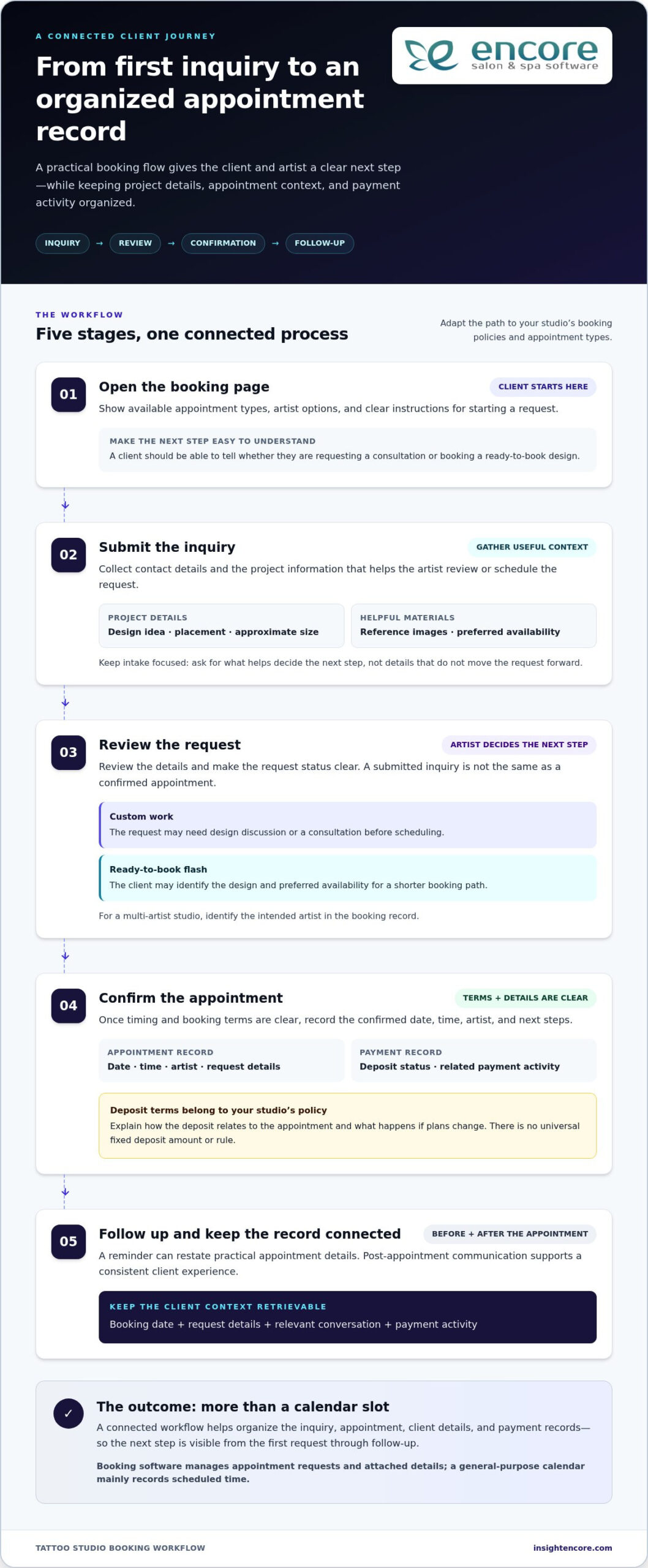
Categories
Uncategorized

Freeing Up Time From Salon Admin Work: The 2026 Automation Guide

Did you know the average salon owner spends between 10 and 16 hours every week on tasks that don’t earn a single cent? That’s nearly two full workdays lost to messy spreadsheets, endless phone tag, and manual math. If you feel like you’re drowning in paperwork, you aren’t alone. Most owners are currently paying a “time tax” that keeps them away from the chair and their families. This guide focuses on freeing up time from salon admin work by using modern automation to handle the heavy lifting for you.

We understand that you didn’t open your doors to become a full-time administrator. You’re an artist and a leader. Yet, your Sunday nights are likely spent calculating multi-tier commissions or worrying about inventory shortages. It’s exhausting to see your creative passion buried under a mountain of manual entries. We’re here to help you move past that stress. You can reclaim 10 or more hours every week while providing a better experience for your clients and a more organized environment for your staff.

This 2026 guide reveals how to eliminate manual double-bookings and slash no-shows by up to 38 percent. We’ll show you how to automate your payroll to capture the expanded FICA tip credits and keep your inventory synced in real time. It’s time to trade your admin burden for a streamlined workflow that finally gives you your life back.

Key Takeaways

  • Identify the hidden “Admin Tax” that drains your energy and pinpoint the three biggest time-wasters in your daily routine.
  • Stop chasing clients and eliminate phone tag by implementing a 24/7 self-service booking portal with automated reminders.
  • Master the art of freeing up time from salon admin work by automating your POS and staff commission calculations for instant, accurate reporting.
  • Ensure your shelves stay stocked and your chairs stay full using automated inventory alerts and “set it and forget it” marketing campaigns.
  • Discover how specialized software modules can streamline your specific business model, from nail salons and barber shops to tattoo studios.

The Salon Admin Tax: Identifying Your Biggest Time Wasters

You didn’t start your salon to be a bookkeeper. You’re a creator. Yet, right now, you’re likely paying a “salon admin tax.” This tax consists of every unbilled hour spent wrestling with spreadsheets or chasing appointments. It’s the time you can’t bill for, but it drains your energy just the same. Identifying these leaks is the first step toward freeing up time from salon admin work. When you know where the minutes are vanishing, you can finally take them back.

Most owners face three primary time sinks. We call these the “Big Three.” First, there’s the relentless phone tag with clients. Second, the Sunday night payroll and commission math. Third, the manual inventory counts that never seem to match what’s actually on your shelves. When you rely on manual systems, errors are inevitable. A single double-booking doesn’t just ruin one hour; it creates a ripple effect of stress for your staff and disappointment for your clients. Salon admin work is the operational friction that limits creative growth.

The Hidden Cost of Manual Scheduling

Every phone call takes an average of three to five minutes. Multiply that by twenty bookings a day, and you’ve lost over an hour just talking about dates and times. Modern appointment scheduling software removes this burden entirely. It allows your clients to book while you sleep. Beyond the time saved, consider the emotional toll. Manually managing cancellations and no-shows is exhausting. Automating this process is a vital part of learning how to increase salon profit margin by focusing on billable services instead of logistics.

The Payroll and Commission Headache

Manual commission calculations are notoriously difficult. Industry data shows that manual systems are often prone to 5-10% error rates. These mistakes aren’t just expensive; they erode the trust you’ve built with your team. Your stylists work hard. When their pay is delayed or incorrect due to paperwork hurdles, morale drops. Freeing up time from salon admin work means moving toward real-time financial tracking. Instead of facing a mountain of receipts at the end of the month, you get instant clarity. You deserve a system that supports your team’s growth without the headache of manual math.

Phase 1: Eliminating Phone Tag with Self-Service Booking

If you’re still relying on a paper book and a landline, you’re essentially tethered to your front desk. Breaking free requires a shift toward self-service. The first phase of freeing up time from salon admin work involves moving your schedule to a cloud-based system that works while you’re busy with a client or sleeping. Research shows that roughly 46 to 50 percent of salon appointments are booked outside regular business hours. If you don’t have a system to catch those requests, you’re leaving money on the table and creating a backlog of voicemails to return the next morning.

The Bureau of Labor Statistics occupational outlook notes that salon owners often juggle heavy administrative duties alongside their craft. By setting up salon client booking portals, you offload the most repetitive part of your day. It isn’t just about convenience; it’s about reclaiming your mental energy.

Setting Up Your 24/7 Virtual Front Desk

To make this transition smooth, don’t just open your calendar. Set intelligent booking rules. For example, you can prevent awkward 15-minute gaps by forcing appointments to sit back-to-back. This ensures your day remains compact and profitable. When configuring your portal, make sure to collect essential data upfront to save time later. A quick checklist for your booking form should include:

  • Updated contact information and preferred communication methods.
  • Chemical history or allergy alerts for new clients.
  • Specific service requirements to ensure the correct time block is reserved.

Digital consultation forms take this a step further. Send these out automatically the moment a booking is confirmed. When the client arrives, you already have their history and goals ready. It’s a professional touch that saves five minutes of “getting to know you” time per appointment.

Automating the “Are You Coming?” Conversation

Automated SMS reminders are a game-changer for any busy owner. They reduce no-show rates by 35 to 38 percent. It isn’t just a nudge; it’s about the psychology of commitment. When a client receives a professional text, they’re more likely to respect your time. Two-way messaging allows them to confirm or reschedule without you ever picking up the phone. You can even see how these automated workflows feel in practice to understand the relief they provide.

Finally, empower your team by giving them mobile access to their own schedules. This eliminates the “when is my first client?” texts that clutter your personal time. When your staff can manage their own day, you’re one step closer to truly freeing up time from salon admin work and focusing on your growth as a mentor and artist.

Phase 2: Automating the Numbers (Payroll, POS, and Commissions)

Numbers don’t lie, but they sure can be exhausting to track by hand. If you’re still using a calculator and a notepad to figure out what you owe your team, you’re losing hours of your life every single pay period. In fact, research shows that salons running manual payroll spend over 11 hours every two weeks just on math. Transitioning to a system where your Point of Sale (POS) talks directly to your calendar is the most effective way of freeing up time from salon admin work. It turns a day-long chore into a few simple clicks.

According to the U.S. Chamber of Commerce guide to business automation, streamlining these repetitive financial workflows prevents burnout and saves hundreds of hours annually. When your sales data flows instantly into your reporting, you get a real-time view of your business health. You don’t have to wait until the end of the month to see your profit and loss; you can see it in seconds.

One-Click Commission and Payroll

The secret to a happy team is accuracy and transparency. You can set up specific rules in your software to calculate salon staff commission automatically based on their experience level. Whether you have senior stylists on a higher tier or junior assistants earning a flat rate, the system handles the logic for you. This is where the Encore advantage really shines, especially for hybrid salons. It manages specialized booth renter financials with ease, keeping your accounts separate and compliant. Giving your staff mobile access to view their own performance metrics builds trust and keeps everyone motivated without you having to print out reports every Friday.

Streamlined Checkout for Clients and Staff

The checkout process should be a celebration of the service, not a math test. By moving to integrated credit card processing, you eliminate the reconciliation errors that happen when you manually type totals into a separate terminal. It’s faster, safer, and much more professional. Storing cards on file allows for a “silent” checkout, which is perfect for busy clients who need to get back to their day. You can also boost your immediate cash flow by offering integrated gift cards that track themselves. Tips and product add-ons are added with a tap, ensuring your stylists get paid exactly what they earned without any manual entry. This level of automation is the ultimate tool for freeing up time from salon admin work while keeping your focus on the guest experience.

Freeing Up Time From Salon Admin Work: The 2026 Automation Guide

Phase 3: Streamlining Inventory and Client Retention Marketing

The final hurdle in freeing up time from salon admin work often involves the tasks you can’t see but definitely feel: inventory and marketing. Counting bottles of shampoo at 9:00 PM or manually emailing clients who haven’t visited in six weeks is a drain on your creative energy. By automating these “back-of-house” processes, you ensure your business remains profitable and your chairs stay full without you ever lifting a pen. It’s about creating a system that cares for your clients and your supplies as much as you do.

Automated Stock Control

Manual inventory counts are notoriously inaccurate and time-consuming. Instead of guessing what you need to order, implement barcode scanning for instant updates. When a stylist checks out a client or logs a formula, your stock levels should update in real time. Using a spa inventory management system allows you to distinguish between back-bar professional usage and retail sales instantly. You can set low-stock alerts that notify you the moment a popular color tube or serum hits a critical level.

This data-driven approach is essential for reducing salon operating costs, as it prevents money from sitting on shelves in the form of overstock. For specialized businesses like tattoo studios, tracking specific supplies like needles and ink is just as critical to maintaining safety and professional standards. When your software handles the ordering logic, you spend less time on clipboards and more time on your craft.

Hands-Free Marketing and Loyalty

Client retention accounts for roughly 87 percent of total salon revenue, yet manual marketing is often the first thing to slide when things get busy. “Set it and forget it” campaigns solve this by triggering “we miss you” emails automatically based on a client’s last visit date. If someone hasn’t re-booked within their usual six-week window, the system sends a friendly nudge for you. This persistent connection is a core part of freeing up time from salon admin work while maintaining a high-end, personal feel.

Automated birthday greetings and holiday promotions build lasting bonds without requiring a single minute of your day. You can also ditch the manual punch cards that clients always lose. An automated loyalty program tracks points internally and applies them at checkout with a simple tap. It rewards your frequent guests and encourages higher spending, all while the software handles the record-keeping in the background.

Automate your marketing and inventory today

Reclaiming Your Freedom: Implementing the Encore Management Suite

Choosing the right system shouldn’t add to your workload. It should be the end of it. Encore Salon & Spa Software acts as a supportive mentor that handles the boring, repetitive tasks so you can focus on being creative. We understand that migrating your data or switching from a complex competitor can feel intimidating. That’s why we use a human-centric approach to get you up and running without the technical headaches. Our team is here to ensure your transition is smooth, reliable, and accessible. Our goal is to guide you from a state of constant operational stress to a feeling of total, organized control. Freeing up time from salon admin work is finally within reach when you have a partner that prioritizes your peace of mind alongside your business growth.

A Solution for Every Business Model

Not every beauty business is the same. A high-end spa has different needs than a bustling barbershop. If you’re an independent pro, you might need a dedicated booth renter client management app that keeps your finances separate from the salon owner’s. Encore provides specialized modules for tattoo artists, nail techs, and barbers, ensuring the tools fit your specific workflow rather than forcing you into a one-size-fits-all box. The Encore features are designed to be an all-in-one suite. This means you don’t have to juggle five different apps to run one business. Whether you’re managing a team of twenty or working solo, the system scales with you, providing the exact level of support you need to thrive.

The Next Step Toward More Free Time

It’s time to stop paying the “admin tax.” You’ve worked hard to build your brand, and you shouldn’t have to sacrifice your personal life or your Sunday nights to keep the lights on. Freeing up time from salon admin work is about more than just convenience; it’s about reclaiming your freedom to lead and inspire. With the reliability of Syntec Business Systems, a company that’s been supporting the industry since 1991, you’re partnering with experts who’ve seen every industry shift. We’re deeply invested in your individual success. We reject delayed interactions and cold, automated support. Instead, we offer a hands-on alliance that empowers you to grow. Take the first step toward a more balanced life today and see how much your business can achieve when you’re finally back behind the chair.

Try Encore Now to Reclaim Your Time

Take Control of Your Salon’s Future

You’ve seen how much your business changes when you stop fighting with spreadsheets and start using smart systems. By automating your booking, payroll, and inventory, you aren’t just making things easier. You’re actively freeing up time from salon admin work so you can focus on the artistry that made you open your doors in the first place. Whether it’s cutting out the stress of manual commission math or ensuring your shelves are always stocked, the right tools make every day feel lighter.

Since 1991, we’ve helped salon professionals transition from chaos to organized control. Our all-in-one platform comes with no hidden fees and dedicated human support to guide you through every step of your migration. You don’t have to navigate these changes alone. We’re here to be the partner that helps your business grow while giving you back your personal life and your Sunday nights.

Start freeing up your time today, try Encore for yourself!

Your journey to a more balanced and profitable salon starts with a single step. We’re excited to help you see what’s possible when the paperwork is finally off your plate and you’re back to doing what you love.

Frequently Asked Questions

How much time can salon software really save me each week?

Most salon owners save between 10 and 16 hours every week by automating their manual workflows. This reclaimed time comes from eliminating the need for manual scheduling, phone tag, and complex payroll calculations. By freeing up time from salon admin work, you can focus on creative services or spend more time with family. It’s a significant shift that turns two full workdays of paperwork into a few simple clicks each morning.

Is it difficult to move my client data from paper or spreadsheets to Encore?

Transitioning your business is much easier than you might think. We provide a human-centric migration process designed to lower the barrier for those moving from manual systems or complex competitors. Our team handles the heavy lifting of importing your client records, formula histories, and service lists. You won’t have to worry about losing important data during the switch. We act as your supportive partner to ensure you’re ready to go without the setup anxiety.

Can I manage multiple staff commission structures automatically?

Yes, you can easily set up automated rules for various staff tiers. Whether you have senior stylists on a high percentage or junior assistants on a flat rate, the software handles the math instantly at checkout. This transparency builds trust with your team because they can view their own performance metrics in real time. It eliminates the 5 to 10 percent error rate often found in manual systems and ensures everyone gets paid accurately and on time.

What happens if I’m not tech-savvy? Is there support available?

We specialize in making technology accessible for everyone. Our platform is designed with simplicity in mind, using clear language instead of dense technical jargon. If you ever feel stuck, you have access to toll-free human phone support from our team of experts. We avoid the cold, impersonal feel of traditional software companies. You’ll always have a responsive ally ready to help you navigate the system and grow your business with confidence.

Does Encore Salon Software work for independent chair renters?

Absolutely. We offer specialized Chair/Booth Renter Software specifically for independent pros. This version includes partitioned logins and separate financial tracking to keep your business records distinct from the salon owner’s. It’s the perfect solution for independent stylists who need professional tools for scheduling and CRM without the complexity of a full enterprise suite. You’ll have total control over your own client list, pricing, and service history in one convenient app.

How do automated reminders help reduce my salon admin work?

Automated reminders act as your virtual front desk, handling the “Are you coming?” conversation while you work. By sending two-way SMS confirmations, you can reduce your no-show rate by up to 38 percent. This is a vital part of freeing up time from salon admin work because it eliminates the need for morning confirmation calls. Clients can confirm or reschedule via text, ensuring your chair stays full and your schedule remains organized without manual effort.

Can I track my inventory and retail sales in the same platform?

Yes, our all-in-one platform includes an integrated Inventory Management System. You can track professional back-bar usage and retail sales in real time using barcode scanning. When a stylist uses a product or sells a bottle of shampoo, the stock levels update automatically. The system even sends low-stock alerts to prevent shortages. This keeps your operating costs low and ensures you never have to spend another Sunday night manually counting bottles in the stockroom.

Is integrated credit card processing more expensive than my current bank terminal?

Integrated processing is often more cost-effective because it eliminates expensive reconciliation errors and manual entry mistakes. While rates vary based on transaction types, having your payments connected directly to your POS saves hours of bookkeeping. It allows for card-on-file bookings and silent checkouts, which improve the client experience. You’ll gain instant financial reporting and a clear view of your profit margins without the headache of managing separate bank terminals and software reports.

Disclaimer

This article is general in nature and may contain errors, please verify all claims with your sales rep

Categories
Uncategorized

Barbershop Scheduling App: The 2026 Guide to Streamlining Your Shop

Did you know that automated reminders can slash your no-show rate by up to 89%? In 2026, a reliable barbershop scheduling app is more than just a digital calendar; it’s the engine that powers your growth while you’re busy with a clipper in hand. You shouldn’t have to spend your evenings chasing Instagram DMs or stressing over manual commission math just to keep the lights on. Your shop deserves a professional edge that works as hard as you do.

We understand that your time is your most valuable asset, and it’s frustrating when a chaotic schedule keeps you from actually growing your business. You deserve a system that handles the heavy lifting, turning every empty slot into a revenue opportunity without the manual effort. This guide will help you find the right software to automate your bookings, eliminate no-shows, and provide clear reports on your best clients and barbers. We’re going to break down the essential features you need to move from daily stress to organized control, ensuring your chairs stay full and your peace of mind stays intact.

Key Takeaways

  • Reclaim your time by transforming your digital calendar into a 24/7 automated receptionist that captures appointments while you focus on your clients.
  • Identify the core integrations needed to sync your social media pages directly with your shop’s point-of-sale system for a frictionless booking experience.
  • Navigate the financial nuances of managing chair renters and commission-based employees using specialized back-office tools.
  • Learn how to choose the perfect barbershop scheduling app to eliminate no-shows and automate your shop’s daily growth.
  • Get a clear, stress-free roadmap for migrating your client data and launching new software during your shop’s quietest periods.

Beyond the Digital Calendar: Why Barbershops Need an Integrated Scheduling App in 2026

Moving from a paper ledger to a modern appointment scheduling software isn’t just about going paperless. It’s about evolving. In 2026, clients don’t want to wait for a return call or a text confirmation. They want to book a fade at 11 PM while scrolling through their phone. A dedicated barbershop scheduling app acts as your 24/7 receptionist, capturing revenue while you’re focused on the chair or even while the shop is closed. This shift creates a professional image that builds immediate trust. When a client sees a sleek, automated booking page, their perception of your shop’s value increases before they even walk through the door.

The True Cost of Manual Booking

Managing a shop through Instagram DMs or texts is a recipe for burnout. It’s not just the time spent typing. It’s the mental load of tracking dozens of separate conversations. If you spend just five minutes per client on back-and-forth booking, you’re losing over an hour of cutting time for every 12 clients. That is time you aren’t being paid for. Relying on DMs also creates a massive revenue leak. One no-show a day might seem small, but over a year, that’s thousands of dollars in empty chair time you can never recover. Your primary income stream shouldn’t depend on a social media inbox.

Winning the ‘No-Show’ War

Ghosting is the silent killer of shop profitability. You can fight back. Research from sources like Market.us shows that automated reminders can reduce no-shows by up to 89%. By using a robust barbershop scheduling app, you can send automated SMS and email alerts that keep your shop top-of-mind. Beyond reminders, modern systems allow you to protect your barbers’ time through deposits and clear cancellation policies.

Setting these expectations from the first click changes the client relationship. Digital waivers and transparent policies ensure everyone respects the schedule. If you use integrated credit card processing, you can even require a card on file. This simple step virtually eliminates “no-call, no-shows.” Clients are far more likely to honor a commitment when there is a clear financial policy in place. It isn’t about being harsh. It’s about valuing your craft and your team’s livelihood.

Core Features Every Barbershop Scheduling App Needs to Drive Growth

A great tool should do more than just record a time slot. It needs to work as a growth engine. To scale your shop, your barbershop scheduling app must integrate directly with the places your clients already spend their time. This means having an online booking module that connects seamlessly with Facebook, Instagram, and Google. When a potential client sees your work on their feed, they should be able to book immediately without leaving the app. This reduces the friction that often leads to abandoned bookings.

Beyond simple scheduling, a high-performing system acts as a central hub for your business. It tracks client history, creating a digital “lookbook” that records previous styles, preferred products, and even personal notes. This data allows you to provide a tailored experience that keeps regulars coming back. You can explore our full list of management features to see how these tools connect your front desk to your back office.

The Power of Integrated Payments

Your scheduler and your cash register shouldn’t live in two different worlds. When you use integrated credit card processing, you eliminate the need for manual entry at checkout. This reduces human error and ensures your daily payout reports match your schedule perfectly. Understanding how technology can benefit your small business is key here; automation doesn’t just save time, it protects your profits.

Features like card-on-file allow for a “silent” checkout experience. Clients can simply stand up, confirm their tip, and walk out. This premium feel encourages higher tips and better client retention. It also simplifies your end-of-day math, especially when tracking inventory levels alongside service sales. If you want to see how this looks in action, you can reach out to our team for a closer look at our all-in-one system.

Marketing That Works While You Work

Consistency is the secret to a full chair. Automated marketing tools allow you to send the right message at the perfect moment. For example, you can set up “We Miss You” campaigns that trigger automatically if a client hasn’t booked in four weeks. This keeps your shop top-of-mind without you having to send a single manual text. You can also use gift cards to boost your cash flow during slower months or holidays. By rewarding your most frequent regulars through a loyalty program, you turn casual visitors into lifelong advocates for your brand.

Managing Chair Renters vs. Employees: The Back-Office Nuance

Managing a barbershop is rarely a one-size-fits-all situation. You might have a lead barber on a high commission, a junior on a base salary, and three independent contractors renting chairs in the back. Each of these relationships requires different financial and legal handling. It’s critical to correctly determine worker classification to ensure your shop stays compliant with tax laws while protecting your profits. A specialized barbershop scheduling app must be flexible enough to manage these distinct models simultaneously. Without this nuance, you’ll end up spending your weekends buried in spreadsheets trying to figure out who owes what.

The most efficient shops use “split-payments” to handle revenue at the point of sale. This means when a client pays for a service, the software automatically routes the booth rental fee or the house’s commission to your shop account while the barber receives their share. It removes the awkward friction of chasing down rent checks or manually cutting payroll at the end of every week. If you’re looking for a system designed to handle this level of complexity, you can explore our Chair/Booth Renter Software solutions.

Automating Commission and Rental Fees

Friday afternoon shouldn’t be a source of stress. Instead of manually tallying up individual tickets and receipts, you should be calculating salon staff commission automatically through your software. For your independent contractors, the system can track flat-rate rental fees and send automated reminders when a payment is due. Giving each barber their own “mini-dashboard” is a massive efficiency win. It allows them to track their personal earnings and upcoming schedule in real-time on their own devices. This transparency builds trust and saves you from answering “How much have I made this week?” five times a day.

Staff Performance Metrics

Running a successful shop requires looking beyond the daily cash total. You need to know how efficiently your chairs are actually being used. By monitoring the salon staff utilization rate, you can identify which hours are your most productive and where you might need to adjust your staffing levels. It’s not just about who brings in the most cash today; it’s about who is building a sustainable business for the future. Tracking rebooking rates tells you which barbers are genuinely connecting with clients and keeping them coming back. These metrics provide the objective data you need for fair and productive performance reviews that help your entire team reach their full potential.

Barbershop Scheduling App: The 2026 Guide to Streamlining Your Shop

The Roadmap to Implementing New Barbershop Software Without the Headache

Switching to a new barbershop scheduling app shouldn’t feel like a chore. It’s an investment in your shop’s future. The key to a smooth transition is timing. You don’t want to launch right before a massive holiday rush when every chair is full and the shop is loud. Instead, pick a traditionally slower period to give your team the mental space to learn the new system. This approach turns a potential headache into a structured, manageable upgrade for your entire business.

Step 1: Data Migration and Setup

Your first move is to audit your current client list. Take the time to clean up duplicate entries and outdated phone numbers before you export contacts from your phone or old system into the CRM. This ensures your automated marketing actually hits the right targets. Once your data is clean, focus on your service menu. Be realistic about durations. If a detailed skin fade takes 45 minutes, don’t list it as 30 just to squeeze in more bookings. Include buffer times for cleaning and tool prep to keep your barbers from burning out. Finally, configure your “Shop Rules” for cancellations and late arrivals. Having these set in stone within the software removes the emotional weight of enforcing policies manually.

Step 2: The Training Phase

Getting your team on board with a new barbershop scheduling app is the most critical step, especially for “old-school” barbers who might be skeptical of new tech. The best way to build confidence is through a “Mock Day.” Spend a few hours running through practice check-outs, applying tips, and rebooking clients for their next visit. Show every barber how to use the mobile app to manage their own chairs directly from their phones. This autonomy is a huge selling point for staff. To keep things moving, identify a “Software Champion” in the shop. This is usually the team member who picks up tech quickly and can help others with quick questions. It takes the pressure off you and fosters a collaborative environment.

When you’re ready to flip the switch, announce the new system to your clients as a “Premium Upgrade.” Frame it as an improvement to their experience that offers faster booking, better reminders, and more personalized service. This positioning makes the change feel like a benefit to them rather than a technical hurdle for you.

Start your stress-free transition today

Why Encore is the All-in-One Partner for the Modern Barbershop

Choosing a barbershop scheduling app is about more than just picking a tool; it’s about choosing a partner. At Encore, we bring 35 years of specialized beauty and wellness industry knowledge to your shop. Since our founding in 1991, we’ve helped professionals move from chaotic calendars to streamlined, automated engines. We don’t just provide software. We provide the stability that comes from decades of understanding the daily hurdles you face behind the chair.

Many shop owners feel like just another number when using massive marketplace platforms. You’ve likely heard the stories of impersonal, bot-only customer service that leaves you hanging when things go wrong. We take a different path. Our support is human-centric. When you have a question about your payroll or a technical hiccup during a busy Saturday, you talk to a real person. We’re a seasoned professional and a dedicated ally invested in your individual success.

Encore is built to scale alongside your ambition. Whether you’re a solo barber in a private studio or a growing franchise with multiple locations, our platform adapts to your needs. We offer transparent pricing that grows as you do. You won’t find hidden marketplace fees here that eat into your hard-earned revenue. It’s a reliable system designed to give you organized control over your business.

Built for Barbers, by Industry Experts

Our Encore Barber Software is designed around the unique rhythm of a busy shop. We know you don’t have time to flip between five different browser tabs to check your numbers. That’s why we keep your inventory management, point-of-sale, and scheduling in one place. This integration ensures your data is always accurate and your checkout process is fast. It’s about removing the friction that slows you down.

Unlike marketplace apps that prioritize their own brand and directory, we focus entirely on yours. We believe your booking page should match your shop’s vibe, not ours. Our goal is to help you build your own client list and loyalty. We prioritize your brand’s growth over our own marketplace visibility because your success is our primary mission. You’ve worked hard to build your reputation; your barbershop scheduling app should help you protect it.

Ready to Take Control of Your Chair?

Organizing your operations provides a level of peace of mind that’s hard to describe until you feel it. Imagine ending your week without a single manual calculation or a missed appointment. You can finally focus on the craft you love while the software handles the rest. We’d love to show you exactly how this looks in action with a personalized walkthrough of our system. It’s time to turn your chaotic calendar into a high-growth engine.

View our pricing and start your journey with Encore today

Take the First Step Toward a Stress-Free Shop

You’ve seen how the right technology can turn a messy calendar into a high-growth business engine. By automating your bookings and utilizing specialized modules for independent booth renters, you can finally focus on your craft instead of back-office math. Choosing a reliable barbershop scheduling app is the most effective way to eliminate no-shows and reclaim your evenings.

We’ve been a supportive partner to thousands of shops since 1991, offering the reliability of 35 years of industry experience. You’ll never have to deal with impersonal bots because we provide direct human support based in North America. It’s about having a seasoned professional in your corner who understands your daily hurdles and is ready to help you overcome them.

Streamline your shop today with Encore Barber Software

Your shop’s growth is within reach. We’re here to help you build the automated, professional business you’ve always envisioned. You deserve the peace of mind that comes with a perfectly managed chair and a thriving team.

Frequently Asked Questions

Is a barbershop scheduling app worth the monthly cost?

Yes, the investment pays for itself through increased efficiency and reduced no-shows. Industry data suggests shops using management software see a revenue uplift of up to 34%. By automating the booking process, you stop losing money on empty chairs and hours spent on manual admin. A professional barbershop scheduling app ensures your business runs like a well-oiled machine even when you’re busy cutting hair or away from the front desk.

How do I move my clients from my old app to a new one?

Moving your data is a straightforward process that starts with exporting your client list into a CSV or Excel file. Most modern systems allow for a clean import of contact details, notes, and service histories. At Encore, we provide direct human support to guide you through this migration, ensuring no client record is lost. It’s a great time to audit your list and remove outdated information for a fresh start.

Can I manage both employees and independent renters in one app?

Absolutely. Our platform includes specialized modules specifically designed for the unique needs of chair and booth renters alongside traditional employees. You can manage separate schedules, track individual commissions, and even set up split payments so funds are routed correctly at the point of sale. This flexibility allows you to maintain a diverse labor model within a single, organized system without the usual back-office headaches or manual math.

Will my older clients struggle with online booking?

Most clients, regardless of age, appreciate the convenience of booking on their own terms without making a phone call. Modern interfaces are designed to be intuitive and mobile-friendly, requiring just a few simple taps to secure a spot. For those who still prefer a traditional approach, you can always enter their appointments manually into the system. This hybrid model ensures every client feels comfortable while you still benefit from an organized digital calendar.

Does the scheduling app handle my credit card processing too?

Yes, integrated credit card processing is a core feature that connects your schedule directly to your revenue. This allows you to collect deposits, enforce cancellation fees, and store cards on file for faster, touchless checkouts. By removing the need for a separate third-party terminal, you reduce manual entry errors and simplify your daily reporting. It’s an essential tool for protecting your shop’s bottom line and ensuring you get paid for your time.

Can I set different prices for different barbers in the shop?

You can easily configure different pricing tiers based on the experience level or seniority of your barbers. This is a vital feature for shops that employ master barbers alongside juniors or apprentices. The software automatically applies the correct rate when a client selects their preferred professional. It ensures your billing is accurate every time and allows you to reward your top talent for their skills without needing to perform manual price overrides.

What happens if my internet goes down in the shop?

Because modern software is cloud-based, you can still access your entire schedule and client list from a smartphone or tablet using mobile data. Your business doesn’t stop just because the local Wi-Fi fails. You can continue checking clients in and rebooking them directly from your mobile device or personal phone. This level of reliability gives you peace of mind that your shop’s operations are protected against local technical issues or temporary power outages.

Can I sell products and track inventory through the scheduling app?

Selling retail is a major revenue stream, and our inventory management system makes it easy to track every bottle on your shelves. You can add products to any service ticket during the checkout process with a single click. The software automatically adjusts your stock levels in real-time and alerts you when it’s time to reorder. This ensures you never miss a sale because of an empty shelf or a forgotten manual inventory count.

Disclaimer

This article is general in nature and may contain errors, please verify all claims with your sales rep
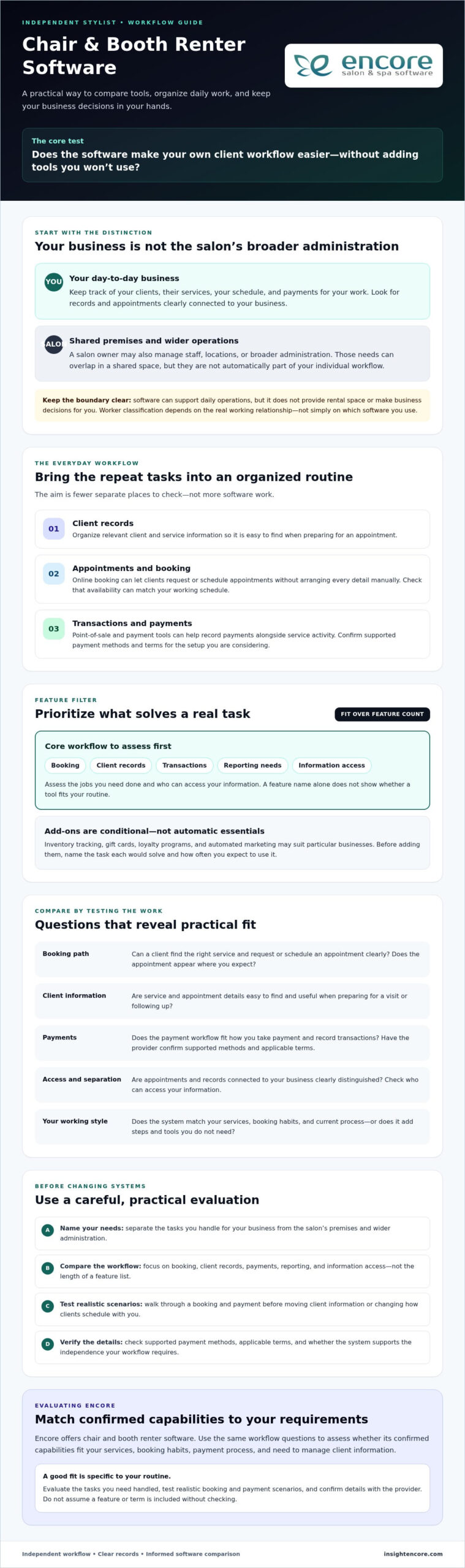
Categories
Uncategorized

How to Prevent Double Booking Appointments: The Ultimate 2026 Salon & Spa Guide

Imagine a busy Saturday morning where your top stylist is finishing a complex balayage, only to see another loyal client walk through the door for their scheduled haircut at the exact same time. Your heart sinks as you realize two different calendars allowed the same slot to be filled. Learning how to prevent double booking appointments isn’t just about avoiding an awkward apology; it’s about protecting the reputation you’ve worked so hard to build.

We understand that the mental load of manually cross-referencing staff schedules and room availability is exhausting. You started your business to create beauty and connection, not to spend your nights staring at a spreadsheet. It’s frustrating when simple human error leads to staff burnout or lost revenue. This guide promises to hand you the blueprint for a reliable, automated system. You’ll discover exactly how to eliminate scheduling overlaps and finally reclaim your peace of mind.

We’re diving into the latest 2026 software strategies, from real-time resource management to seamless mobile booking. You’ll learn how to fill your books accurately while keeping your team happy and your revenue growing. Let’s move from a state of scheduling stress to a feeling of organized control.

Key Takeaways

  • Stop the “ripple effect” by understanding how one scheduling overlap can disrupt your entire day and your bottom line.
  • Master how to prevent double booking appointments by implementing a real-time, multi-channel sync that eliminates human error.
  • Learn to configure essential buffer times and processing gaps to protect your team from burnout and ensure a smooth guest flow.
  • Gain professional communication scripts to resolve existing conflicts quickly while maintaining your salon’s reputation and client trust.
  • Discover how specialized automation handles the complexity of your schedule, allowing you to focus entirely on the guest experience.

The High Cost of Double Booking: Why It Is More Than a Minor Mistake

Double booking happens when two or more appointments occupy the same resource simultaneously. That resource might be a specific stylist, a massage room, or even a specialized piece of equipment like a laser. It is not just a simple calendar overlap; it’s a logistical knot that creates immediate tension for everyone involved. When your system allows two people to occupy the same space at the same time, you’re forced into a reactive mode that rarely ends well.

Think of your daily schedule as a row of dominos. This is the "Ripple Effect." When the first appointment of the day starts twenty minutes late because of a scheduling conflict, every client afterward feels the delay. By mid-afternoon, your team is exhausted from rushing, and your waiting room is full of frustrated guests. This chaos doesn’t just stay in the salon; it follows your staff home and affects their ability to provide high-quality care.

The financial impact of these errors is often underestimated. While it’s easy to see the cost of a 20% "apology discount," the real loss is much higher. Research shows that 87% of salon revenue comes from repeat clients. If a double booking causes a regular to switch to a competitor, you aren’t just losing today’s appointment fee. You’re losing the lifetime value of that guest. Mastering how to prevent double booking appointments ensures those high-value relationships remain intact and your revenue stays predictable.

Staff morale also takes a significant hit when scheduling is disorganized. Constant stress is a primary driver for stylist turnover in the beauty industry. Your best talent wants to focus on their craft and their clients, not apologize for errors they didn’t create. When you provide a reliable system, you’re telling your team that you value their time and their mental health as much as the bottom line.

The Psychology of Client Trust

Clients don’t just pay for a service; they pay for an experience and a sense of escape. When they arrive to find their slot taken, they feel undervalued and invisible. In 2026, a single negative review about "disorganized scheduling" on social media can deter dozens of potential new guests before they ever call you. One simple error can break years of brand loyalty in just a few minutes of frustration.

Hidden Operational Costs

Beyond the visible discounts, there are invisible drains on your business. Managers lose hours of productive time every week scrambling to move appointments, soothe angry clients, or find last-minute cover. You also have to consider the cost of complimentary add-ons used to fix the mistake. Every scheduling error acts as a direct leak in your 2026 profit margins, quietly siphoning away the capital you need to scale your business.

Why Manual Systems and Generic Calendars Fail Salons

Many salon owners start with a paper book or a simple digital calendar because it feels familiar. It’s comfortable; it’s what you’ve always used. However, as your business grows and the pace of 2026 demands increase, these manual methods become a significant liability. The "Human Error" trap is real. Even the most organized receptionist can’t compete with a computer when the phone is ringing, a client is checking out, and a walk-in is standing at the door. Mistakes aren’t a sign of a bad team; they’re a sign of a tired system.

The danger of the "Post-it Note" culture is especially high in busy spas. A quick note about a rescheduled massage might sit on the counter while another staff member books that same slot through an online portal. This lack of real-time updates creates a constant clash between your physical front desk and your digital presence. Understanding how to prevent double booking appointments starts with acknowledging that your tools need to talk to each other instantly.

The Limits of Paper Appointment Books

Paper books have a major physical limitation: only one person can use them at a time. If your manager is checking the schedule in the back office, your front desk is flying blind. There’s also the risk of data loss. A spilled coffee or a misplaced book can wipe out weeks of revenue data and client history. Plus, paper can’t talk. It won’t send an automated SMS to a client or remind a stylist about an upcoming color service. It’s a static tool in a dynamic industry.

The Gap in Generic Digital Tools

Generic tools like Google or Outlook are great for meetings, but they don’t understand the salon industry. They don’t know that a balayage requires processing time where the stylist is free but the chair is occupied. They can’t track room availability or specific equipment. If you want to see how specialized systems handle these complexities, you can explore our integrated booking solutions. These tools are built to recognize the unique rhythm of your floor.

Generic tools also fail to sync across all devices with the speed required today. In 2026, clients expect to book at midnight and see that slot disappear from your view immediately. If your software lags by even a few minutes, the double-booking cycle begins again. To see how a dedicated system can protect your time and peace of mind, you can explore our full range of scheduling features.

The 4-Step Strategy to Eliminate Double Bookings Forever

Transitioning away from the chaos of manual entries requires a structured approach. It isn’t just about getting a digital calendar; it’s about building a system that thinks for you. Learning how to prevent double booking appointments effectively means closing the gaps where errors usually hide. By following these four steps, you can create a seamless flow that protects your time and your team’s energy.

  • Step 1: Implementing Real-Time, Multi-Channel Sync. Your booking portal, mobile app, and front desk tablet must operate as one. If a client books a facial online at midnight, that slot must be blocked across all devices instantly.
  • Step 2: Configuring Buffer Times and Processing Gaps. Never book appointments back-to-back without a breather. Your system should automatically insert time for cleaning and preparation.
  • Step 3: Managing Resources as Independent Entities. You aren’t just scheduling people. You’re scheduling rooms, chairs, and specialized equipment.
  • Step 4: Centralizing All Booking Channels. Walk-ins, phone calls, and social media DMs must all end up in one "Source of Truth" to prevent data fragmentation.

Mastering Buffer Times and Gaps

A common mistake is forgetting the work that happens between guests. You need time to sweep the floor, sanitize the massage table, or grab a fresh set of tools. Automated software allows you to set "cleanup" windows that are invisible to the client but vital for your staff. This prevents the burnout mentioned earlier. Additionally, for hair services, you can schedule "processing time" gaps. This allows a stylist to take a quick haircut while another client’s color is setting, maximizing revenue without creating an overlap. Using software to automatically enforce these gaps means your team doesn’t have to remember to add them manually.

Resource-Based Scheduling Logic

Most basic calendars only look at staff availability. However, a spa or high-end salon often has more stylists than treatment rooms or specialized machines. If two stylists book a laser hair removal session at the same time, you have a conflict, even if both stylists are free. A truly modern system treats the room and the equipment as independent resources. You can check out the Encore features page for advanced resource management tools that prevent these specific conflicts. By booking the stylist and the room simultaneously, you ensure that every tool needed for the service is ready and waiting. This logic eliminates the "room scramble" that often stresses out even the most experienced managers.

How to Prevent Double Booking Appointments: The Ultimate 2026 Salon & Spa Guide

Damage Control: How to Resolve a Scheduling Conflict Professionally

Even with the best intentions, a glitch might occasionally slip through your defenses. The "Identification Phase" is your first line of defense in these moments. By reviewing your master schedule 24 to 48 hours in advance, you can spot overlaps before the client ever sets foot in your salon. Catching an error early transforms the interaction from an awkward apology at the front desk into a proactive, professional solution over the phone.

Proactive honesty is a powerful trust-builder. When you reach out to a guest before they’ve even left their house, you demonstrate that you value their time as much as your own. This builds more long-term loyalty than trying to hide the error or hoping they won’t notice a long wait in the lobby. Mastering how to prevent double booking appointments includes having a clear protocol for these rare moments of friction.

Reclaim your peace of mind today

The ‘Golden Bridge’ Communication Script

Taking full responsibility is essential for maintaining your reputation. Avoid blaming "the system" or a specific staff member. Instead, use a script that provides a "Golden Bridge" to a new appointment. You might say: "I’m calling because we’ve had a scheduling overlap for your visit tomorrow. I want to ensure you get the full, relaxed experience you deserve, so I have two solutions ready for you right now."

Always offer two clear alternatives to give the client a sense of control. You could suggest a different time on the same day with a complimentary service upgrade, or a move to another senior stylist who is equally skilled. For a modern touch, a 2026 SMS reminder can help prevent last-minute confusion: "We’re looking forward to seeing you tomorrow at 2 PM for your Balayage; please reply CONFIRM or call us if you have any questions about your stylist."

Turning a Mistake into a Loyalty Opportunity

Instead of just offering a standard discount, try a "Value-Add" solution. Upgrading a basic facial to a premium treatment or adding a deep-conditioning hair mask costs your business very little but feels like a significant win for the guest. You can also use your management system to issue gift cards or bonus loyalty points as a tangible "thank you" for their flexibility. This gesture often turns a frustrated client into a vocal advocate for your brand.

Finally, perform a brief internal review after the conflict is resolved. Don’t just fix the client’s day; fix the underlying cause. Ask if the error happened because of a manual override or a sync delay. This analysis helps you refine your settings so the same mistake doesn’t recur, keeping your team focused on what they do best.

Automating Your Peace of Mind with Encore Salon Software

Transitioning to a professional system is the final step in mastering how to prevent double booking appointments. Encore Salon Software acts as your silent partner, working behind the scenes while you focus on your artistry. Our Online Booking Module serves as a 24/7 digital receptionist. It never sleeps, never gets distracted, and never makes a manual entry error. It checks your real-time availability across all devices, ensuring that a midnight booking is just as accurate as one made at noon.

For those operating in shared spaces, our Chair and Booth Renter Software provides the perfect balance of independence and organization. Each professional can manage their own unique schedule without the risk of overlapping in a shared room or using the same piece of equipment. We also tackle the "I forgot" factor through automated reminders and confirmations. By sending a timely SMS or email, you significantly reduce the friction of last-minute rescheduling or accidental double bookings caused by client confusion.

Our system goes beyond just time management. By integrating POS and inventory, Encore ensures that every booking has the necessary supplies ready. If a specific color treatment is booked, the system tracks your stock in real time. This prevents the nightmare of having a client in the chair but no product on the shelf. It’s about creating a "set it and forget it" environment where the software handles the complexity so you can focus on the guest experience.

Tailored Solutions for Every Beauty Niche

Every business has a different rhythm. Tattoo Studios, for example, require different booking guardrails than a traditional day spa; they often need longer blocks for custom art or mandatory consultation gaps. High-volume nail salons need to move quickly without the risk of overlapping appointments during peak hours. You can find a complete breakdown of these specialized tools in our full 2026 management guide. We’ve built these modules to respect the specific needs of your niche.

Getting Started with Stress-Free Scheduling

Moving from a paper book or a generic app to Encore is a straightforward process. We’ve designed the transition to be as gentle as possible, removing the technical intimidation often associated with new software. Our team is here to support you at every step. One of the most effective ways to secure your schedule is through integrated credit card processing. By requiring a small deposit at the time of booking, you drastically reduce no-shows and protect your stylists’ time. Ready to end the scheduling chaos? Contact us for a demo today and see how easy it is to reclaim your peace of mind.

Step into a Stress-Free Scheduling Future

Your salon or spa should be a sanctuary of creativity and connection, not a source of logistical headaches. By moving away from outdated manual systems and embracing real-time, multi-channel sync, you protect your hard-earned reputation and your team’s energy. We’ve explored how to prevent double booking appointments through smart buffer times, resource-based scheduling, and professional damage control scripts.

Since 1991, we’ve been dedicated to building tools specifically for the beauty and wellness industry. Our all-in-one platform manages every detail from the first online click to the final POS transaction. You’re never alone in this transition; our human-centric support team is here to ensure your system works as hard as you do. It’s time to let the software handle the complexity so you can focus on your guests.

Start Your Stress-Free Scheduling Journey with Encore
You have the talent and the vision to grow your business. Now, you have the proven strategy to keep it running smoothly. Let’s make 2026 the year you finally reclaim your peace of mind.

Frequently Asked Questions

What is the best way to prevent double bookings in a multi-stylist salon?

The most effective method is implementing a centralized, real-time digital system that all staff can access simultaneously. Unlike paper books, digital platforms prevent two stylists from claiming the same time slot across different devices. You should look for a system that updates instantly when a booking occurs online or via mobile. This ensures everyone is on the same page, eliminating the confusion that leads to overlaps and protecting your team’s workflow.

Can I use Google Calendar to prevent double bookings for my spa?

While Google Calendar is great for basic meetings, it often fails spas because it doesn’t understand resource-based logic. It can’t track whether a specific massage room or facial machine is available alongside the therapist. Using generic tools is a common cause of scheduling errors. To truly master how to prevent double booking appointments, you need industry-specific software that manages staff, rooms, and equipment as independent, interlinked entities.

How do I handle a client who was double booked and is now angry?

Lead with a sincere apology and take full responsibility without making excuses. Offer an immediate solution, such as a different time or a senior stylist, and include a "Value-Add" like a complimentary deep-conditioning treatment. Proactive honesty is key. If you catch the error early, call them before they arrive. This shows you value their time, often turning a potentially negative review into a demonstration of excellent customer service and brand integrity.

What are buffer times and how do they help with scheduling?

Buffer times are automated gaps inserted between appointments to allow for cleaning, room resets, and staff breaks. For example, a 15 minute buffer after a massage ensures the therapist can sanitize the table and prep for the next guest without rushing. These gaps are invisible to clients but essential for your operation. They prevent the "ripple effect" of delays and ensure your team stays energized and focused on providing a high-quality experience.

Should I charge a deposit to prevent double booking and no-shows?

Yes, requiring a deposit is a highly effective strategy to secure your schedule. When clients have a financial stake in their appointment, they’re much more likely to show up or provide ample notice for changes. This reduces the gaps in your day and prevents the chaos of last-minute rescheduling. Using integrated credit card processing makes this a seamless part of your booking flow, protecting your revenue and ensuring your stylists’ time is respected.

Is it possible to sync my Instagram ‘Book Now’ button with my salon software?

Absolutely. Modern salon software allows you to link your Instagram and Facebook ‘Book Now’ buttons directly to your live calendar. When a client clicks that button, they see only your actual open slots. Once they book, that time disappears from your system across all platforms instantly. This multi-channel sync is a vital component in how to prevent double booking appointments, as it removes the need for manual data entry from social media messages.

How do I manage equipment conflicts when two stylists need the same tool?

You manage these by treating equipment as a specific "resource" in your scheduling software. If you only have one laser machine, the system will block that machine’s availability the moment it’s booked, regardless of how many stylists are free. This prevents the "room scramble" and ensures that the tools needed for a service are always ready. It’s a sophisticated way to handle high-volume environments where staff numbers exceed available specialty equipment.

What should I look for in salon management software to ensure no overlaps?

Look for an all-in-one platform that offers real-time calendar sync across all devices and specialized resource management for rooms and equipment. It should include automated SMS reminders to reduce no-shows and integrated point-of-sale for a smooth checkout. Ensure the provider has a long history of serving the beauty and wellness industry; Syntec Business Systems has done so since 1991. Reliable human support is also essential for helping you transition from manual systems.

Disclaimer

This article is general in nature and may contain errors, please verify all claims with your sales rep

Categories
Uncategorized

Ultimate Tattoo Appointment No-Show Policy Guide 2026

You spend three hours on a custom neo-traditional design, prep your station, and decline a walk-in, only to have your 2:00 PM client ghost you without a word. It’s more than just a missed connection. It’s a direct hit to your livelihood and a gap in your schedule that you can’t get back. Every artist understands the frustration of unpaid labor and the awkwardness of telling a regular they’ve lost their deposit. Implementing a clear tattoo appointment no-show policy isn’t about being mean. It’s about respecting your craft and ensuring your studio stays profitable.

We know you’d rather be tattooing than chasing down deposits or sending manual “where are you” texts. That’s why we’ve built this guide to help you create a professional framework that protects your time and your revenue. You’ll learn how to set up a consistent deposit system and use automated tools to handle reminders so you never have to play the role of the debt collector. We’re going to walk through the essential elements of a 2026-ready policy and the simple tech that makes enforcement feel like a breeze. Let’s turn those empty chairs into a reliable income stream once and for all.

Key Takeaways

  • Calculate the hidden costs of missed sessions, including the invisible labor of custom design and station setup.
  • Draft a professional tattoo appointment no-show policy that clearly defines cancellation windows and late arrival consequences.
  • Secure your income by using integrated credit card processing to collect non-refundable deposits during the booking process.
  • Reduce flake rates through automated SMS and email reminder sequences that keep your studio top-of-mind for clients.
  • Master re-engagement strategies to fill last-minute gaps and turn a missed appointment into a future booking.

The True Cost of a Tattoo No-Show in 2026

When a client ghosts a four hour session, the financial sting goes far beyond a few hundred dollars in lost shop time. You’ve already invested hours into that appointment before the client even walks through the door. There’s the station setup, the sterilized equipment, and the specialized lighting that’s been running in anticipation. An empty chair represents a total loss of overhead recovery. It’s a gap in your day that could’ve been filled by a dedicated collector who respects your craft.

Beyond the immediate revenue dip, frequent flakes crush studio morale. It’s demoralizing for artists to sit idle while surrounded by the buzz of other machines. If you’re looking to scale your business or bring on new residents, consistency is your best recruitment tool. High tier talent won’t stay in a shop where their income is unpredictable. Establishing a firm tattoo appointment no-show policy is a professional necessity. Within the Legal Framework for Tattoo Policies, you have the authority to set boundaries that protect your livelihood and your team’s passion.

Calculating Your Studio’s Revenue Leakage

To stop the bleed, you first have to measure it. Many shop owners find it helpful to use a simple formula: (Hourly Rate x Hours Lost) + Admin Time. Don’t forget to account for the 15 to 30 minutes spent chasing the client via phone or DM. When you look at the total monthly loss, the numbers are often eye opening. You can easily spot “Serial No-Showers” by checking history logs in your Client Management System. This data allows you to set a “Risk Threshold,” requiring higher deposits or even pre-payment for clients with a history of disappearing.

The Prep-Time Trap: Why Drawing Time Must Be Protected

The most painful part of a no-show is the “invisible labor.” Artists often spend their evenings drawing custom pieces or preparing complex stencils. This creative energy is finite. When that work goes uncompensated, it leads to burnout and resentment. To combat this, many studios now separate their deposit into a “Design Fee” and a “Session Deposit.” By using Encore Tattoo Studio Software, you can track exactly how much time is spent on client files. This ensures your artists feel valued for every minute of work, whether the needle hits the skin or not.

Elements of a Professional Tattoo No-Show Policy

A solid tattoo appointment no-show policy is the backbone of a stress-free studio. It sets clear expectations before the needle ever touches the skin. Your policy should act as a mutual agreement that respects both your time and the client’s commitment. Without this structure, you’re left guessing how to handle cancellations, which often leads to inconsistent enforcement and lost revenue. Clear rules remove the “gray areas” that cause awkward conversations at the front desk.

Defining your “Notice Window” is your first line of defense. For standard sessions, a 48 hour window is often sufficient to find a replacement from your waitlist. However, for large scale projects like sleeves or backpieces, a 72 hour window is more realistic. This gives you enough time to offer the slot to another dedicated collector. You should also include a “Late Arrival” clause. If a client is more than 20 minutes late without a phone call, the session should be considered a no-show. This prevents their delay from causing a domino effect that ruins the rest of your day. These boundaries align with professional tattoo industry standards for safety and business ethics.

Drafting Your Policy Template

Use direct, supportive language in your template. Avoid cold, legalistic phrasing. Instead, use sentences like, “Your deposit secures your time and supports the hours spent on your custom design.” This reminds the client that your work starts long before they arrive. Display this policy prominently on your website and within your tattoo studio software booking portal. When clients see the rules during the booking process, they’re much more likely to take their commitment seriously. You can see how Encore helps you automate these agreements during every new booking.

The ‘One-Time Grace’ Rule for VIP Clients

Loyalty is a two way street. If a long term regular who has never missed a session has a genuine emergency, a one-time grace period can strengthen that relationship. Use the “Notes” feature in your CRM to track these instances. It’s helpful to see at a glance if a client is habitually “forgetful” or if they’ve had a rare stroke of bad luck. If a client ghosts twice, it’s time to move them to a “Prepayment Only” status. This protects your income while still giving them a path to get their work finished. Professionalism doesn’t mean being rigid; it means being fair while protecting your business.

Financial Safeguards: Deposits and Integrated Payments

A deposit is more than just a down payment. It is a psychological anchor that creates “skin in the game” for the client. When someone has already committed a portion of the session cost, the likelihood of them simply forgetting or deciding to skip out drops significantly. This financial commitment shifts the dynamic from a casual inquiry to a professional contract. By establishing a firm tattoo appointment no-show policy backed by a deposit, you’re teaching your clients to value your time as much as you do.

Choosing between a percentage based deposit and a flat fee often depends on the project scale. For small flash pieces, a flat fee is simple and easy to communicate. For multi session sleeves or backpieces, a percentage helps cover the extensive prep work and drawing time. Regardless of the amount, the process must be frictionless. If a client has to call the shop or send a separate e-transfer, they might stall. Using integrated credit card processing allows you to collect these funds instantly during the booking flow, which is a key part of creating a fair cancellation policy that works for everyone. This removes the “I’ll pay it later” hurdle that often leads to empty chairs.

Comparing Payment Models for Tattoo Artists

Different projects require different levels of security. Here is how the most common models stack up for modern studios:

  • Non-refundable Deposit: Best for custom work. It covers drawing time and ensures the artist is paid for prep even if the client ghosts.
  • Full Prepayment: Ideal for guest spots or high demand flash events where every minute of the day is accounted for.
  • Card on File: Great for long term regulars. It offers convenience while still allowing you to charge a fee if they miss their window.

Managing Finances for Independent Booth Renters

In many studios, the line between shop policy and artist policy gets blurry. For chair and booth renters, protecting personal income is vital because they often operate as their own micro businesses. You need a system that can split payments automatically, sending the deposit directly to the artist while keeping the shop’s cut separate. This setup ensures that if a no-show occurs, the person who did the drawing work is the one who keeps the safeguard. Managing this through a centralized system also ensures PCI compliance. It keeps sensitive client data secure without the artist having to manage complex legal requirements themselves, allowing them to focus entirely on the art.

Ultimate Tattoo Appointment No-Show Policy Guide 2026

Communication Strategy: Reminders and Enforcement

Clear communication bridges the gap between a written tattoo appointment no-show policy and actual client behavior. It isn’t enough to have a policy buried on a website; you need to actively guide your clients through the booking process. When you stay top-of-mind, you significantly reduce the chances of a client simply forgetting their commitment. Effective communication turns a cold set of rules into a supportive partnership that respects everyone’s time.

A successful strategy relies on a 3-touch reminder sequence. First, send a confirmation immediately upon booking to provide a digital paper trail. Second, a 48 hour reminder serves as the final window for penalty free changes. Finally, a day-of text builds excitement and reminds them of essential prep steps. Text messages are the gold standard for artists because they offer much higher open rates compared to email. A quick SMS feels like a message from a professional partner, making it much harder for a client to ignore or overlook.

Automating the Reminder Workflow

You shouldn’t have to spend your lunch break sending manual “where are you” texts. Setting up automated triggers in your Encore software takes the manual labor out of the equation. The Confirmation Loop is the key to 2026 scheduling. You can even personalize these messages with the artist’s name and specific instructions like “Remember to hydrate and eat a full meal before you arrive!” This keeps the interaction feeling human and helpful rather than automated and cold.

Automate your studio reminders today

Scripts for Policy Enforcement

Enforcement doesn’t have to feel corporate or mean. If a client misses their slot, lead with empathy while standing your ground. They might have had a genuine crisis, and how you handle the follow up determines if they’ll ever come back. Use a script like: “Hey [Name], we missed you at the studio today! We hope everything is alright on your end. Since we weren’t able to fill your spot on short notice, your deposit has been applied as a no-show fee per our policy. We’re still excited about your piece, so let us know when you’d like to look at the calendar again.”

If a client asks “Why was I charged?”, be transparent. You might say: “I totally hear you, and I’m sorry the timing didn’t work out. To be fair to our artists, the deposit covers the custom drawing time and the dedicated block of shop time that was reserved just for you. We’d love to get you back on the books; would you like to see what [Artist] has available next month?” This “Soft Pivot” technique acknowledges the loss while immediately offering a re-booking opportunity. It preserves the relationship without sacrificing your studio’s revenue.

Winning Back No-Shows: Re-Engagement Tactics

A missed appointment shouldn’t be the end of your relationship with a client. While your tattoo appointment no-show policy protects your immediate income, re-engagement tactics help you recover the long term value of that client. Life happens. Sometimes a “We Missed You” message is all it takes to turn a forgetful mistake into a lifelong collector. By approaching these situations with empathy instead of anger, you keep the door open for future bookings while still upholding your studio’s professional standards.

Marketing automation is your best friend when an empty chair appears. If a cancellation happens at the last minute, you can blast a “Flash Slot Available” message to your most active clients. This turns a potential revenue gap into a surprise opportunity for someone else. Over time, you’ll start to see trends in your no-show data. You might find that specific days or late afternoon slots have higher flake rates. Armed with this knowledge, you can refine your tattoo appointment no-show policy by requiring higher deposits for those high risk times or sending extra reminders to ensure your day stays on track.

Automated Win-Back Campaigns

Setting up a win-back trigger is a smart move for any growing studio. A few days after a missed session, your system can automatically send a polite nudge with a rebooking incentive. You might suggest they purchase Gift Cards to prepay for their future work, which secures the revenue upfront. This keeps the momentum going without you having to lift a finger. For more tips on scaling your operations, check out our guide on mastering your business with Encore Salon Software.

Protecting Your Bottom Line for the Long Term

Consistency is the secret to a profitable shop. Use your Encore reports to track the ROI of your policy enforcement and see exactly how much revenue you’ve saved. You’ll likely find that a firm policy actually increases client respect and reduces overall flake rates over time. Don’t be afraid to adjust your deposit amounts based on seasonal demand. If you’re fully booked three months out during the summer, a higher deposit ensures only the most committed clients take those prime spots. Scaling your studio is about plugging these small revenue leaks so you can focus on the art you love.

Try Encore Now to secure your schedule

Secure Your Studio’s Future and Focus on Your Art

Protecting your time isn’t just about saving money. It’s about preserving the creative energy you need to produce your best work. By implementing a firm tattoo appointment no-show policy, you set a professional standard that clients will respect. We’ve covered how to quantify the true cost of missed sessions and how to use automated reminders to keep your schedule full. These tools act as your silent partner, handling the logistics while you focus on the needle. You deserve a studio environment where your prep work is valued and your income is predictable.

Start protecting your studio's time with an Encore Tattoo Software demo

We’ve been a trusted industry partner since 1991, providing specialized management tools and integrated payments designed for the unique needs of tattoo artists. You don’t have to manage the stress of empty chairs or awkward deposit conversations alone. With the right systems in place, you can eliminate revenue leaks and build a reliable income stream that supports your long term passion. It’s time to take control of your calendar and get back to the art you love.

Frequently Asked Questions

Is it legal for a tattoo artist to keep a non-refundable deposit?

Yes, it’s generally legal as long as you clearly outline the terms in a written agreement that the client signs or clicks to accept. This payment serves as compensation for the artist’s preparation and the reserved time that can’t be easily rebooked. Ensure your tattoo appointment no-show policy is visible on your website and booking portal to avoid confusion. Clear communication at the start prevents most disputes before they happen.

What is a standard deposit amount for a tattoo appointment?

Standard deposits vary based on the complexity of the piece, but they usually range from a small flat fee for flash to a percentage of the total for larger custom work. This amount should be enough to cover your drawing time and setup costs if the client doesn’t show. Some artists use the deposit as a design fee that isn’t applied to the tattoo price, while others deduct it from the final session cost.

How do I ask a regular client for a deposit without it being awkward?

Frame the deposit as a standard studio requirement that applies to everyone, regardless of how long they’ve been coming to you. You can say, “We’ve updated our booking system to keep our schedule organized, and it now requires a deposit for all sessions.” Most regulars will respect your professionalism and understand that it’s a tool to keep the studio running smoothly. It actually makes their booking feel more secure and confirmed.

What should my tattoo studio’s cancellation window be?

A 48 hour window is the most common choice for standard appointments, while 72 hours is better for large scale projects. This timeframe gives you a realistic chance to offer the spot to someone on your waitlist or fill it via social media. If a client cancels outside of this window, the deposit is forfeited to cover the lost opportunity. Your policy should clearly define these hours so there’s no room for debate.

Can I charge a no-show fee if I don’t have a credit card on file?

It’s nearly impossible to enforce a fee after a client ghosts if you don’t already have their payment information. Without a deposit or a card on file, you’re essentially asking for a donation for your lost time. This is why a firm tattoo appointment no-show policy requires a financial commitment upfront. Using integrated payments ensures you’re protected the moment the booking is made, so you never have to chase down unpaid fees.

How many reminders should I send before a tattoo appointment?

A 3-touch sequence is the most effective way to prevent forgetfulness. Send an immediate confirmation, a 48 hour reminder, and a final day-of text. This rhythm keeps the appointment on the client’s radar without feeling like you’re pestering them. SMS reminders are particularly powerful because they have much higher open rates than email. This consistent communication shows that you’re prepared and expect them to be ready for their session as well.

Should I allow a one-time reschedule without losing the deposit?

Allowing one reschedule is a great way to show flexibility, provided the client gives you enough notice within your policy window. It keeps the relationship positive while ensuring the work eventually gets done. However, you should make it clear that a second reschedule or a last-minute change will result in a forfeited deposit. This prevents your calendar from becoming unstable and ensures that you’re only booking clients who are serious about their ink.

How do I handle a client who has a genuine emergency?

Handle genuine emergencies with a mix of empathy and professional boundaries. You might offer a one-time courtesy to move the deposit to a new date if the situation was truly unavoidable. This preserves the client relationship without you losing the booking entirely. Make sure to document the event in your client notes so you can track if a pattern of “emergencies” starts to emerge with that specific individual over time.

Disclaimer

This article is general in nature and may contain errors, please verify all claims with your sales rep
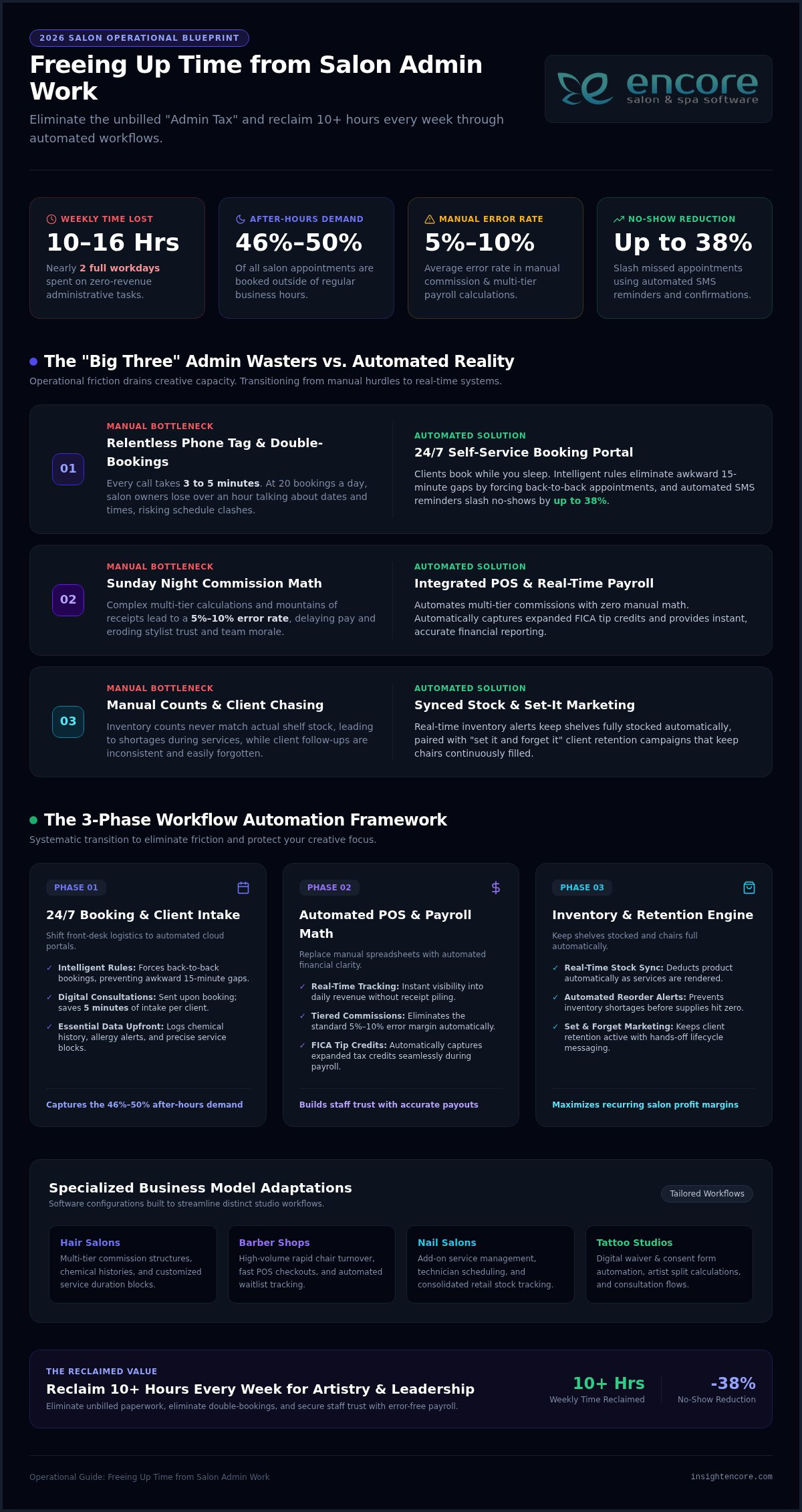
Categories
Uncategorized

The Hidden Costs of “Free” Salon Online Booking Systems: A 2026 Myth-Busting Guide

The most expensive piece of equipment in your salon might be the one you aren’t paying for. While a “free” salon online booking system sounds like a win for your bottom line, the reality in 2026 is often a complex web of hidden transaction fees and lost opportunities. You’ve worked hard to build your brand; you shouldn’t have to sacrifice your professional image or your profit margins just to avoid a monthly subscription fee.

It’s completely understandable why you’d look for a budget-friendly way to manage your calendar. You want to spend your time behind the chair, not chasing no-shows or troubleshooting software glitches alone. This guide busts the common myths surrounding free tools and reveals how they can quietly drain your revenue. We’ll explore the true cost of ownership, from marketplace commissions to the lack of human support when things break. By the end, you’ll know exactly how to choose a platform that streamlines your schedule and empowers your business to grow without falling into financial traps.

Key Takeaways

  • Identify the hidden financial leaks in “free” tools, from high transaction markups to commissions that penalize your success.
  • See why your salon online booking system needs to do more than just schedule appointments to keep your business profitable in 2026.
  • Gain peace of mind by understanding the critical security and support standards required to protect your client data and your reputation.
  • Learn how to swap a generic booking link for a professional portal that builds trust and reflects the high quality of your services.
  • Discover how specialized management tools can replace “app fatigue” with a single, supportive system designed to grow alongside your salon.

The “Free” Online Booking Myth: Why $0 Often Costs the Most

The “freemium” trap is real. It’s easy to feel like you’ve found a shortcut when you see a $0 price tag on a salon online booking system. This psychological hook works because it removes the immediate pain of a monthly bill. However, that lack of a bill often masks deep operational friction. If you aren’t paying with a subscription, you might be paying with your data. Many “free” systems monetize your business by selling insights or showing third-party ads to your clients. We define the Hidden Cost of Ownership as the total sum of processing fees, lost time, and missed revenue caused by system limitations.

The Hidden Reality of Transaction Fees

If a service is free, the provider usually makes their money through payment processing. Professional appointment scheduling software typically offers transparent, competitive rates. In contrast, “free” platforms often inflate these fees by 1% or more. This creates what we call an “Invisible Subscription.” If your salon generates $30,000 in monthly revenue, an extra 1% in fees costs you $300 every single month. That’s significantly more than the cost of a premium management suite. You also have to consider the impact of delayed payouts. Some free tools hold your funds for several days; this can cripple your ability to pay staff or restock inventory on time.

When “Free” Features Hit the Paywall

Growth eventually forces you into a corner with limited software. You might start with a basic salon online booking system, but you’ll quickly realize that essential tools are locked away. Automated appointment reminders, loyalty programs, and detailed reporting often require expensive upgrades. This leads to “App Fatigue,” where you juggle multiple disconnected tools to run your business. It’s a frustrating cycle. One tool handles your calendar, another does your marketing, and a third tracks your retail. They don’t communicate; you end up spending hours manually syncing data. This lack of integration prevents you from creating a professional, cohesive brand identity that your clients can trust. When your tools don’t talk to each other, your business stops moving forward. If you’re tired of this cycle, learning how to streamline your business with salon scheduling software can help you move from manual chaos to a system that actually works for you.

Beyond the Calendar: Why Booking is Only 10% of Your Business

It’s easy to think of your salon online booking system as a simple digital planner. You see a slot, you fill it, and you move on. But that narrow view is exactly what keeps many owners stuck in a cycle of low margins. In 2026, the calendar is just the starting point. If your software doesn’t handle your retail sales, track your back-bar usage, or remember that a client prefers a specific color formula, it’s not actually helping you run a business. It’s just managing a list.

The Missing Link: Inventory and POS Integration

Manual inventory counts are a drain on your energy. They’re prone to error and often lead to “Retail Leakage,” where products disappear or are sold without being tracked. An integrated system ensures that every time a bottle of shampoo leaves the shelf, your stock levels update instantly. This level of control is essential for staying profitable. To see how this looks in practice, you can Master Your Business with Encore Salon Software through our detailed 2026 guide. Automated tracking at the point of sale means you spend less time in the storage room and more time focusing on your guests.

Client Relationship Management (CRM) vs. Basic Scheduling

There is a massive difference between a name in a slot and a comprehensive client profile. When you have detailed notes and a full service history at your fingertips, you can provide a personalized experience that naturally increases your Average Ticket Value. You aren’t just guessing; you’re recommending the right add-on service or retail product based on facts. Plus, with automated marketing, you can target those specific clients to fill “dead zones” in your schedule before they even happen. This transforms your business from a reactive shop into a proactive brand. Loyalty programs further cement this bond, turning one-time visitors into lifelong guests who feel truly seen.

Generic tools often fail specialized professionals. If you run a tattoo studio, a nail salon, or a pet grooming business, your needs for waivers, breed-specific notes, or deposit handling are unique. A one-size-fits-all salon online booking system won’t understand the nuances of your craft. You deserve a partner that understands the daily hurdles of your specific industry. If you’re ready to stop juggling five different apps, you might want to explore a system designed for growth.

Security and Support: The High Price of Being on Your Own

Many owners assume that every salon online booking system follows the same rigorous security standards. This is a dangerous myth. While professional platforms invest heavily in PCI compliance to protect your clients’ sensitive credit card data, free tools often cut corners to keep their own costs down. A security breach doesn’t just cost money; it destroys the trust you’ve spent years building with your community. In 2026, clients are more aware of data privacy than ever before. They expect their information to be handled with professional care, not left on an unmonitored server. Professionalism starts with keeping your guests safe.

Data Ownership and Portability Risks

What happens if you decide to switch providers? This is where the “Hostage Scenario” begins. Many free software companies bury clauses in their fine print that make it nearly impossible to export your client list. You might find that you don’t actually own your data. If you can’t take your history, notes, and contact info with you, you’re trapped. A professional system ensures your business records are audit-ready and securely backed up. This gives you total control over your own information. You should never feel like a guest in your own business database; your data is your most valuable asset.

The “No-Support” Nightmare During Peak Hours

Imagine it’s a busy Saturday morning. Your lobby is full. Suddenly, your system glitches and you can’t check anyone in. If you’re using a free tool, your only “help” might be a generic chatbot or a support ticket that won’t be answered for 48 hours. The true cost of that downtime is measured in stressed staff and frustrated clients. At Encore, we believe you deserve better than a cold, automated response. We prioritize personal, empathetic support because we know your business depends on it. We position ourselves as your supportive partner, ready to help when things get complicated.

Whether you are looking for specific advice in our Nail Salon Client Management Software Guide or need a human expert on the phone, having a dedicated mentor makes all the difference. Reliability isn’t just a technical feature; it’s your peace of mind. Investing in professional software means you are never truly on your own when a challenge arises. You get to focus on your craft while we handle the technical heavy lifting behind the scenes.

The Hidden Costs of "Free" Salon Online Booking Systems: A 2026 Myth-Busting Guide

Scalability: Why “Good Enough for Now” Stunts Your Growth

Ambitious salon owners often fall into the “good enough for now” trap. You might think a basic salon online booking system is fine while you’re small, but limited software eventually creates a growth ceiling. As you add more stylists, chairs, or even a second location, the friction of a “free” tool starts to pull you back. Switching systems later is often ten times harder than starting with the right partner. You have to retrain your team and migrate sensitive data; this often leads to frustrating downtime. It’s better to build your house on a solid foundation from day one.

Professionalism and the Client’s First Impression

Your booking page is often the first interaction a client has with your brand. If they click a link and see third-party ads or a clunky, outdated interface, it devalues your luxury services. A professional image requires a seamless experience. By using the ultimate guide to setting up a salon client booking portal in 2026, you can ensure your digital front door reflects the high quality of your work. Professional systems also offer automated SMS and email confirmations. These aren’t just polite; they are essential for reducing no-shows and protecting your daily profit.

Automated Marketing: The Revenue You’re Leaving on the Table

Many “free” systems lack the intelligence to help you grow your income. They don’t have the tools to re-engage “lost” clients who haven’t visited in several months. A professional salon scheduling software solution pays for itself by increasing your chair occupancy through automated marketing. Think about the impact of birthday rewards or loyalty points on your repeat visit frequency. These small touches make clients feel valued and keep them coming back. When your software handles the follow-ups, you stop leaving money on the table and start seeing a real return on your investment.

Think about the ROI of your own time. How much is an hour of your life worth? If you spend five hours a week manually fixing schedule errors or chasing unconfirmed appointments, that’s time you aren’t spending with clients. Automation isn’t just a luxury; it’s a tool that buys your freedom back. Choosing a professional salon online booking system that grows with you is the smartest move you can make for your future success.

Start growing your business with a professional partner

Investing in Your Encore: The Transition to Professional Management

Choosing a professional salon online booking system is a significant step toward reclaiming your time and your profit. It’s about more than just software; it’s about finding a dedicated mentor that understands the daily hurdles of your industry. If you’ve been struggling with the limitations and hidden fees of a “free” tool, the transition to Encore is designed to be a moment of genuine relief. We help you move away from messy, disconnected systems so you can finally focus on your craft. You handle the artistry and the client experience. We handle the technical heavy lifting and the “business of the business.”

Tailored Solutions for Niche Studios

Generic platforms often overlook the specific needs of specialized studios, creating friction where there should be flow. For instance, tattoo studio software requires robust waiver management and deposit handling that a standard hair salon tool simply doesn’t offer. If you manage chair or booth renters, you need a system that supports independent accounts while keeping your overall salon operations integrated. Even pet groomers have unique requirements, such as tracking breed-specific notes, pet temperaments, and medical alerts. Our specialized modules for tattoo, nail, and pet grooming ensure that your software fits your business perfectly. We don’t believe in forcing your creative process to adapt to rigid, one-size-fits-all limitations.

The Encore Difference: Reliability and Integrated Growth

The real “Encore difference” lies in our commitment to all-in-one support and total transparency. We combine your POS, client management, and automated marketing into one powerful, supportive platform. This eliminates the “app fatigue” caused by juggling multiple free tools and ensures your data is always accurate and actionable. With 35 years of industry-leading expertise since our founding in 1991, we provide the stability and reliability you need to grow with confidence. You aren’t just buying a tool; you’re gaining a responsive and hands-on ally that has seen the industry evolve. This level of professional confidence allows you to lead your team with a clear vision, knowing your backend operations are secure and scalable.

Ready to stop settling for “free” and start investing in your growth? Start your stress-free trial with Encore now!

Ready to Reclaim Your Profit and Peace of Mind?

You deserve a business that rewards your hard work instead of draining it through hidden fees and technical gaps. Transitioning to a professional salon online booking system is the first step toward building a brand that can scale without limits. By moving beyond the “freemium” trap, you gain access to an all-in-one dashboard that integrates your POS, inventory, and marketing seamlessly.

Since 1991, we’ve spent over three decades helping beauty professionals replace cold, automated tools with human-centric support and reliable expertise. You don’t have to navigate the complexities of PCI compliance or “app fatigue” alone. With a supportive partner by your side, you can finally focus on the artistry you love while your software handles the rest.

Master your business and see the Encore difference; try it today!

Your future growth starts with a single, confident decision to prioritize your peace of mind. We’re here to help you every step of the way.

Frequently Asked Questions

Is there really such a thing as a 100% free salon online booking system?

No, there is no such thing as a truly 100% free salon online booking system in the 2026 market. While you might not see a monthly subscription bill, these companies cover their costs through inflated payment processing rates or by charging commissions on every new client you gain. You’re often paying a “hidden tax” on every transaction that can quickly exceed the price of a professional management suite.

How do “free” booking apps make money if they don’t charge a subscription?

“Free” apps typically monetize your business through high transaction fees, often ranging between 2.6% and 3.5% per swipe. They also frequently act as a middleman, taking a percentage of your revenue for clients who find you through their marketplace. Some platforms even sell your business data or show third-party ads to your clients, which can devalue your professional brand image and guest experience.

Can I switch from a free booking system to Encore without losing my client data?

Yes, you can transition to Encore without losing your valuable client history or contact lists. We understand that your data is your most important asset, so we act as your supportive partner during the migration process. Our team helps you move away from messy, limited tools and ensures your records are securely imported into our professional platform so you can start fresh without losing your history.

Does Encore offer specialized features for independent booth renters?

Encore provides specialized Chair/Booth Renter Software designed specifically for independent professionals. This module allows you to manage your own schedule and clients while still having access to integrated credit card processing and marketing tools. It is the perfect balance of independence and professional power, ensuring you have the exact tools needed for your specific business model without the “app fatigue” of multiple tools.

Will using a professional booking system really reduce my no-show rate?

A professional salon online booking system significantly reduces no-shows by using automated, personalized SMS and email confirmations. These reminders are much more effective than manual calls because they reach clients where they are most active. By requiring deposits or keeping cards on file through integrated processing, you create a layer of financial protection and client accountability that basic “free” tools often lack.

Is automated marketing included in professional salon management software?

Automated marketing is a core feature of Encore’s all-in-one management platform. Unlike free apps that require third-party integrations, our system includes loyalty programs and re-engagement tools directly in your dashboard. You can automatically send birthday rewards or “we miss you” emails to fill dead zones in your schedule without spending hours on manual outreach, ensuring your chairs stay occupied and profitable.

What is the most important feature to look for in a salon booking system in 2026?

In 2026, the most important feature is deep integration across your entire business operations. You need a system that connects your calendar to your inventory and POS in real time. This prevents errors and ensures you have a single source of truth for your salon’s health. Data ownership is equally vital; you must ensure you have total control and can export your records at any time.

How much time can I expect to save by switching from a manual or free system to Encore?

Most owners save several hours every week by switching to Encore. You will stop wasting time manually syncing data between different apps or chasing unconfirmed appointments. By automating your inventory tracking and marketing follow-ups, you buy back your freedom to focus on your clients. This professional efficiency transforms your daily workflow from a state of constant stress to one of organized control.

Disclaimer

This article is general in nature and may contain errors, please verify all claims with your sales rep