window.dataLayer = window.dataLayer || []; function gtag(){dataLayer.push(arguments);} gtag('js', new Date()); gtag('config', 'UA-206511945-1');
Search
Categories
Uncategorized

How to Manage Salon Staff Schedules to Prevent No-Shows

What if a holiday request could disrupt bookings before anyone notices? When an employee submits a request, record the proposed time off in the scheduling system and check existing appointments and team coverage before approving it. Knowing how to manage salon staff schedules means making leave visible early, so unavailable hours aren’t left open for clients to book.

A clear process makes holiday requests easier to manage: staff submit requests, managers review the impact on appointments and coverage, then update and share the schedule. That keeps everyone working from the same plan.

This guide explains how to set up digital staff schedules, handle holiday requests, and choose scheduling software that fits your salon. You’ll also find practical ways to reduce missed appointments and last-minute cancellations, from recording time off promptly to building realistic gaps between services. The result is a rota that’s easier for your team to follow and more dependable for clients.

Key Takeaways

  • Match each shift to staff skills and availability, and record approved time off so unavailable slots aren’t booked.
  • Adjust coverage to busy periods and service demand, and plan ahead for seasonal changes.
  • Use realistic appointment gaps, timely reminders, and a waitlist to help manage cancellations and open slots.
  • Choose scheduling software that keeps online booking aligned with staff schedules and flags potential conflicts.
  • Share a rolling rota at least two weeks ahead, and use custom hours for temporary seasonal changes.

Can an employee see only their own schedule?

Yes. A salon can share each employee’s shifts while managers maintain a calendar of overall coverage. Set visibility to suit the team: staff need to see their working hours and approved changes, while managers need the full rota to spot gaps and coordinate appointments.

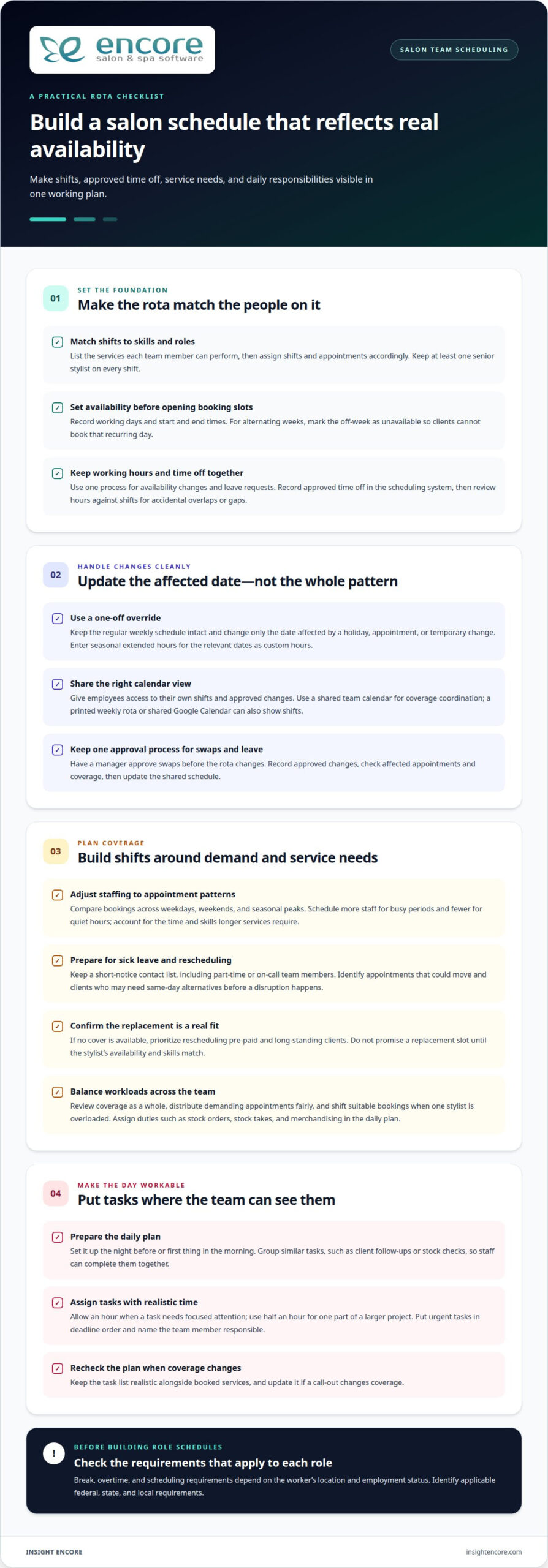
Break, overtime, and scheduling requirements depend on the worker’s location and employment status. Identify the federal, state, and local requirements that apply to each role before building its schedule.

For shift swaps, time-off requests, and call-outs, use one clear approval process. Record approved changes in the scheduling system, check affected appointments and coverage, then update the shared schedule so everyone sees the same plan.

  1. Match shifts to skills and roles. List the services each team member can perform, then assign appointments and shifts accordingly. For example, don’t place a stylist on a service they aren’t trained to provide. Keep at least one senior stylist on every shift, so the team has experienced coverage throughout the day.
  2. Set weekly availability before opening booking slots. Record each person’s working days and start and end times. If a stylist works alternating weeks, set the off-week as unavailable, with no bookings on that recurring day. A calendar that reflects actual availability helps prevent clients from booking when the employee isn’t working.
  3. Track working hours and time off in one place. Ask staff to submit availability changes and leave requests through the same process. Once a manager approves time off, record it in the scheduling system so those hours become unavailable before clients try to book. Review working hours against scheduled shifts to catch accidental overlaps or gaps.
  4. Use overrides for one-off schedule changes. Keep the employee’s regular weekly pattern intact, then update only the affected date for a holiday, appointment, or temporary change. For seasonal extended hours, enter custom hours for the relevant dates rather than changing the default schedule. This keeps future weeks smooth and avoids carrying a temporary change forward.
  5. Share the right calendar view. Give employees access to their own shifts and changes, and use a shared team calendar when staff need to coordinate coverage. A printed weekly rota or shared Google Calendar can also make shifts visible. Publish changes in writing, and let a manager approve swaps before the rota changes.

What Is Salon Staff Scheduling?

Build a rota around actual client demand, service needs, and staff availability. A useful plan also accounts for absences and the daily tasks that keep a salon running smoothly.

Step 1: Plan Shifts Around Demand

Use appointment patterns to schedule more staff during busy periods and fewer during quiet hours. Compare bookings across weekdays, weekends, and seasonal peaks, then adjust coverage to match demand. A holiday rush may call for more appointment capacity, while a slow period may suit staggered starts. Review the pattern regularly: a fixed rota can leave the salon short during busy spells and overstaffed when bookings dip. Factor in the service mix, too. Colour appointments and other longer services need different coverage from short cuts, so plan around the time and skills each booking requires.

Step 2: Plan Sick Cover and Rescheduling

Create a short-notice contact list of stylists who can cover sick leave, including part-time or on-call team members. Before a disruption happens, identify which appointments could move and which clients may need same-day alternatives. This gives owners a clear response plan instead of forcing them to rebuild the day from scratch. If no cover is available, prioritize rescheduling pre-paid and long-standing clients. Keep affected bookings visible in the day’s plan, and assign each client a next step, such as a new time or an alternative stylist. Don’t promise a slot until the replacement’s availability and skills match.

Step 3: Balance Team Coverage and Workload

Review the team schedule as a whole, not just as separate shifts. A coverage overview helps reveal gaps and uneven workloads before appointments are assigned. Check that each shift includes the skills needed for its booked services, then distribute demanding appointments and less client-facing duties fairly. For example, one team member can handle stock orders, stock takes, and merchandising while others serve clients. Record responsibilities in the daily plan so these tasks don’t disappear during busy periods. If bookings cluster around one stylist, redistribute suitable appointments to available colleagues instead of leaving one person overloaded.

Step 4: Plan Daily Tasks

Prepare the daily plan the night before or first thing in the morning. Group similar tasks, such as client follow-ups or stock checks, so staff can complete them together. Give a focused task an hour when the work needs uninterrupted attention; use half an hour to complete one part of a larger project. Put urgent tasks in deadline order, then assign each item to a named team member. Keep the list realistic beside booked services, and update it when a call-out changes coverage. Explore salon scheduling tools to see how a digital rota can support this planning.

Preventing missed appointments and last-minute cancellations

Use reminders, realistic appointment spacing, and a clear response plan to keep the day on track. These steps also help staff manage cancellations without leaving avoidable gaps.

  1. Step 1: Use Reminders, Waitlists, and Rescheduling Policies

    Send appointment reminders by email and text to accommodate clients’ preferred channels. Ask clients to confirm their visit, and let them reschedule independently through an online booking tool. Send reminders two to three hours before the appointment. Set a written rescheduling policy, such as allowing free changes until six hours before the visit, and communicate it during booking.

    When a client cancels, contact waitlisted people who can take that specific time. Match the opening to the client’s requested service and the stylist’s skills. Review missed appointments and cancellations by day to identify patterns. If one day repeatedly has empty slots, adjust that day’s availability or reminders rather than changing the whole rota.

  2. Step 2: Stagger Shifts and Buffer Appointments

    Stagger staff start times so coverage continues through closing without scheduling everyone for identical hours. Before changing a shift, compare its appointments with the employees available to take them. Add a realistic 10 to 15 minute buffer after colour services, chemical treatments, and other longer appointments. This gives stylists time for cleanup, consultation, or a late arrival without pushing every later client behind.

    Build short breaks between appointments into the rota, especially after demanding services. A break gives the stylist time to reset the station and prepare for the next client. Avoid filling every open minute with bookings: without breathing room, one delayed service can make several appointments late. Add buffers where services commonly run over, then review whether they fit the day’s actual booking flow.

  3. Step 3: Coordinate Multi-Stylist Appointments

    For an appointment involving several stylists, assign each service, staff member, and time slot before confirming the booking. A bridal party with 10 appointments in one day, for example, needs a clear sequence that avoids assigning one stylist to overlapping services. Match every appointment to an employee qualified for that service, then leave enough transition time for clients and staff to move between stations.

    Keep the shared appointment plan current if a client changes the service or arrival time. If a cancellation creates a gap, check whether another booked client can move 15 minutes earlier before offering the slot elsewhere. Clear assignments reduce confusion about who is responsible for each service. Explore a scheduling tool for salon appointments to see how digital booking can support this process.
How to Manage Salon Staff Schedules to Prevent No-Shows

Scheduling software selection criteria

Compare software with your salon’s booking flow and staff scheduling needs. Prioritize accurate availability, conflict checks, and tools that reduce manual work.

Step 1: Review Salon Scheduling Software Comparisons

Compare scheduling software by how well it connects staff availability with online booking. The calendar should show bookable times that match each team member’s schedule, so clients can’t reserve unavailable slots. Check whether the system flags conflicts before a new appointment is added. This is especially useful when service needs overlap or schedules change frequently.

Use your own booking patterns to make comparisons useful. For example, a salon serving more than 30 clients daily may need software that can handle a large appointment flow. Consider how managers view team schedules, adjust availability, and handle rescheduling. Avoid choosing from a feature list alone; trace a typical booking from selecting a service to assigning an available staff member.

Step 2: Evaluate Scheduling Software

Test the scheduling workflow using realistic examples from your salon. Enter a staff member’s regular working hours, then check whether online booking reflects them. Try adding an appointment that conflicts with an existing booking and see whether the system flags it before confirmation. These checks show whether the calendar supports your process or leaves managers to catch errors manually.

Review how the software handles schedule changes, too. Update an employee’s availability and confirm the change appears in the booking view. Check how managers access team schedules and whether staff can see their own shifts. If payroll preparation is part of your workflow, look for timesheet exports that can reduce manual administration. Evaluate each function against a task your team actually performs.

Step 3: Use Salon Management Software

Choose a system that fits how your salon manages appointments and staff, then keep its schedule current. Enter working days and hours before opening those slots for online booking. Record approved leave and schedule adjustments so the calendar doesn’t offer unavailable times. Assign each service to an employee with the right skills, and review potential booking conflicts as appointments come in.

Use scheduling software as a shared operational record, not just a booking calendar. Managers can review team coverage, while staff can check current shifts and updates. If the system exports timesheets, use them to support payroll preparation and reduce repeated manual entry. Revisit the setup whenever service demand or staffing patterns change, and ensure online availability still matches the rota.

Digital salon staff schedules

A digital rota gives salon owners a practical way to manage salon staff schedules. Set the regular pattern first, then adjust specific dates as staffing and booking needs change.

  1. Set each team member’s default hours. Enter working days and start and end times for every employee. Use a recurring pattern for regular shifts, and set an alternating workday to repeat every 2 weeks when needed. Mark off-weeks unavailable, so online booking doesn’t offer appointments during time off. Check that each person’s bookable services fit their skills and working hours.

    Keep the default schedule separate from one-off changes. If the salon extends its hours for a seasonal busy period, add custom hours for those dates instead of editing the regular pattern. This keeps future bookings aligned with the normal rota after the busy period ends.

  2. Publish a rolling rota early. Share the schedule at least two weeks ahead so staff can plan around their shifts. One workable routine is to publish the following two weeks every Friday. Put updates in writing so everyone can see what changed and when. If employees can swap shifts with manager approval, update the rota only after approval.

    For holiday periods such as Christmas and summer, schedule staff 6 to 8 weeks ahead. Review leave requests against existing bookings before confirming them, then update availability so clients cannot book affected slots. A shared digital calendar gives the team a current reference point instead of relying on separate messages.

  3. Reuse shift templates for recurring coverage. Save regular evening or weekend staffing patterns as templates, then apply them when those shifts come around. On Saturdays, stagger start times so coverage continues through closing. Block staff break times directly in the schedule; allow 10-minute breaks between appointments during peak hours and 15-20-minute breaks during non-rush periods.

    Include at least 10 minutes for sanitization between appointments. Avoid forcing every service into one fixed duration, since that can leave unproductive 15-minute gaps. Use one-hour or half-hour time blocks to fit service lengths more closely and make the day easier to scan.

  4. Build templates for special booking patterns. For a bridal party with 10 appointments in one day, create a schedule that blocks the required slots and assigns staff to each service. Review the sequence for overlaps before opening those bookings. A clear template helps managers coordinate several stylists while keeping each appointment tied to an available team member.

    At the start of each day, review the digital plan and adjust for call-outs or changed bookings. Check that updated staff hours still match online booking, and share changes in writing. Use this review to refine how you manage salon staff schedules as team needs and booking patterns evolve.

Explore digital salon scheduling

Encore Salon and Spa Software

Encore Salon & Spa Software brings online appointment booking and client management tools into salon operations. If coordinating staff availability with client bookings takes too much manual effort, Encore helps keep appointment information and client records organized. Salons, spas, chair and booth renters, and tattoo studios can use software designed for their business needs.

Consider it when you want booking and client management in one platform alongside the scheduling practices described above. Contact Encore Salon & Spa Software to discuss your salon’s needs.

Make Your Schedule Work for Your Team

Treat the rota as a working agreement, not just a list of shifts. Decide who updates the schedule, how staff share availability changes, and how the team flags recurring conflicts. Use those patterns to refine future schedules. This creates a practical way to improve how you manage salon staff schedules as your services, team, and booking habits evolve.

Encore Salon and Spa Software offers Encore Salon Software, Encore Spa Software, and Chair/Booth Renter Software. These options support different business setups, helping you choose software that fits your salon, spa, or rental model.

Contact Encore Salon and Spa Software

With a clear process and the right tools, your team can work with greater confidence and a schedule that supports the day ahead.

Frequently Asked Questions

Can an employee enter their own holiday?

Yes. An employee can submit a holiday request, but the manager should decide whether to approve it. Keep submission and approval as separate steps. For example, check whether the requested date overlaps with client appointments or leaves a shift without the skills it needs. Once approved, record the leave and update affected bookings so the employee’s time off isn’t left open for booking.

How do I stop double bookings in my salon?

Use one booking calendar as the source of truth, and make each appointment reserve the right staff member for the required service time. Before confirming a booking, check for conflicts with that employee’s existing appointments and working hours. If clients can book online, keep the displayed availability aligned with the salon rota. For a service involving multiple stylists, assign each person’s role and appointment time separately.

How far ahead should I schedule?

Publish a regular rota at least two weeks ahead, then plan farther ahead for seasonal peaks. For holiday periods such as Christmas and summer, schedule staff 6 to 8 weeks ahead. This gives managers time to balance leave requests with appointments and service demand. Keep reviewing upcoming weeks as bookings change, rather than assuming the first draft will remain accurate.

How much time should I leave between salon appointments?

Choose the gap based on the service and how often it runs over. After colour services, chemical treatments, and other longer appointments, allow a 10 to 15 minute buffer for cleanup, consultation, or late arrivals. Include sanitization time between clients, too. A short haircut and a long treatment may need different scheduling blocks, so avoid assigning every service the same duration.

Should salons keep slots open for walk-ins?

Reserve walk-in capacity only when booking patterns and staffing can support it. Compare quiet periods with times when clients commonly arrive without appointments, then leave suitable openings for staff qualified to perform those services. Don’t block the same capacity across every shift by default. If walk-ins are uncommon during a particular period, make those slots bookable instead and review the approach as demand changes.

How do I create a salon staff schedule based on appointments and peak hours?

Start with the appointment calendar, then group bookings by service type, duration, and required skills. Identify busy and quiet periods, and assign coverage to match demand rather than dividing shifts evenly. Check that each booked service has a qualified employee and that longer appointments don’t overlap with their other work. Review the finished rota against upcoming bookings and adjust when demand shifts.

What staffing ratios are typical for salons by service type and size?

There isn’t one staffing ratio that suits every salon. A useful plan depends on appointment volume, service duration, employee skills, and how many clients need service at the same time. A salon with longer colour appointments may need different coverage from one focused on short cuts. Use the booked workload and service mix to identify coverage gaps, then adjust the rota.

How far in advance should salon work schedules be published?

Publish a rolling staff rota at least two weeks ahead so employees can plan around their shifts. A consistent routine helps: prepare the next two weeks every Friday, then share changes in writing. For seasonal periods such as Christmas or summer, plan coverage earlier to account for leave requests and appointment demand. Update the published schedule when approved changes affect a shift.

Disclaimer

This article is general in nature and may contain errors, please verify all claims with your sales rep

Categories
Uncategorized

How to manage walk-ins and appointments with shared scheduling

Walk-ins and booked appointments are easier to manage when staff track both in one shared schedule. A walk-in is a visit requested without a time booked in advance, while a scheduled client has reserved a specific time. Seeing both in one place helps staff track who’s waiting, what’s coming up, and where an opening appears.

It’s frustrating when walk-ins feel ignored or booked clients arrive to find the schedule running behind. A clear process helps you welcome both, set realistic wait-time expectations, and respond consistently to late arrivals and no-shows. This guide explains how to manage walk-ins and appointments with shared scheduling, from deciding when to fit in an unscheduled client to keeping the queue visible and updating the calendar as plans change. You’ll also learn how to avoid the confusion of separate systems, so your team can make practical decisions without losing sight of the clients already waiting.

Key Takeaways

  • Keep booked visits and walk-in requests visible in one schedule so staff can see the day’s demand at a glance.
  • Set a clear process for fitting walk-ins into available gaps while keeping customers with booked times informed.
  • Track late arrivals, cancellations, and no-shows to make timely schedule updates and use openings effectively.
  • Use one shared system to reduce confusion about queue order, waiting times, and the next available appointment.
  • Review walk-in patterns and scheduling gaps to shape a process that suits your services and busy periods.

1. What is a Walk-in Appointment?

A walk-in is a service visit requested without a time booked in advance. A scheduled appointment gives a client an agreed start time. Walk-in clients join the service queue on arrival and wait for an available staff member. For example, a salon guest asking for a quick trim might wait, while a colour service is booked ahead. Both visits need a clear place in the day’s schedule.

Online booking lets clients choose an available service time before arriving. A shared calendar can show scheduled appointments alongside walk-in availability, instead of splitting them across notebooks, screens, or separate lists. Staff can record a walk-in’s name, requested service, arrival time, and queue status. Marking the client as waiting, being served, or no longer waiting gives the team a current view of demand and helps prepare for the next service.

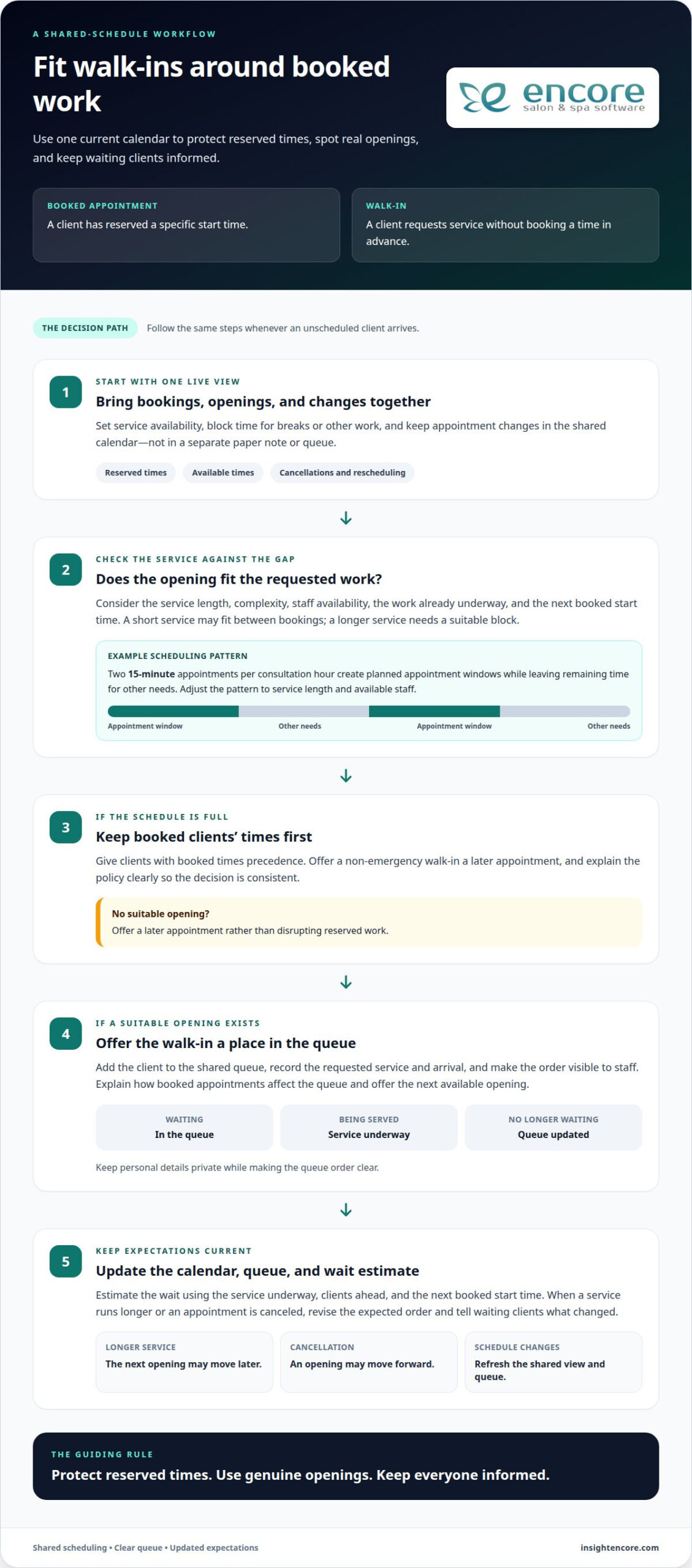
A visible queue makes the order clear to staff and clients. Use one list to show who is waiting and which clients have appointments, while keeping personal details private. When a walk-in arrives, add them to the queue and explain how appointments affect the order. Serve a booked client at their scheduled time when possible, and offer a walk-in the next available opening. This reduces uncertainty about who is next.

Set aside walk-in capacity based on staff availability, service length, and when clients tend to arrive. Keep those openings visible alongside scheduled appointments, then adjust the allocation as demand and service durations become clear. For example, a team can protect longer booking blocks for colour services and use gaps between them for shorter walk-in requests. The right balance depends on the services you offer and your day-to-day demand.

Appointment scheduling software can show appointment status, cancellations, and rescheduling in real time. Online booking tools also display appointments at a glance and update the calendar when plans change. This shared view helps staff spot an opening, offer it to someone waiting, or update the queue after a cancellation. When an appointment runs late, staff can revise the expected order instead of relying on a separate queue that no longer matches the calendar.

Give walk-ins a realistic wait estimate based on the service underway, the clients ahead, and the next booked start time. If any of those details change, update the estimate and tell waiting clients what changed. For instance, a longer service may push back the next opening, while a cancellation may bring it forward. A visible, consistently updated queue helps clients understand when they may be served and helps staff coordinate walk-ins with the booking calendar.

2. Using online appointment software to view and update schedules

Online appointment software gives staff a working view of booked visits, available times, and changes. Set service availability, block time for breaks or other work, and customize scheduling rules to match your operations. When a client books, the schedule shows the reserved time. When plans change, update the calendar instead of relying on a separate paper note. This helps the team make decisions using the same current schedule.

Should walk-ins or appointments receive priority? When the schedule is full, give clients with booked times precedence and offer a non-emergency walk-in a later appointment. If the calendar has an opening, staff can invite the walk-in to wait and explain that calling ahead can help with future visits. A consistent policy makes the decision clear and supports calm communication with the waiting client and those already booked.

For businesses deciding how to manage walk-ins and appointments, start by checking whether an opening fits the requested service. A short service may fit between bookings, while a longer or more complex service needs a suitable block. In one wave-based example, a business schedules two 15-minute appointments per consultation hour. That structure creates planned appointment windows while leaving remaining time for other needs. Adjust the pattern to the service length and available staff.

The right approach depends on the business. Salons, medical practices, legal services, and financial services may use appointments for work that takes longer or requires preparation. A business with simpler, immediate services may leave more room for walk-ins. For example, a salon can reserve time for complex work and fit shorter requests around those bookings. The calendar should reflect actual service needs, rather than treating every visit as the same length.

Advance booking helps staff plan workloads, allocate people, and prepare for expected demand. It also gives clients a reserved time. The trade-off is that a tightly booked calendar leaves fewer openings for unscheduled visitors. Walk-in access can make service more immediate, but an unexpected rush may create longer waits and disrupt planned work. Software helps staff see availability and apply consistent rules as conditions change. Review bookings, walk-in requests, and unused gaps to refine your approach.

A useful way to decide how to manage walk-ins and appointments is to distinguish genuine openings from time needed for booked work. For example, when a dental practice has a full schedule, it can offer a non-emergency walk-in a later appointment. If a suitable opening exists, staff can offer the visitor the chance to wait for the dentist. These choices protect reserved times while making use of available capacity.

3. Service businesses that handle both booked and walk-in customers

Salons, healthcare providers, dental practices, and professional services can serve scheduled clients and walk-ins. Advance bookings help teams plan service flow and allocate staff, supplies, and workstations. Walk-ins offer access for clients who need service sooner, but a rush can cause crowding and unpredictable waits. A business can balance both by reserving appointments for longer services and leaving suitable openings for shorter requests.

Estimate staffing needs by reviewing booked services, their durations, and which staff members are qualified to perform them. Then compare those commitments with recorded walk-in patterns from the last week or month. If a salon sees more unscheduled requests during quieter mid-morning periods, it can schedule coverage accordingly. This approach helps avoid idle staff during quiet periods and overloaded teams when booked clients and walk-ins arrive together.

Service type should shape the balance. A salon may book colour work in advance because it takes longer, while considering shorter services for walk-ins when time allows. Healthcare and dental practices can use appointments to organize planned visits while maintaining a clear process for unscheduled clients. Businesses with lower demand or services clients often need immediately may rely more on walk-in access. The schedule should fit the work, not force every visit into one model.

Confirmations and reminders help clients prepare and let staff plan for expected visits. Appointment software can send confirmations and reminders by email, SMS, or app notification. Automated reminders can help reduce no-shows, while flexible rescheduling gives clients a way to change plans before their appointment. If a cancellation opens a slot, staff can update availability and offer it to someone waiting or seeking an earlier booking.

Wait times affect the client experience, especially when people can’t tell how the line is moving. Give waiting clients an estimate based on the services ahead and current staff availability. If a booked appointment is running late, communicate the change rather than leaving walk-ins and scheduled clients guessing. A visible, consistently updated queue helps staff manage customer flow and gives each person a clearer sense of when they may be served.

Build a review into the routine. Spend 10 minutes each week examining whether the queue held up, how many appointments were missed, and whether customers left because of the wait. Look for patterns, such as walk-ins arriving while staff are tied up with longer booked services. Adjust staffing, booking availability, or reminders to address the specific pressure point. A Client Management System can also help staff keep customer details organized alongside service history, supporting more informed communication with repeat clients.

How to manage walk-ins and appointments with shared scheduling

4. Tracking walk-ins, late arrivals, and no-shows

A shared schedule is more useful when every visit has a clear status. Record whether each client is booked, waiting, being served, late, cancelled, or absent. For walk-ins, note their arrival and requested service; for appointments, update the record when the client arrives. These simple steps show which openings are genuine and help staff understand why the schedule is changing.

Track walk-in volume and arrival times over the last week or month. Compare those patterns with appointment demand and staff availability. For example, if records show a cluster of walk-ins during a quiet period, managers can consider adjusting coverage or available booking times. Keep the review practical: identify when waits grow, which services take longer than planned, and whether clients leave before being served.

Set a consistent grace period for late appointments. A salon might use a 10 to 15 minute window, then decide whether the remaining service can fit without disrupting the next booking. If it cannot, offer a shorter service, a later opening, or another appointment time. Explain the same policy when booking and at arrival, so clients know how lateness may affect their visit.

Clinics can use a 10-to-15-minute grace window to assess late arrivals against the appointment schedule. Staff should consider the visit’s purpose, the time still available, and the effect on patients already waiting. If the appointment no longer fits, rescheduling or placing the patient on a wait list can protect later visits. For repeated late arrivals, apply the clinic’s stated scheduling policy consistently and communicate the next available option.

No-shows also need a clear record. Mark the missed visit promptly, then use the open time for an appropriate walk-in or another client seeking an earlier appointment. A 15% to 20% no-show rate can leave appointment-only clinics with idle staff time and unfilled capacity. Review missed visits alongside cancellations and rescheduled bookings to see whether reminders or easier rescheduling could address a pattern.

Use confirmations and reminders to help clients remember their bookings. Automated appointment reminders can reduce no-shows, while SMS or email messages give clients a convenient way to review visit details. When a client cancels, update the calendar immediately and offer the opening to someone waiting, if the service and staff are a good fit. This keeps the schedule aligned with the actual day rather than an outdated list.

At the end of each day, compare booked visits, walk-ins, late arrivals, and absences. For example, a salon can note whether a late colour appointment affected later clients, then adjust future booking blocks. A clinic can review whether rescheduled late patients returned for care. Consistent records turn individual disruptions into useful scheduling information and help teams make fair, informed decisions.

5. Problems caused by separate appointment and walk-in systems

Separate calendars create two versions of the same business day. A receptionist may record a walk-in on a paper list while appointments remain in scheduling software. If a client cancels, the opening may appear in one place but not the other. Staff could then miss a chance to offer that time to someone waiting or accidentally promise the same slot twice.

Queue confusion can damage trust even when staff are working steadily. A walk-in who waits 45 minutes without knowing their place may feel overlooked, especially if another customer appears to be served first. The problem may be a booked appointment, not a queue jump, but separate records make that distinction hard to explain. Showing staff one current view helps them clarify who is next and why.

Split systems also make wait estimates less useful. If the walk-in queue doesn’t account for booked services, staff can overlook how long those appointments will occupy the team. A client may hear “a few minutes,” then wait much longer because a service runs over or an urgent request changes the order. Before sharing an estimate, account for booked work, clients already waiting, and available staff.

Staffing decisions become less reliable when demand is divided between a booking calendar and a walk-in log. A manager may see a quiet appointment schedule and assign fewer people, while the separate queue shows several waiting clients. The reverse can happen too: a full appointment book may hide a cancellation that leaves a staff member free. Combining records helps managers match coverage to actual work and reduce unplanned gaps.

Separate records can also weaken follow-up. If a walk-in’s details sit only on a clipboard, staff may not connect that visit with the client’s booking history or future appointment. If a booked client doesn’t arrive, a separate queue may not show whether a waiting client could use the opening. Record cancellations, arrivals, and service completion in one shared workflow so each change informs the next scheduling decision.

Usable time going unfilled can affect revenue, but filling every gap isn’t always the right choice. A short opening may suit a quick service, while a longer appointment needs more preparation and staff time. Use one calendar to compare the opening with the requested service before offering it. This keeps the decision grounded in capacity instead of treating every cancellation as an available slot.

To reduce these problems, bring bookings and walk-ins into one daily view, update changes as they happen, and explain the reason for delays. Then review cases where the queue and calendar disagreed. A shared process won’t remove every delay, but it gives staff a reliable basis for decisions and clearer explanations for clients.

Explore shared scheduling options

Encore Salon and Spa Software

Encore Salon and Spa Software helps salons, spas, chair and booth renters, and tattoo studios organize appointment booking and client information. If separate booking and walk-in records make it harder to see availability or keep client details together, Encore’s software supports a more coordinated scheduling process. Choose Encore Salon Software, Encore Spa Software, Chair/Booth Renter Software, or Tattoo Studio Software to suit your business type. These tools are a practical next step when you’re ready to bring appointment management into daily operations and manage client information more easily.

Contact Encore Salon and Spa Software to discuss your scheduling needs.

Build a scheduling process that can grow with your business

Deciding how to manage walk-ins and appointments is an ongoing part of running a service business. As your services, staffing, and client patterns change, revisit how your team handles bookings and walk-in access. A process that works today should make it clear how staff record requests, offer available times, and communicate changes to clients.

When you’re ready to bring appointment booking and business management into one platform, Encore Salon and Spa Software offers solutions for salons, spas, and chair or booth renters, including Encore Salon Software, Encore Spa Software, and Chair/Booth Renter Software. Choose the option that fits your business and supports how you serve clients.

Connect with Encore Salon and Spa Software

Take the next step toward a clear, workable scheduling routine for your team. You can create a better flow for clients one practical change at a time.

Frequently Asked Questions

What is a Walk-in Appointment?

A walk-in is a visit requested without a previously reserved time. The client arrives and asks to be served based on current availability, rather than checking in for a specific booking. For example, a salon guest who drops by for a service without booking beforehand is a walk-in. The business can decide whether to serve them immediately, add them to a waiting list, or offer another time.

What is the best way to balance walk-ins and scheduled appointments?

Use service length and staff availability to decide how much room to leave for unscheduled visits. A short service might fit between longer bookings, while a treatment requiring preparation needs protected time. Review actual demand patterns and adjust the schedule when particular periods regularly become crowded or stay quiet. Make the approach clear to staff so clients with similar requests receive consistent options, rather than different answers from different team members.

How can staff manage walk-in queues and appointment check-ins efficiently?

Give staff one routine for recording arrivals, checking booking details, and noting any service changes. For example, check in a client by confirming their name and requested service, then mark them as arrived. Keep queue access visible to the team, but don’t display private client details publicly. If several staff members handle check-ins, use the same status labels so everyone knows whether a client is waiting, being served, or has left.

What appointment scheduling and queue management tools work for small businesses?

Small businesses can use online appointment software that combines a calendar with a way to record walk-in requests. Look for practical functions such as setting available times, blocking unavailable periods, and changing bookings when plans shift. The right fit depends on how staff take bookings and manage arrivals. A small salon, for instance, benefits from a schedule that shows the team its bookings and current walk-in demand without requiring separate records.

How should businesses communicate wait times and appointment delays to customers?

Share an estimate based on the work ahead, then explain promptly if a change affects it. For example, tell a waiting client that a service is taking longer and provide an updated estimate, rather than letting the original expectation pass without comment. If a booked client will be delayed, contact them using the method associated with their booking. Clear, direct updates help clients decide whether to wait, reschedule, or return later.

What are typical no-show, late-arrival, and walk-in policies?

Policies often explain how customers can cancel or reschedule, what happens if they arrive late, and how the business handles walk-in order. There’s no single rule that fits every service. A salon might set a 10-to-15-minute grace period, then decide whether the booked service still fits the remaining time. State the policy during booking and apply it consistently, while offering practical alternatives when the original slot no longer works.

What are the risks of accepting too many walk-ins or appointments?

Too many bookings can leave staff without enough time to complete services carefully, while excessive walk-ins can create crowded waiting areas and unpredictable delays. This pressure can also disrupt preparation, breaks, and transitions between clients. Watch for signs such as repeated schedule overruns, clients leaving before service, or staff rushing between tasks. Adjust available booking times or walk-in capacity to address the specific bottleneck instead of adding demand indiscriminately.

How do walk-in and appointment policies differ by industry, such as healthcare, salons, and restaurants?

Policies reflect the type and urgency of the service. Healthcare practices may need to assess whether an unscheduled concern requires timely attention; emergency rooms are intended for serious, often life-threatening issues. Salons can distinguish brief services from longer work that needs planned time. Restaurants typically coordinate arrivals with seating and table availability. In each setting, explain how walk-ins are handled and what options clients have when immediate service isn’t available.

Disclaimer

This article is general in nature and may contain errors, please verify all claims with your sales rep
Categories
Uncategorized

Ultimate Tattoo Appointment No-Show Policy Guide 2026

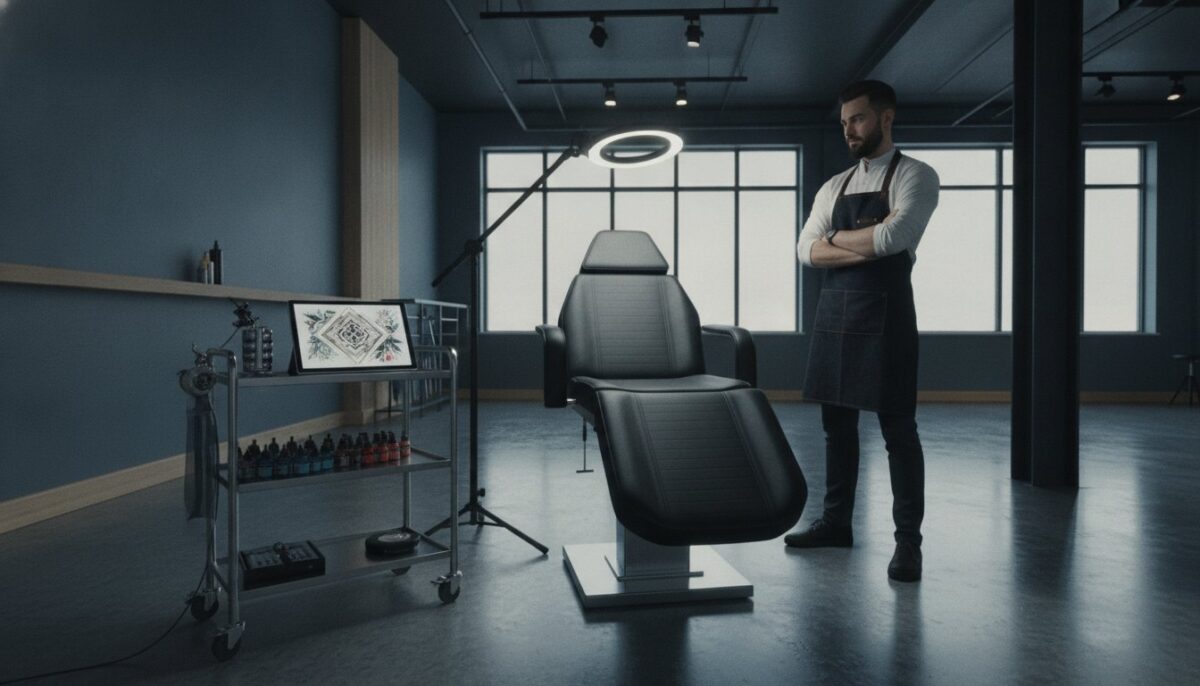
You spend three hours on a custom neo-traditional design, prep your station, and decline a walk-in, only to have your 2:00 PM client ghost you without a word. It’s more than just a missed connection. It’s a direct hit to your livelihood and a gap in your schedule that you can’t get back. Every artist understands the frustration of unpaid labor and the awkwardness of telling a regular they’ve lost their deposit. Implementing a clear tattoo appointment no-show policy isn’t about being mean. It’s about respecting your craft and ensuring your studio stays profitable.

We know you’d rather be tattooing than chasing down deposits or sending manual “where are you” texts. That’s why we’ve built this guide to help you create a professional framework that protects your time and your revenue. You’ll learn how to set up a consistent deposit system and use automated tools to handle reminders so you never have to play the role of the debt collector. We’re going to walk through the essential elements of a 2026-ready policy and the simple tech that makes enforcement feel like a breeze. Let’s turn those empty chairs into a reliable income stream once and for all.

Key Takeaways

  • Calculate the hidden costs of missed sessions, including the invisible labor of custom design and station setup.
  • Draft a professional tattoo appointment no-show policy that clearly defines cancellation windows and late arrival consequences.
  • Secure your income by using integrated credit card processing to collect non-refundable deposits during the booking process.
  • Reduce flake rates through automated SMS and email reminder sequences that keep your studio top-of-mind for clients.
  • Master re-engagement strategies to fill last-minute gaps and turn a missed appointment into a future booking.

The True Cost of a Tattoo No-Show in 2026

When a client ghosts a four hour session, the financial sting goes far beyond a few hundred dollars in lost shop time. You’ve already invested hours into that appointment before the client even walks through the door. There’s the station setup, the sterilized equipment, and the specialized lighting that’s been running in anticipation. An empty chair represents a total loss of overhead recovery. It’s a gap in your day that could’ve been filled by a dedicated collector who respects your craft.

Beyond the immediate revenue dip, frequent flakes crush studio morale. It’s demoralizing for artists to sit idle while surrounded by the buzz of other machines. If you’re looking to scale your business or bring on new residents, consistency is your best recruitment tool. High tier talent won’t stay in a shop where their income is unpredictable. Establishing a firm tattoo appointment no-show policy is a professional necessity. Within the Legal Framework for Tattoo Policies, you have the authority to set boundaries that protect your livelihood and your team’s passion.

Calculating Your Studio’s Revenue Leakage

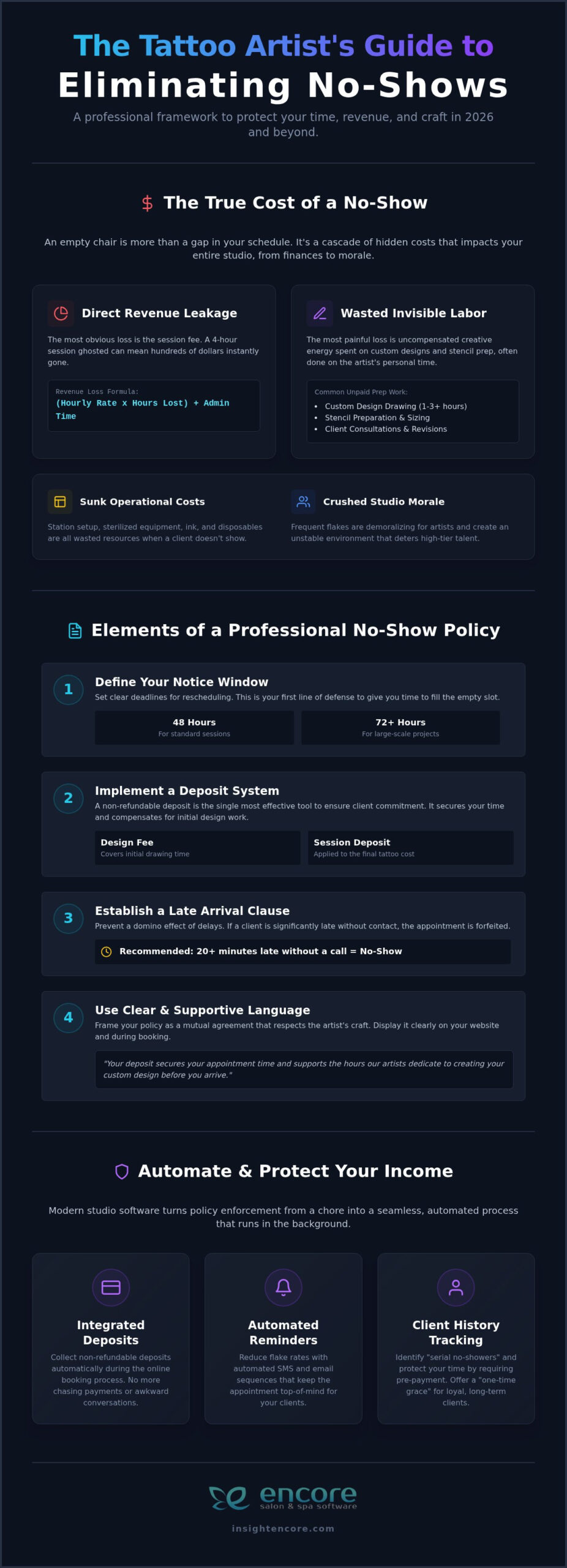
To stop the bleed, you first have to measure it. Many shop owners find it helpful to use a simple formula: (Hourly Rate x Hours Lost) + Admin Time. Don’t forget to account for the 15 to 30 minutes spent chasing the client via phone or DM. When you look at the total monthly loss, the numbers are often eye opening. You can easily spot “Serial No-Showers” by checking history logs in your Client Management System. This data allows you to set a “Risk Threshold,” requiring higher deposits or even pre-payment for clients with a history of disappearing.

The Prep-Time Trap: Why Drawing Time Must Be Protected

The most painful part of a no-show is the “invisible labor.” Artists often spend their evenings drawing custom pieces or preparing complex stencils. This creative energy is finite. When that work goes uncompensated, it leads to burnout and resentment. To combat this, many studios now separate their deposit into a “Design Fee” and a “Session Deposit.” By using Encore Tattoo Studio Software, you can track exactly how much time is spent on client files. This ensures your artists feel valued for every minute of work, whether the needle hits the skin or not.

Elements of a Professional Tattoo No-Show Policy

A solid tattoo appointment no-show policy is the backbone of a stress-free studio. It sets clear expectations before the needle ever touches the skin. Your policy should act as a mutual agreement that respects both your time and the client’s commitment. Without this structure, you’re left guessing how to handle cancellations, which often leads to inconsistent enforcement and lost revenue. Clear rules remove the “gray areas” that cause awkward conversations at the front desk.

Defining your “Notice Window” is your first line of defense. For standard sessions, a 48 hour window is often sufficient to find a replacement from your waitlist. However, for large scale projects like sleeves or backpieces, a 72 hour window is more realistic. This gives you enough time to offer the slot to another dedicated collector. You should also include a “Late Arrival” clause. If a client is more than 20 minutes late without a phone call, the session should be considered a no-show. This prevents their delay from causing a domino effect that ruins the rest of your day. These boundaries align with professional tattoo industry standards for safety and business ethics.

Drafting Your Policy Template

Use direct, supportive language in your template. Avoid cold, legalistic phrasing. Instead, use sentences like, “Your deposit secures your time and supports the hours spent on your custom design.” This reminds the client that your work starts long before they arrive. Display this policy prominently on your website and within your tattoo studio software booking portal. When clients see the rules during the booking process, they’re much more likely to take their commitment seriously. You can see how Encore helps you automate these agreements during every new booking.

The ‘One-Time Grace’ Rule for VIP Clients

Loyalty is a two way street. If a long term regular who has never missed a session has a genuine emergency, a one-time grace period can strengthen that relationship. Use the “Notes” feature in your CRM to track these instances. It’s helpful to see at a glance if a client is habitually “forgetful” or if they’ve had a rare stroke of bad luck. If a client ghosts twice, it’s time to move them to a “Prepayment Only” status. This protects your income while still giving them a path to get their work finished. Professionalism doesn’t mean being rigid; it means being fair while protecting your business.

Financial Safeguards: Deposits and Integrated Payments

A deposit is more than just a down payment. It is a psychological anchor that creates “skin in the game” for the client. When someone has already committed a portion of the session cost, the likelihood of them simply forgetting or deciding to skip out drops significantly. This financial commitment shifts the dynamic from a casual inquiry to a professional contract. By establishing a firm tattoo appointment no-show policy backed by a deposit, you’re teaching your clients to value your time as much as you do.

Choosing between a percentage based deposit and a flat fee often depends on the project scale. For small flash pieces, a flat fee is simple and easy to communicate. For multi session sleeves or backpieces, a percentage helps cover the extensive prep work and drawing time. Regardless of the amount, the process must be frictionless. If a client has to call the shop or send a separate e-transfer, they might stall. Using integrated credit card processing allows you to collect these funds instantly during the booking flow, which is a key part of creating a fair cancellation policy that works for everyone. This removes the “I’ll pay it later” hurdle that often leads to empty chairs.

Comparing Payment Models for Tattoo Artists

Different projects require different levels of security. Here is how the most common models stack up for modern studios:

  • Non-refundable Deposit: Best for custom work. It covers drawing time and ensures the artist is paid for prep even if the client ghosts.
  • Full Prepayment: Ideal for guest spots or high demand flash events where every minute of the day is accounted for.
  • Card on File: Great for long term regulars. It offers convenience while still allowing you to charge a fee if they miss their window.

Managing Finances for Independent Booth Renters

In many studios, the line between shop policy and artist policy gets blurry. For chair and booth renters, protecting personal income is vital because they often operate as their own micro businesses. You need a system that can split payments automatically, sending the deposit directly to the artist while keeping the shop’s cut separate. This setup ensures that if a no-show occurs, the person who did the drawing work is the one who keeps the safeguard. Managing this through a centralized system also ensures PCI compliance. It keeps sensitive client data secure without the artist having to manage complex legal requirements themselves, allowing them to focus entirely on the art.

Ultimate Tattoo Appointment No-Show Policy Guide 2026

Communication Strategy: Reminders and Enforcement

Clear communication bridges the gap between a written tattoo appointment no-show policy and actual client behavior. It isn’t enough to have a policy buried on a website; you need to actively guide your clients through the booking process. When you stay top-of-mind, you significantly reduce the chances of a client simply forgetting their commitment. Effective communication turns a cold set of rules into a supportive partnership that respects everyone’s time.

A successful strategy relies on a 3-touch reminder sequence. First, send a confirmation immediately upon booking to provide a digital paper trail. Second, a 48 hour reminder serves as the final window for penalty free changes. Finally, a day-of text builds excitement and reminds them of essential prep steps. Text messages are the gold standard for artists because they offer much higher open rates compared to email. A quick SMS feels like a message from a professional partner, making it much harder for a client to ignore or overlook.

Automating the Reminder Workflow

You shouldn’t have to spend your lunch break sending manual “where are you” texts. Setting up automated triggers in your Encore software takes the manual labor out of the equation. The Confirmation Loop is the key to 2026 scheduling. You can even personalize these messages with the artist’s name and specific instructions like “Remember to hydrate and eat a full meal before you arrive!” This keeps the interaction feeling human and helpful rather than automated and cold.

Automate your studio reminders today

Scripts for Policy Enforcement

Enforcement doesn’t have to feel corporate or mean. If a client misses their slot, lead with empathy while standing your ground. They might have had a genuine crisis, and how you handle the follow up determines if they’ll ever come back. Use a script like: “Hey [Name], we missed you at the studio today! We hope everything is alright on your end. Since we weren’t able to fill your spot on short notice, your deposit has been applied as a no-show fee per our policy. We’re still excited about your piece, so let us know when you’d like to look at the calendar again.”

If a client asks “Why was I charged?”, be transparent. You might say: “I totally hear you, and I’m sorry the timing didn’t work out. To be fair to our artists, the deposit covers the custom drawing time and the dedicated block of shop time that was reserved just for you. We’d love to get you back on the books; would you like to see what [Artist] has available next month?” This “Soft Pivot” technique acknowledges the loss while immediately offering a re-booking opportunity. It preserves the relationship without sacrificing your studio’s revenue.

Winning Back No-Shows: Re-Engagement Tactics

A missed appointment shouldn’t be the end of your relationship with a client. While your tattoo appointment no-show policy protects your immediate income, re-engagement tactics help you recover the long term value of that client. Life happens. Sometimes a “We Missed You” message is all it takes to turn a forgetful mistake into a lifelong collector. By approaching these situations with empathy instead of anger, you keep the door open for future bookings while still upholding your studio’s professional standards.

Marketing automation is your best friend when an empty chair appears. If a cancellation happens at the last minute, you can blast a “Flash Slot Available” message to your most active clients. This turns a potential revenue gap into a surprise opportunity for someone else. Over time, you’ll start to see trends in your no-show data. You might find that specific days or late afternoon slots have higher flake rates. Armed with this knowledge, you can refine your tattoo appointment no-show policy by requiring higher deposits for those high risk times or sending extra reminders to ensure your day stays on track.

Automated Win-Back Campaigns

Setting up a win-back trigger is a smart move for any growing studio. A few days after a missed session, your system can automatically send a polite nudge with a rebooking incentive. You might suggest they purchase Gift Cards to prepay for their future work, which secures the revenue upfront. This keeps the momentum going without you having to lift a finger. For more tips on scaling your operations, check out our guide on mastering your business with Encore Salon Software.

Protecting Your Bottom Line for the Long Term

Consistency is the secret to a profitable shop. Use your Encore reports to track the ROI of your policy enforcement and see exactly how much revenue you’ve saved. You’ll likely find that a firm policy actually increases client respect and reduces overall flake rates over time. Don’t be afraid to adjust your deposit amounts based on seasonal demand. If you’re fully booked three months out during the summer, a higher deposit ensures only the most committed clients take those prime spots. Scaling your studio is about plugging these small revenue leaks so you can focus on the art you love.

Try Encore Now to secure your schedule

Secure Your Studio’s Future and Focus on Your Art

Protecting your time isn’t just about saving money. It’s about preserving the creative energy you need to produce your best work. By implementing a firm tattoo appointment no-show policy, you set a professional standard that clients will respect. We’ve covered how to quantify the true cost of missed sessions and how to use automated reminders to keep your schedule full. These tools act as your silent partner, handling the logistics while you focus on the needle. You deserve a studio environment where your prep work is valued and your income is predictable.

Start protecting your studio's time with an Encore Tattoo Software demo

We’ve been a trusted industry partner since 1991, providing specialized management tools and integrated payments designed for the unique needs of tattoo artists. You don’t have to manage the stress of empty chairs or awkward deposit conversations alone. With the right systems in place, you can eliminate revenue leaks and build a reliable income stream that supports your long term passion. It’s time to take control of your calendar and get back to the art you love.

Frequently Asked Questions

Is it legal for a tattoo artist to keep a non-refundable deposit?

Yes, it’s generally legal as long as you clearly outline the terms in a written agreement that the client signs or clicks to accept. This payment serves as compensation for the artist’s preparation and the reserved time that can’t be easily rebooked. Ensure your tattoo appointment no-show policy is visible on your website and booking portal to avoid confusion. Clear communication at the start prevents most disputes before they happen.

What is a standard deposit amount for a tattoo appointment?

Standard deposits vary based on the complexity of the piece, but they usually range from a small flat fee for flash to a percentage of the total for larger custom work. This amount should be enough to cover your drawing time and setup costs if the client doesn’t show. Some artists use the deposit as a design fee that isn’t applied to the tattoo price, while others deduct it from the final session cost.

How do I ask a regular client for a deposit without it being awkward?

Frame the deposit as a standard studio requirement that applies to everyone, regardless of how long they’ve been coming to you. You can say, “We’ve updated our booking system to keep our schedule organized, and it now requires a deposit for all sessions.” Most regulars will respect your professionalism and understand that it’s a tool to keep the studio running smoothly. It actually makes their booking feel more secure and confirmed.

What should my tattoo studio’s cancellation window be?

A 48 hour window is the most common choice for standard appointments, while 72 hours is better for large scale projects. This timeframe gives you a realistic chance to offer the spot to someone on your waitlist or fill it via social media. If a client cancels outside of this window, the deposit is forfeited to cover the lost opportunity. Your policy should clearly define these hours so there’s no room for debate.

Can I charge a no-show fee if I don’t have a credit card on file?

It’s nearly impossible to enforce a fee after a client ghosts if you don’t already have their payment information. Without a deposit or a card on file, you’re essentially asking for a donation for your lost time. This is why a firm tattoo appointment no-show policy requires a financial commitment upfront. Using integrated payments ensures you’re protected the moment the booking is made, so you never have to chase down unpaid fees.

How many reminders should I send before a tattoo appointment?

A 3-touch sequence is the most effective way to prevent forgetfulness. Send an immediate confirmation, a 48 hour reminder, and a final day-of text. This rhythm keeps the appointment on the client’s radar without feeling like you’re pestering them. SMS reminders are particularly powerful because they have much higher open rates than email. This consistent communication shows that you’re prepared and expect them to be ready for their session as well.

Should I allow a one-time reschedule without losing the deposit?

Allowing one reschedule is a great way to show flexibility, provided the client gives you enough notice within your policy window. It keeps the relationship positive while ensuring the work eventually gets done. However, you should make it clear that a second reschedule or a last-minute change will result in a forfeited deposit. This prevents your calendar from becoming unstable and ensures that you’re only booking clients who are serious about their ink.

How do I handle a client who has a genuine emergency?

Handle genuine emergencies with a mix of empathy and professional boundaries. You might offer a one-time courtesy to move the deposit to a new date if the situation was truly unavoidable. This preserves the client relationship without you losing the booking entirely. Make sure to document the event in your client notes so you can track if a pattern of “emergencies” starts to emerge with that specific individual over time.

Disclaimer

This article is general in nature and may contain errors, please verify all claims with your sales rep