window.dataLayer = window.dataLayer || []; function gtag(){dataLayer.push(arguments);} gtag('js', new Date()); gtag('config', 'UA-206511945-1');
Search
Categories
Uncategorized

What ‘Appointment is Confirmed’ Means for Your Business and Clients

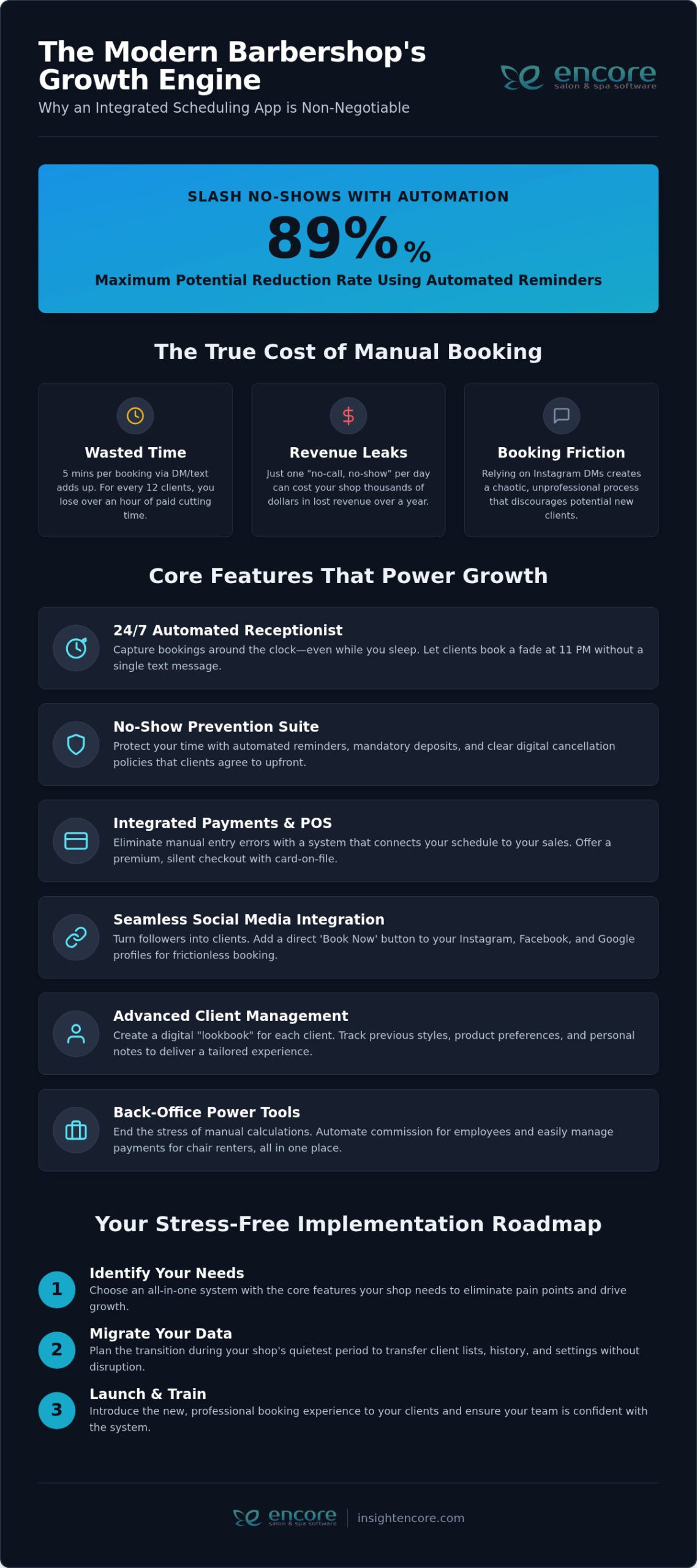
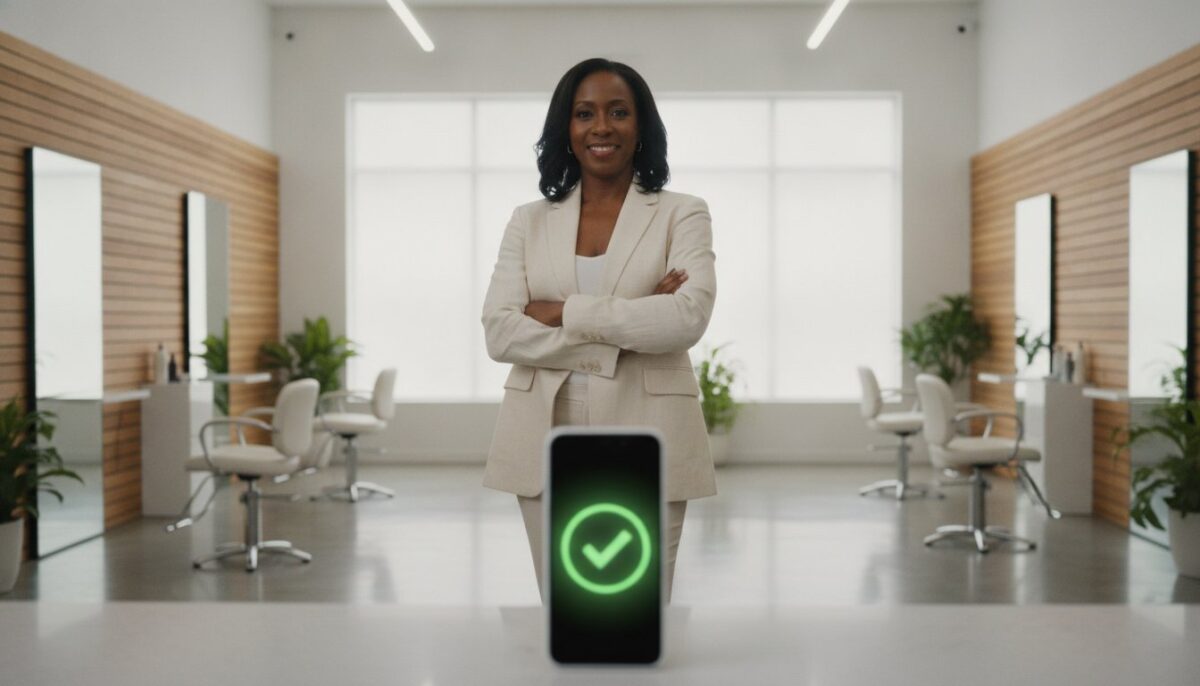
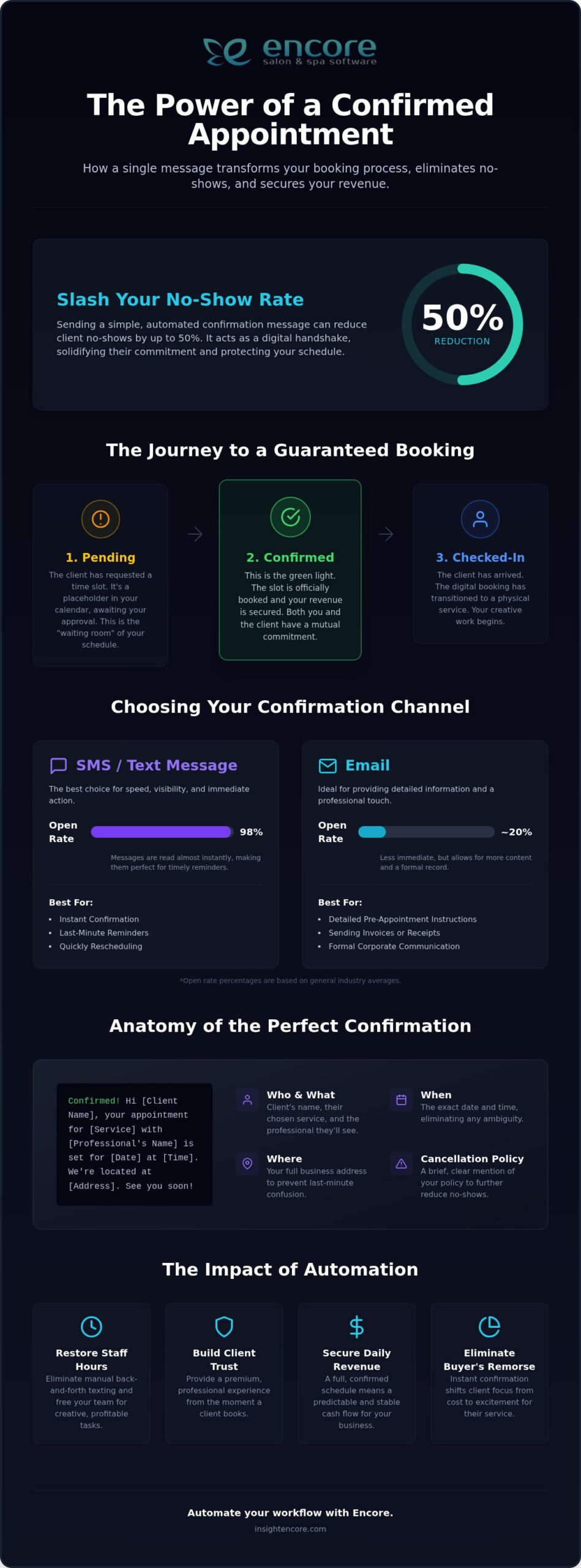
Did you know that sending a simple text message can slash your no-show rate by up to 50%? When a client receives a notification stating their appointment is confirmed, it acts as a digital handshake that builds immediate trust. You’ve likely spent years perfecting your craft, yet a single empty chair can still derail your entire afternoon. It’s exhausting to balance a pair of shears or a tattoo machine in one hand and a smartphone in the other, trying to manually chase down every booking just to keep your lights on.

We understand that your time is your most valuable asset. You’re likely tired of the back and forth texting that eats into your creative hours and leaves clients feeling confused about their booking status. This article shows you how to move past that stress by using professional, automated systems that handle the heavy lifting for you. You’ll learn how a streamlined confirmation process saves hours of staff time and creates a premium experience for every guest. We’ll walk through the essential elements of a perfect confirmation and how to use modern tools to keep your schedule full and your brand looking its absolute best.

Key Takeaways

  • Understand why the confirmation stage is the most critical part of your booking funnel and how it solidifies client commitment.
  • Learn how to leverage psychological triggers that eliminate “buyer’s remorse” once an appointment is confirmed, protecting your daily revenue.
  • Discover why SMS dominates for speed and open rates while identifying the specific scenarios where email still provides a professional edge.
  • Identify the four essential elements every confirmation message needs to include to prevent client confusion and eliminate last-minute questions.
  • See how automating your confirmation workflow with Encore software restores hours of staff time each week for more creative and profitable tasks.

Defining the ‘Appointment is Confirmed’ Status

In the world of professional services, a booking isn’t just a mark on a calendar. It’s a commitment. When an appointment is confirmed, it signals the final stage of the client acquisition funnel. Your marketing did its job, the client found your page, and now they’ve committed to showing up. This status isn’t just a technical label; it’s the specific point where a casual browser transforms into a dedicated customer. It’s the digital handshake that says, "I’ll be there, and I’m ready for you."

Think of the difference between a request and a confirmation. A request is a hope or a wish. A confirmation is a guarantee. For your business, this status means you can stop worrying about gaps in your day and start preparing your station with confidence. For the client, it provides instant relief. They know exactly where they need to be, what time they’re expected, and which professional is waiting for them.

The Linguistic Basis: Agreement and Engagement

The word "appointment" stems from a formal agreement to meet. In a modern salon or spa, this concept has evolved significantly. We’ve moved far beyond the days of messy paper ledgers where "confirmed" simply meant a quick pencil mark next to a name. Today, Appointment scheduling software provides a clear, digital status that acts as a mutual contract of trust.

This digital confirmation creates a powerful psychological shift. Once a client sees that their appointment is confirmed, they’re far more likely to prioritize the event over other daily distractions. It’s no longer a "maybe" in their mind; it’s a professional engagement they’ve officially entered. This mutual obligation ensures you respect their time by being prepared, and they respect yours by arriving on time. It’s about building a relationship before they even walk through your door.

Appointment Statuses You Should Know

Managing a busy schedule requires clear, actionable categories. Using the management features in your booking system helps you track these transitions without the stress of manual checking. Here is how the professional workflow usually looks:

  • Pending: This is the waiting room of your schedule. The client has asked for a specific time, but you haven’t locked it in yet. It’s a placeholder that requires a quick human or automated touch to finalize.
  • Confirmed: This is the green light for both you and the client. Both parties have agreed, and the slot is officially off the market. This is the stage where your revenue is secured and your day is organized.
  • Checked-in: This marks the transition from a digital booking to a physical service. The client is now in the building, and your creative work begins.

Why Confirmation is the Secret to Reducing Salon No-Shows

An empty chair is the most expensive piece of furniture in your salon. When an appointment is confirmed, you aren’t just filling a slot; you’re securing your livelihood. A no-show represents a total loss of potential income that you can’t ever recover. Beyond the immediate cash flow, these gaps disrupt your entire rhythm and leave your staff standing around. Using professional best practices for appointment confirmations ensures that your clients understand the value of the time you’ve set aside specifically for them.

Confirmations also solve a common psychological hurdle known as buyer’s remorse. High-end services or long sessions often come with a moment of hesitation shortly after booking. A clear, welcoming message stating the appointment is confirmed provides a sense of finality and excitement. It moves the client from "did I spend too much?" to "I can’t wait for my transformation." This simple shift in perspective is often the difference between a loyal regular and a last-minute cancellation. It builds your brand as a reliable, organized partner in their self-care journey.

The Cost of a No-Show in 2026

Revenue loss is only the tip of the iceberg. Frequent no-shows drain the energy of your team and create instability for booth renters who rely on every single booking to pay their overhead. When a schedule is flaky, morale drops. Staff start to feel undervalued, and the professional atmosphere of your business begins to slip. You can learn more about protecting your culture and your bottom line in our guide to Master Your Business with Encore Salon & Spa Software.

Creating a Culture of Accountability

Accountability is a two-way street. When you send a professional confirmation, you’re telling the client that your time is valuable. This sets a standard for the entire relationship. It also gives you a natural opportunity to restate your cancellation and deposit policies without it feeling like a confrontation. By automating this journey, you move away from soft verbal promises toward a hard schedule that everyone respects. It’s about creating a system where clients feel obligated to show up because they know you’re ready and waiting for them. If you’re ready to see how this looks in practice, you might want to explore our automated tools to help keep your chairs full and your team happy.

SMS vs. Email: Choosing the Best Way to Confirm

Choosing between text and email isn’t about which tool is better; it’s about meeting your clients where they already live. While both channels serve a purpose, their effectiveness varies based on your specific business model. When an appointment is confirmed, the delivery method determines how quickly that information is processed and acted upon. You want a method that feels like a helpful nudge rather than a digital chore.

The Case for SMS Confirmations

If speed is your priority, SMS is the undisputed champion. Research shows that SMS open rates are as high as 98%, while email averages around 30.7%. Even more impressive is the speed of reading. 95% of text messages are read within 3 minutes of being delivered. For fast-paced environments like barber shops, nail salons, and busy tattoo studios, this immediacy is vital. A "Reply C to Confirm" workflow allows your system to update the schedule automatically, removing the need for staff to manually check messages during a busy shift.

  • High Visibility: Texts cut through the noise of a crowded promotional inbox.
  • Frictionless Response: Clients can confirm with a single character or a quick tap.
  • Real-time Updates: Perfect for last-minute schedule changes or weather-related updates.

The Case for Email Confirmations

While texts are great for speed, email offers the space required for luxury and detail. High-end medical spas or specialized studios often need to provide pre-appointment instructions or digital intake forms. Email allows you to showcase your visual branding, including your logo and a specific aesthetic that reflects your professional identity. It’s the better choice when the client needs to review long-form information before they arrive at your door.

To bridge the "Professionalism Gap," many successful businesses use a multi-channel approach. They send an initial email with all the beautiful branding and prep details, followed by a punchy SMS reminder 24 hours before the visit. This ensures the appointment is confirmed through a method that feels personal and supportive. It captures the client’s attention without being intrusive.

Using automated communication features allows you to hyper-personalize these messages. By pulling client data like their preferred name or their specific service provider, you make the automation feel human. This level of care builds the trust we’ve discussed, ensuring your clients feel like a priority rather than just another entry in a database. It’s a simple way to maintain a high-touch feel while you focus on your creative work.

What 'Appointment is Confirmed' Means for Your Business and Clients

Best Practices for Crafting the Perfect Confirmation Message

Your confirmation message is often the first official interaction a client has with your brand after booking. It needs to be clear, welcoming, and packed with the right details. A vague message leads to "no-show" excuses; a structured message creates a professional boundary. When an appointment is confirmed, the client should immediately feel a sense of organized control. They shouldn’t have to hunt through their inbox to remember who they’re seeing or where they’re going.

To keep things professional, always include these four essential elements in every message: the date and time, the full address of your business, the service provider’s name, and a clear call to action. Whether you want them to "Reply C to Confirm" or click a link to fill out a form, tell them exactly what to do next. This clarity removes the friction that often leads to missed visits. You can explore how to set these up using Encore Salon Software features for automated messaging.

Timing is just as critical as the content. The "sweet spot" for an initial confirmation is immediate. Research shows that 41% of people confirm their appointments within just one hour of receiving a reminder. Sending that first notification the second their appointment is confirmed in your system capitalizes on their current focus. It locks the event into their mental calendar while the booking is still fresh.

Templates You Can Use Today

Different niches require different details. For a standard salon, keep it punchy: "Hi [Name]! Your hair transformation with [Stylist] is locked in for [Date] at [Time]. We can’t wait to see you at [Address]! Reply C to confirm." This is short, sweet, and highly effective for daily bookings. If you’re running a specialized studio, check out our 2026 Nail Salon Client Management Software Guide for more tailored communication tips.

Spas often need to manage logistics like parking or arrival times. A detailed spa confirmation might look like this: "Your relaxation session at [Spa Name] is confirmed for [Date] at [Time]. Please arrive 15 minutes early to enjoy our lounge. Parking is available in the rear lot. See you soon!" This sets expectations and reduces client anxiety about the visit.

Tattoo studios have unique requirements. Your message should emphasize policies: "Hey [Name]! Your session with [Artist] is confirmed for [Date] at [Time]. Remember to bring a valid ID and eat a full meal beforehand. Please note that deposits are non-refundable for cancellations with less than 48 hours’ notice." This firm but friendly tone protects your time and your revenue. If you’re ready to automate these templates and stop the manual texting cycle, you can start your free trial of Encore today.

How Encore Automates Your Confirmation Workflow

The transition from manual texting to an automated system is often the moment a business owner finally breathes a sigh of relief. With Encore Salon & Spa Software, you can implement "set it and forget it" booking rules that act as a silent partner for your front desk. Instead of spending your lunch break scrolling through sent messages to see who replied, the system handles the outreach for you. When an appointment is confirmed through a client’s response, your digital calendar updates in real time. This instant syncing ensures that your schedule is always accurate, preventing double bookings and allowing you to see exactly how your day is shaping up at a glance.

Every business is unique, and your automation should reflect that. A pet grooming session requires different prep than a balayage service. Encore Salon & Spa Software allows you to customize notifications based on the specific service type. You can set unique triggers for your Client Management System so that a tattoo artist’s client receives health disclosures while a hair client gets parking tips. This level of detail ensures that once the appointment is confirmed, the client has every piece of information they need for a successful visit.

Beyond the Text: Integrated Payments and Forms

Securing your revenue starts well before the client walks through the door. By linking deposits directly to the confirmation step, you create a financial commitment that significantly reduces the chance of a no-show. Encore Salon & Spa Software can automatically send digital intake forms the moment a booking is finalized. This means your guests arrive ready to start their service, rather than spending the first ten minutes of their slot filling out paperwork. It creates a seamless, high-end experience that reduces front-desk friction and lets your team focus on their craft.

Getting Started with Automation

Making the switch from a paper book or a basic calendar app to professional software might feel like a big leap, but the results are immediate. Most business owners find they save at least 5 hours a week on administrative tasks alone. That is time you can spend on creative work, staff training, or simply taking a well-deserved break. The ROI isn’t just measured in dollars; it’s measured in the peace of mind that comes from knowing your business is running smoothly in the background. Ready to see it in action? Try Encore Salon & Spa Software Now and discover how simple an organized schedule can be.

Secure Your Revenue and Reclaim Your Time

Ensuring every appointment is confirmed goes beyond simple scheduling; it is about establishing a professional standard that protects your livelihood. By moving away from the chaos of manual follow-ups, you create a reliable environment where both you and your clients can thrive. This digital handshake eliminates ambiguity and ensures that your expertise is respected and your time is properly valued.

Syntec Business Systems has served as a dedicated ally to thousands of beauty professionals since 1991. As an all-in-one platform featuring integrated POS and online booking, we provide specialized tools tailored to the unique needs of salons, spas, and tattoo studios. You deserve a system that works as hard as you do, handling the logistics so you can focus on your craft. We are committed to helping you transition from daily administrative stress to a state of complete, organized control.

Stop chasing clients and start growing your business-Try Encore Salon & Spa Software Now

Frequently Asked Questions

What does ‘appointment is confirmed’ mean in a text message?

An "appointment is confirmed" status means the service provider has officially locked in your requested time slot on their professional schedule. This status indicates that the booking is no longer pending or waiting for approval. You are now expected to arrive at the specified time. It acts as a digital agreement between you and the business to ensure everyone is prepared for the visit.

Is an appointment confirmed the same as a reminder?

No, these messages serve different purposes in the client journey. A confirmation is sent immediately after booking to verify that the slot is officially yours and recorded in the system. A reminder is sent closer to the actual date, often 24 to 48 hours before. This second message ensures you don’t forget the commitment you made days or weeks earlier.

Can I cancel an appointment once it is confirmed?

Yes, you can usually cancel, but you’ll need to follow the specific cancellation policy of the salon or studio. Most professional businesses require at least 24 to 48 hours’ notice to avoid late fees or lost deposits. Check your initial confirmation message for a link or phone number to manage your booking. It’s always better to communicate early if your plans change.

How do I know if my doctor’s appointment is confirmed?

You will typically receive an automated text or email explicitly stating that your appointment is confirmed. If you haven’t received a notification within 24 hours of booking, it’s a good idea to call the office directly. Many modern medical providers also use patient portals where you can log in to check your status and view upcoming visit details in real time.

Why didn’t I receive an appointment confirmation email?

The most common reasons include an incorrect email address, the message being filtered into your spam folder, or a brief delay in the business’s automated system. Check your "Promotions" or "Junk" folders first to see if it was misfiled. If you still can’t find it, contact the business to ensure they have your correct contact information on file for future notifications and reminders.

What is the best wording for an appointment confirmation?

The best wording is clear, concise, and includes all the essential logistics for the visit. Start with a friendly greeting, followed by the date, time, location, and the name of the professional. For example: "Hi [Name], your appointment is confirmed for [Date] at [Time] with [Provider] at [Business Name]. We look forward to seeing you!" This structure removes any potential for client confusion.

Should I ask clients to reply ‘C’ to confirm their booking?

Yes, asking for a simple "C" or "1" is a highly effective way to increase your engagement rates. This low-friction response allows your scheduling software to update the calendar automatically without any manual intervention from your staff. It’s a professional way to ensure the client is still committed to their time slot while drastically reducing your daily administrative workload and manual texting.

How far in advance should an appointment be confirmed?

You should send the initial confirmation immediately after the booking is made to provide instant peace of mind. This gives the client a permanent record of their appointment details. Follow this up with a reminder 24 to 72 hours before the service. This secondary nudge catches any last-minute scheduling conflicts or emergencies before they turn into a frustrating and costly no-show for your team.

Disclaimer

This article is general in nature and may contain errors, please verify all claims with your sales rep
Categories
Uncategorized

Encore Salon & Spa Software: The 2026 Success Guide to Client Retention

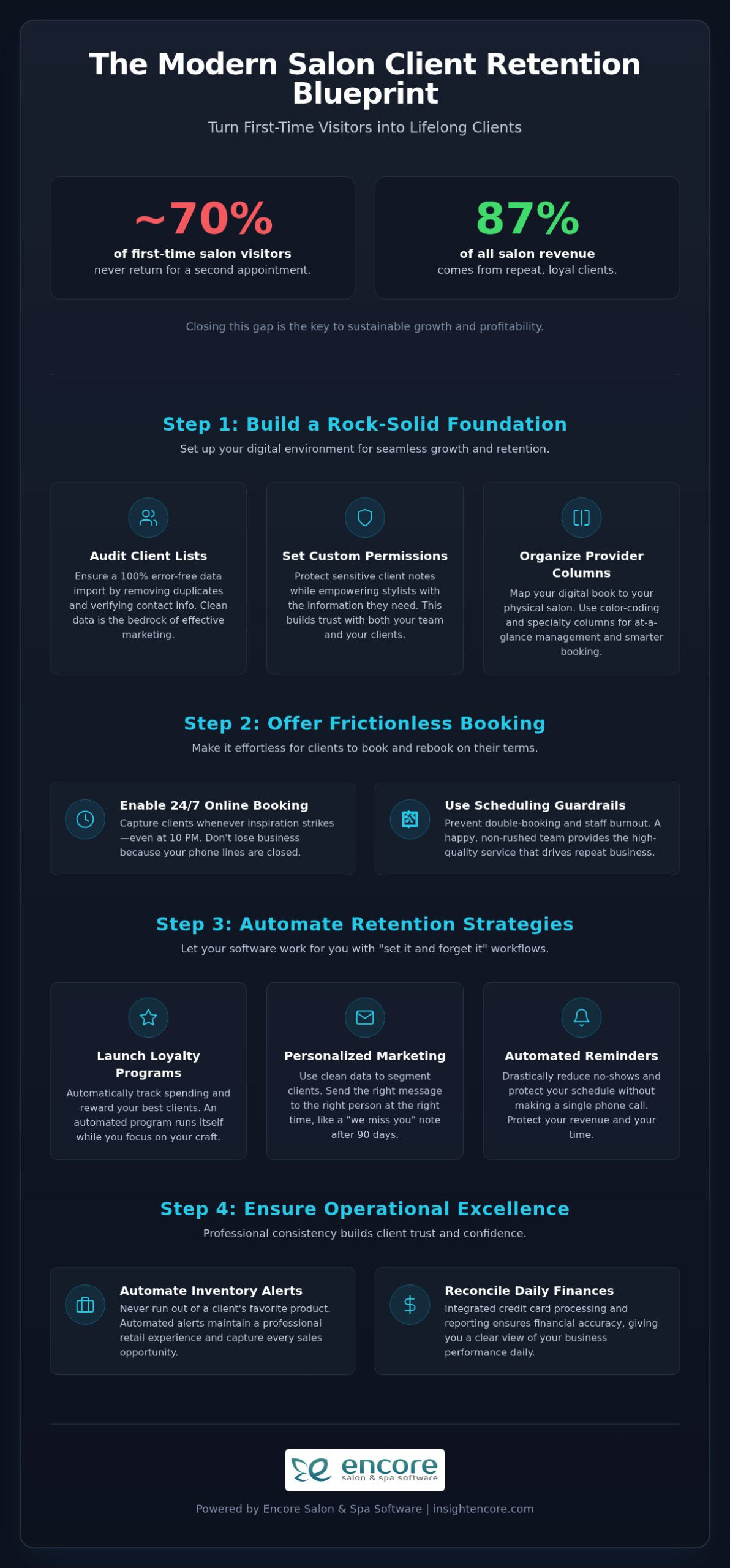
Did you know that nearly 70% of first-time salon visitors never return for a second appointment? In a year where 87% of all salon revenue comes from repeat clients, that is a gap your business simply cannot afford to ignore. It is exhausting to spend your valuable time on manual rebooking calls only to have no-shows kill your profit margins. You deserve a system that supports your growth instead of adding to your daily stress. Implementing effective salon client retention strategies shouldn’t feel like a second job; it should be the heartbeat of your business.

We’re here to help you master the specific Encore workflows and automated strategies needed to eliminate no-shows and boost your rebooking rates in 2026. You’ll learn how to turn your software into a dedicated mentor that handles the follow-ups while you focus on your craft. This guide covers how to set up a loyalty program that runs itself, use automated reminders to protect your schedule, and access clear reporting to see which stylists are performing best. It’s time to take control of your revenue and build the thriving, predictable salon you’ve always wanted.

Key Takeaways

  • Build a rock-solid foundation for your business by auditing client lists for a seamless data transition with the Syntec team.
  • Capture every opportunity with 24/7 online booking while using scheduling guardrails to prevent staff burnout and double-booking errors.
  • Master automated salon client retention strategies by setting up “set it and forget it” loyalty programs and personalized marketing workflows.
  • Ensure professional consistency by automating inventory alerts and reconciling your daily finances through integrated credit card processing.
  • Future-proof your salon with mobile flexibility and leverage unlimited human support to solve operational bottlenecks before they impact your profit.

Optimizing Your Encore Foundation for Retention

Your software setup acts as the invisible ceiling for your business growth. If your digital environment is cluttered or incomplete, your salon client retention strategies will likely fall flat before they even begin. Think of Encore Salon & Spa Software as the digital twin of your physical space. When you map your physical salon layout directly to digital provider columns, you eliminate the frantic clicking that often happens during a busy Saturday rush. This organization allows your front desk team to focus on the person standing in front of them instead of fighting with the screen.

The "Clean Data" Rule is your first step toward long-term loyalty. Before the Syntec team performs your Excel import, you must audit your client lists. Removing duplicate profiles and verifying email addresses ensures that your outreach actually reaches its destination. High-quality customer retention depends on accuracy. You can’t build a relationship on broken data. By cleaning your lists now, you empower your staff with a reliable database that protects your most valuable asset: your client relationships.

Security is also a retention tool. Setting up custom permissions protects sensitive client notes while still giving stylists the information they need to provide a personalized experience. It strikes a balance between professional boundaries and empowered service. Your team feels trusted, and your clients feel secure. This professional confidence radiates through every interaction at the chair.

Streamlining the Transition with Excel Imports

Moving from a legacy system like Insight is a perfect opportunity for a fresh start. Formatting your existing client and inventory lists correctly ensures a 100% error-free upload. This precision is vital. When your data is organized from day one, your automated marketing segmentation becomes incredibly powerful. You can instantly identify who hasn’t visited in 90 days or who loves specific retail products. Clean data allows you to send the right message to the right person at exactly the right time.

Configuring Provider Columns for Peak Visibility

The way you view your day determines how well you manage it. Encore’s pricing is uniquely built around the number of service providers rather than generic users. This model ensures you only pay for the production capacity of your salon. To maximize this, use color-coding to separate high-value chemical services from quick cuts. This visual shorthand helps your team manage the floor at a glance. You should also organize columns by skill level or specialty. This guiding structure helps your front desk book the right clients with the right experts, ensuring a high-quality result that keeps people coming back.

Maximizing the Appointment Book: Frictionless Booking as a Retention Strategy

Convenience is the cornerstone of modern salon client retention strategies. In 2026, the client journey often begins at 10:00 PM when your doors are locked and your staff is resting. If a client has to wait until the morning to call you, there is a high chance they will find a competitor who offers 24/7 online booking. By opening your digital doors around the clock, you remove the friction that prevents a casual browser from becoming a lifelong guest. It is about being available whenever your clients feel the urge to self-care.

Keeping your staff happy is just as important as keeping your clients satisfied. Encore includes a "Double-Booking" guardrail that prevents scheduling overlaps. This feature ensures your stylists never feel overwhelmed by a crowded book, which directly improves the quality of every service. When your team isn’t rushing, they can provide the empathetic, high-quality care that drives repeat business. You can explore these booking features to see how they fit your unique salon workflow.

Integrating payments into your booking flow also streamlines the rebooking process. When credit card processing is handled within the software, it creates a professional and cohesive experience. This data also serves as the foundation for successful loyalty programs because it tracks exactly what and when your clients are spending. Real-time mobile updates further support this by ensuring your team sees schedule changes instantly on their own devices. No one likes a surprise gap in their day, and these notifications keep everyone on the same page.

The 5-Step Online Booking Optimization

Optimizing your digital interface doesn’t have to be complicated. Start by setting lead times. This simple step prevents surprise appointments from appearing on your book five minutes before they are scheduled to start. Next, customize the client interface to reflect your brand’s welcoming tone. It should feel like a digital extension of your physical lobby. Finally, require deposits for high-value services. This creates a mutual commitment and secures your revenue before the client even walks through the door, protecting your time and your talent.

Reducing No-Shows with Automated Confirmations

High no-show rates can kill your profit margins and frustrate your most talented providers. Automated SMS reminders can reduce these incidents by 35%, and timing is the most critical factor. We recommend sending a confirmation text exactly 24 hours prior to the visit. Use warm, empathetic language that reminds the client how much their stylist values their time. If a client becomes a chronic no-show, Encore allows you to flag their profile automatically. This lets you require a full deposit for their future bookings without having to have a difficult manual conversation every time.

Automated Client Retention Strategies: Loyalty Programs and Marketing Workflows

Many salon owners feel like they are on a treadmill, constantly chasing new guests while their existing ones slip away through the cracks. Adopting the "Set It and Forget It" philosophy isn’t about being impersonal. It’s about using Automated Marketing & Loyalty Programs to handle the repetitive tasks that eat your time. By implementing automated salon client retention strategies, you can remain present with the guest in your chair while your software works in the background to secure your next booking.

Personalization at scale is where your business truly begins to feel like a supportive partner to your clients. By leveraging the client notes in Encore, you can automate birthday and anniversary rewards that feel genuine and thoughtful. It’s the digital version of remembering a guest’s favorite beverage or their child’s name. These small, automated touchpoints build the emotional connection that keeps clients loyal for years. It’s a simple way to show you care without needing to remember every date yourself.

Even the most loyal guests can get busy and forget to rebook. The "We Miss You" campaign acts as a gentle safety net, automatically re-engaging clients who haven’t visited in 90 days. This 90-day window is critical. Verified 2026 benchmarks show that nearly 70% of first-time visitors never return for a second appointment. A well-timed, empathetic message can bring them back before they establish a habit at another salon. It’s about extending a hand at exactly the right moment.

Measuring the success of these efforts is simple with Encore’s reporting tools. The immense financial impact of increasing customer retention rates is well-documented; even a small boost in loyalty can lead to a significant jump in your bottom line. Client Retention is the primary driver of 2026 salon profitability as stagnant industry growth makes existing guest loyalty more valuable than ever.

Building an Irresistible Loyalty Program in Encore

Your loyalty program should be a core feature of your business, not an afterthought. When defining point values, consider rewarding retail purchases more heavily than services. Since retail often carries different margins, this encourages clients to take their aftercare home, which increases their lifetime value. You should also promote these rewards directly through your online booking module to keep them top-of-mind. Rewarding clients for social media referrals and tracking them within your CRM turns your best guests into your most effective marketing team.

Strategic Email and Text Segmentation

Blasting your entire list with the same offer is a recipe for high unsubscribe rates. Instead, segment your list by service history to keep your messages relevant. For example, you could target only your hair color clients for a new glossing treatment or send automated holiday gift card pushes to those who haven’t visited in a few months. These targeted salon client retention strategies ensure your messages are always welcomed. They help you drive predictable revenue and build a community of guests who feel truly understood.

Encore Salon & Spa Software: The 2026 Success Guide to Client Retention

Operational Excellence: How Inventory and Financial Accuracy Drive Client Trust

Trust is built on the small details that many salon owners overlook until something goes wrong. When a client arrives for their signature service only for you to realize you are out of a specific toner, that professional bond begins to fray. Operational accuracy is one of the most underrated salon client retention strategies because it ensures a consistent, high-quality experience every time a guest walks through your door. Using an automated Inventory Management System means you can set low-stock alerts for your back-bar essentials, so you never have to apologize for a missing product again.

Your daily close ritual should provide relief, not a headache. Reconciling your POS with integrated credit card processing ensures that your financial data is always accurate without hours of manual counting. This transparency extends to your team as well. If you manage independent contractors, Encore allows you to keep booth renter finances separate but organized within one system. This clarity prevents the awkward financial disputes that can lead to staff turnover, which is often the quickest way to lose a loyal client base.

To truly master your growth, you need to look at the data that matters. There are three specific reports you should monitor to gauge your health: Revenue by Provider, Rebooking Rate, and Retail-to-Service percentage. These numbers tell the story of your salon’s relationship with its guests. A high rebooking rate is the ultimate indicator of trust. By reviewing these metrics, you can identify which stylists are excelling and who might need a bit of extra mentorship to improve their guest connection.

Mastering the Inventory Management System

Efficiency starts at the checkout counter. By linking retail products to specific services, Encore can perform an automatic deduction every time a stylist completes a service. This level of detail prevents "inventory drift" where your digital numbers don’t match reality. We recommend performing monthly spot checks to keep everything precise. Using advanced security permissions also helps reduce shrinkage by ensuring only authorized staff can adjust stock levels. It keeps your business lean and your shelves always ready for your clients.

Financial Transparency and Commission Tracking

Manual payroll is a drain on your energy. You can automatically calculate salon commissions based on your specific provider agreements, which often saves owners five or more hours on weekly payroll tasks. When tax season arrives, you can generate tax-ready reports for your accountant with a single click. This organized approach is a core part of how you can Master Your Business with Encore Salon Software. It removes the stress of backend administration so you can remain the creative leader your salon needs. If you are ready to see how these tools can transform your daily routine, you can start your journey with Encore today.

Future-Proofing Your Business: Mobile Flexibility and Professional Support

Building a legacy requires more than just talent. It requires a resilient infrastructure that doesn’t crumble when the Wi-Fi drops. Professional salon client retention strategies are only as effective as your ability to execute them consistently. If your system goes down, your professionalism takes a hit. That is why a proactive business continuity plan is essential. By using mobile data and tablets, you can keep your appointment book open even during local outages. Your clients will never know there was a glitch because your service remained seamless.

You aren’t in this alone. One of the greatest advantages of partnering with Syntec is our unlimited human support policy. When you run into a technical hurdle, don’t wait until it becomes a crisis. Calling 1-800-805-4532 early prevents operational bottlenecks that could frustrate your guests. We have been providing platform stability since 1991, and we’re committed to your long-term success. Our no-contract, cancel-anytime model reflects this confidence. We want to earn your business every single month through reliability and human connection.

Scalability is the hallmark of a modern business. As you grow from a solo suite to a multi-location empire, your software should be a bridge, not a barrier. The freedom of a contract-free partnership allows you to pivot when the market shifts. This flexibility is a best practice for 2026, ensuring that you always have the best tools at your fingertips without being locked into outdated tech. It’s about maintaining control over your business destiny while having a dedicated mentor in your corner.

Maintaining Access in Any Situation

During the chaotic holiday periods, your front desk can often become a bottleneck. Setting up mobile tablets as backup POS stations allows your team to check out clients directly from the chair, reducing lobby congestion and improving the guest experience. If you are expanding, Encore makes it easy to sync data across multiple locations. You get a unified view of your entire business empire without the stress of fragmented reporting. If you need help configuring your mobile access, you should Contact Syntec for a custom training session tailored to your specific salon needs.

Leveraging Professional Support for Growth

Every salon is unique. Whether you focus on high-end hair color, tattoo artistry, or pet grooming, your software should adapt to you. You can request specific feature enhancements that help your niche thrive. We also provide a robust Knowledgebase and YouTube tutorials to make continuous learning easy. This allows you to onboard new stylists quickly without spending hours away from the chair. It empowers your staff to master the system at their own pace, ensuring they can contribute to your salon client retention strategies from their very first day.

Taking Charge of Your Salon’s Growth

You have the talent. You have the vision. Now you have the tools to back it up. By mastering automated salon client retention strategies, you can finally stop the exhausting cycle of manual rebooking and start focusing on the art you love. Whether it is setting up frictionless online booking or ensuring your back-bar is always stocked through automated alerts, every small adjustment builds a stronger foundation for your team and your guests. These systems work in the background so you can remain fully present at the chair.

We have been serving the beauty industry since 1991, and we truly understand the daily hurdles you face. That is why we offer a no-contract, cancel-anytime policy. You deserve a supportive partner that earns your trust every single day. If you ever feel stuck or overwhelmed by new technology, our unlimited 1-800 human support is always just a phone call away. We are here to help you navigate your next steps with professional confidence and peace of mind.

Ready to streamline your business? Try Encore now! You have everything you need to scale your revenue and build a community of loyal clients that lasts. Let’s make 2026 your most successful and organized year yet.

Frequently Asked Questions

How do I switch from my current software to Encore without losing my client data?

You can transition smoothly by using our specialized Excel import process. Our team at Syntec helps you format your existing client and inventory lists to ensure a complete and accurate data transfer. This clean start is vital for your salon client retention strategies because it preserves your history without the mess of manual entry. We make sure your transition is handled with care so you don’t lose a single guest profile.

What happens to my Encore booking system if the internet goes down in my salon?

You can stay operational by accessing Encore through a mobile tablet or smartphone using cellular data. Since the system is accessible via a web browser, you don’t lose access to your appointment book or client notes during local Wi-Fi outages. This flexibility ensures your business continuity and keeps your front desk running without a hitch. It’s a simple way to protect your revenue and your peace of mind even when technology fails.

Is there a long-term contract required for Encore Salon & Spa Software?

No, we operate on a no-contract, cancel-anytime policy. We believe in earning your business every month through reliable service and helpful support. This flexible model allows you to scale your business or adjust your plan as your needs change without being locked into a rigid agreement. It’s part of our commitment to being a supportive partner rather than a distant service provider who hides behind fine print.

How does the pricing for Encore work for a multi-location business?

Pricing is based on the number of service providers you have rather than the number of physical locations. This provider-centric model is designed to be fair and transparent as you grow your business empire. You only pay for the production capacity of your team, making it easier to manage costs across multiple sites. It allows you to expand your footprint without feeling penalized by traditional software pricing structures.

Can Encore handle commission tracking for booth and chair renters?

Yes, Encore includes specialized modules specifically designed for Chair/Booth Renter Software. You can keep independent contractor finances separate while still managing the entire salon under one digital roof. This feature automates complex commission calculations and saves you hours of manual administrative work every week. It provides the professional confidence needed to manage a diverse team of independent professionals while maintaining clear financial boundaries for everyone involved.

Does Encore offer integrated credit card processing for spas and salons?

Yes, we provide integrated credit card processing that connects directly to your point-of-sale system. This integration speeds up the checkout process and reduces manual entry errors at the front desk. It also helps you track spending patterns more accurately, which is a core component of effective salon client retention strategies and loyalty programs. You can offer a seamless payment experience that matches the high quality of your services.

How can I access the Encore Knowledgebase for staff training?

You can access our comprehensive Knowledgebase and YouTube tutorials online at any time. These resources are designed for rapid staff training, allowing new stylists to learn the system at their own pace. If you need more personalized help, our unlimited 1-800-805-4532 human support is always available to guide your team. We want to ensure your staff feels empowered and confident using every feature we offer.

Can I use Encore on my tablet or smartphone while away from the shop?

Yes, you can log in to your Encore system from any device with an internet connection. This allows you to check your schedule from home or perform chair-side checkouts on a tablet for a more modern guest experience. It gives you the freedom to manage your business on the go while keeping your data synced in real time across all devices. You stay in control no matter where your day takes you.

Disclaimer

This article is general in nature and may contain errors, please verify all claims with your sales rep