
The best salon software alternatives are the ones that fit your services, team, and daily workflow. Before switching, plan one week of overlap to catch appointments booked in the old system. A smooth transition starts with software that matches how your business operates.
Look beyond the feature list. Booking, client management, and the way a provider charges for additional team members can all affect whether a system is a good fit.
This comparison explains how salon and spa software options differ, which businesses and teams they suit, and how user costs can affect the total. It also offers a practical way to narrow your choices and plan an organized transition.
Key Takeaways
- Compare booking, calendar, and client-management tools against the way your salon or spa handles appointments and client records.
- Match software to your business type and workflow, rather than choosing by feature count alone.
- Look closely at which team members are included and how additional users affect the overall fit.
- Use a consistent set of criteria to compare alternatives and narrow your shortlist.
- Explore Encore Salon and Spa Software options for salon, spa, chair or booth renter, and tattoo studio needs.
Booking, calendar, and client-management features
Which salon and spa platforms offer online booking, payments, and point of sale? Look for a system that connects all three in one workflow, rather than treating booking as a standalone calendar. Before narrowing your shortlist, compare how each option handles appointment changes, client records, and checkout.
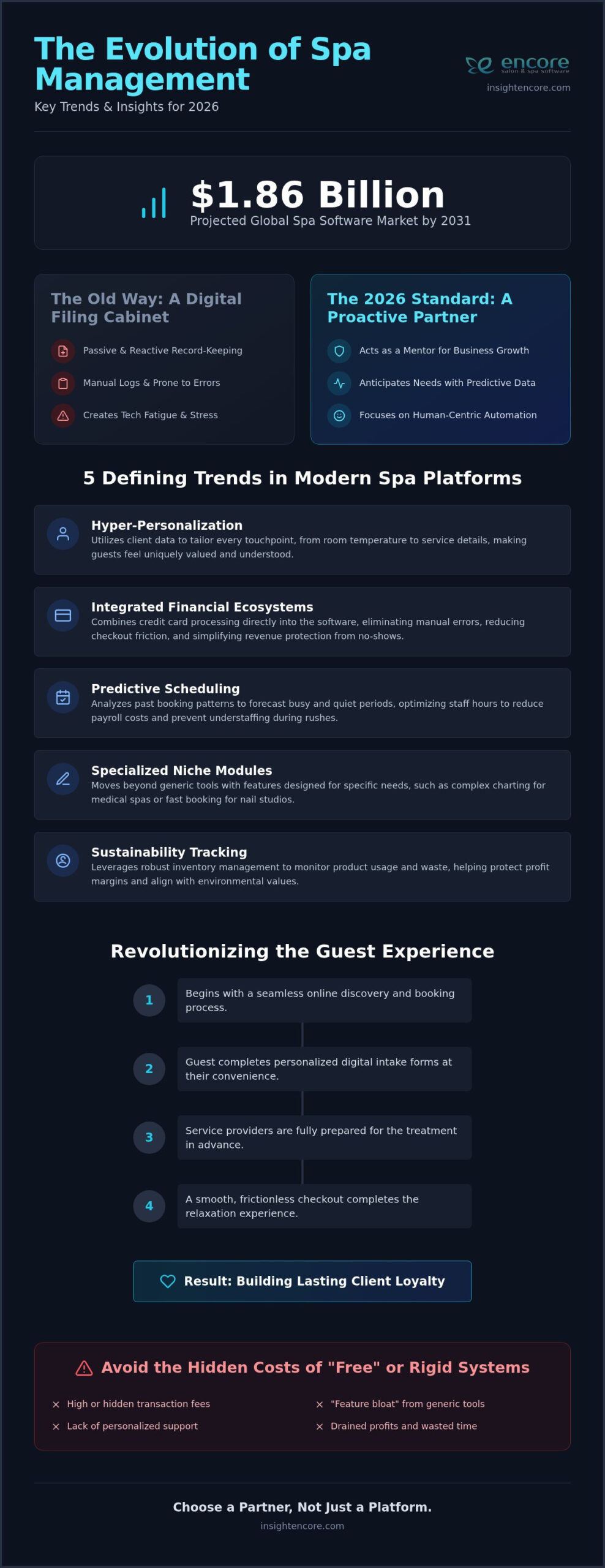
Start with a realistic booking scenario: a returning client requests a service, selects a staff member, then reschedules. Follow each step through the calendar. Does the appointment update clearly? Can staff see relevant client details as they prepare? A feature list may promise “online booking,” but this test shows whether the workflow suits your front desk and service team.
Client retention comes from useful follow-up, not simply sending more messages. Map a win-back sequence for a client who hasn’t returned for a particular service: identify the client segment, draft the message, and decide what response should stop further reminders. Then assess whether automated messages can be tailored to service history and managed alongside other marketing. Also review client portals, website booking embeds, and how clients see appointment availability.
For migration, list the records to carry forward, such as contact details, appointment history, preferences, and notes. Compare the import process field by field, and identify records to clean up before transfer. Plan one week of overlap when switching systems to catch appointments booked in the old calendar. For skin services, check whether client records support SOAP notes, with space for subjective, objective, assessment, and plan details. Make sure staff can find the right note at a future appointment.
A pricing page can show whether features depend on a plan or user count. If a system offers a free trial, test the same booking and follow-up scenarios in each one. Note whether the answers are clear and whether the workflow requires workarounds.
| Option profile | Booking | Calendar | Client records | Retention |
|---|---|---|---|---|
| Appointment-led | Online booking flow | Rescheduling visibility | Visit history | Return reminders |
| Skin-service focused | Service-specific booking | Staff access to notes | SOAP-note structure | Service follow-up |
| Retention focused | Website or portal access | Availability display | Client segments | Automated win-back |
A comparison is most useful when each system faces the same test: book, change, document, and follow up. Choose the option whose calendar and client records support your actual appointment journey, not simply the longest feature list.
Salon and spa software alternatives
Which salon software alternatives include client management, forms, and automated marketing? Compare these capabilities across the options you’re considering, since availability can vary by provider and subscription. Check whether client records, digital forms, and marketing tools work together or require separate products.
The differences between salon and spa platforms are clearest when you apply the same criteria: client profiles, forms, marketing, booking, checkout, staff access, and reporting. Mark each feature as essential, useful, or unnecessary for your business. A solo stylist, for instance, may prioritize simple checkout, while a spa offering varied treatments may value detailed client records and coordinated staff scheduling.
Business size is only one part of the decision. A single-location salon with a small team may need a simple front-desk routine, while a spa with multiple locations may need consistent processes across sites. Compare how each system reflects your team structure, including employees, independent professionals, and chair renters. If staff have different schedules, assess calendar permissions and appointment visibility. A workflow suited to one location may not work as smoothly across separate teams or service menus.
Review subscription costs as closely as features. Use each pricing page to identify what affects the total, such as the selected plan, included users, locations, and optional tools. Apply those details to a realistic scenario, such as adding a stylist or opening another location. Look for additional-user charges and fees for separate features. Include checkout and payment processing, since providers may structure them differently.
What are the contract, cancellation, and data-export terms for other platforms? Terms vary by provider and agreement, so compare commitment periods, cancellation processes, and available export formats. Include client records, forms, and appointment details in your data checklist. A contact-only export may not preserve the information your team needs to prepare for appointments or personalize future visits.
Location can affect practical fit, too. Consider the languages, payment workflows, and business practices your team needs in its operating country. Then trace a typical workday through booking, the front-desk handoff, service notes, and checkout. This can reveal workflow gaps that a feature list misses.
Compare platforms on client profiles, digital forms, marketing, booking, checkout, staff access, and reporting. The right fit depends on your priorities, such as straightforward checkout for a solo stylist or detailed records and coordinated scheduling for a spa.
Business fit by salon size and needs
Salon size matters because a solo stylist and a multi-service spa divide work differently. Start with a typical appointment day: who books clients, assigns providers, records service details, and completes checkout? Map those steps before comparing software. This will show whether you need a straightforward individual workflow or shared access for a front desk, service providers, and managers.
For an independent professional, prioritize the tasks that take time between appointments. Review how the system organizes a personal calendar, stores client preferences, and records payments. Optional features can help, but they shouldn’t distract from the core appointment flow. A solo operator may not need the same staff controls as a salon coordinating several providers.
A larger salon should map its team structure before assessing features. List employee roles, appointment responsibilities, and who can edit schedules or client records. Then consider how the software supports commission tracking and whether payroll-related tasks belong in the same workflow or another tool. The key test is whether managers can understand service activity and staff responsibilities without duplicating processes.
Business needs also vary by service type. A nail salon, for example, may offer distinct services with different appointment durations. A spa may need records organized around different treatments and client visits. A business selling prepaid credits should consider how staff apply them at checkout and track remaining balances. These scenarios help distinguish essential functions from optional extras.
- Solo operator: Prioritize personal scheduling, client records, and a direct checkout flow.
- Small team: Compare shared calendars, staff permissions, and appointment assignment.
- Multi-service business: Assess how service menus, client histories, and staff workflows fit together.
- Growing operation: Consider how added providers or locations would change access and daily oversight.
Use the same scenario for every option. Choose a listed service, book an appointment, assign a provider, record a client preference, and complete checkout. Then repeat the exercise with a commission-based team or a client using credits. Note every point where staff need another tool or manual step. This practical test reveals more than a feature label.
Finally, separate current requirements from future possibilities. If you don’t need multi-location scheduling today, treat it as optional rather than a deciding feature. If service volume, staff roles, or payment routines are changing, include those needs in your evaluation. The best fit supports your real business structure and accommodates changes you’re actively planning.
How to choose an alternative
Choose a salon platform by testing the work your team handles every day. Follow a real appointment from online booking through service delivery and checkout. Then assess payment processing, client records, and staff steps against that example. This keeps the decision focused on operations rather than a long feature list.
Build a short evaluation around four areas: workflow, team fit, costs, and transition. For each platform, record what happens in the same client scenario. If online booking is essential, test a new client booking and a schedule change. If card processing matters, trace a completed sale and note which steps happen inside the platform.
- Set priorities. Separate essential tasks from optional ones. For example, a solo stylist may need appointment scheduling and client histories before advanced team controls.
- Test the workflow. Use a sample service and follow it from booking to checkout. Note every manual step, including how staff access client details and record visit notes.
- Compare the full cost structure. Review monthly and annual billing options, included users, and charges tied to optional features. Consider payment processing separately from software costs, since the total depends on the services and terms selected.
- Plan the switch. List the client data and future appointments that need to move. Allow one week of overlap to catch appointments booked in the old system.
Use a worksheet to compare each option consistently. Give separate rows to online booking, calendar controls, client management, payments, and team access. Mark whether each function is included, optional, or handled through another process. The distinction matters: two platforms may both list appointment booking but differ in how staff manage changes or view client information.
Evaluate costs over a period that matches your planning. A monthly view can help you assess near-term expenses, while an annual view shows the longer commitment. Include user charges and any separate processing costs in the same comparison. Don’t assume a lower subscription total means lower operating costs if key tasks require additional tools or manual work.
Finally, test the platform with the people who will use it. Have a front-desk team member book a client, then ask a service provider to locate the appointment details. If both can complete their tasks without confusing handoffs, the workflow is easier to adopt. Explore a salon software workflow as you narrow your options.
Comparing Mangomint Alternatives for Salons and Spas
Mangomint and various **mangomint alternatives for salons** are options to evaluate against your salon or spa’s actual workflow. Feature names alone won’t show how well a platform suits your services, team, and client experience. Apply the same criteria to each, then compare what the relevant plans support.
Start with one service journey. For a salon, follow a haircut from booking through checkout. For a spa, trace a treatment appointment and the client details staff need beforehand. Compare booking, calendar controls, client records, payment handling, and staff access. Write down where each option meets your needs and where your team would need another step.
| Option | Salon workflow test | Spa workflow test | Team and client-record test |
|---|---|---|---|
| Mangomint | Trace a service booking and checkout | Trace a treatment booking and visit record | Review staff access and client details |
| Alternative One | Trace a service booking and checkout | Trace a treatment booking and visit record | Review staff access and client details |
| Alternative Two | Trace a service booking and checkout | Trace a treatment booking and visit record | Review staff access and client details |
| Alternative Three | Trace a service booking and checkout | Trace a treatment booking and visit record | Review staff access and client details |
| Alternative Four | Trace a service booking and checkout | Trace a treatment booking and visit record | Review staff access and client details |
Treat the table as a test plan, not a claim that every platform handles each task the same way. Check the plan that fits your business and operating location. Record whether each feature is included, optional, or handled outside the platform. That distinction can shape the day-to-day experience, even when two product pages use similar wording.
Next, compare team requirements. Have a front-desk worker book or change an appointment, then ask a provider to find the client record. For a spa, include the treatment notes staff need to prepare. For a salon, include a service change or return visit. A clear handoff matters more than a feature label if it prevents staff from repeating work.
Review costs and switching details alongside functionality. Compare plans, included users, processing charges, contract terms, cancellation processes, and data-export options. Then consider which records and upcoming appointments are involved in a move. Plan one week of overlap to catch appointments booked in the old system.
Choose the option that handles your highest-priority workflow with the fewest workarounds. If two platforms seem equally suitable, test both with the same service, staff role, and client scenario before deciding.
Encore Salon & Spa Software
Encore Salon & Spa Software is another option for salons and spas comparing appointment, client, and checkout workflows. Its management tools support online booking, client relationship management, inventory tracking, and point-of-sale transactions.
Choose a solution for your business type: Encore Salon Software or Encore Spa Software for salon and spa operations, Chair/Booth Renter Software for independent professionals, or Tattoo Studio Software for tattoo studios. Compare the options with your services and team structure to decide whether Encore fits your needs.
If you’d like to discuss how Encore Salon & Spa Software fits your business, contact Encore Salon & Spa Software.
Choose a system your team can grow into
Start by identifying the everyday tasks that matter most, then use those priorities to narrow your shortlist. The right salon software should fit the way your team works without making routine appointments harder to manage. Base your decision on your actual services, staff roles, and client experience.
Encore Salon and Spa Software offers Encore Salon Software, Encore Spa Software, and Chair/Booth Renter Software. These options serve salons, spas, and independent professionals comparing systems for their businesses.
Take a closer look at Encore. A focused conversation can help you explore how its software fits your business needs and preferred workflow.
Take the next step with confidence and choose a setup that works for your team.
Frequently Asked Questions
What salon sizes and business types are best suited to each Mangomint alternative?
No salon size automatically determines the right alternative. Assess Mangomint, Boulevard, Vagaro, GlossGenius, and Fresha against the way work is divided in your business: solo-owner tasks, staff handoffs, or spa treatment records. For chair renters, consider how independent schedules and client relationships fit your setup. Encore Salon Software, Encore Spa Software, and Chair/Booth Renter Software serve those respective business categories. Compare each option using a realistic workday scenario before choosing.
Which Mangomint alternatives offer online booking, payments, and point of sale?
Look for a system that connects online booking, payments, and point of sale in one workflow. Compare how it handles appointment changes, client records, and checkout.
What are common drawbacks and risks of switching from Mangomint?
Appointments booked in the old calendar can be missed, so plan one week of overlap when switching. Migration may also require cleanup and careful field-by-field checks to ensure contact details, appointment history, preferences, and notes carry forward.
Disclaimer
This article is general in nature and may contain errors, please verify all claims with your sales rep