

Cloud-based massage therapy client intake form software is a good fit only when its safeguards match the sensitivity of the information you collect and your practice’s legal obligations. In the United States, intake forms that collect protected health information may be subject to HIPAA if a practice qualifies as a covered entity or business associate, according to the U.S. Department of Health and Human Services.
It’s reasonable to want the convenience of digital forms without losing control of private client details. Look beyond the word “secure” and assess how the software handles access, storage, signatures, and client records. This guide explains what to examine, how HIPAA may apply, and how to judge whether a system fits your massage practice, including what your intake process needs to capture and how it can support a smoother visit.
Key Takeaways
- Assess how client profiles connect intake responses, treatment notes, and payment records, then limit access to the people who need it.
- Check that digital signatures capture clear consent and that form submissions are encrypted while being sent and stored.
- Match the system to your practice: prioritize a simple, manageable workflow as a solo therapist and consider shared access and consistent processes for a larger team.
- In the United States, HIPAA may apply when a practice qualifies as a covered entity or business associate and handles protected health information; keep client notes organized to support continuity of care.
- Choose structured intake tools when you need client records and forms to work together; a basic form builder may suit a narrower, standalone questionnaire.
How secure is cloud-based massage therapy client software for storing health data?
Choose software that clearly explains how it protects client information and supports your practice’s HIPAA obligations. A product name alone doesn’t prove its forms or storage meet your needs. If your practice requires a business associate agreement (BAA), ask whether the vendor will sign one and review its terms for handling protected information. Which massage therapy intake software offers HIPAA-compliant forms and secure data storage? Look for documented safeguards and clear BAA terms rather than relying on a compliance label alone.
In the United States, massage intake forms that collect protected health information may be subject to HIPAA if a practice qualifies as a covered entity or business associate, according to the U.S. Department of Health and Human Services. Protected health information includes individually identifiable health information transmitted or maintained in any form or medium. This can include a client’s name linked to an injury, medication, or treatment note. A form with a name and appointment preference raises different privacy concerns from one connecting that name to health details.
Start by mapping the client profile. It may connect intake forms, documentation, appointment history, and payment records. This can help a therapist find relevant context, but it also means a single record may contain several kinds of sensitive information. For example, a profile could link a client’s allergy response to a visit and its payment entry. Review which staff roles can see each part, how access is removed when roles change, and how records are retained or deleted.
Build intake questions around the information needed to prepare for a session safely and respectfully. A useful form can capture:
- Client name, date of birth, contact details, and emergency contact information.
- Medical history, allergies, medications, surgeries, chronic conditions, injuries, and mobility limitations.
- Pain points, massage preferences, pressure preferences, areas to avoid, and client expectations.
- Informed consent, a liability waiver, and privacy acknowledgment.
Keep questions relevant to the service, and explain why you request sensitive details. For instance, asking about medication or pregnancy can identify information that may affect session planning. Use documentation to record consent and treatment context, not to replace thoughtful communication with the client.
Finally, look at routine workflow. If a system sends appointment reminders, check that the message avoids revealing health details on a shared phone or email account. Review how staff find updated responses before a session, and whether returning clients can update information after a health change. For a practice combining massage appointments with salon or spa bookings, appointment and client management tools can support a more connected workflow.
Choose software that documents its security safeguards and explains how it handles protected information, including whether the vendor will sign a business associate agreement when needed. Review role-based access and record retention or deletion processes instead of relying on a HIPAA-compliance label alone.
Digital signatures and encrypted form submissions
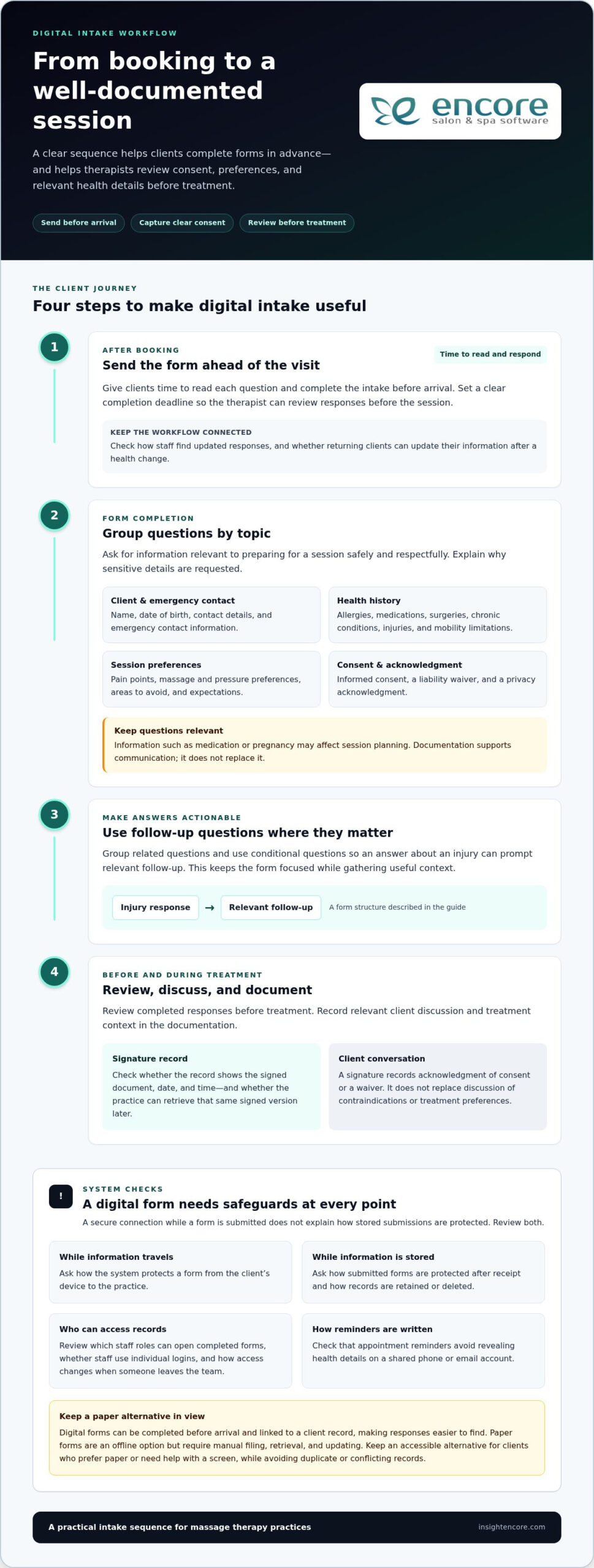
Yes. Clients can complete massage intake forms online before an appointment when the practice provides a digital form. Sending it after booking gives clients time to read each question and lets therapists review responses before the session. A digital signature can record a client’s acknowledgment of consent or a waiver. The form should make clear what the client agreed to, rather than simply adding a name at the bottom of a page.
Check what the signature record captures. For example, does it show the signed document, date, and time? Can the practice retrieve that same signed version later? These details support consistent documentation if a client asks what they agreed to. Keep consent language readable, explain the form’s purpose, and give clients a way to raise questions before signing. A signature supports a clear record, but it doesn’t replace a conversation about contraindications or treatment preferences.
Encryption is another part of the review. Ask how the system protects a form as it travels from a client’s device to the practice, and how it protects stored submissions. These are separate considerations. A secure connection during submission doesn’t explain storage safeguards on its own. Also consider who can open completed forms, whether staff use individual logins, and how access changes when someone leaves the team.
Paper forms offer a familiar, offline option, but staff must file, retrieve, and update them manually. A misplaced folder can expose private details. Digital forms can be completed before arrival and linked to a client record, making responses easier to find. They depend on reliable device access and a process for clients who prefer paper or need help completing a screen. Keep an accessible alternative without creating duplicate or conflicting records.
Build the digital process around the booking and upcoming session:
- Send the form after booking, with a clear completion deadline before arrival.
- Group questions by topic, such as health history, preferences, consent, and emergency contact.
- Use conditional questions so an answer about an injury can prompt relevant follow-up.
- Review responses before treatment and record any client discussion in documentation.
Customization keeps forms relevant. A sports massage practice may ask about recent injuries and areas to avoid; another practice may focus on pressure preferences and mobility. Avoid collecting details that don’t support intake or treatment planning. Test the form on a phone, make required fields clear, and confirm completed responses appear in the correct client record.
For smoother workflows, connect form completion with appointment tracking and reminders. A client who hasn’t submitted a form can receive a reminder before arrival, while staff can see which responses need attention. To explore how appointment and client workflows can work together, view the practice management option.
Choosing software for solo practitioners, clinics, and franchises
The right intake software matches your practice’s booking, documentation, and staffing needs. A solo therapist taking cash-pay appointments may need a streamlined client record and an easy way to collect signed forms. A clinic coordinating several therapists needs clear role-based access and shared processes. A franchise may prioritize consistent templates and workflows across locations.
For a solo practice, keep the process manageable. Look for forms clients can complete before booking or arrival, and records you can quickly find before a session. For example, a therapist working alone might use one intake template and update client details when health information changes. Avoid a complicated workflow that adds administrative work without improving preparation or recordkeeping.
Group practices need to balance shared access with individual responsibility. A clinic with massage therapists and other wellness practitioners may need separate intake templates for different services. Each practitioner should be able to find relevant client details without treating every record as interchangeable. Consider how the software assigns appointments, links a form to the correct therapist, and keeps signed documentation connected to the right client profile.
Insurance-based practices should align intake and documentation needs with their existing administrative process. Identify which client details staff use for appointment coordination, treatment records, and payment handling. Then assess whether the software organizes those details to support the practice’s workflow. Don’t assume an intake form handles insurance processes; the questions on a form and the record system serve different purposes.
Cash-pay practices can often keep intake focused on treatment preparation and client communication. A solo therapist may prioritize emergency contact details, health history, preferences, consent, and a clear payment record. Choose templates that let you adjust questions for your services instead of sending every client through irrelevant fields. A form for relaxation massage, for example, may need different prompts from one for sports massage.
For franchises, consistency matters across locations, while local teams still need practical flexibility. A shared template can keep core questions and consent language aligned. Location-specific fields can capture details relevant to each branch’s scheduling or services. Before adopting a system, compare how managers maintain templates, how staff see updates, and how records stay organized when clients visit different locations.
Use these criteria to compare systems:
- Match templates to each service and client group.
- Connect booking details with the correct practitioner and client record.
- Set access according to staff roles and responsibilities.
- Keep signed forms easy to retrieve alongside relevant documentation.
- Review how the system handles insurance-related records and cash-pay workflows.
The right fit supports proper intake without adding unnecessary steps. Start with a representative booking, such as a new client appointment, and trace the process from form completion to therapist review. This practical test can reveal whether the software suits a solo practice, a multidisciplinary clinic, or a growing franchise.
The best option is software suited to the practice’s size and workflow, with adaptable forms, easy access to client records, and processes that avoid unnecessary administrative work. Solo therapists may favor a simple setup, while clinics and franchises may need shared access, role-based permissions, and consistent templates.
Does therapy client intake software need to be HIPAA compliant?
HIPAA may apply to massage intake records in the United States if a practice qualifies as a covered entity or business associate. The U.S. Department of Health and Human Services explains that protected health information includes individually identifiable health information maintained or transmitted in any form. A client’s name connected to an injury or treatment note can therefore require careful handling. Software alone doesn’t determine whether the rules apply; the practice’s legal role and information flow matter.
For treatment continuity, records should help a therapist understand what happened during earlier visits. Consider a returning client whose intake notes mention shoulder discomfort and limited movement. The next therapist needs relevant context, not an unfiltered file of unrelated details. Use client records to connect the current session with prior observations, client preferences, consent, and agreed treatment goals. Clear organization supports continuity while keeping staff focused on information relevant to care.
SOAP notes can provide a consistent structure for documenting a session. “Subjective” captures what the client reports, such as tenderness after exercise. “Objective” records observable details, while “Assessment” summarizes the therapist’s professional interpretation. “Plan” describes the intended follow-up or treatment approach. A software template can make these fields easier to complete, but shouldn’t encourage copy-and-paste notes that miss meaningful changes between visits.
Review how records move through the software. A therapist, for example, may need to open the current intake, review previous notes, document the session, and locate the signed consent record. Each step should lead to the correct client profile. Separate staff accounts and role-based access help limit who can view or edit records. The practice should also understand its retention and deletion processes, especially if a client requests record updates.
Useful record features support clinical context without turning every detail into a permanent note. A therapist can record that a client reported discomfort, asked to avoid a specific area, and agreed to a modified session. The note should distinguish client statements from therapist observations. This helps another practitioner understand what was reported and what was observed, rather than treating both as the same kind of information.
Before adopting a system, test a sample client journey. Open an existing profile, review its intake and SOAP notes, document a follow-up session, and check that consent remains accessible. Then confirm that the staff member who needs the record can find it. Convenience matters, but it should support accurate treatment records, not broaden access or replace professional judgment.
Comparing structured intake software with basic form builders
A basic form builder collects answers; structured intake software connects those answers to practice workflows. For example, a form may gather a client’s preferences but leave staff to copy them into a separate record. A structured system can organize intake responses alongside client information and appointments. The practical difference is what happens after submission: does the answer remain a standalone document, or help staff prepare for the visit?
Start by defining the form’s purpose. If you need a one-time questionnaire for a small practice, a basic builder may do the job. If you need responses linked to repeat appointments, client history, and billing records, a connected system may reduce duplicate entry. Compare the actual workflow, not just the form editor. Ask how staff find a completed form when preparing for a returning client.
Therapist intake software and electronic health record (EHR) tools can overlap, but they serve different needs. Intake software focuses on collecting client details and organizing practice processes. An EHR is designed around clinical records and may include documentation workflows beyond intake. A massage practice should determine whether it needs a focused intake and client-management tool, a broader clinical record system, or both. The answer depends on which records practitioners maintain and how they use them.
Software categories also differ in their main purpose. A booking platform manages appointments; a form builder gathers answers; practice-management software can connect scheduling with client records and administrative tasks. Don’t assume a product covers all three. Trace one new-client journey: appointment booked, form completed, response reviewed, and client record updated. Note where staff must switch systems or re-enter information.
- Basic form builder: Useful for a standalone questionnaire or simple feedback form.
- Structured intake system: Better suited to organized templates and client-linked responses.
- EHR tool: Consider when clinical documentation and records form a central part of practice operations.
- Practice-management platform: Compare it when appointments, client records, and billing need a shared workflow.
Test customization with real examples. Create separate templates for an initial consultation and a returning-client update. Check that each question is easy to understand, clients can share relevant preferences, and staff can find answers before treatment. Then review what happens when a client updates a response. A suitable system keeps the latest information clear without creating conflicting copies.
Choose the category that matches your daily work, then compare its intake workflow with your current process. This makes gaps visible before you move client records or change how staff handle appointments.
Encore Salon & Spa Software: Encore Salon Software
Encore Salon & Spa Software offers Encore Salon Software for practices that want appointment booking and client management as part of their broader business workflow. If your massage practice also needs to coordinate bookings, client relationships, inventory, and point-of-sale transactions, it may be worth considering. Encore Spa Software supports spa operations, while Chair/Booth Renter Software is designed for renter-based businesses.
Use the needs you identified earlier to guide your assessment. Consider how appointment management and client records should support day-to-day operations, while evaluating intake privacy and clinical documentation as separate requirements. A well-matched system should fit the work your practice needs to manage.
For more information, contact Encore Salon & Spa Software.
Make your next software decision with confidence
Turn your requirements into a practical evaluation. Choose a real client journey, from booking through record review, and use it to assess workflow fit alongside privacy and documentation needs. This gives you a clearer basis for deciding whether massage therapy client intake form software supports the way your practice works, rather than simply offering an appealing feature list.
For broader business management, Encore Salon & Spa Software offers Encore Salon Software, Encore Spa Software, and Chair/Booth Renter Software. Consider which offering aligns with your business model and the operations you want to organize. Keep clinical recordkeeping and your privacy obligations central to the decision.
A thoughtful choice can help you build a more organized practice, one practical decision at a time.
Frequently Asked Questions
What should a pre-intake questionnaire actually ask?
A pre-intake questionnaire should collect information that helps you prepare for the client’s session, not every detail about their life. Ask what outcome they hope for, which areas they want addressed or avoided, and what pressure feels comfortable. Include space for relevant health changes and an emergency contact. Use plain-language prompts, clearly mark essential questions, and explain how sensitive questions support treatment planning.
What features should massage therapy client intake form software include?
Choose massage therapy client intake form software with customizable forms, clear consent capture, searchable client records, and an easy way to review responses. Staff should be able to find the right profile without sorting through unrelated appointments. Also consider whether you can revise questions as services change and retrieve records in a usable format. The right feature mix depends on how your practice collects, reviews, and maintains client information.
How do massage therapy intake form platforms compare in features and usability?
When comparing massage therapy client intake form software, test the same task in each platform: create a client record, complete a sample form, and find its answers before an appointment. Notice how many screens or manual transfers the process requires. Then assess whether labels make sense to clients and staff, and whether the interface works comfortably on a phone. A long feature list matters less if everyday tasks are hard to complete.
How do massage therapists create and customize digital intake forms?
Start with a form for a specific purpose, such as first visits, and add only questions relevant to that service. Create a separate update form for returning clients so they can report changes without repeating every answer. Use conditional prompts when a response needs clarification, and preview the form on a phone before sharing it. Ask a colleague to complete it and flag any confusing wording.
Does massage therapy intake software integrate with scheduling, payments, and practice management tools?
Some platforms bring scheduling, client records, and payment tools into one business workflow, while others keep forms separate. Check how information moves after a booking, whether staff can find the relevant client record, and how payment entries connect to appointments. Encore Salon & Spa Software offers an Online Booking Module, Client Management System, Integrated Credit Card Processing, and Client Intake Forms as an add-on.
Which massage therapy intake software offers HIPAA-compliant forms and secure data storage?
Choose software that documents its security safeguards and explains how it handles protected information, including whether the vendor will sign a business associate agreement when needed. Review access controls and record retention rather than relying on a HIPAA-compliance label alone.
Disclaimer
This article is general in nature and may contain errors, please verify all claims with your sales rep

