

A paper appointment book is still effective if you want a clear, hands-on view of your schedule and are comfortable entering appointments yourself. A digital calendar is generally easier for recurring bookings, quick changes, and sharing schedules. Neither option suits everyone; the right choice depends on how you plan and manage appointments.
Paper’s simplicity has real appeal. Writing an appointment down can help you focus on it, while a planner shows your schedule without competing notifications. But manually recording recurring appointments and updating changes can become a chore, especially when the schedule is busy.
This comparison examines how paper appointment books and digital calendars handle scheduling, manual entry, and recurring appointments. You’ll see when each option works well, which limitations to consider, and how to choose a setup that keeps you organized without adding unnecessary work.
Key Takeaways
- Use a paper appointment book when a visible, hands-on schedule fits the way you plan and you can keep entries current.
- Consider how manual updates and recurring appointments affect your routine before choosing paper as your only calendar.
- Build a simple double-booking check into your planning process, and keep appointments in one reliable system.
- For a business, weigh how the scheduling method supports both day-to-day appointments and coordination with others.
- Salon, spa, booth-rental, and tattoo businesses can explore Encore’s software options when they need scheduling tools suited to their work.
What are the advantages of a paper appointment book over a digital calendar?
A paper appointment book gives you a fixed, visible record of your plans. Open a weekly spread to see appointments, open hours, and personal commitments together. This overview can reveal crowded days before you add another task. Unlike a digital calendar, a paper page doesn’t prompt constant rescheduling with alerts or easy edits. You decide when to change the plan instead of reacting to notifications.
Handwriting may also help you remember scheduled activities and follow through. In the first of three studies, participants reported whether they completed plans two weeks after recording them. Paper-calendar users were more likely than mobile-calendar users to complete activities as scheduled and on time. The third study found that a higher percentage of paper-calendar users completed a self-created activity than mobile-calendar users. These results make paper worth considering when remembering and completing personal plans matters.
Writing by hand adds a deliberate step to planning. To book a dentist appointment, for example, you write down the date, time, and location instead of tapping through a screen. That pause gives you a chance to check the appointment against the rest of your day. Handwritten planning is also associated with better memory, focus, and comprehension. A paper page can help you engage with a commitment, not just store it.
A weekly paper spread makes competing priorities easier to compare at a glance. Mark work meetings, errands, and personal plans in different colors, then spot a packed afternoon quickly. This layout suits people who prefer seeing the whole week together rather than scrolling through calendar screens. Writing down a commitment can also make it feel more deliberate. A handwritten note to prepare documents before a meeting keeps the task visible beside the appointment.
Paper works without a charged device or an internet connection. You can open the book during a power outage, in a low-signal location, or while keeping your phone away during focused work. That independence can reduce interruptions from digital alerts. Task-switching, including briefly checking a notification, can reduce productivity for up to 20 minutes. A paper planner won’t generate those alerts, so your schedule stays visible without pulling you into another app.
Paper also lets you choose how information appears. Use a margin for travel time, a symbol for confirmed appointments, or a short note beside a client meeting. Unlike a fixed digital display, a page can combine an appointment with the context you need to act on it. For example, write “bring intake form” beside a scheduled visit. This approach works well when your planning needs are straightforward and you prefer one physical overview.
Paper planning remains relevant even as digital calendars lead adoption. In a 2018 survey, 70% of respondents relied primarily on a mobile or desktop calendar, while 28% relied primarily on paper. The figures show different preferences, not that one method suits everyone. A paper appointment book can still be effective when handwriting supports your focus, a weekly view helps you plan, and manual changes remain manageable. The deciding question is whether that routine helps you act on your schedule consistently.
What are the disadvantages and risks of using a paper appointment book?
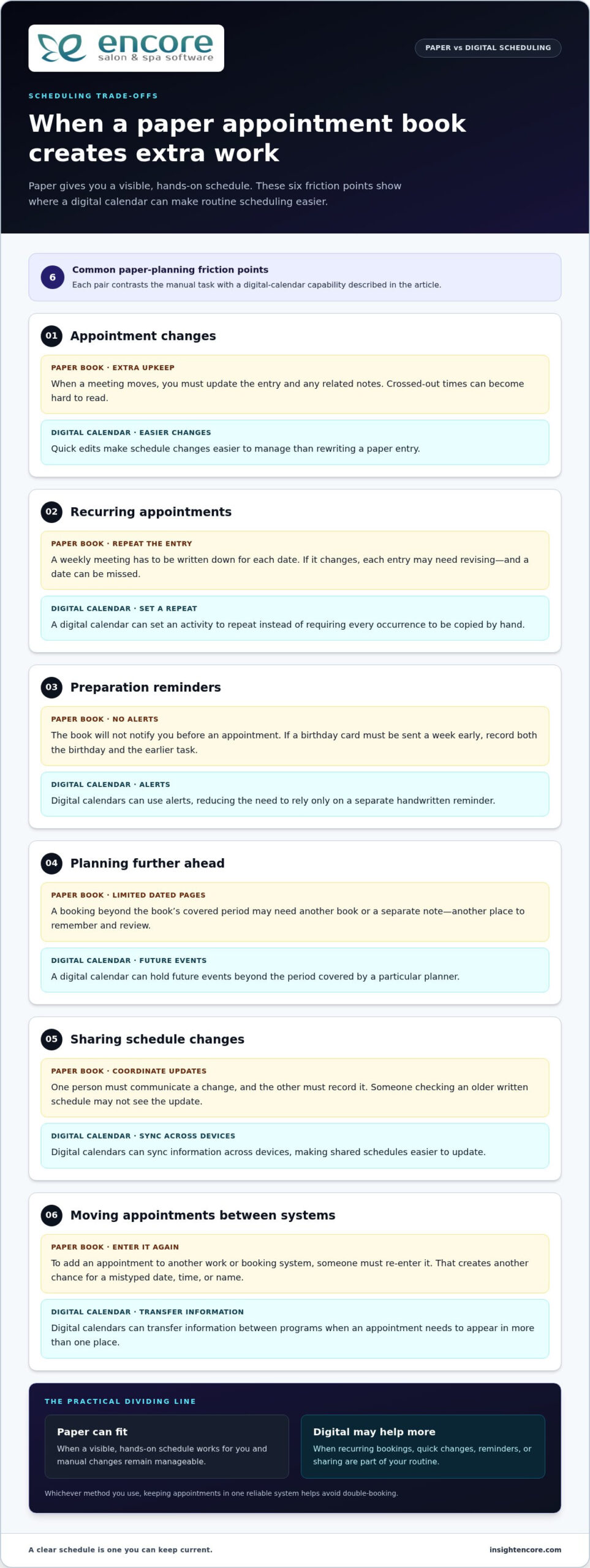
A paper appointment book relies on you to enter every commitment and keep it current. If a meeting moves from Tuesday to Wednesday, you must update the original entry and any related notes. A crossed-out time can become hard to read, especially when several changes crowd the page. An outdated entry may leave you relying on a schedule that no longer reflects the day.
Recurring appointments require repeated effort. A digital calendar can set an activity to repeat, but with a paper book you must write down each occurrence. For a weekly team meeting, you need to add every date and revise each entry if the meeting changes. A missed entry can leave a gap, and copying the series by hand makes it easier to overlook a date.
Paper also lacks an alert system for reminders. If you need to prepare for an appointment, the book won’t notify you beforehand. For example, remembering to buy and send a birthday card a week before the birthday means recording both the birthday and the earlier task. Without that separate note, preparation can slip past while the main date remains visible.
Planning far ahead can be awkward when an appointment book ends with its covered period. If a client books a visit beyond the last dated page, you may need another book or a separate note to record it. That creates another place to remember and review. A digital calendar can hold future events beyond the period covered by a particular planner.
Sharing a paper schedule takes extra coordination. If two people need to know about a changed appointment, one must communicate the update and the other must record it. A phone call might change a meeting time, for instance, but a colleague checking an older written schedule won’t see the change. Digital calendars can sync information across devices, making shared schedules easier to update.
Paper entries don’t transfer automatically to other applications. If an appointment needs to appear in a separate work or booking system, someone must enter it again. This duplication creates another chance for a mistyped date, time, or name. Digital calendars can transfer information between programs, which helps when an appointment needs to appear in more than one place.
Capacity can be harder to assess when appointments, travel, and tasks are recorded on separate pages or notes. Before accepting a new commitment, you may need to scan several sections of the book and compare them. A digital calendar can show how activities overlap, helping you judge whether another task fits. Paper can still work, provided you consistently record the details that affect availability.
To reduce these risks, choose one main planning tool and build a regular review habit around it. At the start of each day, check for changed times, missing recurring appointments, and preparation tasks. When an appointment moves, update its entry immediately and clearly mark the old time. This routine helps keep a paper schedule usable, but its reliability still depends on manual upkeep.
Digital calendars may make it easier to see open time at a glance, but a paper book still depends on checking every relevant page and keeping each entry accurate. Missing five minutes per day adds up to 30 hours in a year, an estimate that illustrates how small scheduling gaps can accumulate. Recurring tasks need to be written in by hand rather than set up automatically, so each repetition creates another opportunity for omission. Tools like Encore Salon & Spa Software offer streamlined digital solutions for businesses that find traditional paper appointment books lacking the automation and flexibility needed for tightly timed commitments.
How can I organize appointments and avoid double-booking with a paper planner
Choose one paper planner as your official schedule. Don’t split appointments between a desk calendar, pocket notebook, and loose notes. Each extra location creates another place to check before accepting a commitment. Keep the planner where you handle scheduling, such as beside your phone or at your reception desk. When someone requests a time, open the planner before agreeing. This makes the written schedule your single source of truth.
Set up the pages before entering appointments. Use the monthly view to mark deadlines, planned time away, and important dates. Use the weekly or daily pages for specific meetings and tasks. If a week is especially busy, write work appointments in one color and personal commitments in another. Add names, locations, and preparation notes beside each entry. A note such as “bring signed form” makes the record more useful than a time alone.
- Record the full appointment. Write the date, start time, expected length, name, and location. For a visit at a client’s office, include the address or a clear travel note. A short label such as “meeting” may not tell you which person or place the entry concerns.
- Check the surrounding schedule. Before accepting a new booking, scan the day and the adjoining days. Look for travel, preparation, and follow-up tasks, not just empty appointment lines. A free slot may still conflict with time needed to reach another location.
- Leave practical space between commitments. Add a note for travel or setup when an appointment requires it. For example, mark travel after an off-site meeting before placing another commitment nearby. This makes the page reflect the time the task actually occupies, not only its scheduled start.
- Update changes immediately. When a meeting moves, cross out the old entry so it cannot be mistaken for current information. Write the replacement time clearly and update related notes. If the change affects another person, tell them directly rather than assuming they can see your planner.
- Review the schedule at a consistent point. Check the next day before finishing work, then compare new requests against the written plan. Look for missing details, overlapping times, and tasks that need preparation. This review gives you a chance to resolve a conflict before it becomes a missed appointment.
Recurring commitments need a deliberate recording routine. If a class meets weekly, add each date covered by the planner, then review the pattern when a new page begins. Don’t assume that writing down the first meeting will remind you about the rest. For tasks tied to an appointment, record the task on the day it needs to happen. A birthday-card reminder, for instance, belongs on the day you plan to buy or send it, not just on the birthday.
Use one clear method for cancellations. Draw a line through a cancelled appointment and write “cancelled” beside it rather than erasing it completely. The marked entry explains why a time slot is open and prevents an old commitment from being mistaken for a current one. If a colleague also schedules appointments, agree on who records changes in the shared book. A paper system works best when everyone follows the same entry and update routine.
Choose a planning method you’ll maintain, and stick to one main tool. A paper planner can help prevent double-booking when every request is checked against it, changes are recorded promptly, and the schedule is reviewed regularly. If several people need to book or update appointments independently, a shared digital calendar may suit that workflow better.
Are paper appointment books suitable for businesses and healthcare providers?
Yes, a paper appointment book can suit a business with a straightforward schedule and a consistent booking routine. A solo practitioner, for example, can record appointments, breaks, and preparation notes in one daily view. The method works best when one person maintains the book and checks it before confirming each new booking. Coordination becomes harder as more staff need to view or update the same schedule.
Paper remains a real choice among calendar methods. In a 2018 survey, 28% of respondents said they relied primarily on a paper calendar. That figure describes respondents’ reliance, not how well paper works for every business. A business should consider who makes bookings, how often appointments change, and whether staff need to share updates. A single provider managing their own day has different coordination needs from a reception team booking for several practitioners.
For a small business, a paper book can provide a clear front-desk record. Staff can write down the customer’s name, appointment time, service, and relevant preparation notes. A daily review can help identify gaps and conflicts before the day begins. Clear ownership matters: if one employee records bookings while another handles changes, both need to update the same book promptly.
Paper becomes less convenient when several people schedule appointments independently. A receptionist may record a booking while a practitioner accepts another commitment elsewhere. Separate notebooks or desk calendars make it difficult to see the full schedule in one place. A shared digital calendar can sync information across devices and make changes easier to share. Choose based on how staff coordinate, not simply on a preference for paper or screens.
Healthcare providers need to consider both scheduling and how appointment information is handled. A paper diary may give a provider a personal view of consultation times, but it won’t automatically alert staff to changes. If a patient calls to reschedule, the person taking the call must update the entry and notify anyone affected. Avoid including unnecessary personal details in visible appointment notes, and store the book where casual visitors cannot read it.
For a clinic with multiple providers, rooms, or staff members, a single paper book can be difficult to maintain. Changing one appointment may affect room use, preparation, or another clinician’s availability. Teams need a shared procedure for recording bookings, cancellations, and updates. They should also decide who checks the day’s schedule and how staff communicate changes. Without consistent routines, even a neatly written planner can show outdated information.
Use a paper appointment book when one person controls bookings, the schedule is straightforward, and manual updates are manageable. Consider a digital system when appointments recur, change frequently, or are shared across staff and locations. You can also use paper for personal planning while keeping shared bookings in a common calendar. The best setup is one staff use consistently to keep the current schedule clear.
A clear process for recording bookings, changes, room assignments, and staff notifications helps ensure each update reaches the people affected. A paper planner offers a fixed view of a person’s time, unlike digital tools with alerts and easy rescheduling. That steadier view may suit providers who want to review the day without relying on prompts, but someone still needs to make and communicate changes. Teams can agree who maintains the book, when entries are checked, and how changes are shared with colleagues. They can also limit notes to information needed for the appointment and put the book away when it is not in use. The key question is whether a fixed, carefully maintained record suits the provider’s workflow and whether staff can keep it current as appointments change.
Encore Salon & Spa Software: Encore Salon Software
Encore Salon & Spa Software offers Encore Salon Software for salon operations, including appointment booking and client management. If paper entries are becoming difficult to coordinate with bookings and client records, software can bring those tasks into one management system. The right fit depends on your business and scheduling needs.
Encore Spa Software supports spa businesses, while Chair/Booth Renter Software is tailored to chair and booth renters. Tattoo studios can use Tattoo Studio Software. These solutions help businesses choose tools suited to their work instead of relying on a paper planner alone. A paper book may still suit personal planning, while software can support appointment management across business operations.
Contact Encore Salon & Spa Software to discuss your scheduling needs.
Choose a scheduling system that can grow with your routine
Whether a paper appointment book is still effective depends on how well it supports your current workflow and the changes you expect. If you can manage your schedule by hand, keep using a planner you can maintain consistently. If coordinating bookings is becoming harder, consider a system designed for your business and its appointment needs.
Encore Salon & Spa Software offers Encore Salon Software, Encore Spa Software, and Chair/Booth Renter Software. These options give salon, spa, and booth-rental businesses a relevant next step when paper scheduling no longer suits day-to-day operations. Choose a planning approach that keeps you organized and gives your team a clear process to follow.
Contact Encore Salon & Spa Software
Your schedule should support good work, not create unnecessary friction. When you’re ready, take the next step and build a routine that feels clear and manageable.
Frequently Asked Questions
Are paper appointment books effective for managing schedules?
Yes, paper appointment books can manage schedules effectively when bookings are recorded consistently and the schedule isn’t shared among many people. To assess your setup, compare the planner with actual appointments at the end of a typical week. Look for missed changes, unclear entries, or bookings that weren’t copied into the book. If these problems keep recurring, a digital calendar may better support how your schedule is managed.
Disclaimer
This article is general in nature and may contain errors, please verify all claims with your sales rep