

window.dataLayer = window.dataLayer || []; function gtag(){dataLayer.push(arguments);} gtag('js', new Date()); gtag('config', 'UA-206511945-1');
Search
Categories
Uncategorized

Digital Consent Forms for Tattoo Parlours: What to Include

A consent form is more than a signature on a screen. You can draft your own wording, but digital consent forms for tattoo parlours should reflect the rules that apply to your location and the work you perform. A legal professional can review whether the form suits your circumstances.

A clear, complete form should also be easy for clients to finish. A digital version can collect client details, health disclosures, age and ID information, the agreed tattoo and placement, and a signature before work begins. It can also record that the client received and understood the aftercare instructions.

This guide explains what to include, how to handle age checks and aftercare, and how digital forms can simplify signing and record retrieval. You’ll also learn how to keep the process organized, from sending a form to finding it alongside the client’s appointment history.

Key Takeaways

  • Record the agreed design and placement so the client’s consent is clear before work begins.
  • Build age checks around identification and the rules that apply in your location.
  • Include aftercare information and a way to note that the client received and understood it.
  • Keep signed forms connected to client records so staff can retrieve them when needed.
  • Explore Encore Salon and Spa Software’s Tattoo Studio Software when you want studio management tools alongside your digital consent process.

A useful consent form records the agreed tattoo, its placement, and the client’s signature. A digital form should also make it easy to connect each record with the right client and appointment.

Placement and Design Consent Records

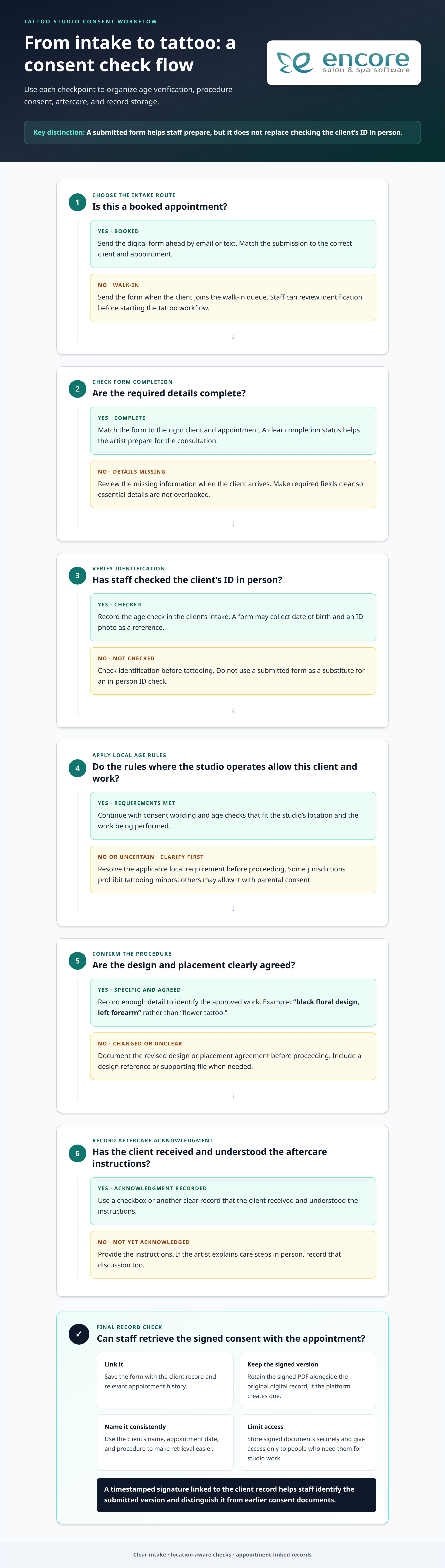
Record the design and placement before tattooing begins. For example, write “black floral design, left forearm” rather than “flower tattoo.” This gives the client and artist a written reference for the agreed work. If the design or placement changes, document the revised agreement before proceeding.

Connect the client’s consent to the specific agreed details, not just a generic waiver. Include a design reference or supporting file when needed, and make required fields clear so essential information isn’t missed. The signed form should reflect the specific procedure the client approved.

For a sample age statement, a form may say the client is over 18. Tattoo requirements differ by location and work performed, so templates need to fit the rules that apply. A tattoo studio’s management and record workflow is relevant when deciding how consent fits with client information.

Signed PDF and Client Record Storage

Save the completed form with the client’s record. If the platform creates a signed PDF, retain it alongside the original digital record. Use a consistent file-naming method, such as the client’s name, appointment date, and procedure, to make retrieval easier.

Store the signed document securely and limit access to people who need it for studio work. Poorly secured files can expose personal details; incomplete files can leave important consent or procedure details unclear. In the EU, the European Union says GDPR treats health data as a special category of personal data subject to stricter processing requirements.

There isn’t one standard cost for digital consent platforms. Pricing depends on included features, storage, and access needs, with costs provided after a quote request.

Appointment-Linked Consent Records

Link each signed consent record to the relevant appointment and client profile. Staff can then find the document in the appointment history instead of searching separate folders. Keep the date and procedure details with the record, especially when a client has several appointments or returns for more work.

Cloud storage can make records available through a studio dashboard, while organized client profiles support retrieval. Check whether the platform keeps forms together and shows which appointment each belongs to. Compare the practical essentials: required fields, digital signatures, PDF access, client-record storage, and search tools.

To reduce gaps, make required fields clear and establish a routine for saving completed forms. A timestamped signature linked to the client record helps identify the submitted version. Staff should be able to find it by client or appointment and distinguish it from earlier consent documents.

Tattoo aftercare, age verification, and client identification

Give each client clear aftercare instructions and record their acknowledgment. A digital form can include a checkbox confirming the client received and understood the instructions. If an artist explains care steps in person, record that discussion too. The client profile can then show what guidance accompanied the appointment, rather than relying on staff memory.

Check identification before tattooing and record the age check in the client’s intake. A form can collect a date of birth and accept an ID photo upload, giving staff a reference. Some jurisdictions prohibit tattooing minors, while others may allow it with parental consent. Base the age-check process on the rules where the studio operates.

For walk-ins, staff can review identification before starting the tattoo workflow. For booked appointments, send the form link ahead by email or text, then review any missing details when the client arrives. A submitted form helps staff prepare, but it doesn’t replace checking the client’s ID in person.

Client contact fields can include a name, email address, phone number, and emergency contact. Explain the purpose of each field. Booking reminders relate to an appointment, while a newsletter or promotion serves a different purpose. Use a separate marketing preference so clients can choose whether they want promotional follow-up without confusing it with consent to the tattoo.

Online bookings and walk-in queues create different starting points. Send a digital form after an online booking or when someone joins a walk-in queue. Staff can then match the submission to the correct client and appointment. A clear completion status helps artists spot missing information before the consultation.

Prepare templates for the studio’s location and the languages clients use. Keep the wording easy to understand, and have a legal professional review it for the applicable rules. If you provide translated versions, retain the exact version each client signed. A saved copy helps staff distinguish signed wording from later template edits.

Limit collected information to what the studio needs for its process. Set a clear path for retrieving a client’s signed form and responding to requests about their personal information, while accounting for retention requirements. If you’re organizing booking and client records together, explore tools for tattoo studio management.

Digital form storage and retrieval

After a client signs a waiver, save the completed form with their client record. Keep the signed version separate from blank templates and unsigned drafts. For example, label files with the client’s name, appointment date, and procedure. Consistent filing helps staff find the right document without sorting through unrelated forms. Digital consent forms for tattoo parlours need a defined route from submission to the client profile.

Use access controls and encrypted storage for signed PDFs, especially when they contain health disclosures or ID images. Limit access to staff who need the records for studio work. A password-protected file alone doesn’t show who can open it or where copies are stored. Set clear permissions for viewing, downloading, and sharing each record, and remove access when staff no longer need it.

Choose a secure digital storage process staff can follow during busy appointments. Save each submitted form to its assigned client profile, then confirm it appears there. Digital forms can sit alongside appointment history and past transactions, making the dashboard a practical place to retrieve them. Use the same filing steps across artists and shifts.

Cloud storage can make records available through the studio’s system, while automatic backups can help preserve saved forms. Backups don’t replace access controls or a retrieval plan. Decide who handles a missing file, how staff find an older appointment, and how records are restored if the usual system is unavailable. Test the process with a sample client record before relying on it during a busy shift.

Make retrieval straightforward. Search by client name or appointment, then confirm the procedure and signature date before opening a document. If a client has several visits, link each consent form to its matching appointment. This helps staff distinguish an earlier waiver from the record for the current work.

A QR code can direct a walk-in client to the correct digital form. After submission, route the form through the same filing process as one sent before booking. Staff can check the client profile for a completed record instead of keeping separate paper notes. Clear instructions at the kiosk or front desk help clients submit the right form and reduce filing errors.

Set a retention schedule based on the applicable statute-of-limitations period. Tattoo studios should keep consent forms for at least that period, typically three to six years. The exact timeframe depends on the jurisdiction. Include a process for client requests to access or delete personal data, while accounting for legal retention requirements.

Review the process whenever staff change filing instructions or form templates. Preserve the version each client signed; don’t overwrite it with a revised waiver. A dated record of the current template and a separate copy of each completed form help distinguish policy updates from past consent documents. This gives digital consent forms for tattoo parlours a reliable trail from submission through retrieval.
Digital Consent Forms for Tattoo Parlours: What to Include

Electronic signatures and mobile-friendly forms

A digital form should let clients read the consent document, confirm their agreement, and sign before tattooing begins. Make the signing process clear on phones, tablets, and computers.

Age and Guardian Signature Settings

Set up the form to capture the client’s date of birth and age statement. Some jurisdictions prohibit tattooing minors, while others may allow it with parental consent. Use conditional questions to request guardian details only when needed. If a guardian must sign, send the form by email or text and keep their signed permission with the client’s submission.

Keep the steps clear: identify the signer, show the consent wording, and provide a signature field. Staff should review the submitted information and the client’s identification before proceeding. A digital form supports the process but doesn’t replace the studio’s age-check procedure or the rules for its location.

Creating, Signing, and Storing Forms

Start with a template that explains the procedure and presents the consent wording in readable sections. Include fields for client details, relevant disclosures, agreement, and signature. Mark required fields clearly so clients know what to complete. Conditional logic can hide questions that don’t apply, keeping the form focused for each client.

Clients can open a form from a website, booking system, appointment email, or in-studio kiosk. On a phone, short labels and uncluttered screens make each section easier to read before signing. A studio can also let clients review a PDF and sign on an iPad or iPhone during check-in.

After submission, save the timestamped signature and consent status to the client’s profile. Keep the signed version intact and separate from the editable template. This preserves the exact wording the client accepted, even if staff later revise the blank form. Store the completed document where staff can retrieve it from the client record.

Before using a template, have a legal professional review its wording and signing process for the studio’s location and circumstances. A waiver doesn’t absolve a studio of negligence, so don’t present a signature as a substitute for safe practice or clear explanations. If a client refuses to sign, don’t proceed with the treatment.

Test the signing process on a phone and a tablet before sharing it with clients. Confirm that the form displays properly, required fields are easy to find, and the final signature appears on the saved copy. A simple test submission can reveal confusing wording or a missing field before a client sees the form.

A digital consent form is a document clients read and complete on a screen. They provide requested details, confirm their agreement, and sign electronically; the information is then saved in the studio’s system. For example, a tattoo intake might record the planned work, relevant health disclosures, and the client’s acknowledgment in one submission.

The key difference from paper is how the form is submitted and stored. Instead of collecting a sheet at reception, a studio can share a form link before an appointment or offer a tablet at check-in. The completed form can be connected to the client’s profile, making the signed record easier to find later.

Tattoo and piercing forms can share a basic structure, but their questions should match the procedure. A tattoo form might ask about placement and design, while a piercing intake could focus on the piercing location and related health disclosures. Separate templates help avoid irrelevant fields while keeping each consent document specific to the work discussed.

Treat the form as part of a consent workflow, not just a digital waiver. The client needs to read the wording, answer relevant questions, and sign before the procedure begins. Staff then need to confirm the submission is complete and retrievable. Required fields and conditional questions can guide the process without giving every client the same prompts.

Language matters, too. If clients can’t understand the wording, they may struggle to make an informed choice. Prepare translated versions for the languages your clients use, then preserve the exact version each person signed. Keep signed documents separate from editable templates so later wording changes don’t alter earlier consent records.

Digital forms can also collect parental permission where applicable, alongside client details and signatures. Their purpose is to document what information the client received and agreed to, while studio staff remain responsible for explaining the procedure. Connect each submission to the relevant client and appointment rather than leaving a signature in an unlabeled file.

The practical takeaway for studios is simple: choose a form that fits the procedure, uses readable language, captures the necessary responses, and saves a retrievable signed record. A digital workflow can bring intake and consent into one organized process, whether clients complete it before arriving or at the studio.

Explore digital tools for tattoo studios

Encore Salon and Spa Software: Tattoo Studio Software

Encore Salon & Spa Software offers Tattoo Studio Software for studios managing appointments, client relationships, and daily operations. If your consent process sits alongside booking and client records, bringing those workflows into a studio management system can help keep them organized. Encore also supports appointment booking and client management, useful when you want studio information handled in one place.

Consider it when separate tools make it harder to manage appointments and client details together. Consent wording and signing procedures still need to reflect your studio’s needs and applicable requirements. To discuss how Tattoo Studio Software may fit your workflow, contact Encore Salon & Spa Software.

A practical next step is to map how clients move from their first booking to signed consent and follow-up. Identify where staff need to access each record and which steps feel disconnected. This gives you a clear basis for shaping digital consent forms for tattoo parlours around your studio’s daily workflow, rather than adding another isolated task.

For broader business management, Encore Salon and Spa Software offers Encore Salon Software, Encore Spa Software, and Chair/Booth Renter Software. The right tools depend on which business operations you want to organize alongside your tattoo studio’s processes.

If you’re ready to discuss your studio’s workflow, start a conversation with Encore Salon and Spa Software.

Contact Encore Salon and Spa Software

A thoughtful process starts with clear choices. Take the next step when it feels right for your studio.

Frequently Asked Questions

Can I write my own consent text?

You can draft your studio’s consent wording, then have a legal professional review it for your location and circumstances. Cover the agreed procedure, relevant client disclosures, and the client’s acknowledgment without suggesting a waiver removes responsibility for negligence. Keep the approved template separate from completed forms, so a later update won’t replace wording a client previously accepted.

How long should I keep consent forms on file?

Keep consent forms for at least the statute-of-limitations period that applies in your jurisdiction. The period is typically three to six years, but the applicable timeframe depends on location. Set a retention schedule for signed forms and related records, then document how staff handle access or deletion requests. Account for legal retention requirements before removing a client’s file.

What Does It Mean to Digitize Consent Forms?

Digitizing consent means moving the form, client responses, and signature into an electronic workflow. A client might open a form on a phone before an appointment or complete it on a studio tablet. The submitted information is saved in the studio’s system rather than kept only on paper. Staff can then organize and retrieve the digital record with the client’s other information.

What information should a tattoo consent form include?

Include the client’s identifying details, date of birth or age statement, and relevant health disclosures. Record allergies, skin conditions, medications, and previous reactions that may affect tattooing or healing. Describe the agreed procedure and placement, then provide space for the client’s signature. You can also record that aftercare instructions were received and understood. Tailor the fields to the procedure instead of asking every client identical questions.

Are digital tattoo consent forms legally valid in the United States?

A digital form’s legal effect depends on the location, circumstances, document wording, and signing process. Don’t assume that putting a paper waiver online automatically makes it legally binding. Have a legal professional review the form and electronic signing process for your studio’s circumstances. Whatever format you use, preserve the signed version and obtain consent before beginning work.

Do tattoo consent forms need electronic signatures or witness signatures?

Consent forms should be signed before tattooing begins. Whether a witness signature or a particular electronic signing method is required depends on the applicable rules and circumstances. Don’t treat a witness field as a substitute for reviewing signing requirements. Keep a copy showing the client’s completed signature and accepted wording, so staff can retrieve the correct record later.

What age and parental consent rules apply to tattooing in each U.S. state?

There isn’t one rule for every state: requirements can differ by state and by the work performed. Create location-specific procedures that tell staff what identification to review and whether guardian permission applies. Have the age-check template reviewed for the state where the studio operates, and don’t treat a signed form as a substitute for identification.

What health disclosures and contraindications should tattoo intake forms ask about?

Ask clients about medical conditions, medications, allergies, skin conditions, pregnancy, and breastfeeding. Include allergies to latex, adhesives, or pigments, plus previous reactions to tattooing or piercing. These questions help artists identify information that may affect skin, ink, or healing. Use clear, relevant fields and collect only the personal information the studio needs. Staff should review responses with the client before proceeding.

Disclaimer

This article is general in nature and may contain errors, please verify all claims with your sales rep
Categories
Uncategorized

Tattoo Shop Booking Software: The 2026 Guide to Streamlining Your Studio

What if your phone stopped buzzing with 2 AM booking inquiries, yet your calendar stayed full and your deposits were already paid? For most artists, the reality is much noisier. You’re likely juggling a flooded inbox, chasing down no-shows, and trying to manage your schedule across three different apps. It’s exhausting. You didn’t pick up a machine to spend half your day acting as a receptionist, which is why the right tattoo shop booking software is no longer a luxury; it’s a necessity.

We believe your focus should stay on the skin, not the screen. This guide will show you how to reclaim your time and protect your paycheck. We’ll explore how to eliminate the “DM chaos” and secure your income with automated deposits that stop no-shows in their tracks. We’ll also walk through how to centralize your communications and create a professional booking portal that matches your studio’s vibe. It’s time to silence the administrative noise and get back to the art.

Key Takeaways

  • Stop losing up to 10 hours every week to manual messages by moving your studio to a 24/7 online booking portal that handles the heavy lifting for you.
  • Protect your income and eliminate no-shows by implementing automated deposit collection directly through your tattoo shop booking software.
  • Streamline your “day-of” process with digital consent forms and intake paperwork that keep your shop organized, professional, and legally compliant.
  • Learn why choosing a stable, established platform with decades of experience is a smarter long-term investment than switching between unproven niche apps.
  • Identify and fix the specific “booking leaks” in your current process to ensure you never lose a potential client to a missed message or a slow response again.

Beyond the DM: Why Tattoo Shop Booking Software is Essential in 2026

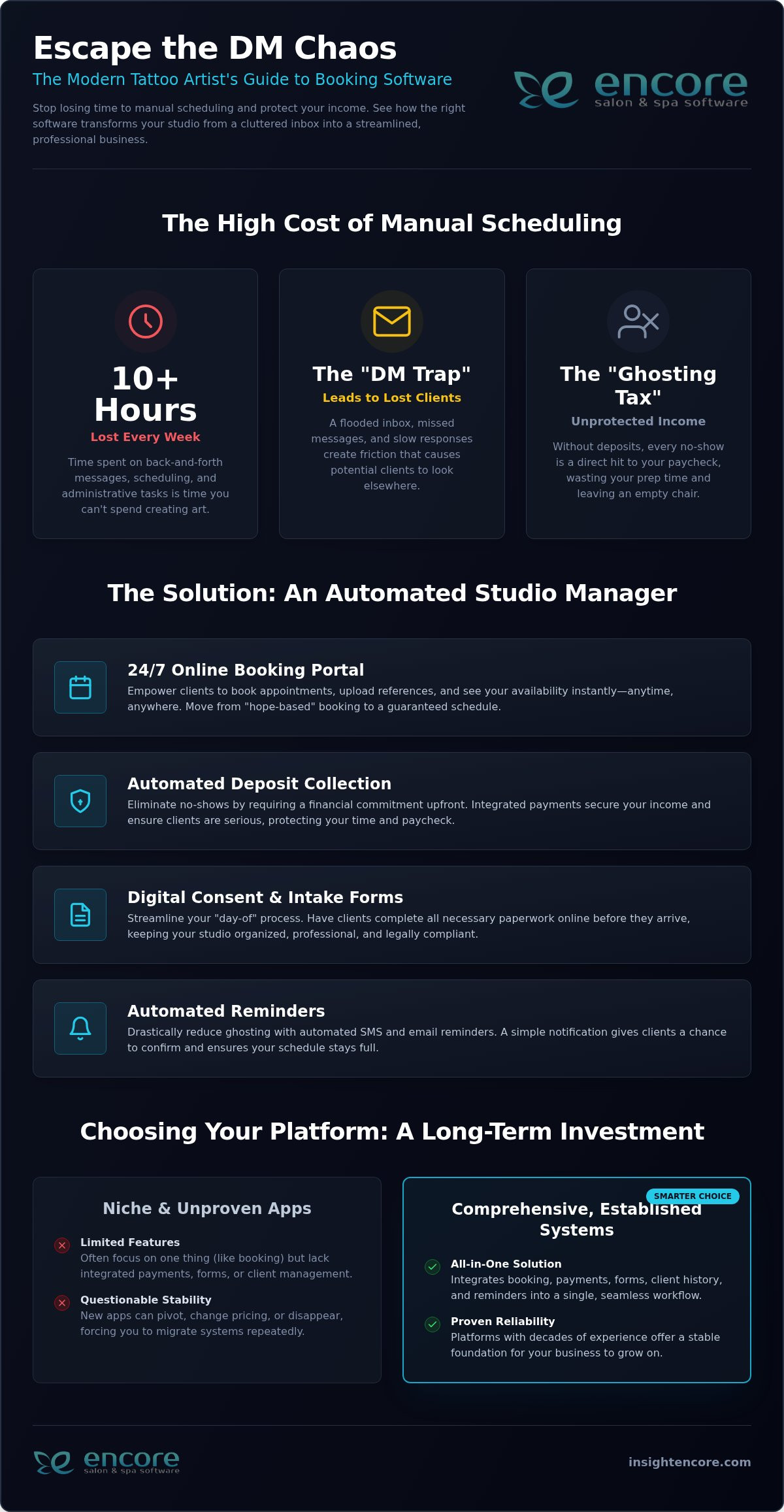
Think about the last time you sat down to draw, only to be interrupted by three Instagram notifications and a text message asking for a price quote. It’s a constant cycle. Managing a studio through direct messages isn’t just annoying; it’s a “DM trap” that swallows your productivity. Many artists find themselves losing up to 10 hours every week just on back-and-forth scheduling. By 2026, clients won’t just appreciate 24/7 online booking; they’ll expect it as a standard part of a professional experience.

Relying on manual messages creates a barrier between a client’s excitement and their commitment. When you use tattoo shop booking software, you remove that friction. Instead of waiting for you to finish a session to reply, a client can see your availability, upload their reference art, and pay a deposit instantly. This shift moves your business from “hope-based” booking to a model built on guaranteed income and clear boundaries. It’s about reclaiming your time so you can stay in the creative zone.

The Real Cost of Manual Scheduling

Every uncollected deposit is a “ghosting tax” on your business. Without a financial commitment upfront, a last-minute no-show doesn’t just leave an empty chair. It wastes your preparation time and potential earnings. This manual overhead adds to a heavy mental load. Artist burnout often stems from the administrative noise of chasing people for information rather than the actual tattooing. If a client says, “I’ll book tomorrow,” without an immediate way to pay, there’s a high chance they’ll never book at all. Automation ensures that the moment of inspiration leads directly to a confirmed appointment.

Transitioning from Paper to Digital Management

Moving away from a physical calendar or a fragmented system of notes is about more than just saving space. It’s about centralizing your studio’s brain. When your client history, reference images, and notes are stored in one secure place, your workflow becomes seamless. You can see exactly what a client wanted six months ago without digging through old DM threads or paper folders. This transition is becoming the standard for studios that want to scale without the chaos. The same demand for streamlined digital scheduling is transforming other appointment-based service businesses as well — for example, pet grooming appointment software is helping groomers eliminate missed calls and fractured schedules in exactly the same way.

  • Accessibility: Access your schedule from any device with cloud sync.
  • Organization: Keep reference images linked directly to the appointment.
  • Trust: Present a professional, branded interface that builds confidence before the needle touches skin.

Adopting tattoo shop booking software is a clear signal to your clients that you value their time as much as your own. It transforms the studio from a chaotic inbox into a streamlined environment where the art always comes first. You aren’t just buying a tool; you’re investing in the peace of mind that comes with an organized business.

Core Features of High-Performance Tattoo Studio Software

Choosing the right tools for your studio isn’t just about finding a calendar. It’s about building a system that protects your time and your income. High-performance tattoo shop booking software acts like a digital studio manager, handling the logistical heavy lifting so you can stay focused on your clients. From the moment someone discovers your work to the final healing stages of their new piece, every touchpoint should feel professional and effortless.

One of the most critical components is automated deposit collection. By integrating credit card processing directly into your booking flow, you secure a financial commitment before the appointment is even confirmed. This simple shift transforms your business from a “handshake” model to a professional service. When a client puts money down, they’re far more likely to show up. If they don’t, your time is still compensated. It’s a fair way to respect both your craft and your schedule.

Beyond payments, modern systems handle the “day-of” chaos with digital consent forms and intake paperwork. Instead of scrambling for a clipboard while your client waits, you can have everything signed and stored before they even walk through the door. This creates a cleaner, more organized workflow that lets you get straight to the stencil. The same principles that drive efficiency in a modern barber shop POS system — integrated payments, digital intake, and automated reminders — apply equally to running a high-performance tattoo studio.

Automated Reminders and No-Show Protection

The psychology of a timely reminder is powerful. Life gets busy, and sometimes a client simply forgets. Sending an automated SMS or email 24 hours before a session drastically reduces ghosting. It gives the client a chance to confirm or reach out if something has changed. You can also customize your cancellation policy within the software, ensuring everyone is on the same page regarding late arrivals or rescheduling. For a deeper look at how to optimize this process, you can explore a professional appointment confirmation strategy to keep your chair full.

Client Relationship Management (CRM) for Artists

A great tattoo is a shared experience. Storing reference art, medical history, and specific ink preferences in a secure tattoo shop booking software database allows you to provide a personalized experience every time. You won’t have to scroll through months of DMs to find that one reference photo they sent. After the session, the system can even trigger automated aftercare follow-ups, showing your clients that you’re invested in their healing process.

You can also use Automated Marketing & Loyalty Programs to reward your regulars or fill those rare last-minute cancellations with a quick blast to your most loyal clients. If you’re ready to see how these features can transform your daily grind, you might want to explore a more streamlined way to work.

Evaluating Your Options: Niche Tattoo Apps vs. Comprehensive Systems

Choosing the right tattoo shop booking software often feels like a choice between two extremes. On one side, you have sleek “niche” apps that look great but often lack the backbone to handle real business growth. On the other, you find generic corporate tools that don’t understand why a deposit for a multi-session sleeve is different from a simple haircut. You need a system that offers the best of both: the specialized features of the tattoo world backed by decades of technical stability.

Reliability is the silent partner every artist needs. Since 1991, we’ve seen software startups come and go. A “v1.0” app might be trendy, but it can’t match over 30 years of refined code and industry experience. If your system goes down on a busy Saturday, you don’t want to wait for an automated chatbot response. You want a human ally with a “can-do” attitude to get you back on track immediately. Your software should scale with you naturally, whether you’re a solo artist today or managing a 10-chair studio tomorrow. The same logic applies across grooming and body art businesses — operators evaluating a barber shop POS system face identical decisions between niche tools and proven comprehensive platforms.

Managing Booth and Chair Renters

Many modern studios operate as a collective of independent contractors. This creates a unique management challenge. You need to balance individual artist autonomy with studio-wide reporting. Using specialized chair/booth renter software allows each artist to manage their own clients and schedules while the studio maintains a professional, unified front. It handles separate payment processing seamlessly. This ensures that funds go exactly where they belong without the manual accounting headaches that often lead to friction between artists and owners.

The “Built for Tattoo” Myth vs. Reality

There is a common myth that only “tattoo-only” apps can handle your specific workflow. In reality, the most important features are often shared with other high-end service industries that require precision and client care. You need robust inventory management for your inks and needles, a reliable POS system, and deep customizability. Our specialized industry solutions bridge this gap perfectly. We provide the enterprise-level reliability of a comprehensive system while allowing you to tailor the experience to your specific artistic process. It’s about avoiding “feature bloat” and focusing on the tools that actually keep your chair full and your business secure.

Tattoo Shop Booking Software: The 2026 Guide to Streamlining Your Studio

Implementation Guide: Setting Up Your Booking Flow for Success

Moving your studio to a new system is a big step toward a more organized life. It’s not just about installing a tool; it’s about building a foundation that supports your art. While the transition might feel daunting, a clear plan makes the process smooth and rewarding. By following a logical setup, you can ensure your tattoo shop booking software works for you from day one.

  • Step 1: Audit your booking leaks. Look at where you currently lose potential clients. Is it a slow reply to a DM? A lack of a clear deposit link? Identifying these gaps helps you configure your new system to catch every lead.
  • Step 2: Configure your digital forms. Set up your intake and consent forms to be legally compliant and easy to sign on a phone. This removes the “paperwork hurdle” when the client arrives.
  • Step 3: Set your deposit requirements. Decide on your deposit amounts and link your Integrated Credit Card Processing. This ensures you get paid before you ever pick up a machine.
  • Step 4: Promote your “Book Now” link. Put your new booking portal link in your Instagram bio, TikTok profile, and website. Make it the only way people can secure a spot.
  • Step 5: Train your team. Show your artists how to use the POS and CRM. When everyone knows how to capture data at every session, the whole studio grows together.

Optimizing Your Online Booking Portal

Branding matters. Your booking portal shouldn’t look like a generic medical form; it should reflect your studio’s unique aesthetic. Use high-quality images of your best work to inspire clients as they choose their service. Writing clear, friendly instructions reduces the “back-and-forth” questions that clutter your inbox. When a client knows exactly what to expect, they feel more confident in their choice to book with you. A professional portal builds trust before the needle even touches the skin.

Automating the Intake-to-Aftercare Lifecycle

The relationship doesn’t end when the tattoo is finished. You can set up an automated “Thank You” email that triggers right after the session, complete with detailed aftercare instructions. This ensures your work heals perfectly without you having to repeat the same advice ten times a day. After a few weeks, your system can automatically request a review or a social media share. Using a robust Client Management System lets you track long-term project progress, making it easy to pick up exactly where you left off on that large-scale sleeve. Ready to stop the leaks and start growing? See how Encore streamlines your studio today.

Securing Your Studio’s Future with Encore Tattoo Software

Your studio is more than just a business; it’s a reflection of your creative vision and years of dedication. To protect that vision, you need a foundation that won’t crumble when your schedule gets packed or your team expands. Choosing the right tattoo shop booking software is about finding a partner that understands your unique hurdles. Here at Encore Salon & Spa Software, we’ve spent decades refining our systems to ensure they provide the stability you need to grow without the stress of administrative chaos. We don’t just provide a tool; we provide the peace of mind that comes with knowing your business is in safe hands.

Since 1991, we’ve been helping service professionals reclaim their time and secure their income. We’ve seen tech trends and “v1.0” apps come and go, but our commitment to reliable, human-centric support remains the same. When you choose our Tattoo Studio Software, you aren’t just getting a digital planner. You’re getting a comprehensive system designed to handle everything from automated deposits to long-term client management. We’re here to help you move away from the “hope-based” booking model and toward a future of guaranteed growth.

The Encore Salon & Spa Software Difference: More Than Just a Calendar

Our specialized industry solutions are built specifically for the way you work. We believe in total transparency, which is why you’ll never find hidden fees or confusing pricing structures here. We approach every challenge with a “can-do” attitude, focusing on the individual success of each artist in your shop. Whether you’re managing a solo booth or a multi-location studio, our software adapts to your needs rather than forcing you to change your workflow. You can explore our full range of studio management features to see how we tailor our tools to the tattoo industry.

Ready to Eliminate the Admin Noise?

Imagine waking up to a calendar that’s already organized, with deposits secured and intake forms completed before you even finish your first coffee. That level of organization isn’t a dream; it’s what happens when you let tattoo shop booking software handle the heavy lifting. By automating the repetitive tasks that drain your energy, you can finally focus on what matters most: the art on the skin.

Taking the first step toward a more organized studio is easier than you think. Our team is here to guide you through the transition, ensuring you feel confident and supported every step of the way. It’s time to stop chasing messages and start focusing on your craft. You’ve worked hard to build your reputation; let us help you protect it with a system that works as hard as you do. Try Encore Salon & Spa Software Now and Transform Your Studio.

Reclaim Your Creative Freedom

You didn’t start tattooing to spend your life managing an inbox. Moving away from the DM trap and implementing a professional tattoo shop booking software means you’re choosing to put your art first. We’ve explored how automated deposits protect your paycheck and how digital forms clean up your daily workflow. It’s about building a business that works for you, not the other way around. You deserve a schedule that respects your time and a system that secures your income.

Since 1991, we’ve helped studios transition from chaotic paper trails to streamlined digital success. With integrated credit card processing and dedicated support for every step of your transition, we ensure you never have to navigate the tech side alone. We’re here to help you eliminate the administrative noise so you can get back to what you do best. Your studio deserves the stability of a seasoned partner. Let’s build something great together.

Secure Your Studio’s Future – Try Encore Now

Common Questions About Tattoo Studio Management

How much does tattoo shop booking software typically cost?

Costs for professional software vary based on the number of artists in your shop and the specific features you require. Most systems offer tiered plans so you can scale as your studio grows. It is best to view the software as an investment that pays for itself by eliminating no-shows and reclaiming hours of administrative time every week.

Can I collect non-refundable deposits through the software?

Yes, you can easily set up and collect non-refundable deposits during the booking process. By using integrated credit card processing, you ensure that a client makes a financial commitment before their spot is confirmed. This professional boundary protects your income and compensates you for your time if a client fails to show up.

Do I need a separate app for digital consent forms?

You don’t need a separate application for your paperwork. High-performance tattoo shop booking software includes digital consent forms and intake as part of its specialized industry solutions. This keeps your client history, medical notes, and signed waivers in one secure digital folder, making your “day-of” workflow much cleaner and more organized.

Is the software compatible with both iPad and desktop?

The system is fully compatible with iPads, tablets, and desktop computers. Because it utilizes cloud synchronization, you can check your schedule at your station on a tablet or manage studio-wide reporting from a desktop at the front desk. This flexibility ensures you always have access to your data wherever you are in the shop.

Can I manage multiple artists with different schedules and rates?

You can manage a full team of artists with completely different schedules, services, and pricing tiers. Our booth renter software modules are specifically designed to handle the complexity of independent contractors within a single studio. This allows each artist to maintain their autonomy while the studio keeps a unified and professional booking portal.

Will the software help me reduce no-shows and last-minute cancellations?

This tattoo shop booking software is designed specifically to stop no-shows in their tracks. It uses a combination of automated SMS reminders and required deposits to ensure clients stay committed to their appointments. By keeping the session top-of-mind and requiring a financial stake, you’ll see a significant decrease in empty chairs and lost revenue.

Is my client data and portfolio art stored securely in the cloud?

All your client data and reference images are stored using secure, industry-standard cloud encryption. This protects sensitive information like medical history and contact details from being lost or accessed by unauthorized users. Digital storage also means you can ditch the physical folders and access your portfolio and notes from any authorized device instantly.

Can I integrate my Instagram “Book Now” button with the software?

You can integrate your “Book Now” link directly into your Instagram and TikTok profiles. This allows potential clients to move from admiring your art to paying a deposit in just a few clicks. It eliminates the need for manual DMs and ensures that your social media presence is constantly working to fill your calendar while you focus on tattooing.

Disclaimer

This article is general in nature and may contain errors, please verify all claims with your sales rep