

What if checkout could do more than take a payment? The right point of sale for booth renters can connect each transaction with client records and appointment activity, helping you keep your independent business organized without adopting a salon-wide system you don’t need.
As a booth renter, you manage your own clients and daily workflow. A basic payment terminal may feel too limited, while software built around an entire salon may seem like more than you need. A practical setup should make payments straightforward and keep useful client and transaction details easy to find.
This guide covers the POS features that can support independent day-to-day operations, from integrated payment processing to client management and online booking. You’ll learn how to compare payment-only tools with connected software, what to prioritize, and which extras may add complexity without helping your routine. Encore’s specialized chair and booth renter software brings POS transactions, credit card processing, client management, and online booking together. Use the criteria below to assess what fits the way you work.
Key Takeaways
- Start with the daily tasks your POS needs to support, including checkout and organized transaction records.
- Choose a point of sale for booth renters that suits an independent workflow instead of adding tools designed mainly for salon-wide management.
- Compare a payment-only setup with connected software to decide whether combining checkout, client records, and booking would simplify your routine.
- Map your booking, checkout, client, and product workflows before comparing features, so you can focus on tools you’ll use.
- Encore’s chair and booth renter software brings POS transactions, integrated payments, client management, and online booking together.
What Does Point of Sale for Booth Renters Need to Handle?
A point-of-sale (POS) system combines the tools and software used to record and complete purchases. For a booth renter, that can mean processing payment after a service, recording a retail sale, and keeping the transaction organized alongside client and appointment activity. A basic payment terminal records a sale; a more connected POS can help make that sale part of a broader client workflow.
POS systems can include more than checkout. The Point of Sale (POS) Systems overview explains how these systems bring together components and functions used to complete transactions. For an independent beauty professional, the practical question is how well those functions support the work around each sale, from recording the service to organizing the next visit.
How a booth renter’s checkout differs from a salon-wide POS
A salon-wide system may be organized around the owner’s view of staff, services, and the business as a whole. A booth renter needs a clear view of their own transactions and client activity. When comparing systems, look for a workflow that lets you identify what was sold and keep relevant information with your own client records. Salon arrangements differ, so focus on the way you manage your own work rather than assuming every business handles checkout the same way.
A booth renter’s POS is a checkout and recordkeeping tool for managing their own client purchases, services, products, and appointment context. This distinction helps you look beyond whether a system accepts payment. The right fit depends on whether it supports your independent workflow.
Which transactions and client interactions should POS support?
Begin by listing the transactions you handle. Your setup should make it possible to process service payments and record retail purchases clearly enough to review later. If a client buys a product during a service visit, consider whether you can record both parts of the sale together or whether you would need to track one elsewhere.
Client and appointment details can add useful context. Consider whether client information can be kept alongside service and purchase activity, and whether appointment details are easy to access during the visit. When checkout, booking, and client records work together, you may spend less time switching between separate tools.
Gift cards may also matter if they’re part of your business. Treat them as a specific checkout requirement, not a must-have for every renter. The goal is a point of sale for booth renters that keeps essential transactions and client activity organized without introducing unnecessary steps.
Which POS Features Matter Most for Booth Renters?
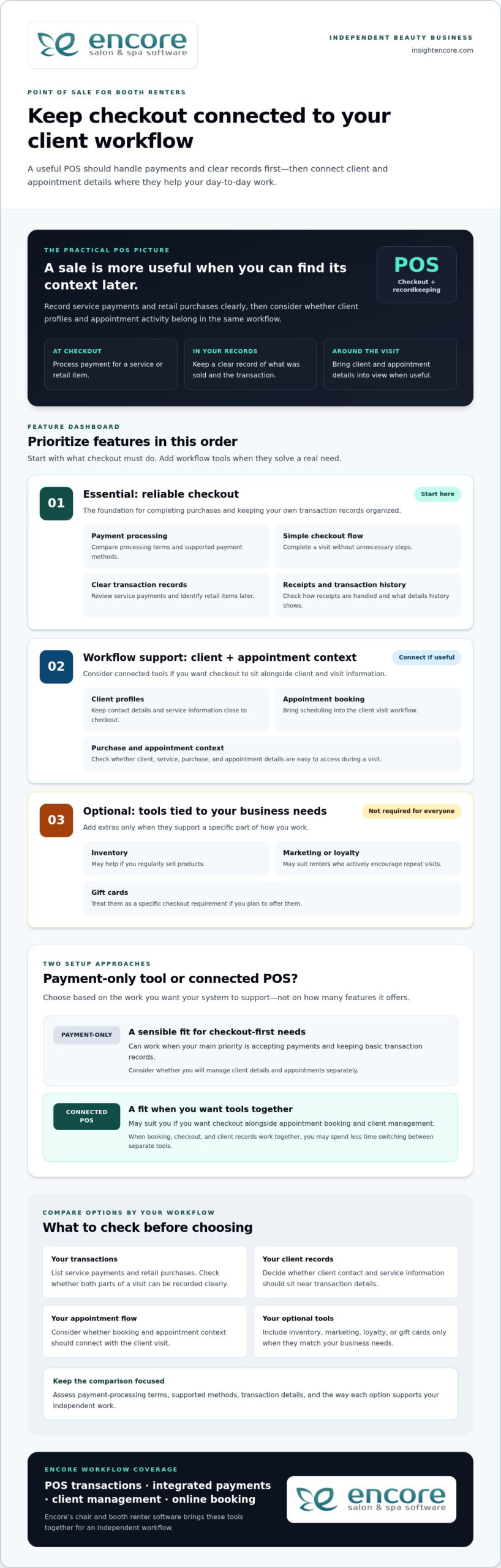
Start with the tasks that happen at checkout. A useful POS should make it straightforward to process a payment, record what the client purchased, and complete the visit without unnecessary steps. Then consider whether client management and appointment booking should connect with checkout. The best point of sale for booth renters supports daily work first; extra tools matter only when they serve a real need.
Core POS checklist: compare payment processing, clear transaction records, a simple checkout flow, client profiles, and appointment context before weighing optional business tools.
Payments, receipts, and transaction records
Payment processing and accurate records are the foundation. A service payment should be easy to enter and review later, and a retail item should be identifiable if it’s part of the same visit. Consider how receipts are handled and whether the transaction history provides the details you need to keep your business records organized.
Compare payment-processing terms, supported payment methods, and the transaction information available for review. These details vary between systems, so assess each option rather than assuming they’re the same. Also consider how integrated credit card processing fits into the checkout workflow you want.
Client management, booking, and business-building tools
Client profiles can keep contact details and service information close to checkout, while online booking can bring appointment scheduling into the client visit workflow. If you’re considering how client records fit into a solo workflow, read this guide to booth renter client management apps.
Other features depend on how you run your business. Inventory tools may be useful if you regularly sell products; automated marketing or loyalty programs may suit renters who actively encourage repeat visits. Gift cards are another option if you plan to offer them. You don’t need every feature. Prioritize tools that solve a specific workflow problem.
- Essential: payment processing, clear transaction records, and an easy checkout flow.
- Workflow support: client profiles and appointment booking that connect with your visit process.
- Optional: inventory, marketing, loyalty, and gift card tools that match your business needs.
Encore’s chair and booth renter software brings POS transactions together with integrated payments, client management, and online booking. Explore Encore for your booth renter workflow as you compare the features that matter to you.
Standalone Payment Tool or Connected Booth Renter POS?
A payment-only tool can be a sensible fit if your main need is accepting payments and keeping basic transaction records. Connected software may suit you better if you want checkout alongside appointment booking and client management. Neither setup works for every renter. Compare how each handles your actual tasks, not just how many features appear on a list.
| Workflow area | Standalone payment tool | Connected booth renter POS |
|---|---|---|
| Checkout | Focused on processing and recording payments. | Can place payment within a broader service and client workflow. |
| Client records | May require a separate client record system. | May connect checkout with client profiles. |
| Booking | Appointments may be managed in another tool or process. | May bring online booking into the same workflow as checkout. |
| Reporting | Review the transaction information the payment tool provides. | May connect transaction activity with other business information. |
| Business tools | Typically focuses on payment needs. | May include optional tools such as inventory, marketing, loyalty, or gift cards. |
When a payment-only POS may be enough
If you mainly need to accept payment after each service and record the transaction, a focused tool may cover your essentials. You can keep appointments and client notes in separate systems if that arrangement works for you. The trade-off is managing information across those tools, but that doesn’t automatically make the setup unsuitable. Ask yourself how quickly you can find the details you need during a busy day.
When connected salon software may make daily work easier
Connected software can bring related tasks closer together. Booking establishes the appointment, client management helps organize client information, and POS transactions record purchases. If you regularly move between all three tasks, it may be useful to manage them within one broader workflow. Specialized booth renter software supports a setup designed around independent beauty businesses.
An all-in-one platform can feel like too much if it adds steps or tools you won’t use. Keep the comparison practical: start with payments, records, booking, and client details. Then consider extras only when they address a real need, such as tracking products you sell or offering gift cards. A point of sale for booth renters should fit your work, not require you to adopt every available feature.
Encore offers specialized chair and booth renter software with POS transactions, integrated credit card processing, client management, and online booking. Explore Encore’s booth renter software as you consider which workflow best fits your business.
How to Evaluate POS Options for Your Booth Rental Business
A useful comparison starts with your actual work, not a feature list. Before choosing a point of sale for booth renters, trace how a client moves from booking to checkout. Note where you currently record payments, client details, and product sales. This simple workflow map helps you identify what should connect and what can stay separate.
A practical five-step POS evaluation checklist
- Start with payments and records. List how clients pay, what you sell, and which transaction details you need for your records. Note any payment methods that are essential to your checkout routine.
- Map your current workflow. Write down how you handle booking, appointments, client notes, checkout, and product sales. Mark where information moves between tools and where you intentionally keep tasks separate.
- Decide what needs to connect. Identify whether you want appointments linked to client profiles, service details available at checkout, or product sales connected to inventory. Focus on links that would make your daily process clearer.
- Compare the must-haves first. Check that each option supports your payment and recordkeeping needs. Then assess ease of use and the transaction or business information you can review. Don’t let optional features distract from essentials.
- Consider future needs selectively. If you plan to sell retail products, use online booking, or offer gift cards, include those requirements in your comparison. Choose tools that suit your plans rather than judging an option by feature count alone.
Assess cost, setup, and everyday usability
Compare software charges separately from payment-processing terms. Look at what each charge covers and how processing terms fit the transactions you expect, rather than judging a system by one number. Weigh costs against the capabilities you need and the workflow you mapped.
Ease of use matters, too. Think through a typical appointment: Can you find client details, complete checkout, and keep the transaction record without awkwardly switching between tools? Consider the setup steps and whether the available information helps you manage your business day to day. A system should support your routine, not make it more complicated.
Once you’ve identified your priorities, compare them with Encore’s specialized chair and booth renter software, which includes POS transactions, integrated credit card processing, client management, and online booking.
How Encore Supports a Booth Renter’s POS Workflow
Once you know which tasks your POS needs to handle, look for software designed for independent booth and chair renters. Encore’s specialized chair and booth renter software brings POS transactions together with integrated credit card processing, client management, and online booking. These capabilities let you consider checkout as part of your client workflow, rather than as a separate payment step.
Bring booth renter tasks into a more connected platform
Consider a client’s visit from start to finish. Online booking supports appointment scheduling, client management helps organize client information, and POS transactions record purchases. Bringing these capabilities into a broader platform can help you think through how those tasks fit together during your day. The right fit depends on the workflow you want, not simply the number of tools available.
Encore also includes inventory tracking, automated marketing, loyalty programs, and gift cards. These capabilities may suit you if you sell retail products, want to encourage repeat visits, or plan to offer gift cards. They’re options to weigh against your needs, not a checklist every booth renter must adopt. For a broader look at the platform, visit Encore Salon & Spa Software.
Explore the next step at your own pace
Use the priorities you established to assess Encore: payment processing and transaction records, client management, and booking. Consider which capabilities you’ll rely on regularly and which optional tools match your business plans. This keeps the decision focused on a practical point of sale for booth renters, not features that add complexity without serving your routine.
Encore is part of Syntec Business Systems, founded in 1991. Compare the software’s capabilities with the workflow you mapped, then visit Encore’s booth renter software page to explore the solution.
Choose a POS That Fits the Way You Work
The best point of sale for booth renters should make daily business easier to manage, not add complexity. Begin with straightforward checkout and clear transaction records. Then decide whether connecting payments with client management and appointment booking would make your workflow more organized. Inventory tracking, marketing, loyalty programs, and gift cards matter when they support goals you already have.
Encore offers specialized chair and booth renter software with POS transactions, integrated credit card processing, client management, and online booking. As you compare options, focus on which tasks you want to handle in one place and which features you’ll use in your independent business. A practical fit can help you manage client visits and keep important activity organized.
Start with a clear picture of your workflow and the tasks you want your POS to support. Explore Encore’s chair and booth renter software to see how its connected tools fit those priorities.
Frequently Asked Questions
What is the best point of sale for booth renters?
The best point of sale for booth renters is one that matches how you handle payments, client information, and appointments. If you only need to accept and record payments, a focused payment tool may be enough. If you want checkout connected with booking and client management, consider specialized booth renter software. Encore offers a chair and booth renter solution with POS transactions, integrated credit card processing, client management, and online booking.
Do booth renters need their own POS system?
Not every booth renter needs a separate POS, but you do need a clear way to process and track the transactions you manage. Your setup could be a payment-only tool or a broader system that supports client and appointment tasks, too. Consider how you handle checkout and records now, and whether your current process gives you a clear view of your own business activity.
Can booth renters use salon software to manage payments and clients?
Yes. Salon software can help booth renters manage payments and client information, especially when it supports independent workflows as well as salon operations. Encore offers specialized chair and booth renter software with POS transactions, integrated credit card processing, and client management. Online booking is also available within the platform, bringing appointment tasks into the software workflow.
What features should a booth renter look for in POS software?
Prioritize payment processing, clear transaction records, and an easy checkout flow. Then consider whether client profiles and appointment booking should connect with checkout, so visit details are easier to manage. If you sell products or offer gift cards, inventory and gift card tools may be useful. Marketing and loyalty features are optional; include them when they serve your business goals, not simply because they’re available.
How much does point-of-sale software for booth renters cost?
Costs vary by software plan and payment-processing terms, so compare those separately rather than relying on a single headline price. Consider whether a system includes the functions you need, such as client management or booking, or whether you’d use separate tools for those tasks. Review each option’s pricing details and weigh them against your workflow. A higher feature count doesn’t automatically mean better value.
Can a booth renter use one system for appointments and payments?
Yes. Some salon software combines online booking and POS transactions, allowing you to manage appointment activity and record payments within one platform. This may suit you if you prefer to keep those tasks connected. Encore’s software includes online booking and POS transactions, alongside client management and integrated credit card processing. Whether one system is right for you depends on how you prefer to organize your daily work.
Is integrated credit card processing useful for independent stylists?
Integrated credit card processing can be useful if you want payment handling as part of a broader business-management workflow. It brings payment processing alongside POS transactions, so you can manage these tasks within the same platform. Compare processing terms and supported payment methods as part of your decision, since they can vary. Encore includes integrated credit card processing in its software for chair and booth renters.
Disclaimer
This article is general in nature and may contain errors, please verify all claims with your sales rep