
window.dataLayer = window.dataLayer || []; function gtag(){dataLayer.push(arguments);} gtag('js', new Date()); gtag('config', 'UA-206511945-1');
Search
Categories
Uncategorized

Track stylist performance metrics to compare salon revenue

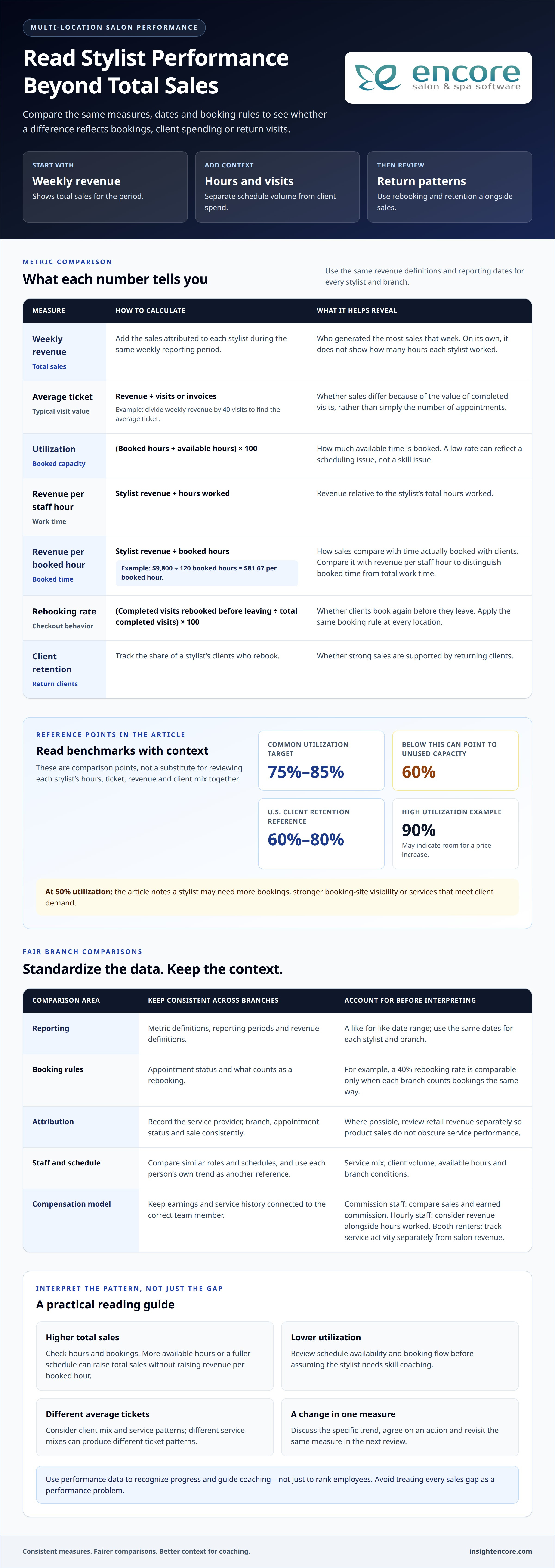
You can compare stylists across branches when every location uses the same metrics and reporting periods. Tracking stylist performance metrics means looking beyond total sales: compare revenue per booked hour, average ticket, utilization, and rebooking on a like-for-like basis.

Raw revenue alone can be misleading. A stylist with more available hours or a fuller schedule may bring in more total sales without generating more revenue per booked hour. Calculate utilization by dividing booked hours by available hours, then multiplying by 100. Calculate average ticket by dividing revenue by the number of visits or invoices.

Consistent definitions make branch comparisons fairer and help you identify whether a difference reflects booking levels, client spending, or return visits. They also give managers a clearer basis for coaching, rather than treating every sales gap as a performance problem.

This guide explains which metrics to compare, how to review weekly indicators across locations, and how often to assess results. It also covers practical ways to track stylist revenue and average tickets while accounting for client retention and the context behind each number.

Key Takeaways

  • Compare weekly revenue alongside average ticket value to see how sales patterns differ between stylists and branches.
  • Use the same reporting definitions across locations, while giving staff private access to their own performance figures.
  • Set a steady review rhythm: use weekly check-ins for changing indicators and quarterly reviews for broader performance discussions.
  • Read average ticket trends in context, including client mix and service patterns, before deciding what action to take.
  • Pair weekly sales measures with indicators such as rebooking and appointment timing to spot issues that revenue alone can miss.

1. Per-Stylist KPIs: Who Generates the Most Revenue?

Start with each stylist’s total weekly revenue, then compare it with their average ticket. Total revenue shows who brought in the most sales during the week; average ticket shows the typical value of each completed visit. Calculate it by dividing a stylist’s revenue by their invoices or visits. This helps owners distinguish a busy schedule from higher spending per client.

For example, if a stylist’s weekly revenue comes from 40 visits, divide that revenue by 40 to find the average ticket. Compare the result with the stylist’s own earlier weeks and with team members who had similar schedules. Total sales per service provider show who generated the most revenue, but they don’t reveal how many hours each person worked. Pair weekly totals with hours to make comparisons more useful.

Measure utilization by dividing booked hours by available hours, then multiplying by 100. Salons commonly target staff utilization of 75% to 85%; a rate below 60% can point to empty chairs and unused payroll. A stylist at 90% utilization may have room for a price increase, while someone at 50% may need more bookings, stronger booking-site visibility, or services that meet client demand. Low utilization can reflect a scheduling issue, not a skill issue.

Revenue per staff hour adds another useful comparison. Divide the revenue attributed to one team member by that person’s hours worked. Revenue per booked hour uses booked hours instead: divide the stylist’s revenue by their booked hours. For example, Emily earns $9,800 over 120 booked hours, or $81.67 per booked hour this month. Comparing both hourly measures helps separate time spent at work from time actually booked with clients.

To track stylist sales consistently, assign each service and invoice to the person who provided it, then total those sales weekly. Use the same dates and revenue definitions for every stylist. A shared reporting period makes branch comparisons more meaningful and helps owners see whether changes came from sales, available hours, or bookings. Where possible, review retail revenue separately so product sales don’t obscure service performance.

Calculate rebooking rate by dividing completed visits where clients booked again before leaving by total completed visits, then multiplying by 100. Client retention measures the share of a stylist’s clients who rebook, and it can help owners assess whether strong sales are supported by returning clients.

In the United States, common benchmarks include 75% to 85% utilization and 60% to 80% client retention. Treat these as comparison points, not a substitute for reviewing each stylist’s revenue, booked hours, average ticket, and client mix together.

2. Consistent Performance Tracking in Multi-Salons

For a fair branch comparison, use the same metric definitions, reporting periods, and booking rules at every location. A 40% rebooking rate this month should mean the same thing in each branch. If one location counts clients who booked later, while another counts only checkout bookings, their dashboards won’t show a reliable comparison. Record the service provider, branch, appointment status, and sale consistently.

Give each staff member private access to their own performance data. A dashboard might show personal sales, rebooking, utilization, service history, and commission earned. Managers can view team and branch trends, while stylists see their own figures rather than colleagues’ individual records. Clear access roles keep reviews focused and help staff understand which results relate to their work.

Use performance data to recognize progress and guide coaching, not just to rank employees. If a stylist’s rebooking improves while total bookings remain steady, acknowledge the stronger return-client pattern. If utilization drops, review schedule availability and booking flow before assuming the stylist needs skill coaching. Discuss a specific trend, agree on an action, then revisit the same measure in the next review.

Keep earnings and service history connected to the right team member. Salon reports can show each person’s sales, attendance, commission earned, and estimated commission projected for payday. Service history adds context: a stylist with a different service mix may have a different ticket pattern from someone who mainly performs shorter services. Review these records using the same reporting dates across branches.

Compensation models also affect which figures matter most. For commission-based staff, compare sales and earned commission; for hourly staff, consider revenue alongside hours worked. For booth renters, track their service activity separately from salon revenue, since the business arrangement differs. Don’t treat these groups as directly comparable without accounting for how each model records earnings.

Set fair goals using each stylist’s service mix, client volume, available hours, and branch conditions. Compare similar roles and schedules, and use each person’s own trend as another reference. A stylist with fewer appointment opportunities shouldn’t face the same raw sales target as someone with a consistently full book. Shared definitions support comparison, while relevant context makes it useful.

For U.S. salons, follow relevant federal and state privacy and labor requirements when handling employee records and making performance decisions. Limit access to business needs, explain how performance data is used, and avoid basing discipline on one metric alone.

When booking and client records are scattered across branches, salon management tools can help organize the information used in consistent performance reviews.

3. How often should I review staff productivity metrics?

Review key numbers weekly, then discuss broader performance quarterly. A weekly rhythm helps salon owners notice changes while schedules and client visits are still current. Quarterly reviews allow time to consider longer-term patterns, coaching, and goals. This avoids waiting until an annual review to address a trend that needs attention.

Keep the weekly check focused. A 15-minute scan can surface changes in bookings, revenue, attendance, and client retention. Set aside about 20 minutes for the full weekly KPI review, including discussion and next steps. Compare the current week with the previous week, then check whether a change is unusual against the four-week average.

Use a consistent checklist to review the same numbers each week. For example, check:

  • Weekly revenue, completed visits, and average spend per client.
  • Rebooking at checkout, plus returning-client activity.
  • Booked and available hours, cancellations, and no-shows.
  • Retail sales, attendance, and estimated commission.

Flag KPI changes greater than 10% compared with the four-week average. A sharp decline in rebooking may call for a conversation about checkout habits or appointment availability. A sudden rise in cancellations may point toward scheduling friction. Record the possible cause and agreed action, then review that same indicator the following week.

Retention needs a longer view than a single weekly snapshot. Use a 60- or 90-day lookback window to assess whether clients returned. That broader window helps account for services that naturally involve longer gaps between visits. Compare similar periods and service patterns before interpreting a change as a stylist issue. Weekly numbers can signal a question; the longer view can help explain it.

Quarterly performance reviews should connect weekly observations to coaching and development. Discuss what changed, what actions were tried, and whether results followed. If client retention improved after checkout conversations became more consistent, recognize the behavior behind the change. If results stayed flat, agree on a different action and set a date for the next review.

Managers should review weekly indicators and provide timely feedback, then hold a broader performance conversation quarterly rather than annually. Keep feedback specific: name the metric, describe the trend, and agree on one practical next step. This gives staff a clear path forward without judging performance based on one unusually busy or quiet week.
Track stylist performance metrics to compare salon revenue

4. Average ticket per stylist

An average ticket helps salon owners understand what clients spend during a visit. Depending on the salon’s reporting method, it may include service revenue, retail purchases, or both. Choose one definition and apply it consistently across stylists and branches. Otherwise, two figures labelled “average ticket” may represent different sales, making comparisons harder to interpret.

Average transaction value and average ticket size usually describe the same practical measure: revenue divided by completed invoices or visits. Keep the time period and included sales consistent. For example, a weekly report should use the same week for both revenue and visit counts. You can then compare a stylist’s ticket with their previous results and with colleagues serving a similar client mix.

Separate service and retail results before combining them. Retail can lift total ticket value, but it may hide a change in service spending. Industry advice often places salon retail at around 10–20% of revenue. Treat that as a reference, then examine what clients actually buy. A stylist with strong service tickets but little retail activity may have a different opportunity from someone whose retail sales drive the average.

Track retail revenue per client as a complementary measure. For example, $1,800 in retail revenue across 450 clients equals $4 per client. That figure shows how product sales relate to client volume, while average ticket shows spending across each invoice or visit. Together, they help identify whether a higher ticket comes from services, retail, or both.

A spreadsheet can make comparisons easier to follow. Use one row per stylist and reporting period, with columns for service revenue, retail revenue, completed visits, average ticket, and rebooking rate. Keep the underlying totals alongside each average. This helps owners see whether a change reflects spending, visit volume, or a different service mix.

Read the numbers in context before coaching a stylist. A lower average may reflect more first-time clients, a shift toward shorter services, or fewer retail purchases. Compare similar periods and service categories where possible, then discuss a specific pattern. If average ticket rises while rebooking falls, the larger spend may not signal stronger long-term performance. Pair ticket trends with return visits to understand both the immediate sale and the client relationship.

For branch comparisons, use the same ticket definition and separate retail from service revenue in every report. This helps managers spot trends without treating one average as a complete measure of stylist performance.

5. Weekly salon performance indicators

Weekly reporting works best when salons track a small set of indicators together. Total sales alone can’t show whether appointments filled, clients returned, or the schedule ran smoothly. Compare this week’s results with the previous week, then flag changes greater than 10% against the four-week average. That helps separate a meaningful shift from ordinary week-to-week movement.

Start with capacity. Chair utilization above 70% is a common salon KPI reference point, while staff utilization above 90% can contribute to burnout and rushed service. Look at booked hours beside available hours, then review whether gaps cluster around specific days or team members. A nearly full schedule isn’t automatically healthy if appointments routinely run late.

Appointment timing can reveal lost capacity. For example, a haircut running 10 minutes over its booked slot may delay later clients or reduce the time available for another appointment. Review scheduled and actual durations by service type. If overruns repeat, adjust timing expectations or examine the workflow before treating slower completion as an individual performance issue.

Track completed visits, new clients, returning clients, and rebooking at checkout. Sarah’s example shows how to read the last measure: 62 of 90 completed visits led to another appointment, giving her a 69% rebooking rate this month. Pair that result with retention and visit trends. A strong sales week alongside weaker return visits may signal a future concern.

Include client spending, retail sales, cancellations, and attendance where those numbers inform a decision. Keep no-shows and late cancellations visible; salons can aim to keep that rate below 5%. Compare walk-ins with pre-booked appointments to see whether staffing matches demand. A manual spreadsheet can work, but consistent definitions matter more than the reporting format.

Turn the weekly review into action, not just a report. If appointment gaps rise, examine booking patterns and consider whether better visibility or a targeted promotion could help. If a team member’s rebooking changes, review checkout conversations and client follow-up. Record the issue, the action, and the next review date so managers can see whether the response made a difference.

Keep reviews practical: compare current and previous week results, investigate notable changes, and assign one next step. This gives salon owners a clear view of capacity, client activity, and sales without letting one number define a stylist’s performance. Consistent weekly reporting makes trends easier to spot and discuss.

Explore salon performance reporting tools

Encore Salon and Spa Software

Encore Salon and Spa Software brings appointment, client, and sales information together in salon management software. When weekly comparisons take too much manual effort, organized records can make it easier to review activity by stylist and location. Encore Salon Software and Encore Spa Software support salon and spa operations, while Chair/Booth Renter Software and Tattoo Studio Software serve other business models.

Consider Encore when scattered records make it difficult to keep performance reviews consistent. The right setup can help your team manage everyday information and build a clearer basis for comparing results. Contact Encore Salon and Spa Software to discuss your salon’s needs.

Build a performance routine your team can use

Make reporting a steady management habit, not a one-time comparison. Tracking stylist performance metrics is more useful when managers and team members understand how results guide coaching, scheduling, and client care. Set clear expectations for discussing figures, and make room for staff to share the context behind them.

As your salon grows or adds locations, consistent systems can help keep appointment and client information organized. Encore Salon and Spa Software offers Encore Salon Software, Encore Spa Software, and Chair/Booth Renter Software for different business models. A suitable management platform can support your team’s routine, while managers remain responsible for interpreting results fairly and thoughtfully.

Choose one practical next step: decide how your team will turn performance reviews into clear, supportive conversations. Small, consistent improvements can help staff understand their progress and owners make more informed decisions.

Explore Encore Salon and Spa Software

Frequently Asked Questions

Can I compare staff across branches?

Yes, compare branches using shared definitions and account for differences in service mix and demand. Fair tracking stylist performance metrics means looking beyond branch totals: compare similar roles, appointment types, and operating periods. For example, a location with more walk-ins may show different booking patterns from an appointment-led branch. Use shared measures to spot differences, then consider local context before deciding whether a result calls for coaching or a scheduling change.

How do multilocation salons maintain consistency in performance tracking?

Multilocation salons can maintain consistency by documenting how each metric is recorded and who updates it. Define terms such as completed visit, retail sale, and rebooking in a shared reporting guide. Assign a manager to review unusual entries before comparing branch reports. If a location corrects a transaction after checkout, record the adjustment consistently so reports remain clear and staff aren’t surprised by unexplained changes.

How do salons balance quantitative and qualitative performance metrics?

Pair numerical results with specific observations from daily work. For example, a rebooking trend can prompt a conversation about how appointment options are presented at checkout. Qualitative notes might capture client communication, teamwork, or follow-through, but should describe observed behavior rather than personality. Use the same categories in each review, and let the stylist add context so one client comment doesn’t outweigh a broader pattern.

How often do salons review employee performance?

Salons can hold formal performance reviews quarterly, tying feedback to documented examples and agreed goals. Use the conversation to discuss progress, support needs, and changes in responsibilities, rather than simply reading figures aloud. If a concern arises between reviews, address the behavior promptly and record the follow-up. This keeps feedback useful without turning every shift into a formal evaluation.

How often should I review staff productivity metrics?

Review productivity numbers weekly to catch operational changes, then use quarterly conversations to discuss broader development. Match the review window to the question: a sudden booking gap needs timely attention, while client return patterns take time to become meaningful. Avoid changing goals after every short-term fluctuation. A stable review rhythm helps managers distinguish temporary variation from a pattern that deserves action.

How to Run a Weekly KPI Review?

Keep the meeting focused on decisions, not reading every figure. Before the review, share the report and note any unusual changes. During the meeting, choose one result to understand, ask the team member what may have influenced it, and agree on a practical response. Record who owns that action and when to revisit it. A 15-minute KPI check can help salon owners keep the routine manageable.

How to Set KPI Goals Your Team Can Hit?

Set goals based on the salon’s recent performance rather than choosing an arbitrary target. Use the current average as a starting point, then aim for a small lift in each KPI goal over the next four weeks. Consider service mix, client volume, available appointments, and the stylist’s role. Agree on actions the team member can influence, such as checkout conversations, and review whether those actions support progress.

Isn’t tracking staff performance going to feel like surveillance?

Performance tracking can feel intrusive if employees don’t understand what’s measured or how the information will be used. Explain the purpose, keep reports focused on relevant work, and give each stylist a chance to share context. Use the numbers to guide support and recognize progress, not to draw conclusions from one isolated result. Clear expectations and respectful conversations help make performance reviews collaborative.

Disclaimer

This article is general in nature and may contain errors, please verify all claims with your sales rep

Categories
Uncategorized

How to Calculate Salon Staff Utilization Rate: The 2026 Management Guide

What if those quiet gaps in your appointment book weren’t just a natural part of the day, but actually a hidden leak in your salon’s profitability? It’s a common frustration for owners who see high overhead costs but feel like their revenue isn’t quite reaching its potential. You shouldn’t have to wonder which stylists are carrying their weight or why your margins feel so thin despite a busy-looking floor. Learning exactly how to calculate salon staff utilization rate is the first step toward reclaiming control over your schedule and your bank account.

We know that managing a team is as much about people as it is about numbers. That’s why this guide focuses on mastering the math behind your productivity without losing the human touch your brand is known for. You’ll learn the exact formula for measuring efficiency, see where you stand against 2026 industry benchmarks, and discover actionable ways to fill empty chairs. We will also look at how automated tools can replace spreadsheet fatigue with clear, reliable insights that empower both you and your staff to succeed. It’s time to turn that idle time into a revenue-generating opportunity.

Key Takeaways

  • Master the fundamental math of your business by learning exactly how to calculate salon staff utilization rate to identify where your revenue is leaking.
  • Discover why a 100% booking rate is actually a sign of potential burnout and learn how to aim for the sustainable “sweet spot” of 75% to 85%.
  • Learn how to eliminate “Swiss cheese” gaps in your daily schedule using automated marketing tools that fill last-minute cancellations.
  • Stop wasting hours on manual performance tracking and see how real-time reporting can replace your spreadsheets with accurate data.
  • Understand the direct link between stylist productivity and rising overhead costs to ensure your salon stays profitable in the 2026 market.

Understanding Salon Staff Utilization: Why This Metric Matters in 2026

In the fast-paced world of hair and beauty, it’s easy to mistake a bustling floor for a profitable one. However, the true health of your business lies in a specific number. A utilization rate is the percentage of time your stylists spend performing services compared to the total hours they are available to work. As we move into 2026, understanding this metric is no longer optional. With rising overhead costs like rent and energy prices, every minute an employee is on the clock must be intentional. This is why learning how to calculate salon staff utilization rate is the first step in protecting your bottom line.

Many owners assume that if their team looks busy, the salon is doing well. This is a common misconception. A stylist might spend half their shift cleaning or folding towels. While these tasks are helpful, they don’t generate direct revenue. Knowing how to calculate salon staff utilization rate allows you to see past the activity on the floor and focus on the actual bookings that pay the bills. It’s the direct link to your break-even point. If your utilization is too low, you aren’t just losing potential profit. You’re actively paying for time that isn’t being sold.

Utilization vs. Productivity: What is the Difference?

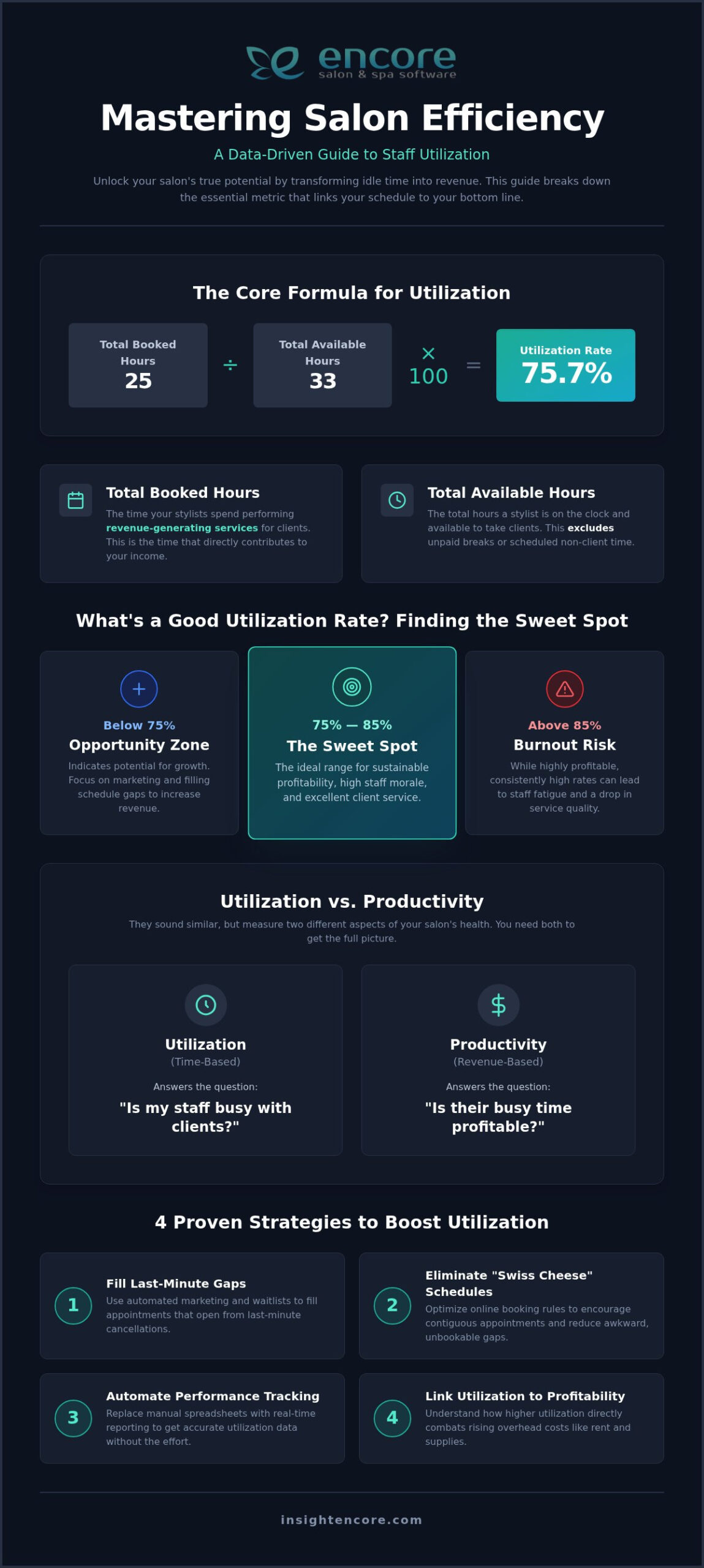
While these terms are often used interchangeably, they measure different things. Utilization is a time-based metric. It tells you if your staff is being kept busy with clients. Productivity, on the other hand, is revenue-based. It tracks how much money a stylist generates during those booked hours. You might have a stylist with 90% utilization who only performs low-cost trims. Conversely, a senior stylist might have 60% utilization but generates massive revenue through high-end color services. You need both metrics to get a full picture of your salon’s health and to make informed management decisions.

The Financial Impact of Idle Time

Idle time is a silent profit killer. Think about the “cost of an empty chair.” Every hour a stylist sits without a client, you’re still paying for rent, utilities, and potentially their base wage. Low utilization rates eat into your margins. This makes it difficult to offer competitive commissions or invest in new equipment. By tracking this data, you can make smarter staffing choices. If utilization is consistently high, it’s time to hire. If it’s low, you might need to adjust your scheduling features or focus on marketing to fill those gaps. Using these insights helps you move from “guesstimating” to running a data-driven business. Of course, utilization is just one piece of the puzzle — pairing this data with a broader strategy to increase your salon profit margin ensures that every filled chair is also contributing meaningfully to your bottom line.

The Step-by-Step Formula for Calculating Stylist Utilization Rates

Ready to get into the numbers? Don’t worry. This isn’t complex calculus. The core formula for how to calculate salon staff utilization rate is straightforward: (Total Booked Hours / Total Available Hours) x 100. This simple equation gives you a percentage that represents how much of your staff’s time is actually being sold to clients. It’s the most reliable way to see if your team is truly productive or just staying busy with side tasks.

To get an accurate result, you must define your terms clearly. “Available Hours” are the hours a stylist is on the clock and ready to work. This should exclude unpaid lunch breaks or scheduled administrative time where they aren’t expected to take clients. “Booked Hours” refers to the time spent performing services. While some owners include cleanup time in this, it’s often better to keep cleanup as a separate operational buffer to avoid inflating your numbers. This ensures you’re measuring the actual revenue-generating capacity of your chairs.

Let’s look at a concrete example. Stylist Sarah works a 40-hour week. After deducting 5 hours for lunch and 2 hours for a weekly staff meeting, her “Available Hours” total 33. If Sarah has 25 hours of services booked on her calendar, her calculation looks like this: (25 / 33) x 100 = 75.7%. This tells you Sarah is performing services for roughly three-quarters of her available time. Knowing how to calculate salon staff utilization rate this way helps you spot performance trends across your entire team.

Accounting for Double Bookings and Overlaps

In busy salons, stylists often work on one client while another’s color processes. This can result in utilization rates exceeding 100%, which might look great on paper but can be confusing for reporting. While high utilization is positive, “weighted” utilization helps you understand if a stylist is multi-tasking effectively or simply overbooked. To keep your data clean, normalize double-booking by counting the total duration of the shift rather than stacking overlapping appointment times. This prevents your reports from suggesting a stylist worked 12 hours in an 8-hour shift, giving you a more realistic view of capacity.

Standardizing Your Data Collection

Consistency is the secret to reliable data. If one stylist clocks in early and another forgets until their first client arrives, your percentages will be skewed. Establish a firm rule for clock-in and clock-out times. You should also distinguish between “walk-in” time and “pre-booked” time. This helps you identify if your utilization is driven by loyal repeat clients or foot traffic. Setting a weekly reporting cadence is usually best for catching trends before they become problems. If you find manual tracking too tedious, you can explore integrated reporting features that handle these calculations for you automatically.

Analyzing Your Results: What Is a “Good” Utilization Rate for a Salon?

Now that you’ve mastered how to calculate salon staff utilization rate, it’s time to interpret what those percentages mean for your business. A common mistake is aiming for 100%. While it sounds efficient, a fully booked team is often a team on the brink of burnout. In the salon industry, the “sweet spot” for sustainable growth usually falls between 75% and 85%. This range allows for maximum revenue while leaving enough room for staff to breathe, clean their stations, and engage with clients about retail products.

If you see rates dipping below 60%, you’ve entered the danger zone. This level of idle time suggests that your marketing isn’t reaching the right people or your scheduling needs a serious overhaul. However, don’t panic if your junior stylists are in this bracket. It’s natural for newer team members to have lower utilization as they build their books. For your master colorists, you should expect to see them consistently hitting that 80% mark. Understanding the numbers is just as important as knowing how to calculate salon staff utilization rate in the first place. If persistent low utilization is squeezing your margins, reviewing your full operational costs through the lens of how to increase salon profit margin can reveal additional leaks that go beyond scheduling alone.

Utilization Benchmarks by Service Type

Expectations should shift based on your business model. High-volume environments like barber shops often thrive with utilization rates closer to 90% because services are quick and transitions are fast. Luxury spas or salons specializing in long-form services like extensions might target a slightly lower rate to ensure the client experience feels unhurried. Specialized businesses have their own rhythms too. For example, artists using Encore Tattoo Software often balance long sessions with significant prep time, which changes how you view a productive day. If you run a high-volume barbershop and want to maximize those strong utilization numbers, reviewing proven barbershop management tips for new owners can help you build the operational foundation needed to sustain that pace.

Red Flags: When High Utilization Becomes a Liability

Consistency is key, but pushing for 95% or higher is a recipe for staff turnover. When stylists have zero “buffer time,” their stress levels skyrocket and the quality of their work can slip. It also kills your retail sales. A stylist who is rushing to clean up for the next client won’t have the time to explain which shampoo will preserve that fresh color. If your team is over-utilized, you’ll see it in their energy levels and your Google reviews. Sustainable success requires a balance between a full book and a supported team.

How to Calculate Salon Staff Utilization Rate: The 2026 Management Guide

4 Proven Strategies to Improve Low Utilization Without Increasing Burnout

Knowing how to calculate salon staff utilization rate is only half the battle; the real magic happens when you use that data to drive positive change. It’s common to feel a bit stuck when you see low percentages, but you don’t have to push your team to the point of exhaustion to see results. Improving utilization is about working smarter and refining your operations. Start by looking at your daily schedule for “Swiss cheese” gaps. These are those awkward 15 or 30 minute breaks between appointments that are too short for a new service but long enough to waste time. By nudging appointments together, you can reclaim hours of billable time every week.

Automated marketing is another powerful tool for your management toolkit. Instead of waiting for the phone to ring, you can send last-minute booking incentives to your most loyal clients as soon as a gap appears. Cross-training also plays a vital role in a modern salon. When a stylist is trained in multiple service types, they can step in to help with a busy nail tech’s overflow or handle a quick brow wax during a color processing break. Implementing online booking further supports this by allowing clients to fill those gaps themselves, often during the late night hours when your salon is closed.

Incentivizing Staff for Self-Filled Gaps

Your stylists are your best brand ambassadors and they’re often eager to help the business grow. Why not reward them for taking initiative? Offering a small bonus or a slightly higher commission for clients they bring in during their own idle hours can transform a slow afternoon into a productive one. You can encourage them to post “flash sales” on their professional social media pages to fill immediate openings. When you integrate these clear utilization goals into your salon employee performance review template, you turn a math problem into a shared win for the whole team.

Managing Client No-Shows and Cancellations

A single no-show can tank your daily utilization rate and leave a stylist feeling undervalued. Protecting your team’s time is a non-negotiable part of modern management. Implementing small deposits or firm cancellation fees ensures that clients value your schedule as much as you do. You can also use automated waitlists to instantly notify waiting clients the moment a slot opens up. This keeps your chairs full and your revenue steady without adding any extra stress or manual work to your staff’s busy day.

Try Encore for free and fill your empty chairs today

Beyond the Spreadsheet: Automating Performance Tracking with Encore

Many owners spend their Sunday nights hunched over a laptop, trying to figure out why their bank balance doesn’t match the activity they saw all week. While knowing how to calculate salon staff utilization rate manually is a foundational skill, relying on pen and paper or clunky spreadsheets often leads to “guesstimates” rather than solid facts. Spreadsheet fatigue is real, and human error is inevitable when you’re busy managing a team and serving clients. A missed clock-in or a forgotten walk-in can skew your data, leaving you with an inaccurate picture of your business health. Encore Salon Software removes this frustration by automating the entire process. It captures every booking and every minute on the clock to generate real-time reports that you can trust.

Automation doesn’t just save time; it connects your data in ways a manual system never could. When your utilization rates are integrated with your payroll and commission structures, you eliminate the need for stressful double-entry. For a deeper look at how to eliminate manual payroll errors entirely, explore how calculating salon staff commission automatically can build lasting trust with your team and protect your peace of mind. Your stylists can see exactly how their performance impacts their paycheck, which builds a culture of transparency and trust. You can also use these performance dashboards to make confident hiring decisions. If your team is consistently hitting that 85% mark, the data is telling you it’s safe to bring on a new team member. Learning how to calculate salon staff utilization rate through an automated system ensures every growth decision is backed by reliable evidence.

Real-Time Insights for Proactive Management

Stop waiting until the end of the month to realize you had too many empty chairs. With live data, you move from “looking back” at missed opportunities to “fixing today.” You can check staff utilization from anywhere using mobile access, whether you’re at the salon or grabbing a coffee down the street. Set up automated alerts to notify you when specific time slots are consistently under-utilized. This allows you to launch a quick marketing campaign or adjust your staffing levels before the week is even over. It’s about having total control over your schedule without being tied to a desk.

Scaling Your Business with Data

Scaling your business requires more than just a gut feeling. When you track utilization trends over months or years, you gain the clarity needed to plan for a second location or a major expansion. These data-backed reviews also improve staff morale. Instead of a vague conversation about “being busy,” you can show a stylist their growth through clear, visual charts. This professional approach fosters loyalty and keeps your best talent from looking elsewhere. If you’re ready to ditch the calculator and see what automation can do for your peace of mind, contact our team for a demo today. We’re here to help you turn those spreadsheets into a strategy for long-term success.

Take Control of Your Salon’s Future

Mastering how to calculate salon staff utilization rate is the key to identifying hidden profit leaks and protecting your team from burnout. You now have the clarity to target that 75% to 85% sweet spot where productivity meets sustainability. By replacing manual spreadsheets with automated insights, you can stop guessing and start making data-driven decisions that actually move the needle for your business.

Since 1991, we’ve provided salon owners with the specialized tools needed to manage everything from utilization to inventory in one place. Whether you’re an independent stylist or running a large spa, our all-in-one reporting is designed to give you back your Sunday nights. You’ve mastered the math. Now it’s time to let a reliable partner handle the tracking so you can focus on your craft.

Stop doing the math and start growing your salon with Encore Software.

Your journey toward a more efficient and profitable salon starts today. We’re here to help you turn your idle time into revenue and your stress into a feeling of organized control. Let’s get started.

Frequently Asked Questions

How do I calculate salon staff utilization rate manually?

To find this number, divide the total hours a stylist spent with clients by the total hours they were available to work, then multiply by 100. For example, if a stylist was available for 30 hours and performed services for 21 hours, their rate is 70%. Understanding how to calculate salon staff utilization rate manually is a great way to double-check your numbers before you transition to an automated reporting system.

What is a good staff utilization rate for a hair salon?

A healthy target for most salons is between 75% and 85%. While 100% might sound like the goal, it often leads to staff burnout and leaves no room for retail sales or cleaning. If your rates fall below 60%, it’s usually a sign that you need to ramp up your marketing or adjust your scheduling. Aiming for the sweet spot ensures your business stays profitable while your team remains happy.

Does double booking affect my utilization rate calculation?

Yes, double booking can skew your data and even push your utilization rate above 100%. If a stylist works on two clients at once, their booked hours might technically exceed their shift length. To keep your reports accurate, it’s best to normalize this data by counting the total duration of the shift as the maximum capacity. This prevents confusing spikes in your reports and gives you a more realistic view of your salon’s actual floor capacity.

How can I improve my stylists utilization without making them feel pressured?

Focus on filling the “Swiss cheese” gaps in your schedule through automated marketing rather than demanding more speed. Use incentives like small bonuses for stylists who fill their own idle time or offer flash sales to your loyal clients. When you frame utilization as a way for them to grow their own commissions, it feels like a partnership. It’s about optimizing the day to work smarter, not just pushing everyone to work harder.

Should I include unpaid lunch breaks in the available hours calculation?

No, you should always exclude unpaid lunch breaks and scheduled meetings from your “available hours” total. Your utilization rate should only reflect the time a stylist is actually on the clock and ready to accept clients. Including non-working time would artificially lower your percentages and give you an inaccurate picture of your team’s efficiency. Removing these hours ensures you’re only measuring the time that has the potential to generate revenue for your salon.

How often should I review my staff utilization reports?

Reviewing your reports once a week is the best way to catch scheduling trends before they turn into major profit leaks. A weekly check-in allows you to be proactive and adjust your marketing if you see a slow period coming up. You should also do a deeper dive once a month to look at long-term performance and seasonal patterns. Consistent reviews keep you in control and help your team stay aligned with your growth goals.

Can salon software calculate utilization for booth renters?

Yes, specialized tools like our Chair/Booth Renter Software are built specifically for independent professionals. Even if you don’t manage a full team, knowing how to calculate salon staff utilization rate for yourself is vital for managing your own time and income. The software tracks your specific bookings against your personal availability. This gives you the same level of professional insight that a large salon uses to stay profitable and organized every single day.

What is the difference between utilization and productivity in a spa?

Utilization measures the time a therapist spends with clients, while productivity measures the revenue they generate during those sessions. In a spa setting, a therapist might be 90% utilized with low-cost treatments but generate less revenue than someone who is 60% utilized with high-end facials. You need both numbers to see the full picture. High utilization is a great start, but it must be paired with strong productivity to ensure your spa remains truly profitable.

Disclaimer

This article is general in nature and may contain errors, please verify all claims with your sales rep