
window.dataLayer = window.dataLayer || []; function gtag(){dataLayer.push(arguments);} gtag('js', new Date()); gtag('config', 'UA-206511945-1');
Search
Categories
Uncategorized

Compare Massage Therapist Scheduling Software for iPad Costs

The best massage therapist scheduling software for iPad isn’t necessarily the one with the most features. It’s the one that makes booking and managing client visits easier without adding unnecessary steps to your day.

Appointments are a natural starting point, but client records and payment processing also affect how well a system fits your practice. Whether you work solo or manage a clinic, the right tools can help organize your day and make it easier for clients to book.

This comparison focuses on iPad scheduling for massage therapists, including client management, solo and clinic workflows, pricing structures, and payment processing. Use the criteria below to weigh your options against the way your practice operates.

Key Takeaways

  • Compare scheduling tools by how smoothly they handle online booking and the day-to-day needs of a massage practice.
  • Look at how client forms, profiles, and notes fit into your appointment workflow and support continuity between visits.
  • Match solo-practitioner or clinic features to the way your team manages calendars and client records.
  • Assess the full cost structure by considering subscription plans alongside payment-processing fees.
  • Understand the practical difference between a dedicated iPad app and a browser-based interface before choosing how you’ll work.

What is the best scheduling software for massage therapists?

The right fit keeps booking, availability, and client visits manageable on your iPad. Compare how each system handles online scheduling, reminders, calendar updates, and recurring appointments before deciding.

IPad App and Browser Interfaces

A dedicated iPad app is designed for tablet use, while a browser-based service opens in a web browser. Either approach can support massage booking, but the experience depends on the interface and booking steps. Try viewing a full day, adding an appointment, and adjusting availability to see how easily each task works.

For a solo practice, a clear appointment calendar may be enough. A clinic may need staff calendars and a shared view of bookings. Consider whether the iPad is your main work device or one of several devices you use to manage scheduling.

Booking, Reminders, and Calendar Sync

Online booking lets clients choose from the appointment times you make available, reducing the need to arrange every visit by phone. Massage therapy software can send appointment reminders 24-48 hours before appointments. Look for scheduling tools that connect booking changes with the calendar you use, so a new appointment or edit is reflected in the right place.

App-based and browser-based platforms may offer online booking, reminders, and calendar syncing on iPad. Compare the booking flow and calendar tools together, and consider how client information is protected. Use access controls and keep records focused on information needed for scheduling and care.

Offline and Internet-Dependent Scheduling

Offline access depends on the app and its features. A calendar stored on a device may remain visible without a connection, but online booking and live syncing require updates to pass between the iPad and the service. Opening an app offline does not necessarily mean clients can book or changes will sync.

If your massage practice relies on online bookings, internet access is essential for keeping availability current. Find out how the scheduling workflow handles a lost connection, including whether an appointment edit waits to sync or must be entered again.

IPad Booking Setup and Availability

Set up booking by adding the services clients can schedule and defining available appointment times. Block breaks and other unavailable periods so clients can’t select times you can’t accept. Then review the booking page on your iPad and test a sample appointment from the client’s perspective.

Recurring massage appointments can suit clients who prefer regular visits. Scheduling tools may support repeat visits every 2, 3, or 4 weeks. For a salon or spa that also manages appointments, salon and spa management software can bring booking into a broader business workflow.

Option Booking access Calendar use Best fit
Dedicated iPad app App-based booking tools Designed for tablet use Practitioners who work mainly on iPad
Browser-based platform Booking through a web browser Access through the browser Practices using different device types
Practice management software Booking alongside practice tools May connect scheduling with other workflows Clinics coordinating more than appointments

Choose the option whose booking, reminder, and calendar workflow best matches how you manage appointments on iPad.

Client intake forms, profiles, and notes

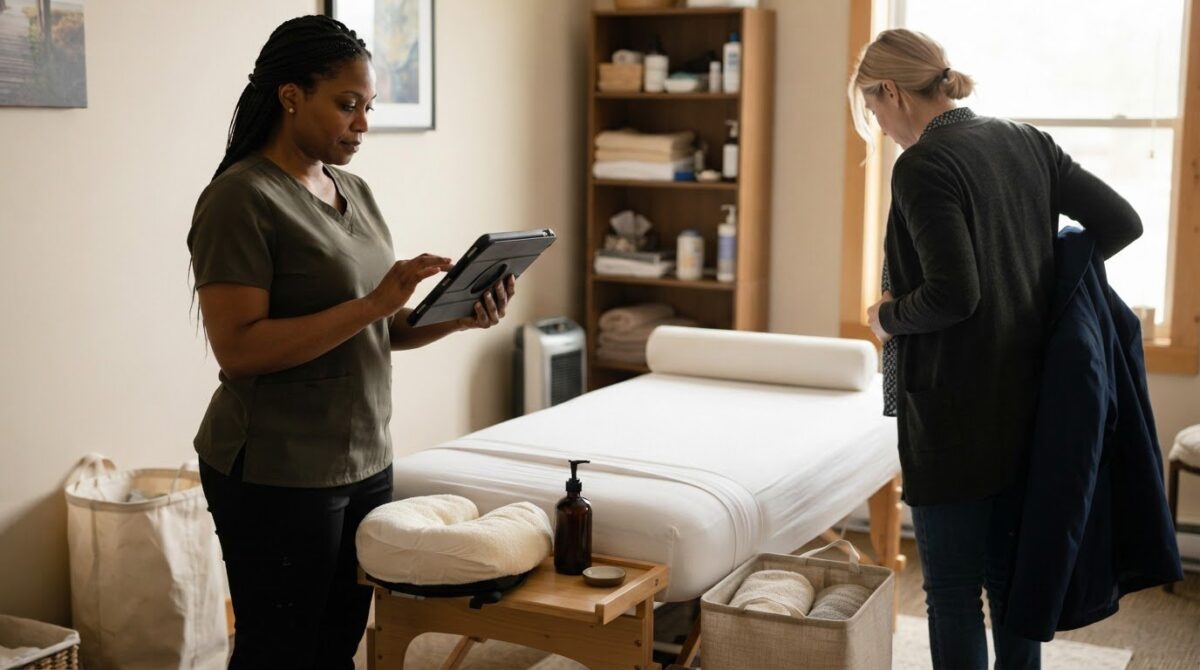
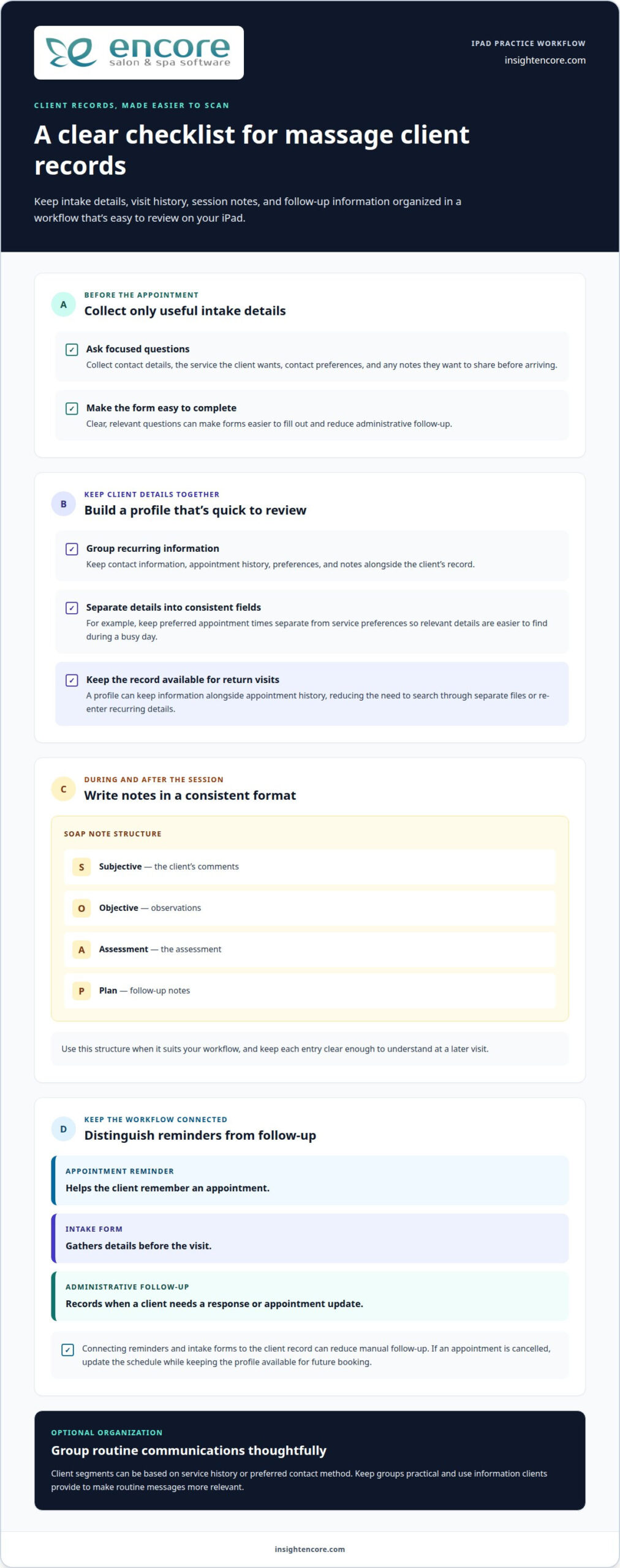
An organized client record makes it easier to prepare for a return visit. An intake form can collect contact details and service preferences, while a profile keeps information alongside appointment history. On an iPad, you can review the profile before a session instead of searching through separate files.

Keep intake forms focused on information that helps with appointments and the requested service. Ask how clients prefer to be contacted, which service they want, and whether they have notes to share before arriving. Clear questions make forms easier to complete and reduce administrative follow-up.

Profiles are most useful when key details are easy to scan. Organize contact information, appointment history, preferences, and notes into consistent fields. For example, record preferred appointment times separately from service preferences so staff can find relevant details during a busy day.

SOAP notes organize session documentation into subjective, objective, assessment, and plan sections. This structure can distinguish a client’s comments from observations and follow-up notes. Use it when it suits your workflow, and write each entry clearly enough to understand at a later visit.

  • Intake: Collect contact details and relevant preferences before the appointment.
  • Profile: Keep recurring details together instead of re-entering them for each visit.
  • Session note: Record concise details using a consistent format, such as SOAP.
  • Follow-up: Add an administrative reminder when a client needs a response or appointment update.

Reminders and intake forms have different jobs: a reminder helps clients remember an appointment, while an intake form gathers details before the visit. Connecting both to the client record can reduce manual follow-up. If an appointment is cancelled, update the schedule while keeping the profile available for future booking.

Client segmentation can make routine communications more relevant. A practice might group clients by service history or preferred contact method, then tailor messages to those groups. Keep segments practical and based on information clients provide. A client management system can bring profiles and related administrative tasks into one workflow.

Choose software that makes records easy to update on the iPad and supports the way you document visits. If you want to see how client management fits into a broader workflow, explore Encore’s software.

Software options for solo therapists and clinics

A solo therapist and a clinic need different levels of control. A solo practitioner may manage a calendar, appointments, and client records on an iPad. A clinic may need shared scheduling, staff access, room assignments, and team reports. The right fit depends on who uses the system and which tasks they handle.

For a solo practice, start with the daily workflow. Can you view appointments, update availability, and find a client record without switching between tools? A straightforward interface keeps routine administration manageable. If you work in multiple locations, consider whether the calendar can distinguish appointments by location.

Clinic software has more to coordinate. A receptionist might manage bookings while therapists view their own schedules and client details. Staff permissions define who can see or change particular records. Set access by role so handling scheduling does not automatically give every employee the same controls.

Reports can help clinic owners see how appointments translate into business activity. Reports by therapist, service, or location can reveal open capacity. Revenue reports offer another view of operations, while cancellation records show how schedule changes affect the day. Look for reports that make these details easy to interpret.

Multi-location clinics need to manage separate calendars while retaining an overall view. A manager may review availability across branches while each team sees its daily schedule. Look for location filters, consistent service names, and clear staff assignments to help spot conflicts and coordinate coverage.

Integrations matter when a clinic uses separate tools for payments, client records, or reporting. Connecting scheduling with payment processing can reduce duplicate entry. Map a common task, such as booking a client, recording payment, and reviewing the appointment later. Fewer disconnected steps make it easier to keep records aligned.

  • Solo therapist: Prioritize a manageable calendar, client access, and simple appointment updates.
  • Small clinic: Compare team calendars, role-based permissions, and therapist-level reports.
  • Multi-location clinic: Look for branch-specific views alongside an overall schedule.

Software plans also differ in how they support a business. Some focus on individual scheduling, while others support multi-location operations and broader staff coordination. Compare included features, such as reporting, permissions, and integrations, rather than choosing by plan label alone.

To narrow your choices, list who needs access, which calendars they manage, and what the clinic needs to report. Then compare each option against those tasks using the same sample appointment workflow.
Compare Massage Therapist Scheduling Software for iPad Costs

Starting prices and payment-processing costs

Compare the full cost of scheduling software, not just its advertised starting price. A subscription may cover appointment management, while payment processing adds transaction costs. For a fair comparison, list the plan, included features, billing period, and payment charges for each platform.

Can iPad scheduling software process payments, deposits, and cancellation fees? It can when the platform includes those functions. Compare each payment feature separately: accepting a session payment does not automatically mean the system handles deposits or cancellation charges.

Plans may differ in their focus, from core scheduling to tools for teams, reporting, or multiple locations. Choose based on what your practice will use. A solo therapist may need appointment booking and payment records, while a clinic may also need staff access and revenue reports.

Payment processing may involve a fee for each card transaction. Rates and other charges depend on the processor and account terms, so compare them alongside the software subscription. Even a small difference can matter when card payments are a regular part of checkout.

For each option, map a client visit from booking to billing. Check whether the client can pay a deposit online, how the remaining balance is recorded, and where the receipt appears in the client’s account. Include a cancellation in the comparison to spot extra tools or manual steps that could affect the total cost.

  • Subscription: Identify the billing period and which scheduling features the plan includes.
  • Processing: Separate card transaction charges from the software subscription.
  • Checkout: Compare deposits, session payments, receipts, and cancellation handling.
  • Growth: Consider whether adding staff or locations changes the plan you need.

Review point-of-sale (POS) payments separately. A therapist might take payment after a session, while another practice collects a deposit at booking. Compare how each workflow records the transaction and links it to the appointment. If your business also uses Google Calendar, include calendar handling in the comparison, separate from payment costs.

Before choosing a platform, make a cost worksheet covering subscription charges, processing fees, and any paid features your workflow requires. Compare the same booking and checkout example across options for a clearer picture than starting prices alone can provide.

Which massage scheduling apps offer a dedicated iPad app versus a browser-based interface?

The iPad experience depends on how you access each scheduling platform. A dedicated app is installed on the device; a browser-based interface opens in a browser such as Safari. Compare each option’s access method rather than assuming every massage scheduling service offers both.

With a dedicated app, test the actual appointment workflow on iPad. Open the calendar, view a client record, and edit an appointment. Check that controls are easy to reach and the screen shows the information you need without unnecessary steps. An app icon alone says little about how smoothly those tasks work.

A browser-based interface can help if you manage scheduling across devices. Sign in through your iPad browser and try the same tasks: find a client, adjust an appointment, and review the day’s schedule. Compare its display and navigation with the dedicated-app experience. Browser access may suit a practice that values consistency across devices.

An app does not mean scheduling works without internet access. Access to live bookings, client records, and calendar changes depends on the service’s design and connection requirements. Test what happens if the iPad loses connectivity, then reconnect and check that any saved changes appear correctly. This matters if you rely on the iPad during sessions or between rooms.

Access type How it opens What to compare
Dedicated iPad app Installed on the iPad Calendar readability, navigation, appointment edits
Browser-based interface Opened in a browser such as Safari Page layout, sign-in flow, device-to-device access
Both access methods App or browser, depending on the service Whether records and schedule changes stay aligned

Use the same sample appointment to compare options fairly. Start with a booking, open the client details, change the schedule, and review the updated calendar. Repeat the sequence in the app and browser if both are available. Note differences in visibility, editing, and access to the information you need.

Choose based on how you use the iPad, not just the interface label. A therapist who works from one device may prefer an app-based workflow; a clinic using different device types may favor browser access. Either way, compare appointment management and client information through the same practical test.

Explore scheduling software options

Encore Salon and Spa Software

Encore Salon & Spa Software helps massage businesses manage appointment booking, client records, and point-of-sale tasks in one platform. Encore Spa Software and Encore Salon Software support businesses coordinating services alongside broader spa or salon operations. Chair/Booth Renter Software is designed for independent professionals managing their own business workflow.

Consider Encore when you want scheduling to work alongside client records and transactions, rather than as a standalone calendar. The right setup depends on how your practice operates and which tasks you want to manage together. Explore an option that fits your business, then contact Encore Salon & Spa Software to discuss your needs.

Make your next scheduling choice with confidence

Choose a system that fits the way you want your practice to run, then plan the transition around a real appointment workflow. Consider what clients and staff need to do and how you want to manage those tasks on your iPad. Starting with a clear workflow makes it easier to build a more organized routine.

If you’re comparing massage therapist scheduling software for iPad with broader salon or spa management, Encore Salon and Spa Software offers Encore Salon Software, Encore Spa Software, and Chair/Booth Renter Software. These options support different setups, from salon and spa operations to independent renters.

Take the next step at a pace that feels right for your business.

Contact Encore Salon and Spa Software

A more manageable schedule starts with a system that fits your work.

Frequently Asked Questions

Can massage booking software help grow a massage practice?

Yes, booking software can help new and returning clients schedule without coordinating by phone. After a first visit, for example, a therapist can share an online booking page and use appointment history to plan relevant follow-up messages. Software organizes booking and communication, but growth also depends on available appointment capacity and the experience clients receive.

What scheduling software for massage therapists works well on iPad?

Choose massage therapist scheduling software for iPad based on how comfortably you can use its calendar, booking tools, and client records on a tablet. Encore works in a current browser on iPad and requires an internet connection. Test a routine task, such as moving a client visit to another available time, to assess the workflow.

How much do massage therapist scheduling software plans cost?

Plan costs depend on the software tier and the practice’s setup, while payment processing may add separate transaction costs. For a useful comparison, estimate the subscription and processing expenses together using your typical booking and checkout workflow. Encore pricing is based on location and employee count, so the plan structure depends on the business rather than iPad use alone.

Which massage scheduling software includes client records, intake forms, and SOAP notes?

Feature sets vary. Encore includes client management tools, and Client Intake Forms are available as an add-on. SOAP notes are a distinct documentation format, so compare whether a platform has separate subjective, objective, assessment, and plan fields. General client notes are not necessarily a structured SOAP template; choose a record layout that suits your documentation workflow.

How do massage practice scheduling platforms compare on ease of use and features?

Compare platforms by completing the same real task in each, such as changing an appointment after a client requests another time. Notice how many screens it takes and how easy the updated booking is to find. Then consider the tools you’ll use regularly, such as client records, reports, or payment tracking, rather than choosing by feature count alone.

Which scheduling apps support multiple therapists, rooms, and locations?

Look for scheduling tools that show separate therapist calendars and assign appointments to treatment rooms. Multi-location support helps manage branch schedules, but room assignments and staff views are separate capabilities. A clinic, for example, may need to see which therapist and room are available at a particular location before offering an appointment.

Disclaimer

This article is general in nature and may contain errors, please verify all claims with your sales rep
Categories
Uncategorized

Pet grooming business software for Mac pricing and tools

A Mac can run a grooming business smoothly when its software supports Mac access and brings daily tasks into one place. Look for booking, appointment reminders, client communications, and marketing tools, then compare whether billing is monthly or yearly. The right pet grooming business software for Mac should make it easier to manage the schedule and stay in touch with clients.

It’s understandable to focus on the monthly or yearly price first, but the useful comparison is what each plan includes and how it fits your workflow. Pricing depends on the tools and plan, and the price is provided after a quote request.

This guide explains what to look for in Mac-compatible grooming software, how booking and reminders support a more organized day, and how client communication and marketing fit into the picture. You’ll also learn what can affect pricing and how an all-in-one management platform can help bring appointments, client records, inventory, and point-of-sale tasks together.

Key Takeaways

  • Compare appointment calendars and online booking tools to find a setup that fits how you schedule grooming visits.
  • Review how reminder options support client follow-through, and how communication tools help you keep messages organized.
  • Assess marketing features by how they support repeat visits and client engagement, not just by the number of tools included.
  • Compare monthly and yearly plans by their billing cadence and included features to understand which structure suits your business.
  • Check how browser-based access works on your Mac, and consider whether an integrated platform for bookings, client records, inventory, and transactions fits your workflow.

Appointment calendar and online booking

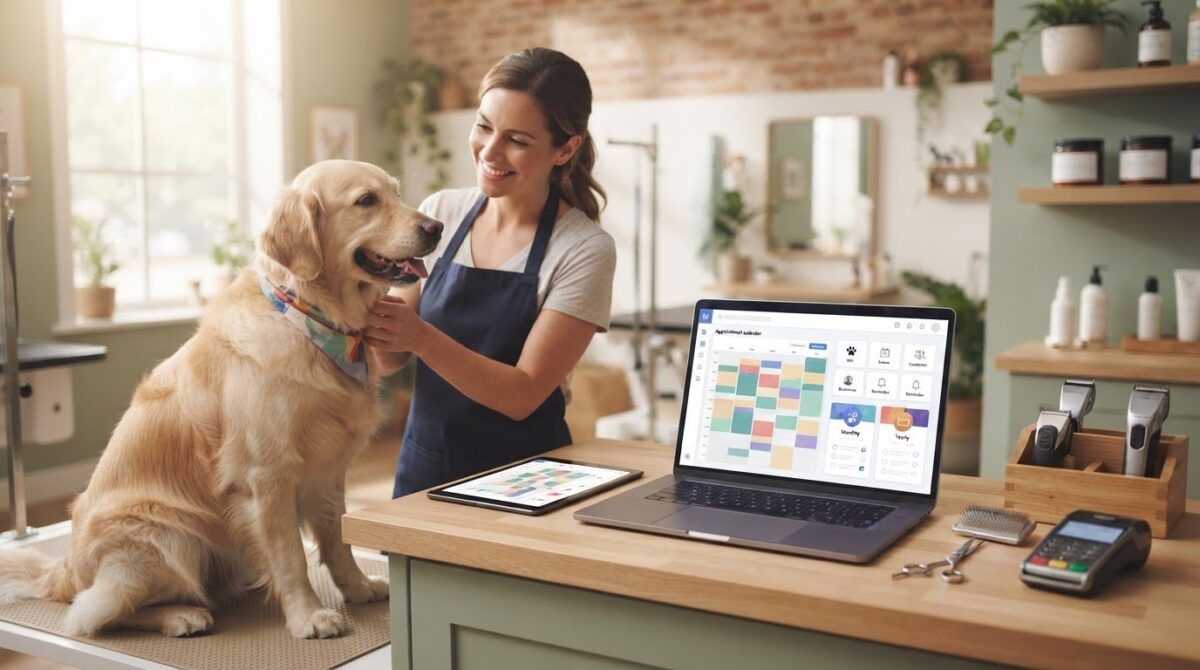
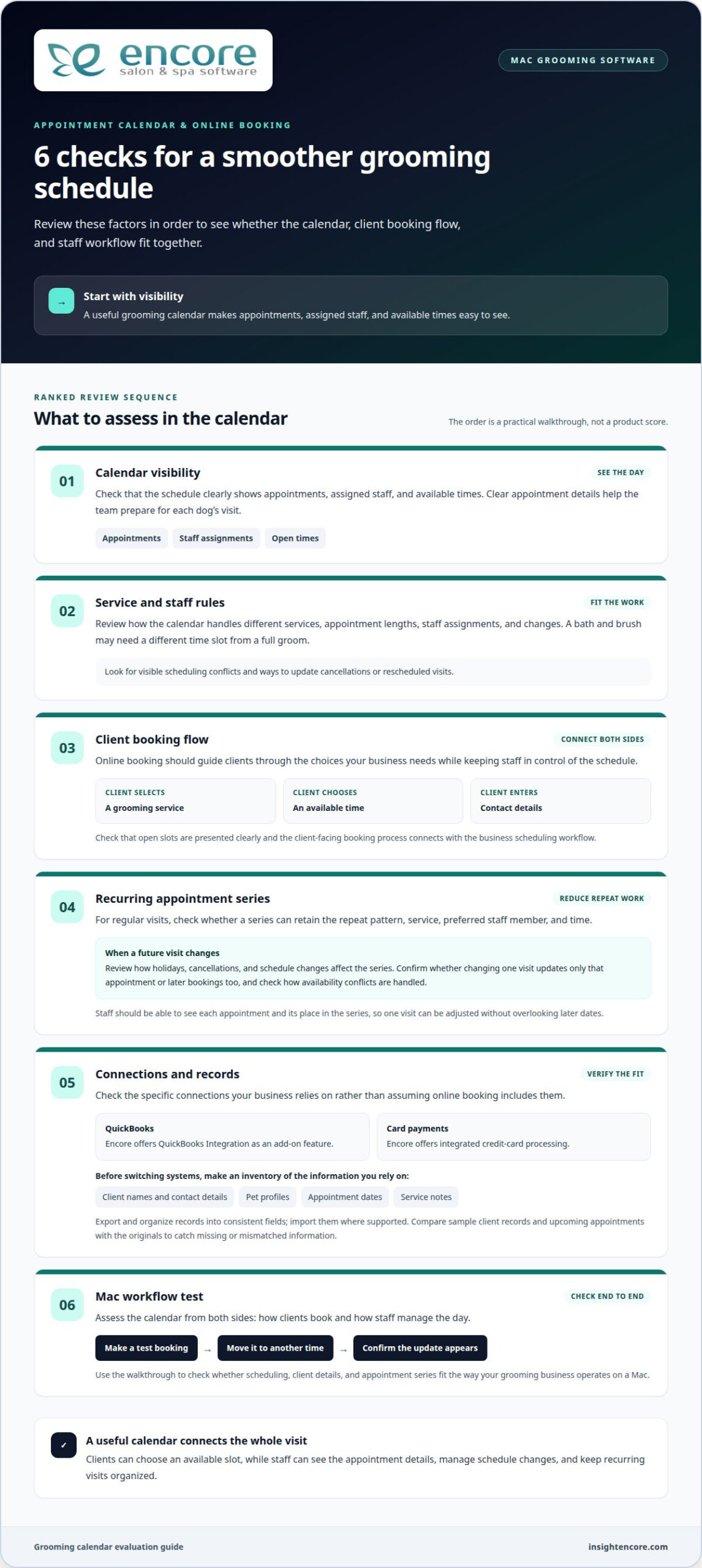
A grooming calendar should make appointments, assigned staff, and available times easy to see. Online booking lets clients choose from available slots without having to call.

Appointment Scheduling and Management

Review how the calendar handles different services, appointment lengths, staff assignments, and changes. A bath and brush, for instance, may need a different time slot from a full groom. Check that staff can see scheduling conflicts and update cancellations or rescheduled visits. Clear appointment details help the team prepare for each dog’s visit.

Online booking should guide clients through the choices your business needs, such as selecting a service, choosing an available time, and entering contact details. Look for a process that presents open slots clearly and gives staff control over the schedule. A useful appointment booking and calendar system connects client-facing booking with the business’s scheduling workflow.

Which grooming software integrates with QuickBooks, payment processors, and calendar apps? Check the specific connections you need rather than assuming that online booking includes them all. Encore offers QuickBooks Integration as an add-on feature and integrated credit-card processing. Confirm that the calendar and accounting tools you rely on fit your workflow.

Before switching systems, list the information you rely on, such as client names, contact details, pet profiles, appointment dates, and service notes. Export records from your current system, organize them into consistent fields, and import them into the new one where supported. Compare sample client records and upcoming appointments with the originals to catch missing or mismatched information.

Recurring Appointment Setup

For clients who book grooming visits regularly, appointment series can reduce repeated scheduling work. Look for options to set the repeat pattern, service, preferred staff member, and time. A client might want the same weekday and groomer for each visit. Review the series when a holiday, cancellation, or schedule change affects a future booking.

Recurring bookings work best when staff can see each appointment and its place in the series. This makes it easier to adjust one visit without overlooking later dates. Before relying on a repeat schedule, check how the system handles availability conflicts and whether a change affects only the selected visit or future appointments too.

For a Mac-based workflow, assess the calendar from both sides: how clients book a time and how staff manage the day. Test a booking, move it to another time, and check that the update appears correctly. This walkthrough shows whether scheduling, client details, and appointment series fit the way your grooming business operates.

Automated text and email reminders

Appointment reminders prompt clients before a grooming visit. A useful reminder identifies the pet, states when to arrive, and explains how to contact the business about a change. Encore includes free SMS appointment confirmations with every subscription. Consider email separately if you want to share more detailed information.

Email and Text Reminders

Start by listing the appointment details clients need. A text can provide a brief prompt with the date, time, and business name. An email can include those details alongside preparation notes, such as bringing a dog’s vaccination record if your business requests it. Keep each message focused so the key information is easy to find.

Before enabling automated messages, review the timing, channel, and wording. For example, you might send an email when an appointment is booked and a text closer to the visit. Treat this as a sample workflow, not a universal schedule. Choose timing that suits your clients and booking process, and avoid sending multiple messages with the same details.

Check that reminders use current contact details and match the appointment record. If a client changes their phone number or email address, update the profile before the next message goes out. When an appointment moves, confirm that the reminder reflects the new time. A test booking lets staff review how the message appears on a phone and in an inbox.

  • Useful details: Include the pet’s name, appointment time, and grooming business name.
  • Clear next steps: Explain how clients can respond or reach the business about a change.
  • Consistent wording: Use a friendly, direct tone across text and email templates.

Ask how the software handles failed or outdated contact details. Some systems may show message status or provide a way to review communication history; assess these options during a product walkthrough. If staff can see whether a reminder was sent, they can choose a personal follow-up for a client who needs extra help. Don’t assume a sent message was read.

Keep appointment confirmations distinct from promotions. A visit message should focus on the existing booking, while a marketing message might share a seasonal grooming offer or encourage a future visit. Clear separation helps staff choose the right message and keeps appointment details from getting buried in promotional copy.

Finally, review templates whenever business details or booking steps change. Update the wording, create a test appointment, and check the resulting text and email before relying on the revised message. This practical review helps keep reminders accurate and useful for clients.

Client communications and marketing

Client profiles connect communication and promotions to useful grooming details. A record for Bella, for example, could include her owner’s contact information, coat notes, preferred style, and past services. With those details together, staff can personalize a follow-up instead of sending a generic message.

Keep client and pet records useful

Look for records that distinguish the client from each pet. One household may book visits for several dogs, so a client record should connect to multiple pet profiles. Useful details include breed, grooming preferences, sensitivities reported by the owner, and service history. Staff should be able to update information after a visit, such as noting a new trim preference.

Client and pet records support continuity between appointments. Before a returning dog’s visit, staff can review the last service and the owner’s instructions. Search tools and clear profile layouts matter when staff need to find a client by name, phone number, or pet. Choose records that help staff use information, rather than store details no one needs.

Use communication tools with purpose

Separate service messages from marketing messages. A service message might confirm a grooming detail, while a marketing message could announce a seasonal coat-care promotion. Encore’s automated marketing and loyalty tools can help organize campaigns around client groups or past visits. For example, a business could prepare a follow-up for clients whose pets received a particular service.

Before sending a campaign, define its audience, message, and desired next step. A reminder to book again should make the booking action clear. A loyalty message should explain how clients can participate. Review the recipient list and message preview first, so a promotion intended for dog owners doesn’t go to unrelated contacts.

Are there U.S. tax, payment-processing, or recordkeeping requirements for grooming business software? Software features don’t determine a business’s tax obligations; these depend on its circumstances and applicable jurisdiction. Choose tools that organize transaction and client records to support your existing business processes.

Understand free-plan client limits

A free plan may limit stored clients, features, or access, so compare the client cap with the records your business needs. Count active households and consider whether each household may have several pets. Then review what happens as your client list grows, including whether older profiles remain accessible and which tools are included.

For example, a solo groomer with a compact client book may value basic records, while a growing team may need shared access and marketing functions. Compare the free plan’s client allowance with its communication and profile tools. The best fit depends on the records you manage and the work you expect the software to support.

Pet grooming business software for Mac pricing and tools

Monthly and yearly subscription pricing

Compare monthly and yearly billing by looking at the full plan, not just the payment interval. A monthly subscription can make ongoing expenses easier to review, while yearly billing groups payments across a longer term. The useful choice depends on your cash flow, expected software use, and whether the included tools suit your grooming workflow.

Compare plan contents before billing periods

List the features your business needs before comparing plans. A solo groomer may prioritize client records and appointment management, while a team may also need staff access, reporting, and marketing tools. Check which features come with each plan and which require a different tier. A lower starting price may not represent the complete setup you intend to use.

Build a simple comparison for each option: billing frequency, included features, user access, client capacity, and any separately charged services. Use the same requirements for every plan. For example, compare the monthly and yearly options using the same number of staff accounts and the same communication tools. That makes differences easier to understand without focusing on one headline figure.

Account for additional staff

Check how employee count affects the subscription. Encore’s monthly pricing is per location and based on the number of employees. Essentials has tiers for one employee, two to three, four to six, seven to twelve, and unlimited employees. Elite uses the same employee groups, with a separate price for each tier. List who needs access so you can compare the right options.

Include likely staffing changes in your review. If a business adds a groomer or receptionist, the plan may need more access or different features. Compare the current setup with that possible workflow, then identify how plan changes are handled. The price depends on the case and is given after a quote request; cost factors include selected features, staff access, and billing term.

  • Monthly billing: Compare the recurring payment with the features and access included.
  • Yearly billing: Review the full commitment and whether the plan still fits expected operations.
  • Staff access: Include each person who needs to manage appointments or client records.

Before choosing, read the plan terms for renewal, cancellation, and changes to user access. Keep a copy of the selected plan details with your business records. If the software supports a client management system, confirm that the chosen plan includes the records and workflows you need. A side-by-side comparison helps you judge the ongoing value without assuming that monthly or yearly billing is automatically the better choice.

Browser-based access on Mac

Browser-based grooming software opens through a web browser on your Mac instead of relying on a locally installed program. That can make the workflow easier to access from different devices, provided the software supports the browser and operating system you use. Start by reviewing its published technical requirements, then test the tasks your team performs each day.

Use a practical walkthrough to assess the experience. Sign in, open the appointment calendar, find a client profile, and update a sample record. Check that menus are easy to use on your Mac’s screen and that the text is readable without repeated zooming. If staff use more than one device, try the same steps there too. Encore includes unlimited device logins.

Browser-based access requires an internet connection, so consider how your team will manage a temporary outage. Identify tasks that depend on live information, such as checking the day’s schedule or updating a client record. Plan a manual fallback for essential details, then reconcile changes once access returns.

Review security and privacy controls

What security and privacy risks should groomers consider when choosing cloud-based software? Client contact details, pet profiles, grooming notes, and transaction records can be sensitive business information. Review how access is controlled, how data is protected, and what recovery options exist if an account or device becomes unavailable.

On a shared Mac, give each staff member an individual login if the software supports separate accounts. Limit access to the tasks each person needs, and sign out before leaving a shared workstation. Strong, unique passwords and a screen lock reduce the risk of someone viewing an open client profile. Keep your browser and operating system updated through their normal update settings.

Review the product’s security information before choosing a system. Look for details on data encryption, backup practices, account permissions, and steps for restoring access. Also review how staff access is handled when someone leaves. These details help you assess information management without assuming every cloud service offers the same safeguards.

For a useful Mac trial, test a complete work sequence rather than just opening the dashboard. Find a client, review a pet’s grooming notes, move between the calendar and records, then sign out. Repeat the test using the browser your team plans to use. Note any slow screens, confusing controls, or missing information, and compare the results with your daily workflow.

Browser access can suit a grooming business that wants to work on a Mac without installing a desktop program. The fit depends on browser compatibility, how the interface works on your device, internet access, and the way staff use client information. Test these points against your schedule before making the software part of your routine.

Explore the software workflow

Encore Salon & Spa Software: Encore Salon Software

Encore Salon & Spa Software offers Encore Salon Software for businesses that want to bring core management tasks together. Businesses evaluating salon software can consider whether they need appointment booking, client management, inventory tracking, and point-of-sale tools. If separate systems make it harder to coordinate appointments, records, and transactions, Encore can bring these tasks into one management platform.

Consider how those tools align with the needs outlined above, including booking and keeping client information organized. Encore Salon Software is one option in the platform, alongside Encore Spa Software, Chair/Booth Renter Software, and Tattoo Studio Software. Explore the Encore Salon Software details to learn more, or contact Encore Salon & Spa Software with your questions.

Choose a system that can grow with your workflow

Start by deciding which part of the grooming day needs the most attention. You might want to coordinate staff, keep client records easy to access, or make booking simpler for pet owners. Use that priority to assess whether the platform fits your current routine and plans for growth. Pet grooming business software for Mac should support your workflow without adding unnecessary complexity.

Encore Salon & Spa Software offers Encore Salon Software, Encore Spa Software, and Chair/Booth Renter Software. These options serve different business models, so consider which one aligns with the way your team operates. A focused conversation can help you explore the relevant fit and next steps.

Contact Encore Salon & Spa Software

With a clear priority and a thoughtful comparison, you can take the next step with confidence and build a more organized grooming business.

Frequently Asked Questions

What pet grooming business software works on Mac?

Browser-based grooming software can work on a Mac when it supports a current browser. Some browser-based pet grooming platforms may work on a Mac if they support a current browser and have an internet connection. Try a typical task, such as opening a pet’s profile and reviewing its service history, to assess the interface against your daily needs.

Which grooming software runs natively on macOS versus in a web browser?

Native software is installed as a macOS application, while browser-based software opens in a browser. Encore’s platform is accessed through a current web browser and requires an internet connection. Consider whether your team prefers an installed app or browser access, then assess how that choice fits your Mac setup and whether staff need to move between devices.

What features should pet grooming business software include?

Choose tools that match the work your grooming business needs to coordinate. Appointment management linked with searchable client and pet records lets staff review service history before a visit. Online booking, integrated credit-card processing, inventory tracking, and marketing tools can support other parts of the workflow. Consider recording a grooming product sale alongside a client’s visit, then decide which functions matter most.

What hardware and macOS versions are required for popular grooming software?

Hardware and macOS requirements depend on the software, so review the requirements for the platform you plan to use. Encore Salon & Spa Software works with a current web browser and internet connection. Check that your Mac can run an up-to-date browser, connect reliably, and display the calendar and client records clearly. Test these screens on the device staff will use.

Which grooming software integrates with QuickBooks, payment processors, and calendar apps?

Choose a grooming platform that explicitly supports the specific accounting, payment, and calendar connections you need. Compare each integration individually rather than assuming online booking includes them all.

Disclaimer

This article is general in nature and may contain errors, please verify all claims with your sales rep