
window.dataLayer = window.dataLayer || []; function gtag(){dataLayer.push(arguments);} gtag('js', new Date()); gtag('config', 'UA-206511945-1');
Search
Categories
Uncategorized

Pet grooming business software for Mac pricing and tools

A Mac can run a grooming business smoothly when its software supports Mac access and brings daily tasks into one place. Look for booking, appointment reminders, client communications, and marketing tools, then compare whether billing is monthly or yearly. The right pet grooming business software for Mac should make it easier to manage the schedule and stay in touch with clients.

It’s understandable to focus on the monthly or yearly price first, but the useful comparison is what each plan includes and how it fits your workflow. Pricing depends on the tools and plan, and the price is provided after a quote request.

This guide explains what to look for in Mac-compatible grooming software, how booking and reminders support a more organized day, and how client communication and marketing fit into the picture. You’ll also learn what can affect pricing and how an all-in-one management platform can help bring appointments, client records, inventory, and point-of-sale tasks together.

Key Takeaways

  • Compare appointment calendars and online booking tools to find a setup that fits how you schedule grooming visits.
  • Review how reminder options support client follow-through, and how communication tools help you keep messages organized.
  • Assess marketing features by how they support repeat visits and client engagement, not just by the number of tools included.
  • Compare monthly and yearly plans by their billing cadence and included features to understand which structure suits your business.
  • Check how browser-based access works on your Mac, and consider whether an integrated platform for bookings, client records, inventory, and transactions fits your workflow.

Appointment calendar and online booking

A grooming calendar should make appointments, assigned staff, and available times easy to see. Online booking lets clients choose from available slots without having to call.

Appointment Scheduling and Management

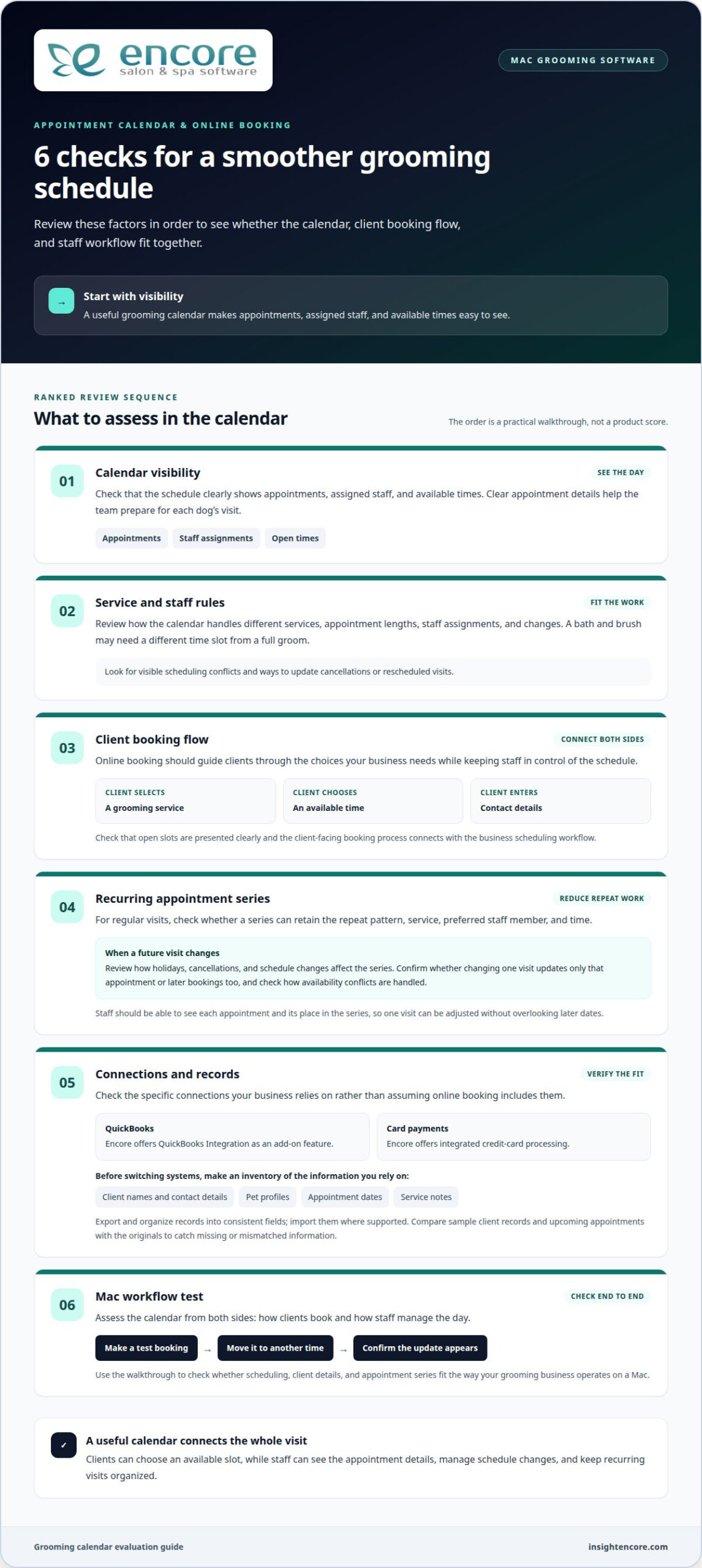
Review how the calendar handles different services, appointment lengths, staff assignments, and changes. A bath and brush, for instance, may need a different time slot from a full groom. Check that staff can see scheduling conflicts and update cancellations or rescheduled visits. Clear appointment details help the team prepare for each dog’s visit.

Online booking should guide clients through the choices your business needs, such as selecting a service, choosing an available time, and entering contact details. Look for a process that presents open slots clearly and gives staff control over the schedule. A useful appointment booking and calendar system connects client-facing booking with the business’s scheduling workflow.

Which grooming software integrates with QuickBooks, payment processors, and calendar apps? Check the specific connections you need rather than assuming that online booking includes them all. Encore offers QuickBooks Integration as an add-on feature and integrated credit-card processing. Confirm that the calendar and accounting tools you rely on fit your workflow.

Before switching systems, list the information you rely on, such as client names, contact details, pet profiles, appointment dates, and service notes. Export records from your current system, organize them into consistent fields, and import them into the new one where supported. Compare sample client records and upcoming appointments with the originals to catch missing or mismatched information.

Recurring Appointment Setup

For clients who book grooming visits regularly, appointment series can reduce repeated scheduling work. Look for options to set the repeat pattern, service, preferred staff member, and time. A client might want the same weekday and groomer for each visit. Review the series when a holiday, cancellation, or schedule change affects a future booking.

Recurring bookings work best when staff can see each appointment and its place in the series. This makes it easier to adjust one visit without overlooking later dates. Before relying on a repeat schedule, check how the system handles availability conflicts and whether a change affects only the selected visit or future appointments too.

For a Mac-based workflow, assess the calendar from both sides: how clients book a time and how staff manage the day. Test a booking, move it to another time, and check that the update appears correctly. This walkthrough shows whether scheduling, client details, and appointment series fit the way your grooming business operates.

Automated text and email reminders

Appointment reminders prompt clients before a grooming visit. A useful reminder identifies the pet, states when to arrive, and explains how to contact the business about a change. Encore includes free SMS appointment confirmations with every subscription. Consider email separately if you want to share more detailed information.

Email and Text Reminders

Start by listing the appointment details clients need. A text can provide a brief prompt with the date, time, and business name. An email can include those details alongside preparation notes, such as bringing a dog’s vaccination record if your business requests it. Keep each message focused so the key information is easy to find.

Before enabling automated messages, review the timing, channel, and wording. For example, you might send an email when an appointment is booked and a text closer to the visit. Treat this as a sample workflow, not a universal schedule. Choose timing that suits your clients and booking process, and avoid sending multiple messages with the same details.

Check that reminders use current contact details and match the appointment record. If a client changes their phone number or email address, update the profile before the next message goes out. When an appointment moves, confirm that the reminder reflects the new time. A test booking lets staff review how the message appears on a phone and in an inbox.

  • Useful details: Include the pet’s name, appointment time, and grooming business name.
  • Clear next steps: Explain how clients can respond or reach the business about a change.
  • Consistent wording: Use a friendly, direct tone across text and email templates.

Ask how the software handles failed or outdated contact details. Some systems may show message status or provide a way to review communication history; assess these options during a product walkthrough. If staff can see whether a reminder was sent, they can choose a personal follow-up for a client who needs extra help. Don’t assume a sent message was read.

Keep appointment confirmations distinct from promotions. A visit message should focus on the existing booking, while a marketing message might share a seasonal grooming offer or encourage a future visit. Clear separation helps staff choose the right message and keeps appointment details from getting buried in promotional copy.

Finally, review templates whenever business details or booking steps change. Update the wording, create a test appointment, and check the resulting text and email before relying on the revised message. This practical review helps keep reminders accurate and useful for clients.

Client communications and marketing

Client profiles connect communication and promotions to useful grooming details. A record for Bella, for example, could include her owner’s contact information, coat notes, preferred style, and past services. With those details together, staff can personalize a follow-up instead of sending a generic message.

Keep client and pet records useful

Look for records that distinguish the client from each pet. One household may book visits for several dogs, so a client record should connect to multiple pet profiles. Useful details include breed, grooming preferences, sensitivities reported by the owner, and service history. Staff should be able to update information after a visit, such as noting a new trim preference.

Client and pet records support continuity between appointments. Before a returning dog’s visit, staff can review the last service and the owner’s instructions. Search tools and clear profile layouts matter when staff need to find a client by name, phone number, or pet. Choose records that help staff use information, rather than store details no one needs.

Use communication tools with purpose

Separate service messages from marketing messages. A service message might confirm a grooming detail, while a marketing message could announce a seasonal coat-care promotion. Encore’s automated marketing and loyalty tools can help organize campaigns around client groups or past visits. For example, a business could prepare a follow-up for clients whose pets received a particular service.

Before sending a campaign, define its audience, message, and desired next step. A reminder to book again should make the booking action clear. A loyalty message should explain how clients can participate. Review the recipient list and message preview first, so a promotion intended for dog owners doesn’t go to unrelated contacts.

Are there U.S. tax, payment-processing, or recordkeeping requirements for grooming business software? Software features don’t determine a business’s tax obligations; these depend on its circumstances and applicable jurisdiction. Choose tools that organize transaction and client records to support your existing business processes.

Understand free-plan client limits

A free plan may limit stored clients, features, or access, so compare the client cap with the records your business needs. Count active households and consider whether each household may have several pets. Then review what happens as your client list grows, including whether older profiles remain accessible and which tools are included.

For example, a solo groomer with a compact client book may value basic records, while a growing team may need shared access and marketing functions. Compare the free plan’s client allowance with its communication and profile tools. The best fit depends on the records you manage and the work you expect the software to support.
Pet grooming business software for Mac pricing and tools

Monthly and yearly subscription pricing

Compare monthly and yearly billing by looking at the full plan, not just the payment interval. A monthly subscription can make ongoing expenses easier to review, while yearly billing groups payments across a longer term. The useful choice depends on your cash flow, expected software use, and whether the included tools suit your grooming workflow.

Compare plan contents before billing periods

List the features your business needs before comparing plans. A solo groomer may prioritize client records and appointment management, while a team may also need staff access, reporting, and marketing tools. Check which features come with each plan and which require a different tier. A lower starting price may not represent the complete setup you intend to use.

Build a simple comparison for each option: billing frequency, included features, user access, client capacity, and any separately charged services. Use the same requirements for every plan. For example, compare the monthly and yearly options using the same number of staff accounts and the same communication tools. That makes differences easier to understand without focusing on one headline figure.

Account for additional staff

Check how employee count affects the subscription. Encore’s monthly pricing is per location and based on the number of employees. Essentials has tiers for one employee, two to three, four to six, seven to twelve, and unlimited employees. Elite uses the same employee groups, with a separate price for each tier. List who needs access so you can compare the right options.

Include likely staffing changes in your review. If a business adds a groomer or receptionist, the plan may need more access or different features. Compare the current setup with that possible workflow, then identify how plan changes are handled. The price depends on the case and is given after a quote request; cost factors include selected features, staff access, and billing term.

  • Monthly billing: Compare the recurring payment with the features and access included.
  • Yearly billing: Review the full commitment and whether the plan still fits expected operations.
  • Staff access: Include each person who needs to manage appointments or client records.

Before choosing, read the plan terms for renewal, cancellation, and changes to user access. Keep a copy of the selected plan details with your business records. If the software supports a client management system, confirm that the chosen plan includes the records and workflows you need. A side-by-side comparison helps you judge the ongoing value without assuming that monthly or yearly billing is automatically the better choice.

Browser-based access on Mac

Browser-based grooming software opens through a web browser on your Mac instead of relying on a locally installed program. That can make the workflow easier to access from different devices, provided the software supports the browser and operating system you use. Start by reviewing its published technical requirements, then test the tasks your team performs each day.

Use a practical walkthrough to assess the experience. Sign in, open the appointment calendar, find a client profile, and update a sample record. Check that menus are easy to use on your Mac’s screen and that the text is readable without repeated zooming. If staff use more than one device, try the same steps there too. Encore includes unlimited device logins.

Browser-based access requires an internet connection, so consider how your team will manage a temporary outage. Identify tasks that depend on live information, such as checking the day’s schedule or updating a client record. Plan a manual fallback for essential details, then reconcile changes once access returns.

Review security and privacy controls

What security and privacy risks should groomers consider when choosing cloud-based software? Client contact details, pet profiles, grooming notes, and transaction records can be sensitive business information. Review how access is controlled, how data is protected, and what recovery options exist if an account or device becomes unavailable.

On a shared Mac, give each staff member an individual login if the software supports separate accounts. Limit access to the tasks each person needs, and sign out before leaving a shared workstation. Strong, unique passwords and a screen lock reduce the risk of someone viewing an open client profile. Keep your browser and operating system updated through their normal update settings.

Review the product’s security information before choosing a system. Look for details on data encryption, backup practices, account permissions, and steps for restoring access. Also review how staff access is handled when someone leaves. These details help you assess information management without assuming every cloud service offers the same safeguards.

For a useful Mac trial, test a complete work sequence rather than just opening the dashboard. Find a client, review a pet’s grooming notes, move between the calendar and records, then sign out. Repeat the test using the browser your team plans to use. Note any slow screens, confusing controls, or missing information, and compare the results with your daily workflow.

Browser access can suit a grooming business that wants to work on a Mac without installing a desktop program. The fit depends on browser compatibility, how the interface works on your device, internet access, and the way staff use client information. Test these points against your schedule before making the software part of your routine.

[Explore the software workflow](https://insightencore.com/try-encore-now/)

Encore Salon & Spa Software: Encore Salon Software

Encore Salon & Spa Software offers Encore Salon Software for businesses that want to bring core management tasks together. Businesses evaluating salon software can consider whether they need appointment booking, client management, inventory tracking, and point-of-sale tools. If separate systems make it harder to coordinate appointments, records, and transactions, Encore can bring these tasks into one management platform.

Consider how those tools align with the needs outlined above, including booking and keeping client information organized. Encore Salon Software is one option in the platform, alongside Encore Spa Software, Chair/Booth Renter Software, and Tattoo Studio Software. Explore the Encore Salon Software details to learn more, or contact Encore Salon & Spa Software with your questions.

Choose a system that can grow with your workflow

Start by deciding which part of the grooming day needs the most attention. You might want to coordinate staff, keep client records easy to access, or make booking simpler for pet owners. Use that priority to assess whether the platform fits your current routine and plans for growth. Pet grooming business software for Mac should support your workflow without adding unnecessary complexity.

Encore Salon & Spa Software offers Encore Salon Software, Encore Spa Software, and Chair/Booth Renter Software. These options serve different business models, so consider which one aligns with the way your team operates. A focused conversation can help you explore the relevant fit and next steps.

[Contact Encore Salon & Spa Software](https://insightencore.com/try-encore-now/)

With a clear priority and a thoughtful comparison, you can take the next step with confidence and build a more organized grooming business.

Frequently Asked Questions

What pet grooming business software works on Mac?

Browser-based grooming software can work on a Mac when it supports a current browser. Some browser-based pet grooming platforms may work on a Mac if they support a current browser and have an internet connection. Try a typical task, such as opening a pet’s profile and reviewing its service history, to assess the interface against your daily needs.

Which grooming software runs natively on macOS versus in a web browser?

Native software is installed as a macOS application, while browser-based software opens in a browser. Encore’s platform is accessed through a current web browser and requires an internet connection. Consider whether your team prefers an installed app or browser access, then assess how that choice fits your Mac setup and whether staff need to move between devices.

What features should pet grooming business software include?

Choose tools that match the work your grooming business needs to coordinate. Appointment management linked with searchable client and pet records lets staff review service history before a visit. Online booking, integrated credit-card processing, inventory tracking, and marketing tools can support other parts of the workflow. Consider recording a grooming product sale alongside a client’s visit, then decide which functions matter most.

What hardware and macOS versions are required for popular grooming software?

Hardware and macOS requirements depend on the software, so review the requirements for the platform you plan to use. Encore Salon & Spa Software works with a current web browser and internet connection. Check that your Mac can run an up-to-date browser, connect reliably, and display the calendar and client records clearly. Test these screens on the device staff will use.

Which grooming software integrates with QuickBooks, payment processors, and calendar apps?

Choose a grooming platform that explicitly supports the specific accounting, payment, and calendar connections you need. Compare each integration individually rather than assuming online booking includes them all.

Disclaimer

This article is general in nature and may contain errors, please verify all claims with your sales rep

Categories
Uncategorized

Pet Grooming Appointment Software: The 2026 Professional Reference Guide

It’s 2:00 PM on a Tuesday, and you’ve just spent twenty minutes carefully calming a nervous Golden Retriever, only to realize you’ve missed three booking calls and a last-minute cancellation text. That sinking feeling of lost revenue and a fractured schedule is a frustration many groomers know by heart. You didn’t start your business to spend more time on the phone than at the grooming table, yet the administrative weight of tracking health notes and client preferences can feel like a second, unpaid job.

We understand that your craft deserves your full attention, not your anxiety. The good news is that the right pet grooming appointment software acts as a silent partner, handling the logistics so you can focus on the pets in your care. This guide will show you how to transform a chaotic calendar into a streamlined, high-growth business that runs smoothly even when you’re off the clock.

You’ll discover how automated 24/7 booking and smart reminders virtually eliminate no-shows while keeping every pet’s medical history at your fingertips. We are going to walk through the essential tools that provide the professional edge you need to reclaim your time and scale your success in 2026.

Key Takeaways

  • Learn why moving from paper logs to a digital assistant is the first step toward reclaiming your time and sanity.
  • See how pet grooming appointment software manages detailed pet profiles, ensuring you always remember every temperament and style preference.
  • Stop losing revenue to empty tables by implementing automated reminders and deposits that keep your schedule full.
  • Discover how to easily manage inventory and sales for your studio, whether you’re a solo booth renter or a growing team.
  • Get a clear, step-by-step plan to audit your current business pains and transition to a more supportive, human-centric management system.

Beyond the Clip: Why Professional Grooming Needs Precision Software in 2026

By 2026, a grooming studio is much more than shears and shampoos. It’s a fast paced business environment where every minute matters. Modern appointment scheduling software has evolved into a centralized digital hub. This isn’t just a calendar; it’s a command center for your scheduling, client records, and financial management. Using a dedicated pet grooming appointment software means moving away from the “big black book” of paper schedules. It’s not just a tech upgrade. It’s like hiring a digital assistant that never sleeps.

Automation has become the line between a business that survives and one that thrives. Today’s clients expect the same seamless experience from their groomer that they get from their favorite restaurants or salons. When you use specialized pet grooming appointment software, you trade administrative noise for what you actually love: creative grooming time. You deserve to spend your day focusing on the pets in your care, not the paperwork on your desk. This shift isn’t just about efficiency. It’s about reclaiming your passion for the craft.

The High Cost of Manual Scheduling

Relying on manual logs or sticky notes comes with a steep price tag. Every missed call while you’re mid-clip is a potential client who might call the shop down the street instead. Double bookings create stress for you and the pet, leading to a frantic atmosphere that owners notice immediately. The mental toll of trying to remember which dog has a skin allergy or which owner prefers a specific cut is exhausting. You shouldn’t have to carry your entire business in your head. Digital tools provide a sense of reassuring empathy by holding that information for you. They remove the “what did I forget?” anxiety that keeps many owners awake at night. By centralizing your data, you protect your revenue and your peace of mind.

24/7 Online Booking: The New Industry Standard

Your clients lead busy lives. Many of them realize they need a grooming session at 10:00 PM when your shop is closed. If they can’t book right then, you risk losing that slot to a more accessible competitor. Providing an Encore online booking module meets these modern expectations instantly. It empowers your clients to see your availability and secure their spot on their own time. This drastically reduces phone fatigue for your staff and ensures your tables stay full without constant manual outreach. It’s about being accessible to your community without being tethered to your phone all day. You gain a full schedule, and your clients gain the convenience they crave.

Core Features of Encore Pet Grooming Software for Business Growth

Success in the grooming industry isn’t just about how well you handle a pair of shears. It’s about how well you manage the data behind every clip. Encore Salon & Spa Software provides the framework you need to scale your studio without losing the personal touch your clients love. By centralizing your operations, you move from reactive fire-fighting to proactive business growth.

Pet-First Client Relationship Management (CRM)

Every pet is unique, and remembering their specific quirks is what builds lifelong loyalty. Our CRM isn’t just a list of names; it’s a detailed history of every interaction. You can store photos of finished grooms to ensure quality remains consistent every time a pet returns. Beyond aesthetics, the system manages critical medical alerts and vaccination records automatically. This keeps your studio safe and compliant without you having to dig through folders. While Encore Salon & Spa Software was built on decades of professional experience, this specialized module is tailored to the unique needs of the grooming world. It handles everything from temperament notes to skin sensitivity warnings with ease.

Automated Marketing and Retention

Keeping your tables full doesn’t have to mean spending hours on social media or the phone. You can set up “We Miss You” emails to reach out to owners whose pets haven’t been in for a clip in eight weeks. This gentle nudge brings clients back through your doors without you lifting a finger. You can also reward your most loyal “Top Dogs” with loyalty points and gift cards, turning occasional visitors into brand advocates. Automated marketing campaigns work in the background to identify slow periods and send targeted offers that fill empty gaps in your calendar. If you want to see how these features can work for your specific shop, you can explore the platform’s capabilities today.

Integrated Payments and Inventory

Checkout should be the easiest part of the client experience. With integrated credit card processing, you can say goodbye to third-party hardware headaches and manual entry errors. Everything syncs directly with your records, making end-of-day balancing a breeze. This professional setup is matched by robust inventory management. The software tracks your usage of shampoos, conditioners, and blades, alerting you before you run out. You’ll always have the supplies you need to provide top-tier service. This level of organization ensures that pet grooming appointment software isn’t just a luxury; it’s the backbone of a high-growth business.

Solving the No-Show Crisis: Automated Communication & Deposits

A quiet grooming table is a groomer’s biggest frustration. When a client misses their slot without notice, it doesn’t just disrupt your flow; it directly impacts your take-home pay. Most people don’t miss appointments on purpose. They simply lose track of time or get buried in their own busy schedules. This is where pet grooming appointment software steps in as a reliable bridge between your business and your clients. By automating your outreach, you remove the burden of manual follow-ups and create a professional boundary that clients respect.

For independent professionals and booth renters, the stakes are even higher. A single no-show can represent a significant portion of your daily earnings. Using a system that handles these interactions for you provides a level of professional confidence that’s hard to maintain when you’re managing everything via personal texts. It shifts the dynamic from a casual favor to a respected professional service.

Perfecting Your Appointment Confirmation Strategy

Timing is everything when it comes to reminders. Sending a message too early means it might be forgotten, while sending it too late doesn’t give you enough time to fill a cancelled slot. We’ve found that a “two-step” approach works best. A confirmation request 48 hours in advance gives you a clear window to rebook if needed. Following up with a quick nudge 2 hours before the appointment keeps the visit top-of-mind for the owner.

Your messages should feel like a friendly conversation, not a robotic alert. Use clear, everyday language that reflects your shop’s personality. If you want to dive deeper into the exact wording that gets results, check out our guide on Perfecting Your Appointment Confirmation Text Strategy. These small touchpoints show clients that you value their time and expect the same in return.

Deposits and Pre-payments

Requiring a deposit for high-value grooms or new clients is a powerful way to secure your income. Integrated payments through your pet grooming appointment software make this process seamless. It removes the awkwardness of asking for money upfront because the system handles the transaction during the booking process. When a client has “skin in the game,” they are far more likely to show up or provide ample notice if they need to reschedule.

This practice also builds trust through transparency. Clients receive an immediate digital receipt and a clear understanding of your cancellation policy. It positions you as a serious business owner who manages their studio with precision. Managing cancellations gracefully becomes much easier when you have a clear, software-backed policy in place. You can offer a refund or a credit toward a future visit, maintaining the relationship without losing the revenue you need to thrive.

Pet Grooming Appointment Software: The 2026 Professional Reference Guide

Managing the Business Side: Inventory, POS, and Booth Renters

Managing a studio involves more than just a sharp eye and a steady hand. Beyond the grooming table, you’re running a complex operation that requires precise tracking of supplies, sales, and staff. Specialized pet grooming appointment software does the heavy lifting for your business backend. It ensures that while you’re focused on the pets, the financial and operational gears of your shop keep turning smoothly. This level of organization is what separates a busy groomer from a successful business owner.

Solutions for Independent Groomers

Independent professionals often face unique hurdles. You might share a roof with other groomers but manage your own books, clients, and supplies. We understand that your independence is your greatest asset. That’s why we emphasize the importance of booth renter client management apps to keep your personal business records secure and separate. Encore supports this individual growth within a larger facility by providing dedicated logins and private schedules. This multi-user logic is similar to what we’ve detailed in our Barber Shop POS System guide. It allows everyone to thrive under one roof while maintaining their own professional identity and client list.

Streamlined Point-of-Sale Transactions

The checkout process should be a moment of celebration, not a technical struggle. Our pet grooming appointment software includes a mobile-friendly POS that works perfectly for both boutique shops and mobile groomers on the move. You can handle tips with ease and manage split payments for multi-pet households without breaking a sweat. Every transaction is secure, professional, and instantly tied to the client’s history. This ensures your records are always up to date, whether you’re selling a full groom or a bottle of specialty shampoo. A professional checkout experience leaves a lasting impression on your clients and reinforces the quality of your brand.

Tracking retail sales alongside your services is a proven way to boost your profit margins. With real-time inventory alerts, the system notifies you before you run out of professional-grade shampoos or replacement blades. When tax season rolls around, you won’t be digging through a shoebox of receipts. You can generate comprehensive year-end reports with a few clicks, making your financial review a stress-free experience. If you’re ready to see how these business tools can simplify your daily routine, schedule your personalized walkthrough and take control of your studio’s future.

Transitioning to Encore: Your Path to a Streamlined Studio

Moving to a new system feels like a big leap. We know that. But staying stuck in a manual routine is a bigger risk that can eventually stall your growth. Transitioning to specialized pet grooming appointment software is a logical progression toward the studio you’ve always wanted to run. It’s about moving from a state of constant catch up to a state of organized control. You deserve a business that supports your lifestyle rather than consuming it.

Step 1: Audit your current “pain points.” Look closely at where you lose the most time each week. Is it the late night phone calls? Or perhaps it’s those messy handwritten notes about a pet’s temperament? Identifying these specific hurdles is the first step toward clearing them once and for all.

Step 2: Sign up for a personalized walkthrough of the Encore platform. We don’t just send you a login and wish you luck. You’ll sit down with a specialist who understands the unique flow of a grooming shop. They’ll show you exactly how the platform fits your unique workflow, ensuring you feel confident before you ever book your first client.

Step 3: Import your existing client list with our supportive data team. You don’t have to type every name manually. Our team doesn’t just move files; they ensure your history remains intact. They understand that medical alerts and style preferences are the lifeblood of your service. They work alongside you to verify that every detail is correctly mapped into the new system.

Step 4: Launch your online booking portal and watch your calendar fill up. This is the moment the stress begins to lift. You can finally focus on the pets at your table while the software handles the logistics in the background.

The Human-Centric Onboarding Experience

We reject the “automated-only” approach that has become so common. In 2026, many companies hide behind bots, but we believe in real human connection. Our support specialists have a “can-do” attitude and deep industry expertise. They are here to help you train your team with professional confidence. We make sure every staff member feels comfortable and empowered by the new tools. We don’t do delayed interactions or cold, impersonal tickets. You get the expert guidance you need exactly when you need it.

Ready to Transform Your Grooming Business?

You started your studio because you love animals, not because you love spreadsheets. Encore gives you the relief of knowing the business side is handled. You get centralized records, automated reminders, and a streamlined checkout process. It’s time to trade the administrative noise for creative growth and peace of mind. Join our community and see how the right pet grooming appointment software changes everything.

Try Encore Now and reclaim your time

Building Your Future-Ready Grooming Studio

You didn’t enter the world of pet grooming to spend your days wrestling with spreadsheets or chasing down no-shows. As we move into 2026, the right pet grooming appointment software is no longer just a convenience; it is the foundation of a sustainable, joyful business. By automating your reminders and centralizing your client records, you create space for what truly matters: the pets in your care and the growth of your craft.

Whether you’re an independent booth renter or managing a full boutique team, having an all-in-one system for booking, POS, and inventory tracking provides a level of control that manual logs simply cannot match. Since 1991, we’ve been a trusted partner for wellness professionals, offering the human-centric support you need to navigate every hurdle. You don’t have to manage this transition alone. Our team is here to ensure your peace of mind as you step into a more organized future.

Start Your Stress-Free Grooming Journey: Try Encore Now

Your studio’s best days are ahead of you. We can’t wait to help you reach them.

Frequently Asked Questions

Is pet grooming appointment software easy to set up for beginners?

Yes, pet grooming appointment software is built with simplicity in mind to ensure you don’t need a tech degree to run your studio. We provide a personalized walkthrough and a supportive data team to help you import your existing client lists. Our goal is to remove the intimidation factor, allowing you to transition from paper books to digital management with professional confidence and total peace of mind.

Can I manage multiple groomers in one software account?

You can absolutely manage multiple groomers within a single Encore account. The system allows for dedicated logins and private schedules for every team member in your facility. This organization helps you track individual performance and commissions without any messy overlap. It’s an ideal solution for growing shops that need a clear, bird’s eye view of their daily operations and staff productivity.

Does the software work for mobile grooming businesses?

Yes, our software is fully optimized for mobile grooming professionals who need to manage their business on the move. The mobile friendly interface and integrated POS allow you to handle bookings and payments from your van or a client’s driveway. With 2026 feature updates, mobile groomers can keep their records updated in real time, ensuring that pet health notes are always accessible regardless of your location.

How does automated appointment confirmation reduce no-shows?

Automated confirmations reduce no-shows by sending timely SMS or email reminders that keep your services top of mind for busy pet owners. When clients receive a nudge 48 hours or 2 hours before their slot, they are much less likely to forget. Pairing these reminders with integrated pet grooming appointment software deposits creates a professional boundary that encourages clients to value your time as much as you value their business.

Can I track pet medical records and vaccination dates in the system?

You can track detailed medical histories, temperament notes, and vaccination expiration dates directly within each pet’s digital profile. The system can even be set to flag expired vaccinations during the booking process, ensuring your studio stays safe and compliant. This centralized record keeping removes the stress of digging through paper files and helps you provide a safer, more personalized experience for every animal.

Is integrated credit card processing secure for my clients?

Integrated credit card processing is highly secure and follows strict industry standards to protect your clients’ sensitive information. By using a professional system, you eliminate the risks associated with manual entry and third party hardware glitches. Your clients will appreciate the seamless, secure checkout experience, and you’ll benefit from having every transaction automatically tied to your financial reports for easier end of day balancing.

What happens if I need technical support during a busy workday?

You will have direct access to our human support specialists who understand the fast paced nature of the grooming industry. We reject the use of automated bots, so you’ll always speak with a real person who has a “can-do” attitude. Whether you have a quick question about a report or need help with a setting, our team is dedicated to getting you back to your grooming table quickly.

Can I use this software if I only rent a booth in a larger shop?

Yes, we offer specialized Chair/Booth Renter Software designed specifically for independent professionals sharing a larger studio space. This module allows you to maintain your own private client list and financial records while operating within a communal environment. It provides the same powerful tools as our full suite, giving you the independence to grow your personal brand with professional confidence and ease.

Disclaimer

This article is general in nature and may contain errors, please verify all claims with your sales rep