

Walk-ins and booked appointments are easier to manage when staff track both in one shared schedule. A walk-in is a visit requested without a time booked in advance, while a scheduled client has reserved a specific time. Seeing both in one place helps staff track who’s waiting, what’s coming up, and where an opening appears.
It’s frustrating when walk-ins feel ignored or booked clients arrive to find the schedule running behind. A clear process helps you welcome both, set realistic wait-time expectations, and respond consistently to late arrivals and no-shows. This guide explains how to manage walk-ins and appointments with shared scheduling, from deciding when to fit in an unscheduled client to keeping the queue visible and updating the calendar as plans change. You’ll also learn how to avoid the confusion of separate systems, so your team can make practical decisions without losing sight of the clients already waiting.
Key Takeaways
- Keep booked visits and walk-in requests visible in one schedule so staff can see the day’s demand at a glance.
- Set a clear process for fitting walk-ins into available gaps while keeping customers with booked times informed.
- Track late arrivals, cancellations, and no-shows to make timely schedule updates and use openings effectively.
- Use one shared system to reduce confusion about queue order, waiting times, and the next available appointment.
- Review walk-in patterns and scheduling gaps to shape a process that suits your services and busy periods.
1. What is a Walk-in Appointment?
A walk-in is a service visit requested without a time booked in advance. A scheduled appointment gives a client an agreed start time. Walk-in clients join the service queue on arrival and wait for an available staff member. For example, a salon guest asking for a quick trim might wait, while a colour service is booked ahead. Both visits need a clear place in the day’s schedule.
Online booking lets clients choose an available service time before arriving. A shared calendar can show scheduled appointments alongside walk-in availability, instead of splitting them across notebooks, screens, or separate lists. Staff can record a walk-in’s name, requested service, arrival time, and queue status. Marking the client as waiting, being served, or no longer waiting gives the team a current view of demand and helps prepare for the next service.
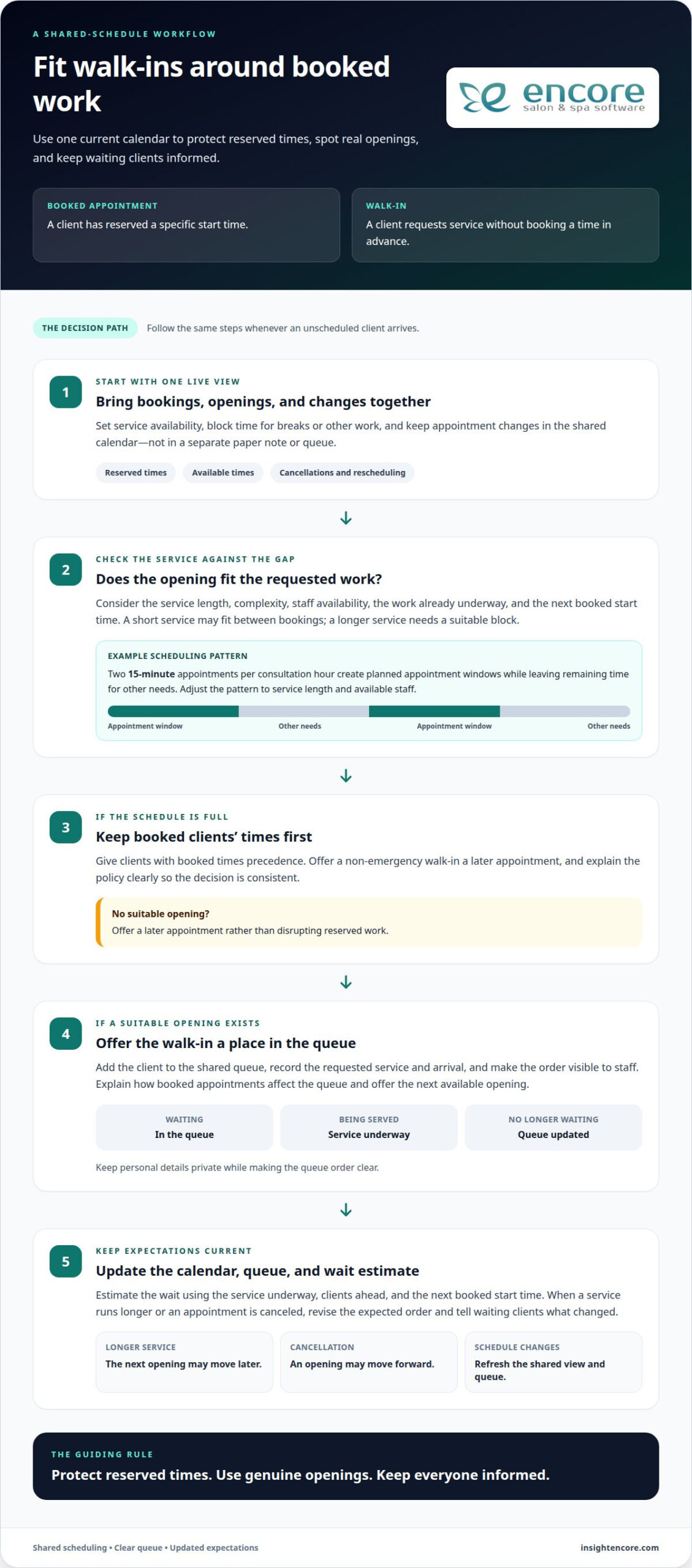
A visible queue makes the order clear to staff and clients. Use one list to show who is waiting and which clients have appointments, while keeping personal details private. When a walk-in arrives, add them to the queue and explain how appointments affect the order. Serve a booked client at their scheduled time when possible, and offer a walk-in the next available opening. This reduces uncertainty about who is next.
Set aside walk-in capacity based on staff availability, service length, and when clients tend to arrive. Keep those openings visible alongside scheduled appointments, then adjust the allocation as demand and service durations become clear. For example, a team can protect longer booking blocks for colour services and use gaps between them for shorter walk-in requests. The right balance depends on the services you offer and your day-to-day demand.
Appointment scheduling software can show appointment status, cancellations, and rescheduling in real time. Online booking tools also display appointments at a glance and update the calendar when plans change. This shared view helps staff spot an opening, offer it to someone waiting, or update the queue after a cancellation. When an appointment runs late, staff can revise the expected order instead of relying on a separate queue that no longer matches the calendar.
Give walk-ins a realistic wait estimate based on the service underway, the clients ahead, and the next booked start time. If any of those details change, update the estimate and tell waiting clients what changed. For instance, a longer service may push back the next opening, while a cancellation may bring it forward. A visible, consistently updated queue helps clients understand when they may be served and helps staff coordinate walk-ins with the booking calendar.
2. Using online appointment software to view and update schedules
Online appointment software gives staff a working view of booked visits, available times, and changes. Set service availability, block time for breaks or other work, and customize scheduling rules to match your operations. When a client books, the schedule shows the reserved time. When plans change, update the calendar instead of relying on a separate paper note. This helps the team make decisions using the same current schedule.
Should walk-ins or appointments receive priority? When the schedule is full, give clients with booked times precedence and offer a non-emergency walk-in a later appointment. If the calendar has an opening, staff can invite the walk-in to wait and explain that calling ahead can help with future visits. A consistent policy makes the decision clear and supports calm communication with the waiting client and those already booked.
For businesses deciding how to manage walk-ins and appointments, start by checking whether an opening fits the requested service. A short service may fit between bookings, while a longer or more complex service needs a suitable block. In one wave-based example, a business schedules two 15-minute appointments per consultation hour. That structure creates planned appointment windows while leaving remaining time for other needs. Adjust the pattern to the service length and available staff.
The right approach depends on the business. Salons, medical practices, legal services, and financial services may use appointments for work that takes longer or requires preparation. A business with simpler, immediate services may leave more room for walk-ins. For example, a salon can reserve time for complex work and fit shorter requests around those bookings. The calendar should reflect actual service needs, rather than treating every visit as the same length.
Advance booking helps staff plan workloads, allocate people, and prepare for expected demand. It also gives clients a reserved time. The trade-off is that a tightly booked calendar leaves fewer openings for unscheduled visitors. Walk-in access can make service more immediate, but an unexpected rush may create longer waits and disrupt planned work. Software helps staff see availability and apply consistent rules as conditions change. Review bookings, walk-in requests, and unused gaps to refine your approach.
A useful way to decide how to manage walk-ins and appointments is to distinguish genuine openings from time needed for booked work. For example, when a dental practice has a full schedule, it can offer a non-emergency walk-in a later appointment. If a suitable opening exists, staff can offer the visitor the chance to wait for the dentist. These choices protect reserved times while making use of available capacity.
3. Service businesses that handle both booked and walk-in customers
Salons, healthcare providers, dental practices, and professional services can serve scheduled clients and walk-ins. Advance bookings help teams plan service flow and allocate staff, supplies, and workstations. Walk-ins offer access for clients who need service sooner, but a rush can cause crowding and unpredictable waits. A business can balance both by reserving appointments for longer services and leaving suitable openings for shorter requests.
Estimate staffing needs by reviewing booked services, their durations, and which staff members are qualified to perform them. Then compare those commitments with recorded walk-in patterns from the last week or month. If a salon sees more unscheduled requests during quieter mid-morning periods, it can schedule coverage accordingly. This approach helps avoid idle staff during quiet periods and overloaded teams when booked clients and walk-ins arrive together.
Service type should shape the balance. A salon may book colour work in advance because it takes longer, while considering shorter services for walk-ins when time allows. Healthcare and dental practices can use appointments to organize planned visits while maintaining a clear process for unscheduled clients. Businesses with lower demand or services clients often need immediately may rely more on walk-in access. The schedule should fit the work, not force every visit into one model.
Confirmations and reminders help clients prepare and let staff plan for expected visits. Appointment software can send confirmations and reminders by email, SMS, or app notification. Automated reminders can help reduce no-shows, while flexible rescheduling gives clients a way to change plans before their appointment. If a cancellation opens a slot, staff can update availability and offer it to someone waiting or seeking an earlier booking.
Wait times affect the client experience, especially when people can’t tell how the line is moving. Give waiting clients an estimate based on the services ahead and current staff availability. If a booked appointment is running late, communicate the change rather than leaving walk-ins and scheduled clients guessing. A visible, consistently updated queue helps staff manage customer flow and gives each person a clearer sense of when they may be served.
Build a review into the routine. Spend 10 minutes each week examining whether the queue held up, how many appointments were missed, and whether customers left because of the wait. Look for patterns, such as walk-ins arriving while staff are tied up with longer booked services. Adjust staffing, booking availability, or reminders to address the specific pressure point. A Client Management System can also help staff keep customer details organized alongside service history, supporting more informed communication with repeat clients.
4. Tracking walk-ins, late arrivals, and no-shows
A shared schedule is more useful when every visit has a clear status. Record whether each client is booked, waiting, being served, late, cancelled, or absent. For walk-ins, note their arrival and requested service; for appointments, update the record when the client arrives. These simple steps show which openings are genuine and help staff understand why the schedule is changing.
Track walk-in volume and arrival times over the last week or month. Compare those patterns with appointment demand and staff availability. For example, if records show a cluster of walk-ins during a quiet period, managers can consider adjusting coverage or available booking times. Keep the review practical: identify when waits grow, which services take longer than planned, and whether clients leave before being served.
Set a consistent grace period for late appointments. A salon might use a 10 to 15 minute window, then decide whether the remaining service can fit without disrupting the next booking. If it cannot, offer a shorter service, a later opening, or another appointment time. Explain the same policy when booking and at arrival, so clients know how lateness may affect their visit.
Clinics can use a 10-to-15-minute grace window to assess late arrivals against the appointment schedule. Staff should consider the visit’s purpose, the time still available, and the effect on patients already waiting. If the appointment no longer fits, rescheduling or placing the patient on a wait list can protect later visits. For repeated late arrivals, apply the clinic’s stated scheduling policy consistently and communicate the next available option.
No-shows also need a clear record. Mark the missed visit promptly, then use the open time for an appropriate walk-in or another client seeking an earlier appointment. A 15% to 20% no-show rate can leave appointment-only clinics with idle staff time and unfilled capacity. Review missed visits alongside cancellations and rescheduled bookings to see whether reminders or easier rescheduling could address a pattern.
Use confirmations and reminders to help clients remember their bookings. Automated appointment reminders can reduce no-shows, while SMS or email messages give clients a convenient way to review visit details. When a client cancels, update the calendar immediately and offer the opening to someone waiting, if the service and staff are a good fit. This keeps the schedule aligned with the actual day rather than an outdated list.
At the end of each day, compare booked visits, walk-ins, late arrivals, and absences. For example, a salon can note whether a late colour appointment affected later clients, then adjust future booking blocks. A clinic can review whether rescheduled late patients returned for care. Consistent records turn individual disruptions into useful scheduling information and help teams make fair, informed decisions.
5. Problems caused by separate appointment and walk-in systems
Separate calendars create two versions of the same business day. A receptionist may record a walk-in on a paper list while appointments remain in scheduling software. If a client cancels, the opening may appear in one place but not the other. Staff could then miss a chance to offer that time to someone waiting or accidentally promise the same slot twice.
Queue confusion can damage trust even when staff are working steadily. A walk-in who waits 45 minutes without knowing their place may feel overlooked, especially if another customer appears to be served first. The problem may be a booked appointment, not a queue jump, but separate records make that distinction hard to explain. Showing staff one current view helps them clarify who is next and why.
Split systems also make wait estimates less useful. If the walk-in queue doesn’t account for booked services, staff can overlook how long those appointments will occupy the team. A client may hear “a few minutes,” then wait much longer because a service runs over or an urgent request changes the order. Before sharing an estimate, account for booked work, clients already waiting, and available staff.
Staffing decisions become less reliable when demand is divided between a booking calendar and a walk-in log. A manager may see a quiet appointment schedule and assign fewer people, while the separate queue shows several waiting clients. The reverse can happen too: a full appointment book may hide a cancellation that leaves a staff member free. Combining records helps managers match coverage to actual work and reduce unplanned gaps.
Separate records can also weaken follow-up. If a walk-in’s details sit only on a clipboard, staff may not connect that visit with the client’s booking history or future appointment. If a booked client doesn’t arrive, a separate queue may not show whether a waiting client could use the opening. Record cancellations, arrivals, and service completion in one shared workflow so each change informs the next scheduling decision.
Usable time going unfilled can affect revenue, but filling every gap isn’t always the right choice. A short opening may suit a quick service, while a longer appointment needs more preparation and staff time. Use one calendar to compare the opening with the requested service before offering it. This keeps the decision grounded in capacity instead of treating every cancellation as an available slot.
To reduce these problems, bring bookings and walk-ins into one daily view, update changes as they happen, and explain the reason for delays. Then review cases where the queue and calendar disagreed. A shared process won’t remove every delay, but it gives staff a reliable basis for decisions and clearer explanations for clients.
Encore Salon and Spa Software
Encore Salon and Spa Software helps salons, spas, chair and booth renters, and tattoo studios organize appointment booking and client information. If separate booking and walk-in records make it harder to see availability or keep client details together, Encore’s software supports a more coordinated scheduling process. Choose Encore Salon Software, Encore Spa Software, Chair/Booth Renter Software, or Tattoo Studio Software to suit your business type. These tools are a practical next step when you’re ready to bring appointment management into daily operations and manage client information more easily.
Contact Encore Salon and Spa Software to discuss your scheduling needs.
Build a scheduling process that can grow with your business
Deciding how to manage walk-ins and appointments is an ongoing part of running a service business. As your services, staffing, and client patterns change, revisit how your team handles bookings and walk-in access. A process that works today should make it clear how staff record requests, offer available times, and communicate changes to clients.
When you’re ready to bring appointment booking and business management into one platform, Encore Salon and Spa Software offers solutions for salons, spas, and chair or booth renters, including Encore Salon Software, Encore Spa Software, and Chair/Booth Renter Software. Choose the option that fits your business and supports how you serve clients.
Take the next step toward a clear, workable scheduling routine for your team. You can create a better flow for clients one practical change at a time.
Frequently Asked Questions
What is a Walk-in Appointment?
A walk-in is a visit requested without a previously reserved time. The client arrives and asks to be served based on current availability, rather than checking in for a specific booking. For example, a salon guest who drops by for a service without booking beforehand is a walk-in. The business can decide whether to serve them immediately, add them to a waiting list, or offer another time.
What is the best way to balance walk-ins and scheduled appointments?
Use service length and staff availability to decide how much room to leave for unscheduled visits. A short service might fit between longer bookings, while a treatment requiring preparation needs protected time. Review actual demand patterns and adjust the schedule when particular periods regularly become crowded or stay quiet. Make the approach clear to staff so clients with similar requests receive consistent options, rather than different answers from different team members.
How can staff manage walk-in queues and appointment check-ins efficiently?
Give staff one routine for recording arrivals, checking booking details, and noting any service changes. For example, check in a client by confirming their name and requested service, then mark them as arrived. Keep queue access visible to the team, but don’t display private client details publicly. If several staff members handle check-ins, use the same status labels so everyone knows whether a client is waiting, being served, or has left.
What appointment scheduling and queue management tools work for small businesses?
Small businesses can use online appointment software that combines a calendar with a way to record walk-in requests. Look for practical functions such as setting available times, blocking unavailable periods, and changing bookings when plans shift. The right fit depends on how staff take bookings and manage arrivals. A small salon, for instance, benefits from a schedule that shows the team its bookings and current walk-in demand without requiring separate records.
How should businesses communicate wait times and appointment delays to customers?
Share an estimate based on the work ahead, then explain promptly if a change affects it. For example, tell a waiting client that a service is taking longer and provide an updated estimate, rather than letting the original expectation pass without comment. If a booked client will be delayed, contact them using the method associated with their booking. Clear, direct updates help clients decide whether to wait, reschedule, or return later.
What are typical no-show, late-arrival, and walk-in policies?
Policies often explain how customers can cancel or reschedule, what happens if they arrive late, and how the business handles walk-in order. There’s no single rule that fits every service. A salon might set a 10-to-15-minute grace period, then decide whether the booked service still fits the remaining time. State the policy during booking and apply it consistently, while offering practical alternatives when the original slot no longer works.
What are the risks of accepting too many walk-ins or appointments?
Too many bookings can leave staff without enough time to complete services carefully, while excessive walk-ins can create crowded waiting areas and unpredictable delays. This pressure can also disrupt preparation, breaks, and transitions between clients. Watch for signs such as repeated schedule overruns, clients leaving before service, or staff rushing between tasks. Adjust available booking times or walk-in capacity to address the specific bottleneck instead of adding demand indiscriminately.
How do walk-in and appointment policies differ by industry, such as healthcare, salons, and restaurants?
Policies reflect the type and urgency of the service. Healthcare practices may need to assess whether an unscheduled concern requires timely attention; emergency rooms are intended for serious, often life-threatening issues. Salons can distinguish brief services from longer work that needs planned time. Restaurants typically coordinate arrivals with seating and table availability. In each setting, explain how walk-ins are handled and what options clients have when immediate service isn’t available.
Disclaimer
This article is general in nature and may contain errors, please verify all claims with your sales rep