
A smoother salon front desk doesn’t mean replacing people with apps. Learning how to streamline salon front desk operations means letting technology handle repetitive admin so your team can stay focused on clients.
It’s natural to want fewer scheduling calls, less time switching between tasks, and a calmer experience for guests. Online booking gives clients more control over scheduling and reduces back-and-forth at reception, so staff can focus on welcoming guests and helping them choose suitable services.
This guide covers practical ways to lighten the daily workload: offer online booking and appointment reminders, make thoughtful service recommendations, move routine calls and admin away from reception, and train staff to handle busy periods confidently. It also explains how salon software can connect bookings, client details, inventory, and payments. The goal isn’t to remove the human touch. It’s to give your team more time to provide it.
Key Takeaways
- Let clients book and manage appointments online, and use confirmations and reminders to reduce scheduling back-and-forth.
- Build thoughtful rebooking and service recommendations into checkout to support revenue without making the experience feel pushy.
- Move routine calls and paperwork away from reception so staff can focus on the clients in front of them.
- Use clear procedures and practical training to help your team handle busy periods with confidence.
- Bring bookings, client details, inventory, and payments into a connected workflow to reduce repeated admin.
1. Offering online booking and appointment confirmations
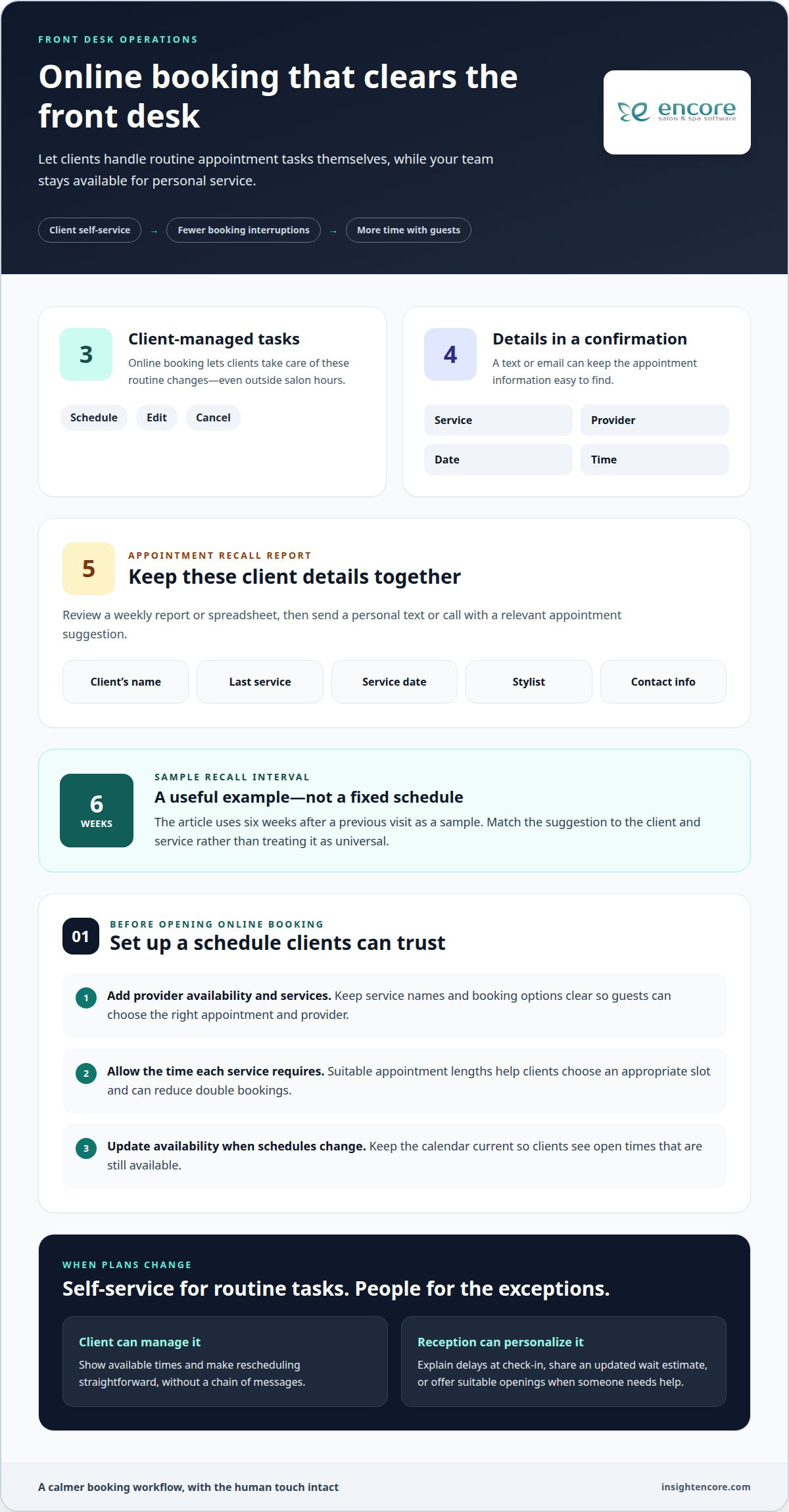
Let clients book online instead of calling to find an available slot. A booking page can show each stylist’s schedule, services, and open appointment times, so clients can choose without messaging reception. Online booking also lets clients schedule, edit, or cancel appointments themselves, even outside salon hours. Keep service names and booking options clear so guests can select the right appointment and provider.
Set up the schedule carefully before enabling online bookings. Add each provider’s availability and services, then make sure appointment options reflect the time each service requires. This helps clients choose a suitable slot and can reduce double bookings. Update availability promptly when schedules change. The online calendar should show current openings, not invite clients to book a time that is no longer available.
Use automated confirmations and reminders to keep appointment details easy to find. A text or email confirmation can list the service, provider, date, and time. A reminder prompts clients to review their plans, while self-service editing lets them change an appointment without calling. Make rescheduling straightforward: clients should be able to see available times and update a booking without leaving reception to coordinate several messages.
For clients who are due to return, use a weekly appointment-recall report or spreadsheet. Include the client’s name, last service, service date, stylist, and contact information. Then review the list and send a personal text or call with a relevant appointment suggestion. For example, six weeks after a previous visit can be used as a sample recall interval, not a fixed schedule for every service. A message offering a haircut appointment on Tuesday at 6 pm shows how a specific option can make replying easier.
Keep the schedule current when appointments change or providers run behind. If a delay affects an arriving client, explain it at check-in and share an updated wait estimate. If someone asks to reschedule, offer suitable openings rather than leaving the next step unclear. Online changes, reminders, and an up-to-date schedule work together: clients can manage routine booking tasks, while reception handles exceptions that need a personal response.
2. How Can My Front Desk Team Bring In More Revenue?
Use checkout to rebook the next visit and make relevant retail suggestions. Ask clients whether they’d like to reserve their next appointment before leaving. Then ask how they liked the service and whether they need at-home maintenance products. This simple sequence links the recent service to a useful next step without turning checkout into a hard sell. Keep recommendations specific, such as suggesting a product that supports the client’s chosen style or treatment.
Automate routine booking messages so staff have more time for clients. Send a confirmation after each booking and a reminder before the visit. Include a clear way to change an appointment or contact reception if plans shift. A self-service check-in option can also shorten the arrival queue, while staff remain available for questions and personal assistance. Together, these steps keep appointments moving and make the experience feel more organized.
Make online booking and rebooking easy to find in every client message. For example, an email to an overdue client can include a direct booking link and an email link to the front desk. The booking link gives the client a quick way to choose an available appointment; the other offers a personal route for questions or help. Use clear, useful wording and make sure the booking link leads directly to appointment options, not a general information page.
Multi-location salons can use booking software to search for open appointments across locations. A back-office team member can book a client at another location when their preferred provider or time isn’t available nearby. This can make better use of open slots while reducing booking work at each front desk. Keep the location, provider, and service details visible so the client knows where the appointment is and who they’ll see.
Booking and point-of-sale apps can connect the appointment with the visit’s next steps. A stylist can check a schedule, review client information, record notes, and complete a retail sale away from the front desk. A client can also rebook while still with their stylist, before checkout becomes another task in the queue. A connected workflow can support these handoffs; explore a salon booking workflow as a next step.
3. Moving phone and administrative work away from reception
Reduce interruptions by giving routine calls a clear path when the receptionist is helping someone in person. An automated greeting can share practical details, such as opening hours, while voicemail lets staff return non-urgent calls between appointments. For example, a stylist finishing with a client won’t have to step away to answer a call asking when the salon closes.
Improve phone handling and online booking by pairing a concise phone greeting with a booking page clients can use independently. For calls that need a personal response, assign a team member to return messages and handle email or other client messages during planned gaps in the schedule.
Virtual reception and support across channels work best when every message has an owner and a next step. A receptionist or administrative assistant can sort calls, emails, and booking requests, then direct appointment questions to the right stylist or manager. If staff can’t answer a call during a service, they can record the request and follow up between clients. A deskless salon may still need a separate space for landline calls, so conversations don’t interrupt services.
Move repeatable admin away from reception’s busiest periods. An administrative assistant can handle calls, bookkeeping, inventory, and other office work from a separate workspace. Tablets at salon stations can also give stylists access to booking and client communication tools without relying on personal phones. For example, a stylist can review the day’s schedule between clients while reception focuses on guests arriving at the desk.
Keep client records useful and discreet. Record relevant details in each client’s file for future visits, and put files away or close them on-screen when they’re not needed. Protect records and payment information by limiting access to staff who need it, keeping details out of public view, and using an established payment-processing workflow. Don’t leave client details or payment screens visible to waiting guests.
Organize reception supplies so staff can find them quickly. Keep appointment records, payment equipment, and frequently used forms in designated storage, then clear the counter after busy periods. Built-in desk storage can keep supplies close and work surfaces open. Choose furniture with enough room for check-in and checkout, and keep the waiting area tidy. During downtime, staff can straighten the seating area and restock retail shelves, leaving the space ready for the next arrival.
4. Training staff for customer interactions and busy periods
Train desk staff to follow the same arrival routine for every guest. Confirm the appointment and provider, then notify the provider when the guest arrives. If the stylist is running behind, explain the delay and give a realistic wait estimate. Offer the guest a beverage while they wait. These small, consistent steps help guests understand what’s happening rather than wonder whether anyone has noticed them.
A lobby check-in kiosk can let guests register their arrival while staff remain available to greet them and answer questions. Connect check-in to a clear staff notification process. For example, the receptionist can text the service provider when a guest arrives or is running late. Salon management software helps staff view appointments and client details, while agreed notification routines keep the team aligned during a busy schedule.
Give late arrivals a defined response so stylists don’t have to guess what happens next. The front desk should notify the provider, then contact the guest to ask whether they’re still coming or want to reschedule. If the provider is delayed, update waiting guests as the situation changes. A shared schedule and a designated person responsible for updates prevent conflicting messages between reception and the service floor.
Customer service improves when desk staff can answer practical questions without searching for help. Train them on salon services, provider specialties, retail products, and service prices. Keep a current reference sheet beside the workstation for details that change. For example, a receptionist can explain which stylist offers a service and direct the guest to the right appointment option. Clear checklists can also guide opening tasks, check-in, checkout, and call handling.
Prepare for busy periods before the lobby fills. Agree on who backs up reception, greets arriving guests, and handles calls when the primary receptionist is helping someone. Practise a scenario where the phone rings during an in-person check-in: acknowledge the guest, politely place the caller on hold, and finish the face-to-face interaction. Role-playing add-on recommendations and conversations with upset clients gives staff a chance to practise calm, natural language.
Training also helps owners plan staffing and payroll expenses. Use staff meetings to review recurring delays, missed handoffs, and guest feedback, then update the checklist. Regular software practice helps employees use schedules and client records confidently instead of slowing service to find basic information.
5. Using integrated salon software
Salon booking software can connect scheduling, client details, payments, and inventory in one workflow. To understand how to streamline salon front desk operations, look for tasks staff repeat or information they enter more than once. Connected records can reduce handoffs and give reception a clearer view of each client’s visit.
For example, a client books online and completes an intake form before arriving. Staff can add relevant details to the client file and refer to those notes at the next visit. Keeping appointment and client information together helps reception find context without searching separate files. It also gives the service provider useful information before the appointment begins.
Connect checkout with the appointment, client notes, payment, and retail sale. Staff can complete those steps in one workflow rather than switching between disconnected tools. Salon and spa teams can also use tablets or mobile devices to handle payments, notes, rebooking, and retail sales at the chair. That can keep checkout moving while reception helps arriving guests.
Inventory tools make another important connection. When retail products and back-bar supplies are managed alongside salon operations, staff can review stock and keep product information current. Recording a retail sale in the same system, for instance, links the transaction to inventory. This reduces duplicate entry and gives the team a clearer picture of the products moving through the business.
Stylists can benefit from mobile access to bookings, schedules, reports, and client information. Reviewing the next appointment between services helps a stylist prepare without returning to the front desk for basic details. To make access useful, agree on which updates staff should record and keep those records current. For owners considering how to streamline salon front desk operations, the key is connecting related tasks, not adding tools for their own sake.
Map a typical visit from booking through checkout and note where staff switch systems or enter information twice. Then prioritize the handoffs that create the most repeated work, such as linking an appointment to a client record or a service to a payment. The takeaway is simple: choose software that brings existing salon workflows together, so staff spend less time coordinating information and more time helping clients.
Encore Salon and Spa Software
Encore Salon and Spa Software connects appointment booking, client management, inventory, and point-of-sale tasks in one workflow. Consider it when staff are re-entering details, switching between tools, or struggling to keep front-desk information current. Encore Salon Software and Encore Spa Software support salon and spa operations, while Chair/Booth Renter Software and Tattoo Studio Software serve other studio setups.
Choose the workflow that fits your business, then use connected information to make routine administration easier to manage. The aim is to support your team, not replace the personal welcome clients value.
Contact Encore Salon and Spa Software to discuss your front-desk needs.
Build a front desk that gives your team room to focus
To decide how to streamline salon front desk operations, choose one recurring bottleneck and focus on a small operational change. For a week, note where staff lose time, where guests wait, and which handoffs need extra follow-up. Then adjust one workflow and explain the change to everyone who uses it. A focused improvement is easier to introduce, observe, and refine than several changes at once.
Bring reception staff and service providers into the conversation. They see different parts of the client journey and can spot where a new process could cause confusion. Agree on who owns each handoff, then revisit the workflow after the team has used it. Clear ownership helps turn a useful idea into a consistent routine.
Keep the goal human. Use smoother processes to make more room for thoughtful service, not just to move tasks faster. As your team gets comfortable with a new routine, decide what deserves attention next and build a front desk that supports the way your salon works.
Each practical adjustment can help your team feel more organized and ready to welcome the next guest.
Frequently Asked Questions
Does going deskless mean replacing people with apps?
No. A deskless setup changes where routine tasks happen, not the value of personal service. A coordinator can welcome guests, guide them through arrival, and help when an online form or check-in step causes confusion. For example, a kiosk can record a guest’s arrival while a staff member answers a service question. Keep a human point of contact available for exceptions and clients who prefer personal assistance.
How Can My Front Desk Team Bring In More Revenue?
Give the team a clear, client-focused routine for identifying useful next steps. At checkout, staff can ask whether a guest wants to book a return visit, then mention a relevant take-home product if it suits the service. During booking calls, they can offer an appropriate add-on when it genuinely fits the client’s request. Track which suggestions guests find helpful and use that feedback to refine the approach without making every interaction feel like a sales pitch.
What technology do you need to run a salon without a reception desk?
A deskless salon needs practical ways to manage appointments, check-ins, client details, and payments without relying on a central counter. A connected salon management platform can bring these tasks together, while tablets or other devices let staff access schedules around the salon. Digital intake forms can collect information before a visit, and self-check-in can register arrivals. Keep a clear process for calls and in-person questions, too, since technology can’t handle every client need.
How can salons reduce appointment scheduling and checkout time?
Reduce duplicate data entry by connecting the booking record to the client’s visit and checkout. Let clients book or adjust appointments online, then keep the schedule current so staff aren’t resolving avoidable conflicts. At checkout, record the service, payment, and retail sale in the same workflow. If stylists can access the schedule and client file where they work, they can complete routine steps without sending every task back to reception.
What are best practices for salon appointment confirmations and reminders?
Send a confirmation as soon as an appointment is booked, then a reminder prompting the client to review the details. Include the service, provider, date, and time so the guest can spot errors easily. Make the next step clear if plans change, such as using an online account or contacting reception. Update the message workflow when an appointment changes, so the client and salon team have the same information.
How should salons manage cancellations, no-shows, and waitlists?
Set a consistent process for recording cancellations, contacting clients who may be late, and offering newly open slots. Keep a waitlist with each person’s preferred service, provider, and availability, then contact a suitable client when a cancellation creates a match. An appointment cancellation list can help staff organize openings. Record the outcome of each contact so two team members don’t offer the same time or leave an available appointment unfilled.
How can salons streamline client check-in and intake forms?
Send digital intake forms after booking so clients can complete them before arriving instead of filling out paperwork at the counter. At check-in, confirm the guest’s name and appointment, then notify the service provider. Self-check-in can record arrivals when staff are busy, but keep someone available to help guests who need assistance. Make sure submitted details reach the right client record so staff don’t need to ask for the same information again.
What front desk staffing and training practices improve salon efficiency?
Assign clear ownership for arrivals, calls, schedule updates, and checkout, then plan who provides backup during busy periods. Train staff on services, provider specialties, retail products, and how to handle late arrivals or complaints. Use short role-play scenarios to practise common situations, such as helping a waiting guest while answering a phone call. Review recurring questions and handoff problems as a team, then update procedures so everyone follows the same approach.
Disclaimer
This article is general in nature and may contain errors, please verify all claims with your sales rep