
A booking that ignores your route can create more work than it saves. The right software for mobile dog groomers should bring appointments, customer locations, pet records, and payments into one manageable workflow, with availability that reflects where and when you can travel.
And yes, you can shape the setup around your business. Start with the tasks that matter most, such as letting customers book online and share their location, keeping grooming notes close at hand, or sending appointment updates. You don’t need every feature turned on to make the day easier.
This guide explains which tools help mobile groomers manage bookings, billing, pet and client records, locations, and customer communication. You’ll also learn what to look for when choosing software, how mobile scheduling differs from salon scheduling, and how Encore Salon & Spa Software’s tools for pet grooming businesses fit in.
Key Takeaways
- Keep each pet’s grooming notes and client details together so useful information is easier to find between appointments.
- Connect invoices and payment processing with appointment records to make billing easier to manage.
- Choose tools around how you work on the road, including the needs of your schedule, routes and number of users.
- Use appointment confirmations and customer updates to keep clients informed as plans change.
- Capture customer locations during online booking and coordinate appointments with your travel schedule.
Client and pet records
A useful grooming record connects each appointment to the right person, pet, and address. Pet grooming software can bring client and pet records together with scheduling, reminders, and customer messages. For example, a customer profile can hold contact details, while separate pet notes capture coat condition, preferred cut, and handling preferences. That keeps key information close when you prepare for a visit.
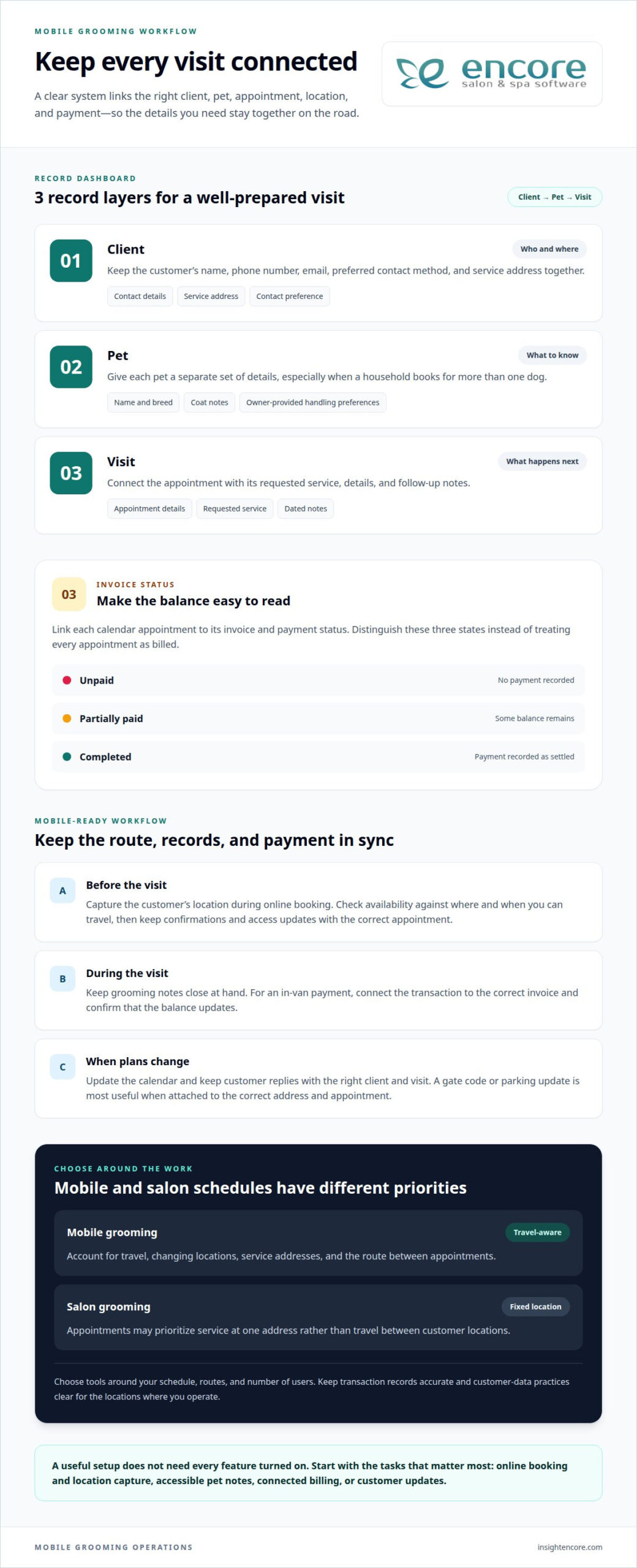
Build each record around information that helps with the next appointment. Add the pet’s name and breed, then note the requested service and any grooming preferences the owner shares. Record the client’s preferred contact method and service address. Dated appointment notes also help distinguish current preferences from older details.
- Client: name, phone number, email, and service address.
- Pet: name, breed, coat notes, and owner-provided handling preferences.
- Visit: requested service, appointment details, and follow-up notes.
Keep notes factual and easy to scan. “Prefers a shorter trim around the paws” gives the next visit a useful starting point. A concise note that a pet becomes restless during nail trimming can help you plan a calmer appointment. Keep each pet’s details separate, especially when a household books grooming for more than one dog.
Two-way texting can connect customer updates with recordkeeping. A groomer might send an appointment confirmation, receive a reply about access instructions, then add that detail to the visit. A gate code or parking update is more useful when it stays with the correct address and appointment.
Before sending a notification, match the message to the client and pet record. A confirmation should identify the appointment clearly; a follow-up can ask the owner to share any changed grooming preferences. Keep replies attached to the correct customer so later operations don’t rely on memory or scattered message threads. A centralized salon management system can help organize client information alongside day-to-day workflows.
When reviewing a record, update details that matter to future service. Replace an old phone number when a client changes it. If a pet’s coat or requested style changes, add a dated note rather than burying it in an old message. Keeping records current helps prevent mix-ups and makes customer updates more personal.
Billing, invoices, and payment integration
A connected billing workflow links each calendar appointment with its invoice and payment status. Mobile groomers can then see what’s due without sorting through separate scheduling and payment records.
Billing and Invoices
Invoicing software can generate an invoice and accept payment, connecting the amount owed to the service. After a nail trim and bath, for example, the invoice should clearly list both services. Check whether you can correct a service entry before sending and find an invoice from its appointment or client record.
That connection matters when your route changes. If a customer moves an appointment, a clear calendar entry helps you match the invoice to the right visit. Look for a workflow that distinguishes unpaid, partially paid, and completed invoices, rather than treating every appointment as billed. Clear records make follow-up easier and help prevent confusion with an older balance.
Payments, Deposits, and Saved Cards
Deposits and saved cards affect how customers pay, so map the payment steps before choosing software. A deposit record should show the amount paid and what remains due after grooming. For saved cards, consider how the customer authorizes payment and how the system identifies the payment method without putting card details in everyday notes.
Check how each payment appears beside the appointment and invoice. A deposit for a future visit should not look like full payment for a completed service. If you accept saved cards, make the charge timing clear to customers. These distinctions help you reconcile payments and explain balances without searching through separate messages.
In-Van Payments
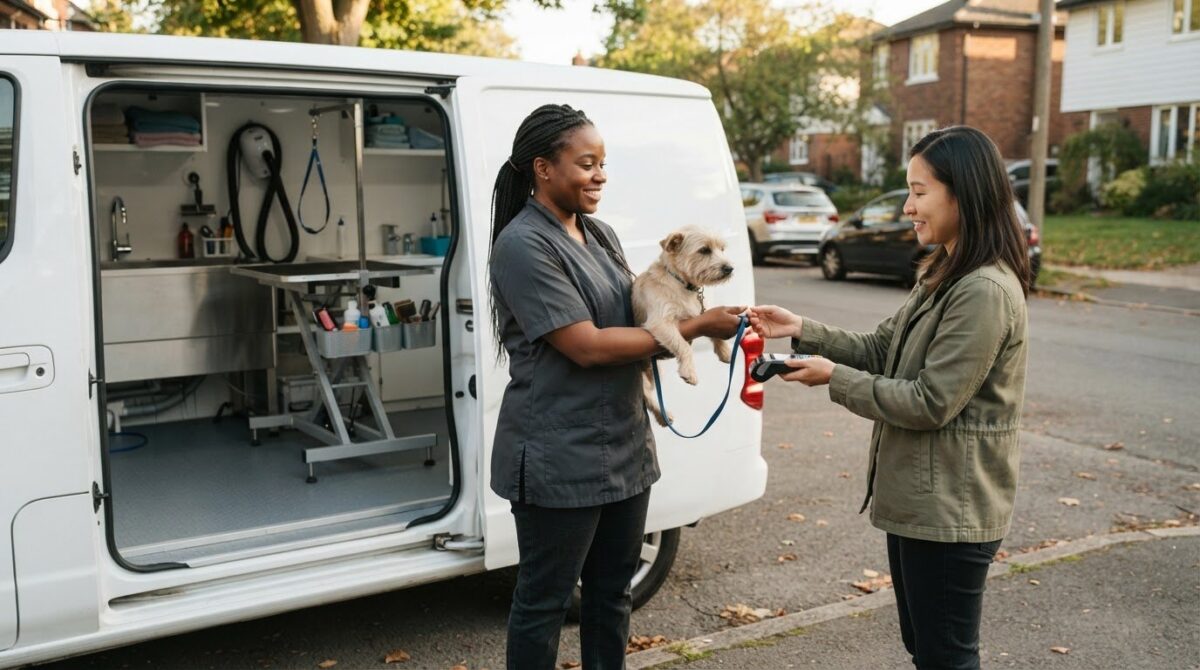
For an in-van payment, consider how you’ll record it while closing out the visit. The workflow should connect the transaction to the correct invoice and update the balance. If a customer pays after a full groom, for example, the record should show which appointment was settled. Integrated credit card processing can link card payments with business records and reduce manual entry.
Test the steps on a typical appointment: open the visit, review the invoice, take payment, and confirm the record reflects the result. A mobile-friendly process should work inside your van, where you may be moving between appointments rather than sitting at a desk.
AI Receptionists
An AI receptionist is separate from billing software. If your setup includes one, assess how it handles questions about invoices or payments. It should direct billing questions appropriately rather than imply a payment was received without a matching transaction record.
Keep automated customer responses aligned with your calendar and payment records. Before relying on an automated receptionist, define which requests it handles and which need your attention. That separation helps prevent a booking or payment message from being mistaken for a completed transaction.
Choose a payment workflow that matches how you invoice, collect deposits, and close out appointments. To explore payment tools alongside salon management features, explore Encore’s software options.
Do mobile and salon groomers need different software?
Not always. A mobile grooming business needs tools that account for travel and changing locations, while a salon may prioritize appointments at one address. US tax, payment, and privacy rules can affect recordkeeping and customer-data handling. Keep transaction records accurate and data practices clear for the locations where you operate.
Cloud-based software can let you access a calendar from different devices, which helps when you leave the van and return to a computer. Desktop software is centered on a computer where it is installed. Compare how each option handles your daily work: can you review the next appointment, update a customer record, and see schedule changes while away from your desk?
Pricing often depends on the features included and the number of employees. A solo groomer may need scheduling, customer records, and payment tools; a business with several groomers may also need employee management. List the tasks each person handles, then compare plans against those needs. Encore’s tiers include the full feature set, with Elite adding extra modules.
Location-based scheduling connects appointment availability with where you travel. Customers can book online and share their location through the platform. If two customers live in different areas, their addresses can help you plan appointments around your route. Check whether the scheduling workflow accounts for location as well as availability, rather than treating every open slot as equally practical.
Maps and location details matter most when service addresses shape your day. A mobile groomer can use customer locations to group nearby appointments or spot a booking that adds unnecessary travel. A salon groomer usually works from one address, so travel-based scheduling may matter less. A business that also offers boarding may need to fit grooming appointments around its facility schedule.
Software risks include unauthorized access, lost records, and unclear cancellation terms. Review who can access customer information, how records can be exported, and what happens to data if you cancel. A groomer changing systems, for example, needs a practical way to retain client and pet histories. Read the cancellation policy for notice requirements, billing terms, and data access after service ends.
- Compare workflows: Test a booking, schedule change, and record update on your usual devices.
- Match access to roles: Decide which staff members need calendars, customer records, or payment details.
- Review location handling: Check how customer addresses affect booking availability and route planning.
- Plan for change: Understand record access and cancellation terms before moving business data.
Choose a setup that fits your workday, from a single van to a fixed salon. Use a real example, such as scheduling two nearby appointments, to see whether the calendar, location details, and staff access suit your operations.
Customer confirmations, reminders, and updates
A confirmation gives customers a record of the appointment they booked. A reminder brings the visit back to their attention, while an update communicates a change. For mobile groomers, messages can also clarify practical details such as the service address or access instructions. Encore’s online booking tools include free SMS appointment confirmations with every subscription.
Decide what each message needs to accomplish. A booking confirmation can identify the appointment and requested service. A reminder can prompt the customer to share changed access details before you travel. If a customer says the driveway is blocked, record that update with the appointment so it informs the visit.
Keep each message focused on one action. A confirmation might ask the customer to review the address, while a separate update explains a change to the arrival window. Clear wording makes it easier to understand what to do and reduces the chance that an important detail gets buried in a long text.
- Confirmation: restate the booked service, appointment date, and address.
- Reminder: prompt the customer to share any changed access instructions.
- Schedule update: explain a change and identify the affected appointment.
- Customer reply: attach new instructions to the right visit record.
Two-way texting is useful when customers need to respond, not just receive a message. A client might reply with a gate code or say another family member will meet you. Keep the reply connected to the right customer and appointment, so you can find it while running your route instead of searching unrelated conversations.
Customers may have different contact preferences. One may prefer texts, while another relies on phone calls. Keep the preferred method visible in the customer record and use it consistently for confirmations and updates. If a customer changes their number, update the record before sending the next appointment message.
Reporting can help you review how appointment communication supports daily operations. Look for records showing whether a message was sent and whether the customer responded, if the system provides that information. Repeated unanswered reminders, for example, may call for a direct follow-up before you travel. Use the review to refine messages and identify appointments needing attention.
Set a clear process for schedule changes. First, update the calendar entry. Next, notify the affected customer with the new appointment details. Then attach any reply or access instruction to that visit. This sequence keeps the message, schedule, and service notes aligned, even when a route change affects several appointments.
Online appointment booking and location capture
For mobile grooming, an open calendar slot isn’t automatically a workable appointment. Booking should account for availability and customer location. Customers can book online and share their location through Encore, helping you assess where a visit fits before scheduling it.
A platform that combines online booking, customer records, payments, and business management can keep key tasks connected. Look for a grooming management system that links an appointment to the customer profile and service address. Then a booking is more than a time on the calendar: it includes details to help you prepare for the visit.
Location capture is useful when clients enter an address during booking. A customer might submit a home address instead of a preferred meeting point. The booking workflow should show that location alongside the appointment, so you can review it against your availability before scheduling the visit.
Appointment timing needs to account for travel, not just grooming duration. A booking request between visits on opposite sides of town may fill an open calendar slot but make your route impractical. Review each address in relation to nearby appointments, then choose a time that works for the customer and your day’s schedule.
- Collect the service location: Include a clear address field in the booking process.
- Review the request: Compare its location with your calendar and existing appointments.
- Confirm a workable time: Accept or adjust the requested slot based on availability and travel.
- Keep details together: Attach the address to the correct customer and appointment.
Availability rules should match how your grooming business operates. Set appointment types with realistic service times and leave room for travel between locations. A full groom may need a different calendar block from a nail trim. If customers choose slots that ignore those differences, appointments can be packed too tightly.
Location details can help organize your route after appointments are booked. Review the day’s addresses and identify visits that are close together. If a customer changes their address, update the appointment before planning travel. This keeps the booking, customer record, and route information aligned.
When assessing online booking, test a sample request from start to finish. Select a service, choose an available time, and add a location. Then confirm that the appointment appears with the address and customer details. This shows whether booking and location capture suit your mobile workflow.
Encore Salon and Spa Software
Encore Salon and Spa Software offers management tools for businesses that provide pet grooming. Its platform brings online appointment booking, client management, inventory tracking, and point-of-sale transactions together to help coordinate key business tasks in one place.
If you want to connect customer records and appointments with everyday business operations, Encore’s tools offer a practical next step. Consider how online booking, client management, and payment handling fit the way you run your grooming business, then focus on the capabilities that support your needs.
Contact Encore Salon and Spa Software to discuss your business needs.
Make your next workflow easier to manage
Your next step doesn’t need to be a complete systems overhaul. Choose one routine that takes too much attention, then define what a smoother version would look like for your grooming business. That gives you a practical way to judge whether software for mobile dog groomers fits your daily operations, without getting distracted by features you may not use.
Encore Salon and Spa Software offers management tools for pet grooming businesses, alongside Encore Salon Software, Encore Spa Software, and Chair/Booth Renter Software. The right fit depends on your business and the workflows you need to support. Start with your most pressing need, such as organizing customer information or managing appointments, and consider how a connected system could help.
When you’re ready to explore a next step, learn more about the available software and how it could fit your business.
Build a way of working that gives you more time to focus on the pets and customers you serve.
Frequently Asked Questions
Can I customize features?
Encore’s interface is customizable, and every pricing tier includes the full feature set. Elite adds extra modules without removing Essentials features. You can choose Elite if additional tools such as payroll and commission tracking or loyalty points suit your workflow. Customizing the interface and choosing additional modules are separate decisions, so consider both when matching the software to your business.
Can I manage staff schedules, commissions, and performance?
Encore includes employee management, and Elite adds payroll and commission tracking. These tools connect compensation details with staff administration. Basic reports are included, but a report may not measure every aspect of individual performance. Decide what information matters to your team, such as appointment activity or commission records, and use the available reports to support those reviews.
Can I save pet photos, medical notes, and previous groom history?
A useful grooming record can include a pet’s service history, care notes, and reference photos. Encore provides a Client Management System for organizing customer relationships and records. Photo attachments and dedicated medical-note fields are separate capabilities, so don’t assume they work the same way as general client notes. Keep entries factual, dated, and relevant to future appointments.
Can I set up different permissions for my staff?
Staff permissions depend on software access controls, not simply on having employee accounts. Before assigning access, decide which team members need customer records, appointment details, or business reports. A groomer may need information for assigned visits, while an owner may need broader business records. Clear access roles help organize staff workflows and limit access to customer information appropriately.
Is training provided?
Encore provides live, real-person customer support, and its software is designed to be simple to learn. Support can help you work through questions as you get started. When planning how you and your staff will learn the system, distinguish live support from formal training classes, onboarding sessions, or self-guided materials.
What software features do mobile dog groomers need?
Software for mobile dog groomers should support the way your team accepts and completes appointments. Prioritize online booking, customer and pet records, payment handling, and communication tools. Then assess whether booking requests capture the details needed to decide if an appointment fits your service area and schedule. A solo operator may value a simple workflow; a team may need employee management too.
How much does mobile dog grooming software cost per month?
Encore’s pricing is per location and based on employee count. Every tier includes the full feature set; Elite adds extra modules.
Does mobile dog grooming software integrate with accounting, payment, or marketing tools?
Encore includes integrated credit card processing, and QuickBooks Integration is an add-on. The platform also offers automated marketing and loyalty programs, along with gift card management. These are distinct from integrations with outside marketing services, so map the tasks you want connected. For example, consider whether you need payment processing in the platform and accounting information linked with QuickBooks.
Disclaimer
This article is general in nature and may contain errors, please verify all claims with your sales rep