
What if a holiday request could disrupt bookings before anyone notices? When an employee submits a request, record the proposed time off in the scheduling system and check existing appointments and team coverage before approving it. Knowing how to manage salon staff schedules means making leave visible early, so unavailable hours aren’t left open for clients to book.
A clear process makes holiday requests easier to manage: staff submit requests, managers review the impact on appointments and coverage, then update and share the schedule. That keeps everyone working from the same plan.
This guide explains how to set up digital staff schedules, handle holiday requests, and choose scheduling software that fits your salon. You’ll also find practical ways to reduce missed appointments and last-minute cancellations, from recording time off promptly to building realistic gaps between services. The result is a rota that’s easier for your team to follow and more dependable for clients.
Key Takeaways
- Match each shift to staff skills and availability, and record approved time off so unavailable slots aren’t booked.
- Adjust coverage to busy periods and service demand, and plan ahead for seasonal changes.
- Use realistic appointment gaps, timely reminders, and a waitlist to help manage cancellations and open slots.
- Choose scheduling software that keeps online booking aligned with staff schedules and flags potential conflicts.
- Share a rolling rota at least two weeks ahead, and use custom hours for temporary seasonal changes.
Can an employee see only their own schedule?
Yes. A salon can share each employee’s shifts while managers maintain a calendar of overall coverage. Set visibility to suit the team: staff need to see their working hours and approved changes, while managers need the full rota to spot gaps and coordinate appointments.
Break, overtime, and scheduling requirements depend on the worker’s location and employment status. Identify the federal, state, and local requirements that apply to each role before building its schedule.
For shift swaps, time-off requests, and call-outs, use one clear approval process. Record approved changes in the scheduling system, check affected appointments and coverage, then update the shared schedule so everyone sees the same plan.
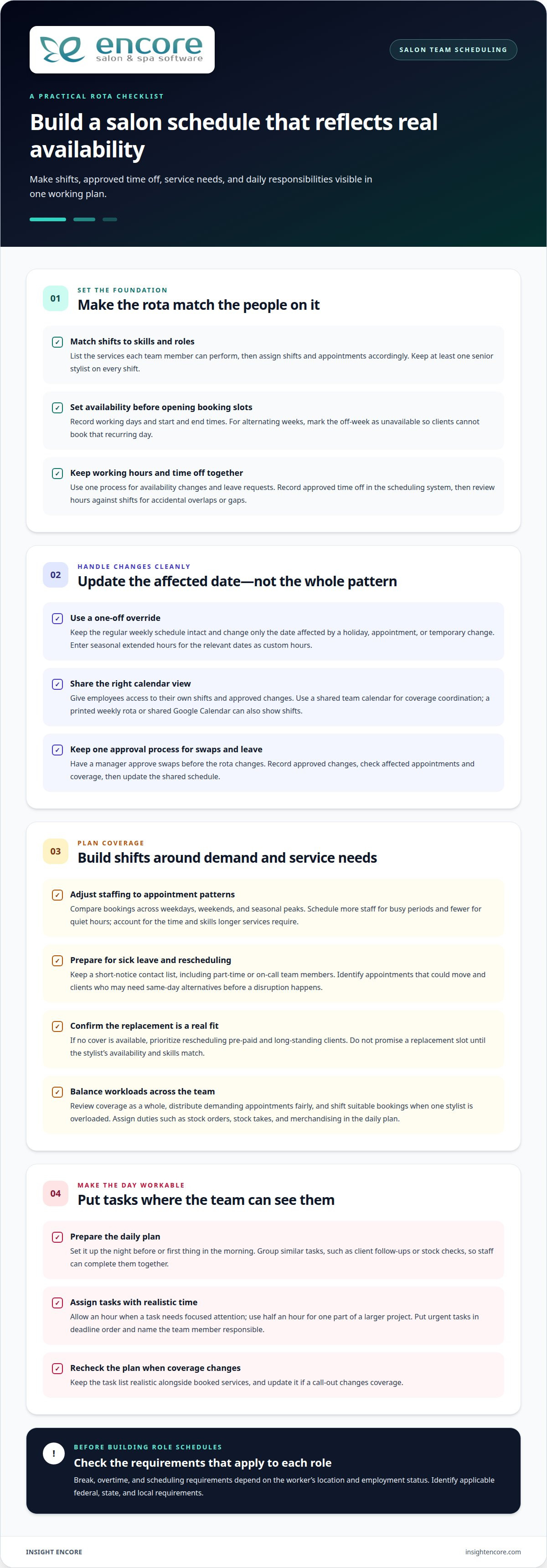
- Match shifts to skills and roles. List the services each team member can perform, then assign appointments and shifts accordingly. For example, don’t place a stylist on a service they aren’t trained to provide. Keep at least one senior stylist on every shift, so the team has experienced coverage throughout the day.
- Set weekly availability before opening booking slots. Record each person’s working days and start and end times. If a stylist works alternating weeks, set the off-week as unavailable, with no bookings on that recurring day. A calendar that reflects actual availability helps prevent clients from booking when the employee isn’t working.
- Track working hours and time off in one place. Ask staff to submit availability changes and leave requests through the same process. Once a manager approves time off, record it in the scheduling system so those hours become unavailable before clients try to book. Review working hours against scheduled shifts to catch accidental overlaps or gaps.
- Use overrides for one-off schedule changes. Keep the employee’s regular weekly pattern intact, then update only the affected date for a holiday, appointment, or temporary change. For seasonal extended hours, enter custom hours for the relevant dates rather than changing the default schedule. This keeps future weeks smooth and avoids carrying a temporary change forward.
- Share the right calendar view. Give employees access to their own shifts and changes, and use a shared team calendar when staff need to coordinate coverage. A printed weekly rota or shared Google Calendar can also make shifts visible. Publish changes in writing, and let a manager approve swaps before the rota changes.
What Is Salon Staff Scheduling?
Build a rota around actual client demand, service needs, and staff availability. A useful plan also accounts for absences and the daily tasks that keep a salon running smoothly.
Step 1: Plan Shifts Around Demand
Use appointment patterns to schedule more staff during busy periods and fewer during quiet hours. Compare bookings across weekdays, weekends, and seasonal peaks, then adjust coverage to match demand. A holiday rush may call for more appointment capacity, while a slow period may suit staggered starts. Review the pattern regularly: a fixed rota can leave the salon short during busy spells and overstaffed when bookings dip. Factor in the service mix, too. Colour appointments and other longer services need different coverage from short cuts, so plan around the time and skills each booking requires.
Step 2: Plan Sick Cover and Rescheduling
Create a short-notice contact list of stylists who can cover sick leave, including part-time or on-call team members. Before a disruption happens, identify which appointments could move and which clients may need same-day alternatives. This gives owners a clear response plan instead of forcing them to rebuild the day from scratch. If no cover is available, prioritize rescheduling pre-paid and long-standing clients. Keep affected bookings visible in the day’s plan, and assign each client a next step, such as a new time or an alternative stylist. Don’t promise a slot until the replacement’s availability and skills match.
Step 3: Balance Team Coverage and Workload
Review the team schedule as a whole, not just as separate shifts. A coverage overview helps reveal gaps and uneven workloads before appointments are assigned. Check that each shift includes the skills needed for its booked services, then distribute demanding appointments and less client-facing duties fairly. For example, one team member can handle stock orders, stock takes, and merchandising while others serve clients. Record responsibilities in the daily plan so these tasks don’t disappear during busy periods. If bookings cluster around one stylist, redistribute suitable appointments to available colleagues instead of leaving one person overloaded.
Step 4: Plan Daily Tasks
Prepare the daily plan the night before or first thing in the morning. Group similar tasks, such as client follow-ups or stock checks, so staff can complete them together. Give a focused task an hour when the work needs uninterrupted attention; use half an hour to complete one part of a larger project. Put urgent tasks in deadline order, then assign each item to a named team member. Keep the list realistic beside booked services, and update it when a call-out changes coverage. Explore salon scheduling tools to see how a digital rota can support this planning.
Preventing missed appointments and last-minute cancellations
Use reminders, realistic appointment spacing, and a clear response plan to keep the day on track. These steps also help staff manage cancellations without leaving avoidable gaps.
-
Step 1: Use Reminders, Waitlists, and Rescheduling Policies
Send appointment reminders by email and text to accommodate clients’ preferred channels. Ask clients to confirm their visit, and let them reschedule independently through an online booking tool. Send reminders two to three hours before the appointment. Set a written rescheduling policy, such as allowing free changes until six hours before the visit, and communicate it during booking.
When a client cancels, contact waitlisted people who can take that specific time. Match the opening to the client’s requested service and the stylist’s skills. Review missed appointments and cancellations by day to identify patterns. If one day repeatedly has empty slots, adjust that day’s availability or reminders rather than changing the whole rota.
-
Step 2: Stagger Shifts and Buffer Appointments
Stagger staff start times so coverage continues through closing without scheduling everyone for identical hours. Before changing a shift, compare its appointments with the employees available to take them. Add a realistic 10 to 15 minute buffer after colour services, chemical treatments, and other longer appointments. This gives stylists time for cleanup, consultation, or a late arrival without pushing every later client behind.
Build short breaks between appointments into the rota, especially after demanding services. A break gives the stylist time to reset the station and prepare for the next client. Avoid filling every open minute with bookings: without breathing room, one delayed service can make several appointments late. Add buffers where services commonly run over, then review whether they fit the day’s actual booking flow.
-
Step 3: Coordinate Multi-Stylist Appointments
For an appointment involving several stylists, assign each service, staff member, and time slot before confirming the booking. A bridal party with 10 appointments in one day, for example, needs a clear sequence that avoids assigning one stylist to overlapping services. Match every appointment to an employee qualified for that service, then leave enough transition time for clients and staff to move between stations.
Keep the shared appointment plan current if a client changes the service or arrival time. If a cancellation creates a gap, check whether another booked client can move 15 minutes earlier before offering the slot elsewhere. Clear assignments reduce confusion about who is responsible for each service. Explore a scheduling tool for salon appointments to see how digital booking can support this process.
Scheduling software selection criteria
Compare software with your salon’s booking flow and staff scheduling needs. Prioritize accurate availability, conflict checks, and tools that reduce manual work.
Step 1: Review Salon Scheduling Software Comparisons
Compare scheduling software by how well it connects staff availability with online booking. The calendar should show bookable times that match each team member’s schedule, so clients can’t reserve unavailable slots. Check whether the system flags conflicts before a new appointment is added. This is especially useful when service needs overlap or schedules change frequently.
Use your own booking patterns to make comparisons useful. For example, a salon serving more than 30 clients daily may need software that can handle a large appointment flow. Consider how managers view team schedules, adjust availability, and handle rescheduling. Avoid choosing from a feature list alone; trace a typical booking from selecting a service to assigning an available staff member.
Step 2: Evaluate Scheduling Software
Test the scheduling workflow using realistic examples from your salon. Enter a staff member’s regular working hours, then check whether online booking reflects them. Try adding an appointment that conflicts with an existing booking and see whether the system flags it before confirmation. These checks show whether the calendar supports your process or leaves managers to catch errors manually.
Review how the software handles schedule changes, too. Update an employee’s availability and confirm the change appears in the booking view. Check how managers access team schedules and whether staff can see their own shifts. If payroll preparation is part of your workflow, look for timesheet exports that can reduce manual administration. Evaluate each function against a task your team actually performs.
Step 3: Use Salon Management Software
Choose a system that fits how your salon manages appointments and staff, then keep its schedule current. Enter working days and hours before opening those slots for online booking. Record approved leave and schedule adjustments so the calendar doesn’t offer unavailable times. Assign each service to an employee with the right skills, and review potential booking conflicts as appointments come in.
Use scheduling software as a shared operational record, not just a booking calendar. Managers can review team coverage, while staff can check current shifts and updates. If the system exports timesheets, use them to support payroll preparation and reduce repeated manual entry. Revisit the setup whenever service demand or staffing patterns change, and ensure online availability still matches the rota.
Digital salon staff schedules
A digital rota gives salon owners a practical way to manage salon staff schedules. Set the regular pattern first, then adjust specific dates as staffing and booking needs change.
- Set each team member’s default hours. Enter working days and start and end times for every employee. Use a recurring pattern for regular shifts, and set an alternating workday to repeat every 2 weeks when needed. Mark off-weeks unavailable, so online booking doesn’t offer appointments during time off. Check that each person’s bookable services fit their skills and working hours.
Keep the default schedule separate from one-off changes. If the salon extends its hours for a seasonal busy period, add custom hours for those dates instead of editing the regular pattern. This keeps future bookings aligned with the normal rota after the busy period ends.
- Publish a rolling rota early. Share the schedule at least two weeks ahead so staff can plan around their shifts. One workable routine is to publish the following two weeks every Friday. Put updates in writing so everyone can see what changed and when. If employees can swap shifts with manager approval, update the rota only after approval.
For holiday periods such as Christmas and summer, schedule staff 6 to 8 weeks ahead. Review leave requests against existing bookings before confirming them, then update availability so clients cannot book affected slots. A shared digital calendar gives the team a current reference point instead of relying on separate messages.
- Reuse shift templates for recurring coverage. Save regular evening or weekend staffing patterns as templates, then apply them when those shifts come around. On Saturdays, stagger start times so coverage continues through closing. Block staff break times directly in the schedule; allow 10-minute breaks between appointments during peak hours and 15-20-minute breaks during non-rush periods.
Include at least 10 minutes for sanitization between appointments. Avoid forcing every service into one fixed duration, since that can leave unproductive 15-minute gaps. Use one-hour or half-hour time blocks to fit service lengths more closely and make the day easier to scan.
- Build templates for special booking patterns. For a bridal party with 10 appointments in one day, create a schedule that blocks the required slots and assigns staff to each service. Review the sequence for overlaps before opening those bookings. A clear template helps managers coordinate several stylists while keeping each appointment tied to an available team member.
At the start of each day, review the digital plan and adjust for call-outs or changed bookings. Check that updated staff hours still match online booking, and share changes in writing. Use this review to refine how you manage salon staff schedules as team needs and booking patterns evolve.
Encore Salon and Spa Software
Encore Salon & Spa Software brings online appointment booking and client management tools into salon operations. If coordinating staff availability with client bookings takes too much manual effort, Encore helps keep appointment information and client records organized. Salons, spas, chair and booth renters, and tattoo studios can use software designed for their business needs.
Consider it when you want booking and client management in one platform alongside the scheduling practices described above. Contact Encore Salon & Spa Software to discuss your salon’s needs.
Make Your Schedule Work for Your Team
Treat the rota as a working agreement, not just a list of shifts. Decide who updates the schedule, how staff share availability changes, and how the team flags recurring conflicts. Use those patterns to refine future schedules. This creates a practical way to improve how you manage salon staff schedules as your services, team, and booking habits evolve.
Encore Salon and Spa Software offers Encore Salon Software, Encore Spa Software, and Chair/Booth Renter Software. These options support different business setups, helping you choose software that fits your salon, spa, or rental model.
With a clear process and the right tools, your team can work with greater confidence and a schedule that supports the day ahead.
Frequently Asked Questions
Can an employee enter their own holiday?
Yes. An employee can submit a holiday request, but the manager should decide whether to approve it. Keep submission and approval as separate steps. For example, check whether the requested date overlaps with client appointments or leaves a shift without the skills it needs. Once approved, record the leave and update affected bookings so the employee’s time off isn’t left open for booking.
How do I stop double bookings in my salon?
Use one booking calendar as the source of truth, and make each appointment reserve the right staff member for the required service time. Before confirming a booking, check for conflicts with that employee’s existing appointments and working hours. If clients can book online, keep the displayed availability aligned with the salon rota. For a service involving multiple stylists, assign each person’s role and appointment time separately.
How far ahead should I schedule?
Publish a regular rota at least two weeks ahead, then plan farther ahead for seasonal peaks. For holiday periods such as Christmas and summer, schedule staff 6 to 8 weeks ahead. This gives managers time to balance leave requests with appointments and service demand. Keep reviewing upcoming weeks as bookings change, rather than assuming the first draft will remain accurate.
How much time should I leave between salon appointments?
Choose the gap based on the service and how often it runs over. After colour services, chemical treatments, and other longer appointments, allow a 10 to 15 minute buffer for cleanup, consultation, or late arrivals. Include sanitization time between clients, too. A short haircut and a long treatment may need different scheduling blocks, so avoid assigning every service the same duration.
Should salons keep slots open for walk-ins?
Reserve walk-in capacity only when booking patterns and staffing can support it. Compare quiet periods with times when clients commonly arrive without appointments, then leave suitable openings for staff qualified to perform those services. Don’t block the same capacity across every shift by default. If walk-ins are uncommon during a particular period, make those slots bookable instead and review the approach as demand changes.
How do I create a salon staff schedule based on appointments and peak hours?
Start with the appointment calendar, then group bookings by service type, duration, and required skills. Identify busy and quiet periods, and assign coverage to match demand rather than dividing shifts evenly. Check that each booked service has a qualified employee and that longer appointments don’t overlap with their other work. Review the finished rota against upcoming bookings and adjust when demand shifts.
What staffing ratios are typical for salons by service type and size?
There isn’t one staffing ratio that suits every salon. A useful plan depends on appointment volume, service duration, employee skills, and how many clients need service at the same time. A salon with longer colour appointments may need different coverage from one focused on short cuts. Use the booked workload and service mix to identify coverage gaps, then adjust the rota.
How far in advance should salon work schedules be published?
Publish a rolling staff rota at least two weeks ahead so employees can plan around their shifts. A consistent routine helps: prepare the next two weeks every Friday, then share changes in writing. For seasonal periods such as Christmas or summer, plan coverage earlier to account for leave requests and appointment demand. Update the published schedule when approved changes affect a shift.
Disclaimer
This article is general in nature and may contain errors, please verify all claims with your sales rep