

What if the software meant to make salon work easier left you feeling less in control of your own business? For independent stylists, chair/booth renter software should simplify daily admin while leaving client relationships and business decisions in your hands.
If client details live in one place, appointments in another, and payments require extra steps, keeping everything straight can take time away from your services. A system built for a full salon may not fit the way you work as an independent renter. Look for an organized workflow that supports your business without adding tools you won’t use.
This guide explains how to compare chair/booth renter software based on daily needs: managing client records, handling bookings and payments, understanding costs, and keeping track of who can access your information. You’ll also find practical questions to ask before choosing a platform and learn how to evaluate Encore’s chair and booth renter software. By the end, you’ll have a clearer way to find a system that fits your workflow and keeps your business organized.
Key Takeaways
- Separate the tasks you handle for your own business from the salon’s premises and broader administration.
- Assess software by the jobs you need done, from booking and client records to payments and reporting, rather than by the length of its feature list.
- Compare chair/booth renter software with your services, booking habits, and current process, and check that it supports the level of independence you need.
- Test realistic booking and payment scenarios before moving client information or changing how clients schedule with you.
- Use your requirements to assess whether Encore’s renter-focused software and confirmed capabilities fit your workflow.
What Chair/Booth Renter Software Should Help You Manage
Chair/booth renter software helps an independent beauty professional manage their service business while working in a shared salon or barbershop. It can bring client records, appointments, and transactions into a more organized workflow, reducing the need to check separate calendars, messages, and payment records.
Software can support your day-to-day operations, but it doesn’t provide rental space or make business decisions for you. The premises and shared arrangements are separate from how you manage your clients and services. Your legal status as an independent contractor depends on the real working relationship, not simply on which software you use.
How a renter’s workflow differs from a salon owner’s
Your daily focus is usually personal and direct: keep track of clients, the services they book, your schedule, and payments for your work. A salon owner may also need tools for managing staff, locations, or broader business administration. Some needs can overlap in a shared space, but they aren’t automatically part of your individual workflow.
For example, you and the salon owner may work from the same premises while maintaining separate client interactions and routines. Check whether the system clearly distinguishes appointments and records connected to your business. That separation can help you maintain continuity with clients if your work arrangements change, rather than treating those relationships as part of salon staff management.
Which everyday tasks can software bring together?
Focus on how software handles the tasks you repeat throughout the week:
- Client management: Organize relevant client and service information so it’s easy to find when preparing for an appointment.
- Appointment handling: Online booking can let clients request or schedule appointments without arranging every detail manually.
- Transactions: Point-of-sale and payment tools can help you record payments alongside service activity. Check the supported payment methods and terms rather than assuming they’re the same across systems.
The goal is to reduce the effort of switching between tools, not to create more software tasks. Encore offers chair and booth renter software. Review its salon software information on the Encore Salon Software page and compare it with the workflow you need.
Which Chair Renter Software Features Make Daily Work Easier?
A long feature list can look impressive without solving the tasks that slow you down. Start by naming those tasks, then compare how each system handles them. Encore software features can help you identify common categories, but check how each one fits your routine.
Renter-focused software should bring core tasks such as booking, client records, and transactions into a workflow you can manage yourself. A solo professional may need those essentials first. Inventory tracking, loyalty tools, or broader marketing features may suit a business with different needs, but extra options aren’t automatically useful if they add steps you won’t use.
Booking and client management for independent professionals
Test the booking process from a client’s perspective. Can someone find the right service and request or schedule an appointment clearly? Can you set availability to match your working schedule? A practical test is to follow the full booking path, then check whether the appointment appears where you expect and whether the process creates avoidable back-and-forth.
Client records should be easy to find and useful in practice. Organized service and appointment details can help you prepare for a visit and follow up consistently. For a closer look at choosing tools for those records, read this booth renter client management guide.
Payments, marketing, and add-on tools
Check how point-of-sale and payment processing fit the way you take payment and record transactions. Ask providers to confirm the supported payment workflows and applicable terms for the specific setup you’re considering. A feature name alone doesn’t show whether it will work smoothly during your service day.
Other tools depend on your business. Inventory tracking may help if you manage products or supplies. Gift cards, loyalty programs, and automated marketing may be useful if they fit how you serve and reconnect with clients. Before adding them, identify the task each feature would solve and how often you expect to use it.
Software can support your workflow, but it doesn’t determine your worker classification. If you have questions about the distinction between an employee and an independent contractor, refer to the IRS guidelines on worker classification. As you compare chair/booth renter software, confirm features and terms directly with each provider. You can also explore Encore as an option against the tasks you’ve identified.
How to Compare Chair/Booth Renter Software Without Losing Independence
Sharing a salon space doesn’t have to mean sharing every client interaction or business routine. The right chair/booth renter software depends on how you work. Don’t assume, however, that separate accounts automatically mean private records or independent control. Confirm the details with each provider before deciding.
Use the comparison below to frame your questions. Check what you can actually do in the system, not just the feature names on a product page.
| Area | What to check |
|---|---|
| Booking | Can you manage your own availability and see appointments connected to your services? |
| Client records | Who can view, edit, export, or otherwise access your client information? |
| Payments | Can you record and review transactions for your work, and what terms apply? |
| Reporting | Can you review information relevant to your own appointments and transactions? |
| Renter usability | Does the workflow make sense for one professional, or is it built around salon-wide staff and administration? |
There isn’t one best fit for every renter. Your services, booking volume, and current process all matter. A solo professional may prioritize personal scheduling and straightforward records. Several renters sharing a workspace may also need clear separation between each professional’s bookings and information. Shared software can support distinct workflows, but its settings and policies need to allow for them.
Questions to ask about client records and access
Ask who can view, edit, export, or otherwise access client information, and whether permissions can be set for individual professionals. Find out whether you can manage your own availability and records. Then review the provider’s current privacy and data-handling documentation. Don’t rely on assumptions or verbal descriptions alone. Check that the written terms address access to records and what happens to them if your arrangement changes.
Matching features to your rental setup
Separate essentials from extras. Booking, client records, payments, and useful reporting may be core needs; inventory or loyalty tools may matter only if they fit your services. Consider the setup, too. One renter needs a workable individual routine, while a shared workspace may need each professional’s activity to be easy to distinguish.
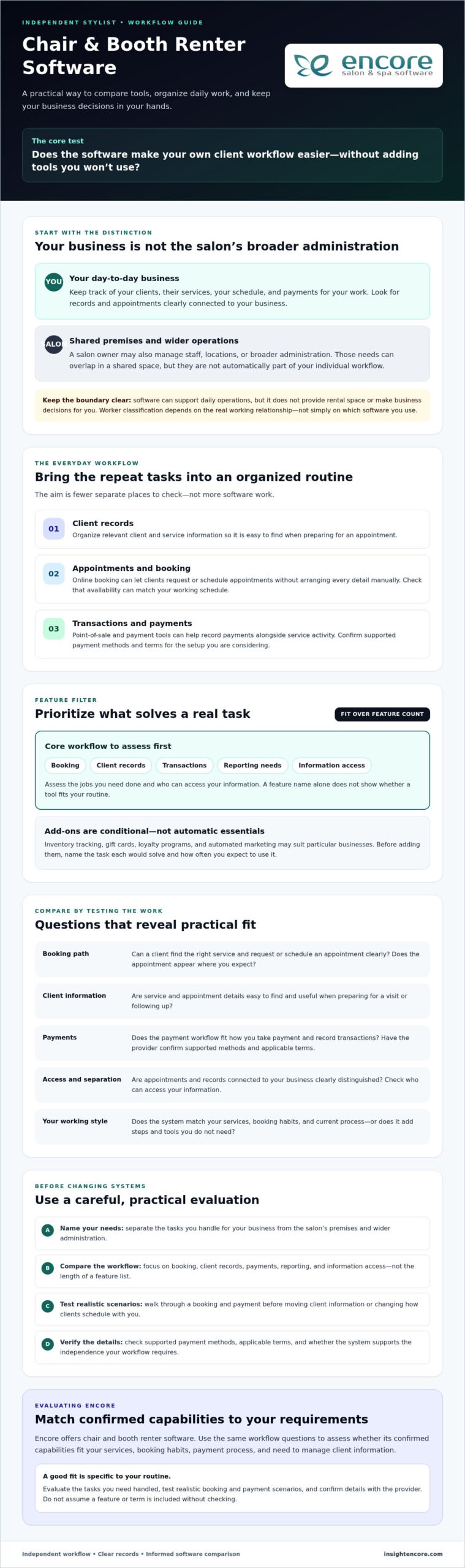
Before choosing, test one realistic client journey: select a service, book based on your availability, find the relevant client record, record the payment, and check what information is available for follow-up. Note any unclear steps and ask the provider to demonstrate how permissions and data access work. This practical check can reveal more than a feature list.
How to Choose and Set Up Software for Your Booth Rental
A good setup starts with your actual workday, not a long list of features. Before committing to chair/booth renter software, identify what it needs to handle, test those tasks in a realistic workflow, and clarify practical details with the provider. This makes it easier to compare systems and plan a change without disrupting client bookings.
A practical checklist before you choose
- Map your current tasks. List the tools you use for appointments, client details, payments, and follow-up. Note where you enter the same information twice or handle routine tasks manually.
- Shortlist your must-haves. Decide which jobs the system needs to support from day one. Separate them from features you may not need yet.
- Test the workflow. Walk through a typical client journey, from booking a service to recording payment and finding the information you need afterward. Try the steps yourself instead of relying only on a feature overview.
- Verify terms and access. Ask about data export, account permissions, payment terms, and how client records are handled. Request current details in writing, and clarify anything that could affect your control of business information.
- Plan the setup. Ask the provider what information can be transferred, who is responsible for setup tasks, and what onboarding or training support is available. Confirm these details rather than assuming they’re included.
A smoother transition into a new system
Choose a transition point that gives you time to check the setup around your appointment schedule. Before changing how clients book, confirm which records can be moved and how they’ll appear in the new system. If other renters will use the same platform, decide who needs access and which permissions are appropriate for each person.
Test the basics before relying on the new process: make a sample booking, review a client record, and check how a payment is entered and displayed. If anything is unclear, pause and ask the provider before moving more information or directing clients to a new booking routine. Preparation can help you catch gaps while your existing process is still available.
Encore offers specialized software for independent chair and booth renters. After defining your requirements, review the Encore Salon Software page as one option, and confirm current feature availability, setup, and payment details for the renter configuration.
How Encore Chair/Booth Renter Software Can Support Your Next Step
Once you’ve identified the tasks your system needs to handle, assess Encore against those requirements. Encore offers specialized chair/booth renter software within a broader beauty and wellness management platform. Its capabilities include online booking, client management, point-of-sale transactions, and integrated credit card processing, which can bring key parts of a renter’s day-to-day workflow together.
Don’t choose a platform based on a feature list alone. Consider whether its booking, client, and transaction tools fit the way you manage services and business information. Confirm the details for the specific chair or booth renter configuration you’re considering.
Where Encore may fit in a renter’s workflow
For a professional looking to bring core management tasks together, online booking can support appointment scheduling, while client management can help organize customer records. Point-of-sale transactions and integrated credit card processing may also suit renters who want to manage service payments within their broader workflow. Check how these functions work together in the configuration available to you, and whether its record-access settings match your needs.
Encore provides software, not booth rental listings or physical salon space. Its offerings don’t make it a substitute for your own decisions about client relationships or how you run your independent business. Evaluate the system against the requirements you’ve already defined.
What to confirm before moving forward
Ask which features are included in the chair or booth renter configuration and whether the system supports the booking, client-record, and transaction steps you want to use. Confirm current payment processing terms, account permissions, and how client data can be accessed or exported. These details affect how well the software can support your workflow.
Also ask about onboarding and support arrangements, including what guidance is available during setup and which tasks you’ll need to complete. Compare the answers with your must-have criteria rather than assuming every feature or service applies to every configuration. Reviewing terms directly with Encore can help you make an informed decision and identify questions to resolve before changing your routine.
Choose a System That Keeps Your Business in Your Hands
The right chair/booth renter software should make everyday tasks easier without blurring who manages your clients, schedule, and business records. Start with your workflow, compare booking, client management, payments, and reporting, then confirm data access and terms directly with each provider.
Before switching, test realistic client scenarios and plan how records, payment setup, and booking routines will move into the new system. A careful setup helps you make a confident choice and avoid unnecessary disruption to your day.
Encore offers a specialized solution for chair and booth renters. Its broader platform includes online booking, client management, and point-of-sale transactions. Explore how these capabilities may fit your needs, and verify current features, configuration, and terms before deciding.
You’re building a business around your skills and client relationships. Choose tools that support that independence. To see whether Encore fits your renter workflow, explore Encore and take the next step.
Frequently Asked Questions
What is chair or booth renter software?
Chair or booth renter software helps an independent salon professional manage business tasks while working in a shared salon or barbershop. It may bring appointment booking, client records, and transactions into one workflow. Unlike tools focused on running an entire salon, renter software should suit an individual professional’s routine. It supports business operations, but it doesn’t provide rental space or make business decisions for you.
Do booth renters need their own salon software?
Not every booth renter needs a separate system, but software that supports your own workflow can make it easier to manage appointments, client information, and payments. Before using a salon-wide platform, find out whether you can manage your availability and records independently. Ask who can access client information and what happens to your data if you leave the shared space. Choose based on your arrangement and business needs.
Can chair renter software keep each professional’s clients separate?
It can, depending on the software’s account setup, permissions, and data-handling rules. Don’t assume separate logins mean records are private or that you can export them. Ask who can view, edit, or access client details, and whether each professional can manage their own bookings. Review the provider’s current privacy documentation and terms to understand how client information is handled before entering or moving records.
What features should booth renter software include?
Start with the tasks you handle regularly. Useful core features may include online booking, organized client records, appointment management, and point-of-sale or payment tools. Depending on your services, inventory tracking, gift cards, loyalty programs, or marketing features may also help. Check that the software supports your actual workflow, including how you schedule clients and record transactions. Confirm current feature availability for the renter configuration you’re considering.
How much does chair or booth renter software cost?
Pricing depends on the provider and the plan or configuration, so ask for current details directly rather than relying on a general estimate. Compare the full cost, not just a subscription fee. Check payment processing terms, any per-booking charges, and whether the tools you need are add-ons. Contact Encore to confirm current pricing and terms for its chair and booth renter software.
Is salon software different from booth renter software?
They can overlap, but they may be designed around different day-to-day needs. Salon-wide software may include tools for managing staff or broader business operations, while renter-focused software should support an individual professional’s appointments, clients, and transactions. The labels alone don’t tell you whether a system fits. Check how it handles your records, booking availability, permissions, and payments, especially if you share a platform with the salon.
How do I switch to new booth renter software?
Start by listing your current tools and deciding which tasks the new system must support. Ask what client and appointment information can be transferred, how to export records later, and who will handle setup. Test a realistic booking, client-record, and payment workflow before changing your routine or directing clients to a new booking process. Plan the transition around your schedule, and confirm account access, payment terms, and available onboarding guidance.
Disclaimer
This article is general in nature and may contain errors, please verify all claims with your sales rep