

The tattoo studio software with the most features isn’t necessarily the best fit for your shop. If a system doesn’t match how you schedule artists, manage client information, and handle transactions, it can add steps instead of taking work off your plate.
When artist availability is hard to coordinate or client and payment details are spread across separate tools, it can be difficult to know which features matter most. Start with your studio’s day-to-day workflow, not a long list of capabilities.
This guide shows how to compare tattoo studio software against the tasks your team actually handles, from booking and client management to payments and inventory. You’ll learn what to assess for solo artists and multi-artist shops, which tattoo-specific features to verify, and how to look beyond the subscription when comparing options. By the end, you’ll have a practical way to narrow the field and choose a platform that supports your artists and clients without unnecessary complexity.
Key Takeaways
- Map how appointments, client details, and transactions move through your studio to find avoidable admin gaps.
- Use scheduling, records, payments, inventory, and client retention to define your essential tattoo studio software requirements.
- Compare platforms by how well they support real studio workflows, not by the length of their feature lists.
- Test realistic booking and client-management tasks, then confirm feature availability, plan limits, and terms with each vendor.
- Encore may suit studios looking to bring several management tools together. Verify which capabilities are included in its tattoo software offering.
What Tattoo Studio Software Does for Your Day-to-Day Operations
Tattoo studio software helps organize appointments, client information, and business transactions in one place. A booking-only tool mainly handles appointment requests and schedules, while studio management software may also bring together other daily tasks. Capabilities vary by platform, so check exactly what’s included before choosing.
This distinction matters when a studio uses separate systems for artist availability, client details, and transactions. Staff may have to search for or enter the same information more than once. A connected platform can make these handoffs easier to manage, but it won’t determine how your studio should operate.
Which everyday studio tasks can software help organize?
Online booking gives clients a way to request appointments and helps the studio coordinate its schedule. Client management tools organize relevant records in one system, much like a Customer Relationship Management (CRM) system supports organized customer information and interactions. Point-of-sale tools can connect service transactions with business records, keeping operational information together.
Assess how these tasks work together, not just whether each feature appears on a list. After a client books, for example, can staff find the appointment and the related client record without switching between separate tools? Ask the provider to demonstrate that workflow and clarify any plan limits.
Who benefits from tattoo studio management software?
Owners coordinating several artists may value a shared way to manage appointments, client-facing processes, and transactions. Independent artists can consider whether a broader platform would simplify their routine or whether a booking-focused tool better suits their setup. In either case, check that the system fits your team size and the way you handle scheduling and records.
Software organizes information and processes. It doesn’t set studio policies or deliver tattoo services. Owners remain responsible for decisions such as how appointments are handled and what procedures the team follows. If a system appears to support a particular policy or tattoo-specific process, verify that capability directly rather than assuming it’s included.
Encore serves tattoo parlours alongside other beauty and wellness businesses. Its listed platform tools include online booking, client management, inventory tracking, and point-of-sale transactions. Check which capabilities apply to its tattoo studio software and your intended setup on the tattoo studio software page.
Tattoo Studio Software Features: Build Your Essential Requirements List
Build your requirements list around your studio’s actual workflow, not the platform with the longest feature list. Core capabilities to assess include scheduling and online booking, organized client records, point-of-sale transactions and payment processing, and inventory tracking. Retention tools such as automated marketing, loyalty programs, and gift cards may also be useful. Confirm which features are available in the specific product and plan you’re considering.
Scheduling and client records for tattoo appointments
Start with the schedule. Can clients request appointments online? Can your team see artist availability and manage bookings in a way that matches current studio processes? A feature name alone won’t show whether a system can handle how your artists share, assign, or update bookings. Ask vendors to demonstrate the scheduling tasks your team performs regularly.
Next, look at client records. Check how information is stored, updated, and accessed by authorized team members. If your workflow depends on deposits, reminders, forms, or appointment-specific notes, verify each capability directly. Don’t assume these are included under a general “client management” or “booking” label.
Payments, inventory, and client retention tools
Review how point-of-sale transactions fit with your studio’s payment process, and confirm what integrated credit card processing includes. For inventory, ask whether the system can track the supplies and products your studio actually manages. A tool that doesn’t match your inventory needs may add work instead of reducing it.
Automated marketing, loyalty programs, and gift cards can support client retention, but may be optional rather than essential. Prioritize them based on how your studio communicates with returning clients. If the platform stores client information, ask vendors how they protect it and review the FTC cybersecurity guidelines for practical steps businesses can take to safeguard information.
- Scheduling: online booking, artist availability, and appointment visibility.
- Client management: organized records and appropriate team access.
- Transactions: point-of-sale tools and integrated payment capabilities.
- Inventory: tracking that fits the supplies and products you manage.
- Retention: marketing, loyalty, and gift card tools if they suit your client approach.
Rank each requirement as essential, useful, or optional. A studio coordinating several artists may prioritize shared scheduling, while an independent artist may focus on straightforward booking and accessible client records. Encore lists online booking, client management, inventory tracking, point-of-sale transactions, integrated credit card processing, automated marketing, loyalty programs, and gift card management among its platform capabilities. Check which are included in the tattoo software offering and applicable plan, then explore Encore as a possible fit.
How to Compare Tattoo Studio Software Beyond the Feature List
A broad platform can bring daily tasks together, but only if it fits the way your studio works. Separate tools may suit a team with an established process, while connected tools may reduce repeated data entry and switching between systems. Neither setup is automatically better. Compare each option against your real workflows, and confirm feature availability, limits, and plan applicability with the vendor.
| Area | What to compare |
|---|---|
| Workflow fit | Can the system support how your studio assigns, updates, and tracks work? |
| Booking | Can clients request appointments, and can staff view and manage schedules as needed? |
| Records | Can authorized team members find and update relevant client information? |
| Transactions | Do point-of-sale and payment capabilities match how the studio handles transactions? |
| Inventory | Can you track the supplies and products your studio actually manages? |
| Support | What help is available, through which channels, and during what hours? |
What should a tattoo studio ask during a software demo?
Ask the vendor to demonstrate a typical client journey, from requesting an appointment to finding the client record and handling the transaction. Make the walkthrough practical: ask how staff find information during a working day, who can access or update it, and what happens when an appointment changes. Get clear answers about included features, implementation steps, data handling, and available support. A direct walkthrough can reveal gaps that a feature list won’t.
How can you assess cost and value without guessing?
Compare each provider’s current plan details, included features, limits, and transaction fees where applicable. Don’t assume a feature is included just because it appears on a general product page. Ask which plan supports your needs and whether additional charges apply.
Then consider the operational trade-off: could consolidating tools reduce duplicate work, or would separate systems remain easier for your team? Assess value against the tasks staff perform without assuming a particular financial return. For Encore’s current plan details, review the Encore pricing information, and confirm which capabilities apply to its tattoo studio software offering.
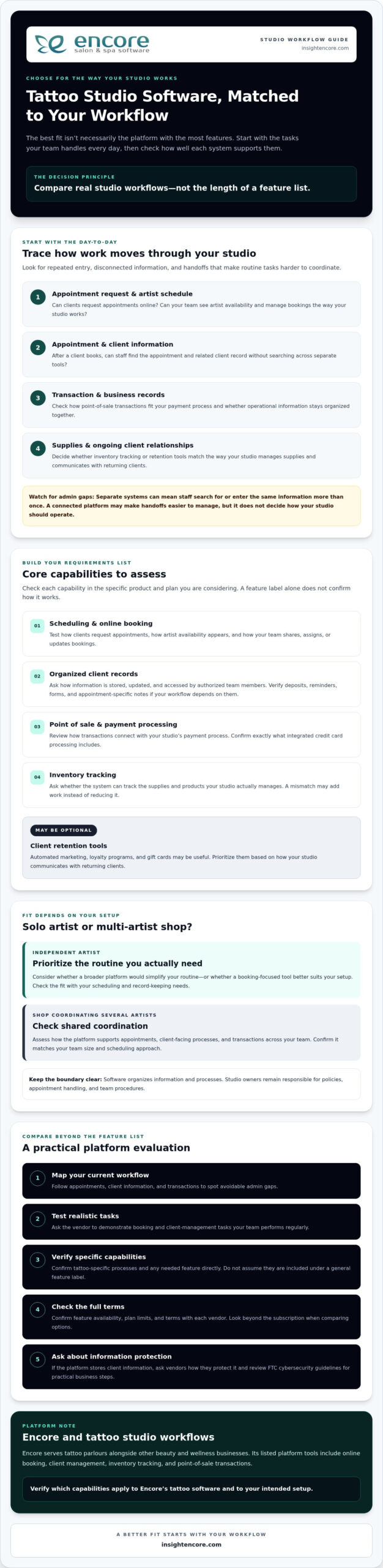
A Practical Checklist for Choosing Tattoo Studio Software
Use a consistent process to compare platforms before moving appointments or client records. A focused evaluation helps you determine whether tattoo studio software fits your studio’s routines, rather than relying on a feature list or polished demo alone.
- Map your current workflow. Write down how clients book, how artists manage their schedules, and where client records are kept. Note repeated admin tasks, handoffs, or moments when staff have to search across tools. Include tattoo-specific needs, such as deposits or forms, as items to verify with vendors rather than assumed features.
- Rank what matters. Sort requirements into essential, useful, and optional. Ask artists and staff what slows them down and what information they need to find quickly. Review current records and processes too, so you understand what may need to move or change.
- Shortlist platforms. Compare providers against your priorities, team size, and daily tasks. Review Encore platform features alongside other vendors’ information, and confirm that any required capability applies to the specific product and plan you’re considering.
- Test realistic tasks. Use the same sample workflow for every shortlisted platform, such as handling an appointment request, finding a client record, updating details, and completing a transaction. Ask staff to try the steps and assess whether they can find the information they need without unnecessary detours.
- Confirm the terms. Ask each vendor about data migration, onboarding, available support, feature limits, and contract terms. Clarify what your team needs to prepare and which records or processes may require manual attention during a changeover.
Make the evaluation practical
A feature may sound useful but still be awkward in daily use. During a demo or trial, ask staff to complete the same tasks they handle at the studio, then gather their feedback. Can they follow the workflow and find and update the right information? Does the system support the process your studio wants, or would the team need to change how it works?
Before switching, check that current records are organized and identify what should be transferred, retained, or reviewed. A clear view of existing processes makes it easier to ask specific questions and plan the transition. The right choice should meet your priorities without adding features or complexity your studio won’t use.
Is Encore Tattoo Studio Software a Fit for Your Business?
Encore is a management platform for beauty and wellness businesses, including tattoo parlours. It may be worth considering if you want to assess several everyday studio tools together rather than evaluate booking in isolation. The fit depends on whether the available features match your team’s workflow, not simply on how many capabilities the platform lists.
Which Encore capabilities may support a tattoo studio?
Encore lists online booking, client management, inventory tracking, and point-of-sale transactions among its platform capabilities. Other listed tools include integrated credit card processing, automated marketing, loyalty programs, and gift card management. These may be relevant to studios reviewing appointment coordination, client records, transactions, stock, and client retention.
Confirm which capabilities are included in the tattoo studio software offering and the plan you’re considering. If your process depends on a specific tattoo-related feature, such as digital forms, deposits, appointment reminders, artist-level access, or particular reporting, ask Encore directly whether it’s available and how it works. Don’t assume a capability is included based on a general feature description.
For product-specific details, review Encore tattoo studio software. Use your list of essential workflows to assess whether the listed tools address your needs, and ask for clarification wherever the details aren’t clear.
How can you take the next step with confidence?
Before exploring the trial, write down your must-have tasks and questions. These might include how your team handles booking requests, updates client records, tracks inventory, and processes transactions. Compare those workflows with the capabilities available in the tattoo offering. A clear checklist helps you focus your evaluation and identify what still needs confirmation.
Ask about feature availability, plan details, onboarding, data handling, and support arrangements that matter to your studio. If the fit isn’t clear, ask more questions rather than rushing a decision. Evaluate the platform against your real process and involve the people who will use it.
If you’re ready to explore the next step, see how Encore’s trial fits your studio’s requirements.
Choose a System That Works for Your Studio
The strongest choice isn’t the platform with the longest feature list. It’s the one that supports your real workflow, helps keep bookings and client records organized, and fits your team’s needs. Before deciding, test routine tasks and confirm which features are included in the product and plan you’re considering.
Encore offers tattoo studio software for tattoo parlours, with listed platform capabilities including online booking, client management, inventory tracking, and point-of-sale transactions. Integrated credit card processing and automated marketing are also listed offerings. Check directly which capabilities are available for your studio and whether they support your tattoo-related requirements.
Use your checklist to explore the option at your own pace. A practical evaluation can help you move forward with confidence.
Frequently Asked Questions
What is tattoo studio software?
Tattoo studio software helps organize business tasks such as appointment booking, client management, and transactions. Some platforms also offer inventory tracking, marketing, loyalty programs, or gift card tools. Capabilities vary by provider, so compare them with your studio’s daily workflows. A useful system should support the way you manage appointments and records, rather than require changes to essential studio practices without a clear reason.
What features should tattoo studio software include?
Start with the tools your studio needs most, such as online booking, artist scheduling, client records, and payment handling. Inventory tracking and client-retention features may also be useful. Ask vendors to confirm any tattoo-specific requirements, including forms, deposits, reminders, or session notes. Don’t assume a feature is included just because a platform serves tattoo businesses. Check availability, plan limits, and how each tool works in your actual workflow.
Can tattoo studio software manage multiple artists?
Some platforms may support team scheduling and shared studio workflows, but capabilities vary by product and plan. Ask the vendor to demonstrate how your team can view artist availability, manage appointments, and access client information. If you need artist-level permissions or reporting, confirm those details directly. Before choosing, test a realistic multi-artist scenario, such as updating an appointment and checking that the right team members can find the relevant information.
How does online booking help a tattoo studio?
Online booking gives clients a way to request or schedule appointments without relying entirely on back-and-forth messages. It can also help keep booking information organized for the studio. Check whether the system supports your preferred process, including consultations or other steps before an appointment is confirmed. Ask how booking requests are reviewed, updated, and confirmed, and whether the workflow suits the way your artists manage availability.
Is tattoo studio software suitable for a solo tattoo artist?
It can suit a solo artist if its booking, client-management, and payment tools match the way you work. You may not need every team or inventory feature, so compare the available capabilities and plan details against your actual requirements. Consider whether you can manage the system independently and find the client information you need. A simpler tool may be a better fit if a broader platform adds steps you won’t use.
How much does tattoo studio software cost?
Pricing depends on the provider, included capabilities, and applicable plan terms. Compare current vendor information rather than relying on generic estimates. Ask whether setup, payment processing, or optional features involve additional charges for your situation, and review contract terms before deciding. Look beyond the headline price to consider which tools are included and whether they support your workflow. That gives you a clearer basis for comparing value.
How do I switch to tattoo studio software?
Start by documenting your current booking process, client records, and routine business tasks. Shortlist platforms, ask vendors about data migration and onboarding, then test realistic workflows before committing. Confirm what information can be transferred, what your team needs to do, and what support is available. Review your records before the change and plan staff training. Choose a transition time that gives your team room to adjust and address questions.
Disclaimer
This article is general in nature and may contain errors, please verify all claims with your sales rep