

A consent form is more than a signature on a screen. You can draft your own wording, but digital consent forms for tattoo parlours should reflect the rules that apply to your location and the work you perform. A legal professional can review whether the form suits your circumstances.
A clear, complete form should also be easy for clients to finish. A digital version can collect client details, health disclosures, age and ID information, the agreed tattoo and placement, and a signature before work begins. It can also record that the client received and understood the aftercare instructions.
This guide explains what to include, how to handle age checks and aftercare, and how digital forms can simplify signing and record retrieval. You’ll also learn how to keep the process organized, from sending a form to finding it alongside the client’s appointment history.
Key Takeaways
- Record the agreed design and placement so the client’s consent is clear before work begins.
- Build age checks around identification and the rules that apply in your location.
- Include aftercare information and a way to note that the client received and understood it.
- Keep signed forms connected to client records so staff can retrieve them when needed.
- Explore Encore Salon and Spa Software’s Tattoo Studio Software when you want studio management tools alongside your digital consent process.
What should a tattoo consent form include?
A useful consent form records the agreed tattoo, its placement, and the client’s signature. A digital form should also make it easy to connect each record with the right client and appointment.
Placement and Design Consent Records
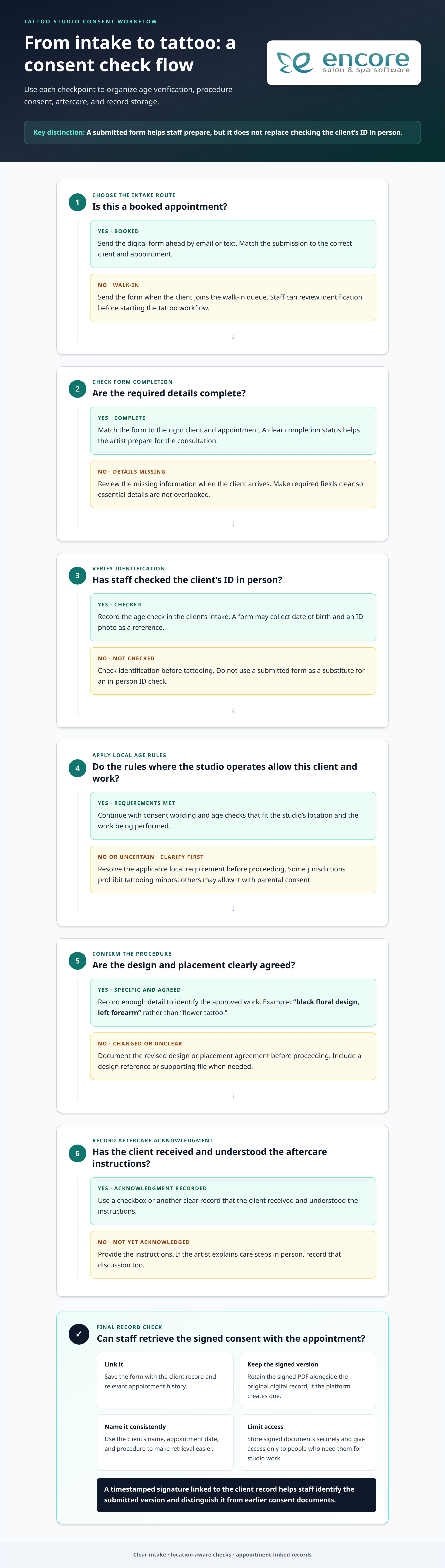
Record the design and placement before tattooing begins. For example, write “black floral design, left forearm” rather than “flower tattoo.” This gives the client and artist a written reference for the agreed work. If the design or placement changes, document the revised agreement before proceeding.
Connect the client’s consent to the specific agreed details, not just a generic waiver. Include a design reference or supporting file when needed, and make required fields clear so essential information isn’t missed. The signed form should reflect the specific procedure the client approved.
For a sample age statement, a form may say the client is over 18. Tattoo requirements differ by location and work performed, so templates need to fit the rules that apply. A tattoo studio’s management and record workflow is relevant when deciding how consent fits with client information.
Signed PDF and Client Record Storage
Save the completed form with the client’s record. If the platform creates a signed PDF, retain it alongside the original digital record. Use a consistent file-naming method, such as the client’s name, appointment date, and procedure, to make retrieval easier.
Store the signed document securely and limit access to people who need it for studio work. Poorly secured files can expose personal details; incomplete files can leave important consent or procedure details unclear. In the EU, the European Union says GDPR treats health data as a special category of personal data subject to stricter processing requirements.
There isn’t one standard cost for digital consent platforms. Pricing depends on included features, storage, and access needs, with costs provided after a quote request.
Appointment-Linked Consent Records
Link each signed consent record to the relevant appointment and client profile. Staff can then find the document in the appointment history instead of searching separate folders. Keep the date and procedure details with the record, especially when a client has several appointments or returns for more work.
Cloud storage can make records available through a studio dashboard, while organized client profiles support retrieval. Check whether the platform keeps forms together and shows which appointment each belongs to. Compare the practical essentials: required fields, digital signatures, PDF access, client-record storage, and search tools.
To reduce gaps, make required fields clear and establish a routine for saving completed forms. A timestamped signature linked to the client record helps identify the submitted version. Staff should be able to find it by client or appointment and distinguish it from earlier consent documents.
Tattoo aftercare, age verification, and client identification
Give each client clear aftercare instructions and record their acknowledgment. A digital form can include a checkbox confirming the client received and understood the instructions. If an artist explains care steps in person, record that discussion too. The client profile can then show what guidance accompanied the appointment, rather than relying on staff memory.
Check identification before tattooing and record the age check in the client’s intake. A form can collect a date of birth and accept an ID photo upload, giving staff a reference. Some jurisdictions prohibit tattooing minors, while others may allow it with parental consent. Base the age-check process on the rules where the studio operates.
For walk-ins, staff can review identification before starting the tattoo workflow. For booked appointments, send the form link ahead by email or text, then review any missing details when the client arrives. A submitted form helps staff prepare, but it doesn’t replace checking the client’s ID in person.
Client contact fields can include a name, email address, phone number, and emergency contact. Explain the purpose of each field. Booking reminders relate to an appointment, while a newsletter or promotion serves a different purpose. Use a separate marketing preference so clients can choose whether they want promotional follow-up without confusing it with consent to the tattoo.
Online bookings and walk-in queues create different starting points. Send a digital form after an online booking or when someone joins a walk-in queue. Staff can then match the submission to the correct client and appointment. A clear completion status helps artists spot missing information before the consultation.
Prepare templates for the studio’s location and the languages clients use. Keep the wording easy to understand, and have a legal professional review it for the applicable rules. If you provide translated versions, retain the exact version each client signed. A saved copy helps staff distinguish signed wording from later template edits.
Limit collected information to what the studio needs for its process. Set a clear path for retrieving a client’s signed form and responding to requests about their personal information, while accounting for retention requirements. If you’re organizing booking and client records together, explore tools for tattoo studio management.
Digital form storage and retrieval
After a client signs a waiver, save the completed form with their client record. Keep the signed version separate from blank templates and unsigned drafts. For example, label files with the client’s name, appointment date, and procedure. Consistent filing helps staff find the right document without sorting through unrelated forms. Digital consent forms for tattoo parlours need a defined route from submission to the client profile.
Use access controls and encrypted storage for signed PDFs, especially when they contain health disclosures or ID images. Limit access to staff who need the records for studio work. A password-protected file alone doesn’t show who can open it or where copies are stored. Set clear permissions for viewing, downloading, and sharing each record, and remove access when staff no longer need it.
Choose a secure digital storage process staff can follow during busy appointments. Save each submitted form to its assigned client profile, then confirm it appears there. Digital forms can sit alongside appointment history and past transactions, making the dashboard a practical place to retrieve them. Use the same filing steps across artists and shifts.
Cloud storage can make records available through the studio’s system, while automatic backups can help preserve saved forms. Backups don’t replace access controls or a retrieval plan. Decide who handles a missing file, how staff find an older appointment, and how records are restored if the usual system is unavailable. Test the process with a sample client record before relying on it during a busy shift.
Make retrieval straightforward. Search by client name or appointment, then confirm the procedure and signature date before opening a document. If a client has several visits, link each consent form to its matching appointment. This helps staff distinguish an earlier waiver from the record for the current work.
A QR code can direct a walk-in client to the correct digital form. After submission, route the form through the same filing process as one sent before booking. Staff can check the client profile for a completed record instead of keeping separate paper notes. Clear instructions at the kiosk or front desk help clients submit the right form and reduce filing errors.
Set a retention schedule based on the applicable statute-of-limitations period. Tattoo studios should keep consent forms for at least that period, typically three to six years. The exact timeframe depends on the jurisdiction. Include a process for client requests to access or delete personal data, while accounting for legal retention requirements.
Review the process whenever staff change filing instructions or form templates. Preserve the version each client signed; don’t overwrite it with a revised waiver. A dated record of the current template and a separate copy of each completed form help distinguish policy updates from past consent documents. This gives digital consent forms for tattoo parlours a reliable trail from submission through retrieval.
Electronic signatures and mobile-friendly forms
A digital form should let clients read the consent document, confirm their agreement, and sign before tattooing begins. Make the signing process clear on phones, tablets, and computers.
Age and Guardian Signature Settings
Set up the form to capture the client’s date of birth and age statement. Some jurisdictions prohibit tattooing minors, while others may allow it with parental consent. Use conditional questions to request guardian details only when needed. If a guardian must sign, send the form by email or text and keep their signed permission with the client’s submission.
Keep the steps clear: identify the signer, show the consent wording, and provide a signature field. Staff should review the submitted information and the client’s identification before proceeding. A digital form supports the process but doesn’t replace the studio’s age-check procedure or the rules for its location.
Creating, Signing, and Storing Forms
Start with a template that explains the procedure and presents the consent wording in readable sections. Include fields for client details, relevant disclosures, agreement, and signature. Mark required fields clearly so clients know what to complete. Conditional logic can hide questions that don’t apply, keeping the form focused for each client.
Clients can open a form from a website, booking system, appointment email, or in-studio kiosk. On a phone, short labels and uncluttered screens make each section easier to read before signing. A studio can also let clients review a PDF and sign on an iPad or iPhone during check-in.
After submission, save the timestamped signature and consent status to the client’s profile. Keep the signed version intact and separate from the editable template. This preserves the exact wording the client accepted, even if staff later revise the blank form. Store the completed document where staff can retrieve it from the client record.
Before using a template, have a legal professional review its wording and signing process for the studio’s location and circumstances. A waiver doesn’t absolve a studio of negligence, so don’t present a signature as a substitute for safe practice or clear explanations. If a client refuses to sign, don’t proceed with the treatment.
Test the signing process on a phone and a tablet before sharing it with clients. Confirm that the form displays properly, required fields are easy to find, and the final signature appears on the saved copy. A simple test submission can reveal confusing wording or a missing field before a client sees the form.
What digital tattoo and piercing consent forms are
A digital consent form is a document clients read and complete on a screen. They provide requested details, confirm their agreement, and sign electronically; the information is then saved in the studio’s system. For example, a tattoo intake might record the planned work, relevant health disclosures, and the client’s acknowledgment in one submission.
The key difference from paper is how the form is submitted and stored. Instead of collecting a sheet at reception, a studio can share a form link before an appointment or offer a tablet at check-in. The completed form can be connected to the client’s profile, making the signed record easier to find later.
Tattoo and piercing forms can share a basic structure, but their questions should match the procedure. A tattoo form might ask about placement and design, while a piercing intake could focus on the piercing location and related health disclosures. Separate templates help avoid irrelevant fields while keeping each consent document specific to the work discussed.
Treat the form as part of a consent workflow, not just a digital waiver. The client needs to read the wording, answer relevant questions, and sign before the procedure begins. Staff then need to confirm the submission is complete and retrievable. Required fields and conditional questions can guide the process without giving every client the same prompts.
Language matters, too. If clients can’t understand the wording, they may struggle to make an informed choice. Prepare translated versions for the languages your clients use, then preserve the exact version each person signed. Keep signed documents separate from editable templates so later wording changes don’t alter earlier consent records.
Digital forms can also collect parental permission where applicable, alongside client details and signatures. Their purpose is to document what information the client received and agreed to, while studio staff remain responsible for explaining the procedure. Connect each submission to the relevant client and appointment rather than leaving a signature in an unlabeled file.
The practical takeaway for studios is simple: choose a form that fits the procedure, uses readable language, captures the necessary responses, and saves a retrievable signed record. A digital workflow can bring intake and consent into one organized process, whether clients complete it before arriving or at the studio.
Encore Salon and Spa Software: Tattoo Studio Software
Encore Salon & Spa Software offers Tattoo Studio Software for studios managing appointments, client relationships, and daily operations. If your consent process sits alongside booking and client records, bringing those workflows into a studio management system can help keep them organized. Encore also supports appointment booking and client management, useful when you want studio information handled in one place.
Consider it when separate tools make it harder to manage appointments and client details together. Consent wording and signing procedures still need to reflect your studio’s needs and applicable requirements. To discuss how Tattoo Studio Software may fit your workflow, contact Encore Salon & Spa Software.
Make your consent process part of a smoother studio workflow
A practical next step is to map how clients move from their first booking to signed consent and follow-up. Identify where staff need to access each record and which steps feel disconnected. This gives you a clear basis for shaping digital consent forms for tattoo parlours around your studio’s daily workflow, rather than adding another isolated task.
For broader business management, Encore Salon and Spa Software offers Encore Salon Software, Encore Spa Software, and Chair/Booth Renter Software. The right tools depend on which business operations you want to organize alongside your tattoo studio’s processes.
If you’re ready to discuss your studio’s workflow, start a conversation with Encore Salon and Spa Software.
A thoughtful process starts with clear choices. Take the next step when it feels right for your studio.
Frequently Asked Questions
Can I write my own consent text?
You can draft your studio’s consent wording, then have a legal professional review it for your location and circumstances. Cover the agreed procedure, relevant client disclosures, and the client’s acknowledgment without suggesting a waiver removes responsibility for negligence. Keep the approved template separate from completed forms, so a later update won’t replace wording a client previously accepted.
How long should I keep consent forms on file?
Keep consent forms for at least the statute-of-limitations period that applies in your jurisdiction. The period is typically three to six years, but the applicable timeframe depends on location. Set a retention schedule for signed forms and related records, then document how staff handle access or deletion requests. Account for legal retention requirements before removing a client’s file.
What Does It Mean to Digitize Consent Forms?
Digitizing consent means moving the form, client responses, and signature into an electronic workflow. A client might open a form on a phone before an appointment or complete it on a studio tablet. The submitted information is saved in the studio’s system rather than kept only on paper. Staff can then organize and retrieve the digital record with the client’s other information.
What information should a tattoo consent form include?
Include the client’s identifying details, date of birth or age statement, and relevant health disclosures. Record allergies, skin conditions, medications, and previous reactions that may affect tattooing or healing. Describe the agreed procedure and placement, then provide space for the client’s signature. You can also record that aftercare instructions were received and understood. Tailor the fields to the procedure instead of asking every client identical questions.
Are digital tattoo consent forms legally valid in the United States?
A digital form’s legal effect depends on the location, circumstances, document wording, and signing process. Don’t assume that putting a paper waiver online automatically makes it legally binding. Have a legal professional review the form and electronic signing process for your studio’s circumstances. Whatever format you use, preserve the signed version and obtain consent before beginning work.
Do tattoo consent forms need electronic signatures or witness signatures?
Consent forms should be signed before tattooing begins. Whether a witness signature or a particular electronic signing method is required depends on the applicable rules and circumstances. Don’t treat a witness field as a substitute for reviewing signing requirements. Keep a copy showing the client’s completed signature and accepted wording, so staff can retrieve the correct record later.
What age and parental consent rules apply to tattooing in each U.S. state?
There isn’t one rule for every state: requirements can differ by state and by the work performed. Create location-specific procedures that tell staff what identification to review and whether guardian permission applies. Have the age-check template reviewed for the state where the studio operates, and don’t treat a signed form as a substitute for identification.
What health disclosures and contraindications should tattoo intake forms ask about?
Ask clients about medical conditions, medications, allergies, skin conditions, pregnancy, and breastfeeding. Include allergies to latex, adhesives, or pigments, plus previous reactions to tattooing or piercing. These questions help artists identify information that may affect skin, ink, or healing. Use clear, relevant fields and collect only the personal information the studio needs. Staff should review responses with the client before proceeding.
Disclaimer
This article is general in nature and may contain errors, please verify all claims with your sales rep