
The best texting tool for a dog groomer is not necessarily the one with the most reminder settings. Dog grooming software with text reminders is most useful when messages fit smoothly into how you book appointments and manage clients, whether you work in a salon or travel to customers.
It makes sense to want reminders that reduce manual follow-ups and help clients remember their appointments. But texting features can vary: some tools focus on scheduling, while grooming-focused platforms may bring appointments together with client and pet records. The right fit depends on how you handle bookings, changes, and communication throughout the day.
This guide explains how appointment texts work, what to compare in software, and which features matter for salon and mobile workflows. You’ll also see how appointment management connects with wider business operations, so you can assess the complete system rather than judging it by texting alone.
Key Takeaways
- Set up appointment texts around your booking process, using a dedicated business number to keep client communication organized.
- Compare software pricing alongside texting limits, so you can understand how each option fits your expected use.
- Choose a workflow that supports the way you schedule appointments, whether you groom in a salon or travel to clients.
- Look beyond reminders when comparing platforms, and consider how scheduling and client management fit together.
- Explore Encore Salon and Spa Software when you want business-management tools that support salon operations.
How to send auto text reminders to grooming clients?
Start with an appointment record that includes the client’s mobile number and booking details. Use a dedicated business number rather than an employee’s personal phone, so replies stay connected to the business when staff schedules change. Before choosing software, confirm that its texting workflow supports the number and reply process you need.
For U.S. business reminders, collect permission during booking, explain that the texts concern appointments, and record the client’s choice. Provide a clear opt-out method, such as replying STOP, and stop sending reminders after someone opts out.
Connect each text to the scheduling calendar. A useful workflow sends a confirmation after booking, then a reminder before the visit. A message might include the appointment date, start time, salon address, and a request to confirm or reschedule. Pull the time and contact details from the appointment record to reduce manual entry errors.
Appointment software may offer automatic confirmations, scheduled reminders, and two-way texting. Clients can confirm by replying, while staff can answer questions or coordinate a changed appointment. Before setting up the workflow, decide who handles replies and how the calendar gets updated when a client requests a change.
Set up the process in a clear sequence:
- Capture booking details: Save the client’s number, pet name, service, date, and appointment time.
- Send confirmation: Use a short message that repeats the booking details and explains how to request a change.
- Schedule reminders: Choose when the system sends each message, based on the business’s booking routine.
- Route responses: Assign incoming replies to a staff member who can handle confirmations and changes.
- Update the calendar: Record cancellations or new times so the appointment schedule stays current.
Keep messages focused. “Bella’s grooming appointment is Tuesday at 10 a.m. Reply to confirm or request a new time” gives the client a clear next step. Avoid adding unrelated promotions to an appointment reminder, and check that the business name appears clearly. A well-maintained calendar then gives anyone handling the schedule one current record to follow.
For a connected scheduling and client-record workflow, the Encore salon software page describes tools for managing salon operations. Settle the booking, confirmation, reply, and calendar steps first, then choose the texting setup that fits them.
What is the best texting software for dog groomers?
The right fit depends on how the software’s pricing, SMS features, and appointment tools suit your booking volume. Compare the complete plan, not just reminders, before moving booked clients into a new system.
Free Trial Options
Free-trial terms vary by provider, so look at what the trial lets you test. Add a sample grooming appointment, schedule a reminder, and follow its confirmation through the calendar. Check whether texting is included during the trial or limited, and whether the offer says “no credit card required.” A useful trial lets you assess the actual workflow, not just browse a feature list.
Automated Reminder Availability
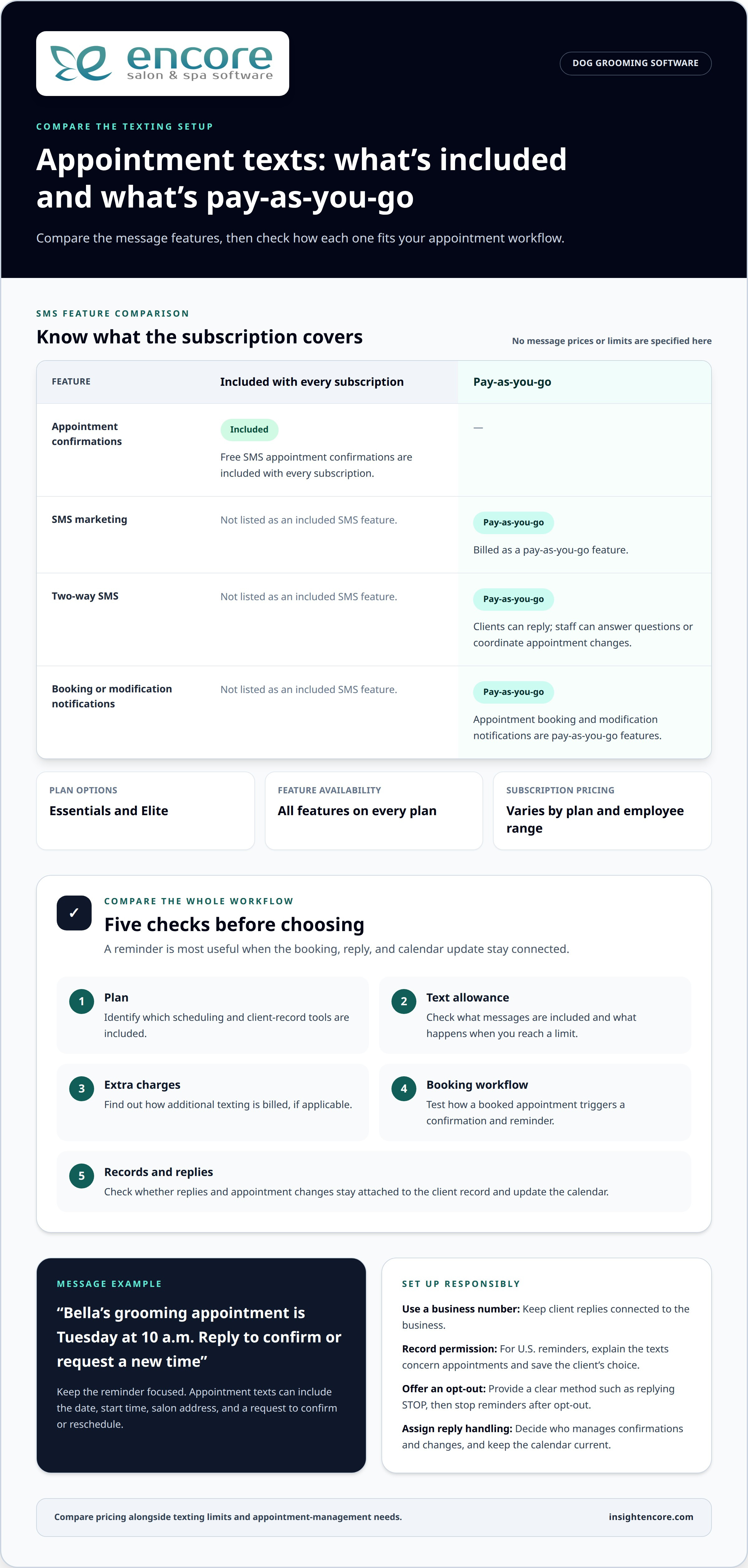
Compare how appointment software handles reminders and changes. Look for texts connected to bookings and a way to keep appointment updates in the calendar. Messaging features and billing can vary, so consider the complete workflow and how it supports client communication. With Encore, every subscription includes free SMS appointment confirmations; SMS marketing and two-way SMS are pay-as-you-go features.
Subscription pricing may depend on the plan and employee range, while some messaging features are billed separately. Encore offers Essentials and Elite plans across employee ranges, with all features available on every plan. SMS marketing, two-way SMS, and appointment booking or modification notifications are pay-as-you-go features. Compare the plan and messaging options with your business needs rather than assuming every type of text is included.
Use the same checklist for each option:
- Plan: Identify which scheduling and client-record tools are included.
- Text allowance: Note the included messages and what happens when you reach the limit.
- Extra charges: Check how additional texting is billed, if applicable.
- Workflow: Test how a booked appointment triggers a confirmation and reminder.
- Records: See whether replies and appointment updates stay attached to the client record.
An instant confirmation can reassure a client that a booking went through, but it should also appear correctly in the calendar. Compare the software’s message timing and reply handling with the way your team manages changes. If a plan offers a free trial, use the same sample appointment across its reminder steps. Explore software options as you compare the features that matter to your workflow.
Salon and mobile grooming workflows
A grooming salon and a mobile grooming business use appointment information differently. Choose a workflow that keeps each booking, client record, and service location clear.
At a grooming salon, the calendar can organize appointments by staff member, service, or available time slot. For example, a receptionist can see which groomer is assigned before confirming a client’s booking. A shared schedule also helps staff handle replies about late arrivals or requested changes. Keep the client and pet details connected to the appointment, so the team can find relevant information without searching separate records.
Mobile grooming adds a location to each appointment. Staff may need the client’s address, access notes, planned service, and appointment time together. Keep these details in one record, then review the day’s bookings in sequence. If a client requests a change, update the schedule and location together to keep the next stop clear and avoid mismatches between the calendar and messages.
Route planning starts with addresses and appointment order, not the reminder text. A mobile groomer can group nearby bookings on the schedule and account for the time needed at each stop. For example, a morning booking in one neighbourhood followed by a nearby afternoon visit may be easier to manage than crossing town between appointments. Scheduling software does not necessarily plan routes, so distinguish calendar management from route-planning tools.
- For a salon: Organize the calendar around groomer availability and assigned services.
- For a mobile visit: Attach the address and useful arrival notes to the client’s appointment record.
- For a schedule change: Update the booking and its location before relying on the revised plan.
- For route planning: Review stop order and travel needs alongside appointment durations.
Tailor texts to the workflow. A salon reminder can include the appointment time and business location. A mobile reminder can share visit details and invite clients to reply about access or timing. Keep messages concise, and treat the calendar as the main record of changes. That way, the updated booking is not stored only in a text conversation.
Before choosing software, compare how its calendar handles staff assignments and mobile addresses. Include the workflow features that matter in your comparison, rather than judging a plan by text limits alone. If your business offers both salon and mobile appointments, test each booking path from scheduling through recording a change.
Comparisons of grooming software platforms
Compare platforms by how well their scheduling, client records, and communication work together. Generic scheduling tools usually prompt salons to switch within 6-12 months because grooming-specific feature needs become clearer.
Dog grooming software can support client records, online booking, and payment processing, but available features vary. Some systems also let teams store vaccination notes in a pet profile. Compare these functions directly, and check whether appointment requests, messages, and payment records connect to the same client profile.
Start with the booking journey. A new client might request a bath and haircut online, provide details, and select an available appointment. The system should make it clear how staff review requests, confirm bookings, and manage changes. A solo groomer may value a simple calendar and searchable client profile, while a larger salon may need staff assignments and shared access.
Then compare the records behind each appointment. Look for places to save the pet’s name, service history, client contact details, and care notes. If vaccination notes matter to your intake process, determine whether the platform supports them in the pet profile or requires another record system. Check how easily staff find those details before starting a service. A record that’s hard to locate won’t help the team during a busy day.
Compare payment tools in practice. Follow a sample appointment from booking to payment, then see where the transaction appears. Does the record connect to the client? Can staff find it without searching separate tools? These steps show whether the platform keeps daily work connected or leaves gaps between scheduling and payment.
- Scheduling: Compare online booking, appointment requests, and calendar updates.
- Profiles: Check how client, pet, service, and care details are stored.
- Payments: Trace a sample payment back to its appointment and client record.
- Messages: See whether client replies stay connected to the relevant booking.
- Daily fit: Match the tools to a solo groomer’s routine or a salon’s staff workflow.
Use the same scenario to compare platforms: a new client books online, provides relevant details, asks a question, and pays after the appointment. Note where each request, message, and record appears. This makes it easier to spot extra steps before choosing software for your grooming business.
What dog grooming software offers automated text appointment reminders?
Look for appointment software that connects texting with scheduling and client records. Dog grooming software with text reminders is easier to assess when you follow a booking from start to finish. Check how a new appointment enters the calendar, how its reminder is triggered, and where a client’s reply is recorded. Then compare whether those steps fit your team’s daily routine.
Some platforms are designed for grooming businesses, while others adapt broader salon management tools. Compare the actual features and how they organize client information alongside appointments. A broader platform may combine booking, client management, inventory, and payment processing. Check whether the records your business needs can be kept together and found easily.
Use a sample booking to compare the full sequence. Add a client, record a dog’s name, select a grooming service, and schedule an appointment. Then assess whether the software sends an automatic confirmation and a later reminder. Check that each message includes the correct date and time. Also note how a changed appointment affects the calendar and any scheduled text.
- Scheduling: See whether online bookings and staff-entered appointments share one calendar.
- Client records: Check how the software stores contact details, pet profiles, and service history.
- Text workflow: Review how confirmations, reminders, and replies connect to appointments.
- Business tools: Compare whether booking, payments, and client management work together.
Consider who handles daily tasks. A solo groomer may prioritize a clear calendar and searchable client profiles. A salon with several staff members may need appointment assignments and shared records. Mobile groomers may need address details beside each booking. These workflow differences can matter more than a long feature list.
Before switching, plan how records will move into the new system. Most groomers fully migrate software in 1-2 weeks. Importing customer and pet data in batches of 100-500 records can make the transition easier to manage. When evaluating dog grooming software with text reminders, include the calendar, client details, and message process in the migration plan. This helps staff handle new bookings consistently.
Choose a platform by matching its workflow to your business. Follow one appointment from booking through confirmation, reply, and record update. That practical comparison can show whether the software supports your team’s routine.
Encore Salon and Spa Software
Encore Salon and Spa Software serves pet grooming businesses with tools for appointment booking and day-to-day management. The platform combines online booking, client management, inventory tracking, and point-of-sale transactions. It can suit a grooming business that wants to connect appointments with broader operating records.
Consider Encore when you want scheduling and client information managed alongside other business tasks. Encore Salon Software is one option within its software offerings. As you compare systems, consider how appointment reminders fit your workflow and which records your team needs to access after booking.
Contact Encore Salon and Spa Software to discuss your business needs.
Choose a Workflow That Can Grow With Your Business
Your next step is to decide how appointment communication should fit into the grooming experience. Choosing dog grooming software with text reminders is one part of that decision. Consider how bookings, schedule changes, and client records work together. A clear process makes it easier to keep appointments organized.
Encore Salon and Spa Software offers Encore Salon Software, Encore Spa Software, and Chair/Booth Renter Software. These options serve different business setups, so the right fit depends on the way you manage your operations. Focus on the tools that support your day-to-day work and the client experience you want to create.
Start with the workflow you want to improve, then explore software options that support it.
A thoughtful setup can help your business move forward with greater clarity. You’re ready to take the next step.
Frequently Asked Questions
Can clients reply to the texts?
Yes, if the software supports two-way texting and routes replies to someone who can respond. A client might confirm, ask about drop-off instructions, or request a different time. Make sure staff can connect the reply to the right appointment and update the record. Encore offers two-way SMS as a pay-as-you-go feature for back-and-forth client communication.
Can I use generic scheduling software instead?
Yes, general scheduling software can work if it supports your booking and communication process. A solo groomer with straightforward appointments, for example, may need only a calendar and client contact details. A business that relies on detailed service histories may benefit from software that keeps client records alongside scheduling. Compare how staff find information and manage changes.
How do rebooking reminders work?
Rebooking reminders invite a client to schedule another visit after a service. A business might send a follow-up message directing the client to online booking or staff. The timing and trigger depend on the software’s settings and the business’s process. Keep the message focused on booking and make it easy for the client to respond.
How much does dog grooming software with SMS reminders cost?
Costs depend on the platform’s subscription structure and how it charges for SMS. Compare the plan, included features, and any pay-as-you-go messaging separately. Encore offers subscription plans based on edition and employee range, while some SMS features use pay-as-you-go pricing. Its live pricing includes exact plan details, so compare the current options against your business setup and messaging needs.
How do dog grooming software platforms compare for small salons, mobile groomers, and multi-location businesses?
Compare each platform with the work your team handles. A salon may prioritize a shared calendar and easy access to client records. A mobile groomer may need addresses and appointment details visible together. A business with multiple locations may need staff to coordinate schedules and records across sites. Use a typical booking scenario for each workflow to spot gaps.
How do you set up automated text reminders in dog grooming software?
Begin by entering accurate client contact details and creating an appointment in the calendar. Set the confirmation and reminder process, then review the message content and timing. Test a sample booking to see whether the details appear correctly. Finally, decide who handles replies and how staff record changes. A clear process keeps messages and calendar updates aligned.
Are SMS reminder fees, message limits, or carrier charges common in grooming software plans?
Texting terms differ by platform, so review the plan’s message allowance and any charges for additional SMS. Separate subscription features from pay-as-you-go messaging when comparing costs. Encore includes free SMS appointment confirmations with every subscription; SMS marketing, two-way SMS, and booking or modification notifications are pay-as-you-go features. Check the plan details to understand how each texting feature is billed.
Disclaimer
This article is general in nature and may contain errors, please verify all claims with your sales rep