

The simplest booking calendar might not be the easiest choice for your business. An independent stylist booking app can make appointments easier to schedule, but if client details, payments, and follow-ups live in separate tools, your workday can still feel scattered.
Online booking can give clients a convenient way to schedule without handing over control of the client experience. The right fit should match how you work now and help you manage the parts of your business you want to bring together. This guide compares tools by how they support the client journey and your daily operations, so you can choose a setup that suits your styling practice.
We’ll look at the difference between a focused booking calendar and broader salon management software, along with features that matter for solo stylists and chair or booth renters. You’ll also see when connected client records, payment processing, inventory, marketing, loyalty, and gift card tools can help. Encore brings online booking together with client management and point-of-sale capabilities, with specialized software for independent renters. The goal isn’t to choose the app with the longest feature list. It’s to find a practical fit that makes booking smoother for clients and business admin simpler for you.
Key Takeaways
- Map your booking, client record, payment, and follow-up tasks to identify friction in your current workflow.
- Choose an independent stylist booking app based on the tasks you rely on every day, not just the length of its feature list.
- Compare booking-focused tools with broader management software to decide whether scheduling alone meets your needs.
- Separate must-have features from appealing extras before comparing how each tool fits your practice.
- Encore supports independent chair and booth renters with online booking, client management, point-of-sale transactions, and integrated credit card processing.
What Does an Independent Stylist Booking App Need to Do?
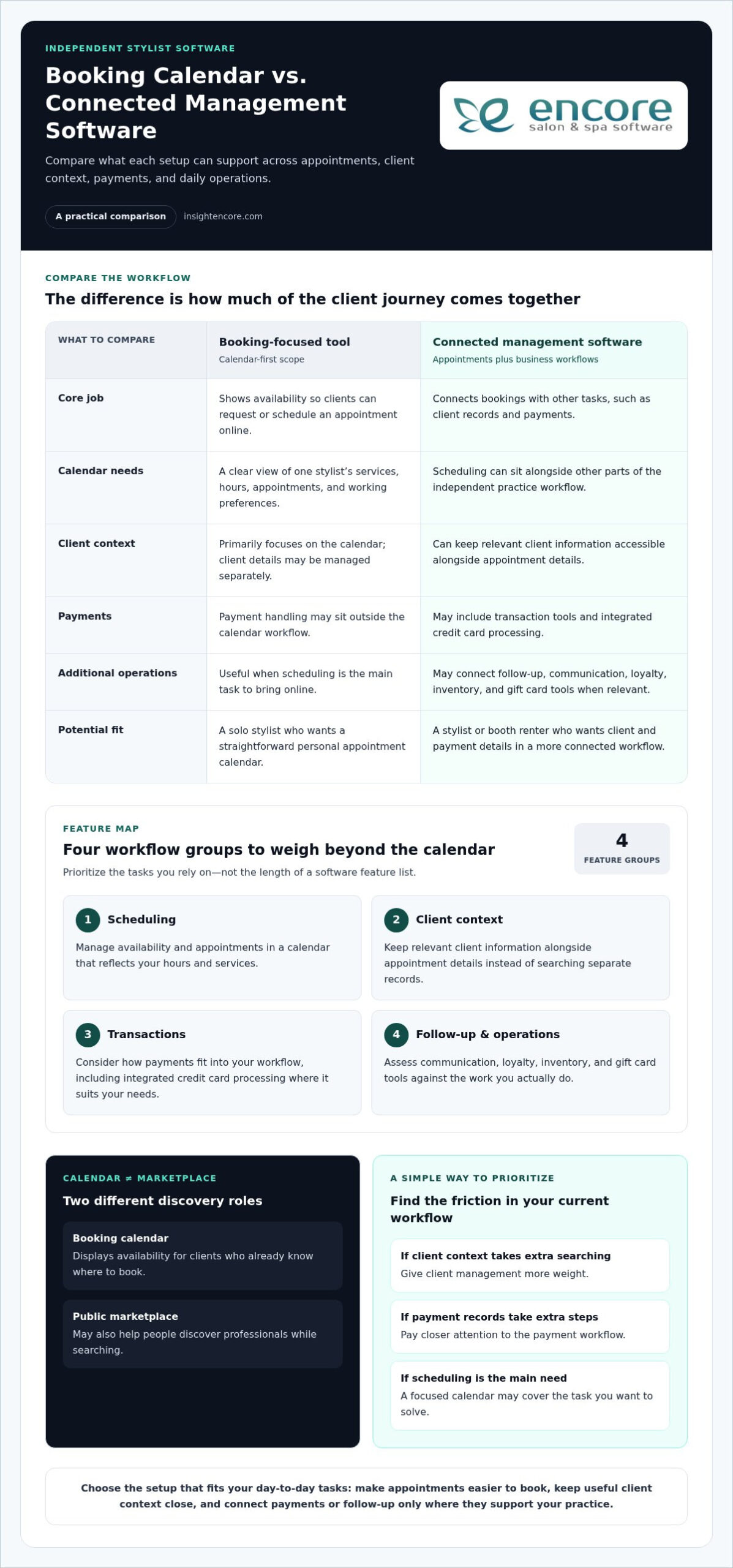
An independent stylist booking app lets clients view a stylist’s availability and request or schedule an appointment online. That’s the core job, but apps differ in scope. Some focus mainly on the calendar, while others connect bookings with client records, payments, and other business tasks. Choose according to how you work, not by the length of the feature list.
For an independent stylist, the calendar usually needs to reflect one person’s services, schedule, and working preferences. A salon manager may need to coordinate several professionals, their availability, and shared operations. That difference affects what is useful day to day. A solo stylist may prioritize a clear view of personal appointments. A booth renter may also want client and payment details in a workflow that supports running an independent practice.
How does online booking fit an independent stylist’s workday?
Online booking lets clients see available times without relying entirely on messages back and forth. For example, a client can review the calendar after work and select a suitable appointment, depending on how the app is set up. This can make scheduling more convenient while leaving you in control of the services, hours, and booking information you present.
Clear service names and appointment details help clients choose the right option. If someone can distinguish a consultation from a longer appointment, they can make a more informed selection. The calendar supports this practical step, but it is only one part of the client journey. Clients discover a stylist or service, book, attend, and decide whether to return.
A booking calendar and a marketplace solve different problems. A calendar displays availability for clients who already know where to book. A public marketplace may also help people discover professionals while searching. Some tools combine both, while others focus on scheduling. Consider whether your main need is making appointments easier for existing clients, helping new clients find you, or both.
Which independent stylist workflows should the app support?
Look beyond the appointment itself. A booking may connect to client records, payment handling, and communication that supports repeat visits. You might want service history close at hand, a clear way to manage transactions, or an organized follow-up process. Not every app needs every function. Start with the tasks you currently manage separately and identify where a connected workflow would save steps.
- Scheduling: Keep availability and appointments clear.
- Client context: Keep relevant client details accessible alongside appointment information.
- Transactions: Consider how payments fit into your appointment workflow.
- Repeat visits: Decide how you’ll communicate with clients after an appointment.
A solo stylist may need a straightforward personal workflow, while a salon manager may coordinate multiple calendars and team responsibilities. Booth renters have their own mix of independence and administration. For more detail on those needs, explore this booth renter client management app guide.
Which Booking App Features Matter Beyond the Calendar?
Build your feature list around the work you need to get done, not the software’s full menu. An independent stylist booking app might cover scheduling alone or connect appointments to client details, transactions, and follow-up tools. Each capability can be useful when it fits the way you run your practice.
Think of the features in four groups:
- Scheduling: Manage availability and appointments in a calendar that reflects your working hours and services.
- Client context: Keep relevant client information alongside appointment details instead of searching through separate records.
- Transactions: Handle payments as part of your business workflow, with integrated credit card processing where it suits your needs.
- Follow-up and operations: Consider communication, loyalty, inventory, and gift card tools based on the work you actually do.
Connecting appointments with client and payment workflows can reduce the number of tools you switch between. It can also make it easier to see how a booked service relates to client details and the transaction. The benefit is a more connected working process, not a promise of more bookings or revenue.
How can booking, client records, and payments work together?
In a connected workflow, appointment details and relevant client information are available together. That can mean less switching between calendars, records, and payment tools to piece together what happened. Integrated credit card processing supports managing payment transactions within the software. Encore’s credit card processing workflow connects payment processing with your broader business workflow.
Before prioritizing these features, write down how you handle each task now. If appointment details are already easy to find but payment records take extra steps, payment workflow may deserve attention first. If you often search for client context, client management may be the more immediate need.
When do marketing, loyalty, and inventory tools become useful?
Follow-up tools can support how you encourage repeat visits. Automated marketing and loyalty programs may help organize client communication or loyalty activity as part of your practice. They aren’t essential for every stylist, and their presence alone doesn’t guarantee that clients will return. Choose them when they support a clear, ongoing task.
Inventory tracking matters if you sell retail products or regularly manage supplies as part of your work. If products and supplies play little role in your daily operations, inventory features may be a lower priority than scheduling or client records.
Separate daily essentials from tools you may want later. Write down the tasks you handle every week, then mark which ones feel repetitive, scattered, or easy to overlook. Those are stronger candidates for must-have features. Marketing, loyalty, and inventory tools can stay optional until your workflow gives you a clear reason to use them. To see how connected capabilities can fit into salon operations, explore Encore’s salon software features.
Booking App vs. Salon Management Software: What Should You Compare?
A booking-focused tool and broader salon management software can both support an independent styling practice, but they cover different parts of the work. Compare the tasks you need handled now: appointment access, client information, transactions, follow-up, and other daily operations. The best fit isn’t automatically the one with the most features. It’s the one that matches your workload without adding unnecessary steps.
| Area | Booking-focused tool | Broader management platform |
|---|---|---|
| Booking access | Centers on presenting availability and organizing appointments. | May include booking alongside other business functions. |
| Client records | May require a separate system for client details. | Can include client management within the wider workflow. |
| Payments | May leave transaction handling to another tool. | May connect point-of-sale activity and payment processing with other tasks. |
| Marketing | May require separate tools for client follow-up. | May offer marketing or loyalty capabilities as part of the platform. |
| Operational scope | Focuses on solving the scheduling task. | Can support several business-management needs in one system. |
What does a standalone booking app handle well?
A standalone booking app can be a practical choice if your main administrative challenge is organizing appointments and showing clients your availability. Its focused scope may be simpler to manage. The trade-off is that client records, payments, or follow-up may remain in separate tools. If those tasks are already working smoothly, a focused booking tool may fit your needs.
When is an all-in-one platform a better fit?
Consider how often your booking, client management, and payment tasks overlap. If you regularly move between systems to manage one appointment from start to finish, a broader platform may bring more of that workflow together. If scheduling is your only pain point, the extra scope may not be necessary yet. Let your current workload guide the choice.
Encore’s salon software features include online booking, client management, point-of-sale transactions, integrated credit card processing, inventory tracking, automated marketing, loyalty programs, and gift card management. This range can suit independent stylists who want booking alongside broader business tools. Explore the salon software features to consider how those capabilities relate to your day-to-day operations.
Use a simple test before deciding: list the tools you open during a typical appointment cycle, from booking through payment and client follow-up. If moving between them creates extra admin, an independent stylist booking app with connected management capabilities may be worth considering. If each task is already easy to handle, a focused calendar could be enough.
For a closer look at how clients use an online portal to book, the salon client booking portal guide explores that part of the experience.
How to Choose an Independent Stylist Booking App for Your Practice
Choose based on your actual workday, not a feature list that makes every tool look essential. An independent stylist booking app should solve a real scheduling or business-management need and feel manageable within your practice. A simple comparison process can show what matters now, what may help later, and where a tool might add unnecessary complexity.
What should you write down before comparing apps?
Map how you currently manage an appointment, from the first contact through payment and follow-up. Note where clients book, where you keep client details, and how you handle transactions. Then mark the tasks that interrupt client-facing work, such as searching messages for appointment information or updating the same details in more than one place.
Use that map to create a short priority list. Separate tasks you need software to handle now from features that simply sound appealing. For instance, if scheduling is the main source of friction, prioritize a clear booking workflow before adding tools for tasks you rarely do.
How can you assess fit without overbuying?
Compare each option against the same typical week. Trace a few real workflows: setting availability, handling a client’s appointment details, processing a transaction, and managing any follow-up you currently do. Notice where the software supports your process and where you would still need another tool. The goal is a good working fit, not the longest checklist.
Review software-plan affordability alongside the features you expect to use. Encore’s pricing information can help you weigh cost alongside the software’s scope. Compare the plan with your must-haves and the work you’re prepared to bring into the system, rather than treating price as the only measure of value.
Use this checklist to keep comparisons consistent:
- Booking: Does the appointment workflow match how clients schedule with you?
- Client information: Can you manage the records you rely on without creating extra admin?
- Payments: Does the transaction workflow fit how you handle payments?
- Daily use: Does the system address a recurring task that currently interrupts your work?
- Future fit: Are extra features relevant to a realistic next step, or are they just attractive possibilities?
Keep implementation planning simple at this stage. Identify the information and routines you’d need to bring into a new workflow, then choose a manageable starting point. You don’t need to plan every future process before deciding whether the tool fits your current practice.
If you’re ready to explore a connected workflow, try Encore.
How Encore Supports Independent Stylists Beyond Online Booking
For an independent stylist, choosing an independent stylist booking app is only part of the decision. You may also want a practical way to manage client information and transactions without treating every business task as a separate process. Encore Salon & Spa Software includes specialized solutions for independent chair and booth renters, with online booking and broader salon and spa management capabilities.
How does Encore connect booking with daily business management?
Encore offers online appointment booking alongside client management and point-of-sale transactions, with integrated credit card processing. Together, these capabilities support several steps around a client appointment: arranging the visit, managing client information, and handling the transaction. The right combination depends on your needs. A stylist focused on scheduling may use a narrower set of capabilities, while another may want more daily operations in one platform.
Independent practices don’t all run the same way. You might work primarily with returning clients and want client details close at hand. Or, as a booth renter, you may be organizing services, payments, and other records independently. Encore’s specialized renter software supports those broader management needs without assuming every stylist needs every available tool.
Consider the related tasks you handle and where you want them to fit:
- Appointments: Use online booking as the scheduling part of the client workflow.
- Client context: Manage client information alongside appointment activity.
- Transactions: Bring point-of-sale transactions and integrated credit card processing into the wider business picture.
What should an independent stylist do next?
Start with your priorities. If booking is the main need, focus on that workflow first. If your client records and payments also feel scattered, consider whether a broader system fits your day-to-day practice. Automated marketing and loyalty programs can support follow-up tasks, while inventory tracking may be relevant if managing products or supplies is part of your operations. These tools are options to match to your work, not requirements for every stylist.
Encore includes automated marketing and loyalty programs, inventory tracking, and gift card management alongside booking, client, and transaction capabilities. Consider which tasks you handle regularly and which you may want to manage as your practice develops. Then compare those needs with Encore’s specialized software for independent chair and booth renters. The aim is a setup that supports your client experience and business routines without adding features you don’t plan to use.
If Encore’s connected approach matches how you want to manage your practice, explore the platform.
Choose a Setup That Grows With Your Practice
Your next step doesn’t need to be a major overhaul. Use what you’ve learned about your daily workflow to choose an independent stylist booking app that solves today’s frustrations and leaves room for the way you want to work next. The right system should support your practice, not dictate it.
Encore offers specialized software for independent chair and booth renters, bringing online booking together with client management and point-of-sale transactions. If you’re looking for more than a calendar, consider how those capabilities fit the way you manage clients and appointments. Start with the workflow you want to improve, then explore whether Encore is a practical match.
You’re building a business around your own skills and client relationships. Choose tools that help you stay in control and make the next step manageable.
Frequently Asked Questions
Is a booking app worth it for an independent stylist?
It can be, especially if appointment coordination regularly pulls you away from client work. An independent stylist booking app may help if you’re copying appointments from messages into a calendar or searching multiple places for the latest details. Before choosing, note how you handle a typical booking and what you want to simplify. Focus on whether the tool addresses that specific friction, not how many features appear in its description.
Can clients book appointments online with an independent stylist?
Yes. Online booking tools can let clients view availability and schedule without relying only on calls or direct messages. The experience depends on the software and how you set up your services and available times. Before sharing a booking page, review it as a client would: check that service names make sense, available times are accurate, and the steps give people enough information to choose confidently.
How much does an independent stylist booking app cost?
Costs vary by provider, plan, and included tools, so compare the plan with the tasks you need it to handle. Consider whether you’ll use the included capabilities or rely on separate tools for important workflows. Pricing can change, so review current plan details before deciding. You can review Encore pricing details and consider how the available software scope aligns with your practice.
What happens if a client needs to change an appointment booked online?
The steps depend on the app’s settings and the policies you share with clients. Decide whether clients should request changes by phone, message, or through the booking tool, then explain that process clearly. Also set out how you handle cancellations and missed appointments. A clear policy helps clients know what to do, while a consistent routine helps you manage schedule changes without assuming the software handles every situation automatically.
Can I use a booking app if I rent a salon chair?
Yes. Chair and booth renters can use booking software to organize appointments for their own services and working hours. The key is deciding whether you need scheduling alone or also want tools for client records and payment handling. A renter who manages client information and transactions independently may prefer software that reflects those responsibilities, rather than a setup designed only around a larger salon’s shared team calendar.
What information should clients see before booking a stylist?
Clients need enough detail to select an appropriate service and appointment. Use plain service descriptions, explain meaningful differences between options, and make your booking expectations easy to find. If clients should prepare in a particular way or share information before the visit, include that in the relevant booking details. Review the client-facing information periodically so it stays aligned with the services and policies you currently offer.
Can I keep my client records when switching booking apps?
That depends on the systems you use and the data-transfer options available. Before switching, list the records you rely on, such as contact details, appointment history, and notes you use to prepare for visits. Find out how you can access those records during a transition, and plan around upcoming appointments so important details aren’t overlooked. Don’t assume records will transfer automatically or in the same format across different apps.
Disclaimer
This article is general in nature and may contain errors, please verify all claims with your sales rep