

A deposit policy works best when clients understand the terms before booking. Effective tattoo shop deposit management means clearly stating the amount due, the payment deadline, and what happens if a client does not respond. This gives the studio and client the same expectations from the start.
Deposit policies can become inconsistent when inquiries, payments, and appointment details are handled in different places. A clear process makes bookings easier to track and helps studios manage cancellations without confusing clients. This guide explains how to set and communicate deposit terms, match deposits to different tattoo projects, and organize booking and payment details with studio management software.
Key Takeaways
- Set out the deposit amount, payment deadline, and response policy clearly in the booking process.
- Choose a point-of-sale workflow that keeps appointment payments and studio transactions organized.
- Use clear cancellation terms and timely reminders to help reduce missed appointments.
- Match deposit terms to the tattoo’s size and preparation needs so clients understand what they’re paying toward.
- Keep online deposit records connected to booking details to make each appointment easier to manage.
What is the best tattoo studio management software?
Look for a workflow that brings booking, deposit collection, and scheduling together. Staff should be able to match each payment to the right client and appointment.
Automated Deposit Collection
Collecting a deposit during booking creates a clear payment record from the start. The process should prompt clients to pay, record whether payment is complete, and connect that status to the booking. An automated confirmation can tell the client the appointment is reserved, while showing staff which bookings need attention.
Scheduling matters, too. A shared appointment calendar helps staff spot overlaps before confirming a time. If the studio uses Google Calendar, consider whether the software fits the calendar workflow the team already relies on. Check how changes, cancellations, and artist availability appear in the schedule rather than assuming they sync automatically.
Deposit Terms in Booking Forms
Put the deposit amount, payment deadline, and consequences of not responding directly in the booking form. Clients should see the terms before paying, not only in a later message. Collect the details staff need to match the deposit to the correct booking, such as the client’s name, artist, and appointment date.
Keep the wording consistent across booking forms and confirmation messages. When evaluating software pricing, compare the features included in each plan and how any upgrade is charged. Free plans may have limits on booking volume, staff access, or payment tools, so assess whether the available functions cover the studio’s actual workflow before choosing.
Applying and Recording Deposits
At checkout, apply the deposit to the final tattoo price and show the remaining balance clearly. Connect the original payment, appointment, and final transaction in the booking record, so staff can follow the amount from booking through completion. Keep the deposit identifiable as part of the same appointment in the bookkeeping records, rather than leaving it as an unlinked entry.
Consistent records make it easier to review completed appointments, outstanding balances, and cancellations. For a tattoo-specific workflow, align booking and scheduling needs with the studio’s work; the tattoo studio software page is a relevant overview.
POS features for tattoo studios
A point-of-sale workflow should make every studio transaction easy to identify and reconcile. At checkout, staff need to see the service total, any deposit already paid, and the remaining balance. Clear records help prevent a booking payment from being confused with a separate purchase or another artist’s transaction.
Map the payment steps from booking to checkout. Match the client and artist to the appointment, record the deposit against that booking, then document the remaining payment after the session. Keep the transaction connected to the correct client record. This creates a useful history if a client asks about an earlier payment or books another session.
POS workflows vary by studio. Payments may be taken at a front desk, at an artist’s station, or through a combination of methods. Choose a process that fits the studio’s setup and lets staff record transactions consistently. If artists work independently, assigning payments to the correct artist helps keep daily records organized.
- Payment tracking: Record the deposit and remaining balance against the same appointment.
- Artist assignment: Make each transaction easy to associate with the correct artist.
- Scheduling context: Use appointment calendars and availability to connect checkout tasks with the right booking.
- Transaction review: Keep payment entries clear enough for staff to find and reconcile later.
A studio minimum rate is separate from the deposit. State the minimum clearly before confirming an appointment and explain how it relates to the final session charge. For example, if a planned tattoo is shorter than the studio’s minimum appointment, explain the minimum charge in the booking details. This keeps the client’s expectations aligned with the studio’s pricing policy.
Review the full checkout flow before choosing a POS option. Walk through a new booking, deposit payment, completed appointment, and changed appointment. At each step, confirm that staff can identify the client, artist, appointment, and payment status without relying on memory or separate notes.
For a more connected studio workflow, explore a tattoo studio management option that brings appointment and client details into the daily process.
Reducing no-shows and last-minute cancellations
A written cancellation policy gives clients a clear path when plans change. Pair it with reminders and consistent deposit records to help protect appointment time.
Cancellation and No-Show Policies
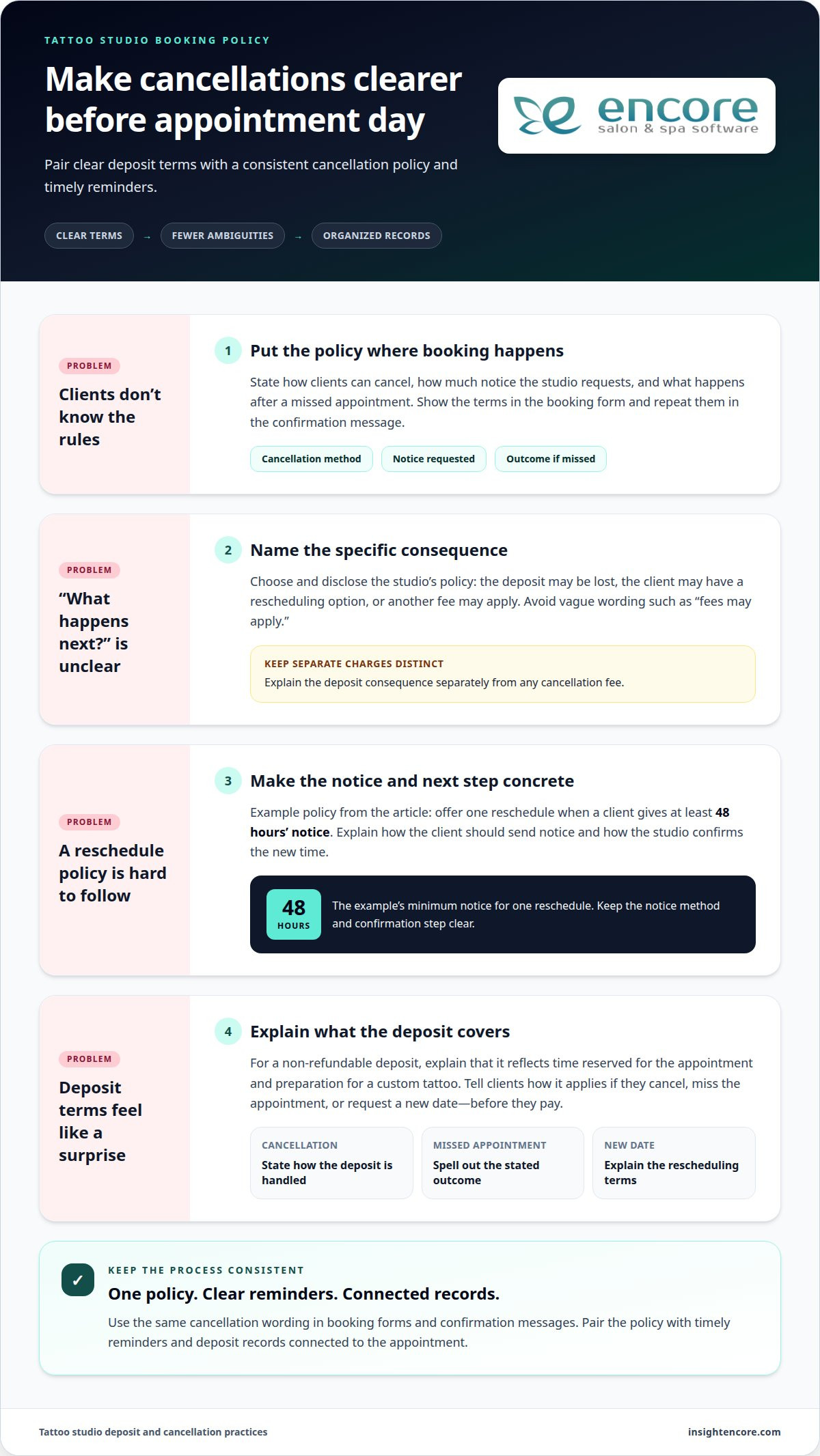
Explain how clients can cancel, how much notice the studio requests, and what happens after a missed appointment. State whether the outcome is a lost deposit, a rescheduling option, or another disclosed fee. Use the same terms in the booking form and confirmation message, so clients can find the policy before booking and again before their appointment.
For example, an artist can offer one reschedule when a client gives at least 48 hours’ notice. Explain how the client should send that notice and how the studio confirms a new time. Keep the policy consistent across artists, while allowing clearly stated exceptions where the studio chooses to make them.
Non-Refundable Deposits
A non-refundable deposit can reflect the time reserved for an appointment and preparation for a custom tattoo. Explain what the deposit covers and how it applies if the client cancels, misses the appointment, or requests a new date. Clients should see these conditions before paying, not after plans change.
Make the deposit consequence distinct from any separate cancellation fee. Avoid vague wording such as “fees may apply.” Instead, spell out the studio’s policy in the booking form and confirmation. This helps clients understand the consequences and gives staff a consistent basis for handling cancellations.
Deposit and refund rules can depend on state-specific requirements. Tattoo artists should account for applicable local rules when setting and communicating their policies.
Reminders add a practical step between booking and the appointment. Appointment reminders can reduce no-shows by up to 50%. A studio can schedule a reminder message that repeats the appointment date, time, artist, and cancellation instructions. Automated SMS or email reminders also give clients a straightforward way to notice a conflict and respond before the reserved time.
Keep the appointment status current in the booking platform after a cancellation or reschedule. Staff can record the client’s notice, apply the stated policy, and reopen the time slot for another booking. For example, if a client cancels within the studio’s stated notice period, the team can update the calendar and confirm whether the deposit transfers to a new appointment.
Record whether clients cancel, reschedule, or miss appointments. Consistent records help the studio apply its policy fairly and identify where reminders or booking instructions need clearer wording.
Adjusting deposit amounts to tattoo size and preparation
A deposit can reflect the design work and appointment time involved. For smaller flash-style tattoos, artists may use a flat deposit of $50 or $100. Larger custom work or full-day sessions may call for a deposit of 30% of the total.
Match the deposit approach to the project, not just the tattoo’s physical size. A small design with substantial custom preparation may need more planning than a simple flash piece. A large tattoo may involve a longer appointment or more coordination. Consider design complexity, preparation time, and the booked session when setting the amount.
Make the calculation easy to follow. For a flat deposit, state the exact amount due to reserve the appointment. For a percentage-based deposit, identify the total it applies to and show the deposit amount in the booking details. Clients can then understand the payment before submitting it, without having to work out the balance from an unclear confirmation.
Connect the deposit terms to the project record. A useful digital workflow links the client’s account, appointment, quoted total, and deposit entry. Staff can refer to one record if the design changes or the appointment moves. For example, if a client changes the scope of a custom tattoo, update the project details and explain the revised payment arrangement before collecting anything further.
Use consistent labels in confirmations and payment records. Identify whether an entry is a flat deposit or a percentage of the tattoo total, then record how it will be applied at checkout. This creates a useful history for the artist and client, and helps staff distinguish the deposit from the remaining amount due after the session.
Before adopting software for this process, walk through two examples: a flash booking with a flat deposit and a full-day custom project using a percentage. Confirm that staff can find the amount, project notes, and appointment within the same workflow. Clear records reduce confusion about which payment belongs to which booking. Keep the terms consistent from the booking form through final payment.
Once the amount and preparation expectations are set, make the booking process reinforce the commitment. Deposits, prepayments, and automated SMS or email reminders may help reduce no-shows. Keep reminder language consistent with the payment terms already given, so clients can connect the appointment with the agreed deposit and any remaining payment. A reminder can identify the booking and refer clients to the details they received, without introducing a different amount or condition.
Use the same process for a simple flash booking and a project requiring substantial preparation. If the scope or appointment details change, update the booking record and align later payment communications with it. Staff can then check what the client agreed to and follow the deposit and preparation expectations throughout the booking.
How can tattoo shops collect deposits online and track them in booking software?
A practical tattoo shop deposit management workflow connects online payment with the client’s appointment from the start. The client selects an available time, reviews the terms, submits the deposit, and receives confirmation. Staff can see the payment status beside the booking instead of searching through separate messages or payment records.
Set up the process in clear steps:
- Enter the appointment details, including the client, artist, date, and service.
- Show the deposit amount and payment terms before the client submits payment.
- Collect the deposit through the booking platform’s payment process.
- Record the payment status and connect it to the appointment record.
- Send a confirmation that identifies the booked time and payment received.
For example, a custom tattoo booking should show whether the deposit is paid, pending, or still due. Staff should also be able to find the record by client name or artist. These details help distinguish a paid appointment from a time that has only been requested, especially when reviewing the calendar during a busy day.
Keep appointment changes connected to the original booking. If a client reschedules, update the appointment record and note the deposit’s status. If the client cancels, record the outcome according to the studio’s stated policy. A consistent history helps staff understand what happened without relying on memory or scattered messages.
Daily reconciliation adds a useful checkpoint. Compare booking records with payment activity in the system, then review any entries that do not match an appointment. For instance, a payment without a linked booking needs review before staff mark an appointment as paid. Clear statuses also help identify bookings awaiting payment.
Before choosing booking software, walk through a test booking from the client’s perspective. Confirm that the payment step follows the deposit terms, the confirmation reflects the booking, and staff can find the transaction later. Repeat the walkthrough for a rescheduled appointment. This can reveal gaps before the studio relies on the workflow for everyday bookings.
Effective tattoo shop deposit management also requires clear records after payment. Keep the client, appointment, and transaction connected through completion, so staff can follow payment history and calendar updates without piecing together separate records.
Encore Salon and Spa Software: Tattoo Studio Software
Encore Salon & Spa Software offers Tattoo Studio Software for studios that want to bring appointment and client information into a business management platform. It can help when deposit records, bookings, and client details are becoming harder to organize across separate tools.
A connected workflow can help staff find appointment and client information together. Consider how your artists handle bookings and records, then decide which parts of the process you want to manage in software.
If you’re ready to discuss software for your studio, contact Encore Salon & Spa Software.
Make your booking process work for your studio
A dependable deposit process supports the wider client experience. As your studio grows, consistent records and clear handoffs can help artists spend less time sorting out booking details and more time preparing for clients. Choose a workflow that fits how your team handles appointments now and can adapt as the studio’s needs change.
Encore Salon and Spa Software offers Encore Salon Software, Encore Spa Software, Chair/Booth Renter Software, and Tattoo Studio Software for different business setups, including studios with independent renters. Better tattoo shop deposit management starts with tools that support the way your business operates.
With a process that fits your team, you can manage bookings more clearly and focus on your work.
Frequently Asked Questions
Can tattoo shops collect deposits online?
Yes, tattoo shops can collect deposits online through a booking workflow that connects payment to an appointment. For example, a client chooses an available time, submits the deposit, and receives confirmation. The studio can keep the payment status with the booking record, making it easier to distinguish a paid appointment from a time that has only been requested.
What Happens If a Client Cancels?
What happens depends on the cancellation terms the studio disclosed before booking. A client may lose the deposit, receive permission to transfer it, or qualify for a reschedule under the studio’s policy. For example, a policy might allow one reschedule after at least 48 hours’ notice. Apply the stated terms consistently, and document the client’s notice and the appointment outcome.
How much deposit should a tattoo shop charge for an appointment?
The deposit can depend on the tattoo’s size, preparation, and appointment length. Artists may use a flat deposit of $50 or $100 for smaller flash-style tattoos, or set a deposit of 30% of the total for larger custom work or full-day sessions. State whether the amount is flat or percentage-based, and explain how it applies to the final tattoo price.
Are tattoo appointment deposits refundable or transferable?
Refundability and transferability depend on the studio’s stated terms and applicable local rules. A non-refundable deposit may be retained after cancellation, while a transferable deposit may be applied to a rescheduled appointment. These are different policies, so explain each outcome before accepting payment. For example, specify whether the deposit stays attached to the appointment if a client changes dates.
What deposit policies are common for tattoo shops in the United States?
Policies commonly explain the deposit amount, payment deadline, cancellation terms, and what happens after a missed appointment. Some studios make deposits non-refundable, while others offer rescheduling under stated conditions. No single policy fits every studio or project. Make the rules easy to find before booking and apply them consistently across appointment forms and client communications.
How should tattoo shops handle cancellations, no-shows, and late arrivals?
Use written terms that distinguish a timely cancellation, a missed appointment, and a late arrival. Explain how clients should notify the studio and whether rescheduling is available. For example, an artist may offer one reschedule with at least 48 hours’ notice. Record each outcome in the appointment history, then update the calendar promptly so staff can manage the newly available time.
What legal rules apply to tattoo shop deposits and refunds by state?
Some states have specific deposit and refund rules, so studios should account for local requirements when setting policies. There is no single state rule that applies nationwide. Make the policy clear about payment, cancellation, and refund outcomes, and do not present a studio preference as a legal requirement. The applicable location matters when setting deposit terms.
How can tattoo shops explain deposit policies to clients before booking?
Show the complete terms before a client pays or confirms an appointment. Include the deposit amount, payment deadline, how the deposit applies to the tattoo, and the outcomes for cancellations, rescheduling, and missed appointments. Use plain wording in the booking form and repeat the key terms in the confirmation. Clients should be able to understand the policy without searching through separate messages.
Disclaimer
This article is general in nature and may contain errors, please verify all claims with your sales rep